

Users
The Users screen displays all the users associated with your workspaces. To view a list of users, navigate to the megamenu and click Settings > Users & Provisioning. The name, status, date user was created, and email of each user displays.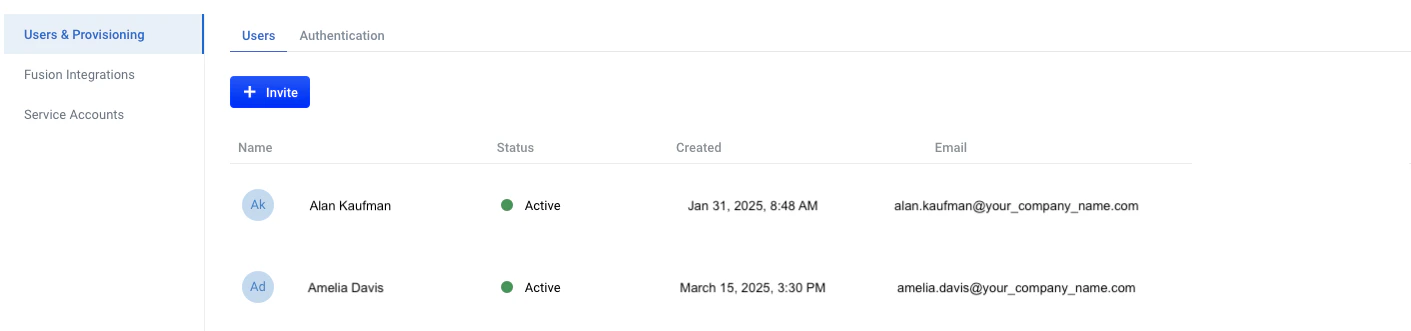
User
Invite workspace owners
Only workspace owners for the specified workspace can invite users to that workspace.
- Navigate to the megamenu and click Settings > Users & Provisioning.
-
Click + Invite and enter the user’s information in the First name, Last name, and Email fields. Required fields are notated with an asterisk (*).
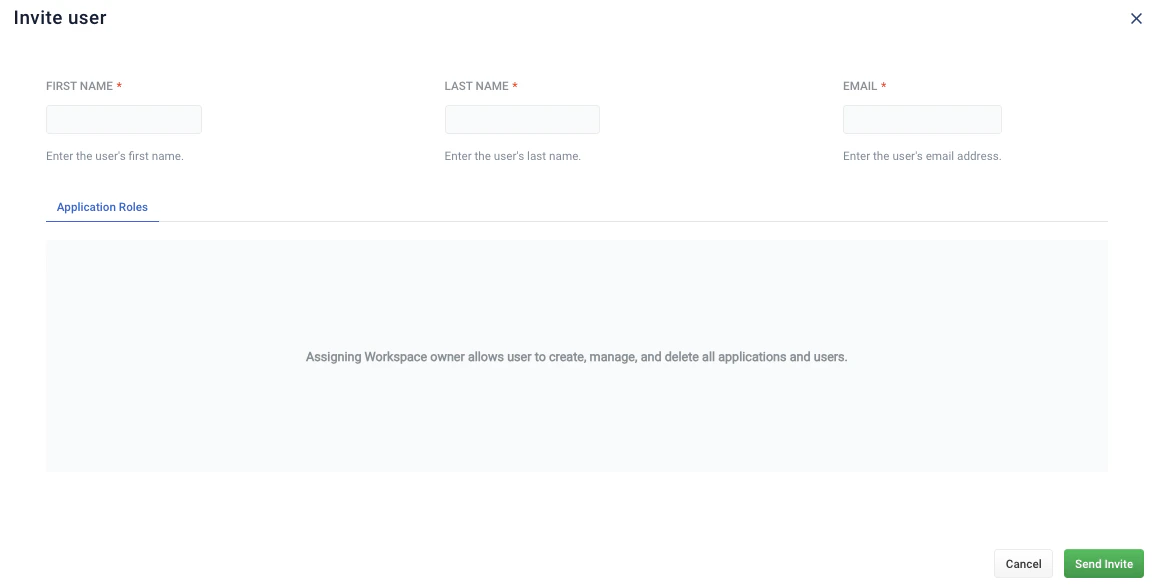
- To email the user the invitation, click Send Invite. To exit without creating a user, click Cancel.
-
In the Users list, verify the status of the new user status is Awaiting Activation.
When the user accepts the email invitation, the status displays as Active. If the user does not receive the email invitation in their inbox, ask them to look in the spam folder for an email from
no-reply@lucidworks.com. If the invitation is not in their inbox or spam folder, verify the user’s email information. If your troubleshooting efforts are unsuccessful, contact Lucidworks Support.
Edit or delete users
To edit a user, click the entry for the user you want to edit. You can also click View/Edit. Workspace owners can also click Delete User to delete the user.Authentication using single-sign on
The Authentication screen lets you configure a single sign-on (SSO) option, which supports the following features:- Restricts user logins to specified email domains
- Uses your organization’s identity provider authentication method instead of Lucidworks’ built-in authentication