

The JavaScript Index stage allows you to write a custom processing logic using JavaScript to manipulate Pipeline Documents and the index pipeline context, which will be compiled by the JDK into Java bytecode that is executed by the Lucidworks Search pipeline. The first time that the pipeline is run, Lucidworks Search compiles the JavaScript program into Java bytecode using the JDK’s JavaScript engine. For a JavaScript Index stage, the JavaScript code must return either:Documentation Index
Fetch the complete documentation index at: https://doc.lucidworks.com/llms.txt
Use this file to discover all available pages before exploring further.
- A single document or array of documents or
-
The null value or an empty array.
In the latter case, no further processing is possible, which means that the document will not be indexed or updated. For example, Solr commits have anullvalue and are dropped.
JavaScript Index Stage global variables
JavaScript is a lightweight scripting language. In a JavaScript stage, Fusion uses the Nashorn engine, which implements ECMAScript version 5.1. Although Nashorn does include some ECMAScript 6 (ES6) features such aslet, const, or template strings, Fusion does not enable ES6 by default, so ES6 support is not guaranteed.
What a JavaScript program can do depends on the container in which it runs.
For a JavaScript Index stage, the container is a Lucidworks Search index pipeline.
The following global pipeline variables are available:
| Name | Type | Description |
|---|---|---|
doc | PipelineDocument | The contents of each document submitted to the pipeline. |
ctx | Context | A map that stores miscellaneous data created by each stage of the pipeline. Important Use the ctx variable instead of the deprecated _context global variable. ctx variable is used to: ● Pass data from one stage to another ● Store data that needs to be passed from one custom stage to a later custom stage The data can differ between stages: ● If the previous stage changes the data ● Based on the configuration of each stage If the data is modified in one stage, it may cause a later stage to function irregularly. |
collection | String | The name of the Lucidworks Search collection being indexed or queried. |
solrServer | BufferingsolrServer | The Solr server instance that manages the pipeline’s default Lucidworks Search collection. All indexing and query requests are done by calls to methods on this object. See solrClient for details |
solrServerFactory | solrClusterComponent | The SolrCluster server used for lookups by collection name which returns a Solr server instance for that collection. For example: var productsSolr = solrServerFactory.getSolrServer("products");. |
Syntax variants
JavaScript stages can be written using legacy syntax or function syntax. The key difference between these syntax variants is how the “global variables” are used. While using legacy syntax, these variables are used as global variables. With function syntax, however, these variables are passed as function parameters.Legacy syntax
Legacy syntax is used to perform very simple tasks.Function syntax
Function syntax is used for moderately complex tasks.Important
Function syntax is used for the examples in this document.
Advanced syntax
Advanced syntax is used for complex tasks and when multiple functions are needed.JavaScript use
The JavaScript in a JavaScript Index stage must return either a single document or an array of documents. This can be accomplished by either:- a series of statements where the final statement evaluates to a document or array of documents
- a function that returns a document or an array of documents
Global variable logger
The logs are output to the indexing service logs for custom index stages. Access the Log Viewer and filter on this service to view the information.
The JavaScript engine used by Lucidworks Search
The default JavaScript engine used by Lucidworks Search is the Nashorn engine from Oracle. See The Nashorn Java API for details. In Lucidworks Search 5.9.6 and up, you also have the option to select OpenJDK Nashorn. While Nashorn is the default option, it is in the process of being deprecated and will eventually be removed, so it is recommended to use OpenJDK Nashorn when possible. You can select the JavaScript engine in the pipeline views or in the workbenches. Your JavaScript pipeline stages are interpreted by the selected engine.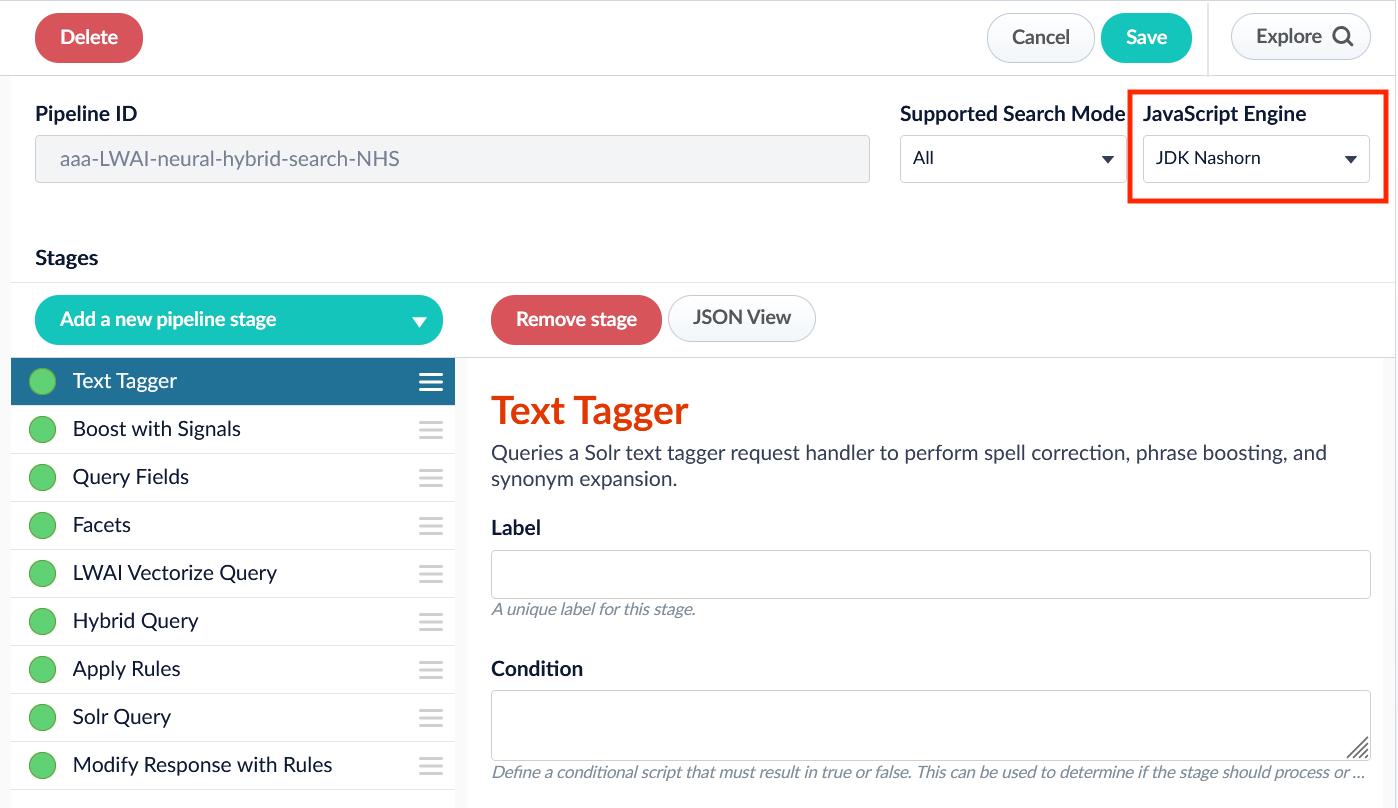
Creating and accessing Java types
The following information is taken from Oracle’s JavaScript programming guide section 3, Using Java From Scripts. To create script objects that access and reference Java types from Javascript use theJava.type() function:
Examples
Set the condition field
The JavaScript Index stage lets you define a condition to trigger the script body.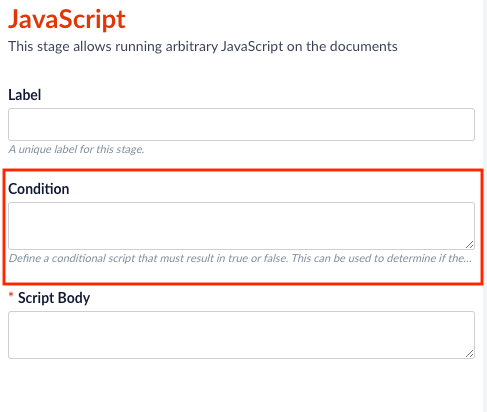
if or include ; at the end of the line.
-
Works:
doc.hasField("title_s") === truedoc.hasField("title_s") === falsedoc.hasField("title_s")
-
Does not work:
if doc.hasField("title_s") === false;
Add a field to a document
Join two fields
The following example conjoins separate latitude and longitude fields into a single geo-coordinate field, whose field name follows Solr schema conventions and ends in “_p”. It also removes the original latitude and longitude fields from the document.Return an array of documents
Parse a JSON-escaped string into a JSON object
While it is simpler to use a JSON Parsing index stage, the following code example shows you how to parse a JSON-escaped string representation into a JSON object. This code parses a JSON object into an array of attributes, and then find the attribute “tags” which has as its value a list of strings. Each item in the list is added to a multi-valued document field named “tag_ss”.Do a lookup on another Lucidworks Search collection
Reject a document
If the function returnsnull or an empty array, it will not be indexed or updated into Lucidworks Search.
Drop a document by ID
Format Date to Solr Date
Replace whitespace and newlines
Split the values in a field
Prevent global variables in JavaScript
Variable declared using the var keyword
If a variable is declared using the var keyword, the JavaScript interpreter processes the value sequentially.
In this example, the values for var i = 0 are logged in order as 0, 1, 2, 3, 4, etc.
Variable not declared using the var keyword
If a variable is not declared using the var keyword, the JavaScript interpreter moves the declaration of variable and functions to the top of the declared (global) scope. Because Lucidworks Search pipeline stages execute in a multi-threaded environment, these global (shared) variables make the stages not thread-safe.
For more detailed information, see Hoisting.
i may not proceed sequentially from 0 to 4 as the loop is processed. Instead, values may be logged based on the execution state of the other pipeline requests. For example, 0, 1, 3, 1, 2, etc., which logs the values as "cat", "the cat", "the cat in the hat is back", "the cat", "the cat in the hat".
However, if only one thread is incrementing the i variable, the values proceed sequentially (0, 1, 2, 3, 4, etc.)
If the queries array varies in length from document to document, the loop may generate an ArrayIndexOutOfBounds exception for a Java array or an undefined error for a JavaScript array.
Threads may not log all four queries.
Setting the "use strict" directive
Setting the "use strict" directive tells the JavaScript engine to require non-global declarations of all functions and variables.
The following example demonstrates how to create a copy of a PipelineDocument and return both the original and the copy to the pipeline for processing.
JavaScript Index Stage global variables
JavaScript is a lightweight scripting language. In a JavaScript stage, Fusion uses the Nashorn engine, which implements ECMAScript version 5.1. Although Nashorn does include some ECMAScript 6 (ES6) features such aslet, const, or template strings, Fusion does not enable ES6 by default, so ES6 support is not guaranteed.
What a JavaScript program can do depends on the container in which it runs.
For a JavaScript Index stage, the container is a Lucidworks Search index pipeline.
The following global pipeline variables are available:
| Name | Type | Description |
|---|---|---|
doc | PipelineDocument | The contents of each document submitted to the pipeline. |
ctx | Context | A map that stores miscellaneous data created by each stage of the pipeline. Important Use the ctx variable instead of the deprecated _context global variable. ctx variable is used to: ● Pass data from one stage to another ● Store data that needs to be passed from one custom stage to a later custom stage The data can differ between stages: ● If the previous stage changes the data ● Based on the configuration of each stage If the data is modified in one stage, it may cause a later stage to function irregularly. |
collection | String | The name of the Lucidworks Search collection being indexed or queried. |
solrServer | BufferingsolrServer | The Solr server instance that manages the pipeline’s default Lucidworks Search collection. All indexing and query requests are done by calls to methods on this object. See solrClient for details |
solrServerFactory | solrClusterComponent | The SolrCluster server used for lookups by collection name which returns a Solr server instance for that collection. For example: var productsSolr = solrServerFactory.getSolrServer("products");. |
Syntax variants
JavaScript stages can be written using legacy syntax or function syntax. The key difference between these syntax variants is how the “global variables” are used. While using legacy syntax, these variables are used as global variables. With function syntax, however, these variables are passed as function parameters.Legacy syntax
Legacy syntax is used to perform very simple tasks.Function syntax
Function syntax is used for moderately complex tasks.Important
Function syntax is used for the examples in this document.
Advanced syntax
Advanced syntax is used for complex tasks and when multiple functions are needed.JavaScript use
The JavaScript in a JavaScript Index stage must return either a single document or an array of documents. This can be accomplished by either:- a series of statements where the final statement evaluates to a document or array of documents
- a function that returns a document or an array of documents
Global variable logger
The logs are output to the indexing service logs for custom index stages. Access the Log Viewer and filter on this service to view the information.
Learn more
JavaScript in Fusion
The course for JavaScript in Fusion focuses on how to leverage JavaScript in Fusion to build powerful and responsive scripts at index and query time.