

Key highlights
Spell Check query stage
The Spell Check query stage lets you invoke a spell check suggestions function that returns relevant spelling suggestions when queries contain misspellings or typing errors.
If a query doesn’t return the minimum number of results you specify, a spell checking function searches dictionaries, indexed data, and files to discover close matches to the terms entered in the query. Using this stage provides the following benefits:
- Enhances your customer’s search experience by suggesting relevant terms even if they mistype query terms.
- Improves search relevance by discovering possible matches to terms entered in queries.
- Minimizes zero search result experiences by returning potential matches to mistyped search terms.
- Solr Query stage, which is more effective for lexical searches.
- Neural Hybrid Query stage or Chunking Neural Hybrid Query stage, which is more effective for semantic searches.
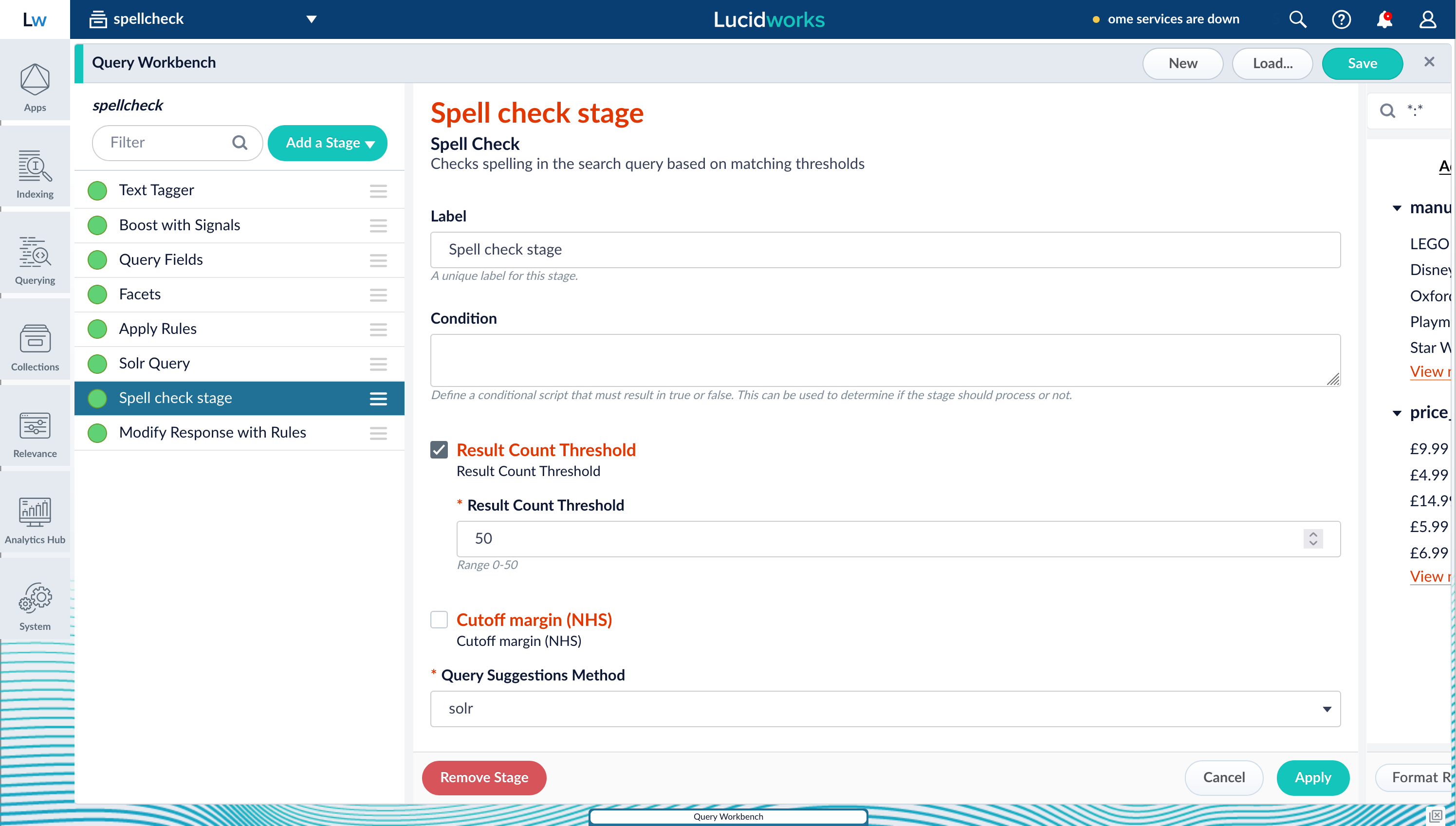
- A query pipeline with a Spell Check stage using the Solr Query stage results.
- A different query pipeline with a Spell Check stage that uses the lexical score from either the Neural Hybrid Query stage or Chunking Neural Hybrid Query stage.
electronc, the query does not return any results. The Spell Check stage triggers the spell checking functions, and possible matches display in the Did you mean? section.
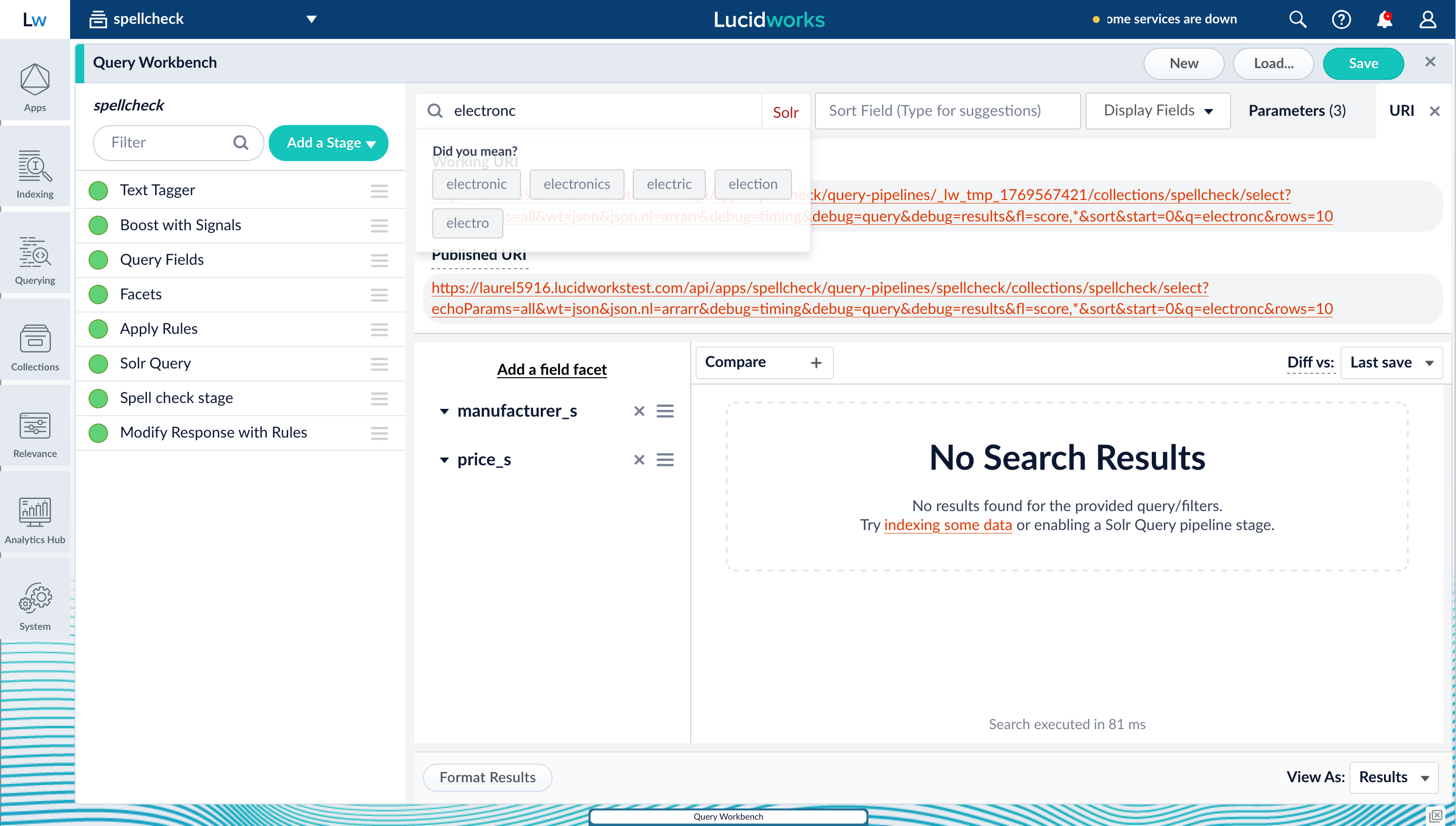
fusion.spellcheck_stage_suggestions array:
Spell check suggestions
Timeout improvements for query pipeline stability and control
Lucidworks Search now includes multiple improvements that make query timeouts more consistent and production-friendly, especially under heavy load.Enforcing an end-to-end query pipeline timeout using a request header
Previously, the gateway could time out using the default of 15 seconds while the query pipeline continued running in the background. This decreased stability during load spikes. With this change, Lucidworks Search checks the remaining time after each pipeline stage and cancels execution when the timeout is exceeded.Fail pipelines when Solr returns partial results
When Solr exceeds atimeAllowed query limit, it can return HTTP 200 with partial results that can break downstream pipeline stages. Lucidworks Search now detects these partial results and fails the pipeline by default to avoid producing incomplete or misleading responses. A new Solr Query stage option of Process partial results can be enabled to continue processing when partial results are acceptable.
More consistent Solr query limit enforcement across deployments
Lucidworks Search improves default query limit enforcements such astimeAllowed and cpuAllowed and aligns image and configset behavior so limits are applied consistently across deployments. This includes updated defaults with property overrides, a handler with higher limits for analytics workloads, and configuration updates to ensure query limits remain enforced.
Query pipeline performance and routing improvements
Smoother performance under burst traffic
Pipeline creation is meant to be cached after the first request. Previously, if multiple requests arrived before the first initialization completed, each request could trigger its own pipeline initialization. This caused slowdowns and extra resource pressure. Lucidworks Search now synchronizes pipeline initialization so only the first request does the work while concurrent requests wait, reducing request spikes and improving stability under load.More predictable subquery latency
Solr subqueries previously lacked a built-in way to steer requests toward the replica types best suited for low-latency query traffic. Without explicit routing, subqueries could land on replica types, such as TLOG, that can introduce latency spikes and complicate troubleshooting. Lucidworks Search now adds apreferredReplicaType option to the Solr Subquery stage, making replica steering easier to configure and more consistently applied—improving tail latency and keeping query routing aligned with operational expectations.
Consumption Dashboard update
The consumption dashboard is updated to make entitlement discovery easier and reporting more accurate. A new Hide Temporary Pipelines checkbox streamlines filtering by removing temporary pipelines from view with a single click. Previously, excluding temporary pipelines required manually deselecting each one, which could be cumbersome when dealing with dozens of pipelines.Collections API now honors replica parameters
Previously,nrtReplicas, tlogReplicas, and pullReplicas could be ignored in Collections API requests, resulting in collections created with defaults instead of the intended architecture. Lucidworks Search now passes these parameters through correctly so automated collection creation matches the requested shard and replica strategy.
Admin UI, APIs, and observability improvements
Lucidworks Search 5.9.16 includes several updates that improve UI usability and provide better diagnostics and monitoring.Blob viewer loads faster and avoids unnecessary downloads
The Admin UI Blob viewer previously downloaded full blob content by default, which could cause large downloads and errors, especially for JSON blobs. Lucidworks Search now fetches blob metadata by default and only downloads full content when editing is requested, improving responsiveness and reliability.Admin UI search enhanced for reliability and clarity
The Admin UI search has been improved to focus exclusively on Lucidworks Search application resources and navigation. This enhancement eliminates unreliable background indexing jobs and provides clearer search results, making it easier to find and manage your collections, pipelines, and other application components.Reduced gateway audit log noise
OPTIONS requests are common in CORS flows and often not meaningful for audit purposes.Operational stability and build reliability
Lucidworks Search 5.9.16 includes several improvements that strengthen platform resilience and improve reliability for deployments and integrations.Improved recovery after temporary ZooKeeper outages
When ZooKeeper became unavailable briefly and then recovered, it could trigger downstream service issues, such as blob service behavior or job visibility problems, and often required manual restarts. Lucidworks Search now recovers more cleanly after temporary ZooKeeper unavailability, improving resilience during transient infrastructure events and reducing manual intervention.Supported Docker images for monitoring exporters
The Bitnami images used forjmx-exporter and kafka-exporter were deprecated and relied on older base images. Lucidworks Search now provides replacement Docker images for both exporters, improving long-term supportability and reducing risk from upstream deprecations.
ETL indexer can automatically trigger Spark jobs after indexing
Many indexing workflows require post-index processing such as enrichment, aggregation, or downstream job execution. Previously, running follow-on Spark jobs often required custom coordination. Lucidworks Search 5.9.16 streamlines automation by allowing the ETL indexer to automatically kick off a Spark job after an indexing run.API gateway no longer depends on Kubernetes API availability
During GCP control plane upgrades or Kubernetes API maintenance events,api-gateway and query-pipeline pods could become unavailable due to readiness and liveness probe failures. These failures prevented pods from recovering during the maintenance window, causing service disruptions.
Fusion now refines the availability checks, reducing the risk of service outages during routine cluster maintenance.
API Updates
Indexing API:- Added subscription indexing endpoints for asynchronous document indexing via Kafka:
GET /subscription_indexing/statusandPOST /subscription_indexing/{id}/collections/{collection}/index. - Added optional
throwOnErrorparameter to/index/{id}and/index/{id}/debugendpoints. When enabled, indexing operations fail immediately if an error is encountered rather than continuing with partial success.
- Removed deprecated endpoint:
/query-stages/lwai-chunking-strategies.
Bug fixes
Parsing and indexing improvements
These fixes improve ingestion reliability, reduce indexing interruptions, and make scaling behavior more predictable in production.- Async parsing works correctly even when other parsers are deactivated.
Async parsing could fail to run when additional parsers were present in the configuration, even if those parsers were explicitly deactivated. Lucidworks Search now ignores deactivated parsers during selection, ensuring async parsing executes reliably regardless of configuration layout.
- Increased reliability of body extraction for large documents in async parsing.
For large, text-heavy files, the async Tika parser could fail to extract body content due to string length constraints. In some cases this happened even when truncation limits were configured, resulting in missing body fields. Lucidworks Search now improves async parsing behavior for large documents so body extraction is more reliable and configured limits are respected more consistently.
- Fixed file descriptor leak in async parsing.
A resource leak during filesystem operations could accumulate over time and trigger “Too many open files” errors, interrupting indexing and requiring repeated pod restarts to recover. Lucidworks Search now properly closes resources during async parsing file operations, improving long-running stability and reducing ingestion disruptions.
- Batch partial updates continue even when some document IDs are missing.
In incremental indexing workflows, partial update batches could stop processing early if a submitted document ID didn’t exist, preventing valid updates later in the same batch from being applied. Lucidworks Search now rejects missing IDs as intended while continuing to process the rest of the batch, improving throughput and reducing the need for manual retries.
- Partial updates work more reliably with common vector configurations.
Using LWAI with partial updates sometimes caused failures when applying vector fields across common formats and configurations. Lucidworks Search now improves partial-update indexing workflows to better support these vector setups, reducing failures and making vector enrichment/indexing more dependable.
fusion-queryandfusion-indexinghave faster startup under HPA.
fusion-queryandfusion-indexingcould experience a 15-second startup delay due to default polling behavior, slowing scale-up responsiveness under Horizontal Pod Autoscaling. Lucidworks Search now reduces unnecessary startup delay by improving service availability polling behavior, enabling faster scaling and better responsiveness during burst traffic.
Connectors
These fixes improve connector reliability during migrations, increase crawl correctness, and make connector APIs more stable and secure.- Web V1 connector now properly indexes documents when using JavaScript evaluation.
In Fusion 5.9.14 and 5.9.15, the Web V1 connector referenced two versions of the Selenium library, which caused runtime incompatibilities. Fusion now resolves this Selenium class-path conflict, and V1 JavaScript evaluation works as expected, reducing crawl disruptions.
- Web V2 connector now dedupes correctly using canonical URLs.
The Web V2 connector did not reliably deduplicate pages by canonical URL due to incorrect canonical redirect limit logic, preventing the canonical-handling code path from running as intended. Lucidworks Search now corrects canonical URL handling so canonical-based deduplication works properly, reducing duplicate content in the index and improving crawl efficiency.
- Connector schema responses are now consistently ordered.
Connector schema output could appear in inconsistent property order due to loss of insertion order during V2 transformations. Lucidworks Search now preserves stable property ordering in connector schema responses, resulting in more predictable API output, cleaner diffs, and easier downstream automation and validation.
SDKs and services
These fixes improve upgrade safety for custom extensions, reduce service startup disruption, and restore expected runtime behavior for encrypted configurations.- Index Stage SDK plugins load more reliably in newer versions.
Some Index Stage SDK plugins could fail to load and would not appear in the Lucidworks Search UI, blocking plugin installation and upgrades. In particular, certain common Java constructs could cause the plugin framework to fail to generate a valid stages definition, resulting in errors like “no stages definition.” Lucidworks Search now improves Index Stage SDK plugin loading so stages using these constructs are discovered correctly and no longer block plugin installation.
ml-model-servicestarts more safely when legacy model types are present.
Deployments could fail or crash-loop when unsupported legacy model types, such as OpenNLP or MLeap, were encountered, or when TLS/ingress configurations did not match expected trust material. These failures could disrupt upgrades and cause avoidable downtime. Lucidworks Search now handles unsupported legacy model types more safely (instead of failing the entire service), reducing startup disruption and improving operational stability when migrating legacy models to supported approaches.
- PBL jobs can decrypt configuration secrets again.
After upgrades, PBL jobs could fail because encrypted configuration values were no longer being decrypted at runtime. Logs indicated that noStringDecryptorimplementation was available, preventing secrets from being resolved. Lucidworks Search now wiresStringDecryptorinto the job runtime through the Spring application context so encrypted configuration values decrypt correctly, restoring expected job behavior and preventing post-upgrade failures tied to secrets handling.
Platform support and component versions
Kubernetes platform support
Lucidworks has tested and validated support for the following Kubernetes platforms and versions:- Google Kubernetes Engine (GKE): 1.30, 1.31, 1.32, 1.33, 1.34, 1.35
- Microsoft Azure Kubernetes Service (AKS): 1.30, 1.31, 1.32, 1.33, 1.34, 1.35
- Amazon Elastic Kubernetes Service (EKS): 1.30, 1.31, 1.32, 1.33, 1.34, 1.35
Component versions
The following table details the versions of key components that may be critical to deployments and upgrades.| Component | Version |
|---|---|
| Solr | fusion-solr 5.9.16 (based on Solr 9.6.1) |
| ZooKeeper | 3.9.1 |
| Spark | 3.4.1 |
| Ingress Controllers | Nginx, Ambassador (Envoy), GKE Ingress Controller |
| Ray | ray[serve] 2.46.0 |
| Helm | 3.4.1 |