

Alfresco REST Configuration
This documentation describes aspects of the Alfresco REST file configurationalfresco-v1.json, such as the authentication, data fetched, requests configured (endpoints, query params, pagination) and variables needed. Terminology is also provided as a reference.
-
The
alfresco-v1.jsonis configured to retrieve the initial folders from the root folder-root-(Company Home) and then retrieve the folders, nestedFolders and files. -
The following objects are indexed into separate solr document:
- Folders (this also include the ‘Sites’ folder)
- Files
Authentication
The Alfresco REST configuration supports:- Basic Authentication using the username and password from an Alfresco account.
Supported crawl options
The Alfresco REST configuration supports the following crawl options:-
Full crawl:
- All the content from the source is fetched.
-
Re-Crawl:
- Per re-crawl, all the content from the source is retrieved as it were a full-crawl
- Orphan files/folders (deleted in the alfresco source that are not retrieved with a current crawl), will be deleted from the index using the strayContentDeletion feature from connectors-service, which is run when a crawl finishes.
Parser
The default parser is set to_system but can be changed to any parser based on index needs.
Variables used
The Alfresco REST configuration use the following variables, which are created with the rest-connector:${LW_BATCH_SIZE}- Used with pagination feature. Used to set themaxItemsquery parameter, which controls the number of entries (folder/files) that are returned in the response.${LW_INDEX_START}- Used with pagination feature. Used to set theskipCountquery parameter, which is used to traverse the pagination.${LW_PARENT_DATA_KEY}- Used with the Child Request Configurations. In crawl-time, this variable is replaced with the parent object ID value extracted by setting the property ‘Parent Data Key’. Note: The parent object is retrieved with a previous request (parent-request).
Pagination Setup
Pagination by Batch Size is configured per Request. Needs to configure properties: ‘Query Params’, and ‘Pagination By BatchSize’Configure the ‘Pagination By BatchSize’ properties:
- IndexStart: The starting point. It replaces the variable
${LW_INDEX_START} - BatchSize: The number of elements to retrieve. Set to 50 by default. It replaces the variable
${LW_BATCH_SIZE} - Stop Condition Key: Reference the “key” in the response, that needs to be met in order to stop the pagination. For the Alfresco Config, use “list.entries”
- Stop Condition Value: Reference the “value” in the response, that needs to be met in order to stop the pagination. For the Alfresco Config, to stop pagination the list of objects retrieved must be empty, then the stop condition should be []
Query Params:
- maxItems=
${LW_BATCH_SIZE}, where${LW_BATCH_SIZE}is replaced with the value of propertyBatchSize. For more information aboutmaxItems, see Alfresco documentation for limiting-result-items - skipCount=
${LW_INDEX_START}, where${LW_INDEX_START}is replaced with the value of propertyIndexStartto request the first page, then internally replaced with ‘IndexStart + BatchSize’ to request next pages. For more information aboutskipCount, see Alfresco documentation for skipping-result-items
Endpoints Configuration with Alfresco REST connector
- The following table describes the Alfresco REST connector endpoints needed to retrieve the files and folders, and how those are configured with the rest-connector.
- Each requests in configured under the property List of Requests Configuration (
requestConfigurationsin thealfresco-v1.json` file)
Response Parsing Configuration
Per request, configure the property Response Handling to set up how to parse the response (responseConfiguration in the alfresco-v1.json file)
Plugin Parsing:
- This parsing happens by default. The responses are parsed as a JSON Object structure using JsonPath.
- Plugin Parsing will happen for requests:
INITIAL_FOLDER,FOLDER,FILE - Properties
Response Handling → Data ID, Data Path, Parent Data Key can be configured to extract certain information from the Objects parsed (see section Terminology for more information
Binary Parsing:
- Enable by setting the property
Response Handling → Parse Binary Data(binaryResponsein the alfresco-v1.json` file). Send the whole response to the Fusion Parsers. If disabled (default), the response is parsed as a JSON object - This parsing is configured for request:
FILE_DOWNLOAD
Skip Indexation of Objects
When enabled, the response is not indexed. This is useful when objects are requested solely to discover their child objects, without needing to index the parent object itself.-
For Alfresco Configuration:
- Given a parent Request
FILE, to retrieve a list of files metadata. The request is needed to discover the IDs of files to be downloaded in a following request. - Given a child Request
FILE_DOWNLOADto download the binary content from the files found previously - Both request will index two solr-docs that represents the same file: 1) doc the file-metadata only, 2) doc with the file-metadata joined with the file-content.
- Given a parent Request
- There is no need to index the first solr-doc. To avoid indexing this, the property ‘Skip Indexation’ for the Request FILE is enabled in the ‘alfresco-v1.json’ file.
- If needed to avoid indexing another objects, enable the property ‘Skip Indexation’ in the corresponding request configuration.
Limit Documents
Exclude by RegEx:
Allows specifying a list of key-value pairs to exclude objects from indexing:- Key: Reference the field name of the object to exclude. It also accepts JsonPath expressions for navigating through nested object, e.g. objects.nested.path
- Value: The value contains a regular expression that will be matched against the field value in the object. If the match succeeds, the entire object will be excluded.
- e.g. Exclude objects from the field ‘entry.path.name’. Let’s consider the Alfresco object named “testFolder” belonging to the path /Company Home/Sites/sample1.
'/Company Home/Sites/sample1', add a key-value pair to the exclusion list:
- Key: entry.path.name (points to the field containing the path)
- Value: /Company Home/Sites/sample1 (regular expression to match the path)
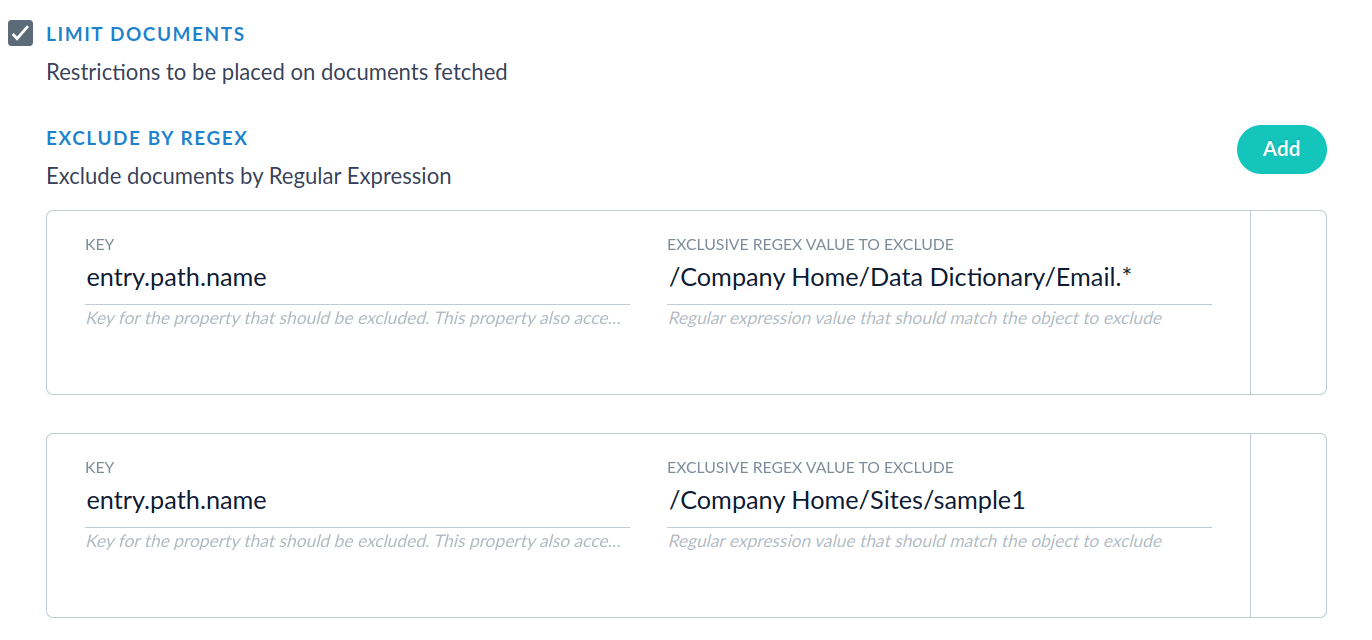
Exclude by File Size:
Allows specifying minimum and maximum sizes that will exclude all files that do not meet the requirements.- Key: Reference the field name of the object with the file size. This property also accepts JsonPath expressions e.g. objects.nested.path
- Minimum File Size: Used for excluding files with sizes smaller than the configured value.
- Maximum File Size: Used for excluding files with sizes larger than the configured value. Set to -1 when there is no limit
- For example: Let’s consider this sample snippet from an Alfresco response
- Set
key=entry.content.sizeInBytes - Then set
minimum, all sizes below the minimum will be excluded. - Then set
maximum, all sizes above the maximum will be excluded (Set to -1 when there should be no
