

- Access to latest features: Stay current with the latest features and functionality to ensure compatibility and optimal performance.
- Simplified process: Fusion 5.9.5 and later use an in-place upgrade strategy, making upgrades easier than ever.
- Extended support: Upgrading keeps you up-to-date with the latest supported Kubernetes versions, as outlined in the Lucidworks Fusion Product Lifecycle policy.
Security patch available for api-gateway: Netty request smuggling vulnerabilitiesA patch is available for the
api-gateway service to address critical Netty request smuggling vulnerabilities (CVE-2026-42581, CVE-2026-42585, CVE-2026-42587). These vulnerabilities allow attackers to smuggle HTTP requests through the gateway, potentially bypassing security controls.Instructions for applying the patch
Instructions for applying the patch
The
api-gateway service requires the Netty security patch.Follow these steps to apply the patched image:- Open your Fusion Helm values file.
-
Add or update the
api-gatewayimage configuration: - Save the values file.
-
For Fusion Cloud Native deployments, run the
upgrade_fusion.shscript you used for your current deployment. For Helm deployments, run:ReplaceNAMESPACEwith your Kubernetes namespace,RELEASE_NAMEwith your Helm release name, andPATH_TO_VALUESwith the path to your updated values file. -
Wait for the
api-gatewaypods to restart and verify they are using the patched image.
Urgent action required by November 26, 2025A patch is required by November 26, 2025 for all self-hosted Fusion deployments running on Amazon Elastic Kubernetes Service (EKS). Certain Java versions used by Fusion components reach end of life on this date. Failure to apply the patch will result in compatibility issues.
Instructions for applying the patch
Instructions for applying the patch
The following Fusion services require the
cgroupv2 patch:Follow these steps to apply the patched images:
- Open your Fusion Helm values file. For Fusion Cloud Native deployments, use the values file for your current deployment. For Helm deployments, use the values file you used to create the deployment.
- For each service listed in the following table that applies to your Fusion version, add or update the image configuration:
- Fusion 5.9.4 to 5.9.10
- Fusion 5.9.11
- Fusion 5.9.12 to 5.9.15
- Save the values file.
-
For Fusion Cloud Native deployments, run the
upgrade_fusion.shscript you used for your current deployment. For Helm deployments, run the following command: - Wait for the affected service pods to restart and verify they are using the patched images.
Upgrade notes for Stage SDK plugins
Upgrade notes for Stage SDK plugins
Fusion 5.9.15 upgrades the Stage SDK to v2.0.0.
Any custom plugins compiled with SDK v1.0.0, such as
query-sample-plugin-stage-0.0.1.zip and index-sample-plugin-stage-0.0.1.zip, will not load after the upgrade.
Pipelines that reference those stages will be hidden until you install SDK v2.0.0 replacements.Take these steps before you begin the upgrade process.-
Rebuild your plugins against Stage SDK v2.0.0.
- Example outputs:
2-0-0-query-sample-plugin-stage-0.0.2.zip2-0-0-index-sample-plugin-stage-0.0.2.zip
- Example outputs:
- Use Java 11 to recompile the plugins.
-
Update your
gradle.propertiesfile to use v2.0.0 of the Stage SDK. For the Query Stage SDK, use:For the Index Stage SDK, use: -
Verify that the
queryStagePluginSDKVersionorindexStagePluginSDKVersionvariable is used in thebuild.gradletask that builds the SDK stage. The following example uses the Query Stage SDK:See the Query Stage SDK sample stage for an example. - Audit your pipelines and remove or replace any stages that no longer exist or are changed in the new plugins. If a pipeline still references a removed stage, it will continue to fail deserialization after upgrade.
Key highlights
Consumption Dashboard update
The Consumption Dashboard uses graphs to visually track request and document usage against the allotted consumption for a Fusion license. The hover interaction for requests per pipeline graphs now displays a sortable list of pipelines to make it easier to analyze pipeline-level consumption. Pipelines in a requests per pipeline graph can be sorted in the following ways:- Value descending: sort pipelines according to number of requests from most to least.
- Value ascending: sort pipelines according to number of requests from least to most.
- Alphabetically ascending: sort by pipeline name from A to Z.
- Alphabetically descending: sort by pipeline name from Z to A.
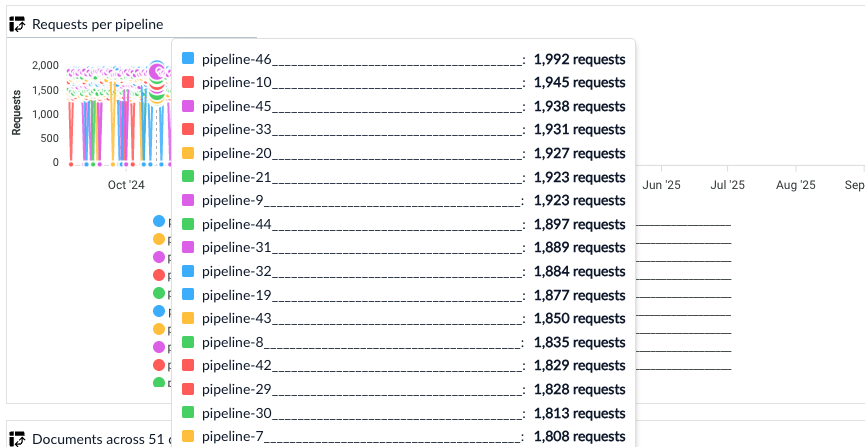
Sortable requests per pipeline graph
Gain deeper insight into asynchronous query performance
Monitoring for asynchronous query stages is expanded to provide performance insights for async workloads, allowing for better optimization and more efficient troubleshooting. Structured logs and Grafana dashboards for each async stage let you view metrics, including the following:- Execution time and trends for how long a job or request takes from start to finish.
- Success rates for percentage of requests and jobs that complete without error.
- Number of retries for how many retry attempts were made after initial failures.
- Queue wait times for the time a job or request spends waiting to be processed.
- Resource usage for consumption of compute/storage/network by workload or tenant.
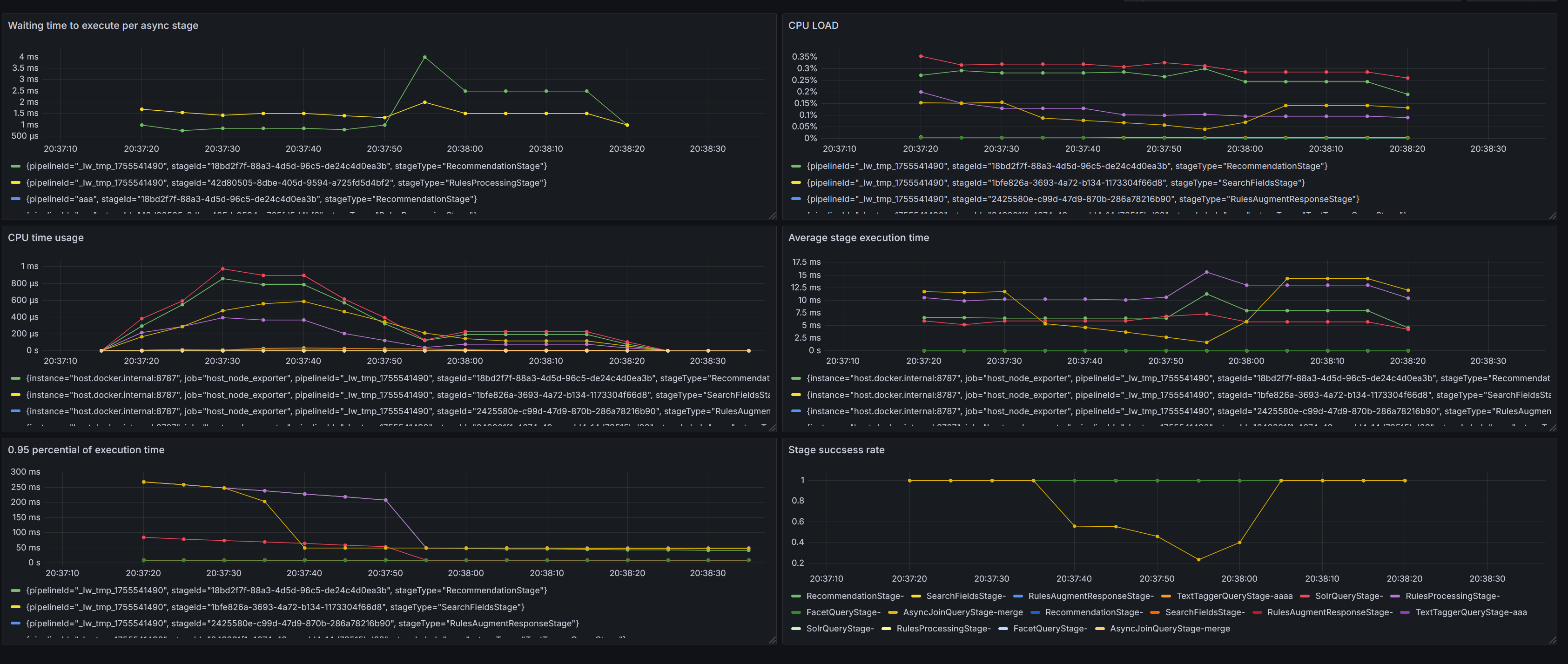
The monitoring dashboard now includes additional metrics
- Application
- Pipeline
- Profile
- Stage
- Execution status
- Custom time ranges
New Retrieval-Augmented Generation (RAG) query stage
Lucidworks continues expanding RAG capabilities that improve the quality and accuracy of LLM-powered retrieval workflows. Documents that require chunking tend to be large and cover multiple topics. Queries return an answer that links to the document, but the answer does not show exactly where to find that information in the document. A Chunking RAG Bridge Query Stage is introduced to evolve RAG from document-level retrieval to chunk-level precision. With this new stage, each cited source that accompanies a RAG answer also provides a link to the relevant document along with a snippet containing information about where to find the content in the document.New Batch Vectorize index stage
Fusion 5.9.15 introduces an LWAI Batch Vectorize Index Stage for AI pipelines. This works the same as the LWAI Vectorize Field stage but delivers faster indexing throughput because it processes your documents in batches before sending those documents to the next stage in your index pipeline. The LWAI Batch Vectorize stage can improve document indexing performance up to ten times the rate of the LWAI Vectorize Field stage. The LWAI Vectorize stage processes documents one at a time.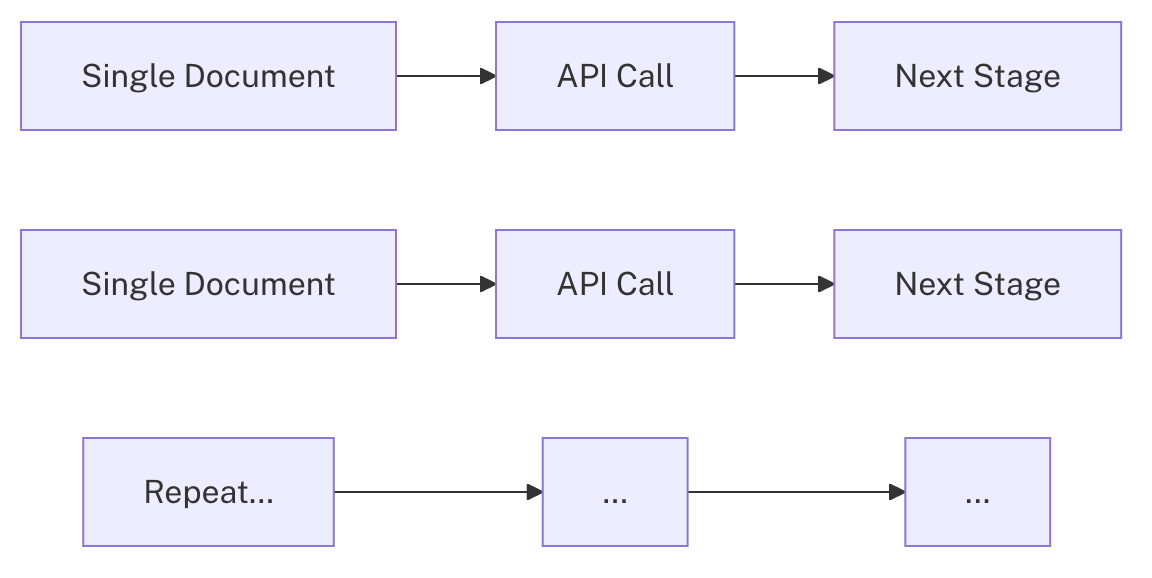
Flowchart for single document processing

Flowchart for batch document processing
Configurable properties added:
Configurable properties added:
Restrictive mode for query pipelines
Fusion 5.9.15 introduces restrictive mode, a new way to safeguard query pipelines against unauthorized or risky changes. When you enable restrictive mode, Fusion enforces stricter query parameter validation and sanitization, blocking unsafe inputs and limiting potentially expensive operations. This feature helps you improve security and prevent costly mistakes. See Restrictive Mode for complete details about how restrictive mode works and how to enable it.Fusion stage SDKs updated to support JDK 11
The Index Stage and Query Stage SDKs in self-hosted Fusion now support JDK 11.These updates apply only to self-hosted Fusion and are not supported in Lucidworks Search.
- Increases runtime success.
- Improves dependency management to build plugins against stable versions.
- Ensures long-term compatibility of critical operational pipelines for plugin developers.
- Enables support for existing search functionality when planning upgrades.
Fusion Admin UI updates
Several updates to the Fusion Admin UI improve safety and usability:-
A description is added to the JSON Facets stage, clarifying its purpose.
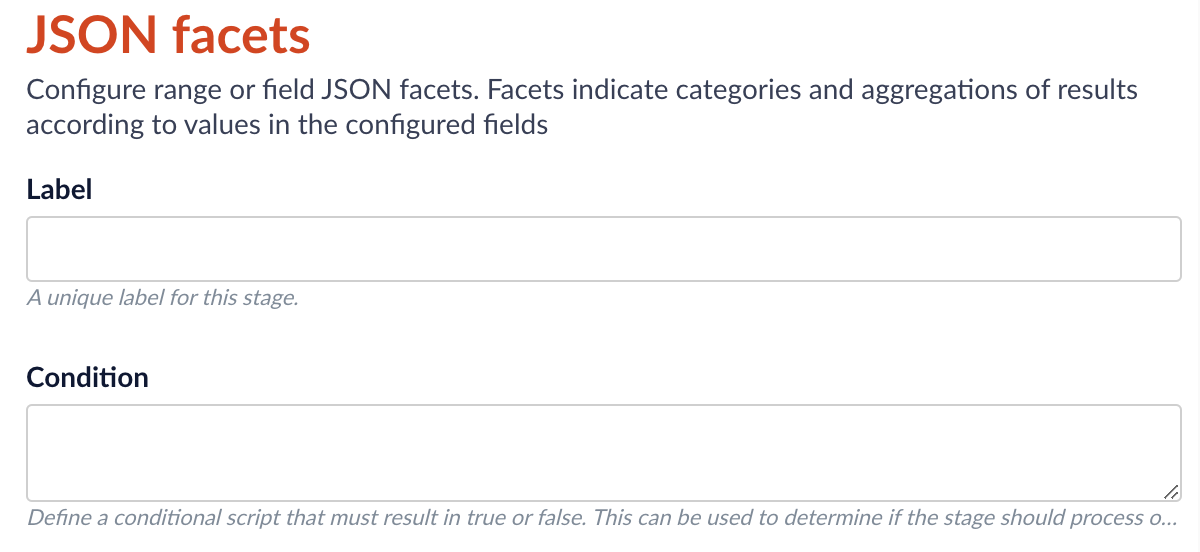
-
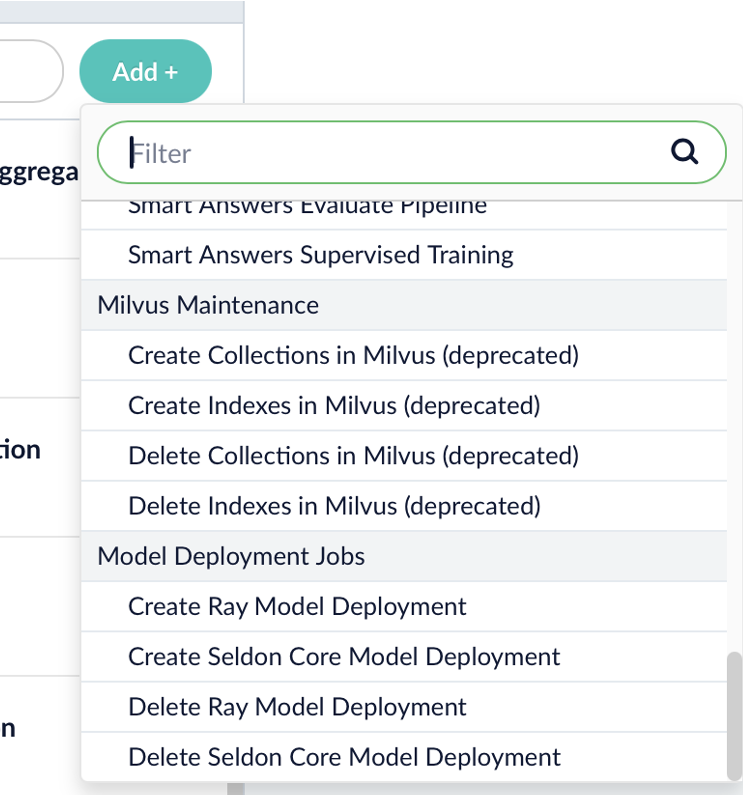
UI labels are added for Ray model deployment jobs, grouping them under “Model Deployment Jobs” for clarity and discoverability.
-
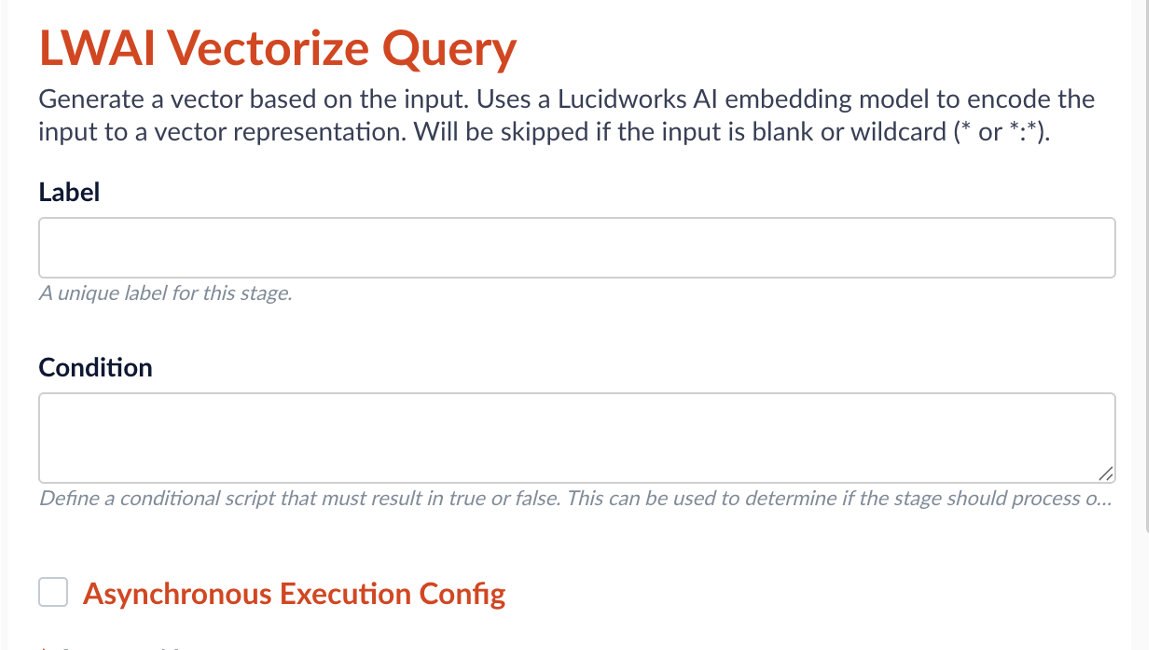
The Asynchronous Execution Config checkbox for the AI pipeline stages is now properly aligned with its label for better visual consistency and user experience.
-
An optional red banner can be added across the bottom of all production environments as a visual reminder that you are in a production environment. The banner is static and non-dismissible, reducing the risk of accidental misconfiguration.
 If you would like to customize the text that shows in the UI, you can add parameters to your custom values YAML file.Configuration parameters:
text(required): the message displayed in the bannerbackgroundColor: background color; default is red #ff4444textColor: text color; default is white #fffffffontSize: font size; default is 14pxfontWeight: font weight; default is boldposition: banner position - bottom or top; default is bottom
Naming conventions for AI-generated fields
Fields generated by Lucidworks AI now include a prefix oflwai_ when indexed to Solr, making it easier to identify those fields when excluding them or using them for other tasks, such as rules, queries, or reports. Any field names previously generated are still supported and no changes are needed to continue using them.
Additional Selenium support for the Web V2 connector
For users of the Web V2 connector v2.2.1 and later, Fusion 5.9.15 improves support for Selenium Grid. The Selenium service is now installed automatically with the Web V2 connector and removed automatically when the connector is removed, resulting in faster setup and ease of use.Smarter hybrid search
Resiliency is improved for searches using the Neural Hybrid Query stage. When a hybrid query depends on vectorization, failures in the upstream vectorization stage previously resulted in incomplete or unstable search behavior. Now Fusion automatically switches to lexical-only search if vectorization is unavailable to ensure uninterrupted results. Clear indicators and improved logging make it easier to understand when the fallback occurs:- If no vector is produced, you will see the message:
Input vector value is blank, skipping vector processing. - If a vector exists but is empty, you will see the message:
Input vector value is empty, {}, skipping vector processing.
Ability added for Prediction API
The Prediction API now supports image metadata enrichment. This API use case generates keywords and categories for images. This information can then be used as metadata for SEO, image-based product discovery, and more.Enhanced previews for integrated Lucidworks Platform products
A new, system-level API was added to Fusion 5.9.15 that allows Commerce Studio and other Lucidworks Platform products to simulate configuration changes before they are published. This change supports the following improvements:- Improved safety: Test and validate changes without affecting live search traffic, reducing the risk of errors or downtime.
- Faster iteration: Experiment and refine configurations in real time, improving development speed and decision-making.
- Higher confidence in publishing: Preview query behavior before deployment to increase trust in changes and reduce rollback events.
Bug fixes
- Added a custom module that serializes Nashorn
undefinedvalues as JSONnull, preventing serialization errors when such values appear in Java objects. When using the OpenJDK version of Nashorn, an exception was thrown when the context contained keys with undefined JavaScript values. This exception occurred because the class for the undefined values was not visible outside of the OpenJDK Nashorn package. A custom object mapper is added for the class so serialization issues are now resolved when handlingundefinedin JavaScript pipeline to run reliably under Java 17. - Time zone conversion issues are fixed in the Consumption Dashboard that caused counts to span extra days. The time selector was creating an overlap due to UTC conversion that included counts for both the selected day and the following day. As the API only accepts dates and not times, the time selector was removed to ensure accurate daily totals for entitlement reporting.
- Addressed an issue where jobs are stuck in a running state during an upgrade. Allowing all crawl jobs to complete before performing Fusion upgrades is necessary to maintain data integrity and prevent invalid job states. Now requests to stop jobs during an upgrade process are enhanced to check for invalid states, attempt automatic fixes, and provide detailed status messages.
- Adjusted license checks when apps-manager is unavailable for consistent and predictable license validation behavior. In previous releases, if apps-manager was unavailable or license capabilities could not be verified, the license check could not complete. The addition of broader exception catching when retrieving license capabilities and improved error logging for service unavailability ensures predictable capability behavior while connectivity is restored.
- Fixed a permissions flow in the Fusion indexing path used by V2 connectors. REST calls made from index pipelines using V2 connectors were running without the required permissions. This returned insufficient permissions errors and skipped mapped fields. REST calls in index pipelines now execute as expected when using the required privileges.
- Fixed an error where the Tika asynchronous parser in Fusion 5.9.12 did not index the body field for SharePoint connector documents, such as DOCS, PPTX, and XLSX files. Documents were split into multiple parts, so the body content only ended up in child documents, while the parent document lacked the body field. Now the first parsed part of the document is sent to Fusion using the parent document ID so the body field merges into the expected parent document. This restores expected content extraction and preserves child parts for images and other embeds.
Known issues
Upgrading to Fusion 5.9.15 moves stage SDKs from v1.0.0 to v2.0.0. When upgrading, plugins compiled with SDK v1.0.0 do not load. Pipelines referencing those stages remain hidden until you replace the plugins.- Before upgrading, rebuild any custom index or query plugins from SDK v1.0.0 using SDK v2.0.0. Also, verify pipelines do not reference stages removed or renamed in the new plugins.
- After upgrading, upload the new plugin ZIP files to the blob store and wait for the installation to complete. At this point, the pipelines will reappear.
Deprecations
For full details on deprecations, see Deprecations and Removals.Deprecated jobs
The following jobs are deprecated in this release and will be removed in a future release: Lucidworks recommends migrating to Neural Hybrid Search, which achieves superior relevance compared to these legacy machine learning methods. Rules previously generated by these jobs and promoted to the_query_rewrite collection will remain until you delete them.
Platform support and component versions
Kubernetes platform support
Lucidworks has tested and validated support for the following Kubernetes platforms and versions:- Google Kubernetes Engine (GKE): 1.29, 1.30, 1.31, 1.32, 1.33
- Microsoft Azure Kubernetes Service (AKS): 1.29, 1.30, 1.31, 1.32, 1.33
- Amazon Elastic Kubernetes Service (EKS): 1.29, 1.30, 1.31, 1.32, 1.33
Component versions
The following table details the versions of key components that may be critical to deployments and upgrades.
More information about support dates can be found at Lucidworks Fusion Product Lifecycle.