Description
The facet directive displays an individual facet. Either a response object and facet name must be passed to it, or a facet object.Search Within Facet
To enable search within facets the following attributes must be set on the facetsearch-enabled="true". The following attributes can be set
on either the facet-list tag or the facet tag to enable search within
platform and query.
If using a string field such as facet_field_s then you should add the
attribute facet-field to your facet tag with the tokenized version of
that field eg. facet-field="facet_field_t", for more information see
the search-enabled and facet-field attributes.
Multi-term facet queries
A field namedlocation_facet might have several facets, such as ‘AGL
Centre’, ‘Airport City’, and ‘Airport Road’. When you search for ‘AGL
c’, you want to see ‘AGL Centre’ in the results.
When conducting partial searches on multi-term facets, tokenize the
searched field using solr.KeywordTokenizerFactory.
Lower-case transformation is crucial for case-insensitive matching. You
can use the built-in lowercase field type in Fusion:
<fieldType name="lowercase" class="solr.TextField" positionIncrementGap="100">
    <analyzer>
    <tokenizer class="solr.KeywordTokenizerFactory"/>
    <filter class="solr.LowerCaseFilterFactory"/>
    </analyzer>
</fieldType>
Usage
as element:<search:facet
[response="{string}"]
[facet-name="{string}"]
[facet="{expression}"]
[title="{string}"]
[show="{string}"]
[show-more="{string}"]
[max-characters="{string}"]
[select="{string}"]
[platform="{string}"]
[query="{string}"]
[search-enabled="{boolean}"]
[wildcard="{string}"]
[facet-field="{string}"]
[collapsible="{boolean}"]
[show-empty="{boolean}"]
[collapsed-by-default="{boolean}"]
[show-count="{boolean}"]
[action="{string}"]
[count-number="{string}"]
[date-format="{string}"]
[measure="{string}"]
[when-field="{string}"]
[exclude="{boolean}"]>
</search:facet>
Directive info
- This directive creates new scope.
Parameters
| Param | Type | Details |
|---|---|---|
| response (optional) | string | The name of the response to use. |
| facet-name (optional) | string | Facet name to use from the response object |
| facet (optional) | expression | A facet object to display |
| title (optional) | string | The title of the facet to display, defaults to the name of the facet |
| show (optional) | string | The number of filters to show by default |
| show-more (optional) | string | The number of extra filters to display when the show more link is clicked |
| max-characters (optional) | string | Limit display value to a certain number of characters, adding ’…’ if max-characters is exceeded. |
| select (optional) | string | How to render each FacetFilter. Valid values: click User selects a filter by clicking the value; (default) multiselect Supports selecting multiple filters that get combined with an ‘OR’. toggle Only allows one filter to be selected at a time but shows unselected filters and counts multiselect-instant Supports selecting multiple filters that get combined with an ‘OR’, filters will be applied automatically. |
| platform (optional) | string | The name of the platform to use for search within the facet. |
| query (optional) | string | Nome of the query to be used. |
| search-enabled (optional) | boolean | Whether to enable search on the facet. If no query or platform is defined on the facet or facet-list it will enable the user to search through the filters that have been returned in the response. If a platform and query is defined on the facet or facet-list then it will search for filters in the search index. (Requires a tokenized field, if not using a tokenized field, if not using a tokenized field please see facet-field). |
| wildcard (optional) | string | If search-enabled is true you can set wildcard rules for this search. Valid values are: left: This adds a wildcard prefix to facet search terms, for example “term”. right: This adds a wildcard suffix to facet search terms, for example “term”. both (default): This adds both a wildcard prefix and suffix to facet search terms, for example “term”. none: This adds no wildcards to the facet search term (only exact matches). |
| facet-field (optional) | string | When this option is provided, the user will have the option to search values within the facet using the named field to search against. The named field should be tokenized. Example usage is if you are using facet_field_s (a string facet/field) as your facet you need to provide the tokenized version of that field for search against, e.g. facet_field_t. |
| collapsible (optional) | boolean | Set to true if the facet should be collapsible in the list of facets. (default: false) |
| show-empty (optional) | boolean | If true then the facet will also output empty filters where count is zero. (default: false) |
| collapsed-by-default (optional) | boolean | Set to true if this facet should be collapsed by default. (default: false) |
| show-count (optional) | boolean | Whether to add metadata with frequency counts etc. (default: true) |
| action (optional) | string | Alternative Action to submit the query parameters to - defaults to current page. |
| count-number (optional) | string | Specify how the number representing the count should be formatted. Valid values: plain Displays the number without any formatting. formatted Formatted means that the number is comma formatted (2,000,000 for 2000000). (default) rounded Rounded means the number is represented in a short format (2k for ~2000). |
| date-format (optional) | string | How to format the date. See #/api/lightning.filter:dateFormat[date format filter] for valid formats. |
| measure (optional) | string | What fact to use as an alternative to count as quantitative value for a filter. |
| when-field (optional) | string | Comma-separated list of field names. When one matches this facet representation will be used during an iteration. |
| exclude (optional) | boolean | On filter hover, displays an icon to allow the user to add an exclusion filter for the value. (default: false) |
Example
Source
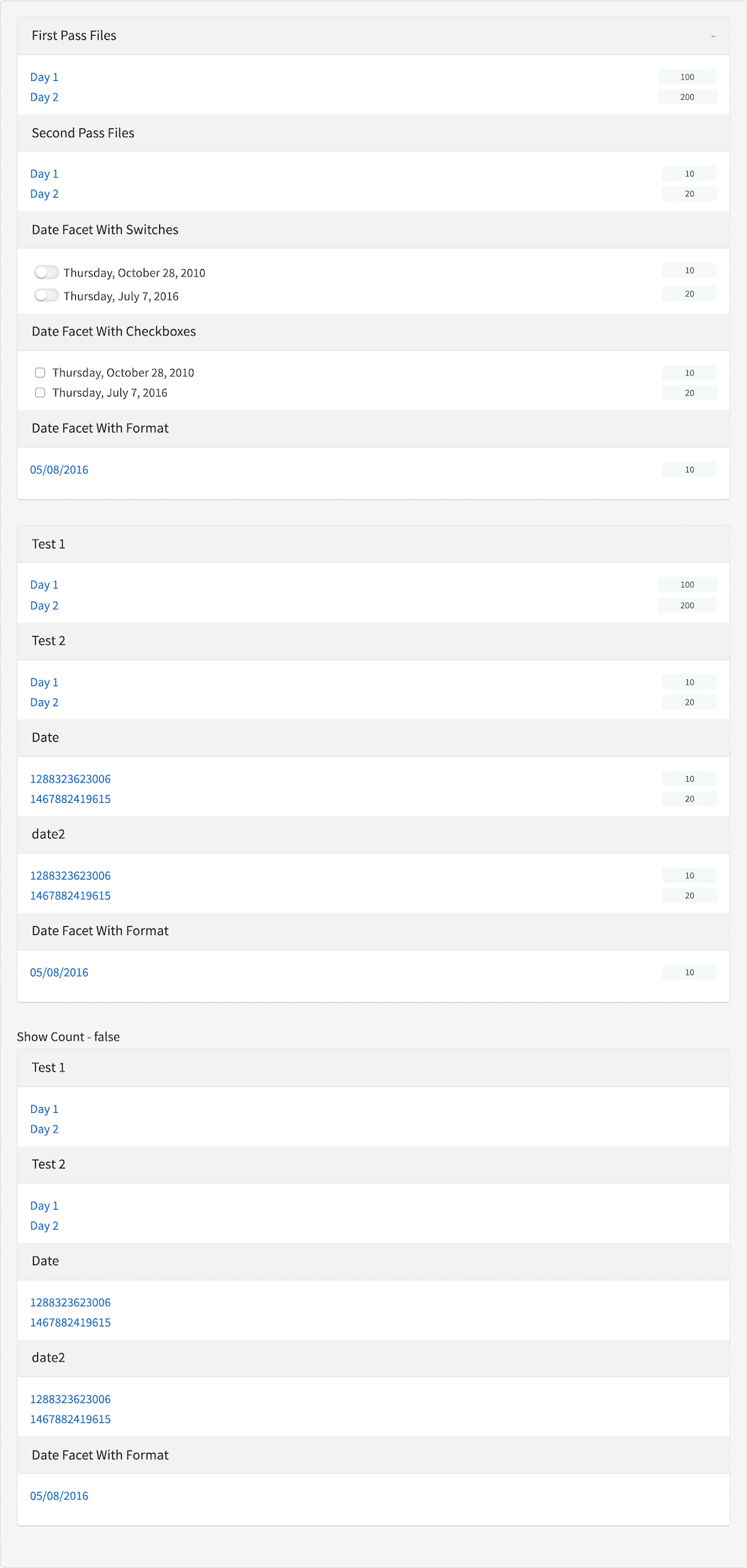
<search:facet-list response="response" styling="facet-list facet-list-step facet-list-wrappedheader facet-list-wrappedheader-noborder">
    <search:facet facet-name="test1" title="First Pass Files" collapsible="true"></search:facet>
    <search:facet facet-name="test2" title="Second Pass Files"></search:facet>
    <search:facet facet-name="empty" title="Empty Facet"></search:facet>
    <search:facet facet-name="date" title="Date Facet With Switches" date-format="fullDate" select="multiselect" styling="switches"></search:facet>
    <search:facet facet-name="date2" title="Date Facet With Checkboxes" date-format="fullDate" select="multiselect"></search:facet>
    <search:facet facet-name="date3" title="Date Facet With Format" date-format="dd/MM/yyyy"></search:facet>
</search:facet-list>

<search:facet-list response="response" styling="facet-list facet-list-step facet-list-wrappedheader facet-list-wrappedheader-noborder" facet-names="*">
    <search:facet facet-name="date3" title="Date Facet With Format" date-format="dd/MM/yyyy"></search:facet>
    <search:facet></search:facet>
</search:facet-list>

<h5 id="example_source_show-count---false">Show Count - false</h5>
<search:facet-list response="response" styling="facet-list facet-list-step facet-list-wrappedheader facet-list-wrappedheader-noborder" facet-names="*">
    <search:facet facet-name="date3" title="Date Facet With Format" date-format="dd/MM/yyyy" show-count="false"></search:facet>
    <search:facet show-count="false"></search:facet>
</search:facet-list>
angular.module('lightning')
.controller('ExampleController', ['$scope','$timeout','ResponseService', function($scope,$timeout,ResponseService) {
            $scope.response = {
                page: 2,
                query: {
                    rpp: 50
                },
                facets: {
                    test1: {
                        filters: [
                            {

                                val: {
                                    dsp: 'Day 1',
                                    act: 'Day 1',

                                },
                                count: 100,

                            },
                            {

                                val: {
                                    dsp: 'Day 2',
                                    act: 'Day 2',
                                },
                                count: 200,
                            }

                        ],
                        display:'Test 1'
                    },
                    test2: {
                        filters: [
                            {

                                val: {
                                    dsp: 'Day 1',
                                    act: 'Day 1',
                                },
                                count: 10,

                            },
                            {

                                val: {
                                    dsp: 'Day 2',
                                    act: 'Day 2',
                                },
                                count: 20,
                            }

                        ],
                        display:'Test 2'
                    },
                    empty: {
                        filters: []
                    },
                    date: {
                        filters: [
                            {

                                val: {
                                    dsp: 1288323623006,
                                    act: 1288323623006,
                                },
                                count: 10,

                            },
                            {

                                val: {
                                    dsp: 1467882419615,
                                    act: 1467882419615,
                                },
                                count: 20,
                            }

                        ],
                        'max-count':20,
                        display:'Date'
                    },
                    date2: {
                        filters: [
                            {

                                val: {
                                    dsp: 1288323623006,
                                    act: 1288323623006,
                                },
                                count: 10,

                            },
                            {

                                val: {
                                    dsp: 1467882419615,
                                    act: 1467882419615,
                                },
                                count: 20,
                            }

                        ],
                        'max-count':20,
                        display:'date2'
                    },
                    date3:{
                        filters:[
                            {
                                val:{
                                    act: {
                                        type: "range",
                                        from: "2016-08-05T12:50:30",
                                        to: "2016-08-05T12:50:40",
                                        fromExcluded: false,
                                        toExcluded:false
                                    },
                                    dsp:'2016-08-05T12:50:30Z'
                                },
                                count:10
                            }
                        ],
                        'max-count':10,
                        display:'date3'
                    },
                },
                results: []
            }

            ResponseService.setResponse('response', $scope.response);
        }]);
Result