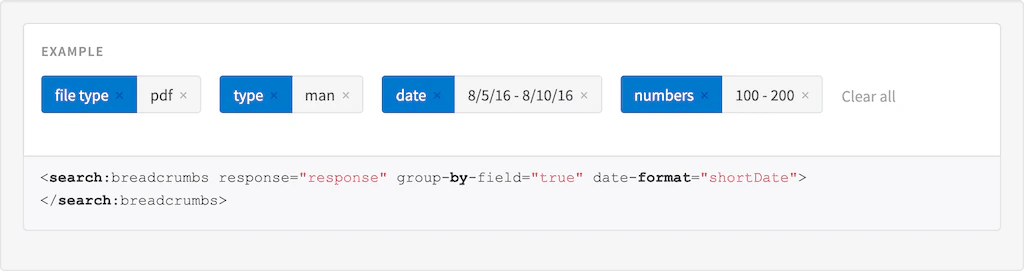
Description
The Breadcrumbs directive.Usage
as element:<search:breadcrumbs
[response="{object}"]
[query="{string}"]
[group-by-field="{boolean}"]
[show-field-name="{boolean}"]
[show-query="{boolean}"]
[max-characters="{number}"]
[action="{string}"]
[optional-label="{string}"]
[date-format="{string}"]
[exclude="{string}"]>
</search:breadcrumbs>
Directive info
- This directive creates new scope.
Parameters
| Param | Type | Details |
|---|---|---|
| response (optional) | object | A response object |
| query (optional) | string | A query object |
| group-by-field (optional) | boolean | Group filters by field name (only available if query is not in grouping mode). |
| show-field-name (optional) | boolean | Whether to show field name as a part of the breadcrumb (only available when group by field is true), Default:true. |
| show-query (optional) | boolean | Whether to include the user query text as a breadcrumb. Default:true |
| max-characters (optional) | number | Limit display value to a certain number of characters, adding ’…’ if maxCharacters is exceeded. |
| action (optional) | string | Alternative page to submit the query parameters to - defaults to current page. |
| optional-label (optional) | string | Label to show when the Filter is optional. |
| date-format (optional) | string | Format to use for date values if no display value is specified. See #/api/lightning.filter:dateFormat[date format filter] for valid formats. |
| exclude (optional) | string | Comma separated list of fields to exclude, you can also use field=value to exclude only fields with the value provided. |
Example
Source
<tk-example>
    <search:breadcrumbs response="response" group-by-field="true" date-format="shortDate" exclude="problem"></search:breadcrumbs>
</tk-example>
<tk-code-wrapper>
    <code hljs><search:breadcrumbs response="response" group-by-field="true" date-format="shortDate"></search:breadcrumbs></code>
</tk-code-wrapper>
angular.module('lightning')
.controller('ExampleController', ['$scope','$timeout', function($scope,$timeout) {
            $scope.response = {
                page: 2,
                query: {
                    rpp: 50,
                    filters:[
                        {
                            field:'file type',
                            val:'pdf'
                        },
                        {
                            field:'type',
                            val:'man'
                        },
                        {
                            val:{
                                act: {
                                    type: "range",
                                    from: "2016-08-05T12:50:30.660",
                                    to: "2016-08-10T12:50:40.509",
                                    fromExcluded: false,
                                    toExcluded:false
                                },
                                dsp:'2016-08-05T12:50:30.660Z - 2016-08-10T12:50:40.509Z'
                            },
                            field:'date'
                        },
                        {
                            val: {
                                act: {
                                    type: "range",
                                    from: 100,
                                    to: "200",
                                    fromExcluded: false,
                                    toExcluded: false
                                },
                                dsp: '100 - 200'
                            },
                            field: 'numbers'
                        },
                        {
                            val: {
                                act:'foo',
                                dsp:'bar'
                            },
                            field:'problem'
                        }
                    ]
                },
                facets: {}
            }
        }]);
Result