Checking a job status
With the API
You can see the current job states of all datasources for the appmyApp by calling the Jobs API:
The value
datasource:myDatasource indicates a datasource, myDatasource, is present. The line "status": "ready" indicates the current state of the job, which has never run.Job history results field definitions
Job history counters vary between V1 (classic) connectors and V2 (plugin) connectors. V1 connectors use thecounter.* prefix, while V2 connectors use different counter names without the prefix.
To determine if a datasource uses a V1 or V2 connector, check the connectorType field in the job history response. V1 connectors use types like lucid.anda or lucid.fs. V2 connectors use types like lucidworks.*, such as lucidworks.file-upload or lucidworks.jdbc.
V1 Connector Counters
| Field | Definition |
|---|---|
| counter.deleted | Total number of documents deleted or removed from the Solr index. |
| counter.failed | Total number of documents not indexed due to failure. The errors are written to the log. |
| counter.input | Total number of fetched documents passed to the index pipeline. |
| counter.new | Total number of documents fetched for the first time. |
| counter.output | Documents successfully sent to the Fusion indexing pipeline. |
| counter.skipped | Total number of documents skipped due to rules such as max, min, and file size. |
| counter.other.pipeline.in | Total number of documents entering the index pipeline. This includes parsed items. |
| counter.other.pipeline.out | Total number of documents exiting the index pipeline. |
| counter.other.pipeline.complete | Total number of documents that completed processing in the pipeline. |
| endTime | Time the job concluded, aborted, or was manually stopped. |
| resource: datasource | Name of the datasource. |
| startTime | Time the job started. |
| status | Job status such as SUCCESS, RUNNING, or ABORTED. |
| runId | Unique identifier for the specific job run. |
| datasourceId | The datasource configuration ID. |
Pro connectors use the same framework as V2 connectors. For more information, see What are Pro connectors?.
| Field | Definition |
|---|---|
| fetch.request | Total number of fetch requests initiated by the connector. |
| fetch.plugin-response | Total number of fetch responses received from the connector plugin. |
| fetch.plugin-response.document | Total number of documents returned in fetch responses. |
| pipeline.in | Total number of documents entering the index pipeline. |
| pipeline.out | Total number of documents exiting the index pipeline. |
| pipeline.complete | Total number of documents that completed processing in the pipeline. |
| pipeline.stages.STAGE_ID.processed | Number of documents processed by a specific pipeline stage, where STAGE_ID is the stage identifier. |
| content-indexer.document.received.count | Total number of documents received by the content indexer. |
| content-indexer.completed.count | Total number of documents that completed indexing. |
| content-indexer.result.success.counter | Total number of documents successfully indexed. |
| start.request | Indicates the job start was requested. |
| start.plugin-response | Indicates the connector plugin acknowledged the start request. |
| stop.request | Indicates the job stop was requested. |
| stop.plugin-response | Indicates the connector plugin acknowledged the stop request. |
| endTime | Time the job concluded, aborted, or was manually stopped. |
| resource: datasource | Name of the datasource. |
| startTime | Time the job started. |
| state | Job state such as FINISHED, RUNNING, or ABORTED. |
| runId | Unique identifier for the specific job run. |
| configId | The datasource configuration ID. |
The specific counters available in job history depend on the connector type, version, and configuration. Some connectors may provide additional metrics. Use the Connector Jobs API to inspect the actual counters for your datasource.
With the UI
In the Fusion UI, navigate to Indexing > Datasources. Click a datasource to open the datasource panel.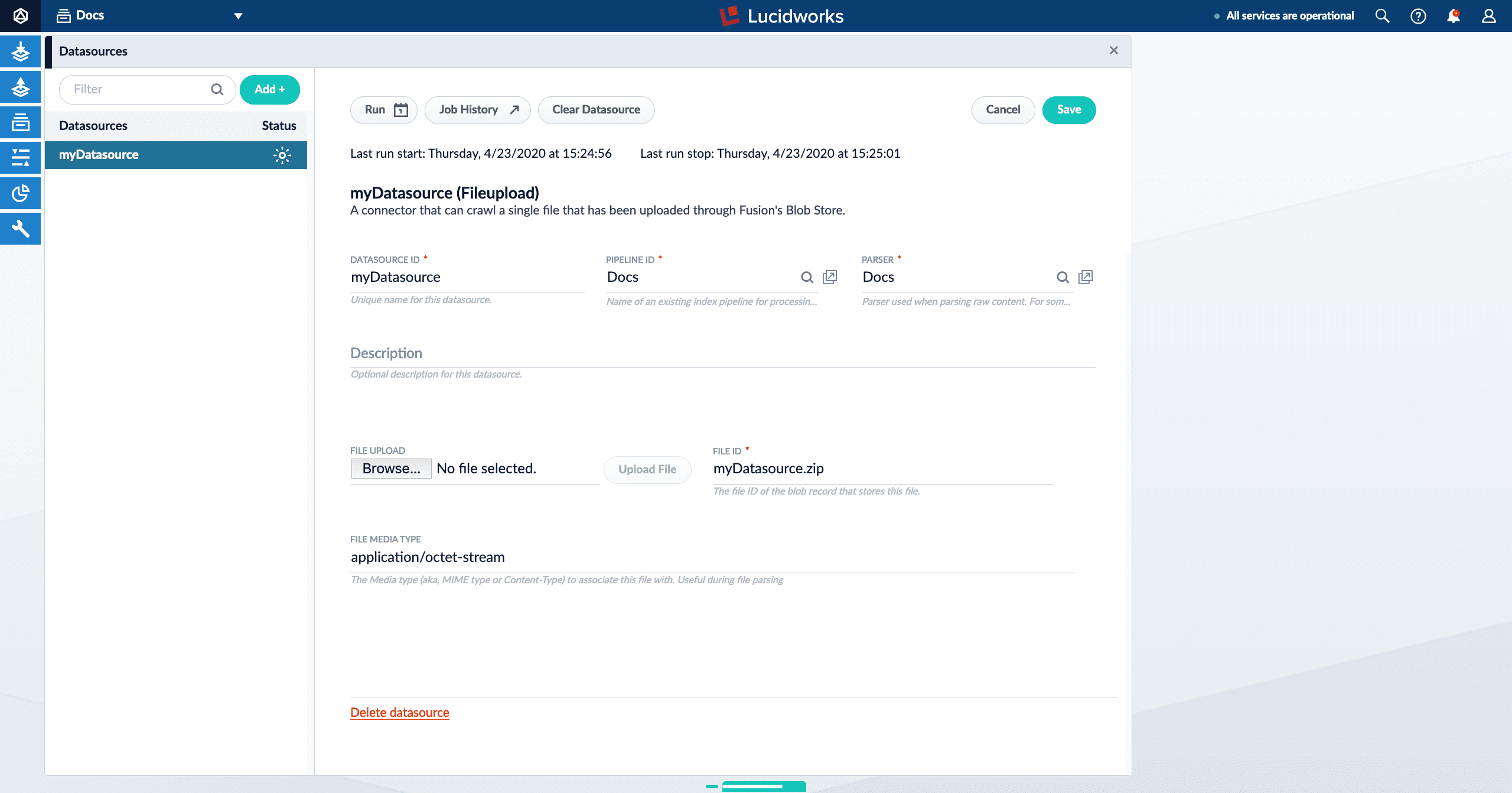
lastStartTime and lastEndTime values from the Jobs API call. (These values are only present if a job has been run at least once.)
| Icon | Description |
|---|---|
| The Run button opens a panel containing various run options and information. | |
| The Start button starts a job. | |
| The New Schedule button displays a dropdown with several scheduling options: • cron. Schedule a job based on a Crontab expression. See Cron Trigger documentation. • interval. Schedule a job to run on an interval after a set starting point. For example, schedule a job to run every day at 1:00 AM. 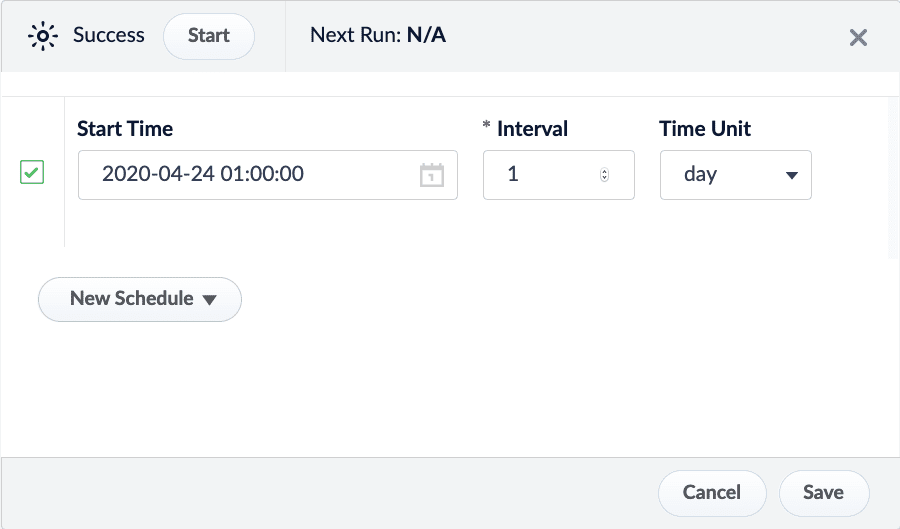 • job_completion. Schedule a job to run after another job has completed. You can schedule the job to run if the job succeeds, fails, or regardless of success. 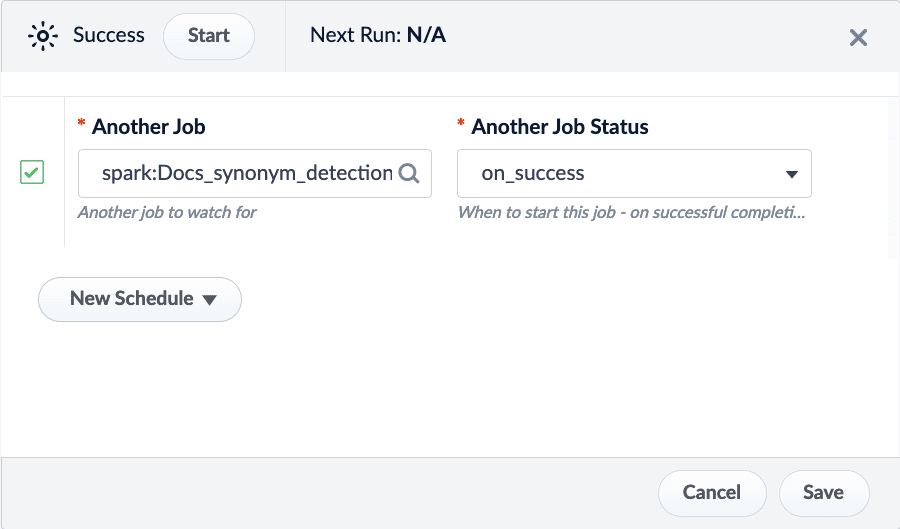 | |
The Stop button stops a running job. This results in a status of "status": "aborted". | |
| The Job History button opens the Job History panel. Click one of the job entries to see additional details. Expand the job details for more information. Click Open Logs in Dashboard for complete information. | |
| The Clear Datasource button removes documents from your collection that are indexed from that datasource. The job history will not be deleted. |
| Icon | Description |
|---|---|
| Never Run | The job has been created but has not been run. |
| Running | The job is currently running. Depending on the number of documents being processed, the job can take a long time to complete. Stop the job with the Stop button. |
| Success | The job was completed successfully. |
| Failed | The job was not able to successfully run. Expand the job details for more information. Click Open Logs in Dashboard for complete information. |
| Aborted | The job was manually stopped before it could finish. |
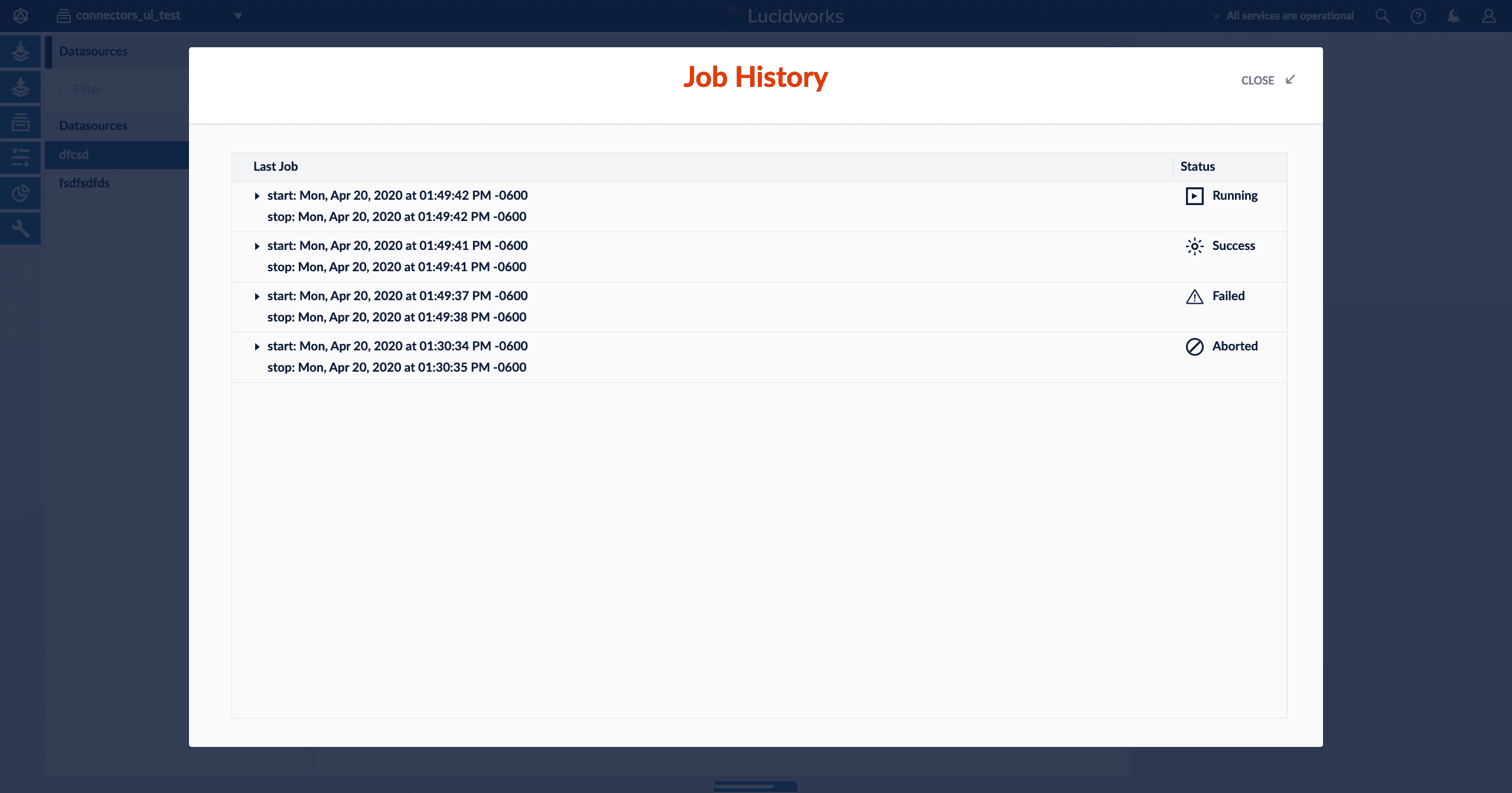
The image above shows all possible job statuses.
How does the Jobs API work?
In Checking a job status with the API above, two Jobs API endpoints were used to call the datasourcemyDatasource:
myApp/jobs?type=datasource- Retrieves the current datasource job states for all datasources of a specified app. In this case, the app is specified asmyApp.
You can also usetype=sparkto retrieve all Spark jobs andtype=taskfor task jobs./jobs/datasource:myDatasource/history- Retrieves a specific object’s job history. In this case, the object type is a datasource, as selected withdatasource:.
Datasources are not the only object type for jobs. There are also Spark jobs (spark:) and task jobs (task:).
JobController and SolrJobHistoryStore.
The Job Controller
The Job Controller is responsible for getting any active job’s run status, if an active job is running. In the case of V1 connectors classic datasource jobs, it will reach out to Fusion’s connectors-classic application’s connectors API. When the API application calls the connectors-classic Jobs API, it will first use Zookeeper to identify the IP address of the connector-classic node that is assigned to this datasource, if one exists. When the connectors-classic node IP assigned to the job is identified, the API application will call out to the connectors-classic node viahttp://<connectors-node-ip>:8984/connectors/v1/connectors/jobs/myDatasource. The call reaches the component ConnectorsManagerController to query the job status of currently running jobs with the ID myDatasource.
The Solr Job History Store
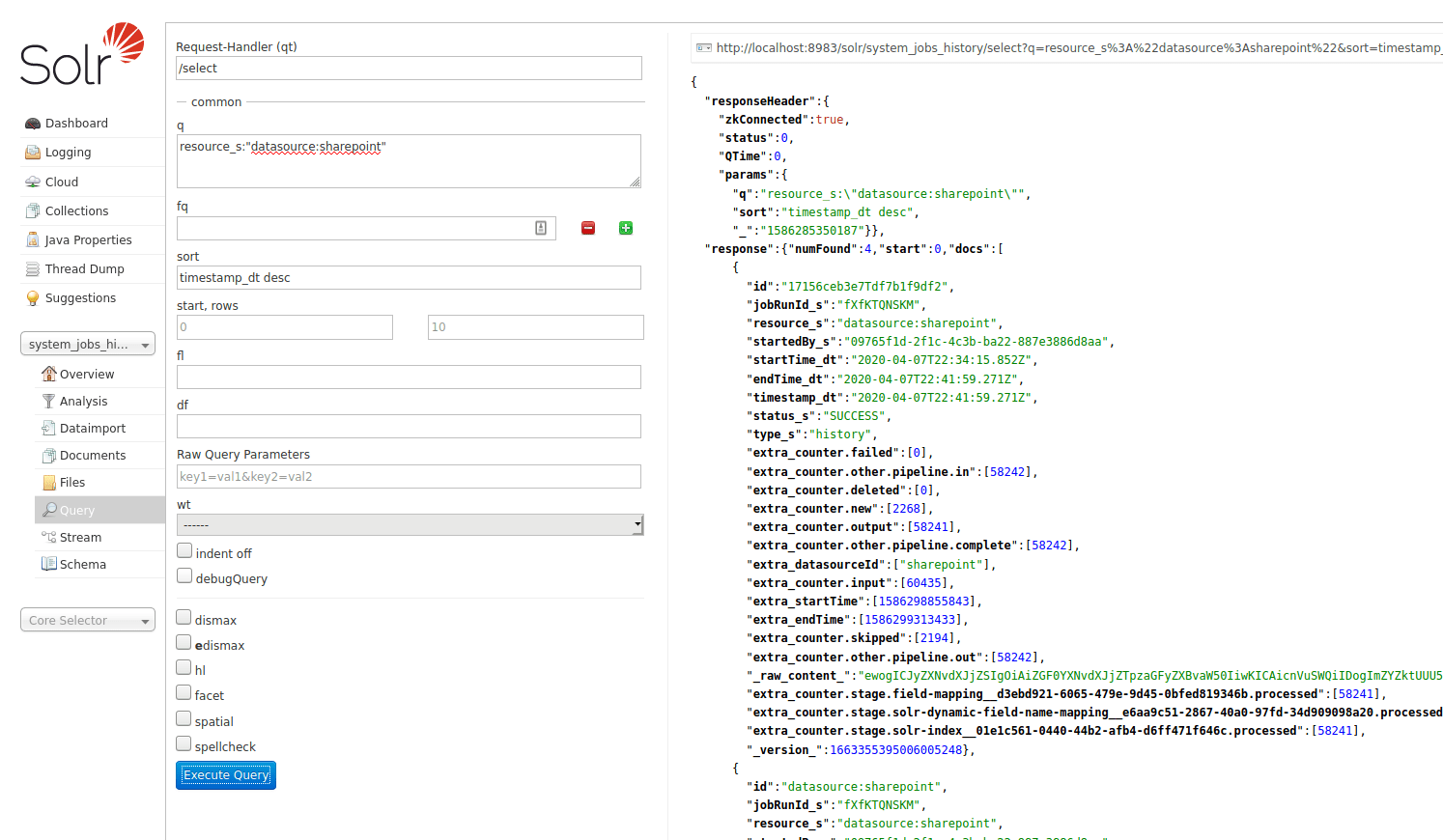
SolrJobHistoryStore reads and writes a job’s history data to and from Solr. Fusion’s API application creates a special system Solr collection, system_jobs_history, to store the history.
You can also query the job history from Solr directly, if you want: