

Key highlights
OpenTelemetry tracing support
OpenTelemetry (OTel) provides distributed tracing capabilities for Lucidworks Search that enable engineering and operations teams to identify performance bottlenecks and errors across microservices in real time. This comprehensive, request-level observability across Lucidworks Search’s microservices helps teams trace individual queries separately from monitoring systems such as Prometheus without overwhelming them. The API Gateway handles incoming queries and routes them through the Query Service to Solr.The services that support OpenTelemetry are API Gateway, Query, and Indexing.
Distributed trace flow
This section illustrates and describes the OpenTelemetry distributed trace flow. Lucidworks Search’s distributed tracing uses the API Gateway as the trace root with selective sampling for Query Service requests, while the Query Service uses parent-based sampling to ensure complete trace coverage. OpenTelemetry collectors run locally on each server to minimize network overhead, bundling trace data before sending it to Grafana Tempo. The tracing system integrates with the existing Lucidworks observability stack (Grafana, Loki, Prometheus) without requiring code changes to Solr, which uses environment variable configuration.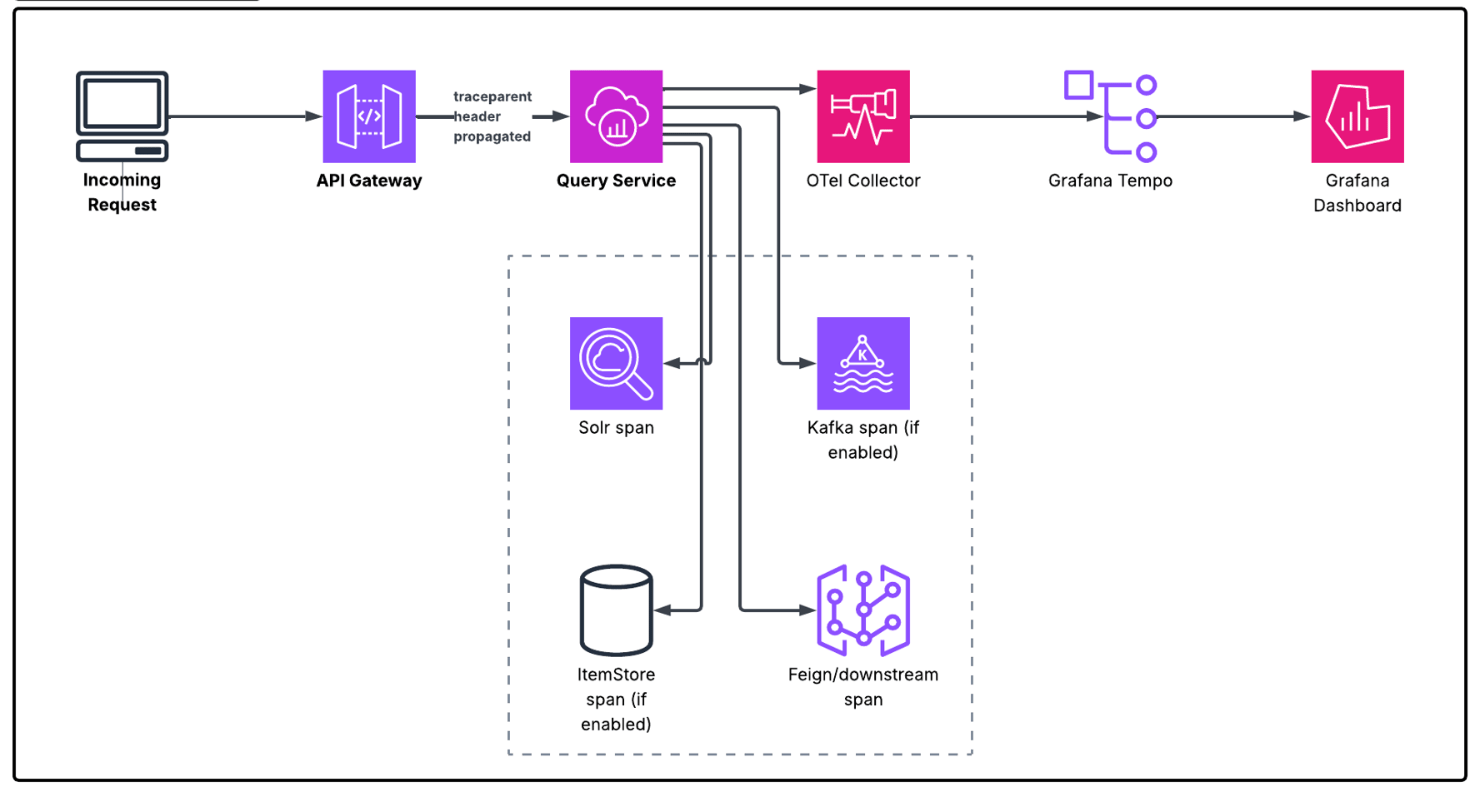
Lucidworks MCP enhancements
Lucidworks Search’s Model Context Protocol (MCP) implementation includes improved configuration capabilities, enhanced authentication options, and monitoring in this release. Enhancements include:- OAuth authentication with external identity providers: Lucidworks Search now supports OAuth 2.1 authentication using external identity providers for both HTTP and STDIO modes. This enables enterprise single sign-on workflows for MCP access and is the recommended authentication method for Claude Desktop applications. See Set up authentication for configuration details.
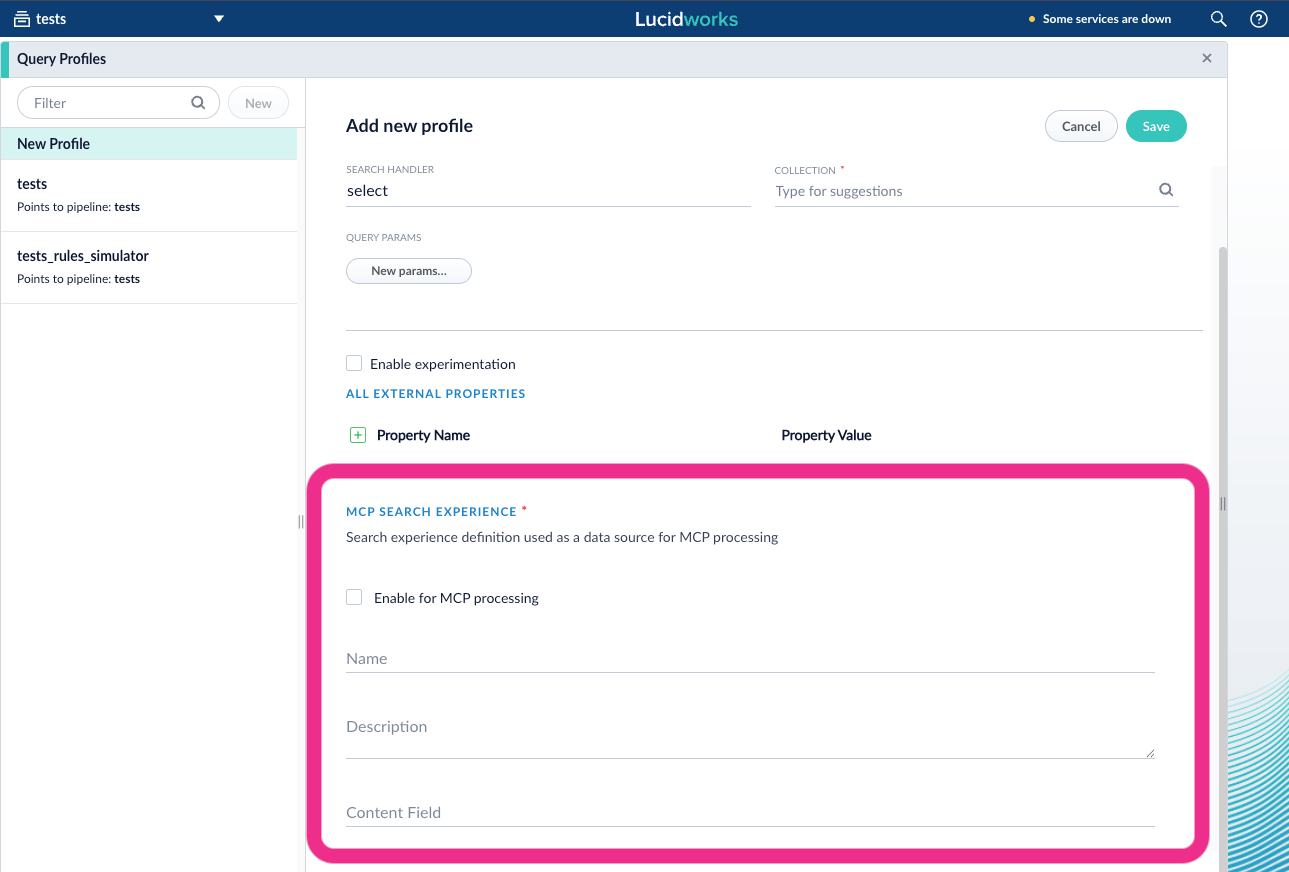
- UI-based search experience configuration: For simpler setup, you can configure MCP search experiences directly through the Query Profile panel instead of by editing a configuration file.
- Multi-experience search: The MCP server can now use multiple search experiences in a single request, allowing Claude to gather information from multiple data sources in one query. In 5.17.x, the server selected only the single best-matching search experience per request. This enables AI assistants to retrieve information from multiple data sources in one query.
- Enhanced document descriptions: The MCP server now checks the
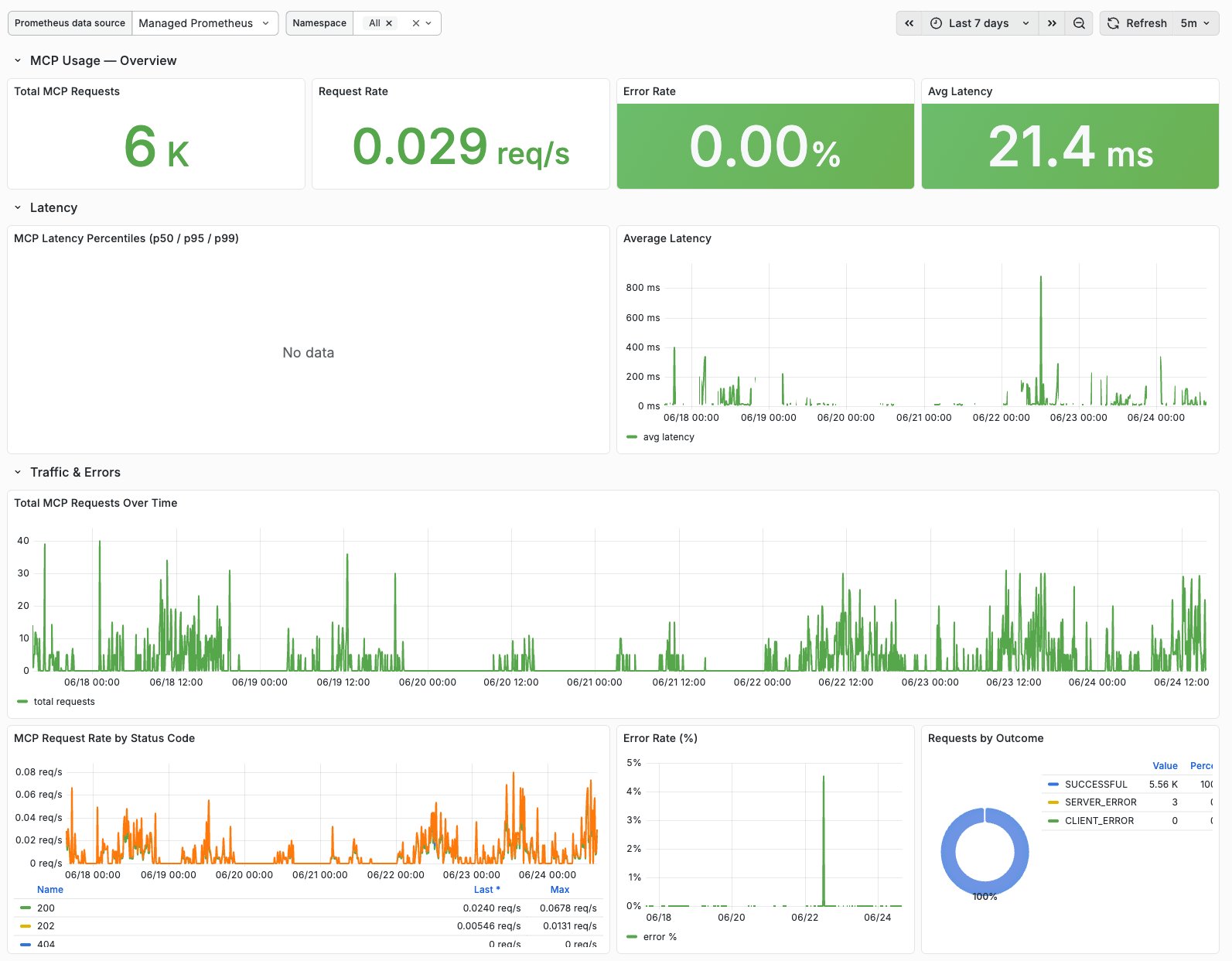
body_tfield as an additional source for document descriptions returned to AI assistants, providing richer document summaries. - MCP usage monitoring documentation: The existing API gateway metrics that track MCP server usage (available since Lucidworks Search 5.17) are now documented with setup instructions.
The metrics provide request rates, average latency, error rates, and traffic breakdowns by status code.
Note that STDIO-based MCP usage (such as earlier Claude Desktop integrations) does not flow through the
/mcpendpoint and is not captured in these metrics. Contact your Lucidworks representative for dashboard configuration.
Mutual Transport Layer Security support
Lucidworks Search 5.18 introduces Mutual Transport Layer Security (mTLS) support for clients on 5.9.15 and later. mTLS is a network-layer authentication feature that extends standard TLS encryption by requiring both the client and server to present valid certificates during the TLS connection process. While standard TLS encrypts traffic and allows clients to verify the server’s identity, mTLS adds bidirectional authentication where the server also verifies the client’s identity before allowing the connection. mTLS is implemented at the Google Cloud External Application Load Balancer level and ensures that only trusted, certificate-authenticated clients can access APIs and UI endpoints. This feature complements but does not replace application-layer authentication methods like SSO and OIDC, and provides an additional security layer that satisfies zero-trust architecture requirements. Performance impact is minimal with only sub-millisecond latency added during initial connection, and the feature supports multiple CA certificates as trust anchors for flexible multi-environment access control. This diagram illustrates an example authentication process.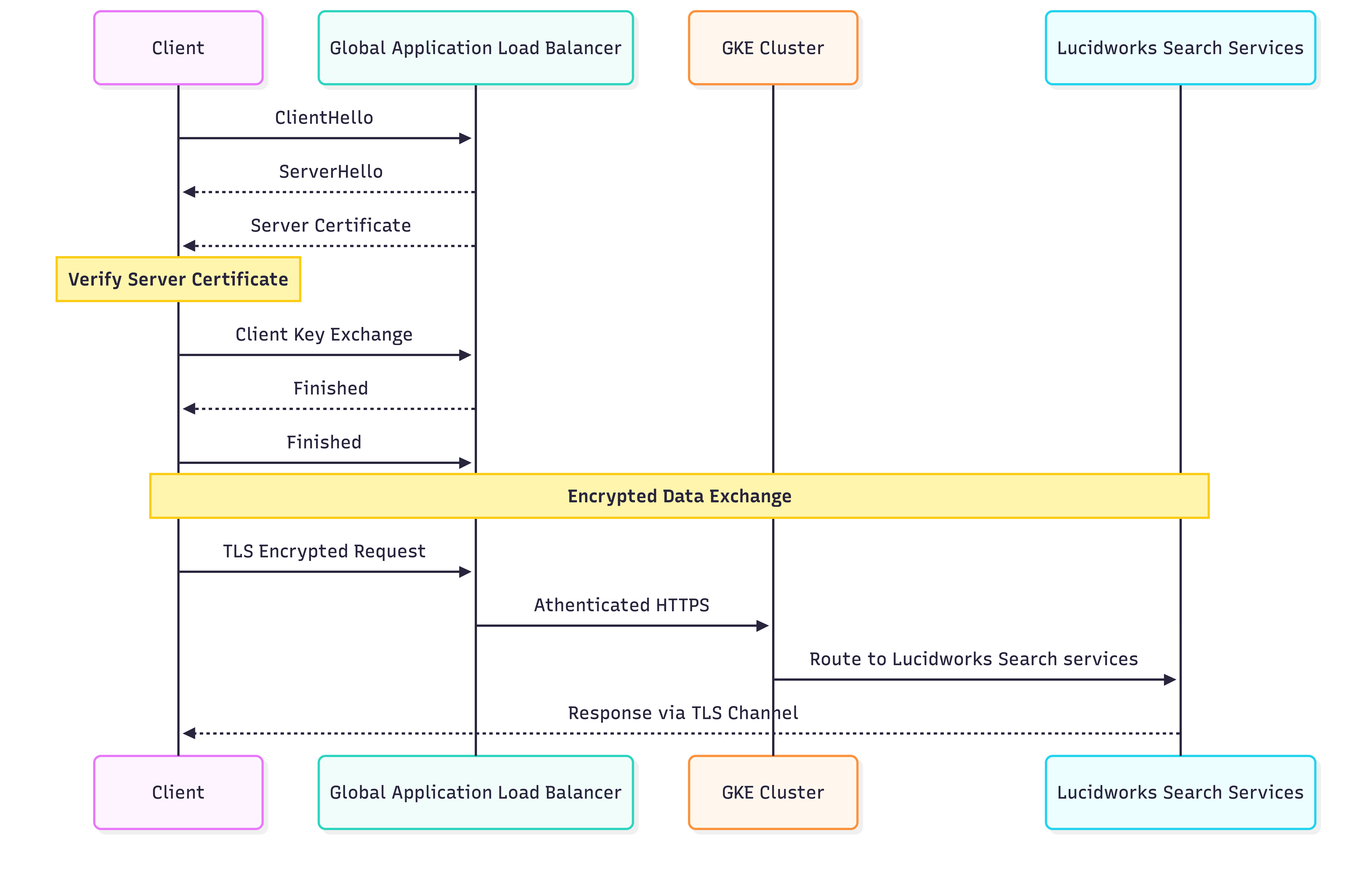
mTLS and TLS service flow
Use cases
mTLS applies to B2B, B2C, and knowledge management scenarios. Organizations can restrict Lucidworks Search API access to only authenticated services within their infrastructure, requiring valid client certificates signed by their certificate authority. For multi-environment deployments, mTLS enables different certificate requirements across development, staging, and production environments. Development environments can use self-signed certificates while production requires certificates from enterprise public key infrastructure (PKI). The feature is particularly critical for organizations operating under zero-trust security frameworks that need to follow these guidelines:- Adhere to strict compliance requirements such as SOC2, ISO 27001, or HIPAA
- Enforce network-layer security controls beyond application authentication
Ray environment variables
Ray deploy jobs now support Ray environment variables, enabling better configuration and control of Ray-based machine learning workloads within Lucidworks Search’s deployment infrastructure.Connectors
Stray content deletion
All V2 and Pro connectors now include a configurable circuit breaker that prevents accidental mass deletion of indexed content. Previously, stray content deletion could silently remove all of a datasource’s content due to misconfigurations or source system issues, with no safety mechanism to detect anomalous deletion patterns. You can set a threshold in a connector’s settings for the maximum percentage of indexed items that may be deleted as stray in a crawl. If the total stray items exceeds this percentage, the job fails, and the circuit breaker blocks the deletion to prevent accidental data loss. Failure details are visible in the job history. To enable tracking each document, child documents of an embedded parser such as entries in a ZIP file or lines in a CSV file are now tracked by a signature so these documents also participate correctly in stray content deletion and circuit breaker accounting, instead of being silently reindexed or deleted. Stray content deletion and the circuit breaker are enabled by default. You can edit these settings in each connector’s core properties.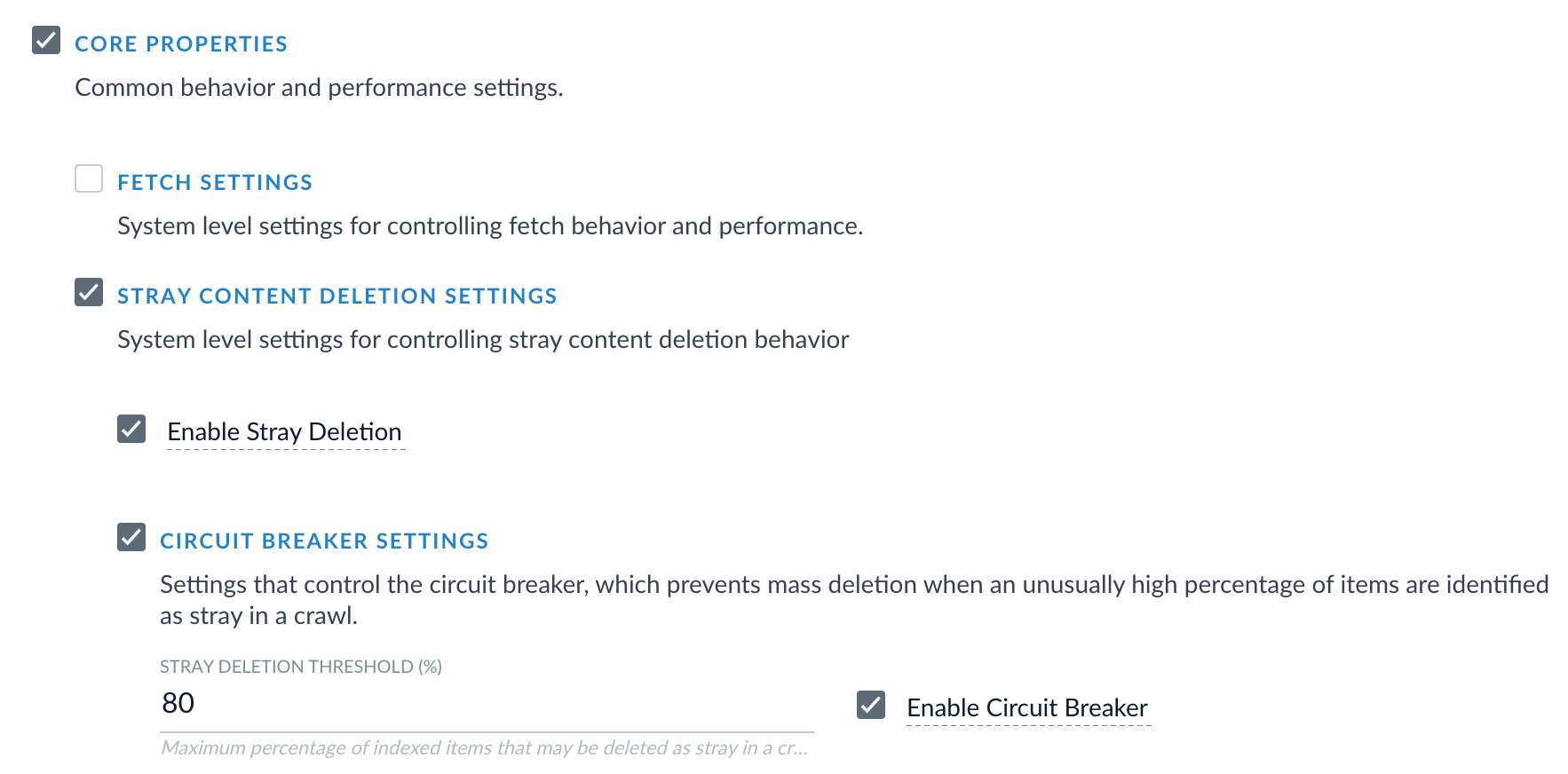
Configuration parameters
Configuration parameters
boolean
default:"true"
When enabled, items not re-encountered in the current crawl are deleted from the content collection.
boolean
default:"true"
When enabled, stray deletion is blocked if the percentage of items to be deleted exceeds the configured threshold.
Disable this setting only if unconditional stray deletion is required regardless of volume.
number
default:"80"
Maximum percentage of indexed items that may be deleted as stray in a crawl.
If the total stray items exceeds this percentage, the circuit breaker blocks the deletion to prevent accidental data loss.
Accepts values from 0 to 100.
Sidecar collections for graph security trimming
Connectors that use graph security trimming can now route access-control documents to a dedicated sidecar collection separate from the content collection. This enables improved performance and cleaner separation of documents for deployments using graph ACLs. By default, ACL documents continue to land in the content collection, maintaining backward compatibility. To use a sidecar collection, navigate to Graph security filtering configuration in your datasource and set the ACL Collection ID datasource parameter to the name of your dedicated ACL collection. After configuring your datasource, navigate to the Query Workbench and configure the graph security trimming query stage to use this sidecar collection. Connectors that support sidecar collections include SharePoint Optimized, LDAP, and any V2 or Pro connector that emits graph ACLs.
Configuration parameter
Configuration parameter
string
Name of the dedicated sidecar collection for storing ACL records.
If not specified, ACL records are stored in the content collection as the default behavior.
Document signatures
V2 and Pro connectors now evaluate document signatures to prevent reindexing unchanged content. Each document, including parsed child documents, receives a_lw_signature_s field containing a fingerprint built from the document’s fields, metadata, and ACLs.
During recrawls, documents with unchanged signatures skip reindexing, reducing memory overhead.
API changes
Connectors SDK upgrade
The Connectors SDK has been upgraded to version 4.2.5. This release includes protobuf schema improvements, enhanced plugin resolution, and updated dependencies for custom connector development. For details, see Connectors SDK 4.2.5 Javadocs.Connector configuration endpoints consolidated
Several legacy connector configuration endpoints have been removed in favor of the standardized datasource API. Use the/api/apps/{app}/datasources endpoints for all connector configuration operations.
Templating API enhancements
The templating API now supports additional Mustache syntax features and provides better error messages for template validation failures.Bug fixes
Connectors
PhaseState no longer causes cached failures in fusion-connectors
In previous versions of Lucidworks Search, PhaseState operations resulted in cached failures that persisted inappropriately in the fusion-connectors service. Lucidworks Search now properly manages PhaseState caching to prevent spurious failure states.RepositoryPluginsService cache failures resolved
In previous versions of Lucidworks Search, the RepositoryPluginsService experienced cached failures that prevented proper plugin loading and initialization in fusion-connectors. Lucidworks Search now correctly manages the plugin service cache lifecycle.Stray content deletion now works correctly when parsers emit marker documents
In previous versions of Lucidworks Search, stray content deletion failed to remove orphaned child documents when a parser emitted an error or comment marker document before any records, causing orphaned documents to accumulate in the content collection across crawls. Lucidworks Search now properly removes orphaned child documents to prevent document accumulation.Connector plugin pods now allocated increased resources
In previous versions of Lucidworks Search, connector plugin pods operated with insufficient resource allocations, causing performance degradation and potential out-of-memory issues. Lucidworks Search now allocates appropriate CPU and memory resources to connector plugin pods for reliable operation under load.AI and machine learning
LWAI stages now continue pipeline execution on failure
In previous versions of Lucidworks Search, LWAI stage failures caused entire pipelines to fail, preventing subsequent stages from executing. Lucidworks Search now logs LWAI stage failures while allowing the pipeline to continue execution, ensuring that temporary AI service issues do not block document processing.Ray vectorization now handles non-ASCII text correctly
In previous versions of Lucidworks Search, Ray vectorization failed for non-ASCII text due to missing UTF-8 encoding configuration. Lucidworks Search now properly encodes text using UTF-8 before vectorization, ensuring reliable processing of international and special characters.Machine Learning stage now works correctly with Neural Hybrid Query and Apply Rules
In previous versions of Lucidworks Search, using the Machine Learning stage together with the Neural Hybrid Query stage and the Apply Rules stage caused query pipeline failures. Lucidworks Search now supports all three stages working together correctly in query pipelines.lwai-gateway now returns correct error code on authentication failure
In previous versions of Lucidworks Search, the lwai-gateway service incorrectly returned HTTP 401 (Unauthorized) when it failed to authenticate itself with backend services, misleading clients about the nature of the error. Lucidworks Search now returns HTTP 500 (Internal Server Error) to accurately indicate server-side authentication failures.Jobs and infrastructure
Jobs now display correct status
In previous versions of Lucidworks Search, jobs occasionally displayed incorrect status information in the UI. Lucidworks Search now correctly reports job status in all cases.job-launcher-spark Role now includes correct permissions
In previous versions of Lucidworks Search, thejob-launcher-spark Kubernetes role was missing the deletecollection verb and referenced an incorrect PVC resource name, preventing proper cleanup operations.
Lucidworks Search now includes the correct RBAC permissions and resource references for Spark job management.
EventBus memory leaks eliminated
In previous versions of Lucidworks Search, Google Guava’s EventBus caused memory leaks in singleton components, particularly affecting the DefaultDataProcessor and RPC service. Lucidworks Search now migrates all remaining EventBus usage to Spring’s event system, eliminating memory leaks and improving long-term stability.Selenium driver updated in rpc-service
In previous versions of Lucidworks Search, the rpc-service used an outdated Selenium driver version with known issues and security vulnerabilities. Lucidworks Search now uses the latest Selenium driver, providing improved compatibility and security.Merge Async Results thread safety improved
In previous versions of Lucidworks Search, the DefaultContext class in the CDW 5.9.16 merge async results implementation was not thread-safe, causing ConcurrentExecutionException errors under concurrent load. Lucidworks Search now resolves thread safety issues in asynchronous result merging.apps-manager now starts correctly with SSL enabled
In previous versions of Lucidworks Search, the apps-manager service failed to start when SSL/TLS was enabled. Lucidworks Search now properly initializes SSL configuration, allowing apps-manager to start successfully in TLS-enabled environments.User interface
Datasource configuration UI checkbox labels now align correctly
In previous versions of Lucidworks Search, checkbox labels in the datasource configuration UI appeared below or misaligned from their checkboxes, creating a confusing user experience. Lucidworks Search now renders checkbox labels in the correct position next to their controls.Blob binary data uploads now work correctly through UI
In previous versions of Lucidworks Search, binary blob data became corrupted when uploaded through the Admin UI. Lucidworks Search now preserves binary data integrity during upload operations, ensuring files are stored and retrieved without corruption.ACL label description clarified
In previous versions of Lucidworks Search, the ACL configuration label description was unclear, causing confusion during security configuration. Lucidworks Search now provides clearer ACL label descriptions in the UI and documentation.Search and query
Bury by attribute now uses correct query parameter
In previous versions of Lucidworks Search, the Experience Manager API’s bury by attribute functionality incorrectly used thebq (boost query) parameter instead of the boost parameter.
Lucidworks Search now correctly applies negative boosts using the boost parameter, ensuring buried items are properly demoted in Commerce Studio’s search results.
Pinned documents now respect query parameters
In previous versions of Fusion, pinned documents returned by query rules did not inherit query parameters from the main query pipeline, such as the field list (fl) filter configured in the Query Fields stage.
Non-pinned documents correctly applied these parameters, but pinned documents outside the initial row count returned all fields regardless of pipeline configuration.
Fusion now propagates query parameters to the secondary lookup used to retrieve pinned documents, ensuring consistent field filtering across all results.
Deprecations
In Lucidworks Search 5.18.0, all V1 connectors are deprecated. This means they are no longer being actively developed and will be removed in a future major version.- Some V1 connectors already have a direct replacement available. You can find the replacement connector on the Fusion Connectors Deprecations and Removals page.
- For all other V1 connectors, a replacement is still under development. The documentation is updated when the replacement is available.
Platform support and component versions
Kubernetes platform support
Lucidworks Search is deployed and managed on the following Kubernetes platforms:- Google Kubernetes Engine (GKE): 1.31, 1.32, 1.33, 1.34, 1.35, 1.36
- Microsoft Azure Kubernetes Service (AKS): 1.31, 1.32, 1.33, 1.34, 1.35, 1.36
- Amazon Elastic Kubernetes Service (EKS): 1.31, 1.32, 1.33, 1.34, 1.35, 1.36
Component versions
The following table details the versions of key components used in Lucidworks Search 5.18.0.
See Lucidworks Semantic Version Support Lifecycle for more information about support dates.