Fusion Connectors are continuously improving with new features, updated functionality, performance upgrades, and bug fixes. This article summarizes these changes.
The Enable security trimming toggle in the Graph Security Filtering Configuration section now also controls access control list (ACL) fetching during crawls.
When disabled, the connector skips all ACL processing, so that no ACL documents are indexed and ACL errors cannot abort a crawl.
ACL fetching remains enabled by default, and existing configurations are unaffected.
This is useful when security trimming is unnecessary or when ACL failures are blocking crawls.See the SharePoint Optimized V2 connector documentation for configuration details.
Crawls no longer fail when SharePoint Online returns ACL data for an unrecognized principal type, such as an Azure AD app-only integration. Previously, this behavior caused an unrecoverable error that aborted the crawl.
Previously, crawls could fail with a NullPointerException when SharePoint returned role-definition data with missing or null fields. ACL processing now continues gracefully instead of aborting.
The Azure AD Refresh Token field no longer displays in the connector configuration. This field was unused and has been removed to simplify setup.
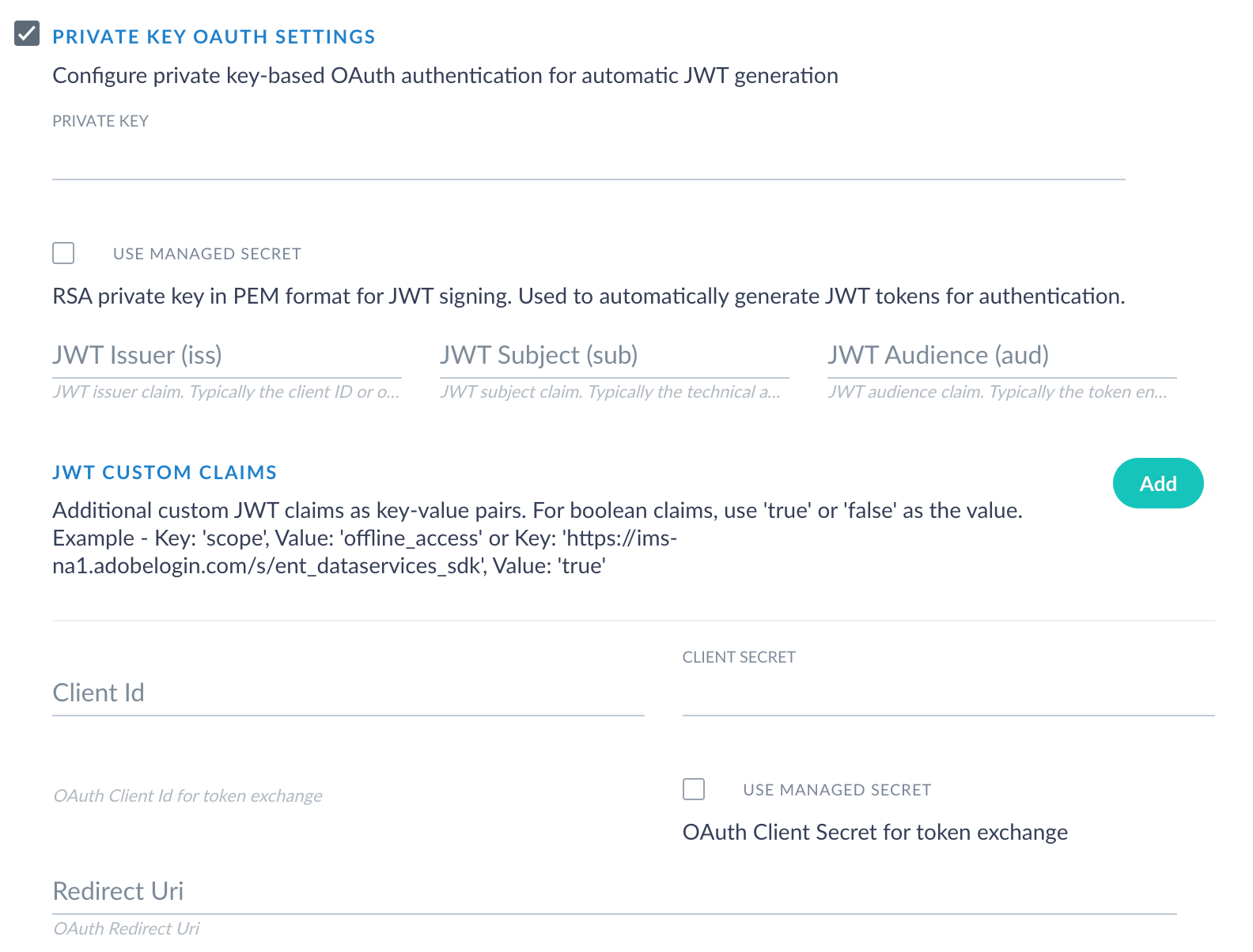
This release adds RSA PEM private key authentication with automatic token refresh via Adobe Identity Management Service (IMS), eliminating the need to manually regenerate tokens every 24 hours.. The connector generates and signs its own JWT from a configured RSA private key, automatically exchanges it for an access token at the Adobe IMS endpoint, and renews the token when it expiresThe private key can be stored securely using Fusion Vault in Fusion 5.18.0 or later.
Private key authentication for the AEM V2 connector
Private key authentication is an opt-in feature. No action is required for existing datasources. Existing JWT and access token configurations are unaffected.
Fixes an issue where the connector failed with a ClassNotFoundException after upgrading Fusion to 5.9.16 or later, caused by an incompatible commons-lang dependency.
Previously, validating an AEM datasource configuration by using “Test” in the Fusion UI could leave the underlying HTTP client connection open. Repeated validation runs no longer accumulate leaked connections/threads.
This release removes the connector’s dependency on Microsoft’s Access Control Services (ACS) authentication by upgrading the authentication library from ADAL4J to MSAL4J. This upgrade is required for continued SharePoint Online operation after Microsoft’s ACS deprecation.
Microsoft deprecated Access Control Services (ACS) for SharePoint Online in April 2026.
Customers using ACS-based authentication must migrate to App-Only (certificate-based) authentication before their SharePoint Online connection stops working.
Existing OAuth credentials continue to work without changes.
The connector now uses Microsoft’s current MSAL4J library (v1.14.3) instead of the deprecated ADAL4J library (v1.6.7). This upgrade adds full support for certificate-based App-Only authentication for SharePoint Online while maintaining existing OAuth credential configurations without changes.New SharePoint Online deployments should use App-Only (certificate-based) authentication. See the SharePoint Optimized V2 connector documentation for setup instructions.
Crawls no longer fail with a StringIndexOutOfBoundsException when processing malformed SharePoint URLs, empty strings, or edge-case inputs. Bounds checking has been added to URL substring operations across SharePoint utility classes.
Resolved potential null pointer exception risks in ACL handling, corrected URL generation in CSOM calls, improved authentication header handling, and fixed login-name formatting issues. No configuration changes are required.
This release enables multiple JavaScript-evaluation datasources to run concurrently on shared Selenium Grid infrastructure and overhauls HTTP retry behavior with exponential backoff and more resilient defaults. The update also includes crawl-reliability fixes for cookies and SSL handling, along with a streamlined configuration UI.
Concurrent JavaScript evaluation datasources
Multiple Web V2 datasources with JavaScript evaluation enabled can now run simultaneously and share a Selenium Grid instance. Each datasource receives a fair share of grid capacity, recomputed dynamically as datasources register and deregister. Datasources that do not use JavaScript evaluation do not consume these resources.
Running multiple JavaScript-enabled datasources concurrently increases the load on Selenium Grid. If you plan to run more than one JavaScript-evaluation datasource at a time, scale your Selenium Grid instance to provide sufficient node capacity. See Scale Selenium Grid for concurrent JavaScript-evaluation datasources for guidance.
Updated retry and error tolerance default values
The default retry and fetching behaviors have been updated to provide more resilient out-of-the-box configuration for new datasources.
Changed from -1 (never) to 2. A document is removed from the index after 3 consecutive fetch errors instead of being retained indefinitely.
Existing datasources retain their currently configured values. Only newly created datasources use these updated defaults. Property descriptions in the configuration UI have been clarified to specify exactly what each value means.
Smarter HTTP retry handling
Retries now use exponential backoff with jitter and cover a broader set of recoverable HTTP status codes (429, 500, 502, 503, 504) in addition to transient network errors. This allows transient site errors to recover more gracefully without manual tuning. The Request Retry Count and Retry Max Delay fields control retry behavior.The Retry Max Delay field now stops retries when backoff exceeds the configured limit. Retries stop as soon as the next backoff wait would exceed the Retry Max Delay value, rather than continuing until Request Retry Count is exhausted. The limit that is reached first (count or delay) ends the retries. Previously, Retry Max Delay only capped the wait interval, but now it also acts as a stop condition.
Selenium Grid readiness check
A new validation check verifies that your Selenium Grid environment is reachable before the crawl starts. If Selenium Grid cannot be reached, the connector now reports a clear validation error, instead of failing during the crawl with an opaque error. Transient slot exhaustion is intentionally not treated as a validation failure and is handled at fetch time by the WebDriver pool’s 60-second create-timeout.
Before v2.2.3
v2.2.3 and later
Configuration UI improvements
Deprecated Kerberos and credential file properties are now hidden from the configuration UI, reducing clutter when configuring new datasources. Existing datasources that have values set for these properties continue to work.Tooltips for Request Retry Count, Retry Max Delay, Timeout, and Infinite Timeout have been rewritten to accurately describe the connector’s behavior, including cross-field interactions.
This release resolves two issues affecting cookie handling and SSL certificate validation.
The Web V2 connector now correctly copies cookies across requests when no authentication is configured. Previously, the Web connector dropped cookies set by the target site on follow-up requests when no authentication method was configured. Public sites that rely on cookies for consent banners, A/B routing, or language preferences now crawl correctly.
The Allow All Certificates setting now applies to both the HTTP client and the Selenium-based JavaScript evaluator. Sites with self-signed or internal-CA certificates can now be crawled end-to-end with JavaScript evaluation enabled. Previously, the HTTP client honored this setting but the Selenium-based JavaScript evaluator ignored it.
The Amazon AWS S3 Pro connector has been updated to version 2.0.0 and has earned the Pro designation, showing that this connector meets higher internal standards for stability, reliability, and production readiness.
Pro connectors are built on the same framework as V2 connectors but meet higher internal standards for stability, reliability, and production readiness. If you’re currently using other V2 connectors, the process for installing and upgrading a Pro connector remains the same.More V2 connectors will be upgraded to Pro connectors in the future.
The Amazon AWS S3 Pro connector brings simplified stray content deletion, improved timeout and shutdown handling, and S3-compatible endpoint support.
S3-compatible endpoint support
The connector now supports S3-compatible storage services through the new Endpoint Override configuration field. You can point the connector at VPC endpoints, LocalStack, MinIO, or S3-compatible services like Google Cloud Storage by setting the endpoint URL.
Endpoint override setting for the S3 Pro connector
Custom endpoint URL for S3-compatible services (for example, https://storage.googleapis.com for Google Cloud Storage, https://vpce-xxx.s3.us-east-1.vpce.amazonaws.com for VPC endpoints).
Improved timeout and shutdown handling
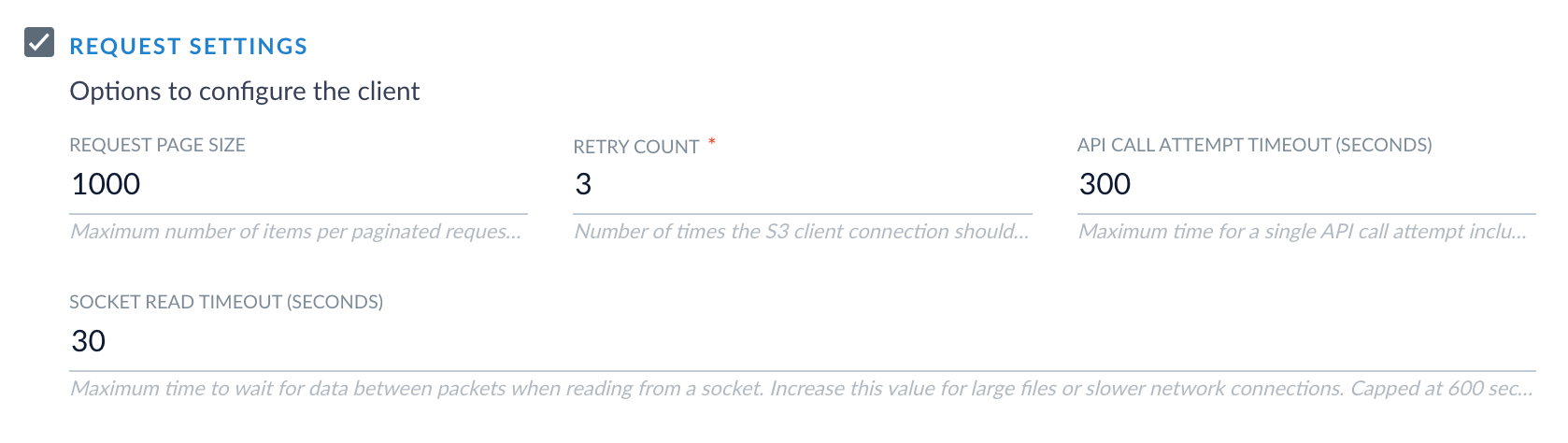
Stalled S3 downloads now fail quickly with clear error messages instead of hanging indefinitely. The connector includes configurable API call and socket timeouts for better control over long-running operations, and connector shutdown no longer produces spurious error log messages.
Maximum time in seconds to wait for data transfer over an open connection. Range: 1 to 600 seconds.
Simplified stray content deletion
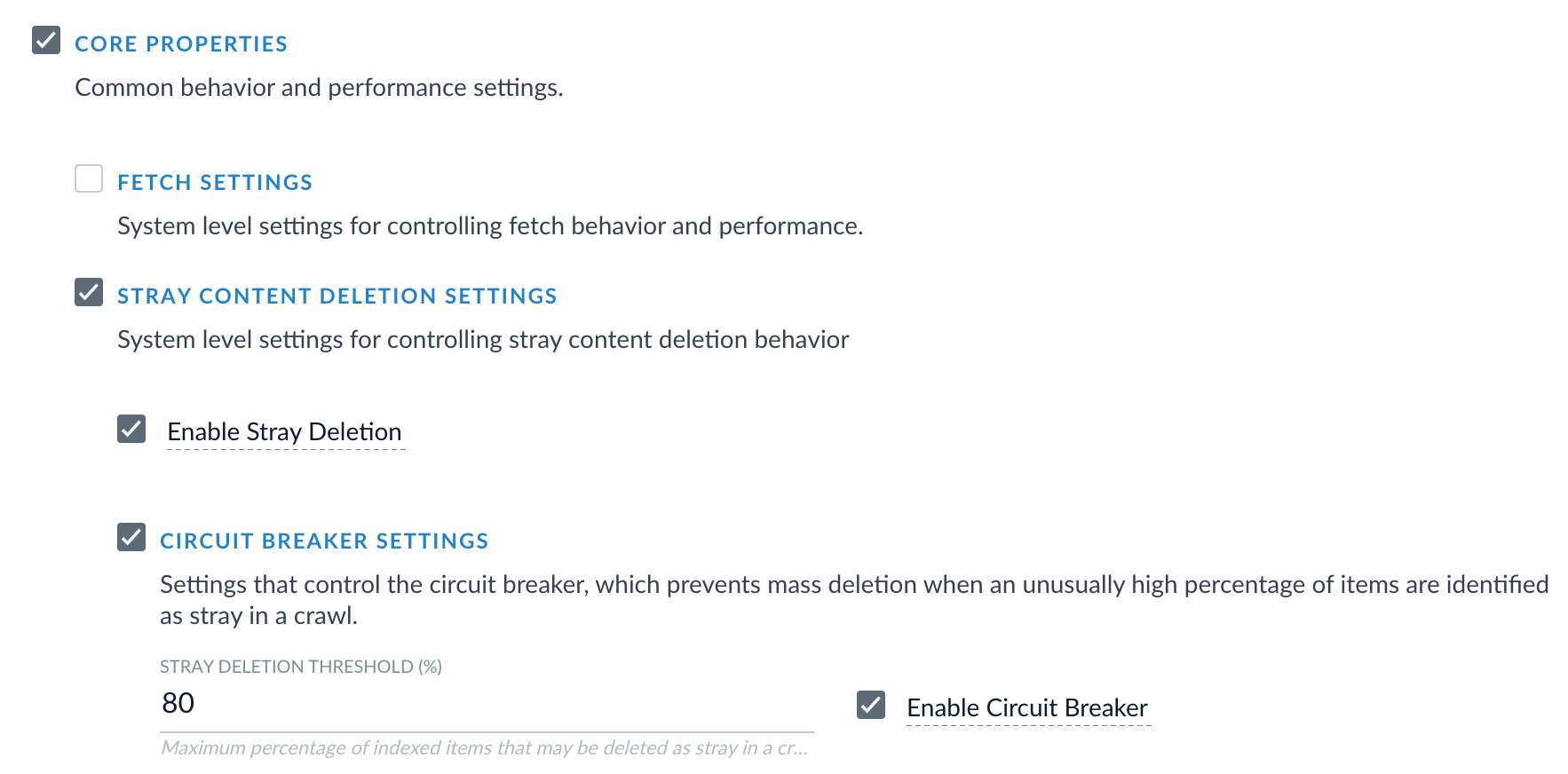
The Enable Stray Content Deletion toggle is now hidden in the UI and is enabled by default. New datasources automatically enable the stray content deletion and circuit breaker feature built into all V2 and Pro connectors starting in Fusion 5.18.0. Existing datasources retain their current settings.
S3 Pro connector stray content deletion and circuit breaker settings
The stray content deletion property remains accessible via the REST API for users who need explicit control for Fusion versions earlier than 5.18.0.
Retry logging
S3 client retry events now appear in connector logs with attempt count and request context, making it easier to identify transient AWS issues during troubleshooting.
Existing datasources continue to work without modification. The connector now displays as S3 Pro in the Fusion connector picker. The type ID (lucidworks.s3) remains unchanged, so existing datasources do not need to be created again.Datasources with out-of-range values for pageSize, retryCount, apiCallAttemptTimeoutSeconds, or socketTimeoutSeconds will fail validation the next time you save your datasource. Review and adjust any values exceeding the documented limits before updating your connector.
Timestamp columns from DB2, MS SQL Server, and Oracle databases are now indexed correctly. Previously, vendor-specific timestamp types were silently dropped with warning messages. The connector now normalizes these database-specific timestamp formats before indexing.This fix applies to:
IBM DB2 timestamp columns (com.ibm.db2.jcc.am.io)
Microsoft SQL Server datetime columns (SQLServerDateTime)
Oracle timestamp columns (oracle.sql.TIMESTAMP)
Simplified stray content deletion
The Enable Stray Content Deletion toggle is now hidden in the UI and is enabled by default. New datasources automatically enable the stray content deletion and circuit breaker feature built into all V2 and Pro connectors starting in Fusion 5.18.0. Existing datasources retain their current settings.
JDBC V2 connector stray content deletion and circuit breaker settings
If you are using Fusion 5.18.0 or later, stray content deletion behavior is determined by the Enable Stray Content Deletion settings built into Fusion’s core datasource settings, available on every V2 and Pro connector.If system-level stray content deletion is enabled and you have a delta query configured, saving the datasource fails with a validation error. Resolve the conflict by adjusting the system setting or removing the delta query.If you are using the JDBC V2 2.8.0 connector with a Fusion version earlier than 5.18.0, then the stray content deletion behavior is automatically determined by your delta query configuration.
When a delta query is configured, stray content deletion is disabled because delta queries only track changes, not deletions.
When no delta query is configured, stray content deletion is enabled by default.
The stray content deletion property remains accessible via the REST API for users who need explicit control for Fusion versions earlier than 5.18.0.
Existing datasources continue to work without modification. The stray content deletion behavior remains the same as before the upgrade.For new datasources with a delta query using Fusion 5.18.0 or later with stray content deletion enabled, saving your changes produces a validation error. On older Fusion versions, the datasource saves successfully with stray deletion automatically disabled.
Two recipes are now available for the REST V2 connector: a new GitHub recipe and an updated Confluence recipe that migrates to the Confluence v2 API.
These recipes require REST V2 connector version 1.1.0 or later and Fusion 5.9.x or later.
Both recipes use the REST V2 connector capabilities introduced in version 1.1.0, including hierarchical request structures for multi-level crawling, recursive requests for automatic depth traversal, skip indexation for cleaner indexes, cursor-based pagination, and content filtering by regular expressions and file size.You can access both recipes in the public GitHub repository. Recipes are treated as an open source resource where contributions are welcome.
The GitHub REST datasource configuration makes code, issues, pull requests, and commit history searchable. This connector helps teams find existing solutions before rebuilding them, accelerates developer onboarding, and surfaces decisions documented in pull requests and issues.The connector indexes 15 entity types per repository:
Repositories, issues, and pull requests
Branches, commits, and commit diffs
Tags, milestones, and releases
Collaborators
Comments for issues, pull requests, and commits
File contents: Folders and Blobs
Key features include per-branch commit crawling using the sha query parameter and recursive directory traversal through a three-stage pattern, as illustrated:The GitHub connector also supports binary content download with Tika parsing and pagination on 10 of 15 of its entity types.
Known limitations
Commits that are reachable from multiple branches are indexed once per branch. There is no cross-branch deduplication.
This connector does not support incremental crawls. Every crawl is a full crawl.
To index multiple repositories, create a new datasource and recipe for each repository.
Atlassian removed the Confluence v1 REST API from service on March 31, 2025. The previous recipe named confluence-v1.json uses the older API and does not work. All users must migrate to confluence.json.
The updated Confluence REST datasource configuration migrates to the Confluence v2 REST API, ensuring continued access to your knowledge base following Atlassian’s v1 REST API deprecation. The connector indexes comments and threaded replies alongside pages, capturing the discussions where context and decisions often live.The connector indexes 5 content types with full hierarchy preservation:
Spaces
Pages and blog posts
Page comments (footer and inline)
Blog comments (footer and inline)
Comment replies with threading
The updated recipe features 11 request configurations covering the full content hierarchy, hierarchical crawling up to four levels deep, as illustrated:The updated recipe also features granular comment crawling with separate endpoints for footer and inline comments, recursive reply threading on footer comments, and cursor-based pagination via Confluence’s _links.next.The updated recipe uses the current /wiki/api/v2 Confluence endpoints instead of the deprecated /wiki/rest/api/content endpoints. It crawls spaces as root objects, distinguishes between footer and inline comments with dedicated endpoints, supports comment reply crawling with recursive requests, and uses cursor-based pagination instead of offset-based pagination.Known limitations:
This connector does not support incremental crawls. Every crawl is a full crawl.
8 of 11 request configurations are dedicated to comment retrieval due to API structure
Only footer comment replies use recursive crawling. Inline replies retrieve direct replies only.
The FTP Pro connector is introduced as a powerful, modern replacement to the FTP V1 connector. Built on the V2 connector framework, it offers full feature parity with the FTP V1 connector while delivering enhanced security, improved configuration validation, and better resource management.This connector enables Fusion to ingest content from FTP, FTPS, and SFTP servers into Fusion.
This connector is compatible with Fusion 5.9.0 or later.
Pro connectors are built on the same framework as V2 connectors but meet higher internal standards for stability, reliability, and production readiness. If you’re currently using other V2 connectors, the process for installing and upgrading a Pro connector remains the same.More V2 connectors will be upgraded to Pro connectors in the future.
The FTP Pro connector brings enhanced security options, advanced filtering, improved connection management, and explicit protocol selection in addition to maintaining parity with the FTP V1 connector.
Enhanced authentication for SFTP
The FTP Pro connector introduces improved authentication methods, particularly for SFTP connections. You can now add an SSH private key, passphrase, and SSH host key fingerprint to verify the server identity for SFTP connections.
FTP Pro SSH private key and passphrase
FTP Pro SSH host key fingerprint
Advanced document filtering
The Pro connector adds new filtering capabilities to provide both allow-list and deny-list capabilities. You can now exclude files by file type with the Excluded file extensions field, or you can filter by file size with the new Minimum file size field.
Connection and retry management
New connection management fields provide better control over timeouts and error handling. The FTP Pro connector automatically detects and retries the connection when transient errors happen (for example, 4xx connection errors or timeouts) and does not attempt a retry in the case of permanent errors (for example, 5xx connection errors or permission failures).
FTP Pro connection properties
FTP Pro retry properties
Click the Advanced toggle to expose the retry properties.
The maximum wait time in milliseconds between retries. Range: 1000 to 300000 (5 minutes).
Restructured server configuration
The FTP Pro connector has restructured the server configuration settings. In the V1 connector, you provided a single Start link URL, and the connector used the URL scheme to detect the connection type. The Pro connector separates the connection settings into discrete fields, and you now explicitly select the connection type.
FTP Pro server property settings
Support for multiple paths
The FTP Pro connector adds support for crawling multiple paths as start points. In the V1 connector, you could only specify one starting path in the URL for the connector to crawl. The Pro connector allows multiple starting paths, so one connector can crawl all the documents you need.
More exposed fetch settings
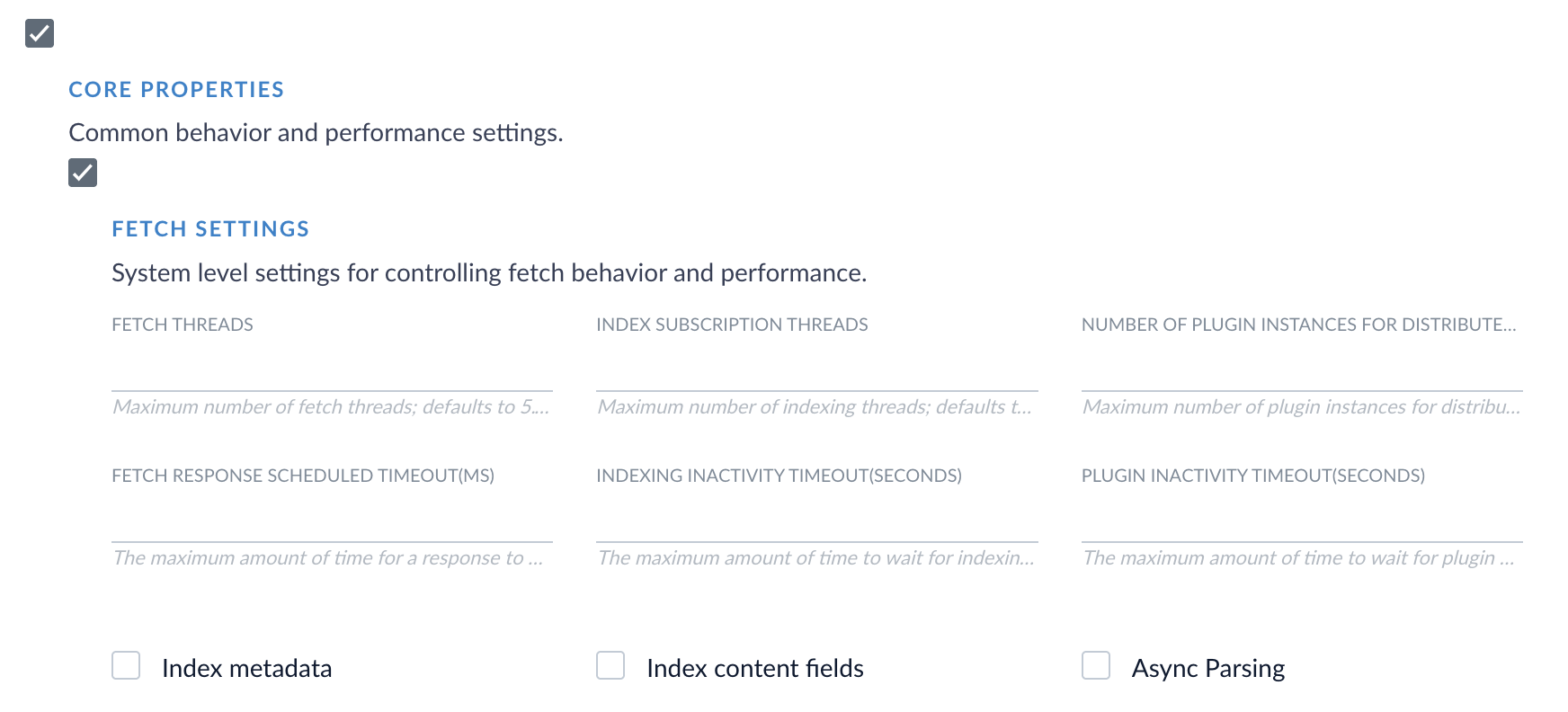
Some fetch settings that were previously hardcoded into the V1 connector are now exposed and configurable in the Pro connector. These fetch settings provide configuration options at the system level to control fetch behavior and performance. Click the Advanced toggle to expose these settings. Then select the checkbox next to Core Properties, and select the checkbox next to Fetch Settings.
The default number of fetch threads has changed from 1 in the V1 connector to 5 in the Pro connector. This means the Pro connector creates 5 concurrent connections to your FTP server by default. Review your FTP server’s connection limits and adjust the Fetch Threads setting if necessary to avoid connection errors or rate limiting.
If you are currently using the FTP V1 connector, we encourage you to migrate to the FTP Pro connector. See the general migration guide for full instructions and the FTP-specific guide for considerations specific for the FTP connector.
The File Upload Pro has been updated to version 1.1.0 and has earned the Pro designation, showing that this connector meets higher internal standards for stability, reliability, and production readiness.
Pro connectors are built on the same framework as V2 connectors but meet higher internal standards for stability, reliability, and production readiness. If you’re currently using other V2 connectors, the process for installing and upgrading a Pro connector remains the same.More V2 connectors will be upgraded to Pro connectors in the future.
In all Fusion versions, the connector now installs as File Upload Pro instead of File Upload V2. If you are using Fusion versions earlier than 5.17.0, the Fusion UI lists the installed connector version as File Upload V2, but the File Upload Pro connector is still installed.
File Upload Pro installation comparison
Simplified connector configuration
This release removes unused core property settings from the Fetch Setting section of the File Upload Pro connector’s configuration screen. Only the Async Parsing setting remains visible in the Fetch Settings section, making the configuration process more straightforward by no longer displaying settings that this connector does not use.
In all Fusion versions, the connector now installs as Solr Pro instead of Solr V2. If you are using Fusion versions earlier than 5.17.0, the Fusion UI lists the installed connector version as Solr V2, but the Solr Pro connector is still installed.
This release resolves a resource leak issue where the SolrClient instance did not close after indexing jobs completed. The connector now properly closes the SolrClient after each job, preventing resource leaks in long-running environments. This improves stability and resource management for production environments using the Solr Pro connector.
The Solr Pro connector is introduced as a powerful, modern replacement to the Solr V1 connector. Built on the V2 connector framework, it offers full feature parity with the Solr V1 connector while delivering improved configuration validation, resource management, and user experience.This connector enables Fusion to ingest content from an external Solr cloud or standalone instance into Fusion.The Solr Pro connector maintains all parity with the V1 connector while adding new features and an improved user experience.
This connector is compatible with Solr 8 or 9 and Fusion 5.9.0 or later.
The Solr Pro connector indexes content from external Solr collections into Fusion. It does not support indexing content from Fusion.
Pro connectors are built on the same framework as V2 connectors but meet higher internal standards for stability, reliability, and production readiness. If you’re currently using other V2 connectors, the process for installing and upgrading a Pro connector remains the same.More V2 connectors will be upgraded to Pro connectors in the future.
The Solr Pro connector brings field and pre-query validation, multi-field sorting, faster pagination, and reliability improvements in addition to maintaining existing Solr V1 connector features.
Comprehensive field validation
The Solr Pro connector now includes comprehensive field validation to prevent common configuration errors.The Query and Request Handler fields are now required and are populated with default values to prevent empty crawls.The unique key field, typically id, is now automatically included in the field list.The Solr Pro connector now validates the relationship between sort fields, field lists, and filter queries before beginning a crawl.
Pre-query validation system
The Solr Pro v1.0.0 connector introduces a pre-query validation system, allowing you to identify query syntax errors and connectivity issues before a crawl begins.The Solr Pro connector now executes your actual configured query against your Solr environment during validation and provides immediate feedback on configuration issues before starting a crawl. If the query generates an error from the server in the validation process, the connector includes more detailed and actionable error messages than the Solr V1 connector so you can troubleshoot and resolve issues quickly.The pre-query validation feature uses a strict 10-second timeout, which prevents the Fusion UI from hanging on unreachable endpoints.
Multi-field sorting
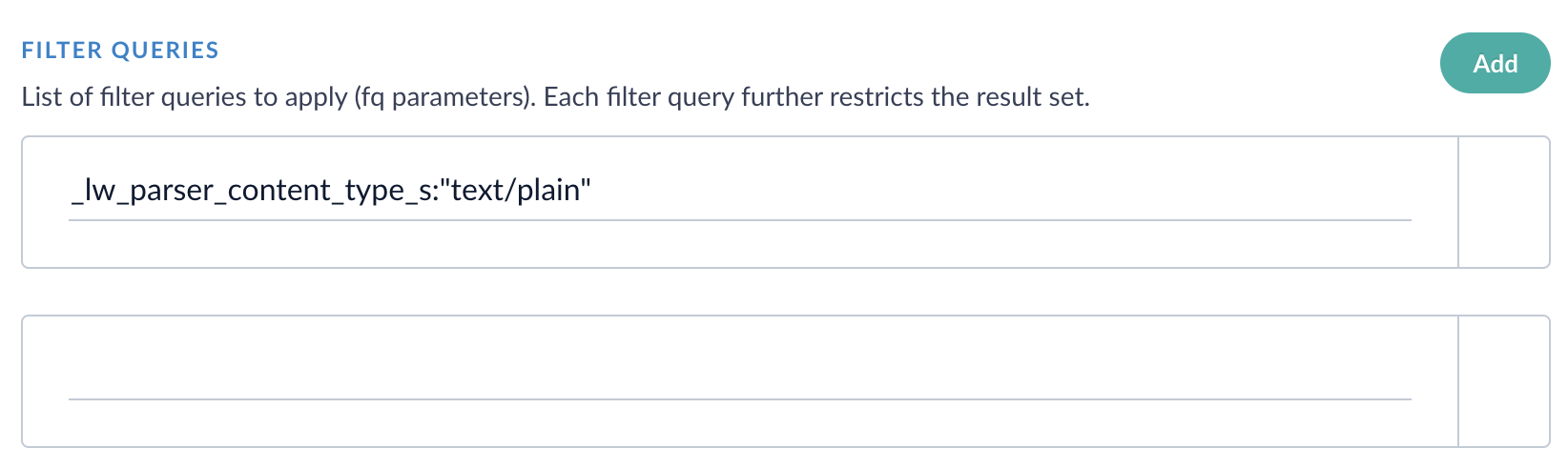
The Solr V1 connector supported sorting by a single field. The Pro connector now supports sorting by multiple fields in the Filter Queries section, enabling robust and specific filtering of your Solr environment. Select Add in the Filter Queries section to add each new filter query.
Solr Pro filter queries
Simplified and faster pagination
This release simplifies the logic used to traverse large Solr collections by introducing a new cursor mark option. By moving to a consistent, single-strategy pagination approach, the connector behaves more predictably and reduces the likelihood of missing documents when processing large Solr collections.To enable cursor mark pagination, select Use cursor mark in the Solr Pro connector’s advanced settings.
Enable or disable the cursor mark, which is used for pagination. This field is enabled by default and results in faster deep paging. If this field is not enabled, then offset-based pagination is used, which was built into the V1 connector.
Note: Cursor mark pagination and offset pagination are distinct. An indexing job cannot be resumed if the pagination type is changed during a job.
More exposed connection and fetch settings
Some advanced connection and fetch settings that were hard-coded into the V1 connector are now exposed and configurable in the Solr Pro connector so you can configure the connector to meet your organization’s needs.You can access these settings by clicking the Advanced toggle.
Controls the connection pool size for high-concurrency environments.
Additionally, some system-level fetch settings that control behavior and performance are now configurable. These fetch settings are accessible by selecting the Advanced toggle, then selecting the checkboxes next to Core Properties and Fetch Settings.
Solr Pro fetch settings
None of the fetch settings are required fields. If you do not configure these fields, the Solr Pro connector uses its default values.
Reliability improvements
The Solr Pro connector introduces built-in fault tolerance to ensure that your production environment is stable and secure.Automatic retry patterns now detect when brief, temporary network disruptions occur between your Solr and Fusion environments. In these situations, the Solr connector can retry a job after a brief network interruption. If your Solr environment reports consistent connection failures, the connector can now temporarily stop requests, which prevents cascade failures in your Fusion environment.A new field, Query timeout, is available to configure how long an individual query request retries before timing out.
The individual query timeout, set in milliseconds. If you’re downloading large files, or if your network or firewall rules may cause slower connections to your Solr environment, consider setting this value higher to prevent query timeouts.
If you are currently using the Solr V1 connector, we encourage you to migrate to the Solr Pro connector. See the general migration guide for full instructions and the Solr-specific guide for considerations specific for the Solr connector.
This release simplifies infinite timeout configuration to a single checkbox, so you can test crawl performance without modifying a production-relevant setting.This release also fixes bugs related to duplicate content from canonical URLs and respecting robots.txt instructions.
Previously, the Web connector improperly handled the request-response cycle, which led to connection pool exhaustion over time when large file downloads exceeded the time set in the Connection Timeout field. Users who wanted to use infinite timeout to download large files had to edit the Connection Timeout value to -1, which overwrote the existing value and did not provide an intuitive experience.Version 2.2.2 adds a new field called Enable infinite timeout settings. When this checkbox is selected, the existing Connection Timeout value is ignored, and infinite timeout settings are active. To turn off infinite timeout settings, deselect the checkbox, and the Web connector uses the Connection Timeout value.
This improvement requires Fusion 5.9.16 or later in addition to version 2.2.2 of the Web V2 connector.
Previous versions of the Web V2 connector created duplicate documents in Fusion collections when websites use canonical URL tags. This releases fixes the duplication issue, resulting in more reliable document counts and accurate search results.
Previous versions of the Web V2 connector ignored the Obey robots meta tags and headers field, and the connector respected robots.txt directives even when the setting wasn’t active.This bug has been fixed, and now the Obey robots meta tags and headers field disregards robots meta tags and headers when the setting is inactive.
When processing XML files, previous versions of the Web V2 connector parsed non-breaking spaces to the HTML entity , which was then processed as XML. This caused the connector to throw an error because is not a valid XML entity.This has been fixed, and the connector now processes non-breaking spaces in XML files correctly.
In version 2.2.1 of the web connector, the Fetch Threads property in the Crawl Performance Properties section was removed because it reproduced the Fetch Threads property in the Fetch Settings section. This change caused datasource errors after upgrading from a previous version of the connector. Version 2.2.2 resolves this issue.
The JDBC V2 connector has been updated to version 2.7.0.This release includes binary content support, enabling full-text search of documents, images, and other binary data stored in database BINARY, VARBINARY, IMAGE, or BLOB columns. This release also fixes StackOverflowError messages related to crawls not starting and eliminates the need to manually restart your pods as a workaround.
Updating your connector to the latest version is fast and simple. Before you begin, download the connector update file Then, use the following instructions:
Open the Fusion UI and navigate to System > Blobs.
Expand the Connector Plugin section, then select lucidworks.jdbc.
Locate Replace Blob, click Choose File, and upload the downloaded zip file. Wait for the upload to finish.
Click Replace.
Confirm the version shown for the JDBC connector now reflects the updated file.
Many organizations rely on binary content, which includes PDF files, Word documents, spreadsheets, and images. To address the challenges of indexing text and non-text content, the JDBC V2 connector now supports indexing of binary content. Binary content is now streamed directly to Fusion’s indexing pipeline, enabling full-text extraction and search across multiple file formats.In previous versions of the JDBC connector, attempting to index files containing binary content results in an error similar to Metadata with key=Content, type=class [B not added. This error happened because the connector treated binary content as an unsupported metadata type and excluded it from indexing.To support binary content indexing, two new fields are available. Check the box next to Binary Content Settings in the connector’s settings to display and configure these fields.
The name of the database column containing binary content (VARBINARY, BINARY, BLOB, IMAGE, etc.). A value is required in order to use binary content indexing.
The name of the database column containing the file name or resource name for the binary content. If a value is not specified, the connector attempts to automatically detect the column name from common naming practices.
Existing content configurations will continue to work without modifications.
Binary content indexing is currently available for MSSQL and Oracle databases using the JDBC V2 connector.
Previously, the JDBC V2 connector experienced periodic failures where crawls failed to start with the error message “Start response was not received”. This issue has been resolved, and users no longer have to manually restart connector pods to prevent this issue.
The Web V2 v2.2.1 release delivers exciting improvements to JavaScript evaluation. These updates benefit users indexing sites with heavy JavaScript usage, long load times, or inconsistent indexing behavior such as missing fields or messages indicating that JavaScript is required.The release also adds automated Selenium service management. This removes the need for manual installation.
Updating your connector to the latest version is fast and simple. Before you begin, download the connector update file. Then, use the following instructions:
Open the Fusion UI and navigate to System > Blobs.
Expand the Connector Plugin section, then select lucidworks.web-v2.
Locate Replace Blob, click Choose File, and upload the downloaded zip file. Wait for the upload to finish.
Click Replace.
Confirm the version shown for the web connector now reflects the updated file.
Some sites take substantial time to load resources, execute JavaScript, and render elements. If the connector begins indexing before the page is fully ready, it may fail to index the page or certain elements. This behavior can vary from one page to another, which makes it difficult to determine the ideal configuration.To address these challenges, the Web V2 connector now includes enhanced controls for JavaScript evaluation.These changes also address common indexing issues with missing fields or error messages, such as You need to enable JavaScript to run this app.
AJAX request completion
A new option allows AJAX requests to finish before indexing proceeds. This gives content additional time to render and reduces the likelihood of missing data.
AJAX timing controls
A new property, AJAX timeout, defines how long an individual AJAX request is considered when determining whether AJAX activity has completed. Requests that exceed this limit are ignored.Request counter min wait and Request counter max wait define how long the connector waits when checking for pending AJAX requests. For example, a minimum of 500 milliseconds causes the connector to wait one half second before checking for pending AJAX requests. It continues checking until the defined maximum wait time is reached.
Updated defaults
Timeout, Script Timeout, and Implicit Wait Timeout default values are updated to reflect the latest field data across many real world use cases. If you have customized configurations for these fields, your configurations remain unchanged.
Specifies how long the connector waits for a page to finish loading, measured in milliseconds. A value of -1 allows the load process to continue without limit.
Specifies how long the connector waits for JavaScript execution to complete, measured in milliseconds. This defines the limit for script processing during page interactions.
Specifies how long the connector waits for elements to appear on the page, measured in milliseconds. This value applies when locating elements during automation tasks. Increasing this timeout may improve reliability on pages with slow or deferred JavaScript content.
These enhancements improve JavaScript execution reliability for dynamic content and resolve inconsistent crawling behavior on JavaScript heavy sites. They offer more precise control over how the Web V2 connector processes and indexes complex pages.
The Lucidworks Fusion Web V2 connector uses Selenium Grid to evaluate JavaScript and render client-side content during crawling and document extraction. This allows Fusion to accurately index web pages that rely on JavaScript for content.Previously, Selenium had to be installed manually to use with the Web V2 connector. In Web V2 v2.2.1 in Fusion 5.9.15 and later, the Selenium service is now automatically installed with the Web V2 connector and is automatically uninstalled when the connector is removed.
Manual installation of Selenium is still required in Fusion 5.9.14 or earlier, even if you use Web V2 v2.2.1. For details, see Selenium Grid setup.
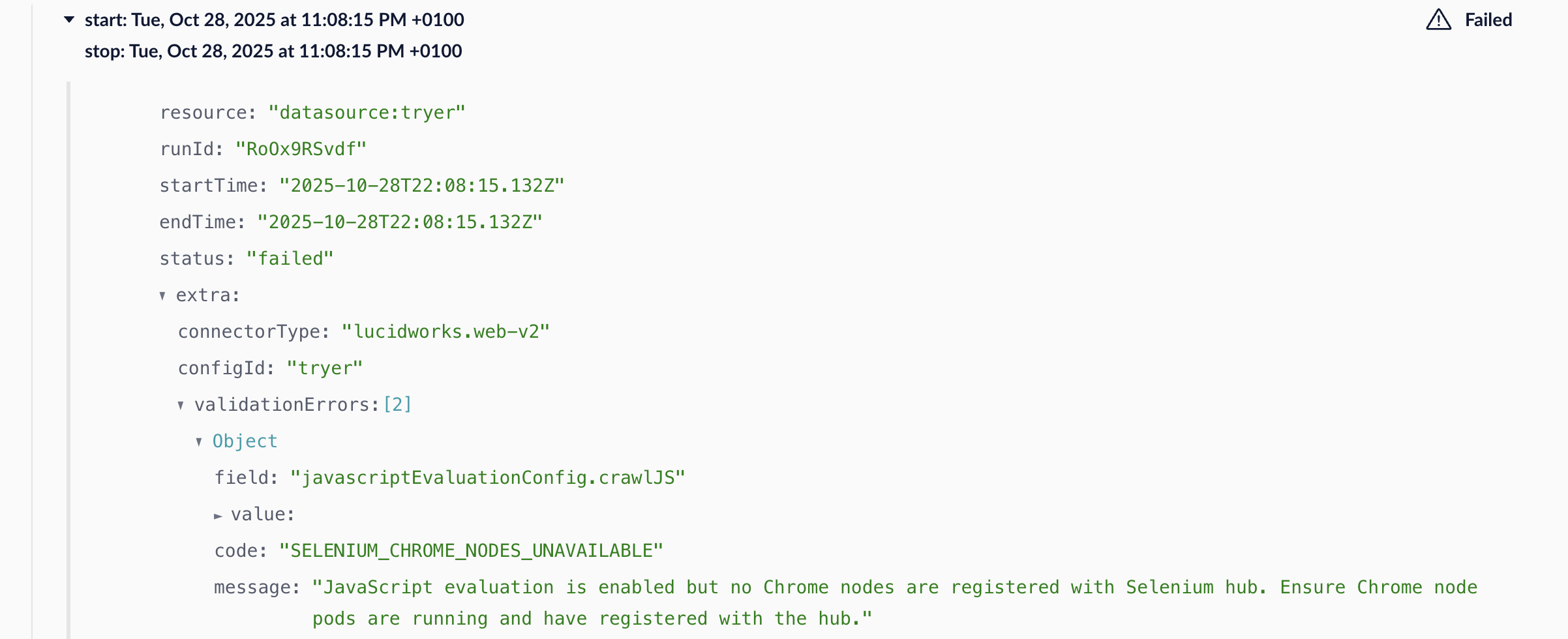
A verification check is added to ensure the Selenium service is running whenever JavaScript evaluation is enabled, improving stability and preventing runtime errors. If the verification check fails, you will see a SELENIUM_CHROME_NODES_UNAVAILABLE error with a message that states:
JavaScript evaluation is enabled but no Chrome nodes are registered with Selenium hub. Ensure Chrome node pods are running and have registered with the hub.
Version 2.2.1 removes the Fetch Threads property in the Crawl Performance Properties section, a property that is reproduced in the Core Properties section. This change causes datasource errors after upgrading from a previous version of the connector. Upgrade to Web V2 v2.2.2 to resolve the datasource errors.
The Kaltura V2 connector has been updated to version 1.4.1.This release resolves a critical JDK 17 compatibility issue affecting the Kaltura V2 connector that was causing Gson JSON serialization failures and preventing successful crawls in production environments.
The connector would timeout with plugin activity errors due to Gson JSON serialization issues when processing API error responses.Version 1.4.1 implements JDK 17 compatibility fixes for Gson serialization:
Enhanced exception handling with updated error response parsing to work within JDK 17’s module system constraints.
Gson configuration updates to handle restricted field access appropriately.
Maintain compatibility with earlier JDK versions for backward compatiblilty.
The JDBC V2 connector has been updated to version 2.6.3.This release addresses a critical stack overflow issue affecting the JDBC V2 connector that was causing intermittent crawl failures and requiring periodic pod restarts.
Version 2.6.3 resolves an infinite recursion issue in the class loading subsystem, eliminating the stack overflow errors and ensuring stable connector operation.
The Web V2 connector has been updated to version 2.1.1.This release delivers feature enhancements and stability improvements to strengthen functionality, streamline configuration, and improve the user experience.Fixes and improvements:
Fixed an authentication regression introduced in v2.0.0 that caused certain authenticated datasources to fail with a “Username may not be null” error, even when credentials were configured. Authentication now works as expected for these datasources.
Restored support for viewport-related configuration properties used during JavaScript evaluation when indexing pages. Viewport width, viewport height, and device screen factor settings are now applied correctly by passing the configured values as command-line arguments to the browser.
Updated the configuration UI to hide unused properties. Only relevant options are now visible, reducing clutter.
These updates ensure smoother authentication, simplify configuration workflows, and provide greater flexibility for tailored crawling.
The Amazon Web Services (AWS) S3 V2 connector has been updated to version 1.5.0.This release adds support for the AWS S3 Object Lambda Access Point that lets you customize how data is processed when it is retrieved from AWS S3 buckets.The Lambda function associated with the access point can perform functions such as decrypting files and redacting personal information from files. For example, if you invoke the AWS S3 V2 connector using the access point and fetch encrypted files, the encrypted files are decrypted and returned to the connector.In the Fusion UI, the datasource includes the Object Lambda Access Point ARN - GET OBJECT field where you enter its Amazon Resource Name (ARN). This access point needs to be associated with the Lambda function on AWS S3 that supports the get-object API call. The connector fetches objects using the access point and triggers the corresponding Lambda function on AWS S3. If the Object Lambda Access Point ARN - GET OBJECT field does not contain a value, the AWS S3 V2 connector retrieves objects normally and the Lambda function is not invoked.
The Web V2 connector has been updated to version 2.1.0.This release adds JavaScript evaluation for the Web V2 connector, which allows the connector to extract content from a website that is only available after JavaScript has been rendered. The release also rebuilds some of the connector’s capabilities in Selenium Grid, which offers non-headless browser mode and concurrent processing. Additionally, this release restores features from the Web V1 connector.
ImportantIf you are using Web V2 2.1.0 or later, you must use Selenium Grid as part of your Web V2 connector setup.
JavaScript evaluation is available for remote and hosted connectors and supports authentication and headless browsing. The capabilities of a browser are essential, and this release introduces Selenium Grid to implement browser-based rendering.For hosted connectors, Selenium Grid support is available through Kubernetes. For remote connectors, Selenium Grid support is available through Docker Compose. See the Web V2 remote support repository for setup instructions and YAML files.The Selenium services require an x86 architecture to run properly. Running the Selenium services on an ARM-based system such as Apple Silicon is not supported.
ImportantUp to three Web V2 connectors can run simultaneously in a single cluster. This prevents reaching a max concurrency limit per Web V2 connector, which affects how much data can be sent to Selenium Grid at one time.
If you are authenticating to your website when crawling it, you can evaluate JavaScript while crawling websites. Select Evaluate JavaScript during SmartForms/SAML Login.The headless browsing setting in the Web V2 connector lets you runs browsers without actually seeing the browser. For websites that render pages on the server, the Headless browser field must be unchecked for the crawl to work correctly and retrieve links. For websites that render pages on the client side, the Headless browser field should be checked.
The depth property has been restored, allowing you to control the scope of your web crawl. The default value is -1, which does not limit the scope of the crawl. Configure this value in the Limit Document Properties section of the Web V2 connector.If a crawl fails because the start link is invalid, the Web V2 connector now marks the crawl as failed and Fusion logs an exception. This restores functionality from the Web V1 connector.
Previously, the Port field for Basic Authentication did not accept -1 as a value to accept any port. This is now resolved, and -1 is an accepted value.
Fixed a bug where Web V2 v2.0.0 failed to handle non-HTML responses such as JSON. When a JSON response was returned, the connector would complete with a success response but without indexing any data due to a premature stream closure error. This issue occurred only with Web V2 v2.0.0 on Fusion 5.9.11 and did not affect Web V2 v1.4.0.
Compatibility for this connector is extended to include all versions of Fusion 5.9.x.
The AWS S3 V2 connector is updated to v1.4.2.This release resolves a bug where recrawls failed to fetch data from folders. This occurred when a previous crawl saved errors in Crawldb and the datasourceConfig had:
The Web V2 connector has been updated to version 2.0.0. This release resolves a critical issue where the Restrict crawl to start-link checkbox appeared unchecked in the UI, while the setting was enabled in the backend. This discrepancy caused the option to be enforced even when the UI indicated it was disabled, potentially resulting in the indexing job failing silently.This release also includes general performance and compatibility improvements.Known issues in version 2.0.0:
The Link rewrite script option, which allows JavaScript to modify document links before fetching, is currently non-functional. A fix is planned for a future release.
The Max items setting enforces a limit that is one less than the configured value. For example, if set to 10,000, only 9,999 documents are fetched. A fix is planned for a future release.
ImportantStarting with Fusion 5.9.11, you must upgrade to the Web V2 connector v2.0.0 or later. Previous versions (e.g. 1.4.0) are incompatible with Fusion 5.9.11 and later versions of Fusion 5.9 due to changes introduced by the upgraded JDK in Fusion. If you are using an earlier version of Fusion, use Web V2 v1.4.0 instead.
The JDBC V2 Connector is updated to v2.6.2.This release resolves a bug that caused some updated or newly added records to be missed during delta indexing.Previously, the connector only looked at the end time of the last indexing job to find new data. This behavior meant any records added or changed during that job could be skipped during delta indexing.With this fix, the connector now looks at both the start and end times of the last job, ensuring that no records are missed when running a delta indexing job.
A recipe is added for Alfresco to enhance the search experience by implementing a hierarchical request feature that traverses multiple storage levels to locate and index file content. Several new features are added, including introducing a retry mechanism to reattempt requests failing due to server-side errors based on configurable retry counts and delay times. Additionally, this release features a skip indexation option that prevents indexing parent objects when they are only used to discover child objects. The connector now supports recursive requests to automatically retrieve nested objects regardless of depth. This release also allows for limiting documents through exclusion by regular expressions and file size constraints, and includes improvements like enhanced logging with query parameters and the addition of an index field to track the number of documents indexed per request configuration.
Hierarchical object discovery allows requests to traverse multiple levels by following the natural structure of the data under the source.
Retry feature is added to enable retrying requests if they fail due to a server-side error:
Retry Count: The number of attempts a request will be retried.
Max Delay Time: The maximum wait time in milliseconds between retries.
Skip indexation of objects feature
When enabled, the response is not indexed. This is useful when objects are requested only to discover their child objects without indexing the parent object.
Example indexing a list of files with their binary content:
Given a parent request (objectType=FILE), retrieve a list of file metadata. This request helps discover the IDs of files to be downloaded in a follow-up request.
Given a child request (objectType=FILE-DOWNLOAD with parentObjectType=FILE), download the binary content from previously discovered file metadata.
The indexed documents will include file metadata (from the FILE request) joined with binary content (from the FILE-DOWNLOAD request).
Enable Skip Indexation in FILE request to prevent indexing file metadata objects.
Recursive requests
Enables recursive retrieval of nested objects of the same ObjectType using the same request configuration. This is useful when the depth of nesting is unknown, automating the retrieval of all nested objects.
Example: Detect all nested folders from a system path where the depth of nested folders is unknown. Enable Recursive Requests to retrieve all levels automatically.
Limit documents
Exclude by RegEx allows specifying a list of key-value pairs to exclude objects from indexing.
Key references the field name of the object to exclude and supports JsonPath expressions for navigating nested objects (for example, objects.nested.path).
Value is a regular expression matched against the field value in the object. If the match succeeds, then the entire object is excluded.
Exclude by File Size allows setting minimum and maximum file sizes (in bytes) to exclude files outside the specified range.
Key references the field name of the object containing the file size and supports JsonPath expressions (for example, objects.nested.path).
Minimum File Size: Files smaller than this value will be excluded.
Maximum File Size: Files larger than this value will be excluded. (Set to -1 for no limit.)
Improved logging to include query parameters in requests.
Added index field _lw_rest_object_type_s to store the value of the ObjectType configuration property, which represents the name of the request. This helps track the number of documents indexed per request configuration.
Property Service Endpoints used for object discovery through two-level requests is deprecated. Instead, use List of Requests Configuration for configuring multiple request levels.
The REST V2 connector is introduced as a way to enable users to crawl content by exposing its data through a REST API. It can be configured to communicate with a wide selection of external datasources by making API calls and indexing the responses. As an out-of-the-box V2 connector, it provides a low-code user experience for indexing data from REST API-compatible sources.The REST V2 connector expedites setting up and indexing various datasources using premade configurations, called recipes. These recipes are templates that include all required parameters for datasource integration and can be easily adjusted to suit your specific needs. Unlike single-purpose connectors, the REST V2 connector can index data from any datasource supported by a corresponding recipe.
The REST V2 Connector relies on a public GitHub repository to store and manage recipes. Recipes are open-source and accessible to the community for use and contribution.
Two recipes are included in the initial release: Jira and Confluence. Additional recipes are being developed and will be released as they are finalized.
This release also includes two forms of authentication: OAuth and Basic Auth.
The REST connector supports crawl and recrawl:
Full crawl retrieves all objects from the datasource.
Recrawl relies on the strayContentDeletion feature from the connectors-service to ensure deleted objects from the source are also removed from the index.
Two-level object discovery:
Allows defining a root request to retrieve first-level objects.
Supports a list of child requests (children of the main request) to retrieve second-level objects.
By default, objects retrieved with the root request and child requests are indexed as individual Solr documents.
The REST connector supports two types of pagination:
Next page URL uses a URL to fetch the next page of results.
Batch size and index start use a batch size and starting index to paginate through results.
Parsing can be done in one of two ways:
When parsing within the plugin, the response is parsed as a JSON object structure using JSONPath. This is the default behavior.
When parsing with Fusion, the response is emitted directly to Fusion, where Fusion parsers handle the binary data. Enable this feature by setting the property Send as Binary Data.
By default, parent and child objects are indexed as individual Solr documents. To merge child objects into the parent object instead of indexing them separately, configure the property Child Response Mapping → Custom Solr Field. This feature works only when both parent and child objects are parsed as JSON objects.The following variables are used when configuring a datasource:
${LW_BATCH_SIZE}: Used with pagination by batch size. This variable represents the size query parameter defined in the property, Pagination By BatchSize → BatchSize.
${LW_INDEX_START}: Used with pagination by batch size. This variable represents the start-point query parameter defined in the property Pagination By BatchSize → IndexStart, which is used to traverse the pagination.
${LW_PARENT_DATA_KEY}: Used with the child request configuration. This variable is replaced with the id extracted from the root object using the property Parent Data Key.
This connector is compatible with Fusion 5.9.0 and later.
A new property, retry count, has been introduced to the S3 connector. This property value is passed in the AWS SDK, determining the number of retry attempts for retrieving the file from the AWS S3 bucket. The configurability of this property enhances the effectiveness of the connector, especially in situations of network instability.
Adds an Enable Stray Content Deletion property in the Fusion UI for the S3 connector to toggle stray content deletion on or off. When stray content deletion is enabled, content that was removed from the datasource is deleted from the index in Fusion. When stray content deletion is disabled, content that was removed from the datasource is not deleted from the index in Fusion. This property is enabled by default.
This version of the connector is compatible with Fusion 5.9.4 and later.
Updates the plugin to replace static Security Trimming with Graph Security Trimming, improving performance.
Fixes the invalid RegEx implementation that adjusts the Box URL to retrieve data from the Box datasource so the connector now accepts dashes (-) in Box start URLs.
Corrects relative path field data when indexing documents that are of type ‘File’ in nested folders.
Fixes a bug where new documents were not being indexed upon incremental crawls.
When the maximum number of referrals is reached, an exception is now thrown to handle the situation while ensuring the connector does not stop functioning.
Now you can configure the AEM connector to include child paths when indexing fields.
This option is off by default; enable it by selecting Index metadata by child path in your AEM datasource configuration.
Fixes a bug that prevented running the connector on Windows.
The basic authentication username and password fields have moved under Authentication Settings > Login Settings.
SharePoint Optimized V2 v2.1.0 is compatible with Fusion 5.9.1 and later. See the configuration reference page for the latest version and compatibility details.
Added the Events Reducer feature, which prevents performing multiple requests to the same SharePoint object and ensures index integrity. Specifically, if multiple change events are made over the same SharePoint object, the connector detects and requests the most relevant event and crawls it correctly.
Fixed Graph Security Trimming when using custom-level permissions.
Fixed an issue to reindex restored lists.
Errors from item/attachment are deleted from crawlDB after being successfully retried.
Fixed a pagination issue that limited the number of records returned.
Added support for pagination of IBM Db2 (version 11 and earlier) by using a template sub-query:
-- add any WHERE, ORDER BY clauses as needed following your_table\SELECT * FROM ( SELECT *, ROW_NUMBER() OVER () AS row_num FROM your_table ) AS subquery WHERE row_num BETWEEN :offset + 1 AND (:offset + :limit)
Fixed an issue where UTF-8 characters stored as CLOB data types didn’t index properly.
The JDBC V2 Connector is updated to v2.6.0 and implements a pagination feature. This allow the JDBC connector to ingest a specified number of rows during the crawl process.This feature is controlled by following newly added properties:
LIMIT - specifies the number of rows returned in the results.
OFFSET - dictates the number of rows to skip from the beginning of the returned data before presenting the results.
disableAutomaticPagination - disables automatic pagination to ignore limit and offset fields.
SharePoint Optimized V2 v2.0.0 is compatible with Fusion 5.9.1 and later. See the configuration reference page for the latest version and compatibility details.
LDAP ACLs V2 connector v2.0.0 is compatible with Fusion 5.9.1 and later. See the configuration reference page for the latest version and compatibility details.
The updated connector:
Supports remote configurations.
Uses the SDK that correctly processes the NOT-EQUAL phrase in delete-by-query.
If you are on Fusion 5.9.0 or later, you must use the SharePoint Optimized V2 v1.6.0 connector or later.
For SharePoint Online connector OAuth authentication and NTLM authentication, an issue with the SharePoint Optimized V2 connector crawl was fixed. Now the crawl fails if the data source is configured with incorrect credentials.
When the moderation status of a published document moves to unpublished, the document is deleted from the index.
The URL that requests folder metadata is now properly encoded and retrieves requested files correctly.
MapDB tables that are no longer needed after indexing are now automatically removed when the indexing job completes.
The connector no longer uses the index pipeline client when the onlyMetadata property is set to true or when Tika async parsing is enabled. Instead, documents are processed using the Connectors SDK’s .newDocument method.
A bug that affected JDBC datasources with large document sizes has been fixed. Previously, the indexing job would fail and produce a Solr error message similar to the following:
Document contains at least one immense term in field="FIELD_NAME"
This bug has been fixed and indexing large documents should now work as expected.
Added support for the graph security trimming stage for Active Directory in Azure.
This describes how to migrate your pre-Fusion 5.8 Graph Security Trimming query pipeline stage setup to Fusion 5.8 or later. It applies to deployments using:
SharePoint Optimized V2 connector v1.1.0 or later
LDAP ACLs V2 connector v1.4.0 or later to crawl Active Directory in Azure
The LDAP ACLs V2 connector v1.2.0 or later to crawl Active Directory in LDAP
The SharePoint Optimized V2 and LDAP ACLs V2 datasources must index the content documents and ACL documents to the same collection. Ensure both datasources use the same value, contentCollection, for the field ACL Collection ID.
If using SharePoint-Optimized and LDAP ACLs < v2.0.0
Update the ACL Collection Id in the datasource configuration.The SharePoint-Optimized and LDAP ACLs datasources must index their content_documents and acl_documents to the same collection. Make sure the property Security -> ACL Collection in both datasources have the same value. In both datasources, SharePoint-Optimized and LDAP ACLs, check the property Security -> ACL Collection Id and make sure it points to the same content-collection.
Navigate to Indexing > Datasources.
Open your SharePoint Optimized V2 or LDAP ACLs V2 datasource.
Under Security, update the configuration to use contentCollection as the ACL Collection ID. The Security checkbox must be checked for this field to appear.
Save the configuration.
Repeat this process for all required datasources.
If using SharePoint-Optimized and LDAP ACLs >= v2.0.0
Recreate or update the datasources. If only updated, it is not possible to go back to the configuration of a previous plugin version.
By default, the LDAP ACLs and SharePoint-Optimized V2 datasources will index the content_documents and acl_documents to the same collection.
Navigate to Indexing > Datasources.
Open your SharePoint Optimized V2 or LDAP ACLs V2 datasource.
Under Graph Security Filtering Configuration, select Enable security trimming.
Repeat this process for all required datasources.
A new field, _lw_document_type_s, has been added to differentiate between document types. SharePoint content documents use the value contentDocument. ACL documents use the value aclDocument.
A bug that caused a NullPointerException error when the listDefaultDisplayFormUrl value is null has been fixed.
A bug that prevented the connector from indexing SharePoint Online URLs containing certain special characters, such as +, &, and #, has been fixed.
A bug that stopped the indexing job unexpectedly when the digestValue request fails has been fixed.
Fixed a bug that removed access control lists (ACLs) during incremental crawls in Azure Active Directory. This bug resulted from a deviation from the LDAP ACLs V2 connector’s unique incremental crawl behavior for Azure Active Directory.
Fixed a bug that sometimes deleted ACLs that the indexing job failed to update during its previous run.
Known issue: The job may complete with a “Successful” status even when a network communication error occurred.
Fixed a bug that sometimes prevented the connector from parsing PDF, Word, Excel, and other file types.
Some conflicting dependencies were removed to resolve errors.
A missing dependency, guava-retrying, was added to resolve a NoClassDefFoundError error.
A bug was fixed that resulted in the connector performing full crawls instead of recrawling as expected.
Known issue: JavaScript evaluation is not functional at this time.
Known issue: The counter values in the Datasources > DATASOURCE_NAME > Job History view do not reflect actual values, when the datasource uses the Web V2 connector.
A bug that sometimes prevented files from being deleted as expected when the datasource was recrawled was fixed.
A bug that prevented the connector from indexing data within certain lists was fixed.
When indexing data to the MetaInfo_s field, an error could occur that prevented indexing data when the data was too large. Now, data larger than 32,766 bytes is indexed to the MetaInfo_txt field instead.
The connector now accepts URLs with spaces.
Was this page helpful?
{"docsConfig":{"theme":"mint","$schema":"https://mintlify.com/docs.json","name":"Lucidworks documentation","colors":{"primary":"#1f66e5","light":"#1f66e5","dark":"#1f66e5"},"logo":{"light":"https://mintcdn.com/lucidworks/LpKUWoCQL0l_5Cdc/logo/light.svg?fit=max\u0026auto=format\u0026n=LpKUWoCQL0l_5Cdc\u0026q=85\u0026s=c11130c65ce03872850971637ad33cc1","dark":"https://mintcdn.com/lucidworks/LpKUWoCQL0l_5Cdc/logo/dark.svg?fit=max\u0026auto=format\u0026n=LpKUWoCQL0l_5Cdc\u0026q=85\u0026s=e6fc42b785ee65191450ef203f0f0cd7"},"favicon":"https://mintcdn.com/lucidworks/X6FITeZi38c2p8IU/favicon.png?fit=max\u0026auto=format\u0026n=X6FITeZi38c2p8IU\u0026q=85\u0026s=e1c6340b8aabe88ea36b1408418da0a5","api":{"playground":{"display":"simple"},"examples":{"defaults":"required","languages":["python","java","javascript","ruby","go","php","curl"]}},"appearance":{"default":"system","strict":false},"navbar":{"links":[{"href":"https://archivedoc.lucidworks.com/","label":"Archive docs"},{"href":"https://academy.lucidworks.com/","label":"LucidAcademy"}],"primary":{"type":"button","label":"Book a demo","href":"https://lucidworks.com/demo/?utm_source=docs\u0026utm_medium=referral\u0026utm_campaign=docs_topnav"}},"footer":{"socials":{"facebook":"https://www.facebook.com/lucidworks","linkedin":"https://linkedin.com/company/lucidworks","x":"https://x.com/Lucidworks","youtube":"https://www.youtube.com/user/LucidWorksSearch","github":"https://github.com/lucidworks"},"links":[{"items":[{"label":"Legal agreements","href":"https://lucidworks.com/legal"},{"label":"Privacy policy","href":"https://lucidworks.com/privacy-policy"},{"label":"Legacy docs","href":"https://doc.lucidworks.com/docs/5/fusion/legacy-products"}]}]},"search":{"prompt":"Search anything"},"fonts":{"heading":{"family":"Funnel Display","source":"https://fonts.gstatic.com/s/funneldisplay/v2/B50bF7FGv37QNVWgE0ga--4PbZSRJXrOHcLHLoAYmmPnX893A5XaFWru.woff","format":"woff"},"body":{"family":"Public Sans","source":"https://fonts.gstatic.com/s/publicsans/v20/ijwGs572Xtc6ZYQws9YVwllKVG8qX1oyOymuFpmJxAcufVotfzbj.woff","format":"woff"}},"styling":{"eyebrows":"breadcrumbs","codeblocks":"dark","latex":true},"integrations":{"ga4":{"measurementId":"G-8ZS8N36PQN"}},"contextual":{"options":["copy","claude","chatgpt"],"display":"header"},"navigation":{"global":{},"pages":[]}},"deployment":{"deploymentMetadataValue":{"subdomain":"lucidworks","hasAudioNarration":false,"actualSubdomain":"lucidworks","customDomains":["doc.lucidworks.com"],"gitSource":{"type":"github","owner":"lucidworks","repo":"fusion-docs-site-mintlify","deployBranch":"main","contentDirectory":"","isPrivate":true,"mountPath":"","label":""},"chroma":{"liveDeploymentHistoryId":"6ae4d96c06013a05a3309dee","collectionId":"09f1e897-0444-47d2-b600-ec2af9e966b3","schemaVersion":"v3","latestBuiltDeploymentHistoryId":"6ae4d96c06013a05a3309dee"},"feedback":{"thumbs":true,"agentFeedback":true},"entitlements":{"AI_CHAT":{"status":"ENABLED"},"REMOVE_BRANDING":{"status":"DISABLED"},"CONTEXTUAL_FEEDBACK":{"status":"DISABLED"},"CODE_SNIPPET_FEEDBACK":{"status":"DISABLED"},"WEB_MCP":{"status":"ENABLED"},"NARRATION":{"status":"ENABLED"}},"buildId":"6ae4f5467f1e9bb929c6f692","clientVersion":"0.0.4044","searchFilterCounts":[{"language":"default","tag":"Self-hosted Fusion","count":1544},{"language":"default","tag":"Fusion APIs","count":998},{"language":"default","tag":"App Studio Reference Guides","count":588},{"language":"default","tag":"App Studio","count":365},{"language":"default","tag":"Developer Docs","count":352},{"language":"default","tag":"Fusion App Studio","count":339},{"language":"default","tag":"Lucidworks Search","count":318},{"language":"default","tag":"Tags","count":302},{"language":"default","tag":"Fusion Server","count":281},{"language":"default","tag":"Reference Guides","count":279}]},"assistantConfig":{},"basePath":"","hasChatPermissions":false,"hasWebMcpPermissions":true,"toggles":[{"name":"kill-isr","enabled":true,"variant":{"name":"disabled","enabled":false,"feature_enabled":true},"impressionData":false},{"name":"agent-mintlify-slack","enabled":true,"variant":{"name":"disabled","enabled":false,"feature_enabled":true},"impressionData":false},{"name":"agent-integrations-settings","enabled":true,"variant":{"name":"disabled","enabled":false,"feature_enabled":true},"impressionData":false},{"name":"automations-pr-grouping","enabled":true,"variant":{"name":"disabled","enabled":false,"feature_enabled":true},"impressionData":false},{"name":"custom-prefix","enabled":true,"variant":{"name":"disabled","enabled":false,"feature_enabled":true},"impressionData":false},{"name":"analytics-v7","enabled":true,"variant":{"name":"disabled","enabled":false,"feature_enabled":true},"impressionData":false},{"name":"user-flows-analytics","enabled":true,"variant":{"name":"disabled","enabled":false,"feature_enabled":true},"impressionData":false},{"name":"no-publish-flow","enabled":true,"variant":{"name":"disabled","enabled":false,"feature_enabled":true},"impressionData":false},{"name":"workos-onboarding","enabled":true,"variant":{"name":"disabled","enabled":false,"feature_enabled":true},"impressionData":false},{"name":"llms-txt-v2","enabled":true,"variant":{"name":"disabled","enabled":false,"feature_enabled":true},"impressionData":false},{"name":"snapshot-serving-live","enabled":true,"variant":{"name":"disabled","enabled":false,"feature_enabled":true},"impressionData":false},{"name":"stripTemperatureMiddleware","enabled":true,"variant":{"name":"disabled","enabled":false,"feature_enabled":true},"impressionData":false},{"name":"support-platform-pylon-zendesk","enabled":true,"variant":{"name":"disabled","enabled":false,"feature_enabled":true},"impressionData":false},{"name":"snapshot-serving","enabled":true,"variant":{"name":"disabled","enabled":false,"feature_enabled":true},"impressionData":false},{"name":"instant-rollback","enabled":true,"variant":{"name":"disabled","enabled":false,"feature_enabled":true},"impressionData":false},{"name":"granular-notifications-server","enabled":true,"variant":{"name":"disabled","enabled":false,"feature_enabled":true},"impressionData":false},{"name":"granular-notifications","enabled":true,"variant":{"name":"disabled","enabled":false,"feature_enabled":true},"impressionData":false},{"name":"automations-fable","enabled":true,"variant":{"name":"disabled","enabled":false,"feature_enabled":true},"impressionData":false},{"name":"fixed-ai-action-pricing","enabled":true,"variant":{"name":"disabled","enabled":false,"feature_enabled":true},"impressionData":false},{"name":"automation-resolve-merge-conflict","enabled":true,"variant":{"name":"disabled","enabled":false,"feature_enabled":true},"impressionData":false},{"name":"scoped-publishing","enabled":true,"variant":{"name":"disabled","enabled":false,"feature_enabled":true},"impressionData":false},{"name":"mintql","enabled":true,"variant":{"name":"disabled","enabled":false,"feature_enabled":true},"impressionData":false},{"name":"page-level-analytics","enabled":true,"variant":{"name":"disabled","enabled":false,"feature_enabled":true},"impressionData":false},{"name":"editor-version-history-v2","enabled":true,"variant":{"name":"disabled","enabled":false,"feature_enabled":true},"impressionData":false},{"name":"billing-page-v2","enabled":true,"variant":{"name":"disabled","enabled":false,"feature_enabled":true},"impressionData":false},{"name":"full-page-search","enabled":true,"variant":{"name":"disabled","enabled":false,"feature_enabled":true},"impressionData":false},{"name":"workspace-projects","enabled":true,"variant":{"name":"disabled","enabled":false,"feature_enabled":true},"impressionData":false},{"name":"assistant-v5","enabled":true,"variant":{"name":"disabled","enabled":false,"feature_enabled":true},"impressionData":false},{"name":"byok-sep-25","enabled":true,"variant":{"name":"disabled","enabled":false,"feature_enabled":true},"impressionData":false},{"name":"fork-pr-previews","enabled":true,"variant":{"name":"disabled","enabled":false,"feature_enabled":true},"impressionData":false},{"name":"revalidation-jwt","enabled":true,"variant":{"name":"disabled","enabled":false,"feature_enabled":true},"impressionData":false},{"name":"vite-origin","enabled":true,"variant":{"name":"disabled","enabled":false,"feature_enabled":true},"impressionData":false},{"name":"billing-updated-9-15","enabled":true,"variant":{"name":"disabled","enabled":false,"feature_enabled":true},"impressionData":false},{"name":"workos-sso-scim","enabled":true,"variant":{"name":"disabled","enabled":false,"feature_enabled":true},"impressionData":false},{"name":"hobby-abuse-scan","enabled":true,"variant":{"name":"disabled","enabled":false,"feature_enabled":true},"impressionData":false},{"name":"dashboard-inbox","enabled":true,"variant":{"name":"disabled","enabled":false,"feature_enabled":true},"impressionData":false},{"name":"workos-signup","enabled":true,"variant":{"name":"disabled","enabled":false,"feature_enabled":true},"impressionData":false},{"name":"turbopuffer-dual-write","enabled":true,"variant":{"name":"disabled","enabled":false,"feature_enabled":true},"impressionData":false},{"name":"workos-enabled","enabled":true,"variant":{"name":"disabled","enabled":false,"feature_enabled":true},"impressionData":false},{"name":"approve-review-flow","enabled":true,"variant":{"name":"disabled","enabled":false,"feature_enabled":true},"impressionData":false},{"name":"sso-setup-deadline-banner","enabled":true,"variant":{"name":"disabled","enabled":false,"feature_enabled":true},"impressionData":false}],"googleFontsInlined":false},"customCss":[{"filePath":"search-styles.css","content":"@keyframes pulse{0%,to{opacity:1}50%{opacity:.4}}body.lw-modal-open,html.dark body.lw-modal-open{overflow:hidden}.lw-modal-overlay{position:fixed;top:0;left:0;width:100vw;height:100vh;background:#2c313666;display:flex;align-items:center;justify-content:center;z-index:10000;overflow:hidden}.lw-modal-container{background:#fff;border-radius:8px;width:90%;max-width:860px;box-shadow:0 0 30px rgba(28,33,64,.4);display:flex;flex-direction:column;transition:height .2s ease;overflow:hidden;padding:32px;box-sizing:border-box;max-height:80vh}.lw-modal-container.collapsed{height:128px}.lw-modal-container.expanded{height:80vh}.lw-search-input-wrapper{position:relative;margin-bottom:16px}.lw-search-icon-container,.lw-search-input-wrapper,.lw-search-toggle-container{display:flex;align-items:center}.lw-search-icon-container{position:absolute;left:10px;top:50%;transform:translateY(-50%);z-index:1;padding:0 8px}.lw-search-icon{color:#44578d;font-size:20px}:root{--toggle-width:75px;--toggle-height:43px;--toggle-padding:calc(var(--toggle-width) + 25px);--results-toggle-width:350px;--results-toggle-height:40px}.lw-search-input{flex:1;padding:15px;padding-left:var(--toggle-padding);font-size:20px;border:1px solid #d7dbdf;border-radius:6px;outline:0;box-sizing:border-box;font-family:'Inter',sans-serif;line-height:35px;font-weight:400;background:#f9fafb}.lw-search-input:focus{border-color:#1f66e5}.lw-toggle-switch{position:relative;display:inline-block;margin:0;vertical-align:middle}.lw-toggle-switch input{opacity:0;width:0;height:0}.lw-search-toggle-switch{width:calc(var(--toggle-width) + 2px);height:calc(var(--toggle-height) + 2px)}.lw-search-toggle-slider{position:absolute;cursor:pointer;top:0;left:0;right:0;bottom:0;background-color:#fff;border-radius:var(--toggle-height)}.lw-search-toggle-slider:after,.lw-search-toggle-slider:before{position:absolute;content:\"\";height:30px;width:30px;top:50%;transform:translateY(-50%);background-size:60%;background-repeat:no-repeat;background-position:center}.lw-search-toggle-slider:before{left:calc(var(--toggle-height)*.1);background-color:#fff;border-radius:50%;background-image:url(https://storage.googleapis.com/docs-downloads/mintlify-site/a-z-icon-blue.svg)}.lw-search-toggle-slider:after{right:calc(var(--toggle-height)*.1);background-image:url(https://storage.googleapis.com/docs-downloads/mintlify-site/ai-icon-dark-gray.svg)}input:checked+.lw-search-toggle-slider{background-color:none}input:checked+.lw-search-toggle-slider:before{background-image:url(https://storage.googleapis.com/docs-downloads/mintlify-site/a-z-icon-gray.svg);background-size:60%}input:checked+.lw-search-toggle-slider:after{background-image:url(https://storage.googleapis.com/docs-downloads/mintlify-site/ai-icon-blue.svg);background-repeat:no-repeat;background-position:center;background-size:60%;border:1px solid #1f66e5;border-radius:50%}input+.lw-search-toggle-slider{border:1px solid #9fa0a2}input+.lw-search-toggle-slider:before{border:1px solid #1f66e5;border-radius:50%}input:checked+.lw-search-toggle-slider:before{border:unset}.lw-results-segment,.lw-results-segmented-toggle{position:relative;height:var(--results-toggle-height)}.lw-results-segmented-toggle{overflow:hidden}.lw-results-segment{display:inline-block;cursor:pointer;font-size:15px;font-weight:500;color:#6b7280;z-index:2;transition:color .3s ease;padding:4px 8px 4px 28px;vertical-align:middle;line-height:calc(var(--results-toggle-height) - 10px);box-sizing:border-box}.lw-results-segment.active{color:#1f66e5}.lw-results-segment-keyword,.lw-results-segment-keyword.active{background-image:url(https://storage.googleapis.com/docs-downloads/mintlify-site/a-z-icon-blue.svg)}.lw-results-segment-keyword{background-size:16px;background-repeat:no-repeat;background-position:8px center;border-radius:100px}.lw-results-segment-keyword.active{border:1px solid #1f66e5;box-shadow:2px 2px 4px 0 #0000001f}.lw-results-segment-keyword:not(.active){background-image:url(https://storage.googleapis.com/docs-downloads/mintlify-site/a-z-icon-gray.svg)}.lw-results-segment-conversation,.lw-results-segment-conversation.active{background-image:url(https://storage.googleapis.com/docs-downloads/mintlify-site/ai-icon-blue.svg)}.lw-results-segment-conversation{background-size:16px;background-repeat:no-repeat;background-position:8px center;border-radius:100px}.lw-results-segment-conversation.active{border:1px solid #1f66e5;box-shadow:2px 2px 4px 0 #0000001f}.lw-results-segment-conversation:not(.active){background-image:url(https://storage.googleapis.com/docs-downloads/mintlify-site/ai-icon-gray.svg)}.lw-results-segment-slider,.lw-results-segment-slider:before{position:absolute;border-radius:calc((var(--results-toggle-height) - 4px)/2)}.lw-results-segment-slider{top:2px;bottom:2px;width:auto;left:2px;right:2px;background-color:#fff;z-index:1;transition:transform .3s ease}.lw-results-segment-slider:before{content:\"\";top:0;left:0;right:0;bottom:0;z-index:-1}.lw-results-segmented-toggle.ai-active .lw-results-segment-slider{transform:translateX(0)}.lw-search-toggle-container{position:absolute;top:50%;left:10px;transform:translateY(-50%);z-index:1}.lw-results-toggle-container{position:absolute;top:0;right:0;z-index:1;padding:5px;border:1px solid #9fa0a2;border-radius:100px}.lw-search-input-container{position:relative;width:100%}#lucidworks-search-results-wrapper{display:flex;flex-direction:row;flex:1;overflow:hidden;margin-top:16px;gap:16px;height:calc(100% - 80px)}.lw-main-results-area{display:flex;flex-direction:column;flex:1;overflow:hidden;position:relative}.lw-results-header{position:relative;height:auto;margin-bottom:40px;display:flex;justify-content:space-between;align-items:flex-start}.lw-query-heading{padding:0;font-size:20px;color:#1c2140;font-weight:600;font-family:'Inter',sans-serif;flex:1;text-overflow:ellipsis;overflow:hidden;margin:0 300px 0 0}.lw-results-container{flex:1;overflow-y:auto;padding-right:4px}.lw-result-item{margin-bottom:16px}.lw-result-title{display:inline-block;font-weight:600;color:#1f66e5;text-decoration:none;font-size:16px}.lw-result-title:hover{text-decoration:underline}.lw-result-description{font-family:Public Sans;font-weight:400;font-size:18px;line-height:140%;letter-spacing:0}.lw-pagination{margin-top:12px;display:flex;justify-content:center;gap:12px;flex-shrink:0}.lw-page-button{padding:6px 12px;font-size:14px;border:1px solid #44578d;background-color:#f8f9fc;color:#1c2140;border-radius:4px;cursor:pointer;transition:background-color .2s}.lw-page-button:hover{background-color:#e6effd}.lw-skeleton{background-color:rgba(31,102,229,.12);border-radius:4px;animation:pulse 1.2s ease-in-out infinite;margin-bottom:16px;height:48px}.lw-ai-switch{font-size:14px;font-weight:500;color:#44578d;text-align:left;margin-bottom:16px;cursor:pointer}.lw-mode-toggle-button{display:flex;align-items:center;justify-content:center;width:100%;padding:12px 16px;margin-bottom:16px;font-size:15px;font-weight:600;border:0;border-radius:6px;cursor:pointer;transition:all .2s ease-in-out;box-shadow:0 2px 4px rgba(0,0,0,.1)}.lw-mode-toggle-button:hover{background-color:#2b3c79;box-shadow:0 4px 8px rgba(0,0,0,.15)}.lw-mode-toggle-button,.lw-mode-toggle-button.search-button{background-color:#44578d;color:#fff}.lw-mode-toggle-button.search-button:hover{background-color:#2b3c79}.lw-mode-toggle-button.ai-button{background-color:#ed308b;color:#fff}.lw-mode-toggle-button.ai-button:hover{background-color:#c51d73}.lw-mode-toggle-button svg{margin-right:8px;height:18px;width:18px}.lw-no-results{padding:20px;text-align:center;color:#666;font-size:16px;margin-bottom:20px;border:1px dashed #44578d;border-radius:6px;background-color:#f9fafb}.lw-sources-heading{font-weight:600;margin-top:24px;margin-bottom:8px;padding-top:16px;color:#2c3136;font-size:14px}.lw-sources-container{display:grid;grid-template-columns:repeat(3,1fr);gap:16px}.lw-source-item{background-color:#fff;border-radius:6px;padding:12px;box-shadow:0 1px 3px rgba(0,0,0,.1)}.lw-source-link{font-size:14px;color:#1f66e5;text-decoration:none}.lw-source-link:hover{text-decoration:underline}.lw-facets-container{width:200px;flex-shrink:0;padding:0 12px 8px 0;display:flex;flex-direction:column;height:calc(100% - 120px);overflow-y:auto;margin-top:80px}.lw-facets-title{font-weight:600;margin-bottom:12px;font-size:14px;color:#44578d}.lw-facets-list{display:flex;flex-direction:column;gap:6px}.lw-facet-item{display:flex;align-items:center;margin-bottom:4px;padding:3px 0 3px 2px;gap:10px}.lw-facets-container .lw-facets-list .lw-facet-item .lw-facet-checkbox{margin:0!important}.lw-facet-item::before{content:\"\";display:inline-block;width:8px;flex-shrink:0}.lw-facet-checkbox{min-width:14px;flex-shrink:0;width:24px;height:24px;border-radius:4px;border:1.5px solid #646f7a}.lw-facet-label,.lw-sources-container .lw-result-item a{font-family:Public Sans;font-weight:400;font-size:14px;line-height:100%;letter-spacing:0}#lw-ai-toggle-btn-container{margin-top:8px;margin-bottom:16px;display:block;width:100%}.lw-results-ai{background-color:rgba(31,102,229,.06);border-radius:8px;padding:16px}.lw-sources-container .lw-result-item{background-color:#fff;border-radius:12px;padding:16px 12px}.lw-sources-container .lw-result-item a{font-weight:600;vertical-align:middle;color:#2c3136}html.dark .lw-modal-overlay{background:rgba(0,0,0,.8)}html.dark .lw-modal-container{background:#1f2937!important;box-shadow:0 0 30px rgba(0,0,0,.6)}html.dark .lw-search-input{background:#374151!important;border:1px solid #6b7280!important;color:#f9fafb!important}html.dark .lw-search-input::placeholder{color:#9ca3af!important}html.dark .lw-search-input:focus{border-color:#60a5fa!important;background:#374151!important}html.dark .lw-search-toggle-slider{background-color:#374151!important;border:1px solid #6b7280!important}html.dark .lw-search-toggle-slider:before{background-color:#374151!important;border:1px solid #f9fafb!important;background-image:url(https://storage.googleapis.com/docs-downloads/mintlify-site/a-z-icon-white.svg)!important}html.dark .lw-result-description img[src*=\"ai-icon-dark-gray.svg\"],html.dark .lw-search-toggle-slider:after{filter:brightness(0) invert(1)!important}html.dark input:checked+.lw-search-toggle-slider{background-color:#374151!important}html.dark input:checked+.lw-search-toggle-slider:before{background-color:#374151!important;border:unset!important;background-image:url(https://storage.googleapis.com/docs-downloads/mintlify-site/a-z-icon-white.svg)!important}html.dark input:checked+.lw-search-toggle-slider:after{border:1px solid #f9fafb!important;filter:brightness(0) invert(1)!important}html.dark input+.lw-search-toggle-slider{border:1px solid #6b7280!important}html.dark input+.lw-search-toggle-slider:before{border:1px solid #f9fafb!important}html.dark .lw-results-segment{color:#d1d5db!important}html.dark .lw-results-segment.active{color:#f9fafb!important}html.dark .lw-results-segment-conversation.active,html.dark .lw-results-segment-keyword.active{border:1px solid #f9fafb!important;box-shadow:2px 2px 4px 0 rgba(0,0,0,.4)!important;background-color:#374151!important;color:#f9fafb!important}html.dark .lw-results-segment-keyword.active{background-image:url(https://storage.googleapis.com/docs-downloads/mintlify-site/a-z-icon-white.svg)!important}html.dark .lw-results-segment-keyword:not(.active){background-image:url(https://storage.googleapis.com/docs-downloads/mintlify-site/a-z-icon-white.svg)!important}html.dark .lw-results-segment-conversation.active{background-image:url(https://storage.googleapis.com/docs-downloads/mintlify-site/ai-icon-blue.svg)!important}html.dark .lw-results-segment-conversation.active::before,html.dark .lw-results-segment-keyword.active::before{content:\"\";position:absolute;top:0;left:0;right:0;bottom:0;background-image:url(https://storage.googleapis.com/docs-downloads/mintlify-site/a-z-icon-blue.svg);background-size:16px;background-repeat:no-repeat;background-position:8px center;filter:brightness(0) invert(1)!important;z-index:-1}html.dark .lw-results-segment-conversation.active::before{background-image:url(https://storage.googleapis.com/docs-downloads/mintlify-site/ai-icon-blue.svg)}html.dark .lw-results-segment-slider{background-color:#374151!important}html.dark .lw-results-toggle-container{border:1px solid #6b7280!important;background-color:#374151!important}html.dark .lw-query-heading{color:#f9fafb!important}html.dark .lw-result-title{color:#1f66e5!important}html.dark .lw-result-description{color:#e5e7eb!important}html.dark .lw-page-button{border:1px solid #6b7280!important;background-color:#374151!important;color:#f9fafb!important}html.dark .lw-page-button:hover{border-color:#9ca3af!important}html.dark .lw-skeleton{background-color:rgba(96,165,250,.2)!important}html.dark .lw-ai-switch{color:#d1d5db!important}html.dark .lw-mode-toggle-button{border:1px solid #9ca3af!important}html.dark .lw-mode-toggle-button.search-button:hover,html.dark .lw-mode-toggle-button:hover,html.dark .lw-page-button:hover{background-color:#4b5563!important}html.dark .lw-mode-toggle-button,html.dark .lw-mode-toggle-button.search-button{background-color:#6b7280!important;color:#f9fafb!important}html.dark .lw-mode-toggle-button.ai-button{background-color:#db2777!important;color:#f9fafb!important}html.dark .lw-mode-toggle-button.ai-button:hover{background-color:#be185d!important}html.dark .lw-no-results{color:#d1d5db!important;border:1px dashed #6b7280!important;background-color:#374151!important}html.dark .lw-sources-heading{color:#e5e7eb!important}html.dark .lw-source-item{background-color:#374151!important;box-shadow:0 1px 3px rgba(0,0,0,.3)!important;border:1px solid #4b5563!important}html.dark .lw-source-link{color:#60a5fa!important}html.dark .lw-facets-title{color:#d1d5db!important}html.dark .lw-facet-checkbox{border:1.5px solid #9ca3af!important;background-color:#374151!important}html.dark .lw-facet-checkbox:checked{background-color:#60a5fa!important;border-color:#60a5fa!important}html.dark .lw-facet-label,html.dark .lw-sources-container .lw-result-item a{color:#e5e7eb!important}html.dark .lw-results-ai{background-color:rgba(96,165,250,.1)!important;border:1px solid rgba(96,165,250,.2)!important}html.dark .lw-sources-container .lw-result-item{background-color:#374151!important;border:1px solid #4b5563!important}html.dark .lw-search-icon{color:#9ca3af!important}html.dark .lw-modal-container,html.dark .lw-modal-container *,html.dark .lw-pagination *{color:#f9fafb!important}html.dark .lw-modal-container .lw-result-title{color:#1f66e5!important}html.dark .lw-result-item .lw-result-description{color:#e5e7eb!important}mark{background-color:rgba(255,200,0,.5)}"},{"filePath":"style.css","content":"body::before{content:\"\";position:fixed;bottom:0;right:0;width:40vw;height:40vw;background-image:url(https://storage.googleapis.com/docs-downloads/mintlify-site/background-light.svg);background-repeat:no-repeat;background-size:contain;background-position:right bottom;opacity:.1;pointer-events:none;z-index:0}.dark body::before{background-image:url(https://storage.googleapis.com/docs-downloads/mintlify-site/background-dark.svg);opacity:.03}h5,h6{font-weight:600}#table-of-contents-layout{padding-left:0!important}.link-grid{display:grid;grid-template-columns:repeat(auto-fill,minmax(160px,1fr));gap:1rem;list-style:none;margin:0;padding:0}.view-more{justify-self:end}.link-grid-link{display:inline-flex;align-items:center;text-decoration:none}.link-grid-label{margin-left:5px}.link-grid-link:hover{text-decoration:underline}.link-grid-icon{margin-right:.5rem}.prose :where(ol):not(:where([class~=not-prose],[class~=not-prose] *)){list-style-type:decimal!important;margin-top:1.25em;margin-bottom:1.25em;padding-inline-start:1.625em}.prose :where(ol > li > ol ):not(:where([class~=not-prose],[class~=not-prose] *)){list-style-type:lower-alpha!important;margin-top:1.25em;margin-bottom:1.25em;padding-inline-start:1.625em}.prose :where(ol > li > ol > li > ol):not(:where([class~=not-prose],[class~=not-prose] *)){list-style-type:lower-roman!important;margin-top:1.25em;margin-bottom:1.25em;padding-inline-start:1.625em}.note-image-wrapper{position:relative;display:inline-block}.note-image{display:block}.note-image-overlay{position:absolute;top:50%;left:50%;transform:translate(-50%,-50%);pointer-events:none;opacity:.6;transition:opacity .3s}.note-image-wrapper:hover .note-image-overlay{opacity:1}img.table-image{height:auto;width:auto}@media only screen and (max-width:768px){.note-image-overlay{width:70px;height:70px}}@media only screen and (max-width:400px){.note-image-overlay{width:32px;height:32px}}img.table-image,table td p,table th p{margin:0!important}img.table-image,table td,table th{vertical-align:top!important}.inline-image{display:inline;vertical-align:start;height:2em;margin:0}.badge-link{font-weight:unset}"},{"filePath":"styles-agent-studio.css","content":"#sidebar-qna-agent{width:23rem;margin-bottom:1rem;border:1px solid #eceef0!important;border-radius:16px!important;padding:16px!important;background-color:#fff;box-sizing:border-box!important;opacity:0;transition:opacity .3s ease-in-out}#sidebar-qna-agent.loaded{opacity:1}.qna-agent-heading{display:flex;align-items:center;font-family:\"Public Sans\",sans-serif;font-size:16px;font-weight:700;line-height:16px;text-transform:capitalize;color:#2c3136;margin-bottom:16px;gap:8px}.qna-agent-heading::before{content:\"\";display:inline-block;width:24px;height:24px;border-radius:100px;background-image:url(https://storage.googleapis.com/docs-downloads/mintlify-site/ai-icon-blue.svg);background-size:contain;background-repeat:no-repeat;background-position:center}#sidebar-qna-agent as-qna{min-height:0!important;max-width:100%!important;width:100%!important;overflow:hidden!important;min-width:unset}#sidebar-qna-agent lw-template{display:block!important;width:100%!important;box-sizing:border-box!important;--qna-container-border-radius:0}.lw-template-container [data-component-part=card-cta]{margin-top:0}.agent-studio-link{border:0}lw-template{margin-top:18px;--qna-header-display:none;--qna-question-option-font-family:\"Public Sans\", sans-serif;--qna-question-option-font-size:16px;--qna-header-font-family:\"Public Sans\", sans-serif;--qna-font-family:\"Public Sans\", sans-serif;--qna-chat-font-family:\"Public Sans\", sans-serif;--qna-header-font-size:16px;--qna-chat-font-size:16px;--qna-container-box-shadow:none;--qna-container-border-radius:16px;--qna-container-border:none;--qna-header-font-color:#2C3136;--qna-question-option-font-color:#2C3136;--qna-chat-font-color:#2C3136;--qna-question-bubble-bg-color:#F2F3F5;--qna-answer-bubble-bg-color:#F0F4FB;--qna-answer-icon-color:#1F66E5}lw-template .template-component{position:static!important}as-qna{min-height:0!important}.as-qna-wrapper{padding:0!important}.as-qna-item-icon{display:none!important}.as-qna-item{background-color:#f2f3f5!important;color:#2c3136!important;border-radius:12px 0 12px 12px!important;padding:12px!important;position:relative!important;margin-bottom:12px!important;max-width:calc(100% - 9px)!important;box-sizing:border-box!important;word-wrap:break-word!important;overflow-wrap:break-word!important}.as-qna-item::before{content:\"\";position:absolute;width:9px;height:11px;right:0;top:0;background:#f2f3f5;transform:rotate(180deg);clip-path:polygon(0 0,100% 50%,0 100%)}.as-qna-item-text{font-family:\"Public Sans\",sans-serif;font-style:normal;font-weight:400;font-size:16px;line-height:140%;color:#2c3136!important}.answer-icon{display:none}html.dark .qna-agent-heading{color:#fff}html.dark .qna-agent-heading::before{filter:brightness(0) invert(1)}html.dark #sidebar-qna-agent{border:1px solid #374151!important;background-color:#1f2937!important}html.dark lw-template{--qna-question-option-font-color:#FFFFFF;--qna-header-font-color:#FFFFFF;--qna-chat-font-color:#FFFFFF;--qna-question-bubble-bg-color:#2B3C79;--qna-answer-bubble-bg-color:#1F66E5;--qna-answer-icon-color:#1F66E5;--qna-container-bg-color:transparent}html.dark .as-qna-item{background-color:#2b3c79!important;color:#fff!important}html.dark .as-qna-item::before{background:#2b3c79}html.dark .as-qna-item-text{color:#fff!important}@media (max-width:1279px){#sidebar-qna-agent{display:none}}@media (min-width:1280px){#sidebar-qna-agent{display:block}}"}],"page":{"pagePath":"docs/fusion-connectors/latest-changes","slug":"/docs/fusion-connectors/latest-changes","pageMetadata":{"title":"Latest changes","nav-order":3,"description":"Fusion Connectors","permalink":"4","icon":"parachute-box","rss":true,"href":"/docs/fusion-connectors/latest-changes"},"description":{"compiledSource":"\"use strict\";\nconst {jsx: _jsx} = arguments[0];\nconst {useMDXComponents: _provideComponents} = arguments[0];\nfunction _createMdxContent(props) {\n const _components = {\n p: \"p\",\n ..._provideComponents(),\n ...props.components\n };\n return _jsx(_components.p, {\n children: \"Fusion Connectors\"\n });\n}\nfunction MDXContent(props = {}) {\n const {wrapper: MDXLayout} = {\n ..._provideComponents(),\n ...props.components\n };\n return MDXLayout ? _jsx(MDXLayout, {\n ...props,\n children: _jsx(_createMdxContent, {\n ...props\n })\n }) : _createMdxContent(props);\n}\nreturn {\n default: MDXContent\n};\n","frontmatter":{},"scope":{}},"pageType":"default","mdx":{"mdxSource":{"compiledSource":"\"use strict\";const{Fragment:_Fragment,jsx:_jsx,jsxs:_jsxs}=arguments[0];const{useMDXComponents:_provideComponents}=arguments[0];const ImageComparisonSlider=({beforeImage,afterImage,beforeLabel=`Before`,afterLabel=`After`,initialPosition=50,height})=>{const[sliderPosition,setSliderPosition]=useState(initialPosition);const[isDragging,setIsDragging]=useState(false);const[aspectRatio,setAspectRatio]=useState(null);const containerRef=useRef(null);const beforeImageRef=useRef(null);const afterImageRef=useRef(null);const handleMove=clientX=>{if(!containerRef.current)return;const rect=containerRef.current.getBoundingClientRect();const x=clientX-rect.left;const percentage=x/rect.width*100;setSliderPosition(Math.max(0,Math.min(100,percentage)))};const handleMouseDown=()=>{setIsDragging(true)};const handleMouseUp=()=>{setIsDragging(false)};const handleMouseMove=e=>{if(!isDragging)return;handleMove(e.clientX)};const handleTouchMove=e=>{if(!isDragging)return;handleMove(e.touches[0].clientX)};const handleImageLoad=()=>{if(height)return;const ratios=[beforeImageRef.current,afterImageRef.current].filter(img=>img\u0026\u0026img.naturalWidth\u0026\u0026img.naturalHeight).map(img=>img.naturalWidth/img.naturalHeight);if(ratios.length)setAspectRatio(Math.min(...ratios))};useEffect(()=>{handleImageLoad()},[]);useEffect(()=>{if(isDragging){document.addEventListener(`mousemove`,handleMouseMove);document.addEventListener(`mouseup`,handleMouseUp);document.addEventListener(`touchmove`,handleTouchMove);document.addEventListener(`touchend`,handleMouseUp);return()=>{document.removeEventListener(`mousemove`,handleMouseMove);document.removeEventListener(`mouseup`,handleMouseUp);document.removeEventListener(`touchmove`,handleTouchMove);document.removeEventListener(`touchend`,handleMouseUp)}}},[isDragging,sliderPosition]);return _jsxs(`div`,{ref:containerRef,style:{position:`relative`,width:`100%`,height:height||(aspectRatio?`auto`:0),aspectRatio:height||!aspectRatio?undefined:aspectRatio,overflow:`hidden`,userSelect:`none`,cursor:`ew-resize`,borderRadius:`8px`,boxShadow:`0 4px 6px rgba(0, 0, 0, 0.1)`},children:[_jsxs(`div`,{style:{position:`absolute`,top:0,left:0,width:`100%`,height:`100%`},children:[_jsx(`img`,{ref:afterImageRef,src:afterImage,alt:afterLabel,onLoad:handleImageLoad,style:{width:`100%`,height:`100%`,objectFit:`cover`,display:`block`}}),_jsx(`div`,{style:{position:`absolute`,top:`12px`,right:`12px`,backgroundColor:`rgba(0, 0, 0, 0.7)`,color:`white`,padding:`4px 12px`,borderRadius:`4px`,fontSize:`14px`,fontWeight:`600`},children:afterLabel})]}),_jsxs(`div`,{style:{position:`absolute`,top:0,left:0,width:`100%`,height:`100%`,clipPath:`inset(0 ${100-sliderPosition}% 0 0)`},children:[_jsx(`img`,{ref:beforeImageRef,src:beforeImage,alt:beforeLabel,onLoad:handleImageLoad,style:{width:`100%`,height:`100%`,objectFit:`cover`,display:`block`}}),_jsx(`div`,{style:{position:`absolute`,top:`12px`,left:`12px`,backgroundColor:`rgba(0, 0, 0, 0.7)`,color:`white`,padding:`4px 12px`,borderRadius:`4px`,fontSize:`14px`,fontWeight:`600`},children:beforeLabel})]}),_jsx(`div`,{style:{position:`absolute`,top:0,left:`${sliderPosition}%`,width:`4px`,height:`100%`,backgroundColor:`white`,cursor:`ew-resize`,transform:`translateX(-50%)`,boxShadow:`0 0 8px rgba(0, 0, 0, 0.5)`},onMouseDown:handleMouseDown,onTouchStart:handleMouseDown,children:_jsx(`div`,{style:{position:`absolute`,top:`50%`,left:`50%`,transform:`translate(-50%, -50%)`,width:`40px`,height:`40px`,backgroundColor:`white`,borderRadius:`50%`,boxShadow:`0 2px 8px rgba(0, 0, 0, 0.3)`,display:`flex`,alignItems:`center`,justifyContent:`center`},children:_jsxs(`svg`,{width:`20`,height:`20`,viewBox:`0 0 20 20`,fill:`none`,xmlns:`http://www.w3.org/2000/svg`,children:[_jsx(`path`,{d:`M7 4L3 10L7 16`,stroke:`#374151`,strokeWidth:`2`,strokeLinecap:`round`,strokeLinejoin:`round`}),_jsx(`path`,{d:`M13 4L17 10L13 16`,stroke:`#374151`,strokeWidth:`2`,strokeLinecap:`round`,strokeLinejoin:`round`})]})})})]})};function _createMdxContent(props){const _components={a:`a`,blockquote:`blockquote`,br:`br`,code:`code`,h5:`h5`,li:`li`,ol:`ol`,p:`p`,pre:`pre`,span:`span`,strong:`strong`,ul:`ul`,..._provideComponents(),...props.components},{Accordion,CodeBlock,Danger,Expandable,Frame,Heading,Mermaid,Note,OptimizedFrame,OptimizedImage,ResponseField,Tab,Tabs,Tip,Update,Warning,_MdxComponentBoundary}=_components;if(!Accordion)_missingMdxReference(`Accordion`,true);if(!CodeBlock)_missingMdxReference(`CodeBlock`,true);if(!Danger)_missingMdxReference(`Danger`,true);if(!Expandable)_missingMdxReference(`Expandable`,true);if(!Frame)_missingMdxReference(`Frame`,true);if(!Heading)_missingMdxReference(`Heading`,true);if(!Mermaid)_missingMdxReference(`Mermaid`,true);if(!Note)_missingMdxReference(`Note`,true);if(!OptimizedFrame)_missingMdxReference(`OptimizedFrame`,true);if(!OptimizedImage)_missingMdxReference(`OptimizedImage`,true);if(!ResponseField)_missingMdxReference(`ResponseField`,true);if(!Tab)_missingMdxReference(`Tab`,true);if(!Tabs)_missingMdxReference(`Tabs`,true);if(!Tip)_missingMdxReference(`Tip`,true);if(!Update)_missingMdxReference(`Update`,true);if(!Warning)_missingMdxReference(`Warning`,true);if(!_MdxComponentBoundary)_missingMdxReference(`_MdxComponentBoundary`,true);return _jsxs(_Fragment,{children:[_jsx(_components.p,{children:`Fusion Connectors are continuously improving with new features, updated functionality, performance upgrades, and bug fixes. This article summarizes these changes.`}),`\n`,_jsxs(Update,{label:`SharePoint Optimized V2 v2.3.0`,tags:[`SharePoint Optimized V2`],description:`September 25, 2026`,id:`sharepoint-optimized-v2-v2-3-0`,children:[_jsxs(_components.p,{children:[`The `,_jsx(_components.a,{href:`/docs/fusion-connectors/connectors/sharepoint-v2-optimized`,children:`SharePoint Optimized V2 connector`}),` has been updated to version 2.3.0.`]}),_jsx(Heading,{level:`4`,id:`optional-access-control-list-fetching`,children:`Optional access control list fetching`}),_jsxs(_components.p,{children:[`The `,_jsx(_components.strong,{children:`Enable security trimming`}),` toggle in the `,_jsx(_components.strong,{children:`Graph Security Filtering Configuration`}),` section now also controls access control list (ACL) fetching during crawls.\nWhen disabled, the connector skips all ACL processing, so that no ACL documents are indexed and ACL errors cannot abort a crawl.\nACL fetching remains enabled by default, and existing configurations are unaffected.\nThis is useful when security trimming is unnecessary or when ACL failures are blocking crawls.`]}),_jsxs(_components.p,{children:[`See the `,_jsx(_components.a,{href:`/docs/fusion-connectors/connectors/sharepoint-v2-optimized`,children:`SharePoint Optimized V2 connector documentation`}),` for configuration details.`]}),_jsx(Heading,{level:`4`,id:`bug-fixes`,children:`Bug fixes`}),_jsxs(_components.ul,{children:[`\n`,_jsxs(_components.li,{children:[`\n`,_jsx(_components.p,{children:`Crawls no longer fail when SharePoint Online returns ACL data for an unrecognized principal type, such as an Azure AD app-only integration. Previously, this behavior caused an unrecoverable error that aborted the crawl.`}),`\n`]}),`\n`,_jsxs(_components.li,{children:[`\n`,_jsxs(_components.p,{children:[`Previously, crawls could fail with a `,_jsx(_components.code,{children:`NullPointerException`}),` when SharePoint returned role-definition data with missing or null fields. ACL processing now continues gracefully instead of aborting.`]}),`\n`]}),`\n`,_jsxs(_components.li,{children:[`\n`,_jsxs(_components.p,{children:[`The `,_jsx(_components.strong,{children:`Azure AD Refresh Token`}),` field no longer displays in the connector configuration. This field was unused and has been removed to simplify setup.`]}),`\n`]}),`\n`]})]}),`\n`,_jsxs(Update,{label:`AEM V2 v1.4.0`,tags:[`AEM V2`],description:`August 11, 2026`,id:`aem-v2-v1-4-0`,children:[_jsxs(_components.p,{children:[`The `,_jsx(_components.a,{href:`/docs/fusion-connectors/connectors/aem`,children:`AEM V2 connector`}),` has been updated to version 1.4.0.`]}),_jsx(Heading,{level:`4`,id:`private-key-authentication`,children:`Private key authentication`}),_jsx(_components.p,{children:`This release adds RSA PEM private key authentication with automatic token refresh via Adobe Identity Management Service (IMS), eliminating the need to manually regenerate tokens every 24 hours.. The connector generates and signs its own JWT from a configured RSA private key, automatically exchanges it for an access token at the Adobe IMS endpoint, and renews the token when it expires`}),_jsxs(_components.p,{children:[`The private key can be stored securely using `,_jsx(_components.a,{href:`/docs/5/fusion/operations/security/external-vault`,children:`Fusion Vault`}),` in Fusion 5.18.0 or later.`]}),_jsx(Frame,{caption:`Private key authentication for the AEM V2 connector`,children:_jsx(OptimizedImage,{src:`https://mintcdn.com/lucidworks/9fimZUFmpC6pb1yE/assets/images/connectors/aem-140-privatekeyoauth.png?fit=max\u0026auto=format\u0026n=9fimZUFmpC6pb1yE\u0026q=85\u0026s=d277528399beea27d9693fa081ed419a`,alt:`Private key authentication for the AEM V2 connector`,\"data-og-width\":`1584`,width:`1584`,\"data-og-height\":`1204`,height:`1204`,\"data-path\":`assets/images/connectors/aem-140-privatekeyoauth.png`,\"data-optimize\":`true`,\"data-opv\":`3`,srcset:`https://mintcdn.com/lucidworks/9fimZUFmpC6pb1yE/assets/images/connectors/aem-140-privatekeyoauth.png?w=280\u0026fit=max\u0026auto=format\u0026n=9fimZUFmpC6pb1yE\u0026q=85\u0026s=e2c93995e1374a410b4a5d6c5d622438 280w, https://mintcdn.com/lucidworks/9fimZUFmpC6pb1yE/assets/images/connectors/aem-140-privatekeyoauth.png?w=560\u0026fit=max\u0026auto=format\u0026n=9fimZUFmpC6pb1yE\u0026q=85\u0026s=c5971ce0fb19b0178a2aac07ed88e887 560w, https://mintcdn.com/lucidworks/9fimZUFmpC6pb1yE/assets/images/connectors/aem-140-privatekeyoauth.png?w=840\u0026fit=max\u0026auto=format\u0026n=9fimZUFmpC6pb1yE\u0026q=85\u0026s=625f36b6eff3b3fefab17db7fb752e6f 840w, https://mintcdn.com/lucidworks/9fimZUFmpC6pb1yE/assets/images/connectors/aem-140-privatekeyoauth.png?w=1100\u0026fit=max\u0026auto=format\u0026n=9fimZUFmpC6pb1yE\u0026q=85\u0026s=e44aa9219c320300cad03569b2642fe0 1100w, https://mintcdn.com/lucidworks/9fimZUFmpC6pb1yE/assets/images/connectors/aem-140-privatekeyoauth.png?w=1650\u0026fit=max\u0026auto=format\u0026n=9fimZUFmpC6pb1yE\u0026q=85\u0026s=6f24e21b453d8811587d025fd4823eb6 1650w, https://mintcdn.com/lucidworks/9fimZUFmpC6pb1yE/assets/images/connectors/aem-140-privatekeyoauth.png?w=2500\u0026fit=max\u0026auto=format\u0026n=9fimZUFmpC6pb1yE\u0026q=85\u0026s=f5e43052a1b0befbfcf7e3347af57120 2500w`})}),_jsx(Note,{children:_jsx(_components.p,{children:`Private key authentication is an opt-in feature. No action is required for existing datasources. Existing JWT and access token configurations are unaffected.`})}),_jsx(Heading,{level:`4`,id:`bug-fixes-2`,children:`Bug fixes`}),_jsxs(_components.ul,{children:[`\n`,_jsxs(_components.li,{children:[`Fixes an issue where the connector failed with a `,_jsx(_components.code,{children:`ClassNotFoundException`}),` after upgrading Fusion to 5.9.16 or later, caused by an incompatible `,_jsx(_components.code,{children:`commons-lang`}),` dependency.`]}),`\n`,_jsx(_components.li,{children:`Previously, validating an AEM datasource configuration by using “Test” in the Fusion UI could leave the underlying HTTP client connection open. Repeated validation runs no longer accumulate leaked connections/threads.`}),`\n`]})]}),`\n`,_jsxs(Update,{label:`SharePoint Optimized V2 v2.2.0`,tags:[`SharePoint Optimized V2`],description:`July 17, 2026`,id:`sharepoint-optimized-v2-v2-2-0`,children:[_jsxs(_components.p,{children:[`The `,_jsx(_components.a,{href:`/docs/fusion-connectors/connectors/sharepoint-v2-optimized`,children:`SharePoint Optimized V2 connector`}),` has been updated to version 2.2.0.`]}),_jsx(Heading,{level:`4`,id:`release-highlights`,children:`Release highlights`}),_jsx(_components.p,{children:`This release removes the connector’s dependency on Microsoft’s Access Control Services (ACS) authentication by upgrading the authentication library from ADAL4J to MSAL4J. This upgrade is required for continued SharePoint Online operation after Microsoft’s ACS deprecation.`}),_jsx(Warning,{children:_jsx(_components.p,{children:`Microsoft deprecated Access Control Services (ACS) for SharePoint Online in April 2026.\nCustomers using ACS-based authentication must migrate to App-Only (certificate-based) authentication before their SharePoint Online connection stops working.\nExisting OAuth credentials continue to work without changes.`})}),_jsx(Heading,{level:`4`,id:`updated-authentication-library`,children:`Updated authentication library`}),_jsx(_components.p,{children:`The connector now uses Microsoft’s current MSAL4J library (v1.14.3) instead of the deprecated ADAL4J library (v1.6.7). This upgrade adds full support for certificate-based App-Only authentication for SharePoint Online while maintaining existing OAuth credential configurations without changes.`}),_jsxs(_components.p,{children:[`New SharePoint Online deployments should use App-Only (certificate-based) authentication. See the `,_jsx(_components.a,{href:`/docs/fusion-connectors/connectors/sharepoint-v2-optimized`,children:`SharePoint Optimized V2 connector documentation`}),` for setup instructions.`]}),_jsx(Heading,{level:`4`,id:`bug-fixes-3`,children:`Bug fixes`}),_jsxs(_components.ul,{children:[`\n`,_jsxs(_components.li,{children:[`\n`,_jsxs(_components.p,{children:[`Crawls no longer fail with a `,_jsx(_components.code,{children:`StringIndexOutOfBoundsException`}),` when processing malformed SharePoint URLs, empty strings, or edge-case inputs. Bounds checking has been added to URL substring operations across SharePoint utility classes.`]}),`\n`]}),`\n`,_jsxs(_components.li,{children:[`\n`,_jsx(_components.p,{children:`Resolved potential null pointer exception risks in ACL handling, corrected URL generation in CSOM calls, improved authentication header handling, and fixed login-name formatting issues. No configuration changes are required.`}),`\n`]}),`\n`]})]}),`\n`,_jsxs(Update,{label:`Web V2 v2.2.3`,tags:[`Web V2`],description:`July 10, 2026`,id:`web-v2-v2-2-3`,children:[_jsxs(_components.p,{children:[`The `,_jsx(_components.a,{href:`/docs/fusion-connectors/connectors/web-v2`,children:`Web V2 connector`}),` has been updated to version 2.2.3.`]}),_jsx(Heading,{level:`4`,id:`release-highlights-2`,children:`Release highlights`}),_jsx(_components.p,{children:`This release enables multiple JavaScript-evaluation datasources to run concurrently on shared Selenium Grid infrastructure and overhauls HTTP retry behavior with exponential backoff and more resilient defaults. The update also includes crawl-reliability fixes for cookies and SSL handling, along with a streamlined configuration UI.`}),_jsx(_components.h5,{children:`Concurrent JavaScript evaluation datasources`}),_jsx(_components.p,{children:`Multiple Web V2 datasources with JavaScript evaluation enabled can now run simultaneously and share a Selenium Grid instance. Each datasource receives a fair share of grid capacity, recomputed dynamically as datasources register and deregister. Datasources that do not use JavaScript evaluation do not consume these resources.`}),_jsx(Note,{children:_jsxs(_components.p,{children:[`Running multiple JavaScript-enabled datasources concurrently increases the load on Selenium Grid. If you plan to run more than one JavaScript-evaluation datasource at a time, scale your Selenium Grid instance to provide sufficient node capacity. See `,_jsx(_components.a,{href:`/docs/fusion-connectors/connectors/web-v2#scale-selenium-grid-for-concurrent-javascript-evaluation-datasources`,children:`Scale Selenium Grid for concurrent JavaScript-evaluation datasources`}),` for guidance.`]})}),_jsx(_components.h5,{children:`Updated retry and error tolerance default values`}),_jsx(_components.p,{children:`The default retry and fetching behaviors have been updated to provide more resilient out-of-the-box configuration for new datasources.`}),_jsx(ResponseField,{name:`Updated defaults`,type:`object`,id:`param-updated-defaults`,children:_jsxs(Expandable,{title:`properties`,defaultOpen:`true`,children:[_jsx(ResponseField,{name:`Request Retry Count`,type:`integer`,id:`param-request-retry-count`,children:_jsx(_components.p,{children:`Changed from 0 to 2. Failed HTTP requests now retry twice by default (3 attempts total) instead of failing immediately.`})}),_jsx(ResponseField,{name:`Fetch Failure Allowance`,type:`integer`,id:`param-fetch-failure-allowance`,children:_jsx(_components.p,{children:`Changed from -1 (never) to 2. A document is removed from the index after 3 consecutive fetch errors instead of being retained indefinitely.`})})]})}),_jsx(_components.p,{children:`Existing datasources retain their currently configured values. Only newly created datasources use these updated defaults. Property descriptions in the configuration UI have been clarified to specify exactly what each value means.`}),_jsx(_components.h5,{children:`Smarter HTTP retry handling`}),_jsxs(_components.p,{children:[`Retries now use exponential backoff with jitter and cover a broader set of recoverable HTTP status codes (429, 500, 502, 503, 504) in addition to transient network errors. This allows transient site errors to recover more gracefully without manual tuning. The `,_jsx(_components.strong,{children:`Request Retry Count`}),` and `,_jsx(_components.strong,{children:`Retry Max Delay`}),` fields control retry behavior.`]}),_jsxs(_components.p,{children:[`The `,_jsx(_components.strong,{children:`Retry Max Delay`}),` field now stops retries when backoff exceeds the configured limit. Retries stop as soon as the next backoff wait would exceed the `,_jsx(_components.strong,{children:`Retry Max Delay`}),` value, rather than continuing until `,_jsx(_components.strong,{children:`Request Retry Count`}),` is exhausted. The limit that is reached first (count or delay) ends the retries. Previously, `,_jsx(_components.strong,{children:`Retry Max Delay`}),` only capped the wait interval, but now it also acts as a stop condition.`]}),_jsx(_components.h5,{children:`Selenium Grid readiness check`}),_jsx(_components.p,{children:`A new validation check verifies that your Selenium Grid environment is reachable before the crawl starts. If Selenium Grid cannot be reached, the connector now reports a clear validation error, instead of failing during the crawl with an opaque error. Transient slot exhaustion is intentionally not treated as a validation failure and is handled at fetch time by the WebDriver pool’s 60-second create-timeout.`}),_jsxs(Tabs,{children:[_jsx(Tab,{title:`Before v2.2.3`,id:`before-v2-2-3`,children:_jsx(Mermaid,{chart:`flowchart TD\n accTitle: Grid unreachable — before Web V2 v2.2.3\naccDescr: A flowchart showing that before Web V2 v2.2.3, an unreachable Selenium Grid results in a crawl that runs and fails rather than a validation error\n A([Start crawl]) --> B[Fetch phase...]\n B -->|\"reachable\"| C[\"Crawl runs\"]\n B -->|\"unreachable\"| D[\"Crawl runs and fails\"]`})}),_jsx(Tab,{title:`v2.2.3 and later`,id:`v2-2-3-and-later`,children:_jsx(Mermaid,{chart:`flowchart TD\n accTitle: Grid unreachable — Web V2 v2.2.3 and later\naccDescr: A flowchart showing that in Web V2 v2.2.3 and later, an unreachable Selenium Grid triggers a validation error message before the crawl starts\n A([Start crawl]) --> B[\"Grid check\"]\n B -->|\"reachable\"| C[\"Crawl runs\"]\n B -->|\"unreachable\"| D[\"Validation error message\"]`})})]}),_jsx(_components.h5,{children:`Configuration UI improvements`}),_jsx(_components.p,{children:`Deprecated Kerberos and credential file properties are now hidden from the configuration UI, reducing clutter when configuring new datasources. Existing datasources that have values set for these properties continue to work.`}),_jsxs(_components.p,{children:[`Tooltips for `,_jsx(_components.strong,{children:`Request Retry Count`}),`, `,_jsx(_components.strong,{children:`Retry Max Delay`}),`, `,_jsx(_components.strong,{children:`Timeout`}),`, and `,_jsx(_components.strong,{children:`Infinite Timeout`}),` have been rewritten to accurately describe the connector’s behavior, including cross-field interactions.`]}),_jsx(Heading,{level:`4`,id:`bug-fixes-4`,children:`Bug fixes`}),_jsx(_components.p,{children:`This release resolves two issues affecting cookie handling and SSL certificate validation.`}),_jsxs(_components.ul,{children:[`\n`,_jsxs(_components.li,{children:[`\n`,_jsx(_components.p,{children:`The Web V2 connector now correctly copies cookies across requests when no authentication is configured. Previously, the Web connector dropped cookies set by the target site on follow-up requests when no authentication method was configured. Public sites that rely on cookies for consent banners, A/B routing, or language preferences now crawl correctly.`}),`\n`]}),`\n`,_jsxs(_components.li,{children:[`\n`,_jsxs(_components.p,{children:[`The `,_jsx(_components.strong,{children:`Allow All Certificates`}),` setting now applies to both the HTTP client and the Selenium-based JavaScript evaluator. Sites with self-signed or internal-CA certificates can now be crawled end-to-end with JavaScript evaluation enabled. Previously, the HTTP client honored this setting but the Selenium-based JavaScript evaluator ignored it.`]}),`\n`]}),`\n`]})]}),`\n`,_jsxs(Update,{label:`S3 Pro v2.0.0`,tags:[`S3 Pro`],description:`July 7, 2026`,id:`s3-pro-v2-0-0`,children:[_jsxs(_components.p,{children:[`The `,_jsx(_components.a,{href:`/docs/fusion-connectors/connectors/amazon-aws-s3-pro`,children:`Amazon AWS S3 Pro connector`}),` has been updated to version 2.0.0 and has earned the Pro designation, showing that this connector meets higher internal standards for stability, reliability, and production readiness.`]}),_jsx(Heading,{level:`4`,id:`what-are-pro-connectors%3F`,children:`What are Pro connectors?`}),_jsx(_components.p,{children:`Pro connectors are built on the same framework as V2 connectors but meet higher internal standards for stability, reliability, and production readiness. If you’re currently using other V2 connectors, the process for installing and upgrading a Pro connector remains the same.`}),_jsx(_components.p,{children:`More V2 connectors will be upgraded to Pro connectors in the future.`}),_jsx(Heading,{level:`4`,id:`release-highlights-3`,children:`Release highlights`}),_jsx(_components.p,{children:`The Amazon AWS S3 Pro connector brings simplified stray content deletion, improved timeout and shutdown handling, and S3-compatible endpoint support.`}),_jsx(_components.h5,{children:`S3-compatible endpoint support`}),_jsxs(_components.p,{children:[`The connector now supports S3-compatible storage services through the new `,_jsx(_components.strong,{children:`Endpoint Override`}),` configuration field. You can point the connector at VPC endpoints, LocalStack, MinIO, or S3-compatible services like Google Cloud Storage by setting the endpoint URL.`]}),_jsx(Frame,{caption:`Endpoint override setting for the S3 Pro connector`,children:_jsx(OptimizedImage,{src:`https://mintcdn.com/lucidworks/6iV5G-ytlkdAjyD1/assets/images/connectors/s3-pro-200-endpointoverride.png?fit=max\u0026auto=format\u0026n=6iV5G-ytlkdAjyD1\u0026q=85\u0026s=30e36ee1ba82adac4b7bbe5326ade105`,alt:`Endpoint override setting for the S3 Pro connector`,\"data-og-width\":`1662`,width:`1662`,\"data-og-height\":`214`,height:`214`,\"data-path\":`assets/images/connectors/s3-pro-200-endpointoverride.png`,\"data-optimize\":`true`,\"data-opv\":`3`,srcset:`https://mintcdn.com/lucidworks/6iV5G-ytlkdAjyD1/assets/images/connectors/s3-pro-200-endpointoverride.png?w=280\u0026fit=max\u0026auto=format\u0026n=6iV5G-ytlkdAjyD1\u0026q=85\u0026s=3ef5c10e9781feb0e5b2212f742a9c34 280w, https://mintcdn.com/lucidworks/6iV5G-ytlkdAjyD1/assets/images/connectors/s3-pro-200-endpointoverride.png?w=560\u0026fit=max\u0026auto=format\u0026n=6iV5G-ytlkdAjyD1\u0026q=85\u0026s=82ff90955252afcf14ce9c8bdf0fedc2 560w, https://mintcdn.com/lucidworks/6iV5G-ytlkdAjyD1/assets/images/connectors/s3-pro-200-endpointoverride.png?w=840\u0026fit=max\u0026auto=format\u0026n=6iV5G-ytlkdAjyD1\u0026q=85\u0026s=2bb43712106fa110cf48c6830b20a427 840w, https://mintcdn.com/lucidworks/6iV5G-ytlkdAjyD1/assets/images/connectors/s3-pro-200-endpointoverride.png?w=1100\u0026fit=max\u0026auto=format\u0026n=6iV5G-ytlkdAjyD1\u0026q=85\u0026s=04f0fda119b62def24742399fb0a527e 1100w, https://mintcdn.com/lucidworks/6iV5G-ytlkdAjyD1/assets/images/connectors/s3-pro-200-endpointoverride.png?w=1650\u0026fit=max\u0026auto=format\u0026n=6iV5G-ytlkdAjyD1\u0026q=85\u0026s=f21cc5e5b30c8aa5e60943fcd5a9699e 1650w, https://mintcdn.com/lucidworks/6iV5G-ytlkdAjyD1/assets/images/connectors/s3-pro-200-endpointoverride.png?w=2500\u0026fit=max\u0026auto=format\u0026n=6iV5G-ytlkdAjyD1\u0026q=85\u0026s=dae4693e78087f45f749fff32bd3292c 2500w`})}),_jsx(ResponseField,{name:`Endpoint Override`,type:`string`,id:`param-endpoint-override`,children:_jsxs(_components.p,{children:[`Custom endpoint URL for S3-compatible services (for example, `,_jsx(_components.code,{children:`https://storage.googleapis.com`}),` for Google Cloud Storage, `,_jsx(_components.code,{children:`https://vpce-xxx.s3.us-east-1.vpce.amazonaws.com`}),` for VPC endpoints).`]})}),_jsx(_components.h5,{children:`Improved timeout and shutdown handling`}),_jsx(_components.p,{children:`Stalled S3 downloads now fail quickly with clear error messages instead of hanging indefinitely. The connector includes configurable API call and socket timeouts for better control over long-running operations, and connector shutdown no longer produces spurious error log messages.`}),_jsx(Frame,{caption:`S3 Pro connector request settings`,children:_jsx(OptimizedImage,{src:`https://mintcdn.com/lucidworks/6iV5G-ytlkdAjyD1/assets/images/connectors/s3-pro-200-requestsettings.png?fit=max\u0026auto=format\u0026n=6iV5G-ytlkdAjyD1\u0026q=85\u0026s=bac392c8f8b9a3b1801d971c9f44709b`,alt:`Request settings for the S3 Pro connector`,\"data-og-width\":`1678`,width:`1678`,\"data-og-height\":`474`,height:`474`,\"data-path\":`assets/images/connectors/s3-pro-200-requestsettings.png`,\"data-optimize\":`true`,\"data-opv\":`3`,srcset:`https://mintcdn.com/lucidworks/6iV5G-ytlkdAjyD1/assets/images/connectors/s3-pro-200-requestsettings.png?w=280\u0026fit=max\u0026auto=format\u0026n=6iV5G-ytlkdAjyD1\u0026q=85\u0026s=6a6c82241df7576e10cb0aa91881c71d 280w, https://mintcdn.com/lucidworks/6iV5G-ytlkdAjyD1/assets/images/connectors/s3-pro-200-requestsettings.png?w=560\u0026fit=max\u0026auto=format\u0026n=6iV5G-ytlkdAjyD1\u0026q=85\u0026s=cb45d871330889df38b700016d649006 560w, https://mintcdn.com/lucidworks/6iV5G-ytlkdAjyD1/assets/images/connectors/s3-pro-200-requestsettings.png?w=840\u0026fit=max\u0026auto=format\u0026n=6iV5G-ytlkdAjyD1\u0026q=85\u0026s=9a0b17066488f4d583d79716103fec8f 840w, https://mintcdn.com/lucidworks/6iV5G-ytlkdAjyD1/assets/images/connectors/s3-pro-200-requestsettings.png?w=1100\u0026fit=max\u0026auto=format\u0026n=6iV5G-ytlkdAjyD1\u0026q=85\u0026s=3577adc9cf459c5a6e5a6da263277231 1100w, https://mintcdn.com/lucidworks/6iV5G-ytlkdAjyD1/assets/images/connectors/s3-pro-200-requestsettings.png?w=1650\u0026fit=max\u0026auto=format\u0026n=6iV5G-ytlkdAjyD1\u0026q=85\u0026s=9fa91dbe9da98f83c597d2b878803a5a 1650w, https://mintcdn.com/lucidworks/6iV5G-ytlkdAjyD1/assets/images/connectors/s3-pro-200-requestsettings.png?w=2500\u0026fit=max\u0026auto=format\u0026n=6iV5G-ytlkdAjyD1\u0026q=85\u0026s=c558a3215f72c8fa373264ebb84ab198 2500w`})}),_jsx(ResponseField,{name:`Timeout configuration`,type:`object`,id:`param-timeout-configuration`,children:_jsxs(Expandable,{title:`properties`,children:[_jsx(ResponseField,{name:`API Call Attempt Timeout`,type:`integer`,default:`300`,id:`param-api-call-attempt-timeout`,children:_jsx(_components.p,{children:`Maximum time in seconds for individual API call attempts. Range: 1 to 3600 seconds.`})}),_jsx(ResponseField,{name:`Socket Read Timeout`,type:`integer`,default:`30`,id:`param-socket-read-timeout`,children:_jsx(_components.p,{children:`Maximum time in seconds to wait for data transfer over an open connection. Range: 1 to 600 seconds.`})})]})}),_jsx(_components.h5,{children:`Simplified stray content deletion`}),_jsxs(_components.p,{children:[`The `,_jsx(_components.strong,{children:`Enable Stray Content Deletion`}),` toggle is now hidden in the UI and is enabled by default. New datasources automatically enable the stray content deletion and circuit breaker feature built into all V2 and Pro connectors starting in Fusion 5.18.0. Existing datasources retain their current settings.`]}),_jsx(Frame,{caption:`S3 Pro connector stray content deletion and circuit breaker settings`,children:_jsx(OptimizedImage,{src:`https://mintcdn.com/lucidworks/Rk3pMZV1fKkqa5BK/assets/images/5.18/stray-content-deletion-circuit-breaker-518.png?fit=max\u0026auto=format\u0026n=Rk3pMZV1fKkqa5BK\u0026q=85\u0026s=f3bbe755e65aa95a140975f589f5cd66`,alt:`S3 Pro connector stray content deletion and circuit breaker settings`,\"data-og-width\":`1766`,width:`1766`,\"data-og-height\":`872`,height:`872`,\"data-path\":`assets/images/5.18/stray-content-deletion-circuit-breaker-518.png`,\"data-optimize\":`true`,\"data-opv\":`3`,srcset:`https://mintcdn.com/lucidworks/Rk3pMZV1fKkqa5BK/assets/images/5.18/stray-content-deletion-circuit-breaker-518.png?w=280\u0026fit=max\u0026auto=format\u0026n=Rk3pMZV1fKkqa5BK\u0026q=85\u0026s=1497c36ef16e8ec2b6583186c3c94d99 280w, https://mintcdn.com/lucidworks/Rk3pMZV1fKkqa5BK/assets/images/5.18/stray-content-deletion-circuit-breaker-518.png?w=560\u0026fit=max\u0026auto=format\u0026n=Rk3pMZV1fKkqa5BK\u0026q=85\u0026s=9614a1c976a9aa911069b4c78e2d2f30 560w, https://mintcdn.com/lucidworks/Rk3pMZV1fKkqa5BK/assets/images/5.18/stray-content-deletion-circuit-breaker-518.png?w=840\u0026fit=max\u0026auto=format\u0026n=Rk3pMZV1fKkqa5BK\u0026q=85\u0026s=30ad841cdda77436bdc2af157eb3054a 840w, https://mintcdn.com/lucidworks/Rk3pMZV1fKkqa5BK/assets/images/5.18/stray-content-deletion-circuit-breaker-518.png?w=1100\u0026fit=max\u0026auto=format\u0026n=Rk3pMZV1fKkqa5BK\u0026q=85\u0026s=68589719209f9a511d93e81ef17ec622 1100w, https://mintcdn.com/lucidworks/Rk3pMZV1fKkqa5BK/assets/images/5.18/stray-content-deletion-circuit-breaker-518.png?w=1650\u0026fit=max\u0026auto=format\u0026n=Rk3pMZV1fKkqa5BK\u0026q=85\u0026s=0558b1f18670f4d889e9d5e2228e77da 1650w, https://mintcdn.com/lucidworks/Rk3pMZV1fKkqa5BK/assets/images/5.18/stray-content-deletion-circuit-breaker-518.png?w=2500\u0026fit=max\u0026auto=format\u0026n=Rk3pMZV1fKkqa5BK\u0026q=85\u0026s=f5678f5f1c9e782f58a6794a57fd675a 2500w`})}),_jsx(Note,{children:_jsx(_components.p,{children:`The stray content deletion property remains accessible via the REST API for users who need explicit control for Fusion versions earlier than 5.18.0.`})}),_jsx(_components.h5,{children:`Retry logging`}),_jsx(_components.p,{children:`S3 client retry events now appear in connector logs with attempt count and request context, making it easier to identify transient AWS issues during troubleshooting.`}),_jsx(Heading,{level:`4`,id:`additional-improvements`,children:`Additional improvements`}),_jsxs(_components.ul,{children:[`\n`,_jsx(_components.li,{children:`The S3 Pro Connector now uses Fusion Connectors SDK version 4.2.0.`}),`\n`,_jsx(_components.li,{children:`The AWS SDK for Java v2 has been upgraded to 2.41.24 for security patches and API updates.`}),`\n`,_jsx(_components.li,{children:`Configuration validation now enforces numeric bounds on request properties.`}),`\n`,_jsx(_components.li,{children:`S3 clients are now properly closed after configuration validation, reducing resource leaks.`}),`\n`,_jsx(_components.li,{children:`Field descriptions and error messages have been rewritten for improved clarity.`}),`\n`]}),_jsx(Heading,{level:`4`,id:`bug-fixes-5`,children:`Bug fixes`}),_jsxs(_components.ul,{children:[`\n`,_jsx(_components.li,{children:`Datasources with invalid object keys now end in a failed status instead of completing with errors hidden in logs.`}),`\n`,_jsx(_components.li,{children:`Configuration validator no longer leaks S3 clients during repeated “Test Connection” operations.`}),`\n`]}),_jsx(Heading,{level:`4`,id:`upgrade-notes`,children:`Upgrade notes`}),_jsxs(_components.p,{children:[`Existing datasources continue to work without modification. The connector now displays as `,_jsx(_components.strong,{children:`S3 Pro`}),` in the Fusion connector picker. The type ID (`,_jsx(_components.code,{children:`lucidworks.s3`}),`) remains unchanged, so existing datasources do not need to be created again.`]}),_jsxs(_components.p,{children:[`Datasources with out-of-range values for `,_jsx(_components.code,{children:`pageSize`}),`, `,_jsx(_components.code,{children:`retryCount`}),`, `,_jsx(_components.code,{children:`apiCallAttemptTimeoutSeconds`}),`, or `,_jsx(_components.code,{children:`socketTimeoutSeconds`}),` will fail validation the next time you save your datasource. Review and adjust any values exceeding the documented limits before updating your connector.`]})]}),`\n`,_jsxs(Update,{label:`JDBC V2 v2.8.0`,tags:[`JDBC V2`],description:`July 7, 2026`,id:`jdbc-v2-v2-8-0`,children:[_jsxs(_components.p,{children:[`The `,_jsx(_components.a,{href:`/docs/fusion-connectors/connectors/jdbc-v2`,children:`JDBC V2 connector`}),` has been updated to version 2.8.0.`]}),_jsx(Heading,{level:`4`,id:`release-highlights-4`,children:`Release highlights`}),_jsx(_components.h5,{children:`Vendor-specific timestamp support`}),_jsx(_components.p,{children:`Timestamp columns from DB2, MS SQL Server, and Oracle databases are now indexed correctly. Previously, vendor-specific timestamp types were silently dropped with warning messages. The connector now normalizes these database-specific timestamp formats before indexing.`}),_jsx(_components.p,{children:`This fix applies to:`}),_jsxs(_components.ul,{children:[`\n`,_jsxs(_components.li,{children:[`IBM DB2 timestamp columns (`,_jsx(_components.code,{children:`com.ibm.db2.jcc.am.io`}),`)`]}),`\n`,_jsxs(_components.li,{children:[`Microsoft SQL Server datetime columns (`,_jsx(_components.code,{children:`SQLServerDateTime`}),`)`]}),`\n`,_jsxs(_components.li,{children:[`Oracle timestamp columns (`,_jsx(_components.code,{children:`oracle.sql.TIMESTAMP`}),`)`]}),`\n`]}),_jsx(_components.h5,{children:`Simplified stray content deletion`}),_jsxs(_components.p,{children:[`The `,_jsx(_components.strong,{children:`Enable Stray Content Deletion`}),` toggle is now hidden in the UI and is enabled by default. New datasources automatically enable the stray content deletion and circuit breaker feature built into all V2 and Pro connectors starting in Fusion 5.18.0. Existing datasources retain their current settings.`]}),_jsx(Frame,{caption:`JDBC V2 connector stray content deletion and circuit breaker settings`,children:_jsx(OptimizedImage,{src:`https://mintcdn.com/lucidworks/Rk3pMZV1fKkqa5BK/assets/images/5.18/stray-content-deletion-circuit-breaker-518.png?fit=max\u0026auto=format\u0026n=Rk3pMZV1fKkqa5BK\u0026q=85\u0026s=f3bbe755e65aa95a140975f589f5cd66`,alt:`JDBC V2 connector stray content deletion and circuit breaker settings`,\"data-og-width\":`1766`,width:`1766`,\"data-og-height\":`872`,height:`872`,\"data-path\":`assets/images/5.18/stray-content-deletion-circuit-breaker-518.png`,\"data-optimize\":`true`,\"data-opv\":`3`,srcset:`https://mintcdn.com/lucidworks/Rk3pMZV1fKkqa5BK/assets/images/5.18/stray-content-deletion-circuit-breaker-518.png?w=280\u0026fit=max\u0026auto=format\u0026n=Rk3pMZV1fKkqa5BK\u0026q=85\u0026s=1497c36ef16e8ec2b6583186c3c94d99 280w, https://mintcdn.com/lucidworks/Rk3pMZV1fKkqa5BK/assets/images/5.18/stray-content-deletion-circuit-breaker-518.png?w=560\u0026fit=max\u0026auto=format\u0026n=Rk3pMZV1fKkqa5BK\u0026q=85\u0026s=9614a1c976a9aa911069b4c78e2d2f30 560w, https://mintcdn.com/lucidworks/Rk3pMZV1fKkqa5BK/assets/images/5.18/stray-content-deletion-circuit-breaker-518.png?w=840\u0026fit=max\u0026auto=format\u0026n=Rk3pMZV1fKkqa5BK\u0026q=85\u0026s=30ad841cdda77436bdc2af157eb3054a 840w, https://mintcdn.com/lucidworks/Rk3pMZV1fKkqa5BK/assets/images/5.18/stray-content-deletion-circuit-breaker-518.png?w=1100\u0026fit=max\u0026auto=format\u0026n=Rk3pMZV1fKkqa5BK\u0026q=85\u0026s=68589719209f9a511d93e81ef17ec622 1100w, https://mintcdn.com/lucidworks/Rk3pMZV1fKkqa5BK/assets/images/5.18/stray-content-deletion-circuit-breaker-518.png?w=1650\u0026fit=max\u0026auto=format\u0026n=Rk3pMZV1fKkqa5BK\u0026q=85\u0026s=0558b1f18670f4d889e9d5e2228e77da 1650w, https://mintcdn.com/lucidworks/Rk3pMZV1fKkqa5BK/assets/images/5.18/stray-content-deletion-circuit-breaker-518.png?w=2500\u0026fit=max\u0026auto=format\u0026n=Rk3pMZV1fKkqa5BK\u0026q=85\u0026s=f5678f5f1c9e782f58a6794a57fd675a 2500w`})}),_jsxs(_components.p,{children:[`If you are using Fusion 5.18.0 or later, stray content deletion behavior is determined by the `,_jsx(_components.strong,{children:`Enable Stray Content Deletion`}),` settings built into Fusion’s core datasource settings, available on every V2 and Pro connector.`]}),_jsx(_components.p,{children:`If system-level stray content deletion is enabled and you have a delta query configured, saving the datasource fails with a validation error. Resolve the conflict by adjusting the system setting or removing the delta query.`}),_jsx(_components.p,{children:`If you are using the JDBC V2 2.8.0 connector with a Fusion version earlier than 5.18.0, then the stray content deletion behavior is automatically determined by your delta query configuration.`}),_jsxs(_components.ul,{children:[`\n`,_jsx(_components.li,{children:`When a delta query is configured, stray content deletion is disabled because delta queries only track changes, not deletions.`}),`\n`,_jsx(_components.li,{children:`When no delta query is configured, stray content deletion is enabled by default.`}),`\n`]}),_jsx(Note,{children:_jsx(_components.p,{children:`The stray content deletion property remains accessible via the REST API for users who need explicit control for Fusion versions earlier than 5.18.0.`})}),_jsx(Heading,{level:`4`,id:`upgrade-notes-2`,children:`Upgrade notes`}),_jsx(_components.p,{children:`Existing datasources continue to work without modification. The stray content deletion behavior remains the same as before the upgrade.`}),_jsx(_components.p,{children:`For new datasources with a delta query using Fusion 5.18.0 or later with stray content deletion enabled, saving your changes produces a validation error. On older Fusion versions, the datasource saves successfully with stray deletion automatically disabled.`})]}),`\n`,_jsxs(Update,{label:`REST V2 Recipes: GitHub and Confluence`,tags:[`REST V2`,`REST V2 recipes`],description:`May 19, 2026`,id:`rest-v2-recipes%3A-github-and-confluence`,children:[_jsxs(_components.p,{children:[`Two recipes are now available for the `,_jsx(_components.a,{href:`/docs/fusion-connectors/connectors/rest-v2/overview`,children:`REST V2 connector`}),`: a new GitHub recipe and an updated Confluence recipe that migrates to the Confluence v2 API.`]}),_jsx(Note,{children:_jsx(_components.p,{children:`These recipes require REST V2 connector version 1.1.0 or later and Fusion 5.9.x or later.`})}),_jsx(_components.p,{children:`Both recipes use the REST V2 connector capabilities introduced in version 1.1.0, including hierarchical request structures for multi-level crawling, recursive requests for automatic depth traversal, skip indexation for cleaner indexes, cursor-based pagination, and content filtering by regular expressions and file size.`}),_jsxs(_components.p,{children:[`You can access both recipes in the `,_jsx(_components.a,{href:`https://github.com/lucidworks/rest-configurations`,children:`public GitHub repository`}),`. Recipes are treated as an open source resource where contributions are welcome.`]}),_jsx(Heading,{level:`4`,id:`new-github-recipe`,children:`New GitHub recipe`}),_jsxs(_components.p,{children:[`The `,_jsx(_components.a,{href:`/docs/fusion-connectors/connectors/rest-v2/recipes/rest-github`,children:`GitHub REST datasource configuration`}),` makes code, issues, pull requests, and commit history searchable. This connector helps teams find existing solutions before rebuilding them, accelerates developer onboarding, and surfaces decisions documented in pull requests and issues.`]}),_jsx(_components.p,{children:`The connector indexes 15 entity types per repository:`}),_jsxs(_components.ul,{children:[`\n`,_jsx(_components.li,{children:`Repositories, issues, and pull requests`}),`\n`,_jsx(_components.li,{children:`Branches, commits, and commit diffs`}),`\n`,_jsx(_components.li,{children:`Tags, milestones, and releases`}),`\n`,_jsx(_components.li,{children:`Collaborators`}),`\n`,_jsx(_components.li,{children:`Comments for issues, pull requests, and commits`}),`\n`,_jsx(_components.li,{children:`File contents: Folders and Blobs`}),`\n`]}),_jsxs(_components.p,{children:[`Key features include per-branch commit crawling using the `,_jsx(_components.code,{children:`sha`}),` query parameter and recursive directory traversal through a three-stage pattern, as illustrated:`]}),_jsx(Mermaid,{chart:`flowchart LR\naccTitle: GitHub REST connector directory traversal\naccDescr: A flowchart showing how the GitHub REST connector traverses from a branch through content nodes, recursively processing folders and routing blobs to Tika for binary parsing\n BRANCH[\"Branch (sha)\"] --> CONTENT\n CONTENT --> FOLDER\n CONTENT --> BLOB\n FOLDER -.->|\"recurse\"| CONTENT\n BLOB --> TIKA[\"Tika (binary)\"]`}),_jsx(_components.p,{children:`The GitHub connector also supports binary content download with Tika parsing and pagination on 10 of 15 of its entity types.`}),_jsx(_components.h5,{children:`Known limitations`}),_jsxs(_components.ul,{children:[`\n`,_jsx(_components.li,{children:`Commits that are reachable from multiple branches are indexed once per branch. There is no cross-branch deduplication.`}),`\n`,_jsx(_components.li,{children:`This connector does not support incremental crawls. Every crawl is a full crawl.`}),`\n`,_jsx(_components.li,{children:`To index multiple repositories, create a new datasource and recipe for each repository.`}),`\n`]}),_jsx(Heading,{level:`4`,id:`updated-confluence-recipe`,children:`Updated Confluence recipe`}),_jsx(Warning,{children:_jsxs(_components.p,{children:[`Atlassian removed the Confluence v1 REST API from service on March 31, 2025. The previous recipe named `,_jsx(_components.code,{children:`confluence-v1.json`}),` uses the older API and does not work. All users must migrate to `,_jsx(_components.code,{children:`confluence.json`}),`.`]})}),_jsxs(_components.p,{children:[`The `,_jsx(_components.a,{href:`/docs/fusion-connectors/connectors/rest-v2/recipes/rest-confluence`,children:`updated Confluence REST datasource configuration`}),` migrates to the Confluence v2 REST API, ensuring continued access to your knowledge base following Atlassian’s v1 REST API deprecation. The connector indexes comments and threaded replies alongside pages, capturing the discussions where context and decisions often live.`]}),_jsx(_components.p,{children:`The connector indexes 5 content types with full hierarchy preservation:`}),_jsxs(_components.ul,{children:[`\n`,_jsx(_components.li,{children:`Spaces`}),`\n`,_jsx(_components.li,{children:`Pages and blog posts`}),`\n`,_jsx(_components.li,{children:`Page comments (footer and inline)`}),`\n`,_jsx(_components.li,{children:`Blog comments (footer and inline)`}),`\n`,_jsx(_components.li,{children:`Comment replies with threading`}),`\n`]}),_jsx(_components.p,{children:`The updated recipe features 11 request configurations covering the full content hierarchy, hierarchical crawling up to four levels deep, as illustrated:`}),_jsx(Mermaid,{chart:`flowchart LR\naccTitle: Confluence REST connector content hierarchy\naccDescr: A flowchart showing how the Confluence REST connector crawls spaces to pages and blog posts, then to comments and replies\n SPACE --> PAGE\n SPACE --> BLOG\n PAGE --> COMMENT\n BLOG --> COMMENT\n COMMENT --> REPLY`}),_jsxs(_components.p,{children:[`The updated recipe also features granular comment crawling with separate endpoints for footer and inline comments, recursive reply threading on footer comments, and cursor-based pagination via Confluence’s `,_jsx(_components.code,{children:`_links.next`}),`.`]}),_jsxs(_components.p,{children:[`The updated recipe uses the current `,_jsx(_components.code,{children:`/wiki/api/v2`}),` Confluence endpoints instead of the deprecated `,_jsx(_components.code,{children:`/wiki/rest/api/content`}),` endpoints. It crawls spaces as root objects, distinguishes between footer and inline comments with dedicated endpoints, supports comment reply crawling with recursive requests, and uses cursor-based pagination instead of offset-based pagination.`]}),_jsx(_components.p,{children:_jsx(_components.strong,{children:`Known limitations:`})}),_jsxs(_components.ul,{children:[`\n`,_jsx(_components.li,{children:`This connector does not support incremental crawls. Every crawl is a full crawl.`}),`\n`,_jsx(_components.li,{children:`8 of 11 request configurations are dedicated to comment retrieval due to API structure`}),`\n`,_jsx(_components.li,{children:`Only footer comment replies use recursive crawling. Inline replies retrieve direct replies only.`}),`\n`]})]}),`\n`,_jsxs(Update,{label:`FTP Pro v1.0.0`,tags:[`FTP Pro`],description:`May 7, 2026`,id:`ftp-pro-v1-0-0`,children:[_jsxs(_components.p,{children:[`The `,_jsx(_components.a,{href:`/docs/fusion-connectors/connectors/ftp-pro`,children:`FTP Pro connector`}),` is introduced as a powerful, modern replacement to the FTP V1 connector. Built on the V2 connector framework, it offers full feature parity with the FTP V1 connector while delivering enhanced security, improved configuration validation, and better resource management.`]}),_jsx(_components.p,{children:`This connector enables Fusion to ingest content from FTP, FTPS, and SFTP servers into Fusion.`}),_jsx(Note,{children:_jsx(_components.p,{children:`This connector is compatible with Fusion 5.9.0 or later.`})}),_jsx(Heading,{level:`4`,id:`what-are-pro-connectors%3F-2`,children:`What are Pro connectors?`}),_jsx(_components.p,{children:`Pro connectors are built on the same framework as V2 connectors but meet higher internal standards for stability, reliability, and production readiness. If you’re currently using other V2 connectors, the process for installing and upgrading a Pro connector remains the same.`}),_jsx(_components.p,{children:`More V2 connectors will be upgraded to Pro connectors in the future.`}),_jsx(Heading,{level:`4`,id:`release-highlights-5`,children:`Release highlights`}),_jsx(_components.p,{children:`The FTP Pro connector brings enhanced security options, advanced filtering, improved connection management, and explicit protocol selection in addition to maintaining parity with the FTP V1 connector.`}),_jsx(OptimizedFrame,{src:`https://app.supademo.com/embed/cmon7vykl0xdbw9doeo0xf1mg?embed_v=2\u0026utm_source=embed`,title:`FTP Pro v1.0.0 release highlights`,allow:`clipboard-write`,className:`mint-w-full mint-aspect-video mint-rounded-xl`,allowFullScreen:true}),_jsx(_components.h5,{children:`Enhanced authentication for SFTP`}),_jsx(_components.p,{children:`The FTP Pro connector introduces improved authentication methods, particularly for SFTP connections. You can now add an SSH private key, passphrase, and SSH host key fingerprint to verify the server identity for SFTP connections.`}),_jsx(Frame,{caption:`FTP Pro SSH private key and passphrase`,children:_jsx(OptimizedImage,{src:`https://mintcdn.com/lucidworks/YBuoMvvXGLxHhc6k/assets/images/connectors/ftp-pro-ssh-key-authentication.png?fit=max\u0026auto=format\u0026n=YBuoMvvXGLxHhc6k\u0026q=85\u0026s=52849c4cf37f853c1bc67dbc5189c2d4`,\"data-og-width\":`1560`,width:`1560`,\"data-og-height\":`264`,height:`264`,\"data-path\":`assets/images/connectors/ftp-pro-ssh-key-authentication.png`,\"data-optimize\":`true`,\"data-opv\":`3`,srcset:`https://mintcdn.com/lucidworks/YBuoMvvXGLxHhc6k/assets/images/connectors/ftp-pro-ssh-key-authentication.png?w=280\u0026fit=max\u0026auto=format\u0026n=YBuoMvvXGLxHhc6k\u0026q=85\u0026s=45d3bbd745373bb028c979a610fa5a97 280w, https://mintcdn.com/lucidworks/YBuoMvvXGLxHhc6k/assets/images/connectors/ftp-pro-ssh-key-authentication.png?w=560\u0026fit=max\u0026auto=format\u0026n=YBuoMvvXGLxHhc6k\u0026q=85\u0026s=9dc4203f4ef404769fb94dbb6aedaeb9 560w, https://mintcdn.com/lucidworks/YBuoMvvXGLxHhc6k/assets/images/connectors/ftp-pro-ssh-key-authentication.png?w=840\u0026fit=max\u0026auto=format\u0026n=YBuoMvvXGLxHhc6k\u0026q=85\u0026s=c84bac70850c08c2c3bb79b94c4f1bd2 840w, https://mintcdn.com/lucidworks/YBuoMvvXGLxHhc6k/assets/images/connectors/ftp-pro-ssh-key-authentication.png?w=1100\u0026fit=max\u0026auto=format\u0026n=YBuoMvvXGLxHhc6k\u0026q=85\u0026s=34b7def765287621aaab3babc7a1481e 1100w, https://mintcdn.com/lucidworks/YBuoMvvXGLxHhc6k/assets/images/connectors/ftp-pro-ssh-key-authentication.png?w=1650\u0026fit=max\u0026auto=format\u0026n=YBuoMvvXGLxHhc6k\u0026q=85\u0026s=cb4c7b87ea3c6cf5f99acf40b7f54f0d 1650w, https://mintcdn.com/lucidworks/YBuoMvvXGLxHhc6k/assets/images/connectors/ftp-pro-ssh-key-authentication.png?w=2500\u0026fit=max\u0026auto=format\u0026n=YBuoMvvXGLxHhc6k\u0026q=85\u0026s=eae9525e0e31739ef5b805c98864786e 2500w`})}),_jsx(Frame,{caption:`FTP Pro SSH host key fingerprint`,children:_jsx(OptimizedImage,{src:`https://mintcdn.com/lucidworks/YBuoMvvXGLxHhc6k/assets/images/connectors/ftp-pro-sftp-trusted-host-fingerprint.png?fit=max\u0026auto=format\u0026n=YBuoMvvXGLxHhc6k\u0026q=85\u0026s=81e9185913ad540ccb7ed78987c4791d`,\"data-og-width\":`1590`,width:`1590`,\"data-og-height\":`256`,height:`256`,\"data-path\":`assets/images/connectors/ftp-pro-sftp-trusted-host-fingerprint.png`,\"data-optimize\":`true`,\"data-opv\":`3`,srcset:`https://mintcdn.com/lucidworks/YBuoMvvXGLxHhc6k/assets/images/connectors/ftp-pro-sftp-trusted-host-fingerprint.png?w=280\u0026fit=max\u0026auto=format\u0026n=YBuoMvvXGLxHhc6k\u0026q=85\u0026s=ce85d1624ff03c47a1ab3c481f50cc12 280w, https://mintcdn.com/lucidworks/YBuoMvvXGLxHhc6k/assets/images/connectors/ftp-pro-sftp-trusted-host-fingerprint.png?w=560\u0026fit=max\u0026auto=format\u0026n=YBuoMvvXGLxHhc6k\u0026q=85\u0026s=cabc9f13d38bc1426d5228d93497b31f 560w, https://mintcdn.com/lucidworks/YBuoMvvXGLxHhc6k/assets/images/connectors/ftp-pro-sftp-trusted-host-fingerprint.png?w=840\u0026fit=max\u0026auto=format\u0026n=YBuoMvvXGLxHhc6k\u0026q=85\u0026s=10d2dc781b749e1bde8f83a4bee315af 840w, https://mintcdn.com/lucidworks/YBuoMvvXGLxHhc6k/assets/images/connectors/ftp-pro-sftp-trusted-host-fingerprint.png?w=1100\u0026fit=max\u0026auto=format\u0026n=YBuoMvvXGLxHhc6k\u0026q=85\u0026s=98e697dd8b40d75d12b82a72ad94fa52 1100w, https://mintcdn.com/lucidworks/YBuoMvvXGLxHhc6k/assets/images/connectors/ftp-pro-sftp-trusted-host-fingerprint.png?w=1650\u0026fit=max\u0026auto=format\u0026n=YBuoMvvXGLxHhc6k\u0026q=85\u0026s=2294aa43e78242802ec4e8dd51314e0c 1650w, https://mintcdn.com/lucidworks/YBuoMvvXGLxHhc6k/assets/images/connectors/ftp-pro-sftp-trusted-host-fingerprint.png?w=2500\u0026fit=max\u0026auto=format\u0026n=YBuoMvvXGLxHhc6k\u0026q=85\u0026s=30eed1d6d9f4fad6e7531ffae51d1328 2500w`})}),_jsx(_components.h5,{children:`Advanced document filtering`}),_jsxs(_components.p,{children:[`The Pro connector adds new filtering capabilities to provide both allow-list and deny-list capabilities. You can now exclude files by file type with the `,_jsx(_components.strong,{children:`Excluded file extensions`}),` field, or you can filter by file size with the new `,_jsx(_components.strong,{children:`Minimum file size`}),` field.`]}),_jsx(_components.h5,{children:`Connection and retry management`}),_jsx(_components.p,{children:`New connection management fields provide better control over timeouts and error handling. The FTP Pro connector automatically detects and retries the connection when transient errors happen (for example, 4xx connection errors or timeouts) and does not attempt a retry in the case of permanent errors (for example, 5xx connection errors or permission failures).`}),_jsx(Frame,{caption:`FTP Pro connection properties`,children:_jsx(OptimizedImage,{src:`https://mintcdn.com/lucidworks/YBuoMvvXGLxHhc6k/assets/images/connectors/ftp-pro-connection-properties.png?fit=max\u0026auto=format\u0026n=YBuoMvvXGLxHhc6k\u0026q=85\u0026s=6c125a1e570992fd2f38dcaabd390929`,\"data-og-width\":`1594`,width:`1594`,\"data-og-height\":`264`,height:`264`,\"data-path\":`assets/images/connectors/ftp-pro-connection-properties.png`,\"data-optimize\":`true`,\"data-opv\":`3`,srcset:`https://mintcdn.com/lucidworks/YBuoMvvXGLxHhc6k/assets/images/connectors/ftp-pro-connection-properties.png?w=280\u0026fit=max\u0026auto=format\u0026n=YBuoMvvXGLxHhc6k\u0026q=85\u0026s=fc0646007de62a1f79a411066643bc88 280w, https://mintcdn.com/lucidworks/YBuoMvvXGLxHhc6k/assets/images/connectors/ftp-pro-connection-properties.png?w=560\u0026fit=max\u0026auto=format\u0026n=YBuoMvvXGLxHhc6k\u0026q=85\u0026s=409c967b932394f704b30e481deaf86d 560w, https://mintcdn.com/lucidworks/YBuoMvvXGLxHhc6k/assets/images/connectors/ftp-pro-connection-properties.png?w=840\u0026fit=max\u0026auto=format\u0026n=YBuoMvvXGLxHhc6k\u0026q=85\u0026s=733f73586cc4a1db216c1c4ab28cdd5d 840w, https://mintcdn.com/lucidworks/YBuoMvvXGLxHhc6k/assets/images/connectors/ftp-pro-connection-properties.png?w=1100\u0026fit=max\u0026auto=format\u0026n=YBuoMvvXGLxHhc6k\u0026q=85\u0026s=37d8ca5bcb7c3da6d47d10d7a6a7380f 1100w, https://mintcdn.com/lucidworks/YBuoMvvXGLxHhc6k/assets/images/connectors/ftp-pro-connection-properties.png?w=1650\u0026fit=max\u0026auto=format\u0026n=YBuoMvvXGLxHhc6k\u0026q=85\u0026s=4f2a4e3b51d86bd778b0e29292f37f9f 1650w, https://mintcdn.com/lucidworks/YBuoMvvXGLxHhc6k/assets/images/connectors/ftp-pro-connection-properties.png?w=2500\u0026fit=max\u0026auto=format\u0026n=YBuoMvvXGLxHhc6k\u0026q=85\u0026s=0120981387a5e663b0d5c110bdc06492 2500w`})}),_jsx(Frame,{caption:`FTP Pro retry properties`,children:_jsx(OptimizedImage,{src:`https://mintcdn.com/lucidworks/YBuoMvvXGLxHhc6k/assets/images/connectors/ftp-pro-retry-properties.png?fit=max\u0026auto=format\u0026n=YBuoMvvXGLxHhc6k\u0026q=85\u0026s=5fb482b87a86f2d41d94fbb311ace590`,\"data-og-width\":`1596`,width:`1596`,\"data-og-height\":`250`,height:`250`,\"data-path\":`assets/images/connectors/ftp-pro-retry-properties.png`,\"data-optimize\":`true`,\"data-opv\":`3`,srcset:`https://mintcdn.com/lucidworks/YBuoMvvXGLxHhc6k/assets/images/connectors/ftp-pro-retry-properties.png?w=280\u0026fit=max\u0026auto=format\u0026n=YBuoMvvXGLxHhc6k\u0026q=85\u0026s=2a75fd42d2daab180e6d190ab9b48343 280w, https://mintcdn.com/lucidworks/YBuoMvvXGLxHhc6k/assets/images/connectors/ftp-pro-retry-properties.png?w=560\u0026fit=max\u0026auto=format\u0026n=YBuoMvvXGLxHhc6k\u0026q=85\u0026s=a2abd551fe134cb57cf7a90c9e961af2 560w, https://mintcdn.com/lucidworks/YBuoMvvXGLxHhc6k/assets/images/connectors/ftp-pro-retry-properties.png?w=840\u0026fit=max\u0026auto=format\u0026n=YBuoMvvXGLxHhc6k\u0026q=85\u0026s=29dd0eb4cb97ab097626d56ba35889dd 840w, https://mintcdn.com/lucidworks/YBuoMvvXGLxHhc6k/assets/images/connectors/ftp-pro-retry-properties.png?w=1100\u0026fit=max\u0026auto=format\u0026n=YBuoMvvXGLxHhc6k\u0026q=85\u0026s=21ca1f0f2ab89295cba4b8cd74f594cd 1100w, https://mintcdn.com/lucidworks/YBuoMvvXGLxHhc6k/assets/images/connectors/ftp-pro-retry-properties.png?w=1650\u0026fit=max\u0026auto=format\u0026n=YBuoMvvXGLxHhc6k\u0026q=85\u0026s=e06d311d79fa3d57b90b9d970b6ea340 1650w, https://mintcdn.com/lucidworks/YBuoMvvXGLxHhc6k/assets/images/connectors/ftp-pro-retry-properties.png?w=2500\u0026fit=max\u0026auto=format\u0026n=YBuoMvvXGLxHhc6k\u0026q=85\u0026s=fc1177f15a9328b0b069fcd5a647e80b 2500w`})}),_jsxs(_components.p,{children:[`Click the `,_jsx(_components.strong,{children:`Advanced`}),` toggle to expose the retry properties.`]}),_jsx(ResponseField,{name:`Connection Properties`,type:`object`,id:`param-connection-properties`,children:_jsxs(Expandable,{title:`properties`,children:[_jsx(ResponseField,{name:`Connection Timeout`,type:`integer`,default:`30000`,id:`param-connection-timeout`,children:_jsx(_components.p,{children:`Maximum time (in milliseconds) to establish a connection to the server. Range: 1 to 300000 (5 minutes).`})}),_jsx(ResponseField,{name:`Data Timeout`,type:`integer`,default:`60000`,id:`param-data-timeout`,children:_jsx(_components.p,{children:`Maximum time (in milliseconds) to wait for a server response or data during operations. Range: 1 to 900000 (15 minutes).`})})]})}),_jsx(ResponseField,{name:`Retry Properties`,type:`object`,id:`param-retry-properties`,children:_jsxs(Expandable,{title:`properties`,children:[_jsx(ResponseField,{name:`Retry Count`,type:`integer`,default:`3`,id:`param-retry-count`,children:_jsx(_components.p,{children:`Number of attempts a request will be retried. Set to 0 to disable retrying. Maximum: 36 attempts.`})}),_jsx(ResponseField,{name:`Maximum Delay Time`,type:`integer`,default:`60000`,id:`param-maximum-delay-time`,children:_jsx(_components.p,{children:`The maximum wait time in milliseconds between retries. Range: 1000 to 300000 (5 minutes).`})})]})}),_jsx(_components.h5,{children:`Restructured server configuration`}),_jsxs(_components.p,{children:[`The FTP Pro connector has restructured the server configuration settings. In the V1 connector, you provided a single `,_jsx(_components.strong,{children:`Start link`}),` URL, and the connector used the URL scheme to detect the connection type. The Pro connector separates the connection settings into discrete fields, and you now explicitly select the connection type.`]}),_jsx(Frame,{caption:`FTP Pro server property settings`,children:_jsx(OptimizedImage,{src:`https://mintcdn.com/lucidworks/YBuoMvvXGLxHhc6k/assets/images/connectors/ftp-pro-server-properties.png?fit=max\u0026auto=format\u0026n=YBuoMvvXGLxHhc6k\u0026q=85\u0026s=c97c64f9cddb6dec37066ff3bee7f7b4`,\"data-og-width\":`1598`,width:`1598`,\"data-og-height\":`260`,height:`260`,\"data-path\":`assets/images/connectors/ftp-pro-server-properties.png`,\"data-optimize\":`true`,\"data-opv\":`3`,srcset:`https://mintcdn.com/lucidworks/YBuoMvvXGLxHhc6k/assets/images/connectors/ftp-pro-server-properties.png?w=280\u0026fit=max\u0026auto=format\u0026n=YBuoMvvXGLxHhc6k\u0026q=85\u0026s=5a82e7b3e558a41d24c9f3f447c026b3 280w, https://mintcdn.com/lucidworks/YBuoMvvXGLxHhc6k/assets/images/connectors/ftp-pro-server-properties.png?w=560\u0026fit=max\u0026auto=format\u0026n=YBuoMvvXGLxHhc6k\u0026q=85\u0026s=f1b366ae6b636e1cec5d8d4ef3030334 560w, https://mintcdn.com/lucidworks/YBuoMvvXGLxHhc6k/assets/images/connectors/ftp-pro-server-properties.png?w=840\u0026fit=max\u0026auto=format\u0026n=YBuoMvvXGLxHhc6k\u0026q=85\u0026s=32c974bf378feed758bffe5c30f6afb4 840w, https://mintcdn.com/lucidworks/YBuoMvvXGLxHhc6k/assets/images/connectors/ftp-pro-server-properties.png?w=1100\u0026fit=max\u0026auto=format\u0026n=YBuoMvvXGLxHhc6k\u0026q=85\u0026s=0a5a1059b07111169601013484579088 1100w, https://mintcdn.com/lucidworks/YBuoMvvXGLxHhc6k/assets/images/connectors/ftp-pro-server-properties.png?w=1650\u0026fit=max\u0026auto=format\u0026n=YBuoMvvXGLxHhc6k\u0026q=85\u0026s=08fe9ee2b0ea158c9ab5928b808f822e 1650w, https://mintcdn.com/lucidworks/YBuoMvvXGLxHhc6k/assets/images/connectors/ftp-pro-server-properties.png?w=2500\u0026fit=max\u0026auto=format\u0026n=YBuoMvvXGLxHhc6k\u0026q=85\u0026s=a69edffa0bd3808877c4344166c465e8 2500w`})}),_jsx(_components.h5,{children:`Support for multiple paths`}),_jsx(_components.p,{children:`The FTP Pro connector adds support for crawling multiple paths as start points. In the V1 connector, you could only specify one starting path in the URL for the connector to crawl. The Pro connector allows multiple starting paths, so one connector can crawl all the documents you need.`}),_jsx(_components.h5,{children:`More exposed fetch settings`}),_jsxs(_components.p,{children:[`Some fetch settings that were previously hardcoded into the V1 connector are now exposed and configurable in the Pro connector. These fetch settings provide configuration options at the system level to control fetch behavior and performance. Click the `,_jsx(_components.strong,{children:`Advanced`}),` toggle to expose these settings. Then select the checkbox next to `,_jsx(_components.strong,{children:`Core Properties`}),`, and select the checkbox next to `,_jsx(_components.strong,{children:`Fetch Settings`}),`.`]}),_jsx(Warning,{children:_jsxs(_components.p,{children:[`The default number of fetch threads has changed from 1 in the V1 connector to 5 in the Pro connector. This means the Pro connector creates 5 concurrent connections to your FTP server by default. Review your FTP server’s connection limits and adjust the `,_jsx(_components.strong,{children:`Fetch Threads`}),` setting if necessary to avoid connection errors or rate limiting.`]})}),_jsx(Heading,{level:`4`,id:`migrate-from-the-v1-connector`,children:`Migrate from the V1 connector`}),_jsxs(_components.p,{children:[`If you are currently using the FTP V1 connector, we encourage you to migrate to the FTP Pro connector. See the `,_jsx(_components.a,{href:`/docs/fusion-connectors/migration-guide`,children:`general migration guide`}),` for full instructions and the `,_jsx(_components.a,{href:`/docs/fusion-connectors/migration-ftp-pro`,children:`FTP-specific guide`}),` for considerations specific for the FTP connector.`]})]}),`\n`,_jsxs(Update,{label:`File Upload Pro v1.1.0`,tags:[`File Upload Pro`],description:`April 15, 2026`,id:`file-upload-pro-v1-1-0`,children:[_jsxs(_components.p,{children:[`The `,_jsx(_components.a,{href:`/docs/fusion-connectors/connectors/fileupload-pro`,children:`File Upload Pro`}),` has been updated to version 1.1.0 and has earned the Pro designation, showing that this connector meets higher internal standards for stability, reliability, and production readiness.`]}),_jsx(Heading,{level:`4`,id:`what-are-pro-connectors%3F-3`,children:`What are Pro connectors?`}),_jsx(_components.p,{children:`Pro connectors are built on the same framework as V2 connectors but meet higher internal standards for stability, reliability, and production readiness. If you’re currently using other V2 connectors, the process for installing and upgrading a Pro connector remains the same.`}),_jsx(_components.p,{children:`More V2 connectors will be upgraded to Pro connectors in the future.`}),_jsx(Heading,{level:`4`,id:`release-highlights-6`,children:`Release highlights`}),_jsxs(_components.p,{children:[`In all Fusion versions, the connector now installs as `,_jsx(_components.strong,{children:`File Upload Pro`}),` instead of `,_jsx(_components.strong,{children:`File Upload V2`}),`. If you are using Fusion versions earlier than 5.17.0, the Fusion UI lists the installed connector version as `,_jsx(_components.strong,{children:`File Upload V2`}),`, but the File Upload Pro connector is still installed.`]}),_jsx(Frame,{caption:`File Upload Pro installation comparison`,children:_jsx(_MdxComponentBoundary,{name:`ImageComparisonSlider`,children:_jsx(ImageComparisonSlider,{beforeImage:`/assets/images/connectors/fileupload-display-5916.png`,afterImage:`/assets/images/connectors/fileuploadpro-display-517.png`,beforeLabel:`Fusion 5.9.16 and earlier`,afterLabel:`Fusion 5.17.0 and later`,initialPosition:50})})}),_jsx(_components.h5,{children:`Simplified connector configuration`}),_jsxs(_components.p,{children:[`This release removes unused core property settings from the Fetch Setting section of the File Upload Pro connector’s configuration screen. Only the `,_jsx(_components.strong,{children:`Async Parsing`}),` setting remains visible in the Fetch Settings section, making the configuration process more straightforward by no longer displaying settings that this connector does not use.`]})]}),`\n`,_jsxs(Update,{label:`Solr Pro v1.0.1`,tags:[`Solr Pro`],description:`April 15, 2026`,id:`solr-pro-v1-0-1`,children:[_jsxs(_components.p,{children:[`The `,_jsx(_components.a,{href:`/docs/fusion-connectors/connectors/solr-pro`,children:`Solr Pro connector`}),` has been updated to version 1.0.1.`]}),_jsx(Heading,{level:`4`,id:`release-highlights-7`,children:`Release highlights`}),_jsxs(_components.p,{children:[`In all Fusion versions, the connector now installs as `,_jsx(_components.strong,{children:`Solr Pro`}),` instead of `,_jsx(_components.strong,{children:`Solr V2`}),`. If you are using Fusion versions earlier than 5.17.0, the Fusion UI lists the installed connector version as `,_jsx(_components.strong,{children:`Solr V2`}),`, but the Solr Pro connector is still installed.`]}),_jsx(Frame,{caption:`Solr Pro installation comparison`,children:_jsx(_MdxComponentBoundary,{name:`ImageComparisonSlider`,children:_jsx(ImageComparisonSlider,{beforeImage:`/assets/images/connectors/solr-display-5916.png`,afterImage:`/assets/images/connectors/solrpro-display-517.png`,beforeLabel:`Fusion 5.9.16 and earlier`,afterLabel:`Fusion 5.17.0 and later`,initialPosition:50})})}),_jsx(Heading,{level:`4`,id:`bug-fixes-6`,children:`Bug fixes`}),_jsx(_components.p,{children:`This release resolves a resource leak issue where the SolrClient instance did not close after indexing jobs completed. The connector now properly closes the SolrClient after each job, preventing resource leaks in long-running environments. This improves stability and resource management for production environments using the Solr Pro connector.`})]}),`\n`,_jsxs(Update,{label:`Solr Pro v1.0.0`,tags:[`Solr Pro`],description:`February 25, 2026`,id:`solr-pro-v1-0-0`,children:[_jsxs(_components.p,{children:[`The `,_jsx(_components.a,{href:`/docs/fusion-connectors/connectors/solr-pro`,children:`Solr Pro connector`}),` is introduced as a powerful, modern replacement to the Solr V1 connector. Built on the V2 connector framework, it offers full feature parity with the Solr V1 connector while delivering improved configuration validation, resource management, and user experience.`]}),_jsx(_components.p,{children:`This connector enables Fusion to ingest content from an external Solr cloud or standalone instance into Fusion.`}),_jsx(_components.p,{children:`The Solr Pro connector maintains all parity with the V1 connector while adding new features and an improved user experience.`}),_jsx(Note,{children:_jsx(_components.p,{children:`This connector is compatible with Solr 8 or 9 and Fusion 5.9.0 or later.`})}),_jsx(Danger,{children:_jsxs(_components.p,{children:[`The Solr Pro connector indexes content from external Solr collections into Fusion. It does `,_jsx(_components.strong,{children:`not`}),` support indexing content from Fusion.`]})}),_jsx(Heading,{level:`4`,id:`what-are-pro-connectors%3F-4`,children:`What are Pro connectors?`}),_jsx(_components.p,{children:`Pro connectors are built on the same framework as V2 connectors but meet higher internal standards for stability, reliability, and production readiness. If you’re currently using other V2 connectors, the process for installing and upgrading a Pro connector remains the same.`}),_jsx(_components.p,{children:`More V2 connectors will be upgraded to Pro connectors in the future.`}),_jsx(Heading,{level:`4`,id:`release-highlights-8`,children:`Release highlights`}),_jsx(_components.p,{children:`The Solr Pro connector brings field and pre-query validation, multi-field sorting, faster pagination, and reliability improvements in addition to maintaining existing Solr V1 connector features.`}),_jsx(_components.h5,{children:`Comprehensive field validation`}),_jsx(_components.p,{children:`The Solr Pro connector now includes comprehensive field validation to prevent common configuration errors.`}),_jsxs(_components.p,{children:[`The `,_jsx(_components.strong,{children:`Query`}),` and `,_jsx(_components.strong,{children:`Request Handler`}),` fields are now required and are populated with default values to prevent empty crawls.`]}),_jsxs(_components.p,{children:[`The unique key field, typically `,_jsx(_components.code,{children:`id`}),`, is now automatically included in the field list.`]}),_jsx(_components.p,{children:`The Solr Pro connector now validates the relationship between sort fields, field lists, and filter queries before beginning a crawl.`}),_jsx(_components.h5,{children:`Pre-query validation system`}),_jsx(_components.p,{children:`The Solr Pro v1.0.0 connector introduces a pre-query validation system, allowing you to identify query syntax errors and connectivity issues before a crawl begins.`}),_jsx(_components.p,{children:`The Solr Pro connector now executes your actual configured query against your Solr environment during validation and provides immediate feedback on configuration issues before starting a crawl. If the query generates an error from the server in the validation process, the connector includes more detailed and actionable error messages than the Solr V1 connector so you can troubleshoot and resolve issues quickly.`}),_jsx(_components.p,{children:`The pre-query validation feature uses a strict 10-second timeout, which prevents the Fusion UI from hanging on unreachable endpoints.`}),_jsx(_components.h5,{children:`Multi-field sorting`}),_jsxs(_components.p,{children:[`The Solr V1 connector supported sorting by a single field. The Pro connector now supports sorting by multiple fields in the Filter Queries section, enabling robust and specific filtering of your Solr environment. Select `,_jsx(_components.strong,{children:`Add`}),` in the Filter Queries section to add each new filter query.`]}),_jsx(Frame,{caption:`Solr Pro filter queries`,children:_jsx(OptimizedImage,{src:`https://mintcdn.com/lucidworks/nSpFApMGvbGVqHP1/assets/images/connectors/solr-pro-filter-queries.png?fit=max\u0026auto=format\u0026n=nSpFApMGvbGVqHP1\u0026q=85\u0026s=8ac2764e7d3e776dcaa58eeb9467964c`,\"data-og-width\":`1644`,width:`1644`,\"data-og-height\":`492`,height:`492`,\"data-path\":`assets/images/connectors/solr-pro-filter-queries.png`,\"data-optimize\":`true`,\"data-opv\":`3`,srcset:`https://mintcdn.com/lucidworks/nSpFApMGvbGVqHP1/assets/images/connectors/solr-pro-filter-queries.png?w=280\u0026fit=max\u0026auto=format\u0026n=nSpFApMGvbGVqHP1\u0026q=85\u0026s=3045e321f03a6bbd514cc95df36926f9 280w, https://mintcdn.com/lucidworks/nSpFApMGvbGVqHP1/assets/images/connectors/solr-pro-filter-queries.png?w=560\u0026fit=max\u0026auto=format\u0026n=nSpFApMGvbGVqHP1\u0026q=85\u0026s=d7f59299330fc1a924032c3c9f9e2800 560w, https://mintcdn.com/lucidworks/nSpFApMGvbGVqHP1/assets/images/connectors/solr-pro-filter-queries.png?w=840\u0026fit=max\u0026auto=format\u0026n=nSpFApMGvbGVqHP1\u0026q=85\u0026s=929a5b8baeb1cf042d34272168e7bc97 840w, https://mintcdn.com/lucidworks/nSpFApMGvbGVqHP1/assets/images/connectors/solr-pro-filter-queries.png?w=1100\u0026fit=max\u0026auto=format\u0026n=nSpFApMGvbGVqHP1\u0026q=85\u0026s=325ec83daf00161902a5f4e02dd2fbff 1100w, https://mintcdn.com/lucidworks/nSpFApMGvbGVqHP1/assets/images/connectors/solr-pro-filter-queries.png?w=1650\u0026fit=max\u0026auto=format\u0026n=nSpFApMGvbGVqHP1\u0026q=85\u0026s=a6fce99dffbad27c67ae2fbf23416139 1650w, https://mintcdn.com/lucidworks/nSpFApMGvbGVqHP1/assets/images/connectors/solr-pro-filter-queries.png?w=2500\u0026fit=max\u0026auto=format\u0026n=nSpFApMGvbGVqHP1\u0026q=85\u0026s=57b73b210bd299dab9a643fb8719f3cc 2500w`})}),_jsx(_components.h5,{children:`Simplified and faster pagination`}),_jsx(_components.p,{children:`This release simplifies the logic used to traverse large Solr collections by introducing a new cursor mark option. By moving to a consistent, single-strategy pagination approach, the connector behaves more predictably and reduces the likelihood of missing documents when processing large Solr collections.`}),_jsxs(_components.p,{children:[`To enable cursor mark pagination, select `,_jsx(_components.strong,{children:`Use cursor mark`}),` in the Solr Pro connector’s advanced settings.`]}),_jsx(ResponseField,{name:`Use Cursor Mark`,type:`boolean`,default:`true`,id:`param-use-cursor-mark`,children:_jsx(_components.p,{children:`Enable or disable the cursor mark, which is used for pagination. This field is enabled by default and results in faster deep paging. If this field is not enabled, then offset-based pagination is used, which was built into the V1 connector.`})}),_jsx(Note,{children:` Note: Cursor mark pagination and offset pagination are distinct. An indexing job cannot be resumed if the pagination type is changed during a job. `}),_jsx(_components.h5,{children:`More exposed connection and fetch settings`}),_jsx(_components.p,{children:`Some advanced connection and fetch settings that were hard-coded into the V1 connector are now exposed and configurable in the Solr Pro connector so you can configure the connector to meet your organization’s needs.`}),_jsxs(_components.p,{children:[`You can access these settings by clicking the `,_jsx(_components.strong,{children:`Advanced`}),` toggle.`]}),_jsx(Frame,{caption:`Solr Pro advanced connection settings`,children:_jsx(OptimizedImage,{src:`https://mintcdn.com/lucidworks/nSpFApMGvbGVqHP1/assets/images/connectors/solr-pro-adv-connection-settings.png?fit=max\u0026auto=format\u0026n=nSpFApMGvbGVqHP1\u0026q=85\u0026s=12ce96b8bd4119905280c864a6fee801`,\"data-og-width\":`1610`,width:`1610`,\"data-og-height\":`270`,height:`270`,\"data-path\":`assets/images/connectors/solr-pro-adv-connection-settings.png`,\"data-optimize\":`true`,\"data-opv\":`3`,srcset:`https://mintcdn.com/lucidworks/nSpFApMGvbGVqHP1/assets/images/connectors/solr-pro-adv-connection-settings.png?w=280\u0026fit=max\u0026auto=format\u0026n=nSpFApMGvbGVqHP1\u0026q=85\u0026s=21d1e997794d698405b64f89117319bf 280w, https://mintcdn.com/lucidworks/nSpFApMGvbGVqHP1/assets/images/connectors/solr-pro-adv-connection-settings.png?w=560\u0026fit=max\u0026auto=format\u0026n=nSpFApMGvbGVqHP1\u0026q=85\u0026s=b024e451d77978fc582f88ca2a83446c 560w, https://mintcdn.com/lucidworks/nSpFApMGvbGVqHP1/assets/images/connectors/solr-pro-adv-connection-settings.png?w=840\u0026fit=max\u0026auto=format\u0026n=nSpFApMGvbGVqHP1\u0026q=85\u0026s=0e7a96515cb5e25dbbbaad71b86400b5 840w, https://mintcdn.com/lucidworks/nSpFApMGvbGVqHP1/assets/images/connectors/solr-pro-adv-connection-settings.png?w=1100\u0026fit=max\u0026auto=format\u0026n=nSpFApMGvbGVqHP1\u0026q=85\u0026s=2c75504d3dc754c49294f46f24c6e46b 1100w, https://mintcdn.com/lucidworks/nSpFApMGvbGVqHP1/assets/images/connectors/solr-pro-adv-connection-settings.png?w=1650\u0026fit=max\u0026auto=format\u0026n=nSpFApMGvbGVqHP1\u0026q=85\u0026s=2eb0a0a9d4835e8652290d2a78d13971 1650w, https://mintcdn.com/lucidworks/nSpFApMGvbGVqHP1/assets/images/connectors/solr-pro-adv-connection-settings.png?w=2500\u0026fit=max\u0026auto=format\u0026n=nSpFApMGvbGVqHP1\u0026q=85\u0026s=6d3cb12fd9030773e0807cdfdaaf6075 2500w`})}),_jsx(ResponseField,{name:`Advanced connection settings`,type:`object`,id:`param-advanced-connection-settings`,children:_jsxs(Expandable,{title:`properties`,defaultOpen:`true`,children:[_jsx(ResponseField,{name:`Connection timeout (MS)`,type:`integer`,default:`10000`,id:`param-connection-timeout-ms`,children:_jsx(_components.p,{children:`The time for the connector to wait before the connection times out, listed in milliseconds. The maximum value is 300000 (5 minutes).`})}),_jsx(ResponseField,{name:`Socket timeout (MS)`,type:`integer`,default:`30000`,id:`param-socket-timeout-ms`,children:_jsx(_components.p,{children:`Controls the wait time for data packets.`})}),_jsx(ResponseField,{name:`Max connections per host`,type:`integer`,default:`20`,id:`param-max-connections-per-host`,children:_jsx(_components.p,{children:`Controls the connection pool size for high-concurrency environments.`})})]})}),_jsxs(_components.p,{children:[`Additionally, some system-level fetch settings that control behavior and performance are now configurable. These fetch settings are accessible by selecting the `,_jsx(_components.strong,{children:`Advanced`}),` toggle, then selecting the checkboxes next to `,_jsx(_components.strong,{children:`Core Properties`}),` and `,_jsx(_components.strong,{children:`Fetch Settings`}),`.`]}),_jsx(Frame,{caption:`Solr Pro fetch settings`,children:_jsx(OptimizedImage,{src:`https://mintcdn.com/lucidworks/nSpFApMGvbGVqHP1/assets/images/connectors/solr-pro-fetch-settings.png?fit=max\u0026auto=format\u0026n=nSpFApMGvbGVqHP1\u0026q=85\u0026s=8f35d1555683c597003ac685434fec38`,\"data-og-width\":`1744`,width:`1744`,\"data-og-height\":`792`,height:`792`,\"data-path\":`assets/images/connectors/solr-pro-fetch-settings.png`,\"data-optimize\":`true`,\"data-opv\":`3`,srcset:`https://mintcdn.com/lucidworks/nSpFApMGvbGVqHP1/assets/images/connectors/solr-pro-fetch-settings.png?w=280\u0026fit=max\u0026auto=format\u0026n=nSpFApMGvbGVqHP1\u0026q=85\u0026s=9b2bbfd88f07baff37b960f7fec330b8 280w, https://mintcdn.com/lucidworks/nSpFApMGvbGVqHP1/assets/images/connectors/solr-pro-fetch-settings.png?w=560\u0026fit=max\u0026auto=format\u0026n=nSpFApMGvbGVqHP1\u0026q=85\u0026s=a75279febab4442d8b6ff740626171f2 560w, https://mintcdn.com/lucidworks/nSpFApMGvbGVqHP1/assets/images/connectors/solr-pro-fetch-settings.png?w=840\u0026fit=max\u0026auto=format\u0026n=nSpFApMGvbGVqHP1\u0026q=85\u0026s=a2f26e69ac153f029ef421c165106d88 840w, https://mintcdn.com/lucidworks/nSpFApMGvbGVqHP1/assets/images/connectors/solr-pro-fetch-settings.png?w=1100\u0026fit=max\u0026auto=format\u0026n=nSpFApMGvbGVqHP1\u0026q=85\u0026s=f274941ce075aff54d89e29d6e57cc41 1100w, https://mintcdn.com/lucidworks/nSpFApMGvbGVqHP1/assets/images/connectors/solr-pro-fetch-settings.png?w=1650\u0026fit=max\u0026auto=format\u0026n=nSpFApMGvbGVqHP1\u0026q=85\u0026s=2fc90e67f4f269403287f80b1d106bc6 1650w, https://mintcdn.com/lucidworks/nSpFApMGvbGVqHP1/assets/images/connectors/solr-pro-fetch-settings.png?w=2500\u0026fit=max\u0026auto=format\u0026n=nSpFApMGvbGVqHP1\u0026q=85\u0026s=b6c85ca73c20dd7d61cbfcbb4a454858 2500w`})}),_jsx(_components.p,{children:`None of the fetch settings are required fields. If you do not configure these fields, the Solr Pro connector uses its default values.`}),_jsx(_components.h5,{children:`Reliability improvements`}),_jsx(_components.p,{children:`The Solr Pro connector introduces built-in fault tolerance to ensure that your production environment is stable and secure.`}),_jsx(_components.p,{children:`Automatic retry patterns now detect when brief, temporary network disruptions occur between your Solr and Fusion environments. In these situations, the Solr connector can retry a job after a brief network interruption. If your Solr environment reports consistent connection failures, the connector can now temporarily stop requests, which prevents cascade failures in your Fusion environment.`}),_jsxs(_components.p,{children:[`A new field, `,_jsx(_components.strong,{children:`Query timeout`}),`, is available to configure how long an individual query request retries before timing out.`]}),_jsx(ResponseField,{name:`Query timeout`,type:`integer`,default:`30000`,id:`param-query-timeout`,children:_jsx(_components.p,{children:`The individual query timeout, set in milliseconds. If you’re downloading large files, or if your network or firewall rules may cause slower connections to your Solr environment, consider setting this value higher to prevent query timeouts.`})}),_jsx(Heading,{level:`4`,id:`migrate-from-the-v1-connector-2`,children:`Migrate from the V1 connector`}),_jsxs(_components.p,{children:[`If you are currently using the Solr V1 connector, we encourage you to migrate to the Solr Pro connector. See the `,_jsx(_components.a,{href:`/docs/fusion-connectors/migration-guide`,children:`general migration guide`}),` for full instructions and the `,_jsx(_components.a,{href:`/docs/fusion-connectors/migration-solr-pro`,children:`Solr-specific guide`}),` for considerations specific for the Solr connector.`]})]}),`\n`,_jsxs(Update,{label:`Web V2 v2.2.2`,tags:[`Web V2`],description:`February 24, 2026`,id:`web-v2-v2-2-2`,children:[_jsxs(_components.p,{children:[`The `,_jsx(_components.a,{href:`/docs/fusion-connectors/connectors/web-v2`,children:`Web V2 connector`}),` has been updated to version 2.2.2.`]}),_jsx(Heading,{level:`4`,id:`release-highlights-9`,children:`Release highlights`}),_jsx(OptimizedFrame,{src:`https://app.supademo.com/embed/cmkxkf4kp13fstw9feeu6c7tc?embed_v=2\u0026utm_source=embed`,title:`Configure the Fusion Spell Check stage`,allow:`clipboard-write`,className:`mint-w-full mint-aspect-video mint-rounded-xl`,allow:`clipboard-write`,allowFullScreen:true}),_jsx(_components.p,{children:`This release simplifies infinite timeout configuration to a single checkbox, so you can test crawl performance without modifying a production-relevant setting.`}),_jsxs(_components.p,{children:[`This release also fixes bugs related to duplicate content from canonical URLs and respecting `,_jsx(_components.code,{children:`robots.txt`}),` instructions.`]}),_jsx(Heading,{level:`4`,id:`infinite-timeout-configuration`,children:`Infinite timeout configuration`}),_jsxs(_components.p,{children:[`Previously, the Web connector improperly handled the request-response cycle, which led to connection pool exhaustion over time when large file downloads exceeded the time set in the `,_jsx(_components.strong,{children:`Connection Timeout`}),` field. Users who wanted to use infinite timeout to download large files had to edit the `,_jsx(_components.strong,{children:`Connection Timeout`}),` value to `,_jsx(_components.code,{children:`-1`}),`, which overwrote the existing value and did not provide an intuitive experience.`]}),_jsxs(_components.p,{children:[`Version 2.2.2 adds a new field called `,_jsx(_components.strong,{children:`Enable infinite timeout settings`}),`. When this checkbox is selected, the existing `,_jsx(_components.strong,{children:`Connection Timeout`}),` value is ignored, and infinite timeout settings are active. To turn off infinite timeout settings, deselect the checkbox, and the Web connector uses the `,_jsx(_components.strong,{children:`Connection Timeout`}),` value.`]}),_jsx(Heading,{level:`4`,id:`canonical-url-bug-fix`,children:`Canonical URL bug fix`}),_jsx(Note,{children:`This improvement requires Fusion 5.9.16 or later in addition to version 2.2.2 of the Web V2 connector.`}),_jsx(_components.p,{children:`Previous versions of the Web V2 connector created duplicate documents in Fusion collections when websites use canonical URL tags. This releases fixes the duplication issue, resulting in more reliable document counts and accurate search results.`}),_jsx(Heading,{level:`4`,id:`robots-directive-bug-fix`,children:`Robots directive bug fix`}),_jsxs(_components.p,{children:[`Previous versions of the Web V2 connector ignored the `,_jsx(_components.strong,{children:`Obey robots meta tags and headers`}),` field, and the connector respected `,_jsx(_components.code,{children:`robots.txt`}),` directives even when the setting wasn’t active.`]}),_jsxs(_components.p,{children:[`This bug has been fixed, and now the `,_jsx(_components.strong,{children:`Obey robots meta tags and headers`}),` field disregards robots meta tags and headers when the setting is inactive.`]}),_jsx(Heading,{level:`4`,id:`non-breaking-space-parsing-bug-fix`,children:`Non-breaking space parsing bug fix`}),_jsxs(_components.p,{children:[`When processing XML files, previous versions of the Web V2 connector parsed non-breaking spaces to the HTML entity `,_jsx(_components.code,{children:`\u0026nbsp;`}),`, which was then processed as XML. This caused the connector to throw an error because `,_jsx(_components.code,{children:`\u0026nbsp;`}),` is not a valid XML entity.`]}),_jsx(_components.p,{children:`This has been fixed, and the connector now processes non-breaking spaces in XML files correctly.`}),_jsx(Heading,{level:`4`,id:`fetch-threads-configuration-property-fix`,children:`Fetch Threads configuration property fix`}),_jsxs(_components.p,{children:[`In version 2.2.1 of the web connector, the `,_jsx(_components.strong,{children:`Fetch Threads`}),` property in the Crawl Performance Properties section was removed because it reproduced the `,_jsx(_components.strong,{children:`Fetch Threads`}),` property in the Fetch Settings section. This change caused datasource errors after upgrading from a previous version of the connector. Version 2.2.2 resolves this issue.`]})]}),`\n`,_jsxs(Update,{label:`JDBC V2 v2.7.0`,tags:[`JDBC V2`],description:`December 8, 2025`,id:`jdbc-v2-v2-7-0`,children:[_jsxs(_components.p,{children:[`The `,_jsx(_components.a,{href:`/docs/fusion-connectors/connectors/jdbc-v2`,children:`JDBC V2 connector`}),` has been updated to version 2.7.0.`]}),_jsxs(_components.p,{children:[`This release includes binary content support, enabling full-text search of documents, images, and other binary data stored in database BINARY, VARBINARY, IMAGE, or BLOB columns. This release also fixes `,_jsx(_components.code,{children:`StackOverflowError`}),` messages related to crawls not starting and eliminates the need to manually restart your pods as a workaround.`]}),_jsx(Heading,{level:`4`,id:`how-to-upgrade`,children:`How to upgrade`}),_jsxs(_components.p,{children:[`Updating your connector to the latest version is fast and simple. Before you begin, download the `,_jsx(_components.a,{href:`https://plugins.lucidworks.com/4.2.0/lucidworks.connector.jdbc/2.7.0/lucidworks.connector.jdbc-2.7.0.zip`,children:`connector update file`}),` Then, use the following instructions:`]}),_jsxs(_components.ol,{children:[`\n`,_jsxs(_components.li,{children:[`Open the Fusion UI and navigate to `,_jsx(_components.strong,{children:`System > Blobs`}),`.`]}),`\n`,_jsxs(_components.li,{children:[`Expand the Connector Plugin section, then select `,_jsx(_components.strong,{children:`lucidworks.jdbc`}),`.`]}),`\n`,_jsxs(_components.li,{children:[`Locate `,_jsx(_components.strong,{children:`Replace Blob`}),`, click `,_jsx(_components.strong,{children:`Choose File`}),`, and upload the downloaded zip file. Wait for the upload to finish.`]}),`\n`,_jsxs(_components.li,{children:[`Click `,_jsx(_components.strong,{children:`Replace`}),`.`]}),`\n`]}),_jsx(Tip,{children:_jsx(_components.p,{children:`Confirm the version shown for the JDBC connector now reflects the updated file.`})}),_jsx(Heading,{level:`4`,id:`support-for-binary-content-indexing`,children:`Support for binary content indexing`}),_jsx(OptimizedFrame,{src:`https://app.supademo.com/embed/cmit8o97d34pwl8214api69g3?embed_v=2\u0026utm_source=embed`,title:`JDBC V2 v2.7.0 connector release highlights`,loading:`lazy`,className:`mint-w-full mint-aspect-video mint-rounded-xl`,allow:`clipboard-write`,allowFullScreen:true}),_jsxs(_components.p,{children:[`Many organizations rely on binary content, which includes PDF files, Word documents, spreadsheets, and images. To address the challenges of indexing text and non-text content, the JDBC V2 connector now supports `,_jsx(_components.a,{href:`/docs/fusion-connectors/connectors/jdbc-v2#binary-content-indexing`,children:`indexing of binary content`}),`. Binary content is now streamed directly to Fusion’s indexing pipeline, enabling full-text extraction and search across multiple file formats.`]}),_jsxs(_components.p,{children:[`In previous versions of the JDBC connector, attempting to index files containing binary content results in an error similar to `,_jsx(_components.code,{children:`Metadata with key=Content, type=class [B not added`}),`. This error happened because the connector treated binary content as an unsupported metadata type and excluded it from indexing.`]}),_jsxs(_components.p,{children:[`To support binary content indexing, two new fields are available. Check the box next to `,_jsx(_components.strong,{children:`Binary Content Settings`}),` in the connector’s settings to display and configure these fields.`]}),_jsx(Frame,{caption:`Binary content indexing settings`,children:_jsx(OptimizedImage,{src:`https://mintcdn.com/lucidworks/Hc4XjRdgc9f-vsBD/assets/images/connectors/connector-jdbcv2-binarycontent.png?fit=max\u0026auto=format\u0026n=Hc4XjRdgc9f-vsBD\u0026q=85\u0026s=0ad30e70781eb21bf699a6ddbf583fd3`,\"data-og-width\":`1712`,width:`1712`,\"data-og-height\":`360`,height:`360`,\"data-path\":`assets/images/connectors/connector-jdbcv2-binarycontent.png`,\"data-optimize\":`true`,\"data-opv\":`3`,srcset:`https://mintcdn.com/lucidworks/Hc4XjRdgc9f-vsBD/assets/images/connectors/connector-jdbcv2-binarycontent.png?w=280\u0026fit=max\u0026auto=format\u0026n=Hc4XjRdgc9f-vsBD\u0026q=85\u0026s=e69530de6db449be3968a7ab06beffaa 280w, https://mintcdn.com/lucidworks/Hc4XjRdgc9f-vsBD/assets/images/connectors/connector-jdbcv2-binarycontent.png?w=560\u0026fit=max\u0026auto=format\u0026n=Hc4XjRdgc9f-vsBD\u0026q=85\u0026s=aa906a677486b52b865ae4f658b29362 560w, https://mintcdn.com/lucidworks/Hc4XjRdgc9f-vsBD/assets/images/connectors/connector-jdbcv2-binarycontent.png?w=840\u0026fit=max\u0026auto=format\u0026n=Hc4XjRdgc9f-vsBD\u0026q=85\u0026s=c1854aa7fd9a5c6d07a1235a32a62a7b 840w, https://mintcdn.com/lucidworks/Hc4XjRdgc9f-vsBD/assets/images/connectors/connector-jdbcv2-binarycontent.png?w=1100\u0026fit=max\u0026auto=format\u0026n=Hc4XjRdgc9f-vsBD\u0026q=85\u0026s=0be10ad54f0d1bdb02df51543f77c197 1100w, https://mintcdn.com/lucidworks/Hc4XjRdgc9f-vsBD/assets/images/connectors/connector-jdbcv2-binarycontent.png?w=1650\u0026fit=max\u0026auto=format\u0026n=Hc4XjRdgc9f-vsBD\u0026q=85\u0026s=35d5016681e4940c128708aff1a70f2a 1650w, https://mintcdn.com/lucidworks/Hc4XjRdgc9f-vsBD/assets/images/connectors/connector-jdbcv2-binarycontent.png?w=2500\u0026fit=max\u0026auto=format\u0026n=Hc4XjRdgc9f-vsBD\u0026q=85\u0026s=180e7ff157e3270fec3273fe50b5aa54 2500w`})}),_jsx(ResponseField,{name:`Binary content settings`,type:`object`,id:`param-binary-content-settings`,children:_jsxs(Expandable,{title:`properties`,defaultOpen:`true`,children:[_jsx(ResponseField,{name:`Binary Content Column Name`,type:`string`,id:`param-binary-content-column-name`,children:_jsx(_components.p,{children:`The name of the database column containing binary content (VARBINARY, BINARY, BLOB, IMAGE, etc.). A value is required in order to use binary content indexing.`})}),_jsx(ResponseField,{name:`Binary File Column Name`,type:`string`,id:`param-binary-file-column-name`,children:_jsx(_components.p,{children:`The name of the database column containing the file name or resource name for the binary content. If a value is not specified, the connector attempts to automatically detect the column name from common naming practices.`})})]})}),_jsx(_components.p,{children:`Existing content configurations will continue to work without modifications.`}),_jsx(Tip,{children:_jsx(_components.p,{children:`Binary content indexing is currently available for MSSQL and Oracle databases using the JDBC V2 connector.`})}),_jsx(Heading,{level:`4`,id:`stackoverflowerror-bug-fix`,children:`StackOverflowError bug fix`}),_jsx(_components.p,{children:`Previously, the JDBC V2 connector experienced periodic failures where crawls failed to start with the error message “Start response was not received”. This issue has been resolved, and users no longer have to manually restart connector pods to prevent this issue.`})]}),`\n`,_jsxs(Update,{label:`Web V2 v2.2.1`,tags:[`Web V2`],description:`November 13, 2025`,id:`web-v2-v2-2-1`,children:[_jsxs(_components.p,{children:[`The `,_jsx(_components.a,{href:`/docs/fusion-connectors/connectors/web-v2`,children:`Web V2 connector`}),` has been updated to version 2.2.1.`]}),_jsx(Heading,{level:`4`,id:`release-highlights-10`,children:`Release highlights`}),_jsx(OptimizedFrame,{src:`https://app.supademo.com/embed/cmi58ip7b2e55b7b4b1ny04qg?embed_v=2\u0026utm_source=embed`,title:`Web V2 v2.2.1 connector release highlights`,loading:`lazy`,className:`mint-w-full mint-aspect-video mint-rounded-xl`,allow:`clipboard-write`,allowFullScreen:true}),_jsx(_components.p,{children:`The Web V2 v2.2.1 release delivers exciting improvements to JavaScript evaluation. These updates benefit users indexing sites with heavy JavaScript usage, long load times, or inconsistent indexing behavior such as missing fields or messages indicating that JavaScript is required.`}),_jsx(_components.p,{children:`The release also adds automated Selenium service management. This removes the need for manual installation.`}),_jsx(Heading,{level:`4`,id:`how-to-upgrade-2`,children:`How to upgrade`}),_jsxs(_components.p,{children:[`Updating your connector to the latest version is fast and simple. Before you begin, download the `,_jsx(_components.a,{href:`https://plugins.lucidworks.com/4.2.0/lucidworks.connector.web-v2/2.2.1/lucidworks.connector.web-v2-2.2.1.zip`,children:`connector update file`}),`. Then, use the following instructions:`]}),_jsx(OptimizedFrame,{src:`https://app.supademo.com/embed/cmi513m0v25ffb7b4qlrfww4r?embed_v=2\u0026utm_source=embed`,title:`Update a connector in Fusion`,loading:`lazy`,className:`mint-w-full mint-aspect-video mint-rounded-xl`,allow:`clipboard-write`,allowFullScreen:true}),_jsxs(_components.ol,{children:[`\n`,_jsxs(_components.li,{children:[`Open the Fusion UI and navigate to `,_jsx(_components.strong,{children:`System > Blobs`}),`.`]}),`\n`,_jsxs(_components.li,{children:[`Expand the Connector Plugin section, then select `,_jsx(_components.strong,{children:`lucidworks.web-v2`}),`.`]}),`\n`,_jsxs(_components.li,{children:[`Locate `,_jsx(_components.strong,{children:`Replace Blob`}),`, click `,_jsx(_components.strong,{children:`Choose File`}),`, and upload the downloaded zip file. Wait for the upload to finish.`]}),`\n`,_jsxs(_components.li,{children:[`Click `,_jsx(_components.strong,{children:`Replace`}),`.`]}),`\n`]}),_jsx(Tip,{children:_jsx(_components.p,{children:`Confirm the version shown for the web connector now reflects the updated file.`})}),_jsx(Heading,{level:`4`,id:`improvements-to-javascript-evaluation`,children:`Improvements to JavaScript evaluation`}),_jsx(_components.p,{children:`Some sites take substantial time to load resources, execute JavaScript, and render elements. If the connector begins indexing before the page is fully ready, it may fail to index the page or certain elements. This behavior can vary from one page to another, which makes it difficult to determine the ideal configuration.`}),_jsx(_components.p,{children:`To address these challenges, the Web V2 connector now includes enhanced controls for JavaScript evaluation.`}),_jsxs(_components.p,{children:[`These changes also address common indexing issues with missing fields or error messages, such as `,_jsx(_components.code,{children:`You need to enable JavaScript to run this app`}),`.`]}),_jsx(_components.h5,{children:`AJAX request completion`}),_jsx(_components.p,{children:`A new option allows AJAX requests to finish before indexing proceeds. This gives content additional time to render and reduces the likelihood of missing data.`}),_jsx(_components.h5,{children:`AJAX timing controls`}),_jsxs(_components.p,{children:[`A new property, `,_jsx(_components.strong,{children:`AJAX timeout`}),`, defines how long an individual AJAX request is considered when determining whether AJAX activity has completed. Requests that exceed this limit are ignored.`]}),_jsxs(_components.p,{children:[_jsx(_components.strong,{children:`Request counter min wait`}),` and `,_jsx(_components.strong,{children:`Request counter max wait`}),` define how long the connector waits when checking for pending AJAX requests. For example, a minimum of 500 milliseconds causes the connector to wait one half second before checking for pending AJAX requests. It continues checking until the defined maximum wait time is reached.`]}),_jsx(_components.h5,{children:`Updated defaults`}),_jsxs(_components.p,{children:[_jsx(_components.strong,{children:`Timeout`}),`, `,_jsx(_components.strong,{children:`Script Timeout`}),`, and `,_jsx(_components.strong,{children:`Implicit Wait Timeout`}),` default values are updated to reflect the latest field data across many real world use cases. If you have customized configurations for these fields, your configurations remain unchanged.`]}),_jsx(ResponseField,{name:`JavaScript evaluation config`,type:`object`,id:`param-java-script-evaluation-config`,children:_jsxs(Expandable,{title:`properties`,defaultOpen:`true`,children:[_jsx(ResponseField,{name:`Timeout`,type:`number`,default:`15000`,id:`param-timeout`,children:_jsx(_components.p,{children:`Specifies how long the connector waits for a page to finish loading, measured in milliseconds. A value of -1 allows the load process to continue without limit.`})}),_jsx(ResponseField,{name:`Script Timeout`,type:`number`,default:`30000`,id:`param-script-timeout`,children:_jsx(_components.p,{children:`Specifies how long the connector waits for JavaScript execution to complete, measured in milliseconds. This defines the limit for script processing during page interactions.`})}),_jsx(ResponseField,{name:`Implicit Wait Timeout`,type:`number`,default:`5000`,id:`param-implicit-wait-timeout`,children:_jsx(_components.p,{children:`Specifies how long the connector waits for elements to appear on the page, measured in milliseconds. This value applies when locating elements during automation tasks. Increasing this timeout may improve reliability on pages with slow or deferred JavaScript content.`})})]})}),_jsx(_components.p,{children:`These enhancements improve JavaScript execution reliability for dynamic content and resolve inconsistent crawling behavior on JavaScript heavy sites. They offer more precise control over how the Web V2 connector processes and indexes complex pages.`}),_jsx(Heading,{level:`4`,id:`selenium-service-management`,children:`Selenium service management`}),_jsx(_components.p,{children:`The Lucidworks Fusion Web V2 connector uses Selenium Grid to evaluate JavaScript and render client-side content during crawling and document extraction. This allows Fusion to accurately index web pages that rely on JavaScript for content.`}),_jsx(_components.p,{children:`Previously, Selenium had to be installed manually to use with the Web V2 connector. In Web V2 v2.2.1 in Fusion 5.9.15 and later, the Selenium service is now automatically installed with the Web V2 connector and is automatically uninstalled when the connector is removed.`}),_jsx(Note,{children:_jsxs(_components.p,{children:[`Manual installation of Selenium is still required in Fusion 5.9.14 or earlier, even if you use Web V2 v2.2.1. For details, see `,_jsx(_components.a,{href:`/docs/fusion-connectors/connectors/web-v2#selenium-grid-setup`,children:`Selenium Grid setup`}),`.`]})}),_jsxs(_components.p,{children:[`A verification check is added to ensure the Selenium service is running whenever JavaScript evaluation is enabled, improving stability and preventing runtime errors. If the verification check fails, you will see a `,_jsx(_components.code,{children:`SELENIUM_CHROME_NODES_UNAVAILABLE`}),` error with a message that states:`]}),_jsxs(_components.blockquote,{children:[`\n`,_jsx(_components.p,{children:`JavaScript evaluation is enabled but no Chrome nodes are registered with Selenium hub. Ensure Chrome node pods are running and have registered with the hub.`}),`\n`]}),_jsx(Frame,{caption:`Selenium hub verification check failure message`,children:_jsx(OptimizedImage,{src:`https://mintcdn.com/lucidworks/8nKwWWXNEmzPZpFE/assets/images/connectors/selenium-unavailable.png?fit=max\u0026auto=format\u0026n=8nKwWWXNEmzPZpFE\u0026q=85\u0026s=e39c5a0a02735e2b826755a16b916ad5`,\"data-og-width\":`2404`,width:`2404`,\"data-og-height\":`980`,height:`980`,\"data-path\":`assets/images/connectors/selenium-unavailable.png`,\"data-optimize\":`true`,\"data-opv\":`3`,srcset:`https://mintcdn.com/lucidworks/8nKwWWXNEmzPZpFE/assets/images/connectors/selenium-unavailable.png?w=280\u0026fit=max\u0026auto=format\u0026n=8nKwWWXNEmzPZpFE\u0026q=85\u0026s=16c35973d295b605bb7d78e31038fc07 280w, https://mintcdn.com/lucidworks/8nKwWWXNEmzPZpFE/assets/images/connectors/selenium-unavailable.png?w=560\u0026fit=max\u0026auto=format\u0026n=8nKwWWXNEmzPZpFE\u0026q=85\u0026s=8f7bd8dea608050af712383a841bd7a7 560w, https://mintcdn.com/lucidworks/8nKwWWXNEmzPZpFE/assets/images/connectors/selenium-unavailable.png?w=840\u0026fit=max\u0026auto=format\u0026n=8nKwWWXNEmzPZpFE\u0026q=85\u0026s=d7dccb7cf38729d108e63ca64d71eb00 840w, https://mintcdn.com/lucidworks/8nKwWWXNEmzPZpFE/assets/images/connectors/selenium-unavailable.png?w=1100\u0026fit=max\u0026auto=format\u0026n=8nKwWWXNEmzPZpFE\u0026q=85\u0026s=5bc79a9210c41868f12b18dce50cb701 1100w, https://mintcdn.com/lucidworks/8nKwWWXNEmzPZpFE/assets/images/connectors/selenium-unavailable.png?w=1650\u0026fit=max\u0026auto=format\u0026n=8nKwWWXNEmzPZpFE\u0026q=85\u0026s=1462962e13eb2a5ce24bebad3ada5fcb 1650w, https://mintcdn.com/lucidworks/8nKwWWXNEmzPZpFE/assets/images/connectors/selenium-unavailable.png?w=2500\u0026fit=max\u0026auto=format\u0026n=8nKwWWXNEmzPZpFE\u0026q=85\u0026s=2d2ea0882141a90b02fa66ae512575ff 2500w`})}),_jsx(Heading,{level:`4`,id:`additional-improvements-2`,children:`Additional improvements`}),_jsxs(_components.ul,{children:[`\n`,_jsx(_components.li,{children:`Introduced a WebDriver pool to improve resource management efficiency and overall performance during crawl execution.`}),`\n`,_jsx(_components.li,{children:`Added enhanced logging for HTTP connection pools, enabling better debugging, performance analysis, and monitoring.`}),`\n`,_jsx(_components.li,{children:`Updated system behavior to properly respect JVM system properties, ensuring consistent configuration handling.`}),`\n`,_jsxs(_components.li,{children:[`Added data mapping support for `,_jsx(_components.code,{children:`parent`}),` and `,_jsx(_components.code,{children:`fetchedDate`}),` fields.`]}),`\n`]}),_jsx(Heading,{level:`4`,id:`bug-fixes-7`,children:`Bug fixes`}),_jsx(_components.p,{children:`Overall performance and system stability is improved by fixing an issue that caused increasing thread counts due to a memory leak.`}),_jsx(Heading,{level:`4`,id:`known-issues`,children:`Known issues`}),_jsxs(_components.p,{children:[`Version 2.2.1 removes the `,_jsx(_components.strong,{children:`Fetch Threads`}),` property in the Crawl Performance Properties section, a property that is reproduced in the Core Properties section. This change causes datasource errors after upgrading from a previous version of the connector. Upgrade to Web V2 v2.2.2 to resolve the datasource errors.`]})]}),`\n`,_jsxs(Update,{label:`Kaltura V2 v1.4.1`,tags:[`Kaltura V2`],description:`September 23, 2025`,id:`kaltura-v2-v1-4-1`,children:[_jsxs(_components.p,{children:[`The `,_jsx(_components.a,{href:`/docs/fusion-connectors/connectors/kaltura`,children:`Kaltura V2 connector`}),` has been updated to version 1.4.1.`]}),_jsx(_components.p,{children:`This release resolves a critical JDK 17 compatibility issue affecting the Kaltura V2 connector that was causing Gson JSON serialization failures and preventing successful crawls in production environments.\nThe connector would timeout with plugin activity errors due to Gson JSON serialization issues when processing API error responses.`}),_jsx(_components.p,{children:`Version 1.4.1 implements JDK 17 compatibility fixes for Gson serialization:`}),_jsxs(_components.ul,{children:[`\n`,_jsx(_components.li,{children:`Enhanced exception handling with updated error response parsing to work within JDK 17’s module system constraints.`}),`\n`,_jsx(_components.li,{children:`Gson configuration updates to handle restricted field access appropriately.`}),`\n`,_jsx(_components.li,{children:`Maintain compatibility with earlier JDK versions for backward compatiblilty.`}),`\n`]})]}),`\n`,_jsxs(Update,{label:`JDBC V2 v2.6.3`,tags:[`JDBC V2`],description:`September 23, 2025`,id:`jdbc-v2-v2-6-3`,children:[_jsxs(_components.p,{children:[`The `,_jsx(_components.a,{href:`/docs/fusion-connectors/connectors/jdbc-v2`,children:`JDBC V2 connector`}),` has been updated to version 2.6.3.`]}),_jsx(_components.p,{children:`This release addresses a critical stack overflow issue affecting the JDBC V2 connector that was causing intermittent crawl failures and requiring periodic pod restarts.\nVersion 2.6.3 resolves an infinite recursion issue in the class loading subsystem, eliminating the stack overflow errors and ensuring stable connector operation.`})]}),`\n`,_jsxs(Update,{label:`Web V2 v2.1.1`,tags:[`Web V2`],description:`August 7, 2025`,id:`web-v2-v2-1-1`,children:[_jsxs(_components.p,{children:[`The `,_jsx(_components.a,{href:`/docs/fusion-connectors/connectors/web-v2`,children:`Web V2 connector`}),` has been updated to version 2.1.1.`]}),_jsx(_components.p,{children:`This release delivers feature enhancements and stability improvements to strengthen functionality, streamline configuration, and improve the user experience.`}),_jsx(_components.p,{children:`Fixes and improvements:`}),_jsxs(_components.ul,{children:[`\n`,_jsx(_components.li,{children:`Fixed an authentication regression introduced in v2.0.0 that caused certain authenticated datasources to fail with a “Username may not be null” error, even when credentials were configured. Authentication now works as expected for these datasources.`}),`\n`,_jsx(_components.li,{children:`Restored support for viewport-related configuration properties used during JavaScript evaluation when indexing pages. Viewport width, viewport height, and device screen factor settings are now applied correctly by passing the configured values as command-line arguments to the browser.`}),`\n`,_jsx(_components.li,{children:`Updated the configuration UI to hide unused properties. Only relevant options are now visible, reducing clutter.`}),`\n`]}),_jsx(_components.p,{children:`These updates ensure smoother authentication, simplify configuration workflows, and provide greater flexibility for tailored crawling.`})]}),`\n`,_jsxs(Update,{label:`Amazon AWS S3 V2 v1.5.0`,tags:[`Amazon AWS S3 V2`],description:`August 4, 2025`,id:`amazon-aws-s3-v2-v1-5-0`,children:[_jsxs(_components.p,{children:[`The `,_jsx(_components.a,{href:`/docs/fusion-connectors/connectors/amazon-aws-s3-pro`,children:`Amazon Web Services (AWS) S3 V2 connector`}),` has been updated to version 1.5.0.`]}),_jsx(_components.p,{children:`This release adds support for the AWS S3 Object Lambda Access Point that lets you customize how data is processed when it is retrieved from AWS S3 buckets.`}),_jsx(_components.p,{children:`The Lambda function associated with the access point can perform functions such as decrypting files and redacting personal information from files. For example, if you invoke the AWS S3 V2 connector using the access point and fetch encrypted files, the encrypted files are decrypted and returned to the connector.`}),_jsxs(_components.p,{children:[`In the Fusion UI, the datasource includes the `,_jsx(_components.code,{children:`Object Lambda Access Point ARN - GET OBJECT`}),` field where you enter its `,_jsx(_components.code,{children:`Amazon Resource Name (ARN)`}),`. This access point needs to be associated with the Lambda function on AWS S3 that supports the `,_jsx(_components.code,{children:`get-object`}),` API call. The connector fetches objects using the access point and triggers the corresponding Lambda function on AWS S3. If the `,_jsx(_components.code,{children:`Object Lambda Access Point ARN - GET OBJECT`}),` field does not contain a value, the AWS S3 V2 connector retrieves objects normally and the Lambda function is not invoked.`]})]}),`\n`,_jsxs(Update,{description:`July 9, 2025`,label:`Web V2 v2.1.0`,tags:[`Web V2`],id:`web-v2-v2-1-0`,children:[_jsxs(_components.p,{children:[`The `,_jsx(_components.a,{href:`/docs/fusion-connectors/connectors/web-v2`,children:`Web V2 connector`}),` has been updated to version 2.1.0.`]}),_jsx(_components.p,{children:`This release adds JavaScript evaluation for the Web V2 connector, which allows the connector to extract content from a website that is only available after JavaScript has been rendered. The release also rebuilds some of the connector’s capabilities in Selenium Grid, which offers non-headless browser mode and concurrent processing. Additionally, this release restores features from the Web V1 connector.`}),_jsxs(Tip,{children:[_jsx(_components.p,{children:_jsx(_components.strong,{children:`Important`})}),_jsx(_components.p,{children:`If you are using Web V2 2.1.0 or later, you must use Selenium Grid as part of your Web V2 connector setup.`})]}),_jsx(Heading,{level:`4`,id:`javascript-evaluation`,children:`JavaScript evaluation`}),_jsx(_components.p,{children:`JavaScript evaluation is available for remote and hosted connectors and supports authentication and headless browsing. The capabilities of a browser are essential, and this release introduces Selenium Grid to implement browser-based rendering.`}),_jsxs(_components.p,{children:[`For hosted connectors, Selenium Grid support is available through Kubernetes. For remote connectors, Selenium Grid support is available through Docker Compose. See `,_jsx(_components.a,{href:`https://github.com/lucidworks/web-v2-remote-support/`,children:`the Web V2 remote support repository`}),` for setup instructions and YAML files.`]}),_jsx(_components.p,{children:`The Selenium services require an x86 architecture to run properly. Running the Selenium services on an ARM-based system such as Apple Silicon is not supported.`}),_jsxs(Tip,{children:[_jsx(_components.p,{children:_jsx(_components.strong,{children:`Important`})}),_jsx(_components.p,{children:`Up to three Web V2 connectors can run simultaneously in a single cluster. This prevents reaching a max concurrency limit per Web V2 connector, which affects how much data can be sent to Selenium Grid at one time.`})]}),_jsxs(_components.p,{children:[`If you are authenticating to your website when crawling it, you can evaluate JavaScript while crawling websites. Select `,_jsx(_components.strong,{children:`Evaluate JavaScript during SmartForms/SAML Login`}),`.`]}),_jsxs(_components.p,{children:[`The headless browsing setting in the Web V2 connector lets you runs browsers without actually seeing the browser. For websites that render pages on the server, the `,_jsx(_components.strong,{children:`Headless browser`}),` field must be unchecked for the crawl to work correctly and retrieve links. For websites that render pages on the client side, the `,_jsx(_components.strong,{children:`Headless browser`}),` field should be checked.`]}),_jsx(Heading,{level:`4`,id:`improvements`,children:`Improvements`}),_jsxs(_components.p,{children:[`The `,_jsx(_components.code,{children:`depth`}),` property has been restored, allowing you to control the scope of your web crawl. The default value is `,_jsx(_components.code,{children:`-1`}),`, which does not limit the scope of the crawl. Configure this value in the `,_jsx(_components.strong,{children:`Limit Document Properties`}),` section of the Web V2 connector.`]}),_jsx(_components.p,{children:`If a crawl fails because the start link is invalid, the Web V2 connector now marks the crawl as failed and Fusion logs an exception. This restores functionality from the Web V1 connector.`}),_jsx(Heading,{level:`4`,id:`bug-fix`,children:`Bug fix`}),_jsxs(_components.p,{children:[`Previously, the Port field for Basic Authentication did not accept `,_jsx(_components.code,{children:`-1`}),` as a value to accept any port. This is now resolved, and `,_jsx(_components.code,{children:`-1`}),` is an accepted value.`]})]}),`\n`,_jsxs(Update,{description:`April 24, 2025`,label:`Web V2 v2.0.1`,tags:[`Web V2`],id:`web-v2-v2-0-1`,children:[_jsxs(_components.p,{children:[`The `,_jsx(_components.a,{href:`/docs/fusion-connectors/connectors/web-v2`,children:`Web V2 connector`}),` has been updated to version 2.0.1.`]}),_jsxs(_components.ul,{children:[`\n`,_jsx(_components.li,{children:`Fixed a bug where Web V2 v2.0.0 failed to handle non-HTML responses such as JSON. When a JSON response was returned, the connector would complete with a success response but without indexing any data due to a premature stream closure error. This issue occurred only with Web V2 v2.0.0 on Fusion 5.9.11 and did not affect Web V2 v1.4.0.`}),`\n`,_jsx(_components.li,{children:`Compatibility for this connector is extended to include all versions of Fusion 5.9.x.`}),`\n`]})]}),`\n`,_jsxs(Update,{label:`Amazon AWS S3 V2 v1.4.2`,tags:[`Amazon AWS S3 V2`],description:`April 9, 2025`,id:`amazon-aws-s3-v2-v1-4-2`,children:[_jsxs(_components.p,{children:[`The `,_jsx(_components.a,{href:`/docs/fusion-connectors/connectors/amazon-aws-s3-pro`,children:`AWS S3 V2 connector`}),` is updated to v1.4.2.`]}),_jsxs(_components.p,{children:[`This release resolves a bug where recrawls failed to fetch data from folders. This occurred when a previous crawl saved errors in Crawldb and the `,_jsx(_components.strong,{children:`datasourceConfig`}),` had:`]}),_jsxs(_components.ul,{children:[`\n`,_jsxs(_components.li,{children:[_jsx(_components.code,{children:`objectKeys`}),` configured`]}),`\n`,_jsxs(_components.li,{children:[_jsx(_components.code,{children:`enableStrayContent`}),` set to `,_jsx(_components.code,{children:`false`})]}),`\n`]})]}),`\n`,_jsxs(Update,{label:`Web V2 v2.0.0`,tags:[`Web V2`],description:`March 31, 2025`,id:`web-v2-v2-0-0`,children:[_jsxs(_components.p,{children:[`The `,_jsx(_components.a,{href:`/docs/fusion-connectors/connectors/web-v2`,children:`Web V2 connector`}),` has been updated to version 2.0.0. This release resolves a critical issue where the `,_jsx(_components.strong,{children:`Restrict crawl to start-link`}),` checkbox appeared unchecked in the UI, while the setting was enabled in the backend. This discrepancy caused the option to be enforced even when the UI indicated it was disabled, potentially resulting in the indexing job failing silently.`]}),_jsx(_components.p,{children:`This release also includes general performance and compatibility improvements.`}),_jsx(_components.p,{children:`Known issues in version 2.0.0:`}),_jsxs(_components.ul,{children:[`\n`,_jsxs(_components.li,{children:[`The `,_jsx(_components.strong,{children:`Link rewrite script`}),` option, which allows JavaScript to modify document links before fetching, is currently non-functional. A fix is planned for a future release.`]}),`\n`,_jsxs(_components.li,{children:[`The `,_jsx(_components.strong,{children:`Max items`}),` setting enforces a limit that is one less than the configured value. For example, if set to 10,000, only 9,999 documents are fetched. A fix is planned for a future release.`]}),`\n`]}),_jsxs(Tip,{children:[_jsx(_components.p,{children:_jsx(_components.strong,{children:`Important`})}),_jsx(_components.p,{children:`Starting with Fusion 5.9.11, you must upgrade to the Web V2 connector v2.0.0 or later. Previous versions (e.g. 1.4.0) are incompatible with Fusion 5.9.11 and later versions of Fusion 5.9 due to changes introduced by the upgraded JDK in Fusion. If you are using an earlier version of Fusion, use Web V2 v1.4.0 instead.`})]})]}),`\n`,_jsxs(Update,{label:`JDBC V2 v2.6.2`,tags:[`JDBC V2`],description:`March 3, 2025`,id:`jdbc-v2-v2-6-2`,children:[_jsxs(_components.p,{children:[`The `,_jsx(_components.a,{href:`/docs/fusion-connectors/connectors/jdbc-v2`,children:`JDBC V2 Connector`}),` is updated to v2.6.2.`]}),_jsx(_components.p,{children:`This release resolves a bug that caused some updated or newly added records to be missed during delta indexing.`}),_jsx(_components.p,{children:`Previously, the connector only looked at the end time of the last indexing job to find new data. This behavior meant any records added or changed during that job could be skipped during delta indexing.`}),_jsx(_components.p,{children:`With this fix, the connector now looks at both the start and end times of the last job, ensuring that no records are missed when running a delta indexing job.`})]}),`\n`,_jsxs(Update,{label:`REST V2 v1.1.0`,tags:[`REST V2`],description:`January 30, 2025`,id:`rest-v2-v1-1-0`,children:[_jsxs(_components.p,{children:[`The `,_jsx(_components.a,{href:`/docs/fusion-connectors/connectors/rest-v2/overview`,children:`REST V2 connector`}),` is upgraded to v1.1.0.`]}),_jsx(Heading,{level:`4`,id:`summary`,children:`Summary`}),_jsx(_components.p,{children:`A recipe is added for Alfresco to enhance the search experience by implementing a hierarchical request feature that traverses multiple storage levels to locate and index file content. Several new features are added, including introducing a retry mechanism to reattempt requests failing due to server-side errors based on configurable retry counts and delay times. Additionally, this release features a skip indexation option that prevents indexing parent objects when they are only used to discover child objects. The connector now supports recursive requests to automatically retrieve nested objects regardless of depth. This release also allows for limiting documents through exclusion by regular expressions and file size constraints, and includes improvements like enhanced logging with query parameters and the addition of an index field to track the number of documents indexed per request configuration.`}),_jsx(Heading,{level:`4`,id:`new-recipe`,children:`New recipe`}),_jsxs(_components.ul,{children:[`\n`,_jsxs(_components.li,{children:[`A new recipe is included as part of this release: `,_jsx(_components.a,{href:`/docs/fusion-connectors/connectors/rest-v2/recipes/rest-alfresco`,children:`Alfresco`}),`.`]}),`\n`,_jsx(_components.li,{children:`This new recipe integrates with the Alfresco information management software improve to improve the search experience.`}),`\n`,_jsx(_components.li,{children:`The recipe implements the new hierarchical request feature to locate and index file content at multiple storage levels.`}),`\n`]}),_jsx(Heading,{level:`4`,id:`new-features`,children:`New features`}),_jsx(_components.h5,{children:`Hierarchical request feature:`}),_jsxs(_components.ul,{children:[`\n`,_jsx(_components.li,{children:`Hierarchical object discovery allows requests to traverse multiple levels by following the natural structure of the data under the source.`}),`\n`]}),_jsx(_components.p,{children:`Retry feature is added to enable retrying requests if they fail due to a server-side error:`}),_jsxs(_components.ul,{children:[`\n`,_jsx(_components.li,{children:`Retry Count: The number of attempts a request will be retried.`}),`\n`,_jsx(_components.li,{children:`Max Delay Time: The maximum wait time in milliseconds between retries.`}),`\n`]}),_jsx(_components.h5,{children:`Skip indexation of objects feature`}),_jsxs(_components.ul,{children:[`\n`,_jsxs(_components.li,{children:[`\n`,_jsx(_components.p,{children:`When enabled, the response is not indexed. This is useful when objects are requested only to discover their child objects without indexing the parent object.`}),`\n`]}),`\n`,_jsxs(_components.li,{children:[`\n`,_jsx(_components.p,{children:`Example indexing a list of files with their binary content:`}),`\n`,_jsxs(_components.ul,{children:[`\n`,_jsxs(_components.li,{children:[`Given a parent request (`,_jsx(_components.code,{children:`objectType=FILE`}),`), retrieve a list of file metadata. This request helps discover the IDs of files to be downloaded in a follow-up request.`]}),`\n`,_jsxs(_components.li,{children:[`Given a child request (`,_jsx(_components.code,{children:`objectType=FILE-DOWNLOAD`}),` with `,_jsx(_components.code,{children:`parentObjectType=FILE`}),`), download the binary content from previously discovered file metadata.`]}),`\n`,_jsxs(_components.li,{children:[`The indexed documents will include file metadata (from the `,_jsx(_components.code,{children:`FILE`}),` request) joined with binary content (from the `,_jsx(_components.code,{children:`FILE-DOWNLOAD`}),` request).`]}),`\n`,_jsxs(_components.li,{children:[`Enable `,_jsx(_components.strong,{children:`Skip Indexation`}),` in `,_jsx(_components.code,{children:`FILE`}),` request to prevent indexing file metadata objects.`]}),`\n`]}),`\n`]}),`\n`]}),_jsx(_components.h5,{children:`Recursive requests`}),_jsxs(_components.ul,{children:[`\n`,_jsxs(_components.li,{children:[`Enables recursive retrieval of nested objects of the same `,_jsx(_components.code,{children:`ObjectType`}),` using the same request configuration. This is useful when the depth of nesting is unknown, automating the retrieval of all nested objects.`]}),`\n`,_jsxs(_components.li,{children:[`Example: Detect all nested folders from a system path where the depth of nested folders is unknown. Enable `,_jsx(_components.strong,{children:`Recursive Requests`}),` to retrieve all levels automatically.`]}),`\n`]}),_jsx(_components.h5,{children:`Limit documents`}),_jsxs(_components.ul,{children:[`\n`,_jsxs(_components.li,{children:[`\n`,_jsxs(_components.p,{children:[_jsx(_components.strong,{children:`Exclude by RegEx`}),` allows specifying a list of key-value pairs to exclude objects from indexing.`]}),`\n`,_jsxs(_components.ul,{children:[`\n`,_jsxs(_components.li,{children:[_jsx(_components.strong,{children:`Key`}),` references the field name of the object to exclude and supports `,_jsx(_components.code,{children:`JsonPath`}),` expressions for navigating nested objects (for example, `,_jsx(_components.code,{children:`objects.nested.path`}),`).`]}),`\n`,_jsxs(_components.li,{children:[_jsx(_components.strong,{children:`Value`}),` is a regular expression matched against the field value in the object. If the match succeeds, then the entire object is excluded.`]}),`\n`]}),`\n`]}),`\n`,_jsxs(_components.li,{children:[`\n`,_jsxs(_components.p,{children:[_jsx(_components.strong,{children:`Exclude by File Size`}),` allows setting minimum and maximum file sizes (in bytes) to exclude files outside the specified range.`]}),`\n`,_jsxs(_components.ul,{children:[`\n`,_jsxs(_components.li,{children:[_jsx(_components.strong,{children:`Key`}),` references the field name of the object containing the file size and supports `,_jsx(_components.code,{children:`JsonPath`}),` expressions (for example, `,_jsx(_components.code,{children:`objects.nested.path`}),`).`]}),`\n`,_jsxs(_components.li,{children:[_jsx(_components.strong,{children:`Minimum File Size`}),`: Files smaller than this value will be excluded.`]}),`\n`,_jsxs(_components.li,{children:[_jsx(_components.strong,{children:`Maximum File Size`}),`: Files larger than this value will be excluded. (Set to `,_jsx(_components.code,{children:`-1`}),` for no limit.)`]}),`\n`]}),`\n`]}),`\n`]}),_jsx(Heading,{level:`4`,id:`improvements-2`,children:`Improvements`}),_jsxs(_components.ul,{children:[`\n`,_jsx(_components.li,{children:`Improved logging to include query parameters in requests.`}),`\n`,_jsxs(_components.li,{children:[`Added index field `,_jsx(_components.code,{children:`_lw_rest_object_type_s`}),` to store the value of the `,_jsx(_components.code,{children:`ObjectType`}),` configuration property, which represents the name of the request. This helps track the number of documents indexed per request configuration.`]}),`\n`]}),_jsx(Heading,{level:`4`,id:`deprecation`,children:`Deprecation`}),_jsxs(_components.ul,{children:[`\n`,_jsxs(_components.li,{children:[`Property `,_jsx(_components.code,{children:`Service Endpoints`}),` used for object discovery through two-level requests is deprecated. Instead, use `,_jsx(_components.code,{children:`List of Requests Configuration`}),` for configuring multiple request levels.`]}),`\n`]})]}),`\n`,_jsxs(Update,{label:`REST V2 v1.0.0`,tags:[`REST V2`],description:`December 20, 2024`,id:`rest-v2-v1-0-0`,children:[_jsxs(_components.p,{children:[`The `,_jsx(_components.a,{href:`/docs/fusion-connectors/connectors/rest-v2/overview`,children:`REST V2 connector`}),` is introduced as a way to enable users to crawl content by exposing its data through a REST API. It can be configured to communicate with a wide selection of external datasources by making API calls and indexing the responses. As an out-of-the-box V2 connector, it provides a low-code user experience for indexing data from REST API-compatible sources.`]}),_jsx(_components.p,{children:`The REST V2 connector expedites setting up and indexing various datasources using premade configurations, called recipes. These recipes are templates that include all required parameters for datasource integration and can be easily adjusted to suit your specific needs. Unlike single-purpose connectors, the REST V2 connector can index data from any datasource supported by a corresponding recipe.`}),_jsxs(_components.ul,{children:[`\n`,_jsxs(_components.li,{children:[`The REST V2 Connector relies on a `,_jsx(_components.a,{href:`https://github.com/lucidworks/rest-configurations`,children:`public GitHub repository`}),` to store and manage recipes. Recipes are open-source and accessible to the community for use and contribution.`]}),`\n`,_jsxs(_components.li,{children:[`Two recipes are included in the initial release: `,_jsx(_components.a,{href:`/docs/fusion-connectors/connectors/rest-v2/recipes/rest-jira`,children:`Jira`}),` and `,_jsx(_components.a,{href:`/docs/fusion-connectors/connectors/rest-v2/recipes/rest-confluence`,children:`Confluence`}),`. Additional recipes are being developed and will be released as they are finalized.`]}),`\n`,_jsxs(_components.li,{children:[`This release also includes two forms of authentication: `,_jsx(_components.a,{href:`/docs/fusion-connectors/connectors/rest-v2/rest-v2-oauth`,children:`OAuth`}),` and Basic Auth.`]}),`\n`]}),_jsx(_components.p,{children:`The REST connector supports crawl and recrawl:`}),_jsxs(_components.ul,{children:[`\n`,_jsx(_components.li,{children:`Full crawl retrieves all objects from the datasource.`}),`\n`,_jsxs(_components.li,{children:[`Recrawl relies on the `,_jsx(_components.code,{children:`strayContentDeletion`}),` feature from the `,_jsx(_components.code,{children:`connectors-service`}),` to ensure deleted objects from the source are also removed from the index.`]}),`\n`]}),_jsx(_components.p,{children:`Two-level object discovery:`}),_jsxs(_components.ul,{children:[`\n`,_jsx(_components.li,{children:`Allows defining a root request to retrieve first-level objects.`}),`\n`,_jsx(_components.li,{children:`Supports a list of child requests (children of the main request) to retrieve second-level objects.`}),`\n`,_jsx(_components.li,{children:`By default, objects retrieved with the root request and child requests are indexed as individual Solr documents.`}),`\n`]}),_jsx(_components.p,{children:`The REST connector supports two types of pagination:`}),_jsxs(_components.ul,{children:[`\n`,_jsx(_components.li,{children:`Next page URL uses a URL to fetch the next page of results.`}),`\n`,_jsx(_components.li,{children:`Batch size and index start use a batch size and starting index to paginate through results.`}),`\n`]}),_jsx(_components.p,{children:`Parsing can be done in one of two ways:`}),_jsxs(_components.ul,{children:[`\n`,_jsx(_components.li,{children:`When parsing within the plugin, the response is parsed as a JSON object structure using JSONPath. This is the default behavior.`}),`\n`,_jsxs(_components.li,{children:[`When parsing with Fusion, the response is emitted directly to Fusion, where Fusion parsers handle the binary data. Enable this feature by setting the property `,_jsx(_components.code,{children:`Send as Binary Data`}),`.`]}),`\n`]}),_jsxs(_components.p,{children:[`By default, parent and child objects are indexed as individual Solr documents. To merge child objects into the parent object instead of indexing them separately, configure the property `,_jsx(_components.code,{children:`Child Response Mapping → Custom Solr Field`}),`. This feature works only when both parent and child objects are parsed as JSON objects.`]}),_jsx(_components.p,{children:`The following variables are used when configuring a datasource:`}),_jsxs(_components.ul,{children:[`\n`,_jsxs(_components.li,{children:[_jsx(_components.code,{children:\"${LW_BATCH_SIZE}\"}),`: Used with pagination by batch size. This variable represents the `,_jsx(_components.code,{children:`size`}),` query parameter defined in the property, `,_jsx(_components.code,{children:`Pagination By BatchSize → BatchSize`}),`.`]}),`\n`,_jsxs(_components.li,{children:[_jsx(_components.code,{children:\"${LW_INDEX_START}\"}),`: Used with pagination by batch size. This variable represents the `,_jsx(_components.code,{children:`start-point`}),` query parameter defined in the property `,_jsx(_components.code,{children:`Pagination By BatchSize → IndexStart`}),`, which is used to traverse the pagination.`]}),`\n`,_jsxs(_components.li,{children:[_jsx(_components.code,{children:\"${LW_PARENT_DATA_KEY}\"}),`: Used with the child request configuration. This variable is replaced with the `,_jsx(_components.code,{children:`id`}),` extracted from the root object using the property `,_jsx(_components.code,{children:`Parent Data Key`}),`.`]}),`\n`]}),_jsx(Note,{children:_jsx(_components.p,{children:`This connector is compatible with Fusion 5.9.0 and later.`})})]}),`\n`,_jsxs(Update,{label:`LDAP ACLs V2`,tags:[`LDAP ACLs V2`],description:`December 20, 2024`,id:`ldap-acls-v2`,children:[_jsxs(_components.p,{children:[`An improvement is made to the `,_jsx(_components.a,{href:`/docs/fusion-connectors/connectors/ad-acl-ldap`,children:`LDAP ACLs V2 connector`}),`.`]}),_jsxs(_components.ul,{children:[`\n`,_jsx(_components.li,{children:`The timeout limit to retrieve ACLs from LDAP services is extended.`}),`\n`]}),_jsx(Note,{children:_jsx(_components.p,{children:`This version of the connector is compatible with Fusion 5.9.1 and later.`})})]}),`\n`,_jsxs(Update,{label:`Web V2 v1.4.0`,tags:[`Web V2`],description:`September 25, 2024`,id:`web-v2-v1-4-0`,children:[_jsxs(_components.p,{children:[`The `,_jsx(_components.a,{href:`/docs/fusion-connectors/connectors/web-v2`,children:`Web V2 Connector`}),` is upgraded to v1.4.0.`]}),_jsxs(_components.ul,{children:[`\n`,_jsx(_components.li,{children:`Incorporates OAuth for compatibility with Ping Identity and Azure.`}),`\n`,_jsxs(_components.li,{children:[`Fixes a bug where links listed under `,_jsx(_components.strong,{children:`BULK START LINKS`}),` were not being indexed.`]}),`\n`]})]}),`\n`,_jsxs(Update,{label:`Amazon AWS S3 V2 v1.4.1`,tags:[`Amazon AWS S3 V2`],description:`September 11, 2024`,id:`amazon-aws-s3-v2-v1-4-1`,children:[_jsxs(_components.p,{children:[`The `,_jsx(_components.a,{href:`/docs/fusion-connectors/connectors/amazon-aws-s3-pro`,children:`AWS S3 V2 connector`}),` is updated to v1.4.1.`]}),_jsxs(_components.ul,{children:[`\n`,_jsx(_components.li,{children:`A new property, retry count, has been introduced to the S3 connector. This property value is passed in the AWS SDK, determining the number of retry attempts for retrieving the file from the AWS S3 bucket. The configurability of this property enhances the effectiveness of the connector, especially in situations of network instability.`}),`\n`]})]}),`\n`,_jsxs(Update,{label:`Kaltura V2 v1.4.0`,tags:[`Kaltura V2`],description:`September 10, 2024`,id:`kaltura-v2-v1-4-0`,children:[_jsxs(_components.p,{children:[`The `,_jsx(_components.a,{href:`/docs/fusion-connectors/connectors/kaltura`,children:`Kaltura V2 connector`}),` is updated to v1.4.0.`]}),_jsx(Note,{children:_jsx(_components.p,{children:`This version of the connector is compatible with Fusion 5.9.4 and later.`})}),_jsxs(_components.ul,{children:[`\n`,_jsx(_components.li,{children:`Adds validation to establish a connection with Kaltura before commencing the crawling process.`}),`\n`,_jsx(_components.li,{children:`Updates the plugin to replace static Security Trimming with Graph Security Trimming, improving performance.`}),`\n`]})]}),`\n`,_jsxs(Update,{label:`Amazon AWS S3 V2 v1.4.0`,tags:[`Amazon AWS S3 V2`],description:`August 21, 2024`,id:`amazon-aws-s3-v2-v1-4-0`,children:[_jsxs(_components.p,{children:[`The `,_jsx(_components.a,{href:`/docs/fusion-connectors/connectors/amazon-aws-s3-pro`,children:`AWS S3 V2 connector`}),` is updated to v1.4.0.`]}),_jsxs(_components.ul,{children:[`\n`,_jsxs(_components.li,{children:[`Adds an `,_jsx(_components.strong,{children:`Enable Stray Content Deletion`}),` property in the Fusion UI for the S3 connector to toggle stray content deletion on or off. When stray content deletion is enabled, content that was removed from the datasource is deleted from the index in Fusion. When stray content deletion is disabled, content that was removed from the datasource is not deleted from the index in Fusion. This property is enabled by default.`]}),`\n`]})]}),`\n`,_jsxs(Update,{label:`AEM V2 v1.3.0`,tags:[`AEM V2`],description:`July 31, 2024`,id:`aem-v2-v1-3-0`,children:[_jsxs(_components.p,{children:[`The `,_jsx(_components.a,{href:`/docs/fusion-connectors/connectors/aem`,children:`AEM V2 connector`}),` is updated to v1.3.0.`]}),_jsx(Note,{children:_jsx(_components.p,{children:`This version of the connector is compatible with Fusion 5.9.4 and later.`})}),_jsxs(_components.ul,{children:[`\n`,_jsx(_components.li,{children:`Updates the plugin to replace static Security Trimming with Graph Security Trimming, improving performance.`}),`\n`,_jsx(_components.li,{children:`Fixed an issue where security trimming was enabled by default.`}),`\n`]})]}),`\n`,_jsxs(Update,{label:`File Upload V2`,tags:[`File Upload V2`],description:`July 24, 2024`,id:`file-upload-v2`,children:[_jsxs(_components.p,{children:[`The `,_jsx(_components.a,{href:`/docs/fusion-connectors/connectors/fileupload-v2`,children:`File Upload V2 connector`}),` replaces the File Upload V1 connector for indexing local file contents.`]}),_jsxs(_components.ul,{children:[`\n`,_jsx(_components.li,{children:`Provides a convenient way to quickly ingest data from your local filesystem.`}),`\n`,_jsx(_components.li,{children:`Constructed using the V2 framework and serves as a replacement for the classic version.`}),`\n`]})]}),`\n`,_jsxs(Update,{label:`Box V2 v2.2.0`,tags:[`Box V2`],description:`July 17, 2024`,id:`box-v2-v2-2-0`,children:[_jsxs(_components.p,{children:[`The `,_jsx(_components.a,{href:`/docs/fusion-connectors/connectors/box.com-v2`,children:`Box.com V2 connector`}),` is updated to version 2.2.0.`]}),_jsx(Note,{children:_jsx(_components.p,{children:`This version of the connector is compatible with Fusion 5.9.4 and later.`})}),_jsxs(_components.ul,{children:[`\n`,_jsx(_components.li,{children:`Updates the plugin to replace static Security Trimming with Graph Security Trimming, improving performance.`}),`\n`,_jsxs(_components.li,{children:[`Fixes the invalid RegEx implementation that adjusts the Box URL to retrieve data from the Box datasource so the connector now accepts dashes (`,_jsx(_components.code,{children:`-`}),`) in Box start URLs.`]}),`\n`,_jsx(_components.li,{children:`Corrects relative path field data when indexing documents that are of type ‘File’ in nested folders.`}),`\n`,_jsx(_components.li,{children:`Fixes a bug where new documents were not being indexed upon incremental crawls.`}),`\n`,_jsx(_components.li,{children:`Migrates the Box-Java-SDK to version 4.8.0.`}),`\n`]})]}),`\n`,_jsxs(Update,{label:`LDAP ACLs V2`,tags:[`LDAP ACLs V2`],description:`July 17, 2024`,id:`ldap-acls-v2-2`,children:[_jsxs(_components.p,{children:[`An improvement is made to the `,_jsx(_components.a,{href:`/docs/fusion-connectors/connectors/ad-acl-ldap`,children:`LDAP ACLs V2 connector`}),`.`]}),_jsxs(_components.ul,{children:[`\n`,_jsx(_components.li,{children:`When the maximum number of referrals is reached, an exception is now thrown to handle the situation while ensuring the connector does not stop functioning.`}),`\n`]})]}),`\n`,_jsxs(Update,{label:`SMB V2 v2.0.0`,tags:[`SMB V2`],description:`July 17, 2024`,id:`smb-v2-v2-0-0`,children:[_jsxs(_components.p,{children:[`The `,_jsx(_components.a,{href:`/docs/fusion-connectors/connectors/windows-share-smb-2-3-v2`,children:`Windows Share SMB 2/3 V2 connector`}),` is updated to version 2.0.0.`]}),_jsx(Note,{children:_jsx(_components.p,{children:`This version of the connector is compatible with Fusion 5.9.4 and later.`})}),_jsxs(_components.ul,{children:[`\n`,_jsx(_components.li,{children:`Upgrades the plugin to use the latest SDK version.`}),`\n`,_jsx(_components.li,{children:`Updates the plugin to replace static Security Trimming with Graph Security Trimming, improving performance.`}),`\n`,_jsxs(_components.li,{children:[`Fixes a bug where an “Error validating datasource” message displayed after trying to save a datasource with the `,_jsx(_components.code,{children:`Enable DFS`}),` connection property.`]}),`\n`]})]}),`\n`,_jsxs(Update,{label:`AEM V2 v1.2.0`,tags:[`AEM V2`],description:`May 15, 2024`,id:`aem-v2-v1-2-0`,children:[_jsxs(_components.p,{children:[`The `,_jsx(_components.a,{href:`/docs/fusion-connectors/connectors/aem`,children:`AEM V2 connector`}),` is updated to version 1.2.0.`]}),_jsxs(_components.ul,{children:[`\n`,_jsxs(_components.li,{children:[`Now you can configure the AEM connector to include child paths when indexing fields.`,_jsx(_components.br,{}),`\n`,`This option is off by default; enable it by selecting `,_jsx(_components.strong,{children:`Index metadata by child path`}),` in your AEM datasource configuration.`]}),`\n`,_jsx(_components.li,{children:`Fixes a bug that prevented running the connector on Windows.`}),`\n`,_jsxs(_components.li,{children:[`The basic authentication username and password fields have moved under `,_jsx(_components.strong,{children:`Authentication Settings`}),` > `,_jsx(_components.strong,{children:`Login Settings`}),`.`]}),`\n`]})]}),`\n`,_jsxs(Update,{label:`LDAP ACLs V2 v2.1.0`,tags:[`LDAP ACLs V2`],description:`April 16, 2024`,id:`ldap-acls-v2-v2-1-0`,children:[_jsxs(_components.p,{children:[`The `,_jsx(_components.a,{href:`/docs/fusion-connectors/connectors/ad-acl-ldap`,children:`LDAP ACLs V2 connector`}),` is updated to version 2.1.0.`]}),_jsxs(_components.ul,{children:[`\n`,_jsxs(_components.li,{children:[`Fixes Graph security trimming not working with `,_jsx(_components.code,{children:`Everyone except external`}),` access.`]}),`\n`,_jsx(_components.li,{children:`Allows connector to reach maximum referral. The connector will throw the exception but will not stop.`}),`\n`]})]}),`\n`,_jsxs(Update,{label:`SharePoint Optimized V2 v2.1.0`,tags:[`SharePoint Optimized V2`],description:`April 16, 2024`,id:`sharepoint-optimized-v2-v2-1-0`,children:[_jsxs(_components.p,{children:[`The `,_jsx(_components.a,{href:`/docs/fusion-connectors/connectors/sharepoint-v2-optimized`,children:`SharePoint Optimized V2 connector`}),` is updated to v2.1.0.`]}),_jsx(Note,{children:_jsx(_components.p,{children:`SharePoint Optimized V2 v2.1.0 is compatible with Fusion 5.9.1 and later. See the configuration reference page for the latest version and compatibility details.`})}),_jsxs(_components.ul,{children:[`\n`,_jsxs(_components.li,{children:[`\n`,_jsx(_components.p,{children:`Added the Events Reducer feature, which prevents performing multiple requests to the same SharePoint object and ensures index integrity. Specifically, if multiple change events are made over the same SharePoint object, the connector detects and requests the most relevant event and crawls it correctly.`}),`\n`]}),`\n`,_jsxs(_components.li,{children:[`\n`,_jsx(_components.p,{children:`Fixed Graph Security Trimming when using custom-level permissions.`}),`\n`]}),`\n`,_jsxs(_components.li,{children:[`\n`,_jsx(_components.p,{children:`Fixed an issue to reindex restored lists.`}),`\n`]}),`\n`,_jsxs(_components.li,{children:[`\n`,_jsx(_components.p,{children:`Errors from item/attachment are deleted from crawlDB after being successfully retried.`}),`\n`]}),`\n`]})]}),`\n`,_jsxs(Update,{label:`JDBC V2 v2.6.1`,tags:[`JDBC V2`],description:`April 9, 2024`,id:`jdbc-v2-v2-6-1`,children:[_jsxs(_components.p,{children:[`The `,_jsx(_components.a,{href:`/docs/fusion-connectors/connectors/jdbc-v2`,children:`JDBC V2 Connector`}),` is updated to v2.6.1.`]}),_jsxs(_components.ul,{children:[`\n`,_jsxs(_components.li,{children:[`\n`,_jsx(_components.p,{children:`Fixed a pagination issue that limited the number of records returned.`}),`\n`]}),`\n`,_jsxs(_components.li,{children:[`\n`,_jsx(_components.p,{children:`Added support for pagination of IBM Db2 (version 11 and earlier) by using a template sub-query:`}),`\n`,_jsx(CodeBlock,{filename:``,numberOfLines:`2`,language:`sql`,children:_jsx(_components.pre,{className:`shiki shiki-themes dark-plus dark-plus`,style:{backgroundColor:`#0B0C0E`,\"--shiki-dark-bg\":`#0B0C0E`,color:`#D4D4D4`,\"--shiki-dark\":`#D4D4D4`},language:`sql`,children:_jsxs(_components.code,{language:`sql`,numberOfLines:`2`,children:[_jsx(_components.span,{className:`line`,children:_jsx(_components.span,{style:{color:`#6A9955`,\"--shiki-dark\":`#6A9955`},children:`-- add any WHERE, ORDER BY clauses as needed following your_table\\\\`})}),`\n`,_jsxs(_components.span,{className:`line`,children:[_jsx(_components.span,{style:{color:`#569CD6`,\"--shiki-dark\":`#569CD6`},children:`SELECT`}),_jsx(_components.span,{style:{color:`#D4D4D4`,\"--shiki-dark\":`#D4D4D4`},children:` * `}),_jsx(_components.span,{style:{color:`#569CD6`,\"--shiki-dark\":`#569CD6`},children:`FROM`}),_jsx(_components.span,{style:{color:`#D4D4D4`,\"--shiki-dark\":`#D4D4D4`},children:` ( `}),_jsx(_components.span,{style:{color:`#569CD6`,\"--shiki-dark\":`#569CD6`},children:`SELECT`}),_jsx(_components.span,{style:{color:`#D4D4D4`,\"--shiki-dark\":`#D4D4D4`},children:` *, `}),_jsx(_components.span,{style:{color:`#DCDCAA`,\"--shiki-dark\":`#DCDCAA`},children:`ROW_NUMBER`}),_jsx(_components.span,{style:{color:`#D4D4D4`,\"--shiki-dark\":`#D4D4D4`},children:`() `}),_jsx(_components.span,{style:{color:`#569CD6`,\"--shiki-dark\":`#569CD6`},children:`OVER`}),_jsx(_components.span,{style:{color:`#D4D4D4`,\"--shiki-dark\":`#D4D4D4`},children:` () `}),_jsx(_components.span,{style:{color:`#569CD6`,\"--shiki-dark\":`#569CD6`},children:`AS`}),_jsx(_components.span,{style:{color:`#D4D4D4`,\"--shiki-dark\":`#D4D4D4`},children:` row_num `}),_jsx(_components.span,{style:{color:`#569CD6`,\"--shiki-dark\":`#569CD6`},children:`FROM`}),_jsx(_components.span,{style:{color:`#D4D4D4`,\"--shiki-dark\":`#D4D4D4`},children:` your_table ) `}),_jsx(_components.span,{style:{color:`#569CD6`,\"--shiki-dark\":`#569CD6`},children:`AS`}),_jsx(_components.span,{style:{color:`#D4D4D4`,\"--shiki-dark\":`#D4D4D4`},children:` subquery `}),_jsx(_components.span,{style:{color:`#569CD6`,\"--shiki-dark\":`#569CD6`},children:`WHERE`}),_jsx(_components.span,{style:{color:`#D4D4D4`,\"--shiki-dark\":`#D4D4D4`},children:` row_num `}),_jsx(_components.span,{style:{color:`#569CD6`,\"--shiki-dark\":`#569CD6`},children:`BETWEEN`}),_jsx(_components.span,{style:{color:`#D4D4D4`,\"--shiki-dark\":`#D4D4D4`},children:` :offset + `}),_jsx(_components.span,{style:{color:`#B5CEA8`,\"--shiki-dark\":`#B5CEA8`},children:`1`}),_jsx(_components.span,{style:{color:`#569CD6`,\"--shiki-dark\":`#569CD6`},children:` AND`}),_jsx(_components.span,{style:{color:`#D4D4D4`,\"--shiki-dark\":`#D4D4D4`},children:` (:offset + :`}),_jsx(_components.span,{style:{color:`#569CD6`,\"--shiki-dark\":`#569CD6`},children:`limit`}),_jsx(_components.span,{style:{color:`#D4D4D4`,\"--shiki-dark\":`#D4D4D4`},children:`)`})]}),`\n`]})})}),`\n`]}),`\n`,_jsxs(_components.li,{children:[`\n`,_jsx(_components.p,{children:`Fixed an issue where UTF-8 characters stored as CLOB data types didn’t index properly.`}),`\n`]}),`\n`]})]}),`\n`,_jsxs(Update,{label:`JDBC V2 v2.6.0`,tags:[`JDBC V2`],description:`February 20, 2024`,id:`jdbc-v2-v2-6-0`,children:[_jsxs(_components.p,{children:[`The `,_jsx(_components.a,{href:`/docs/fusion-connectors/connectors/jdbc-v2`,children:`JDBC V2 Connector`}),` is updated to v2.6.0 and implements a pagination feature. This allow the JDBC connector to ingest a specified number of rows during the crawl process.`]}),_jsx(_components.p,{children:`This feature is controlled by following newly added properties:`}),_jsxs(_components.ul,{children:[`\n`,_jsxs(_components.li,{children:[_jsx(_components.code,{children:`LIMIT`}),` - specifies the number of rows returned in the results.`]}),`\n`,_jsxs(_components.li,{children:[_jsx(_components.code,{children:`OFFSET`}),` - dictates the number of rows to skip from the beginning of the returned data before presenting the results.`]}),`\n`,_jsxs(_components.li,{children:[_jsx(_components.code,{children:`disableAutomaticPagination`}),` - disables automatic pagination to ignore limit and offset fields.`]}),`\n`]})]}),`\n`,_jsxs(Update,{label:`LDAP ACLs V2 v1.5.1`,tags:[`LDAP ACLs V2`],description:`January 31, 2024`,id:`ldap-acls-v2-v1-5-1`,children:[_jsxs(_components.p,{children:[`The `,_jsx(_components.a,{href:`/docs/fusion-connectors/connectors/ad-acl-ldap`,children:`LDAP ACLs V2 connector`}),` v1.5.1 release includes backported fixes.`]}),_jsxs(_components.ul,{children:[`\n`,_jsxs(_components.li,{children:[`Indexes the `,_jsx(_components.strong,{children:`all-users`}),` acl document when indexing from AzureAD.`]}),`\n`,_jsxs(_components.li,{children:[`Fixes Graph Security Trimming with `,_jsx(_components.code,{children:`Everyone except external`}),` access in SharePoint Online.`]}),`\n`]})]}),`\n`,_jsxs(Update,{label:`JDBC V2 v2.5.0`,tags:[`JDBC V2`],description:`January 3, 2024`,id:`jdbc-v2-v2-5-0`,children:[_jsxs(_components.p,{children:[`The `,_jsx(_components.a,{href:`/docs/fusion-connectors/connectors/jdbc-v2`,children:`JDBC V2 Connector`}),` is updated to v2.5.0.`]}),_jsxs(_components.ul,{children:[`\n`,_jsx(_components.li,{children:`Exposes configuration options for the validation timeout.`}),`\n`,_jsx(_components.li,{children:`Resolves an issue where documents were deleted on incremental crawls when stray delete was enabled.`}),`\n`]})]}),`\n`,_jsxs(Update,{label:`Kaltura V2 v1.3.0`,tags:[`Kaltura V2`],description:`November 22, 2023`,id:`kaltura-v2-v1-3-0`,children:[_jsxs(_components.p,{children:[`The `,_jsx(_components.a,{href:`/docs/fusion-connectors/connectors/kaltura`,children:`Kaltura V2 connector`}),` is updated to v1.3.0.`]}),_jsxs(_components.ul,{children:[`\n`,_jsx(_components.li,{children:`This adds back in the Kaltura External Media Entry Compare Attribute fields.`}),`\n`]})]}),`\n`,_jsxs(Update,{label:`SharePoint Optimized V2 v2.0.0`,tags:[`SharePoint Optimized V2`],description:`November 7, 2023`,id:`sharepoint-optimized-v2-v2-0-0`,children:[_jsxs(_components.p,{children:[`The `,_jsx(_components.a,{href:`/docs/fusion-connectors/connectors/sharepoint-v2-optimized`,children:`SharePoint Optimized V2 connector`}),` is updated to v2.0.0.`]}),_jsx(Note,{children:_jsx(_components.p,{children:`SharePoint Optimized V2 v2.0.0 is compatible with Fusion 5.9.1 and later. See the configuration reference page for the latest version and compatibility details.`})}),_jsxs(_components.ul,{children:[`\n`,_jsx(_components.li,{children:`The connector supports remote configurations.`}),`\n`]})]}),`\n`,_jsxs(Update,{label:`LDAP ACLs V2 v2.0.0`,tags:[`LDAP ACLs V2`],description:`November 7, 2023`,id:`ldap-acls-v2-v2-0-0`,children:[_jsxs(_components.p,{children:[`The `,_jsx(_components.a,{href:`/docs/fusion-connectors/connectors/ad-acl-ldap`,children:`LDAP ACLs V2 connector`}),` is updated to v2.0.0.`]}),_jsx(Note,{children:_jsx(_components.p,{children:`LDAP ACLs V2 connector v2.0.0 is compatible with Fusion 5.9.1 and later. See the configuration reference page for the latest version and compatibility details.`})}),_jsx(_components.p,{children:`The updated connector:`}),_jsxs(_components.ul,{children:[`\n`,_jsx(_components.li,{children:`Supports remote configurations.`}),`\n`,_jsx(_components.li,{children:`Uses the SDK that correctly processes the NOT-EQUAL phrase in delete-by-query.`}),`\n`,_jsx(_components.li,{children:`Supports unauthenticated proxy.`}),`\n`]})]}),`\n`,_jsxs(Update,{label:`AEM V2 v1.1.0`,tags:[`AEM V2`],description:`November 7, 2023`,id:`aem-v2-v1-1-0`,children:[_jsxs(_components.p,{children:[`The `,_jsx(_components.a,{href:`/docs/fusion-connectors/connectors/aem`,children:`AEM V2 connector`}),` is updated to v1.1.0.`]}),_jsxs(_components.ul,{children:[`\n`,_jsx(_components.li,{children:`The connector allows OAuth 2 support for JWT token.`}),`\n`]})]}),`\n`,_jsxs(Update,{label:`JDBC V2 v2.4.0`,tags:[`JDBC V2`],description:`September 12, 2023`,id:`jdbc-v2-v2-4-0`,children:[_jsxs(_components.p,{children:[`The `,_jsx(_components.a,{href:`/docs/fusion-connectors/connectors/jdbc-v2`,children:`JDBC V2 Connector`}),` is upgraded to v2.4.0.`]}),_jsxs(_components.ul,{children:[`\n`,_jsx(_components.li,{children:`This release expands the types of character large objects (CLOBs) which can be indexed to include IBM CLOBs.`}),`\n`]})]}),`\n`,_jsxs(Update,{label:`SharePoint Optimized V2 v1.6.0`,tags:[`SharePoint Optimized V2`],description:`June 28, 2023`,id:`sharepoint-optimized-v2-v1-6-0`,children:[_jsxs(_components.p,{children:[`The `,_jsx(_components.a,{href:`/docs/fusion-connectors/connectors/sharepoint-v2-optimized`,children:`SharePoint Optimized V2 connector`}),` is upgraded to v1.6.0.`]}),_jsx(Note,{children:_jsx(_components.p,{children:`If you are on Fusion 5.9.0 or later, you must use the SharePoint Optimized V2 v1.6.0 connector or later.`})}),_jsxs(_components.ul,{children:[`\n`,_jsxs(_components.li,{children:[`\n`,_jsx(_components.p,{children:`For SharePoint Online connector OAuth authentication and NTLM authentication, an issue with the SharePoint Optimized V2 connector crawl was fixed. Now the crawl fails if the data source is configured with incorrect credentials.`}),`\n`]}),`\n`,_jsxs(_components.li,{children:[`\n`,_jsx(_components.p,{children:`When the moderation status of a published document moves to unpublished, the document is deleted from the index.`}),`\n`]}),`\n`,_jsxs(_components.li,{children:[`\n`,_jsx(_components.p,{children:`The URL that requests folder metadata is now properly encoded and retrieves requested files correctly.`}),`\n`]}),`\n`]})]}),`\n`,_jsxs(Update,{label:`LDAP ACLs V2 v1.5.0`,tags:[`LDAP ACLs V2`],description:`June 20, 2023`,id:`ldap-acls-v2-v1-5-0`,children:[_jsxs(_components.p,{children:[`The `,_jsx(_components.a,{href:`/docs/fusion-connectors/connectors/ad-acl-ldap`,children:`LDAP ACLs V2 connector`}),` is upgraded to v1.5.0.`]}),_jsx(Note,{children:_jsx(_components.p,{children:`If you are on Fusion 5.9.0 or later, you must use the LDAP ACLs V2 connector v1.5.0 or later.`})}),_jsxs(_components.ul,{children:[`\n`,_jsx(_components.li,{children:`The datasource indexing job will now return an error when invalid access credentials are provided instead of reporting a success.`}),`\n`,_jsxs(_components.li,{children:[`The `,_jsx(_components.code,{children:`Security`}),` parameter is now set to `,_jsx(_components.code,{children:`enabled`}),` by default.`]}),`\n`]})]}),`\n`,_jsxs(Update,{label:`Kaltura V2 v1.2.0`,tags:[`Kaltura V2`],description:`May 30, 2023`,id:`kaltura-v2-v1-2-0`,children:[_jsxs(_components.p,{children:[`The `,_jsx(_components.a,{href:`/docs/fusion-connectors/connectors/kaltura`,children:`Kaltura V2 connector`}),` is upgraded to v1.2.0.`]}),_jsxs(_components.ul,{children:[`\n`,_jsx(_components.li,{children:`Fixed an issue that occurred when reaching Kaltura’s API limit of 10,000 documents. Indexing over 10,000 documents should now work as expected.`}),`\n`]})]}),`\n`,_jsxs(Update,{label:`JDBC V2 v2.3.0`,tags:[`JDBC V2`],description:`May 11, 2023`,id:`jdbc-v2-v2-3-0`,children:[_jsxs(_components.p,{children:[`The `,_jsx(_components.a,{href:`/docs/fusion-connectors/connectors/jdbc-v2`,children:`JDBC V2 Connector`}),` is upgraded to v2.3.0.`]}),_jsxs(_components.ul,{children:[`\n`,_jsx(_components.li,{children:`The JDBC V2 connector now supports indexing character large objects (CLOBs).`}),`\n`]})]}),`\n`,_jsxs(Update,{label:`Kaltura V2 v1.1.0`,tags:[`Kaltura V2`],description:`May 11, 2023`,id:`kaltura-v2-v1-1-0`,children:[_jsxs(_components.p,{children:[`The `,_jsx(_components.a,{href:`/docs/fusion-connectors/connectors/kaltura`,children:`Kaltura V2 connector`}),` is upgraded to v1.1.0.`]}),_jsxs(_components.ul,{children:[`\n`,_jsxs(_components.li,{children:[`A `,_jsx(_components.code,{children:`NoClassDefFound`}),` error in the connector has been fixed.`]}),`\n`]})]}),`\n`,_jsxs(Update,{label:`SharePoint Optimized V2 v1.5.0`,tags:[`SharePoint Optimized V2`],description:`May 3, 2023`,id:`sharepoint-optimized-v2-v1-5-0`,children:[_jsxs(_components.p,{children:[`The `,_jsx(_components.a,{href:`/docs/fusion-connectors/connectors/sharepoint-v2-optimized`,children:`SharePoint Optimized V2 Connector`}),` is upgraded to v1.5.0.`]}),_jsxs(_components.ul,{children:[`\n`,_jsx(_components.li,{children:`MapDB tables that are no longer needed after indexing are now automatically removed when the indexing job completes.`}),`\n`,_jsxs(_components.li,{children:[`The connector no longer uses the index pipeline client when the `,_jsx(_components.code,{children:`onlyMetadata`}),` property is set to `,_jsx(_components.code,{children:`true`}),` or when Tika async parsing is enabled. Instead, documents are processed using the Connectors SDK’s `,_jsx(_components.code,{children:`.newDocument`}),` method.`]}),`\n`]})]}),`\n`,_jsxs(Update,{label:`Web V2 v1.3.0`,tags:[`Web V2`],description:`May 3, 2023`,id:`web-v2-v1-3-0`,children:[_jsxs(_components.p,{children:[`The `,_jsx(_components.a,{href:`/docs/fusion-connectors/connectors/web-v2`,children:`Web V2 Connector`}),` is upgraded to v1.3.0.`]}),_jsxs(_components.ul,{children:[`\n`,_jsxs(_components.li,{children:[`A bug with the `,_jsx(_components.strong,{children:`Rewrite URI`}),` configuration option that prevented the configuration from being applied during the indexing job has been fixed.`]}),`\n`,_jsxs(_components.li,{children:[`The `,_jsx(_components.strong,{children:`SAML`}),`, `,_jsx(_components.strong,{children:`Form`}),`, and `,_jsx(_components.strong,{children:`NTML`}),` authorization form fields are updated to match those present in the Web V1 connector.`]}),`\n`]})]}),`\n`,_jsxs(Update,{label:`JDBC V2 v2.2.0`,tags:[`JDBC V2`],description:`April 20, 2023`,id:`jdbc-v2-v2-2-0`,children:[_jsxs(_components.p,{children:[`The `,_jsx(_components.a,{href:`/docs/fusion-connectors/connectors/jdbc-v2`,children:`JDBC V2 Connector`}),` is upgraded to v2.2.0.`]}),_jsxs(_components.ul,{children:[`\n`,_jsxs(_components.li,{children:[`\n`,_jsx(_components.p,{children:`A bug that affected JDBC datasources with large document sizes has been fixed. Previously, the indexing job would fail and produce a Solr error message similar to the following:`}),`\n`,_jsx(CodeBlock,{numberOfLines:`2`,language:`text`,children:_jsx(_components.pre,{className:`shiki shiki-themes dark-plus dark-plus`,style:{backgroundColor:`#0B0C0E`,\"--shiki-dark-bg\":`#0B0C0E`,color:`#D4D4D4`,\"--shiki-dark\":`#D4D4D4`},language:`text`,children:_jsxs(_components.code,{language:`text`,numberOfLines:`2`,children:[_jsx(_components.span,{className:`line`,children:_jsx(_components.span,{children:`Document contains at least one immense term in field=\"FIELD_NAME\"`})}),`\n`,_jsx(_components.span,{className:`line`,children:_jsx(_components.span,{})})]})})}),`\n`,_jsx(_components.p,{children:`This bug has been fixed and indexing large documents should now work as expected.`}),`\n`]}),`\n`]})]}),`\n`,_jsxs(Update,{label:`LDAP ACLs V2 v1.4.0`,tags:[`LDAP ACLs V2`],description:`April 12, 2023`,id:`ldap-acls-v2-v1-4-0`,children:[_jsxs(_components.p,{children:[`The `,_jsx(_components.a,{href:`/docs/fusion-connectors/connectors/ad-acl-ldap`,children:`LDAP ACLs V2 Connector`}),` is upgraded to v1.4.0.`]}),_jsxs(_components.ul,{children:[`\n`,_jsxs(_components.li,{children:[`\n`,_jsx(_components.p,{children:`Added support for the graph security trimming stage for Active Directory in Azure.`}),`\n`,_jsxs(Accordion,{children:[_jsx(_components.p,{children:`This describes how to migrate your pre-Fusion 5.8 Graph Security Trimming query pipeline stage setup to Fusion 5.8 or later. It applies to deployments using:`}),_jsxs(_components.ul,{children:[`\n`,_jsx(_components.li,{children:`SharePoint Optimized V2 connector v1.1.0 or later`}),`\n`,_jsx(_components.li,{children:`LDAP ACLs V2 connector v1.4.0 or later to crawl Active Directory in Azure`}),`\n`,_jsx(_components.li,{children:`The LDAP ACLs V2 connector v1.2.0 or later to crawl Active Directory in LDAP`}),`\n`]}),_jsx(Heading,{level:`2`,id:`migration`,children:`Migration`}),_jsx(_components.p,{children:`To migrate a deployment that is crawling Active Directory to Fusion 5.8 or later, follow these steps.`}),_jsx(Heading,{level:`3`,id:`update-the-datasource-configurations`,children:`Update the datasource configurations`}),_jsxs(_components.p,{children:[`The SharePoint Optimized V2 and LDAP ACLs V2 datasources must index the content documents and ACL documents to the same collection. Ensure both datasources use the same value, `,_jsx(_components.code,{children:`contentCollection`}),`, for the field `,_jsx(_components.strong,{children:`ACL Collection ID`}),`.`]}),_jsx(Heading,{level:`4`,id:`if-using-sharepoint-optimized-and-ldap-acls-%3C-v2-0-0`,children:`If using SharePoint-Optimized and LDAP ACLs \u003c v2.0.0`}),_jsxs(_components.p,{children:[`Update the `,_jsx(_components.strong,{children:`ACL Collection Id`}),` in the datasource configuration.`]}),_jsxs(_components.p,{children:[`The SharePoint-Optimized and LDAP ACLs datasources must index their `,_jsx(_components.code,{children:`content_documents`}),` and `,_jsx(_components.code,{children:`acl_documents`}),` to the same collection. Make sure the property `,_jsx(_components.strong,{children:`Security`}),` -> `,_jsx(_components.strong,{children:`ACL Collection`}),` in both datasources have the same value. In both datasources, SharePoint-Optimized and LDAP ACLs, check the property `,_jsx(_components.strong,{children:`Security`}),` -> `,_jsx(_components.strong,{children:`ACL Collection Id`}),` and make sure it points to the same content-collection.`]}),_jsxs(_components.ol,{children:[`\n`,_jsxs(_components.li,{children:[`Navigate to `,_jsx(_components.strong,{children:`Indexing > Datasources`}),`.`]}),`\n`,_jsx(_components.li,{children:`Open your SharePoint Optimized V2 or LDAP ACLs V2 datasource.`}),`\n`,_jsxs(_components.li,{children:[`Under `,_jsx(_components.strong,{children:`Security`}),`, update the configuration to use `,_jsx(_components.code,{children:`contentCollection`}),` as the `,_jsx(_components.strong,{children:`ACL Collection ID`}),`. The `,_jsx(_components.strong,{children:`Security`}),` checkbox must be checked for this field to appear.`]}),`\n`,_jsxs(_components.li,{children:[`Save the configuration.`,_jsx(_components.br,{}),`\n`,`Repeat this process for all required datasources.`]}),`\n`]}),_jsx(Heading,{level:`4`,id:`if-using-sharepoint-optimized-and-ldap-acls-%3E%3D-v2-0-0`,children:`If using SharePoint-Optimized and LDAP ACLs >= v2.0.0`}),_jsxs(_components.p,{children:[`Recreate or update the datasources. If only updated, it is not possible to go back to the configuration of a previous plugin version.`,_jsx(_components.br,{}),`\n`,`By default, the LDAP ACLs and SharePoint-Optimized V2 datasources will index the `,_jsx(_components.code,{children:`content_documents`}),` and `,_jsx(_components.code,{children:`acl_documents`}),` to the same collection.`]}),_jsxs(_components.ol,{children:[`\n`,_jsxs(_components.li,{children:[`Navigate to `,_jsx(_components.strong,{children:`Indexing > Datasources`}),`.`]}),`\n`,_jsx(_components.li,{children:`Open your SharePoint Optimized V2 or LDAP ACLs V2 datasource.`}),`\n`,_jsxs(_components.li,{children:[`Under `,_jsx(_components.strong,{children:`Graph Security Filtering Configuration`}),`, select `,_jsx(_components.strong,{children:`Enable security trimming`}),`.`,_jsx(_components.br,{}),`\n`,`Repeat this process for all required datasources.`]}),`\n`]}),_jsx(Heading,{level:`3`,id:`clear-the-datasources-and-perform-a-full-crawl`,children:`Clear the datasources and perform a full crawl`}),_jsxs(_components.ol,{children:[`\n`,_jsxs(_components.li,{children:[`Navigate to `,_jsx(_components.strong,{children:`Indexing > Datasources`}),`.`]}),`\n`,_jsx(_components.li,{children:`Open your SharePoint Optimized V2 or LDAP ACLs V2 datasource.`}),`\n`,_jsxs(_components.li,{children:[`Click the `,_jsx(_components.strong,{children:`Clear Datasource`}),` button, and choose yes.`]}),`\n`,_jsxs(_components.li,{children:[`Navigate to `,_jsx(_components.strong,{children:`Collections > Collections Manager`}),`.`]}),`\n`,_jsxs(_components.li,{children:[`Verify that the `,_jsx(_components.code,{children:`job_state`}),` collection is empty.`]}),`\n`,_jsx(_components.li,{children:`Return to your datasource.`}),`\n`,_jsxs(_components.li,{children:[`Click `,_jsx(_components.strong,{children:`Run > Start`}),` to reindex your data.`,_jsx(_components.br,{}),`\n`,`Repeat this process for all required datasources.`]}),`\n`]})]}),`\n`]}),`\n`,_jsxs(_components.li,{children:[`\n`,_jsx(_components.p,{children:`A bug that prevented the connector from retrying after a connection error has been fixed.`}),`\n`]}),`\n`]})]}),`\n`,_jsxs(Update,{label:`JDBC V2 v2.1.0`,tags:[`JDBC V2`],description:`April 10, 2023`,id:`jdbc-v2-v2-1-0`,children:[_jsxs(_components.p,{children:[`The `,_jsx(_components.a,{href:`/docs/fusion-connectors/connectors/jdbc-v2`,children:`JDBC V2 Connector`}),` is upgraded to v2.1.0.`]}),_jsxs(_components.ul,{children:[`\n`,_jsxs(_components.li,{children:[`The `,_jsx(_components.code,{children:`statement.setMaxRows()`}),` field was added to resolve a timeout error for large queries on a JDBC data source.`]}),`\n`]})]}),`\n`,_jsxs(Update,{label:`SharePoint Optimized V2 v1.4.0`,tags:[`SharePoint Optimized V2`],description:`April 5, 2023`,id:`sharepoint-optimized-v2-v1-4-0`,children:[_jsxs(_components.p,{children:[`The `,_jsx(_components.a,{href:`/docs/fusion-connectors/connectors/sharepoint-v2-optimized`,children:`SharePoint Optimized V2 Connector`}),` is upgraded to v1.4.0.`]}),_jsxs(_components.ul,{children:[`\n`,_jsxs(_components.li,{children:[`A new field, `,_jsx(_components.code,{children:`_lw_document_type_s`}),`, has been added to differentiate between document types. SharePoint content documents use the value `,_jsx(_components.code,{children:`contentDocument`}),`. ACL documents use the value `,_jsx(_components.code,{children:`aclDocument`}),`.`]}),`\n`,_jsxs(_components.li,{children:[`A bug that caused a `,_jsx(_components.code,{children:`NullPointerException`}),` error when the `,_jsx(_components.code,{children:`listDefaultDisplayFormUrl`}),` value is null has been fixed.`]}),`\n`,_jsxs(_components.li,{children:[`A bug that prevented the connector from indexing SharePoint Online URLs containing certain special characters, such as `,_jsx(_components.code,{children:`+`}),`, `,_jsx(_components.code,{children:`\u0026`}),`, and `,_jsx(_components.code,{children:`#`}),`, has been fixed.`]}),`\n`,_jsxs(_components.li,{children:[`A bug that stopped the indexing job unexpectedly when the `,_jsx(_components.code,{children:`digestValue`}),` request fails has been fixed.`]}),`\n`]})]}),`\n`,_jsxs(Update,{label:`LDAP ACLs v1.3.0`,tags:[`LDAP ACLs V2`],description:`March 15, 2023`,id:`ldap-acls-v1-3-0`,children:[_jsxs(_components.p,{children:[`The `,_jsx(_components.a,{href:`/docs/fusion-connectors/connectors/ad-acl-ldap`,children:`LDAP ACLs connector`}),` is upgraded to v1.3.0.`]}),_jsxs(_components.ul,{children:[`\n`,_jsxs(_components.li,{children:[`Fixed a memory leak that resulted in an `,_jsx(_components.code,{children:`OutOfMemoryError`}),` runtime error, causing recrawls to quickly fail.`]}),`\n`]})]}),`\n`,_jsxs(Update,{label:`SharePoint Optimized V2 v1.3.0`,tags:[`SharePoint Optimized V2`],description:`March 9, 2023`,id:`sharepoint-optimized-v2-v1-3-0`,children:[_jsxs(_components.p,{children:[`The `,_jsx(_components.a,{href:`/docs/fusion-connectors/connectors/sharepoint-v2-optimized`,children:`SharePoint Optimized V2 Connector`}),` is upgraded to v1.3.0.`]}),_jsxs(_components.ul,{children:[`\n`,_jsx(_components.li,{children:`Fixed an issue where sometimes the connector did not index all attachments in full crawls.`}),`\n`,_jsx(_components.li,{children:`Fixed an error related to OAuth authentication where the body would not return the expected value.`}),`\n`,_jsx(_components.li,{children:`Folders with unique permissions no longer inherit list permissions instead of their own.`}),`\n`]})]}),`\n`,_jsxs(Update,{label:`Web V2 v1.2.0`,tags:[`Web V2`],description:`February 27, 2023`,id:`web-v2-v1-2-0`,children:[_jsxs(_components.p,{children:[`The `,_jsx(_components.a,{href:`/docs/fusion-connectors/connectors/web-v2`,children:`Web V2 Connector`}),` is upgraded to v1.2.0.`]}),_jsxs(_components.ul,{children:[`\n`,_jsxs(_components.li,{children:[`Fixed a bug that sometimes resulted in an `,_jsx(_components.code,{children:`OutOfMemory: Java Heap Space`}),` error when the connector was run remotely.`]}),`\n`,_jsxs(_components.li,{children:[`Fixed a dependency issue that sometimes resulted in a `,_jsx(_components.code,{children:`Error starting controllers`}),` error that caused the job to fail.`]}),`\n`]})]}),`\n`,_jsxs(Update,{label:`LDAP ACLs V2 v1.2.0`,tags:[`LDAP ACLs V2`],description:`February 9, 2023`,id:`ldap-acls-v2-v1-2-0`,children:[_jsxs(_components.p,{children:[`The `,_jsx(_components.a,{href:`/docs/fusion-connectors/connectors/ad-acl-ldap`,children:`LDAP ACLs V2 Connector`}),` is upgraded to v1.2.0.`]}),_jsxs(_components.ul,{children:[`\n`,_jsxs(_components.li,{children:[`Fixed a bug that removed access control lists (ACLs) during incremental crawls in Azure Active Directory. This bug resulted from a deviation from the LDAP ACLs V2 connector’s `,_jsx(_components.a,{href:`/docs/fusion-connectors/connectors/ad-acl-ldap`,children:`unique incremental crawl behavior`}),` for Azure Active Directory.`]}),`\n`,_jsx(_components.li,{children:`Fixed a bug that sometimes deleted ACLs that the indexing job failed to update during its previous run.`}),`\n`,_jsx(_components.li,{children:`Known issue: The job may complete with a “Successful” status even when a network communication error occurred.`}),`\n`]})]}),`\n`,_jsxs(Update,{label:`SharePoint Optimized V2 v1.2.0`,tags:[`SharePoint Optimized V2`],description:`February 9, 2023`,id:`sharepoint-optimized-v2-v1-2-0`,children:[_jsxs(_components.p,{children:[`The `,_jsx(_components.a,{href:`/docs/fusion-connectors/connectors/sharepoint-v2-optimized`,children:`SharePoint Optimized V2 Connector`}),` is upgraded to v1.2.0.`]}),_jsxs(_components.ul,{children:[`\n`,_jsx(_components.li,{children:`Fixed a bug that sometimes generated a “User cannot be found” error statement and prevented the connector from indexing files.`}),`\n`,_jsxs(_components.li,{children:[`Updated the description of the `,_jsx(_components.strong,{children:`Item size limit`}),` property to clarify its behavior.`]}),`\n`]})]}),`\n`,_jsxs(Update,{label:`Web V2 v1.1.0`,tags:[`Web V2`],description:`January 19, 2023`,id:`web-v2-v1-1-0`,children:[_jsxs(_components.p,{children:[`The `,_jsx(_components.a,{href:`/docs/fusion-connectors/connectors/web-v2`,children:`Web V2 connector`}),` is upgraded to v1.1.0.`]}),_jsxs(_components.ul,{children:[`\n`,_jsx(_components.li,{children:`Fixed a bug that sometimes prevented the connector from parsing PDF, Word, Excel, and other file types.`}),`\n`,_jsx(_components.li,{children:`Some conflicting dependencies were removed to resolve errors.`}),`\n`,_jsxs(_components.li,{children:[`A missing dependency, guava-retrying, was added to resolve a `,_jsx(_components.code,{children:`NoClassDefFoundError`}),` error.`]}),`\n`,_jsx(_components.li,{children:`A bug was fixed that resulted in the connector performing full crawls instead of recrawling as expected.`}),`\n`,_jsx(_components.li,{children:`Known issue: JavaScript evaluation is not functional at this time.`}),`\n`,_jsxs(_components.li,{children:[`Known issue: The counter values in the `,_jsx(_components.strong,{children:`Datasources > DATASOURCE_NAME > Job History`}),` view do not reflect actual values, when the datasource uses the Web V2 connector.`]}),`\n`]})]}),`\n`,_jsxs(Update,{label:`SharePoint Optimized V2 v1.1.0`,tags:[`SharePoint Optimized V2`],description:`January 6, 2023`,id:`sharepoint-optimized-v2-v1-1-0`,children:[_jsxs(_components.p,{children:[`The `,_jsx(_components.a,{href:`/docs/fusion-connectors/connectors/sharepoint-v2-optimized`,children:`SharePoint Optimized V2 connector`}),` is upgraded to v1.1.0. This upgrade includes several bug fixes.`]}),_jsxs(_components.ul,{children:[`\n`,_jsx(_components.li,{children:`A bug that sometimes prevented files from being deleted as expected when the datasource was recrawled was fixed.`}),`\n`,_jsx(_components.li,{children:`A bug that prevented the connector from indexing data within certain lists was fixed.`}),`\n`,_jsxs(_components.li,{children:[`When indexing data to the `,_jsx(_components.code,{children:`MetaInfo_s`}),` field, an error could occur that prevented indexing data when the data was too large. Now, data larger than 32,766 bytes is indexed to the `,_jsx(_components.code,{children:`MetaInfo_txt`}),` field instead.`]}),`\n`,_jsx(_components.li,{children:`The connector now accepts URLs with spaces.`}),`\n`]})]})]})}function MDXContent(props={}){const{wrapper:MDXLayout}={..._provideComponents(),...props.components};return MDXLayout?_jsx(MDXLayout,{...props,children:_jsx(_createMdxContent,{...props})}):_createMdxContent(props)}return{ImageComparisonSlider,default:MDXContent};function _missingMdxReference(id,component){throw new Error(`Expected `+(component?`component`:`object`)+\" `\"+id+\"` to be defined: you likely forgot to import, pass, or provide it.\")}","frontmatter":{},"scope":{"codeStyling":"dark","config":{},"pageMetadata":{"title":"Latest changes","nav-order":3,"description":"Fusion Connectors","permalink":"4","icon":"parachute-box","rss":true,"href":"/docs/fusion-connectors/latest-changes"}}},"mdxSourceWithNoJs":null,"noJsSplices":[[157,3969,")=>null;function _cr"]]},"mdxExtracts":{"tableOfContents":[{"title":"SharePoint Optimized V2 v2.3.0","slug":"sharepoint-optimized-v2-v2-3-0","depth":1,"children":[]},{"title":"AEM V2 v1.4.0","slug":"aem-v2-v1-4-0","depth":1,"children":[]},{"title":"SharePoint Optimized V2 v2.2.0","slug":"sharepoint-optimized-v2-v2-2-0","depth":1,"children":[]},{"title":"Web V2 v2.2.3","slug":"web-v2-v2-2-3","depth":1,"children":[]},{"title":"S3 Pro v2.0.0","slug":"s3-pro-v2-0-0","depth":1,"children":[]},{"title":"JDBC V2 v2.8.0","slug":"jdbc-v2-v2-8-0","depth":1,"children":[]},{"title":"REST V2 Recipes: GitHub and Confluence","slug":"rest-v2-recipes%3A-github-and-confluence","depth":1,"children":[]},{"title":"FTP Pro v1.0.0","slug":"ftp-pro-v1-0-0","depth":1,"children":[]},{"title":"File Upload Pro v1.1.0","slug":"file-upload-pro-v1-1-0","depth":1,"children":[]},{"title":"Solr Pro v1.0.1","slug":"solr-pro-v1-0-1","depth":1,"children":[]},{"title":"Solr Pro v1.0.0","slug":"solr-pro-v1-0-0","depth":1,"children":[]},{"title":"Web V2 v2.2.2","slug":"web-v2-v2-2-2","depth":1,"children":[]},{"title":"JDBC V2 v2.7.0","slug":"jdbc-v2-v2-7-0","depth":1,"children":[]},{"title":"Web V2 v2.2.1","slug":"web-v2-v2-2-1","depth":1,"children":[]},{"title":"Kaltura V2 v1.4.1","slug":"kaltura-v2-v1-4-1","depth":1,"children":[]},{"title":"JDBC V2 v2.6.3","slug":"jdbc-v2-v2-6-3","depth":1,"children":[]},{"title":"Web V2 v2.1.1","slug":"web-v2-v2-1-1","depth":1,"children":[]},{"title":"Amazon AWS S3 V2 v1.5.0","slug":"amazon-aws-s3-v2-v1-5-0","depth":1,"children":[]},{"title":"Web V2 v2.1.0","slug":"web-v2-v2-1-0","depth":1,"children":[]},{"title":"Web V2 v2.0.1","slug":"web-v2-v2-0-1","depth":1,"children":[]},{"title":"Amazon AWS S3 V2 v1.4.2","slug":"amazon-aws-s3-v2-v1-4-2","depth":1,"children":[]},{"title":"Web V2 v2.0.0","slug":"web-v2-v2-0-0","depth":1,"children":[]},{"title":"JDBC V2 v2.6.2","slug":"jdbc-v2-v2-6-2","depth":1,"children":[]},{"title":"REST V2 v1.1.0","slug":"rest-v2-v1-1-0","depth":1,"children":[]},{"title":"REST V2 v1.0.0","slug":"rest-v2-v1-0-0","depth":1,"children":[]},{"title":"LDAP ACLs V2","slug":"ldap-acls-v2","depth":1,"children":[]},{"title":"Web V2 v1.4.0","slug":"web-v2-v1-4-0","depth":1,"children":[]},{"title":"Amazon AWS S3 V2 v1.4.1","slug":"amazon-aws-s3-v2-v1-4-1","depth":1,"children":[]},{"title":"Kaltura V2 v1.4.0","slug":"kaltura-v2-v1-4-0","depth":1,"children":[]},{"title":"Amazon AWS S3 V2 v1.4.0","slug":"amazon-aws-s3-v2-v1-4-0","depth":1,"children":[]},{"title":"AEM V2 v1.3.0","slug":"aem-v2-v1-3-0","depth":1,"children":[]},{"title":"File Upload V2","slug":"file-upload-v2","depth":1,"children":[]},{"title":"Box V2 v2.2.0","slug":"box-v2-v2-2-0","depth":1,"children":[]},{"title":"LDAP ACLs V2","slug":"ldap-acls-v2-2","depth":1,"children":[]},{"title":"SMB V2 v2.0.0","slug":"smb-v2-v2-0-0","depth":1,"children":[]},{"title":"AEM V2 v1.2.0","slug":"aem-v2-v1-2-0","depth":1,"children":[]},{"title":"LDAP ACLs V2 v2.1.0","slug":"ldap-acls-v2-v2-1-0","depth":1,"children":[]},{"title":"SharePoint Optimized V2 v2.1.0","slug":"sharepoint-optimized-v2-v2-1-0","depth":1,"children":[]},{"title":"JDBC V2 v2.6.1","slug":"jdbc-v2-v2-6-1","depth":1,"children":[]},{"title":"JDBC V2 v2.6.0","slug":"jdbc-v2-v2-6-0","depth":1,"children":[]},{"title":"LDAP ACLs V2 v1.5.1","slug":"ldap-acls-v2-v1-5-1","depth":1,"children":[]},{"title":"JDBC V2 v2.5.0","slug":"jdbc-v2-v2-5-0","depth":1,"children":[]},{"title":"Kaltura V2 v1.3.0","slug":"kaltura-v2-v1-3-0","depth":1,"children":[]},{"title":"SharePoint Optimized V2 v2.0.0","slug":"sharepoint-optimized-v2-v2-0-0","depth":1,"children":[]},{"title":"LDAP ACLs V2 v2.0.0","slug":"ldap-acls-v2-v2-0-0","depth":1,"children":[]},{"title":"AEM V2 v1.1.0","slug":"aem-v2-v1-1-0","depth":1,"children":[]},{"title":"JDBC V2 v2.4.0","slug":"jdbc-v2-v2-4-0","depth":1,"children":[]},{"title":"SharePoint Optimized V2 v1.6.0","slug":"sharepoint-optimized-v2-v1-6-0","depth":1,"children":[]},{"title":"LDAP ACLs V2 v1.5.0","slug":"ldap-acls-v2-v1-5-0","depth":1,"children":[]},{"title":"Kaltura V2 v1.2.0","slug":"kaltura-v2-v1-2-0","depth":1,"children":[]},{"title":"JDBC V2 v2.3.0","slug":"jdbc-v2-v2-3-0","depth":1,"children":[]},{"title":"Kaltura V2 v1.1.0","slug":"kaltura-v2-v1-1-0","depth":1,"children":[]},{"title":"SharePoint Optimized V2 v1.5.0","slug":"sharepoint-optimized-v2-v1-5-0","depth":1,"children":[]},{"title":"Web V2 v1.3.0","slug":"web-v2-v1-3-0","depth":1,"children":[]},{"title":"JDBC V2 v2.2.0","slug":"jdbc-v2-v2-2-0","depth":1,"children":[]},{"title":"LDAP ACLs V2 v1.4.0","slug":"ldap-acls-v2-v1-4-0","depth":1,"children":[]},{"title":"JDBC V2 v2.1.0","slug":"jdbc-v2-v2-1-0","depth":1,"children":[]},{"title":"SharePoint Optimized V2 v1.4.0","slug":"sharepoint-optimized-v2-v1-4-0","depth":1,"children":[]},{"title":"LDAP ACLs v1.3.0","slug":"ldap-acls-v1-3-0","depth":1,"children":[]},{"title":"SharePoint Optimized V2 v1.3.0","slug":"sharepoint-optimized-v2-v1-3-0","depth":1,"children":[]},{"title":"Web V2 v1.2.0","slug":"web-v2-v1-2-0","depth":1,"children":[]},{"title":"LDAP ACLs V2 v1.2.0","slug":"ldap-acls-v2-v1-2-0","depth":1,"children":[]},{"title":"SharePoint Optimized V2 v1.2.0","slug":"sharepoint-optimized-v2-v1-2-0","depth":1,"children":[]},{"title":"Web V2 v1.1.0","slug":"web-v2-v1-1-0","depth":1,"children":[]},{"title":"SharePoint Optimized V2 v1.1.0","slug":"sharepoint-optimized-v2-v1-1-0","depth":1,"children":[]}],"changelogFilters":[{"tag":"Web V2","count":11},{"tag":"JDBC V2","count":11},{"tag":"SharePoint Optimized V2","count":10},{"tag":"LDAP ACLs V2","count":9},{"tag":"Kaltura V2","count":5},{"tag":"AEM V2","count":4},{"tag":"Amazon AWS S3 V2","count":4},{"tag":"REST V2","count":3},{"tag":"Solr Pro","count":2},{"tag":"S3 Pro","count":1},{"tag":"REST V2 recipes","count":1},{"tag":"FTP Pro","count":1},{"tag":"File Upload Pro","count":1},{"tag":"File Upload V2","count":1},{"tag":"Box V2","count":1},{"tag":"SMB V2","count":1}],"codeExamples":{}},"jsLinks":["/_mintlify/custom/lucidworks/88b196f083901b9b/lucidworks-ai.js","/_mintlify/custom/lucidworks/f9c4065d65798103/lucidworks-search.js","/_mintlify/custom/lucidworks/4987beb9058575fd/feedback.js","/_mintlify/custom/lucidworks/05ee6a769a6f79cd/scripts/generate-schema-mdx.js","/_mintlify/custom/lucidworks/55a2f20b7e69dd96/netlify/functions/search.js","/_mintlify/custom/lucidworks/e81459b22c48d0e2/lucidworks-signals.js","/_mintlify/custom/lucidworks/a573fb9f114386ec/netlify/functions/signals.js","/_mintlify/custom/lucidworks/020e5eb4e41bd238/google-search-console.js","/_mintlify/custom/lucidworks/40ab7c36315b2f87/cloud-functions/search/index.js","/_mintlify/custom/lucidworks/27b98cbed3dae861/cloud-functions/signals/index.js","/_mintlify/custom/lucidworks/da5abbcdf04fd1cb/lucidworks-agent-studio.js","/_mintlify/custom/lucidworks/691169980c7c36b7/single-video-player.js"],"dynamicCss":".mint-aspect-video {\n aspect-ratio: 16 / 9\n}\n.mint-w-full {\n width: 100%\n}\n.mint-rounded-xl {\n border-radius: 0.75rem\n}","subdomain":"lucidworks","siteName":"Lucidworks documentation","title":"Latest changes - Lucidworks documentation","navMaps":{"firstHrefInVersion":{},"firstHrefInLanguage":{}},"lastModified":"2026-10-22T17:33:24.350Z","originalFileLocation":"docs/fusion-connectors/latest-changes.mdx"},"headHtml":"\u003cscript data-mint-head>(function(){var d=document.documentElement,p=null;if(!p){try{p=localStorage.getItem(\"isDarkMode\")}catch(e){}if(p==='true')p='dark';else if(p==='false')p='light';if(p!=='light'\u0026\u0026p!=='dark'\u0026\u0026p!=='system')p=\"system\"}var r=p==='system'?(matchMedia(\"(prefers-color-scheme: dark)\").matches?'dark':'light'):p;d.classList.remove(r==='dark'?'light':'dark');d.classList.add(r);d.setAttribute(\"data-theme-preference\",p)})();\u003c/script>\u003cmeta data-mint-head name=\"description\" content=\"Fusion Connectors\">\u003cmeta data-mint-head name=\"application-name\" content=\"Lucidworks documentation\">\u003cmeta data-mint-head name=\"generator\" content=\"Mintlify\">\u003clink data-mint-head rel=\"icon\" type=\"image/png\" sizes=\"192x192\" href=\"/mintlify-assets/_mintlify/favicons/lucidworks/T2US6_aopTwAa5Up/_generated/favicon/android-chrome-192x192.png\" media=\"(prefers-color-scheme: light)\">\u003clink data-mint-head rel=\"apple-touch-icon\" type=\"image/png\" sizes=\"180x180\" href=\"/mintlify-assets/_mintlify/favicons/lucidworks/T2US6_aopTwAa5Up/_generated/favicon/apple-touch-icon.png\">\u003clink data-mint-head rel=\"icon\" type=\"image/png\" sizes=\"16x16\" href=\"/mintlify-assets/_mintlify/favicons/lucidworks/T2US6_aopTwAa5Up/_generated/favicon/favicon-16x16.png\" media=\"(prefers-color-scheme: light)\">\u003clink data-mint-head rel=\"icon\" type=\"image/png\" sizes=\"32x32\" href=\"/mintlify-assets/_mintlify/favicons/lucidworks/T2US6_aopTwAa5Up/_generated/favicon/favicon-32x32.png\" media=\"(prefers-color-scheme: light)\">\u003clink data-mint-head rel=\"shortcut icon\" type=\"image/x-icon\" href=\"/mintlify-assets/_mintlify/favicons/lucidworks/T2US6_aopTwAa5Up/_generated/favicon/favicon.ico\" media=\"(prefers-color-scheme: light)\">\u003clink data-mint-head rel=\"icon\" type=\"image/png\" sizes=\"192x192\" href=\"/mintlify-assets/_mintlify/favicons/lucidworks/T2US6_aopTwAa5Up/_generated/favicon-dark/android-chrome-192x192.png\" media=\"(prefers-color-scheme: dark)\">\u003clink data-mint-head rel=\"icon\" type=\"image/png\" sizes=\"16x16\" href=\"/mintlify-assets/_mintlify/favicons/lucidworks/T2US6_aopTwAa5Up/_generated/favicon-dark/favicon-16x16.png\" media=\"(prefers-color-scheme: dark)\">\u003clink data-mint-head rel=\"icon\" type=\"image/png\" sizes=\"32x32\" href=\"/mintlify-assets/_mintlify/favicons/lucidworks/T2US6_aopTwAa5Up/_generated/favicon-dark/favicon-32x32.png\" media=\"(prefers-color-scheme: dark)\">\u003clink data-mint-head rel=\"shortcut icon\" type=\"image/x-icon\" href=\"/mintlify-assets/_mintlify/favicons/lucidworks/T2US6_aopTwAa5Up/_generated/favicon-dark/favicon.ico\" media=\"(prefers-color-scheme: dark)\">\u003cmeta data-mint-head property=\"og:title\" content=\"Latest changes - Lucidworks documentation\">\u003cmeta data-mint-head property=\"og:description\" content=\"Fusion Connectors\">\u003cmeta data-mint-head property=\"og:site_name\" content=\"Lucidworks documentation\">\u003cmeta data-mint-head property=\"og:url\" content=\"https://doc.lucidworks.com/docs/fusion-connectors/latest-changes\">\u003cmeta data-mint-head property=\"og:type\" content=\"website\">\u003cmeta data-mint-head property=\"og:image\" content=\"https://lucidworks.mintlify.app/_mintlify/api/og/v2?division=+\u0026amp;title=Latest+changes\u0026amp;description=Fusion+Connectors\u0026amp;theme=343211754b40544248343fb4\u0026amp;signature=108f2f293fce91e444d1abd21e6713dcc9e321430c9ccd75fc5a7da5b93df475\">\u003cmeta data-mint-head property=\"og:image:width\" content=\"1200\">\u003cmeta data-mint-head property=\"og:image:height\" content=\"630\">\u003cmeta data-mint-head name=\"twitter:card\" content=\"summary_large_image\">\u003cmeta data-mint-head name=\"twitter:title\" content=\"Latest changes - Lucidworks documentation\">\u003cmeta data-mint-head name=\"twitter:description\" content=\"Fusion Connectors\">\u003cmeta data-mint-head name=\"twitter:image\" content=\"https://lucidworks.mintlify.app/_mintlify/api/og/v2?division=+\u0026amp;title=Latest+changes\u0026amp;description=Fusion+Connectors\u0026amp;theme=343211754b40544248343fb4\u0026amp;signature=108f2f293fce91e444d1abd21e6713dcc9e321430c9ccd75fc5a7da5b93df475\">\u003cmeta data-mint-head name=\"twitter:image:width\" content=\"1200\">\u003cmeta data-mint-head name=\"twitter:image:height\" content=\"630\">\u003cmeta data-mint-head name=\"msapplication-config\" content=\"/mintlify-assets/_mintlify/favicons/lucidworks/T2US6_aopTwAa5Up/_generated/favicon/browserconfig.xml\">\u003cmeta data-mint-head name=\"apple-mobile-web-app-title\" content=\"Lucidworks documentation\">\u003cmeta data-mint-head name=\"msapplication-TileColor\" content=\"#1f66e5\">\u003clink data-mint-head rel=\"canonical\" href=\"https://doc.lucidworks.com/docs/fusion-connectors/latest-changes\">\u003clink data-mint-head rel=\"alternate\" type=\"application/xml\" href=\"/sitemap.xml\">\u003clink data-mint-head rel=\"alternate\" type=\"text/markdown\" href=\"/docs/fusion-connectors/latest-changes.md\">\u003clink data-mint-head rel=\"alternate\" type=\"application/rss+xml\" href=\"https://doc.lucidworks.com/docs/fusion-connectors/latest-changes/rss.xml\">\u003cscript data-mint-head type=\"application/ld+json\">{\"@context\":\"https://schema.org\",\"@graph\":[{\"@type\":\"Organization\",\"@id\":\"https://doc.lucidworks.com/#organization\",\"name\":\"Lucidworks documentation\",\"url\":\"https://doc.lucidworks.com\",\"logo\":{\"@type\":\"ImageObject\",\"url\":\"https://mintcdn.com/lucidworks/LpKUWoCQL0l_5Cdc/logo/light.svg?fit=max\u0026auto=format\u0026n=LpKUWoCQL0l_5Cdc\u0026q=85\u0026s=c11130c65ce03872850971637ad33cc1\"}},{\"@type\":\"WebSite\",\"@id\":\"https://doc.lucidworks.com#website\",\"name\":\"Lucidworks documentation\",\"url\":\"https://doc.lucidworks.com\",\"publisher\":{\"@id\":\"https://doc.lucidworks.com/#organization\"}},{\"@type\":\"WebPage\",\"@id\":\"https://doc.lucidworks.com/docs/fusion-connectors/latest-changes#webpage\",\"url\":\"https://doc.lucidworks.com/docs/fusion-connectors/latest-changes\",\"name\":\"Latest changes\",\"description\":\"Fusion Connectors\",\"dateModified\":\"2026-10-22T17:33:24.350Z\",\"isPartOf\":{\"@id\":\"https://doc.lucidworks.com#website\"},\"breadcrumb\":{\"@id\":\"https://doc.lucidworks.com/docs/fusion-connectors/latest-changes#breadcrumb\"}},{\"@type\":\"BreadcrumbList\",\"@id\":\"https://doc.lucidworks.com/docs/fusion-connectors/latest-changes#breadcrumb\",\"itemListElement\":[{\"@type\":\"ListItem\",\"position\":1,\"name\":\" \",\"item\":\"https://doc.lucidworks.com/docs/fusion-connectors/overview\"},{\"@type\":\"ListItem\",\"position\":2,\"name\":\"Latest changes\",\"item\":\"https://doc.lucidworks.com/docs/fusion-connectors/latest-changes\"}]},{\"@type\":[\"Article\",\"TechArticle\"],\"@id\":\"https://doc.lucidworks.com/docs/fusion-connectors/latest-changes#article\",\"headline\":\"Latest changes\",\"name\":\"Latest changes\",\"description\":\"Fusion Connectors\",\"url\":\"https://doc.lucidworks.com/docs/fusion-connectors/latest-changes\",\"mainEntityOfPage\":{\"@id\":\"https://doc.lucidworks.com/docs/fusion-connectors/latest-changes#webpage\"},\"dateModified\":\"2026-10-22T17:33:24.350Z\",\"publisher\":{\"@id\":\"https://doc.lucidworks.com/#organization\"},\"isPartOf\":{\"@id\":\"https://doc.lucidworks.com#website\"}}]}\u003c/script>\u003cscript data-mint-head type=\"application/ld+json\">{\"@context\":\"https://schema.org\",\"@type\":\"WebSite\",\"name\":\"Lucidworks documentation\",\"creator\":{\"@type\":\"Organization\",\"name\":\"Mintlify\",\"url\":\"https://mintlify.com\"}}\u003c/script>","siteName":"Lucidworks documentation","nav":{"global":{},"tabs":[{"tab":"SaaS Platform","pages":[{"title":"SaaS Platform","href":"/docs/lw-platform"}]},{"tab":"Platform APIs","pages":[{"title":"Platform APIs","href":"/api-reference/request-access-token/request-access-token"}]},{"tab":"Self-hosted Fusion","versions":[{"version":"Fusion 5","pages":[{"group":" ","pages":[{"title":"Self-hosted Fusion","sidebarTitle":"Introduction","icon":"book-open","href":"/docs/5/fusion/overview"},{"group":"Latest changes","icon":"rocket","expanded":true,"pages":[{"title":"Fusion 5.19.0","sidebarTitle":"5.19","href":"/docs/5/fusion/release-notes/5.19/5.19.0-release-notes"},{"group":"5.18","pages":[{"title":"Fusion 5.18.0","sidebarTitle":"5.18","href":"/docs/5/fusion/release-notes/5.18/5.18.0-release-notes"}]},{"group":"5.17","pages":[{"title":"Fusion 5.17.2","sidebarTitle":"5.17.2","href":"/docs/5/fusion/release-notes/5.17/5.17.2-release-notes"},{"title":"Fusion 5.17.1","sidebarTitle":"5.17.1","href":"/docs/5/fusion/release-notes/5.17/5.17.1-release-notes"},{"title":"Fusion 5.17.0","sidebarTitle":"5.17","href":"/docs/5/fusion/release-notes/5.17/5.17.0-release-notes"}]},{"group":"5.9","pages":[{"title":"Fusion 5.9.16","href":"/docs/5/fusion/release-notes/5.9/5.9.16-release-notes"},{"title":"Fusion 5.9.15","href":"/docs/5/fusion/release-notes/5.9/5.9.15-release-notes"},{"title":"Fusion 5.9.14","href":"/docs/5/fusion/release-notes/5.9/5.9.14-release-notes"},{"title":"Fusion 5.9.13","href":"/docs/5/fusion/release-notes/5.9/5.9.13-release-notes"},{"title":"Fusion 5.9.12","href":"/docs/5/fusion/release-notes/5.9/5.9.12-release-notes"},{"title":"Fusion 5.9.11","href":"/docs/5/fusion/release-notes/5.9/5.9.11-release-notes"},{"title":"Fusion 5.9.10","href":"/docs/5/fusion/release-notes/5.9/5.9.10-release-notes"},{"title":"Fusion 5.9.9","href":"/docs/5/fusion/release-notes/5.9/5.9.9-release-notes"},{"title":"Fusion 5.9.8","href":"/docs/5/fusion/release-notes/5.9/5.9.8-release-notes"},{"title":"Fusion 5.9.7","href":"/docs/5/fusion/release-notes/5.9/5.9.7-release-notes"},{"title":"Fusion 5.9.6","href":"/docs/5/fusion/release-notes/5.9/5.9.6-release-notes"},{"title":"Fusion 5.9.5","href":"/docs/5/fusion/release-notes/5.9/5.9.5-release-notes"},{"title":"Fusion 5.9.4","href":"/docs/5/fusion/release-notes/5.9/5.9.4-release-notes"},{"title":"Fusion 5.9.3","href":"/docs/5/fusion/release-notes/5.9/5.9.3-release-notes"},{"title":"Fusion 5.9.2","href":"/docs/5/fusion/release-notes/5.9/5.9.2-release-notes"},{"title":"Fusion 5.9.1","href":"/docs/5/fusion/release-notes/5.9/5.9.1-release-notes"},{"title":"Fusion 5.9.0","href":"/docs/5/fusion/release-notes/5.9/5.9.0-release-notes"}]},{"group":"More releases","pages":[{"title":"Fusion 5.12.0","href":"/docs/5/fusion/release-notes/more/5.12.0-release-notes"},{"title":"Fusion 5.11.0","href":"/docs/5/fusion/release-notes/more/5.11.0-release-notes"},{"title":"Fusion 5.10.0","href":"/docs/5/fusion/release-notes/more/5.10.0-release-notes"},{"title":"Fusion 5.8.1","href":"/docs/5/fusion/release-notes/more/5.8.1-release-notes"},{"title":"Fusion 5.8.0","href":"/docs/5/fusion/release-notes/more/5.8.0-release-notes"},{"title":"Fusion 5.7.1","href":"/docs/5/fusion/release-notes/more/5.7.1-release-notes"},{"title":"Fusion 5.7.0","href":"/docs/5/fusion/release-notes/more/5.7.0-release-notes"},{"title":"Fusion 5.6.1","href":"/docs/5/fusion/release-notes/more/5.6.1-release-notes"},{"title":"Fusion 5.6.0","href":"/docs/5/fusion/release-notes/more/5.6.0-release-notes"},{"title":"Fusion 5.5.2","href":"/docs/5/fusion/release-notes/more/5.5.2-release-notes"},{"title":"Fusion 5.5.1-3","href":"/docs/5/fusion/release-notes/more/5.5.1-3-release-notes"},{"title":"Fusion 5.5.1-2","href":"/docs/5/fusion/release-notes/more/5.5.1-2-release-notes"},{"title":"Fusion 5.5.1-1","href":"/docs/5/fusion/release-notes/more/5.5.1-1-release-notes"},{"title":"Fusion 5.5.1","href":"/docs/5/fusion/release-notes/more/5.5.1-release-notes"},{"title":"Fusion 5.5.0","href":"/docs/5/fusion/release-notes/more/5.5.0-release-notes"}]}]},{"title":"Try the New Admin UI","tag":"Preview","href":"/docs/5/fusion/new-fusion-ui"},{"title":"Deprecations and Removals","icon":"circle-xmark","href":"/docs/5/fusion/deprecations-and-removals"}]},{"group":"Introduction to Fusion","pages":[{"title":"Introduction to Fusion","sidebarTitle":"Overview","href":"/docs/5/fusion/intro/overview"},{"group":"Fusion UI Tour","pages":[{"title":"Fusion UI Tour","sidebarTitle":"Overview","href":"/docs/5/fusion/intro/ui-tour/overview"},{"title":"Fusion Apps","href":"/docs/5/fusion/intro/ui-tour/fusion-apps"},{"title":"Index Workbench","href":"/docs/5/fusion/intro/ui-tour/index-workbench"},{"title":"Query Workbench","href":"/docs/5/fusion/intro/ui-tour/query-workbench"},{"title":"Object Explorer","href":"/docs/5/fusion/intro/ui-tour/object-explorer"}]},{"group":"The Fusion Stack","pages":[{"title":"The Fusion Stack","sidebarTitle":"Overview","href":"/docs/5/fusion/intro/fusion-stack/overview"},{"group":"Apache Solr","pages":[{"title":"Apache Solr","href":"/docs/5/fusion/intro/fusion-stack/solr/overview"},{"title":"Configset templates","href":"/docs/5/fusion/intro/fusion-stack/solr/configset-templates"}]},{"title":"Milvus","href":"/docs/5/fusion/intro/fusion-stack/milvus"},{"title":"Seldon","href":"/docs/5/fusion/intro/fusion-stack/seldon"},{"group":"Spark Operations","pages":[{"title":"Spark Operations","sidebarTitle":"Overview","href":"/docs/5/fusion/intro/fusion-stack/spark/overview"},{"title":"Spark Job Drivers","href":"/docs/5/fusion/intro/fusion-stack/spark/spark-job-drivers"}]},{"title":"ZooKeeper","href":"/docs/5/fusion/intro/fusion-stack/zookeeper"}]},{"title":"Kubernetes Deployment Architecture","href":"/docs/5/fusion/intro/kubernetes"},{"title":"Indexing Data Flow","href":"/docs/5/fusion/intro/indexing-dataflow"},{"title":"Query Data Flow","href":"/docs/5/fusion/intro/query-dataflow"},{"group":"Machine Learning","pages":[{"title":"Machine Learning","sidebarTitle":"Overview","href":"/docs/5/fusion/intro/machine-learning/overview"},{"title":"Machine Learning Jobs","href":"/docs/5/fusion/intro/machine-learning/ml-jobs"},{"title":"Machine Learning Models in Fusion","href":"/docs/5/fusion/intro/machine-learning/machine-learning-models"},{"title":"Semantic vector search","href":"/docs/5/fusion/intro/machine-learning/vector-search"}]}]},{"group":"Getting Data In","pages":[{"title":"Getting Data In","sidebarTitle":"Overview","href":"/docs/5/fusion/getting-data-in/overview"},{"group":"Indexing Your Data","pages":[{"title":"Indexing Your Data","sidebarTitle":"Overview","href":"/docs/5/fusion/getting-data-in/indexing/overview"},{"title":"Indexing Data Flow","href":"/docs/5/fusion/getting-data-in/indexing/indexing-data-flow"},{"group":"Collections","pages":[{"title":"Collections","sidebarTitle":"Overview","href":"/docs/5/fusion/getting-data-in/indexing/collections/overview"},{"title":"Fields Editor UI","href":"/docs/5/fusion/getting-data-in/indexing/collections/fields-editor-ui"}]},{"title":"The Indexing Workbench","href":"/docs/5/fusion/getting-data-in/indexing/index-workbench"},{"group":"Index Pipelines","pages":[{"title":"Index Pipelines","sidebarTitle":"Overview","href":"/docs/5/fusion/getting-data-in/indexing/index-pipelines/overview"},{"title":"Index Pipeline Stages","href":"/docs/5/fusion/getting-data-in/indexing/index-pipelines/index-pipeline-stages"},{"title":"Index Profiles","href":"/docs/5/fusion/getting-data-in/indexing/index-pipelines/index-profiles"},{"title":"Custom JavaScript Stages for Index Pipelines","href":"/docs/5/fusion/getting-data-in/indexing/index-pipelines/custom-javascript-index-stages"}]},{"title":"Indexing Signals","href":"/docs/5/fusion/getting-data-in/indexing/indexing-signals/overview"},{"group":"Platform Signals","pages":[{"title":"Platform Signals","sidebarTitle":"Overview","href":"/docs/5/fusion/getting-data-in/platform-signals/overview"},{"title":"Enable Platform Signals","href":"/docs/5/fusion/getting-data-in/platform-signals/configuration"},{"title":"Troubleshooting Platform Signals","href":"/docs/5/fusion/getting-data-in/platform-signals/troubleshooting"}]},{"title":"Data Models","href":"/docs/5/fusion/getting-data-in/indexing/data-models/overview"},{"title":"Asynchronous Tika Parsing","href":"/docs/5/fusion/getting-data-in/indexing/asynchronous-tika-parsing"},{"title":"Connectors and Datasources","href":"/docs/5/fusion/getting-data-in/indexing/connectors"}]},{"title":"Blob Storage","href":"/docs/5/fusion/getting-data-in/blob-storage"},{"title":"Parallel Bulk Loader (PBL)","href":"/docs/5/fusion/getting-data-in/parallel-bulk-loader"},{"title":"Fusion Advanced Linguistics Package","sidebarTitle":"Advanced Linguistics","href":"/docs/5/fusion/getting-data-in/advanced-linguistics"}]},{"group":"Getting Data Out","pages":[{"title":"Getting Data Out","sidebarTitle":"Overview","href":"/docs/5/fusion/getting-data-out/overview"},{"group":"Query Basics","pages":[{"title":"Query Basics","sidebarTitle":"Overview","href":"/docs/5/fusion/getting-data-out/query-basics/overview"},{"title":"Query Data Flow","href":"/docs/5/fusion/getting-data-out/query-basics/query-dataflow"},{"group":"Query Pipelines","pages":[{"title":"Query Pipelines","sidebarTitle":"Overview","href":"/docs/5/fusion/getting-data-out/query-basics/query-pipelines/overview"},{"title":"Query Pipeline Stages","href":"/docs/5/fusion/getting-data-out/query-basics/query-pipelines/query-pipeline-stages"},{"title":"Query Profiles","href":"/docs/5/fusion/getting-data-out/query-basics/query-pipelines/query-profiles"},{"title":"Custom JavaScript Stages for Query Pipelines","href":"/docs/5/fusion/getting-data-out/query-basics/query-pipelines/custom-javascript-query-stages"},{"title":"Restrictive Mode","href":"/docs/5/fusion/getting-data-out/query-basics/query-pipelines/restrictive-mode"}]},{"title":"The Query Workbench","href":"/docs/5/fusion/getting-data-out/query-basics/query-workbench"},{"title":"Solr Query Language Cheat Sheet","href":"/docs/5/fusion/getting-data-out/query-basics/query-language-cheat-sheet"},{"title":"Domain Specific Language (DSL)","href":"/docs/5/fusion/getting-data-out/query-basics/domain-specific-language"},{"title":"Faceting","href":"/docs/5/fusion/getting-data-out/query-basics/faceting"},{"title":"Stored Parameters Collection","href":"/docs/5/fusion/getting-data-out/query-basics/stored-parameters-collection"}]},{"group":"Query Enhancement","pages":[{"title":"Query Enhancement","sidebarTitle":"Overview","href":"/docs/5/fusion/getting-data-out/query-enhancement/overview"},{"group":"Signals","pages":[{"title":"Signals","sidebarTitle":"Overview","href":"/docs/5/fusion/getting-data-out/query-enhancement/signals/overview"},{"title":"Signals Data Flow","href":"/docs/5/fusion/getting-data-out/query-enhancement/signals/data-flow"},{"title":"Aggregations","href":"/docs/5/fusion/getting-data-out/query-enhancement/signals/aggregations"},{"title":"Signals Types and Structures","href":"/docs/5/fusion/getting-data-out/query-enhancement/signals/types-and-structures"},{"title":"Deleting Old Signals","href":"/docs/5/fusion/getting-data-out/query-enhancement/signals/deleting-old-signals"},{"title":"Required Signals for App Insights","href":"/docs/5/fusion/getting-data-out/query-enhancement/signals/signals-reqs-for-insights"},{"title":"Required Signals for Jobs","href":"/docs/5/fusion/getting-data-out/query-enhancement/signals/signals-reqs-for-jobs"}]},{"group":"Boosting","pages":[{"title":"Boosting","sidebarTitle":"Overview","href":"/docs/5/fusion/getting-data-out/query-enhancement/boosting/overview"},{"title":"Boost With Signals","href":"/docs/5/fusion/getting-data-out/query-enhancement/boosting/boost-with-signals"}]},{"group":"Recommendations","pages":[{"title":"Recommendations","sidebarTitle":"Overview","href":"/docs/5/fusion/getting-data-out/query-enhancement/recommendations/overview"},{"title":"Getting Started with Recommendations and Boosting","href":"/docs/5/fusion/getting-data-out/query-enhancement/recommendations/getting-started"},{"title":"Methods for Recommendations and Boosting","href":"/docs/5/fusion/getting-data-out/query-enhancement/recommendations/recommendation-methods"},{"title":"Items-For-Item Recommendations","href":"/docs/5/fusion/getting-data-out/query-enhancement/recommendations/items-for-item"},{"title":"Items-For-Query Recommendations","href":"/docs/5/fusion/getting-data-out/query-enhancement/recommendations/items-for-query"},{"title":"Items-For-User Recommendations","href":"/docs/5/fusion/getting-data-out/query-enhancement/recommendations/items-for-user"},{"title":"Queries-for-Query Recommendations","href":"/docs/5/fusion/getting-data-out/query-enhancement/recommendations/queries-for-query"},{"title":"Trending Items and Queries","href":"/docs/5/fusion/getting-data-out/query-enhancement/recommendations/trending-items"},{"title":"Users-for-Item Recommendations","href":"/docs/5/fusion/getting-data-out/query-enhancement/recommendations/users-for-item"}]},{"title":"Synonyms","href":"/docs/5/fusion/getting-data-out/query-enhancement/synonyms/overview"},{"group":"Business Rules","pages":[{"title":"Business Rules","sidebarTitle":"Overview","href":"/docs/5/fusion/getting-data-out/query-enhancement/business-rules/overview"},{"title":"General Configurations","href":"/docs/5/fusion/getting-data-out/query-enhancement/business-rules/general-config"},{"title":"Conditions","href":"/docs/5/fusion/getting-data-out/query-enhancement/business-rules/conditions"},{"title":"Actions","href":"/docs/5/fusion/getting-data-out/query-enhancement/business-rules/actions"},{"title":"Custom Rule Actions","href":"/docs/5/fusion/getting-data-out/query-enhancement/business-rules/custom-rules-actions"}]},{"title":"Collapsing Results","href":"/docs/5/fusion/getting-data-out/query-enhancement/collapse"},{"title":"Head/Tail Analysis","href":"/docs/5/fusion/getting-data-out/query-enhancement/underperforming-queries"},{"title":"Misspelling Detection","href":"/docs/5/fusion/getting-data-out/query-enhancement/misspelling-detection"},{"title":"Fuzzy Search","href":"/docs/5/fusion/getting-data-out/query-enhancement/fuzzy-search"},{"title":"Phrase Detection","href":"/docs/5/fusion/getting-data-out/query-enhancement/phrase-detection"},{"title":"Query Rewriting","href":"/docs/5/fusion/getting-data-out/query-enhancement/query-rewriting"},{"title":"Remove Words","href":"/docs/5/fusion/getting-data-out/query-enhancement/remove-words"},{"title":"Response Rewriting","href":"/docs/5/fusion/getting-data-out/query-enhancement/response-rewriting"},{"title":"Rules Editor","href":"/docs/5/fusion/getting-data-out/query-enhancement/rules-editor"},{"title":"Stopwords Files","href":"/docs/5/fusion/getting-data-out/query-enhancement/stopwords-files"},{"title":"Template Expressions","href":"/docs/5/fusion/getting-data-out/query-enhancement/template-expressions/overview"}]},{"title":"Lucidworks MCP","href":"/docs/5/fusion/getting-data-out/mcp"},{"group":"Curating Your Search Experience","pages":[{"title":"Curating Your Search Experience","sidebarTitle":"Overview","href":"/docs/5/fusion/getting-data-out/curating-your-search-experience/overview"},{"group":"Predictive Merchandiser","pages":[{"title":"Predictive Merchandiser","sidebarTitle":"Overview","href":"/docs/5/fusion/getting-data-out/curating-your-search-experience/predictive-merchandiser/overview"},{"title":"Hierarchical Facets","href":"/docs/5/fusion/getting-data-out/curating-your-search-experience/predictive-merchandiser/hierarchical-faceting"},{"title":"Merchandising Zero Results","href":"/docs/5/fusion/getting-data-out/curating-your-search-experience/predictive-merchandiser/merchandising-zero-results"},{"title":"Page Metadata","href":"/docs/5/fusion/getting-data-out/curating-your-search-experience/predictive-merchandiser/page-metadata"},{"title":"Product Grouping","href":"/docs/5/fusion/getting-data-out/curating-your-search-experience/predictive-merchandiser/product-grouping"},{"title":"Rule Conflict Resolution","href":"/docs/5/fusion/getting-data-out/curating-your-search-experience/predictive-merchandiser/rule-conflict-resolution"},{"title":"Search Rewrites","href":"/docs/5/fusion/getting-data-out/curating-your-search-experience/predictive-merchandiser/search-rewrites"},{"title":"Supported Browsers","href":"/docs/5/fusion/getting-data-out/curating-your-search-experience/predictive-merchandiser/pm-browser-support"},{"title":"Templates","href":"/docs/5/fusion/getting-data-out/curating-your-search-experience/predictive-merchandiser/templates"},{"title":"Templates UI Configuration Options","href":"/docs/5/fusion/getting-data-out/curating-your-search-experience/predictive-merchandiser/templates-config"}]},{"group":"Experience Optimizer","pages":[{"title":"Experience Optimizer","sidebarTitle":"Overview","href":"/docs/5/fusion/getting-data-out/curating-your-search-experience/experience-optimizer/overview"},{"title":"Document Grouping","href":"/docs/5/fusion/getting-data-out/curating-your-search-experience/experience-optimizer/eo-document-grouping"},{"title":"Optimizing Zero Results","href":"/docs/5/fusion/getting-data-out/curating-your-search-experience/experience-optimizer/optimizing-zero-results"},{"title":"Rule Conflict Resolution","href":"/docs/5/fusion/getting-data-out/curating-your-search-experience/experience-optimizer/rule-conflict-resolution"},{"title":"Search Rewrites","href":"/docs/5/fusion/getting-data-out/curating-your-search-experience/experience-optimizer/eo-search-rewrites"},{"title":"Supported Browsers","href":"/docs/5/fusion/getting-data-out/curating-your-search-experience/experience-optimizer/eo-browser-support"}]}]},{"group":"Advanced Query Enhancement","pages":[{"title":"Advanced Query Enhancement","sidebarTitle":"Overview","href":"/docs/5/fusion/getting-data-out/advanced-query-enhancement/overview"},{"group":"Smart Answers","pages":[{"title":"Smart Answers","sidebarTitle":"Overview","href":"/docs/5/fusion/getting-data-out/advanced-query-enhancement/smart-answers/overview"},{"title":"Best Practices","href":"/docs/5/fusion/getting-data-out/advanced-query-enhancement/smart-answers/best-practices"},{"title":"Cold Start Solution","href":"/docs/5/fusion/getting-data-out/advanced-query-enhancement/smart-answers/cold-start"},{"title":"FAQ Solution","href":"/docs/5/fusion/getting-data-out/advanced-query-enhancement/smart-answers/faq-solution"},{"title":"Advanced Model Training Configuration for Smart Answers","href":"/docs/5/fusion/getting-data-out/advanced-query-enhancement/smart-answers/smart-answers-advanced-model-config"}]},{"title":"Sentiment Analysis and Prediction","href":"/docs/5/fusion/getting-data-out/advanced-query-enhancement/sentiment-analysis"}]},{"group":"Data Analytics","pages":[{"title":"Data Analytics","sidebarTitle":"Overview","href":"/docs/5/fusion/getting-data-out/data-analytics/overview"},{"group":"App Insights","pages":[{"title":"App Insights","sidebarTitle":"Overview","href":"/docs/5/fusion/getting-data-out/data-analytics/app-insights/overview"},{"title":"Dashboards in App Insights","href":"/docs/5/fusion/getting-data-out/data-analytics/app-insights/dashboards"},{"title":"Events","href":"/docs/5/fusion/getting-data-out/data-analytics/app-insights/events"},{"title":"Sessions","href":"/docs/5/fusion/getting-data-out/data-analytics/app-insights/sessions"},{"title":"Analytics","href":"/docs/5/fusion/getting-data-out/data-analytics/app-insights/analytics"},{"title":"Experiment Results","href":"/docs/5/fusion/getting-data-out/data-analytics/app-insights/experiment-results"},{"title":"Requirements for Reports and Dashboards","href":"/docs/5/fusion/getting-data-out/data-analytics/app-insights/report-requirements"}]},{"group":"Experiments","pages":[{"title":"Experiments","sidebarTitle":"Overview","href":"/docs/5/fusion/getting-data-out/data-analytics/experiments/overview"},{"title":"Experiment Metrics","href":"/docs/5/fusion/getting-data-out/data-analytics/experiments/experiment-metrics"},{"title":"Evaluation Metrics","href":"/docs/5/fusion/getting-data-out/data-analytics/experiments/evaluation-metrics"}]}]},{"title":"Export Data from ZooKeeper","href":"/docs/5/fusion/getting-data-out/zookeeper"}]},{"group":"Operations","pages":[{"title":"Operations","sidebarTitle":"Overview","href":"/docs/5/fusion/operations/overview"},{"title":"Kubernetes Deployment","href":"/docs/5/fusion/operations/deployment"},{"title":"Fusion 5 Upgrades","href":"/docs/5/fusion/operations/fusion-5-upgrades"},{"title":"Autoscaling with KEDA","href":"/docs/5/fusion/operations/keda"},{"title":"Fusion 5 Frequently Asked Questions","href":"/docs/5/fusion/operations/faq"},{"group":"Fusion 5 Survival Guide","pages":[{"title":"Fusion 5 Survival Guide","sidebarTitle":"Overview","href":"/docs/5/fusion/operations/survival-guide/overview"},{"title":"Which Kubernetes?","href":"/docs/5/fusion/operations/survival-guide/platforms"},{"title":"Multiple Zones for High Availability","href":"/docs/5/fusion/operations/survival-guide/high-availability"},{"title":"Ingress and Security","href":"/docs/5/fusion/operations/survival-guide/ingress"},{"title":"Stateless Sessions with JWT","href":"/docs/5/fusion/operations/survival-guide/jwt"},{"title":"High-Performance Query Processing with Auto-Scaling","href":"/docs/5/fusion/operations/survival-guide/auto-scaling"},{"title":"Workload Isolation with Multiple Node Pools","href":"/docs/5/fusion/operations/survival-guide/workload-isolation"},{"title":"Run Fusion Services on ARM64 Nodes","href":"/docs/5/fusion/operations/survival-guide/arm64-nodes"},{"title":"GPU Support for Deep Learning Training","href":"/docs/5/fusion/operations/survival-guide/gpu-support-deep-learning"},{"title":"Fusion 5 On-prem Kubernetes Deployment","href":"/docs/5/fusion/operations/survival-guide/k8s-on-prem"},{"title":"Spark Administration in Kubernetes","href":"/docs/5/fusion/operations/survival-guide/spark-kubernetes-overview"}]},{"group":"Jobs and Scheduling","pages":[{"title":"Jobs and Scheduling","sidebarTitle":"Overview","href":"/docs/5/fusion/operations/jobs-and-scheduling/overview"},{"title":"Fusion Schedules","href":"/docs/5/fusion/operations/jobs-and-scheduling/schedules"},{"title":"Datasource Jobs","href":"/docs/5/fusion/operations/jobs-and-scheduling/datasource-jobs"},{"title":"Job History","href":"/docs/5/fusion/operations/jobs-and-scheduling/job-history"},{"title":"Spark Jobs","href":"/docs/5/fusion/operations/jobs-and-scheduling/spark-jobs"},{"title":"Tasks","href":"/docs/5/fusion/operations/jobs-and-scheduling/tasks"}]},{"group":"Security","pages":[{"title":"Security","sidebarTitle":"Overview","href":"/docs/5/fusion/operations/security/overview"},{"group":"Access Control","pages":[{"title":"Access Control","sidebarTitle":"Overview","href":"/docs/5/fusion/operations/security/access-control/overview"},{"title":"API Keys","href":"/docs/5/fusion/operations/security/access-control/api-keys"},{"title":"Permissions","href":"/docs/5/fusion/operations/security/access-control/permissions"},{"title":"Roles","href":"/docs/5/fusion/operations/security/access-control/roles"},{"title":"Security Realms","href":"/docs/5/fusion/operations/security/access-control/security-realms"},{"title":"Users","href":"/docs/5/fusion/operations/security/access-control/users"}]},{"group":"Secrets Management","pages":[{"title":"Secrets management using Fusion Vault","sidebarTitle":"Secrets management using Fusion Vault","href":"/docs/5/fusion/operations/security/external-vault"},{"title":"Secrets management using ZooKeeper","sidebarTitle":"Secrets management using ZooKeeper","href":"/docs/5/fusion/operations/security/zookeeper"}]},{"title":"High Availability and Disaster Recovery","href":"/docs/5/fusion/operations/security/ha-dr"},{"title":"Ingress and Security","href":"/docs/5/fusion/operations/security/ingress"},{"title":"Mutual Transport Layer Security","sidebarTitle":"Mutual Transport Layer Security (mTLS)","href":"/docs/5/fusion/operations/security/mtls-fusion"}]},{"group":"Monitoring","pages":[{"title":"Monitoring","sidebarTitle":"Overview","href":"/docs/5/fusion/operations/monitoring-and-reporting/overview"},{"title":"Prometheus, Grafana, and Loki in Fusion","href":"/docs/5/fusion/operations/monitoring-and-reporting/prometheus-grafana-loki"},{"title":"Grafana Loki for log exploration","href":"/docs/5/fusion/operations/monitoring-and-reporting/grafana-loki"},{"title":"Grafana Dashboards","href":"/docs/5/fusion/operations/monitoring-and-reporting/grafana-dashboards"},{"title":"MCP Server Monitoring","href":"/docs/5/fusion/operations/monitoring-and-reporting/mcp-monitoring"},{"title":"OpenTelemetry Distributed Tracing","sidebarTitle":"OpenTelemetry Distributed Tracing","href":"/docs/5/fusion/operations/monitoring-and-reporting/opentelemetry-implementation-fusion"},{"group":"Banana Dashboards","pages":[{"title":"Banana Dashboards","sidebarTitle":"Overview","href":"/docs/5/fusion/operations/monitoring-and-reporting/banana-dashboards/overview"},{"title":"Built-in Dashboards","href":"/docs/5/fusion/operations/monitoring-and-reporting/banana-dashboards/built-in-dashboards"},{"title":"Display Panels","href":"/docs/5/fusion/operations/monitoring-and-reporting/banana-dashboards/display-panels"},{"title":"Input Panels","href":"/docs/5/fusion/operations/monitoring-and-reporting/banana-dashboards/input-panels"}]},{"title":"Consumption Dashboard","href":"/docs/5/fusion/operations/monitoring-and-reporting/consumption"}]},{"group":"ConfigSync","pages":[{"title":"ConfigSync","sidebarTitle":"Overview","href":"/docs/5/fusion/operations/config-sync/overview"},{"title":"ConfigSync deployment","href":"/docs/5/fusion/operations/config-sync/deployment"},{"group":"Supported objects","pages":[{"title":"Supported objects","sidebarTitle":"Overview","href":"/docs/5/fusion/operations/config-sync/objects/overview"},{"title":"Blobs","href":"/docs/5/fusion/operations/config-sync/objects/blobs"},{"title":"Connector plugins","href":"/docs/5/fusion/operations/config-sync/objects/connector-plugins"},{"title":"Index stage plugins","href":"/docs/5/fusion/operations/config-sync/objects/index-stage-plugins"},{"title":"JDBC drivers","href":"/docs/5/fusion/operations/config-sync/objects/jdbc-drivers"},{"title":"JS-based stages in pipelines","href":"/docs/5/fusion/operations/config-sync/objects/js-pipeline-stages"},{"title":"Query stage plugins","href":"/docs/5/fusion/operations/config-sync/objects/query-stage-plugins"},{"title":"Rules","href":"/docs/5/fusion/operations/config-sync/objects/rules"},{"title":"Solr collections","href":"/docs/5/fusion/operations/config-sync/objects/solr-collections"},{"title":"Solr configs","href":"/docs/5/fusion/operations/config-sync/objects/solr-configs"},{"title":"Tips for scripts and code fields","href":"/docs/5/fusion/operations/config-sync/objects/scripts"},{"title":"Users","href":"/docs/5/fusion/operations/config-sync/objects/users"}]},{"group":"Synchronization modes","pages":[{"title":"Synchronization modes","sidebarTitle":"Overview","href":"/docs/5/fusion/operations/config-sync/modes/overview"},{"title":"Publisher mode","href":"/docs/5/fusion/operations/config-sync/modes/publisher-mode"},{"title":"Subscriber Mode","href":"/docs/5/fusion/operations/config-sync/modes/subscriber-mode"},{"title":"PubSub mode","href":"/docs/5/fusion/operations/config-sync/modes/pubsub-mode"}]},{"group":"Filters","pages":[{"title":"Filters","sidebarTitle":"Overview","href":"/docs/5/fusion/operations/config-sync/filters/overview"},{"title":"Apps filter","href":"/docs/5/fusion/operations/config-sync/filters/apps-filter"},{"title":"Object filters","href":"/docs/5/fusion/operations/config-sync/filters/object-filter"}]},{"title":"Repo organization","href":"/docs/5/fusion/operations/config-sync/repo-org"},{"title":"Commit management","href":"/docs/5/fusion/operations/config-sync/commits-management"},{"title":"Branch locks","href":"/docs/5/fusion/operations/config-sync/locks"},{"title":"Secrets management in Config Sync","href":"/docs/5/fusion/operations/config-sync/secrets-management-used-in-config-sync"},{"title":"ConfigSync metrics and annotations","href":"/docs/5/fusion/operations/config-sync/metrics"},{"title":"Data restoration","href":"/docs/5/fusion/operations/config-sync/disaster-recovery"},{"title":"ConfigSync configuration reference","href":"/docs/5/fusion/operations/config-sync/settings"}]}]},{"group":"Reference","pages":[{"title":"Reference","sidebarTitle":"Overview","href":"/docs/5/fusion/reference/overview"},{"group":"Configuration Reference","pages":[{"title":"Configuration Reference","sidebarTitle":"Overview","href":"/docs/5/fusion/reference/config-ref/overview"},{"group":"Jobs","pages":[{"title":"Jobs","sidebarTitle":"Overview","href":"/docs/5/fusion/reference/config-ref/jobs/overview"},{"group":"ALS Recommender Jobs","pages":[{"title":"ALS Recommender Jobs","sidebarTitle":"Overview","href":"/docs/5/fusion/reference/config-ref/jobs/als-recommender/overview"},{"title":"Items-for-Item Recommendations Configuration (ALS)","href":"/docs/5/fusion/reference/config-ref/jobs/als-recommender/items-for-item-config"},{"title":"Items-for-User Recommendations Configuration (ALS)","href":"/docs/5/fusion/reference/config-ref/jobs/als-recommender/items-for-user-config"}]},{"group":"Aggregation Jobs","pages":[{"title":"Aggregation Jobs","sidebarTitle":"Overview","href":"/docs/5/fusion/reference/config-ref/jobs/aggregations/overview"},{"title":"Aggregator Functions Examples","href":"/docs/5/fusion/reference/config-ref/jobs/aggregations/aggregator-function-examples"},{"title":"Built-in SQL Aggregation Jobs","href":"/docs/5/fusion/reference/config-ref/jobs/aggregations/built-in-sql-aggregation-jobs"},{"title":"SQL Aggregation Examples","href":"/docs/5/fusion/reference/config-ref/jobs/aggregations/sql-aggregation-examples"},{"title":"SQL Aggregation Jobs","href":"/docs/5/fusion/reference/config-ref/jobs/aggregations/sql-aggregation"}]},{"title":"BPR Recommender Jobs","href":"/docs/5/fusion/reference/config-ref/jobs/bpr-recommender"},{"title":"Build Training Data Jobs","href":"/docs/5/fusion/reference/config-ref/jobs/build-training-data"},{"title":"Classification Jobs","href":"/docs/5/fusion/reference/config-ref/jobs/classification"},{"title":"Cluster Labeling Jobs","href":"/docs/5/fusion/reference/config-ref/jobs/cluster-labeling"},{"title":"Content-Based Recommender Jobs (Experimental)","href":"/docs/5/fusion/reference/config-ref/jobs/content-based-recommender"},{"title":"Create Collections in Milvus Jobs","href":"/docs/5/fusion/reference/config-ref/jobs/create-collections-in-milvus"},{"title":"Create Indexes in Milvus Jobs","href":"/docs/5/fusion/reference/config-ref/jobs/create-indexes-in-milvus"},{"title":"Create Ray Model Deployment","href":"/docs/5/fusion/reference/config-ref/jobs/create-ray-model-deployment"},{"title":"Create Seldon Core Model Deployment","href":"/docs/5/fusion/reference/config-ref/jobs/create-seldon-core-model-deployment"},{"title":"Custom Python Jobs","href":"/docs/5/fusion/reference/config-ref/jobs/custom-python"},{"title":"Custom Spark Jobs","href":"/docs/5/fusion/reference/config-ref/jobs/custom-spark-job"},{"title":"Data Augmentation Job","href":"/docs/5/fusion/reference/config-ref/jobs/data-augmentation"},{"title":"Delete Collections in Milvus Jobs","href":"/docs/5/fusion/reference/config-ref/jobs/delete-collections-in-milvus"},{"title":"Delete Indexes in Milvus Jobs","href":"/docs/5/fusion/reference/config-ref/jobs/delete-indexes-in-milvus"},{"title":"Delete Ray Model Deployment Job","href":"/docs/5/fusion/reference/config-ref/jobs/delete-ray-model-deployment"},{"title":"Delete Seldon Core Model Deployment Job","href":"/docs/5/fusion/reference/config-ref/jobs/delete-seldon-core-model-deployment"},{"title":"Document Clustering Jobs","href":"/docs/5/fusion/reference/config-ref/jobs/document-clustering"},{"title":"Download Blob","href":"/docs/5/fusion/reference/config-ref/jobs/download-blob"},{"title":"Ground Truth Jobs","href":"/docs/5/fusion/reference/config-ref/jobs/ground-truth"},{"title":"Head/Tail Analysis Jobs","href":"/docs/5/fusion/reference/config-ref/jobs/head-tail-analysis"},{"title":"Log Cleanup Jobs","href":"/docs/5/fusion/reference/config-ref/jobs/log-cleanup-jobs"},{"title":"Logistic Regression Classifier Training Jobs","href":"/docs/5/fusion/reference/config-ref/jobs/logistic-regression-classifier-training"},{"title":"Outlier Detection Jobs","href":"/docs/5/fusion/reference/config-ref/jobs/outlier-detection"},{"title":"Parallel Bulk Loader","href":"/docs/5/fusion/reference/config-ref/jobs/parallel-bulk-loader"},{"title":"Phrase Extraction Jobs","href":"/docs/5/fusion/reference/config-ref/jobs/phrase-extraction"},{"title":"Query-to-Query Collaborative Similarity Job","href":"/docs/5/fusion/reference/config-ref/jobs/query-to-query-collaborative-similarity"},{"title":"Query-to-Query Session-Based Similarity Jobs","href":"/docs/5/fusion/reference/config-ref/jobs/query-to-query-session-based-similarity"},{"title":"REST Call Jobs","href":"/docs/5/fusion/reference/config-ref/jobs/rest-call"},{"title":"Random Forest Classifier Training Jobs","href":"/docs/5/fusion/reference/config-ref/jobs/random-forest-classifier-training"},{"title":"Ranking Metrics Jobs","href":"/docs/5/fusion/reference/config-ref/jobs/ranking-metrics"},{"title":"SQL-Based Experiment Metric Jobs","href":"/docs/5/fusion/reference/config-ref/jobs/sql-based-experiment-metric"},{"title":"Script Jobs","href":"/docs/5/fusion/reference/config-ref/jobs/script"},{"title":"Smart Answers Coldstart Training","href":"/docs/5/fusion/reference/config-ref/jobs/smart-answers-coldstart-training"},{"title":"Smart Answers Evaluate Pipeline","href":"/docs/5/fusion/reference/config-ref/jobs/smart-answers-evaluate-pipeline"},{"title":"Smart Answers Supervised Training","href":"/docs/5/fusion/reference/config-ref/jobs/smart-answers-supervised-training"},{"title":"Synonym Detection Jobs","href":"/docs/5/fusion/reference/config-ref/jobs/synonym-detection"},{"title":"Token and Phrase Spell Correction Job","href":"/docs/5/fusion/reference/config-ref/jobs/token-and-phrase-spell-correction"},{"title":"Transfer Collection to Cloud Job","href":"/docs/5/fusion/reference/config-ref/jobs/transfer-collection-to-cloud"},{"title":"Trending Recommender Jobs","href":"/docs/5/fusion/reference/config-ref/jobs/trending-recommender"},{"title":"Upload Model Parameters to Cloud Job","href":"/docs/5/fusion/reference/config-ref/jobs/upload-model-parameters"},{"title":"Word2Vec Model Training Jobs","href":"/docs/5/fusion/reference/config-ref/jobs/word2vec-model-training"}]},{"group":"Pipeline Stages","pages":[{"title":"Pipeline Stages","sidebarTitle":"Overview","href":"/docs/5/fusion/reference/config-ref/pipeline-stages/overview"},{"group":"Query Pipeline Stages Reference","pages":[{"title":"Query Pipeline Stages Reference","sidebarTitle":"Overview","href":"/docs/5/fusion/reference/config-ref/pipeline-stages/query-stages/overview"},{"title":"Active Directory Security Trimming Stage","href":"/docs/5/fusion/reference/config-ref/pipeline-stages/query-stages/active-directory-security-trimming-query-stage"},{"title":"Additional Query Parameters Stage","href":"/docs/5/fusion/reference/config-ref/pipeline-stages/query-stages/set-query-params-stage"},{"title":"Analytics Catalog Stage","href":"/docs/5/fusion/reference/config-ref/pipeline-stages/query-stages/analytics-catalog-query-stage"},{"title":"Apply Rules Stage","href":"/docs/5/fusion/reference/config-ref/pipeline-stages/query-stages/query-rules-query-stage"},{"title":"Block Documents Stage","href":"/docs/5/fusion/reference/config-ref/pipeline-stages/query-stages/block-documents-query-stage"},{"title":"Boost Documents Stage","href":"/docs/5/fusion/reference/config-ref/pipeline-stages/query-stages/boost-documents-query-stage"},{"title":"Boost with Signals Stage","href":"/docs/5/fusion/reference/config-ref/pipeline-stages/query-stages/recommendation-boosting-query-stage"},{"title":"Call Pipeline Stage","href":"/docs/5/fusion/reference/config-ref/pipeline-stages/query-stages/call-pipeline-query-stage"},{"title":"Chunking Neural Hybrid Query Stage","href":"/docs/5/fusion/reference/config-ref/pipeline-stages/query-stages/chunking-neural-hybrid-query"},{"title":"Chunking RAG Bridge Query Stage","href":"/docs/5/fusion/reference/config-ref/pipeline-stages/query-stages/chunking-rag-bridge"},{"title":"DSL to Legacy Parameters Stage","href":"/docs/5/fusion/reference/config-ref/pipeline-stages/query-stages/dsl-to-legacy-query-stage"},{"title":"Experiment Stage","href":"/docs/5/fusion/reference/config-ref/pipeline-stages/query-stages/experiment-query-stage"},{"title":"Field Facet Stage","href":"/docs/5/fusion/reference/config-ref/pipeline-stages/query-stages/facet-query-stage"},{"title":"Graph Security Trimming Stage","href":"/docs/5/fusion/reference/config-ref/pipeline-stages/query-stages/security-trimming-graph-query-stage"},{"title":"Highlight Stage","href":"/docs/5/fusion/reference/config-ref/pipeline-stages/query-stages/highlight-query-stage"},{"title":"Hybrid Query Stage","href":"/docs/5/fusion/reference/config-ref/pipeline-stages/query-stages/hybrid-search-query"},{"title":"JDBC Lookup Stage","href":"/docs/5/fusion/reference/config-ref/pipeline-stages/query-stages/jdbc-query-stage"},{"title":"JavaScript Query Stage","href":"/docs/5/fusion/reference/config-ref/pipeline-stages/query-stages/javascript-query-stage"},{"title":"JSON Facets Stage","href":"/docs/5/fusion/reference/config-ref/pipeline-stages/query-stages/json-facets-query-stage"},{"title":"LWAI Prediction","href":"/docs/5/fusion/reference/config-ref/pipeline-stages/query-stages/lucidworks-ai-prediction-query-stage"},{"title":"LWAI Vectorize Query","href":"/docs/5/fusion/reference/config-ref/pipeline-stages/query-stages/lwai-vectorize-query"},{"title":"Landing Pages Stage","href":"/docs/5/fusion/reference/config-ref/pipeline-stages/query-stages/landing-pages-query-stage"},{"title":"Logging Stage","href":"/docs/5/fusion/reference/config-ref/pipeline-stages/query-stages/logging-query-stage"},{"title":"Machine Learning Stage","href":"/docs/5/fusion/reference/config-ref/pipeline-stages/query-stages/machine-learning-query-stage"},{"title":"Managed JavaScript Query Stage","href":"/docs/5/fusion/reference/config-ref/pipeline-stages/query-stages/managed-javascript-query-stage"},{"title":"Merge Async Results Stage","href":"/docs/5/fusion/reference/config-ref/pipeline-stages/query-stages/merge-async-results-query-stage"},{"title":"Milvus Ensemble Query Stage","href":"/docs/5/fusion/reference/config-ref/pipeline-stages/query-stages/milvus-ensemble-query-stage"},{"title":"Milvus Query Stage","href":"/docs/5/fusion/reference/config-ref/pipeline-stages/query-stages/milvus-query-stage"},{"title":"Milvus Response Update Stage","href":"/docs/5/fusion/reference/config-ref/pipeline-stages/query-stages/milvus-response-update-stage"},{"title":"Modify Response Stage","href":"/docs/5/fusion/reference/config-ref/pipeline-stages/query-stages/rules-augment-response-query-stage"},{"title":"Neural Hybrid Query Stage","href":"/docs/5/fusion/reference/config-ref/pipeline-stages/query-stages/neural-hybrid-query"},{"title":"Parameterized Boosting Stage","href":"/docs/5/fusion/reference/config-ref/pipeline-stages/query-stages/advanced-boosting-query-stage"},{"title":"Query Fields Stage","href":"/docs/5/fusion/reference/config-ref/pipeline-stages/query-stages/search-fields-query-stage"},{"title":"REST Query Stage","href":"/docs/5/fusion/reference/config-ref/pipeline-stages/query-stages/query-rpc-query-stage"},{"title":"Ray/Seldon Vectorize Query Stage","href":"/docs/5/fusion/reference/config-ref/pipeline-stages/query-stages/vectorize-query-via-seldon-query-stage"},{"title":"Recommend Items for Item Stage","href":"/docs/5/fusion/reference/config-ref/pipeline-stages/query-stages/recommend-items-for-item-query-stage"},{"title":"Recommend Items for User Stage","href":"/docs/5/fusion/reference/config-ref/pipeline-stages/query-stages/recommend-items-for-user-query-stage"},{"title":"Recommend Similar Queries Stage","href":"/docs/5/fusion/reference/config-ref/pipeline-stages/query-stages/recommend-similar-queries-query-stage"},{"title":"Response Diagnostics Query Stage","sidebarTitle":"Response Diagnostics Query Stage","href":"/docs/5/fusion/reference/config-ref/pipeline-stages/query-stages/response-diagnostics"},{"title":"Response Document Exclusion Stage","href":"/docs/5/fusion/reference/config-ref/pipeline-stages/query-stages/response-document-exclusion-query-stage"},{"title":"Response Pairwise Swap Stage","href":"/docs/5/fusion/reference/config-ref/pipeline-stages/query-stages/response-pairwise-swap-query-stage"},{"title":"Response Shuffle Stage","href":"/docs/5/fusion/reference/config-ref/pipeline-stages/query-stages/response-shuffle-query-stage"},{"title":"Return Query Parameters Stage","href":"/docs/5/fusion/reference/config-ref/pipeline-stages/query-stages/return-queryparams-query-stage"},{"title":"Rollup Aggregation Stage","href":"/docs/5/fusion/reference/config-ref/pipeline-stages/query-stages/rollup-aggregator-query-stage"},{"title":"Security Trimming Stage","href":"/docs/5/fusion/reference/config-ref/pipeline-stages/query-stages/security-trimming-query-stage"},{"title":"Solr MoreLikeThis Stage","href":"/docs/5/fusion/reference/config-ref/pipeline-stages/query-stages/solr-more-like-this-query-stage"},{"title":"Solr Query Stage","href":"/docs/5/fusion/reference/config-ref/pipeline-stages/query-stages/solr-query-stage"},{"title":"Solr Subquery Stage","href":"/docs/5/fusion/reference/config-ref/pipeline-stages/query-stages/subquery-query-stage"},{"title":"Spell Check Query Stage","href":"/docs/5/fusion/reference/config-ref/pipeline-stages/query-stages/spell-check-query-stage"},{"title":"Text Tagger Stage","href":"/docs/5/fusion/reference/config-ref/pipeline-stages/query-stages/text-tagger-query-stage"}]},{"group":"Index Pipeline Stages Reference","pages":[{"title":"Index Pipeline Stages Reference","sidebarTitle":"Overview","href":"/docs/5/fusion/reference/config-ref/pipeline-stages/index-stages/overview"},{"title":"Asynchronous Field Parser Index Stage","sidebarTitle":"Asynchronous Field Parser Index Stage","href":"/docs/5/fusion/reference/config-ref/pipeline-stages/index-stages/asynchronous-field-parser-index-stage"},{"title":"Call Data Model Pipeline Index Stage","href":"/docs/5/fusion/reference/config-ref/pipeline-stages/index-stages/call-datamodel-pipeline-index-stage"},{"title":"Call Pipeline Index Stage","href":"/docs/5/fusion/reference/config-ref/pipeline-stages/index-stages/call-pipeline-index-stage"},{"title":"Call External Pipeline Index Stage","sidebarTitle":"Call External Pipeline Index Stage","href":"/docs/5/fusion/reference/config-ref/pipeline-stages/index-stages/call-external-pipeline-index-stage"},{"title":"Data Model Mapping Index Stage","href":"/docs/5/fusion/reference/config-ref/pipeline-stages/index-stages/datamodel-mapping-index-stage"},{"title":"Date Parsing Index Stage","href":"/docs/5/fusion/reference/config-ref/pipeline-stages/index-stages/date-parsing-index-stage"},{"title":"Detect Language Index Stage","href":"/docs/5/fusion/reference/config-ref/pipeline-stages/index-stages/language-detection-index-stage"},{"title":"Encode into Milvus Index Stage","href":"/docs/5/fusion/reference/config-ref/pipeline-stages/index-stages/encode-into-milvus-index-stage"},{"title":"Exclude Documents Index Stage","href":"/docs/5/fusion/reference/config-ref/pipeline-stages/index-stages/exclude-documents-index-stage"},{"title":"Exclusion Filter Index Stage","href":"/docs/5/fusion/reference/config-ref/pipeline-stages/index-stages/exclusion-filter-index-stage"},{"title":"Field Mapping Index Stage","href":"/docs/5/fusion/reference/config-ref/pipeline-stages/index-stages/field-mapper-index-stage"},{"title":"Field Parser Index Stage","href":"/docs/5/fusion/reference/config-ref/pipeline-stages/index-stages/field-parser-index-stage"},{"title":"Filter Short Fields Index Stage","href":"/docs/5/fusion/reference/config-ref/pipeline-stages/index-stages/short-field-filter-index-stage"},{"title":"Find and Replace Index Stage","href":"/docs/5/fusion/reference/config-ref/pipeline-stages/index-stages/find-replace-index-stage"},{"title":"Format Signals Index Stage","href":"/docs/5/fusion/reference/config-ref/pipeline-stages/index-stages/signal-formatter-index-stage"},{"title":"Gazetteer Lookup Extraction Index Stage","href":"/docs/5/fusion/reference/config-ref/pipeline-stages/index-stages/gazetteer-lookup-extractor-index-stage"},{"title":"GeoIP Lookup Stage","href":"/docs/5/fusion/reference/config-ref/pipeline-stages/index-stages/geoip-lookup-index-stage"},{"title":"Include Documents Index Stage","href":"/docs/5/fusion/reference/config-ref/pipeline-stages/index-stages/include-documents-index-stage"},{"title":"JDBC Index Stage","href":"/docs/5/fusion/reference/config-ref/pipeline-stages/index-stages/jdbc-index-stage"},{"title":"JavaScript Index Stage","href":"/docs/5/fusion/reference/config-ref/pipeline-stages/index-stages/javascript-index-stage"},{"title":"Local Chunker Index Stage","href":"/docs/5/fusion/reference/config-ref/pipeline-stages/index-stages/local-chunker-index-stage"},{"title":"LWAI Chunker Index Stage","href":"/docs/5/fusion/reference/config-ref/pipeline-stages/index-stages/lucidworks-ai-chunker-index-stage"},{"title":"LWAI Prediction","href":"/docs/5/fusion/reference/config-ref/pipeline-stages/index-stages/lucidworks-ai-prediction-index-stage"},{"title":"LWAI Batch Vectorize Index Stage","href":"/docs/5/fusion/reference/config-ref/pipeline-stages/index-stages/lwai-batch-vectorize-index-stage"},{"title":"LWAI Vectorize Field","href":"/docs/5/fusion/reference/config-ref/pipeline-stages/index-stages/lwai-vectorize-field"},{"title":"Logging Index Stage","href":"/docs/5/fusion/reference/config-ref/pipeline-stages/index-stages/logging-index-stage"},{"title":"Machine Learning Index Stage","href":"/docs/5/fusion/reference/config-ref/pipeline-stages/index-stages/machine-learning-index-stage"},{"title":"Managed JavaScript Index Stage","href":"/docs/5/fusion/reference/config-ref/pipeline-stages/index-stages/managed-javascript-index-stage"},{"title":"REST Query Index Stage","href":"/docs/5/fusion/reference/config-ref/pipeline-stages/index-stages/indexing-rpc-stage"},{"title":"Ray/Seldon Vectorize Field Stage","href":"/docs/5/fusion/reference/config-ref/pipeline-stages/index-stages/vectorize-field-via-seldon-index-stage"},{"title":"Regex Field Extraction Index Stage","href":"/docs/5/fusion/reference/config-ref/pipeline-stages/index-stages/regular-expression-extractor-index-stage"},{"title":"Regex Field Filter Index Stage","href":"/docs/5/fusion/reference/config-ref/pipeline-stages/index-stages/regular-expression-filter-index-stage"},{"title":"Regex Field Replacement Index Stage","href":"/docs/5/fusion/reference/config-ref/pipeline-stages/index-stages/regular-expression-replacement-index-stage"},{"title":"Resolve Multivalued Fields Index Stage","href":"/docs/5/fusion/reference/config-ref/pipeline-stages/index-stages/multi-value-resolver-index-stage"},{"title":"Set Property Index Stage","href":"/docs/5/fusion/reference/config-ref/pipeline-stages/index-stages/set-property-index-stage"},{"title":"Solr Dynamic Field Name Mapping","href":"/docs/5/fusion/reference/config-ref/pipeline-stages/index-stages/solr-dynamic-field-name-mapping-index-stage"},{"title":"Solr Indexer Stage","href":"/docs/5/fusion/reference/config-ref/pipeline-stages/index-stages/solr-indexer-stage"},{"title":"Solr Partial Update Indexer Stage","href":"/docs/5/fusion/reference/config-ref/pipeline-stages/index-stages/solr-partial-update-indexer-stage"},{"title":"Text Processing Index Stage","href":"/docs/5/fusion/reference/config-ref/pipeline-stages/index-stages/text-processing-index-stage"},{"title":"Update Experiment Stage","href":"/docs/5/fusion/reference/config-ref/pipeline-stages/index-stages/update-experiment-index-stage"},{"title":"Update Related Document Stage","href":"/docs/5/fusion/reference/config-ref/pipeline-stages/index-stages/update-related-document-index-stage"},{"title":"XML Transformation Index Stage","href":"/docs/5/fusion/reference/config-ref/pipeline-stages/index-stages/xml-transform-index-stage"}]},{"title":"Custom JavaScript Stages Global Variables","href":"/docs/5/fusion/reference/config-ref/pipeline-stages/custom-javascript-stages-global-variables"}]},{"group":"Parsers","pages":[{"title":"Parsers","sidebarTitle":"Overview","href":"/docs/5/fusion/reference/config-ref/parser-stages/overview"},{"title":"Apache Tika Container parser stage","href":"/docs/5/fusion/reference/config-ref/parser-stages/apache-tika-container"},{"title":"Apache Tika Parser","href":"/docs/5/fusion/reference/config-ref/parser-stages/apache-tika-parser"},{"title":"Apache Tika Server Stage","href":"/docs/5/fusion/reference/config-ref/parser-stages/apache-tika-server"},{"title":"Archive Parser Stage","href":"/docs/5/fusion/reference/config-ref/parser-stages/archive-parser"},{"title":"CSV Parser Stage","href":"/docs/5/fusion/reference/config-ref/parser-stages/csv-parser"},{"title":"Fallback Parser Stage","href":"/docs/5/fusion/reference/config-ref/parser-stages/fallback-parser"},{"title":"Forked Apache Tika Parser Stage","href":"/docs/5/fusion/reference/config-ref/parser-stages/forked-apache-tika-parser"},{"title":"Grok Parser Stage","href":"/docs/5/fusion/reference/config-ref/parser-stages/grok-parser"},{"title":"Grok Patterns","href":"/docs/5/fusion/reference/config-ref/parser-stages/grok-patterns"},{"title":"HTML Parser Stage","href":"/docs/5/fusion/reference/config-ref/parser-stages/html-parser"},{"title":"JSON Parser Stage","href":"/docs/5/fusion/reference/config-ref/parser-stages/json-parser"},{"title":"Solr Update Parser Stage","href":"/docs/5/fusion/reference/config-ref/parser-stages/solr-update-parser"},{"title":"Text Parser Stage","href":"/docs/5/fusion/reference/config-ref/parser-stages/text-parser"},{"title":"XML Parser Stage","href":"/docs/5/fusion/reference/config-ref/parser-stages/xml-parser"}]},{"title":"Configure Fusion for JWT","href":"/docs/5/fusion/reference/config-ref/configure-fusion-for-jwt-5x"}]},{"title":"Fusion Microservices","href":"/docs/5/fusion/reference/microservices"},{"title":"Custom JavaScript Query Stage examples","href":"/docs/5/fusion/reference/example-custom-javascript-stages"},{"title":"Docker Images by Fusion Version","href":"/docs/5/fusion/reference/docker-images-versions"},{"title":"Gateway Configuration Properties","href":"/docs/5/fusion/reference/gateway-config-parameters"},{"title":"Language Support in Fusion","href":"/docs/5/fusion/reference/language-support"},{"title":"Solr Reference Guide","href":"/docs/5/fusion/reference/solr-reference-guide"},{"title":"Spark Reference Guide","href":"/docs/5/fusion/reference/spark-guide"}]},{"group":"Developer Docs","pages":[{"title":"Developer Docs","sidebarTitle":"Overview","href":"/docs/5/fusion/dev-portal/overview"},{"title":"Fusion REST APIs","href":"/docs/5/fusion/dev-portal/rest-apis"},{"group":"Front-end Development","pages":[{"title":"Front-end Development","sidebarTitle":"Overview","href":"/docs/5/fusion/dev-portal/front-end-dev/overview"},{"title":"Autocomplete","href":"/docs/5/fusion/dev-portal/front-end-dev/autocomplete"},{"title":"REST API Examples for Front-End Development","href":"/docs/5/fusion/dev-portal/front-end-dev/rest-api-examples"}]},{"title":"Pipeline Javadocs","href":"/docs/5/fusion/dev-portal/pipeline-javadocs/overview"},{"group":"Fusion App Studio","pages":[{"title":"Fusion App Studio","sidebarTitle":"Overview","href":"/docs/5/fusion/dev-portal/appkit/overview"},{"group":"App Studio Reference Guides","pages":[{"title":"Overview","href":"/docs/5/fusion/dev-portal/appkit/reference/overview"},{"group":"Services","pages":[{"title":"Services","sidebarTitle":"Overview","href":"/docs/5/fusion/dev-portal/appkit/reference/services/overview"},{"title":"$filterService","href":"/docs/5/fusion/dev-portal/appkit/reference/services/lightning.$filterService"},{"title":"$lightningLog","href":"/docs/5/fusion/dev-portal/appkit/reference/services/lightning.$lightningLog"},{"title":"$lightningUrl","href":"/docs/5/fusion/dev-portal/appkit/reference/services/lightning-locations.$lightningUrl"},{"title":"$twigkit","href":"/docs/5/fusion/dev-portal/appkit/reference/services/lightning-services.$twigkit"},{"title":"$util","href":"/docs/5/fusion/dev-portal/appkit/reference/services/lightning-services.$util"},{"title":"BookmarkService","href":"/docs/5/fusion/dev-portal/appkit/reference/services/lightning.BookmarkService"},{"title":"CollaborationService","href":"/docs/5/fusion/dev-portal/appkit/reference/services/lightning.CollaborationService"},{"title":"DateUtils","href":"/docs/5/fusion/dev-portal/appkit/reference/services/lightning.DateUtils"},{"title":"FieldService","href":"/docs/5/fusion/dev-portal/appkit/reference/services/lightning.FieldService"},{"title":"ModalService","href":"/docs/5/fusion/dev-portal/appkit/reference/services/lightning.ModalService"},{"title":"PlatformService","href":"/docs/5/fusion/dev-portal/appkit/reference/services/lightning.PlatformService"},{"title":"QueryIdService","href":"/docs/5/fusion/dev-portal/appkit/reference/services/lightning.QueryIdService"},{"title":"QueryService","href":"/docs/5/fusion/dev-portal/appkit/reference/services/lightning.QueryService"},{"title":"ResponseService","href":"/docs/5/fusion/dev-portal/appkit/reference/services/lightning.ResponseService"},{"title":"ScrollToService","href":"/docs/5/fusion/dev-portal/appkit/reference/services/lightning.ScrollToService"},{"title":"TogglePanesService","href":"/docs/5/fusion/dev-portal/appkit/reference/services/lightning.TogglePanesService"},{"title":"TranslationService","href":"/docs/5/fusion/dev-portal/appkit/reference/services/lightning.TranslationService"},{"title":"UserService","href":"/docs/5/fusion/dev-portal/appkit/reference/services/lightning.UserService"},{"title":"httpInterceptor","href":"/docs/5/fusion/dev-portal/appkit/reference/services/lightning.httpInterceptor"},{"title":"scrollAndResizeListener","href":"/docs/5/fusion/dev-portal/appkit/reference/services/lightning.scrollAndResizeListener"}]},{"group":"Accessing Data","pages":[{"title":"Accessing Data","sidebarTitle":"Overview","href":"/docs/5/fusion/dev-portal/appkit/reference/accessing-data/overview"},{"title":"Configuring the Search Platform","href":"/docs/5/fusion/dev-portal/appkit/reference/accessing-data/configuring-the-search-platform"},{"title":"Filter Syntax","href":"/docs/5/fusion/dev-portal/appkit/reference/accessing-data/filter-syntax"},{"title":"Formulating a Query","href":"/docs/5/fusion/dev-portal/appkit/reference/accessing-data/formulating-a-query"},{"title":"Search Responses","href":"/docs/5/fusion/dev-portal/appkit/reference/accessing-data/search-response"}]},{"group":"Modules","pages":[{"title":"Modules","sidebarTitle":"Overview","href":"/docs/5/fusion/dev-portal/appkit/reference/modules/overview"},{"title":"Activity Tracking","href":"/docs/5/fusion/dev-portal/appkit/reference/modules/activity-tracking/overview"},{"group":"Visualizations","pages":[{"title":"Visualizations","sidebarTitle":"Overview","href":"/docs/5/fusion/dev-portal/appkit/reference/modules/visualisations/overview"},{"title":"Adding Credits","href":"/docs/5/fusion/dev-portal/appkit/reference/modules/visualisations/adding-credits"},{"title":"Chart Legend","href":"/docs/5/fusion/dev-portal/appkit/reference/modules/visualisations/legend"},{"title":"Chart Tooltips","href":"/docs/5/fusion/dev-portal/appkit/reference/modules/visualisations/chart-tooltips"},{"title":"Displaying a Chart","href":"/docs/5/fusion/dev-portal/appkit/reference/modules/visualisations/chart-display"},{"title":"Exporting a Chart","href":"/docs/5/fusion/dev-portal/appkit/reference/modules/visualisations/chart-export"},{"title":"Faceting a Data Series","href":"/docs/5/fusion/dev-portal/appkit/reference/modules/visualisations/facet-data-series"},{"title":"Histogram","href":"/docs/5/fusion/dev-portal/appkit/reference/modules/visualisations/histogram"},{"title":"Search Result Data Series","href":"/docs/5/fusion/dev-portal/appkit/reference/modules/visualisations/data-series"},{"title":"Tag Cloud","href":"/docs/5/fusion/dev-portal/appkit/reference/modules/visualisations/tag-cloud"}]},{"group":"Security","pages":[{"title":"Security","sidebarTitle":"Overview","href":"/docs/5/fusion/dev-portal/appkit/reference/modules/security/overview"},{"group":"Authentication","pages":[{"title":"Authentication","sidebarTitle":"Overview","href":"/docs/5/fusion/dev-portal/appkit/reference/modules/security/authentication/overview"},{"title":"OAuth","href":"/docs/5/fusion/dev-portal/appkit/reference/modules/security/authentication/oauth/overview"},{"group":"SAML Configuration","pages":[{"title":"SAML Configuration","sidebarTitle":"Overview","href":"/docs/5/fusion/dev-portal/appkit/reference/modules/security/authentication/saml/overview"},{"title":"Troubleshooting SAML","href":"/docs/5/fusion/dev-portal/appkit/reference/modules/security/authentication/saml/troubleshooting"}]}]},{"title":"Role-based Access","href":"/docs/5/fusion/dev-portal/appkit/reference/modules/security/role-based-access"},{"title":"User Web Service","href":"/docs/5/fusion/dev-portal/appkit/reference/modules/security/user-web-service"}]},{"group":"Geospatial Module","pages":[{"title":"Geospatial Module","sidebarTitle":"Overview","href":"/docs/5/fusion/dev-portal/appkit/reference/modules/geospatial/overview"},{"title":"Esri Web Maps","href":"/docs/5/fusion/dev-portal/appkit/reference/modules/geospatial/esri-web-map"},{"title":"Maps","href":"/docs/5/fusion/dev-portal/appkit/reference/modules/geospatial/maps"}]},{"group":"Media Module","pages":[{"title":"Media Module","sidebarTitle":"Overview","href":"/docs/5/fusion/dev-portal/appkit/reference/modules/media/overview"},{"title":"Export Services","href":"/docs/5/fusion/dev-portal/appkit/reference/modules/media/export-services"},{"title":"Image Formatting and Transcoding","href":"/docs/5/fusion/dev-portal/appkit/reference/modules/media/image-formatting-and-transcoding"}]},{"group":"Workflow and Data Processing Module","pages":[{"title":"Workflow and Data Processing Module","sidebarTitle":"Overview","href":"/docs/5/fusion/dev-portal/appkit/reference/modules/workflow-and-data-processing/overview"},{"group":"Response Processors","pages":[{"title":"Response Processors","sidebarTitle":"Overview","href":"/docs/5/fusion/dev-portal/appkit/reference/modules/workflow-and-data-processing/response-processors/overview"},{"title":"Facet Processors","href":"/docs/5/fusion/dev-portal/appkit/reference/modules/workflow-and-data-processing/response-processors/facet-processors"},{"title":"Field Processors","href":"/docs/5/fusion/dev-portal/appkit/reference/modules/workflow-and-data-processing/response-processors/field-processors"},{"title":"Filter Processors","href":"/docs/5/fusion/dev-portal/appkit/reference/modules/workflow-and-data-processing/response-processors/filter-processors"},{"title":"General Response Processors","href":"/docs/5/fusion/dev-portal/appkit/reference/modules/workflow-and-data-processing/response-processors/general-response-processors"}]},{"title":"Query Processors","href":"/docs/5/fusion/dev-portal/appkit/reference/modules/workflow-and-data-processing/query-processors"}]},{"title":"Social and Collaboration Tools","href":"/docs/5/fusion/dev-portal/appkit/reference/modules/collaboration/overview"}]},{"group":"App Studio Gallery","pages":[{"title":"App Studio Gallery","sidebarTitle":"Overview","href":"/docs/5/fusion/dev-portal/appkit/reference/gallery/overview"},{"title":"Button","href":"/docs/5/fusion/dev-portal/appkit/reference/gallery/button"},{"title":"Checkbox","href":"/docs/5/fusion/dev-portal/appkit/reference/gallery/checkbox"},{"title":"Color","href":"/docs/5/fusion/dev-portal/appkit/reference/gallery/color"},{"title":"Comment","href":"/docs/5/fusion/dev-portal/appkit/reference/gallery/comment"},{"title":"Field","href":"/docs/5/fusion/dev-portal/appkit/reference/gallery/field"},{"title":"Form","href":"/docs/5/fusion/dev-portal/appkit/reference/gallery/form"},{"title":"Grid","href":"/docs/5/fusion/dev-portal/appkit/reference/gallery/grid"},{"title":"Icons","href":"/docs/5/fusion/dev-portal/appkit/reference/gallery/icon"},{"title":"Input","href":"/docs/5/fusion/dev-portal/appkit/reference/gallery/input"},{"title":"Loader","href":"/docs/5/fusion/dev-portal/appkit/reference/gallery/loader"},{"title":"Message","href":"/docs/5/fusion/dev-portal/appkit/reference/gallery/message"},{"title":"Pagination","href":"/docs/5/fusion/dev-portal/appkit/reference/gallery/pagination"},{"title":"Panel","href":"/docs/5/fusion/dev-portal/appkit/reference/gallery/panel"},{"title":"Progress Bars","href":"/docs/5/fusion/dev-portal/appkit/reference/gallery/progress-bar"},{"title":"Result List","href":"/docs/5/fusion/dev-portal/appkit/reference/gallery/result-lists"},{"title":"Table","href":"/docs/5/fusion/dev-portal/appkit/reference/gallery/table"},{"title":"Tabs and Toggle Panes","href":"/docs/5/fusion/dev-portal/appkit/reference/gallery/tab"},{"title":"Tag","href":"/docs/5/fusion/dev-portal/appkit/reference/gallery/tag"},{"title":"Timeline","href":"/docs/5/fusion/dev-portal/appkit/reference/gallery/timeline"},{"title":"Tooltip","href":"/docs/5/fusion/dev-portal/appkit/reference/gallery/tooltip"},{"title":"Typography","href":"/docs/5/fusion/dev-portal/appkit/reference/gallery/typography"}]},{"group":"FAQ","pages":[{"title":"FAQ","sidebarTitle":"Overview","href":"/docs/5/fusion/dev-portal/appkit/reference/faq/overview"},{"title":"App Studio Versions","href":"/docs/5/fusion/dev-portal/appkit/reference/faq/versions"},{"title":"Devices and Browser Support","href":"/docs/5/fusion/dev-portal/appkit/reference/faq/devices-and-browsers"},{"title":"Empty Facets in Solr","href":"/docs/5/fusion/dev-portal/appkit/reference/faq/solr-empty-facets"},{"title":"Performance","href":"/docs/5/fusion/dev-portal/appkit/reference/faq/performance"},{"title":"Responsive Design","href":"/docs/5/fusion/dev-portal/appkit/reference/faq/responsive-design"},{"title":"Space for Log Files","href":"/docs/5/fusion/dev-portal/appkit/reference/faq/space-for-log-files"}]},{"group":"Deployment","pages":[{"title":"Deployment","sidebarTitle":"Overview","href":"/docs/5/fusion/dev-portal/appkit/reference/app-deployment/overview"},{"title":"Building from Source","href":"/docs/5/fusion/dev-portal/appkit/reference/app-deployment/building-from-source"}]},{"group":"Search Platforms","pages":[{"title":"Search Platforms","sidebarTitle":"Overview","href":"/docs/5/fusion/dev-portal/appkit/reference/search-platforms/overview"},{"group":"Solr","pages":[{"title":"Solr","sidebarTitle":"Overview","href":"/docs/5/fusion/dev-portal/appkit/reference/search-platforms/solr/overview"},{"title":"Configuring the Hierarchical Facet Service","href":"/docs/5/fusion/dev-portal/appkit/reference/search-platforms/solr/hierarchical-facet-service"},{"title":"Indexing Hierarchical Taxonomies","href":"/docs/5/fusion/dev-portal/appkit/reference/search-platforms/solr/indexing-hierarchical-taxonomies"},{"title":"Query Suggestions","href":"/docs/5/fusion/dev-portal/appkit/reference/search-platforms/solr/query-suggestions"},{"title":"SolrCloud","href":"/docs/5/fusion/dev-portal/appkit/reference/search-platforms/solr/solrcloud"}]},{"title":"Elasticsearch","href":"/docs/5/fusion/dev-portal/appkit/reference/search-platforms/elasticsearch"},{"title":"Google Custom Search","href":"/docs/5/fusion/dev-portal/appkit/reference/search-platforms/google-custom-search"},{"title":"Lucidworks Fusion","sidebarTitle":"Overview","href":"/docs/5/fusion/dev-portal/appkit/reference/search-platforms/fusion/overview"},{"title":"Offline","href":"/docs/5/fusion/dev-portal/appkit/reference/search-platforms/offline"},{"title":"Pipl","href":"/docs/5/fusion/dev-portal/appkit/reference/search-platforms/pipl"},{"title":"Shared Platform Attributes","href":"/docs/5/fusion/dev-portal/appkit/reference/search-platforms/shared-platform-attributes"},{"title":"Twitter","href":"/docs/5/fusion/dev-portal/appkit/reference/search-platforms/twitter"},{"title":"Wikipedia","href":"/docs/5/fusion/dev-portal/appkit/reference/search-platforms/wikipedia"},{"title":"Wolfram|Alpha","href":"/docs/5/fusion/dev-portal/appkit/reference/search-platforms/wolfram-alpha/overview"},{"title":"YouTube","href":"/docs/5/fusion/dev-portal/appkit/reference/search-platforms/youtube"}]},{"group":"Filters","pages":[{"title":"Filters","sidebarTitle":"Overview","href":"/docs/5/fusion/dev-portal/appkit/reference/filters/overview"},{"title":"Filter Syntax","href":"/docs/5/fusion/dev-portal/appkit/reference/filters/filter-syntax"},{"title":"actual","href":"/docs/5/fusion/dev-portal/appkit/reference/filters/lightning.filter.actual"},{"title":"actualValue","href":"/docs/5/fusion/dev-portal/appkit/reference/filters/lightning.filter.actualValue"},{"title":"dateFormat","href":"/docs/5/fusion/dev-portal/appkit/reference/filters/lightning.filter.dateFormat"},{"title":"deepFilter","href":"/docs/5/fusion/dev-portal/appkit/reference/filters/lightning.filter.deepFilter"},{"title":"display","href":"/docs/5/fusion/dev-portal/appkit/reference/filters/lightning.filter.display"},{"title":"displayValue","href":"/docs/5/fusion/dev-portal/appkit/reference/filters/lightning.filter.displayValue"},{"title":"encodeURIComponent","href":"/docs/5/fusion/dev-portal/appkit/reference/filters/lightning.filter.encodeURIComponent"},{"title":"facet","href":"/docs/5/fusion/dev-portal/appkit/reference/filters/lightning.filter.facet"},{"title":"fact","href":"/docs/5/fusion/dev-portal/appkit/reference/filters/lightning.filter.fact"},{"title":"field","href":"/docs/5/fusion/dev-portal/appkit/reference/filters/lightning.filter.field"},{"title":"filterCount","href":"/docs/5/fusion/dev-portal/appkit/reference/filters/lightning.filter.filterCount"},{"title":"filterValue","href":"/docs/5/fusion/dev-portal/appkit/reference/filters/lightning.filter.filterValue"},{"title":"formatAsCssName","href":"/docs/5/fusion/dev-portal/appkit/reference/filters/lightning.filter.formatAsCssName"},{"title":"getUrlForQuery","href":"/docs/5/fusion/dev-portal/appkit/reference/filters/lightning.filter.getUrlForQuery"},{"title":"hasFilter","href":"/docs/5/fusion/dev-portal/appkit/reference/filters/lightning.filter.hasFilter"},{"title":"htmlToPlainText","href":"/docs/5/fusion/dev-portal/appkit/reference/filters/lightning.filter.htmlToPlainText"},{"title":"maxCharacters","href":"/docs/5/fusion/dev-portal/appkit/reference/filters/lightning.filter.maxCharacters"},{"title":"numberFormat","href":"/docs/5/fusion/dev-portal/appkit/reference/filters/lightning.filter.numberFormat"},{"title":"orderByValue","href":"/docs/5/fusion/dev-portal/appkit/reference/filters/lightning.filter.orderByValue"},{"title":"placeholder","href":"/docs/5/fusion/dev-portal/appkit/reference/filters/lightning.filter.placeholder"},{"title":"property","href":"/docs/5/fusion/dev-portal/appkit/reference/filters/lightning.filter.property"},{"title":"pyramidSort","href":"/docs/5/fusion/dev-portal/appkit/reference/filters/lightning.filter.pyramidSort"},{"title":"rangeDateFormat","href":"/docs/5/fusion/dev-portal/appkit/reference/filters/lightning.filter.rangeDateFormat"},{"title":"result","href":"/docs/5/fusion/dev-portal/appkit/reference/filters/lightning.filter.result"},{"title":"roundedNumber","href":"/docs/5/fusion/dev-portal/appkit/reference/filters/lightning.filter.roundedNumber"},{"title":"translate","href":"/docs/5/fusion/dev-portal/appkit/reference/filters/lightning.filter.translate"},{"title":"trusted","href":"/docs/5/fusion/dev-portal/appkit/reference/filters/lightning.filter.trusted"}]},{"group":"Installation","pages":[{"title":"Installation","sidebarTitle":"Overview","href":"/docs/5/fusion/dev-portal/appkit/reference/installation/overview"},{"title":"Open Source Libraries","href":"/docs/5/fusion/dev-portal/appkit/reference/installation/open-source-libraries"},{"title":"Software Requirements","href":"/docs/5/fusion/dev-portal/appkit/reference/installation/requirements"},{"title":"Supported Devices and Browsers","href":"/docs/5/fusion/dev-portal/appkit/reference/installation/devices-and-browsers"}]},{"title":"Licensing","sidebarTitle":"Overview","href":"/docs/5/fusion/dev-portal/appkit/reference/licensing/overview"},{"title":"Styles","href":"/docs/5/fusion/dev-portal/appkit/reference/styling"},{"group":"Tags","pages":[{"title":"Tags","sidebarTitle":"Overview","href":"/docs/5/fusion/dev-portal/appkit/reference/tags/overview"},{"title":"advanced:button","href":"/docs/5/fusion/dev-portal/appkit/reference/tags/lightning.directive.advancedButton"},{"title":"advanced:date-range","href":"/docs/5/fusion/dev-portal/appkit/reference/tags/lightning.directive.advancedDateRange"},{"title":"advanced:text","href":"/docs/5/fusion/dev-portal/appkit/reference/tags/lightning.directive.advancedText"},{"title":"block:interruptor","href":"/docs/5/fusion/dev-portal/appkit/reference/tags/lightning.directive.blockInterruptor"},{"title":"chart:credit","href":"/docs/5/fusion/dev-portal/appkit/reference/tags/lightning.directive.chartCredit"},{"title":"chart:display","href":"/docs/5/fusion/dev-portal/appkit/reference/tags/lightning.directive.chartDisplay"},{"title":"chart:export","href":"/docs/5/fusion/dev-portal/appkit/reference/tags/lightning.directive.chartExport"},{"title":"chart:gauge","href":"/docs/5/fusion/dev-portal/appkit/reference/tags/lightning.directive.chartGauge"},{"title":"chart:histogram","href":"/docs/5/fusion/dev-portal/appkit/reference/tags/lightning.directive.chartHistogram"},{"title":"chart:legend","href":"/docs/5/fusion/dev-portal/appkit/reference/tags/lightning.directive.chartLegend"},{"title":"chart:tagcloud","href":"/docs/5/fusion/dev-portal/appkit/reference/tags/lightning.directive.chartTagcloud"},{"title":"chart:timeline","href":"/docs/5/fusion/dev-portal/appkit/reference/tags/lightning.directive.chartTimeline"},{"title":"chart:tooltip","href":"/docs/5/fusion/dev-portal/appkit/reference/tags/lightning.directive.chartTooltip"},{"title":"class:toggle","href":"/docs/5/fusion/dev-portal/appkit/reference/tags/lightning.directive.classToggle"},{"title":"click:outside","href":"/docs/5/fusion/dev-portal/appkit/reference/tags/lightning.directive.clickOutside"},{"title":"collaborate:bookmark","href":"/docs/5/fusion/dev-portal/appkit/reference/tags/lightning.directive.collaborateBookmark"},{"title":"collaborate:bookmark-list","href":"/docs/5/fusion/dev-portal/appkit/reference/tags/lightning.directive.collaborateBookmarkList"},{"title":"collaborate:comment-form","href":"/docs/5/fusion/dev-portal/appkit/reference/tags/lightning.directive.collaborateCommentForm"},{"title":"collaborate:comment-list","href":"/docs/5/fusion/dev-portal/appkit/reference/tags/lightning.directive.collaborateCommentList"},{"title":"collaborate:like","href":"/docs/5/fusion/dev-portal/appkit/reference/tags/lightning.directive.collaborateLike"},{"title":"collaborate:saved-query-list","href":"/docs/5/fusion/dev-portal/appkit/reference/tags/lightning.directive.collaborateSavedQueryList"},{"title":"collaborate:topic-form","href":"/docs/5/fusion/dev-portal/appkit/reference/tags/lightning.directive.collaborateTopicForm"},{"title":"collaborate:topic-list","href":"/docs/5/fusion/dev-portal/appkit/reference/tags/lightning.directive.collaborateTopicList"},{"title":"content:boolean","href":"/docs/5/fusion/dev-portal/appkit/reference/tags/lightning.directive.contentBoolean"},{"title":"content:form","href":"/docs/5/fusion/dev-portal/appkit/reference/tags/lightning.directive.contentForm"},{"title":"content:input","href":"/docs/5/fusion/dev-portal/appkit/reference/tags/lightning.directive.contentInput"},{"title":"content:radio","href":"/docs/5/fusion/dev-portal/appkit/reference/tags/lightning.directive.contentRadio"},{"title":"content:submit","href":"/docs/5/fusion/dev-portal/appkit/reference/tags/lightning.directive.contentSubmit"},{"title":"content:textarea","href":"/docs/5/fusion/dev-portal/appkit/reference/tags/lightning.directive.contentTextarea"},{"title":"controller","href":"/docs/5/fusion/dev-portal/appkit/reference/tags/lightning.directive.controller"},{"title":"default:src","href":"/docs/5/fusion/dev-portal/appkit/reference/tags/lightning.directive.defaultSrc"},{"title":"dev:track-digests","href":"/docs/5/fusion/dev-portal/appkit/reference/tags/lightning.directive.devTrackDigests"},{"title":"drawer","href":"/docs/5/fusion/dev-portal/appkit/reference/tags/lightning.directive.drawer"},{"title":"dynamic:styling","href":"/docs/5/fusion/dev-portal/appkit/reference/tags/lightning.directive.dynamicStyling"},{"title":"esri:heatmap","href":"/docs/5/fusion/dev-portal/appkit/reference/tags/lightning.directive.esriHeatmap"},{"title":"esri:webmap","href":"/docs/5/fusion/dev-portal/appkit/reference/tags/lightning.directive.esriWebmap"},{"title":"facet:dropdown","href":"/docs/5/fusion/dev-portal/appkit/reference/tags/lightning.directive.facetDropdown"},{"title":"facet:hierarchical","href":"/docs/5/fusion/dev-portal/appkit/reference/tags/lightning.directive.facetHierarchical"},{"title":"geo:heatmap","href":"/docs/5/fusion/dev-portal/appkit/reference/tags/lightning.directive.geoHeatmap"},{"title":"geo:highmaps","href":"/docs/5/fusion/dev-portal/appkit/reference/tags/lightning.directive.geoHighmaps"},{"title":"geo:layer","href":"/docs/5/fusion/dev-portal/appkit/reference/tags/lightning.directive.geoLayer"},{"title":"geo:map","href":"/docs/5/fusion/dev-portal/appkit/reference/tags/lightning.directive.geoMap"},{"title":"graph:flow","href":"/docs/5/fusion/dev-portal/appkit/reference/tags/lightning.directive.graphFlow"},{"title":"helper:constant","href":"/docs/5/fusion/dev-portal/appkit/reference/tags/lightning.directive.helperConstant"},{"title":"helper:set","href":"/docs/5/fusion/dev-portal/appkit/reference/tags/lightning.directive.helperSet"},{"title":"helper:title","href":"/docs/5/fusion/dev-portal/appkit/reference/tags/lightning.directive.helperTitle"},{"title":"hide:when","href":"/docs/5/fusion/dev-portal/appkit/reference/tags/lightning.directive.hideWhen"},{"title":"instant:result-list","href":"/docs/5/fusion/dev-portal/appkit/reference/tags/lightning.directive.instantResultList"},{"title":"layout:animate","href":"/docs/5/fusion/dev-portal/appkit/reference/tags/lightning.directive.layoutAnimate"},{"title":"layout:block","href":"/docs/5/fusion/dev-portal/appkit/reference/tags/lightning.directive.layoutBlock"},{"title":"layout:box","href":"/docs/5/fusion/dev-portal/appkit/reference/tags/lightning.directive.layoutBox"},{"title":"layout:center-content","href":"/docs/5/fusion/dev-portal/appkit/reference/tags/lightning.directive.layoutCenterContent"},{"title":"layout:content","href":"/docs/5/fusion/dev-portal/appkit/reference/tags/lightning.directive.layoutContent"},{"title":"layout:controls","href":"/docs/5/fusion/dev-portal/appkit/reference/tags/lightning.directive.layoutControls"},{"title":"layout:grid","href":"/docs/5/fusion/dev-portal/appkit/reference/tags/lightning.directive.layoutGrid"},{"title":"layout:include","href":"/docs/5/fusion/dev-portal/appkit/reference/tags/lightning.directive.layoutInclude"},{"title":"layout:logo","href":"/docs/5/fusion/dev-portal/appkit/reference/tags/lightning.directive.layoutLogo"},{"title":"layout:sidebar","href":"/docs/5/fusion/dev-portal/appkit/reference/tags/lightning.directive.layoutSidebar"},{"title":"lifecycle:delay","href":"/docs/5/fusion/dev-portal/appkit/reference/tags/lightning.directive.lifecycleDelay"},{"title":"lifecycle:display","href":"/docs/5/fusion/dev-portal/appkit/reference/tags/lightning.directive.lifecycleDisplay"},{"title":"lifecycle:event","href":"/docs/5/fusion/dev-portal/appkit/reference/tags/lightning.directive.lifecycleEvent"},{"title":"lifecycle:on","href":"/docs/5/fusion/dev-portal/appkit/reference/tags/lightning.directive.lifecycleOn"},{"title":"lifecycle:required","href":"/docs/5/fusion/dev-portal/appkit/reference/tags/lightning.directive.lifecycleRequired"},{"title":"media:csv","href":"/docs/5/fusion/dev-portal/appkit/reference/tags/lightning.directive.mediaCsv"},{"title":"media:excel","href":"/docs/5/fusion/dev-portal/appkit/reference/tags/lightning.directive.mediaExcel"},{"title":"media:image","href":"/docs/5/fusion/dev-portal/appkit/reference/tags/lightning.directive.mediaImage"},{"title":"ng:compile","href":"/docs/5/fusion/dev-portal/appkit/reference/tags/lightning.directive.ngCompile"},{"title":"ng:inject","href":"/docs/5/fusion/dev-portal/appkit/reference/tags/lightning.directive.ngInject"},{"title":"padding:bottom","href":"/docs/5/fusion/dev-portal/appkit/reference/tags/lightning.directive.paddingBottom"},{"title":"padding:left","href":"/docs/5/fusion/dev-portal/appkit/reference/tags/lightning.directive.paddingLeft"},{"title":"padding:right","href":"/docs/5/fusion/dev-portal/appkit/reference/tags/lightning.directive.paddingRight"},{"title":"padding:top","href":"/docs/5/fusion/dev-portal/appkit/reference/tags/lightning.directive.paddingTop"},{"title":"pivot:table","href":"/docs/5/fusion/dev-portal/appkit/reference/tags/lightning.directive.pivotTable"},{"title":"progress:bar","href":"/docs/5/fusion/dev-portal/appkit/reference/tags/lightning.directive.progressBar"},{"title":"progress:radial","href":"/docs/5/fusion/dev-portal/appkit/reference/tags/lightning.directive.progressRadial"},{"title":"query:custom","href":"/docs/5/fusion/dev-portal/appkit/reference/tags/lightning.directive.queryCustom"},{"title":"query:filter","href":"/docs/5/fusion/dev-portal/appkit/reference/tags/lightning.directive.queryFilter"},{"title":"query:suggestions","href":"/docs/5/fusion/dev-portal/appkit/reference/tags/lightning.directive.querySuggestions"},{"title":"search:advanced","href":"/docs/5/fusion/dev-portal/appkit/reference/tags/lightning.directive.searchAdvanced"},{"title":"search:alert","href":"/docs/5/fusion/dev-portal/appkit/reference/tags/lightning.directive.searchAlert"},{"title":"search:box","href":"/docs/5/fusion/dev-portal/appkit/reference/tags/lightning.directive.searchBox"},{"title":"search:breadcrumbs","href":"/docs/5/fusion/dev-portal/appkit/reference/tags/lightning.directive.searchBreadcrumbs"},{"title":"search:conditional","href":"/docs/5/fusion/dev-portal/appkit/reference/tags/lightning.directive.searchConditional"},{"title":"search:facet","href":"/docs/5/fusion/dev-portal/appkit/reference/tags/lightning.directive.searchFacet"},{"title":"search:facet-list","href":"/docs/5/fusion/dev-portal/appkit/reference/tags/lightning.directive.searchFacetList"},{"title":"search:field","href":"/docs/5/fusion/dev-portal/appkit/reference/tags/lightning.directive.searchField"},{"title":"search:fields","href":"/docs/5/fusion/dev-portal/appkit/reference/tags/lightning.directive.searchFields"},{"title":"search:filter","href":"/docs/5/fusion/dev-portal/appkit/reference/tags/lightning.directive.searchFilter"},{"title":"search:filter-list","href":"/docs/5/fusion/dev-portal/appkit/reference/tags/lightning.directive.searchFilterList"},{"title":"search:keyword","href":"/docs/5/fusion/dev-portal/appkit/reference/tags/lightning.directive.searchKeyword"},{"title":"search:load","href":"/docs/5/fusion/dev-portal/appkit/reference/tags/lightning.directive.searchLoad"},{"title":"search:message-list","href":"/docs/5/fusion/dev-portal/appkit/reference/tags/lightning.directive.searchMessageList"},{"title":"search:no-results","href":"/docs/5/fusion/dev-portal/appkit/reference/tags/lightning.directive.searchNoResults"},{"title":"search:offcanvas-toggle","href":"/docs/5/fusion/dev-portal/appkit/reference/tags/lightning.directive.searchOffcanvasToggle"},{"title":"search:pagination","href":"/docs/5/fusion/dev-portal/appkit/reference/tags/lightning.directive.searchPagination"},{"title":"search:platform","href":"/docs/5/fusion/dev-portal/appkit/reference/tags/lightning.directive.searchPlatform"},{"title":"search:query","href":"/docs/5/fusion/dev-portal/appkit/reference/tags/lightning.directive.searchQuery"},{"title":"search:response","href":"/docs/5/fusion/dev-portal/appkit/reference/tags/lightning.directive.searchResponse"},{"title":"search:response-statistics","href":"/docs/5/fusion/dev-portal/appkit/reference/tags/lightning.directive.searchResponseStatistics"},{"title":"search:result","href":"/docs/5/fusion/dev-portal/appkit/reference/tags/lightning.directive.searchResult"},{"title":"search:result-list","href":"/docs/5/fusion/dev-portal/appkit/reference/tags/lightning.directive.searchResultList"},{"title":"search:results-per-page","href":"/docs/5/fusion/dev-portal/appkit/reference/tags/lightning.directive.searchResultsPerPage"},{"title":"search:sort","href":"/docs/5/fusion/dev-portal/appkit/reference/tags/lightning.directive.searchSort"},{"title":"search:tabs","href":"/docs/5/fusion/dev-portal/appkit/reference/tags/lightning.directive.searchTabs"},{"title":"search:typeahead","href":"/docs/5/fusion/dev-portal/appkit/reference/tags/lightning.directive.searchTypeahead"},{"title":"security:user-actions","href":"/docs/5/fusion/dev-portal/appkit/reference/tags/lightning.directive.securityUserActions"},{"title":"series:facet","href":"/docs/5/fusion/dev-portal/appkit/reference/tags/lightning.directive.seriesFacet"},{"title":"series:pivot","href":"/docs/5/fusion/dev-portal/appkit/reference/tags/lightning.directive.seriesPivot"},{"title":"series:result-list","href":"/docs/5/fusion/dev-portal/appkit/reference/tags/lightning.directive.seriesResultList"},{"title":"series:time","href":"/docs/5/fusion/dev-portal/appkit/reference/tags/lightning.directive.seriesTime"},{"title":"show:when","href":"/docs/5/fusion/dev-portal/appkit/reference/tags/lightning.directive.showWhen"},{"title":"slide:toggle","href":"/docs/5/fusion/dev-portal/appkit/reference/tags/lightning.directive.slideToggle"},{"title":"social:comment-form","href":"/docs/5/fusion/dev-portal/appkit/reference/tags/lightning.directive.socialCommentForm"},{"title":"social:comment-list","href":"/docs/5/fusion/dev-portal/appkit/reference/tags/lightning.directive.socialCommentList"},{"title":"styling","href":"/docs/5/fusion/dev-portal/appkit/reference/tags/lightning.directive.styling"},{"title":"table:body","href":"/docs/5/fusion/dev-portal/appkit/reference/tags/lightning.directive.tableBody"},{"title":"table:cell","href":"/docs/5/fusion/dev-portal/appkit/reference/tags/lightning.directive.tableCell"},{"title":"table:header","href":"/docs/5/fusion/dev-portal/appkit/reference/tags/lightning.directive.tableHeader"},{"title":"table:header-cell","href":"/docs/5/fusion/dev-portal/appkit/reference/tags/lightning.directive.tableHeaderCell"},{"title":"table:result-list","href":"/docs/5/fusion/dev-portal/appkit/reference/tags/lightning.directive.tableResultList"},{"title":"table:row","href":"/docs/5/fusion/dev-portal/appkit/reference/tags/lightning.directive.tableRow"},{"title":"task:form","href":"/docs/5/fusion/dev-portal/appkit/reference/tags/lightning.directive.taskForm"},{"title":"task:list","href":"/docs/5/fusion/dev-portal/appkit/reference/tags/lightning.directive.taskList"},{"title":"toggle:controls","href":"/docs/5/fusion/dev-portal/appkit/reference/tags/lightning.directive.toggleControls"},{"title":"toggle:pane","href":"/docs/5/fusion/dev-portal/appkit/reference/tags/lightning.directive.togglePane"},{"title":"toggle:panes","href":"/docs/5/fusion/dev-portal/appkit/reference/tags/lightning.directive.togglePanes"},{"title":"tooltip","href":"/docs/5/fusion/dev-portal/appkit/reference/tags/lightning.directive.tooltip"},{"title":"track:clicks","href":"/docs/5/fusion/dev-portal/appkit/reference/tags/lightning.directive.trackClicks"},{"title":"track:query","href":"/docs/5/fusion/dev-portal/appkit/reference/tags/lightning.directive.trackQuery"},{"title":"trigger:event","href":"/docs/5/fusion/dev-portal/appkit/reference/tags/lightning.directive.triggerEvent"},{"title":"url:tabs","href":"/docs/5/fusion/dev-portal/appkit/reference/tags/lightning.directive.urlTabs"},{"title":"widget:carousel","href":"/docs/5/fusion/dev-portal/appkit/reference/tags/lightning.directive.widgetCarousel"},{"title":"widget:date-range","href":"/docs/5/fusion/dev-portal/appkit/reference/tags/lightning.directive.widgetDateRange"},{"title":"widget:datetimepicker","href":"/docs/5/fusion/dev-portal/appkit/reference/tags/lightning.directive.widgetDatetimepicker"},{"title":"widget:file-hierarchy","href":"/docs/5/fusion/dev-portal/appkit/reference/tags/lightning.directive.widgetFileHierarchy"},{"title":"widget:icon","href":"/docs/5/fusion/dev-portal/appkit/reference/tags/lightning.directive.widgetIcon"},{"title":"widget:in-view","href":"/docs/5/fusion/dev-portal/appkit/reference/tags/lightning.directive.widgetInView"},{"title":"widget:license","href":"/docs/5/fusion/dev-portal/appkit/reference/tags/lightning.directive.widgetLicense"},{"title":"widget:login-form","href":"/docs/5/fusion/dev-portal/appkit/reference/tags/lightning.directive.widgetLoginForm"},{"title":"widget:login-page","href":"/docs/5/fusion/dev-portal/appkit/reference/tags/lightning.directive.widgetLoginPage"},{"title":"widget:logout","href":"/docs/5/fusion/dev-portal/appkit/reference/tags/lightning.directive.widgetLogout"},{"title":"widget:modal","href":"/docs/5/fusion/dev-portal/appkit/reference/tags/lightning.directive.widgetModal"},{"title":"widget:open-modal","href":"/docs/5/fusion/dev-portal/appkit/reference/tags/lightning.directive.widgetOpenModal"},{"title":"widget:popover","href":"/docs/5/fusion/dev-portal/appkit/reference/tags/lightning.directive.widgetPopover"},{"title":"widget:scroll-to","href":"/docs/5/fusion/dev-portal/appkit/reference/tags/lightning.directive.widgetScrollTo"},{"title":"widget:slide-down","href":"/docs/5/fusion/dev-portal/appkit/reference/tags/lightning.directive.widgetSlideDown"},{"title":"widget:slider","href":"/docs/5/fusion/dev-portal/appkit/reference/tags/lightning.directive.widgetSlider"},{"title":"widget:spelling-suggestions","href":"/docs/5/fusion/dev-portal/appkit/reference/tags/lightning.directive.widgetSpellingSuggestions"},{"title":"widget:spinner","href":"/docs/5/fusion/dev-portal/appkit/reference/tags/lightning.directive.widgetSpinner"},{"title":"widget:tutorial","href":"/docs/5/fusion/dev-portal/appkit/reference/tags/lightning.directive.widgetTutorial"}]},{"title":"Additional resources","href":"/docs/5/fusion/dev-portal/appkit/reference/additional-resources"}]},{"group":"App Studio Concepts","pages":[{"title":"App Studio Concepts","sidebarTitle":"Overview","href":"/docs/5/fusion/dev-portal/appkit/concepts/overview"},{"title":"App Development","href":"/docs/5/fusion/dev-portal/appkit/concepts/app-development/overview"},{"group":"App Studio Enterprise","pages":[{"title":"App Studio Enterprise","sidebarTitle":"Overview","href":"/docs/5/fusion/dev-portal/appkit/concepts/app-studio-enterprise/overview"},{"title":"App Studio Enterprise Downloads","href":"/docs/5/fusion/dev-portal/appkit/concepts/app-studio-enterprise/download"},{"title":"Get Started with ASE","href":"/docs/5/fusion/dev-portal/appkit/concepts/app-studio-enterprise/getting-started"}]},{"group":"Appkit","pages":[{"title":"Appkit","sidebarTitle":"Overview","href":"/docs/5/fusion/dev-portal/appkit/concepts/overview/overview"},{"title":"Appkit Concepts","href":"/docs/5/fusion/dev-portal/appkit/concepts/overview/appkit-concepts"},{"title":"Appkit tags","href":"/docs/5/fusion/dev-portal/appkit/concepts/overview/appkit-tags"},{"title":"Architecture and Technology Stack","href":"/docs/5/fusion/dev-portal/appkit/concepts/overview/architecture"},{"title":"Data Sources","href":"/docs/5/fusion/dev-portal/appkit/concepts/overview/data-sources"},{"title":"Routing and URL Rules","href":"/docs/5/fusion/dev-portal/appkit/concepts/overview/routing-and-url-rules"},{"title":"Signals in Appkit","href":"/docs/5/fusion/dev-portal/appkit/concepts/overview/signals"},{"title":"Social and Collaboration Tools","href":"/docs/5/fusion/dev-portal/appkit/concepts/overview/social-and-collaboration-tools"},{"title":"User Interface Components","href":"/docs/5/fusion/dev-portal/appkit/concepts/overview/ui-components"}]},{"group":"Configuration","pages":[{"title":"Configuration","sidebarTitle":"Overview","href":"/docs/5/fusion/dev-portal/appkit/concepts/configuration/overview"},{"title":"Basic Configuration","href":"/docs/5/fusion/dev-portal/appkit/concepts/configuration/basic-configuration"},{"title":"Configuration Files","href":"/docs/5/fusion/dev-portal/appkit/concepts/configuration/configuration-files"},{"title":"Externalising Configuration","href":"/docs/5/fusion/dev-portal/appkit/concepts/configuration/externalising-configuration-files"},{"title":"Localization Keys","href":"/docs/5/fusion/dev-portal/appkit/concepts/configuration/localization-keys"},{"title":"Overlaying Configuration Values","href":"/docs/5/fusion/dev-portal/appkit/concepts/configuration/overlaying-configuration"},{"title":"Structure of a Web Application","href":"/docs/5/fusion/dev-portal/appkit/concepts/configuration/web-app-structure"}]},{"group":"Navigation","pages":[{"title":"Navigation","sidebarTitle":"Overview","href":"/docs/5/fusion/dev-portal/appkit/concepts/navigation/overview"},{"title":"Breadcrumbs tag","href":"/docs/5/fusion/dev-portal/appkit/concepts/navigation/breadcrumbs-tag"},{"title":"Faceted Navigation","href":"/docs/5/fusion/dev-portal/appkit/concepts/navigation/faceted-navigation"},{"title":"Tabs tag","href":"/docs/5/fusion/dev-portal/appkit/concepts/navigation/tabs-tag"}]},{"group":"Rendering Search Results","pages":[{"title":"Rendering Search Results","sidebarTitle":"Overview","href":"/docs/5/fusion/dev-portal/appkit/concepts/rendering-search-results/overview"},{"group":"Results Table","pages":[{"title":"Results Table","sidebarTitle":"Overview","href":"/docs/5/fusion/dev-portal/appkit/concepts/rendering-search-results/results-table/overview"},{"title":"Cell tag","href":"/docs/5/fusion/dev-portal/appkit/concepts/rendering-search-results/results-table/cell-tag"},{"title":"Header Cell tag","href":"/docs/5/fusion/dev-portal/appkit/concepts/rendering-search-results/results-table/header-cell-tag"},{"title":"Header tag","href":"/docs/5/fusion/dev-portal/appkit/concepts/rendering-search-results/results-table/header-tag"},{"title":"Row tag","href":"/docs/5/fusion/dev-portal/appkit/concepts/rendering-search-results/results-table/row-tag"},{"title":"Table Body tag","href":"/docs/5/fusion/dev-portal/appkit/concepts/rendering-search-results/results-table/body-tag"},{"title":"Table Result List tag","href":"/docs/5/fusion/dev-portal/appkit/concepts/rendering-search-results/results-table/table-result-list-tag"}]},{"title":"Result List tag","href":"/docs/5/fusion/dev-portal/appkit/concepts/rendering-search-results/result-list-tag"},{"title":"Result tags","href":"/docs/5/fusion/dev-portal/appkit/concepts/rendering-search-results/result-tag"}]},{"group":"Extending Appkit","pages":[{"title":"Extending Appkit","sidebarTitle":"Overview","href":"/docs/5/fusion/dev-portal/appkit/concepts/extending-appkit/overview"},{"title":"Collaboration Events","href":"/docs/5/fusion/dev-portal/appkit/concepts/extending-appkit/collaboration-events"},{"title":"Developing Platforms","href":"/docs/5/fusion/dev-portal/appkit/concepts/extending-appkit/developing-platforms"},{"title":"Developing Processors","href":"/docs/5/fusion/dev-portal/appkit/concepts/extending-appkit/developing-processors"},{"title":"Developing Services and Servlets","href":"/docs/5/fusion/dev-portal/appkit/concepts/extending-appkit/developing-services-and-servlets"}]},{"group":"Layout and Styling","pages":[{"title":"Layout and Styling","sidebarTitle":"Overview","href":"/docs/5/fusion/dev-portal/appkit/concepts/layout-and-styling/overview"},{"title":"Layout of the Default View","href":"/docs/5/fusion/dev-portal/appkit/concepts/layout-and-styling/default-view"},{"title":"Themes and Styling","href":"/docs/5/fusion/dev-portal/appkit/concepts/layout-and-styling/themes-and-styling"},{"title":"Topic Pages","href":"/docs/5/fusion/dev-portal/appkit/concepts/layout-and-styling/topic-pages"}]}]}]},{"group":"Connectors SDK","pages":[{"title":"Connectors SDK","sidebarTitle":"Overview","href":"/docs/5/fusion/dev-portal/connectors-sdk/overview"},{"title":"Java Connector Development","href":"/docs/5/fusion/dev-portal/connectors-sdk/java-sdk"},{"title":"Simple Demo Connector","href":"/docs/5/fusion/dev-portal/connectors-sdk/simple-demo-connector"},{"title":"Connectors SDK Javadocs","href":"/docs/5/fusion/dev-portal/connectors-sdk/javadocs"}]},{"title":"Index Stage SDK","href":"/docs/5/fusion/dev-portal/index-stage-sdk"},{"group":"Query Stage SDK","pages":[{"title":"Query Stage SDK","sidebarTitle":"Overview","href":"/docs/5/fusion/dev-portal/query-stage-sdk/overview"},{"title":"Java SDK Library","href":"/docs/5/fusion/dev-portal/query-stage-sdk/java-sdk"}]}]},{"group":"Neural Hybrid Search","pages":[{"title":"Neural Hybrid Search","sidebarTitle":"Overview","href":"/docs/5/fusion/hybrid-search/overview"},{"title":"Chunking","href":"/docs/5/fusion/hybrid-search/chunking"},{"title":"Semantic vector search test guidelines","href":"/docs/5/fusion/hybrid-search/testing-svs"},{"title":"Part number detection in Neural Hybrid Search","href":"/docs/5/fusion/hybrid-search/part-number-detection-in-nhs"},{"title":"Choosing, implementing, and troubleshooting NHS stages","href":"/docs/5/fusion/hybrid-search/hybrid-stage-differences"},{"title":"Fine-tune Neural Hybrid Search pipelines","href":"/docs/5/fusion/hybrid-search/tuning"}]}]},{"version":"Fusion 4","pages":[{"title":"Fusion 4","href":"/docs/4/fusion-server/overview"}]}]},{"tab":"Lucidworks Search","pages":[{"title":"Lucidworks Search","href":"/docs/lucidworks-search/overview"}]},{"tab":"Fusion APIs","versions":[{"version":"v5.19","groups":[{"group":"Admin","pages":[{"group":"Apps","pages":[{"title":"Get apps service status","deprecated":null,"version":null,"openapi":"/api-reference/5.9/fusion-api-swagger.json get /apps/status","href":"/api-reference/apps/get-apps-service-status"},{"title":"List all apps","deprecated":null,"version":null,"openapi":"/api-reference/5.9/fusion-api-swagger.json get /apps","href":"/api-reference/apps/list-all-apps"},{"title":"Create an app","deprecated":null,"version":null,"openapi":"/api-reference/5.9/fusion-api-swagger.json post /apps","href":"/api-reference/apps/create-an-app"},{"title":"Get an app","deprecated":null,"version":null,"openapi":"/api-reference/5.9/fusion-api-swagger.json get /apps/{id}","href":"/api-reference/apps/get-an-app"},{"title":"Delete an app","deprecated":null,"version":null,"openapi":"/api-reference/5.9/fusion-api-swagger.json delete /apps/{id}","href":"/api-reference/apps/delete-an-app"},{"title":"Get the apps schema","deprecated":null,"version":null,"openapi":"/api-reference/5.9/fusion-api-swagger.json get /apps/_schema","href":"/api-reference/apps/get-the-apps-schema"}]},{"group":"Blobs","pages":[{"title":"Get blob store service status","deprecated":null,"version":null,"openapi":"/api-reference/5.9/fusion-api-swagger.json get /blobs/status","href":"/api-reference/blobs/get-blob-store-service-status"},{"title":"List all blobs","deprecated":null,"version":null,"openapi":"/api-reference/5.9/fusion-api-swagger.json get /blobs","href":"/api-reference/blobs/list-all-blobs"},{"title":"Get a blob","deprecated":null,"version":null,"openapi":"/api-reference/5.9/fusion-api-swagger.json get /blobs/{id}","href":"/api-reference/blobs/get-a-blob"},{"title":"Upload a blob","deprecated":null,"version":null,"openapi":"/api-reference/5.9/fusion-api-swagger.json put /blobs/{id}","href":"/api-reference/blobs/upload-a-blob"},{"title":"Delete a blob","deprecated":null,"version":null,"openapi":"/api-reference/5.9/fusion-api-swagger.json delete /blobs/{id}","href":"/api-reference/blobs/delete-a-blob"},{"title":"Get blob metadata","deprecated":null,"version":null,"openapi":"/api-reference/5.9/fusion-api-swagger.json head /blobs/{id}","href":"/api-reference/blobs/get-blob-metadata"},{"title":"Convert blob manifests","deprecated":true,"version":null,"openapi":"/api-reference/5.9/fusion-api-swagger.json put /blobs/convert","href":"/api-reference/blobs/convert-blob-manifests"}]},{"group":"Collections","pages":[{"title":"Get collections service status","deprecated":null,"version":null,"openapi":"/api-reference/5.9/fusion-api-swagger.json get /collections/status","href":"/api-reference/collections/get-collections-service-status"},{"title":"List all collections","deprecated":null,"version":null,"openapi":"/api-reference/5.9/fusion-api-swagger.json get /collections","href":"/api-reference/collections/list-all-collections"},{"title":"Create a new collection","deprecated":null,"version":null,"openapi":"/api-reference/5.9/fusion-api-swagger.json post /collections","href":"/api-reference/collections/create-a-new-collection"},{"title":"Get a collection","deprecated":null,"version":null,"openapi":"/api-reference/5.9/fusion-api-swagger.json get /collections/{collection}","href":"/api-reference/collections/get-a-collection"},{"title":"Create or update a collection","deprecated":null,"version":null,"openapi":"/api-reference/5.9/fusion-api-swagger.json put /collections/{collection}","href":"/api-reference/collections/create-or-update-a-collection"},{"title":"Delete a collection","deprecated":null,"version":null,"openapi":"/api-reference/5.9/fusion-api-swagger.json delete /collections/{collection}","href":"/api-reference/collections/delete-a-collection"},{"title":"Get collection statistics","deprecated":null,"version":null,"openapi":"/api-reference/5.9/fusion-api-swagger.json get /collections/{collection}/stats","href":"/api-reference/collections/get-collection-statistics"},{"title":"Get collection status","deprecated":null,"version":null,"openapi":"/api-reference/5.9/fusion-api-swagger.json get /collections/{collection}/status","href":"/api-reference/collections/get-collection-status"},{"title":"Get collection features.","deprecated":null,"version":null,"openapi":"/api-reference/5.9/fusion-api-swagger.json get /collections/{collection}/features","href":"/api-reference/collections/get-collection-features"},{"title":"Get a feature","deprecated":null,"version":null,"openapi":"/api-reference/5.9/fusion-api-swagger.json get /collections/{collection}/features/{feature}","href":"/api-reference/collections/get-a-feature"},{"title":"Update a feature","deprecated":null,"version":null,"openapi":"/api-reference/5.9/fusion-api-swagger.json put /collections/{collection}/features/{feature}","href":"/api-reference/collections/update-a-feature"},{"title":"Delete a feature","deprecated":null,"version":null,"openapi":"/api-reference/5.9/fusion-api-swagger.json delete /collections/{collection}/features/{feature}","href":"/api-reference/collections/delete-a-feature"},{"title":"Get collection partitions status","deprecated":null,"version":null,"openapi":"/api-reference/5.9/fusion-api-swagger.json get /collections/{collection}/partitions/status","href":"/api-reference/collections/get-collection-partitions-status"},{"title":"List a collection's partitions","deprecated":null,"version":null,"openapi":"/api-reference/5.9/fusion-api-swagger.json get /collections/{collection}/partitions","href":"/api-reference/collections/list-a-collections-partitions"},{"title":"Delete a partition","deprecated":null,"version":null,"openapi":"/api-reference/5.9/fusion-api-swagger.json delete /collections/{collection}/partitions/{partition}","href":"/api-reference/collections/delete-a-partition"},{"title":"Perform partition maintenance","deprecated":null,"version":null,"openapi":"/api-reference/5.9/fusion-api-swagger.json post /collections/{collection}/partitions/_scheduledCallback","href":"/api-reference/collections/perform-partition-maintenance"},{"title":"Update a partition feature","deprecated":null,"version":null,"openapi":"/api-reference/5.9/fusion-api-swagger.json post /collections/{collection}/partitions/_changed","href":"/api-reference/collections/update-a-partition-feature"},{"title":"Get the partition feature schema","deprecated":null,"version":null,"openapi":"/api-reference/5.9/fusion-api-swagger.json get /collections/{collection}/partitions/_schema","href":"/api-reference/collections/get-the-partition-feature-schema"},{"title":"Get collection schema status","deprecated":null,"version":null,"openapi":"/api-reference/5.9/fusion-api-swagger.json get /collections/{collection}/schema/status","href":"/api-reference/collections/get-collection-schema-status"},{"title":"List all collection fields","deprecated":null,"version":null,"openapi":"/api-reference/5.9/fusion-api-swagger.json get /collections/{collection}/schema/fields","href":"/api-reference/collections/list-all-collection-fields"},{"title":"Create a collection field","deprecated":null,"version":null,"openapi":"/api-reference/5.9/fusion-api-swagger.json post /collections/{collection}/schema/fields","href":"/api-reference/collections/create-a-collection-field"},{"title":"Update a collection field","deprecated":null,"version":null,"openapi":"/api-reference/5.9/fusion-api-swagger.json put /collections/{collection}/schema/fields/{field}","href":"/api-reference/collections/update-a-collection-field"},{"title":"Delete a collection field","deprecated":null,"version":null,"openapi":"/api-reference/5.9/fusion-api-swagger.json delete /collections/{collection}/schema/fields/{field}","href":"/api-reference/collections/delete-a-collection-field"},{"title":"Get a collection's fields schema","deprecated":null,"version":null,"openapi":"/api-reference/5.9/fusion-api-swagger.json get /collections/{collection}/schema/fields.schema","href":"/api-reference/collections/get-a-collections-fields-schema"},{"title":"List all collection field types","deprecated":null,"version":null,"openapi":"/api-reference/5.9/fusion-api-swagger.json get /collections/{collection}/schema/fieldTypes","href":"/api-reference/collections/list-all-collection-field-types"},{"title":"Create a field type","deprecated":null,"version":null,"openapi":"/api-reference/5.9/fusion-api-swagger.json post /collections/{collection}/schema/fieldTypes","href":"/api-reference/collections/create-a-field-type"},{"title":"Update a field type","deprecated":null,"version":null,"openapi":"/api-reference/5.9/fusion-api-swagger.json put /collections/{collection}/schema/fieldTypes/{fieldTypeId}","href":"/api-reference/collections/update-a-field-type"},{"title":"List all dynamic fields","deprecated":null,"version":null,"openapi":"/api-reference/5.9/fusion-api-swagger.json get /collections/{collection}/schema/dynamicfields","href":"/api-reference/collections/list-all-dynamic-fields"},{"title":"Create a dynamic field","deprecated":null,"version":null,"openapi":"/api-reference/5.9/fusion-api-swagger.json post /collections/{collection}/schema/dynamicfields","href":"/api-reference/collections/create-a-dynamic-field"},{"title":"Update a dynamic field","deprecated":null,"version":null,"openapi":"/api-reference/5.9/fusion-api-swagger.json put /collections/{collection}/schema/dynamicfields/{field}","href":"/api-reference/collections/update-a-dynamic-field"},{"title":"Delete a dynamic field","deprecated":null,"version":null,"openapi":"/api-reference/5.9/fusion-api-swagger.json delete /collections/{collection}/schema/dynamicfields/{field}","href":"/api-reference/collections/delete-a-dynamic-field"},{"title":"Get the dynamic fields schema","deprecated":null,"version":null,"openapi":"/api-reference/5.9/fusion-api-swagger.json get /collections/{collection}/schema/dynamicfields.schema","href":"/api-reference/collections/get-the-dynamic-fields-schema"},{"title":"Get synonyms status","deprecated":null,"version":null,"openapi":"/api-reference/5.9/fusion-api-swagger.json get /collections/{collection}/synonyms/status","href":"/api-reference/collections/get-synonyms-status"},{"title":"List all synonyms files","deprecated":null,"version":null,"openapi":"/api-reference/5.9/fusion-api-swagger.json get /collections/{collection}/synonyms","href":"/api-reference/collections/list-all-synonyms-files"},{"title":"Get the synonyms file editing status","deprecated":null,"version":null,"openapi":"/api-reference/5.9/fusion-api-swagger.json get /collections/{collection}/synonyms/{path}","href":"/api-reference/collections/get-the-synonyms-file-editing-status"},{"title":"Update a synonyms file","deprecated":null,"version":null,"openapi":"/api-reference/5.9/fusion-api-swagger.json put /collections/{collection}/synonyms/{path}","href":"/api-reference/collections/update-a-synonyms-file"},{"title":"Get a synonyms file","deprecated":null,"version":null,"openapi":"/api-reference/5.9/fusion-api-swagger.json get /collections/{collection}/synonyms/{path}/items","href":"/api-reference/collections/get-a-synonyms-file"},{"title":"Create synonym entries","deprecated":null,"version":null,"openapi":"/api-reference/5.9/fusion-api-swagger.json post /collections/{collection}/synonyms/{path}/items","href":"/api-reference/collections/create-synonym-entries"},{"title":"Update a synonym entry","deprecated":null,"version":null,"openapi":"/api-reference/5.9/fusion-api-swagger.json put /collections/{collection}/synonyms/{path}/items/{id}","href":"/api-reference/collections/update-a-synonym-entry"},{"title":"Delete a synonym entry","deprecated":null,"version":null,"openapi":"/api-reference/5.9/fusion-api-swagger.json delete /collections/{collection}/synonyms/{path}/items/{id}","href":"/api-reference/collections/delete-a-synonym-entry"},{"title":"Get synonym suggestions","deprecated":true,"version":null,"openapi":"/api-reference/5.9/fusion-api-swagger.json get /collections/{collection}/synonyms/{path}/suggestions","href":"/api-reference/collections/get-synonym-suggestions"},{"title":"Get the Solr config status","deprecated":null,"version":null,"openapi":"/api-reference/5.9/fusion-api-swagger.json get /collections/{collection}/solr-config/status","href":"/api-reference/collections/get-the-solr-config-status"}]},{"group":"Solr Configuration","pages":[{"title":"List all Solr config files","deprecated":null,"version":null,"openapi":"/api-reference/5.9/fusion-api-swagger.json get /collections/{collection}/solr-config","href":"/api-reference/solr-configuration/list-all-solr-config-files"},{"title":"Get a Solr config file","deprecated":null,"version":null,"openapi":"/api-reference/5.9/fusion-api-swagger.json get /collections/{collection}/solr-config/{path}","href":"/api-reference/solr-configuration/get-a-solr-config-file"},{"title":"Replace a Solr configuration file","deprecated":null,"version":null,"openapi":"/api-reference/5.9/fusion-api-swagger.json put /collections/{collection}/solr-config/{path}","href":"/api-reference/solr-configuration/replace-a-solr-configuration-file"},{"title":"Create a Solr configuration file","deprecated":null,"version":null,"openapi":"/api-reference/5.9/fusion-api-swagger.json post /collections/{collection}/solr-config/{path}","href":"/api-reference/solr-configuration/create-a-solr-configuration-file"}]},{"group":"Configurations","pages":[{"title":"Get configurations service status","deprecated":null,"version":null,"openapi":"/api-reference/5.9/fusion-api-swagger.json get /configurations/status","href":"/api-reference/configurations/get-configurations-service-status"},{"title":"List matching configurations","deprecated":null,"version":null,"openapi":"/api-reference/5.9/fusion-api-swagger.json get /configurations","href":"/api-reference/configurations/list-matching-configurations"},{"title":"Get a configuration item","deprecated":null,"version":null,"openapi":"/api-reference/5.9/fusion-api-swagger.json get /configurations/{key}","href":"/api-reference/configurations/get-a-configuration-item"},{"title":"Update a configuration item","deprecated":null,"version":null,"openapi":"/api-reference/5.9/fusion-api-swagger.json put /configurations/{key}","href":"/api-reference/configurations/update-a-configuration-item"},{"title":"Create a configuration item","deprecated":null,"version":null,"openapi":"/api-reference/5.9/fusion-api-swagger.json post /configurations/{key}","href":"/api-reference/configurations/create-a-configuration-item"}]},{"group":"CRUD events","pages":[{"title":"Get crud-events service status","deprecated":null,"version":null,"openapi":"/api-reference/5.9/fusion-api-swagger.json get /crud-events/status","href":"/api-reference/crud-events/get-crud-events-service-status"}]},{"group":"Data models","pages":[{"title":"Get data models service status","deprecated":null,"version":null,"openapi":"/api-reference/5.9/fusion-api-swagger.json get /data-models/status","href":"/api-reference/data-models/get-data-models-service-status"},{"title":"List all data models","deprecated":null,"version":null,"openapi":"/api-reference/5.9/fusion-api-swagger.json get /data-models","href":"/api-reference/data-models/list-all-data-models"},{"title":"Get a data model","deprecated":null,"version":null,"openapi":"/api-reference/5.9/fusion-api-swagger.json get /data-models/{id}","href":"/api-reference/data-models/get-a-data-model"},{"title":"Delete a data model","deprecated":null,"version":null,"openapi":"/api-reference/5.9/fusion-api-swagger.json delete /data-models/{id}","href":"/api-reference/data-models/delete-a-data-model"},{"title":"Get data model fields","deprecated":null,"version":null,"openapi":"/api-reference/5.9/fusion-api-swagger.json get /data-models/{id}/fields","href":"/api-reference/data-models/get-data-model-fields"},{"title":"Get the data model schema","deprecated":null,"version":null,"openapi":"/api-reference/5.9/fusion-api-swagger.json get /data-models/_schema","href":"/api-reference/data-models/get-the-data-model-schema"}]},{"group":"Features","pages":[{"title":"Get features service status","deprecated":null,"version":null,"openapi":"/api-reference/5.9/fusion-api-swagger.json get /features/status","href":"/api-reference/features/get-features-service-status"},{"title":"List all features","deprecated":null,"version":null,"openapi":"/api-reference/5.9/fusion-api-swagger.json get /features","href":"/api-reference/features/list-all-features"},{"title":"Get a feature","deprecated":null,"version":null,"openapi":"/api-reference/5.9/fusion-api-swagger.json get /features/{feature}","href":"/api-reference/features/get-a-feature"},{"title":"Get feature configuration schema","deprecated":null,"version":null,"openapi":"/api-reference/5.9/fusion-api-swagger.json get /features/{feature}/_schema","href":"/api-reference/features/get-feature-configuration-schema"}]},{"group":"Groups","pages":[{"title":"Get groups service status","deprecated":null,"version":null,"openapi":"/api-reference/5.9/fusion-api-swagger.json get /groups/status","href":"/api-reference/groups/get-groups-service-status"},{"title":"List all groups","deprecated":null,"version":null,"openapi":"/api-reference/5.9/fusion-api-swagger.json get /groups","href":"/api-reference/groups/list-all-groups"},{"title":"Get a group","deprecated":null,"version":null,"openapi":"/api-reference/5.9/fusion-api-swagger.json get /groups/{id}","href":"/api-reference/groups/get-a-group"},{"title":"Delete a group","deprecated":null,"version":null,"openapi":"/api-reference/5.9/fusion-api-swagger.json delete /groups/{id}","href":"/api-reference/groups/delete-a-group"},{"title":"Get the groups schema","deprecated":null,"version":null,"openapi":"/api-reference/5.9/fusion-api-swagger.json get /groups/_schema","href":"/api-reference/groups/get-the-groups-schema"}]},{"group":"History","pages":[{"title":"Get history service status","deprecated":null,"version":null,"openapi":"/api-reference/5.9/fusion-api-swagger.json get /history/status","href":"/api-reference/history/get-history-service-status"},{"title":"List all services","deprecated":null,"version":null,"openapi":"/api-reference/5.9/fusion-api-swagger.json get /history","href":"/api-reference/history/list-all-services"},{"title":"Clear service histories","deprecated":null,"version":null,"openapi":"/api-reference/5.9/fusion-api-swagger.json delete /history","href":"/api-reference/history/clear-service-histories"},{"title":"Get a service","deprecated":null,"version":null,"openapi":"/api-reference/5.9/fusion-api-swagger.json get /history/{service}","href":"/api-reference/history/get-a-service"},{"title":"Delete service history","deprecated":null,"version":null,"openapi":"/api-reference/5.9/fusion-api-swagger.json delete /history/{service}","href":"/api-reference/history/delete-service-history"},{"title":"Get service history","deprecated":null,"version":null,"openapi":"/api-reference/5.9/fusion-api-swagger.json get /history/{service}/items","href":"/api-reference/history/get-service-history"},{"title":"Delete service history items","deprecated":null,"version":null,"openapi":"/api-reference/5.9/fusion-api-swagger.json delete /history/{service}/items","href":"/api-reference/history/delete-service-history-items"},{"title":"Get a service history item","deprecated":null,"version":null,"openapi":"/api-reference/5.9/fusion-api-swagger.json get /history/{service}/items/{item}","href":"/api-reference/history/get-a-service-history-item"},{"title":"Create a service history item","deprecated":null,"version":null,"openapi":"/api-reference/5.9/fusion-api-swagger.json put /history/{service}/items/{item}","href":"/api-reference/history/create-a-service-history-item"},{"title":"Delete a service history item","deprecated":null,"version":null,"openapi":"/api-reference/5.9/fusion-api-swagger.json delete /history/{service}/items/{item}","href":"/api-reference/history/delete-a-service-history-item"}]},{"group":"Introspect","pages":[{"title":"Get introspect service status","deprecated":null,"version":null,"openapi":"/api-reference/5.9/fusion-api-swagger.json get /introspect/status","href":"/api-reference/introspect/get-introspect-service-status"},{"title":"List all endpoints and parameters","deprecated":null,"version":null,"openapi":"/api-reference/5.9/fusion-api-swagger.json get /introspect","href":"/api-reference/introspect/list-all-endpoints-and-parameters"}]},{"group":"Jobs","pages":[{"title":"Get a job's run history","deprecated":null,"version":null,"openapi":"/api-reference/5.9/fusion-api-swagger.json get /jobs/{resource}/history","href":"/api-reference/jobs/get-a-jobs-run-history"},{"title":"Get the jobs schema","deprecated":null,"version":null,"openapi":"/api-reference/5.9/fusion-api-swagger.json get /jobs/_schema","href":"/api-reference/jobs/get-the-jobs-schema"},{"title":"Start/pause/abort a job","deprecated":null,"version":null,"openapi":"/api-reference/5.9/fusion-api-swagger.json post /jobs/{resource}/actions","href":"/api-reference/jobs/startpauseabort-a-job"},{"title":"Get jobs service status","deprecated":null,"version":null,"openapi":"/api-reference/5.9/fusion-api-swagger.json get /jobs/status","href":"/api-reference/jobs/get-jobs-service-status"},{"title":"List all jobs","deprecated":true,"version":null,"openapi":"/api-reference/5.9/fusion-api-swagger.json get /jobs","href":"/api-reference/jobs/list-all-jobs"},{"title":"Get a job","deprecated":null,"version":null,"openapi":"/api-reference/5.9/fusion-api-swagger.json get /jobs/{resource}","href":"/api-reference/jobs/get-a-job"},{"title":"Get a job schedule","deprecated":null,"version":null,"openapi":"/api-reference/5.9/fusion-api-swagger.json get /jobs/{resource}/schedule","href":"/api-reference/jobs/get-a-job-schedule"},{"title":"Update a job schedule","deprecated":null,"version":null,"openapi":"/api-reference/5.9/fusion-api-swagger.json put /jobs/{resource}/schedule","href":"/api-reference/jobs/update-a-job-schedule"},{"title":"Reset a job schedule","deprecated":null,"version":null,"openapi":"/api-reference/5.9/fusion-api-swagger.json delete /jobs/{resource}/schedule","href":"/api-reference/jobs/reset-a-job-schedule"}]},{"group":"License","pages":[{"title":"Get license service status","deprecated":null,"version":null,"openapi":"/api-reference/5.9/fusion-api-swagger.json get /license/status","href":"/api-reference/license/get-license-service-status"},{"title":"Get the Fusion license","deprecated":null,"version":null,"openapi":"/api-reference/5.9/fusion-api-swagger.json get /license","href":"/api-reference/license/get-the-fusion-license"},{"title":"Update the Fusion license","deprecated":null,"version":null,"openapi":"/api-reference/5.9/fusion-api-swagger.json put /license","href":"/api-reference/license/update-the-fusion-license"},{"title":"Validate the Fusion license","deprecated":null,"version":null,"openapi":"/api-reference/5.9/fusion-api-swagger.json get /license/check","href":"/api-reference/license/validate-the-fusion-license"},{"title":"Get license capabilities","deprecated":null,"version":null,"openapi":"/api-reference/5.9/fusion-api-swagger.json get /license/capability/{capability}","href":"/api-reference/license/get-license-capabilities"},{"title":"Get the license expiration","deprecated":null,"version":null,"openapi":"/api-reference/5.9/fusion-api-swagger.json get /license/expiration","href":"/api-reference/license/get-the-license-expiration"}]},{"group":"Links","pages":[{"title":"Get the links service status","deprecated":null,"version":null,"openapi":"/api-reference/5.9/fusion-api-swagger.json get /links/status","href":"/api-reference/links/get-the-links-service-status"},{"title":"List all links","deprecated":null,"version":null,"openapi":"/api-reference/5.9/fusion-api-swagger.json get /links","href":"/api-reference/links/list-all-links"},{"title":"Create a link","deprecated":null,"version":null,"openapi":"/api-reference/5.9/fusion-api-swagger.json put /links","href":"/api-reference/links/create-a-link"},{"title":"Delete links","deprecated":null,"version":null,"openapi":"/api-reference/5.9/fusion-api-swagger.json delete /links","href":"/api-reference/links/delete-links"},{"title":"Unlink two resources","deprecated":null,"version":null,"openapi":"/api-reference/5.9/fusion-api-swagger.json delete /links/unlink","href":"/api-reference/links/unlink-two-resources"},{"title":"Get all links for a resource","deprecated":null,"version":null,"openapi":"/api-reference/5.9/fusion-api-swagger.json get /links/involving","href":"/api-reference/links/get-all-links-for-a-resource"},{"title":"Get app contexts","deprecated":null,"version":null,"openapi":"/api-reference/5.9/fusion-api-swagger.json get /links/contexts","href":"/api-reference/links/get-app-contexts"},{"title":"Update a link's context","deprecated":null,"version":null,"openapi":"/api-reference/5.9/fusion-api-swagger.json post /links/contexts","href":"/api-reference/links/update-a-links-context"},{"title":"List an app's resources","deprecated":null,"version":null,"openapi":"/api-reference/5.9/fusion-api-swagger.json get /links/app-context","href":"/api-reference/links/list-an-apps-resources"},{"title":"Check links","deprecated":null,"version":null,"openapi":"/api-reference/5.9/fusion-api-swagger.json get /links/check","href":"/api-reference/links/check-links"},{"title":"Get outgoing links","deprecated":null,"version":null,"openapi":"/api-reference/5.9/fusion-api-swagger.json get /links/directed","href":"/api-reference/links/get-outgoing-links"},{"title":"Get links between resources","deprecated":null,"version":null,"openapi":"/api-reference/5.9/fusion-api-swagger.json get /links/between","href":"/api-reference/links/get-links-between-resources"},{"title":"Replace a resource's links","deprecated":null,"version":null,"openapi":"/api-reference/5.9/fusion-api-swagger.json post /links/replace","href":"/api-reference/links/replace-a-resources-links"}]},{"group":"Nodes","pages":[{"title":"Get nodes service status","deprecated":null,"version":null,"openapi":"/api-reference/5.9/fusion-api-swagger.json get /nodes/status","href":"/api-reference/nodes/get-nodes-service-status"},{"title":"List all hosts","deprecated":null,"version":null,"openapi":"/api-reference/5.9/fusion-api-swagger.json get /nodes/hosts","href":"/api-reference/nodes/list-all-hosts"},{"title":"List running endpoints by service","deprecated":null,"version":null,"openapi":"/api-reference/5.9/fusion-api-swagger.json get /nodes/up","href":"/api-reference/nodes/list-running-endpoints-by-service"},{"title":"List running endpoints by host","deprecated":null,"version":null,"openapi":"/api-reference/5.9/fusion-api-swagger.json get /nodes/upByHost","href":"/api-reference/nodes/list-running-endpoints-by-host"}]},{"group":"Objects","pages":[{"title":"Get objects service status","deprecated":null,"version":null,"openapi":"/api-reference/5.9/fusion-api-swagger.json get /objects/status","href":"/api-reference/objects/get-objects-service-status"},{"title":"Export objects","deprecated":null,"version":null,"openapi":"/api-reference/5.9/fusion-api-swagger.json get /objects/export","href":"/api-reference/objects/export-objects"},{"title":"Import objects","deprecated":null,"version":null,"openapi":"/api-reference/5.9/fusion-api-swagger.json post /objects/import","href":"/api-reference/objects/import-objects"},{"title":"List imported variables","deprecated":null,"version":null,"openapi":"/api-reference/5.9/fusion-api-swagger.json post /objects/substitutions","href":"/api-reference/objects/list-imported-variables"},{"title":"Validate objects","deprecated":null,"version":null,"openapi":"/api-reference/5.9/fusion-api-swagger.json post /objects/validate","href":"/api-reference/objects/validate-objects"}]},{"group":"Registration","pages":[{"title":"Get registration service status","deprecated":null,"version":null,"openapi":"/api-reference/5.9/fusion-api-swagger.json get /registration/status","href":"/api-reference/registration/get-registration-service-status"}]},{"group":"Scheduler","pages":[{"title":"Get scheduler service status","deprecated":null,"version":null,"openapi":"/api-reference/5.9/fusion-api-swagger.json get /scheduler/status","href":"/api-reference/scheduler/get-scheduler-service-status"},{"title":"List all running jobs","deprecated":null,"version":null,"openapi":"/api-reference/5.9/fusion-api-swagger.json get /scheduler/jobs","href":"/api-reference/scheduler/list-all-running-jobs"},{"title":"Stop all running jobs","deprecated":null,"version":null,"openapi":"/api-reference/5.9/fusion-api-swagger.json delete /scheduler/jobs","href":"/api-reference/scheduler/stop-all-running-jobs"},{"title":"Get a scheduled job","deprecated":null,"version":null,"openapi":"/api-reference/5.9/fusion-api-swagger.json get /scheduler/jobs/{id}","href":"/api-reference/scheduler/get-a-scheduled-job"},{"title":"Stop a running job","deprecated":null,"version":null,"openapi":"/api-reference/5.9/fusion-api-swagger.json delete /scheduler/jobs/{id}","href":"/api-reference/scheduler/stop-a-running-job"},{"title":"List matching schedules","deprecated":null,"version":null,"openapi":"/api-reference/5.9/fusion-api-swagger.json get /scheduler/schedules","href":"/api-reference/scheduler/list-matching-schedules"},{"title":"Create a schedule","deprecated":null,"version":null,"openapi":"/api-reference/5.9/fusion-api-swagger.json post /scheduler/schedules","href":"/api-reference/scheduler/create-a-schedule"},{"title":"Delete schedules","deprecated":null,"version":null,"openapi":"/api-reference/5.9/fusion-api-swagger.json delete /scheduler/schedules","href":"/api-reference/scheduler/delete-schedules"},{"title":"Get a schedule","deprecated":null,"version":null,"openapi":"/api-reference/5.9/fusion-api-swagger.json get /scheduler/schedules/{id}","href":"/api-reference/scheduler/get-a-schedule"},{"title":"Update a schedule","deprecated":null,"version":null,"openapi":"/api-reference/5.9/fusion-api-swagger.json put /scheduler/schedules/{id}","href":"/api-reference/scheduler/update-a-schedule"},{"title":"Delete a schedule","deprecated":null,"version":null,"openapi":"/api-reference/5.9/fusion-api-swagger.json delete /scheduler/schedules/{id}","href":"/api-reference/scheduler/delete-a-schedule"}]},{"group":"Search cluster","pages":[{"title":"Get search cluster service status","deprecated":null,"version":null,"openapi":"/api-reference/5.9/fusion-api-swagger.json get /searchCluster/status","href":"/api-reference/search-cluster/get-search-cluster-service-status"},{"title":"List all clusters","deprecated":null,"version":null,"openapi":"/api-reference/5.9/fusion-api-swagger.json get /searchCluster","href":"/api-reference/search-cluster/list-all-clusters"},{"title":"Create a cluster","deprecated":null,"version":null,"openapi":"/api-reference/5.9/fusion-api-swagger.json post /searchCluster","href":"/api-reference/search-cluster/create-a-cluster"},{"title":"Get a cluster","deprecated":null,"version":null,"openapi":"/api-reference/5.9/fusion-api-swagger.json get /searchCluster/{id}","href":"/api-reference/search-cluster/get-a-cluster"},{"title":"Update a cluster","deprecated":null,"version":null,"openapi":"/api-reference/5.9/fusion-api-swagger.json put /searchCluster/{id}","href":"/api-reference/search-cluster/update-a-cluster"},{"title":"Delete a cluster","deprecated":null,"version":null,"openapi":"/api-reference/5.9/fusion-api-swagger.json delete /searchCluster/{id}","href":"/api-reference/search-cluster/delete-a-cluster"},{"title":"Get search cluster system info","deprecated":null,"version":null,"openapi":"/api-reference/5.9/fusion-api-swagger.json get /searchCluster/{id}/systemInfo","href":"/api-reference/search-cluster/get-search-cluster-system-info"},{"title":"Get cluster nodes status","deprecated":null,"version":null,"openapi":"/api-reference/5.9/fusion-api-swagger.json get /searchCluster/{id}/nodes","href":"/api-reference/search-cluster/get-cluster-nodes-status"},{"title":"Get the search cluster schema","deprecated":null,"version":null,"openapi":"/api-reference/5.9/fusion-api-swagger.json get /searchCluster/_schema","href":"/api-reference/search-cluster/get-the-search-cluster-schema"}]},{"group":"Search logs","pages":[{"title":"Get search logs service status","deprecated":null,"version":null,"openapi":"/api-reference/5.9/fusion-api-swagger.json get /searchLogs/status","href":"/api-reference/search-logs/get-search-logs-service-status"},{"title":"Update search logs","deprecated":null,"version":null,"openapi":"/api-reference/5.9/fusion-api-swagger.json post /searchLogs/_changed","href":"/api-reference/search-logs/update-search-logs"}]},{"group":"Solr admin","pages":[{"title":"Send a Solr command","deprecated":null,"version":null,"openapi":"/api-reference/5.9/fusion-api-swagger.json get /solrAdmin/{solrApiPath}/{path}","href":"/api-reference/solr-admin/send-a-solr-command"},{"title":"Send a Solr command","deprecated":null,"version":null,"openapi":"/api-reference/5.9/fusion-api-swagger.json put /solrAdmin/{solrApiPath}/{path}","href":"/api-reference/solr-admin/send-a-solr-command-1"},{"title":"Send a Solr command","deprecated":null,"version":null,"openapi":"/api-reference/5.9/fusion-api-swagger.json post /solrAdmin/{solrApiPath}/{path}","href":"/api-reference/solr-admin/send-a-solr-command-2"},{"title":"Send a Solr command","deprecated":null,"version":null,"openapi":"/api-reference/5.9/fusion-api-swagger.json delete /solrAdmin/{solrApiPath}/{path}","href":"/api-reference/solr-admin/send-a-solr-command-3"},{"title":"List Solr command options","deprecated":null,"version":null,"openapi":"/api-reference/5.9/fusion-api-swagger.json options /solrAdmin/{solrApiPath}/{path}","href":"/api-reference/solr-admin/list-solr-command-options"},{"title":"Send an HTTP HEAD request","deprecated":null,"version":null,"openapi":"/api-reference/5.9/fusion-api-swagger.json head /solrAdmin/{solrApiPath}/{path}","href":"/api-reference/solr-admin/send-an-http-head-request"},{"title":"Get Solr admin service status","deprecated":null,"version":null,"openapi":"/api-reference/5.9/fusion-api-swagger.json get /solrAdmin/status","href":"/api-reference/solr-admin/get-solr-admin-service-status"}]},{"group":"Solr","pages":[{"title":"Send a GET request to Solr","deprecated":null,"version":null,"openapi":"/api-reference/5.9/fusion-api-swagger.json get /solr/{collection}/{path}","href":"/api-reference/solr/send-a-get-request-to-solr"},{"title":"Send a PUT request to Solr","deprecated":null,"version":null,"openapi":"/api-reference/5.9/fusion-api-swagger.json put /solr/{collection}/{path}","href":"/api-reference/solr/send-a-put-request-to-solr"},{"title":"Send a POST request to Solr","deprecated":null,"version":null,"openapi":"/api-reference/5.9/fusion-api-swagger.json post /solr/{collection}/{path}","href":"/api-reference/solr/send-a-post-request-to-solr"},{"title":"Send a DELETE request to Solr","deprecated":null,"version":null,"openapi":"/api-reference/5.9/fusion-api-swagger.json delete /solr/{collection}/{path}","href":"/api-reference/solr/send-a-delete-request-to-solr"},{"title":"Get Solr service status","deprecated":null,"version":null,"openapi":"/api-reference/5.9/fusion-api-swagger.json get /solr/status","href":"/api-reference/solr/get-solr-service-status"}]},{"group":"Swagger","pages":[{"title":"Get the Fusion API spec (JSON)","deprecated":null,"version":null,"openapi":"/api-reference/5.9/fusion-api-swagger.json get /swagger","href":"/api-reference/swagger/get-the-fusion-api-spec-json"},{"title":"Get the Fusion API spec (YAML)","deprecated":null,"version":null,"openapi":"/api-reference/5.9/fusion-api-swagger.json get /swagger/yaml","href":"/api-reference/swagger/get-the-fusion-api-spec-yaml"},{"title":"Get Fusion per-service API specs (JSON)","deprecated":null,"version":null,"openapi":"/api-reference/5.9/fusion-api-swagger.json get /swagger/multi-json","href":"/api-reference/swagger/get-fusion-per-service-api-specs-json"},{"title":"Get Fusion per-service API specs (YAML)","deprecated":null,"version":null,"openapi":"/api-reference/5.9/fusion-api-swagger.json get /swagger/multi-yaml","href":"/api-reference/swagger/get-fusion-per-service-api-specs-yaml"},{"title":"Get swagger service status","deprecated":null,"version":null,"openapi":"/api-reference/5.9/fusion-api-swagger.json get /swagger/status","href":"/api-reference/swagger/get-swagger-service-status"}]},{"group":"System","pages":[{"title":"Get autocomplete documents","deprecated":null,"version":null,"openapi":"/api-reference/5.9/fusion-api-swagger.json get /system/autocomplete/documents","href":"/api-reference/system/get-autocomplete-documents"},{"title":"Get autocomplete service status","deprecated":null,"version":null,"openapi":"/api-reference/5.9/fusion-api-swagger.json get /system/autocomplete/status","href":"/api-reference/system/get-autocomplete-service-status"},{"title":"Resolve a URN","deprecated":null,"version":null,"openapi":"/api-reference/5.9/fusion-api-swagger.json get /system/resolve","href":"/api-reference/system/resolve-a-urn"},{"title":"I'm a little teapot...","deprecated":null,"version":null,"openapi":"/api-reference/5.9/fusion-api-swagger.json get /system/teapot","href":"/api-reference/system/im-a-little-teapot"},{"title":"Show available metric names","deprecated":null,"version":null,"openapi":"/api-reference/5.9/fusion-api-swagger.json get /system/metricNames","href":"/api-reference/system/show-available-metric-names"},{"title":"Get a metric's data","deprecated":null,"version":null,"openapi":"/api-reference/5.9/fusion-api-swagger.json get /system/metric/{name}","href":"/api-reference/system/get-a-metrics-data"},{"title":"Get all system metrics","deprecated":null,"version":null,"openapi":"/api-reference/5.9/fusion-api-swagger.json get /system/metrics","href":"/api-reference/system/get-all-system-metrics"},{"title":"Get the system status","deprecated":null,"version":null,"openapi":"/api-reference/5.9/fusion-api-swagger.json get /system/status_code","href":"/api-reference/system/get-the-system-status"},{"title":"Get the system version","deprecated":null,"version":null,"openapi":"/api-reference/5.9/fusion-api-swagger.json get /system/version","href":"/api-reference/system/get-the-system-version"},{"title":"Get system status","deprecated":null,"version":null,"openapi":"/api-reference/5.9/fusion-api-swagger.json get /system/status","href":"/api-reference/system/get-system-status"}]},{"group":"Tasks","pages":[{"title":"Get a task","deprecated":null,"version":null,"openapi":"/api-reference/5.9/fusion-api-swagger.json get /tasks/{id}","href":"/api-reference/tasks/get-a-task"},{"title":"Update a task","deprecated":null,"version":null,"openapi":"/api-reference/5.9/fusion-api-swagger.json put /tasks/{id}","href":"/api-reference/tasks/update-a-task"},{"title":"Delete a task","deprecated":null,"version":null,"openapi":"/api-reference/5.9/fusion-api-swagger.json delete /tasks/{id}","href":"/api-reference/tasks/delete-a-task"},{"title":"Get tasks service status","deprecated":null,"version":null,"openapi":"/api-reference/5.9/fusion-api-swagger.json get /tasks/status","href":"/api-reference/tasks/get-tasks-service-status"},{"title":"List all tasks","deprecated":null,"version":null,"openapi":"/api-reference/5.9/fusion-api-swagger.json get /tasks","href":"/api-reference/tasks/list-all-tasks"},{"title":"Create a task","deprecated":null,"version":null,"openapi":"/api-reference/5.9/fusion-api-swagger.json post /tasks","href":"/api-reference/tasks/create-a-task"},{"title":"Get the tasks schema","deprecated":null,"version":null,"openapi":"/api-reference/5.9/fusion-api-swagger.json get /tasks/_schema","href":"/api-reference/tasks/get-the-tasks-schema"},{"title":"Delete a task (backward compatibility)","deprecated":true,"version":null,"openapi":"/api-reference/5.9/fusion-api-swagger.json delete /tasks/_backcompat/{id}","href":"/api-reference/tasks/delete-a-task-backward-compatibility"}]},{"group":"Update","pages":[{"title":"Update a signals collection","deprecated":null,"version":null,"openapi":"/api-reference/5.9/fusion-api-swagger.json post /update/all/signalCollection","href":"/api-reference/update/update-a-signals-collection"},{"title":"Get update service status","deprecated":null,"version":null,"openapi":"/api-reference/5.9/fusion-api-swagger.json get /update/status","href":"/api-reference/update/get-update-service-status"}]},{"group":"ZooKeeper","pages":[{"title":"Get ZooKeeper data","deprecated":null,"version":null,"openapi":"/api-reference/5.9/fusion-api-swagger.json get /zk/export/{path}","href":"/api-reference/zookeeper/get-zookeeper-data"},{"title":"Get ZooKeeper export service status","deprecated":null,"version":null,"openapi":"/api-reference/5.9/fusion-api-swagger.json get /zk/export/status","href":"/api-reference/zookeeper/get-zookeeper-export-service-status"}]},{"group":"Webapps","pages":[]}]},{"group":"Apps Manager","pages":[{"group":"Fusion license API","pages":[{"title":"Get the Fusion license","deprecated":null,"version":null,"openapi":"/api-reference/5.9/fusion-api-apps-manager.json get /license","href":"/api-reference/fusion-license-api/get-the-fusion-license"},{"title":"Replace the Fusion license","deprecated":null,"version":null,"openapi":"/api-reference/5.9/fusion-api-apps-manager.json put /license","href":"/api-reference/fusion-license-api/replace-the-fusion-license"},{"title":"Get the license expiration","deprecated":null,"version":null,"openapi":"/api-reference/5.9/fusion-api-apps-manager.json get /license/expiration","href":"/api-reference/fusion-license-api/get-the-license-expiration"},{"title":"Validate the Fusion license","deprecated":null,"version":null,"openapi":"/api-reference/5.9/fusion-api-apps-manager.json get /license/check","href":"/api-reference/fusion-license-api/validate-the-fusion-license"},{"title":"Get capability details","deprecated":null,"version":null,"openapi":"/api-reference/5.9/fusion-api-apps-manager.json get /license/capability/{capability}","href":"/api-reference/fusion-license-api/get-capability-details"}]},{"group":"Entitlements consumption API","pages":[{"title":"Get the year's consumption","deprecated":null,"version":null,"openapi":"/api-reference/5.9/fusion-api-apps-manager.json get /entitlements/current","href":"/api-reference/entitlements-consumption-api/get-the-years-consumption"},{"title":"List all entitlement periods","deprecated":null,"version":null,"openapi":"/api-reference/5.9/fusion-api-apps-manager.json get /entitlements/periods","href":"/api-reference/entitlements-consumption-api/list-all-entitlement-periods"}]},{"group":"Entitlements consumption records API","pages":[{"title":"Get the records consumption","deprecated":null,"version":null,"openapi":"/api-reference/5.9/fusion-api-apps-manager.json get /entitlements/documents/summary","href":"/api-reference/entitlements-consumption-records-api/get-the-records-consumption"},{"title":"Get the detailed records consumption","deprecated":null,"version":null,"openapi":"/api-reference/5.9/fusion-api-apps-manager.json get /entitlements/documents/detailed","href":"/api-reference/entitlements-consumption-records-api/get-the-detailed-records-consumption"}]},{"group":"Entitlements consumption report API","pages":[{"title":"Get an entitlements consumption report","deprecated":null,"version":null,"openapi":"/api-reference/5.9/fusion-api-apps-manager.json get /entitlements/report","href":"/api-reference/entitlements-consumption-report-api/get-an-entitlements-consumption-report"}]},{"group":"Entitlements consumption requests API","pages":[{"title":"Get requests consumption summary","deprecated":null,"version":null,"openapi":"/api-reference/5.9/fusion-api-apps-manager.json get /entitlements/requests/summary","href":"/api-reference/entitlements-consumption-requests-api/get-requests-consumption-summary"},{"title":"Get requests consumption details","deprecated":null,"version":null,"openapi":"/api-reference/5.9/fusion-api-apps-manager.json get /entitlements/requests/detailed","href":"/api-reference/entitlements-consumption-requests-api/get-requests-consumption-details"},{"title":"Get accumulated requests consumption","deprecated":null,"version":null,"openapi":"/api-reference/5.9/fusion-api-apps-manager.json get /entitlements/requests/accumulated","href":"/api-reference/entitlements-consumption-requests-api/get-accumulated-requests-consumption"},{"title":"Get accumulated requests consumption details","deprecated":null,"version":null,"openapi":"/api-reference/5.9/fusion-api-apps-manager.json get /entitlements/requests/accumulated/detailed","href":"/api-reference/entitlements-consumption-requests-api/get-accumulated-requests-consumption-details"}]},{"group":"Fusion Vault","pages":[{"title":"List all available secrets","deprecated":null,"version":null,"openapi":"/api-reference/5.18/fusion-api-apps-manager.json get /vault","href":"/api-reference/fusion-vault/list-all-available-secrets"},{"title":"Get secret metadata","deprecated":null,"version":null,"openapi":"/api-reference/5.18/fusion-api-apps-manager.json get /vault/secrets/{name}","href":"/api-reference/fusion-vault/get-secret-metadata"},{"title":"Get secret value by label","deprecated":null,"version":null,"openapi":"/api-reference/5.18/fusion-api-apps-manager.json get /vault/secrets/{label}/value","href":"/api-reference/fusion-vault/get-secret-value-by-label"},{"title":"List secret labels","deprecated":null,"version":null,"openapi":"/api-reference/5.18/fusion-api-apps-manager.json get /vault/labels","href":"/api-reference/fusion-vault/list-secret-labels"},{"title":"Get vault cache statistics","deprecated":null,"version":null,"openapi":"/api-reference/5.18/fusion-api-apps-manager.json get /vault/cache/stats","href":"/api-reference/fusion-vault/get-vault-cache-statistics"}]}]},{"group":"Async Parsing","pages":[{"group":"Parsers CRUD API","pages":[{"title":"List all parsers","deprecated":true,"version":null,"openapi":"/api-reference/5.9/fusion-api-indexing.json get /parsers","href":"/api-reference/parsers-crud-api/list-all-parsers"},{"title":"Create a parser","deprecated":true,"version":null,"openapi":"/api-reference/5.9/fusion-api-indexing.json post /parsers","href":"/api-reference/parsers-crud-api/create-a-parser"},{"title":"Get a parser","deprecated":null,"version":null,"openapi":"/api-reference/5.9/fusion-api-async-parsing.json get /async-parsing/parsers/{id}","href":"/api-reference/parsers-crud-api/get-a-parser"},{"title":"Update a parser","deprecated":true,"version":null,"openapi":"/api-reference/5.9/fusion-api-indexing.json put /parsers/{id}","href":"/api-reference/parsers-crud-api/update-a-parser"},{"title":"Delete a parser","deprecated":true,"version":null,"openapi":"/api-reference/5.9/fusion-api-indexing.json delete /parsers/{id}","href":"/api-reference/parsers-crud-api/delete-a-parser"}]},{"group":"Failed Documents API","pages":[]},{"group":"Parsers Schema API","pages":[{"title":"Get the JSON schema","deprecated":null,"version":null,"openapi":"/api-reference/5.9/fusion-api-async-parsing.json get /async-parsing/_schema/parsers","href":"/api-reference/parsers-schema-api/get-the-json-schema"}]},{"group":"Async Parsing API","pages":[{"title":"Index a document using a profile ID","deprecated":null,"version":null,"openapi":"/api-reference/5.9/fusion-api-async-parsing.json post /async-parsing/parser/standalone/{profileId}","href":"/api-reference/async-parsing-api/index-a-document-using-a-profile-id"},{"title":"Index a document using parser, pipeline, and collection IDs","deprecated":null,"version":null,"openapi":"/api-reference/5.9/fusion-api-async-parsing.json post /async-parsing/parser/standalone/{parserId}/index-pipeline/{pipelineId}/collection/{collectionId}","href":"/api-reference/async-parsing-api/index-a-document-using-parser-pipeline-and-collection-ids"}]}]},{"group":"Connectors","pages":[{"group":"Datasource Configuration V2 API","pages":[{"title":"List all V2 datasources","deprecated":null,"version":null,"openapi":"/api-reference/5.9/fusion-api-connectors.json get /connectors/configs","href":"/api-reference/datasource-configuration-v2-api/list-all-v2-datasources"},{"title":"Create a V2 datasource","deprecated":null,"version":null,"openapi":"/api-reference/5.9/fusion-api-connectors.json post /connectors/configs","href":"/api-reference/datasource-configuration-v2-api/create-a-v2-datasource"},{"title":"Delete V2 datasources","deprecated":null,"version":null,"openapi":"/api-reference/5.9/fusion-api-connectors.json delete /connectors/configs","href":"/api-reference/datasource-configuration-v2-api/delete-v2-datasources"},{"title":"Get a V2 datasource","deprecated":null,"version":null,"openapi":"/api-reference/5.9/fusion-api-connectors.json get /connectors/configs/{id}","href":"/api-reference/datasource-configuration-v2-api/get-a-v2-datasource"},{"title":"Update a V2 datasource","deprecated":null,"version":null,"openapi":"/api-reference/5.9/fusion-api-connectors.json put /connectors/configs/{id}","href":"/api-reference/datasource-configuration-v2-api/update-a-v2-datasource"},{"title":"Delete a V2 datasource","deprecated":null,"version":null,"openapi":"/api-reference/5.9/fusion-api-connectors.json delete /connectors/configs/{id}","href":"/api-reference/datasource-configuration-v2-api/delete-a-v2-datasource"}]},{"group":"Datasource Configuration API","pages":[{"title":"List all datasource configurations","deprecated":null,"version":null,"openapi":"/api-reference/5.9/fusion-api-connectors.json get /connectors/datasources","href":"/api-reference/datasource-configuration-api/list-all-datasource-configurations"},{"title":"Create a datasource","deprecated":null,"version":null,"openapi":"/api-reference/5.9/fusion-api-connectors.json post /connectors/datasources","href":"/api-reference/datasource-configuration-api/create-a-datasource"},{"title":"Delete datasources","deprecated":null,"version":null,"openapi":"/api-reference/5.9/fusion-api-connectors.json delete /connectors/datasources","href":"/api-reference/datasource-configuration-api/delete-datasources"},{"title":"Get a datasource","deprecated":null,"version":null,"openapi":"/api-reference/5.9/fusion-api-connectors.json get /connectors/datasources/{id}","href":"/api-reference/datasource-configuration-api/get-a-datasource"},{"title":"Update a datasource","deprecated":null,"version":null,"openapi":"/api-reference/5.9/fusion-api-connectors.json put /connectors/datasources/{id}","href":"/api-reference/datasource-configuration-api/update-a-datasource"},{"title":"Delete a datasource","deprecated":null,"version":null,"openapi":"/api-reference/5.9/fusion-api-connectors.json delete /connectors/datasources/{id}","href":"/api-reference/datasource-configuration-api/delete-a-datasource"},{"title":"Duplicate a datasource","deprecated":null,"version":null,"openapi":"/api-reference/5.19/fusion-api-connectors.json post /connectors/datasources/{id}/duplicate","href":"/api-reference/datasource-configuration-api/duplicate-a-datasource"},{"title":"Clear the crawlDB","deprecated":null,"version":null,"openapi":"/api-reference/5.9/fusion-api-connectors.json delete /connectors/datasources/{id}/db","href":"/api-reference/datasource-configuration-api/clear-the-crawldb"},{"title":"Delete indexed documents","deprecated":null,"version":null,"openapi":"/api-reference/5.9/fusion-api-connectors.json delete /connectors/datasources/{id}/output","href":"/api-reference/datasource-configuration-api/delete-indexed-documents"},{"title":"Run a sample job","deprecated":null,"version":null,"openapi":"/api-reference/5.9/fusion-api-connectors.json get /connectors/datasources/{id}/sample","href":"/api-reference/datasource-configuration-api/run-a-sample-job"},{"title":"Run a sample job (debug)","deprecated":null,"version":null,"openapi":"/api-reference/5.9/fusion-api-connectors.json get /connectors/datasources/{id}/sample/pipeline-debug","href":"/api-reference/datasource-configuration-api/run-a-sample-job-debug"}]},{"group":"Datasource Jobs API","pages":[{"title":"List running connector jobs","deprecated":null,"version":null,"openapi":"/api-reference/5.9/fusion-api-connectors.json get /connectors/jobs","href":"/api-reference/datasource-jobs-api/list-running-connector-jobs"},{"title":"Stop running connector jobs","deprecated":null,"version":null,"openapi":"/api-reference/5.9/fusion-api-connectors.json delete /connectors/jobs","href":"/api-reference/datasource-jobs-api/stop-running-connector-jobs"},{"title":"Get the connector job status","deprecated":null,"version":null,"openapi":"/api-reference/5.9/fusion-api-connectors.json get /connectors/jobs/{id}","href":"/api-reference/datasource-jobs-api/get-the-connector-job-status"},{"title":"Update the connector job state","deprecated":null,"version":null,"openapi":"/api-reference/5.9/fusion-api-connectors.json post /connectors/jobs/{id}","href":"/api-reference/datasource-jobs-api/update-the-connector-job-state"},{"title":"Clear crawlDB collection","deprecated":null,"version":null,"openapi":"/api-reference/5.9/fusion-api-connectors.json delete /connectors/jobs/{id}/db","href":"/api-reference/datasource-jobs-api/clear-crawldb-collection"},{"title":"Delete indexed documents","deprecated":null,"version":null,"openapi":"/api-reference/5.9/fusion-api-connectors.json delete /connectors/jobs/{id}/output","href":"/api-reference/datasource-jobs-api/delete-indexed-documents"}]},{"group":"Connector Plugins API","pages":[{"title":"List installed plugins","deprecated":null,"version":null,"openapi":"/api-reference/5.9/fusion-api-connectors.json get /connectors/plugins","href":"/api-reference/connector-plugins-api/list-installed-plugins"},{"title":"Install a plugin","deprecated":null,"version":null,"openapi":"/api-reference/5.9/fusion-api-connectors.json put /connectors/plugins","href":"/api-reference/connector-plugins-api/install-a-plugin"},{"title":"Install a plugin","deprecated":null,"version":null,"openapi":"/api-reference/5.9/fusion-api-connectors.json post /connectors/plugins","href":"/api-reference/connector-plugins-api/install-a-plugin-1"},{"title":"Uninstall a plugin","deprecated":null,"version":null,"openapi":"/api-reference/5.9/fusion-api-connectors.json delete /connectors/plugins/{type}","href":"/api-reference/connector-plugins-api/uninstall-a-plugin"},{"title":"List plugins by category","deprecated":true,"version":null,"openapi":"/api-reference/5.9/fusion-api-connectors.json get /connectors/pluginsByCategory","href":"/api-reference/connector-plugins-api/list-plugins-by-category"}]},{"group":"Connector Schema API","pages":[{"title":"Get the connector schema","deprecated":null,"version":null,"openapi":"/api-reference/5.9/fusion-api-connectors.json get /connectors/plugins/{type}","href":"/api-reference/connector-schema-api/get-the-connector-schema"},{"title":"List the plugin sub-types","deprecated":null,"version":null,"openapi":"/api-reference/5.9/fusion-api-connectors.json get /connectors/plugins/{connector}/types","href":"/api-reference/connector-schema-api/list-the-plugin-sub-types"},{"title":"Get the connector schema","deprecated":null,"version":null,"openapi":"/api-reference/5.9/fusion-api-connectors.json get /connectors/plugins/{connector}/types/{type}","href":"/api-reference/connector-schema-api/get-the-connector-schema-1"},{"title":"Get the connector schema","deprecated":null,"version":null,"openapi":"/api-reference/5.9/fusion-api-connectors.json get /connectors/schema/{type}","href":"/api-reference/connector-schema-api/get-the-connector-schema-2"},{"title":"List the plugin sub-types","deprecated":null,"version":null,"openapi":"/api-reference/5.9/fusion-api-connectors.json get /connectors/schema/{connector}/types","href":"/api-reference/connector-schema-api/list-the-plugin-sub-types-1"},{"title":"Get the plugin schema","deprecated":null,"version":null,"openapi":"/api-reference/5.9/fusion-api-connectors.json get /connectors/schema/{connector}/types/{type}","href":"/api-reference/connector-schema-api/get-the-plugin-schema"}]},{"group":"Connector Plugins Repository API","pages":[{"title":"List all plugins in repository","deprecated":null,"version":null,"openapi":"/api-reference/5.9/fusion-api-connectors.json get /connectors/repository","href":"/api-reference/connector-plugins-repository-api/list-all-plugins-in-repository"}]},{"group":"Connectors Configuration Suggestion API","pages":[{"title":"List matching connector configuration suggestions","deprecated":null,"version":null,"openapi":"/api-reference/5.9/fusion-api-connectors.json get /suggestions/datasources","href":"/api-reference/connectors-configuration-suggestion-api/list-matching-connector-configuration-suggestions"},{"title":"List matching connector configuration suggestions","deprecated":null,"version":null,"openapi":"/api-reference/5.9/fusion-api-connectors.json get /partial-config","href":"/api-reference/connectors-configuration-suggestion-api/list-matching-connector-configuration-suggestions-1"}]},{"group":"Connectors Security Filter API","pages":[{"title":"Build a security filter","deprecated":null,"version":null,"openapi":"/api-reference/5.9/fusion-api-connectors.json post /security-filter","href":"/api-reference/connectors-security-filter-api/build-a-security-filter"},{"title":"Build a security filter","deprecated":null,"version":null,"openapi":"/api-reference/5.9/fusion-api-connectors.json post /security_filter","href":"/api-reference/connectors-security-filter-api/build-a-security-filter-1"}]}]},{"group":"Indexing","pages":[{"group":"Index Profiles API","pages":[{"title":"Get the service status","deprecated":null,"version":null,"openapi":"/api-reference/5.9/fusion-api-indexing.json get /index/status","href":"/api-reference/index-profiles-api/get-the-service-status"},{"title":"Index a document","deprecated":null,"version":null,"openapi":"/api-reference/5.9/fusion-api-indexing.json post /index/{id}","href":"/api-reference/index-profiles-api/index-a-document"},{"title":"Index a document (debug)","deprecated":null,"version":null,"openapi":"/api-reference/5.9/fusion-api-indexing.json post /index/{id}/debug","href":"/api-reference/index-profiles-api/index-a-document-debug"}]},{"group":"Index Profiles CRUD API","pages":[{"title":"List all index profiles","deprecated":null,"version":null,"openapi":"/api-reference/5.9/fusion-api-indexing.json get /index-profiles","href":"/api-reference/index-profiles-crud-api/list-all-index-profiles"},{"title":"Create an index profile","deprecated":null,"version":null,"openapi":"/api-reference/5.9/fusion-api-indexing.json post /index-profiles","href":"/api-reference/index-profiles-crud-api/create-an-index-profile"},{"title":"Retrieve an index profile","deprecated":null,"version":null,"openapi":"/api-reference/5.9/fusion-api-indexing.json get /index-profiles/{id}","href":"/api-reference/index-profiles-crud-api/retrieve-an-index-profile"},{"title":"Update an index profile","deprecated":null,"version":null,"openapi":"/api-reference/5.9/fusion-api-indexing.json put /index-profiles/{id}","href":"/api-reference/index-profiles-crud-api/update-an-index-profile"},{"title":"Delete an index profile","deprecated":null,"version":null,"openapi":"/api-reference/5.9/fusion-api-indexing.json delete /index-profiles/{id}","href":"/api-reference/index-profiles-crud-api/delete-an-index-profile"},{"title":"Get the service status","deprecated":null,"version":null,"openapi":"/api-reference/5.9/fusion-api-indexing.json get /index-profiles/status","href":"/api-reference/index-profiles-crud-api/get-the-service-status"},{"title":"Retrieve the JSON schema","deprecated":null,"version":null,"openapi":"/api-reference/5.9/fusion-api-indexing.json get /index-profiles/_schema","href":"/api-reference/index-profiles-crud-api/retrieve-the-json-schema"}]},{"group":"Index Pipelines API","pages":[{"title":"Get the service status","deprecated":null,"version":null,"openapi":"/api-reference/5.9/fusion-api-indexing.json get /index-pipelines/status","href":"/api-reference/index-pipelines-api/get-the-service-status"},{"title":"List all index pipelines","deprecated":null,"version":null,"openapi":"/api-reference/5.9/fusion-api-indexing.json get /index-pipelines","href":"/api-reference/index-pipelines-api/list-all-index-pipelines"},{"title":"Create an index pipeline","deprecated":null,"version":null,"openapi":"/api-reference/5.9/fusion-api-indexing.json post /index-pipelines","href":"/api-reference/index-pipelines-api/create-an-index-pipeline"},{"title":"Retrieve an index pipeline","deprecated":null,"version":null,"openapi":"/api-reference/5.9/fusion-api-indexing.json get /index-pipelines/{id}","href":"/api-reference/index-pipelines-api/retrieve-an-index-pipeline"},{"title":"Update an index pipeline","deprecated":null,"version":null,"openapi":"/api-reference/5.9/fusion-api-indexing.json put /index-pipelines/{id}","href":"/api-reference/index-pipelines-api/update-an-index-pipeline"},{"title":"Delete an index pipeline","deprecated":null,"version":null,"openapi":"/api-reference/5.9/fusion-api-indexing.json delete /index-pipelines/{id}","href":"/api-reference/index-pipelines-api/delete-an-index-pipeline"},{"title":"Reload an index pipeline","deprecated":null,"version":null,"openapi":"/api-reference/5.9/fusion-api-indexing.json put /index-pipelines/{id}/refresh","href":"/api-reference/index-pipelines-api/reload-an-index-pipeline"},{"title":"Index a document (deprecated)","deprecated":true,"version":null,"openapi":"/api-reference/5.9/fusion-api-indexing.json post /index-pipelines/{id}/collections/{collection}/index","href":"/api-reference/index-pipelines-api/index-a-document-deprecated"},{"title":"Index a document (debug)","deprecated":null,"version":null,"openapi":"/api-reference/5.9/fusion-api-indexing.json post /index-pipelines/{id}/collections/{collection}/debug","href":"/api-reference/index-pipelines-api/index-a-document-debug"},{"title":"Skip pending async requests","deprecated":null,"version":null,"openapi":"/api-reference/5.9/fusion-api-indexing.json put /index-pipelines/{id}/async-enrichment/skip-pending","href":"/api-reference/index-pipelines-api/skip-pending-async-requests"},{"title":"Retrieve the JSON schema","deprecated":null,"version":null,"openapi":"/api-reference/5.9/fusion-api-indexing.json get /index-pipelines/_schema","href":"/api-reference/index-pipelines-api/retrieve-the-json-schema"}]},{"group":"Index Stage API","pages":[{"title":"Get the service status","deprecated":null,"version":null,"openapi":"/api-reference/5.9/fusion-api-indexing.json get /index-stages/status","href":"/api-reference/index-stage-api/get-the-service-status"},{"title":"List all index stages","deprecated":null,"version":null,"openapi":"/api-reference/5.9/fusion-api-indexing.json get /index-stages/schema","href":"/api-reference/index-stage-api/list-all-index-stages"},{"title":"Retrieve an index stage","deprecated":null,"version":null,"openapi":"/api-reference/5.9/fusion-api-indexing.json get /index-stages/schema/{type}","href":"/api-reference/index-stage-api/retrieve-an-index-stage"}]},{"group":"Index Stage Plugins API","pages":[{"title":"List all plugins","deprecated":null,"version":null,"openapi":"/api-reference/5.9/fusion-api-indexing.json get /index-stage-plugins","href":"/api-reference/index-stage-plugins-api/list-all-plugins"},{"title":"Add or update a plugin","deprecated":null,"version":null,"openapi":"/api-reference/5.9/fusion-api-indexing.json put /index-stage-plugins","href":"/api-reference/index-stage-plugins-api/add-or-update-a-plugin"},{"title":"Delete a plugin","deprecated":null,"version":null,"openapi":"/api-reference/5.9/fusion-api-indexing.json delete /index-stage-plugins/{pluginId}","href":"/api-reference/index-stage-plugins-api/delete-a-plugin"},{"title":"Reload a plugin","deprecated":null,"version":null,"openapi":"/api-reference/5.9/fusion-api-indexing.json put /index-stage-plugins/{pluginId}/refresh","href":"/api-reference/index-stage-plugins-api/reload-a-plugin"}]},{"group":"Parsers CRUD API","pages":[{"title":"List all parsers","deprecated":true,"version":null,"openapi":"/api-reference/5.9/fusion-api-indexing.json get /parsers","href":"/api-reference/parsers-crud-api/list-all-parsers"},{"title":"Create a parser","deprecated":true,"version":null,"openapi":"/api-reference/5.9/fusion-api-indexing.json post /parsers","href":"/api-reference/parsers-crud-api/create-a-parser"},{"title":"Retrieve a parser","deprecated":true,"version":null,"openapi":"/api-reference/5.9/fusion-api-indexing.json get /parsers/{id}","href":"/api-reference/parsers-crud-api/retrieve-a-parser"},{"title":"Update a parser","deprecated":true,"version":null,"openapi":"/api-reference/5.9/fusion-api-indexing.json put /parsers/{id}","href":"/api-reference/parsers-crud-api/update-a-parser"},{"title":"Delete a parser","deprecated":true,"version":null,"openapi":"/api-reference/5.9/fusion-api-indexing.json delete /parsers/{id}","href":"/api-reference/parsers-crud-api/delete-a-parser"}]},{"group":"Parsers Schema API","pages":[{"title":"Retrieve the JSON schema","deprecated":true,"version":null,"openapi":"/api-reference/5.9/fusion-api-indexing.json get /parsers/_schema","href":"/api-reference/parsers-schema-api/retrieve-the-json-schema"}]},{"group":"Subscriptions API","pages":[{"title":"Get subscription indexing status","deprecated":null,"version":null,"openapi":"/api-reference/5.9/fusion-api-indexing.json get /subscription_indexing/status","href":"/api-reference/subscriptions-api/get-subscription-indexing-status"},{"title":"Index documents via subscription","deprecated":null,"version":null,"openapi":"/api-reference/5.9/fusion-api-indexing.json post /subscription_indexing/{id}/collections/{collection}/index","href":"/api-reference/subscriptions-api/index-documents-via-subscription"}]}]},{"group":"Job Config","pages":[{"group":"Manage task jobs","pages":[{"title":"List task jobs","deprecated":null,"version":null,"openapi":"/api-reference/5.9/fusion-api-job-config.json get /job-config/tasks","href":"/api-reference/manage-task-jobs/list-task-jobs"},{"title":"Create a task job","deprecated":null,"version":null,"openapi":"/api-reference/5.9/fusion-api-job-config.json post /job-config/tasks","href":"/api-reference/manage-task-jobs/create-a-task-job"},{"title":"Get a task job","deprecated":null,"version":null,"openapi":"/api-reference/5.9/fusion-api-job-config.json get /job-config/tasks/{id}","href":"/api-reference/manage-task-jobs/get-a-task-job"},{"title":"Update a task job","deprecated":null,"version":null,"openapi":"/api-reference/5.9/fusion-api-job-config.json put /job-config/tasks/{id}","href":"/api-reference/manage-task-jobs/update-a-task-job"},{"title":"Delete a task job","deprecated":null,"version":null,"openapi":"/api-reference/5.9/fusion-api-job-config.json delete /job-config/tasks/{id}","href":"/api-reference/manage-task-jobs/delete-a-task-job"},{"title":"Get the task jobs schema","deprecated":null,"version":null,"openapi":"/api-reference/5.9/fusion-api-job-config.json get /job-config/tasks/_schema","href":"/api-reference/manage-task-jobs/get-the-task-jobs-schema"}]},{"group":"Manage all jobs","pages":[{"title":"List all jobs","deprecated":null,"version":null,"openapi":"/api-reference/5.9/fusion-api-job-config.json get /job-config/jobs","href":"/api-reference/manage-all-jobs/list-all-jobs"},{"title":"Delete a job","deprecated":null,"version":null,"openapi":"/api-reference/5.9/fusion-api-job-config.json delete /job-config/jobs","href":"/api-reference/manage-all-jobs/delete-a-job"},{"title":"Get a job","deprecated":null,"version":null,"openapi":"/api-reference/5.9/fusion-api-job-config.json get /job-config/jobs/{resource}","href":"/api-reference/manage-all-jobs/get-a-job"},{"title":"Start, pause, or abort a job","deprecated":null,"version":null,"openapi":"/api-reference/5.9/fusion-api-job-config.json post /job-config/jobs/{resource}/actions","href":"/api-reference/manage-all-jobs/start-pause-or-abort-a-job"}]},{"group":"Get job histories","pages":[{"title":"Get a job's history","deprecated":null,"version":null,"openapi":"/api-reference/5.9/fusion-api-job-config.json get /job-config/jobs/{resource}/history","href":"/api-reference/get-job-histories/get-a-jobs-history"}]},{"group":"Manage job schedules","pages":[{"title":"Get a job schedule","deprecated":null,"version":null,"openapi":"/api-reference/5.9/fusion-api-job-config.json get /job-config/jobs/{resource}/schedule","href":"/api-reference/manage-job-schedules/get-a-job-schedule"},{"title":"Update a schedule","deprecated":null,"version":null,"openapi":"/api-reference/5.9/fusion-api-job-config.json put /job-config/jobs/{resource}/schedule","href":"/api-reference/manage-job-schedules/update-a-schedule"},{"title":"Reset a schedule","deprecated":null,"version":null,"openapi":"/api-reference/5.9/fusion-api-job-config.json delete /job-config/jobs/{resource}/schedule","href":"/api-reference/manage-job-schedules/reset-a-schedule"},{"title":"Get the jobs schema","deprecated":null,"version":null,"openapi":"/api-reference/5.9/fusion-api-job-config.json get /job-config/jobs/_schema","href":"/api-reference/manage-job-schedules/get-the-jobs-schema"}]}]},{"group":"Job Launcher","pages":[{"group":"Job Configuration","pages":[{"title":"Launch a job","deprecated":null,"version":null,"openapi":"/api-reference/5.9/fusion-api-job-launcher.json post /job-launcher/launcher","href":"/api-reference/job-configuration/launch-a-job"}]},{"group":"Job Status and Progress","pages":[{"title":"List all job statuses","deprecated":null,"version":null,"openapi":"/api-reference/5.9/fusion-api-job-launcher.json get /job-launcher/launcher/status","href":"/api-reference/job-status-and-progress/list-all-job-statuses"},{"title":"Update a job","deprecated":null,"version":null,"openapi":"/api-reference/5.9/fusion-api-job-launcher.json post /job-launcher/launcher/status","href":"/api-reference/job-status-and-progress/update-a-job"},{"title":"Get a job's last run","deprecated":null,"version":null,"openapi":"/api-reference/5.9/fusion-api-job-launcher.json get /job-launcher/launcher/status/{id}","href":"/api-reference/job-status-and-progress/get-a-jobs-last-run"},{"title":"List all job runs","deprecated":null,"version":null,"openapi":"/api-reference/5.9/fusion-api-job-launcher.json get /job-launcher/launcher/status/{id}/all","href":"/api-reference/job-status-and-progress/list-all-job-runs"}]},{"group":"Job Logs","pages":[{"title":"Get the job driver log","deprecated":null,"version":null,"openapi":"/api-reference/5.9/fusion-api-job-launcher.json get /job-launcher/launcher/driver/log/{id}","href":"/api-reference/job-logs/get-the-job-driver-log"}]},{"group":"Job Management","pages":[{"title":"Delete a job","deprecated":null,"version":null,"openapi":"/api-reference/5.9/fusion-api-job-launcher.json delete /job-launcher/launcher/{id}","href":"/api-reference/job-management/delete-a-job"}]}]},{"group":"Job Rest Server","pages":[{"group":"Spark Job Controller API","pages":[{"title":"List all runs for all jobs","deprecated":null,"version":null,"openapi":"/api-reference/5.9/fusion-api-job-rest-server.json get /spark/jobs","href":"/api-reference/spark-job-controller-api/list-all-runs-for-all-jobs"},{"title":"List all job runs","deprecated":null,"version":null,"openapi":"/api-reference/5.9/fusion-api-job-rest-server.json get /spark/jobs/{id}/all","href":"/api-reference/spark-job-controller-api/list-all-job-runs"},{"title":"Get a job's last run","deprecated":null,"version":null,"openapi":"/api-reference/5.9/fusion-api-job-rest-server.json get /spark/jobs/{id}","href":"/api-reference/spark-job-controller-api/get-a-jobs-last-run"},{"title":"Start a job run","deprecated":null,"version":null,"openapi":"/api-reference/5.9/fusion-api-job-rest-server.json post /spark/jobs/{id}","href":"/api-reference/spark-job-controller-api/start-a-job-run"},{"title":"Stop a job","deprecated":null,"version":null,"openapi":"/api-reference/5.9/fusion-api-job-rest-server.json delete /spark/jobs/{id}","href":"/api-reference/spark-job-controller-api/stop-a-job"}]},{"group":"Spark Job Config Controller API","pages":[{"title":"List all jobs","deprecated":null,"version":null,"openapi":"/api-reference/5.9/fusion-api-job-rest-server.json get /spark/configurations","href":"/api-reference/spark-job-config-controller-api/list-all-jobs"},{"title":"Create a new job","deprecated":null,"version":null,"openapi":"/api-reference/5.9/fusion-api-job-rest-server.json post /spark/configurations","href":"/api-reference/spark-job-config-controller-api/create-a-new-job"},{"title":"Get a job","deprecated":null,"version":null,"openapi":"/api-reference/5.9/fusion-api-job-rest-server.json get /spark/configurations/{id}","href":"/api-reference/spark-job-config-controller-api/get-a-job"},{"title":"Update a job","deprecated":null,"version":null,"openapi":"/api-reference/5.9/fusion-api-job-rest-server.json put /spark/configurations/{id}","href":"/api-reference/spark-job-config-controller-api/update-a-job"},{"title":"Delete a job","deprecated":null,"version":null,"openapi":"/api-reference/5.9/fusion-api-job-rest-server.json delete /spark/configurations/{id}","href":"/api-reference/spark-job-config-controller-api/delete-a-job"},{"title":"Create an experiment job configuration","deprecated":null,"version":null,"openapi":"/api-reference/5.9/fusion-api-job-rest-server.json post /spark/configurations/experiment","href":"/api-reference/spark-job-config-controller-api/create-an-experiment-job-configuration"},{"title":"Create a job configuration","deprecated":null,"version":null,"openapi":"/api-reference/5.9/fusion-api-job-rest-server.json post /spark/configurations/app/{appId}","href":"/api-reference/spark-job-config-controller-api/create-a-job-configuration"},{"title":"Get the jobs schema","deprecated":null,"version":null,"openapi":"/api-reference/5.9/fusion-api-job-rest-server.json get /spark/schema","href":"/api-reference/spark-job-config-controller-api/get-the-jobs-schema"},{"title":"Get Spark pod logs","deprecated":null,"version":null,"openapi":"/api-reference/5.9/fusion-api-job-rest-server.json get /spark/driver/log/{id}","href":"/api-reference/spark-job-config-controller-api/get-spark-pod-logs"}]},{"group":"Signals Controller API","pages":[]}]},{"group":"ML Model Service","pages":[{"group":"Model Service API","pages":[{"title":"List all models","deprecated":null,"version":null,"openapi":"/api-reference/5.9/fusion-api-ml-model-service.json get /ai/ml-models","href":"/api-reference/model-service-api/list-all-models"},{"title":"Get a prediction","deprecated":null,"version":null,"openapi":"/api-reference/5.9/fusion-api-ml-model-service.json post /ai/ml-models/{modelId}/prediction","href":"/api-reference/model-service-api/get-a-prediction"}]},{"group":"Serialized Model API","pages":[{"title":"Deploy a model","deprecated":null,"version":null,"openapi":"/api-reference/5.9/fusion-api-ml-model-service.json post /ai/ml-models","href":"/api-reference/serialized-model-api/deploy-a-model"},{"title":"Get a model","deprecated":null,"version":null,"openapi":"/api-reference/5.9/fusion-api-ml-model-service.json get /ai/ml-models/{modelId}","href":"/api-reference/serialized-model-api/get-a-model"},{"title":"Delete a model","deprecated":null,"version":null,"openapi":"/api-reference/5.9/fusion-api-ml-model-service.json delete /ai/ml-models/{modelId}","href":"/api-reference/serialized-model-api/delete-a-model"},{"title":"Check whether a model exists","deprecated":null,"version":null,"openapi":"/api-reference/5.9/fusion-api-ml-model-service.json head /ai/ml-models/{modelId}","href":"/api-reference/serialized-model-api/check-whether-a-model-exists"}]}]},{"group":"Proxy","pages":[{"group":"System status","pages":[{"title":"List services and realms","deprecated":null,"version":null,"openapi":"/api-reference/5.9/fusion-api-api-docs.json get /","href":"/api-reference/system-status/list-services-and-realms"},{"title":"Set initial admin password","deprecated":null,"version":null,"openapi":"/api-reference/5.9/fusion-api-api-docs.json post /","href":"/api-reference/system-status/set-initial-admin-password"},{"title":"Get the current user session","deprecated":null,"version":null,"openapi":"/api-reference/5.9/fusion-api-api-docs.json get /session","href":"/api-reference/system-status/get-the-current-user-session"},{"title":"Create a JWT token","deprecated":null,"version":null,"openapi":"/api-reference/5.9/fusion-api-api-docs.json post /session","href":"/api-reference/system-status/create-a-jwt-token"},{"title":"Delete a cookie","deprecated":null,"version":null,"openapi":"/api-reference/5.9/fusion-api-api-docs.json delete /session","href":"/api-reference/system-status/delete-a-cookie"}]},{"group":"API key management","pages":[{"title":"List API keys","deprecated":null,"version":null,"openapi":"/api-reference/5.9/fusion-api-api-docs.json get /api-key","href":"/api-reference/api-key-management/list-api-keys"},{"title":"Create an API key","deprecated":null,"version":null,"openapi":"/api-reference/5.9/fusion-api-api-docs.json post /api-key","href":"/api-reference/api-key-management/create-an-api-key"},{"title":"Get an API key","deprecated":null,"version":null,"openapi":"/api-reference/5.9/fusion-api-api-docs.json get /api-key/{id}","href":"/api-reference/api-key-management/get-an-api-key"},{"title":"Delete an API key","deprecated":null,"version":null,"openapi":"/api-reference/5.9/fusion-api-api-docs.json delete /api-key/{id}","href":"/api-reference/api-key-management/delete-an-api-key"}]},{"group":"OAuth 2.0","pages":[{"title":"Get the gateway certificate","deprecated":null,"version":null,"openapi":"/api-reference/5.9/fusion-api-api-docs.json get /oauth2/certificate","href":"/api-reference/oauth-20/get-the-gateway-certificate"},{"title":"Get the Java Web Key","deprecated":null,"version":null,"openapi":"/api-reference/5.9/fusion-api-api-docs.json get /oauth2/jwk","href":"/api-reference/oauth-20/get-the-java-web-key"},{"title":"Get an access token","deprecated":null,"version":null,"openapi":"/api-reference/5.9/fusion-api-api-docs.json post /oauth2/token","href":"/api-reference/oauth-20/get-an-access-token"},{"title":"Register OAuth 2.1 client","deprecated":null,"version":null,"openapi":"/api-reference/5.18/fusion-api-api-docs.json post /oauth2/register","href":"/api-reference/oauth-20/register-oauth-21-client"}]},{"group":"Realm management","pages":[{"title":"List realms","deprecated":null,"version":null,"openapi":"/api-reference/5.9/fusion-api-api-docs.json get /realm-configs","href":"/api-reference/realm-management/list-realms"},{"title":"Create a realm","deprecated":null,"version":null,"openapi":"/api-reference/5.9/fusion-api-api-docs.json post /realm-configs","href":"/api-reference/realm-management/create-a-realm"},{"title":"Get a realm","deprecated":null,"version":null,"openapi":"/api-reference/5.9/fusion-api-api-docs.json get /realm-configs/{id}","href":"/api-reference/realm-management/get-a-realm"},{"title":"Update a realm","deprecated":null,"version":null,"openapi":"/api-reference/5.9/fusion-api-api-docs.json put /realm-configs/{id}","href":"/api-reference/realm-management/update-a-realm"},{"title":"Delete a realm","deprecated":null,"version":null,"openapi":"/api-reference/5.9/fusion-api-api-docs.json delete /realm-configs/{id}","href":"/api-reference/realm-management/delete-a-realm"},{"title":"List realms and flag the default","deprecated":null,"version":null,"openapi":"/api-reference/5.9/fusion-api-api-docs.json get /realm-configs/default","href":"/api-reference/realm-management/list-realms-and-flag-the-default"},{"title":"Set the default realm","deprecated":null,"version":null,"openapi":"/api-reference/5.9/fusion-api-api-docs.json put /realm-configs/default","href":"/api-reference/realm-management/set-the-default-realm"}]},{"group":"Role management","pages":[{"title":"List roles","deprecated":null,"version":null,"openapi":"/api-reference/5.9/fusion-api-api-docs.json get /roles","href":"/api-reference/role-management/list-roles"},{"title":"Create a role","deprecated":null,"version":null,"openapi":"/api-reference/5.9/fusion-api-api-docs.json post /roles","href":"/api-reference/role-management/create-a-role"},{"title":"Get role","deprecated":null,"version":null,"openapi":"/api-reference/5.9/fusion-api-api-docs.json get /roles/{id}","href":"/api-reference/role-management/get-role"},{"title":"Update a role","deprecated":null,"version":null,"openapi":"/api-reference/5.9/fusion-api-api-docs.json put /roles/{id}","href":"/api-reference/role-management/update-a-role"},{"title":"Delete a role","deprecated":null,"version":null,"openapi":"/api-reference/5.9/fusion-api-api-docs.json delete /roles/{id}","href":"/api-reference/role-management/delete-a-role"}]},{"group":"Suggestions","pages":[{"title":"Match fields","deprecated":null,"version":null,"openapi":"/api-reference/5.9/fusion-api-api-docs.json get /suggestions/collections/{collectionId}/schema/fields","href":"/api-reference/suggestions/match-fields"}]},{"group":"User management","pages":[{"title":"List users","deprecated":null,"version":null,"openapi":"/api-reference/5.9/fusion-api-api-docs.json get /users","href":"/api-reference/user-management/list-users"},{"title":"Create user","deprecated":null,"version":null,"openapi":"/api-reference/5.9/fusion-api-api-docs.json post /users","href":"/api-reference/user-management/create-user"},{"title":"Get a user","deprecated":null,"version":null,"openapi":"/api-reference/5.9/fusion-api-api-docs.json get /users/{id}","href":"/api-reference/user-management/get-a-user"},{"title":"Update a user","deprecated":null,"version":null,"openapi":"/api-reference/5.9/fusion-api-api-docs.json put /users/{id}","href":"/api-reference/user-management/update-a-user"},{"title":"Delete a user","deprecated":null,"version":null,"openapi":"/api-reference/5.9/fusion-api-api-docs.json delete /users/{id}","href":"/api-reference/user-management/delete-a-user"},{"title":"Update user password","deprecated":null,"version":null,"openapi":"/api-reference/5.9/fusion-api-api-docs.json patch /users/{id}","href":"/api-reference/user-management/update-user-password"}]},{"group":"OAuth 2.1 Well-Known","pages":[{"title":"OAuth 2.0 Authorization Server Metadata (RFC 8414)","deprecated":null,"version":null,"openapi":"/api-reference/5.18/fusion-api-api-docs.json get /.well-known/oauth-authorization-server","href":"/api-reference/oauth-21-well-known/oauth-20-authorization-server-metadata-rfc-8414"},{"title":"OAuth 2.0 Protected Resource Metadata (RFC 9728)","deprecated":null,"version":null,"openapi":"/api-reference/5.18/fusion-api-api-docs.json get /.well-known/oauth-protected-resource","href":"/api-reference/oauth-21-well-known/oauth-20-protected-resource-metadata-rfc-9728"}]}]},{"group":"Query","pages":[{"group":"Query Profiles API","pages":[{"title":"Get the service status","deprecated":null,"version":null,"openapi":"/api-reference/5.9/fusion-api-query.json get /query/status","href":"/api-reference/query-profiles-api/get-the-service-status"},{"title":"Get query results","deprecated":null,"version":null,"openapi":"/api-reference/5.9/fusion-api-query.json get /query/{id}","href":"/api-reference/query-profiles-api/get-query-results"},{"title":"Get query results (DSL mode)","deprecated":null,"version":null,"openapi":"/api-reference/5.9/fusion-api-query.json post /query/{id}","href":"/api-reference/query-profiles-api/get-query-results-dsl-mode"},{"title":"Index response signals","deprecated":null,"version":null,"openapi":"/api-reference/5.9/fusion-api-query.json post /query/{id}/signals","href":"/api-reference/query-profiles-api/index-response-signals"},{"title":"Get query results","deprecated":null,"version":null,"openapi":"/api-reference/5.9/fusion-api-query.json get /query/{id}/","href":"/api-reference/query-profiles-api/get-query-results-1"},{"title":"Get query results","deprecated":null,"version":null,"openapi":"/api-reference/5.9/fusion-api-query.json post /query/{id}/","href":"/api-reference/query-profiles-api/get-query-results-2"}]},{"group":"Query Profiles CRUD API","pages":[{"title":"Get the service status","deprecated":null,"version":null,"openapi":"/api-reference/5.9/fusion-api-query.json get /query-profiles/status","href":"/api-reference/query-profiles-crud-api/get-the-service-status"},{"title":"List all query profiles","deprecated":null,"version":null,"openapi":"/api-reference/5.9/fusion-api-query.json get /query-profiles","href":"/api-reference/query-profiles-crud-api/list-all-query-profiles"},{"title":"Create a query profile","deprecated":null,"version":null,"openapi":"/api-reference/5.9/fusion-api-query.json post /query-profiles","href":"/api-reference/query-profiles-crud-api/create-a-query-profile"},{"title":"Get a query profile","deprecated":null,"version":null,"openapi":"/api-reference/5.9/fusion-api-query.json get /query-profiles/{id}","href":"/api-reference/query-profiles-crud-api/get-a-query-profile"},{"title":"Update a query profile","deprecated":null,"version":null,"openapi":"/api-reference/5.9/fusion-api-query.json put /query-profiles/{id}","href":"/api-reference/query-profiles-crud-api/update-a-query-profile"},{"title":"Delete a query profile","deprecated":null,"version":null,"openapi":"/api-reference/5.9/fusion-api-query.json delete /query-profiles/{id}","href":"/api-reference/query-profiles-crud-api/delete-a-query-profile"},{"title":"Get the JSON schema","deprecated":null,"version":null,"openapi":"/api-reference/5.9/fusion-api-query.json get /query-profiles/_schema","href":"/api-reference/query-profiles-crud-api/get-the-json-schema"}]},{"group":"Query Pipelines API","pages":[{"title":"Get all query pipelines","deprecated":null,"version":null,"openapi":"/api-reference/5.9/fusion-api-query.json get /query-pipelines","href":"/api-reference/query-pipelines-api/get-all-query-pipelines"},{"title":"Create a query pipeline","deprecated":null,"version":null,"openapi":"/api-reference/5.9/fusion-api-query.json post /query-pipelines","href":"/api-reference/query-pipelines-api/create-a-query-pipeline"},{"title":"Get a query pipeline","deprecated":null,"version":null,"openapi":"/api-reference/5.9/fusion-api-query.json get /query-pipelines/{id}","href":"/api-reference/query-pipelines-api/get-a-query-pipeline"},{"title":"Update a query pipeline","deprecated":null,"version":null,"openapi":"/api-reference/5.9/fusion-api-query.json put /query-pipelines/{id}","href":"/api-reference/query-pipelines-api/update-a-query-pipeline"},{"title":"Get query results (DSL mode)","deprecated":null,"version":null,"openapi":"/api-reference/5.9/fusion-api-query.json post /query-pipelines/{id}","href":"/api-reference/query-pipelines-api/get-query-results-dsl-mode"},{"title":"Delete a query pipeline","deprecated":null,"version":null,"openapi":"/api-reference/5.9/fusion-api-query.json delete /query-pipelines/{id}","href":"/api-reference/query-pipelines-api/delete-a-query-pipeline"},{"title":"Get query results","deprecated":null,"version":null,"openapi":"/api-reference/5.9/fusion-api-query.json get /query-pipelines/{id}/collections/{collection}/{handler}","href":"/api-reference/query-pipelines-api/get-query-results"},{"title":"Get query results","deprecated":null,"version":null,"openapi":"/api-reference/5.9/fusion-api-query.json post /query-pipelines/{id}/collections/{collection}/{handler}","href":"/api-reference/query-pipelines-api/get-query-results-1"},{"title":"Get the service status","deprecated":null,"version":null,"openapi":"/api-reference/5.9/fusion-api-query.json get /query-pipelines/status","href":"/api-reference/query-pipelines-api/get-the-service-status"},{"title":"Get the JSON schema","deprecated":null,"version":null,"openapi":"/api-reference/5.9/fusion-api-query.json get /query-pipelines/_schema","href":"/api-reference/query-pipelines-api/get-the-json-schema"}]},{"group":"Query Stage API","pages":[{"title":"Get the service status","deprecated":null,"version":null,"openapi":"/api-reference/5.9/fusion-api-query.json get /query-stages/status","href":"/api-reference/query-stage-api/get-the-service-status"},{"title":"Get all JSON schemas","deprecated":null,"version":null,"openapi":"/api-reference/5.9/fusion-api-query.json get /query-stages/schema","href":"/api-reference/query-stage-api/get-all-json-schemas"},{"title":"Get a JSON schema","deprecated":null,"version":null,"openapi":"/api-reference/5.9/fusion-api-query.json get /query-stages/schema/{type}","href":"/api-reference/query-stage-api/get-a-json-schema"}]},{"group":"Query Stage Plugins API","pages":[{"title":"List all plugins","deprecated":null,"version":null,"openapi":"/api-reference/5.9/fusion-api-query.json get /query-stage-plugins","href":"/api-reference/query-stage-plugins-api/list-all-plugins"},{"title":"Install or update a plugin","deprecated":null,"version":null,"openapi":"/api-reference/5.9/fusion-api-query.json put /query-stage-plugins","href":"/api-reference/query-stage-plugins-api/install-or-update-a-plugin"},{"title":"Delete a plugin","deprecated":null,"version":null,"openapi":"/api-reference/5.9/fusion-api-query.json delete /query-stage-plugins/{pluginId}","href":"/api-reference/query-stage-plugins-api/delete-a-plugin"}]},{"group":"Query Rewrite API","pages":[{"title":"Get the query rewrite status","deprecated":null,"version":null,"openapi":"/api-reference/5.9/fusion-api-query.json get /query-rewrite/{type}","href":"/api-reference/query-rewrite-api/get-the-query-rewrite-status"},{"title":"Enable or disable a query rewrite","deprecated":null,"version":null,"openapi":"/api-reference/5.9/fusion-api-query.json put /query-rewrite/{type}","href":"/api-reference/query-rewrite-api/enable-or-disable-a-query-rewrite"},{"title":"Publish query rewrites","deprecated":null,"version":null,"openapi":"/api-reference/5.9/fusion-api-query.json put /query-rewrite/publish","href":"/api-reference/query-rewrite-api/publish-query-rewrites"},{"title":"Delete query rewrites","deprecated":null,"version":null,"openapi":"/api-reference/5.9/fusion-api-query.json delete /query-rewrite/publish","href":"/api-reference/query-rewrite-api/delete-query-rewrites"},{"title":"Delete an un-deployed query rewrite","deprecated":null,"version":null,"openapi":"/api-reference/5.9/fusion-api-query.json delete /query-rewrite/publish/{type}","href":"/api-reference/query-rewrite-api/delete-an-un-deployed-query-rewrite"},{"title":"Publish query rewrites by type","deprecated":null,"version":null,"openapi":"/api-reference/5.9/fusion-api-query.json put /query-rewrite/publish/{types}","href":"/api-reference/query-rewrite-api/publish-query-rewrites-by-type"},{"title":"List query rewrites","deprecated":null,"version":null,"openapi":"/api-reference/5.9/fusion-api-query.json get /query-rewrite/instances","href":"/api-reference/query-rewrite-api/list-query-rewrites"},{"title":"Create/update/delete query rewrites","deprecated":null,"version":null,"openapi":"/api-reference/5.9/fusion-api-query.json put /query-rewrite/instances","href":"/api-reference/query-rewrite-api/createupdatedelete-query-rewrites"},{"title":"Create a query rewrite","deprecated":null,"version":null,"openapi":"/api-reference/5.9/fusion-api-query.json post /query-rewrite/instances","href":"/api-reference/query-rewrite-api/create-a-query-rewrite"},{"title":"Get a query rewrite","deprecated":null,"version":null,"openapi":"/api-reference/5.9/fusion-api-query.json get /query-rewrite/instances/{id}","href":"/api-reference/query-rewrite-api/get-a-query-rewrite"},{"title":"Update a query rewrite","deprecated":null,"version":null,"openapi":"/api-reference/5.9/fusion-api-query.json put /query-rewrite/instances/{id}","href":"/api-reference/query-rewrite-api/update-a-query-rewrite"},{"title":"Delete a query rewrite","deprecated":null,"version":null,"openapi":"/api-reference/5.9/fusion-api-query.json delete /query-rewrite/instances/{id}","href":"/api-reference/query-rewrite-api/delete-a-query-rewrite"},{"title":"Publish a query rewrite","deprecated":null,"version":null,"openapi":"/api-reference/5.9/fusion-api-query.json put /query-rewrite/instances/{id}/publish","href":"/api-reference/query-rewrite-api/publish-a-query-rewrite"},{"title":"Get the service status","deprecated":null,"version":null,"openapi":"/api-reference/5.9/fusion-api-query.json get /query-rewrite/status","href":"/api-reference/query-rewrite-api/get-the-service-status"},{"title":"Get query rewrite facets and hits","deprecated":null,"version":null,"openapi":"/api-reference/5.9/fusion-api-query.json get /query-rewrite/search","href":"/api-reference/query-rewrite-api/get-query-rewrite-facets-and-hits"},{"title":"Get query rewrite facets and hits","deprecated":null,"version":null,"openapi":"/api-reference/5.9/fusion-api-query.json get /query-rewrite/search/{type}","href":"/api-reference/query-rewrite-api/get-query-rewrite-facets-and-hits-1"},{"title":"Get rules by targeted docs","deprecated":null,"version":null,"openapi":"/api-reference/5.9/fusion-api-query.json get /query-rewrite/search/targeted-docs","href":"/api-reference/query-rewrite-api/get-rules-by-targeted-docs"},{"title":"Get the JSON schema","deprecated":null,"version":null,"openapi":"/api-reference/5.9/fusion-api-query.json get /query-rewrite/schema","href":"/api-reference/query-rewrite-api/get-the-json-schema"},{"title":"Get the JSON schema by type","deprecated":null,"version":null,"openapi":"/api-reference/5.9/fusion-api-query.json get /query-rewrite/schema/{type}","href":"/api-reference/query-rewrite-api/get-the-json-schema-by-type"},{"title":"Export query rewrite docs","deprecated":null,"version":null,"openapi":"/api-reference/5.9/fusion-api-query.json get /query-rewrite/export/{id}","href":"/api-reference/query-rewrite-api/export-query-rewrite-docs"},{"title":"Undo pending changes","deprecated":null,"version":null,"openapi":"/api-reference/5.9/fusion-api-query.json delete /query-rewrite/undo/{id}","href":"/api-reference/query-rewrite-api/undo-pending-changes"}]},{"group":"Experience Manager API","pages":[]},{"group":"Experiments API","pages":[{"title":"Get an experiment","deprecated":null,"version":null,"openapi":"/api-reference/5.9/fusion-api-query.json get /experiments/{id}","href":"/api-reference/experiments-api/get-an-experiment"},{"title":"Update an experiment","deprecated":null,"version":null,"openapi":"/api-reference/5.9/fusion-api-query.json put /experiments/{id}","href":"/api-reference/experiments-api/update-an-experiment"},{"title":"Delete an experiment","deprecated":null,"version":null,"openapi":"/api-reference/5.9/fusion-api-query.json delete /experiments/{id}","href":"/api-reference/experiments-api/delete-an-experiment"},{"title":"Get experiment metrics","deprecated":null,"version":null,"openapi":"/api-reference/5.9/fusion-api-query.json get /experiments/{id}/metrics","href":"/api-reference/experiments-api/get-experiment-metrics"},{"title":"Recompute experiment metrics","deprecated":null,"version":null,"openapi":"/api-reference/5.9/fusion-api-query.json put /experiments/{id}/metrics","href":"/api-reference/experiments-api/recompute-experiment-metrics"},{"title":"List all experiments","deprecated":null,"version":null,"openapi":"/api-reference/5.9/fusion-api-query.json get /experiments","href":"/api-reference/experiments-api/list-all-experiments"},{"title":"Create an experiment","deprecated":null,"version":null,"openapi":"/api-reference/5.9/fusion-api-query.json post /experiments","href":"/api-reference/experiments-api/create-an-experiment"},{"title":"Start an experiment","deprecated":null,"version":null,"openapi":"/api-reference/5.9/fusion-api-query.json post /experiments/{id}/job","href":"/api-reference/experiments-api/start-an-experiment"},{"title":"Stop an experiment","deprecated":null,"version":null,"openapi":"/api-reference/5.9/fusion-api-query.json delete /experiments/{id}/job","href":"/api-reference/experiments-api/stop-an-experiment"},{"title":"Get a variant","deprecated":null,"version":null,"openapi":"/api-reference/5.9/fusion-api-query.json get /experiments/{id}/variant","href":"/api-reference/experiments-api/get-a-variant"},{"title":"Get experiment run metrics","deprecated":null,"version":null,"openapi":"/api-reference/5.9/fusion-api-query.json get /experiments/{id}/metrics/{runId}","href":"/api-reference/experiments-api/get-experiment-run-metrics"},{"title":"Get experiment job history","deprecated":null,"version":null,"openapi":"/api-reference/5.9/fusion-api-query.json get /experiments/{id}/history","href":"/api-reference/experiments-api/get-experiment-job-history"},{"title":"Get ground truth results","deprecated":null,"version":null,"openapi":"/api-reference/5.9/fusion-api-query.json get /experiments/{id}/groundTruth","href":"/api-reference/experiments-api/get-ground-truth-results"},{"title":"Get the service status","deprecated":null,"version":null,"openapi":"/api-reference/5.9/fusion-api-query.json get /experiments/status","href":"/api-reference/experiments-api/get-the-service-status"},{"title":"Get the JSON schema","deprecated":null,"version":null,"openapi":"/api-reference/5.9/fusion-api-query.json get /experiments/_schema","href":"/api-reference/experiments-api/get-the-json-schema"}]},{"group":"Custom Rule Type API","pages":[{"title":"Get a custom rule type","deprecated":null,"version":null,"openapi":"/api-reference/5.9/fusion-api-query.json get /custom-rule-types/{id}","href":"/api-reference/custom-rule-type-api/get-a-custom-rule-type"},{"title":"Update a custom rule type","deprecated":null,"version":null,"openapi":"/api-reference/5.9/fusion-api-query.json put /custom-rule-types/{id}","href":"/api-reference/custom-rule-type-api/update-a-custom-rule-type"},{"title":"Delete a custom rule type","deprecated":null,"version":null,"openapi":"/api-reference/5.9/fusion-api-query.json delete /custom-rule-types/{id}","href":"/api-reference/custom-rule-type-api/delete-a-custom-rule-type"},{"title":"List all custom rule types","deprecated":null,"version":null,"openapi":"/api-reference/5.9/fusion-api-query.json get /custom-rule-types","href":"/api-reference/custom-rule-type-api/list-all-custom-rule-types"},{"title":"Create a custom rule type","deprecated":null,"version":null,"openapi":"/api-reference/5.9/fusion-api-query.json post /custom-rule-types","href":"/api-reference/custom-rule-type-api/create-a-custom-rule-type"},{"title":"Get the service status","deprecated":null,"version":null,"openapi":"/api-reference/5.9/fusion-api-query.json get /custom-rule-types/status","href":"/api-reference/custom-rule-type-api/get-the-service-status"},{"title":"Get the JSON schema","deprecated":null,"version":null,"openapi":"/api-reference/5.9/fusion-api-query.json get /custom-rule-types/_schema","href":"/api-reference/custom-rule-type-api/get-the-json-schema"}]},{"group":"Signal Indexing API","pages":[{"title":"Index an event signal","deprecated":null,"version":null,"openapi":"/api-reference/5.9/fusion-api-query.json post /signals/{collection}","href":"/api-reference/signal-indexing-api/index-an-event-signal"}]},{"group":"Query Pipeline Template API","pages":[]}]},{"group":"Templating","pages":[{"group":"render-controller","pages":[{"title":"Get template information using your-app-name","deprecated":null,"version":null,"openapi":"/api-reference/5.9/fusion-api-templating.json get /render/{app}","href":"/api-reference/render-controller/get-template-information-using-your-app-name"},{"title":"Post template information using your-app-name","deprecated":null,"version":null,"openapi":"/api-reference/5.9/fusion-api-templating.json post /render/{app}","href":"/api-reference/render-controller/post-template-information-using-your-app-name"},{"title":"Get and render a template","deprecated":null,"version":null,"openapi":"/api-reference/5.9/fusion-api-templating.json post /renderDSL/{app}","href":"/api-reference/render-controller/get-and-render-a-template"},{"title":"Get a template","deprecated":null,"version":null,"openapi":"/api-reference/5.9/fusion-api-templating.json get /renderId/{templateId}","href":"/api-reference/render-controller/get-a-template"},{"title":"Post Fusion template updates using specific templateId","deprecated":null,"version":null,"openapi":"/api-reference/5.9/fusion-api-templating.json post /renderId/{templateId}","href":"/api-reference/render-controller/post-fusion-template-updates-using-specific-templateid"},{"title":"Get and render a template","deprecated":null,"version":null,"openapi":"/api-reference/5.9/fusion-api-templating.json post /renderIdDSL/{templateId}","href":"/api-reference/render-controller/get-and-render-a-template-1"}]},{"group":"template-settings-controller","pages":[{"title":"Get templates","deprecated":null,"version":null,"openapi":"/api-reference/5.9/fusion-api-templating.json get /settings","href":"/api-reference/template-settings-controller/get-templates"},{"title":"Add optional fields","deprecated":null,"version":null,"openapi":"/api-reference/5.9/fusion-api-templating.json post /settings","href":"/api-reference/template-settings-controller/add-optional-fields"},{"title":"Get settings schema","deprecated":null,"version":null,"openapi":"/api-reference/5.9/fusion-api-templating.json get /settings/_schema","href":"/api-reference/template-settings-controller/get-settings-schema"},{"title":"Get service status","deprecated":null,"version":null,"openapi":"/api-reference/5.9/fusion-api-templating.json get /settings/status","href":"/api-reference/template-settings-controller/get-service-status"},{"title":"Get settings for an app","deprecated":null,"version":null,"openapi":"/api-reference/5.9/fusion-api-templating.json get /settings/{id}","href":"/api-reference/template-settings-controller/get-settings-for-an-app"},{"title":"Update settings for an app","deprecated":null,"version":null,"openapi":"/api-reference/5.9/fusion-api-templating.json put /settings/{id}","href":"/api-reference/template-settings-controller/update-settings-for-an-app"},{"title":"Delete settings for an app","deprecated":null,"version":null,"openapi":"/api-reference/5.9/fusion-api-templating.json delete /settings/{id}","href":"/api-reference/template-settings-controller/delete-settings-for-an-app"},{"title":"Force-delete an app","deprecated":null,"version":null,"openapi":"/api-reference/5.9/fusion-api-templating.json delete /settings/{id}/_force","href":"/api-reference/template-settings-controller/force-delete-an-app"},{"title":"Get templates schema","deprecated":null,"version":null,"openapi":"/api-reference/5.9/fusion-api-templating.json get /templates/_schema","href":"/api-reference/template-settings-controller/get-templates-schema"}]},{"group":"templates-controller","pages":[{"title":"Get template information","deprecated":null,"version":null,"openapi":"/api-reference/5.9/fusion-api-templating.json get /templates","href":"/api-reference/templates-controller/get-template-information"},{"title":"Add a template","deprecated":null,"version":null,"openapi":"/api-reference/5.9/fusion-api-templating.json post /templates","href":"/api-reference/templates-controller/add-a-template"},{"title":"Publish specified template using templateId","deprecated":null,"version":null,"openapi":"/api-reference/5.9/fusion-api-templating.json post /templates/publish/{id}","href":"/api-reference/templates-controller/publish-specified-template-using-templateid"},{"title":"Get status of the templates","deprecated":null,"version":null,"openapi":"/api-reference/5.9/fusion-api-templating.json get /templates/status","href":"/api-reference/templates-controller/get-status-of-the-templates"},{"title":"Get used urlContext for specified application using your-app-name","deprecated":null,"version":null,"openapi":"/api-reference/5.9/fusion-api-templating.json get /templates/urlContext/{app}","href":"/api-reference/templates-controller/get-used-urlcontext-for-specified-application-using-your-app-name"},{"title":"Get template information by templateId","deprecated":null,"version":null,"openapi":"/api-reference/5.9/fusion-api-templating.json get /templates/{id}","href":"/api-reference/templates-controller/get-template-information-by-templateid"},{"title":"Put template information using specific templateId","deprecated":null,"version":null,"openapi":"/api-reference/5.9/fusion-api-templating.json put /templates/{id}","href":"/api-reference/templates-controller/put-template-information-using-specific-templateid"},{"title":"Mark the specified template for deletion using templateId","deprecated":null,"version":null,"openapi":"/api-reference/5.9/fusion-api-templating.json delete /templates/{id}","href":"/api-reference/templates-controller/mark-the-specified-template-for-deletion-using-templateid"},{"title":"Force delete the specific template using templateId","deprecated":null,"version":null,"openapi":"/api-reference/5.9/fusion-api-templating.json delete /templates/{id}/_force","href":"/api-reference/templates-controller/force-delete-the-specific-template-using-templateid"}]},{"group":"page-metadata-controller","pages":[{"title":"Post zone page metadata using templateId","deprecated":null,"version":null,"openapi":"/api-reference/5.9/fusion-api-templating.json post /templates/{id}/metadata","href":"/api-reference/page-metadata-controller/post-zone-page-metadata-using-templateid"}]},{"group":"trigger-controller","pages":[{"title":"Get triggered template using your-app-name","deprecated":null,"version":null,"openapi":"/api-reference/5.9/fusion-api-templating.json get /trigger/{app}","href":"/api-reference/trigger-controller/get-triggered-template-using-your-app-name"},{"title":"Post trigger information using your-app-name","deprecated":null,"version":null,"openapi":"/api-reference/5.9/fusion-api-templating.json post /trigger/{app}","href":"/api-reference/trigger-controller/post-trigger-information-using-your-app-name"},{"title":"Get a template","deprecated":null,"version":null,"openapi":"/api-reference/5.9/fusion-api-templating.json post /triggerDSL/{app}","href":"/api-reference/trigger-controller/get-a-template"}]},{"group":"zones-controller","pages":[{"title":"Get zone information","deprecated":null,"version":null,"openapi":"/api-reference/5.9/fusion-api-templating.json get /zones","href":"/api-reference/zones-controller/get-zone-information"},{"title":"Post zone","deprecated":null,"version":null,"openapi":"/api-reference/5.9/fusion-api-templating.json post /zones","href":"/api-reference/zones-controller/post-zone"},{"title":"Post import zones from existing application","deprecated":null,"version":null,"openapi":"/api-reference/5.9/fusion-api-templating.json post /zones/_import","href":"/api-reference/zones-controller/post-import-zones-from-existing-application"},{"title":"Get zones schema","deprecated":null,"version":null,"openapi":"/api-reference/5.9/fusion-api-templating.json get /zones/_schema","href":"/api-reference/zones-controller/get-zones-schema"},{"title":"Get zone schema using TYPE","deprecated":null,"version":null,"openapi":"/api-reference/5.9/fusion-api-templating.json get /zones/_schema/{type}","href":"/api-reference/zones-controller/get-zone-schema-using-type"},{"title":"Get status of the zones","deprecated":null,"version":null,"openapi":"/api-reference/5.9/fusion-api-templating.json get /zones/status","href":"/api-reference/zones-controller/get-status-of-the-zones"},{"title":"Get zone UI Treatment field values","deprecated":null,"version":null,"openapi":"/api-reference/5.9/fusion-api-templating.json get /zones/uiTreatments","href":"/api-reference/zones-controller/get-zone-ui-treatment-field-values"},{"title":"Get zone information using zone ID","deprecated":null,"version":null,"openapi":"/api-reference/5.9/fusion-api-templating.json get /zones/{id}","href":"/api-reference/zones-controller/get-zone-information-using-zone-id"},{"title":"Put zone information using zone ID","deprecated":null,"version":null,"openapi":"/api-reference/5.9/fusion-api-templating.json put /zones/{id}","href":"/api-reference/zones-controller/put-zone-information-using-zone-id"},{"title":"Delete a zone by using zoneId","deprecated":null,"version":null,"openapi":"/api-reference/5.9/fusion-api-templating.json delete /zones/{id}","href":"/api-reference/zones-controller/delete-a-zone-by-using-zoneid"},{"title":"Force delete the specific zone using zoneId","deprecated":null,"version":null,"openapi":"/api-reference/5.9/fusion-api-templating.json delete /zones/{id}/_force","href":"/api-reference/zones-controller/force-delete-the-specific-zone-using-zoneid"}]}]}]},{"version":"v5.18","pages":[{"title":"v5.18","href":"/api-reference/apps/get-apps-service-status"}]},{"version":"v5.17","pages":[{"title":"v5.17","href":"/api-reference/apps/get-apps-service-status"}]},{"version":"v5.9","pages":[{"title":"v5.9","href":"/api-reference/apps/get-apps-service-status"}]},{"version":"v4.2","pages":[{"title":"v4.2","href":"/api-reference/42-apps-api/get-all-entities"}]}]},{"tab":"Connectors","groups":[{"group":" ","pages":[{"title":"Connectors","sidebarTitle":"Introduction","icon":"book-open","description":null,"href":"/docs/fusion-connectors/overview"},{"title":"Latest changes","icon":"parachute-box","href":"/docs/fusion-connectors/latest-changes"},{"title":"Deprecations and Removals","description":"Fusion Connectors","icon":"circle-xmark","href":"/docs/fusion-connectors/deprecations-and-removals"},{"group":"Migrate to V2","icon":"right-to-bracket","pages":[{"title":"General V2/Pro migration guide","href":"/docs/fusion-connectors/migration-guide"},{"title":"Solr Pro migration guide","href":"/docs/fusion-connectors/migration-solr-pro"},{"title":"FTP Pro migration guide","href":"/docs/fusion-connectors/migration-ftp-pro"}]}]},{"group":"Concepts","pages":[{"title":"Concepts","sidebarTitle":"Overview","href":"/docs/fusion-connectors/concepts/overview"},{"title":"Datasources","href":"/docs/fusion-connectors/concepts/datasources"},{"title":"V1 and V2 Connectors","href":"/docs/fusion-connectors/concepts/v1-v2-connectors"},{"title":"Active Directory Connector for ACLs","href":"/docs/fusion-connectors/concepts/ad-acl"},{"title":"ServiceNow V1 Connector","href":"/docs/fusion-connectors/concepts/servicenow"},{"title":"SharePoint and SharePoint Online Connectors","href":"/docs/fusion-connectors/concepts/sharepoint"},{"title":"Windows Share SMB 2/3 Connector","href":"/docs/fusion-connectors/concepts/windows-share-smb-2-3"}]},{"group":"Connectors","pages":[{"title":"Configuration Reference","sidebarTitle":"Overview","href":"/docs/fusion-connectors/connectors/overview"},{"title":"AEM V2","icon":"file-import","href":"/docs/fusion-connectors/connectors/aem"},{"title":"AWS S3 Pro","icon":"aws","href":"/docs/fusion-connectors/connectors/amazon-aws-s3-pro"},{"title":"Box.com V2","icon":"box","href":"/docs/fusion-connectors/connectors/box.com-v2"},{"title":"Couchbase V2","icon":"file-import","href":"/docs/fusion-connectors/connectors/couchbase-v2"},{"title":"File Upload Pro","icon":"file-import","href":"/docs/fusion-connectors/connectors/fileupload-pro"},{"title":"FTP Pro","icon":"file-import","href":"/docs/fusion-connectors/connectors/ftp-pro"},{"title":"Google Cloud Storage (GCS) V2","icon":"google","href":"/docs/fusion-connectors/connectors/google-cloud-storage"},{"title":"JDBC V2","icon":"file-import","href":"/docs/fusion-connectors/connectors/jdbc-v2"},{"title":"Kaltura V2","icon":"file-import","href":"/docs/fusion-connectors/connectors/kaltura"},{"title":"LDAP ACLs V2","icon":"file-import","href":"/docs/fusion-connectors/connectors/ad-acl-ldap"},{"title":"Local Filesystem V2","icon":"files","href":"/docs/fusion-connectors/connectors/local-filesystem-v2"},{"title":"OneDrive Datasource V2","icon":"hard-drive","href":"/docs/fusion-connectors/connectors/onedrive"},{"group":"REST V2","icon":"share-nodes","pages":[{"title":"REST V2","sidebarTitle":"Overview","href":"/docs/fusion-connectors/connectors/rest-v2/overview"},{"group":"Recipes","pages":[{"title":"Recipes","sidebarTitle":"Overview","href":"/docs/fusion-connectors/connectors/rest-v2/recipes/overview"},{"title":"Alfresco","href":"/docs/fusion-connectors/connectors/rest-v2/recipes/rest-alfresco"},{"title":"Confluence","href":"/docs/fusion-connectors/connectors/rest-v2/recipes/rest-confluence"},{"title":"GitHub","href":"/docs/fusion-connectors/connectors/rest-v2/recipes/rest-github"},{"title":"Jira","href":"/docs/fusion-connectors/connectors/rest-v2/recipes/rest-jira"}]},{"title":"Use OAuth","href":"/docs/fusion-connectors/connectors/rest-v2/rest-v2-oauth"},{"title":"FAQ","href":"/docs/fusion-connectors/connectors/rest-v2/rest-v2-faq"},{"title":"Troubleshooting","href":"/docs/fusion-connectors/connectors/rest-v2/rest-v2-troubleshooting"}]},{"title":"SharePoint Optimized V2","icon":"microsoft","href":"/docs/fusion-connectors/connectors/sharepoint-v2-optimized"},{"title":"SharePoint V2","icon":"microsoft","href":"/docs/fusion-connectors/connectors/sharepoint-v2"},{"title":"Sitecore V2","icon":"file-import","href":"/docs/fusion-connectors/connectors/sitecore"},{"title":"Slack V2","icon":"slack","href":"/docs/fusion-connectors/connectors/slack-v2"},{"title":"Solr Pro","icon":"file-import","href":"/docs/fusion-connectors/connectors/solr-pro"},{"title":"Solr Push Endpoint V2","icon":"file-import","href":"/docs/fusion-connectors/connectors/solr-push"},{"title":"Web V2","icon":"browser","href":"/docs/fusion-connectors/connectors/web-v2"},{"title":"Windows Share SMB 2/3 V2","icon":"windows","href":"/docs/fusion-connectors/connectors/windows-share-smb-2-3-v2"},{"group":"V1 connectors","icon":"clock-rotate-left","pages":[{"title":"AWS S3 V1","href":"/docs/fusion-connectors/connectors/v1/s3"},{"title":"Active Directory for ACLs V1","href":"/docs/fusion-connectors/connectors/v1/ad-acl"},{"title":"Alfresco V1","href":"/docs/fusion-connectors/connectors/v1/alfresco"},{"title":"Apache Hadoop 2 V1","href":"/docs/fusion-connectors/connectors/v1/hadoop-apache2"},{"title":"Azure V1","href":"/docs/fusion-connectors/connectors/v1/azure"},{"title":"Box.com V1","href":"/docs/fusion-connectors/connectors/v1/box.com"},{"title":"Cloudera V1","href":"/docs/fusion-connectors/connectors/v1/hadoop-cloudera"},{"title":"Confluence V1","href":"/docs/fusion-connectors/connectors/v1/confluence"},{"title":"Couchbase V1","href":"/docs/fusion-connectors/connectors/v1/couchbase"},{"title":"Dropbox V1","href":"/docs/fusion-connectors/connectors/v1/dropbox"},{"title":"Drupal 7.x V1","href":"/docs/fusion-connectors/connectors/v1/drupal-7.x"},{"title":"FTP V1","href":"/docs/fusion-connectors/connectors/v1/ftp"},{"title":"File Upload V1","href":"/docs/fusion-connectors/connectors/v1/fileupload"},{"title":"GitHub V1","href":"/docs/fusion-connectors/connectors/v1/github"},{"title":"Google Drive V1","href":"/docs/fusion-connectors/connectors/v1/googledrive"},{"title":"HDFS V1","href":"/docs/fusion-connectors/connectors/v1/hdfs"},{"title":"Hortonworks V1","href":"/docs/fusion-connectors/connectors/v1/hadoop-hortonworks"},{"title":"JDBC V1","href":"/docs/fusion-connectors/connectors/v1/jdbc"},{"title":"Jira V1","href":"/docs/fusion-connectors/connectors/v1/jira"},{"title":"Jive V1","href":"/docs/fusion-connectors/connectors/v1/jive"},{"title":"Local Filesystem V1","href":"/docs/fusion-connectors/connectors/v1/local-filesystem-v1"},{"title":"MapR V1","href":"/docs/fusion-connectors/connectors/v1/hadoop-mapr"},{"title":"MongoDB V1","href":"/docs/fusion-connectors/connectors/v1/mongodb"},{"title":"Salesforce V1","href":"/docs/fusion-connectors/connectors/v1/salesforce"},{"title":"ServiceNow V1","href":"/docs/fusion-connectors/connectors/v1/servicenow"},{"title":"SharePoint Online V1","href":"/docs/fusion-connectors/connectors/v1/sharepoint-online"},{"title":"SharePoint Online V1 Optimized","href":"/docs/fusion-connectors/connectors/v1/sharepoint-online-v1-optimized"},{"title":"SharePoint V1","href":"/docs/fusion-connectors/connectors/v1/sharepoint"},{"title":"SharePoint V1 Optimized","href":"/docs/fusion-connectors/connectors/v1/sharepoint-v1-optimized"},{"title":"Solr V1","href":"/docs/fusion-connectors/connectors/v1/solr"},{"title":"SolrXML V1","href":"/docs/fusion-connectors/connectors/v1/solrxml"},{"title":"Twitter Search V1","href":"/docs/fusion-connectors/connectors/v1/twitter-search"},{"title":"Twitter Stream V1","href":"/docs/fusion-connectors/connectors/v1/twitter-stream"},{"title":"Web V1","href":"/docs/fusion-connectors/connectors/v1/web"},{"title":"Windows Share SMB 2/3 V1","href":"/docs/fusion-connectors/connectors/v1/windows-share-smb-2-3"},{"title":"Windows Share V1","href":"/docs/fusion-connectors/connectors/v1/windows-share"},{"title":"Zendesk V1","href":"/docs/fusion-connectors/connectors/v1/zendesk"}]}]},{"group":"Developers","pages":[{"title":"Lucid.anda Connector Framework","href":"/docs/fusion-connectors/developers/lucid.anda-connector-framework"},{"title":"Lucid.fs Connector Framework","href":"/docs/fusion-connectors/developers/lucid.fs-connector-framework"},{"title":"Connectors SDK","href":"/docs/fusion-connectors/developers/connectors-sdk-4x"},{"title":"Java Connector Development","href":"/docs/fusion-connectors/developers/java-sdk"},{"title":"Remote Connectors","href":"/docs/fusion-connectors/developers/remote-connectors"},{"title":"Remote V2 Connectors","href":"/docs/fusion-connectors/developers/remote-v2-connectors"}]},{"group":"Downloads","pages":[{"title":"V2 and Pro connector downloads","href":"/docs/fusion-connectors/downloads/v2-connectors-downloads"},{"title":"V1 connector downloads","href":"/docs/fusion-connectors/downloads/fusion-4-x-connector-downloads"}]}]},{"tab":"Policies","pages":[{"title":"Policies","href":"/docs/policies/overview"}]}]},"basePath":"","title":"Latest changes - Lucidworks documentation","buildId":"dpl_DeHjVRGfFnhYQwHnfC2pjeXXv8h9","deploymentId":"dpl_DeHjVRGfFnhYQwHnfC2pjeXXv8h9","dynamics":["07c022d89b","a74be98ba7"],"chunks":["Frame-DXXFP6nH.js","DynamicMarkdown-B54_zNBF.js","zoom-image-lightbox-BG6oD64b.js","lightbox-handle-r17bVUz3.js"]}