

- Access to latest features: Stay current with the latest features and functionality to ensure compatibility and optimal performance.
- Simplified process: Fusion 5.9.5 and later use an in-place upgrade strategy, making upgrades easier than ever.
- Extended support: Upgrading keeps you up-to-date with the latest supported Kubernetes versions, as outlined in the Lucidworks Semantic Version Support Lifecycle policy.
Key highlights
Lucidworks MCP for agentic search
Fusion 5.17 introduces support for the Model Context Protocol (MCP), an open standard that enables AI assistants to search your Fusion data. With the new MCP server, you can connect Claude Code to your Fusion instance using a standardized protocol.- Intro to Lucidworks MCP
- Admin setup
- Lucidworks MCP in Claude
- Interactive walkthrough
B2B Commerce
Electronic component distributors and industrial suppliers can search technical specifications using queries like “Find ceramic capacitors rated for 50V with 10% tolerance” to locate precise parts across complex catalogs.
B2C Commerce
Retail customers can ask “Find wireless headphones under $200 with noise cancellation, sorted by rating” to discover products conversationally without navigating faceted search interfaces.
Knowledge Management
Employees search enterprise documentation with queries like “Find JWT authentication guides from the past six months” and receive filtered results with highlighted snippets while field-level security protects sensitive content.
Kubernetes event-driven autoscaling
Fusion 5.17 adds support for KEDA (Kubernetes Event-Driven Autoscaling) as an alternative autoscaling approach for Fusion workloads. Unlike traditional HPA-based scaling that relies mainly on CPU and memory utilization, KEDA enables you to scale based on events, schedules, and business metrics. This allows you to align infrastructure capacity more closely with real demand, improving operational efficiency and reducing unnecessary resource consumption.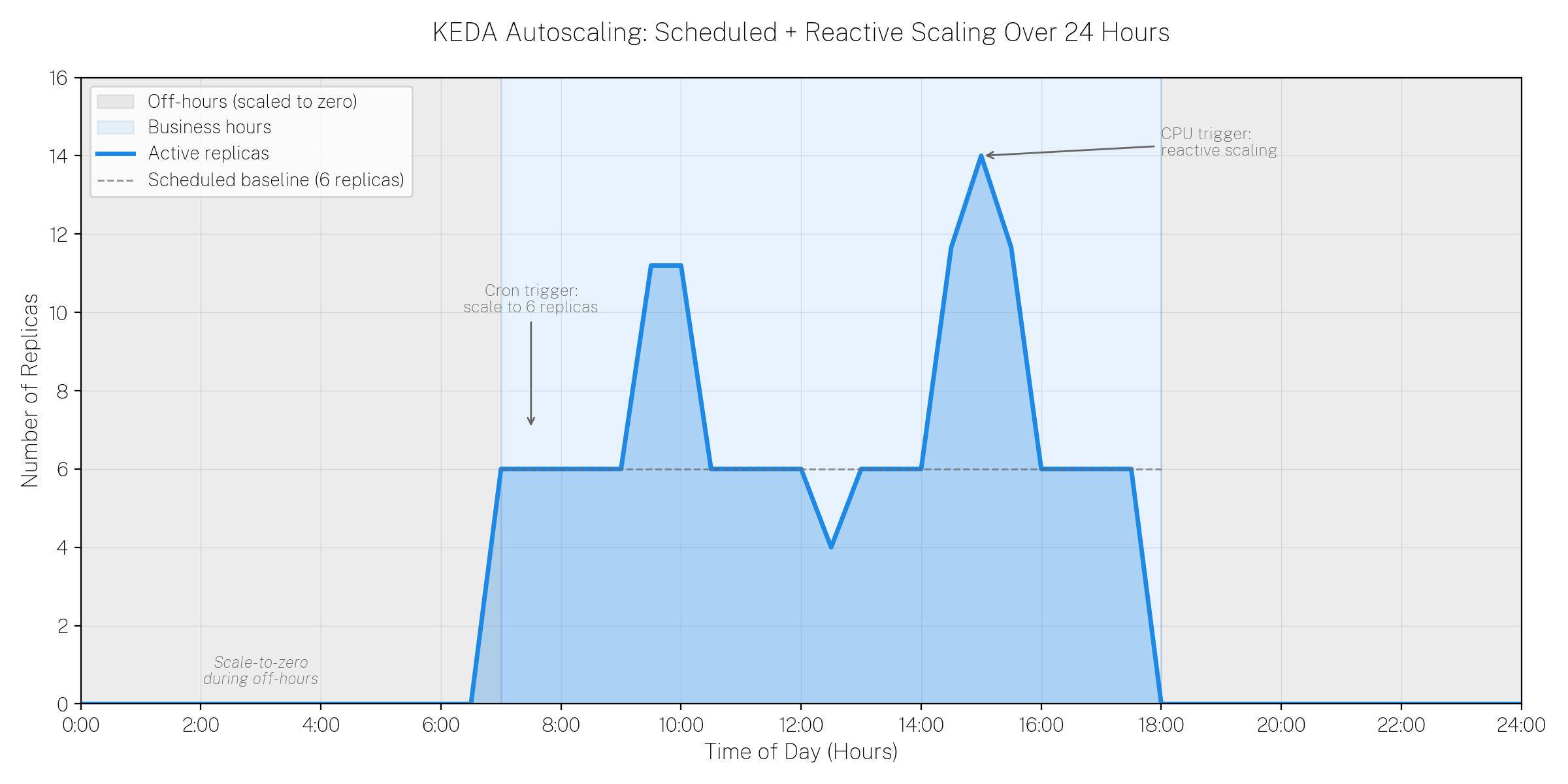
KEDA combines scheduled scaling (cron trigger) with reactive scaling (CPU trigger) to align infrastructure capacity with actual demand throughout the day.
- Event-driven autoscaling Scale Fusion workloads in response to external signals such as Prometheus metrics, queue depth, or pipeline execution load.
- Scheduled scaling Automatically scale workloads up or down based on predictable traffic patterns, such as market hours or peak usage windows.
- Scale-to-zero capability Reduce infrastructure costs by allowing certain workloads to scale down to zero during off-hours or periods of inactivity.
- Improved operational efficiency Align infrastructure capacity with real business demand instead of relying solely on CPU or memory thresholds.
api-gatewayquery-pipelinefusion-indexing
Connectors improvements
Skipping validation is now supported in V2 and Pro connectors
All V2 and Pro connectors now support a new core property that allows you to skip validation when needed. In previous versions of Fusion, long-running validation checks could cause connector configuration timeouts in the UI, preventing you from saving connector configurations even when the settings were correct. You can now configure connectors to skip validation by setting the appropriate property in the datasource configuration.Configuration parameters
Configuration parameters
boolean
default:"false"
Enable to skip configuration validation when it takes too long and causes a timeout issue.
The Selenium version for the Web connector has been upgraded
The Selenium Hub used by the Web connector has been upgraded from version 4.20.0 to version 4.38.0. The previous version was over a year old and contained security vulnerabilities. Users can expect more reliable web crawling operations, enhanced security, and improved browser compatibility with Chrome, Firefox, and Edge.Facet and JSON Facet stage improvements
Both the Facet and JSON Facet stages have been enhanced with several new capabilities that give you more control over facet presentation and matching:- Boost, bury, and suppress facet values The Facet and JSON Facet stages now support boost, bury, and suppress options for individual facet values, similar to the capabilities previously available only in facet rules. You can now promote important facet values to the top of the list (boost), move less relevant values to the bottom (bury), or hide specific values entirely (suppress) directly within the stage configuration. This provides greater flexibility for controlling facet display without requiring separate rules.
- Facet field ordering You can now control the order in which facet fields appear in query responses for both standard facets and JSON facets. This ordering capability is available in both facet stages and facet rules, allowing you to define a specific display sequence for Field and Range facets that matches your business requirements or user interface needs.
Monitoring improvements with kafka-exporter and jmx-exporter
Fusion 5.17 introduces Docker images forkafka-exporter and jmx-exporter, providing enhanced monitoring capabilities for Kafka and JMX metrics. These exporters enable you to collect detailed metrics from Kafka brokers and Java applications, making it easier to monitor Fusion component health and performance through Prometheus and other observability tools. The kafka-exporter provides visibility into Kafka consumer lag, topic metrics, and broker performance, while the jmx-exporter exposes JVM and application-level metrics for Fusion services.
Additional model parameters supported in Ray and Seldon vectorization stages
The Ray / Seldon Vectorize Field and Ray/Seldon Vectorize Query stages now support passing additional custom parameters to Ray and Seldon models beyond the basic text input. You can now include parameters such as tracking IDs, custom endpoints, input/output keys, and other model-specific configuration options in your vectorization requests.New parameters in the Ray / Seldon Vectorize Query query pipeline stage
Configuration parameters
Configuration parameters
ConfigSync annotations
ConfigSync now supports annotations that overlay ConfigSync event information on Grafana time-series graphs to highlight when specific events occurred. Annotations provide context by overlaying event information directly onto your graphs, making it easier to correlate Fusion system behavior with ConfigSync activities.Commerce Studio collection backup support in ConfigSync
ConfigSync now supports automatic backup of Commerce Studio collections. When Commerce Studio is enabled for an application, it creates a specialized set of collections with the_em suffix (for example, app_name_query_rewrite_em).
These collections are now automatically included in ConfigSync backups alongside standard query rewrite collections, ensuring that Commerce Studio configurations are preserved and can be synchronized across environments.
API Updates
Fusion 5.17 removes several deprecated endpoints in favor of more standardized alternatives. These changes align Fusion’s API surface with modern best practices and improve consistency across services. The following endpoints have been removed:-
PUT /collections/{collection}/schema/dynamicfields/{fieldName}has been removed. Instead, usePOST /solr/{collection}/schemawith areplace-dynamic-fieldcommand in the request body: -
PUT /collections/{collection}/schema/fields/{fieldName}has been removed. Instead, usePOST /solr/{collection}/schemawith areplace-fieldcommand in the request body:
Application API enhancements for Solr collection configuration
The Fusion Application Create API now provides advanced options for controlling default Solr shard and replica strategies when creating applications programmatically. You can now specify the number and types of replicas (NRT, TLOG, or PULL) for the collections that will be created with your application. The API also provides visibility into all collections that will be created for the application, giving you better control over resource allocation and replication strategies. This enhancement is particularly useful for customers who need to customize Solr topology to match specific performance, availability, or resource constraints when deploying Fusion applications through automation.OpenAPI documentation improvements
Several Fusion services have been updated to use OpenAPI specifications and resolve Swagger documentation issues. The fusion-indexing, fusion-api-gateway, and fusion-chassis services now provide improved API documentation with proper OpenAPI compliance, making it easier to understand available endpoints, request/response formats, and integration patterns. These updates enhance the developer experience when working with Fusion APIs and ensure that API documentation accurately reflects the actual service capabilities.Bug fixes
PIN rules: pinned items outside the result window are now excluded rather than promoted to position 1
When a document was pinned to a position greater than the query’srows value, Fusion incorrectly promoted it to position 1 instead of omitting it.
PIN rule processing is now pagination-aware: pins that fall outside the current page are ignored.
LWAI Gateway SSL protocol mismatch fixed
In Fusion 5.9.16, self-hosted deployments using TLS with the LWAI Gateway service experienced HTTP503 Service Unavailable errors when users attempted to configure LWAI Vectorize Field or Query stages. This occurred because the API Gateway attempted HTTPS connections to the LWAI Gateway service, which was only listening on HTTP, causing an Unsupported or unrecognized SSL message error.
The protocol mismatch has been resolved, and self-hosted TLS deployments can now properly configure LWAI vectorization stages.
Chunking RAG bridge stage now escapes document IDs properly
In previous versions of Fusion, the Chunking RAG Bridge stage failed with a Solr syntax error when processing documents with IDs containing special characters such as colons:https://example.com. The stage now properly escapes document IDs in filter queries, allowing it to work correctly with web-crawled content and other sources that use special characters in document IDs.
Pipeline cache initialization fixed to reduce ZooKeeper load
In previous versions of Fusion, query and index pipeline services generated excessive ZooKeeper read traffic due to an uninitialized cache. The cache was created but never initialized, causing every pipeline lookup to bypass the cache and query ZooKeeper directly. This resulted in high ZooKeeper traffic that scaled with query volume and the number of pipeline pods in the cluster. The cache initialization has been fixed, significantly reducing ZooKeeper traffic and improving overall cluster performance.Solr Indexer stage no longer fails with NullPointerException when using Unmapped Fields Mapping
In previous versions of Fusion starting with 5.9.10, the Solr Indexer stage could fail with a NullPointerException when the Unmapped Fields Mapping configuration was enabled with a DELETE operation. This occurred when a field configured for deletion in the Unmapped Fields Mapping settings caused the validator to incorrectly return null when processing other unrelated fields that had multiple values being mapped to single-value fields. Documents would fail to index entirely when this condition was triggered.
The field validation logic has been fixed to properly handle DELETE operations in the Unmapped Fields Mapping configuration, ensuring that unmapped field operations only affect their intended target fields and do not interfere with the validation of other fields in the document.
Ray vectorization now handles non-ASCII characters correctly
In previous versions of Fusion, Ray vectorization failed when processing text containing non-ASCII characters such as trademark symbols, copyright symbols, or other special characters. Query pipelines failed with aModel execution error: CANCELLED: Failed to read message error, while index pipelines silently omitted vector fields from documents without any error message.
This has been fixed by properly setting charset=UTF-8 in the Content-Type header for all Ray model requests. Query and index pipelines using Ray-based vectorization stages now correctly process text containing special characters, ensuring that documents with these characters are properly vectorized.
Filter queries now trigger rules when fq contains OR for the same field
In previous versions of Fusion, rules were only triggered when filter queries (fq) contained single values for a field, such as fq=categories_s:hep-th. Rules failed to trigger when multiple values for the same field were combined using OR logic, such as fq=categories_s:(hep-ph OR hep-th). This prevented rules from applying consistently across different query patterns.
The rules engine has been enhanced to support OR-based filter values for the same field, so rules now trigger correctly whether you use single filter values or combine multiple values with OR clauses.
Vectorize query stage performance improved
In previous versions of Fusion, the vectorize query stage could experience significant latency due to inefficient OAuth token handling. The OAuth token initialization was being performed lazily on each request rather than being cached properly. This has been fixed by optimizing the OAuth token initialization and caching strategy, significantly reducing query latency. Additional logging has been added to improve troubleshooting and observability for vectorization stages.Helm chart whitespace syntax issues fixed
In previous versions of Fusion starting with 5.9.14, Helm charts contained whitespace formatting issues that could cause YAML syntax errors during deployment. These whitespace problems affected chart parsing and could prevent successful installations or upgrades. The Helm charts have been corrected to ensure proper YAML formatting and eliminate syntax problems related to whitespace.Admin UI logging loop fixed
Previously, the Admin UI could enter an infinite logging loop when the/api/ui-logs endpoint failed. When this endpoint returned an error, the Admin UI would attempt to log that error, which would send another request to the same failing endpoint, creating a cascading loop.
The Admin UI now detects and prevents logging errors that originate from the ui-logs endpoint itself, breaking the infinite loop. Additionally, log queues are now properly cleared even when logging fails, and error details are output to the console for debugging purposes.
JavaScript stage security enhancement
A security patch has been created to disable the Nashorn JavaScript engine for query and index pipeline JavaScript stages. This enhancement restricts JavaScript execution to only the more secure GraalVM engine, providing enhanced security for environments with strict security requirements. This feature is particularly useful for customers undergoing penetration testing or who require highly secure JavaScript execution environments. You can enable it by adding this to your Fusion Helm chart:Parsing and indexing fixes
Several datasource indexing and parsing bugs have been fixed that previously caused data inconsistencies, missing documents, or incorrect field extraction.-
When Fusion parsed a document into multiple documents (such as splitting a large file into sections), it would index an extra
container-docdocument representing the parent document alongside the parsed child documents. This behavior caused confusion for users who would see unexpected extra documents in their index. The connector now skips indexing thecontainer-docwhile still maintaining proper deletion handling for parsed documents. -
When Fusion parsed XML files with a root path configuration of
/(representing the entire XML file as a single document), theabsolute_resource_namefield incorrectly included a#0suffix. For example,https://example.com/file.xmlwould be stored ashttps://example.com/file.xml#0. This suffix has been removed, and theabsolute_resource_namefield now correctly reflects the original XML file path without any suffix.
LWAI Vectorize stage validation errors improved
In previous versions of Fusion, providing invalid or misplaced parameters in the LWAI Vectorize stage configuration (such as placing a parameter meant formodelConfig into useCaseConfig instead) resulted in an unhelpful NullPointerException.
The stage now properly validates configuration parameters and returns an HTTP 400 Bad Request with a descriptive error message that indicates which parameter is invalid, the list of valid parameters for each configuration section, and contextual suggestions. This improves the user experience and reduces troubleshooting time.
Updating a datasource now displays default values
In previous versions of Fusion, default values for datasource configuration fields were only displayed when creating a new datasource. When editing an existing datasource, fields that had no value set by the user would appear empty instead of showing their default values. This made it difficult to understand the actual datasource configuration being used and could lead to confusion about whether default values were being applied. Default values now display properly in edit mode for all fields that have not changed the default value, ensuring consistency between the create and edit experiences.Next job run time displays properly
In previous versions of Fusion, the next scheduled run time for jobs did not appear in the Jobs UI unless the browser was manually refreshed. This has been fixed, and the job schedule information now displays correctly and updates automatically without needing to manually refresh your browser.Known issues
Streaming mode indexing fails with unquoted character errors
When indexing content in streaming mode, the Jackson library upgrade (2.13.5 → 2.19.1) introduced stricter validation. The current implementation might fail with the long requests which use aTransfer-Encoding: chunked header.
Below is an example of a failure message, though other messages are also possible:
Content-Length header.
Platform support and component versions
Kubernetes platform support
Lucidworks has tested and validated support for the following Kubernetes platforms and versions:- Google Kubernetes Engine (GKE): 1.30, 1.31, 1.32, 1.33, 1.34, 1.35
- Microsoft Azure Kubernetes Service (AKS): 1.30, 1.31, 1.32, 1.33, 1.34, 1.35
- Amazon Elastic Kubernetes Service (EKS): 1.30, 1.31, 1.32, 1.33, 1.34, 1.35
Component versions
The following table details the versions of key components that may be critical to deployments and upgrades.
More information about support dates can be found at Lucidworks Semantic Version Support Lifecycle.