

The Spell Check query stage lets you configure threshold values to invoke a spell check function, such as Solr Spell Check, to return relevant spelling suggestions when queries contain misspellings or typing errors. This improves search relevance and minimizes zero search result experiences. After the stage is configured, you can test by entering misspelled search terms in Query Workbench, and reviewing the suggestions returned by the spell check function.Documentation Index
Fetch the complete documentation index at: https://doc.lucidworks.com/llms.txt
Use this file to discover all available pages before exploring further.
Prerequisites
You can set up a Spell Check stage for any query pipeline. However, you must choose whether spell check is dependent on results for a Solr Query stage or from a neural hybrid query stage.Solr Query
The search approach for lexical search uses a basic Solr query. The Solr Query stage enables this functionality, and the Spell Check stage must appear after it in the query pipeline.The Result Count Threshold configuration option is tied to this approach and checks for a minimum document count returned before processing.
Neural Hybrid Search (NHS)
The search approach for a blend of lexical and semantic search uses Neural Hybrid Search. Either the Neural Hybrid Query stage or Chunking Neural Hybrid Query stage enables this functionality, and the Spell Check stage must appear after either of these stages in the query pipeline.The Cutoff margin (NHS) configuration option is tied to this approach and checks for a minimum lexical score before processing.
Add Spell Check to your query pipeline
- Spell check with Solr Query
- Spell check with NHS
To configure and test the Spell Check query stage, open your pipeline, and complete the following steps: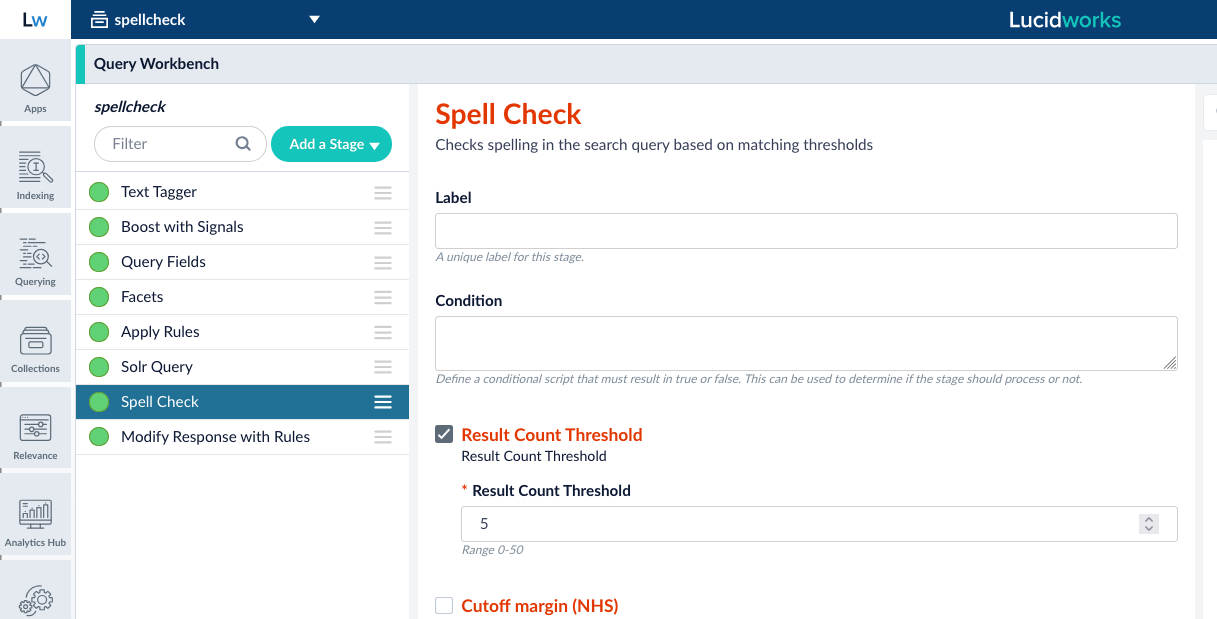
- Click Add a new pipeline stage, and select Spell Check from the list.
- Select the Result Count Threshold checkbox, then enter the minimum number of results the search terms must return to prevent triggering the spell check function. The values are 0-50. For example, if the value in Result Count Threshold is 50, and the user enters search terms where fewer than 50 results are returned, the Spell Check stage triggers the spell check function selected in the Query Suggestions Method field. The spell check function assumes the user entry is misspelled or typed incorrectly, so it searches for correctly spelled terms similar to the search terms entered. If it finds suggestions, they display in Query Workbench.
-
In the Query Suggestions Method field, select the spell check function to trigger if the threshold values are not met. For example, a value of
solrtriggers the Solr Spell Checking function. - Click Save.
- Drag and move the Spell Check stage in the list so it appears after the Solr Query stage.
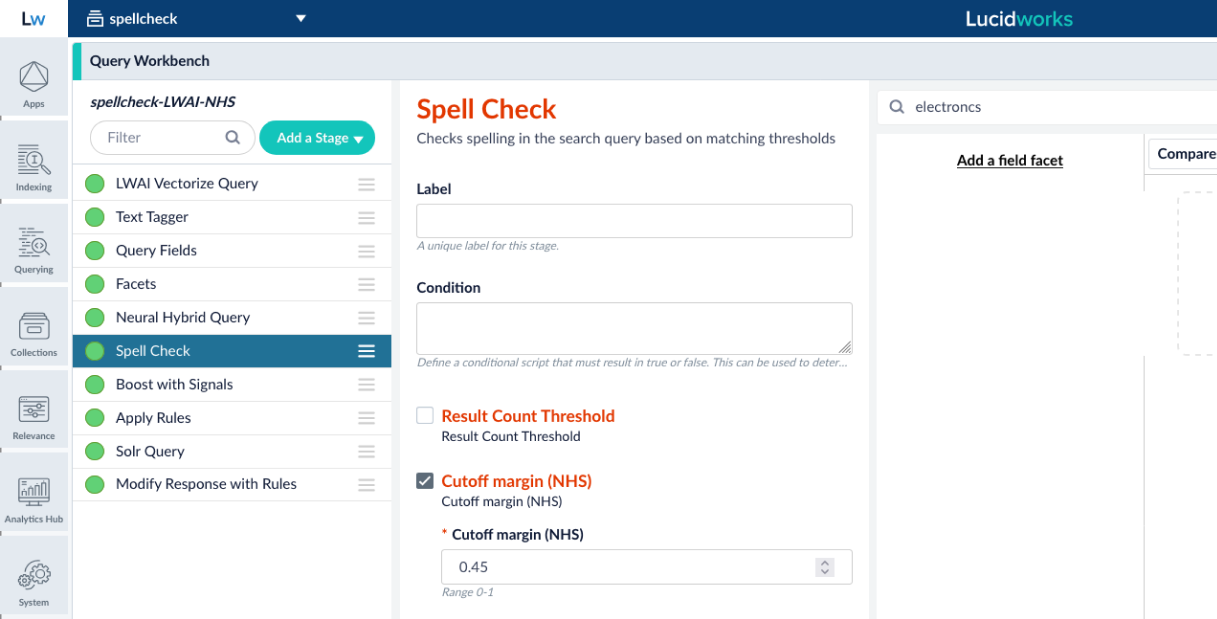
- In Query Workbench, enter a misspelled term in the Search field.
-
If the threshold for results is not met, verify the “Did you mean?” dropdown with suggestions related to the search terms display. For example, if you enter
electroncs, the system displays “Did you mean?”electronics,electronic,electrodes, and so on. The results do not interfere with neural hybrid search semantic relevance.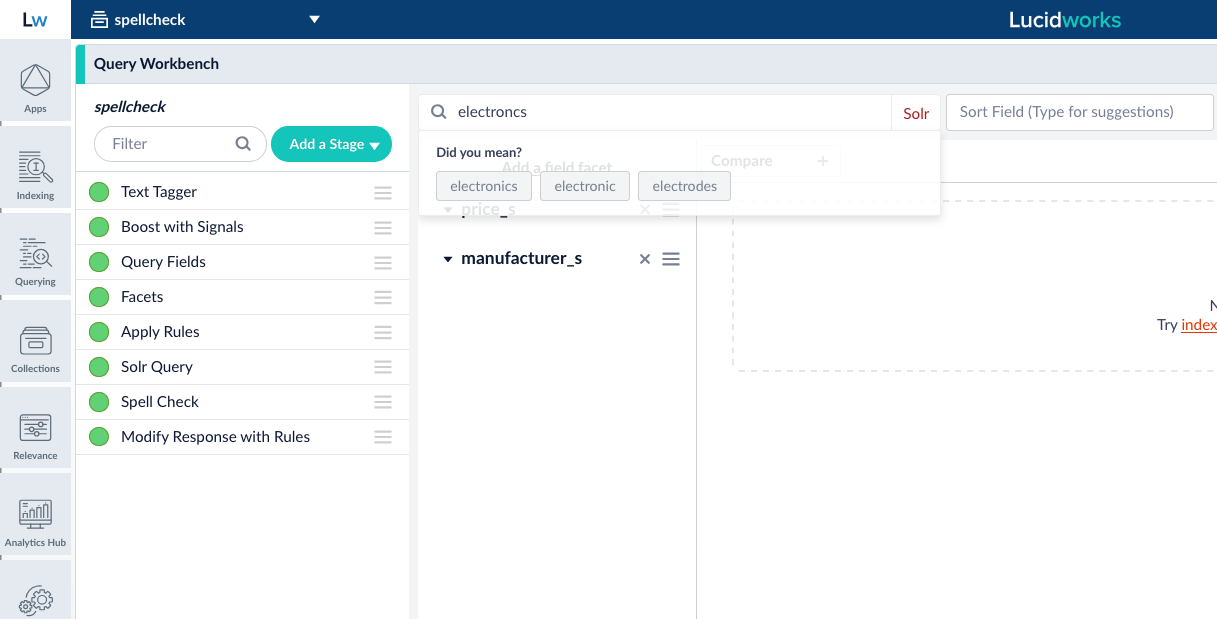
- Select one of the suggestions and verify appropriate results display in the results section. You can click show fields to view details for each result.
The Spell Check query stage also provides Prometheus metrics and insights that help your organization make data-driven adjustments to increase conversions.
Understand threshold behavior
- Spell check with Solr Query
- Spell check with NHS
The spell check function is not triggered until the defined Result Count Threshold is met. When the threshold is not met, the spell check function processes the query, but suggestions only appear if the function produces at least one suggestion.For example, if Result Count Threshold is configured as
50:| Docs returned | Threshold met | Number of suggestions | Spell check suggestions returned |
|---|---|---|---|
| 75 | |||
| 50 | |||
| 25 | 0 | ||
| 25 | 5 |