> ## Documentation Index
> Fetch the complete documentation index at: https://doc.lucidworks.com/llms.txt
> Use this file to discover all available pages before exploring further.
# AI Ranking Insights
export const LwTemplate = ({title = "Key questions to get you started", icon = "sparkles", cta = "Powered by Agent Studio", linkHref = "https://lucidworks.com/demo/?utm_source=docs&utm_medium=referral&utm_campaign=docs_cta_ai"}) => {
const [isLoaded, setIsLoaded] = useState(false);
useEffect(() => {
const timer = setTimeout(() => {
setIsLoaded(true);
}, 500);
return () => clearTimeout(timer);
}, []);
return
{isLoaded && `
}} />}
Powered by Lucidworks Agent Studio
;
};
AI Ranking Insights is a Commerce Studio feature that displays a clear, business-friendly explanation about why a product or content is ranked in a given position.
This feature uses a large language model (LLM) to interpret primary ranking drivers, such as text relevance, rules, boosts, rewrites, and AI-driven signals like Neural Hybrid Search (NHS), in Fusion's debug response.
## AI Ranking Insights example
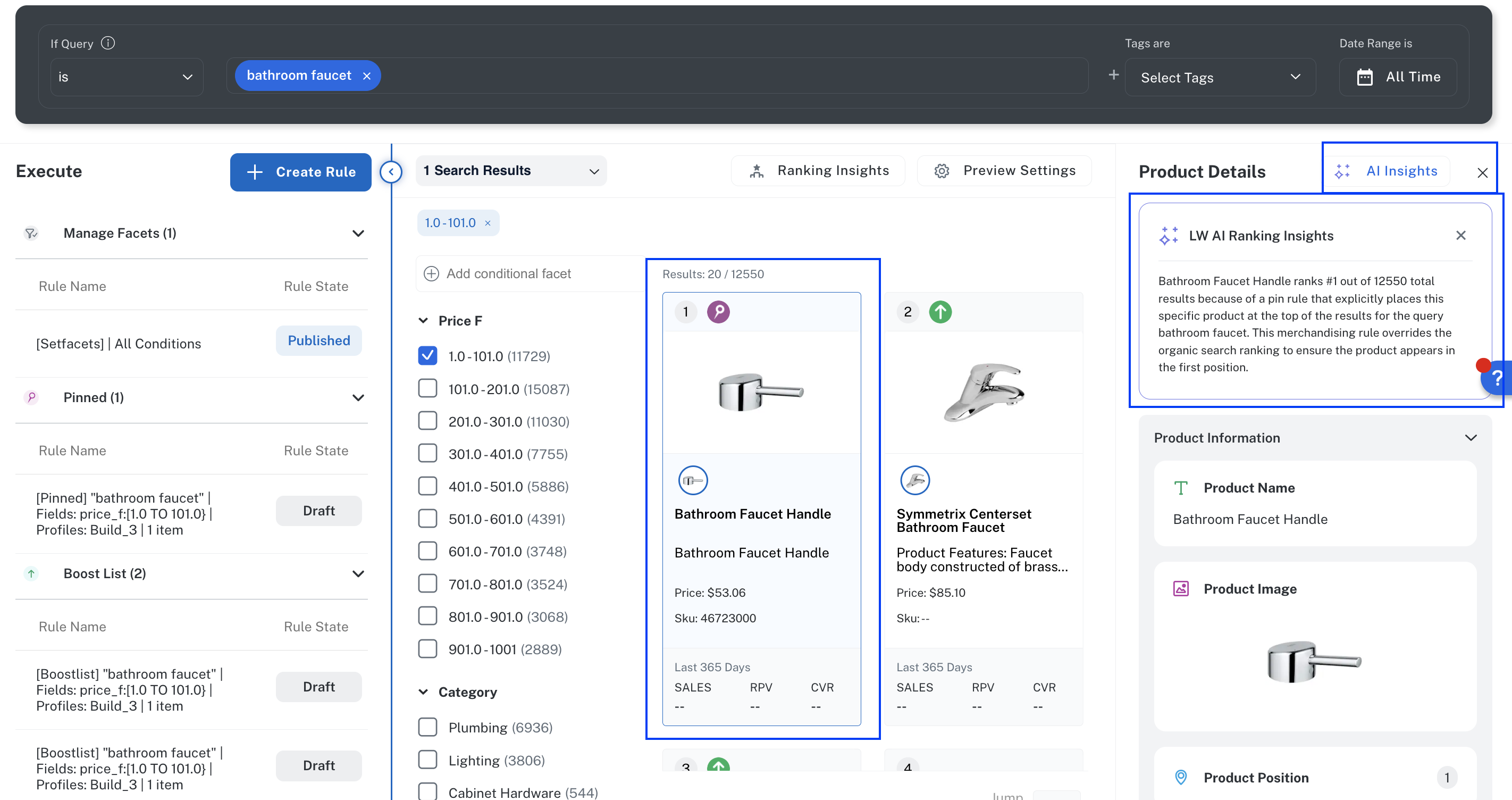
To display the information, hold the pointer over a search result and select **Click Details**. In the Product Details section, click **AI Ranking Insights**.
The AI ranking insights feature identifies key relevancy influencers including merchandising rules, matching fields, and matching logic, and then returns the reasoning in a readable format so merchandisers and search managers can quickly identify the key factors influencing a search result's relevancy.
In this example, the AI ranking insight explains that the selected search result is ranked first because of a pin rule (listed in the **Execute** section of the Editor screen), and that the rule places the item above all other items. Merchandisers and other personnel would use this information to modify the factors of this and other search results, if needed, to rank other results higher than the bathroom faucet handle.
## Benefits
Merchandisers, search managers, and other personnel can use this concise explanation to:
* More quickly refine and optimize relevance without requiring expertise in Fusion configuration or search engineering.
* Reduce the requirement for technical expertise to decipher raw scores, weights, and pipeline calculations.
* Reduce reliance on engineering resources to troubleshoot relevance issues.
* Reduce the risk of time-consuming, trial-and-error rule and other configuration changes.
## How it works
This is the flow to display AI Ranking Insights for a product:
1. In Commerce Studio Editor, a user searches for a product. For example, bathroom faucet.
2. Lucidworks Platform captures the corresponding Fusion debug response in the Query Workbench.
3. The debug response, aware of the query context, rules, rewrites, and AI signals, is sent to an LLM.
4. The LLM returns a clear, concise explanation that takes the primary ranking factors into account:
* Interaction of related rules, boosts, and relevance
* Why the product displays in relation to the other products
## Technical requirements
Because the AI Ranking Insights function reads the Fusion debug response, the following is required in Fusion:
* The Fusion pipelines must be configured with `send debug response = true`.
* The response must include the `explain` information in the `debug` section. If you remove these from the response for any reason, add the following conditional statement, which passes the information exclusively to Commerce Studio (but no other location).
```json theme={"dark"}
!request.hasParam("lw.em.queryType")
```
 ## Benefits
Merchandisers, search managers, and other personnel can use this concise explanation to:
* More quickly refine and optimize relevance without requiring expertise in Fusion configuration or search engineering.
* Reduce the requirement for technical expertise to decipher raw scores, weights, and pipeline calculations.
* Reduce reliance on engineering resources to troubleshoot relevance issues.
* Reduce the risk of time-consuming, trial-and-error rule and other configuration changes.
## How it works
This is the flow to display AI Ranking Insights for a product:
1. In Commerce Studio Editor, a user searches for a product. For example, bathroom faucet.
2. Lucidworks Platform captures the corresponding Fusion debug response in the Query Workbench.
3. The debug response, aware of the query context, rules, rewrites, and AI signals, is sent to an LLM.
4. The LLM returns a clear, concise explanation that takes the primary ranking factors into account:
* Interaction of related rules, boosts, and relevance
* Why the product displays in relation to the other products
## Technical requirements
Because the AI Ranking Insights function reads the Fusion debug response, the following is required in Fusion:
* The Fusion pipelines must be configured with `send debug response = true`.
* The response must include the `explain` information in the `debug` section. If you remove these from the response for any reason, add the following conditional statement, which passes the information exclusively to Commerce Studio (but no other location).
```json theme={"dark"}
!request.hasParam("lw.em.queryType")
```
## Benefits
Merchandisers, search managers, and other personnel can use this concise explanation to:
* More quickly refine and optimize relevance without requiring expertise in Fusion configuration or search engineering.
* Reduce the requirement for technical expertise to decipher raw scores, weights, and pipeline calculations.
* Reduce reliance on engineering resources to troubleshoot relevance issues.
* Reduce the risk of time-consuming, trial-and-error rule and other configuration changes.
## How it works
This is the flow to display AI Ranking Insights for a product:
1. In Commerce Studio Editor, a user searches for a product. For example, bathroom faucet.
2. Lucidworks Platform captures the corresponding Fusion debug response in the Query Workbench.
3. The debug response, aware of the query context, rules, rewrites, and AI signals, is sent to an LLM.
4. The LLM returns a clear, concise explanation that takes the primary ranking factors into account:
* Interaction of related rules, boosts, and relevance
* Why the product displays in relation to the other products
## Technical requirements
Because the AI Ranking Insights function reads the Fusion debug response, the following is required in Fusion:
* The Fusion pipelines must be configured with `send debug response = true`.
* The response must include the `explain` information in the `debug` section. If you remove these from the response for any reason, add the following conditional statement, which passes the information exclusively to Commerce Studio (but no other location).
```json theme={"dark"}
!request.hasParam("lw.em.queryType")
```