> ## Documentation Index
> Fetch the complete documentation index at: https://doc.lucidworks.com/llms.txt
> Use this file to discover all available pages before exploring further.
# Lucidworks AI
export const LwTemplate = ({title = "Key questions to get you started", icon = "sparkles", cta = "Powered by Agent Studio", linkHref = "https://lucidworks.com/demo/?utm_source=docs&utm_medium=referral&utm_campaign=docs_cta_ai"}) => {
const [isLoaded, setIsLoaded] = useState(false);
useEffect(() => {
const timer = setTimeout(() => {
setIsLoaded(true);
}, 500);
return () => clearTimeout(timer);
}, []);
return
{isLoaded && `
}} />}
Powered by Lucidworks Agent Studio
;
};
[old doc.lw link]: https://doc.lucidworks.com/lw-platform/ai/lukosg
[localhost link]: http://localhost:3000/docs/lw-platform/lw-ai/overview
[mintlify link]: https://doc.lucidworks.com/docs/lw-platform/lw-ai/overview
Lucidworks AI is an advanced suite of AI-powered data discovery and search capabilities designed to enhance user experiences across various industries by using pre-trained embedding models, custom embedding models, and generative AI (Gen-AI) models. Lucidworks AI is easy to use and integrates seamlessly with Lucidworks Platform and Fusion.
This article describes features that are only available in certain packages. See [Lucidworks Feature Limited Availability](/docs/policies/feature-availability) for
details, or reach out to your Lucidworks representative.
See how Lucidworks AI performs with your own data. Our team can walk you through a tailored demo.
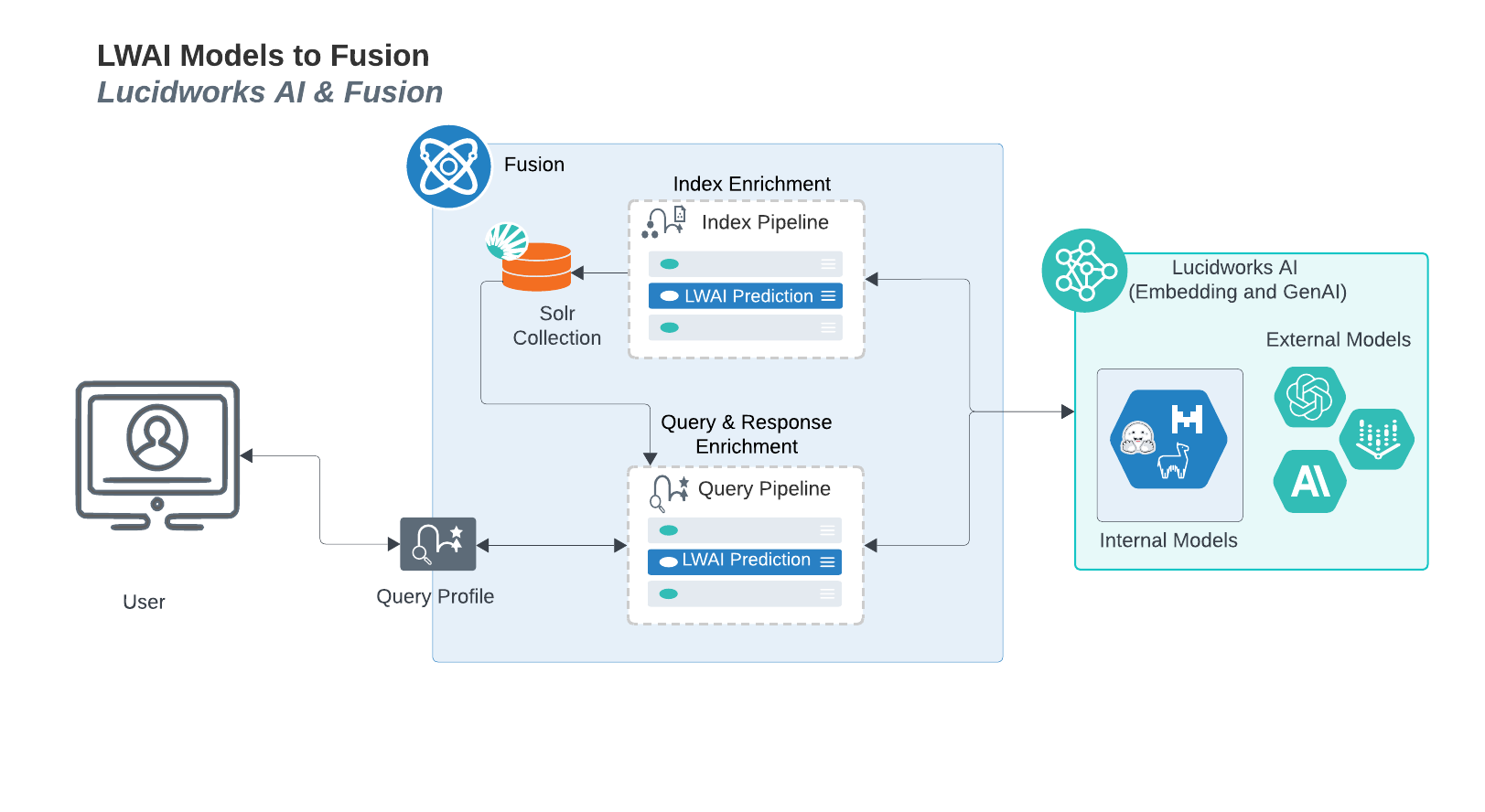
## Lucidworks AI model interactions with Fusion
This diagram displays the interactions between Lucidworks AI models and Fusion.
## Implement Lucidworks AI
Lucidworks AI is available for Fusion 5.9.5 and later, and requires a valid Lucidworks platform license.
1. [Configure the Lucidworks AI gateway](/docs/lw-platform/lw-ai/lw-ai-gateway)
2. [Set up Fusion and Lucidworks AI pipeline stages](/docs/lw-platform/lw-ai/lw-ai-stages/overview)
3. Identify which of the following models will best suit your organization’s goals:
* [Pre-trained embedding models](#pre-trained-embedding-models)
* [Custom embedding models](#custom-embedding-model-training)
* [Gen-AI with open and closed source models](#gen-ai-with-open-and-closed-source-models)
## Pre-trained embedding models
Lucidworks provides state-of-the-art [pre-trained embedding models](/docs/lw-platform/lw-ai/lw-ai-pre-trained-embedding-models) to support semantic vector search (SVS).
You can use Lucidworks AI to choose the models that best suit your organizational needs. Lucidworks consistently evaluates and tests new models and enhancements to existing models. When an enhancement or a new model is verified to be effective on the platform, it is released.
## Custom embedding model training
The [Custom model training user interface](/docs/lw-platform/lw-ai/lw-ai-custom-embedding-model-training/custom-model-training-user-interface) lets you train and deploy custom models that Lucidworks provides, and it displays information about the custom models deployed on your site.
You can also use the [Lucidworks AI Models API](/docs/lw-platform/lw-ai/lw-ai-apis/lw-ai-models-api) to perform those tasks.
Custom trained models are essential for ecommerce and other use cases with a domain-specific language. Custom model training uses:
* Signals data that enables optimization for particular business use cases and metrics.
* Graphics processing units (GPUs) for optimal performance.
The Lucidworks AI model training user interface provides evaluation metrics to easily compare trained models. Lucidworks provides small and efficient custom models that scale to thousands of queries per second (QPS) without decreasing the quality of embeddings.
## Gen-AI with open and closed source models
Lucidworks provides [Gen-AI use cases](/docs/lw-platform/lw-ai/lw-ai-generative-ai) such as retrieval-augmented generation (RAG), summarization, and keyword extraction. New use cases are added on a regular basis, and are accessible immediately through the Fusion stages integration with Lucidworks AI.
## Learn more
Lucidworks offers free training to help you get started. The course focuses on how to connect Lucidworks AI to Fusion. Visit LucidAcademy to see the full training catalog.
 ## Implement Lucidworks AI
Lucidworks AI is available for Fusion 5.9.5 and later, and requires a valid Lucidworks platform license.
1. [Configure the Lucidworks AI gateway](/docs/lw-platform/lw-ai/lw-ai-gateway)
2. [Set up Fusion and Lucidworks AI pipeline stages](/docs/lw-platform/lw-ai/lw-ai-stages/overview)
3. Identify which of the following models will best suit your organization’s goals:
* [Pre-trained embedding models](#pre-trained-embedding-models)
* [Custom embedding models](#custom-embedding-model-training)
* [Gen-AI with open and closed source models](#gen-ai-with-open-and-closed-source-models)
## Pre-trained embedding models
Lucidworks provides state-of-the-art [pre-trained embedding models](/docs/lw-platform/lw-ai/lw-ai-pre-trained-embedding-models) to support semantic vector search (SVS).
You can use Lucidworks AI to choose the models that best suit your organizational needs. Lucidworks consistently evaluates and tests new models and enhancements to existing models. When an enhancement or a new model is verified to be effective on the platform, it is released.
## Custom embedding model training
The [Custom model training user interface](/docs/lw-platform/lw-ai/lw-ai-custom-embedding-model-training/custom-model-training-user-interface) lets you train and deploy custom models that Lucidworks provides, and it displays information about the custom models deployed on your site.
You can also use the [Lucidworks AI Models API](/docs/lw-platform/lw-ai/lw-ai-apis/lw-ai-models-api) to perform those tasks.
Custom trained models are essential for ecommerce and other use cases with a domain-specific language. Custom model training uses:
* Signals data that enables optimization for particular business use cases and metrics.
* Graphics processing units (GPUs) for optimal performance.
The Lucidworks AI model training user interface provides evaluation metrics to easily compare trained models. Lucidworks provides small and efficient custom models that scale to thousands of queries per second (QPS) without decreasing the quality of embeddings.
## Gen-AI with open and closed source models
Lucidworks provides [Gen-AI use cases](/docs/lw-platform/lw-ai/lw-ai-generative-ai) such as retrieval-augmented generation (RAG), summarization, and keyword extraction. New use cases are added on a regular basis, and are accessible immediately through the Fusion stages integration with Lucidworks AI.
## Learn more
## Implement Lucidworks AI
Lucidworks AI is available for Fusion 5.9.5 and later, and requires a valid Lucidworks platform license.
1. [Configure the Lucidworks AI gateway](/docs/lw-platform/lw-ai/lw-ai-gateway)
2. [Set up Fusion and Lucidworks AI pipeline stages](/docs/lw-platform/lw-ai/lw-ai-stages/overview)
3. Identify which of the following models will best suit your organization’s goals:
* [Pre-trained embedding models](#pre-trained-embedding-models)
* [Custom embedding models](#custom-embedding-model-training)
* [Gen-AI with open and closed source models](#gen-ai-with-open-and-closed-source-models)
## Pre-trained embedding models
Lucidworks provides state-of-the-art [pre-trained embedding models](/docs/lw-platform/lw-ai/lw-ai-pre-trained-embedding-models) to support semantic vector search (SVS).
You can use Lucidworks AI to choose the models that best suit your organizational needs. Lucidworks consistently evaluates and tests new models and enhancements to existing models. When an enhancement or a new model is verified to be effective on the platform, it is released.
## Custom embedding model training
The [Custom model training user interface](/docs/lw-platform/lw-ai/lw-ai-custom-embedding-model-training/custom-model-training-user-interface) lets you train and deploy custom models that Lucidworks provides, and it displays information about the custom models deployed on your site.
You can also use the [Lucidworks AI Models API](/docs/lw-platform/lw-ai/lw-ai-apis/lw-ai-models-api) to perform those tasks.
Custom trained models are essential for ecommerce and other use cases with a domain-specific language. Custom model training uses:
* Signals data that enables optimization for particular business use cases and metrics.
* Graphics processing units (GPUs) for optimal performance.
The Lucidworks AI model training user interface provides evaluation metrics to easily compare trained models. Lucidworks provides small and efficient custom models that scale to thousands of queries per second (QPS) without decreasing the quality of embeddings.
## Gen-AI with open and closed source models
Lucidworks provides [Gen-AI use cases](/docs/lw-platform/lw-ai/lw-ai-generative-ai) such as retrieval-augmented generation (RAG), summarization, and keyword extraction. New use cases are added on a regular basis, and are accessible immediately through the Fusion stages integration with Lucidworks AI.
## Learn more