> ## Documentation Index
> Fetch the complete documentation index at: https://doc.lucidworks.com/llms.txt
> Use this file to discover all available pages before exploring further.
# Generative AI
export const LwTemplate = ({title = "Key questions to get you started", icon = "sparkles", cta = "Powered by Agent Studio", linkHref = "https://lucidworks.com/demo/?utm_source=docs&utm_medium=referral&utm_campaign=docs_cta_ai"}) => {
const [isLoaded, setIsLoaded] = useState(false);
useEffect(() => {
const timer = setTimeout(() => {
setIsLoaded(true);
}, 500);
return () => clearTimeout(timer);
}, []);
return
{isLoaded && `
}} />}
Powered by Lucidworks Agent Studio
;
};
[old doc.lw link]: https://doc.lucidworks.com/lw-platform/ai/r7ai90
[localhost link]: http://localhost:3000/docs/lw-platform/lw-ai/lw-ai-generative-ai
[mintlify link]: https://doc.lucidworks.com/docs/lw-platform/lw-ai/lw-ai-generative-ai
Lucidworks AI provides a generative AI (Gen-AI) service that lets you access and use large language models (LLM) for a variety of Gen-AI use cases.
Click your organization type for information about the benefits of using generative AI:
Interpret natural language customer queries and use query rewriting, enriched metadata, and retrieval-augmented generation (RAG) to improve product discovery and provide accurate responses and recommendations.
Index and interpret large volumes of complex content including product catalogs and technical documentation. Use summarization, named entity recognition (NER), and keyword extraction to make content easier to retrieve. Use retrieval-augmented generation (RAG) to provide grounded, accurate results to internal and external user queries.
Enrich and structure unstructured content and use summarization, named entity recognition (NER), and vectorization to make the content easier to search and retrieve. Use retrieval-augmented generation (RAG) to ground responses to existing documentation, ensuring the results reflect your organization's information.
The Gen-AI models use one of Lucidworks' pre-defined use cases described in the following APIs:
* [LWAI Prediction API](/docs/lw-platform/lw-ai/lw-ai-apis/lw-ai-prediction-api/overview)
* [Lucidworks AI Async Prediction API](/docs/lw-platform/lw-ai/lw-ai-apis/lw-ai-async-prediction-api/overview)
The APIs specify configuration for:
* Use cases are set in the `useCaseConfig` parameter.
* Models are set in the `modelConfig` parameter.
For information about the stages that integrate Fusion with Lucidworks AI, see:
* [LWAI Prediction query stage](/docs/5/fusion/reference/config-ref/pipeline-stages/query-stages/lucidworks-ai-prediction-query-stage)
* [LWAI Prediction index stage](/docs/5/fusion/reference/config-ref/pipeline-stages/index-stages/lucidworks-ai-prediction-index-stage)
Lucidworks AI is built with Meta Llama 3.
## Generative AI indexing enrichment
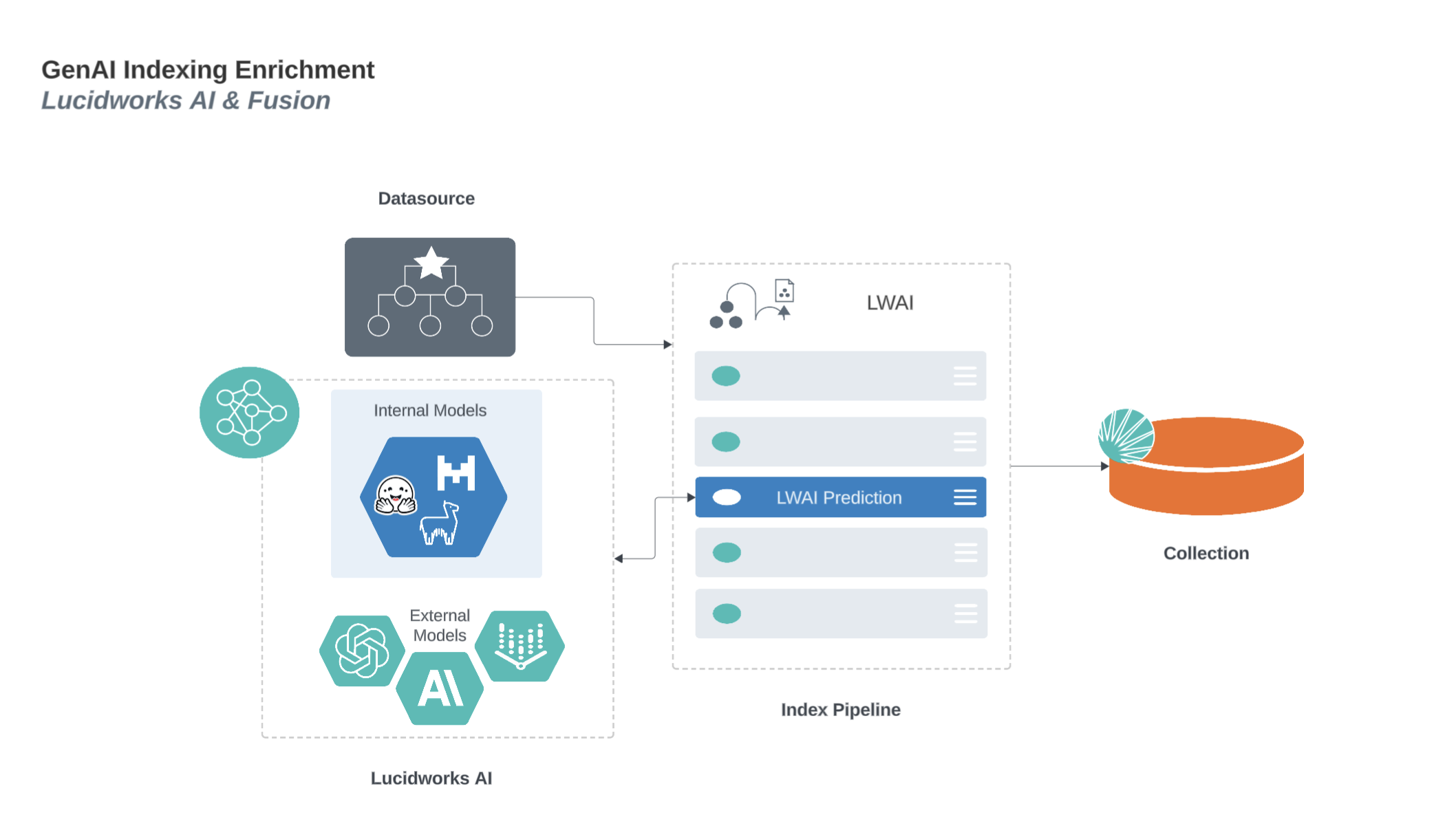
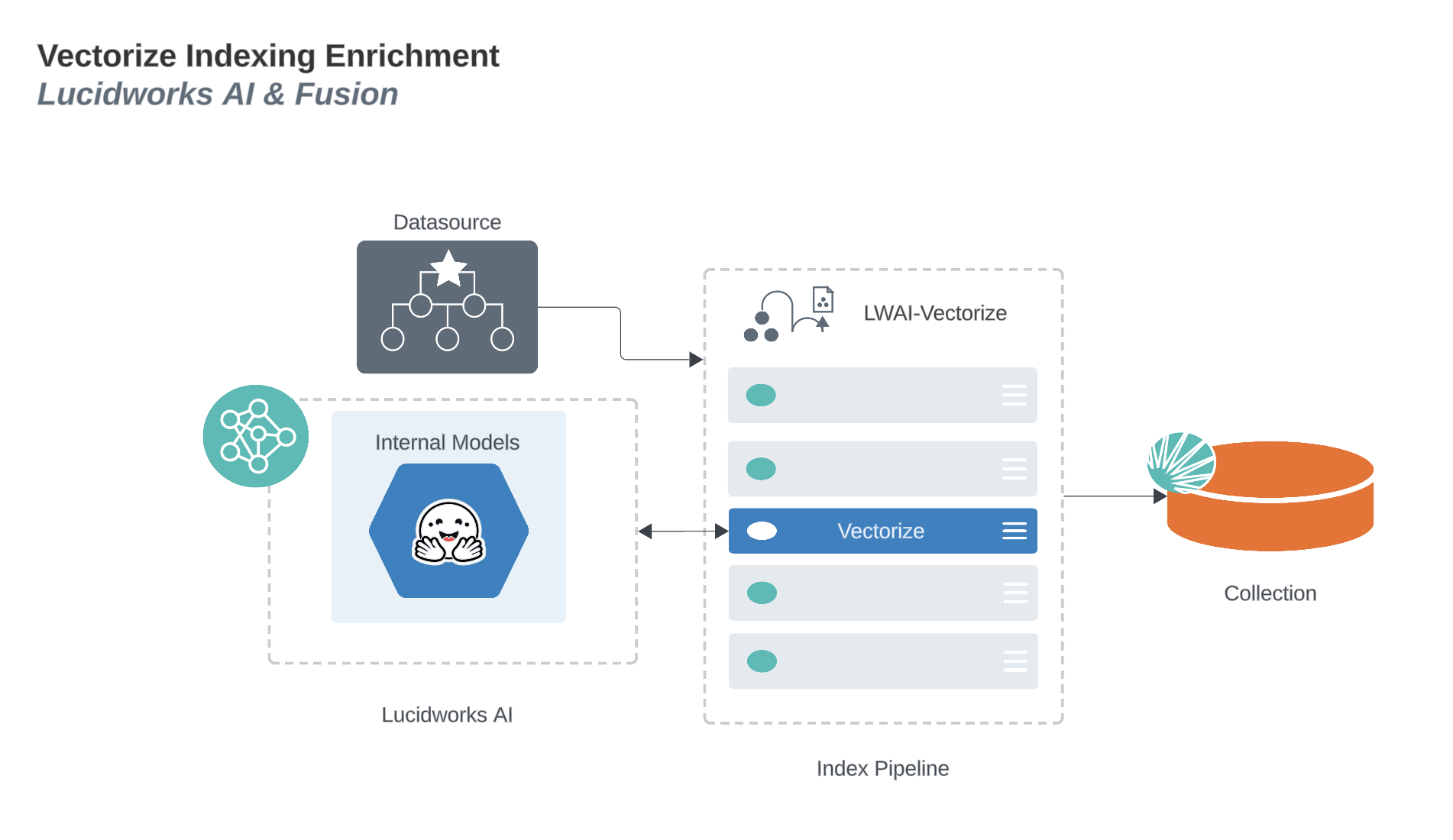
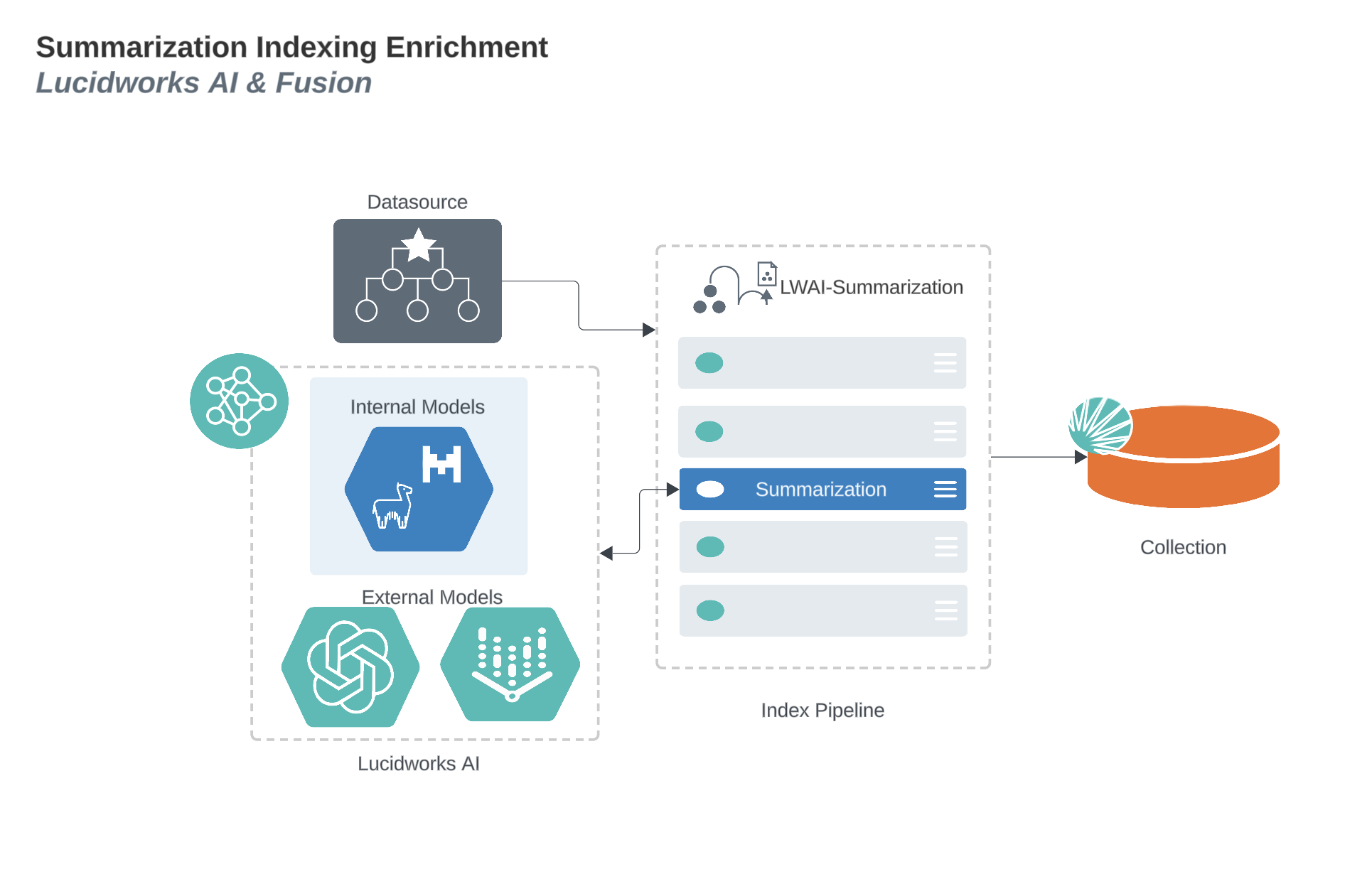
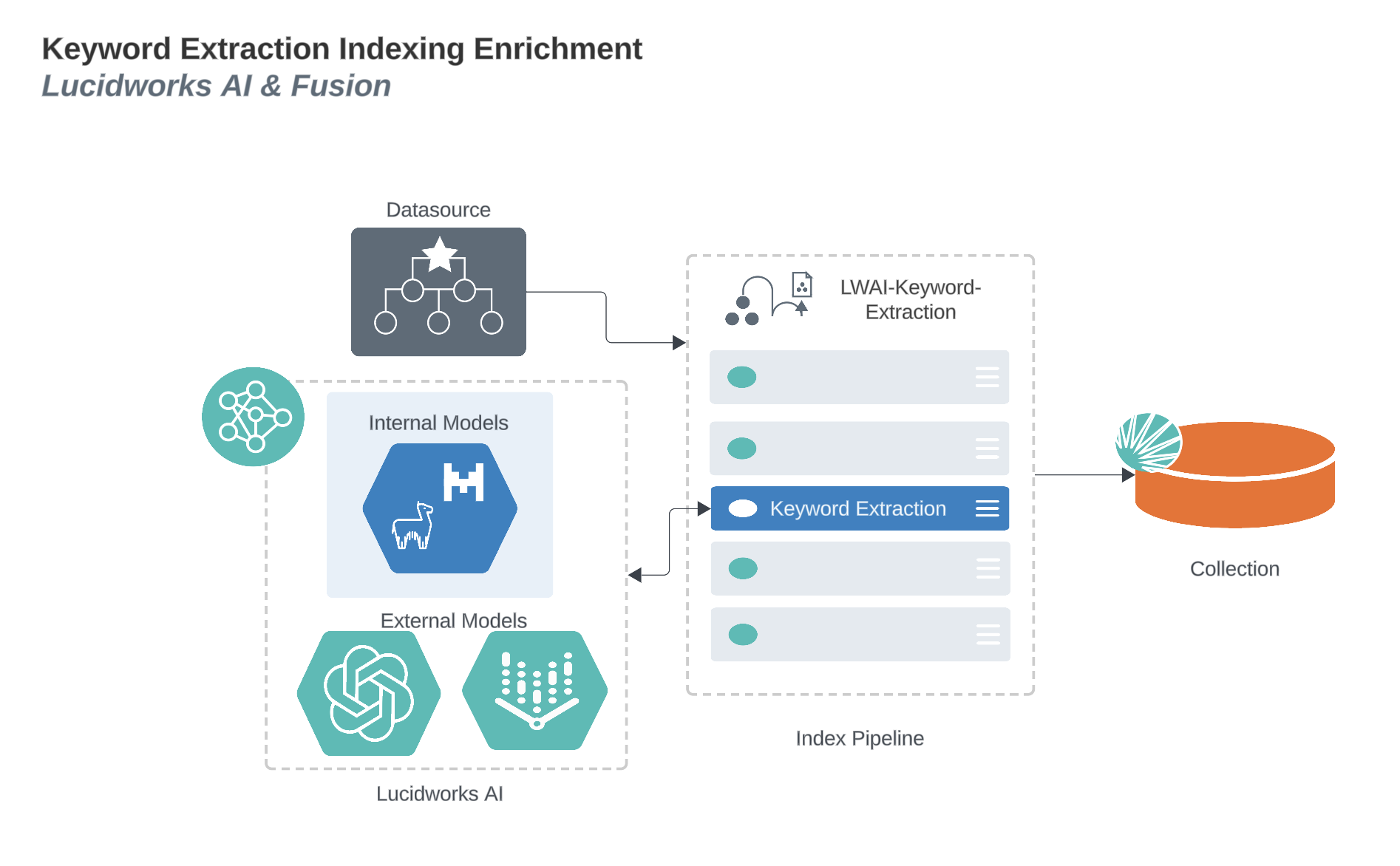
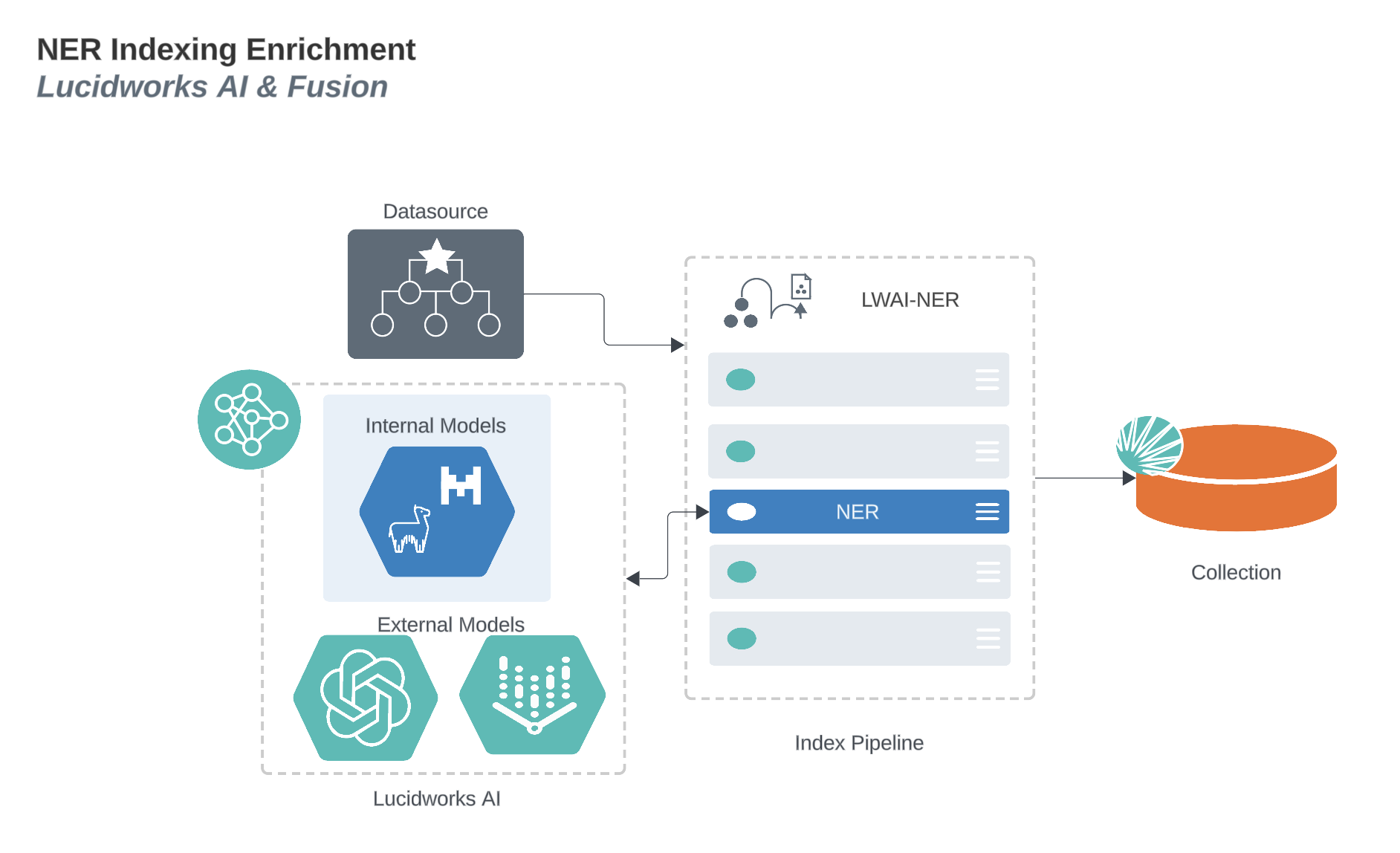
Generative AI processes indexed data and enriches it with AI-generated information to improve the search experience and enhances the quality of results. These diagrams display the process that enriches generative AI indexing for several functions and use cases.
### Generative AI prediction indexing enrichment
### Generative AI vectorize indexing enrichment
### Generative AI summarization indexing enrichment
### Generative AI keyword extraction indexing enrichment
### Generative AI named entity recognition (NER) indexing enrichment
## Generative AI query enrichment
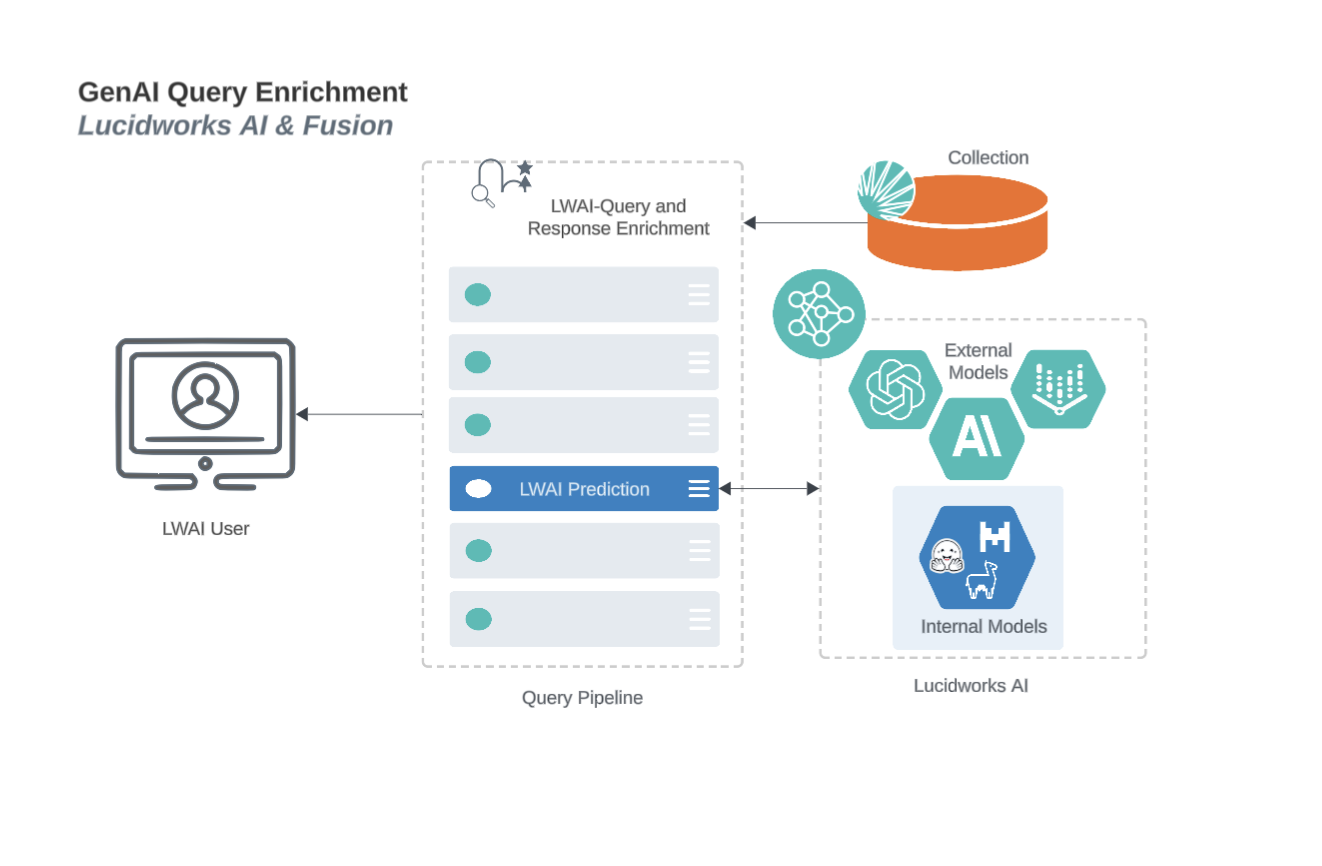
In addition to the rules you create and deploy, generative AI enhances queries by rewriting, determining similar context and terms, and interpreting the potential meaning of search entries. This diagram displays the query enrichment process.
## Generative AI models
### Lucidworks-hosted Gen-AI models
All of the models currently hosted by Lucidworks are open source.
In models hosted by Lucidworks, the data is:
* Contained within Lucidworks and is never exposed to third parties.
* Passed to the specified model and generates responses to the instance’s requests, but is not retained to train or be used by the model after the initial request.
The supported Lucidworks-hosted models are:
* [`Llama-3.1-8b-instruct` (`llama-3-8b-instruct`)](https://huggingface.co/meta-llama/Llama-3.1-8B-Instruct)
* [nu-zero-ner](https://huggingface.co/numind/NuNER_Zero). This model only supports the NER use case.
* [Phi-4-multimodal-instruct (`phi-4-multimodal-instruct`)](https://huggingface.co/microsoft/Phi-4-multimodal-instruct)
Lucidworks-hosted models enforce limits for total model context length. The limits may be different for synchronous and asynchronous requests. For Lucidworks-hosted models, the limits are:
| Model | Sync Length | Async Length |
| ------------------------- | ----------- | ------------ |
| llama-3-8b-instruct | 32000 | 128000 |
| nu-zero-ner | 384 | 384 |
| phi-4-multimodal-instruct | 32000 | 64000 |
| gemma-4-e2b | 32000 | 80000 |
| gemma-4-e4b | 32000 | 128000 |
There is a limit of 2048 max tokens for all Lucidworks-hosted models. You can generate a maximum of 2048 tokens on output, or you can set a lower maximum limit.
For information about model training, biases, and safety features for those models, refer to the documentation provided by the model creators.
### OpenAI models
An API key is required in each OpenAI model request. There is no default key.
The supported OpenAI models are:
* `gpt-4`
* `gpt-4o`
* `gpt-4o-2024-05-13`
* `gpt-4-0613`
* `gpt-4-turbo`
* `gpt-4-turbo-2024-04-09`
* `gpt-3.5-turbo`
* `gpt-3.5-turbo-1106`
* `gpt-3.5-turbo-0125`
### Azure OpenAI models
Deployed Azure OpenAI models are supported in the [LWAI Prediction API](/docs/lw-platform/lw-ai/lw-ai-apis/lw-ai-prediction-api/overview) and the [Lucidworks AI Async Prediction API](/docs/lw-platform/lw-ai/lw-ai-apis/lw-ai-async-prediction-api/overview) in the following use cases:
* Pass-through
* Retrieval-Augmented Generation (RAG)
* Standalone query rewriter
* Summarization
* Keyword extraction
* Named Entity Recognition (NER)
There are some prerequisites to use Azure OpenAI models on Lucidworks AI:
* A valid Azure subscription on [Microsoft Azure](https://portal.azure.com).
* Deployed `Azure OpenAI` models you want to use. Lucidworks does not support `Azure AI Studio`.
* The Azure `Deployment Name` for the model you want to use. Use this as the value of the Lucidworks AI API `"modelConfig": "azureDeployment"` field.
* The Azure `Key1` or `Key2` for the model you want to use. Use either as the value of the Lucidworks AI API `"modelConfig": "apiKey"` field.
* The Azure `Endpoint` for the model you want to use. Use this as the value of the Lucidworks AI API `"modelConfig": "azureEndpoint"` field.
* The Lucidworks AI API value of `MODEL_ID` for Azure OpenAI is `azure-openai`.
### Google Vertex AI models
Lucidworks AI supports these Google Vertex AI models:
* `gemini-2.5-pro`
* `gemini-2.5-flash`
Each request requires the following fields:
| Field | Description |
| ----------------- | --------------------------------------------------------------------------------------------------------------------------------------------------------------------------------------------------------------------------------------------------------------- |
| `apiKey` | A base64-encoded Google Vertex AI service account key. To learn how to create it, see [Create a Google service account key](https://cloud.google.com/iam/docs/keys-create-delete#creating). |
| `googleProjectId` | The unique Google project identifier, and is only required when a Google Vertex AI model is used for prediction. |
| `googleRegion` | Geographic location that is only required when a Google Vertex AI model is used for prediction. A value of `global` routes the query to any available region. Some other example values include `us-central1`, `northamerica-northeast1`, and `asia-northeast`. |
### Anthropic models
An API key is required in each OpenAI model request.
There is no default key.
The supported Anthropic models are:
* `claude-haiku-4-5-20251001`
* `claude-sonnet-4-5-20250929`
* `claude-sonnet-4-6`
Most of the typical parameters are supported. However, the tooling part of the models or streaming is not currently supported.
To set a system prompt in the pass-through, use the [JSON prompt dataType example](/docs/lw-platform/lw-ai/lw-ai-apis/lw-ai-prediction-api/passthrough-prediction#data-type). This method automatically passes the prompt correctly.
To set multiple system prompts, you must add all of the values in a single text string. If all of the values are not in a single string, only the last system prompt is sent in the query. This scenario supports all use cases.
## Generative AI use cases
The Gen-AI use cases are used to run predictions from pre-trained models.
The Prediction API also contains the embedding use case (that is not categorized as Gen-AI use cases).
For more information about models, see:
* [Pre-trained models](/docs/lw-platform/lw-ai/lw-ai-pre-trained-embedding-models) for the LWAI Prediction API.
* [Custom models](/docs/lw-platform/lw-ai/lw-ai-custom-embedding-model-training/overview) for either the LWAI Prediction API or the Lucidworks AI Async Prediction API.
The generic path for the Prediction API is `/ai/prediction/USE_CASE/MODEL_NAME`.
The generic path for the Async Prediction API is `/ai/async-prediction/USE_CASE/MODEL_NAME`.
The Gen-AI use cases based on the generic path are as follows:
* Pass-through use case lets you use the Generative AI services as a proxy to the large language model (LLM). Use this use case when you want full control over the prompt sent to the Gen-AI model.
* Retrieval-augmented generation (RAG) use case uses candidate documents inserted into a LLM’s context to ground the generated response to those documents to prevent frequency of LLM hallucinative responses.
* Standalone query rewriter use case rewrites the text in relation to information associated with the `memoryUuid`. This use case can be invoked during the RAG use case.
* Summarization use case where the LLM ingests text and returns a summary of that text as a response.
* Keyword extraction use case where the LLM ingests text and returns a JSON response that lists keywords extracted from that text.
* Named Entity Recognition `ner` use case where the LLM ingests text and entities to extract and return a JSON response that contains a list of entities extracted from the text.
 ### Generative AI vectorize indexing enrichment
 ### Generative AI summarization indexing enrichment
 ### Generative AI keyword extraction indexing enrichment
 ### Generative AI named entity recognition (NER) indexing enrichment
 ## Generative AI query enrichment
In addition to the rules you create and deploy, generative AI enhances queries by rewriting, determining similar context and terms, and interpreting the potential meaning of search entries. This diagram displays the query enrichment process.
## Generative AI query enrichment
In addition to the rules you create and deploy, generative AI enhances queries by rewriting, determining similar context and terms, and interpreting the potential meaning of search entries. This diagram displays the query enrichment process.
 ## Generative AI models
### Lucidworks-hosted Gen-AI models
All of the models currently hosted by Lucidworks are open source.
In models hosted by Lucidworks, the data is:
* Contained within Lucidworks and is never exposed to third parties.
* Passed to the specified model and generates responses to the instance’s requests, but is not retained to train or be used by the model after the initial request.
The supported Lucidworks-hosted models are:
* [`Llama-3.1-8b-instruct` (`llama-3-8b-instruct`)](https://huggingface.co/meta-llama/Llama-3.1-8B-Instruct)
* [nu-zero-ner](https://huggingface.co/numind/NuNER_Zero). This model only supports the NER use case.
* [Phi-4-multimodal-instruct (`phi-4-multimodal-instruct`)](https://huggingface.co/microsoft/Phi-4-multimodal-instruct)
Lucidworks-hosted models enforce limits for total model context length. The limits may be different for synchronous and asynchronous requests. For Lucidworks-hosted models, the limits are:
| Model | Sync Length | Async Length |
| ------------------------- | ----------- | ------------ |
| llama-3-8b-instruct | 32000 | 128000 |
| nu-zero-ner | 384 | 384 |
| phi-4-multimodal-instruct | 32000 | 64000 |
| gemma-4-e2b | 32000 | 80000 |
| gemma-4-e4b | 32000 | 128000 |
There is a limit of 2048 max tokens for all Lucidworks-hosted models. You can generate a maximum of 2048 tokens on output, or you can set a lower maximum limit.
For information about model training, biases, and safety features for those models, refer to the documentation provided by the model creators.
### OpenAI models
An API key is required in each OpenAI model request. There is no default key.
The supported OpenAI models are:
* `gpt-4`
* `gpt-4o`
* `gpt-4o-2024-05-13`
* `gpt-4-0613`
* `gpt-4-turbo`
* `gpt-4-turbo-2024-04-09`
* `gpt-3.5-turbo`
* `gpt-3.5-turbo-1106`
* `gpt-3.5-turbo-0125`
### Azure OpenAI models
Deployed Azure OpenAI models are supported in the [LWAI Prediction API](/docs/lw-platform/lw-ai/lw-ai-apis/lw-ai-prediction-api/overview) and the [Lucidworks AI Async Prediction API](/docs/lw-platform/lw-ai/lw-ai-apis/lw-ai-async-prediction-api/overview) in the following use cases:
* Pass-through
* Retrieval-Augmented Generation (RAG)
* Standalone query rewriter
* Summarization
* Keyword extraction
* Named Entity Recognition (NER)
There are some prerequisites to use Azure OpenAI models on Lucidworks AI:
* A valid Azure subscription on [Microsoft Azure](https://portal.azure.com).
* Deployed `Azure OpenAI` models you want to use. Lucidworks does not support `Azure AI Studio`.
* The Azure `Deployment Name` for the model you want to use. Use this as the value of the Lucidworks AI API `"modelConfig": "azureDeployment"` field.
* The Azure `Key1` or `Key2` for the model you want to use. Use either as the value of the Lucidworks AI API `"modelConfig": "apiKey"` field.
* The Azure `Endpoint` for the model you want to use. Use this as the value of the Lucidworks AI API `"modelConfig": "azureEndpoint"` field.
* The Lucidworks AI API value of `MODEL_ID` for Azure OpenAI is `azure-openai`.
### Google Vertex AI models
Lucidworks AI supports these Google Vertex AI models:
* `gemini-2.5-pro`
* `gemini-2.5-flash`
Each request requires the following fields:
| Field | Description |
| ----------------- | --------------------------------------------------------------------------------------------------------------------------------------------------------------------------------------------------------------------------------------------------------------- |
| `apiKey` | A base64-encoded Google Vertex AI service account key. To learn how to create it, see [Create a Google service account key](https://cloud.google.com/iam/docs/keys-create-delete#creating). |
| `googleProjectId` | The unique Google project identifier, and is only required when a Google Vertex AI model is used for prediction. |
| `googleRegion` | Geographic location that is only required when a Google Vertex AI model is used for prediction. A value of `global` routes the query to any available region. Some other example values include `us-central1`, `northamerica-northeast1`, and `asia-northeast`. |
### Anthropic models
An API key is required in each OpenAI model request.
There is no default key.
The supported Anthropic models are:
* `claude-haiku-4-5-20251001`
* `claude-sonnet-4-5-20250929`
* `claude-sonnet-4-6`
Most of the typical parameters are supported. However, the tooling part of the models or streaming is not currently supported.
To set a system prompt in the pass-through, use the [JSON prompt dataType example](/docs/lw-platform/lw-ai/lw-ai-apis/lw-ai-prediction-api/passthrough-prediction#data-type). This method automatically passes the prompt correctly.
To set multiple system prompts, you must add all of the values in a single text string. If all of the values are not in a single string, only the last system prompt is sent in the query. This scenario supports all use cases.
## Generative AI use cases
The Gen-AI use cases are used to run predictions from pre-trained models.
## Generative AI models
### Lucidworks-hosted Gen-AI models
All of the models currently hosted by Lucidworks are open source.
In models hosted by Lucidworks, the data is:
* Contained within Lucidworks and is never exposed to third parties.
* Passed to the specified model and generates responses to the instance’s requests, but is not retained to train or be used by the model after the initial request.
The supported Lucidworks-hosted models are:
* [`Llama-3.1-8b-instruct` (`llama-3-8b-instruct`)](https://huggingface.co/meta-llama/Llama-3.1-8B-Instruct)
* [nu-zero-ner](https://huggingface.co/numind/NuNER_Zero). This model only supports the NER use case.
* [Phi-4-multimodal-instruct (`phi-4-multimodal-instruct`)](https://huggingface.co/microsoft/Phi-4-multimodal-instruct)
Lucidworks-hosted models enforce limits for total model context length. The limits may be different for synchronous and asynchronous requests. For Lucidworks-hosted models, the limits are:
| Model | Sync Length | Async Length |
| ------------------------- | ----------- | ------------ |
| llama-3-8b-instruct | 32000 | 128000 |
| nu-zero-ner | 384 | 384 |
| phi-4-multimodal-instruct | 32000 | 64000 |
| gemma-4-e2b | 32000 | 80000 |
| gemma-4-e4b | 32000 | 128000 |
There is a limit of 2048 max tokens for all Lucidworks-hosted models. You can generate a maximum of 2048 tokens on output, or you can set a lower maximum limit.
For information about model training, biases, and safety features for those models, refer to the documentation provided by the model creators.
### OpenAI models
An API key is required in each OpenAI model request. There is no default key.
The supported OpenAI models are:
* `gpt-4`
* `gpt-4o`
* `gpt-4o-2024-05-13`
* `gpt-4-0613`
* `gpt-4-turbo`
* `gpt-4-turbo-2024-04-09`
* `gpt-3.5-turbo`
* `gpt-3.5-turbo-1106`
* `gpt-3.5-turbo-0125`
### Azure OpenAI models
Deployed Azure OpenAI models are supported in the [LWAI Prediction API](/docs/lw-platform/lw-ai/lw-ai-apis/lw-ai-prediction-api/overview) and the [Lucidworks AI Async Prediction API](/docs/lw-platform/lw-ai/lw-ai-apis/lw-ai-async-prediction-api/overview) in the following use cases:
* Pass-through
* Retrieval-Augmented Generation (RAG)
* Standalone query rewriter
* Summarization
* Keyword extraction
* Named Entity Recognition (NER)
There are some prerequisites to use Azure OpenAI models on Lucidworks AI:
* A valid Azure subscription on [Microsoft Azure](https://portal.azure.com).
* Deployed `Azure OpenAI` models you want to use. Lucidworks does not support `Azure AI Studio`.
* The Azure `Deployment Name` for the model you want to use. Use this as the value of the Lucidworks AI API `"modelConfig": "azureDeployment"` field.
* The Azure `Key1` or `Key2` for the model you want to use. Use either as the value of the Lucidworks AI API `"modelConfig": "apiKey"` field.
* The Azure `Endpoint` for the model you want to use. Use this as the value of the Lucidworks AI API `"modelConfig": "azureEndpoint"` field.
* The Lucidworks AI API value of `MODEL_ID` for Azure OpenAI is `azure-openai`.
### Google Vertex AI models
Lucidworks AI supports these Google Vertex AI models:
* `gemini-2.5-pro`
* `gemini-2.5-flash`
Each request requires the following fields:
| Field | Description |
| ----------------- | --------------------------------------------------------------------------------------------------------------------------------------------------------------------------------------------------------------------------------------------------------------- |
| `apiKey` | A base64-encoded Google Vertex AI service account key. To learn how to create it, see [Create a Google service account key](https://cloud.google.com/iam/docs/keys-create-delete#creating). |
| `googleProjectId` | The unique Google project identifier, and is only required when a Google Vertex AI model is used for prediction. |
| `googleRegion` | Geographic location that is only required when a Google Vertex AI model is used for prediction. A value of `global` routes the query to any available region. Some other example values include `us-central1`, `northamerica-northeast1`, and `asia-northeast`. |
### Anthropic models
An API key is required in each OpenAI model request.
There is no default key.
The supported Anthropic models are:
* `claude-haiku-4-5-20251001`
* `claude-sonnet-4-5-20250929`
* `claude-sonnet-4-6`
Most of the typical parameters are supported. However, the tooling part of the models or streaming is not currently supported.
To set a system prompt in the pass-through, use the [JSON prompt dataType example](/docs/lw-platform/lw-ai/lw-ai-apis/lw-ai-prediction-api/passthrough-prediction#data-type). This method automatically passes the prompt correctly.
To set multiple system prompts, you must add all of the values in a single text string. If all of the values are not in a single string, only the last system prompt is sent in the query. This scenario supports all use cases.
## Generative AI use cases
The Gen-AI use cases are used to run predictions from pre-trained models.