> ## Documentation Index
> Fetch the complete documentation index at: https://doc.lucidworks.com/llms.txt
> Use this file to discover all available pages before exploring further.
# Lucidworks AI Gateway
export const LwTemplate = ({title = "Key questions to get you started", icon = "sparkles", cta = "Powered by Agent Studio", linkHref = "https://lucidworks.com/demo/?utm_source=docs&utm_medium=referral&utm_campaign=docs_cta_ai"}) => {
const [isLoaded, setIsLoaded] = useState(false);
useEffect(() => {
const timer = setTimeout(() => {
setIsLoaded(true);
}, 500);
return () => clearTimeout(timer);
}, []);
return
{isLoaded && `
}} />}
Powered by Lucidworks Agent Studio
;
};
[old doc.lw link]: https://doc.lucidworks.com/lw-platform/ai/41gdb7
[localhost link]: http://localhost:3000/docs/lw-platform/lw-ai/lw-ai-gateway
[mintlify link]: https://doc.lucidworks.com/docs/lw-platform/lw-ai/lw-ai-gateway
Lucidworks AI Gateway is a specialized service that enables secure and authenticated access to Lucidworks AI, allowing Fusion to seamlessly integrate with both pre- and custom-trained AI models hosted on Lucidworks AI.
This feature is only available for Fusion 5.9.5 and later.
Before you can use Lucidworks AI with self-hosted Fusion, you must configure Lucidworks AI Gateway.
Lucidworks Search clients can work with their Client Success/Technical Account Manager (CSTAM) team for a Lucidworks AI Gateway integration.
Before you can use Lucidworks AI with Lucidworks Platform, you must configure the [Lucidworks AI Gateway](/docs/lw-platform/lw-ai/lw-ai-gateway) to provide a secure, authenticated integration between self-hosted Fusion and your hosted models.
This configuration is done through a secret properties file that you can find in the Lucidworks Platform UI.
This feature is available starting in Fusion 5.9.5 and in all subsequent Fusion 5.9 releases.
Integrations are created for you by the Lucidworks team. But as a workspace owner, you can configure those integrations with Lucidworks AI Gateway.
Each account can have its own set of credentials and associated scopes, which define the operations it can perform.
If configuration properties are not provided at the account level, default settings are used instead.
To configure the Lucidworks AI Gateway, navigate to the megamenu and click **Models**.
1. On the Integrations tab, click your integration. If you don’t see your integration, contact your Lucidworks representative.
2. Download or copy the YAML code and paste it into a file called `account.yaml`.
The file for a single integration should look similar to this one:
```yaml theme={"dark"}
lwai-gateway:
lwai:
credentials: |
fusion.lwai.default.baseUrl: https://APPLICATION_ID.applications.lucidworks.com
fusion.lwai.default.authEndpoint: https://identity.lucidworks.com/oauth2/XXXXXXXXXX/v1/token
fusion.lwai.account[0].name: ACCOUNT_NAME
fusion.lwai.account[0].scopes: machinelearning.predict,machinelearning.model
fusion.lwai.account[0].clientId: *****
fusion.lwai.account[0].clientSecret: *****
```
For a configuration with multiple integrations, it should look like this:
```yaml theme={"dark"}
lwai-gateway:
lwai:
credentials: |
fusion.lwai.default.authEndpoint: https://identity.lucidworks.com/oauth2/XXXXXXXXXX/v1/token
fusion.lwai.account[0].baseUrl: https://APPLICATION_ID.applications.lucidworks.com
fusion.lwai.account[0].name: ACCOUNT_NAME
fusion.lwai.account[0].scopes: machinelearning.predict,machinelearning.model
fusion.lwai.account[0].clientId: *****
fusion.lwai.account[0].clientSecret: *****
fusion.lwai.account[1].baseUrl: https://APPLICATION_ID2.applications.lucidworks.com
fusion.lwai.account[1].name: ACCOUNT_NAME
fusion.lwai.account[1].scopes: machinelearning.predict,machinelearning.model
fusion.lwai.account[1].clientId: *****
fusion.lwai.account[1].clientSecret: *****
```
Non-admin users must have the following permissions to use Lucidworks AI integrations:
`PUT,POST,GET:/LWAI-ACCOUNT-NAME/**`
where `LWAI-ACCOUNT-NAME` must match the value of `fusion.lwai.account[n].name` in the integration YAML.
3. Apply the file to your Fusion configuration file.
For example:
```bash theme={"dark"}
helm upgrade KUBERNETES_NAMESPACE lucidworks/fusion -f FUSION_VALUES.yaml
```
## Key features of Lucidworks AI Gateway
* **Credential Management:**
The gateway securely manages credentials through Fusion’s secret management system.
It ensures that only the necessary account name is exposed, keeping other sensitive details private.
* **Seamless Model Integration:**
Fusion services can use the Lucidworks AI Gateway to access both pre-trained and custom-trained AI models, enabling a wide range of AI-driven functionalities within Fusion.
* **Flexible Configuration:**
The gateway allows for multiple integrations to be configured.
Each account can have its own set of credentials and associated scopes, which define the operations it can perform.
If certain configuration properties are not provided at the account level, default settings can be used instead.
## How Lucidworks AI Gateway works
Lucidworks AI Gateway acts as a bridge between Fusion and Lucidworks AI, handling the complexities of authentication and communication.
By managing credentials and other sensitive information behind the scenes, it ensures that Fusion can interact with Lucidworks AI without exposing the details of the underlying accounts or requiring manual authentication.
In Lucidworks AI, you have one or more integrations that each represent a set of credentials and a security scope.
When you add an integration to Lucidworks AI Gateway, it allows Fusion to seamlessly connect to Lucidworks AI at any time without additional authentication.
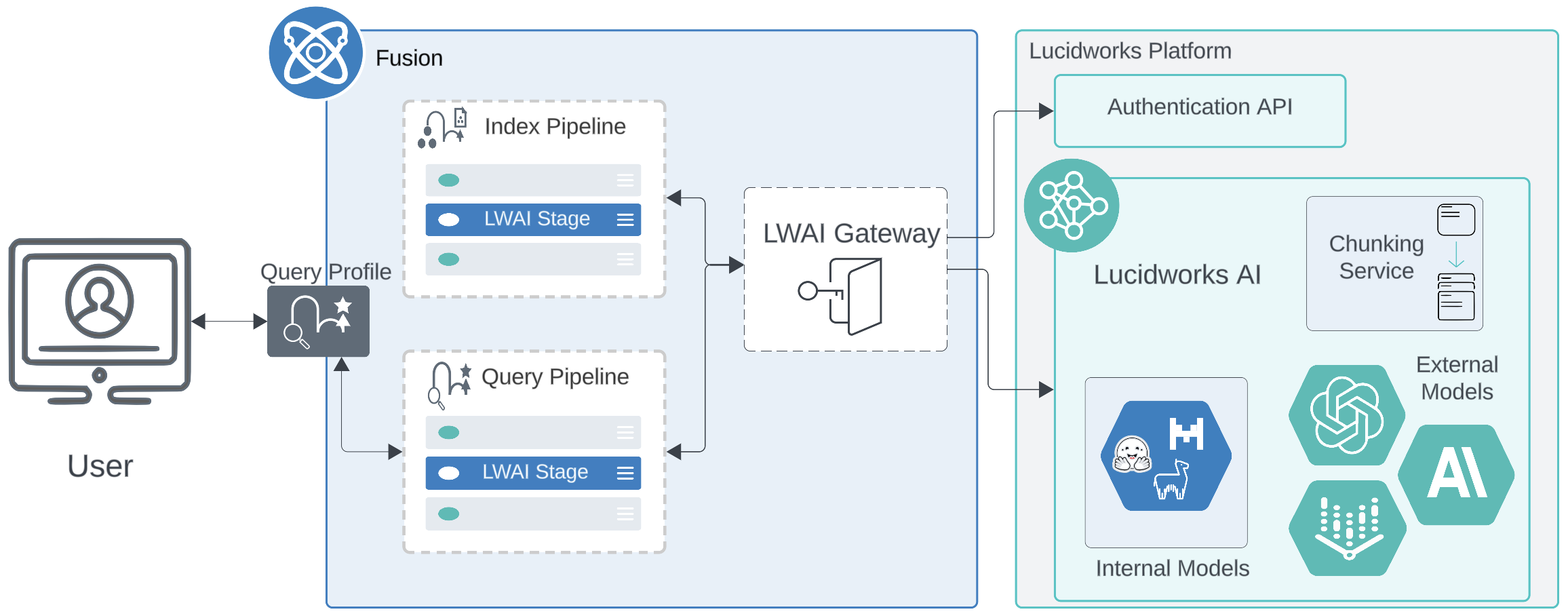
The diagram below displays the interaction between Lucidworks AI and Fusion.
Note that Lucidworks AI Gateway only posts to Lucidworks AI; Lucidworks Platform and Lucidworks AI cannot reach out to Lucidworks AI Gateway or to Fusion.
### Firewall and port considerations
Lucidworks AI Gateway is a critical component of Lucidworks Fusion, enabling secure and authenticated communication between Fusion and Lucidworks AI. It facilitates seamless integration with AI-powered search enhancements by managing credentials and access permissions.
To function correctly, the `lwai-gateway` pod must be able to communicate externally on port 443 for:
* Authentication service: Okta authentication hosted at identity.lucidworks.com for secure OAuth-based authentication.
* LWAI services: Reaching the private LWAI endpoint hosted on the Lucidworks Platform.
If a firewall restricts outbound connections, administrators must allow traffic over port 443 to these destinations.
### Security and configuration
Lucidworks AI Gateway securely handles API credentials and account scopes, allowing Fusion to interact with AI models without exposing sensitive data. Configuration is managed via Helm values files, ensuring flexible multi-integration support for Fusion instances.
By ensuring proper firewall rules and secure credentials management, the Lucidworks AI Gateway enables a robust AI-powered search experience within Fusion.
 ### Firewall and port considerations
Lucidworks AI Gateway is a critical component of Lucidworks Fusion, enabling secure and authenticated communication between Fusion and Lucidworks AI. It facilitates seamless integration with AI-powered search enhancements by managing credentials and access permissions.
To function correctly, the `lwai-gateway` pod must be able to communicate externally on port 443 for:
* Authentication service: Okta authentication hosted at identity.lucidworks.com for secure OAuth-based authentication.
* LWAI services: Reaching the private LWAI endpoint hosted on the Lucidworks Platform.
If a firewall restricts outbound connections, administrators must allow traffic over port 443 to these destinations.
### Security and configuration
Lucidworks AI Gateway securely handles API credentials and account scopes, allowing Fusion to interact with AI models without exposing sensitive data. Configuration is managed via Helm values files, ensuring flexible multi-integration support for Fusion instances.
By ensuring proper firewall rules and secure credentials management, the Lucidworks AI Gateway enables a robust AI-powered search experience within Fusion.
### Firewall and port considerations
Lucidworks AI Gateway is a critical component of Lucidworks Fusion, enabling secure and authenticated communication between Fusion and Lucidworks AI. It facilitates seamless integration with AI-powered search enhancements by managing credentials and access permissions.
To function correctly, the `lwai-gateway` pod must be able to communicate externally on port 443 for:
* Authentication service: Okta authentication hosted at identity.lucidworks.com for secure OAuth-based authentication.
* LWAI services: Reaching the private LWAI endpoint hosted on the Lucidworks Platform.
If a firewall restricts outbound connections, administrators must allow traffic over port 443 to these destinations.
### Security and configuration
Lucidworks AI Gateway securely handles API credentials and account scopes, allowing Fusion to interact with AI models without exposing sensitive data. Configuration is managed via Helm values files, ensuring flexible multi-integration support for Fusion instances.
By ensuring proper firewall rules and secure credentials management, the Lucidworks AI Gateway enables a robust AI-powered search experience within Fusion.