> ## Documentation Index
> Fetch the complete documentation index at: https://doc.lucidworks.com/llms.txt
> Use this file to discover all available pages before exploring further.
# Custom model training user interface
export const LwTemplate = ({title = "Key questions to get you started", icon = "sparkles", cta = "Powered by Agent Studio", linkHref = "https://lucidworks.com/demo/?utm_source=docs&utm_medium=referral&utm_campaign=docs_cta_ai"}) => {
const [isLoaded, setIsLoaded] = useState(false);
useEffect(() => {
const timer = setTimeout(() => {
setIsLoaded(true);
}, 500);
return () => clearTimeout(timer);
}, []);
return
{isLoaded && `
}} />}
Powered by Lucidworks Agent Studio
;
};
[old doc.lw link]: https://doc.lucidworks.com/lw-platform/ai/6bb9s5
[localhost link]: http://localhost:3000/docs/lw-platform/lw-ai/lw-ai-custom-embedding-model-training/custom-model-training-user-interface
[mintlify link]: https://doc.lucidworks.com/docs/lw-platform/lw-ai/lw-ai-custom-embedding-model-training/custom-model-training-user-interface
The Lucidworks AI custom model training user interface lets you train and deploy custom models, and provides information about the custom models deployed on your site.
For technical information about custom embedding models, see [Custom embedding model training](/docs/lw-platform/lw-ai/lw-ai-custom-embedding-model-training/overview).
The other embedding models you can use are the *pre-trained* embedding models that Lucidworks deploys for every organization. For more information, see [Lucidworks AI Pre-trained embedding models](/docs/lw-platform/lw-ai/lw-ai-pre-trained-embedding-models).
## Custom Models screen
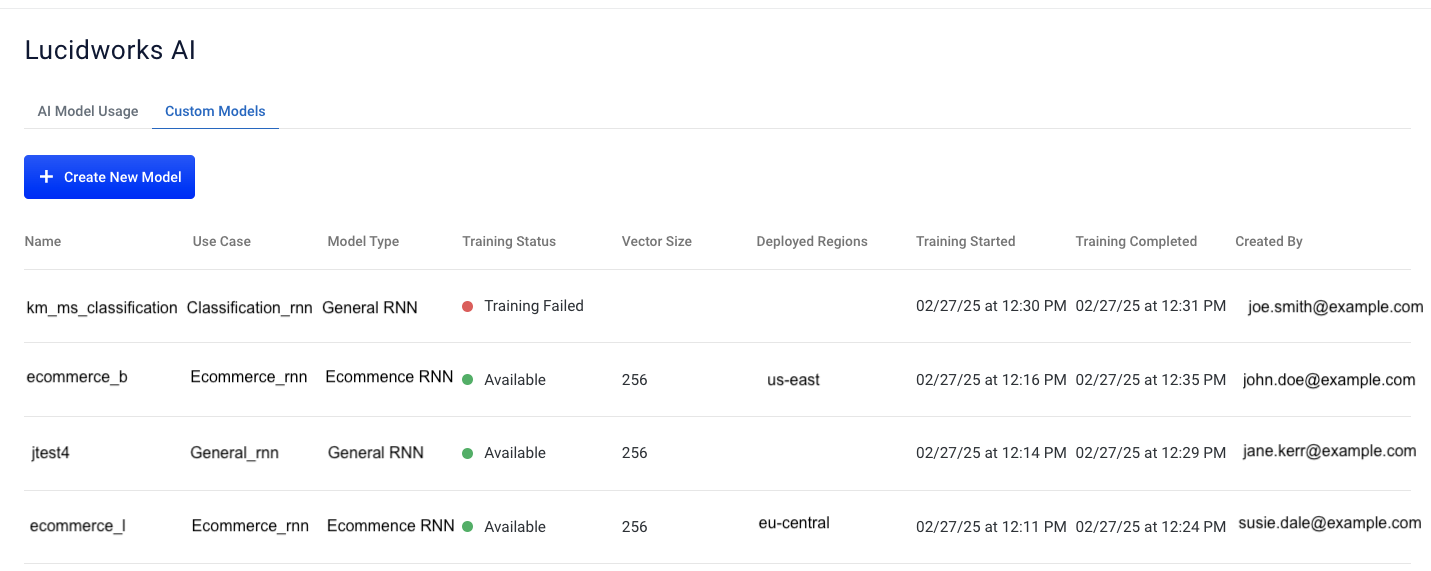
To access the Custom Models screen, navigate to the megamenu and click **Models > Custom Models**.
The following table describes the information for each model.
| Field | Description |
| ------------------ | ------------------------------------------------------------------------------------------------------------------------------------------------------------------------------------------------------------------------------------------------------------------------------------------------------------------------------------------------------------------------------------------------------------------------------------------------------------------------------------------------------------------ |
| Name | The name of the model. |
| Use case | The model use case used to train the model. |
| Training status | Also referred to as `state`, this is the current status of the model. Options are: AVAILABLE, TRAINING, TRAINING\_FAILED, DELETING, DELETING\_FAILED. |
| Vector size | The number of elements and objects in the custom model. |
| Deployed regions | The geographic region specified when the custom model is deployed. |
| Training started | The date and time the training started. |
| Training completed | The date and time the training completed. |
| Created by | Also referred to as `Author`, this is the user who created the model. |
You can also create a new custom model. For more information, see [Create a new model](/docs/lw-platform/lw-ai/lw-ai-custom-embedding-model-training/create-and-deploy-custom-models).
## Model Details screen
If you hold the pointer over a model on the list and click the entry, the Model Details screen displays.
You can view [Training details](#training-details) that include [Metadata](#metadata), [Summary](#summary), and [Metrics](#metrics) information about the selected model.
You can also:
* Click **Download Model Data** to download the JSON file for the model. You can use the parameters from this model in a different model without rekeying the information.
* Click **Delete** if the model can be deleted. If the model cannot be deleted because it is associated with deployments, all the deployments must be deleted first. For example, if the model is associated with two deployments, `2 Active Deployments: Deleting Disabled` displays instead of the Delete button. This example indicates there are two current deployments for the model, and based on the status of those deployments, the option to delete the model is disabled.
### Training Details
The Training Details screen provides metadata, summary, and metrics information.
#### Metadata
This metadata provides the data supplied when the model was created.
| Field | Description |
| ------------------------------------------------ | -------------------------------------------------------------------------------------------------------------------------------------------------------------------------------------------------------------------------------------------------------------------------------------------------------------------------------------------------------------------------------------------- |
| id | The unique identifier for the model. The identifier of the model. For custom models, the value is the universally unique identified (UUID) that is the primary key for the model. |
| Author | Also referred to as `createdBy`, this is the user who created the model. |
| Use case | The model use case used to train the model. |
| ModelType | The model type. For custom models, it is the name of the model. |
| Region | Also referred to as `Deployed region` this is the geographic region specified when the model was trained. |
| State | Also referred to as `Training status`, this is the current status of the model. |
| Vector size | The number of elements and objects in the custom model. Default value is 256. |
| Training started | The date and time the training started. |
| Training completed | The date and time the training completed. |
| Training Data Index Catalog | The location of the catalog of the training data in Google Cloud Storage (GCS). |
| Training Data Query Signals | The location of signals in the training data in Google Cloud Storage (GCS). |
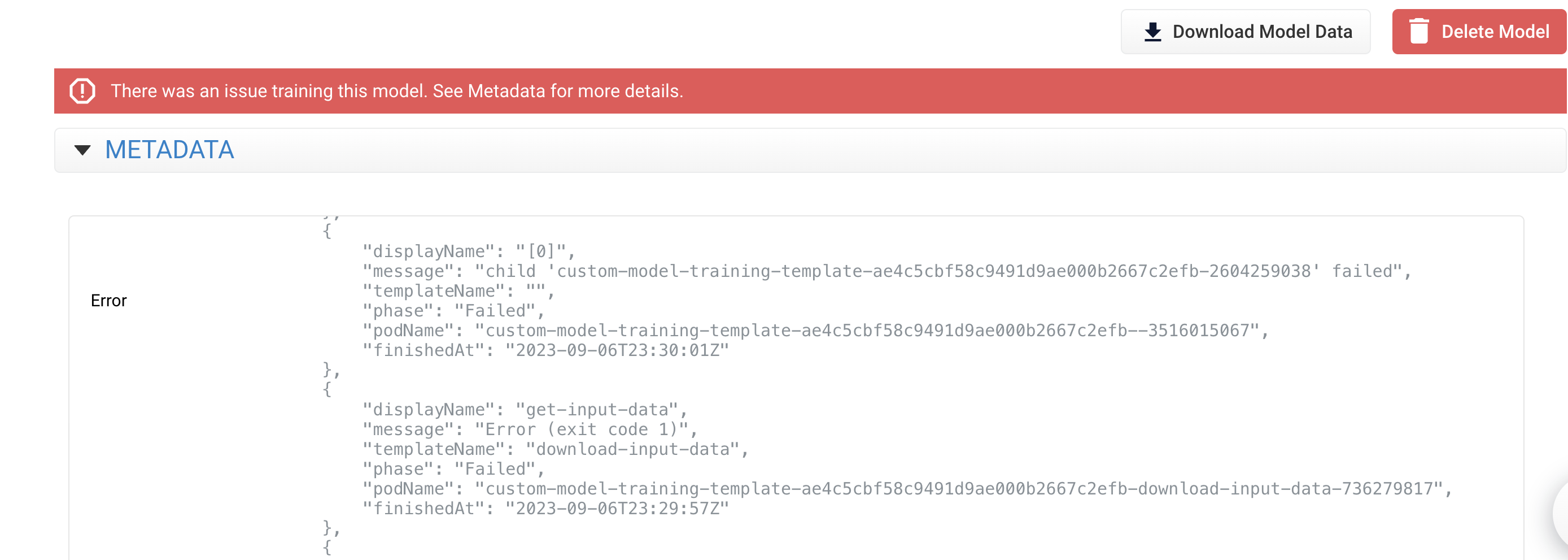
| Error Message | The errors generated when the training failed. This field only displays for custom models with a TRAINING\_FAILED status. |
| dataset\_config | The options for the dataset format used for training are `mlp_general` (used for the general RNN model type) and `mlp_ecommerce` (used for an ecommerce RNN model type). |
| trainer\_config | The options for the trainer type used for training are `mlp_general_rnn` and `mlp_ecommerce_rnn`. |
| Additional dataset\_config parameters | Any additional fields used to train the model using the Manual Entry method are listed. They are custom parameters. |
| trainer\_config/text\_processor\_config | This field determines which type of tokenization and embedding is used as the base for the RNN model. This field only displays for custom models with a TRAINING\_FAILED status. For more information, see [Lucidworks AI Models API text processors](/docs/lw-platform/lw-ai/lw-ai-apis/lw-ai-models-api). From that topic, select **View API specification** for detailed API information. |
| trainer\_config.encoder\_config.rnn\_names\_list | This field determines which bi-directional RNN layers are used. Options include `gru` and `lstm`. This field only displays for custom models with a TRAINING\_FAILED status. |
An example of an error message when the training fails is:
#### Summary
Click the **Summary** tab to view information about training metrics for the selected model.
| Field | Description |
| ------------------------- | ------------------------------------------------------------------------------------------------------------------------------------------------------------------------------------------------------------------------------------ |
| Best Epoch | The number of the epoch where the most relevant results were returned. |
| Index Size | The number of bytes in the vector index. |
| Vector size | The number of elements and objects in the custom model. |
| Training Time | The number of seconds to successfully train the model. |
| Num Trn Queries | The number of unique training queries used in this model. |
| Num Val Queries | The number of unique validation queries used in this model. |
| Num Unique Training Pairs | The number of unique training pairs for this model. An example of a training pair is `query/document`. This value may be larger than the `Num Trn Queries` because one query might return many documents, and therefore, many pairs. |
#### Metrics
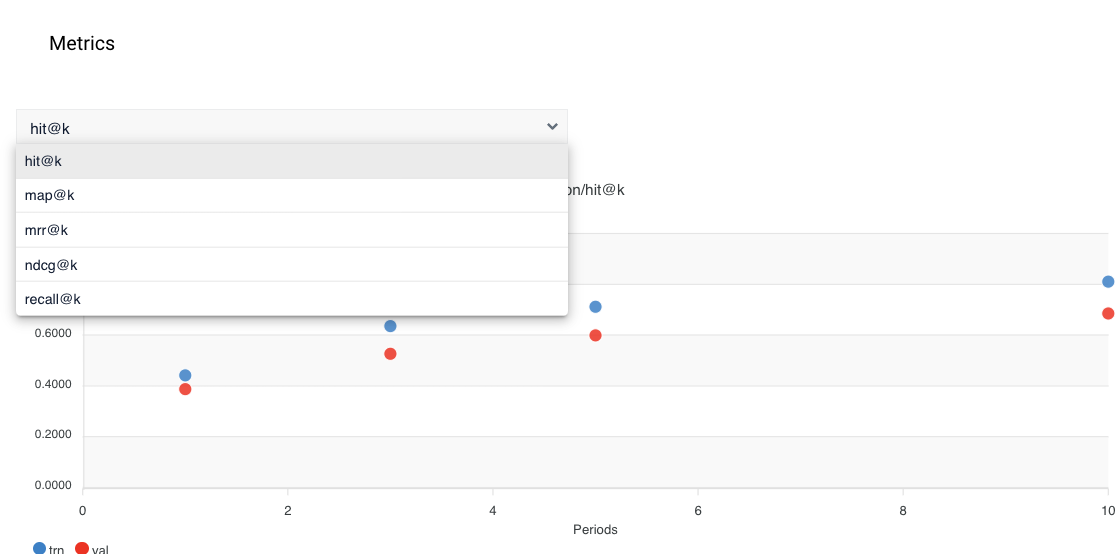
Click the **Metrics** tab to view analytics about the trained model. This information provides insights that help you determine if parameters need to be changed or if more data is needed to improve the model for optimal results.
The [Custom configuration](/docs/lw-platform/lw-ai/lw-ai-custom-embedding-model-training/custom-embedding-model-configuration) parameter that specifies metrics is `dataset_config.metrics_config.monitor_metric`. When you select one of the values, the `k` designates the numbers `1`, `3`, `5`, and `10.`
* `hit@k` which measures the probability that the prediction is in the first top `k` model predictions.
* `map@k` is the mean average precision metric that evaluates the system to return relevant items in the top `k` results, and positions more relevant items at the top.
* `mrr@k` is the mean reciprocal rank that determines how quickly the system displays the first relevant item in the top `k` results.
* `ndcg@k` is the normalized discounted cumulative gain metric that compares rankings to the optimal order where all relevant items display at the top.
* `recall@k` displays the number of relevant items returned in the top `k` recommendations out of the number of relevant items in the dataset.
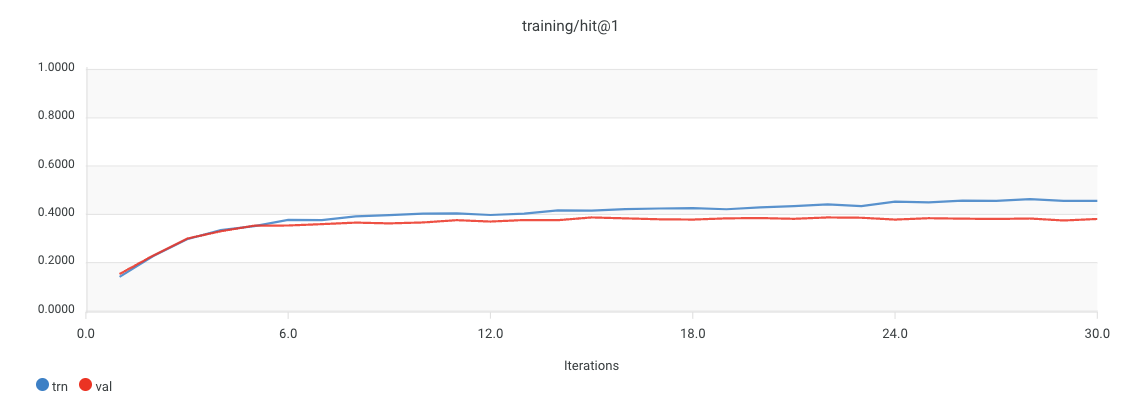
The metrics section displays graphs and lets you select the value to view:
The following is an example when the `hit@k` value is selected. Four graphs display on the screen: `hit@1` (pictured), `hit@3`, `hit@5`, and `hit@10`.
### Deployment Details
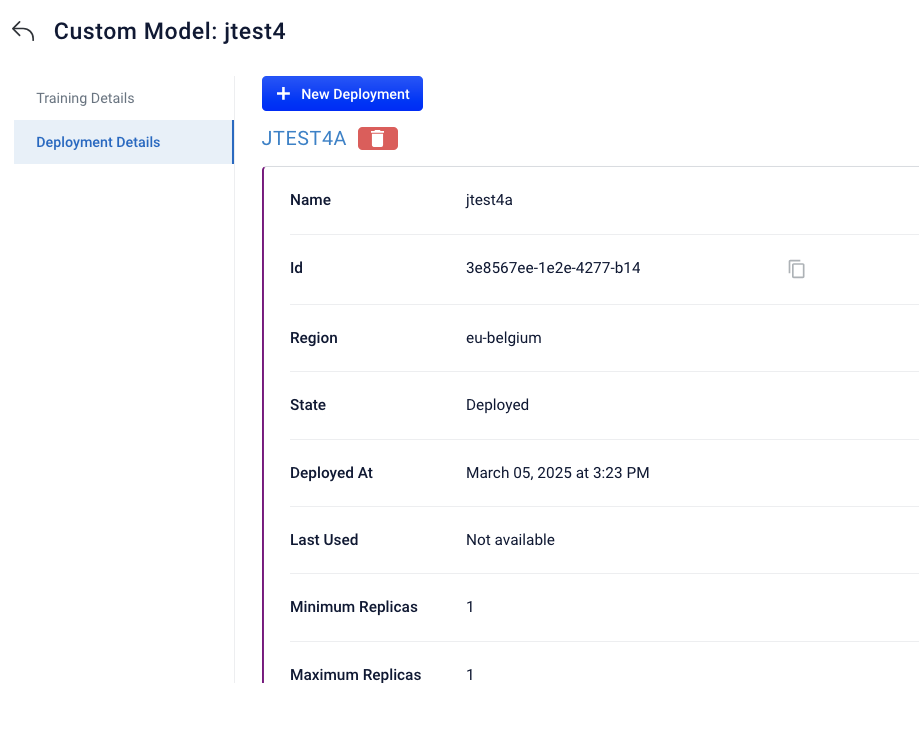
The deployments screen displays information about each time you deployed the selected model.
| Field | Description |
| ---------------- | ------------------------------------------------------------------------------------------------------------------------------------------------------------------------------------------------------------------------------------------------------------------------------------------------------------------------------------------------------------------------------------------------------------------------------------------------------------------------------------------------------------------------------------------------------------------------------------------------------------------------------- |
| id | The unique identifier for the model. For custom models, the value is the universally unique identified (UUID) that is the primary key for the model. |
| Region | The geographic region specified when the model was deployed. |
| State | The current status of the deployed model. Options are: This field specifies the current status of the custom model deployment. Value options include: \* **DEPLOYING**. The model is in the process of being deployed. \* **DEPLOYED**. The model is deployed and available for predictions. \* **DEPLOY\_FAILED**. The model failed to deploy. \* **DELETING**. The model deployment is being deleted. The `custom_model_deployment` record is also deleted if the deployment is successfully deleted. \* **DELETE\_FAILED**. The model deployment deletion failed. The model is still deployed and available for predictions. |
| Deployed At | The date and time the deployment occurred. |
| Last Used | The last date and time this model was used in the `/predict` endpoint. |
| Minimum Replicas | The minimum value of replicas for the model. |
| Maximum Replicas | The maximum value of replicas for the model. |
| parameter\_1 | The value of the first parameter passed in the `config` object. This parameter is optional. The name of `parameter_1` is an example placeholder. The actual name of each custom configuration field is designated by the person creating the query. |
| parameter\_2 | The value of the second parameter passed in the `config` object. This parameter is optional. The name of `parameter_2` is an example placeholder. The actual name of each custom configuration field is designated by the person creating the query. You can use as many custom configuration fields as needed, it is not limited to the two fields mentioned. |
You can also:
* Click **+ New Deployment** to deploy the model again. For more information, see [Create a new deployment](/docs/lw-platform/lw-ai/lw-ai-custom-embedding-model-training/create-and-deploy-custom-models).
* Click the Trash icon to delete a deployment with a status of "Deployed". You cannot delete a deployment with a status of "Deploying".
 The following table describes the information for each model.
| Field | Description |
| ------------------ | ------------------------------------------------------------------------------------------------------------------------------------------------------------------------------------------------------------------------------------------------------------------------------------------------------------------------------------------------------------------------------------------------------------------------------------------------------------------------------------------------------------------ |
| Name | The name of the model. |
| Use case | The model use case used to train the model. |
| Training status | Also referred to as `state`, this is the current status of the model. Options are:
The following table describes the information for each model.
| Field | Description |
| ------------------ | ------------------------------------------------------------------------------------------------------------------------------------------------------------------------------------------------------------------------------------------------------------------------------------------------------------------------------------------------------------------------------------------------------------------------------------------------------------------------------------------------------------------ |
| Name | The name of the model. |
| Use case | The model use case used to train the model. |
| Training status | Also referred to as `state`, this is the current status of the model. Options are: 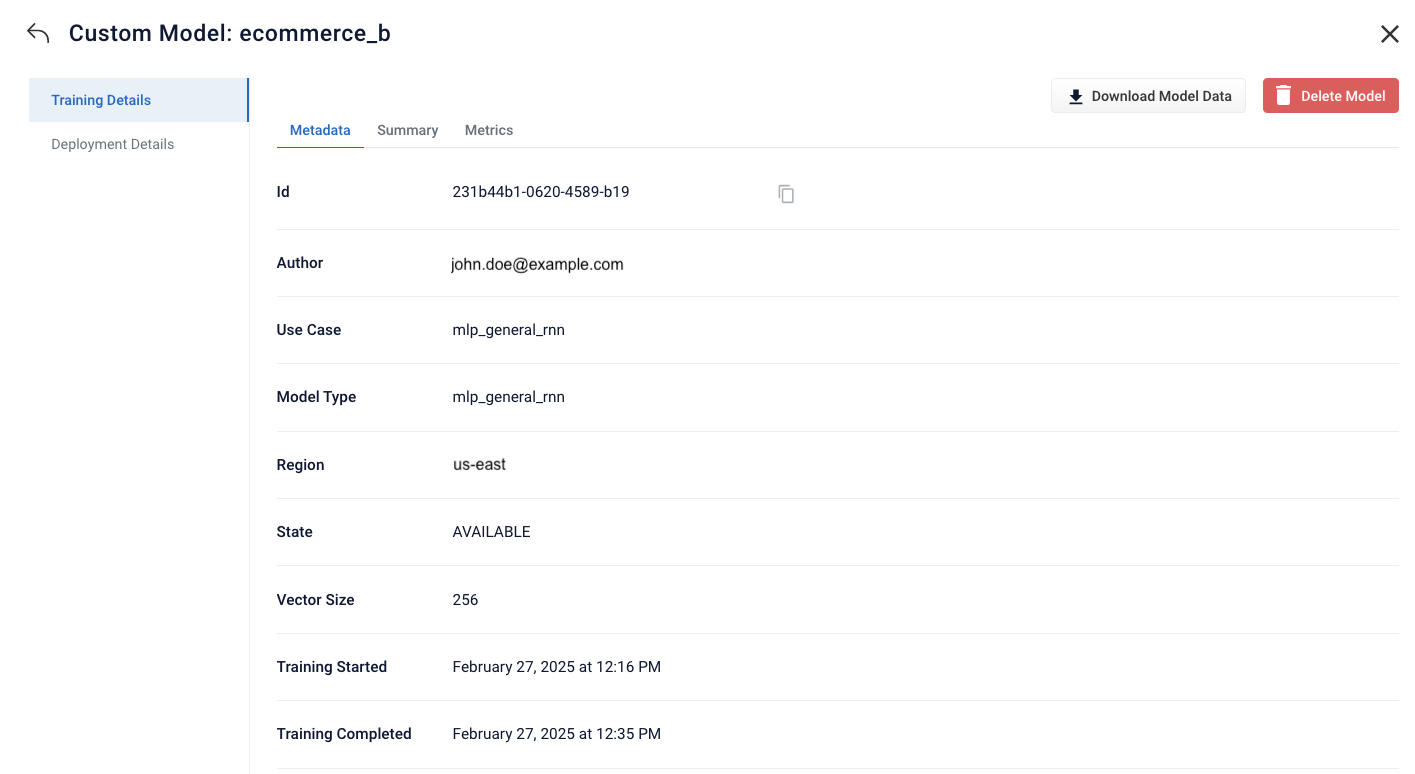 #### Metadata
This metadata provides the data supplied when the model was created.
| Field | Description |
| ------------------------------------------------ | -------------------------------------------------------------------------------------------------------------------------------------------------------------------------------------------------------------------------------------------------------------------------------------------------------------------------------------------------------------------------------------------- |
| id | The unique identifier for the model. The identifier of the model. For custom models, the value is the universally unique identified (UUID) that is the primary key for the model. |
| Author | Also referred to as `createdBy`, this is the user who created the model. |
| Use case | The model use case used to train the model. |
| ModelType | The model type. For custom models, it is the name of the model. |
| Region | Also referred to as `Deployed region` this is the geographic region specified when the model was trained. |
| State | Also referred to as `Training status`, this is the current status of the model. |
| Vector size | The number of elements and objects in the custom model. Default value is 256. |
| Training started | The date and time the training started. |
| Training completed | The date and time the training completed. |
| Training Data Index Catalog | The location of the catalog of the training data in Google Cloud Storage (GCS). |
| Training Data Query Signals | The location of signals in the training data in Google Cloud Storage (GCS). |
| Error Message | The errors generated when the training failed. This field only displays for custom models with a TRAINING\_FAILED status. |
| dataset\_config | The options for the dataset format used for training are `mlp_general` (used for the general RNN model type) and `mlp_ecommerce` (used for an ecommerce RNN model type). |
| trainer\_config | The options for the trainer type used for training are `mlp_general_rnn` and `mlp_ecommerce_rnn`. |
| Additional dataset\_config parameters | Any additional fields used to train the model using the Manual Entry method are listed. They are custom parameters. |
| trainer\_config/text\_processor\_config | This field determines which type of tokenization and embedding is used as the base for the RNN model. This field only displays for custom models with a TRAINING\_FAILED status. For more information, see [Lucidworks AI Models API text processors](/docs/lw-platform/lw-ai/lw-ai-apis/lw-ai-models-api). From that topic, select **View API specification** for detailed API information. |
| trainer\_config.encoder\_config.rnn\_names\_list | This field determines which bi-directional RNN layers are used. Options include `gru` and `lstm`. This field only displays for custom models with a TRAINING\_FAILED status. |
An example of an error message when the training fails is:
#### Metadata
This metadata provides the data supplied when the model was created.
| Field | Description |
| ------------------------------------------------ | -------------------------------------------------------------------------------------------------------------------------------------------------------------------------------------------------------------------------------------------------------------------------------------------------------------------------------------------------------------------------------------------- |
| id | The unique identifier for the model. The identifier of the model. For custom models, the value is the universally unique identified (UUID) that is the primary key for the model. |
| Author | Also referred to as `createdBy`, this is the user who created the model. |
| Use case | The model use case used to train the model. |
| ModelType | The model type. For custom models, it is the name of the model. |
| Region | Also referred to as `Deployed region` this is the geographic region specified when the model was trained. |
| State | Also referred to as `Training status`, this is the current status of the model. |
| Vector size | The number of elements and objects in the custom model. Default value is 256. |
| Training started | The date and time the training started. |
| Training completed | The date and time the training completed. |
| Training Data Index Catalog | The location of the catalog of the training data in Google Cloud Storage (GCS). |
| Training Data Query Signals | The location of signals in the training data in Google Cloud Storage (GCS). |
| Error Message | The errors generated when the training failed. This field only displays for custom models with a TRAINING\_FAILED status. |
| dataset\_config | The options for the dataset format used for training are `mlp_general` (used for the general RNN model type) and `mlp_ecommerce` (used for an ecommerce RNN model type). |
| trainer\_config | The options for the trainer type used for training are `mlp_general_rnn` and `mlp_ecommerce_rnn`. |
| Additional dataset\_config parameters | Any additional fields used to train the model using the Manual Entry method are listed. They are custom parameters. |
| trainer\_config/text\_processor\_config | This field determines which type of tokenization and embedding is used as the base for the RNN model. This field only displays for custom models with a TRAINING\_FAILED status. For more information, see [Lucidworks AI Models API text processors](/docs/lw-platform/lw-ai/lw-ai-apis/lw-ai-models-api). From that topic, select **View API specification** for detailed API information. |
| trainer\_config.encoder\_config.rnn\_names\_list | This field determines which bi-directional RNN layers are used. Options include `gru` and `lstm`. This field only displays for custom models with a TRAINING\_FAILED status. |
An example of an error message when the training fails is:
 #### Summary
Click the **Summary** tab to view information about training metrics for the selected model.
#### Summary
Click the **Summary** tab to view information about training metrics for the selected model.
 | Field | Description |
| ------------------------- | ------------------------------------------------------------------------------------------------------------------------------------------------------------------------------------------------------------------------------------ |
| Best Epoch | The number of the epoch where the most relevant results were returned. |
| Index Size | The number of bytes in the vector index. |
| Vector size | The number of elements and objects in the custom model. |
| Training Time | The number of seconds to successfully train the model. |
| Num Trn Queries | The number of unique training queries used in this model. |
| Num Val Queries | The number of unique validation queries used in this model. |
| Num Unique Training Pairs | The number of unique training pairs for this model. An example of a training pair is `query/document`. This value may be larger than the `Num Trn Queries` because one query might return many documents, and therefore, many pairs. |
#### Metrics
Click the **Metrics** tab to view analytics about the trained model. This information provides insights that help you determine if parameters need to be changed or if more data is needed to improve the model for optimal results.
The [Custom configuration](/docs/lw-platform/lw-ai/lw-ai-custom-embedding-model-training/custom-embedding-model-configuration) parameter that specifies metrics is `dataset_config.metrics_config.monitor_metric`. When you select one of the values, the `k` designates the numbers `1`, `3`, `5`, and `10.`
* `hit@k` which measures the probability that the prediction is in the first top `k` model predictions.
* `map@k` is the mean average precision metric that evaluates the system to return relevant items in the top `k` results, and positions more relevant items at the top.
* `mrr@k` is the mean reciprocal rank that determines how quickly the system displays the first relevant item in the top `k` results.
* `ndcg@k` is the normalized discounted cumulative gain metric that compares rankings to the optimal order where all relevant items display at the top.
* `recall@k` displays the number of relevant items returned in the top `k` recommendations out of the number of relevant items in the dataset.
The metrics section displays graphs and lets you select the value to view:
| Field | Description |
| ------------------------- | ------------------------------------------------------------------------------------------------------------------------------------------------------------------------------------------------------------------------------------ |
| Best Epoch | The number of the epoch where the most relevant results were returned. |
| Index Size | The number of bytes in the vector index. |
| Vector size | The number of elements and objects in the custom model. |
| Training Time | The number of seconds to successfully train the model. |
| Num Trn Queries | The number of unique training queries used in this model. |
| Num Val Queries | The number of unique validation queries used in this model. |
| Num Unique Training Pairs | The number of unique training pairs for this model. An example of a training pair is `query/document`. This value may be larger than the `Num Trn Queries` because one query might return many documents, and therefore, many pairs. |
#### Metrics
Click the **Metrics** tab to view analytics about the trained model. This information provides insights that help you determine if parameters need to be changed or if more data is needed to improve the model for optimal results.
The [Custom configuration](/docs/lw-platform/lw-ai/lw-ai-custom-embedding-model-training/custom-embedding-model-configuration) parameter that specifies metrics is `dataset_config.metrics_config.monitor_metric`. When you select one of the values, the `k` designates the numbers `1`, `3`, `5`, and `10.`
* `hit@k` which measures the probability that the prediction is in the first top `k` model predictions.
* `map@k` is the mean average precision metric that evaluates the system to return relevant items in the top `k` results, and positions more relevant items at the top.
* `mrr@k` is the mean reciprocal rank that determines how quickly the system displays the first relevant item in the top `k` results.
* `ndcg@k` is the normalized discounted cumulative gain metric that compares rankings to the optimal order where all relevant items display at the top.
* `recall@k` displays the number of relevant items returned in the top `k` recommendations out of the number of relevant items in the dataset.
The metrics section displays graphs and lets you select the value to view:
 The following is an example when the `hit@k` value is selected. Four graphs display on the screen: `hit@1` (pictured), `hit@3`, `hit@5`, and `hit@10`.
 ### Deployment Details
The deployments screen displays information about each time you deployed the selected model.
### Deployment Details
The deployments screen displays information about each time you deployed the selected model.
 | Field | Description |
| ---------------- | ------------------------------------------------------------------------------------------------------------------------------------------------------------------------------------------------------------------------------------------------------------------------------------------------------------------------------------------------------------------------------------------------------------------------------------------------------------------------------------------------------------------------------------------------------------------------------------------------------------------------------- |
| id | The unique identifier for the model. For custom models, the value is the universally unique identified (UUID) that is the primary key for the model. |
| Region | The geographic region specified when the model was deployed. |
| State | The current status of the deployed model. Options are: This field specifies the current status of the custom model deployment. Value options include: \* **DEPLOYING**. The model is in the process of being deployed. \* **DEPLOYED**. The model is deployed and available for predictions. \* **DEPLOY\_FAILED**. The model failed to deploy. \* **DELETING**. The model deployment is being deleted. The `custom_model_deployment` record is also deleted if the deployment is successfully deleted. \* **DELETE\_FAILED**. The model deployment deletion failed. The model is still deployed and available for predictions. |
| Deployed At | The date and time the deployment occurred. |
| Last Used | The last date and time this model was used in the `/predict` endpoint. |
| Minimum Replicas | The minimum value of replicas for the model. |
| Maximum Replicas | The maximum value of replicas for the model. |
| parameter\_1 | The value of the first parameter passed in the `config` object. This parameter is optional. The name of `parameter_1` is an example placeholder. The actual name of each custom configuration field is designated by the person creating the query. |
| parameter\_2 | The value of the second parameter passed in the `config` object. This parameter is optional. The name of `parameter_2` is an example placeholder. The actual name of each custom configuration field is designated by the person creating the query. You can use as many custom configuration fields as needed, it is not limited to the two fields mentioned. |
You can also:
* Click **+ New Deployment** to deploy the model again. For more information, see [Create a new deployment](/docs/lw-platform/lw-ai/lw-ai-custom-embedding-model-training/create-and-deploy-custom-models).
* Click the Trash icon to delete a deployment with a status of "Deployed". You cannot delete a deployment with a status of "Deploying".
| Field | Description |
| ---------------- | ------------------------------------------------------------------------------------------------------------------------------------------------------------------------------------------------------------------------------------------------------------------------------------------------------------------------------------------------------------------------------------------------------------------------------------------------------------------------------------------------------------------------------------------------------------------------------------------------------------------------------- |
| id | The unique identifier for the model. For custom models, the value is the universally unique identified (UUID) that is the primary key for the model. |
| Region | The geographic region specified when the model was deployed. |
| State | The current status of the deployed model. Options are: This field specifies the current status of the custom model deployment. Value options include: \* **DEPLOYING**. The model is in the process of being deployed. \* **DEPLOYED**. The model is deployed and available for predictions. \* **DEPLOY\_FAILED**. The model failed to deploy. \* **DELETING**. The model deployment is being deleted. The `custom_model_deployment` record is also deleted if the deployment is successfully deleted. \* **DELETE\_FAILED**. The model deployment deletion failed. The model is still deployed and available for predictions. |
| Deployed At | The date and time the deployment occurred. |
| Last Used | The last date and time this model was used in the `/predict` endpoint. |
| Minimum Replicas | The minimum value of replicas for the model. |
| Maximum Replicas | The maximum value of replicas for the model. |
| parameter\_1 | The value of the first parameter passed in the `config` object. This parameter is optional. The name of `parameter_1` is an example placeholder. The actual name of each custom configuration field is designated by the person creating the query. |
| parameter\_2 | The value of the second parameter passed in the `config` object. This parameter is optional. The name of `parameter_2` is an example placeholder. The actual name of each custom configuration field is designated by the person creating the query. You can use as many custom configuration fields as needed, it is not limited to the two fields mentioned. |
You can also:
* Click **+ New Deployment** to deploy the model again. For more information, see [Create a new deployment](/docs/lw-platform/lw-ai/lw-ai-custom-embedding-model-training/create-and-deploy-custom-models).
* Click the Trash icon to delete a deployment with a status of "Deployed". You cannot delete a deployment with a status of "Deploying".