> ## Documentation Index
> Fetch the complete documentation index at: https://doc.lucidworks.com/llms.txt
> Use this file to discover all available pages before exploring further.
# Retrieval-augmented generation (RAG) use case
> Lucidworks AI Async Prediction API
export const LwTemplate = ({title = "Key questions to get you started", icon = "sparkles", cta = "Powered by Agent Studio", linkHref = "https://lucidworks.com/demo/?utm_source=docs&utm_medium=referral&utm_campaign=docs_cta_ai"}) => {
const [isLoaded, setIsLoaded] = useState(false);
useEffect(() => {
const timer = setTimeout(() => {
setIsLoaded(true);
}, 500);
return () => clearTimeout(timer);
}, []);
return
{isLoaded && `
}} />}
Powered by Lucidworks Agent Studio
;
};
[localhost link]: http://localhost:3000/docs/lw-platform/lw-ai/lw-ai-apis/lw-ai-async-prediction-api/rag-async
[mintlify link]: https://doc.lucidworks.com/docs/lw-platform/lw-ai/lw-ai-apis/lw-ai-async-prediction-api/rag-async
[old doc.lw link]: https://doc.lucidworks.com/lw-platform/ai/6u8kow
The Retrieval-augmented generation (RAG) use case of the [Lucidworks AI Async Prediction API](/docs/lw-platform/lw-ai/lw-ai-apis/lw-ai-async-prediction-api/overview) uses candidate documents that are inserted into a LLM’s context to ground the generated response to those documents instead of generating an answer from details stored in the LLM’s trained weights. This helps prevent frequency of LLM hallucinative responses. This type of search adds guardrails so the LLM can search private data collections.
The RAG search can perform queries against external documents passed in as part of the request.
This use case can be used:
* To generate answers based on the context of the responses collected (corpus)
* To generate a response based on the context from responses to a previous request
The RAG use case contains two requests:
* POST request - submits a prediction task for a specific `useCase` and `modelId`. The API responds with the following information:
* `predictionId`. A unique UUID for the submitted prediction task that can be used later to retrieve the results.
* `status`. The current state of the prediction task.
* GET request - uses the `predictionId` you submit from a previously-submitted POST request and returns the results associated with that previous request.
For detailed API specifications in Swagger/OpenAPI format, see [Platform APIs](/api-reference/get-predictions/rag-use-case).
## Prerequisites
To use this API, you need:
* The unique `APPLICATION_ID` for your Lucidworks AI application, which is provided by Lucidworks.
* A bearer token generated with a scope value of `machinelearning.predict`. For more information, see [Authentication API](/docs/lw-platform/lw-platform/authentication-api).
* The `USE_CASE` and `MODEL_ID` fields in the `/async-prediction` for the POST request. The path is `/ai/async-prediction/USE_CASE/MODEL_ID`. A list of supported modes is returned in the [Lucidworks AI Use Case API](/docs/lw-platform/lw-ai/lw-ai-apis/lw-ai-use-case-api). For more information about supported models, see [Generative AI models](/docs/lw-platform/lw-ai/lw-ai-generative-ai#generative-ai-models).
## Common POST request parameters and fields
Some parameters in the `/ai/async-prediction/USE_CASE/MODEL_ID` POST request are common to all of the generative AI (Gen-AI) use cases, such as the `modelConfig` parameter.
Also referred to as hyperparameters, these fields set certain controls on the response.
Refer to the [API spec](/api-reference/get-predictions/rag-use-case) for more information.
## Unique values for the external documents RAG use case
Some parameter values available in the `external documents RAG` use case are unique to this use case, including values for the `documents` and `useCaseConfig` parameters.
Refer to the [API spec](/api-reference/get-predictions/rag-use-case) for more information.
## Example request
The following is an example request. This example does not include:
* `modelConfig` parameters, but you can submit requests that include parameters described in Common parameters and fields.
* `useCaseConfig` parameters, but you can submit requests that include parameters described in [Unique values for the external documents RAG use case](#unique-values-for-the-external-documents-rag-use-case).
```bash wrap Request theme={"dark"}
curl --request POST \
--url https://APPLICATION_ID.applications.lucidworks.com/ai/async-prediction/rag/MODEL_ID \
--header 'Authorization: Bearer ACCESS_TOKEN' \
--header 'Content-type: application/json' \
--data '{
"batch": [
{
"text": "Why did I go to Germany?",
"documents": [{
"body": "I'm off to Germany to go to the Oktoberfest!",
"source": "http://example.com/112",
"title": "Off to Germany!",
"date": "2022-01-31T19:31:34Z"
}
]
}
]
}'
```
```json wrap Success theme={"dark"}
{
"predictionId": "fd110486-f168-47c0-a419-1518a4840589",
"status": "SUBMITTED"
}
```
```json wrap Error theme={"dark"}
{
"predictionId": "fd110486-f168-47c0-a419-1518a4840589",
"status": "ERROR",
"message": "System prompt exceeded the maximum number of allowed input tokens: 81 vs -1091798"
}
```
### Example GET request
```bash wrap Request theme={"dark"}
curl --request GET
--url https://APPLICATION_ID.applications.lucidworks.com/ai/async-prediction/PREDICTION_ID
--header 'Authorization: Bearer Auth '
```
```json wrap Response theme={"dark"}
{
"predictionId": "fd110486-f168-47c0-a419-1518a4840589",
"status": "READY",
"predictions": [
{
"response": "ANSWER: \"I went to Germany to visit family.\"\nSOURCES: [\"http://example.com/112\"]",
"tokensUsed": {
"promptTokens": 202,
"completionTokens": 17,
"totalTokens": 219
},
"answer": "I went to Germany to visit family.",
"answerFound": true,
"sources": [
"http://example.com/112"
],
"memoryUuid": "27a887fe-3d7c-4ef0-9597-e2dfc054c20e"
}
]
}
```
In the previous example, the response includes the:
* Generated answer
* `SOURCES` line of text that contains the URL of the documents used to generate the answer
* Metadata about the response:
* `memoryUuid` that can be used to retrieve the LLM’s chat history
* Count of tokens used to complete the query
This example includes the `useCaseConfig` parameters in the request:
```bash wrap expandable Request theme={"dark"}
curl --request POST \
--url https://APPLICATION_ID.applications.lucidworks.com/ai/prediction/rag/MODEL_ID \
--header 'Authorization: Bearer ACCESS_TOKEN' \
--header 'Content-type: application/json' \
--data '{
"batch": [
{
"text": "Why did I go to Germany?",
"documents": [{
"body": "I'm off to Germany to go to the Oktoberfest!",
"source": "http://example.com/112",
"title": "Off to Germany!",
"date": "2022-01-31T19:31:34Z"
}
],
"useCaseConfig": {
"answerNotFoundMessage": "No answer found."
}
}
],
}'
```
```json wrap Success theme={"dark"}
{
"predictionId": "fd110486-f168-47c0-a419-1518a4840589",
"status": "SUBMITTED"
}
```
```json wrap Error theme={"dark"}
{
"predictionId": "fd110486-f168-47c0-a419-1518a4840589",
"status": "ERROR",
"message": "System prompt exceeded the maximum number of allowed input tokens: 81 vs -1091798"
}
```
### Example GET request
```bash wrap Request theme={"dark"}
curl --request GET
--url https://APPLICATION_ID.applications.lucidworks.com/ai/async-prediction/PREDICTION_ID
--header 'Authorization: Bearer Auth '
```
```json wrap Response with answer theme={"dark"}
{
"predictions": [
{
"tokensUsed": {
"promptTokens": 322,
"completionTokens": 28,
"totalTokens": 350
},
"memoryUuid": "62b887fe-3d7c-4ef0-9597-e2dfc054c20e",
"extractedContent": [
"I'm off to Germany to go to the Oktoberfest!"
],
"answer": "To go to Oktoberfest.",
"answerFound": true,
"response": "{\"ANSWER\": \"To go to Oktoberfest.\", \"SOURCES\": [\"http://example.com/112\"]}"
}
]
}
```
```json wrap Response without answer theme={"dark"}
{
"predictions": [
{
"tokensUsed": {
"promptTokens": 322,
"completionTokens": 28,
"totalTokens": 350
},
"memoryUuid": "62b887fe-3d7c-4ef0-9597-e2dfc054c20e",
"extractedContent": [
"No relevant information in the document."
],
"answer": "No answer found.",
"answerFound": false,
"warning": "No sources were generated",
"response": "{\"ANSWER\": \"Not possible to answer given this content.\", \"SOURCES\": []}"
}
]
}
```
## Unique values for the chat history RAG use case
Some parameter values available in the `external documents RAG` use case are unique to this use case, including values for the `documents` and `useCaseConfig` parameters.
Refer to the [API spec](/api-reference/get-predictions/rag-use-case) for more information.
### Example POST request using chat history
When using the RAG search, the LLM service stores the query and its response in a cache. In addition to the response, it also returns a UUID value in the `memoryUuid` field. If the UUID is passed back in a subsequent request, the LLM uses the cached query and response as part of its context. This lets the LLM be used as a chatbot, where previous queries and responses are used to generate the next response.
The following is an example request. This example does not include:
* `modelConfig` parameters, but you can submit requests that include parameters described in the [API spec](/api-reference/get-predictions/rag-use-case).
* `useCaseConfig` parameters, but you can submit requests that include parameters described in [Unique values for the chat history RAG use case](#unique-values-for-the-chat-history-rag-use-case).
```bash wrap Request theme={"dark"}
curl --request POST \
--url https://APPLICATION_ID.applications.lucidworks.com/ai/async-prediction/rag/MODEL_ID \
--header 'Authorization: Bearer ACCESS_TOKEN' \
--header 'Content-type: application/json' \
--data '{
"batch": [
{
"text": "What is RAG?",
"documents": [{
"body":"Retrieval-Augmented Generation, known as RAG, a framework promising to optimize generative AI and ensure its responses are up-to-date, relevant to the prompt, and most important",
"source":"http://rag.com/115",
"title":"What is Retrieval-Augmented Generation",
"date":"1104537600"
}]
}
],
"useCaseConfig": {
"memoryUuid": "27a887fe-3d7c-4ef0-9597-e2dfc054c20e"
}
}'
```
The following is an example of a successful response:
```json wrap Success theme={"dark"}
{
"predictionId": "fd110486-f168-47c0-a419-1518a4840589",
"status": "SUBMITTED"
}
```
The following is an example of an error response:
```json wrap Error theme={"dark"}
{
"predictionId": "fd110486-f168-47c0-a419-1518a4840589",
"status": "ERROR",
"message": "System prompt exceeded the maximum number of allowed input tokens: 81 vs -1091798"
}
```
### Example GET request
```bash wrap Request theme={"dark"}
curl --request GET
--url https://APPLICATION_ID.applications.lucidworks.com/ai/async-prediction/PREDICTION_ID
--header 'Authorization: Bearer Auth '
```
```json wrap Response theme={"dark"}
{
"predictionId": "fd110486-f168-47c0-a419-1518a4840589",
"status": "READY",
"predictions": [
{
"response": "ANSWER: \"Retrieval-Augmented Generation, known as RAG, is a framework promising to optimize generative AI and ensure its responses are up-to-date, relevant to the prompt, and most important.\"\nSOURCES: [\"http://rag.com/115\"]",
"tokensUsed": {
"promptTokens": 238,
"completionTokens": 54,
"totalTokens": 292
},
"answer": "Retrieval-Augmented Generation, known as RAG, is a framework promising to optimize generative AI and ensure its responses are up-to-date, relevant to the prompt, and most important.",
"answerFound": true,
"sources": [
"http://rag.com/115"
],
"memoryUuid": "27a887fe-3d7c-4ef0-9597-e2dfc054c20e"
}
]
}
```
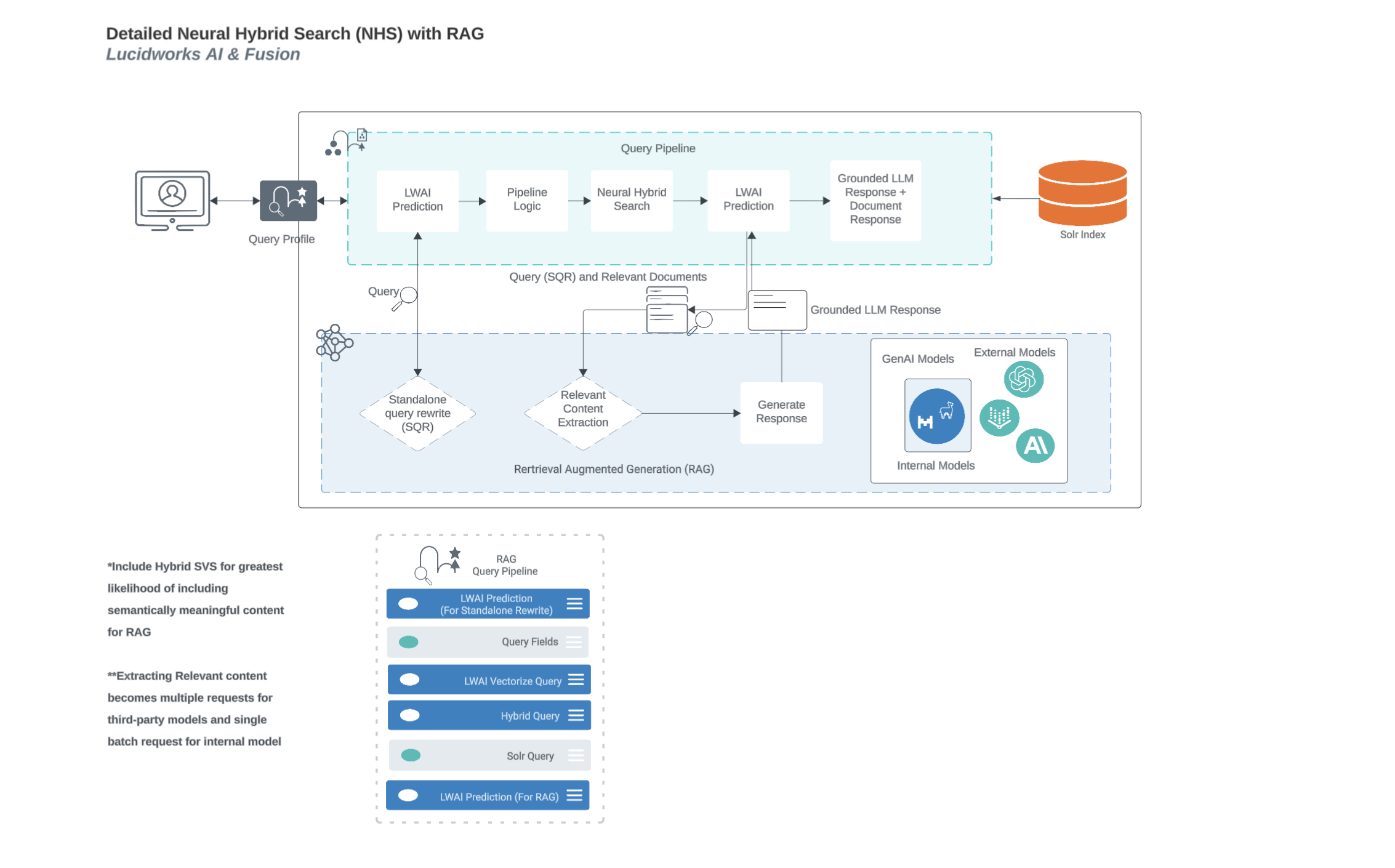
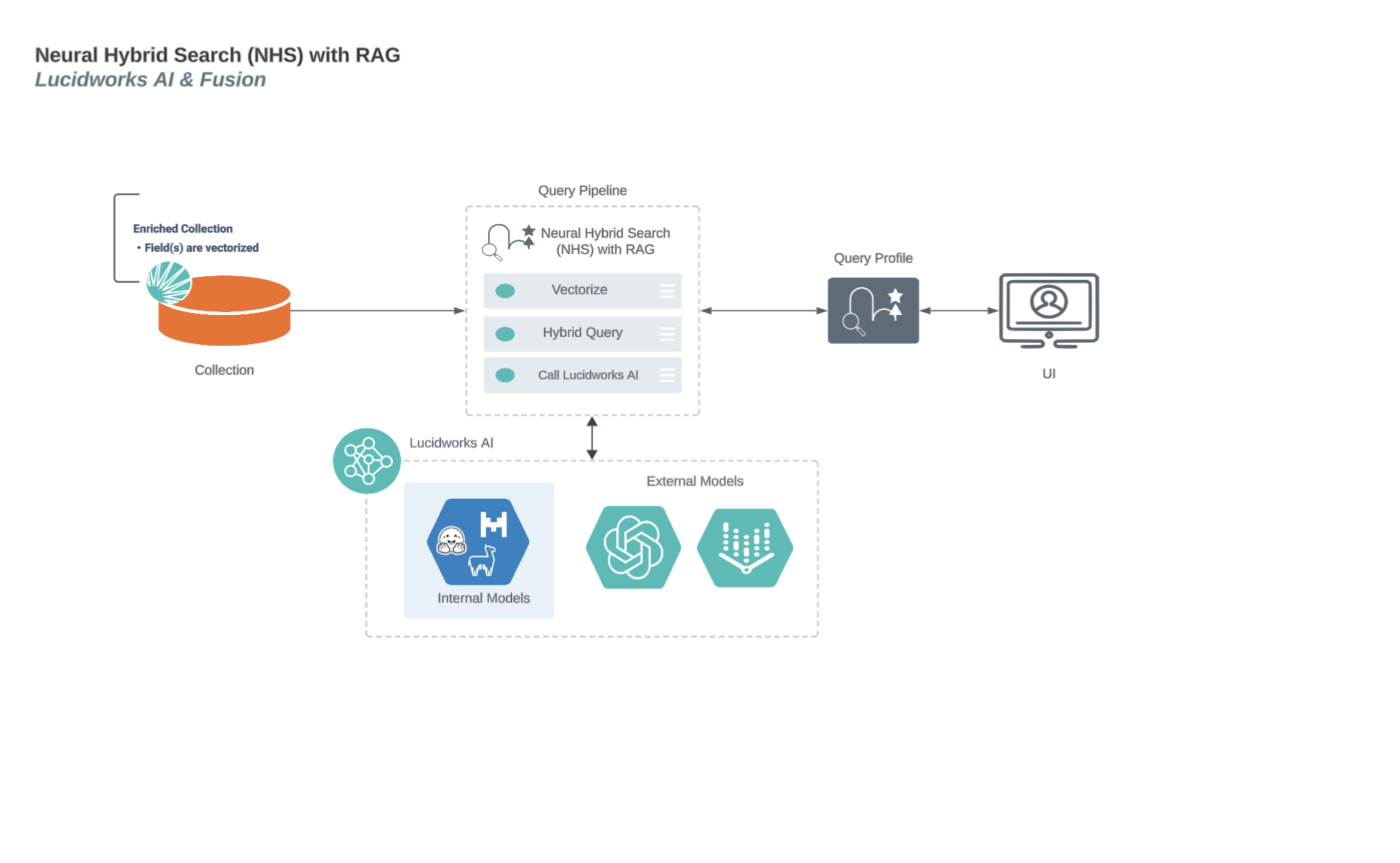
## Neural Hybrid Search process flow with Retrieval-Augmented Generation (RAG)
This diagram displays the process flow between neural hybrid search and RAG use cases.
For more information about neural hybrid search, see the topic that applies to your product:
* [Neural hybrid search for Lucidworks Search](/docs/lucidworks-search/11-vector-search/overview)
* [Neural hybrid search for Self-hosted Fusion](/docs/5/fusion/hybrid-search/overview)
 For more information about neural hybrid search, see the topic that applies to your product:
* [Neural hybrid search for Lucidworks Search](/docs/lucidworks-search/11-vector-search/overview)
* [Neural hybrid search for Self-hosted Fusion](/docs/5/fusion/hybrid-search/overview)
For more information about neural hybrid search, see the topic that applies to your product:
* [Neural hybrid search for Lucidworks Search](/docs/lucidworks-search/11-vector-search/overview)
* [Neural hybrid search for Self-hosted Fusion](/docs/5/fusion/hybrid-search/overview)