> ## Documentation Index
> Fetch the complete documentation index at: https://doc.lucidworks.com/llms.txt
> Use this file to discover all available pages before exploring further.
# Lucidworks Search 5.9.13
> June 17, 2025
[localhost link]: http://localhost:3000/docs/lucidworks-search/13-release-notes/5.9.13-release-notes
[mintlify link]: https://doc.lucidworks.com/docs/lucidworks-search/13-release-notes/5.9.13-release-notes
[old doc.lw link]: https://doc.lucidworks.com/managed-fusion/5.9/f0ekix
Lucidworks Search 5.9.13 is a
[maintenance release](/docs/policies/lifecycle-policies/lw-version-support-lifecycle#maintenance-release-support-policy) that introduces
advanced SKU grouping with Solr collapse, and compatibility with Kubernetes 1.32.
Lucidworks Search 5.9.13 also improves authentication resilience with a configurable JWT timeout, and resolves key scheduling and security bugs to ensure greater stability and compliance in enterprise environments.
**Security patch for api-gateway**
Lucidworks will apply a security patch to your Lucidworks Search instance to address critical Netty request smuggling vulnerabilities (CVE-2026-42581, CVE-2026-42585, CVE-2026-42587) in the `api-gateway` service.
No action is required on your part.
For supported Kubernetes versions and key component versions, see [Platform support and component versions](#platform-support-and-component-versions).
## Key highlights
### Expanded support for collapsed search results
Now Lucidworks Search gives you access to all of the available Solr settings for collapsing search results, giving you finer control over how Lucidworks Search groups variations of each item into a single search result.
You can use collapse to improve conversion rates and customer satisfaction by streamlining search results, reducing cognitive load, and surfacing the most relevant product variations first.
For example, you can use a `product_id` field as the collapse field to group all versions or SKUs of a product into a single search result.
You can also control how Lucidworks Search selects the variation that represents the collapsed group; the default is the one most relevant to the user’s query.
For example, a user who searches for "red shoes" sees all of the red variations of shoes first, with the option to drill down and see all the variations.
 Additional capabilities include:
* **Faceting compatibility**: Facets can reflect counts based on collapsed groups instead of individual SKUs.
* **Sorting options**: Choose how the representative SKU is selected using sort fields like `sales_rank` or `popularity_score`.
* **Expand support**: Optional expansion of collapsed groups allows users to see all SKUs for a product on demand.
* **Commerce Studio integration**: Merchandising actions such as pinning, boosting, and burying now apply to the entire product group, not just individual SKUs.
* **Query Workbench support**: You can preview collapsed and expanded result sets directly in Query Workbench for easy validation.
This update eliminates the need for custom collapse implementations and makes SKU/product rollup behavior a first-class capability in Lucidworks Search.
For complete details about the new configuration options, see the [Query Fields stage](/docs/lucidworks-search/09-developer-documentation/config-specs/query-pipeline-stages/query-fields) configuration reference.
### Kubernetes 1.32 support for better security and long-term compatibility
Lucidworks Search 5.9.13 introduces full compatibility with Kubernetes version 1.32, ensuring seamless deployment and operation on the latest Kubernetes platforms.
This update allows you to take advantage of the latest stability, performance, and security improvements in Kubernetes, including better control over sidecar container behavior and improvements to admission webhooks and scheduling logic.
By supporting Kubernetes 1.32, Lucidworks Search stays aligned with cloud provider upgrades and helps future-proof your infrastructure.
### Improved JWT authentication resilience with configurable timeout
Lucidworks Search now allows you to configure the `jwkSetTimeout` variable in the JWT Realm settings, enabling better control over how long Lucidworks Search waits for a response when retrieving a JSON Web Key (JWK) set.
This improves authentication reliability in environments where key providers may respond slowly.
By increasing the default 500 ms timeout as needed (for example, to 2000 ms), you can reduce the risk of failed authentication due to network latency or external service delays.
You can configure this in the Lucidworks Search UI under the **System > Access Control > Security Realms** tab.
### Configurable vector quantization method in LWAI pipeline stages
Lucidworks Search 5.9.13 adds vector quantization in certain Lucidworks AI (LWAI) pipeline stages, making it easier to reduce memory usage and accelerate vector search without sacrificing quality.
Quantization converts high-precision float vectors into compact 8-bit integer vectors, significantly lowering storage and compute costs.
Now you can choose between min-max or max-scale quantization methods directly in the pipeline configuration interface for the LWAI vectorization stages:
* [LWAI Vectorize Query Stage](/docs/lucidworks-search/09-developer-documentation/config-specs/query-pipeline-stages/vectorize-query-via-lucidworks-ai-query-stage)
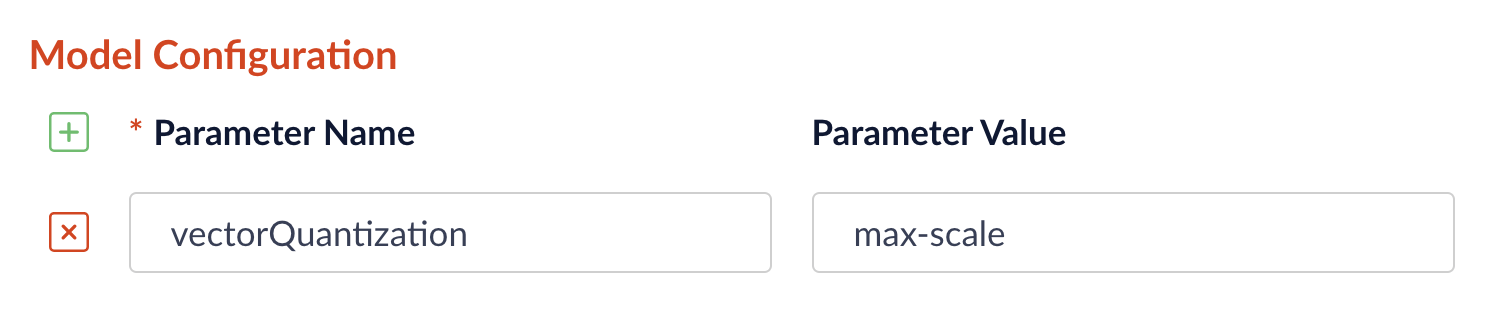
To select the quantization method, go to **Model Config** in the LWAI pipeline stage configuration and enter the `vectorQuantizationMethod` parameter with the value for the desired method:
Additional capabilities include:
* **Faceting compatibility**: Facets can reflect counts based on collapsed groups instead of individual SKUs.
* **Sorting options**: Choose how the representative SKU is selected using sort fields like `sales_rank` or `popularity_score`.
* **Expand support**: Optional expansion of collapsed groups allows users to see all SKUs for a product on demand.
* **Commerce Studio integration**: Merchandising actions such as pinning, boosting, and burying now apply to the entire product group, not just individual SKUs.
* **Query Workbench support**: You can preview collapsed and expanded result sets directly in Query Workbench for easy validation.
This update eliminates the need for custom collapse implementations and makes SKU/product rollup behavior a first-class capability in Lucidworks Search.
For complete details about the new configuration options, see the [Query Fields stage](/docs/lucidworks-search/09-developer-documentation/config-specs/query-pipeline-stages/query-fields) configuration reference.
### Kubernetes 1.32 support for better security and long-term compatibility
Lucidworks Search 5.9.13 introduces full compatibility with Kubernetes version 1.32, ensuring seamless deployment and operation on the latest Kubernetes platforms.
This update allows you to take advantage of the latest stability, performance, and security improvements in Kubernetes, including better control over sidecar container behavior and improvements to admission webhooks and scheduling logic.
By supporting Kubernetes 1.32, Lucidworks Search stays aligned with cloud provider upgrades and helps future-proof your infrastructure.
### Improved JWT authentication resilience with configurable timeout
Lucidworks Search now allows you to configure the `jwkSetTimeout` variable in the JWT Realm settings, enabling better control over how long Lucidworks Search waits for a response when retrieving a JSON Web Key (JWK) set.
This improves authentication reliability in environments where key providers may respond slowly.
By increasing the default 500 ms timeout as needed (for example, to 2000 ms), you can reduce the risk of failed authentication due to network latency or external service delays.
You can configure this in the Lucidworks Search UI under the **System > Access Control > Security Realms** tab.
### Configurable vector quantization method in LWAI pipeline stages
Lucidworks Search 5.9.13 adds vector quantization in certain Lucidworks AI (LWAI) pipeline stages, making it easier to reduce memory usage and accelerate vector search without sacrificing quality.
Quantization converts high-precision float vectors into compact 8-bit integer vectors, significantly lowering storage and compute costs.
Now you can choose between min-max or max-scale quantization methods directly in the pipeline configuration interface for the LWAI vectorization stages:
* [LWAI Vectorize Query Stage](/docs/lucidworks-search/09-developer-documentation/config-specs/query-pipeline-stages/vectorize-query-via-lucidworks-ai-query-stage)
To select the quantization method, go to **Model Config** in the LWAI pipeline stage configuration and enter the `vectorQuantizationMethod` parameter with the value for the desired method:
 ### Support for pre-filtering in the Chunking Neural Hybrid Query stage
For parity with the [Neural Hybrid Query stage](/docs/5/fusion/reference/config-ref/pipeline-stages/query-stages/neural-hybrid-query), the [Chunking Neural Hybrid Query Stage](/docs/5/fusion/reference/config-ref/pipeline-stages/query-stages/chunking-neural-hybrid-query) now supports pre-filtering.
Pre-filtering can improve performance by reducing the number of chunks that need to be processed.
However, in some cases it can also lead to less accurate facet counts and search results.
Pre-filtering is blocked by default.
You can enable it by unchecking the **Block pre-filtering** checkbox in the Chunking Neural Hybrid Query stage configuration.
### Default Solr data commit parameter changed to autoCommit
Solr's `commitWithin` parameter was removed as the default at the collection level. The default parameter is now `autoCommit`.
Solr offers three methods to determine when newly-indexed documents are made visible in searches. The methods are manual commits, auto commit settings, and the per-update `commitWithin` parameter.
Fusion relies on Solr's commit mechanisms, but adds a Fusion-managed `commitWithin` policy per collection. Fusion's typical commit configuration includes the following parameters:
* The `autoCommit` setting (Solr hard commit) is Fusion's default parameter for Solr data commits, is inherited from the collection's `solrconfig.xml`, and defaults to `15` seconds. This saves the data, but does not force the search results to refresh immediately. With this setting, search performance is not slowed, but the new data may not show in search results until the next refresh. This property can be used instead of the `commitWithin` property.
* The `autoSoftCommit` setting (Solr soft commit) does not save the data, but makes the data visible to searches almost immediately. If the system crashes, that new data is lost because it has not been saved. The default is false, and search visibility is managed using the `commitWithin` setting.
* Solr's `commitWithin` parameter, configured at the collection level with a default of `10000` milliseconds, ensures data is committed and available for searching within 10 seconds. The default for signals collections is `1000` milliseconds. Fusion uses `commitWithin` to avoid relying on specific Solr-side configurations. The `com.lucidworks.apollo.solr.commitWithin` global property defines the default `commitWithin` for all documents added through Fusion. When you create a new collection in Fusion, its per-collection `commitWithin` is initialized from this global default.
For more information, see [Collection configuration properties](/docs/managed-fusion/04-move-data-in/collection/overview#collection-configuration-properties) and [various operations in the Collections API](/api-reference/collections/list-all-collections).
## Bug fixes
* Fixed misleading `DOWN` status on the `job-config` actuator health endpoint.
Fusion 5.9.13 ensures accurate health reporting from the `/job-config/actuator/health` endpoint after ZooKeeper outages, reducing the risk of false alerts or unnecessary service restarts in monitored environments.
* Patched the Fabric8 client in `fusion-spark-3.2.2` to fix Kubernetes token refresh errors.
Fusion 5.9.13 includes an updated version of the 3.2.2 Spark image that properly handles token refresh under Kubernetes OIDC authentication, improving compatibility and reliability for secure Spark workloads.
* Fixed an issue that blocked Web V2 connector jobs from restarting after failure.
Fusion now clears any corrupted job state caused by interrupted connector jobs, allowing new crawl attempts to succeed.
This resolves a critical error where subsequent jobs failed with `The state should never be null`, even after the connector was restored and the datasource was reset.
* Fixed Web connector indexing failure caused by corrupted job state
Lucidworks Search running 5.9.13 restores indexing functionality for the Webv2 connector (v2.0.1) by resolving an issue that caused a corrupted job state in the `connectors-backend` service.
Jobs that previously failed with `The state should never be null` can now complete successfully.
* Fixed an issue that prevented schedule changes from persisting for some datasources.
In Lucidworks Search 5.9.12, clicking **Save** after configuring a new schedule for a datasource in the “Run” dialog could fail silently in certain apps, leaving the schedule unsaved with no warning to the user.
This was due to a `job-config` handling issue that affected pre-existing app configurations.\
Lucidworks Search 5.9.13 resolves this issue so that new schedules are reliably saved and acknowledged as expected.
* Fixed permission handling in the `job-config` service to ensure scheduled jobs run as expected.
Fusion now correctly handles permission checks when creating or modifying scheduled jobs, preventing failures caused by mismatches between user and service account permissions.
This resolves issues where job could not be scheduled or executed following upgrades.
* Helm charts now support Kubernetes secrets for TLS keystore passwords
Lucidworks Search 5.9.13 updates the Helm charts to eliminate the use of plaintext passwords for TLS keystores. Now the keystore password is managed using a Kubernetes secret, aligning with hardened OpenShift and enterprise security policies.
* Upgraded the Spring framework in the `web-apps` service to improve security and ensure compatibility with token authentication behavior on modern Kubernetes platforms.
## Known issues
* UI may incorrectly report `job-config` as down.\
In Lucidworks Search 5.9.13, the `job-config` service may be flagged as “down” in the UI even when running normally.
This display issue is fixed in Lucidworks Search 5.9.14.
For the `job-config` service, the **Next Run** value is updated *only after the current job completes*. Because the same job cannot run multiple times simultaneously, if another run is scheduled before the current job completes, that run is not executed.
* Jobs and V2 datasources may fail when Lucidworks Search collections are remapped to different Solr collections.\
In Lucidworks Search 5.9.13, strict validation in the `job-config` service causes “Collection not found” errors when jobs or V2 datasources target Lucidworks Search collections that point to differently named Solr collections.
This issue is fixed in Lucidworks Search 5.9.14.
As a workaround, use V1 datasources or avoid using REST call jobs on remapped collections.
* Saving large pipelines during high traffic may trigger service instability.\
In some environments, saving large query pipelines while handling high traffic loads can cause the Query service to crash with OOM errors due to thread contention.
Lucidworks Search 5.9.14 resolves this issue. If you’re impacted and not yet on this version, contact Lucidworks Support for mitigation options.
## Deprecations and removals
For full details, see [Deprecations and Removals](/docs/5/fusion/deprecations-and-removals).
### Bitnami removal
By August 28, 2025, Fusion’s Helm chart will reference internally built open-source images instead of Bitnami images due to changes in how they host images.
### Hybrid Query pipeline stage
The [Hybrid Query pipeline stage](/docs/5/fusion/reference/config-ref/pipeline-stages/query-stages/hybrid-search-query) is now deprecated.
Instead, use the [Neural Hybrid Query stage](/docs/5/fusion/reference/config-ref/pipeline-stages/query-stages/neural-hybrid-query), which combines lexical and vector search and includes improvements such as K-Nearest Neighbors (KNN), chunking, and more.
### Removed deprecated `X-XSS-Protection` header from session API responses
Lucidworks Search 5.9.13 removes the deprecated `X-XSS-Protection` HTTP response header from the session API.
This header is no longer supported by modern browsers and has no effect on security behavior.
Its removal helps avoid confusion during security audits and aligns with current web security standards.
## Platform Support and Component Versions
### Kubernetes platform support
Lucidworks has tested and validated support for the following Kubernetes platform and versions:
* **Google Kubernetes Engine (GKE):** 1.29, 1.30, 1.31, 1.32
For more information on Kubernetes version support, see the [Kubernetes support policy](/docs/policies/lifecycle-policies/lw-version-support-lifecycle#kubernetes-support).
### Component versions
The following table details the versions of key components that may be critical to deployments and upgrades.
| Component | Version |
| ------------------- | ------------------------------------------------- |
| Solr | fusion-solr 5.9.13
### Support for pre-filtering in the Chunking Neural Hybrid Query stage
For parity with the [Neural Hybrid Query stage](/docs/5/fusion/reference/config-ref/pipeline-stages/query-stages/neural-hybrid-query), the [Chunking Neural Hybrid Query Stage](/docs/5/fusion/reference/config-ref/pipeline-stages/query-stages/chunking-neural-hybrid-query) now supports pre-filtering.
Pre-filtering can improve performance by reducing the number of chunks that need to be processed.
However, in some cases it can also lead to less accurate facet counts and search results.
Pre-filtering is blocked by default.
You can enable it by unchecking the **Block pre-filtering** checkbox in the Chunking Neural Hybrid Query stage configuration.
### Default Solr data commit parameter changed to autoCommit
Solr's `commitWithin` parameter was removed as the default at the collection level. The default parameter is now `autoCommit`.
Solr offers three methods to determine when newly-indexed documents are made visible in searches. The methods are manual commits, auto commit settings, and the per-update `commitWithin` parameter.
Fusion relies on Solr's commit mechanisms, but adds a Fusion-managed `commitWithin` policy per collection. Fusion's typical commit configuration includes the following parameters:
* The `autoCommit` setting (Solr hard commit) is Fusion's default parameter for Solr data commits, is inherited from the collection's `solrconfig.xml`, and defaults to `15` seconds. This saves the data, but does not force the search results to refresh immediately. With this setting, search performance is not slowed, but the new data may not show in search results until the next refresh. This property can be used instead of the `commitWithin` property.
* The `autoSoftCommit` setting (Solr soft commit) does not save the data, but makes the data visible to searches almost immediately. If the system crashes, that new data is lost because it has not been saved. The default is false, and search visibility is managed using the `commitWithin` setting.
* Solr's `commitWithin` parameter, configured at the collection level with a default of `10000` milliseconds, ensures data is committed and available for searching within 10 seconds. The default for signals collections is `1000` milliseconds. Fusion uses `commitWithin` to avoid relying on specific Solr-side configurations. The `com.lucidworks.apollo.solr.commitWithin` global property defines the default `commitWithin` for all documents added through Fusion. When you create a new collection in Fusion, its per-collection `commitWithin` is initialized from this global default.
For more information, see [Collection configuration properties](/docs/managed-fusion/04-move-data-in/collection/overview#collection-configuration-properties) and [various operations in the Collections API](/api-reference/collections/list-all-collections).
## Bug fixes
* Fixed misleading `DOWN` status on the `job-config` actuator health endpoint.
Fusion 5.9.13 ensures accurate health reporting from the `/job-config/actuator/health` endpoint after ZooKeeper outages, reducing the risk of false alerts or unnecessary service restarts in monitored environments.
* Patched the Fabric8 client in `fusion-spark-3.2.2` to fix Kubernetes token refresh errors.
Fusion 5.9.13 includes an updated version of the 3.2.2 Spark image that properly handles token refresh under Kubernetes OIDC authentication, improving compatibility and reliability for secure Spark workloads.
* Fixed an issue that blocked Web V2 connector jobs from restarting after failure.
Fusion now clears any corrupted job state caused by interrupted connector jobs, allowing new crawl attempts to succeed.
This resolves a critical error where subsequent jobs failed with `The state should never be null`, even after the connector was restored and the datasource was reset.
* Fixed Web connector indexing failure caused by corrupted job state
Lucidworks Search running 5.9.13 restores indexing functionality for the Webv2 connector (v2.0.1) by resolving an issue that caused a corrupted job state in the `connectors-backend` service.
Jobs that previously failed with `The state should never be null` can now complete successfully.
* Fixed an issue that prevented schedule changes from persisting for some datasources.
In Lucidworks Search 5.9.12, clicking **Save** after configuring a new schedule for a datasource in the “Run” dialog could fail silently in certain apps, leaving the schedule unsaved with no warning to the user.
This was due to a `job-config` handling issue that affected pre-existing app configurations.\
Lucidworks Search 5.9.13 resolves this issue so that new schedules are reliably saved and acknowledged as expected.
* Fixed permission handling in the `job-config` service to ensure scheduled jobs run as expected.
Fusion now correctly handles permission checks when creating or modifying scheduled jobs, preventing failures caused by mismatches between user and service account permissions.
This resolves issues where job could not be scheduled or executed following upgrades.
* Helm charts now support Kubernetes secrets for TLS keystore passwords
Lucidworks Search 5.9.13 updates the Helm charts to eliminate the use of plaintext passwords for TLS keystores. Now the keystore password is managed using a Kubernetes secret, aligning with hardened OpenShift and enterprise security policies.
* Upgraded the Spring framework in the `web-apps` service to improve security and ensure compatibility with token authentication behavior on modern Kubernetes platforms.
## Known issues
* UI may incorrectly report `job-config` as down.\
In Lucidworks Search 5.9.13, the `job-config` service may be flagged as “down” in the UI even when running normally.
This display issue is fixed in Lucidworks Search 5.9.14.
For the `job-config` service, the **Next Run** value is updated *only after the current job completes*. Because the same job cannot run multiple times simultaneously, if another run is scheduled before the current job completes, that run is not executed.
* Jobs and V2 datasources may fail when Lucidworks Search collections are remapped to different Solr collections.\
In Lucidworks Search 5.9.13, strict validation in the `job-config` service causes “Collection not found” errors when jobs or V2 datasources target Lucidworks Search collections that point to differently named Solr collections.
This issue is fixed in Lucidworks Search 5.9.14.
As a workaround, use V1 datasources or avoid using REST call jobs on remapped collections.
* Saving large pipelines during high traffic may trigger service instability.\
In some environments, saving large query pipelines while handling high traffic loads can cause the Query service to crash with OOM errors due to thread contention.
Lucidworks Search 5.9.14 resolves this issue. If you’re impacted and not yet on this version, contact Lucidworks Support for mitigation options.
## Deprecations and removals
For full details, see [Deprecations and Removals](/docs/5/fusion/deprecations-and-removals).
### Bitnami removal
By August 28, 2025, Fusion’s Helm chart will reference internally built open-source images instead of Bitnami images due to changes in how they host images.
### Hybrid Query pipeline stage
The [Hybrid Query pipeline stage](/docs/5/fusion/reference/config-ref/pipeline-stages/query-stages/hybrid-search-query) is now deprecated.
Instead, use the [Neural Hybrid Query stage](/docs/5/fusion/reference/config-ref/pipeline-stages/query-stages/neural-hybrid-query), which combines lexical and vector search and includes improvements such as K-Nearest Neighbors (KNN), chunking, and more.
### Removed deprecated `X-XSS-Protection` header from session API responses
Lucidworks Search 5.9.13 removes the deprecated `X-XSS-Protection` HTTP response header from the session API.
This header is no longer supported by modern browsers and has no effect on security behavior.
Its removal helps avoid confusion during security audits and aligns with current web security standards.
## Platform Support and Component Versions
### Kubernetes platform support
Lucidworks has tested and validated support for the following Kubernetes platform and versions:
* **Google Kubernetes Engine (GKE):** 1.29, 1.30, 1.31, 1.32
For more information on Kubernetes version support, see the [Kubernetes support policy](/docs/policies/lifecycle-policies/lw-version-support-lifecycle#kubernetes-support).
### Component versions
The following table details the versions of key components that may be critical to deployments and upgrades.
| Component | Version |
| ------------------- | ------------------------------------------------- |
| Solr | fusion-solr 5.9.13
*(based on Solr 9.6.1)* |
| ZooKeeper | 3.9.1 |
| Spark | 3.4.1 |
| Ingress Controllers | Nginx, Ambassador (Envoy), GKE Ingress Controller |
| Ray | ray\[serve] 2.42.1 |
More information about support dates can be found at [Lucidworks Fusion Product Lifecycle](/docs/policies/lifecycle-policies/lw-version-support-lifecycle).