> ## Documentation Index
> Fetch the complete documentation index at: https://doc.lucidworks.com/llms.txt
> Use this file to discover all available pages before exploring further.

# Managed JavaScript

> Query pipeline stage configuration specifications

export const schema = {
  "type": "object",
  "title": "Managed JavaScript",
  "description": "Manipulate the request via JavaScript using a script from the Blob Service. This stage allows to run arbitrary code on the server.",
  "required": ["ref"],
  "properties": {
    "skip": {
      "type": "boolean",
      "title": "Skip This Stage",
      "description": "Set to true to skip this stage.",
      "default": false,
      "hints": ["advanced"]
    },
    "label": {
      "type": "string",
      "title": "Label",
      "description": "A unique label for this stage.",
      "hints": ["advanced"],
      "maxLength": 255
    },
    "condition": {
      "type": "string",
      "title": "Condition",
      "description": "Define a conditional script that must result in true or false. This can be used to determine if the stage should process or not.",
      "hints": ["code", "code/javascript", "advanced"]
    },
    "legacy": {
      "type": "boolean",
      "title": "Legacy",
      "description": "True if this stage only supports legacy mode",
      "hints": ["readonly", "hidden"]
    },
    "shareState": {
      "type": "boolean",
      "title": "Share state",
      "description": "Causes all instances of this stage to share global state. Enabling this will increase performance, but can lead to unexpected behavior if any variables are declared globally. This is safe to use if you declare all variables explicitly using 'var'.",
      "default": true
    },
    "ref": {
      "type": "string",
      "title": "Script Reference",
      "description": "Reference to a Javascript Blob with Blob type file:js-query.",
      "reference": "blob",
      "blobType": "file:js-query"
    }
  },
  "category": "Advanced",
  "categoryPriority": 3,
  "unsafe": false
};

export const SchemaParamFields = ({schema}) => {
  const sanitize = str => {
    if (typeof str !== "string") return str;
    return str.replace(/^"(.*)"$/s, "$1").replace(/\\/g, "").replace(/"/g, "'");
  };
  const formatDescription = str => {
    const s = sanitize(str);
    return (/[.!?]\)*$/).test(s) ? s : `${s}.`;
  };
  const {description, properties = {}, required: requiredProps = []} = schema;
  const visibleProps = useMemo(() => Object.entries(properties).filter(([, prop]) => !prop.hints?.includes("hidden")), [properties]);
  return <div>
      {description && <p>{formatDescription(description)}</p>}

      {visibleProps.map(([name, prop]) => {
    const isRequired = requiredProps.includes(name);
    const hasDefault = prop.default !== undefined;
    const rawDefault = prop.default;
    const isComplexDefault = hasDefault && (typeof rawDefault === "object" || typeof rawDefault === "string" && (rawDefault.length > 20 || rawDefault.includes('"')));
    const fieldProps = {
      key: name,
      body: prop.title || name,
      type: prop.type,
      ...prop.title && ({
        post: [<><span className="text-stone-400 dark:text-stone-500">API property: </span>{name}</>]
      }),
      ...isRequired && ({
        required: true
      }),
      ...!isComplexDefault && hasDefault ? {
        default: sanitize(String(rawDefault))
      } : {}
    };
    const isObject = prop.type === "object" && prop.properties;
    const isArrayOfObjects = prop.type === "array" && prop.items?.type === "object" && prop.items.properties;
    return <ParamField {...fieldProps}>
            {prop.description && <p>{formatDescription(prop.description)}</p>}

            {isComplexDefault && <div className="flex">
                <p>
                  <strong>Default:</strong>
                </p>
                <pre className="!my-0">
                  <code>
                    {JSON.stringify(rawDefault, null, 2)}
                  </code>
                </pre>
              </div>}

            {isArrayOfObjects && <div className="flex">
              <p>
                <strong>Object attributes:</strong>
              </p>
              <pre className="!my-0">
                <code>
                  {'{\n'}
                  {Object.entries(prop.items.properties).map(([iname, iprop]) => <>
                      {`  ${iname}`}
                      {prop.items?.required?.includes(iname) && <span style={{
      color: 'red'
    }}> required</span>}
                      {`: {\n    display name: ${sanitize(iprop.title || '')}\n    type: ${iprop.type}\n  }\n`}
                    </>)}
                  {'}'}
                </code>
              </pre>
              </div>}

            {isObject && <Expandable title="properties">
                <SchemaParamFields schema={{
      properties: prop.properties,
      required: prop.required
    }} />
              </Expandable>}
          </ParamField>;
  })}
    </div>;
};

export const LwTemplate = ({title = "Key questions to get you started", icon = "sparkles", cta = "Powered by Agent Studio", linkHref = "https://lucidworks.com/demo/?utm_source=docs&utm_medium=referral&utm_campaign=docs_cta_ai"}) => {
  const [isLoaded, setIsLoaded] = useState(false);
  useEffect(() => {
    const timer = setTimeout(() => {
      setIsLoaded(true);
    }, 500);
    return () => clearTimeout(timer);
  }, []);
  return <div className="lw-template-container">
      <Card title={title} icon={icon}>
        {isLoaded && <span dangerouslySetInnerHTML={{
    __html: `<lw-template id="a029c1a9-28be-427e-b0e1-5d918920246a"></lw-template
            >`
  }} />}
        <Link href={linkHref} className="agent-studio-link text-left text-gray-600 gap-2 dark:text-gray-400 text-sm font-medium flex flex-row items-center hover:text-primary dark:hover:text-primary-light group-hover:text-primary group-hover:dark:text-primary-light">Powered by Lucidworks Agent Studio</Link>
      </Card>
    </div>;
};

[localhost link]: http://localhost:3000/docs/lucidworks-search/09-developer-documentation/config-specs/query-pipeline-stages/managed-javascript-query

[mintlify link]: https://doc.lucidworks.com/docs/lucidworks-search/09-developer-documentation/config-specs/query-pipeline-stages/managed-javascript-query

[old doc.lw link]: https://doc.lucidworks.com/managed-fusion/5.9/zfwfyr

This stage manipulates a query using a script from the [blob store](/docs/lucidworks-search/04-move-data-in/blob-storage/overview). The script must have the blob type `file:js-query`.

**See also: [Custom JavaScript Stages For Query Pipelines](/docs/lucidworks-search/05-move-data-out/query-pipeline/custom-js-query-stages).**

<LwTemplate />

## Uploading a JavaScript blob

In Lucidworks Search 5.9, JavaScript blobs must be uploaded using the [Blob Store API](/api-reference/blobs/get-blob-store-service-status), like this:

```bash wrap  theme={"dark"}
curl -u USERNAME:PASSWORD -X PUT -H 'Content-Type: text/javascript' --data-binary @query-pipeline-js-stage.js http://EXAMPLE_COMPANY.lucidworks.cloud/api/apps/APP_NAME/blobs/query-pipeline-js-stage.js?resourceType=file:js-query
```

<Note>
  Replace `EXAMPLE_COMPANY` with the name provided by your Lucidworks representative.
</Note>

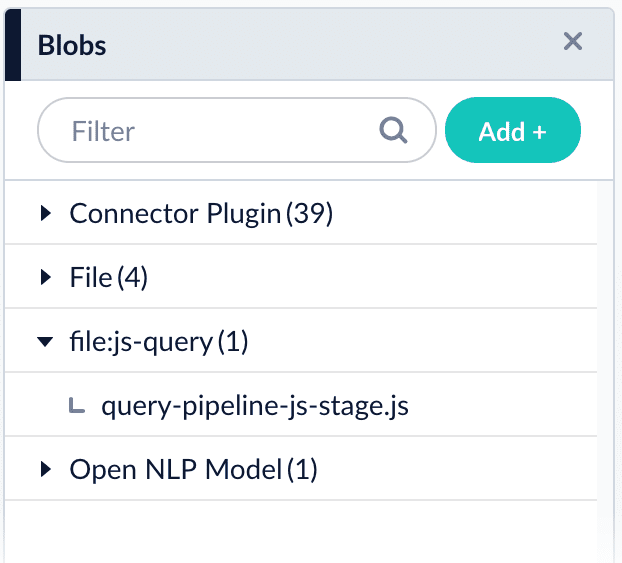
Open the [blob manager](/docs/lucidworks-search/04-move-data-in/blob-storage/overview) to verify that the new blob is present:

<img src="https://mintcdn.com/lucidworks/qCaM85k6rX7hs1DP/assets/images/4.1/known-issue-APOLLO-15672-query.png?fit=max&auto=format&n=qCaM85k6rX7hs1DP&q=85&s=519a545d56c02167555a5f8a8a66414b" alt="Uploaded JavaScript blob in the blob manager" width="622" height="563" data-path="assets/images/4.1/known-issue-APOLLO-15672-query.png" />

## Referencing a JavaScript blob

Use any of the following formats for the `ref`/**Script Reference** configuration field:

```bash wrap  theme={"dark"}
query-pipeline-js-stage.js
```

```bash wrap  theme={"dark"}
blob:query-pipeline-js-stage.js
```

```bash wrap  theme={"dark"}
urn:x-fusion:blob:query-pipeline-js-stage.js
```

<Note>
  The examples above use `query-pipeline-js-stage.js` as the blob ID.
</Note>

### Edit JavaScript

Select **Edit** in the **Script Reference** field to edit JavaScript directly in the Lucidworks Search UI.

## Configuration

<Tip>
  When entering configuration values in the UI, use *unescaped* characters, such as `\t` for the tab character. When entering configuration values in the API, use *escaped* characters, such as `\\t` for the tab character.
</Tip>

<SchemaParamFields schema={schema} />