> ## Documentation Index
> Fetch the complete documentation index at: https://doc.lucidworks.com/llms.txt
> Use this file to discover all available pages before exploring further.

# Call Pipeline

> Query pipeline stage configuration specifications

export const schema = {
  "type": "object",
  "title": "Call Pipeline",
  "description": "Call another Fusion query pipeline",
  "required": ["pipelineToRun"],
  "properties": {
    "skip": {
      "type": "boolean",
      "title": "Skip This Stage",
      "description": "Set to true to skip this stage.",
      "default": false,
      "hints": ["advanced"]
    },
    "label": {
      "type": "string",
      "title": "Label",
      "description": "A unique label for this stage.",
      "hints": ["advanced"],
      "maxLength": 255
    },
    "condition": {
      "type": "string",
      "title": "Condition",
      "description": "Define a conditional script that must result in true or false. This can be used to determine if the stage should process or not.",
      "hints": ["code", "code/javascript", "advanced"]
    },
    "legacy": {
      "type": "boolean",
      "title": "Legacy",
      "description": "True if this stage only supports legacy mode",
      "hints": ["readonly", "hidden"]
    },
    "pipelineToRun": {
      "type": "string",
      "title": "Query Pipeline to Call"
    },
    "collection": {
      "type": "string",
      "title": "Collection to Query"
    },
    "solrHandler": {
      "type": "string",
      "title": "Solr Handler to Use"
    }
  },
  "category": "Other",
  "categoryPriority": 1,
  "unsafe": false
};

export const SchemaParamFields = ({schema}) => {
  const sanitize = str => {
    if (typeof str !== "string") return str;
    return str.replace(/^"(.*)"$/s, "$1").replace(/\\/g, "").replace(/"/g, "'");
  };
  const formatDescription = str => {
    const s = sanitize(str);
    return (/[.!?]\)*$/).test(s) ? s : `${s}.`;
  };
  const {description, properties = {}, required: requiredProps = []} = schema;
  const visibleProps = useMemo(() => Object.entries(properties).filter(([, prop]) => !prop.hints?.includes("hidden")), [properties]);
  return <div>
      {description && <p>{formatDescription(description)}</p>}

      {visibleProps.map(([name, prop]) => {
    const isRequired = requiredProps.includes(name);
    const hasDefault = prop.default !== undefined;
    const rawDefault = prop.default;
    const isComplexDefault = hasDefault && (typeof rawDefault === "object" || typeof rawDefault === "string" && (rawDefault.length > 20 || rawDefault.includes('"')));
    const fieldProps = {
      key: name,
      body: prop.title || name,
      type: prop.type,
      ...prop.title && ({
        post: [<><span className="text-stone-400 dark:text-stone-500">API property: </span>{name}</>]
      }),
      ...isRequired && ({
        required: true
      }),
      ...!isComplexDefault && hasDefault ? {
        default: sanitize(String(rawDefault))
      } : {}
    };
    const isObject = prop.type === "object" && prop.properties;
    const isArrayOfObjects = prop.type === "array" && prop.items?.type === "object" && prop.items.properties;
    return <ParamField {...fieldProps}>
            {prop.description && <p>{formatDescription(prop.description)}</p>}

            {isComplexDefault && <div className="flex">
                <p>
                  <strong>Default:</strong>
                </p>
                <pre className="!my-0">
                  <code>
                    {JSON.stringify(rawDefault, null, 2)}
                  </code>
                </pre>
              </div>}

            {isArrayOfObjects && <div className="flex">
              <p>
                <strong>Object attributes:</strong>
              </p>
              <pre className="!my-0">
                <code>
                  {'{\n'}
                  {Object.entries(prop.items.properties).map(([iname, iprop]) => <>
                      {`  ${iname}`}
                      {prop.items?.required?.includes(iname) && <span style={{
      color: 'red'
    }}> required</span>}
                      {`: {\n    display name: ${sanitize(iprop.title || '')}\n    type: ${iprop.type}\n  }\n`}
                    </>)}
                  {'}'}
                </code>
              </pre>
              </div>}

            {isObject && <Expandable title="properties">
                <SchemaParamFields schema={{
      properties: prop.properties,
      required: prop.required
    }} />
              </Expandable>}
          </ParamField>;
  })}
    </div>;
};

export const LwTemplate = ({title = "Key questions to get you started", icon = "sparkles", cta = "Powered by Agent Studio", linkHref = "https://lucidworks.com/demo/?utm_source=docs&utm_medium=referral&utm_campaign=docs_cta_ai"}) => {
  const [isLoaded, setIsLoaded] = useState(false);
  useEffect(() => {
    const timer = setTimeout(() => {
      setIsLoaded(true);
    }, 500);
    return () => clearTimeout(timer);
  }, []);
  return <div className="lw-template-container">
      <Card title={title} icon={icon}>
        {isLoaded && <span dangerouslySetInnerHTML={{
    __html: `<lw-template id="a029c1a9-28be-427e-b0e1-5d918920246a"></lw-template
            >`
  }} />}
        <Link href={linkHref} className="agent-studio-link text-left text-gray-600 gap-2 dark:text-gray-400 text-sm font-medium flex flex-row items-center hover:text-primary dark:hover:text-primary-light group-hover:text-primary group-hover:dark:text-primary-light">Powered by Lucidworks Agent Studio</Link>
      </Card>
    </div>;
};

[localhost link]: http://localhost:3000/docs/lucidworks-search/09-developer-documentation/config-specs/query-pipeline-stages/call-query-pipeline

[mintlify link]: https://doc.lucidworks.com/docs/lucidworks-search/09-developer-documentation/config-specs/query-pipeline-stages/call-query-pipeline

[old doc.lw link]: https://doc.lucidworks.com/managed-fusion/5.9/9pxv1w

The Call Pipeline query stage calls another query pipeline.
You can use this stage to reuse pipeline logic across multiple pipelines.
You can also use it to check for null results, look up related queries, perform fallback queries, and so on.

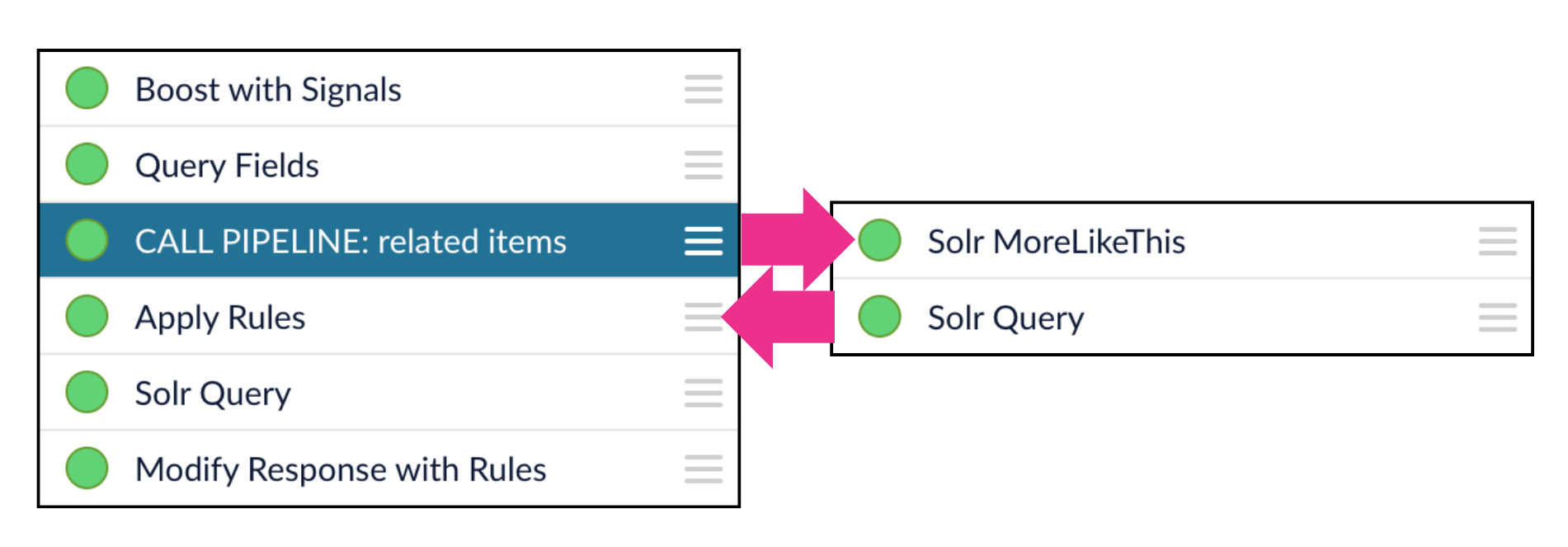
In the context of a query pipeline, the Call Pipeline stage creates a "subroutine" that pauses the main pipeline while the called pipeline completes its operations.
The called pipeline returns its output to the pipeline that called it, as input for the next pipeline stage.
Note that this is different than Call Pipeline stages in index pipelines, where the called pipeline does *not* return its output to the pipeline that called it.

In the example illustrated below, a Call Pipeline stage invokes a query pipeline that looks up related items and returns those results to the main pipeline as the input to the next pipeline stage:

<img src="https://mintcdn.com/lucidworks/pcVooZE8fTjtTbXE/assets/images/diagrams/call-pipeline-query1.png?fit=max&auto=format&n=pcVooZE8fTjtTbXE&q=85&s=2761d4d4799c919c9deaaef5173d6912" alt="A Call Pipeline stage in a query pipeline" width="1901" height="663" data-path="assets/images/diagrams/call-pipeline-query1.png" />

The main pipeline then continues processing the query.

<Tip>
  Use a naming convention for your pipelines that lets you easily differentiate between your main pipelines and the ones you are using as call pipelines.
  For example, you can add a suffix like `_cpl` to differentiate your call pipelines from other pipelines.
</Tip>

<Card title="Using Call Pipelines" class="note-image" href="https://academy.lucidworks.com/using-call-pipelines" cta="Take this course on the LucidAcademy." icon="graduation-cap" iconType="duotone">
  The quick learning for **Using Call Pipelines** focuses on how the Call Pipeline stage works differently in index pipelines versus query pipelines and how to use it in both.
</Card>

<Card title="Call Pipelines" class="note-image" href="https://academy.lucidworks.com/call-pipelines" cta="Take this course on the LucidAcademy." icon="graduation-cap" iconType="duotone">
  The course for **Call Pipelines** focuses on how to implement reusable pipelines and call them from other pipelines.
</Card>

<LwTemplate />

## Configuration

<Tip>
  When entering configuration values in the UI, use *unescaped* characters, such as `\t` for the tab character. When entering configuration values in the API, use *escaped* characters, such as `\\t` for the tab character.
</Tip>

<SchemaParamFields schema={schema} />