> ## Documentation Index
> Fetch the complete documentation index at: https://doc.lucidworks.com/llms.txt
> Use this file to discover all available pages before exploring further.

# Trending Recommender

> Job configuration specifications

export const schema = {
  "type": "object",
  "title": "Trending Recommender",
  "description": "Trending Recommender",
  "required": ["id", "trainingCollection", "dataFormat", "refTimeRange", "targetTimeRange", "countField", "typeField", "timeField", "docIdField", "types", "recsCount", "type"],
  "properties": {
    "id": {
      "type": "string",
      "title": "Spark Job ID",
      "description": "The ID for this Spark job. Used in the API to reference this job. Allowed characters: a-z, A-Z, dash (-) and underscore (_). Maximum length: 63 characters.",
      "maxLength": 63,
      "pattern": "[a-zA-Z][_\\-a-zA-Z0-9]*[a-zA-Z0-9]?"
    },
    "sparkConfig": {
      "type": "array",
      "title": "Spark Settings",
      "description": "Spark configuration settings.",
      "hints": ["advanced"],
      "items": {
        "type": "object",
        "required": ["key"],
        "properties": {
          "key": {
            "type": "string",
            "title": "Parameter Name"
          },
          "value": {
            "type": "string",
            "title": "Parameter Value"
          }
        }
      }
    },
    "trainingCollection": {
      "type": "string",
      "title": "Training Collection",
      "description": "Solr Collection containing labeled training data",
      "minLength": 1
    },
    "fieldToVectorize": {
      "type": "string",
      "title": "Solr Fields to Read",
      "description": "Fields to extract from Solr (not used for other formats)",
      "minLength": 1
    },
    "dataFormat": {
      "type": "string",
      "title": "Data format",
      "description": "Spark-compatible format that contains training data (like 'solr', 'parquet', 'orc' etc)",
      "default": "solr",
      "minLength": 1
    },
    "trainingDataFrameConfigOptions": {
      "type": "object",
      "title": "Dataframe Config Options",
      "description": "Additional spark dataframe loading configuration options",
      "properties": {},
      "additionalProperties": {
        "type": "string"
      },
      "hints": ["advanced"]
    },
    "trainingDataFilterQuery": {
      "type": "string",
      "title": "Training data filter query",
      "description": "Solr query to use when loading training data if using Solr",
      "default": "*:*",
      "hints": ["advanced"]
    },
    "sparkSQL": {
      "type": "string",
      "title": "Spark SQL filter query",
      "description": "Use this field to create a Spark SQL query for filtering your input data. The input data will be registered as spark_input",
      "default": "SELECT * from spark_input",
      "hints": ["code/sql", "advanced"]
    },
    "trainingDataSamplingFraction": {
      "type": "number",
      "title": "Training data sampling fraction",
      "description": "Fraction of the training data to use",
      "default": 1,
      "hints": ["advanced"],
      "maximum": 1,
      "exclusiveMaximum": false
    },
    "randomSeed": {
      "type": "integer",
      "title": "Random seed",
      "description": "For any deterministic pseudorandom number generation",
      "default": 1234,
      "hints": ["advanced"]
    },
    "outputCollection": {
      "type": "string",
      "title": "Output Collection",
      "description": "Solr Collection to store model-labeled data to"
    },
    "overwriteOutput": {
      "type": "boolean",
      "title": "Overwrite Output",
      "description": "Overwrite output collection",
      "default": true,
      "hints": ["hidden", "advanced"]
    },
    "dataOutputFormat": {
      "type": "string",
      "title": "Data output format",
      "description": "Spark-compatible output format (like 'solr', 'parquet', etc)",
      "default": "solr",
      "hints": ["advanced"],
      "minLength": 1
    },
    "sourceFields": {
      "type": "string",
      "title": "Fields to Load",
      "description": "Solr fields to load (comma-delimited). Leave empty to allow the job to select the required fields to load at runtime.",
      "hints": ["advanced"]
    },
    "partitionCols": {
      "type": "string",
      "title": "Partition fields",
      "description": "If writing to non-Solr sources, this field will accept a comma-delimited list of column names for partitioning the dataframe before writing to the external output ",
      "hints": ["advanced"]
    },
    "writeOptions": {
      "type": "array",
      "title": "Write Options",
      "description": "Options used when writing output to Solr or other sources",
      "hints": ["advanced"],
      "items": {
        "type": "object",
        "required": ["key"],
        "properties": {
          "key": {
            "type": "string",
            "title": "Parameter Name"
          },
          "value": {
            "type": "string",
            "title": "Parameter Value"
          }
        }
      }
    },
    "readOptions": {
      "type": "array",
      "title": "Read Options",
      "description": "Options used when reading input from Solr or other sources.",
      "hints": ["advanced"],
      "items": {
        "type": "object",
        "required": ["key"],
        "properties": {
          "key": {
            "type": "string",
            "title": "Parameter Name"
          },
          "value": {
            "type": "string",
            "title": "Parameter Value"
          }
        }
      }
    },
    "refTimeRange": {
      "type": "integer",
      "title": "Reference Time Days",
      "description": "Number of reference days: number of days to use as baseline to find trends (calculated from today)"
    },
    "targetTimeRange": {
      "type": "integer",
      "title": "Target Time Days",
      "description": "Number of target days: number of days to use as target to find trends (calculated from today)"
    },
    "numWeeksRef": {
      "type": "number",
      "title": "Num Weeks Reference",
      "description": "If using filter queries for reference and target time ranges, enter the value of (reference days / target days) here (if not using filter queries, this will be calculated automatically)",
      "hints": ["advanced"]
    },
    "sparkPartitions": {
      "type": "integer",
      "title": "Set minimum Spark partitions for input",
      "description": "Spark will re-partition the input to have this number of partitions. Increase for greater parallelism",
      "default": 200,
      "hints": ["advanced"]
    },
    "countField": {
      "type": "string",
      "title": "Event Count Field Name",
      "description": "Field containing the number of times an event (e.g. click) occurs for a particular query; count_i in the raw signal collection or aggr_count_i in the aggregated signal collection.",
      "default": "aggr_count_i",
      "minLength": 1
    },
    "referenceTimeFilterQuery": {
      "type": "string",
      "title": "Reference Filter Time Query",
      "description": "Add a Spark SQL filter query here for greater control of time filtering",
      "hints": ["advanced"]
    },
    "targetFilterTimeQuery": {
      "type": "string",
      "title": "Target Filter Time Query",
      "description": "Add a Spark SQL filter query here for greater control of time filtering",
      "hints": ["advanced"]
    },
    "typeField": {
      "type": "string",
      "title": "Type field",
      "description": "Enter type field (default is type)",
      "default": "aggr_type_s"
    },
    "timeField": {
      "type": "string",
      "title": "Time field",
      "description": "Enter time field (default is timestamp_tdt)",
      "default": "timestamp_tdt"
    },
    "docIdField": {
      "type": "string",
      "title": "Document ID field",
      "description": "Enter document id field (default is doc_id)",
      "default": "doc_id_s"
    },
    "types": {
      "type": "string",
      "title": "Event types",
      "description": "Enter a comma-separated list of event types to filter on",
      "default": "click,add"
    },
    "recsCount": {
      "type": "integer",
      "title": "Recommendation Count",
      "description": "Maximum number of recs to generate (or -1 for no limit)",
      "default": 500
    },
    "type": {
      "type": "string",
      "title": "Spark Job Type",
      "enum": ["trending-recommender"],
      "default": "trending-recommender",
      "hints": ["readonly"]
    }
  },
  "additionalProperties": true,
  "category": "Other",
  "categoryPriority": 1,
  "propertyGroups": [{
    "label": "Input/Output Parameters",
    "properties": ["trainingCollection", "outputCollection", "dataFormat", "trainingDataFilterQuery", "readOptions", "writeOptions", "trainingDataFrameConfigOptions", "trainingDataSamplingFraction", "randomSeed"]
  }, {
    "label": "Field Parameters",
    "properties": ["fieldToVectorize", "sourceFields", "countField"]
  }]
};

export const SchemaParamFields = ({schema}) => {
  const sanitize = str => {
    if (typeof str !== "string") return str;
    return str.replace(/^"(.*)"$/s, "$1").replace(/\\/g, "").replace(/"/g, "'");
  };
  const formatDescription = str => {
    const s = sanitize(str);
    return (/[.!?]\)*$/).test(s) ? s : `${s}.`;
  };
  const {description, properties = {}, required: requiredProps = []} = schema;
  const visibleProps = useMemo(() => Object.entries(properties).filter(([, prop]) => !prop.hints?.includes("hidden")), [properties]);
  return <div>
      {description && <p>{formatDescription(description)}</p>}

      {visibleProps.map(([name, prop]) => {
    const isRequired = requiredProps.includes(name);
    const hasDefault = prop.default !== undefined;
    const rawDefault = prop.default;
    const isComplexDefault = hasDefault && (typeof rawDefault === "object" || typeof rawDefault === "string" && (rawDefault.length > 20 || rawDefault.includes('"')));
    const fieldProps = {
      key: name,
      body: prop.title || name,
      type: prop.type,
      ...prop.title && ({
        post: [<><span className="text-stone-400 dark:text-stone-500">API property: </span>{name}</>]
      }),
      ...isRequired && ({
        required: true
      }),
      ...!isComplexDefault && hasDefault ? {
        default: sanitize(String(rawDefault))
      } : {}
    };
    const isObject = prop.type === "object" && prop.properties;
    const isArrayOfObjects = prop.type === "array" && prop.items?.type === "object" && prop.items.properties;
    return <ParamField {...fieldProps}>
            {prop.description && <p>{formatDescription(prop.description)}</p>}

            {isComplexDefault && <div className="flex">
                <p>
                  <strong>Default:</strong>
                </p>
                <pre className="!my-0">
                  <code>
                    {JSON.stringify(rawDefault, null, 2)}
                  </code>
                </pre>
              </div>}

            {isArrayOfObjects && <div className="flex">
              <p>
                <strong>Object attributes:</strong>
              </p>
              <pre className="!my-0">
                <code>
                  {'{\n'}
                  {Object.entries(prop.items.properties).map(([iname, iprop]) => <>
                      {`  ${iname}`}
                      {prop.items?.required?.includes(iname) && <span style={{
      color: 'red'
    }}> required</span>}
                      {`: {\n    display name: ${sanitize(iprop.title || '')}\n    type: ${iprop.type}\n  }\n`}
                    </>)}
                  {'}'}
                </code>
              </pre>
              </div>}

            {isObject && <Expandable title="properties">
                <SchemaParamFields schema={{
      properties: prop.properties,
      required: prop.required
    }} />
              </Expandable>}
          </ParamField>;
  })}
    </div>;
};

export const LwTemplate = ({title = "Key questions to get you started", icon = "sparkles", cta = "Powered by Agent Studio", linkHref = "https://lucidworks.com/demo/?utm_source=docs&utm_medium=referral&utm_campaign=docs_cta_ai"}) => {
  const [isLoaded, setIsLoaded] = useState(false);
  useEffect(() => {
    const timer = setTimeout(() => {
      setIsLoaded(true);
    }, 500);
    return () => clearTimeout(timer);
  }, []);
  return <div className="lw-template-container">
      <Card title={title} icon={icon}>
        {isLoaded && <span dangerouslySetInnerHTML={{
    __html: `<lw-template id="a029c1a9-28be-427e-b0e1-5d918920246a"></lw-template
            >`
  }} />}
        <Link href={linkHref} className="agent-studio-link text-left text-gray-600 gap-2 dark:text-gray-400 text-sm font-medium flex flex-row items-center hover:text-primary dark:hover:text-primary-light group-hover:text-primary group-hover:dark:text-primary-light">Powered by Lucidworks Agent Studio</Link>
      </Card>
    </div>;
};

[localhost link]: http://localhost:3000/docs/lucidworks-search/09-developer-documentation/config-specs/jobs/trending-recommender

[mintlify link]: https://doc.lucidworks.com/docs/lucidworks-search/09-developer-documentation/config-specs/jobs/trending-recommender

[old doc.lw link]: https://doc.lucidworks.com/managed-fusion/5.9/qdbucu

The Trending Recommender job analyzes signals to measure customer engagement over time. Use this job to identify spikes in popularity for specific items or queries, then display those items to your users or analyze the trends for business purposes. You can configure any time window, such as daily, weekly, or monthly.

|            |                                                                                                                                                                                     |
| ---------- | ----------------------------------------------------------------------------------------------------------------------------------------------------------------------------------- |
| **Input**  | [signals](/docs/lucidworks-search/09-developer-documentation/config-specs/jobs/sql-aggregation/built-in-sql-aggregation-jobs) (the `COLLECTION_NAME_signals` collection by default) |
| **Output** | Trending items or queries                                                                                                                                                           |

|                          | query    | count\_i | type | timestamp\_tdt | user\_id | doc\_id | session\_id | fusion\_query\_id |
| ------------------------ | -------- | -------- | ---- | -------------- | -------- | ------- | ----------- | ----------------- |
| Required signals fields: | \[**5**] | ✅        | ✅    | ✅              |          | ✅       |             |                   |

\* **5** Required when identifying trending queries instead of trending items.

For detailed steps to configure this job, see **Identify trending items or queries**.

<Accordion title="Identify trending items or queries">
  The Trending Recommender job analyzes signals to measure customer engagement over time. Use this job to identify spikes in popularity for specific items or queries, then display those items to your users or analyze the trends for business purposes. You can configure any time window, such as daily, weekly, or monthly.

  For complete details about the job’s configuration options, see [Trending Recommender Jobs](/docs/lucidworks-search/09-developer-documentation/config-specs/jobs/trending-recommender).

  **How to identify trending items or queries**

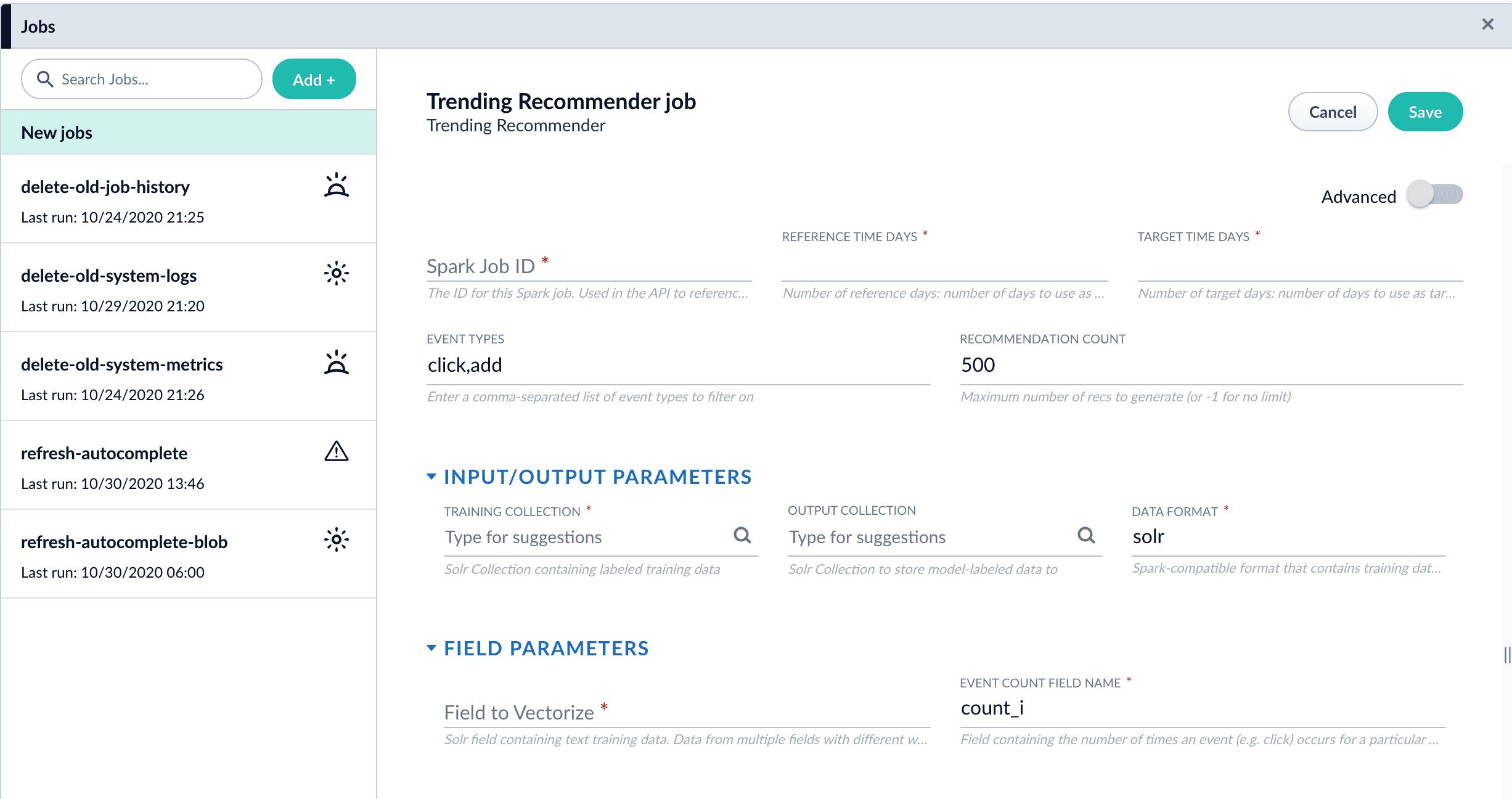
  1. Navigate to **Collections** > **Jobs** > **Add +** > **Trending Recommender**.

       <img src="https://mintcdn.com/lucidworks/tklssWuUmNaxlF0b/assets/images/5.3/trending-recommender-job.png?fit=max&auto=format&n=tklssWuUmNaxlF0b&q=85&s=c3fdb9781de1852568066a3458f04ae3" alt="Trending Recommender job configuration panel" width="2453" height="1296" data-path="assets/images/5.3/trending-recommender-job.png" />
  2. Configure the job:

     1. Enter an ID for this job.
     2. In the **Reference Time Days** field, enter the number of days to use as a *baseline* for identifying trends, starting from today.\
        For example, enter 21 days to analyze three weeks of signals data to use as a baseline.
     3. In the **Target Time Days** field, enter the number of days to use as a *target* for identifying trends, starting from today.\
        For example, enter 7 days to get documents or products whose popularity has spiked in the past week.
        <Tip>      **Reference Time Days** and **Target Time Days** do not overlap. For example, with the values suggested above, a total of 28 days of signals are analyzed, and the first 21 days are compared to the last 7 days.</Tip>
     4. If you want to identify trending queries instead of trending items, change the value of the **Document ID Field** from `doc_id_s` to `query_s`.
        <Note>      This field must be present in your signals. See the required signals fields in the [Trending Recommender Jobs](/docs/lucidworks-search/09-developer-documentation/config-specs/jobs/trending-recommender) reference topic.</Note>
     5. In the **Training Collection** field, enter the Solr collection or cloud path where signals are stored (the `COLLECTION_NAME_signals` collection by default).
     6. In the **Output Collection** field, enter the Solr collection or cloud path where trend analysis data will be stored.
     7. If you are using a format other than `solr`, enter it in the **Data Format** field.
     8. In the **Solr Fields to Read** field, enter one or more field names containing text training data.
        <Tip>      You can enter multiple field names with weights, as in `field1:weight1,field2:weight2...`.</Tip>
     9. In the **Event Count Field Name** field, enter the name of the event count field in your training data, usually `count_i`.
  3. Click **Save**.
  4. Click **Run** > **Start** to run the job.
     The job outputs documents similar to this example:

  ```json theme={"dark"}
      {
             "doc_id":250,
             "ref_hits":1,
             "ref_rank":1,
             "trgt_hits":1,
             "trgt_rank":1,
             "vol_diff":0.5,
             "average_weekly_vol":0.5,
             "hit_vol_ratio":2.0,
             "combine_score":1.0,
             "vol_diff_ratio":1.0,
             "ref_wt_vol_diff_ratio":1.0,
             "vol_diff_wt_vol_diff_ratio":0.5,
             "log_diff_wt_ratio":1.3068528194400546,
             "trend-type":"prds_weekly",
             "id":"284f930d-d750-49a2-90ac-be4692bddda9",
             "_version_":1682995654191742976
       }
  ```

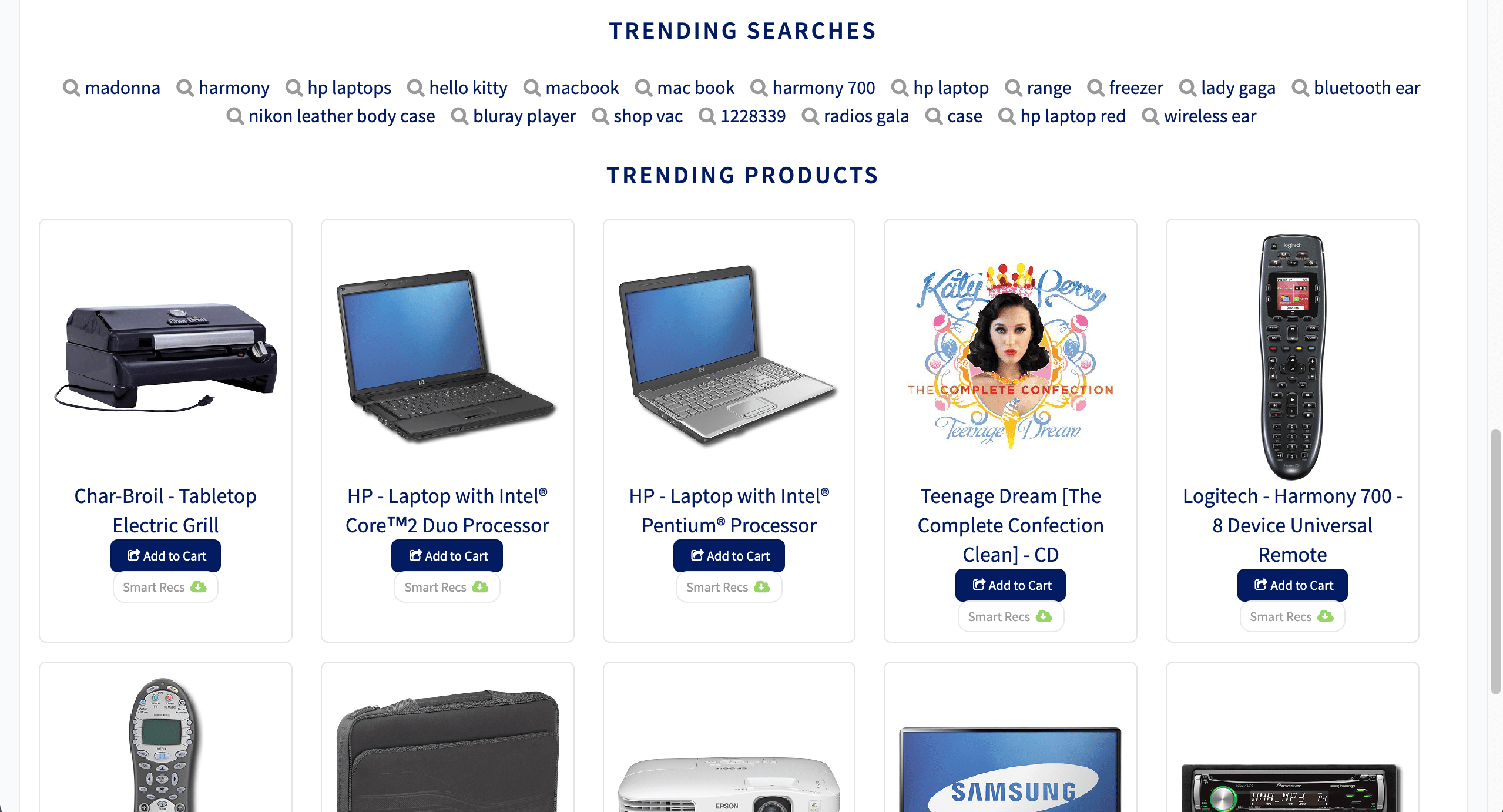
  5. Configure a query pipeline to retrieve trending items from the job’s output collection for display or further analysis. For more information about pipelines created when recommendations are enabled, see [enable recommendations](/docs/lucidworks-search/07-improve-your-queries/recommendations/getting-started).

     <Tip>   Search on the `log_diff_wt_ratio` field to find the top trending items in the output collection.</Tip>

  <img src="https://mintcdn.com/lucidworks/L5PMnIeZ03zhv8Ti/assets/images/5.4/trending-recommender-display.png?fit=max&auto=format&n=L5PMnIeZ03zhv8Ti&q=85&s=47772693e815217729602815cec3bb51" alt="Trending queries and products" width="2558" height="1382" data-path="assets/images/5.4/trending-recommender-display.png" />
</Accordion>

<LwTemplate />

## Configuration properties

<SchemaParamFields schema={schema} />