> ## Documentation Index
> Fetch the complete documentation index at: https://doc.lucidworks.com/llms.txt
> Use this file to discover all available pages before exploring further.

# Smart Answers Evaluate Pipeline

> Job configuration specifications

export const schema = {
  "type": "object",
  "title": "Smart Answers Evaluate Pipeline",
  "description": "Evaluates performance of a configured pipeline",
  "required": ["id", "inputEvaluationCollection", "trainingFormat", "outputEvaluationCollection", "outputFormat", "appName", "queryPipelineName", "collectionName", "returnFields", "type"],
  "properties": {
    "id": {
      "type": "string",
      "title": "Job ID",
      "description": "The ID for this job. Used in the API to reference this job. Allowed characters: a-z, A-Z, dash (-) and underscore (_)",
      "maxLength": 63,
      "pattern": "[a-zA-Z][_\\-a-zA-Z0-9]*[a-zA-Z0-9]?"
    },
    "sparkConfig": {
      "type": "array",
      "title": "Additional parameters",
      "description": "Provide additional key/value pairs to be injected into the training JSON map at runtime. Values will be inserted as-is, so use \" to surround string values",
      "hints": ["advanced"],
      "items": {
        "type": "object",
        "required": ["key"],
        "properties": {
          "key": {
            "type": "string",
            "title": "Parameter Name"
          },
          "value": {
            "type": "string",
            "title": "Parameter Value"
          }
        }
      }
    },
    "writeOptions": {
      "type": "array",
      "title": "Write Options",
      "description": "Options used when writing output to Solr or other sources",
      "hints": ["advanced"],
      "items": {
        "type": "object",
        "required": ["key"],
        "properties": {
          "key": {
            "type": "string",
            "title": "Parameter Name"
          },
          "value": {
            "type": "string",
            "title": "Parameter Value"
          }
        }
      }
    },
    "readOptions": {
      "type": "array",
      "title": "Read Options",
      "description": "Options used when reading input from Solr or other sources.",
      "hints": ["advanced"],
      "items": {
        "type": "object",
        "required": ["key"],
        "properties": {
          "key": {
            "type": "string",
            "title": "Parameter Name"
          },
          "value": {
            "type": "string",
            "title": "Parameter Value"
          }
        }
      }
    },
    "inputEvaluationCollection": {
      "type": "string",
      "title": "Input Evaluation Data Path",
      "description": "Cloud storage path or Solr collection to pull labeled data for use in evaluation",
      "minLength": 1
    },
    "trainingFormat": {
      "type": "string",
      "title": "Input data format",
      "description": "The format of the input data - solr, parquet etc.",
      "default": "solr",
      "minLength": 1
    },
    "outputEvaluationCollection": {
      "type": "string",
      "title": "Output Evaluation Data Path",
      "description": "Cloud storage path or Solr collection to store evaluation results (recommended collection is job_reports)",
      "minLength": 1
    },
    "partitionFields": {
      "type": "string",
      "title": "Partition fields",
      "description": "If writing to non-Solr sources, this field will accept a comma-delimited list of column names for partitioning the dataframe before writing to the external output ",
      "hints": ["advanced"]
    },
    "batchSize": {
      "type": "string",
      "title": "Output Batch Size",
      "description": "If writing to solr, this field defines the batch size for documents to be pushed to solr.",
      "hints": ["advanced"]
    },
    "outputFormat": {
      "type": "string",
      "title": "Output format",
      "description": "The format of the output data - solr, parquet etc.",
      "default": "solr",
      "minLength": 1
    },
    "secretName": {
      "type": "string",
      "title": "Cloud storage secret name",
      "description": "Name of the secret used to access cloud storage as defined in the K8s namespace",
      "hints": ["advanced"],
      "minLength": 1
    },
    "trainingDataFilterQuery": {
      "type": "string",
      "title": "Training Data Filter Query",
      "description": "Solr or SQL query to filter training data. Use solr query when solr collection is specified in Training Path. Use SQL query when cloud storage location is specified. The table name for SQL is `spark_input`",
      "hints": ["code/sql", "advanced"]
    },
    "trainingSampleFraction": {
      "type": "number",
      "title": "Sampling proportion",
      "description": "The proportion of data to be sampled from the full dataset. Use a value between 0 and 1 for a proportion (e.g. 0.5 for 50%), or for a specific number of examples, use an integer larger than 1. Leave blank for no sampling",
      "hints": ["advanced"]
    },
    "seed": {
      "type": "integer",
      "title": "Sampling Seed",
      "description": "Random seed for sampling",
      "default": 12345,
      "hints": ["advanced"]
    },
    "testQuestionFieldInFile": {
      "type": "string",
      "title": "Test Question Field",
      "description": "Defines the field in the collection containing the test question",
      "default": "question"
    },
    "matchFieldInFile": {
      "type": "string",
      "title": "Ground Truth Field",
      "description": "Field which contains id or text of the ground truth answer in the evaluation collection",
      "default": "answer_id"
    },
    "matchFieldInFusion": {
      "type": "string",
      "title": "Answer or id Field in Fusion",
      "description": "Field name in Fusion which contains answer id or text for matching ground truth answer id or text in the evaluation collection",
      "default": "doc_id"
    },
    "appName": {
      "type": "string",
      "title": "App name",
      "description": "Fusion app where indexed documents or QA pairs live."
    },
    "queryPipelineName": {
      "type": "string",
      "title": "Fusion Query Pipeline",
      "description": "Configured query pipeline name that should be used for evaluation"
    },
    "collectionName": {
      "type": "string",
      "title": "Main Collection",
      "description": "Fusion collection where indexed documents or QA pairs live"
    },
    "additionalParams": {
      "type": "string",
      "title": "Additional query parameters",
      "description": "Additional query parameters to pass to return resultsfrom Fusion. Please specify in dictionary format: e.g. { \"rowsFromSolrToRerank\": 20,\"fq\": \"type:answer\" }\"",
      "hints": ["advanced"]
    },
    "returnFields": {
      "type": "string",
      "title": "Return fields",
      "description": "Fields (comma-separated) that should be returned from the main collection (e.g. question, answer). The job will add them to the output evaluation"
    },
    "rankingScoreField": {
      "type": "string",
      "title": "Ranking score",
      "description": "Score to be used for ranking and evaluation",
      "default": "ensemble_score",
      "hints": ["advanced"]
    },
    "metricsList": {
      "type": "string",
      "title": "Metrics list",
      "description": "List of metrics that should be computed during evaluation. e.g.[\"recall\",\"precision\",\"map\",\"mrr\"]",
      "default": "[\"recall\",\"map\",\"mrr\"]",
      "hints": ["advanced"]
    },
    "kList": {
      "type": "string",
      "title": "Metrics@k list",
      "description": "The k retrieval position that will be used to compute for each metric",
      "default": "[1,3,5]",
      "hints": ["advanced"]
    },
    "doWeightsSelection": {
      "type": "boolean",
      "title": "Perform weights selection",
      "description": "Whether to perform grid search to find the best weights combination for ranking scores for query pipeline's Compute Mathematical Expression stage\"",
      "default": false,
      "hints": ["advanced"]
    },
    "solrScaleFunc": {
      "type": "string",
      "title": "Solr scale function",
      "description": "Function used in the pipeline to scale Solr scores. E.g., scale by max Solr score retrieved (max), scale by log with base 10 (log10) or take squre root of score (pow0.5)",
      "default": "max"
    },
    "scoreListForWeights": {
      "type": "string",
      "title": "List of ranking scores for ensemble",
      "description": "Ranking scores (comma-separated) used for ensemble in the query pipeline's Compute Mathematical Expression stage. The job will perform weights selection for the listed scores",
      "default": "score,vectors_distance"
    },
    "targetRankingMetric": {
      "type": "string",
      "title": "Target metric to use for weight selection",
      "description": "Target ranking metric to optimize during weights selection",
      "default": "mrr@3"
    },
    "fetcherType": {
      "type": "string",
      "title": "Fetcher Type to use with query evaluation",
      "default": "query-service",
      "hints": ["hidden"]
    },
    "useLabelingResolution": {
      "type": "boolean",
      "title": "Use Labeling Resolution",
      "description": "Check this to determine similar questions and similar answers via labeling resolution and graph connected components. Does not work well with signals data.",
      "default": false,
      "hints": ["advanced"]
    },
    "useConcurrentQuerying": {
      "type": "boolean",
      "title": "Use Concurrent Querying",
      "description": "Check this option if you want to make concurrent queries to Fusion. It will greatly speed up the job at the cost of increased load on Fusion. Use with caution.",
      "default": false,
      "hints": ["advanced"]
    },
    "type": {
      "type": "string",
      "title": "Spark Job Type",
      "enum": ["argo-qna-evaluate"],
      "default": "argo-qna-evaluate",
      "hints": ["readonly"]
    }
  },
  "additionalProperties": true,
  "category": "Other",
  "categoryPriority": 1,
  "propertyGroups": [{
    "label": "Input / Output Parameters",
    "properties": ["inputEvaluationCollection", "trainingFormat", "outputEvaluationCollection", "outputFormat", "trainingDataFilterQuery", "testQuestionFieldInFile", "matchFieldInFile", "trainingSampleFraction", "seed", "useLabelingResolution", "partitionFields", "batchSize", "secretName"]
  }, {
    "label": "Query Pipeline Input / Output Parameters",
    "properties": ["appName", "collectionName", "queryPipelineName", "matchFieldInFusion", "additionalParams", "returnFields", "useConcurrentQuerying"]
  }, {
    "label": "Metrics",
    "properties": ["rankingScoreField", "metricsList", "kList", "doWeightsSelection", "solrScaleFunc", "scoreListForWeights", "targetRankingMetric"]
  }]
};

export const SchemaParamFields = ({schema}) => {
  const sanitize = str => {
    if (typeof str !== "string") return str;
    return str.replace(/^"(.*)"$/s, "$1").replace(/\\/g, "").replace(/"/g, "'");
  };
  const formatDescription = str => {
    const s = sanitize(str);
    return (/[.!?]\)*$/).test(s) ? s : `${s}.`;
  };
  const {description, properties = {}, required: requiredProps = []} = schema;
  const visibleProps = useMemo(() => Object.entries(properties).filter(([, prop]) => !prop.hints?.includes("hidden")), [properties]);
  return <div>
      {description && <p>{formatDescription(description)}</p>}

      {visibleProps.map(([name, prop]) => {
    const isRequired = requiredProps.includes(name);
    const hasDefault = prop.default !== undefined;
    const rawDefault = prop.default;
    const isComplexDefault = hasDefault && (typeof rawDefault === "object" || typeof rawDefault === "string" && (rawDefault.length > 20 || rawDefault.includes('"')));
    const fieldProps = {
      key: name,
      body: prop.title || name,
      type: prop.type,
      ...prop.title && ({
        post: [<><span className="text-stone-400 dark:text-stone-500">API property: </span>{name}</>]
      }),
      ...isRequired && ({
        required: true
      }),
      ...!isComplexDefault && hasDefault ? {
        default: sanitize(String(rawDefault))
      } : {}
    };
    const isObject = prop.type === "object" && prop.properties;
    const isArrayOfObjects = prop.type === "array" && prop.items?.type === "object" && prop.items.properties;
    return <ParamField {...fieldProps}>
            {prop.description && <p>{formatDescription(prop.description)}</p>}

            {isComplexDefault && <div className="flex">
                <p>
                  <strong>Default:</strong>
                </p>
                <pre className="!my-0">
                  <code>
                    {JSON.stringify(rawDefault, null, 2)}
                  </code>
                </pre>
              </div>}

            {isArrayOfObjects && <div className="flex">
              <p>
                <strong>Object attributes:</strong>
              </p>
              <pre className="!my-0">
                <code>
                  {'{\n'}
                  {Object.entries(prop.items.properties).map(([iname, iprop]) => <>
                      {`  ${iname}`}
                      {prop.items?.required?.includes(iname) && <span style={{
      color: 'red'
    }}> required</span>}
                      {`: {\n    display name: ${sanitize(iprop.title || '')}\n    type: ${iprop.type}\n  }\n`}
                    </>)}
                  {'}'}
                </code>
              </pre>
              </div>}

            {isObject && <Expandable title="properties">
                <SchemaParamFields schema={{
      properties: prop.properties,
      required: prop.required
    }} />
              </Expandable>}
          </ParamField>;
  })}
    </div>;
};

export const LwTemplate = ({title = "Key questions to get you started", icon = "sparkles", cta = "Powered by Agent Studio", linkHref = "https://lucidworks.com/demo/?utm_source=docs&utm_medium=referral&utm_campaign=docs_cta_ai"}) => {
  const [isLoaded, setIsLoaded] = useState(false);
  useEffect(() => {
    const timer = setTimeout(() => {
      setIsLoaded(true);
    }, 500);
    return () => clearTimeout(timer);
  }, []);
  return <div className="lw-template-container">
      <Card title={title} icon={icon}>
        {isLoaded && <span dangerouslySetInnerHTML={{
    __html: `<lw-template id="a029c1a9-28be-427e-b0e1-5d918920246a"></lw-template
            >`
  }} />}
        <Link href={linkHref} className="agent-studio-link text-left text-gray-600 gap-2 dark:text-gray-400 text-sm font-medium flex flex-row items-center hover:text-primary dark:hover:text-primary-light group-hover:text-primary group-hover:dark:text-primary-light">Powered by Lucidworks Agent Studio</Link>
      </Card>
    </div>;
};

[localhost link]: http://localhost:3000/docs/lucidworks-search/09-developer-documentation/config-specs/jobs/smart-answers-evaluate-pipeline

[mintlify link]: https://doc.lucidworks.com/docs/lucidworks-search/09-developer-documentation/config-specs/jobs/smart-answers-evaluate-pipeline

[old doc.lw link]: https://doc.lucidworks.com/managed-fusion/5.9/uznt4n

Evaluate the performance of a [Smart Answers](/docs/lucidworks-search/10-machine-learning/smart-answers/overview) pipeline.

See **Evaluate a Smart Answers Query Pipeline** for configuration instructions.

<Accordion title="Evaluate a Smart Answers Query Pipeline">
  The [Smart Answers Evaluate Pipeline job](/docs/lucidworks-search/09-developer-documentation/config-specs/jobs/smart-answers-evaluate-pipeline) evaluates the rankings of results from any [Smart Answers](/docs/lucidworks-search/10-machine-learning/smart-answers/overview) pipeline and finds the best set of weights in the ensemble score.  This topic explains how to set up the job.

  Before beginning this procedure, prepare a machine learning model using either the Supervised method or the Cold start method, or by selecting one of the pre-trained cold start models, then Configure your pipelines.

  The input for this job is a set of test queries and the text or ID of the correct responses. At least 100 entries are needed to obtain useful results. The job compares the test data with Lucidworks Search’s actual results and computes variety of the ranking metrics to provide insights of how well the pipeline works. It is also useful to use to compare with other setups or pipelines.

  <LwTemplate />

  ## Prepare test data

  1. Format your test data as query/response pairs, that is, a query and its corresponding answer in each row.

     You can do this in any format that Lucidworks Search supports, but parquet file would be preferable to reduce the amount of possible encoding issues.
     The response value can be either the document ID of the correct answer in your Lucidworks Search index (preferable), or the text of the correct answer.

     <Note>   If you use answer text instead of an ID, make sure that the answer text in the evaluation file is formatted identically to the answer text in Lucidworks Search.</Note>

     If there are multiple possible answers for a unique question, then repeat the questions and put the pair into different rows to make sure each row has exactly one query and one response.
  2. If you wish to index test data into Lucidworks Search, create a collection for your test data, such as `sa_test_input` and index the test data into that collection.

  ## Configure the evaluation job

  1. If you wish to save the job output in Lucidworks Search, create a collection for your evaluation data such as `sa_test_output`.
  2. Navigate to **Collections** > **Jobs**.
  3. Select **New** > **Smart Answers Evaluate Pipeline**.
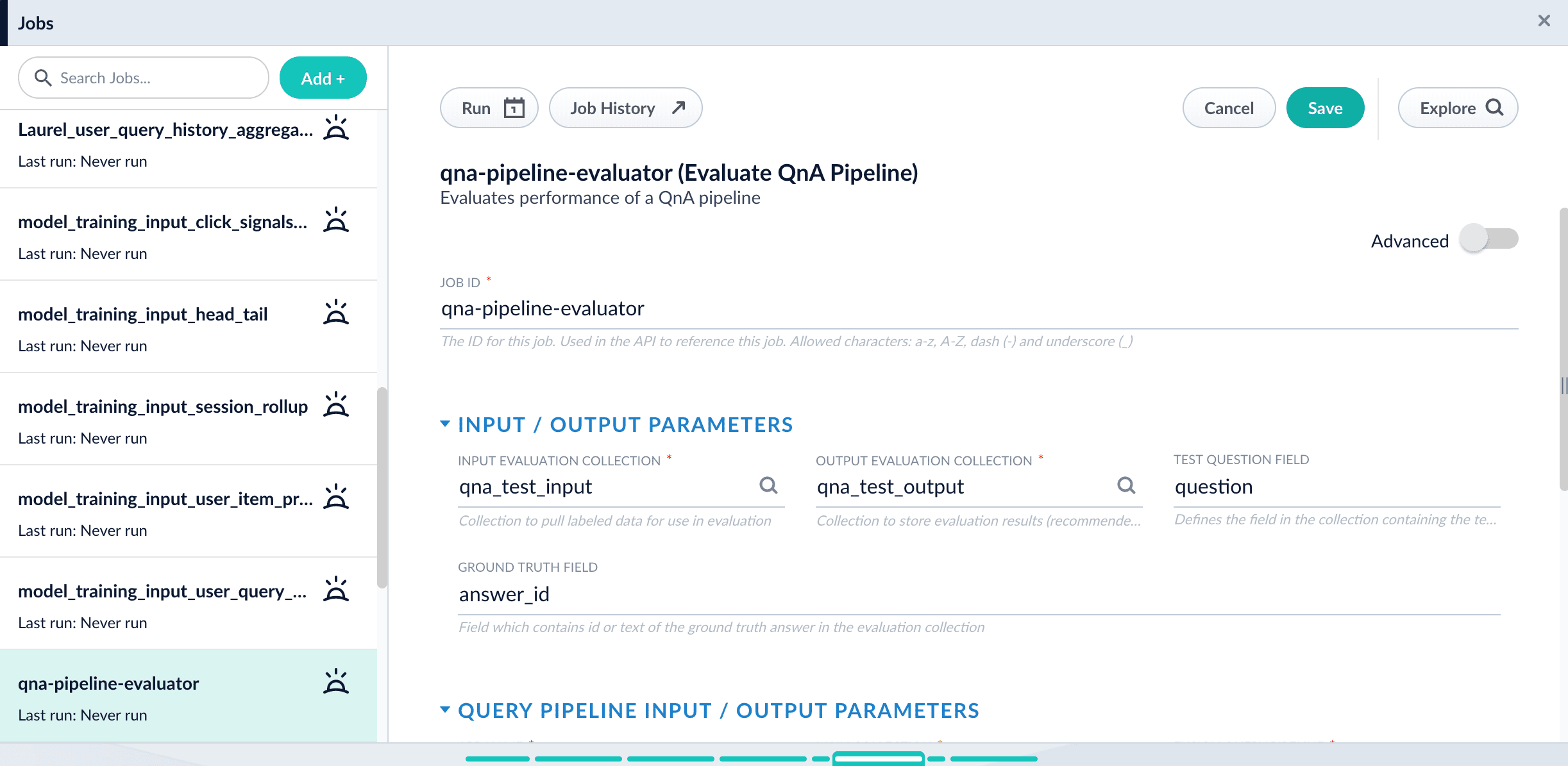
  4. Enter a **Job ID**, such as `sa-pipeline-evaluator`.
  5. Enter the name of your test data collection (such as `sa_test_input`) in the **Input Evaluation Collection** field.
  6. Enter the name of your output collection (such as `sa_test_output`) in the **Output Evaluation Collection** field.

     {/* // I don’t think this note is relevant to MF customers */}

     {/* // NOTE: In Fusion 5.3 and later, you can also configure this job to read from or write to cloud storage.   */}
  7. Enter the name of the **Test Question Field** in the input collection.
  8. Enter the name of the answer field as the **Ground Truth Field**.
  9. Enter the **App Name** of the Lucidworks Search app where the main Smart Answers content is indexed.
  10. In the **Main Collection** field, enter the name of the Lucidworks Search collection that contains your Smart Answers content.
  11. In the **Fusion Query Pipeline** field, enter the name of the Smart Answers query pipeline you want to evaluate.
  12. In the **Answer Or ID Field In Fusion** field, enter the name of the field that Lucidworks Search will return containing the answer text or answer ID.
  13. Optionally, you can configure the **Return Fields** to pass from Smart Answers collection into the evaluation output.

  <Tip>   Check the Query Workbench to see which fields are available to be returned.</Tip>

  14. Configure the **Metrics** parameters:

  * **Solr Scale Function**

    Specify the function used in the Compute Mathematical Expression stage of the query pipeline, one of the following:

    * `max`
    * `log10`
    * `pow0.5`
  * **List of Ranking Scores For Ensemble**

    To find the best weights for different ranking scores, list the names of the ranking score fields, separated by commas.  Different ranking scores might include Solr score, query-to-question distance, or query-to-answer distance from the Compute Mathematical Expression pipeline stage.
  * **Target Metric To Use For Weight Selection**

    The target ranking metric to optimize during weights selection.  The default is `mrr@3`.

    {/* //+ */}

    {/* //Target metric to use for weight selection parameter allows to specify metric that should be optimized during weights selection, for example `recall@3`. Metric values at different positions for different weights combinations will be shown in the log, sorted descendingly based on metric specified above. NOTE: Weights selection can take a while to run for big evaluation datasets, thus if only interested in comparing pipelines, please turn this function off by uncheck Perform weights selection box. */}

  15. Optionally, [read about the advanced parameters](/docs/lucidworks-search/09-developer-documentation/config-specs/jobs/smart-answers-evaluate-pipeline) and consider whether to configure them as well.

  For example, **Sampling proportion** and **Sampling seed** provide a way to run the job only on a sample of the test data.
  16\. Click **Save**.

  <img src="https://mintcdn.com/lucidworks/1FfsxYVDR4XL56q9/assets/images/5.1/evaluate-qna-pipeline-job1.png?fit=max&auto=format&n=1FfsxYVDR4XL56q9&q=85&s=c28481fb669ec17bcbf3ca4a2c14a567" alt="The configured Smart Answers Evaluate Pipeline job" width="2445" height="1195" data-path="assets/images/5.1/evaluate-qna-pipeline-job1.png" />

  17\. Click **Run** > **Start**.

  ## Examine the output

  The job provides a variety of metrics (controlled by the **Metrics list** advanced parameter) at different positions (controlled by the **Metrics\@k list** advanced parameter) for the chosen final ranking score (specified in **Ranking score** parameter).

  **Example: Pipeline evaluation metrics**
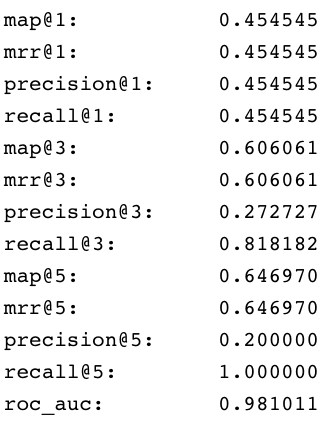
  <img src="https://mintcdn.com/lucidworks/hRHvA40l_Bej4D7e/assets/images/5.1/smart-answers-metrics1.png?fit=max&auto=format&n=hRHvA40l_Bej4D7e&q=85&s=e3a8a3511c7f27515483bafb2d0fd232" alt="Pipeline evaluation metrics" width="333" height="423" data-path="assets/images/5.1/smart-answers-metrics1.png" />

  **Example: recall\@1,3,5 for different weights and distances**

  <img src="https://mintcdn.com/lucidworks/hRHvA40l_Bej4D7e/assets/images/5.1/smart-answers-metrics1.png?fit=max&auto=format&n=hRHvA40l_Bej4D7e&q=85&s=e3a8a3511c7f27515483bafb2d0fd232" alt="Pipeline evaluation metrics" width="333" height="423" data-path="assets/images/5.1/smart-answers-metrics1.png" />

  In addition to metrics, a results evaluation file is indexed to the specified output evaluation collection. It provides the correct answer position for each test question as well as the top returned results for each field specified in **Return fields** parameter.
</Accordion>

## Configuration properties

<SchemaParamFields schema={schema} />