> ## Documentation Index
> Fetch the complete documentation index at: https://doc.lucidworks.com/llms.txt
> Use this file to discover all available pages before exploring further.

# Smart Answers Coldstart Training

> Job configuration specifications

export const schema = {
  "type": "object",
  "title": "Smart Answers Coldstart Training",
  "description": "Trains Smart Answers model on a cold start (unsupervised) basis with with pre-trained or trained embeddings and deploys the trained model to the ML Model Service",
  "required": ["id", "trainingCollection", "trainingFormat", "textColName", "deployModelName", "modelBase", "type"],
  "properties": {
    "id": {
      "type": "string",
      "title": "Job ID",
      "description": "The ID for this job. Used in the API to reference this job. Allowed characters: a-z, A-Z, dash (-) and underscore (_)",
      "maxLength": 63,
      "pattern": "[a-zA-Z][_\\-a-zA-Z0-9]*[a-zA-Z0-9]?"
    },
    "sparkConfig": {
      "type": "array",
      "title": "Additional parameters",
      "description": "Provide additional key/value pairs to be injected into the training JSON map at runtime. Values will be inserted as-is, so use \" to surround string values",
      "hints": ["advanced"],
      "items": {
        "type": "object",
        "required": ["key"],
        "properties": {
          "key": {
            "type": "string",
            "title": "Parameter Name"
          },
          "value": {
            "type": "string",
            "title": "Parameter Value"
          }
        }
      }
    },
    "writeOptions": {
      "type": "array",
      "title": "Write Options",
      "description": "Options used when writing output to Solr or other sources",
      "hints": ["advanced"],
      "items": {
        "type": "object",
        "required": ["key"],
        "properties": {
          "key": {
            "type": "string",
            "title": "Parameter Name"
          },
          "value": {
            "type": "string",
            "title": "Parameter Value"
          }
        }
      }
    },
    "readOptions": {
      "type": "array",
      "title": "Read Options",
      "description": "Options used when reading input from Solr or other sources.",
      "hints": ["advanced"],
      "items": {
        "type": "object",
        "required": ["key"],
        "properties": {
          "key": {
            "type": "string",
            "title": "Parameter Name"
          },
          "value": {
            "type": "string",
            "title": "Parameter Value"
          }
        }
      }
    },
    "trainingCollection": {
      "type": "string",
      "title": "Training data path",
      "description": "Solr collection or cloud storage path where training data is present.",
      "minLength": 1
    },
    "trainingFormat": {
      "type": "string",
      "title": "Training data format",
      "description": "The format of the training data - solr, parquet etc.",
      "default": "solr",
      "minLength": 1
    },
    "secretName": {
      "type": "string",
      "title": "Cloud storage secret name",
      "description": "Name of the secret used to access cloud storage as defined in the K8s namespace",
      "hints": ["advanced"],
      "minLength": 1
    },
    "trainingDataFilterQuery": {
      "type": "string",
      "title": "Training Data Filter Query",
      "description": "Solr or SQL query to filter training data. Use solr query when solr collection is specified in Training Path. Use SQL query when cloud storage location is specified. The table name for SQL is `spark_input`",
      "hints": ["code/sql", "advanced"]
    },
    "textColName": {
      "type": "string",
      "title": "Field which contains the content documents",
      "description": "Field which contains the documents that will be used to learn about the vocabulary. If multiple fields, please separate them by comma, e.g. question,answer."
    },
    "deployModelName": {
      "type": "string",
      "title": "Model Deployment Name",
      "description": "Name of the model to be used for deployment (must be a valid lowercased DNS subdomain with no underscores).",
      "maxLength": 30,
      "pattern": "^[a-z0-9]([-a-z0-9]*[a-z0-9])?(\\.[a-z0-9]([-a-z0-9]*[a-z0-9])?)*$"
    },
    "modelBase": {
      "type": "string",
      "title": "Model base",
      "description": "Specify one of these custom embeddings: ['word_custom', 'bpe_custom'] or choose one of the included pre-trained embeddings / models.",
      "enum": ["word_custom", "bpe_custom", "word_en_300d_2M", "bpe_en_300d_10K", "bpe_en_300d_200K", "bpe_ja_300d_100K", "bpe_ko_300d_100K", "bpe_zh_300d_50K", "bpe_multi_300d_320K", "distilbert_en", "distilbert_multi", "biobert_v1.1"],
      "default": "word_en_300d_2M"
    },
    "testMode": {
      "type": "boolean",
      "title": "Test Mode",
      "description": "If set to true, then the training will exit after the first iteration. Useful for ensuring that the end-to-end pipeline is working",
      "default": false,
      "hints": ["hidden"]
    },
    "modelReplicas": {
      "type": "integer",
      "title": "Model replicas",
      "description": "How many replicas of the model should be deployed by Seldon Core",
      "default": 1
    },
    "w2vEpochs": {
      "type": "integer",
      "title": "Word2Vec training epochs",
      "description": "Number of epochs to train custom Word2Vec embeddings",
      "default": 15,
      "hints": ["advanced"]
    },
    "w2vVectorSize": {
      "type": "integer",
      "title": "Size of word vectors",
      "description": "Word-vector dimensionality to represent text (suggested dimension ranges: 100~300)",
      "default": 150,
      "hints": ["advanced"]
    },
    "w2vWindowSize": {
      "type": "integer",
      "title": "Word2Vec window size",
      "description": "The window size (context words from [-window, window]) for Word2Vec",
      "default": 8,
      "hints": ["advanced"]
    },
    "trainingSampleFraction": {
      "type": "number",
      "title": "Training Data Sampling Fraction",
      "description": "The proportion of data to be sampled from the full dataset. Use a value between 0 and 1 for a proportion (e.g. 0.5 for 50%), or for a specific number of examples, use an integer larger than 1. Leave blank for no sampling",
      "hints": ["advanced"]
    },
    "seed": {
      "type": "integer",
      "title": "Seed",
      "description": "Random seed for sampling",
      "default": 12345,
      "hints": ["hidden"]
    },
    "minTokensNum": {
      "type": "integer",
      "title": "Minimum number of words in doc",
      "description": "Drop document if the total words is lower than this value",
      "default": 1,
      "hints": ["advanced"],
      "minimum": 1,
      "exclusiveMinimum": false
    },
    "maxTokensNum": {
      "type": "integer",
      "title": "Maximum number of words in doc",
      "description": "Drop document if the total words is greater than this value",
      "default": 5000,
      "hints": ["advanced"],
      "minimum": 1,
      "exclusiveMinimum": false
    },
    "lowerCases": {
      "type": "boolean",
      "title": "Lower case all words",
      "description": "Whether to lower case all words in training, i.e. whether to treat upper case and lower case words equally. Only utilized for custom embeddings or for the default model base: word_en_300d_2M.",
      "default": true
    },
    "maxVocabSize": {
      "type": "integer",
      "title": "Maximum vocabulary size",
      "description": "Maximum number of words in vocabulary, words will be trimmed if frequency is too low",
      "default": 100000,
      "hints": ["advanced"],
      "minimum": 1,
      "exclusiveMinimum": false
    },
    "extraTrainingArgs": {
      "type": "string",
      "title": "Extra training args for Python scripts",
      "description": "Add any additional arguments for the Python training scripts in this field",
      "hints": ["hidden"]
    },
    "maxLen": {
      "type": "integer",
      "title": "Max Length",
      "description": "Max length of question/answer by number of tokens"
    },
    "infBatch": {
      "type": "integer",
      "title": "Inference batch size",
      "description": "The batch size used for encoding during the training",
      "hints": ["advanced"]
    },
    "numClusters": {
      "type": "integer",
      "title": "Number of clusters",
      "description": "DEPRECATED: please, consider using Milvus for fast dense vector similarity search. Number of clusters to be used for fast dense vector retrieval. Note no clustering will be applied if this is set to 0. If left blank, cluster count will be inferred by the job depending on the data",
      "default": 0,
      "hints": ["advanced"]
    },
    "topKClusters": {
      "type": "integer",
      "title": "Top k of clusters to return",
      "description": "How many closest clusters the model can find for each query. At retrieval time, all answers in top k nearest clusters will be returned and reranked",
      "default": 10,
      "hints": ["advanced"]
    },
    "unidecode": {
      "type": "boolean",
      "title": "Apply unicode decoding",
      "description": "Use Unidecode library to transform Unicode input into ASCII transliterations. Only utilized for custom embeddings or for the default model base: word_en_300d_2M",
      "default": true
    },
    "globalPoolType": {
      "type": "string",
      "title": "Global Pool Type",
      "description": "Determines how token vectors should be aggregated to obtain final content vector. Must be one of: [avg, max].",
      "enum": ["avg", "max"],
      "default": "avg",
      "hints": ["advanced"]
    },
    "type": {
      "type": "string",
      "title": "Spark Job Type",
      "enum": ["argo-qna-coldstart"],
      "default": "argo-qna-coldstart",
      "hints": ["readonly"]
    }
  },
  "additionalProperties": true,
  "category": "Other",
  "categoryPriority": 1,
  "propertyGroups": [{
    "label": "Input/Output Parameters",
    "properties": ["trainingCollection", "trainingFormat", "textColName", "deployModelName", "modelReplicas", "secretName", "testMode"]
  }, {
    "label": "Data Preprocessing",
    "properties": ["trainingDataFilterQuery", "trainingSampleFraction", "seed", "minTokensNum", "maxTokensNum", "lowerCases", "unidecode", "maxVocabSize"]
  }, {
    "label": "Custom Embeddings Initialization",
    "properties": ["w2vEpochs", "w2vVectorSize", "w2vWindowSize"]
  }, {
    "label": "Model Tuning Parameters",
    "properties": ["maxLen", "infBatch", "numClusters", "topKClusters", "globalPoolType"]
  }]
};

export const SchemaParamFields = ({schema}) => {
  const sanitize = str => {
    if (typeof str !== "string") return str;
    return str.replace(/^"(.*)"$/s, "$1").replace(/\\/g, "").replace(/"/g, "'");
  };
  const formatDescription = str => {
    const s = sanitize(str);
    return (/[.!?]\)*$/).test(s) ? s : `${s}.`;
  };
  const {description, properties = {}, required: requiredProps = []} = schema;
  const visibleProps = useMemo(() => Object.entries(properties).filter(([, prop]) => !prop.hints?.includes("hidden")), [properties]);
  return <div>
      {description && <p>{formatDescription(description)}</p>}

      {visibleProps.map(([name, prop]) => {
    const isRequired = requiredProps.includes(name);
    const hasDefault = prop.default !== undefined;
    const rawDefault = prop.default;
    const isComplexDefault = hasDefault && (typeof rawDefault === "object" || typeof rawDefault === "string" && (rawDefault.length > 20 || rawDefault.includes('"')));
    const fieldProps = {
      key: name,
      body: prop.title || name,
      type: prop.type,
      ...prop.title && ({
        post: [<><span className="text-stone-400 dark:text-stone-500">API property: </span>{name}</>]
      }),
      ...isRequired && ({
        required: true
      }),
      ...!isComplexDefault && hasDefault ? {
        default: sanitize(String(rawDefault))
      } : {}
    };
    const isObject = prop.type === "object" && prop.properties;
    const isArrayOfObjects = prop.type === "array" && prop.items?.type === "object" && prop.items.properties;
    return <ParamField {...fieldProps}>
            {prop.description && <p>{formatDescription(prop.description)}</p>}

            {isComplexDefault && <div className="flex">
                <p>
                  <strong>Default:</strong>
                </p>
                <pre className="!my-0">
                  <code>
                    {JSON.stringify(rawDefault, null, 2)}
                  </code>
                </pre>
              </div>}

            {isArrayOfObjects && <div className="flex">
              <p>
                <strong>Object attributes:</strong>
              </p>
              <pre className="!my-0">
                <code>
                  {'{\n'}
                  {Object.entries(prop.items.properties).map(([iname, iprop]) => <>
                      {`  ${iname}`}
                      {prop.items?.required?.includes(iname) && <span style={{
      color: 'red'
    }}> required</span>}
                      {`: {\n    display name: ${sanitize(iprop.title || '')}\n    type: ${iprop.type}\n  }\n`}
                    </>)}
                  {'}'}
                </code>
              </pre>
              </div>}

            {isObject && <Expandable title="properties">
                <SchemaParamFields schema={{
      properties: prop.properties,
      required: prop.required
    }} />
              </Expandable>}
          </ParamField>;
  })}
    </div>;
};

export const LwTemplate = ({title = "Key questions to get you started", icon = "sparkles", cta = "Powered by Agent Studio", linkHref = "https://lucidworks.com/demo/?utm_source=docs&utm_medium=referral&utm_campaign=docs_cta_ai"}) => {
  const [isLoaded, setIsLoaded] = useState(false);
  useEffect(() => {
    const timer = setTimeout(() => {
      setIsLoaded(true);
    }, 500);
    return () => clearTimeout(timer);
  }, []);
  return <div className="lw-template-container">
      <Card title={title} icon={icon}>
        {isLoaded && <span dangerouslySetInnerHTML={{
    __html: `<lw-template id="a029c1a9-28be-427e-b0e1-5d918920246a"></lw-template
            >`
  }} />}
        <Link href={linkHref} className="agent-studio-link text-left text-gray-600 gap-2 dark:text-gray-400 text-sm font-medium flex flex-row items-center hover:text-primary dark:hover:text-primary-light group-hover:text-primary group-hover:dark:text-primary-light">Powered by Lucidworks Agent Studio</Link>
      </Card>
    </div>;
};

[localhost link]: http://localhost:3000/docs/lucidworks-search/09-developer-documentation/config-specs/jobs/smart-answers-coldstart-training

[mintlify link]: https://doc.lucidworks.com/docs/lucidworks-search/09-developer-documentation/config-specs/jobs/smart-answers-coldstart-training

[old doc.lw link]: https://doc.lucidworks.com/managed-fusion/5.9/8dacf9

Train a [Smart Answers](/docs/lucidworks-search/10-machine-learning/smart-answers/overview) model on a [cold start](/docs/lucidworks-search/10-machine-learning/smart-answers/cold-start-solution) (unsupervised) basis, with pre-trained or trained embeddings, and deploy the trained model to the ML Model Service.

See **Train a Smart Answers cold start model** for configuration instructions.

<Accordion title="Train a Smart Answers cold start model">
  <Check>The Smart Answers Cold Start Training job is deprecated in Fusion 5.12.</Check>

  The [cold start solution for Smart Answers](/docs/lucidworks-search/10-machine-learning/smart-answers/cold-start-solution) begins with training a model using your existing content. To do this, you run the [Smart Answers Coldstart Training](/docs/lucidworks-search/09-developer-documentation/config-specs/jobs/smart-answers-coldstart-training) job. This job uses variety of word embeddings, including custom via Word2Vec training, to learn about the vocabulary that you want to search against.

  <Tip>Smart Answers comes with two pre-trained cold-start models. If your data does not have many domain-specific words, then consider using a pre-trained model.</Tip>

  During a cold start, we suggest capturing user feedback such as document clicks, likes, and downloads on the website. After accumulating feedback data and at least 3,000 query/response pairs, the feedback can be used to train a model using the Supervised method.

  {/* // tag::steps[] */}

  <LwTemplate />

  ## Configure the training job

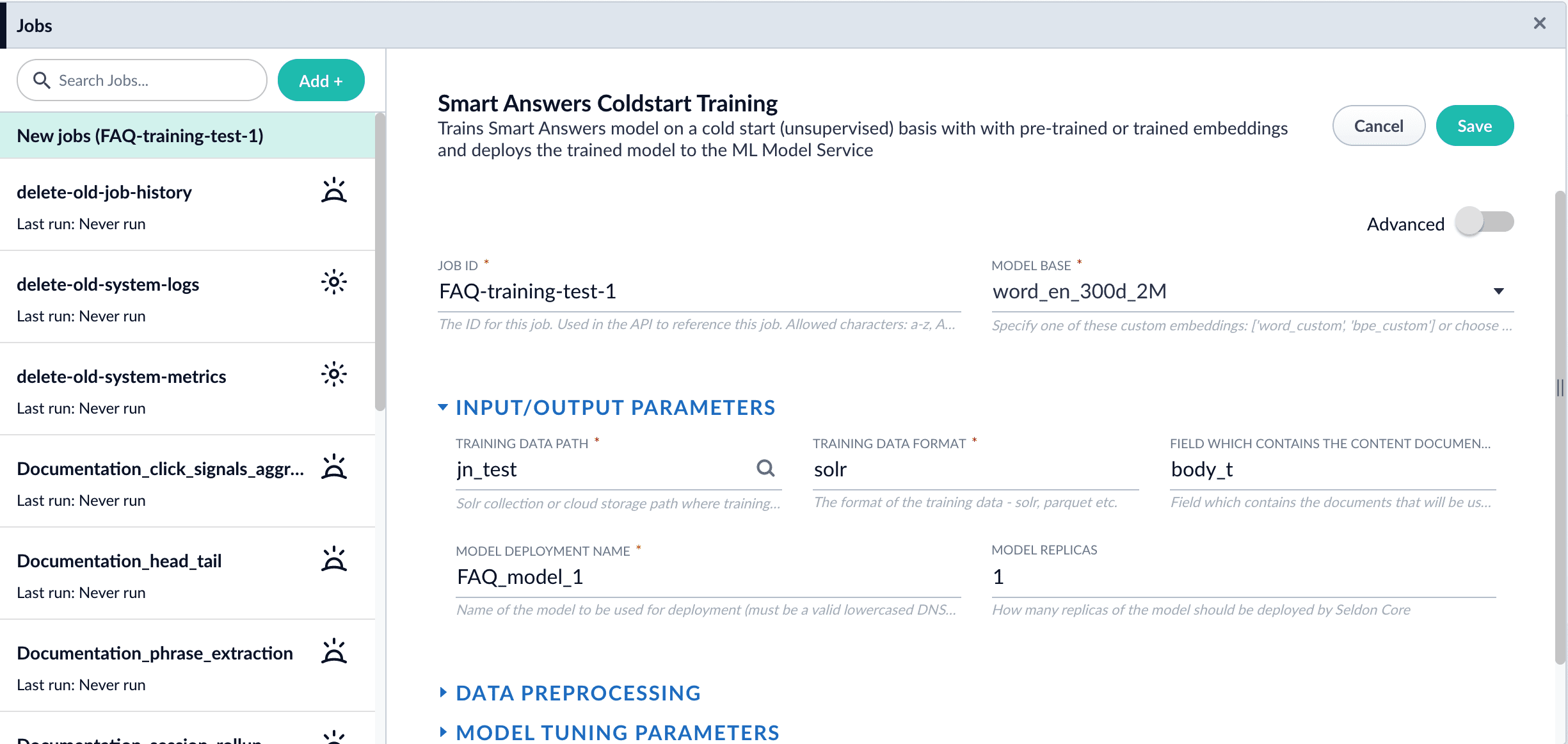
  1. In Fusion, navigate to **Collections** > **Jobs**.
  2. Select **Add** > **Smart Answer Coldstart Training**.
  3. In the **Training Collection** field, specify the collection that contains the content that can be used to answer questions.
  4. Enter the name of the **Field which contains the content documents**.
  5. Enter a **Model Deployment Name**.

     The new machine learning model is saved in the blob store with this name. You will reference it later when you configure your pipelines.
  6. Configure the **Model base**.

     There are several pre-trained word and [BPE](https://nlp.h-its.org/bpemb) embeddings for different languages, as well as a few pre-trained BERT models.

     If you want to train custom embeddings, please select `word_custom` or `bpe_custom`.
     This trains Word2vec on the data and fields specified in **Training collection** and **Field which contains the content documents**. It might be useful in cases when your content includes unusual or domain-specific vocabulary.

     When you use the pre-trained embeddings, the log shows the percentage of processed vocabulary words. If this value is high, then try using custom embeddings.

     During the training job analyzes the content data to select weights for each of the words. The result model performs the weighted average of word embeddings to obtain final single dense vector for the content.
  7. Click **Save**.

       <img src="https://mintcdn.com/lucidworks/tklssWuUmNaxlF0b/assets/images/5.4/smart-answers-coldstart-job.png?fit=max&auto=format&n=tklssWuUmNaxlF0b&q=85&s=95ff3d1b9027e50d15a4d7ef707d039e" alt="The saved job configuration" width="2450" height="1162" data-path="assets/images/5.4/smart-answers-coldstart-job.png" />

     <Note>   If using solr as the training data source ensure that the source collection contains the `random_*` dynamic field defined in its `managed-schema.xml`. This field is required for sampling the data. If it is not present, add the following entry to the `managed-schema.xml` alongside other dynamic fields `<dynamicField name="random_*" type="random"/>` and \<fieldType class="solr.RandomSortField" indexed="true" name="random"/> alongside other field types.</Note>
  8. Click **Run** > **Start**.

  After training is finished the model is deployed into the cluster and can be used in index and query pipelines.

  {/* // end::steps[] */}

  ## Next steps

  1. Configure The Smart Answers Pipelines
  2. Evaluate a Smart Answers Query Pipeline
</Accordion>

## Configuration properties

<SchemaParamFields schema={schema} />
