> ## Documentation Index
> Fetch the complete documentation index at: https://doc.lucidworks.com/llms.txt
> Use this file to discover all available pages before exploring further.

# Custom Spark

> Job configuration specifications

export const schema = {
  "type": "object",
  "title": "Custom Spark Job",
  "description": "Use this job when you want to run a custom JAR on Spark",
  "required": ["id", "klassName", "type"],
  "properties": {
    "id": {
      "type": "string",
      "title": "Spark Job ID",
      "description": "The ID for this Spark job. Used in the API to reference this job. Allowed characters: a-z, A-Z, dash (-) and underscore (_). Maximum length: 63 characters.",
      "maxLength": 63,
      "pattern": "[a-zA-Z][_\\-a-zA-Z0-9]*[a-zA-Z0-9]?"
    },
    "sparkConfig": {
      "type": "array",
      "title": "Spark Settings",
      "description": "Spark configuration settings.",
      "hints": ["advanced"],
      "items": {
        "type": "object",
        "required": ["key"],
        "properties": {
          "key": {
            "type": "string",
            "title": "Parameter Name"
          },
          "value": {
            "type": "string",
            "title": "Parameter Value"
          }
        }
      }
    },
    "klassName": {
      "type": "string",
      "title": "Class name",
      "description": "Fully-qualified name of the Java/Scala class to invoke"
    },
    "submitArgs": {
      "type": "array",
      "title": "Script args",
      "description": "Additional options to pass to the application when running this job.",
      "items": {
        "type": "string"
      }
    },
    "script": {
      "type": "string",
      "title": "Scala Script",
      "description": "Use this text field if you want to override the default behaviour, which is to run className.main(args)",
      "hints": ["code/scala", "lengthy", "advanced"]
    },
    "type": {
      "type": "string",
      "title": "Spark Job Type",
      "enum": ["custom_spark_scala_job"],
      "default": "custom_spark_scala_job",
      "hints": ["readonly"]
    }
  },
  "additionalProperties": true,
  "category": "Other",
  "categoryPriority": 1
};

export const SchemaParamFields = ({schema}) => {
  const sanitize = str => {
    if (typeof str !== "string") return str;
    return str.replace(/^"(.*)"$/s, "$1").replace(/\\/g, "").replace(/"/g, "'");
  };
  const formatDescription = str => {
    const s = sanitize(str);
    return (/[.!?]\)*$/).test(s) ? s : `${s}.`;
  };
  const {description, properties = {}, required: requiredProps = []} = schema;
  const visibleProps = useMemo(() => Object.entries(properties).filter(([, prop]) => !prop.hints?.includes("hidden")), [properties]);
  return <div>
      {description && <p>{formatDescription(description)}</p>}

      {visibleProps.map(([name, prop]) => {
    const isRequired = requiredProps.includes(name);
    const hasDefault = prop.default !== undefined;
    const rawDefault = prop.default;
    const isComplexDefault = hasDefault && (typeof rawDefault === "object" || typeof rawDefault === "string" && (rawDefault.length > 20 || rawDefault.includes('"')));
    const fieldProps = {
      key: name,
      body: prop.title || name,
      type: prop.type,
      ...prop.title && ({
        post: [<><span className="text-stone-400 dark:text-stone-500">API property: </span>{name}</>]
      }),
      ...isRequired && ({
        required: true
      }),
      ...!isComplexDefault && hasDefault ? {
        default: sanitize(String(rawDefault))
      } : {}
    };
    const isObject = prop.type === "object" && prop.properties;
    const isArrayOfObjects = prop.type === "array" && prop.items?.type === "object" && prop.items.properties;
    return <ParamField {...fieldProps}>
            {prop.description && <p>{formatDescription(prop.description)}</p>}

            {isComplexDefault && <div className="flex">
                <p>
                  <strong>Default:</strong>
                </p>
                <pre className="!my-0">
                  <code>
                    {JSON.stringify(rawDefault, null, 2)}
                  </code>
                </pre>
              </div>}

            {isArrayOfObjects && <div className="flex">
              <p>
                <strong>Object attributes:</strong>
              </p>
              <pre className="!my-0">
                <code>
                  {'{\n'}
                  {Object.entries(prop.items.properties).map(([iname, iprop]) => <>
                      {`  ${iname}`}
                      {prop.items?.required?.includes(iname) && <span style={{
      color: 'red'
    }}> required</span>}
                      {`: {\n    display name: ${sanitize(iprop.title || '')}\n    type: ${iprop.type}\n  }\n`}
                    </>)}
                  {'}'}
                </code>
              </pre>
              </div>}

            {isObject && <Expandable title="properties">
                <SchemaParamFields schema={{
      properties: prop.properties,
      required: prop.required
    }} />
              </Expandable>}
          </ParamField>;
  })}
    </div>;
};

export const LwTemplate = ({title = "Key questions to get you started", icon = "sparkles", cta = "Powered by Agent Studio", linkHref = "https://lucidworks.com/demo/?utm_source=docs&utm_medium=referral&utm_campaign=docs_cta_ai"}) => {
  const [isLoaded, setIsLoaded] = useState(false);
  useEffect(() => {
    const timer = setTimeout(() => {
      setIsLoaded(true);
    }, 500);
    return () => clearTimeout(timer);
  }, []);
  return <div className="lw-template-container">
      <Card title={title} icon={icon}>
        {isLoaded && <span dangerouslySetInnerHTML={{
    __html: `<lw-template id="a029c1a9-28be-427e-b0e1-5d918920246a"></lw-template
            >`
  }} />}
        <Link href={linkHref} className="agent-studio-link text-left text-gray-600 gap-2 dark:text-gray-400 text-sm font-medium flex flex-row items-center hover:text-primary dark:hover:text-primary-light group-hover:text-primary group-hover:dark:text-primary-light">Powered by Lucidworks Agent Studio</Link>
      </Card>
    </div>;
};

[localhost link]: http://localhost:3000/docs/lucidworks-search/09-developer-documentation/config-specs/jobs/custom-spark

[mintlify link]: https://doc.lucidworks.com/docs/lucidworks-search/09-developer-documentation/config-specs/jobs/custom-spark

[old doc.lw link]: https://doc.lucidworks.com/managed-fusion/5.9/wbun66

Custom Spark jobs run Java ARchive (JAR) files uploaded to the [blob store](/docs/lucidworks-search/04-move-data-in/blob-storage/overview).

To configure a custom Spark job, sign in to Lucidworks Search and click **Collections > Jobs**. Then click **Add+** and in the Custom and Other Jobs section, select **Custom Spark Job**. You can enter basic and advanced parameters to configure the job. If the field has a default value, it is populated when you click to add the job.

<LwTemplate />

## Basic parameters

<Note>
  To enter advanced parameters in the UI, click **Advanced**. Those parameters are described in [the advanced parameters section](#advanced-parameters).
</Note>

* **Spark job ID.** The unique ID for the Spark job that references this job in the API. This is the `id` field in the configuration file. Required field.
* **Class name.** The fully-qualified name of the Java/Scala class to invoke for this job. This is the `klassName` field in the configuration file. Required field.
* **Script ARGs.** The arguments (ARGs), which are additional options to pass to the application when running this job. This is the `submitArgs` field in the configuration file. Optional field.

## Advanced parameters

If you click the **Advanced** toggle, the following optional fields are displayed in the UI.

* **Spark Settings.** This section lets you enter `parameter name:parameter value` options to configure Spark settings. This is the `sparkConfig` field in the configuration file.
* **Scala Script.** The value in this text field overrides running `className.main(args)` default behavior. This is the `script` field in the configuration file.

<Note>
  Alternatives to custom Spark jobs are [Custom Python job configuration specifications](/docs/lucidworks-search/09-developer-documentation/config-specs/jobs/custom-python) and Scala [Script job configuration specifications](/docs/lucidworks-search/09-developer-documentation/config-specs/jobs/script-jobs).
</Note>

## Learn more

<AccordionGroup>
  <Accordion title="Configure Spark Job Resource Allocation">
    For related topics, see Spark Operations.

    #### Number of instances and cores allocated

    To set the number of cores allocated for a job, add the following parameter keys and values in the Spark Settings field. This is done within the "advanced" job properties in the Lucidworks Search UI or the `sparkConfig` object, if defining a job via the Lucidworks Search API.

    | Parameter Key                           | Example Value |
    | --------------------------------------- | ------------- |
    | spark.executor.instances                | 3             |
    | spark.kubernetes.executor.request.cores | 3             |
    | spark.executor.cores                    | 6             |
    | spark.driver.cores                      | 1             |

    If `spark.kubernetes.executor.request.cores` is unset, the default configuration, Spark sets the number of CPUs for the executor pod to be the same number as `spark.executor.cores`. For example, if `spark.executor.cores` is `3`, Spark allocates 3 CPUs for the executor pod and runs 3 tasks in parallel. To under-allocate the CPU for the executor pod and still run multiple tasks in parallel, set `spark.kubernetes.executor.request.cores` to a lower value than `spark.executor.cores`.

    The ratio for `spark.kubernetes.executor.request.cores` to `spark.executor.cores` depends on the type of job: either CPU-bound or I/O-bound. Allocate more memory to the executor if more tasks are running in parallel on a single executor pod.

    If these settings not specified, the job launches with a driver using one core and 3GB of memory plus two executors, each using one core with 1GB of memory.

    #### Memory allocation

    The amount of memory allocated to the driver and executors is controlled on a per-job basis using the `spark.executor.memory` and `spark.driver.memory` parameters in the Spark Settings section of the job definition. This is found in the Lucidworks Search UI or within the `sparkConfig` object in the JSON definition of the job.

    | Parameter Key         | Example Value |
    | --------------------- | ------------- |
    | spark.executor.memory | 6g            |
    | spark.driver.memory   | 2g            |
  </Accordion>

  <Accordion title="Use Spark Drivers">
    ## Using the Spark default driver

    Navigate to **Collections** > **Collections Manager** and select the `system_monitor` collection.

    Then navigate to **Collections** > **Jobs** and select one of the built-in aggregation jobs, such as `session_rollup`. In the diagram above, the spark-master service in Fusion is the Cluster Manager.

    You must delete any existing driver applications before launching the job. Even if you have not started any jobs by hand, Fusion’s API service might have started one automatically, because Fusion ships with built-in jobs that run in the background which perform rollups of metrics in the `system_monitor`collection. Therefore, before you try to launch a job, you should run the following command:

    ```bash theme={"dark"}
    curl -X DELETE http://localhost:8764/api/spark/driver
    ```

    Wait a few seconds and use the Spark UI to verify that no Fusion-Spark application (for example, `Fusion-20161005224611`) is running.

    In a terminal window or windows, set up a `tail -f` job (on Unix, or the equivalent on Windows) on the `api` and `spark-driver-default` logs:

    ```bash theme={"dark"}
    tail -f var/log/api/api.log var/log/api/spark-driver-default.log
    ```

    Give this command from the `bin` directory below the Fusion home directory, for example, `/opt/fusion/latest.x*` (on Unix) or `C:\lucidworks\fusion\latest.*x` (on Windows).

    Now, start any aggregation job from the UI. It does not matter whether or not this job performs any work; the goal of this exercise is to show what happens in Fusion and Spark when you run an aggregation job.
    You should see activity in both logs related to starting the driver application and running the selected job.
    The Spark UI will now show a Fusion-Spark app:

    <img src="https://mintcdn.com/lucidworks/3Ch7Gf3ey98GnjMH/assets/images/spark/SparkOps_default_driver.png?fit=max&auto=format&n=3Ch7Gf3ey98GnjMH&q=85&s=9ea595f9434a3cdd6a02cbc4d0eddc0b" alt="Spark default driver" width="1204" height="132" data-path="assets/images/spark/SparkOps_default_driver.png" />

    Use the `ps` command to get more details on this process:

    ```bash theme={"dark"}
    ps waux | grep SparkDriver
    ```

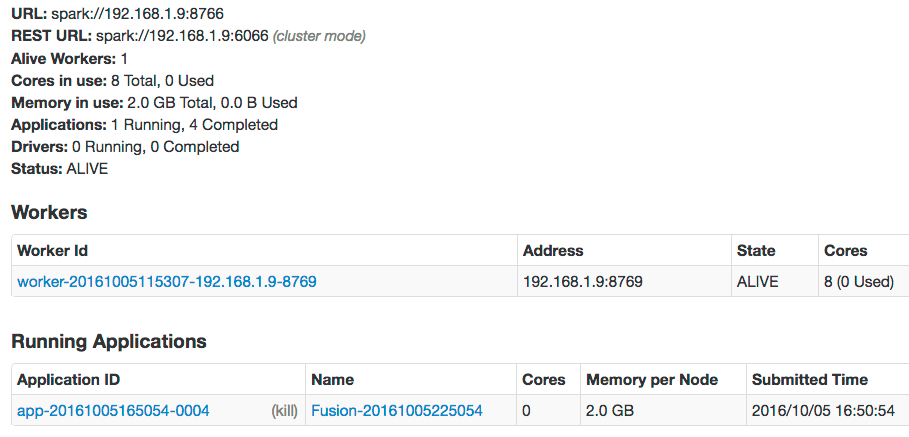
    The output should show that the Fusion SparkDriver is a JVM process started by the API service; it is not managed by the Fusion agent. Within a few minutes, the Spark UI will update itself:
    <img src="https://mintcdn.com/lucidworks/osBX0w3nXJkTl2Fw/assets/images/spark/SparkOps_dynalloc_driver.png?fit=max&auto=format&n=osBX0w3nXJkTl2Fw&q=85&s=b74831051c440e2b0711fd29efdbe17e" alt="Spark default driver dynamic allocation" width="909" height="437" data-path="assets/images/spark/SparkOps_dynalloc_driver.png" />

    Notice that the application no longer has any cores allocated and that all of the memory available is not being used (0.0B Used of 2.0 GB Total). This is because we launch our driver applications with `spark.dynamicAllocation.enabled=true`. This setting allows the Spark master to reclaim CPU & memory from an application if it is not actively using the resources allocated to it.

    Both driver processes (default and scripted) manage a SparkContext. For the default driver, the SparkContext will be shut down after waiting a configurable (`fusion.spark.idleTime`: default 5 mins) idle time. The scripted driver shuts down the SparkContext after every scripted job is run to avoid classpath pollution between jobs.

    ## Using the Spark script-job driver

    Fusion supports custom script jobs.

    Script jobs require a separate driver to isolate the classpath for custom Scala scripts, as well as to isolate the classpath between the jobs, so that classes compiled from scripts do not pollute the classpath for subsequent scripted jobs.

    For this reason, the SparkContext that each scripted job uses is immediately shut down after the job is finished and is recreated for new jobs. This adds some startup overhead for scripted jobs.

    Refer to the [apachelogs lab](https://github.com/lucidworks/fusion-spark-bootcamp/tree/master/labs/apachelogs)
    in the
    [Fusion Spark Bootcamp project](https://github.com/lucidworks/fusion-spark-bootcamp) for a complete example of a custom script job.

    To troubleshoot problems with a script job, start by looking for errors in the script-job driver log `spark-driver-scripted.log` in `/opt/fusion/latest.x*/var/log/api/` (on Unix) or `C:\lucidworks\var\fusion\latest.*x\var\log\api\` (on Windows).

    ## Spark drivers in a multinode cluster

    To find out which node is running the Spark driver which node is running the driver when running a multi-node Fusion deployment which has several nodes running Fusion’s API services, you can query the driver status via the following call:

    ```bash theme={"dark"}
    curl http://localhost:8764/api/spark/driver/status
    ```

    This returns a status report:

    ```json theme={"dark"}
    {
      "/spark-drivers/15797426d56T537184c2" : {
        "id" : "15797426d56T537184c2",
        "hostname" : "192.168.1.9",
        "port" : 8601,
        "scripted" : false
      }
    }
    ```
  </Accordion>
</AccordionGroup>

## Configuration properties

<SchemaParamFields schema={schema} />
