> ## Documentation Index
> Fetch the complete documentation index at: https://doc.lucidworks.com/llms.txt
> Use this file to discover all available pages before exploring further.
# Datasource jobs
export const LwTemplate = ({title = "Key questions to get you started", icon = "sparkles", cta = "Powered by Agent Studio", linkHref = "https://lucidworks.com/demo/?utm_source=docs&utm_medium=referral&utm_campaign=docs_cta_ai"}) => {
const [isLoaded, setIsLoaded] = useState(false);
useEffect(() => {
const timer = setTimeout(() => {
setIsLoaded(true);
}, 500);
return () => clearTimeout(timer);
}, []);
return
{isLoaded && `
}} />}
Powered by Lucidworks Agent Studio
;
};
[localhost link]: http://localhost:3000/docs/lucidworks-search/08-administration/jobs-scheduling/datasource-jobs
[mintlify link]: https://doc.lucidworks.com/docs/lucidworks-search/08-administration/jobs-scheduling/datasource-jobs
[old doc.lw link]: https://doc.lucidworks.com/managed-fusion/5.9/4xe02f
A datasource job specifies the origin of the data imported and indexed into Lucidworks Search. Datasources include databases, files, and data obtained from websites or applications.
Sources of data can be uploaded to Lucidworks Search in **System > Blobs**.
In addition, you can create and configure the datasource job using the following methods:
* The [Index Workbench](/docs/lucidworks-search/03-ui-tour/index-workbench). Navigate to **Indexing > Index Workbench > Configure Datasource**. You can upload a particular ZIP file or select a datasource type which includes supported Lucidworks Search connectors. The list is divided datasources already installed and datasources not yet installed. When you select an uninstalled connector from the list, the system installs the connector.
* [Datasources](/docs/fusion-connectors/concepts/datasources). Navigate to **Indexing** > **Datasources**. If you click **Add**, you can select from a list of supported Lucidworks Search connectors. The list is divided datasources already installed and datasources not yet installed. When you select an uninstalled connector from the list, the system installs the connector.
* The [Connector Datasources API](/api-reference/datasource-configuration-v2-api/list-all-v2-datasources). You can also use these endpoints to manage the crawl database and view connector schema.
Running the datasource job obtains and indexes the data in Lucidworks Search based on configuration parameters including the ability to:
* Generate diagnostic logs
* Limit document crawl levels or the number of documents obtained and indexed
* Exclude or include files based on file extension, text or patterns in the document, and authentication methods
* Set recrawl rules
* Enter links where you want the crawl to begin
## Learn more
To schedule a datasource job, complete the following:
1. Use the Index Workbench to set up a datasource.
2. Click **System > Scheduler**.
3. Select the datasource from the job list.
4. Click **New Schedule**.
5. Select and configure a trigger:
* **After Another Job Completes**\
Enter the job ID and job result that trigger this one.
* **Cron String**\
Enter a Quartz cron expression. See [the Quartz documentation](http://www.quartz-scheduler.org/api/2.3.0/org/quartz/CronExpression.html) for details.
* **Start + Interval**\
Enter a start date/time, an interval, and the interval units.
To start a datasource job, complete the following:
1. Navigate to **Collections > Jobs**.
2. Select the job you want to run and click **Run > Start**.
3. To view the job status information and its result, click **Job History**.
To stop a datasource job, complete the following:
1. After you start the job, you can click **Stop** in the Run window to stop the job.
If you want to stop the job using the API, execute the following command in the Jobs API:
```json wrap theme={"dark"}
curl -u USERNAME:PASSWORD \
-X POST \
-H "Content-Type: application/json" \
https://EXAMPLE_COMPANY.b.lucidworks.cloud:API_PORT/api/jobs/datasource:DATASOURCE_ID/actions \
-d '{"action": "abort"}'
```
For more information, see [Start/pause/abort a job](/api-reference/jobs/startpauseabort-a-job).
Parsing and indexing of documents emitted prior to clicking stop are not stopped, so if you need to stop all ingestion activities, you must also complete the rest of the steps in this procedure.
2. To stop parsing, execute the command to delete the applicable parser in the Parsers CRUD API:
```json wrap theme={"dark"}
curl -u USERNAME:PASSWORD \
-X DELETE \
https://EXAMPLE_COMPANY.b.lucidworks.cloud:API_PORT/api/parser/datasource/DATASOURCE_ID
```
For more information, see [Delete a parser](/api-reference/parsers-crud-api/delete-a-parser).
3. To cancel Lucidworks AI requests, execute the following command in the Index Pipelines API:
```json wrap theme={"dark"}
curl -u USERNAME:PASSWORD \
-X POST \
https://EXAMPLE_COMPANY.b.lucidworks.cloud:API_PORT/api/index-pipelines/INDEX_PROFILE_ID/async-enrichment/skip-pending
```
For more information, see [Skip pending async requests](/api-reference/index-pipelines-api/skip-pending-async-requests).
4. To reset the index subscription, execute the following command in the Subscriptions API:
```json wrap theme={"dark"}
curl -u USERNAME:PASSWORD \
-X POST \
https://EXAMPLE_COMPANY.b.lucidworks.cloud:API_PORT/api/subscriptions/SUBSCRIPTION_ID/refresh?action=reset
```
For more information, see [Refresh a subscription](/api-reference/subscriptions-api/refresh-a-subscription).
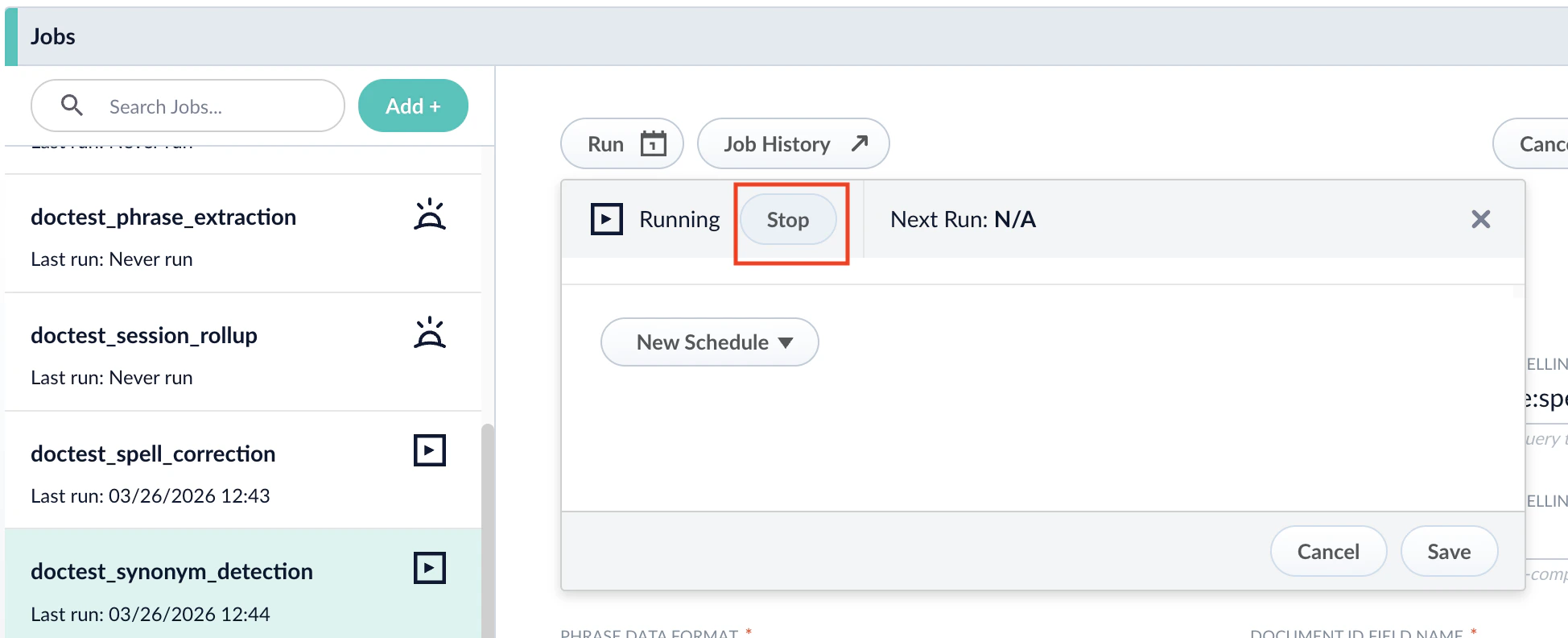 If you want to stop the job using the API, execute the following command in the Jobs API:
```json wrap theme={"dark"}
curl -u USERNAME:PASSWORD \
-X POST \
-H "Content-Type: application/json" \
https://EXAMPLE_COMPANY.b.lucidworks.cloud:API_PORT/api/jobs/datasource:DATASOURCE_ID/actions \
-d '{"action": "abort"}'
```
For more information, see [Start/pause/abort a job](/api-reference/jobs/startpauseabort-a-job).
If you want to stop the job using the API, execute the following command in the Jobs API:
```json wrap theme={"dark"}
curl -u USERNAME:PASSWORD \
-X POST \
-H "Content-Type: application/json" \
https://EXAMPLE_COMPANY.b.lucidworks.cloud:API_PORT/api/jobs/datasource:DATASOURCE_ID/actions \
-d '{"action": "abort"}'
```
For more information, see [Start/pause/abort a job](/api-reference/jobs/startpauseabort-a-job).