> ## Documentation Index
> Fetch the complete documentation index at: https://doc.lucidworks.com/llms.txt
> Use this file to discover all available pages before exploring further.
# Cloud signal storage
export const LwTemplate = ({title = "Key questions to get you started", icon = "sparkles", cta = "Powered by Agent Studio", linkHref = "https://lucidworks.com/demo/?utm_source=docs&utm_medium=referral&utm_campaign=docs_cta_ai"}) => {
const [isLoaded, setIsLoaded] = useState(false);
useEffect(() => {
const timer = setTimeout(() => {
setIsLoaded(true);
}, 500);
return () => clearTimeout(timer);
}, []);
return
{isLoaded && `
}} />}
Powered by Lucidworks Agent Studio
;
};
[localhost link]: http://localhost:3000/docs/lucidworks-search/07-improve-your-queries/signals/cloud-signal-storage-59
[mintlify link]: https://doc.lucidworks.com/docs/lucidworks-search/07-improve-your-queries/signals/cloud-signal-storage-59
[old doc.lw link]: https://doc.lucidworks.com/managed-fusion/5.9/vcpe1e
By default, Lucidworks Search stores signals in Solr. Alternatively, you can choose to store signals in Google Cloud Storage or Amazon S3.
Storing signals in the cloud reduces the amount of data stored on a Solr cluster. Signals data files are periodically compacted into larger files to save storage space, improve performance, and make it easier to manage the files.
This feature is only available in Lucidworks Search 5.9.x for versions 5.9.6+.
Cloud signal storage is enabled at the time of deployment. To enable cloud signal storage for a new Lucidworks Search deployment, you must configure this feature in the deployment options.
All signal types are supported, including custom signal types. The default signal schema can be customized.
The course for **Cloud Signal Storage** focuses on how to use cloud signal storage in Fusion to enhance your data storage efficiency.
**FAQ**
Can I migrate existing signals to cloud signal storage?
Currently, there is no migration path from default signal storage in Solr to cloud signal storage. This improvement is planned for a future release. To use cloud signal storage, start with a new deployment.
## Data flow
**Kafka**
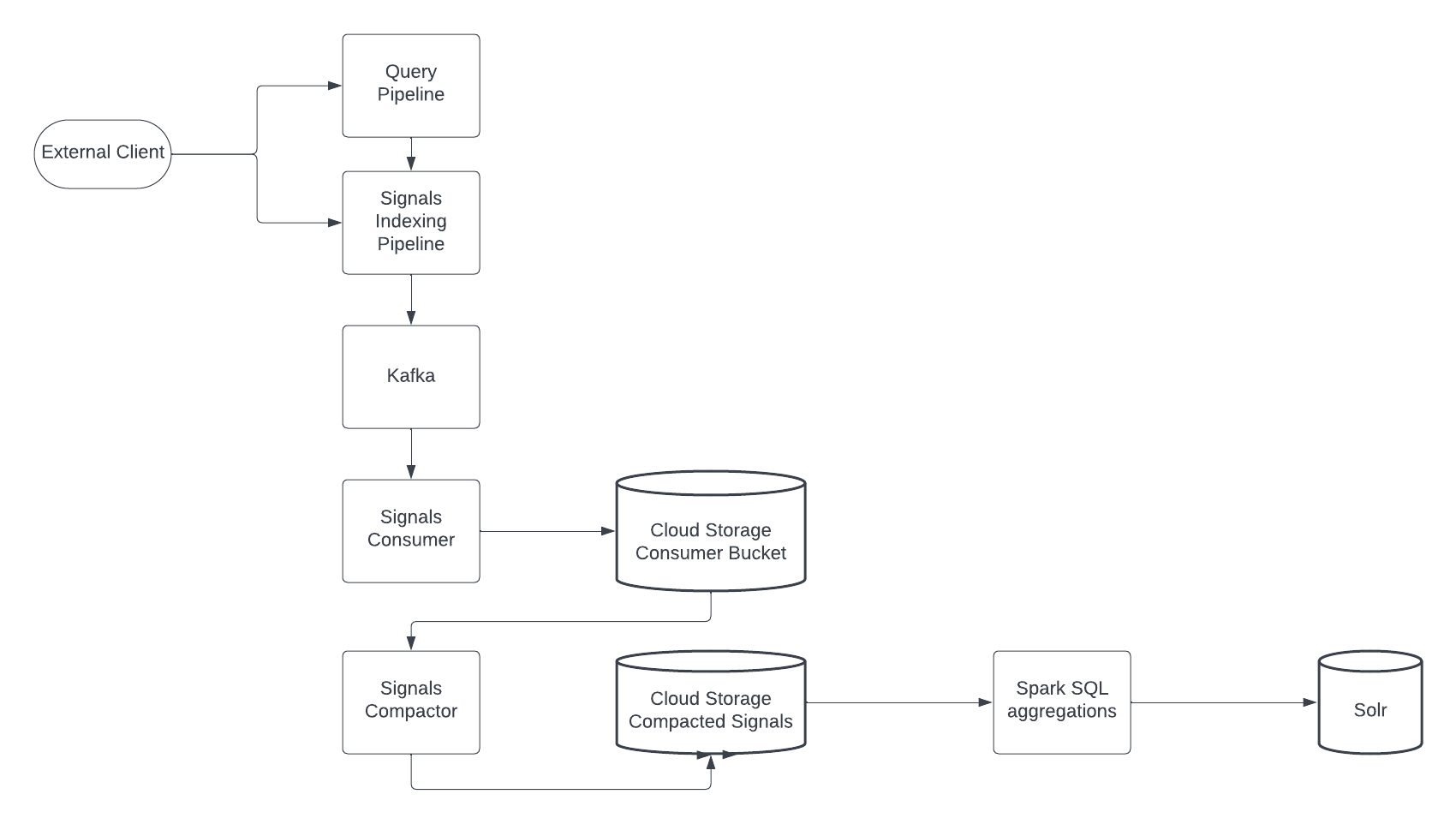
Both internally and externally originated signals flow through the signals indexing pipeline. In contrast to default signals storage, when cloud signal storage is enabled, signals are not sent to Solr. Instead, signals are sent to the fusion.system.cloud-signals Kafka topic, the message system used by Lucidworks Search clouds signals to buffer signals before they are written to cloud storage.
**Signals consumer**
A signals consumer, which runs within a Kubernetes pod, polls the Kafka topic frequently and writes signals data files in Parquet format to a stable, temporary cloud storage location. Due to the write frequency, this results in a large number of small files.
**Signals compactor**
A signals compactor, which also runs within a Kubernetes pod, periodically compacts the signals data files sent by the signals consumer and writes them to a smaller number of large files. In contrast to aggregation, compaction does not change the data itself.
The compacted signals data files are stored separately from the uncompacted signals data files. The compaction frequency is configurable, to meet the needs of your use case.
**Spark SQL aggregations**
Lucidworks Search Distributed Compute schedules and runs Spark jobs, which operate over the compacted Parquet partitions written by the signals compactor. The output is written to Solr for use at query time for boosting and recommendations.
## Cloud signal schema
Signals are stored in [Apache Parquet](https://parquet.apache.org/) file format, which is designed to handle flat, column-oriented data.
## Known issues
Some features in Lucidworks Search rely on signals data stored in Solr, not cloud signal storage. The following list contains features that are not supported:
* [Experiments analytics](/docs/lucidworks-search/06-metrics-and-analytics/experiments)
* [Predictive Merchandiser analytics](/docs/lucidworks-search/07-improve-your-queries/curate-search-experience/predictive-merchandiser/overview)
* [Login signals](/docs/lucidworks-search/07-improve-your-queries/signals/signal-types)
* [Query-to-Query Session Based Similarity](/docs/lucidworks-search/09-developer-documentation/config-specs/jobs/query-to-query-session-similarity)
* [Ground Truth](/docs/lucidworks-search/09-developer-documentation/config-specs/jobs/ground-truth)
* [Ranking Metrics](/docs/lucidworks-search/09-developer-documentation/config-specs/jobs/ranking-metrics)
Other features not listed here may be impacted.
 **Kafka**
Both internally and externally originated signals flow through the signals indexing pipeline. In contrast to default signals storage, when cloud signal storage is enabled, signals are not sent to Solr. Instead, signals are sent to the fusion.system.cloud-signals Kafka topic, the message system used by Lucidworks Search clouds signals to buffer signals before they are written to cloud storage.
**Signals consumer**
A signals consumer, which runs within a Kubernetes pod, polls the Kafka topic frequently and writes signals data files in Parquet format to a stable, temporary cloud storage location. Due to the write frequency, this results in a large number of small files.
**Signals compactor**
A signals compactor, which also runs within a Kubernetes pod, periodically compacts the signals data files sent by the signals consumer and writes them to a smaller number of large files. In contrast to aggregation, compaction does not change the data itself.
The compacted signals data files are stored separately from the uncompacted signals data files. The compaction frequency is configurable, to meet the needs of your use case.
**Spark SQL aggregations**
Lucidworks Search Distributed Compute schedules and runs Spark jobs, which operate over the compacted Parquet partitions written by the signals compactor. The output is written to Solr for use at query time for boosting and recommendations.
## Cloud signal schema
Signals are stored in [Apache Parquet](https://parquet.apache.org/) file format, which is designed to handle flat, column-oriented data.
## Known issues
Some features in Lucidworks Search rely on signals data stored in Solr, not cloud signal storage. The following list contains features that are not supported:
* [Experiments analytics](/docs/lucidworks-search/06-metrics-and-analytics/experiments)
* [Predictive Merchandiser analytics](/docs/lucidworks-search/07-improve-your-queries/curate-search-experience/predictive-merchandiser/overview)
* [Login signals](/docs/lucidworks-search/07-improve-your-queries/signals/signal-types)
* [Query-to-Query Session Based Similarity](/docs/lucidworks-search/09-developer-documentation/config-specs/jobs/query-to-query-session-similarity)
* [Ground Truth](/docs/lucidworks-search/09-developer-documentation/config-specs/jobs/ground-truth)
* [Ranking Metrics](/docs/lucidworks-search/09-developer-documentation/config-specs/jobs/ranking-metrics)
Other features not listed here may be impacted.
**Kafka**
Both internally and externally originated signals flow through the signals indexing pipeline. In contrast to default signals storage, when cloud signal storage is enabled, signals are not sent to Solr. Instead, signals are sent to the fusion.system.cloud-signals Kafka topic, the message system used by Lucidworks Search clouds signals to buffer signals before they are written to cloud storage.
**Signals consumer**
A signals consumer, which runs within a Kubernetes pod, polls the Kafka topic frequently and writes signals data files in Parquet format to a stable, temporary cloud storage location. Due to the write frequency, this results in a large number of small files.
**Signals compactor**
A signals compactor, which also runs within a Kubernetes pod, periodically compacts the signals data files sent by the signals consumer and writes them to a smaller number of large files. In contrast to aggregation, compaction does not change the data itself.
The compacted signals data files are stored separately from the uncompacted signals data files. The compaction frequency is configurable, to meet the needs of your use case.
**Spark SQL aggregations**
Lucidworks Search Distributed Compute schedules and runs Spark jobs, which operate over the compacted Parquet partitions written by the signals compactor. The output is written to Solr for use at query time for boosting and recommendations.
## Cloud signal schema
Signals are stored in [Apache Parquet](https://parquet.apache.org/) file format, which is designed to handle flat, column-oriented data.
## Known issues
Some features in Lucidworks Search rely on signals data stored in Solr, not cloud signal storage. The following list contains features that are not supported:
* [Experiments analytics](/docs/lucidworks-search/06-metrics-and-analytics/experiments)
* [Predictive Merchandiser analytics](/docs/lucidworks-search/07-improve-your-queries/curate-search-experience/predictive-merchandiser/overview)
* [Login signals](/docs/lucidworks-search/07-improve-your-queries/signals/signal-types)
* [Query-to-Query Session Based Similarity](/docs/lucidworks-search/09-developer-documentation/config-specs/jobs/query-to-query-session-similarity)
* [Ground Truth](/docs/lucidworks-search/09-developer-documentation/config-specs/jobs/ground-truth)
* [Ranking Metrics](/docs/lucidworks-search/09-developer-documentation/config-specs/jobs/ranking-metrics)
Other features not listed here may be impacted.