> ## Documentation Index
> Fetch the complete documentation index at: https://doc.lucidworks.com/llms.txt
> Use this file to discover all available pages before exploring further.
# Aggregations
export const LwTemplate = ({title = "Key questions to get you started", icon = "sparkles", cta = "Powered by Agent Studio", linkHref = "https://lucidworks.com/demo/?utm_source=docs&utm_medium=referral&utm_campaign=docs_cta_ai"}) => {
const [isLoaded, setIsLoaded] = useState(false);
useEffect(() => {
const timer = setTimeout(() => {
setIsLoaded(true);
}, 500);
return () => clearTimeout(timer);
}, []);
return
{isLoaded && `
}} />}
Powered by Lucidworks Agent Studio
;
};
[localhost link]: http://localhost:3000/docs/lucidworks-search/07-improve-your-queries/signals/aggregations
[mintlify link]: https://doc.lucidworks.com/docs/lucidworks-search/07-improve-your-queries/signals/aggregations
[old doc.lw link]: https://doc.lucidworks.com/managed-fusion/5.9/itm6oz
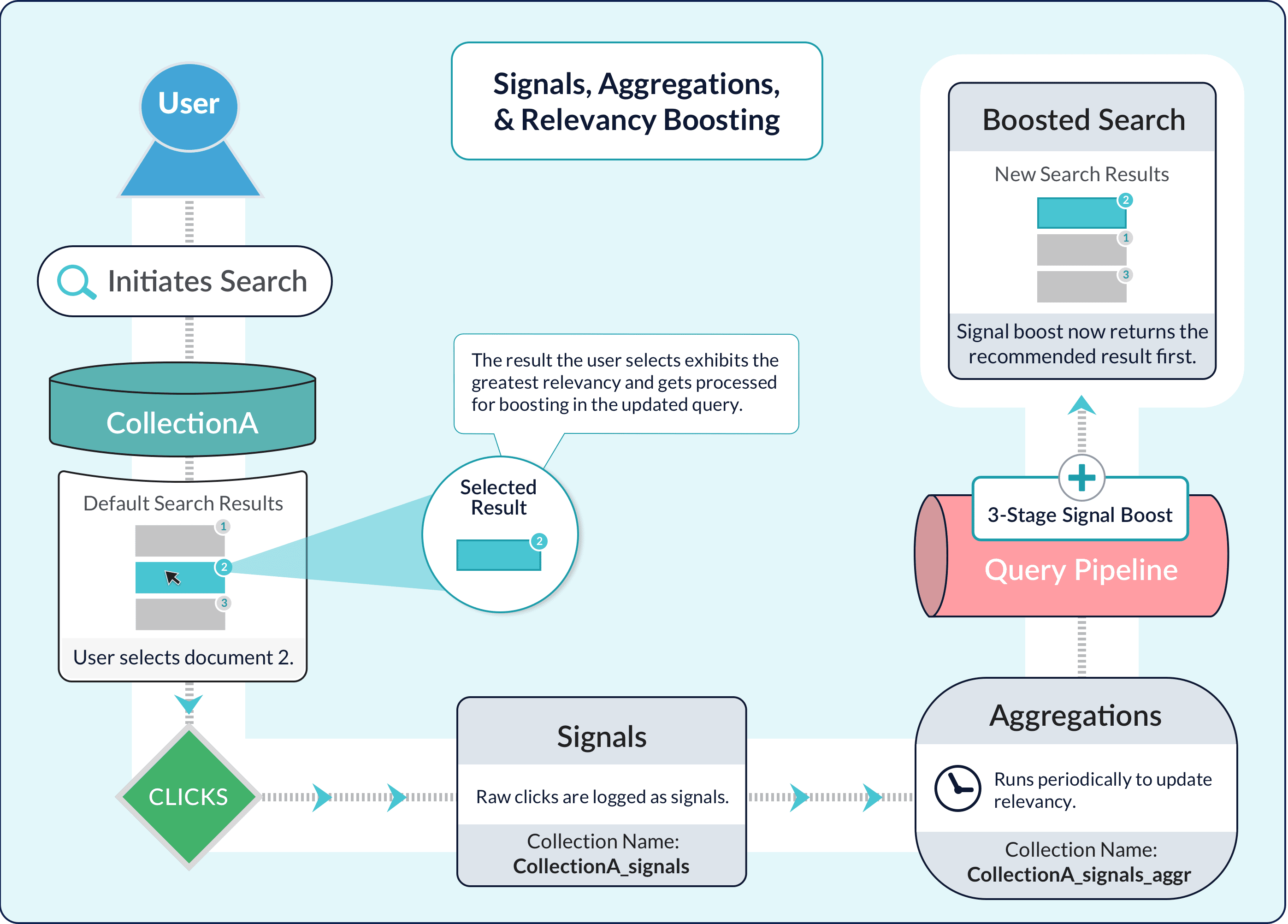
Aggregations compile [Signals](/docs/lucidworks-search/07-improve-your-queries/signals/overview) into a set of summaries that you can use to enrich the search experience through [recommendations and boosting](/docs/lucidworks-search/07-improve-your-queries/recommendations/methods-recs).
Lucidworks Search uses SQL to produce these signal summaries. SQL is a familiar query language that is well suited to data aggregation. Lucidworks Search’s SQL Aggregation Engine is powerful and flexible.
You can perform a SQL aggregation on a signals collection for a datasource (or on some other collection) through the Lucidworks Search UI or using a Lucidworks Search API. For more information, see **Create and Run a SQL Aggregation Job**.
You can perform a SQL aggregation on a signals collection for a datasource (or on some other collection), through the Lucidworks Search UI or using the Lucidworks Search API.
## Preliminaries
Before you can create and run a SQL aggregation job, you must create an app, create a collection (or use the default collection for the app), and add a datasource. Before you run a SQL aggregation job, you need signal data. Otherwise, there is nothing to aggregate.
## Use the Lucidworks Search UI
You can use the Lucidworks Search UI to perform a SQL aggregation.
1. In the Lucidworks Search application, navigate to **Collections > Jobs**.
2. Click **Add** and select **SQL Aggregation** from the dropdown list.
3. Specify an arbitrary **Spark Job ID**.
4. For the **Source Collection**, select the collection that contains the data to aggregate.
This is *not* the base collection. For example, to aggregate the signals in `experiment_signals`, you would select `experiment_signals`, not `experiment`.
5. Click the **SQL** field to enter aggregation statements. Click **Close** to close the dialog box.
Select the **Advanced** option in the top right corner to enter detailed parameters. See [SQL Aggregation Jobs](/docs/lucidworks-search/09-developer-documentation/config-specs/jobs/sql-aggregation/overview) for more information.
6. Enter applicable **Signal Types**.
7. Enter the **Data Format**.
8. Save the job.
**Run a SQL aggregation job**
1. With the app open, navigate to **Collections > Jobs**.
2. In the list of jobs, click the job you want to run, and then click **Run**.
If you do not want to run the job manually, you can also schedule a job.
## Use the Lucidworks Search API
You can use the Lucidworks Search API to perform a SQL aggregation. For example:
```json theme={"dark"}
curl ":API_PORT/api/spark/configurations/experiment_signals_aggregation"
{
"type" : "spark",
"id" : "experiment_click_signals_aggregation",
"definition" : {
"id" : "experiment_click_signals_aggregation",
"sql" : "SELECT SUM(count_i) AS aggr_count_i, query AS query_s, doc_id AS doc_id_s, time_decay(count_i, timestamp_tdt) AS weight_d FROM default_signals WHERE type_s='click' GROUP BY query, doc_id",
"selectQuery" : "*:*",
"outputPipeline" : "_system",
"rollupAggregator" : "SQL",
"sourceRemove" : false,
"sourceCatchup" : true,
"outputRollup" : true,
"parameters" : [ {
"key" : "optimizeOutput",
"value" : "4"
} ]
},
"inputCollection" : "experiment_click_signals",
"rows" : 10000
}
```
```json theme={"dark"}
curl -u USERNAME:PASSWORD -X POST -H "Content-Type: application/json" https://EXAMPLE_COMPANY.b.lucidworks.cloud:API_PORT/api/jobs/spark:experiment_click_signals_aggregation/actions -d '{"action": "start"}'
```
## Rollup SQL
Most aggregation jobs run with the catch-up flag set to `true`, which means that Lucidworks Search only computes aggregations for new signals that have arrived *since* the last time the job was run, and *up to and including* `ref_time`, which is usually the run time of the current job. Lucidworks Search must "roll up" the newly aggregated rows into any existing aggregated rows in the `COLLECTION_NAME_aggr` collection.
If you are using SQL to do aggregation but have not supplied a custom rollup SQL, Lucidworks Search generates a basic rollup SQL script automatically by consulting the schema of the aggregated documents. If your rollup logic is complex, you can provide a custom rollup SQL script.
Lucidworks Search’s basic rollup is a SUM of numeric types (long, integer, double, and float) and can support `time_decay` for the weight field. If you are not using `time_decay` in your weight calculations, then the weight is calculated using `weight_d`. If you do include `time_decay` with your weight calculations, then the weight is calculated as a combination of timestamp, `halfLife`, `ref_time`, and `weight_d`.
The basic rollup SQL can be grouped by `DOC_ID`, `QUERY`, `USER_ID`, and `FILTERS`. The last GROUP BY field in the main SQL is used so it will ultimately group any newly aggregated rows with existing rows.
This is an example of a rollup query:
```sql wrap theme={"dark"}
SELECT query_s, doc_id_s, time_decay(1, timestamp_tdt, "30 days", ref_time, weight_d)
AS weight_d , SUM(aggr_count_i) AS aggr_count_i
FROM `commerce_signals_aggr` GROUP BY query_s, doc_id_s
```
## Time-range filtering
When Lucidworks Search rolls up new data into an aggregation, time-range filtering lets you ensure that Lucidworks Search does not aggregate the same data over and over again.
Lucidworks Search applies a time-range filter when loading rows from Solr, before executing the aggregation SQL statement. In other words, the SQL executes over rows that are already filtered by the appropriate time range for the aggregation job.
Notice that the examples [Perform the Default SQL Aggregation](/docs/lucidworks-search/09-developer-documentation/config-specs/jobs/sql-aggregation/sql-aggregation-examples#perform-the-default-sql-aggregation) and [Use Different Weights Based on Signal Types](/docs/lucidworks-search/09-developer-documentation/config-specs/jobs/sql-aggregation/sql-aggregation-examples#use-different-weights-based-on-signal-types) do not include a time-range filter. Lucidworks Search computes the time-range filter automatically as follows:
* If the catch-up flag is set to `true`, Lucidworks Search uses the last time the job was run and `ref_time` (which you typically set to the current time). This is equivalent to the WHERE clause `WHERE time > last_run_time AND time <= ref_time`.
* If the catch-up flag is not set to `true`, Lucidworks Search uses a filter with `ref_time` (and no start time). This is equivalent to the WHERE clause `WHERE time <= ref_time`.
The built-in time logic should suffice for most use cases. You can set the time range filter to **TO** and specify a WHERE clause filter to achieve more complex time based filtering.
Time range in Lucidworks Search is equivalent to [date range in Solr](https://solr.apache.org/guide/working-with-dates.html).
**Example values for time range:**
* `[* TO NOW]` - all past events
* `[2000-11-01 TO 2020-12-01]` – specify by exact date
* `[* TO 2020-12-01]` – from the first data point to the end of the day specified
* `[2000 TO 2020]` - from the start of a year to the end of another year
## SQL functions
A Spark SQL aggregation query can use any of the functions provided by [Spark SQL](https://spark.apache.org/docs/latest/api/sql/index.html). Use these functions to perform complex aggregations or to enrich aggregation results.
## Weight aggregated values using a time-decay function
Lucidworks Search automatically uses a default `time_decay` function to compute and apply appropriate weights to aggregation groups during aggregation. Larger weights are assigned to more recent events. This reduces the impact of less-recent signals. Intuitively, older signals (and the user behavior they represent) should count less than newer signals.
If the default `time_decay` function does not meet your needs, you can modify it. The `time_decay` function is implemented as a [User Defined Aggregate Function](https://spark.apache.org/docs/latest/sql-ref-functions-udf-aggregate.html) (UDAF).
**Full function signature**
This is the UDAF signature of the default `time_decay` function:
```js wrap theme={"dark"}
time_decay(count: Long,
timestamp: Timestamp,
halfLife: String (calendar interval),
ref_time: Timestamp,
weight_d: Double)
```
**Abbreviated function signature and default values**
Your function call can also use this abbreviated UDAF signature, that omits `halfLife`, `ref_time`, and `weight_d`:
```js wrap theme={"dark"}
time_decay(count: Long,
timestamp: Timestamp)
```
In this case, Lucidworks Search fills in these values for the omitted parameters: `halfLife` = `30 days`, `ref_time` = `NOW`, and `weight_d` = `0.1`.
Users indexing custom signals with `weight_d` specified should ensure that the "default" value matches the `weight_d` parameter used by `time_decay`.
**Matching legacy aggregation**
To match the results of legacy aggregation, either use the abbreviated function signature or supply these values for the mentioned parameters: `halfLife` = `30 days`, `ref_time` = `NOW`, and `weight_d` = `0.1`.
**Parameters**
Parameters for `time_decay` are:
| Parameter | Description |
| ----------- | ----------------------------------------------------------------------------------------------------------------------------------------------------------------------------------------------------------------------------------------------------------------------------------------------------------------------------------------------------------------------------------------------------------------------------------------------------------------------------------------------------------------------------------------- |
| `count` | Number of occurrences of the event. Typically, the increment is 1, though there is no reason it could not be some other number. In most cases, you pass `count_i`, which is the event count field used by Lucidworks Search signals, as shown in the [SQL aggregation examples](/docs/lucidworks-search/09-developer-documentation/config-specs/jobs/sql-aggregation/sql-aggregation-examples). |
| `timestamp` | The date-and-time for the event. This time is the beginning of the interval used to calculate the time-based decay factor. |
| `halfLife` | Half life for the exponential decay that Lucidworks Search calculates. It is some interval of time, for example, `30 days` or `10 minutes`. The `interval` prefix is optional. Lucidworks Search treats `30 days` as equivalent to `interval 30 days`. |
| `ref_time` | Reference time used to compute the age of an event for the time-decay computation. It is usually the time when the aggregation job runs (`NOW`). The reference time is not present in the data; Lucidworks Search determines the reference time at runtime. Lucidworks Search automatically attaches a `ref_time` column to every row before executing the SQL. |
| `weight_d` | Initial weight for an event if not specified in the signal, prior to the decay calculation. This value is typically not present in the signal data. If some signals *do* contain `weight_d` values, this parameter should be set to match the "neutral" value there. You can use SQL to compute `weight_d`; see [Use Different Weights Based on Signal Types](/docs/lucidworks-search/09-developer-documentation/config-specs/jobs/sql-aggregation/sql-aggregation-examples#use-different-weights-based-on-signal-types) for an example. |
**Sample calculation of the age of a signal**
This is an example of how Lucidworks Search calculates the age of a signal:
Imagine a SQL aggregation job that runs at `Tuesday, July 11, 2017 1:00:00 AM (1499734800)`.
For a signal with the timestamp `Tuesday, July 11, 2017 12:00:00 AM (1499731200)`, the age of the signal in relation to the reference time is 1 hour.
## Learn more
Lucidworks Search’s basic aggregation jobs aggregate using the document ID. You can also aggregate at a more coarse-grained level using other fields available for documents (item metadata), such as manufacturer or brand for products. Aggregating with item metadata is useful for building personalization boosts into your search application.
The following PUT request creates additional aggregation jobs that join signals with the primary `products` collection to compute an aggregated weight for a `manufacturer` field:
```json wrap theme={"dark"}
curl -X PUT -H "Content-type:application/json" -d '{"enabled":true, "metadata_column":"manufacturer"}' "https://EXAMPLE_COMPANY.b.lucidworks.cloud/api/collections/products/features/signals"
```
After performing the PUT request shown above, you will have two additional aggregation jobs in Lucidworks Search.
### COLLECTION\_NAME\_user\_METADATA\_preferences\_aggregation
This job computes an aggregated weight for each user/item metadata combination, for example, user/manufacturer, found in the signals collection. Lucidworks Search computes the weight for each group using an exponential time-decay on signal count (30 day half-life) and a weighted sum based on the signal type. Use the `signalTypeWeights` parameter to set the correct signal types and weights for your dataset. Use the `primaryCollectionMetadataField` parameter to set the name of a field from the primary collection to join into the results, for example, `manufacturer`. You can use the results of this job to boost queries based on user preferences regarding item-specific metadata such as manufacturer (for example, Ford vs. BMW) or brand (for example, Ralph Lauren vs. Abercrombie & Fitch).
### COLLECTION\_NAME\_query\_METADATA\_preferences\_aggregation
This job computes an aggregated weight for each query/item metadata combination, for example, query/manufacturer, found in the signals collection. Lucidworks Search computes the weight for each group using an exponential time-decay on signal count (30 day half-life) and a weighted sum based on the signal type. Use the `signalTypeWeights` parameter to set the correct signal types and weights for your dataset. Use the `primaryCollectionMetadataField` parameter to set the name of a field from the primary collection to join into the results.
These additional item/metadata aggregation jobs also serve as examples of how to join between the signals and primary collections to perform aggregations on fields other than the document ID. You can re-execute the same PUT request shown above using a different metadata field name in the `metadata_column` parameter.
 ## Rollup SQL
Most aggregation jobs run with the catch-up flag set to `true`, which means that Lucidworks Search only computes aggregations for new signals that have arrived *since* the last time the job was run, and *up to and including* `ref_time`, which is usually the run time of the current job. Lucidworks Search must "roll up" the newly aggregated rows into any existing aggregated rows in the `COLLECTION_NAME_aggr` collection.
If you are using SQL to do aggregation but have not supplied a custom rollup SQL, Lucidworks Search generates a basic rollup SQL script automatically by consulting the schema of the aggregated documents. If your rollup logic is complex, you can provide a custom rollup SQL script.
Lucidworks Search’s basic rollup is a SUM of numeric types (long, integer, double, and float) and can support `time_decay` for the weight field. If you are not using `time_decay` in your weight calculations, then the weight is calculated using `weight_d`. If you do include `time_decay` with your weight calculations, then the weight is calculated as a combination of timestamp, `halfLife`, `ref_time`, and `weight_d`.
The basic rollup SQL can be grouped by `DOC_ID`, `QUERY`, `USER_ID`, and `FILTERS`. The last GROUP BY field in the main SQL is used so it will ultimately group any newly aggregated rows with existing rows.
This is an example of a rollup query:
```sql wrap theme={"dark"}
SELECT query_s, doc_id_s, time_decay(1, timestamp_tdt, "30 days", ref_time, weight_d)
AS weight_d , SUM(aggr_count_i) AS aggr_count_i
FROM `commerce_signals_aggr` GROUP BY query_s, doc_id_s
```
## Time-range filtering
When Lucidworks Search rolls up new data into an aggregation, time-range filtering lets you ensure that Lucidworks Search does not aggregate the same data over and over again.
Lucidworks Search applies a time-range filter when loading rows from Solr, before executing the aggregation SQL statement. In other words, the SQL executes over rows that are already filtered by the appropriate time range for the aggregation job.
Notice that the examples [Perform the Default SQL Aggregation](/docs/lucidworks-search/09-developer-documentation/config-specs/jobs/sql-aggregation/sql-aggregation-examples#perform-the-default-sql-aggregation) and [Use Different Weights Based on Signal Types](/docs/lucidworks-search/09-developer-documentation/config-specs/jobs/sql-aggregation/sql-aggregation-examples#use-different-weights-based-on-signal-types) do not include a time-range filter. Lucidworks Search computes the time-range filter automatically as follows:
* If the catch-up flag is set to `true`, Lucidworks Search uses the last time the job was run and `ref_time` (which you typically set to the current time). This is equivalent to the WHERE clause `WHERE time > last_run_time AND time <= ref_time`.
* If the catch-up flag is not set to `true`, Lucidworks Search uses a filter with `ref_time` (and no start time). This is equivalent to the WHERE clause `WHERE time <= ref_time`.
The built-in time logic should suffice for most use cases. You can set the time range filter to **TO** and specify a WHERE clause filter to achieve more complex time based filtering.
Time range in Lucidworks Search is equivalent to [date range in Solr](https://solr.apache.org/guide/working-with-dates.html).
**Example values for time range:**
* `[* TO NOW]` - all past events
* `[2000-11-01 TO 2020-12-01]` – specify by exact date
* `[* TO 2020-12-01]` – from the first data point to the end of the day specified
* `[2000 TO 2020]` - from the start of a year to the end of another year
## SQL functions
A Spark SQL aggregation query can use any of the functions provided by [Spark SQL](https://spark.apache.org/docs/latest/api/sql/index.html). Use these functions to perform complex aggregations or to enrich aggregation results.
## Weight aggregated values using a time-decay function
Lucidworks Search automatically uses a default `time_decay` function to compute and apply appropriate weights to aggregation groups during aggregation. Larger weights are assigned to more recent events. This reduces the impact of less-recent signals. Intuitively, older signals (and the user behavior they represent) should count less than newer signals.
If the default `time_decay` function does not meet your needs, you can modify it. The `time_decay` function is implemented as a [User Defined Aggregate Function](https://spark.apache.org/docs/latest/sql-ref-functions-udf-aggregate.html) (UDAF).
**Full function signature**
This is the UDAF signature of the default `time_decay` function:
```js wrap theme={"dark"}
time_decay(count: Long,
timestamp: Timestamp,
halfLife: String (calendar interval),
ref_time: Timestamp,
weight_d: Double)
```
**Abbreviated function signature and default values**
Your function call can also use this abbreviated UDAF signature, that omits `halfLife`, `ref_time`, and `weight_d`:
```js wrap theme={"dark"}
time_decay(count: Long,
timestamp: Timestamp)
```
In this case, Lucidworks Search fills in these values for the omitted parameters: `halfLife` = `30 days`, `ref_time` = `NOW`, and `weight_d` = `0.1`.
## Rollup SQL
Most aggregation jobs run with the catch-up flag set to `true`, which means that Lucidworks Search only computes aggregations for new signals that have arrived *since* the last time the job was run, and *up to and including* `ref_time`, which is usually the run time of the current job. Lucidworks Search must "roll up" the newly aggregated rows into any existing aggregated rows in the `COLLECTION_NAME_aggr` collection.
If you are using SQL to do aggregation but have not supplied a custom rollup SQL, Lucidworks Search generates a basic rollup SQL script automatically by consulting the schema of the aggregated documents. If your rollup logic is complex, you can provide a custom rollup SQL script.
Lucidworks Search’s basic rollup is a SUM of numeric types (long, integer, double, and float) and can support `time_decay` for the weight field. If you are not using `time_decay` in your weight calculations, then the weight is calculated using `weight_d`. If you do include `time_decay` with your weight calculations, then the weight is calculated as a combination of timestamp, `halfLife`, `ref_time`, and `weight_d`.
The basic rollup SQL can be grouped by `DOC_ID`, `QUERY`, `USER_ID`, and `FILTERS`. The last GROUP BY field in the main SQL is used so it will ultimately group any newly aggregated rows with existing rows.
This is an example of a rollup query:
```sql wrap theme={"dark"}
SELECT query_s, doc_id_s, time_decay(1, timestamp_tdt, "30 days", ref_time, weight_d)
AS weight_d , SUM(aggr_count_i) AS aggr_count_i
FROM `commerce_signals_aggr` GROUP BY query_s, doc_id_s
```
## Time-range filtering
When Lucidworks Search rolls up new data into an aggregation, time-range filtering lets you ensure that Lucidworks Search does not aggregate the same data over and over again.
Lucidworks Search applies a time-range filter when loading rows from Solr, before executing the aggregation SQL statement. In other words, the SQL executes over rows that are already filtered by the appropriate time range for the aggregation job.
Notice that the examples [Perform the Default SQL Aggregation](/docs/lucidworks-search/09-developer-documentation/config-specs/jobs/sql-aggregation/sql-aggregation-examples#perform-the-default-sql-aggregation) and [Use Different Weights Based on Signal Types](/docs/lucidworks-search/09-developer-documentation/config-specs/jobs/sql-aggregation/sql-aggregation-examples#use-different-weights-based-on-signal-types) do not include a time-range filter. Lucidworks Search computes the time-range filter automatically as follows:
* If the catch-up flag is set to `true`, Lucidworks Search uses the last time the job was run and `ref_time` (which you typically set to the current time). This is equivalent to the WHERE clause `WHERE time > last_run_time AND time <= ref_time`.
* If the catch-up flag is not set to `true`, Lucidworks Search uses a filter with `ref_time` (and no start time). This is equivalent to the WHERE clause `WHERE time <= ref_time`.
The built-in time logic should suffice for most use cases. You can set the time range filter to **TO** and specify a WHERE clause filter to achieve more complex time based filtering.
Time range in Lucidworks Search is equivalent to [date range in Solr](https://solr.apache.org/guide/working-with-dates.html).
**Example values for time range:**
* `[* TO NOW]` - all past events
* `[2000-11-01 TO 2020-12-01]` – specify by exact date
* `[* TO 2020-12-01]` – from the first data point to the end of the day specified
* `[2000 TO 2020]` - from the start of a year to the end of another year
## SQL functions
A Spark SQL aggregation query can use any of the functions provided by [Spark SQL](https://spark.apache.org/docs/latest/api/sql/index.html). Use these functions to perform complex aggregations or to enrich aggregation results.
## Weight aggregated values using a time-decay function
Lucidworks Search automatically uses a default `time_decay` function to compute and apply appropriate weights to aggregation groups during aggregation. Larger weights are assigned to more recent events. This reduces the impact of less-recent signals. Intuitively, older signals (and the user behavior they represent) should count less than newer signals.
If the default `time_decay` function does not meet your needs, you can modify it. The `time_decay` function is implemented as a [User Defined Aggregate Function](https://spark.apache.org/docs/latest/sql-ref-functions-udf-aggregate.html) (UDAF).
**Full function signature**
This is the UDAF signature of the default `time_decay` function:
```js wrap theme={"dark"}
time_decay(count: Long,
timestamp: Timestamp,
halfLife: String (calendar interval),
ref_time: Timestamp,
weight_d: Double)
```
**Abbreviated function signature and default values**
Your function call can also use this abbreviated UDAF signature, that omits `halfLife`, `ref_time`, and `weight_d`:
```js wrap theme={"dark"}
time_decay(count: Long,
timestamp: Timestamp)
```
In this case, Lucidworks Search fills in these values for the omitted parameters: `halfLife` = `30 days`, `ref_time` = `NOW`, and `weight_d` = `0.1`.