> ## Documentation Index
> Fetch the complete documentation index at: https://doc.lucidworks.com/llms.txt
> Use this file to discover all available pages before exploring further.
# Query data
export const LwTemplate = ({title = "Key questions to get you started", icon = "sparkles", cta = "Powered by Agent Studio", linkHref = "https://lucidworks.com/demo/?utm_source=docs&utm_medium=referral&utm_campaign=docs_cta_ai"}) => {
const [isLoaded, setIsLoaded] = useState(false);
useEffect(() => {
const timer = setTimeout(() => {
setIsLoaded(true);
}, 500);
return () => clearTimeout(timer);
}, []);
return
{isLoaded && `
}} />}
Powered by Lucidworks Agent Studio
;
};
[localhost link]: http://localhost:3000/docs/lucidworks-search/05-move-data-out/overview
[mintlify link]: https://doc.lucidworks.com/docs/lucidworks-search/05-move-data-out/overview
[old doc.lw link]: https://doc.lucidworks.com/managed-fusion/5.9/s3j1mi
[Indexing Data Flow](/docs/lucidworks-search/04-move-data-in/overview) shows you how your content, signals, and recommendations are indexed in Lucidworks Search. Getting data out of Lucidworks Search can mean querying your content or your signals, or accessing other data for analytics.
Querying Lucidworks Search means sending a request to Lucidworks Search’s [Query API endpoints](/api-reference/query-profiles-api/get-the-service-status), specifying the query profile and any Solr query parameters. The request is processed by the query pipeline associated with the specified profile, and the response includes any enhancements configured in the query pipeline. You can also enter queries in the [Query Workbench](/docs/lucidworks-search/03-ui-tour/query-workbench) to test your query pipeline.
The quick learning for **Anatomy of Querying** focuses on the basics of query related objects and workflows in Fusion.
## Query your content
When you query your content using the default query pipeline *and* you have [signals enabled](/docs/lucidworks-search/04-move-data-in/overview), you also get [query rewrites](/docs/lucidworks-search/07-improve-your-queries/query-rewriting/overview) and [automatic boosting](/docs/lucidworks-search/07-improve-your-queries/boosting/boost-with-signals) to enhance the relevancy of your search results. In addition to matches from your primary collection, you’ll get results produced by Lucidworks Search’s machine learning jobs, based on [signals](/docs/lucidworks-search/07-improve-your-queries/signals/overview) from your users.
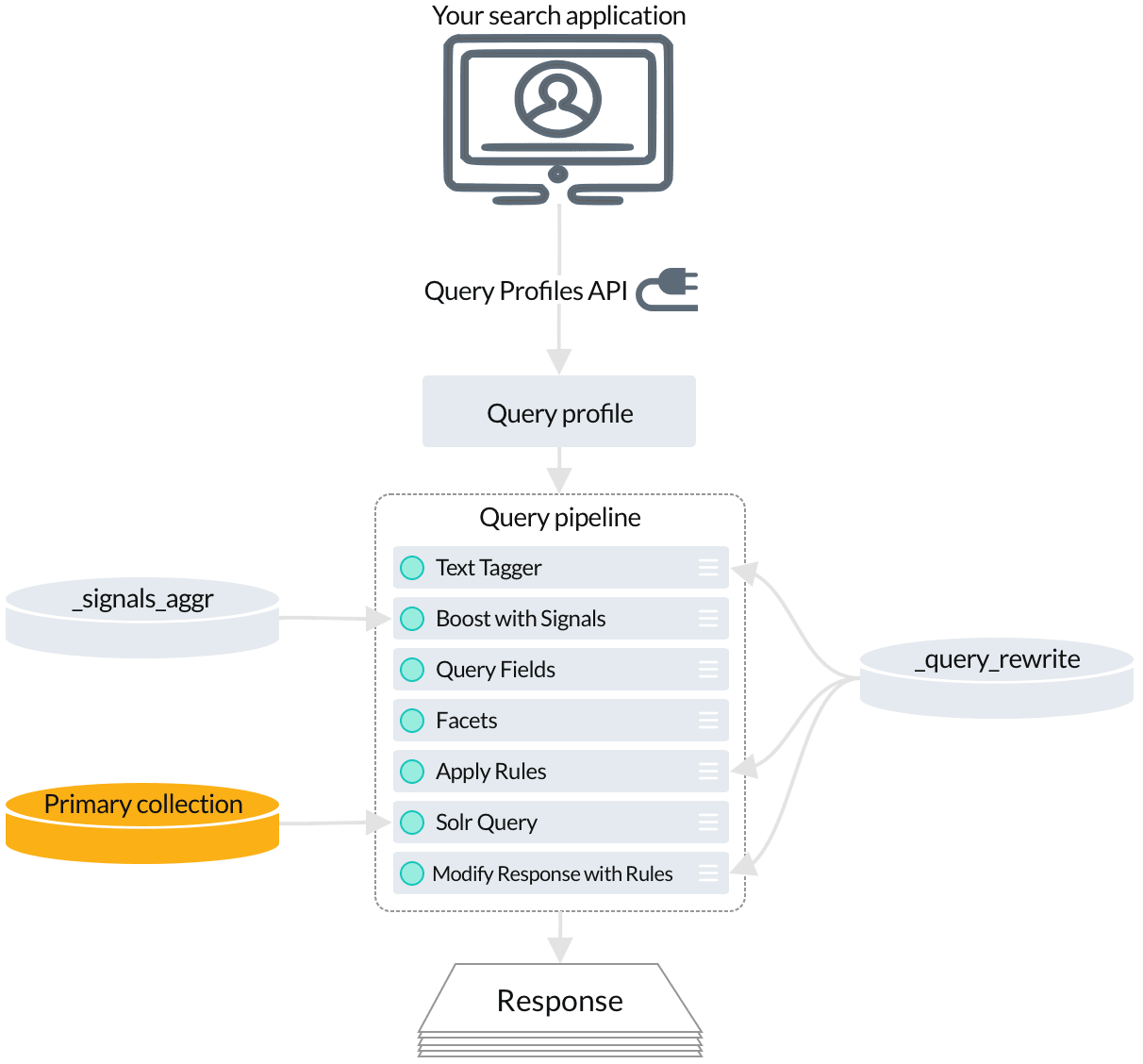
[Query profiles](/docs/lucidworks-search/05-move-data-out/query-profile/overview) give you a stable endpoint that can be associated with any [query pipeline](/docs/lucidworks-search/05-move-data-out/query-pipeline/overview). Just specify the query profile when sending queries to the [Query API](/api-reference/query-profiles-api/get-the-service-status) endpoint. You can always reconfigure the query profile to point to a different pipeline, or to an [experiment](/docs/lucidworks-search/06-metrics-and-analytics/experiments).
* Several stages perform [query rewriting](/docs/lucidworks-search/07-improve-your-queries/query-rewriting/overview) and [response rewriting](/docs/lucidworks-search/07-improve-your-queries/response-rewriting/overview) by reading from the `_query_rewrite` collection:
* The [Text Tagger stage](/docs/lucidworks-search/09-developer-documentation/config-specs/query-pipeline-stages/text-tagger) finds [misspellings](/docs/lucidworks-search/07-improve-your-queries/misspelling-detection/overview), [phrases](/docs/lucidworks-search/07-improve-your-queries/phrase-detection/overview), [underperforming query strings](/docs/lucidworks-search/07-improve-your-queries/head-tail-analysis/overview), and [synonyms](/docs/lucidworks-search/09-developer-documentation/config-specs/jobs/synonym-detection) in the incoming query.
* The [Apply Rules stage](/docs/lucidworks-search/09-developer-documentation/config-specs/query-pipeline-stages/apply-rules) applies your [business rules](/docs/lucidworks-search/07-improve-your-queries/business-rules/overview) to the incoming query.
* The [Modify Response with Rules stage](/docs/lucidworks-search/09-developer-documentation/config-specs/query-pipeline-stages/modify-response-rules)
* The [Boost with Signals stage](/docs/lucidworks-search/09-developer-documentation/config-specs/query-pipeline-stages/boost-with-signals) reads aggregated signals to boost search results that have been popular with users.
* The [Solr Query stage](/docs/lucidworks-search/09-developer-documentation/config-specs/query-pipeline-stages/solr-query) fetches the final set of relevant search results from the primary collection.
## Query for recommendations
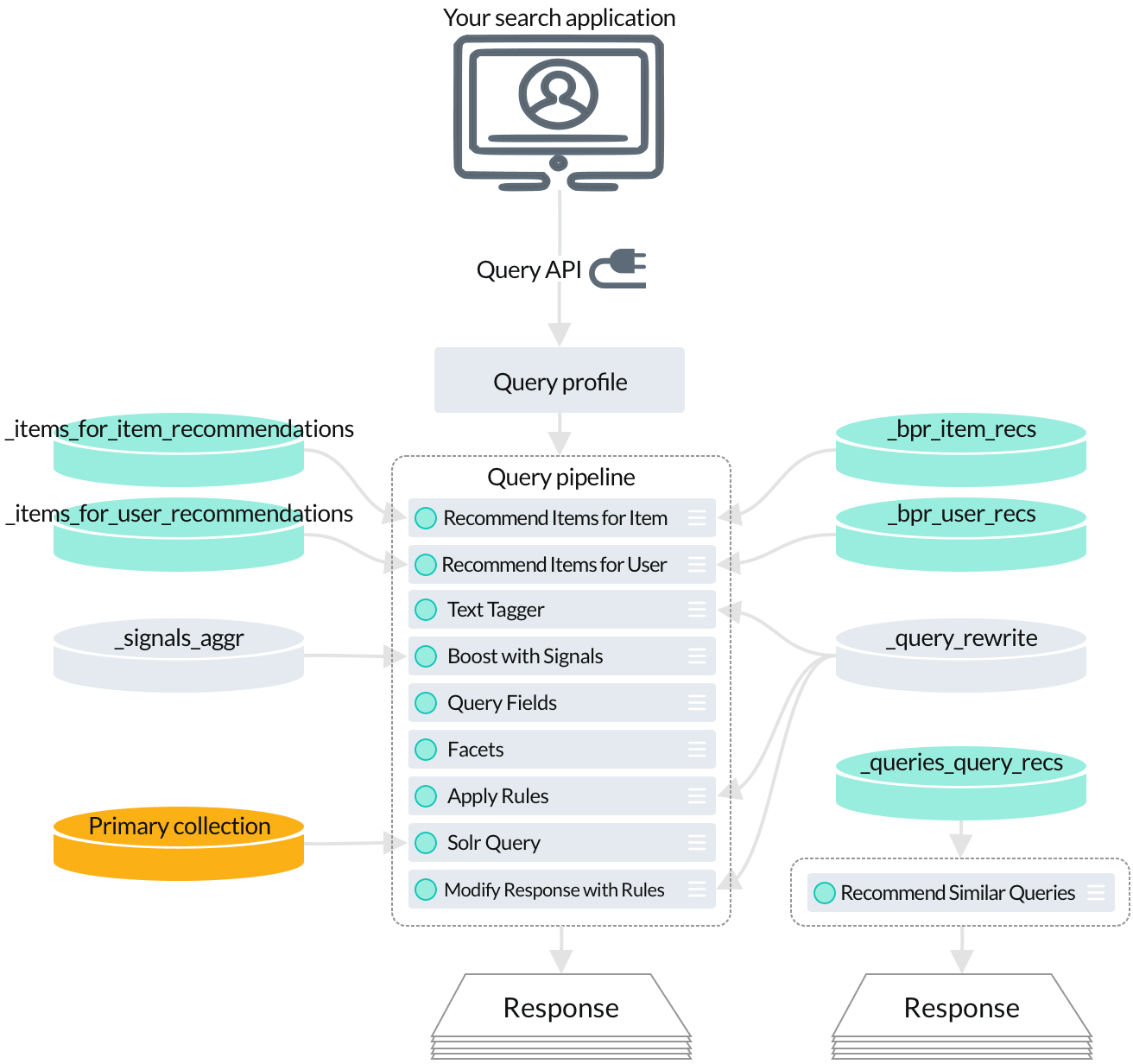
To get even more relevant results based on AI-powered analysis of your signals data, your query pipeline can perform any number of secondary queries to the collections where the output from machine learning jobs is indexed. Your secondary queries can provide additional search results based on Lucidworks Search’s analysis of your signals.
* Use the [Recommend Items for Item stage](/docs/lucidworks-search/09-developer-documentation/config-specs/query-pipeline-stages/recommend-items-for-item) to query for [collaborative items-for-item recommendations](/docs/lucidworks-search/07-improve-your-queries/recommendations/items-for-item#collaborative-items-for-item-recommendations).
* The [Recommend Items for User stage](/docs/lucidworks-search/09-developer-documentation/config-specs/query-pipeline-stages/recommend-items-for-user) queries for [items-for-user recommendations](/docs/lucidworks-search/07-improve-your-queries/recommendations/items-for-user).
* The [Recommend Similar Queries stage](/docs/lucidworks-search/09-developer-documentation/config-specs/query-pipeline-stages/recommend-similar-queries) provides [queries-for-query recommendations](/docs/lucidworks-search/07-improve-your-queries/recommendations/queries-for-query).
## Search applications
Search applications are the front-end interfaces that you build on top of Lucidworks Search. Your application makes calls to Lucidworks Search’s REST API in order to retrieve search results or perform other actions. Certain features, like autocomplete and synonyms, require some configuration on the Lucidworks Search back end. See [Application Development](/docs/lucidworks-search/09-developer-documentation/frontend-development/overview).
## Query language
Whenever you are getting data out of Lucidworks Search, you may find it handy to consult the [Query language cheat sheet](/docs/lucidworks-search/05-move-data-out/solr-query-language).
If you are using Lucidworks Search, you can generate and retrieve additional data for analysis or to enhance the end-user experience. For example, Lucidworks Search can produce sophisticated recommendations to guide end users to the best available results, including results that do not exactly match the original user-submitted query.
It can also perform machine learning functions that automatically improve search results based on the past activities of users. For more information, see [Machine learning](/docs/lucidworks-search/10-machine-learning/overview).
 * Several stages perform [query rewriting](/docs/lucidworks-search/07-improve-your-queries/query-rewriting/overview) and [response rewriting](/docs/lucidworks-search/07-improve-your-queries/response-rewriting/overview) by reading from the `_query_rewrite` collection:
* The [Text Tagger stage](/docs/lucidworks-search/09-developer-documentation/config-specs/query-pipeline-stages/text-tagger) finds [misspellings](/docs/lucidworks-search/07-improve-your-queries/misspelling-detection/overview), [phrases](/docs/lucidworks-search/07-improve-your-queries/phrase-detection/overview), [underperforming query strings](/docs/lucidworks-search/07-improve-your-queries/head-tail-analysis/overview), and [synonyms](/docs/lucidworks-search/09-developer-documentation/config-specs/jobs/synonym-detection) in the incoming query.
* The [Apply Rules stage](/docs/lucidworks-search/09-developer-documentation/config-specs/query-pipeline-stages/apply-rules) applies your [business rules](/docs/lucidworks-search/07-improve-your-queries/business-rules/overview) to the incoming query.
* The [Modify Response with Rules stage](/docs/lucidworks-search/09-developer-documentation/config-specs/query-pipeline-stages/modify-response-rules)
* The [Boost with Signals stage](/docs/lucidworks-search/09-developer-documentation/config-specs/query-pipeline-stages/boost-with-signals) reads aggregated signals to boost search results that have been popular with users.
* The [Solr Query stage](/docs/lucidworks-search/09-developer-documentation/config-specs/query-pipeline-stages/solr-query) fetches the final set of relevant search results from the primary collection.
## Query for recommendations
To get even more relevant results based on AI-powered analysis of your signals data, your query pipeline can perform any number of secondary queries to the collections where the output from machine learning jobs is indexed. Your secondary queries can provide additional search results based on Lucidworks Search’s analysis of your signals.
* Several stages perform [query rewriting](/docs/lucidworks-search/07-improve-your-queries/query-rewriting/overview) and [response rewriting](/docs/lucidworks-search/07-improve-your-queries/response-rewriting/overview) by reading from the `_query_rewrite` collection:
* The [Text Tagger stage](/docs/lucidworks-search/09-developer-documentation/config-specs/query-pipeline-stages/text-tagger) finds [misspellings](/docs/lucidworks-search/07-improve-your-queries/misspelling-detection/overview), [phrases](/docs/lucidworks-search/07-improve-your-queries/phrase-detection/overview), [underperforming query strings](/docs/lucidworks-search/07-improve-your-queries/head-tail-analysis/overview), and [synonyms](/docs/lucidworks-search/09-developer-documentation/config-specs/jobs/synonym-detection) in the incoming query.
* The [Apply Rules stage](/docs/lucidworks-search/09-developer-documentation/config-specs/query-pipeline-stages/apply-rules) applies your [business rules](/docs/lucidworks-search/07-improve-your-queries/business-rules/overview) to the incoming query.
* The [Modify Response with Rules stage](/docs/lucidworks-search/09-developer-documentation/config-specs/query-pipeline-stages/modify-response-rules)
* The [Boost with Signals stage](/docs/lucidworks-search/09-developer-documentation/config-specs/query-pipeline-stages/boost-with-signals) reads aggregated signals to boost search results that have been popular with users.
* The [Solr Query stage](/docs/lucidworks-search/09-developer-documentation/config-specs/query-pipeline-stages/solr-query) fetches the final set of relevant search results from the primary collection.
## Query for recommendations
To get even more relevant results based on AI-powered analysis of your signals data, your query pipeline can perform any number of secondary queries to the collections where the output from machine learning jobs is indexed. Your secondary queries can provide additional search results based on Lucidworks Search’s analysis of your signals.
 * Use the [Recommend Items for Item stage](/docs/lucidworks-search/09-developer-documentation/config-specs/query-pipeline-stages/recommend-items-for-item) to query for [collaborative items-for-item recommendations](/docs/lucidworks-search/07-improve-your-queries/recommendations/items-for-item#collaborative-items-for-item-recommendations).
* The [Recommend Items for User stage](/docs/lucidworks-search/09-developer-documentation/config-specs/query-pipeline-stages/recommend-items-for-user) queries for [items-for-user recommendations](/docs/lucidworks-search/07-improve-your-queries/recommendations/items-for-user).
* The [Recommend Similar Queries stage](/docs/lucidworks-search/09-developer-documentation/config-specs/query-pipeline-stages/recommend-similar-queries) provides [queries-for-query recommendations](/docs/lucidworks-search/07-improve-your-queries/recommendations/queries-for-query).
## Search applications
Search applications are the front-end interfaces that you build on top of Lucidworks Search. Your application makes calls to Lucidworks Search’s REST API in order to retrieve search results or perform other actions. Certain features, like autocomplete and synonyms, require some configuration on the Lucidworks Search back end. See [Application Development](/docs/lucidworks-search/09-developer-documentation/frontend-development/overview).
## Query language
Whenever you are getting data out of Lucidworks Search, you may find it handy to consult the [Query language cheat sheet](/docs/lucidworks-search/05-move-data-out/solr-query-language).
If you are using Lucidworks Search, you can generate and retrieve additional data for analysis or to enhance the end-user experience. For example, Lucidworks Search can produce sophisticated recommendations to guide end users to the best available results, including results that do not exactly match the original user-submitted query.
It can also perform machine learning functions that automatically improve search results based on the past activities of users. For more information, see [Machine learning](/docs/lucidworks-search/10-machine-learning/overview).
* Use the [Recommend Items for Item stage](/docs/lucidworks-search/09-developer-documentation/config-specs/query-pipeline-stages/recommend-items-for-item) to query for [collaborative items-for-item recommendations](/docs/lucidworks-search/07-improve-your-queries/recommendations/items-for-item#collaborative-items-for-item-recommendations).
* The [Recommend Items for User stage](/docs/lucidworks-search/09-developer-documentation/config-specs/query-pipeline-stages/recommend-items-for-user) queries for [items-for-user recommendations](/docs/lucidworks-search/07-improve-your-queries/recommendations/items-for-user).
* The [Recommend Similar Queries stage](/docs/lucidworks-search/09-developer-documentation/config-specs/query-pipeline-stages/recommend-similar-queries) provides [queries-for-query recommendations](/docs/lucidworks-search/07-improve-your-queries/recommendations/queries-for-query).
## Search applications
Search applications are the front-end interfaces that you build on top of Lucidworks Search. Your application makes calls to Lucidworks Search’s REST API in order to retrieve search results or perform other actions. Certain features, like autocomplete and synonyms, require some configuration on the Lucidworks Search back end. See [Application Development](/docs/lucidworks-search/09-developer-documentation/frontend-development/overview).
## Query language
Whenever you are getting data out of Lucidworks Search, you may find it handy to consult the [Query language cheat sheet](/docs/lucidworks-search/05-move-data-out/solr-query-language).
If you are using Lucidworks Search, you can generate and retrieve additional data for analysis or to enhance the end-user experience. For example, Lucidworks Search can produce sophisticated recommendations to guide end users to the best available results, including results that do not exactly match the original user-submitted query.
It can also perform machine learning functions that automatically improve search results based on the past activities of users. For more information, see [Machine learning](/docs/lucidworks-search/10-machine-learning/overview).