> ## Documentation Index
> Fetch the complete documentation index at: https://doc.lucidworks.com/llms.txt
> Use this file to discover all available pages before exploring further.
# Asynchronous Tika Parsing
export const LwTemplate = ({title = "Key questions to get you started", icon = "sparkles", cta = "Powered by Agent Studio", linkHref = "https://lucidworks.com/demo/?utm_source=docs&utm_medium=referral&utm_campaign=docs_cta_ai"}) => {
const [isLoaded, setIsLoaded] = useState(false);
useEffect(() => {
const timer = setTimeout(() => {
setIsLoaded(true);
}, 500);
return () => clearTimeout(timer);
}, []);
return
{isLoaded && `
}} />}
Powered by Lucidworks Agent Studio
;
};
[localhost link]: http://localhost:3000/docs/lucidworks-search/04-move-data-in/parsers/asynchronous-tika-parsing
[mintlify link]: https://doc.lucidworks.com/docs/lucidworks-search/04-move-data-in/parsers/asynchronous-tika-parsing
[old doc.lw link]: https://doc.lucidworks.com/managed-fusion/5.9/ve1qvp
In synchronous Tika parsing, parsing and indexing are performed concurrently. This can result in slow indexing for a large number of documents, as the parser and indexer must share resources.
Asynchronous Tika parsing, on the other hand, performs parsing in the background. This allows Lucidworks Search to continue indexing documents while the parser is processing others, resulting in improved indexing performance for large numbers of documents.
**FAQ**
How does the configuration differ from synchronous Tika parsing?
* In Fusion 5.9.10 and earlier, asynchronous parsing does not use a Fusion parser stage. Instead, the configuration is made in the datasource and index pipeline.
* In Fusion 5.9.11 and later, asynchronous parsing uses the [Apache Tika Container parser stage](/docs/lucidworks-search/09-developer-documentation/config-specs/parsers/apache-tika-container) in addition to configuration in the datasource and index pipeline. The parser ID set in the connector datasource configuration is used, allowing you to use any parser stage configuration except deprecated Tika stages.
By default, the asynchronous parsing service is deployed with a single instance, or pod. Depending on the number of documents and their size, you may consider scaling up or down the service. It is also possible to configure:
* **Cron expression:** The cron expression that controls when the task is be executed.
* **Number of datasources:** The number of datasources to select per task.
* **Number of documents:** The number of documents to select per datasource per task.
* **Task execution timeout:** The maximum amount of time that a task is allowed to run before it is terminated.
**Important**
* In Fusion 5.9.10 and earlier, *your parser configuration is ignored* when using asynchronous parsing.\
The asynchronous parsing service performs Tika parsing using Apache Tika Server. Other parsers, such as HTML and JSON, are not supported by the asynchronous parsing service.\
Although your datasource is linked to a parser configuration, this link is ignored when asynchronous parsing is used.
* In Fusion 5.9.11 and later, *your parser configuration is used* when using asynchronous parsing.\
Asynchronous parsing service performs Tika parsing using [Apache Tika Container](/docs/lucidworks-search/09-developer-documentation/config-specs/parsers/apache-tika-container). Other parsers, such as HTML and JSON, are now supported by the asynchronous parsing service.\
Your datasource is linked to a parser configuration. This link is used when asynchronous parsing is used.
## Requirements
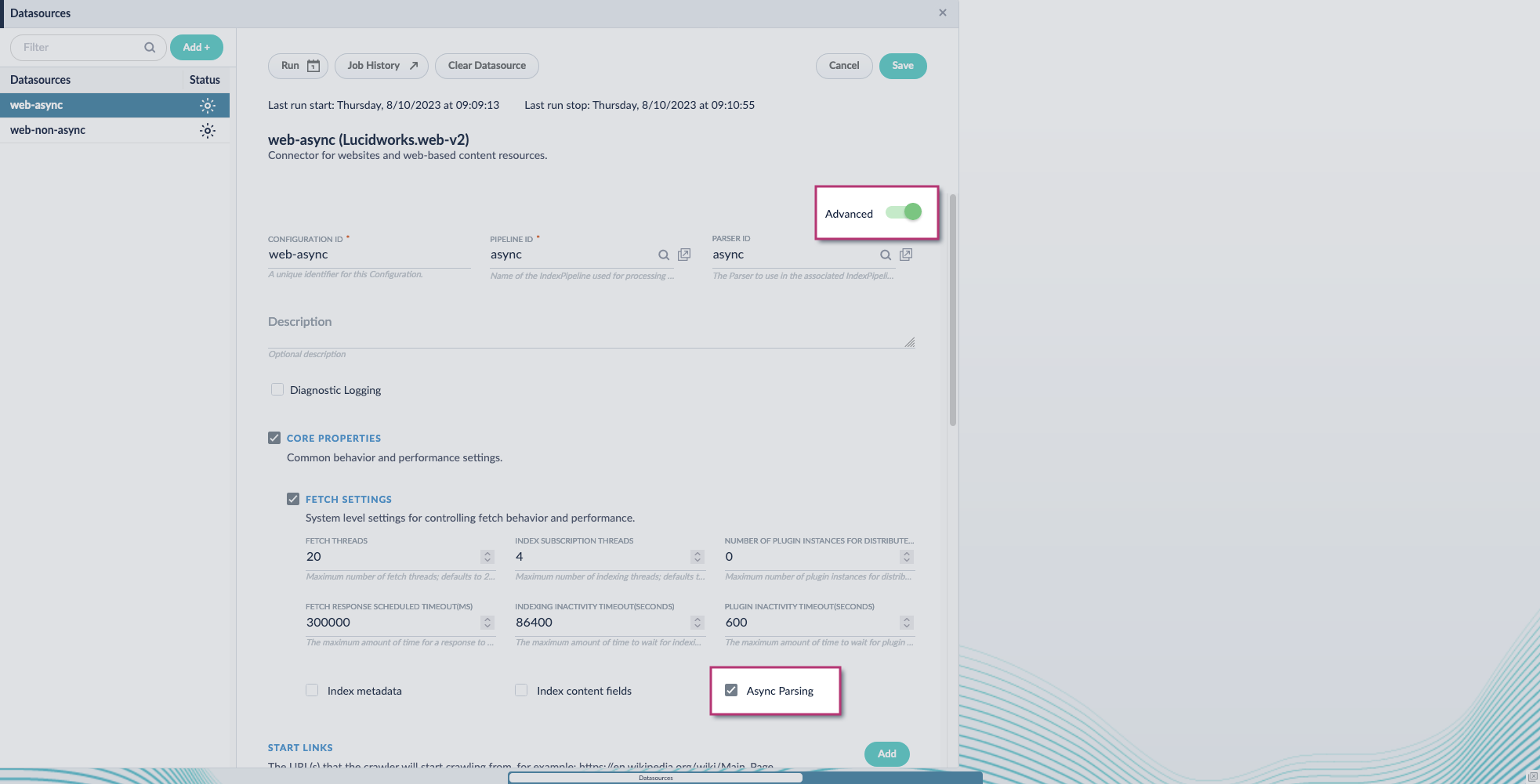
Asynchronous parsing works for V2 connectors only, which use the Java SDK framework. It is enabled in the datasource configuration by toggling the **Advanced** view and turning on the **Async Parsing** option. Learn more about [V1 and V2 connectors](/docs/fusion-connectors/concepts/v1-v2-connectors).
Additionally, the index pipeline must include a [Solr Partial Update Indexer](/docs/lucidworks-search/09-developer-documentation/config-specs/index-pipeline-stages/solr-partial-update-indexer) stage. This stage replaces the Solr indexer stage, which should be removed or turned off. This is required because the connector plugin and the asynchronous parsing services generate one document each, one from the fetching process and another from the parsing process, respectively. Both documents need to be merged into a single document. The Solr Partial Update Indexer merges both documents, while the Solr indexer stage overrides documents.
For more information on asynchronous parsing setup, see **Use Tika asynchronous parsing**.
This document describes how to set up your application to use Tika asynchronous parsing.
Unlike synchronous Tika parsing, which uses a parser stage, asynchronous Tika parsing is configured in the datasource and index pipeline. For more information, see [Asynchronous Tika Parsing](/docs/lucidworks-search/04-move-data-in/parsers/asynchronous-tika-parsing).
**Field names change with asynchronous Tika parsing.**
{/* // The code sample `\_lw_*` uses a backslash to escape the underscore character to prevent italics. */} In contrast to synchronous parsing, asynchronous Tika parsing prepends `parser_` to fields added to a document. System fields, which start with `\_lw_`, are not prepended with `parser_`. If you are migrating to asynchronous Tika parsing, and your search application configuration relies on specific field names, update your search application to use the new fields.
## Configure the connectors datasource
1. Navigate to your datasource.
2. Enable the **Advanced** view.
3. Enable the **Async Parsing** option.
**Lucidworks Search 5.9.11 and later uses your parser configuration when using asynchronous parsing.**
The asynchronous parsing service performs Tika parsing using Apache Tika Server. In Lucidworks Search 5.8 through 5.9.10, other parsers, such as HTML and JSON, are not supported by the asynchronous parsing service. By enabling asynchronous parsing, the parser configuration linked to your datasource is ignored. In Lucidworks Search 5.9.11 and later, other parsers, such as HTML and JSON, are supported by the asynchronous parsing service. By enabling asynchronous parsing, the parser configuration linked to your datasource is used.
4. Save the datasource configuration.
## Configure the parser stage
You must do this step in Lucidworks Search 5.9.11 and later.
1. Navigate to **Parsers**.
2. Select the parser, or create a new parser.
3. From the **Add a parser stage** menu, select **Apache Tika Container Parser**.
4. (Optional) Enter a label for this stage. This label changes the names from Apache Tika Container Parser to the value you enter in this field.
5. If the Apache Tika Container Parser stage is not already the first stage, drag and drop the stage to the top of the stage list so it is the first stage that runs.
## Configure the index pipeline
1. Go to the **Index Pipeline** screen.
2. Add the **Solr Partial Update Indexer** stage.
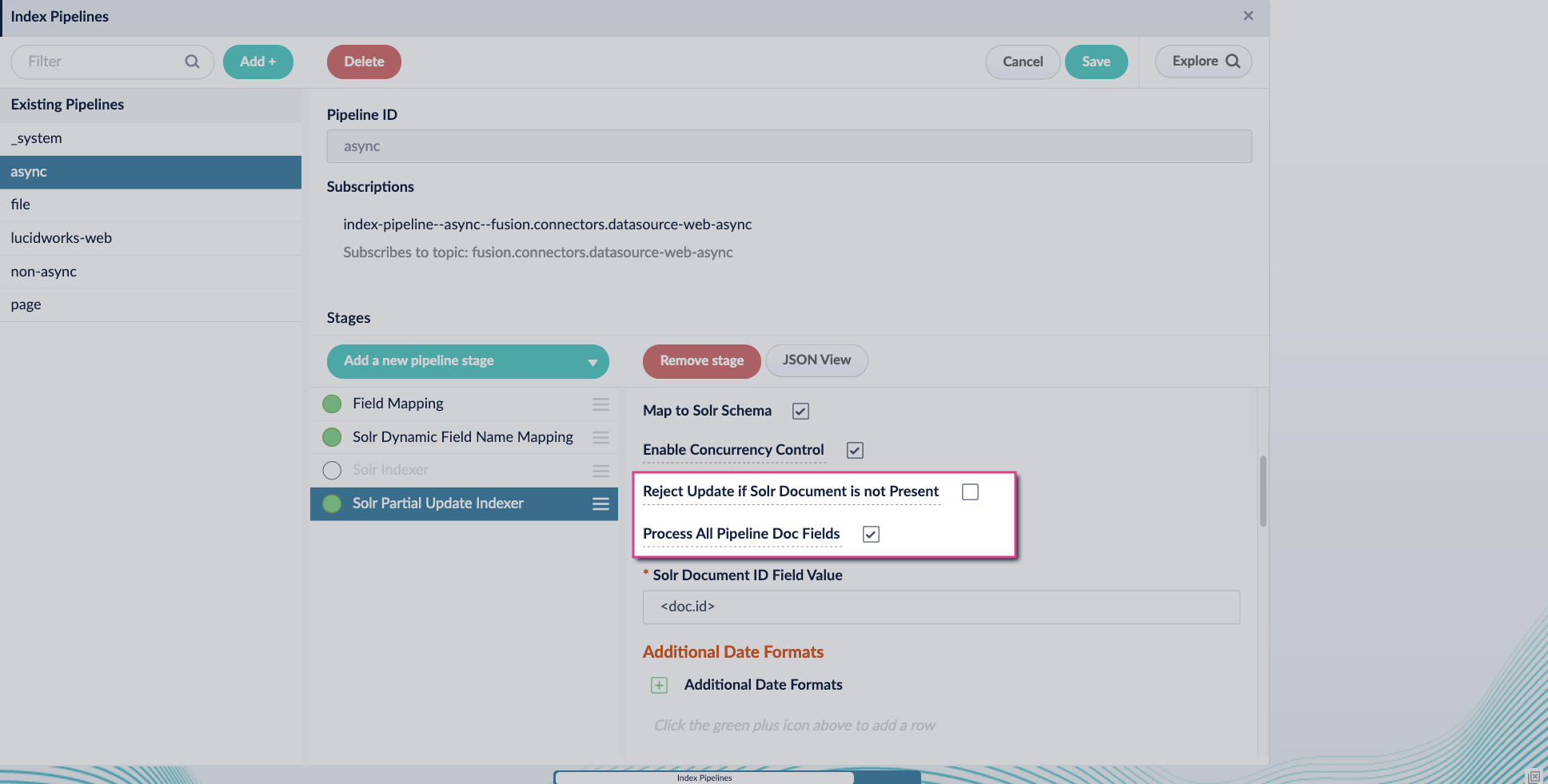
3. Turn off the **Reject Update if Solr Document is not Present** option and turn on the **Process All Pipeline Doc Fields** option:
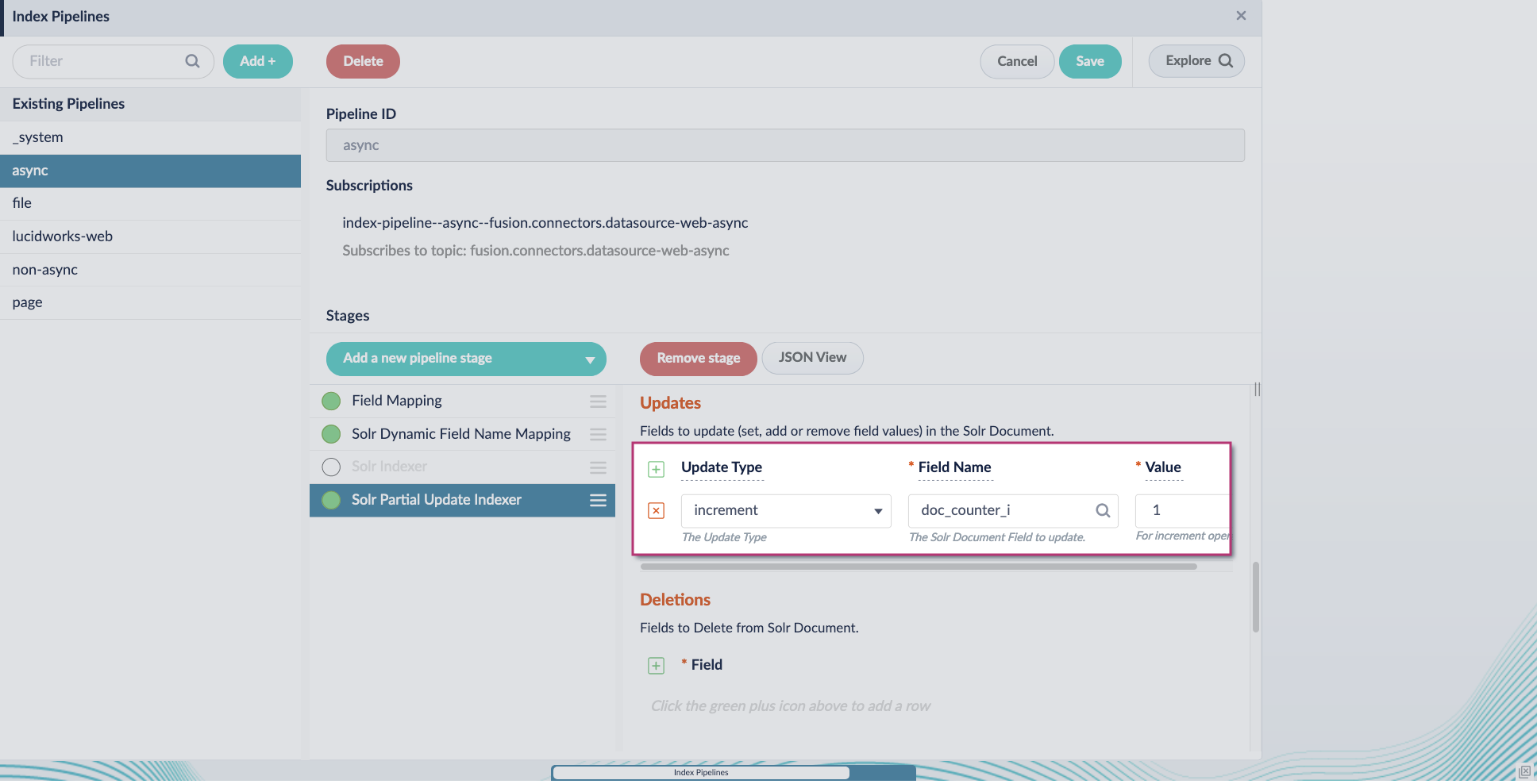
4. Include an extra update field in the stage configuration using any update type and field name. In this example, an incremental field `docs_counter_i` with an increment value of `1` is added:
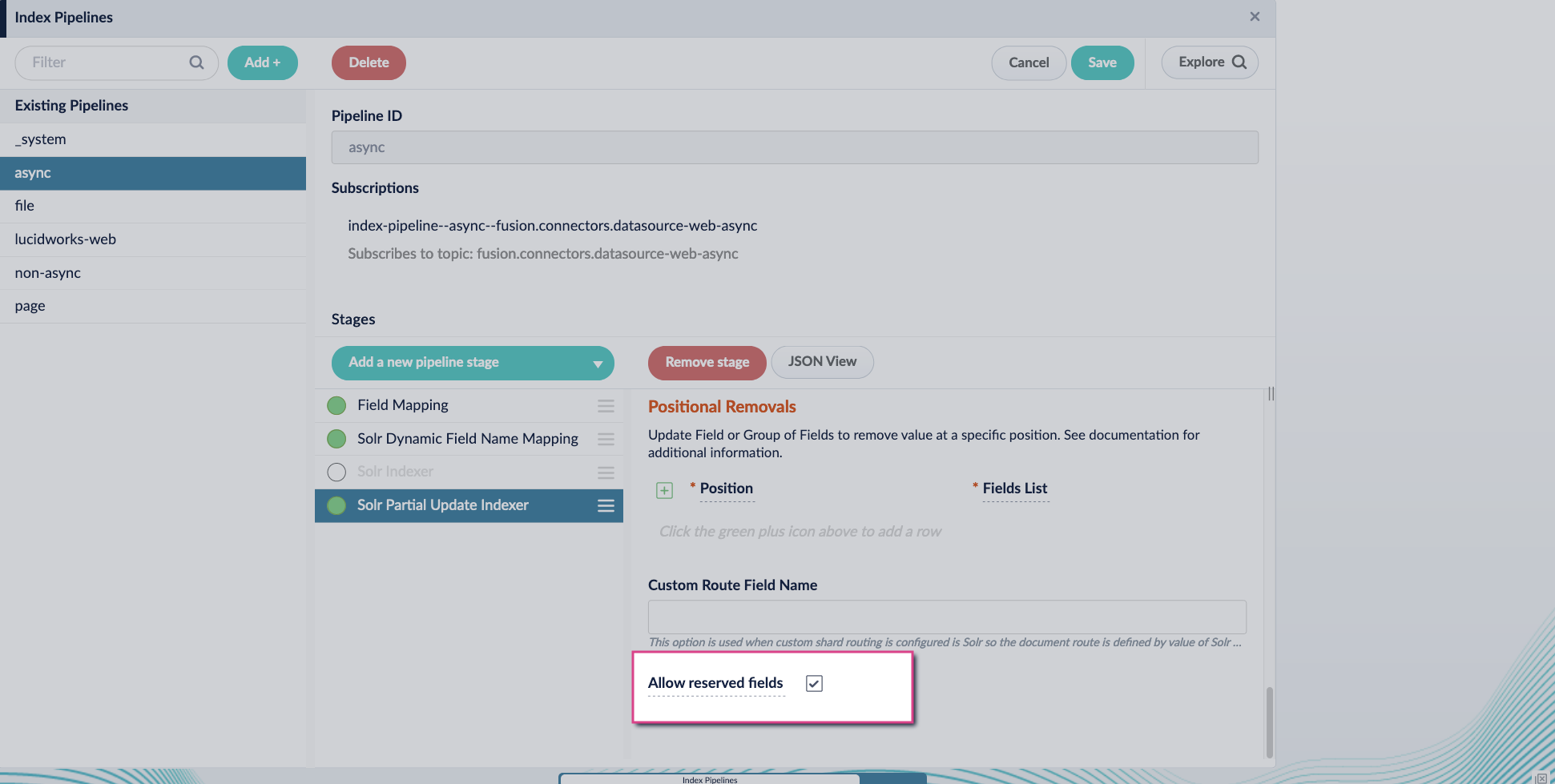
5. Enable the **Allow reserved fields** option:
6. Click **Save**.
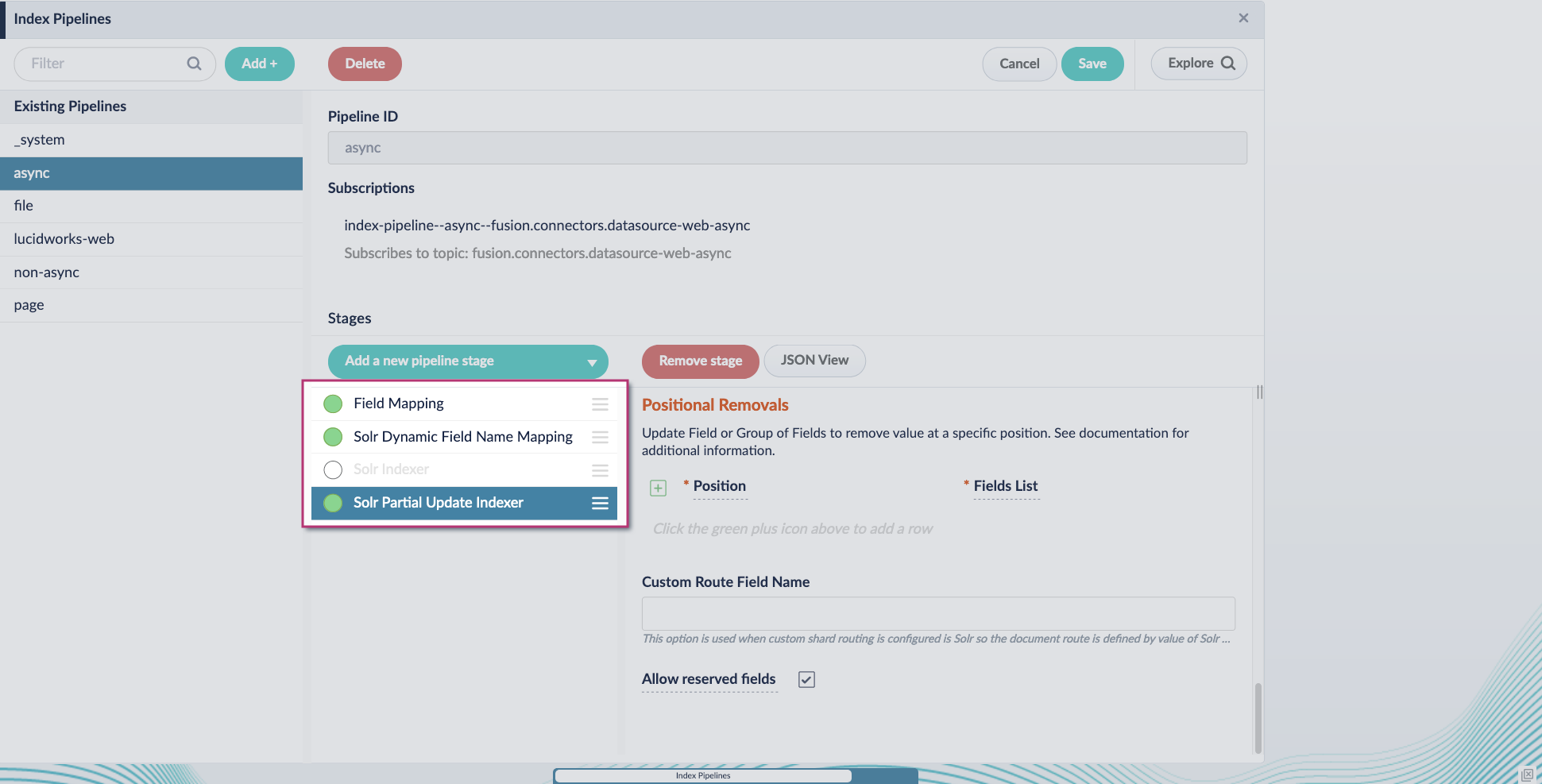
7. Turn off or remove the **Solr Indexer stage**, and move the **Solr Partial Update Indexer stage** to be the last stage in the pipeline.
Asynchronous Tika parsing setup is now complete. Run the datasource indexing job and monitor the results.
 4. Include an extra update field in the stage configuration using any update type and field name. In this example, an incremental field `docs_counter_i` with an increment value of `1` is added:
 5. Enable the **Allow reserved fields** option:
 6. Click **Save**.
7. Turn off or remove the **Solr Indexer stage**, and move the **Solr Partial Update Indexer stage** to be the last stage in the pipeline.
6. Click **Save**.
7. Turn off or remove the **Solr Indexer stage**, and move the **Solr Partial Update Indexer stage** to be the last stage in the pipeline.
 Asynchronous Tika parsing setup is now complete. Run the datasource indexing job and monitor the results.