> ## Documentation Index
> Fetch the complete documentation index at: https://doc.lucidworks.com/llms.txt
> Use this file to discover all available pages before exploring further.
# Signals
export const LwTemplate = ({title = "Key questions to get you started", icon = "sparkles", cta = "Powered by Agent Studio", linkHref = "https://lucidworks.com/demo/?utm_source=docs&utm_medium=referral&utm_campaign=docs_cta_ai"}) => {
const [isLoaded, setIsLoaded] = useState(false);
useEffect(() => {
const timer = setTimeout(() => {
setIsLoaded(true);
}, 500);
return () => clearTimeout(timer);
}, []);
return
{isLoaded && `
}} />}
Powered by Lucidworks Agent Studio
;
};
[localhost link]: http://localhost:3000/docs/lucidworks-search/04-move-data-in/indexing-signals/overview
[mintlify link]: https://doc.lucidworks.com/docs/lucidworks-search/04-move-data-in/indexing-signals/overview
[old doc.lw link]: https://doc.lucidworks.com/managed-fusion/5.9/t154hp
Signals are indexed just like other data, but instead of using a connector, you use the [Signals API](/api-reference/signal-indexing-api/index-an-event-signal).
## Signals data flow
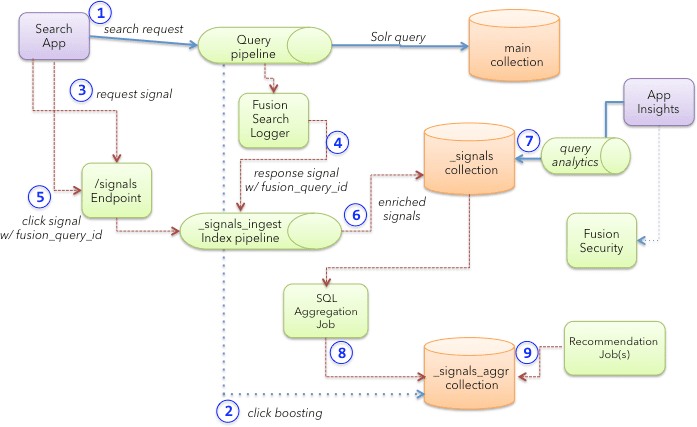
This diagram shows the flow of signals data from the search app through Lucidworks Search. The numbered steps are explained below.
1. The search app sends a query to a Lucidworks Search query pipeline.\
The query request should include a user ID and session query parameter to identify the user.
2. Optionally, the Lucidworks Search query pipeline queries the `COLLECTION_NAME_signals_aggr` collection to get boosts for the main query based on aggregated click data.
3. The search app also sends a request signal to the Lucidworks Search [`/signals` endpoint](/api-reference/signal-indexing-api/index-an-event-signal).\
The primary intent of a request signal is to capture the raw user query and contextual information about the user’s current activity in the app, such as the user agent and the page where they generated the query. The request signal does not contain any information about the results sent to Solr; it is created before a query is processed.
4. Once Solr returns the response to Lucidworks Search, the SearchLogger component indexes the complete request/response data into the `COLLECTION_NAME_signals` collection as a response signal using the `_signals_ingest` pipeline. Therefore, the response signal captures all results from Lucidworks Search as it related to the original query.
Query activity is not indexed into the `_logs` collection. All response signals use the `fusion_query_id` (see below) as the unique document ID in Solr.
5. When the user clicks a link in the search results, the search app sends a click event to the Lucidworks Search signals endpoint (which invokes the `_signals_ingest` pipeline behind the scenes).\
The click signal *must* include a field named `fusion_query_id` in the `params` object of the raw click signal. The `fusion_query_id` field is returned in the query response (from step 1) in a response header named `x-fusion-query-id`. This allows Lucidworks Search to associate a click signal with the response signal generated in step 4. The `fusion_query_id` is also used by Lucidworks Search to associate click signals with [experiments](/docs/lucidworks-search/06-metrics-and-analytics/experiments). For experiments to work, each click signal must contain the corresponding `fusion_query_id` that produced the document/item that was clicked.
6. The `_signals_ingest` pipeline enriches signals before indexing into the `COLLECTION_NAME_signals` collection.\
This enrichment includes field mapping, geolocation resolution, and updating the `has_clicks` flag to "true" on request signals when the first click signal is encountered for a given request using the [Update Related Document index stage](/docs/lucidworks-search/09-developer-documentation/config-specs/index-pipeline-stages/update-related-document).
7. Lucidworks Search queries the `COLLECTION_NAME_signals` collection through a Lucidworks Search query pipeline to generate query analytics reports from raw signals.
8. Behind the scenes, the [SQL aggregation](/docs/lucidworks-search/09-developer-documentation/config-specs/jobs/sql-aggregation/overview) framework aggregates click signals to compute a weight for each query + `doc_id` + filters group.\
The resulting metrics are saved to the `COLLECTION_NAME_signals_aggr` collection to generate boosts on queries to the main collection (step 2 above).
9. Recommendations also use aggregated documents in the `COLLECTION_NAME_signals_aggr` collection to build a [collaborative filtering-based recommender model](/docs/lucidworks-search/07-improve-your-queries/recommendations/methods-recs).
## Default index pipeline for signals
When indexing signals of any type for any Lucidworks Search app, Lucidworks Search always uses a default index pipeline named `_signals_ingest` unless you explicitly specify a different index pipeline.
Because this pipeline is not associated with any Lucidworks Search app, it does not automatically appear in the list of index pipelines. You can find it in the [Object Explorer](/docs/lucidworks-search/03-ui-tour/object-explorer) by clicking the **In No Apps** filter.
### Default stages
The `_signals_ingest` index pipeline has several stages:
1. [Format Signals stage](/docs/lucidworks-search/09-developer-documentation/config-specs/index-pipeline-stages/format-signals)
2. [Field Mapping stage](/docs/lucidworks-search/09-developer-documentation/config-specs/index-pipeline-stages/field-mapping)
3. [GeoIP Lookup stage](/docs/lucidworks-search/09-developer-documentation/config-specs/index-pipeline-stages/geoip-lookup)
4. [Solr Indexer stage](/docs/lucidworks-search/09-developer-documentation/config-specs/index-pipeline-stages/solr-indexer)
5. Update `has_clicks` flag stage\
The Update `has_clicks` flag stage is an instance of the [Update Related Document stage](/docs/lucidworks-search/09-developer-documentation/config-specs/index-pipeline-stages/update-related-document) that updates the `has_clicks` flag to "true" on an existing request signal after the first click signal is processed for the request.
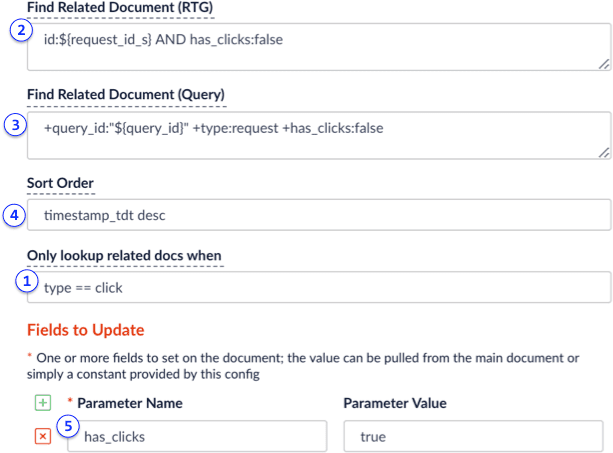
The Update `has_clicks` flag stage works as follows:
1. When a click signal is encountered (`type==click`)
2. Look at the incoming click signal for a field named `request_id_s`, which gets set by the Format Signals stage using a distributed cache of recently processed request signals.\
If the `request_id_s` field is set, then send a real-time `GET` query to Solr to find a request signal with ID equal to the value of the `request_id_s` field on the click signal. To avoid re-updating request signals, the RTG query also filters on `has_clicks==false`, which avoids duplicate atomic updates on the same document in Solr. Real-time `GET` is used to avoid timing issues between a request signal being sent to Solr and when it gets committed. This prevents missing updates when clicks occur soon after the initial request signal is sent by the search app.
3. If the click signal does not have the `request_id_s` field set, then do a normal Solr lookup for the request signal using: `+query_id:"${query_id}" +type:request +has_clicks:false`. A click signal may not have a `request_id_s` if there is a cache miss in the distributed cache used by the Format Signals stage.
4. If the stage performs a normal query, there may be multiple request signals that have the same `query_id`. This is because the `query_id` is based on `session` + `query` + `filter`, so if a user sends the same `query` + `filter` during the same session, there will be multiple request signals with the same `query_id` value. Thus, the stage sorts to get the latest request signal to update.
5. If a related document is found (in this case a request signal), then the stage updates the `has_clicks` field to true and performs an atomic update in Solr.
This stage performs its work in a background thread, so it does not impact the indexing performance of the click signal.
 1. The search app sends a query to a Lucidworks Search query pipeline.\
The query request should include a user ID and session query parameter to identify the user.
2. Optionally, the Lucidworks Search query pipeline queries the `COLLECTION_NAME_signals_aggr` collection to get boosts for the main query based on aggregated click data.
3. The search app also sends a request signal to the Lucidworks Search [`/signals` endpoint](/api-reference/signal-indexing-api/index-an-event-signal).\
The primary intent of a request signal is to capture the raw user query and contextual information about the user’s current activity in the app, such as the user agent and the page where they generated the query. The request signal does not contain any information about the results sent to Solr; it is created before a query is processed.
4. Once Solr returns the response to Lucidworks Search, the SearchLogger component indexes the complete request/response data into the `COLLECTION_NAME_signals` collection as a response signal using the `_signals_ingest` pipeline. Therefore, the response signal captures all results from Lucidworks Search as it related to the original query.
1. The search app sends a query to a Lucidworks Search query pipeline.\
The query request should include a user ID and session query parameter to identify the user.
2. Optionally, the Lucidworks Search query pipeline queries the `COLLECTION_NAME_signals_aggr` collection to get boosts for the main query based on aggregated click data.
3. The search app also sends a request signal to the Lucidworks Search [`/signals` endpoint](/api-reference/signal-indexing-api/index-an-event-signal).\
The primary intent of a request signal is to capture the raw user query and contextual information about the user’s current activity in the app, such as the user agent and the page where they generated the query. The request signal does not contain any information about the results sent to Solr; it is created before a query is processed.
4. Once Solr returns the response to Lucidworks Search, the SearchLogger component indexes the complete request/response data into the `COLLECTION_NAME_signals` collection as a response signal using the `_signals_ingest` pipeline. Therefore, the response signal captures all results from Lucidworks Search as it related to the original query.
 1. When a click signal is encountered (`type==click`)
2. Look at the incoming click signal for a field named `request_id_s`, which gets set by the Format Signals stage using a distributed cache of recently processed request signals.\
If the `request_id_s` field is set, then send a real-time `GET` query to Solr to find a request signal with ID equal to the value of the `request_id_s` field on the click signal. To avoid re-updating request signals, the RTG query also filters on `has_clicks==false`, which avoids duplicate atomic updates on the same document in Solr. Real-time `GET` is used to avoid timing issues between a request signal being sent to Solr and when it gets committed. This prevents missing updates when clicks occur soon after the initial request signal is sent by the search app.
3. If the click signal does not have the `request_id_s` field set, then do a normal Solr lookup for the request signal using: `+query_id:"${query_id}" +type:request +has_clicks:false`. A click signal may not have a `request_id_s` if there is a cache miss in the distributed cache used by the Format Signals stage.
4. If the stage performs a normal query, there may be multiple request signals that have the same `query_id`. This is because the `query_id` is based on `session` + `query` + `filter`, so if a user sends the same `query` + `filter` during the same session, there will be multiple request signals with the same `query_id` value. Thus, the stage sorts to get the latest request signal to update.
5. If a related document is found (in this case a request signal), then the stage updates the `has_clicks` field to true and performs an atomic update in Solr.
This stage performs its work in a background thread, so it does not impact the indexing performance of the click signal.
1. When a click signal is encountered (`type==click`)
2. Look at the incoming click signal for a field named `request_id_s`, which gets set by the Format Signals stage using a distributed cache of recently processed request signals.\
If the `request_id_s` field is set, then send a real-time `GET` query to Solr to find a request signal with ID equal to the value of the `request_id_s` field on the click signal. To avoid re-updating request signals, the RTG query also filters on `has_clicks==false`, which avoids duplicate atomic updates on the same document in Solr. Real-time `GET` is used to avoid timing issues between a request signal being sent to Solr and when it gets committed. This prevents missing updates when clicks occur soon after the initial request signal is sent by the search app.
3. If the click signal does not have the `request_id_s` field set, then do a normal Solr lookup for the request signal using: `+query_id:"${query_id}" +type:request +has_clicks:false`. A click signal may not have a `request_id_s` if there is a cache miss in the distributed cache used by the Format Signals stage.
4. If the stage performs a normal query, there may be multiple request signals that have the same `query_id`. This is because the `query_id` is based on `session` + `query` + `filter`, so if a user sends the same `query` + `filter` during the same session, there will be multiple request signals with the same `query_id` value. Thus, the stage sorts to get the latest request signal to update.
5. If a related document is found (in this case a request signal), then the stage updates the `has_clicks` field to true and performs an atomic update in Solr.
This stage performs its work in a background thread, so it does not impact the indexing performance of the click signal.