> ## Documentation Index
> Fetch the complete documentation index at: https://doc.lucidworks.com/llms.txt
> Use this file to discover all available pages before exploring further.
# Index pipelines
export const LwTemplate = ({title = "Key questions to get you started", icon = "sparkles", cta = "Powered by Agent Studio", linkHref = "https://lucidworks.com/demo/?utm_source=docs&utm_medium=referral&utm_campaign=docs_cta_ai"}) => {
const [isLoaded, setIsLoaded] = useState(false);
useEffect(() => {
const timer = setTimeout(() => {
setIsLoaded(true);
}, 500);
return () => clearTimeout(timer);
}, []);
return
{isLoaded && `
}} />}
Powered by Lucidworks Agent Studio
;
};
[localhost link]: http://localhost:3000/docs/lucidworks-search/04-move-data-in/index-pipeline/overview
[mintlify link]: https://doc.lucidworks.com/docs/lucidworks-search/04-move-data-in/index-pipeline/overview
[old doc.lw link]: https://doc.lucidworks.com/managed-fusion/5.9/4mm52v
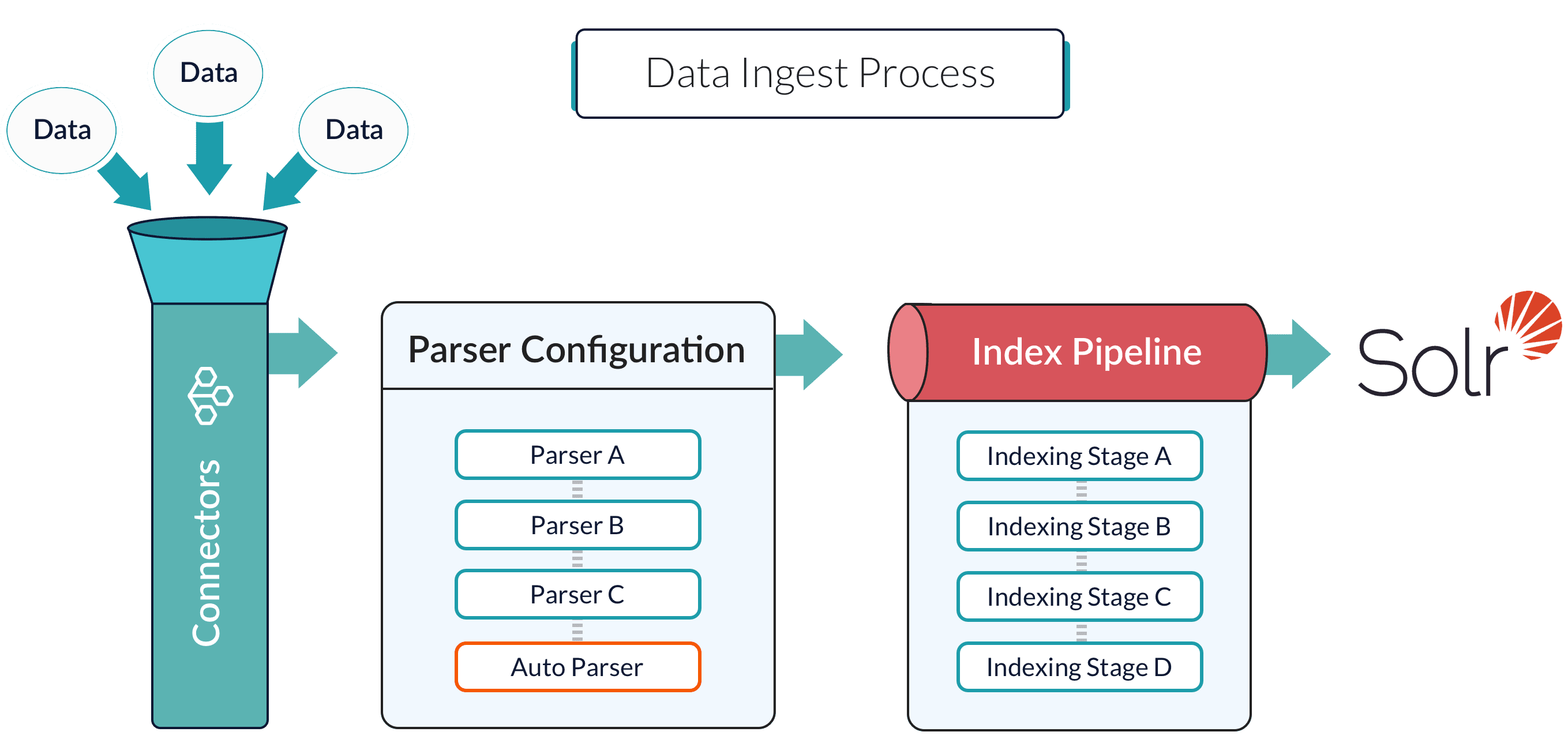
Index pipelines transform incoming data into `PipelineDocument` objects for indexing by Lucidworks Search-managed Solr service.
An index pipeline consists of a series of configurable
[index pipeline stages](/docs/lucidworks-search/04-move-data-in/index-pipeline/index-pipeline-stages),
each performing a different transformation on the data before passing the result to the next stage in the pipeline.
The final stage is the
[Solr Indexer stage](/docs/lucidworks-search/09-developer-documentation/config-specs/index-pipeline-stages/solr-indexer),
which transforms the PipelineDocument into a Solr document and submits it to Solr for indexing in a specific
[Collection](/docs/lucidworks-search/04-move-data-in/collection/overview).
Each configured datasource has an associated index pipeline and uses a
[connector](/docs/lucidworks-search/09-developer-documentation/config-specs/fusion-connectors/overview)
to fetch data to parse and then input into the index pipeline.
Alternatively, documents can be submitted directly to an index pipeline or profile with the REST API; see
**Import Data with the REST API**.
It is often possible to get documents into Lucidworks Search by configuring a datasource with the appropriate connector: [Connectors Configuration Reference](/docs/lucidworks-search/09-developer-documentation/config-specs/fusion-connectors/overview).
But if there are obstacles to using connectors, it can be simpler to index documents with a REST API call to an index profile or pipeline.
## Push documents to Lucidworks Search using index profiles
Index profiles allow you to send documents to a consistent endpoint (the profile alias) and change the backend index pipeline as needed. The profile is also a simple way to use one pipeline for multiple collections without any one collection "owning" the pipeline. See [Lucidworks Search Index Profiles](/docs/lucidworks-search/04-move-data-in/index-profile/overview).
You can send documents directly to an index using the [Index REST API](/api-reference/index-profiles-api/index-a-document). The request path is:
```bash theme={"dark"}
/api/apps/APP_NAME/index/INDEX_PROFILE
```
These requests are sent as a POST request. The request header specifies the format of the contents of the request body. Create an index profile in the Lucidworks Search UI.
To send a streaming list of JSON documents, you can send the JSON file that holds these objects to the API listed above with `application/json` as the content type. If your JSON file is a list or array of many items, the endpoint operates in a streaming way and indexes the docs as necessary.
### Send data to an index profile that is part of an app
Accessing an index profile through an app lets a Lucidworks Search admin secure and manage all objects on a per-app basis. Security is then determined by whether a user can access an app. This is the recommended way to manage permissions in Lucidworks Search.
The syntax for sending documents to an index profile that is part of an app is as follows:
```bash wrap theme={"dark"}
curl -u USERNAME:PASSWORD -X POST -H 'content-type: application/json' https://EXAMPLE_COMPANY.b.lucidworks.cloud/api/apps/APP_NAME/index/INDEX_PROFILE --data-binary @my-json-data.json
```
Spaces in an app name become underscores. Spaces in an index profile name become hyphens.
To prevent the terminal from displaying all the data and metadata it indexes--useful if you are indexing a large file--you can optionally append `?echo=false` to the URL.
Be sure to set the content type header properly for the content being sent. Some frequently used content types are:
* Text: `application/json`, `application/xml`
* PDF documents: `application/pdf`
* MS Office:
* DOCX: `application/vnd.openxmlformats-officedocument.wordprocessingml.document`
* XLSX: `application/vnd.openxmlformats-officedocument.spreadsheetml.sheet`
* PPTX: `application/vnd.vnd.openxmlformats-officedocument.presentationml.presentation`
* More types: [http://filext.com/faq/office\_mime\_types.php](http://filext.com/faq/office_mime_types.php)
### Example: Send JSON data to an index profile under an app
In `$FUSION_HOME/apps/solr-dist/example/exampledocs` you can find a few sample documents. This example uses one of these, `books.json`.
To push JSON data to an index profile under an app:
1. Create an index profile. In the Lucidworks Search UI, click **Indexing > Index Profiles** and follow the prompts.
2. From the directory containing `books.json`, enter the following, substituting your values for username, password, and index profile name:
```bash wrap theme={"dark"}
curl -u USERNAME:PASSWORD -X POST -H 'content-type: application/json' https://EXAMPLE_COMPANY.b.lucidworks.cloud/api/apps/APP_NAME/index/INDEX_PROFILE?echo=false --data-binary @books.json
```
3. Test that your data has made it into Lucidworks Search:
1. Log into the Lucidworks Search UI.
2. Navigate to the app where you sent your data.
3. Navigate to the Query Workbench.
4. Search for `\*:*`.
5. Select relevant Display Fields, for example `author` and `name`.
### Example: Send JSON data without defining an app
In most cases it is best to delegate permissions on a per-app basis. But if your use case requires it, you can push data to Lucidworks Search without defining an app.
To send JSON data without app security, issue the following curl command:
```bash wrap theme={"dark"}
curl -u USERNAME:PASSWORD -X POST -H 'content-type: application/json' https://EXAMPLE_COMPANY.b.lucidworks.cloud/api/index/INDEX_PROFILE --data-binary @my-json-data.json
```
### Example: Send XML data to an index profile with an app
To send XML data to an app, use the following:
```bash wrap theme={"dark"}
curl -u USERNAME:PASSWORD -X POST -H 'content-type: application/xml' https://EXAMPLE_COMPANY.b.lucidworks.cloud/api/apps/APP_NAME/index/INDEX_PROFILE --data-binary @my-xml-file.xml
```
You can also create documents using the [PipelineDocument](https://javadoc.lucidworks.com/fusion-pipeline-javadocs/5.10/com/lucidworks/apollo/common/pipeline/PipelineDocument.html) JSON notation.
## Send documents to an index pipeline
Although sending documents to an index profile is recommended, if your use case requires it, you can send documents directly to an [index pipeline](/api-reference/index-profiles-api/index-a-document).
### Specify a parser
When you push data to a pipeline, you can specify the name of the parser by adding a parserId querystring parameter to the URL.
For example: `https://EXAMPLE_COMPANY.b.lucidworks.cloud/api/index-pipelines/INDEX_PIPELINE/collections/COLLECTION_NAME/index?parserId=PARSER`.
If you do not specify a parser, and you are indexing outside of an app (`https://EXAMPLE_COMPANY.b.lucidworks.cloud/api/index-pipelines/...`), then the `_system` parser is used.
If you do not specify a parser, and you are indexing in an app context (`https://EXAMPLE_COMPANY.b.lucidworks.cloud/api/apps/APP_NAME/index-pipelines/...`), then the parser with the same name as the app is used.
## Indexing CSV Files
In the usual case, to index a CSV or TSV file, the file is split into records, one per row, and each row is indexed as a separate document.
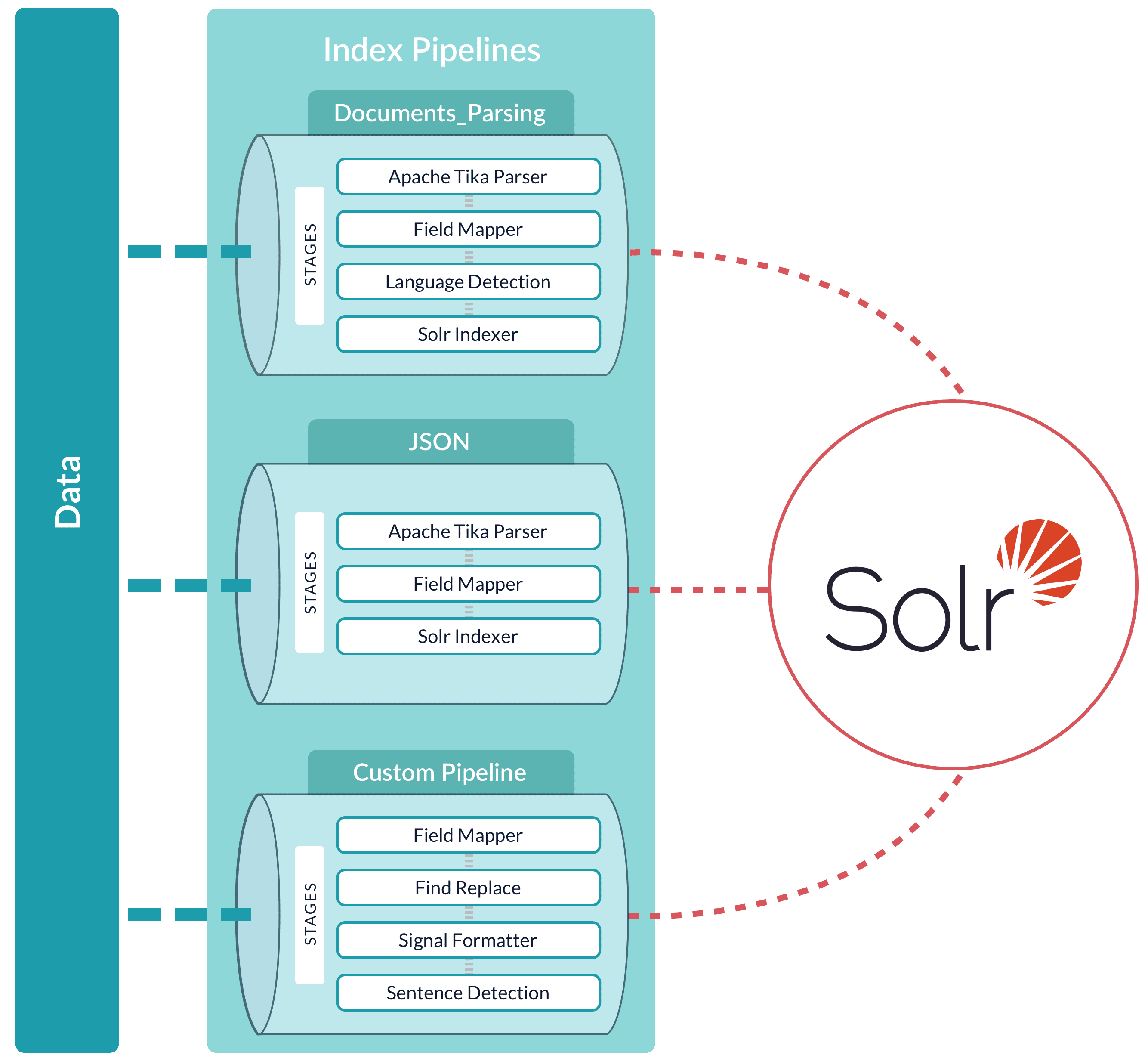
A pipeline can be reused across multiple collections. Lucidworks Search provides a set of built-in pipelines. You can use the Index Workbench or the
[REST API](/api-reference/index-profiles-api/index-a-document)
to develop custom index pipelines to suit any datasource or application.
Lucidworks Search creates a default index pipeline when you create an app. The index pipeline has the same name as the app. This pipeline consists of a [Field Mapping index stage](/docs/lucidworks-search/09-developer-documentation/config-specs/index-pipeline-stages/field-mapping).
 Alternatively, documents can be submitted directly to an index pipeline or profile with the REST API; see
**Import Data with the REST API**.
Alternatively, documents can be submitted directly to an index pipeline or profile with the REST API; see
**Import Data with the REST API**.
 Lucidworks Search creates a default index pipeline when you create an app. The index pipeline has the same name as the app. This pipeline consists of a [Field Mapping index stage](/docs/lucidworks-search/09-developer-documentation/config-specs/index-pipeline-stages/field-mapping).