> ## Documentation Index
> Fetch the complete documentation index at: https://doc.lucidworks.com/llms.txt
> Use this file to discover all available pages before exploring further.

# Google Drive V1

> The Google Drive connector is used to index the documents in a Google Drive account.

export const schema = {
  "type": "object",
  "title": "Google Drive",
  "description": "GoogleDrive.com file storage",
  "required": ["id", "connector", "type", "pipeline", "properties"],
  "properties": {
    "category": {
      "type": "string",
      "title": "Category",
      "default": "Filesystem",
      "hints": ["hidden", "readonly"]
    },
    "id": {
      "type": "string",
      "title": "Datasource ID",
      "description": "Unique name for this datasource.",
      "minLength": 1,
      "pattern": "^[a-zA-Z0-9_-]+$"
    },
    "connector": {
      "type": "string",
      "title": "Connector Type",
      "description": "Connector Type.",
      "hints": ["hidden"],
      "minLength": 1
    },
    "type": {
      "type": "string",
      "title": "Datasource Type",
      "description": "Datasource type supported by the selected connector type.",
      "hints": ["hidden"],
      "minLength": 1
    },
    "pipeline": {
      "type": "string",
      "title": "Pipeline ID",
      "description": "Name of an existing index pipeline for processing documents.",
      "minLength": 1
    },
    "description": {
      "type": "string",
      "title": "Description",
      "description": "Optional description for this datasource."
    },
    "type_description": {
      "type": "string",
      "title": "Type Description",
      "default": "Connector for Google Drive file storage. To use this connector, you must first register an application with access to the Drive API via the Google Developer Console at http://console.developers.google.com/project.",
      "hints": ["hidden", "readonly"]
    },
    "parserId": {
      "type": "string",
      "title": "Parser",
      "description": "Parser used when parsing raw content. For some connectors, a configuration to 'retry' parsing if an error occurs is available as an advanced setting"
    },
    "properties": {
      "type": "object",
      "title": "Properties",
      "description": "Datasource configuration properties",
      "required": ["startLinks", "enable_security_trimming"],
      "properties": {
        "refreshAll": {
          "type": "boolean",
          "title": "Recrawl all items",
          "description": "Set to true to always recrawl all items found in the crawldb.",
          "default": false,
          "hints": ["advanced"]
        },
        "startLinks": {
          "type": "array",
          "title": "Start Links",
          "description": "The IDs of the folders or files to crawl. For example if the URL to your folder is https://drive.google.com/drive/folders/0B1u0p7N096R6MWgma3gwUj4j, then enter 0B1u0p7N096R6MWgma3gwUj4j here. To crawl the entire Google Drive, enter the special value 'root'.",
          "items": {
            "type": "string",
            "minLength": 1
          }
        },
        "collection": {
          "type": "string",
          "title": "Collection",
          "description": "Collection documents will be indexed to.",
          "hints": ["hidden"],
          "pattern": "^[a-zA-Z0-9_-]+$"
        },
        "db": {
          "type": "object",
          "title": "Connector DB",
          "description": "Type and properties for a ConnectorDB implementation to use with this datasource.",
          "required": ["type"],
          "properties": {
            "type": {
              "type": "string",
              "title": "Implementation Class Name",
              "description": "Fully qualified class name of ConnectorDb implementation.",
              "default": "com.lucidworks.connectors.db.impl.MapDbConnectorDb",
              "minLength": 1
            },
            "inlinks": {
              "type": "boolean",
              "title": "Process Inlinks?",
              "description": "Keep track of incoming links. This negatively impacts performance and size of DB.",
              "default": false
            },
            "aliases": {
              "type": "boolean",
              "title": "Process Aliases?",
              "description": "Keep track of original URI-s that resolved to the current URI. This negatively impacts performance and size of DB.",
              "default": false
            },
            "inv_aliases": {
              "type": "boolean",
              "title": "Process Inverted Aliases?",
              "description": "Keep track of target URI-s that the current URI resolves to. This negatively impacts performance and size of DB.",
              "default": false
            }
          },
          "hints": ["hidden"]
        },
        "dedupe": {
          "type": "boolean",
          "title": "Dedupe documents",
          "description": "If true, documents will be deduplicated. Deduplication can be done based on an analysis of the content, on the content of a specific field, or by a JavaScript function. If neither a field nor a script are defined, content analysis will be used.",
          "default": false,
          "hints": ["advanced"]
        },
        "dedupeField": {
          "type": "string",
          "title": "Dedupe field",
          "description": "Field to be used for dedupe. Define either a field or a dedupe script, otherwise the full raw content of each document will be used.",
          "hints": ["advanced"]
        },
        "dedupeScript": {
          "type": "string",
          "title": "Dedupe script",
          "description": "Custom javascript to dedupe documents. The script must define a 'genSignature(content){}' function, but can use any combination of document fields. The function must return a string.",
          "hints": ["advanced", "code", "code/javascript"]
        },
        "dedupeSaveSignature": {
          "type": "boolean",
          "title": "Save dedupe signature",
          "description": "If true,the signature used for dedupe will be stored in a 'dedupeSignature_s' field. Note this may cause errors about 'immense terms' in that field.",
          "default": false,
          "hints": ["advanced"]
        },
        "delete": {
          "type": "boolean",
          "title": "Delete dead URIs",
          "description": "Set to true to remove documents from the index when they can no longer be accessed as unique documents.",
          "default": true
        },
        "deleteErrorsAfter": {
          "type": "integer",
          "title": "Fetch failure allowance",
          "description": "Number of fetch failures to tolerate before removing a document from the index. The default of -1 means no fetch failures will be removed.",
          "default": -1
        },
        "fetchThreads": {
          "type": "integer",
          "title": "Fetch threads",
          "description": "The number of threads to use during fetching. The default is 5.",
          "default": 5
        },
        "emitThreads": {
          "type": "integer",
          "title": "Emit threads",
          "description": "The number of threads used to send documents from the connector to the index pipeline. The default is 5.",
          "default": 5
        },
        "chunkSize": {
          "type": "integer",
          "title": "Fetch batch size",
          "description": "The number of items to batch for each round of fetching. A higher value can make crawling faster, but memory usage is also increased. The default is 1.",
          "default": 1,
          "hints": ["advanced"]
        },
        "fetchDelayMS": {
          "type": "integer",
          "title": "Fetch delay",
          "description": "Number of milliseconds to wait between fetch requests. The default is 0. This property can be used to throttle a crawl if necessary.",
          "default": 0,
          "hints": ["advanced"]
        },
        "refreshStartLinks": {
          "type": "boolean",
          "title": "Recrawl start links",
          "description": "Set to true to recrawl items specified in the list of start links.",
          "default": false,
          "hints": ["advanced"]
        },
        "refreshErrors": {
          "type": "boolean",
          "title": "Recrawl errors",
          "description": "Set to true to recrawl items that failed during the last crawl.",
          "default": false,
          "hints": ["advanced"]
        },
        "refreshOlderThan": {
          "type": "integer",
          "title": "Recrawl age",
          "description": "Number of seconds to recrawl items whose last fetched date is longer ago than this value.",
          "default": -1,
          "hints": ["advanced"]
        },
        "refreshIDPrefixes": {
          "type": "array",
          "title": "Recrawl ID prefixes",
          "description": "A prefix to recrawl all items whose IDs begin with this value.",
          "hints": ["advanced"],
          "items": {
            "type": "string"
          }
        },
        "refreshIDRegexes": {
          "type": "array",
          "title": "Recrawl ID regexes",
          "description": "A regular expression to recrawl all items whose IDs match this pattern.",
          "hints": ["advanced"],
          "items": {
            "type": "string"
          }
        },
        "refreshScript": {
          "type": "string",
          "title": "Recrawl script",
          "description": "A JavaScript function ('shouldRefresh()') to customize the items recrawled. ",
          "hints": ["advanced", "code", "code/javascript"]
        },
        "forceRefresh": {
          "type": "boolean",
          "title": "Force recrawl",
          "description": "Set to true to recrawl all items even if they have not changed since the last crawl.",
          "default": false,
          "hints": ["advanced"]
        },
        "forceRefreshClearSignatures": {
          "type": "boolean",
          "title": "Clear signatures",
          "description": "If true, signatures will be cleared if force recrawl is enabled.",
          "default": true,
          "hints": ["advanced"]
        },
        "retryEmit": {
          "type": "boolean",
          "title": "Retry emits",
          "description": "Set to true for emit batch failures to be retried on a document-by-document basis.",
          "default": true,
          "hints": ["advanced"]
        },
        "depth": {
          "type": "integer",
          "title": "Max crawl depth",
          "description": "Number of levels in a directory or site tree to descend for documents.",
          "default": -1
        },
        "maxItems": {
          "type": "integer",
          "title": "Max items",
          "description": "Maximum number of documents to fetch. The default (-1) means no limit.",
          "default": -1
        },
        "failFastOnStartLinkFailure": {
          "type": "boolean",
          "title": "Fail crawl if start links are invalid",
          "description": "If true, when Fusion cannot connect to any of the provided start links, the crawl is stopped and an exception logged.",
          "default": true,
          "hints": ["advanced"]
        },
        "crawlDBType": {
          "type": "string",
          "title": "Crawl database type",
          "description": "The type of crawl database to use, in-memory or on-disk.",
          "enum": ["in-memory", "on-disk"],
          "default": "on-disk",
          "hints": ["advanced"]
        },
        "commitAfterItems": {
          "type": "integer",
          "title": "Commit After This Many Items",
          "description": "Commit the crawlDB to disk after this many items have been received. A smaller number here will result in a slower crawl because of commits to disk being more frequent; conversely, a larger number here will cause a resumed job after a crash to need to recrawl more records.",
          "default": 10000,
          "hints": ["advanced"]
        },
        "initial_mapping": {
          "type": "object",
          "title": "Initial field mapping",
          "description": "Provides mapping of fields before documents are sent to an index pipeline.",
          "properties": {
            "skip": {
              "type": "boolean",
              "title": "Skip This Stage",
              "description": "Set to true to skip this stage.",
              "default": false,
              "hints": ["advanced"]
            },
            "label": {
              "type": "string",
              "title": "Label",
              "description": "A unique label for this stage.",
              "hints": ["advanced"],
              "maxLength": 255
            },
            "condition": {
              "type": "string",
              "title": "Condition",
              "description": "Define a conditional script that must result in true or false. This can be used to determine if the stage should process or not.",
              "hints": ["code", "code/javascript", "advanced"]
            },
            "reservedFieldsMappingAllowed": {
              "type": "boolean",
              "title": "Allow System Fields Mapping?",
              "default": false,
              "hints": ["advanced"]
            },
            "retentionMappings": {
              "type": "array",
              "title": "Field Retention",
              "description": "Fields that should be kept or deleted",
              "default": [],
              "hints": ["advanced"],
              "items": {
                "type": "object",
                "required": ["field"],
                "properties": {
                  "field": {
                    "type": "string",
                    "title": "Field",
                    "description": "The name of the field to operate on.",
                    "hints": ["advanced"]
                  },
                  "operation": {
                    "type": "string",
                    "title": "Operation",
                    "description": "The type of operation to perform: keep (default) or delete",
                    "enum": ["keep", "delete"],
                    "default": "keep",
                    "hints": ["advanced"]
                  }
                }
              }
            },
            "updateMappings": {
              "type": "array",
              "title": "Field Value Updates",
              "description": "Values that should be added to or set on a field. When a value is added, any values previously on the field will be retained. When a value is set, any values previously on the field will be overwritten.",
              "default": [],
              "hints": ["advanced"],
              "items": {
                "type": "object",
                "required": ["field", "value"],
                "properties": {
                  "field": {
                    "type": "string",
                    "title": "Field",
                    "description": "The name of the field to operate on.",
                    "hints": ["advanced"]
                  },
                  "value": {
                    "type": "string",
                    "title": "Value",
                    "description": "The value to add to or set on the field.",
                    "hints": ["advanced"]
                  },
                  "operation": {
                    "type": "string",
                    "title": "Operation",
                    "description": "The type of operation to perform: add (default) or set.",
                    "enum": ["add", "set"],
                    "default": "add",
                    "hints": ["advanced"]
                  }
                }
              }
            },
            "translationMappings": {
              "type": "array",
              "title": "Field Translations",
              "description": "Fields that should be moved or copied to another field. When a field is moved, the values from the source field are moved over to the target field and the source field is removed. When a field is copied, the values from the source field are copied over to the target field and the source field is retained.",
              "default": [{
                "source": "charSet",
                "target": "charSet_s",
                "operation": "move"
              }, {
                "source": "fetchedDate",
                "target": "fetchedDate_dt",
                "operation": "move"
              }, {
                "source": "lastModified",
                "target": "lastModified_dt",
                "operation": "move"
              }, {
                "source": "signature",
                "target": "dedupeSignature_s",
                "operation": "move"
              }, {
                "source": "length",
                "target": "length_l",
                "operation": "move"
              }, {
                "source": "mimeType",
                "target": "mimeType_s",
                "operation": "move"
              }, {
                "source": "parent",
                "target": "parent_s",
                "operation": "move"
              }, {
                "source": "owner",
                "target": "owner_s",
                "operation": "move"
              }, {
                "source": "group",
                "target": "group_s",
                "operation": "move"
              }, {
                "source": "driveMimeType",
                "target": "driveMimeType_s",
                "operation": "move"
              }],
              "hints": ["advanced"],
              "items": {
                "type": "object",
                "required": ["source", "target"],
                "properties": {
                  "source": {
                    "type": "string",
                    "title": "Source Field",
                    "description": "The name of the field to operate on.",
                    "hints": ["advanced"]
                  },
                  "target": {
                    "type": "string",
                    "title": "Target Field",
                    "description": "The name of the target field.",
                    "hints": ["advanced"]
                  },
                  "operation": {
                    "type": "string",
                    "title": "Operation",
                    "description": "The type of operation to perform: copy (default) or move.",
                    "enum": ["copy", "move"],
                    "default": "copy",
                    "hints": ["advanced"]
                  }
                }
              }
            },
            "unmappedRule": {
              "type": "object",
              "title": "Unmapped Fields",
              "description": "Fields not mapped by the above rules. By default, any remaining fields will be kept on the document.",
              "properties": {
                "keep": {
                  "type": "boolean",
                  "title": "Keep",
                  "description": "Keep all unmapped fields",
                  "default": true,
                  "hints": ["advanced"]
                },
                "delete": {
                  "type": "boolean",
                  "title": "Delete",
                  "description": "Delete all unmapped fields",
                  "default": false,
                  "hints": ["advanced"]
                },
                "fieldToMoveValuesTo": {
                  "type": "string",
                  "title": "Move",
                  "description": "Move all unmapped field values to this field",
                  "hints": ["advanced"]
                },
                "fieldToCopyValuesTo": {
                  "type": "string",
                  "title": "Copy",
                  "description": "Copy all unmapped field values to this field",
                  "hints": ["advanced"]
                },
                "valueToAddToUnmappedFields": {
                  "type": "string",
                  "title": "Add",
                  "description": "Add this value to all unmapped fields",
                  "hints": ["advanced"]
                },
                "valueToSetOnUnmappedFields": {
                  "type": "string",
                  "title": "Set",
                  "description": "Set this value on all unmapped fields",
                  "hints": ["advanced"]
                }
              },
              "default": {
                "keep": true,
                "delete": false,
                "fieldToMoveValuesTo": "",
                "fieldToCopyValuesTo": "",
                "valueToAddToUnmappedFields": "",
                "valueToSetOnUnmappedFields": ""
              }
            }
          },
          "category": "Field Transformation",
          "categoryPriority": 7,
          "hints": ["advanced"],
          "unsafe": false
        },
        "f.maxSizeBytes": {
          "type": "integer",
          "title": "Maximum file size (bytes)",
          "description": "Maximum size (in bytes) of documents to fetch or -1 for unlimited file size.",
          "default": 20000000
        },
        "f.minSizeBytes": {
          "type": "integer",
          "title": "Minimum file size (bytes)",
          "description": "Minimum size, in bytes, of documents to fetch.",
          "default": 0
        },
        "f.addFileMetadata": {
          "type": "boolean",
          "title": "Add file metadata",
          "description": "Set to true to add information about documents found in the filesystem to the document, such as document owner, group, or ACL permissions.",
          "default": true
        },
        "f.index_items_discarded": {
          "type": "boolean",
          "title": "Index discarded document metadata",
          "description": "Enable to index discarded document metadata",
          "default": false
        },
        "enable_security_trimming": {
          "type": "object",
          "title": "Enable Security Trimming",
          "properties": {
            "f.fs.enableSecurityTrimming": {
              "type": "boolean",
              "title": "Enable Security Trimming",
              "description": "Enable indexing and query-time security-trimming of google users)",
              "default": true
            },
            "f.fs.userSearchQuery": {
              "type": "string",
              "title": "User Search Query",
              "description": "Google drive crawl works by first getting a list of users, then crawling them. The User Search Query property lets you customize the query of users to fetch. See this link https://developers.google.com/admin-sdk/directory/v1/guides/search-users#fields for formats. Separate each query with a comma. Example: email:a*,email:b*,email:c*"
            },
            "f.fs.userExcludeList": {
              "type": "string",
              "title": "User Exclude List",
              "description": "By default, all users' files are crawled. Enter a comma-separated list of usernames (email addresses) to exclude from the crawl. If the last character of the email address is an '*', then all email addresses that start with that prefix will be excluded."
            },
            "f.fs.defaultDomain": {
              "type": "string",
              "title": "Default domain for Google Drive",
              "description": "For Google Drive security trimming to work, the username must be of form username@domain. During the security trimming query stage, this default domain will be applied to the security trimming user names in the case that they do not have 'username@domain' format."
            },
            "f.fs.applyGroupSecurityFiltering": {
              "type": "boolean",
              "title": "Apply Group Security Filtering",
              "description": "Check this box if you want to query the Google Directory API to fetch a users' Google groups during security trimming stage. These group names, once indexed, can be used to filter search results by Google Group.",
              "default": true
            },
            "f.fs.security_filter_cache": {
              "type": "boolean",
              "title": "Unused",
              "description": "Unused",
              "hints": ["hidden"]
            },
            "f.fs.cache_expiration_time": {
              "type": "integer",
              "title": "Unused",
              "description": "Unused",
              "hints": ["hidden"]
            },
            "f.fs.cache_max_size": {
              "type": "integer",
              "title": "No longer in use",
              "description": "No longer in use",
              "default": 0,
              "hints": ["hidden"]
            },
            "security_filter_cache": {
              "type": "boolean",
              "title": "Enable security filter cache",
              "description": "Cache of document access control rules.",
              "default": true
            },
            "cache_expiration_time": {
              "type": "integer",
              "title": "Security cache expiration time",
              "description": "Time in seconds before the security filter cache expires.",
              "default": 7200
            }
          }
        },
        "retainOutlinks": {
          "type": "boolean",
          "title": "Retain links in the crawldb",
          "description": "Set to true for links found during fetching to be stored in the crawldb. This increases precision in certain recrawl scenarios, but requires more memory and disk space.",
          "default": false,
          "hints": ["advanced"]
        },
        "aliasExpiration": {
          "type": "integer",
          "title": "Alias expiration",
          "description": "The number of crawls after which an alias will expire. The default is 1 crawl.",
          "default": 1,
          "hints": ["advanced"]
        },
        "f.fs.clientID": {
          "type": "string",
          "title": "Google Drive OAuth Client ID",
          "description": "Google OAuth Client ID for a registered application with access to the Drive API."
        },
        "f.fs.clientSecret": {
          "type": "string",
          "title": "Google Drive OAuth Client Secret",
          "description": "Google OAuth Client Secret for the registered application.",
          "hints": ["secret"]
        },
        "f.fs.refreshToken": {
          "type": "string",
          "title": "Google Drive OAuth Refresh Token",
          "description": "OAuth Refresh Token to allow re-authorization of the connector to the Drive API."
        },
        "f.fs.serviceAccountId": {
          "type": "string",
          "title": "Service Account ID",
          "description": "For Service Account configuration - specifies the Service Account ID to use to connect Fusion to Google Drive."
        },
        "f.fs.serviceAccountPrivateKey": {
          "type": "string",
          "title": "Service account JSON private key contents",
          "description": "For Service Account configuration - specifies the private key file in JSON format. Open the private key json file (from Google api console) with a text editor, select all the text, copy, then paste into this text box. This private key is treated as a password meaning it is encrypted and is not visible in plain text when editing.",
          "hints": ["secret"]
        },
        "f.fs.serviceAccountEmail": {
          "type": "string",
          "title": "Service Account Email",
          "description": "For Service Account configuration only - NOTE: Required only when 'Apply Group Security Filtering' is checked. This service account email must be assigned to your Google project as a Service Actor in the console. It must have ability to list groups for a user, list users, and read google drive content."
        },
        "f.fs.serviceAccountPrivateKeyFile": {
          "type": "string",
          "title": "Service Account P12 Private Key File",
          "description": "For Service Account configuration - specifies the private key file in P12 private key format.",
          "hints": ["hidden", "readonly"]
        },
        "f.fs.serviceAccountPrivateKeyFilePassword": {
          "type": "string",
          "title": "Service Account P12 Private Key Password.",
          "description": "For Service Account configuration - specifies the private key file in P12 private key format.",
          "hints": ["hidden", "readonly"]
        },
        "f.fs.extraFileFieldsToIndex": {
          "type": "string",
          "title": "Extra File fields to index",
          "description": "Google Drive by default will only index \"id,createdTime,modifiedTime,size,name,description,mimeType,owners,permissions,webContentLink,webViewLink,fileExtension,trashed,parents\". You can specify additional fields to index here. Note: You can only specify top level fields. Such as \"capabilities\". Specifying sub fields like \"capabilities(canAddChildren,canRename)\" will result in an error."
        },
        "f.fs.mime_type_includes": {
          "type": "string",
          "title": "Mime Type Includes",
          "description": "A comma-separated list of the Mime types to include in this crawl. Includes supercede excludes."
        },
        "f.fs.mime_type_excludes": {
          "type": "string",
          "title": "Mime Type Excludes",
          "description": "A comma-separated list of the Mime types to exclude from this crawl. NOTE: This is only used if the \"Mime Type Includes\" field is empty."
        },
        "f.fs.additional_item_filters": {
          "type": "string",
          "title": "Additional Item Filters",
          "description": "In https://developers.google.com/drive/v3/web/search-parameters#fn4 there are additional search parameters you can add to filter the files returned by google to be indexed. Example: modifiedTime > '2012-06-04T12:00:00'"
        },
        "f.fs.indexTrash": {
          "type": "boolean",
          "title": "Index trash",
          "description": "Set to true to index files in users Trash folders",
          "default": false
        },
        "f.fs.connectTimeout": {
          "type": "integer",
          "title": "Google Drive Connect timeout (ms)",
          "description": "Determines how long, in milliseconds, a request to the Google Drive API is allowed to take to connect prior to timing out",
          "default": 20000
        },
        "f.fs.readTimeout": {
          "type": "integer",
          "title": "Google Drive read timeout (ms)",
          "description": "Determines how long, in milliseconds, a request to the Google Drive API is allowed to attempt to read content prior to timing out",
          "default": 20000
        },
        "f.fs.batchPageSize": {
          "type": "integer",
          "title": "Incremental crawling batch page size",
          "description": "Incremental crawling batch page size",
          "default": 100,
          "hints": ["advanced"],
          "maximum": 100,
          "exclusiveMaximum": false,
          "minimum": 1,
          "exclusiveMinimum": false
        },
        "f.fs.RecrawlCollectionName": {
          "type": "string",
          "title": "Incremental crawling collection name",
          "description": "The collection name for incremental crawling",
          "default": "system_google_drive_recrawl"
        },
        "diagnosticMode": {
          "type": "boolean",
          "title": "Diagnostic mode",
          "description": "Enable to print more detailed information to the logs about each request.",
          "default": false,
          "hints": ["advanced"]
        },
        "batch_incremental_crawling": {
          "type": "boolean",
          "title": "Batch Incremental crawling",
          "description": "Batch Incremental crawling",
          "default": true,
          "hints": ["advanced"]
        },
        "parserRetryCount": {
          "type": "integer",
          "title": "Max Parser Retries",
          "description": "The maximum number of times the configured parser will try getting content before giving up",
          "default": 0,
          "maximum": 5,
          "exclusiveMaximum": true,
          "minimum": 0,
          "exclusiveMinimum": false
        }
      },
      "propertyGroups": [{
        "label": "Crawl Performance",
        "properties": ["chunkSize", "fetchThreads", "fetchDelayMS", "emitThreads", "retryEmit", "failFastOnStartLinkFailure", "connectTimeout", "readTimeout", "parserRetryCount"]
      }, {
        "label": "Recrawl Rules",
        "properties": ["refreshAll", "batch_incremental_crawling", "refreshStartLinks", "refreshErrors", "refreshOlderThan", "refreshIDPrefixes", "refreshIDRegexes", "refreshScript", "forceRefresh", "forceRefreshClearSignatures"]
      }, {
        "label": "Security Trimming",
        "properties": ["enable_security_trimming"]
      }, {
        "label": "Dedupe",
        "properties": ["dedupe", "dedupeSaveSignature", "dedupeField", "dedupeScript"]
      }, {
        "label": "Crawl History",
        "properties": ["retainOutlinks", "aliasExpiration", "crawlDBType", "commitAfterItems"]
      }, {
        "label": "Limit Documents",
        "properties": ["depth", "maxItems", "delete", "deleteErrorsAfter", "indexTrash", "f.maxSizeBytes", "f.minSizeBytes", "f.addFileMetadata", "f.index_items_discarded"]
      }, {
        "label": "Field Mapping",
        "properties": ["initial_mapping"]
      }]
    }
  },
  "category": "Other",
  "categoryPriority": 1,
  "unsafe": false
};

export const SchemaParamFields = ({schema}) => {
  const sanitize = str => {
    if (typeof str !== "string") return str;
    return str.replace(/^"(.*)"$/s, "$1").replace(/\\/g, "").replace(/"/g, "'");
  };
  const formatDescription = str => {
    const s = sanitize(str);
    return (/[.!?]\)*$/).test(s) ? s : `${s}.`;
  };
  const {description, properties = {}, required: requiredProps = []} = schema;
  const visibleProps = useMemo(() => Object.entries(properties).filter(([, prop]) => !prop.hints?.includes("hidden")), [properties]);
  return <div>
      {description && <p>{formatDescription(description)}</p>}

      {visibleProps.map(([name, prop]) => {
    const isRequired = requiredProps.includes(name);
    const hasDefault = prop.default !== undefined;
    const rawDefault = prop.default;
    const isComplexDefault = hasDefault && (typeof rawDefault === "object" || typeof rawDefault === "string" && (rawDefault.length > 20 || rawDefault.includes('"')));
    const fieldProps = {
      key: name,
      body: prop.title || name,
      type: prop.type,
      ...prop.title && ({
        post: [<><span className="text-stone-400 dark:text-stone-500">API property: </span>{name}</>]
      }),
      ...isRequired && ({
        required: true
      }),
      ...!isComplexDefault && hasDefault ? {
        default: sanitize(String(rawDefault))
      } : {}
    };
    const isObject = prop.type === "object" && prop.properties;
    const isArrayOfObjects = prop.type === "array" && prop.items?.type === "object" && prop.items.properties;
    return <ParamField {...fieldProps}>
            {prop.description && <p>{formatDescription(prop.description)}</p>}

            {isComplexDefault && <div className="flex">
                <p>
                  <strong>Default:</strong>
                </p>
                <pre className="!my-0">
                  <code>
                    {JSON.stringify(rawDefault, null, 2)}
                  </code>
                </pre>
              </div>}

            {isArrayOfObjects && <div className="flex">
              <p>
                <strong>Object attributes:</strong>
              </p>
              <pre className="!my-0">
                <code>
                  {'{\n'}
                  {Object.entries(prop.items.properties).map(([iname, iprop]) => <>
                      {`  ${iname}`}
                      {prop.items?.required?.includes(iname) && <span style={{
      color: 'red'
    }}> required</span>}
                      {`: {\n    display name: ${sanitize(iprop.title || '')}\n    type: ${iprop.type}\n  }\n`}
                    </>)}
                  {'}'}
                </code>
              </pre>
              </div>}

            {isObject && <Expandable title="properties">
                <SchemaParamFields schema={{
      properties: prop.properties,
      required: prop.required
    }} />
              </Expandable>}
          </ParamField>;
  })}
    </div>;
};

export const LwTemplate = ({title = "Key questions to get you started", icon = "sparkles", cta = "Powered by Agent Studio", linkHref = "https://lucidworks.com/demo/?utm_source=docs&utm_medium=referral&utm_campaign=docs_cta_ai"}) => {
  const [isLoaded, setIsLoaded] = useState(false);
  useEffect(() => {
    const timer = setTimeout(() => {
      setIsLoaded(true);
    }, 500);
    return () => clearTimeout(timer);
  }, []);
  return <div className="lw-template-container">
      <Card title={title} icon={icon}>
        {isLoaded && <span dangerouslySetInnerHTML={{
    __html: `<lw-template id="a029c1a9-28be-427e-b0e1-5d918920246a"></lw-template
            >`
  }} />}
        <Link href={linkHref} className="agent-studio-link text-left text-gray-600 gap-2 dark:text-gray-400 text-sm font-medium flex flex-row items-center hover:text-primary dark:hover:text-primary-light group-hover:text-primary group-hover:dark:text-primary-light">Powered by Lucidworks Agent Studio</Link>
      </Card>
    </div>;
};

[localhost link]: http://localhost:3000/docs/fusion-connectors/connectors/v1/googledrive

[mintlify link]: https://doc.lucidworks.com/docs/fusion-connectors/connectors/v1/googledrive

[old doc.lw link]: https://doc.lucidworks.com/fusion-connectors/60

<Callout icon="plug" color="#A4C6F7" iconType="solid">
  **Compatible with Fusion version:** 4.0.0 through 5.12.0
</Callout>

<Tip>
  V1 deprecation and removal notice

  All V1 connectors are deprecated in Fusion 5.18.0 and later. This means they are no longer being actively developed and will be removed in Fusion 6. V1 connectors were also previously deprecated in Fusion 5.12.0 but remained available in all versions between 5.12.0 and 5.18.0, including the Fusion 5.9.x long-term support release line, to support customers on those versions.

  The replacement for this connector is in active development at this time and will be released at a future date.

  If you are using this connector, you must migrate to the replacement connector or a supported alternative before upgrading to Fusion 6. Migrate to the replacement connector as soon as possible to avoid any disruption to your workflows.
</Tip>

<LwTemplate />

## Learn more

<Accordion title="Configure Google Drive Authentication">
  The Google Drive connector is used to index the documents in a Google Drive account.

  There are two methods of Google Drive authentication for Fusion:

  * [authentication for access to site-wide documents](#authentication-for-access-to-site-wide-documents)\
    Use a [G-Suite](https://gsuite.google.com/) account with admin-level access rights to configure access to all shared documents owned by the users in your organization.
  * [authentication for access to per-user documents](#authentication-for-access-to-per-user-documents)\
    This type of authentication gives you access to your own documents in Google Drive. Admin-level access rights are not required, but Fusion must be running in an [authorized domain](https://support.google.com/a/answer/60216?hl=en).

  In both cases, you will get a client ID, client secret, and refresh token from Google. These become part of your datasource configuration in Fusion.

  ## Authentication for access to site-wide documents

  <Check>When connecting to Google Drive through a service account, the **Viewed By Me timestamp is updated** for any fetched files.</Check>

  In order to access all the shared documents by users in your organization, you must configure the Google Drive API and the Admin SDK. See the instructions in the [academy](https://academy.lucidworks.com/training/019a573a-cf45-7a45-9485-7ab22671f67a/overview).

  <Note>You need a [G-Suite](https://gsuite.google.com/) account in order to perform these steps.</Note>

  **How to configure authentication for access to site-side documents**

  1. Log in to Google as a user with *admin-level access rights*.
  2. Go to [https://console.developers.google.com/](https://console.developers.google.com/).
  3. Create a Google project for Fusion:

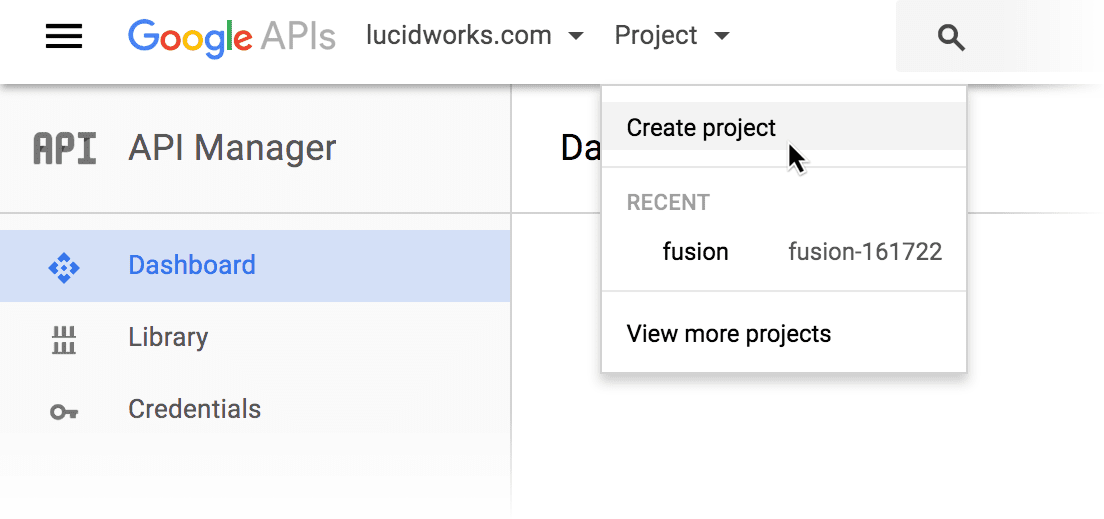
     1. In the upper left, open the **Project** menu and select **Create Project**:

          <img src="https://mintcdn.com/lucidworks/UvoyXcLoYZI3kpMl/assets/images/common/gdrive1.png?fit=max&auto=format&n=UvoyXcLoYZI3kpMl&q=85&s=7b8cd58734cddbd23abf3b5d4f0eda7a" alt="Create Project" width="1104" height="519" data-path="assets/images/common/gdrive1.png" />
     2. Enter a new project name, such as "fusion".
     3. Click **Create**.
     4. In the new project, click **Enable API**.
     5. Under "Google Apps APIs", click **Drive API**.
     6. Click **Enable**.

        Google may prompt you to create credentials. Do not create credentials here; we will do that a few steps later.
     7. Click **Library**, then **Admin SDK**.
     8. Click **Enable**.
  4. Create a service account key:

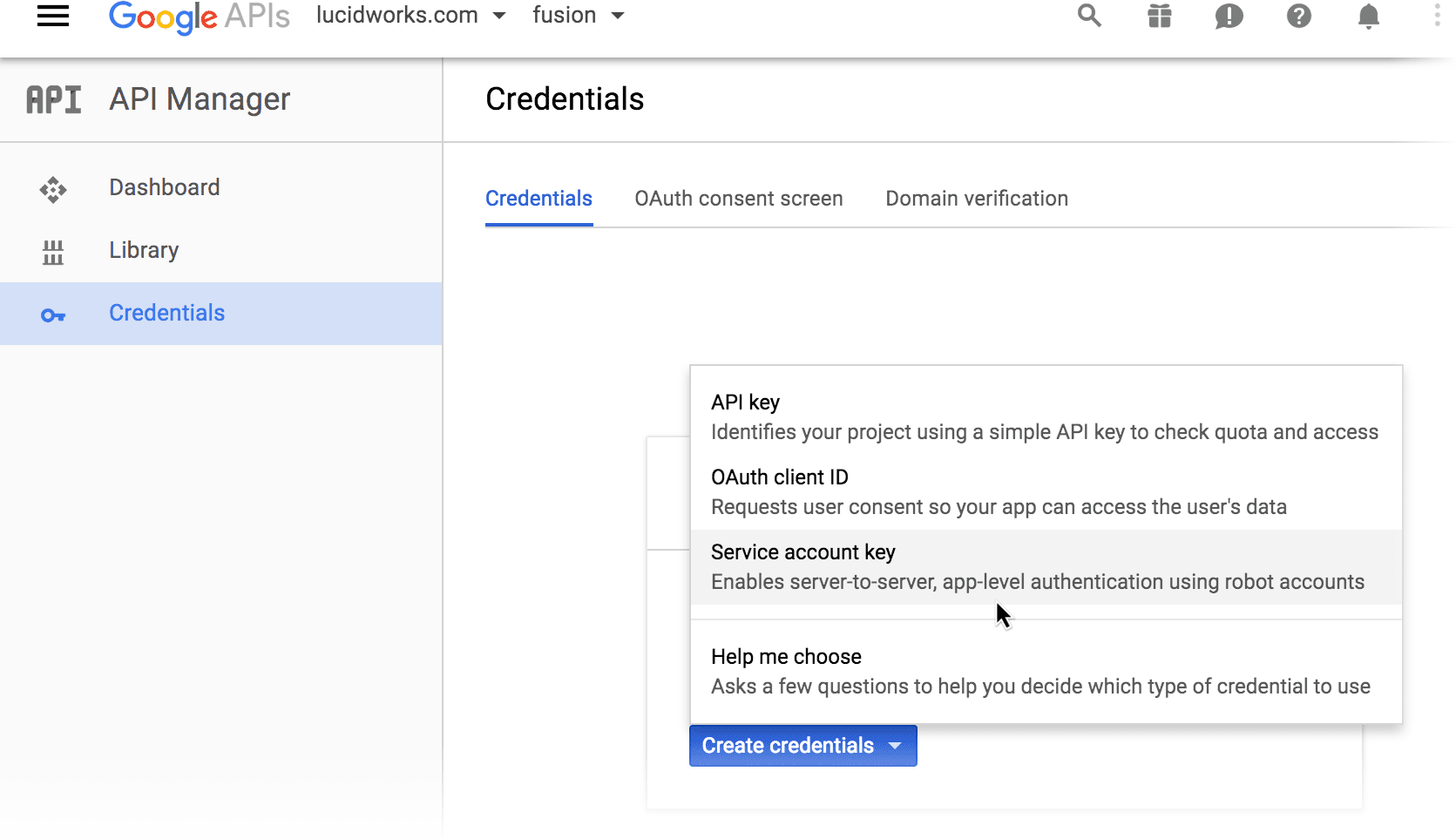
     1. Navigate to **Credentials** > **Create Credentials** > **Service account key**:
          <img src="https://mintcdn.com/lucidworks/UvoyXcLoYZI3kpMl/assets/images/common/gdrive2.png?fit=max&auto=format&n=UvoyXcLoYZI3kpMl&q=85&s=e8c9a325a8d01aef1e22bf1d3883fe10" alt="Service account key" width="1671" height="963" data-path="assets/images/common/gdrive2.png" />
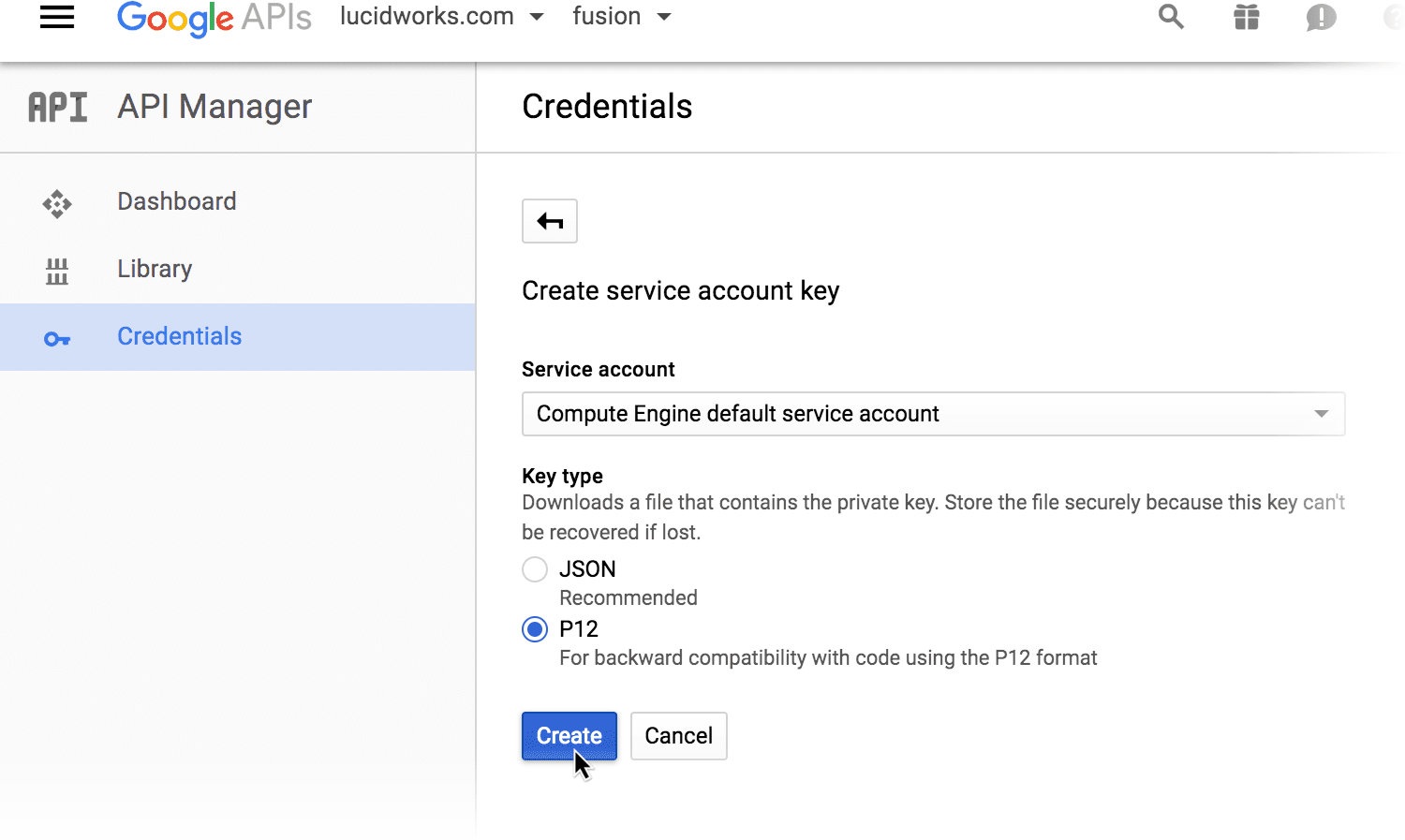
     2. From the **Service account** list, select  **Compute Engine default service account**.
     3. Under "Key type", select **P12**.
     4. Click **Create**.
          <img src="https://mintcdn.com/lucidworks/UvoyXcLoYZI3kpMl/assets/images/common/gdrive3.png?fit=max&auto=format&n=UvoyXcLoYZI3kpMl&q=85&s=b6d5ef95b6471f0b8f306bd98b926b87" alt="Create credentials" width="1500" height="897" data-path="assets/images/common/gdrive3.png" />

        A new private key downloads automatically to your local drive. Google prompts you to store it securely and save the displayed password. The key and password will not be provided to you again.
  5. Create a service account:

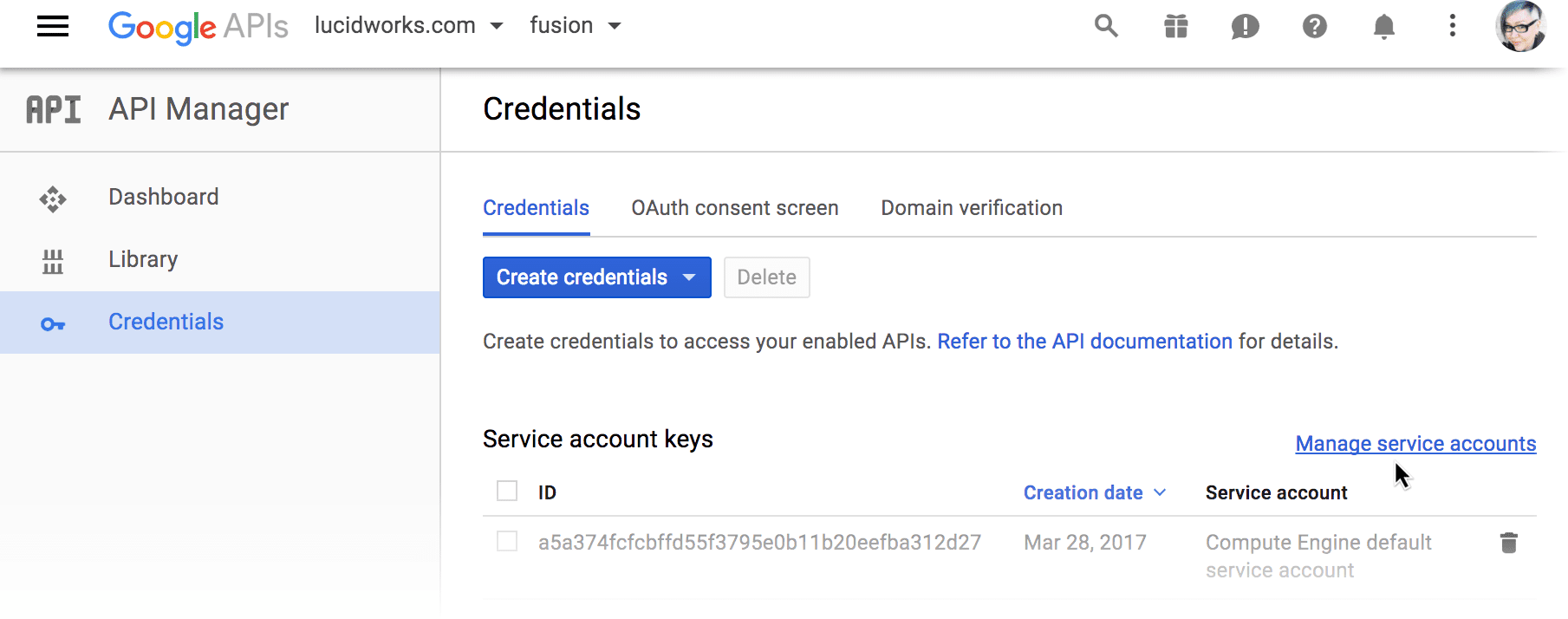
     1. Click **Manage service accounts**:
          <img src="https://mintcdn.com/lucidworks/UvoyXcLoYZI3kpMl/assets/images/common/gdrive4.png?fit=max&auto=format&n=UvoyXcLoYZI3kpMl&q=85&s=5d1e2514c5a7e0767906831ffbc3c505" alt="Manage service accounts" width="1809" height="714" data-path="assets/images/common/gdrive4.png" />
     2. Click **Create Service Account**.
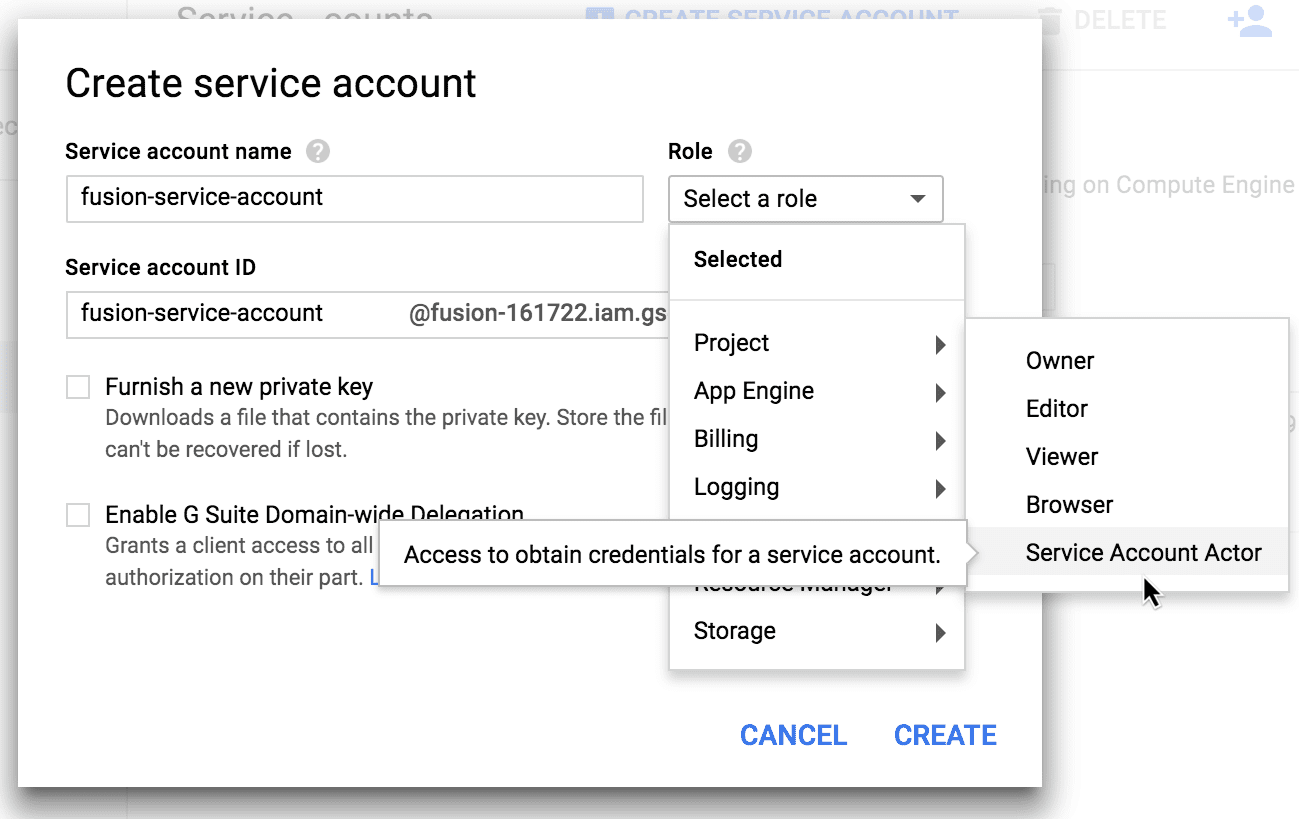
     3. Enter a service account name, such as "fusion-service-account".
     4. From the **Role** list, select **Project** > **Service account actor**:
          <img src="https://mintcdn.com/lucidworks/pcVooZE8fTjtTbXE/assets/images/common/gdrive5.png?fit=max&auto=format&n=pcVooZE8fTjtTbXE&q=85&s=b6aec9b6436585495f898a8a1c9deb0b" alt="Manage service accounts" width="1299" height="819" data-path="assets/images/common/gdrive5.png" />
     5. Select **Enable G Suite Domain-wide Delegation**.
     6. Enter an arbitrary name under **Product name for the consent screen**.
     7. Click **Create**.

        Google displays the list of service accounts.
     8. Next to the "fusion-service-account", click **View Client ID**.

        You may need to scroll to the right in order to see this link.
     9. Copy the client ID and service account name. Save them in a separate location.
     10. Click the menu in the upper left and select **IAM & Admin**.
     11. Next to the "fusion-service-account" project, select its permissions as shown below:
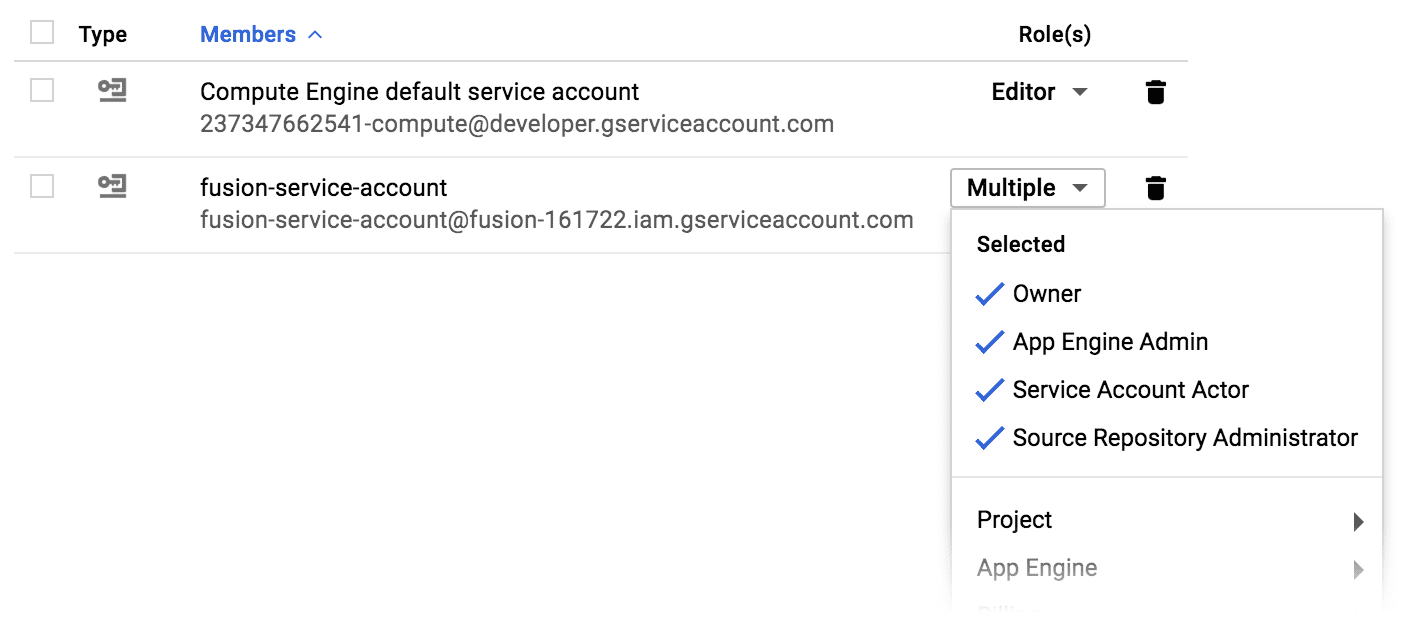
           <img src="https://mintcdn.com/lucidworks/pcVooZE8fTjtTbXE/assets/images/common/gdrive6.png?fit=max&auto=format&n=pcVooZE8fTjtTbXE&q=85&s=9db9672d6e46ed856a55d1c82e652bb8" alt="Manage service accounts" width="1401" height="627" data-path="assets/images/common/gdrive6.png" />
  6. Go to `https://admin.google.com` and log in with your [G-Suite](https://gsuite.google.com/) account.
  7. Navigate to **Admin Console** > **Security**.

     Remember, you must be logged in as a user with admin-level access rights.
  8. Navigate to **Show more** > **Advanced settings** > **Manage API client access**.
  9. Create a new API client:

     1. In the **Client Name** field, enter the client ID from your service account (above).
     2. In the **One or More API Scopes** field, enter the following:

        ```bash wrap theme={"dark"}
        https://www.googleapis.com/auth/admin.directory.group,https://www.googleapis.com/auth/admin.directory.group.readonly,https://www.googleapis.com/auth/admin.directory.user,https://www.googleapis.com/auth/admin.directory.user.alias.readonly,https://www.googleapis.com/auth/drive,https://www.googleapis.com/auth/drive.readonly
        ```
     3. Click **Authorize**.

     The new API client authorization appears in the list:
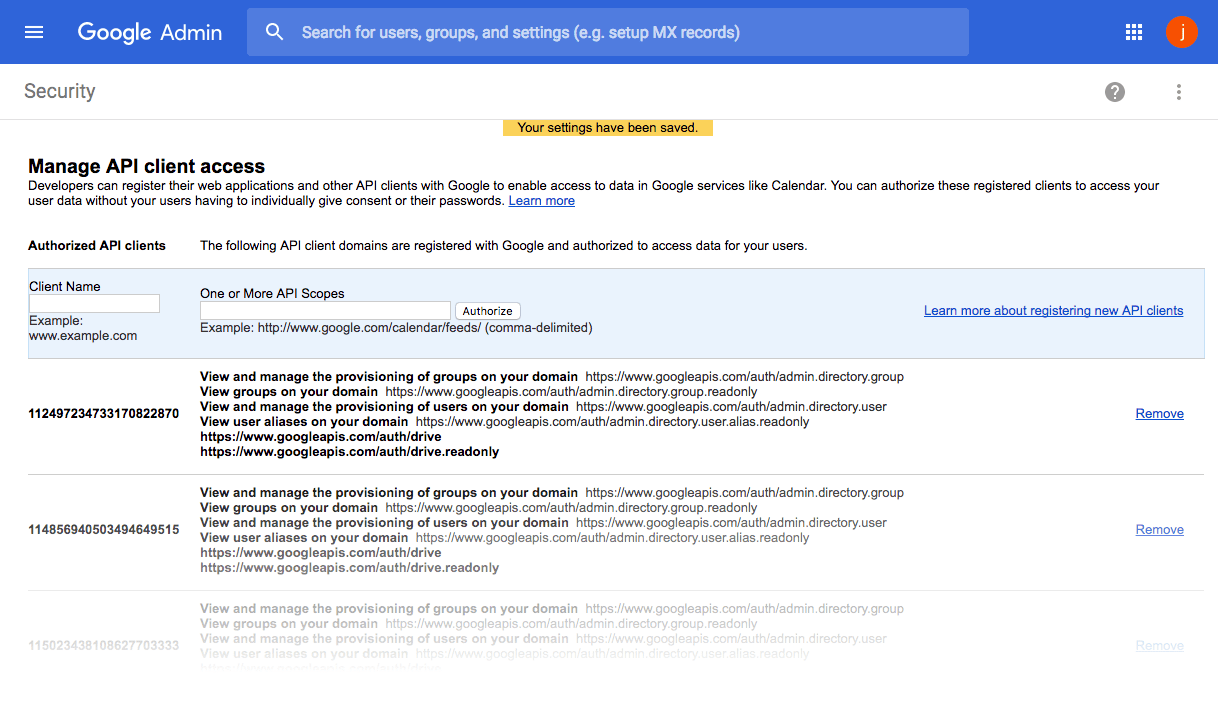
       <img src="https://mintcdn.com/lucidworks/pcVooZE8fTjtTbXE/assets/images/common/gdrive9.png?fit=max&auto=format&n=pcVooZE8fTjtTbXE&q=85&s=2bf7a655ea840ee56968b6d158669cee" alt="API client access" width="1218" height="705" data-path="assets/images/common/gdrive9.png" />

  ## Authentication for access to per-user documents

  These instructions show you how to configure Google to allow Fusion to crawl a specific user’s Google Drive, including documents that other users have shared with them. Fusion must be running in an [authorized domain](https://support.google.com/a/answer/60216?hl=en).

  **How to configure authentication for access to per-user documents**

  1. Log in to Google as a user with *admin-level access rights*.
  2. Go to [https://console.developers.google.com/](https://console.developers.google.com/).
  3. Create a Google project for Fusion:

     1. In the upper left, open the **Project** menu and select **Create Project**:

          <img src="https://mintcdn.com/lucidworks/UvoyXcLoYZI3kpMl/assets/images/common/gdrive1.png?fit=max&auto=format&n=UvoyXcLoYZI3kpMl&q=85&s=7b8cd58734cddbd23abf3b5d4f0eda7a" alt="Create Project" width="1104" height="519" data-path="assets/images/common/gdrive1.png" />
     2. Enter a new project name, such as "fusion".
     3. Click **Create**.
  4. Create the client ID and client secret:

     1. In the new project, click **Enable APIs and Services**.
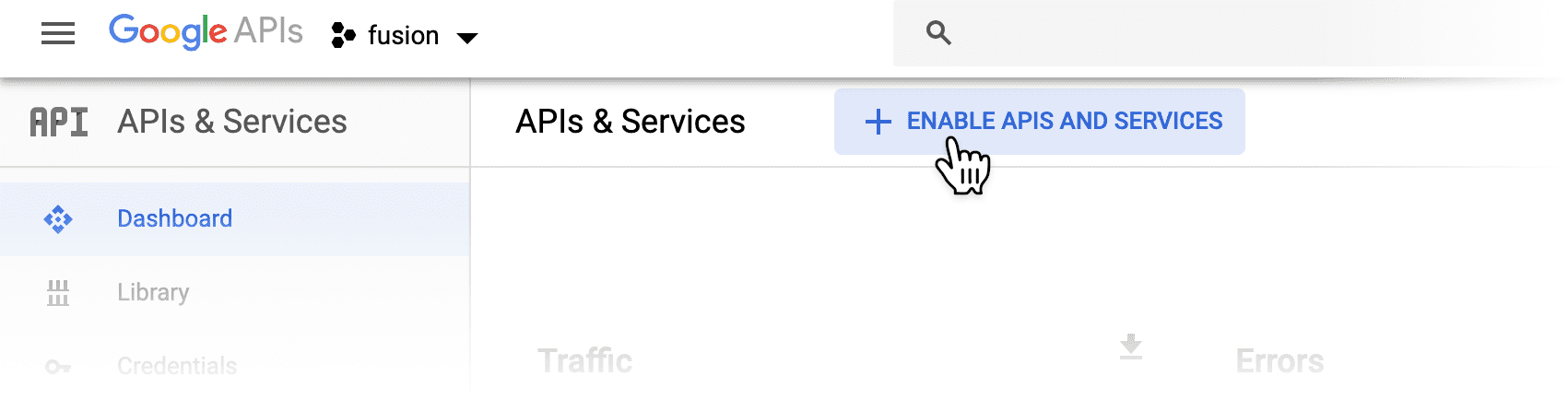
          <img src="https://mintcdn.com/lucidworks/UvoyXcLoYZI3kpMl/assets/images/common/gdrive-add-api.png?fit=max&auto=format&n=UvoyXcLoYZI3kpMl&q=85&s=f737e1037c3faddfa5037f16cb263975" alt="Enable APIs and Services" width="1701" height="434" data-path="assets/images/common/gdrive-add-api.png" />
     2. Under "Google Apps APIs", click **Drive API**.
     3. Click **Enable**.

        Google may prompt you to create credentials, if this is the first time you have enabled this API.
     4. Click **Credentials**, then **Create Credentials** > **Oauth client ID**.
     5. Select **Web application**.
     6. Enter a name for this Web application, such as "Fusion search".
     7. In the **Authorized Javascript origins** field, enter "[https://developers.google.com](https://developers.google.com)".
     8. In the **Authorized redirect URIs** field, enter "[https://developers.google.com/oauthplayground](https://developers.google.com/oauthplayground)" and press Return on your keyboard.
     9. In the **Authorized redirect URIs** field, enter "http\://FUSION\_HOST:8764/admin/oauth-redirect", specifying the hostname of your Fusion instance.
     10. Click **Create**.

         Google displays the new client ID and client secret.
     11. Copy the client ID and client secret. Save them in a separate location.
     12. Click **OK**.
     13. Go to [https://developers.google.com/oauthplayground/](https://developers.google.com/oauthplayground/).
     14. In the upper right, click the gear icon.

         The OAuth 2.0 configuration window opens.
     15. Select **Use your own OAuth credentials**.
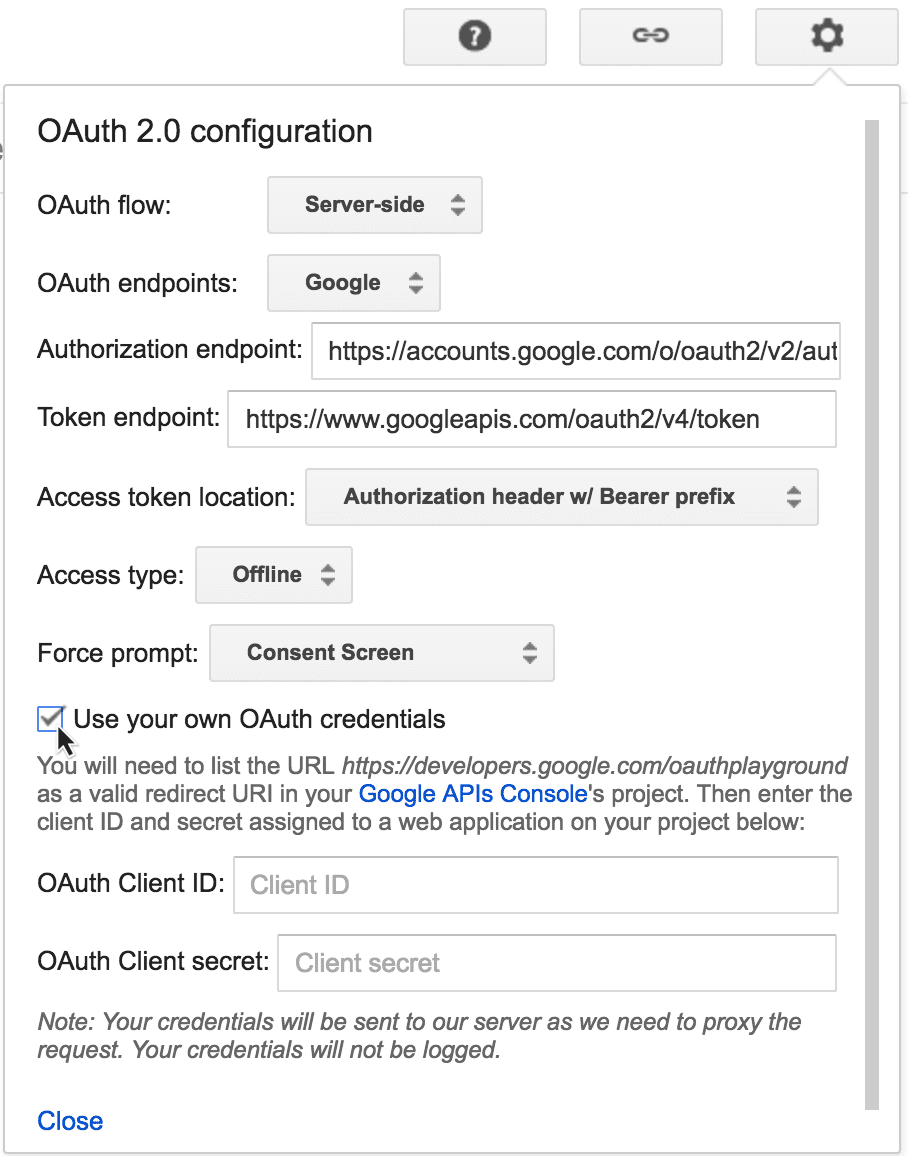
           <img src="https://mintcdn.com/lucidworks/pcVooZE8fTjtTbXE/assets/images/common/gdrive7.png?fit=max&auto=format&n=pcVooZE8fTjtTbXE&q=85&s=6564531cc4ee2356a4c22849c90a88b4" alt="Oauth config" width="908" height="1156" data-path="assets/images/common/gdrive7.png" />
     16. Enter your client ID and client secret.
     17. Click **Close**.
  5. Navigate to **Credentials** > **Oauth Consent Screen**.
  6. Under **Authorized domains**, enter the [Google-verified domain](https://support.google.com/cloud/answer/6158849?hl=en#authorized-domains) under which Fusion is running.
  7. Click **Save**.
  8. Add the credentials to the datasource configuration in the Fusion UI:

     1. In the Google Drive datasource configuration panel, enter a string for the **Datasource ID**.
     2. Enter the Google client ID and client secret.
     3. Click **Get Refresh Token**.

        A new browser window opens, and Google prompts you for permission to access the documents:
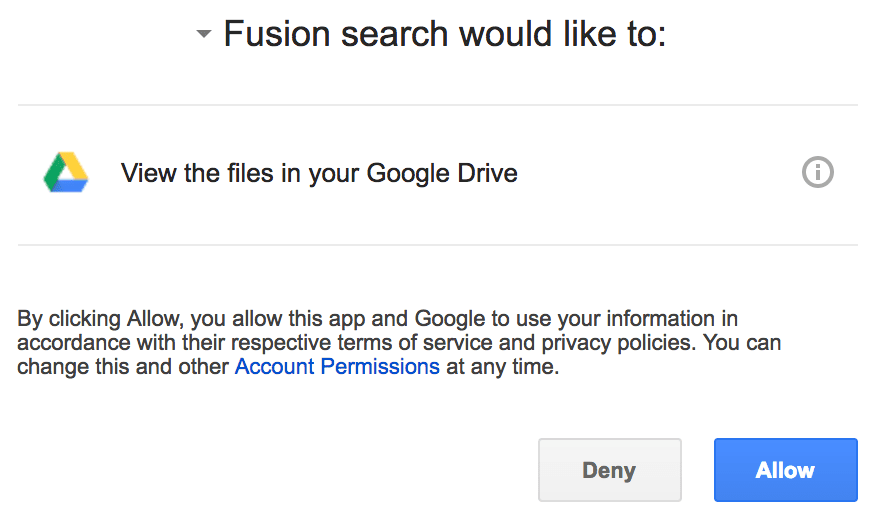
          <img src="https://mintcdn.com/lucidworks/pcVooZE8fTjtTbXE/assets/images/common/gdrive8.png?fit=max&auto=format&n=pcVooZE8fTjtTbXE&q=85&s=a8612c4c8fc07d7ba94a214d78ecea91" alt="Google prompt" width="873" height="507" data-path="assets/images/common/gdrive8.png" />
     4. Click **Allow**.

        Fusion automatically populates the **Google Drive Oauth Refresh Token** field.
     5. In the **Startlinks** field, enter a starting URL to which this user has access.

        See below for details about the format for this value.
     6. Click **Save**.
</Accordion>

## Configuration

The **StartLinks** values for this connector must be one of the following:

* `root` to crawl the whole organization or per-user drive.
* A folder ID.\
  For example, if your folder’s URL is `https://drive.google.com/drive/folders/0B1u0p7N096R6MWgma3gwUj4j` then the start link in the connector configuration should be `0B1u0p7N096R6MWgma3gwUj4j`.
* A document ID.\
  For example, if your document’s URL is `https://docs.google.com/document/d/10HRr5gD0OetzgEL9fsyxryf_AfiKqDQ8cn12YXQ/edit` then the start link in the connector configuration should be `10HRr5gD0OetzgEL9fsyxryf_AfiKqDQ8cn12YXQ`.

<Note>
  Debugging with HTTP is available in Fusion 4.2.6. You can enable `diagnosticMode` to diagnose an issue with HTTP level traffic logging.
</Note>

<Tip>
  When entering configuration values in the UI, use *unescaped* characters, such as `\t` for the tab character. When entering configuration values in the API, use *escaped* characters, such as `\\t` for the tab character.
</Tip>

<SchemaParamFields schema={schema} />
