> ## Documentation Index
> Fetch the complete documentation index at: https://doc.lucidworks.com/llms.txt
> Use this file to discover all available pages before exploring further.

# Box.com V1

> The Box connector retrieves data from a Box.com cloud-based data repository.

export const schema = {
  "type": "object",
  "title": "Box (v2)",
  "description": "Connector for Box.com. This connector can work in one of two ways: 1) It can crawl a single user's files (and files shared with that user) using OAuth, or 2) It  supports a JWT Service account method that will crawl all users in an enterprise using Box.com's \"As-User\" header to simulate each user. For large distributed accounts, JWT Service Account is recommended. Otherwise you need to explicitly provide a single user access to every file you want to crawl.",
  "required": ["parserId", "id", "properties", "pipeline"],
  "properties": {
    "parserId": {
      "type": "string",
      "title": "Parser ID",
      "description": "The Parser to use in the associated IndexPipeline."
    },
    "id": {
      "type": "string",
      "title": "Configuration ID",
      "description": "A unique identifier for this Configuration.",
      "minLength": 1,
      "pattern": "^[a-zA-Z0-9_-]+$"
    },
    "pipeline": {
      "type": "string",
      "title": "Pipeline ID",
      "description": "Name of the IndexPipeline used for processing output.",
      "minLength": 1,
      "pattern": "^[a-zA-Z0-9_-]+$"
    },
    "description": {
      "type": "string",
      "title": "Description",
      "description": "Optional description",
      "hints": ["lengthy"],
      "maxLength": 125
    },
    "modified": {
      "type": "string",
      "title": "Date Modified",
      "description": "The date at which this Configuration was last modified.",
      "hints": ["readonly", "hidden"]
    },
    "created": {
      "type": "string",
      "title": "Date Created",
      "description": "The date at which this Configuration was created.",
      "hints": ["readonly", "hidden"]
    },
    "type": {
      "type": "string",
      "title": "Type",
      "description": "A type ID for this connector.",
      "hints": ["readonly", "hidden"]
    },
    "collection": {
      "type": "string",
      "title": "Collection ID",
      "description": "The associated content Collection.",
      "hints": ["readonly", "hidden"],
      "minLength": 1,
      "pattern": "^[a-zA-Z0-9_-]+$"
    },
    "diagnosticLogging": {
      "type": "boolean",
      "title": "Diagnostic Logging",
      "description": "[Deprecated] Enables verbose diagnostic logging for troubleshooting. May increase log volume. Disabled by default.",
      "default": false
    },
    "type_description": {
      "type": "string",
      "title": "Type Description",
      "default": "Connector for Box.com. This connector can work in one of two ways: 1) It can crawl a single user's files (and files shared with that user) using OAuth, or 2) It  supports a JWT Service account method that will crawl all users in an enterprise using Box.com's \"As-User\" header to simulate each user. For large distributed accounts, JWT Service Account is recommended. Otherwise you need to explicitly provide a single user access to every file you want to crawl.",
      "hints": ["hidden", "readonly"]
    },
    "category": {
      "type": "string",
      "title": "Category",
      "default": "Connector for Box.com. This connector can work in one of two ways: 1) It can crawl a single user's files (and files shared with that user) using OAuth, or 2) It  supports a JWT Service account method that will crawl all users in an enterprise using Box.com's \"As-User\" header to simulate each user. For large distributed accounts, JWT Service Account is recommended. Otherwise you need to explicitly provide a single user access to every file you want to crawl.",
      "hints": ["hidden", "readonly"]
    },
    "connector": {
      "title": "Connector Type",
      "description": "Connector type.",
      "minLength": 1,
      "type": "string",
      "hints": ["hidden"]
    },
    "properties": {
      "type": "object",
      "title": "Box properties",
      "description": "Plugin specific properties.",
      "required": ["authenticationProperties", "application"],
      "properties": {
        "application": {
          "type": "object",
          "title": "Box application",
          "description": "Box application to crawl.",
          "required": [],
          "properties": {
            "boxItems": {
              "type": "array",
              "title": "Box Items",
              "description": "Enter the IDs of the folders you want to crawl. For instance, if your folder URL is https://app.box.com/folder/12345, you should enter 12345. Leave this property empty in order to crawl the entire Box Account.",
              "default": [],
              "items": {
                "type": "string",
                "minLength": 1
              }
            },
            "includedFileExtensions": {
              "type": "array",
              "title": "Included file extensions",
              "description": "Set of file extensions to be fetched. If specified, all non-matching files will be skipped.",
              "default": [],
              "items": {
                "type": "string",
                "minLength": 1
              }
            },
            "excludedFileExtensions": {
              "type": "array",
              "title": "Excluded file extensions",
              "description": "A set of all file extensions to be skipped from the fetch.",
              "default": [],
              "items": {
                "type": "string",
                "minLength": 1
              }
            },
            "inclusiveRegexes": {
              "type": "array",
              "title": "Inclusive regexes",
              "description": "Regular expressions for URI patterns to include. This will limit this datasource to only URIs that match the regular expression.",
              "default": [],
              "items": {
                "type": "string",
                "minLength": 1
              }
            },
            "exclusiveRegexes": {
              "type": "array",
              "title": "Exclusive regexes",
              "description": "Regular expressions for URI patterns to exclude. This will limit this datasource to only URIs that do not match the regular expression.",
              "default": [],
              "items": {
                "type": "string",
                "minLength": 1
              }
            },
            "indexFolderMetadata": {
              "type": "boolean",
              "title": "Index Folder Metadata",
              "description": "Enable indexing of folder metadata. Each folder will be represented by a document in the collection.",
              "default": false
            },
            "regexCacheSize": {
              "type": "number",
              "title": "",
              "default": 10000,
              "hints": ["hidden"],
              "maximum": 2147483647,
              "exclusiveMaximum": false,
              "minimum": -2147483648,
              "exclusiveMinimum": false,
              "multipleOf": 1
            }
          }
        },
        "authenticationProperties": {
          "type": "object",
          "title": "Authentication settings",
          "required": ["apiKey"],
          "properties": {
            "jwtProperties": {
              "type": "object",
              "title": "JWT Authentication settings",
              "required": [],
              "properties": {
                "appEntityId": {
                  "type": "string",
                  "title": "App Entity ID",
                  "description": "The JWT App User ID or JWT App Enterprise ID with access to crawl."
                },
                "publicKeyId": {
                  "type": "string",
                  "title": "Public Key Id",
                  "description": "The public key prefix from the box.com public keys"
                },
                "privateKeyBase64": {
                  "type": "string",
                  "title": "Private Key (Base64)",
                  "description": "Content of the private key. To get this value, open your key file and convert its content (including first and last line) to base64 string.",
                  "hints": ["secret"]
                },
                "privateKeyBase64VaultLabel": {
                  "type": "string",
                  "title": "Private Key (Base64) from Vault",
                  "description": "The Fusion managed secret to use for Private Key (Base64).",
                  "hints": ["vaultvaluetarget:privateKeyBase64", "enumUrl:/apps-manager/vault/labels?type=secret", "vaultref"]
                },
                "privateKeyPassword": {
                  "type": "string",
                  "title": "Private Key Password",
                  "description": "The password you entered for the private key file.",
                  "hints": ["secret"]
                },
                "privateKeyPasswordVaultLabel": {
                  "type": "string",
                  "title": "Private Key Password from Vault",
                  "description": "The Fusion managed secret to use for Private Key Password.",
                  "hints": ["vaultvaluetarget:privateKeyPassword", "enumUrl:/apps-manager/vault/labels?type=secret", "vaultref"]
                },
                "encryptionAlgorithm": {
                  "type": "string",
                  "title": "Encryption Algorithm",
                  "description": "Encryption Algorithm.",
                  "enum": ["RSA_SHA_256", "RSA_SHA_384", "RSA_SHA_512"],
                  "default": "RSA_SHA_256"
                },
                "accountType": {
                  "type": "string",
                  "title": "Account type",
                  "description": "App account type.",
                  "enum": ["USER", "ENTERPRISE"],
                  "default": "USER"
                },
                "tokenCacheEntries": {
                  "type": "number",
                  "title": "Max Token Cache Entries",
                  "description": "Max Token Cache Entries",
                  "default": 512,
                  "maximum": 2147483647,
                  "exclusiveMaximum": false,
                  "minimum": -2147483648,
                  "exclusiveMinimum": false,
                  "multipleOf": 1
                }
              }
            },
            "oAuthProperties": {
              "type": "object",
              "title": "OAuth Authentication settings",
              "required": [],
              "properties": {
                "refreshToken": {
                  "type": "string",
                  "title": "OAuth Refresh Token",
                  "description": "OAuth Refresh token"
                }
              }
            },
            "apiKey": {
              "type": "string",
              "title": "API Key",
              "description": "The box API Key"
            },
            "apiSecret": {
              "type": "string",
              "title": "API Secret",
              "description": "The Box API Secret",
              "hints": ["secret"]
            },
            "apiSecretVaultLabel": {
              "type": "string",
              "title": "API Secret from Vault",
              "description": "The Fusion managed secret to use for API Secret.",
              "hints": ["enumUrl:/apps-manager/vault/labels?type=secret", "vaultref", "vaultvaluetarget:apiSecret"]
            },
            "userCacheSize": {
              "type": "number",
              "title": "User cache size",
              "description": "Size of the user cache to save connection for impersonation",
              "default": 2000,
              "maximum": 2147483647,
              "exclusiveMaximum": false,
              "minimum": -2147483648,
              "exclusiveMinimum": false,
              "multipleOf": 1
            },
            "userCacheExpirationTime": {
              "type": "number",
              "title": "User cache expiration time",
              "description": "Time (minutes) before removing an item from the cache since it was last accessed by a read or a write",
              "default": 5,
              "maximum": 2147483647,
              "exclusiveMaximum": false,
              "minimum": -2147483648,
              "exclusiveMinimum": false,
              "multipleOf": 1
            }
          }
        },
        "proxyProperties": {
          "type": "object",
          "title": "Proxy settings",
          "required": [],
          "properties": {
            "proxyType": {
              "type": "string",
              "title": "Proxy type",
              "description": "Type of proxy to use.",
              "enum": ["HTTP", "SOCKS"]
            },
            "proxyHost": {
              "type": "string",
              "title": "Proxy host",
              "description": "The address to use when connecting through the proxy."
            },
            "proxyPort": {
              "type": "number",
              "title": "Proxy port",
              "description": "The port to use when connecting through the proxy.",
              "maximum": 2147483647,
              "exclusiveMaximum": false,
              "minimum": -2147483648,
              "exclusiveMinimum": false,
              "multipleOf": 1
            }
          },
          "hints": ["advanced"]
        },
        "connectionsConfig": {
          "type": "object",
          "title": "Connection settings",
          "required": [],
          "properties": {
            "readTimeout": {
              "type": "number",
              "title": "API Read Timeout (ms)",
              "description": "The box api read timeout in milliseconds.",
              "default": 120000,
              "maximum": 2147483647,
              "exclusiveMaximum": false,
              "minimum": -2147483648,
              "exclusiveMinimum": false,
              "multipleOf": 1
            },
            "connectTimeout": {
              "type": "number",
              "title": "API Connection Timeout (ms)",
              "description": "The box api connection timeout in milliseconds.",
              "default": 120000,
              "maximum": 2147483647,
              "exclusiveMaximum": false,
              "minimum": -2147483648,
              "exclusiveMinimum": false,
              "multipleOf": 1
            },
            "pageSize": {
              "type": "number",
              "title": "Request page size",
              "description": "Maximum number of items per paginated request",
              "default": 1000,
              "maximum": 1000,
              "exclusiveMaximum": false,
              "minimum": 1,
              "exclusiveMinimum": false,
              "multipleOf": 1
            }
          },
          "hints": ["advanced"]
        },
        "incrementalCrawlingConfig": {
          "type": "object",
          "title": "Incremental crawling settings",
          "required": [],
          "properties": {
            "cacheSize": {
              "type": "number",
              "title": "Folder collaborations cache size",
              "description": "Size of the folder collaborations cache",
              "default": 1000,
              "maximum": 2147483647,
              "exclusiveMaximum": false,
              "minimum": -2147483648,
              "exclusiveMinimum": false,
              "multipleOf": 1
            },
            "cacheExpirationTime": {
              "type": "number",
              "title": "Folder collaborations cache expiration time",
              "description": "Time in minutes before removing a folder collaboration set",
              "default": 5,
              "maximum": 2147483647,
              "exclusiveMaximum": false,
              "minimum": -2147483648,
              "exclusiveMinimum": false,
              "multipleOf": 1
            }
          },
          "hints": ["advanced"]
        },
        "maximumItemLimitConfig": {
          "type": "object",
          "title": "Item Count Limit",
          "required": [],
          "properties": {
            "maxItems": {
              "type": "number",
              "title": "Maximum Output Limit",
              "description": "Limits the number of items emitted to the configured IndexPipeline. The default is no limit (-1).",
              "default": -1,
              "maximum": 2147483647,
              "exclusiveMaximum": false,
              "minimum": -2147483648,
              "exclusiveMinimum": false,
              "multipleOf": 1
            }
          },
          "hints": ["advanced"]
        },
        "sizeLimitProperties": {
          "type": "object",
          "title": "Item Size Limits",
          "description": "Options for including or excluding items based on size, in bytes.",
          "required": [],
          "properties": {
            "maxSizeBytes": {
              "type": "number",
              "title": "Maximum",
              "description": "Used for excluding items when the item size is larger than the configured value.",
              "default": -1,
              "maximum": 2147483647,
              "exclusiveMaximum": false,
              "minimum": -2147483648,
              "exclusiveMinimum": false,
              "multipleOf": 1
            },
            "minSizeBytes": {
              "type": "number",
              "title": "Minimum",
              "description": "Used for excluding items when the item size is smaller than the configured value.",
              "default": 1,
              "maximum": 2147483647,
              "exclusiveMaximum": false,
              "minimum": -2147483648,
              "exclusiveMinimum": false,
              "multipleOf": 1
            }
          },
          "hints": ["advanced"]
        },
        "itemRetryProperties": {
          "type": "object",
          "title": "Item retry settings",
          "description": "Options to configure the retry operation for items.",
          "required": [],
          "properties": {
            "maxRetries": {
              "type": "number",
              "title": "Max retry attempts",
              "description": "The maximum number of attempts for a failed item",
              "default": 3,
              "maximum": 20,
              "exclusiveMaximum": false,
              "minimum": 0,
              "exclusiveMinimum": false,
              "multipleOf": 1
            },
            "retryDelayInSeconds": {
              "type": "number",
              "title": "Retry delay",
              "description": "The amount of time, in seconds, before process again a failed item",
              "default": 30,
              "maximum": 600,
              "exclusiveMaximum": false,
              "minimum": 1,
              "exclusiveMinimum": false,
              "multipleOf": 1
            }
          },
          "hints": ["advanced"]
        },
        "security": {
          "type": "object",
          "title": "Graph security filtering configuration",
          "required": [],
          "properties": {
            "collectionId": {
              "type": "string",
              "title": "ACL collection id",
              "description": "Sidecar collection ID for storing ACL records. Defaults to the content collection if not specified."
            },
            "enabled": {
              "type": "boolean",
              "title": "Enable security trimming",
              "description": "Enable query-time security-trimming",
              "default": true
            }
          }
        }
      }
    },
    "coreProperties": {
      "type": "object",
      "title": "Core Properties",
      "description": "Common behavior and performance settings.",
      "required": [],
      "properties": {
        "fetchSettings": {
          "type": "object",
          "title": "Fetch Settings",
          "description": "System level settings for controlling fetch behavior and performance.",
          "required": [],
          "properties": {
            "numFetchThreads": {
              "type": "number",
              "title": "Fetch Threads",
              "description": "Maximum number of fetch threads; defaults to 5.This setting controls the number of threads that call the Connectors fetch method.Higher values can, but not always, help with overall fetch performance.",
              "default": 5,
              "maximum": 500,
              "exclusiveMaximum": false,
              "minimum": 1,
              "exclusiveMinimum": false,
              "multipleOf": 1
            },
            "indexingThreads": {
              "type": "number",
              "title": "Index Subscription Threads",
              "description": "Maximum number of indexing threads; defaults to 4.This setting controls the number of threads in the indexing service used for processing content documents emitted by this datasource.Higher values can sometimes help with overall fetch performance.",
              "default": 4,
              "maximum": 10,
              "exclusiveMaximum": false,
              "minimum": 1,
              "exclusiveMinimum": false,
              "multipleOf": 1
            },
            "pluginInstances": {
              "type": "number",
              "title": "Number of plugin instances for distributed fetching",
              "description": "Maximum number of plugin instances for distributed fetching. Only specified number of plugin instanceswill do fetching. This is useful for distributing load between different instances.",
              "default": 0,
              "maximum": 500,
              "exclusiveMaximum": false,
              "minimum": 0,
              "exclusiveMinimum": false,
              "multipleOf": 1
            },
            "fetchItemQueueSize": {
              "type": "number",
              "title": "Fetch Item Queue Size",
              "description": "Size of the fetch item queue.Larger values result in increased memory usage, but potentially higher performance.Default is 10k.",
              "default": 10000,
              "hints": ["hidden"],
              "maximum": 500000,
              "exclusiveMaximum": false,
              "minimum": 1,
              "exclusiveMinimum": false,
              "multipleOf": 1
            },
            "fetchRequestCheckInterval": {
              "type": "number",
              "title": "Fetch request check interval(ms)",
              "description": "The amount of time to wait before check if a request is done",
              "default": 15000,
              "hints": ["hidden"],
              "maximum": 500000,
              "exclusiveMaximum": false,
              "minimum": 1000,
              "exclusiveMinimum": false,
              "multipleOf": 1
            },
            "fetchResponseScheduledTimeout": {
              "type": "number",
              "title": "Fetch response scheduled timeout(ms)",
              "description": "The maximum amount of time for a response to be scheduled. The task will be canceled if this setting is exceeded.",
              "default": 300000,
              "maximum": 500000,
              "exclusiveMaximum": false,
              "minimum": 1000,
              "exclusiveMinimum": false,
              "multipleOf": 1
            },
            "fetchResponseCompletedTimeout": {
              "type": "number",
              "title": "Fetch response completion timeout(ms)",
              "description": "The maximum amount of time for a response to be completed. If exceeded, the task will be retried if the job is still running",
              "default": 300000,
              "hints": ["hidden"],
              "maximum": 600000,
              "exclusiveMaximum": false,
              "minimum": 1,
              "exclusiveMinimum": false,
              "multipleOf": 1
            },
            "indexingInactivityTimeout": {
              "type": "number",
              "title": "Indexing inactivity timeout(seconds)",
              "description": "The maximum amount of time to wait for indexing results (in seconds). If exceeded, the job will fail with an indexing inactivity timeout.",
              "default": 86400,
              "maximum": 691200,
              "exclusiveMaximum": false,
              "minimum": 60,
              "exclusiveMinimum": false,
              "multipleOf": 1
            },
            "pluginInactivityTimeout": {
              "type": "number",
              "title": "Plugin inactivity timeout(seconds)",
              "description": "The maximum amount of time to wait for plugin activity (in seconds). If exceeded, the job will fail with a plugin inactivity timeout.",
              "default": 600,
              "maximum": 691200,
              "exclusiveMaximum": false,
              "minimum": 60,
              "exclusiveMinimum": false,
              "multipleOf": 1
            },
            "indexMetadata": {
              "type": "boolean",
              "title": "Index metadata",
              "description": "When enabled the metadata of skipped items will be indexed to the content collection.",
              "default": false
            },
            "indexContentFields": {
              "type": "boolean",
              "title": "Index content fields",
              "description": "When enabled, content fields will be indexed to the crawl-db collection.",
              "default": false
            },
            "asyncParsing": {
              "type": "boolean",
              "title": "Async Parsing",
              "description": "When enabled, content will be indexed asynchronously.",
              "default": false
            }
          }
        },
        "strayDeletionSettings": {
          "type": "object",
          "title": "Stray Content Deletion Settings",
          "description": "System level settings for controlling stray content deletion behavior",
          "required": [],
          "properties": {
            "enableStrayDeletion": {
              "type": "boolean",
              "title": "Enable Stray Deletion",
              "description": "When enabled, items not re-encountered in the current crawl are deleted from the content collection. Defaults to true.",
              "default": true
            },
            "circuitBreakerSettings": {
              "type": "object",
              "title": "Circuit Breaker Settings",
              "description": "Settings that control the circuit breaker, which prevents mass deletion when an unusually high percentage of items are identified as stray in a crawl.",
              "required": [],
              "properties": {
                "percentageThreshold": {
                  "type": "number",
                  "title": "Stray Deletion Threshold (%)",
                  "description": "Maximum percentage of indexed items that may be deleted as stray in a crawl. If the total stray item exceeds this percentage, the circuit breaker blocks the deletion to prevent accidental data loss. Accepts values from 0 to 100. Defaults to 80.",
                  "default": 80,
                  "maximum": 100,
                  "exclusiveMaximum": false,
                  "minimum": 0,
                  "exclusiveMinimum": false,
                  "multipleOf": 1
                },
                "enableCircuitBreaker": {
                  "type": "boolean",
                  "title": "Enable Circuit Breaker",
                  "description": "When enabled, stray deletion is blocked if the percentage of items to be deleted exceeds the configured threshold. Disable only if unconditional stray deletion is required regardless of volume. Defaults to true.",
                  "default": true
                }
              }
            }
          }
        },
        "skipConfigValidation": {
          "type": "boolean",
          "title": "Skip Validation",
          "description": "Enable to skip configuration validation when it takes too long and causes timeout issue",
          "default": false
        }
      },
      "hints": ["advanced"]
    }
  },
  "category": "FileSystem",
  "categoryPriority": 1
};

export const SchemaParamFields = ({schema}) => {
  const sanitize = str => {
    if (typeof str !== "string") return str;
    return str.replace(/^"(.*)"$/s, "$1").replace(/\\/g, "").replace(/"/g, "'");
  };
  const formatDescription = str => {
    const s = sanitize(str);
    return (/[.!?]\)*$/).test(s) ? s : `${s}.`;
  };
  const {description, properties = {}, required: requiredProps = []} = schema;
  const visibleProps = useMemo(() => Object.entries(properties).filter(([, prop]) => !prop.hints?.includes("hidden")), [properties]);
  return <div>
      {description && <p>{formatDescription(description)}</p>}

      {visibleProps.map(([name, prop]) => {
    const isRequired = requiredProps.includes(name);
    const hasDefault = prop.default !== undefined;
    const rawDefault = prop.default;
    const isComplexDefault = hasDefault && (typeof rawDefault === "object" || typeof rawDefault === "string" && (rawDefault.length > 20 || rawDefault.includes('"')));
    const fieldProps = {
      key: name,
      body: prop.title || name,
      type: prop.type,
      ...prop.title && ({
        post: [<><span className="text-stone-400 dark:text-stone-500">API property: </span>{name}</>]
      }),
      ...isRequired && ({
        required: true
      }),
      ...!isComplexDefault && hasDefault ? {
        default: sanitize(String(rawDefault))
      } : {}
    };
    const isObject = prop.type === "object" && prop.properties;
    const isArrayOfObjects = prop.type === "array" && prop.items?.type === "object" && prop.items.properties;
    return <ParamField {...fieldProps}>
            {prop.description && <p>{formatDescription(prop.description)}</p>}

            {isComplexDefault && <div className="flex">
                <p>
                  <strong>Default:</strong>
                </p>
                <pre className="!my-0">
                  <code>
                    {JSON.stringify(rawDefault, null, 2)}
                  </code>
                </pre>
              </div>}

            {isArrayOfObjects && <div className="flex">
              <p>
                <strong>Object attributes:</strong>
              </p>
              <pre className="!my-0">
                <code>
                  {'{\n'}
                  {Object.entries(prop.items.properties).map(([iname, iprop]) => <>
                      {`  ${iname}`}
                      {prop.items?.required?.includes(iname) && <span style={{
      color: 'red'
    }}> required</span>}
                      {`: {\n    display name: ${sanitize(iprop.title || '')}\n    type: ${iprop.type}\n  }\n`}
                    </>)}
                  {'}'}
                </code>
              </pre>
              </div>}

            {isObject && <Expandable title="properties">
                <SchemaParamFields schema={{
      properties: prop.properties,
      required: prop.required
    }} />
              </Expandable>}
          </ParamField>;
  })}
    </div>;
};

export const LwTemplate = ({title = "Key questions to get you started", icon = "sparkles", cta = "Powered by Agent Studio", linkHref = "https://lucidworks.com/demo/?utm_source=docs&utm_medium=referral&utm_campaign=docs_cta_ai"}) => {
  const [isLoaded, setIsLoaded] = useState(false);
  useEffect(() => {
    const timer = setTimeout(() => {
      setIsLoaded(true);
    }, 500);
    return () => clearTimeout(timer);
  }, []);
  return <div className="lw-template-container">
      <Card title={title} icon={icon}>
        {isLoaded && <span dangerouslySetInnerHTML={{
    __html: `<lw-template id="a029c1a9-28be-427e-b0e1-5d918920246a"></lw-template
            >`
  }} />}
        <Link href={linkHref} className="agent-studio-link text-left text-gray-600 gap-2 dark:text-gray-400 text-sm font-medium flex flex-row items-center hover:text-primary dark:hover:text-primary-light group-hover:text-primary group-hover:dark:text-primary-light">Powered by Lucidworks Agent Studio</Link>
      </Card>
    </div>;
};

export const InlineImage = ({src, alt = '', height = '2em'}) => {
  return <img src={src} alt={alt} style={{
    display: 'inline',
    verticalAlign: 'start',
    height: height,
    margin: '0'
  }} />;
};

[localhost link]: http://localhost:3000/docs/fusion-connectors/connectors/v1/box.com

[mintlify link]: https://doc.lucidworks.com/docs/fusion-connectors/connectors/v1/box.com

[old doc.lw link]: https://doc.lucidworks.com/fusion-connectors/79

<Callout icon="plug" color="#A4C6F7" iconType="solid">
  **Compatible with Fusion version:** 4.0.0 through 5.2.2
</Callout>

The Box V1 connector retrieves data from a Box.com cloud-based data repository. To fetch content from multiple Box users, you must configure a Box.com datasource. For limited testing using a single user account, you can configure Box.com tokens.

<AccordionGroup>
  <Accordion title="Configure a Box.com datasource">
    The Box connector retrieves data from a Box.com cloud-based data repository.

    This topic applies to the Box.com V1 and Box.com V2 connectors. The Box.com V1 connector is available in Fusion 5.2 and earlier. The Box.com V2 connector is available in Fusion 5.3 and later.

    <LwTemplate />

    ## Configuration overview

    <Note>These steps are for a multi-user Box.com data repository. For limited testing using a single user account, you can create a Box app that uses Standard OAuth 2.0 authentication.</Note>

    Following is an overview of the steps required to set up Box and Fusion, and to crawl a Box data repository.

    1. Sign up for a Box developer account.

    2. Enable 2-step verification.

    3. Create a Box app that Fusion can use to crawl the Box files.

    4. Configure your app to use a Box service account.

    5. Install Fusion’s Box Connector.

    6. Create datasources in Fusion that use the Box connector.

    7. Crawl the Fusion datasources.

    ## Set Up Box

    Set up Box so that Fusion can crawl Box data repositories.

    ### Step 1: Sign Up for a Box Developer Account

    If you already have an account, proceed to Step 2: Enable 2-Step Verification.

    1. Open the [Box Developers Console](https://app.box.com/developers/console).
    2. In the top right corner, click **Sign Up**.
    3. Select an appropriate Platform Developer plan.
    4. Enter the requested information and click **Submit**.
    5. Open the confirmation email and click **Verify Email**.
    6. Log in to your Box account.

    ### Step 2: Enable 2-Step Verification

    1. Log in to your Box developer account.
       1. Open the [Box Developers Console](https://app.box.com/developers/console).
       2. Log in as the admin.
    2. <a name="Box-CreateCrawlAccount" /> Create the Box account that you want to use for crawling.
       1. Open the [Users page](https://app.box.com/master/users) in the Box admin console.
       2. Click **+Users** to create a new user account.
       3. Enter the Name and Email for the user, and then click **Add user**.
       4. Click the user you just created to enter its user settings.
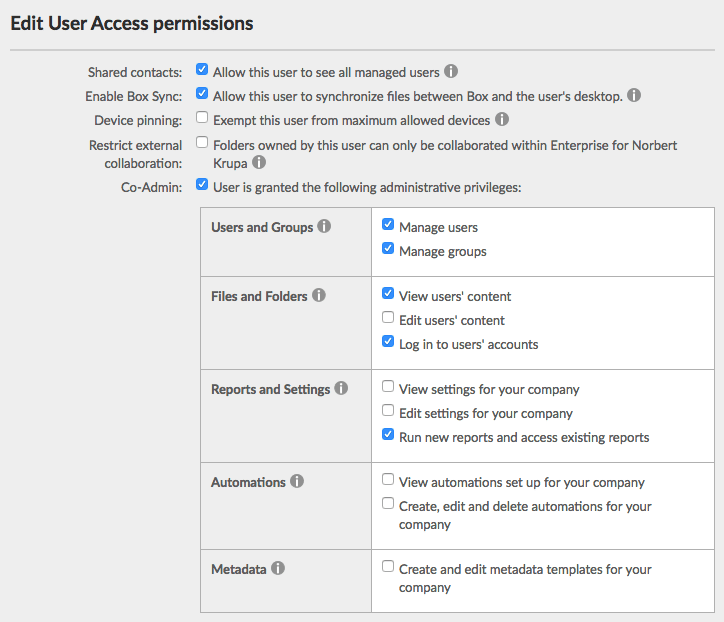
       5. Make this user a [Co-Admin](https://support.box.com/hc/en-us/articles/360043694174-Understanding-Administrator-and-Co-Administrator-Permissions) by selecting Co-Admin checkbox. Once clicked, a pane titled "User is granted the following administrative privileges" appears. Select all of the following:

          * Manage users
          * Manage groups
          * View users' content
          * Log in to users' accounts
          * Run new reports and access existing reports

                <img src="https://mintcdn.com/lucidworks/9iE2X4O8aa8U8XL3/assets/images/common/BoxPermissions.png?fit=max&auto=format&n=9iE2X4O8aa8U8XL3&q=85&s=8cada4a2881da0051b220cce5f36f2c1" alt="accept screen for Box connector permissions" width="724" height="622" data-path="assets/images/common/BoxPermissions.png" />
       6. Click **Save**.
       7. Close the Admin Console browser tab.
    3. Enable 2-step verification for unrecognized logins:
       1. Open the [Account Settings](https://app.box.com/account) page. (You can reach this page from the drop-down menu under your initials.)
       2. On the **Account** tab, under **Authentication**, select **Require 2-step verification for unrecognized logins**.
       3. Choose your **Country** and enter a **Mobile Phone Number**, and then click **Continue**.
       4. Enter the verification code you receive, and then click **Continue**.
       5. If you are using a new mobile device, Box will send you a second code. Enter it, and then click **Submit**.
       6. Click **Save Changes**.

    ### Step 3: Create a Box App that Fusion Can Use to Crawl the Box files

    Create a Box app that uses OAuth 2.0 with JWT server authentication.

    If you already have an app, proceed to Step 4: Configure Your App to Use a Box Service Account.

    1. Open the [Box Developers Console](https://app.box.com/developers/console).
    2. Click **Create New App**.
    3. Select **Custom App**, and then click **Next**.
    4. Click **OAuth 2.0 with JWT (Server Authentication)**, and then click **Next**.
    5. Name your app, and then click **Create App**. The name must be globally unique across all apps created by all Box users.
    6. Click **View Your App**.

    ### Step 4: Configure Your App to Use a Box Service Account

    1. <a name="Box-Key-Creation" /> Use OpenSSL to create a private/public key pair:
       1. Install OpenSSL if you need to. Windows instructions are [here](http://gnuwin32.sourceforge.net/packages/openssl.htm).
       2. Open a Command Prompt window and run these commands to generate a private/public key pair:

          ```
          openssl genrsa -aes128 -out private_key.pem 2048
          ```

          Enter a password for the private key when prompted.

          ```
          openssl rsa -pubout -in private_key.pem -out public_key.pem
          ```

          In the current directory of the Command Prompt, you now have private and public key files, `private_key.pem` and `public_key.pem` respectively.
    2. Open the [Box Developers Console](https://app.box.com/developers/console), log in as Admin if you are asked to log in, and click your app.
    3. <a name="Box-ConfigureApp-Step3" /> In the left navigation menu, click **Configuration**.
    4. Configure scopes and advanced features:

       1. Under **Application Access**, select **Enterprise**.
       2. Under **Application Scopes**, deselect **Manage groups**.
       3. Under **Advanced Features**, enable **Generate User Access Tokens** and **Perform Actions as Users**.
       4. Click **Save Changes**.
    5. <a name="Box-ConfigureApp-AddPublicKey" /> In the **Add and Manage Public Keys** area, click **Add a Public Key** and paste the contents of the `public_key.pem` file (generated from
       Step 4: Configure Your App to Use a Box Service Account) into the text box.
       1. Make a note of the new **Public Key ID** that you just created.
    6. <a name="Box-ConfigureApp-Step6" /> Under **OAuth 2.0 Credentials**, click **COPY** for the Client ID.
    7. Authorize your app:

       1. Open the [Box Admin Console](https://app.box.com/master).
       2. In the left navigation menu, click **Settings** > **Enterprise Settings** (or **Business Settings**) > **Apps**.
       3. Under **Custom Applications**, click **Authorize New App**.
       4. In the **API Key** box, paste the Client ID credential you copied in Step 6, and then click **Next**.
       5. Read the App Authorization dialog and click **Authorize**.
       6. Close the Admin Console browser tab.

       <Note>   If you change your app’s configuration later, you must repeat this step to re-authorize your app.</Note>
    8. Close the Dev Console browser tab.

    ## Set Up Fusion

    Set up Fusion to crawl Box data repositories.

    ### Step 5: Install Fusion’s Box Connector

    1. Navigate to the [Fusion 4.x Connector Downloads](/docs/fusion-connectors/downloads/fusion-4-x-connector-downloads)
    2. Select the Box connector link for the release to download. The .zip file is downloaded.
    3. Do not unzip the file.
    4. Open the Fusion UI and click **System** > **Blobs**.
    5. Click **Add**.
    6. Select **Connector Plugin**.
    7. Click **Choose File**, select the file, and then click **Open**.
    8. Click **Upload**.

    ### Step 6: Create Datasources

    Create datasources that use the Box connector to access the Box data repository.

    For each datasource:

    1. In the Fusion UI, Navigate to **Indexing** > **Datasources**.
    2. Click **Add**.
    3. Select **Box.com**.
    4. Fill in the form. Note the following regarding configuration settings to use:

       |                                           |                                                                                                                                                                                                                                                                                                                                                                                                                                                                                                                                                                                                                                                                                                                                                                                                                                                                                                                                                                                                                                                                                                                                                                                                                                                                                                                                                                                                                                                                                                                                                                                                                                                                                                                                                                                                                                                                                                                                                                                                                                                                                                                                                                                                                                                                                                                                                                                                                                                                                                                                                                                                                                                                                                                                                                                                                                                                                                                                                                                                                                                                                                                                                                                                                                                                                                                                                                 |
       | ----------------------------------------- | --------------------------------------------------------------------------------------------------------------------------------------------------------------------------------------------------------------------------------------------------------------------------------------------------------------------------------------------------------------------------------------------------------------------------------------------------------------------------------------------------------------------------------------------------------------------------------------------------------------------------------------------------------------------------------------------------------------------------------------------------------------------------------------------------------------------------------------------------------------------------------------------------------------------------------------------------------------------------------------------------------------------------------------------------------------------------------------------------------------------------------------------------------------------------------------------------------------------------------------------------------------------------------------------------------------------------------------------------------------------------------------------------------------------------------------------------------------------------------------------------------------------------------------------------------------------------------------------------------------------------------------------------------------------------------------------------------------------------------------------------------------------------------------------------------------------------------------------------------------------------------------------------------------------------------------------------------------------------------------------------------------------------------------------------------------------------------------------------------------------------------------------------------------------------------------------------------------------------------------------------------------------------------------------------------------------------------------------------------------------------------------------------------------------------------------------------------------------------------------------------------------------------------------------------------------------------------------------------------------------------------------------------------------------------------------------------------------------------------------------------------------------------------------------------------------------------------------------------------------------------------------------------------------------------------------------------------------------------------------------------------------------------------------------------------------------------------------------------------------------------------------------------------------------------------------------------------------------------------------------------------------------------------------------------------------------------------------------------------------- |
       | Setting                                   | Notes                                                                                                                                                                                                                                                                                                                                                                                                                                                                                                                                                                                                                                                                                                                                                                                                                                                                                                                                                                                                                                                                                                                                                                                                                                                                                                                                                                                                                                                                                                                                                                                                                                                                                                                                                                                                                                                                                                                                                                                                                                                                                                                                                                                                                                                                                                                                                                                                                                                                                                                                                                                                                                                                                                                                                                                                                                                                                                                                                                                                                                                                                                                                                                                                                                                                                                                                                           |
       | Start Links                               | Each start link defined for the datasource must consist of a numeric Box file ID or directory ID. The root directory of any Box account has ID 0 (zero). To crawl your entire Box repository, enter '0'. These images indicate with underlines where you can get a folder ID or file ID. Select a folder or file at [Box.com](https://account.box.com/login?). Folder ID: <img src="https://mintcdn.com/lucidworks/2n5qtVSsU54oMlB1/assets/images/3.1/box-folder-ID.png?fit=max&auto=format&n=2n5qtVSsU54oMlB1&q=85&s=b8441a7103d5a4d1016c9dcf87b17715" alt="Folder ID" width="735" height="74" data-path="assets/images/3.1/box-folder-ID.png" /> Enter the start link `34192617287`. File ID: <img src="https://mintcdn.com/lucidworks/2n5qtVSsU54oMlB1/assets/images/3.1/box-file-ID.png?fit=max&auto=format&n=2n5qtVSsU54oMlB1&q=85&s=2d4aec2cbf6002350967f24e44edf537" alt="File ID" width="721" height="76" data-path="assets/images/3.1/box-file-ID.png" /> Enter the start link `204871656422`: |

       | API Key                                   | In the [Box Developers Console](https://app.box.com/developers/console), select the app. On the **Configuration** tab under **OAuth 2.0 Credentials**, use the **Client ID**.                                                                                                                                                                                                                                                                                                                                                                                                                                                                                                                                                                                                                                                                                                                                                                                                                                                                                                                                                                                                                                                                                                                                                                                                                                                                                                                                                                                                                                                                                                                                                                                                                                                                                                                                                                                                                                                                                                                                                                                                                                                                                                                                                                                                                                                                                                                                                                                                                                                                                                                                                                                                                                                                                                                                                                                                                                                                                                                                                                                                                                                                                                                                                                                   |
       | API Secret                                | In the [Box Developers Console](https://app.box.com/developers/console), select the app. On the **Configuration** tab under **OAuth 2.0 Credentials**, use the **Client Secret**.                                                                                                                                                                                                                                                                                                                                                                                                                                                                                                                                                                                                                                                                                                                                                                                                                                                                                                                                                                                                                                                                                                                                                                                                                                                                                                                                                                                                                                                                                                                                                                                                                                                                                                                                                                                                                                                                                                                                                                                                                                                                                                                                                                                                                                                                                                                                                                                                                                                                                                                                                                                                                                                                                                                                                                                                                                                                                                                                                                                                                                                                                                                                                                               |
       | JWT App User ID                           | Email address that you use to sign in to your Box co-admin account. Use the Co-admin account you created in Step 4.                                                                                                                                                                                                                                                                                                                                                                                                                                                                                                                                                                                                                                                                                                                                                                                                                                                                                                                                                                                                                                                                                                                                                                                                                                                                                                                                                                                                                                                                                                                                                                                                                                                                                                                                                                                                                                                                                                                                                                                                                                                                                                                                                                                                                                                                                                                                                                                                                                                                                                                                                                                                                                                                                                                                                                                                                                                                                                                                                                                                                                                                                                                                                                                                                                             |
       | JWT Public Key Id                         | In the [Box Developers Console](https://app.box.com/developers/console), select the app. On the **Configuration** tab, under **Add and Manage Public Keys**, use the **ID** for a public key.                                                                                                                                                                                                                                                                                                                                                                                                                                                                                                                                                                                                                                                                                                                                                                                                                                                                                                                                                                                                                                                                                                                                                                                                                                                                                                                                                                                                                                                                                                                                                                                                                                                                                                                                                                                                                                                                                                                                                                                                                                                                                                                                                                                                                                                                                                                                                                                                                                                                                                                                                                                                                                                                                                                                                                                                                                                                                                                                                                                                                                                                                                                                                                   |
       | JWT Private Key                           | Base64-encoded contents of the private-key file that matches your JWT Public Key Id. Base64 encode the *entire* contents of the file, including the first and last lines. *(Fusion 5.0+ only.)*                                                                                                                                                                                                                                                                                                                                                                                                                                                                                                                                                                                                                                                                                                                                                                                                                                                                                                                                                                                                                                                                                                                                                                                                                                                                                                                                                                                                                                                                                                                                                                                                                                                                                                                                                                                                                                                                                                                                                                                                                                                                                                                                                                                                                                                                                                                                                                                                                                                                                                                                                                                                                                                                                                                                                                                                                                                                                                                                                                                                                                                                                                                                                                 |
       | JWT Private Key File                      | Full path to the private-key file you created that matches your JWT Public Key Id.  *(Prior to Fusion 5.0 only.)*                                                                                                                                                                                                                                                                                                                                                                                                                                                                                                                                                                                                                                                                                                                                                                                                                                                                                                                                                                                                                                                                                                                                                                                                                                                                                                                                                                                                                                                                                                                                                                                                                                                                                                                                                                                                                                                                                                                                                                                                                                                                                                                                                                                                                                                                                                                                                                                                                                                                                                                                                                                                                                                                                                                                                                                                                                                                                                                                                                                                                                                                                                                                                                                                                                               |
       | JWT Private Key Password                  | Passphrase for the private key (from the private-key file you created in Step 4).                                                                                                                                                                                                                                                                                                                                                                                                                                                                                                                                                                                                                                                                                                                                                                                                                                                                                                                                                                                                                                                                                                                                                                                                                                                                                                                                                                                                                                                                                                                                                                                                                                                                                                                                                                                                                                                                                                                                                                                                                                                                                                                                                                                                                                                                                                                                                                                                                                                                                                                                                                                                                                                                                                                                                                                                                                                                                                                                                                                                                                                                                                                                                                                                                                                                               |
       | Distributed crawl collection name         | Collection that contains the pre-fetch index.                                                                                                                                                                                                                                                                                                                                                                                                                                                                                                                                                                                                                                                                                                                                                                                                                                                                                                                                                                                                                                                                                                                                                                                                                                                                                                                                                                                                                                                                                                                                                                                                                                                                                                                                                                                                                                                                                                                                                                                                                                                                                                                                                                                                                                                                                                                                                                                                                                                                                                                                                                                                                                                                                                                                                                                                                                                                                                                                                                                                                                                                                                                                                                                                                                                                                                                   |
       | Box.com children responses per page       | Use the default value of 1000.                                                                                                                                                                                                                                                                                                                                                                                                                                                                                                                                                                                                                                                                                                                                                                                                                                                                                                                                                                                                                                                                                                                                                                                                                                                                                                                                                                                                                                                                                                                                                                                                                                                                                                                                                                                                                                                                                                                                                                                                                                                                                                                                                                                                                                                                                                                                                                                                                                                                                                                                                                                                                                                                                                                                                                                                                                                                                                                                                                                                                                                                                                                                                                                                                                                                                                                                  |
       | Nested folder depth limit                 | Generally, you want a number that will crawl all documents, so keep the default value. For testing, you could reduce the number substantially to speed up the crawl.                                                                                                                                                                                                                                                                                                                                                                                                                                                                                                                                                                                                                                                                                                                                                                                                                                                                                                                                                                                                                                                                                                                                                                                                                                                                                                                                                                                                                                                                                                                                                                                                                                                                                                                                                                                                                                                                                                                                                                                                                                                                                                                                                                                                                                                                                                                                                                                                                                                                                                                                                                                                                                                                                                                                                                                                                                                                                                                                                                                                                                                                                                                                                                                            |
       | Number of partition buckets               | Divide the number of files by 5000. Use that number or 10000, whichever is smaller.                                                                                                                                                                                                                                                                                                                                                                                                                                                                                                                                                                                                                                                                                                                                                                                                                                                                                                                                                                                                                                                                                                                                                                                                                                                                                                                                                                                                                                                                                                                                                                                                                                                                                                                                                                                                                                                                                                                                                                                                                                                                                                                                                                                                                                                                                                                                                                                                                                                                                                                                                                                                                                                                                                                                                                                                                                                                                                                                                                                                                                                                                                                                                                                                                                                                             |
       | Number distributed crawl datasources      | Use 1 to 27.                                                                                                                                                                                                                                                                                                                                                                                                                                                                                                                                                                                                                                                                                                                                                                                                                                                                                                                                                                                                                                                                                                                                                                                                                                                                                                                                                                                                                                                                                                                                                                                                                                                                                                                                                                                                                                                                                                                                                                                                                                                                                                                                                                                                                                                                                                                                                                                                                                                                                                                                                                                                                                                                                                                                                                                                                                                                                                                                                                                                                                                                                                                                                                                                                                                                                                                                                    |
       | Number of pre-fetch index creator threads | A number between 2 and 5. Use 2 for small datasources and 5 for huge datasources (over 10 million files).                                                                                                                                                                                                                                                                                                                                                                                                                                                                                                                                                                                                                                                                                                                                                                                                                                                                                                                                                                                                                                                                                                                                                                                                                                                                                                                                                                                                                                                                                                                                                                                                                                                                                                                                                                                                                                                                                                                                                                                                                                                                                                                                                                                                                                                                                                                                                                                                                                                                                                                                                                                                                                                                                                                                                                                                                                                                                                                                                                                                                                                                                                                                                                                                                                                       |
    5. Click **Save**.

    ## Crawl a Box Data Repository

    Crawl a Box data repository.

    ### Step 7: Crawl the Fusion Datasources

    Crawl the datasources, which use Fusion’s Box connector to access the Box data repository. Fusion’s Box connector uses the pre-fetch index to fetch the contents of each file from Box.com, get metadata from both the distributed index and Box.com, and index the documents through Fusion’s index pipeline.

    You can:

    * **Run the crawl now.**

      1. From the Fusion launcher, click **Search** > **Home** > **Datasources**.
      2. Click the datasource.
      3. Click **Start Crawl**.
    * **Schedule the crawl** (For Fusion 4.2 through 5.5):

      1. From the Fusion launcher, click **Devops** > **Home** > **Scheduler**.
      2. Click the row for the job that corresponds to the datasource.
      3. Specify schedule information, and then click **Save**.
  </Accordion>

  <Accordion title="Configure Box.com tokens">
    This topic explains how to configure Box.com authorization, access, and refresh tokens. The information applies to the Box.com V1 and Box.com V2 connectors. The Box.com V1 connector is available in Fusion 5.2 and earlier. The Box.com V2 connector is available in Fusion 5.3 and later.

    Fusion supports two methods of authentication with the Box API:

    * JSON Web Token (JWT)
    * OAuth2

    ## Box App Users Using JWT

    Box.com has rather recently released a [Box Developer Edition](https://www.box.com/blog/box-developer-edition/). The Box Developer Edition lets a user access an application without having to create their own Box account.

    App Auth uses the [JSON Web Token (JWT)](https://docs.box.com/docs/app-auth) authentication architecture to establish a trusted connection with Box, allowing an application to provision and manage a Box account while minimizing the number of logins for a user and authentication services to manage.

    For this option, Fusion needs the inputs below to crawl your Box data.

    Required options are highlighted.

    |                                                               |                                                                                                              |
    | ------------------------------------------------------------- | ------------------------------------------------------------------------------------------------------------ |
    | UI Label,<br /> API Name                                      | Description                                                                                                  |
    | JWT App User ID<br /> `f.fs.appUserId`                        | The Developer Edition API App User ID that you want to crawl as.                                             |
    | JWT Public Key ID<br /> `f.fs.publicKeyId`                    | The public key prefix registered in Box Auth that you want to use to authenticate with.                      |
    | JWT Private Key<br /> `f.fs.privateKeyBase64`                 | Base64-encoded JWT private key for the app user you want to authenticate as. *(Fusion 5.0+ only.)*           |
    | JWT Private Key File Path<br /> `f.fs.privateKeyFile`         | Path to the JWT private key file for the app user you want to authenticate as. *(Prior to Fusion 5.0 only.)* |
    | JWT Private Key File Password<br /> `f.fs.privateKeyPassword` | The password that secures the public key.                                                                    |

    <Tip>The biggest advantage to using the JWT App Auth Users approach is that you do not have to generate new refresh tokens. The public/private key file combination remain valid indefinitely.</Tip>

    ## Authentication Using OAuth 2.0

    For limited testing using a single user account, you can create a Box app that uses Standard OAuth 2.0 authentication.

    1. Log in to your Box developer account as the Admin.
       1. Open the [Box Developers web portal](https://developer.box.com/).
       2. In the top right corner, click **Log In**.
    2. Open the page for creating a new app and click **Create New App**.
    3. Click **Custom App**, and then click **Next**.
    4. Click **Standard OAuth 2.0 (User Authentication)**, and then click **Next**.
    5. Name your app, and then click **Create App**. The name must be globally unique across all apps created by all Box users.
    6. Click **View Your App**.
    7. On the Configuration page:
       1. Click the Authentication Method **Standard OAuth 2.0 (User Authentication)**.
       2. Set the **Redirect URI** to `http://localhost` or `http://0.0.0.0`. This address is not used by Fusion, but cannot be left blank.
       3. Click **Save Changes**.
  </Accordion>
</AccordionGroup>

<Note>
  Deprecation and removal notice

  This connector is deprecated as of Fusion 5.2 and is removed or expected to be removed as of Fusion 5.3. Use the Box V2 connector instead.

  For more information about deprecations and removals, including possible alternatives, see [Deprecations and Removals](/docs/fusion-connectors/deprecations-and-removals).
</Note>

## How the Box Connector Works

<Note>
  This section is only relevant to Fusion 5.1 and earlier.
</Note>

When you crawl a Fusion datasource that uses the Box connector, the Box connector performs a two-step process to crawl a Box data repository:

1. **Build a pre-fetch index.** The Box connector crawls file metadata *user-by-user*. It creates a distributed *pre-fetch index* that describes the structure of files in the repository. The pre-fetch index contains basic file metadata—file IDs and the directory relationships. Fusion stores the pre-fetch index in Solr as a [system collection](/docs/4/fusion-server/concepts/indexing/collections/overview) called `system_box_distributed_crawl`, which is shared by all Box.com datasources.

   The pre-fetch index lets the Box connector crawl files randomly, file-by-file; instead of user-by-user. This gets around Box rate limits.
2. **Build the file index.** The Box connector crawls files *file-by-file*. It uses the pre-fetch index to fetch the contents of files and metadata. It indexes the documents through Fusion’s index pipeline.

<Tip>
  The initial crawl of a Box data repository can take a long time (hours or days). After the initial crawl, both the pre-fetch and main parts of the crawl are *incremental*, and they proceed much more quickly.
</Tip>

Fusion cannot delete the pre-fetch data, so if you want to perform a new crawl using a different start link, you must do *one* of the following in order to get new results:

* Clear the `system_box_distributed_crawl` collection manually:

  1. Navigate to **Collections** > **Collections Manager**.
  2. Hover over `system_box_distributed_crawl`, and then click the **Configure** <InlineImage src="/assets/images/4.0/icons/configure.png" /> icon.
  3. Click **Clear Collection**.
* Create a new distributed crawl collection for the datasource by editing the **Distributed crawl collection name** field (`f.fs.distributedCrawlCollectionName`) in your datasource configuration.

## Request batching deprecation

Starting in Fusion 5.2, request batching is deprecated with the [Box 2.39.0 release](https://github.com/box/box-java-sdk/releases/tag/v2.39.0).

## Start links

While crawling with folders as start links on the Box connector, the crawling user (**JWT App User ID**) must either:

* Be the owner of folders
* Have access to the start links folders

The `startLinks` defined for the datasource must include the numeric Box file and directory IDs. The root directory of any Box account has an ID of 0 (zero). If you want to crawl your entire Box repository, you should enter '0'.

## Configuration

<Tip>
  When entering configuration values in the UI, use *unescaped* characters, such as `\t` for the tab character. When entering configuration values in the API, use *escaped* characters, such as `\\t` for the tab character.
</Tip>

<SchemaParamFields schema={schema} />
