> ## Documentation Index
> Fetch the complete documentation index at: https://doc.lucidworks.com/llms.txt
> Use this file to discover all available pages before exploring further.

# JDBC V2

> The JDBC V2 connector fetches rows from any JDBC-compliant relational database and indexes them as documents in Fusion. Each row returned by the SQL `SELECT` statements entered in Fusion becomes a document in the content collection, enabling the querying of relational data.

export const schema = {
  "type": "object",
  "title": "JDBC (v2)",
  "description": "Connector to index content in a database.",
  "required": ["parserId", "id", "properties", "pipeline"],
  "properties": {
    "parserId": {
      "type": "string",
      "title": "Parser ID",
      "description": "The Parser to use in the associated IndexPipeline."
    },
    "id": {
      "type": "string",
      "title": "Configuration ID",
      "description": "A unique identifier for this Configuration.",
      "minLength": 1,
      "pattern": "^[a-zA-Z0-9_-]+$"
    },
    "pipeline": {
      "type": "string",
      "title": "Pipeline ID",
      "description": "Name of the IndexPipeline used for processing output.",
      "minLength": 1,
      "pattern": "^[a-zA-Z0-9_-]+$"
    },
    "description": {
      "type": "string",
      "title": "Description",
      "description": "Optional description",
      "hints": ["lengthy"],
      "maxLength": 125
    },
    "modified": {
      "type": "string",
      "title": "Date Modified",
      "description": "The date at which this Configuration was last modified.",
      "hints": ["readonly", "hidden"]
    },
    "created": {
      "type": "string",
      "title": "Date Created",
      "description": "The date at which this Configuration was created.",
      "hints": ["readonly", "hidden"]
    },
    "type": {
      "type": "string",
      "title": "Type",
      "description": "A type ID for this connector.",
      "hints": ["readonly", "hidden"]
    },
    "collection": {
      "type": "string",
      "title": "Collection ID",
      "description": "The associated content Collection.",
      "hints": ["readonly", "hidden"],
      "minLength": 1,
      "pattern": "^[a-zA-Z0-9_-]+$"
    },
    "diagnosticLogging": {
      "type": "boolean",
      "title": "Diagnostic Logging",
      "description": "[Deprecated] Enables verbose diagnostic logging for troubleshooting. May increase log volume. Disabled by default.",
      "default": false
    },
    "type_description": {
      "type": "string",
      "title": "Type Description",
      "default": "Connector to index content in a database.",
      "hints": ["hidden", "readonly"]
    },
    "category": {
      "type": "string",
      "title": "Category",
      "default": "Connector to index content in a database.",
      "hints": ["hidden", "readonly"]
    },
    "connector": {
      "title": "Connector Type",
      "description": "Connector type.",
      "minLength": 1,
      "type": "string",
      "hints": ["hidden"]
    },
    "properties": {
      "type": "object",
      "title": "JDBC properties",
      "description": "Plugin specific properties.",
      "required": ["driver", "query", "url", "primaryKey"],
      "properties": {
        "url": {
          "type": "string",
          "title": "JDBC URL",
          "description": "A URL to the database, e.g., 'jdbc:mysql://localhost/test'"
        },
        "driver": {
          "type": "string",
          "title": "JDBC driver",
          "description": "The class name of the JDBC driver to use to connect to the database."
        },
        "query": {
          "type": "string",
          "title": "SQL statement",
          "description": "A SQL SELECT statement to choose the records to be retrieved. For paginated queries, use the special variables ${limit} and ${offset}. The specific syntax will be driver dependent. Examples: Mysql - SELECT * FROM test_table LIMIT ${limit} OFFSET ${offset}, Microsoft SQLServer - SELECT * FROM test_table ORDER BY primary_key OFFSET ${offset} FETCH NEXT ${limit} ROWS ONLY"
        },
        "enableAutomaticPagination": {
          "type": "boolean",
          "title": "Enable Automatic Pagination",
          "description": "Enabled automatic pagination such that pagination will be done as long as criteria is met",
          "default": true
        },
        "deltaQuery": {
          "type": "string",
          "title": "Delta SQL Query",
          "description": "An optional second query that will be used on re-crawls. It is intended to be used to save performance by returning only new/modified items. It's not allowed if Stray Content Deletion is enabled."
        },
        "nestedQueries": {
          "type": "array",
          "title": "Nested SQL Queries",
          "description": "A nested query to join data from multiple tables. The nested query will be used with the SQL Statement and must include the primary key with the ${id} template. For example, 'SELECT column FROM table_fk WHERE pk_id=${id}'.",
          "items": {
            "type": "string"
          }
        },
        "strayContentDeletionEnabled": {
          "type": "boolean",
          "title": "Enable Stray Content Deletion",
          "description": "When this feature is enabled, items not returned by the SQL query used for the crawl will be deleted from the content collection after each crawl. If it is disabled, no checks are performed for data freshness.",
          "default": true,
          "hints": ["hidden"]
        },
        "primaryKey": {
          "type": "string",
          "title": "Primary key",
          "description": "The column name of the primary key for the table.",
          "default": "id"
        },
        "username": {
          "type": "string",
          "title": "username",
          "description": "The username of a database account used for authentication and data access."
        },
        "password": {
          "type": "string",
          "title": "password",
          "description": "The password of the account used for authentication and data access.",
          "hints": ["secret"]
        },
        "passwordVaultLabel": {
          "type": "string",
          "title": "password from Vault",
          "description": "The Fusion managed secret to use for password.",
          "hints": ["vaultvaluetarget:password", "enumUrl:/apps-manager/vault/labels?type=secret", "vaultref"]
        },
        "batchSize": {
          "type": "number",
          "title": "Batch size",
          "description": "Size of the batch during the statement execution",
          "default": 5000,
          "maximum": 2147483647,
          "exclusiveMaximum": false,
          "minimum": -2147483648,
          "exclusiveMinimum": false,
          "multipleOf": 1
        },
        "maxConnections": {
          "type": "number",
          "title": "Maximum of open connections",
          "description": "Maximum of connections in parallel to be used during statements execution",
          "default": 20,
          "maximum": 2147483647,
          "exclusiveMaximum": false,
          "minimum": -2147483648,
          "exclusiveMinimum": false,
          "multipleOf": 1
        },
        "nestedQueryTimeOut": {
          "type": "number",
          "title": "Nested query timeout",
          "description": "Timeout in minutes while executing a nested query statement",
          "default": 1,
          "maximum": 2147483647,
          "exclusiveMaximum": false,
          "minimum": -2147483648,
          "exclusiveMinimum": false,
          "multipleOf": 1
        },
        "skipValidation": {
          "type": "boolean",
          "title": "Skip Connection Validation",
          "description": "Sometimes the validation can take long time, it is better to skip it.",
          "default": false
        },
        "binaryContent": {
          "type": "object",
          "title": "Binary Content Settings",
          "description": "Configuration for handling binary content columns (BLOB, VARBINARY, IMAGE, BYTEA, etc.). These properties should be populated to index binary content from specific columns.",
          "required": [],
          "properties": {
            "binaryContentColumnName": {
              "type": "string",
              "title": "Binary Content Column Name",
              "description": "The name of the database column containing the binary content to index (BLOB, VARBINARY, IMAGE, BYTEA, etc.). Example: 'File_Content', 'DocumentBlob', 'AttachmentData'."
            },
            "binaryFileColumnName": {
              "type": "string",
              "title": "Binary File Column Name",
              "description": "The column name that contains the document filename or resource name. When specified, this column will be used first to find the file name of the binary content. If not specified or if the column value is empty, the connector will automatically search for common filename columns (e.g., 'FileName', 'Name', 'document_name')."
            }
          }
        },
        "limit": {
          "type": "number",
          "title": "Limit",
          "description": "Limiter to paginate the results returned. Max amount of records to return at a time",
          "default": 10000,
          "hints": ["hidden"],
          "maximum": 2147483647,
          "exclusiveMaximum": false,
          "minimum": -2147483648,
          "exclusiveMinimum": false,
          "multipleOf": 1
        },
        "offset": {
          "type": "number",
          "title": "Fetch starting offset",
          "description": "Starting number for records fetch. Such as starting from the 10th record",
          "default": 0,
          "hints": ["hidden"],
          "maximum": 2147483647,
          "exclusiveMaximum": false,
          "minimum": -2147483648,
          "exclusiveMinimum": false,
          "multipleOf": 1
        },
        "disableAutomaticPagination": {
          "type": "boolean",
          "title": "Disable Automatic Pagination",
          "description": "Disable automatic pagination such that limit and offset fields will be ignored",
          "default": false,
          "hints": ["hidden"]
        },
        "maximumItemLimitConfig": {
          "type": "object",
          "title": "Item Count Limits",
          "required": [],
          "properties": {
            "maxItems": {
              "type": "number",
              "title": "Maximum Output Limit",
              "description": "Limits the number of items emitted to the configured IndexPipeline. The default is no limit (-1).",
              "default": -1,
              "maximum": 2147483647,
              "exclusiveMaximum": false,
              "minimum": -2147483648,
              "exclusiveMinimum": false,
              "multipleOf": 1
            }
          }
        }
      }
    },
    "coreProperties": {
      "type": "object",
      "title": "Core Properties",
      "description": "Common behavior and performance settings.",
      "required": [],
      "properties": {
        "fetchSettings": {
          "type": "object",
          "title": "Fetch Settings",
          "description": "System level settings for controlling fetch behavior and performance.",
          "required": [],
          "properties": {
            "numFetchThreads": {
              "type": "number",
              "title": "Fetch Threads",
              "description": "Maximum number of fetch threads; defaults to 5.This setting controls the number of threads that call the Connectors fetch method.Higher values can, but not always, help with overall fetch performance.",
              "default": 5,
              "maximum": 500,
              "exclusiveMaximum": false,
              "minimum": 1,
              "exclusiveMinimum": false,
              "multipleOf": 1
            },
            "indexingThreads": {
              "type": "number",
              "title": "Index Subscription Threads",
              "description": "Maximum number of indexing threads; defaults to 4.This setting controls the number of threads in the indexing service used for processing content documents emitted by this datasource.Higher values can sometimes help with overall fetch performance.",
              "default": 4,
              "maximum": 10,
              "exclusiveMaximum": false,
              "minimum": 1,
              "exclusiveMinimum": false,
              "multipleOf": 1
            },
            "pluginInstances": {
              "type": "number",
              "title": "Number of plugin instances for distributed fetching",
              "description": "Maximum number of plugin instances for distributed fetching. Only specified number of plugin instanceswill do fetching. This is useful for distributing load between different instances.",
              "default": 0,
              "maximum": 500,
              "exclusiveMaximum": false,
              "minimum": 0,
              "exclusiveMinimum": false,
              "multipleOf": 1
            },
            "fetchItemQueueSize": {
              "type": "number",
              "title": "Fetch Item Queue Size",
              "description": "Size of the fetch item queue.Larger values result in increased memory usage, but potentially higher performance.Default is 10k.",
              "default": 10000,
              "hints": ["hidden"],
              "maximum": 500000,
              "exclusiveMaximum": false,
              "minimum": 1,
              "exclusiveMinimum": false,
              "multipleOf": 1
            },
            "fetchRequestCheckInterval": {
              "type": "number",
              "title": "Fetch request check interval(ms)",
              "description": "The amount of time to wait before check if a request is done",
              "default": 15000,
              "hints": ["hidden"],
              "maximum": 500000,
              "exclusiveMaximum": false,
              "minimum": 1000,
              "exclusiveMinimum": false,
              "multipleOf": 1
            },
            "fetchResponseScheduledTimeout": {
              "type": "number",
              "title": "Fetch response scheduled timeout(ms)",
              "description": "The maximum amount of time for a response to be scheduled. The task will be canceled if this setting is exceeded.",
              "default": 300000,
              "maximum": 500000,
              "exclusiveMaximum": false,
              "minimum": 1000,
              "exclusiveMinimum": false,
              "multipleOf": 1
            },
            "fetchResponseCompletedTimeout": {
              "type": "number",
              "title": "Fetch response completion timeout(ms)",
              "description": "The maximum amount of time for a response to be completed. If exceeded, the task will be retried if the job is still running",
              "default": 300000,
              "hints": ["hidden"],
              "maximum": 600000,
              "exclusiveMaximum": false,
              "minimum": 1,
              "exclusiveMinimum": false,
              "multipleOf": 1
            },
            "indexingInactivityTimeout": {
              "type": "number",
              "title": "Indexing inactivity timeout(seconds)",
              "description": "The maximum amount of time to wait for indexing results (in seconds). If exceeded, the job will fail with an indexing inactivity timeout.",
              "default": 86400,
              "maximum": 691200,
              "exclusiveMaximum": false,
              "minimum": 60,
              "exclusiveMinimum": false,
              "multipleOf": 1
            },
            "pluginInactivityTimeout": {
              "type": "number",
              "title": "Plugin inactivity timeout(seconds)",
              "description": "The maximum amount of time to wait for plugin activity (in seconds). If exceeded, the job will fail with a plugin inactivity timeout.",
              "default": 600,
              "maximum": 691200,
              "exclusiveMaximum": false,
              "minimum": 60,
              "exclusiveMinimum": false,
              "multipleOf": 1
            },
            "indexMetadata": {
              "type": "boolean",
              "title": "Index metadata",
              "description": "When enabled the metadata of skipped items will be indexed to the content collection.",
              "default": false
            },
            "indexContentFields": {
              "type": "boolean",
              "title": "Index content fields",
              "description": "When enabled, content fields will be indexed to the crawl-db collection.",
              "default": false
            },
            "asyncParsing": {
              "type": "boolean",
              "title": "Async Parsing",
              "description": "When enabled, content will be indexed asynchronously.",
              "default": false
            }
          }
        },
        "strayDeletionSettings": {
          "type": "object",
          "title": "Stray Content Deletion Settings",
          "description": "System level settings for controlling stray content deletion behavior",
          "required": [],
          "properties": {
            "enableStrayDeletion": {
              "type": "boolean",
              "title": "Enable Stray Deletion",
              "description": "When enabled, items not re-encountered in the current crawl are deleted from the content collection. Defaults to true.",
              "default": true
            },
            "circuitBreakerSettings": {
              "type": "object",
              "title": "Circuit Breaker Settings",
              "description": "Settings that control the circuit breaker, which prevents mass deletion when an unusually high percentage of items are identified as stray in a crawl.",
              "required": [],
              "properties": {
                "percentageThreshold": {
                  "type": "number",
                  "title": "Stray Deletion Threshold (%)",
                  "description": "Maximum percentage of indexed items that may be deleted as stray in a crawl. If the total stray item exceeds this percentage, the circuit breaker blocks the deletion to prevent accidental data loss. Accepts values from 0 to 100. Defaults to 80.",
                  "default": 80,
                  "maximum": 100,
                  "exclusiveMaximum": false,
                  "minimum": 0,
                  "exclusiveMinimum": false,
                  "multipleOf": 1
                },
                "enableCircuitBreaker": {
                  "type": "boolean",
                  "title": "Enable Circuit Breaker",
                  "description": "When enabled, stray deletion is blocked if the percentage of items to be deleted exceeds the configured threshold. Disable only if unconditional stray deletion is required regardless of volume. Defaults to true.",
                  "default": true
                }
              }
            }
          }
        },
        "skipConfigValidation": {
          "type": "boolean",
          "title": "Skip Validation",
          "description": "Enable to skip configuration validation when it takes too long and causes timeout issue",
          "default": false
        }
      },
      "hints": ["advanced"]
    }
  },
  "category": "Database",
  "categoryPriority": 1
};

export const SchemaParamFields = ({schema}) => {
  const sanitize = str => {
    if (typeof str !== "string") return str;
    return str.replace(/^"(.*)"$/s, "$1").replace(/\\/g, "").replace(/"/g, "'");
  };
  const formatDescription = str => {
    const s = sanitize(str);
    return (/[.!?]\)*$/).test(s) ? s : `${s}.`;
  };
  const {description, properties = {}, required: requiredProps = []} = schema;
  const visibleProps = useMemo(() => Object.entries(properties).filter(([, prop]) => !prop.hints?.includes("hidden")), [properties]);
  return <div>
      {description && <p>{formatDescription(description)}</p>}

      {visibleProps.map(([name, prop]) => {
    const isRequired = requiredProps.includes(name);
    const hasDefault = prop.default !== undefined;
    const rawDefault = prop.default;
    const isComplexDefault = hasDefault && (typeof rawDefault === "object" || typeof rawDefault === "string" && (rawDefault.length > 20 || rawDefault.includes('"')));
    const fieldProps = {
      key: name,
      body: prop.title || name,
      type: prop.type,
      ...prop.title && ({
        post: [<><span className="text-stone-400 dark:text-stone-500">API property: </span>{name}</>]
      }),
      ...isRequired && ({
        required: true
      }),
      ...!isComplexDefault && hasDefault ? {
        default: sanitize(String(rawDefault))
      } : {}
    };
    const isObject = prop.type === "object" && prop.properties;
    const isArrayOfObjects = prop.type === "array" && prop.items?.type === "object" && prop.items.properties;
    return <ParamField {...fieldProps}>
            {prop.description && <p>{formatDescription(prop.description)}</p>}

            {isComplexDefault && <div className="flex">
                <p>
                  <strong>Default:</strong>
                </p>
                <pre className="!my-0">
                  <code>
                    {JSON.stringify(rawDefault, null, 2)}
                  </code>
                </pre>
              </div>}

            {isArrayOfObjects && <div className="flex">
              <p>
                <strong>Object attributes:</strong>
              </p>
              <pre className="!my-0">
                <code>
                  {'{\n'}
                  {Object.entries(prop.items.properties).map(([iname, iprop]) => <>
                      {`  ${iname}`}
                      {prop.items?.required?.includes(iname) && <span style={{
      color: 'red'
    }}> required</span>}
                      {`: {\n    display name: ${sanitize(iprop.title || '')}\n    type: ${iprop.type}\n  }\n`}
                    </>)}
                  {'}'}
                </code>
              </pre>
              </div>}

            {isObject && <Expandable title="properties">
                <SchemaParamFields schema={{
      properties: prop.properties,
      required: prop.required
    }} />
              </Expandable>}
          </ParamField>;
  })}
    </div>;
};

export const LwTemplate = ({title = "Key questions to get you started", icon = "sparkles", cta = "Powered by Agent Studio", linkHref = "https://lucidworks.com/demo/?utm_source=docs&utm_medium=referral&utm_campaign=docs_cta_ai"}) => {
  const [isLoaded, setIsLoaded] = useState(false);
  useEffect(() => {
    const timer = setTimeout(() => {
      setIsLoaded(true);
    }, 500);
    return () => clearTimeout(timer);
  }, []);
  return <div className="lw-template-container">
      <Card title={title} icon={icon}>
        {isLoaded && <span dangerouslySetInnerHTML={{
    __html: `<lw-template id="a029c1a9-28be-427e-b0e1-5d918920246a"></lw-template
            >`
  }} />}
        <Link href={linkHref} className="agent-studio-link text-left text-gray-600 gap-2 dark:text-gray-400 text-sm font-medium flex flex-row items-center hover:text-primary dark:hover:text-primary-light group-hover:text-primary group-hover:dark:text-primary-light">Powered by Lucidworks Agent Studio</Link>
      </Card>
    </div>;
};

[localhost link]: http://localhost:3000/docs/fusion-connectors/connectors/jdbc-v2

[mintlify link]: https://doc.lucidworks.com/docs/fusion-connectors/connectors/jdbc-v2

[old doc.lw link]: https://doc.lucidworks.com/fusion-connectors/8850

<Callout icon="plug" color="#A4C6F7" iconType="solid">
  * **Latest version:** v2.8.0
  * **Compatible with Fusion version:** 5.9.0 and later
</Callout>

<LwTemplate />

## Add a JDBC driver to Fusion

Perform these prerequisites to ensure the connector can reliably access, crawl, and index your data.
Proper setup helps avoid configuration or permission errors, so use the following guidelines to keep your content available for discovery and search in Fusion.

Before creating your datasource, ensure Fusion can load your JDBC driver.
These steps let the connector pull in the driver automatically at runtime.

**Fusion UI:**

1. Navigate to `System > Blobs`.
2. Click `Add > JDBC Driver`.
3. Choose your JAR file and click `Upload`.

**API:**

In the following steps, replace `ID` with the name of your JAR file.

1. `PUT` your driver JAR file to `/api/blobs/ID?resourceType=driver:jdbc`.
2. Verify with `GET /api/blobs/ID/manifest`.

See the [Blob Store API](/api-reference/blobs/get-blob-store-service-status) for additional guidance on sending these requests.

<Accordion title="Upload a JDBC Driver to Fusion">
  The JDBC V2 connector is supported, and fetches documents from a relational database via SQL queries. Under the hood, this connector implements the Solr [DataImportHandler (DIH)](https://wiki.apache.org/solr/DataImportHandler) plugin.

  Fusion stores JDBC drivers in the blob store. You can upload a driver using the Fusion UI or the Blob Store API.

  ## How to upload a JDBC driver using the Fusion UI

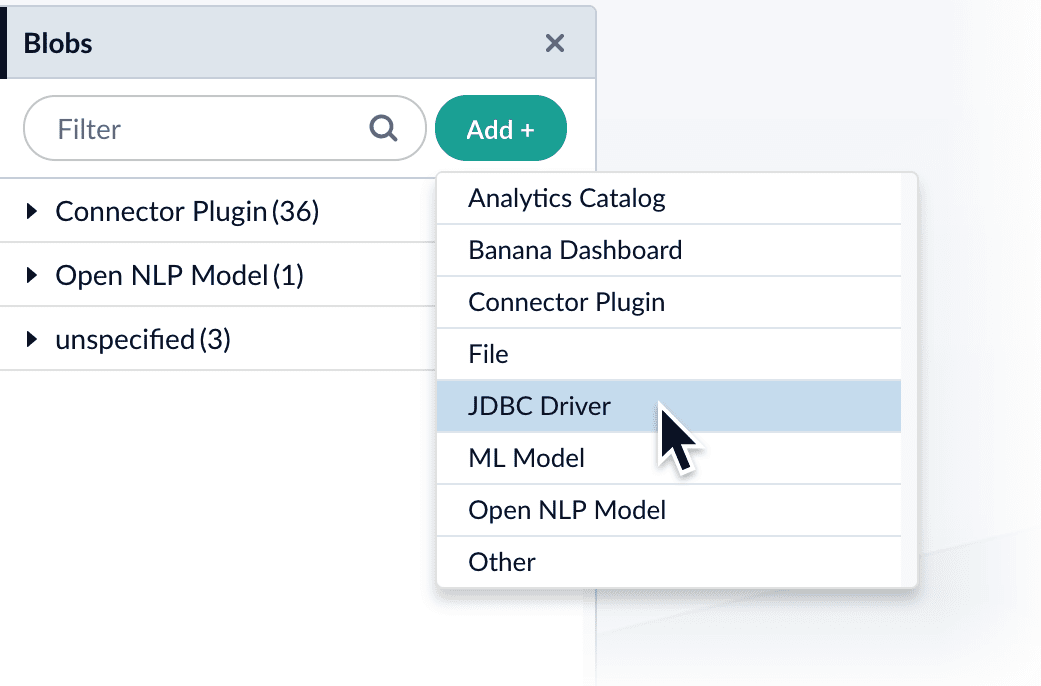
  1. In the Fusion UI, navigate to **System** > **Blobs**.

  2. Click **Add**.

  3. Select **JDBC Driver**.
     The "New 'JDBC Driver' Upload" panel appears.
       <img src="https://mintcdn.com/lucidworks/5yWZ-KtZuBe4Y_Fg/assets/images/4.0/blobstore_add_jdbcdriver1.png?fit=max&auto=format&n=5yWZ-KtZuBe4Y_Fg&q=85&s=b7d0a7b57734a2219cb107db40b0f210" alt="Uploading a connector" style={{ width: "450px" }} width="1041" height="686" data-path="assets/images/4.0/blobstore_add_jdbcdriver1.png" />

  4. Click **Choose File** and select the .jar file from your file system.
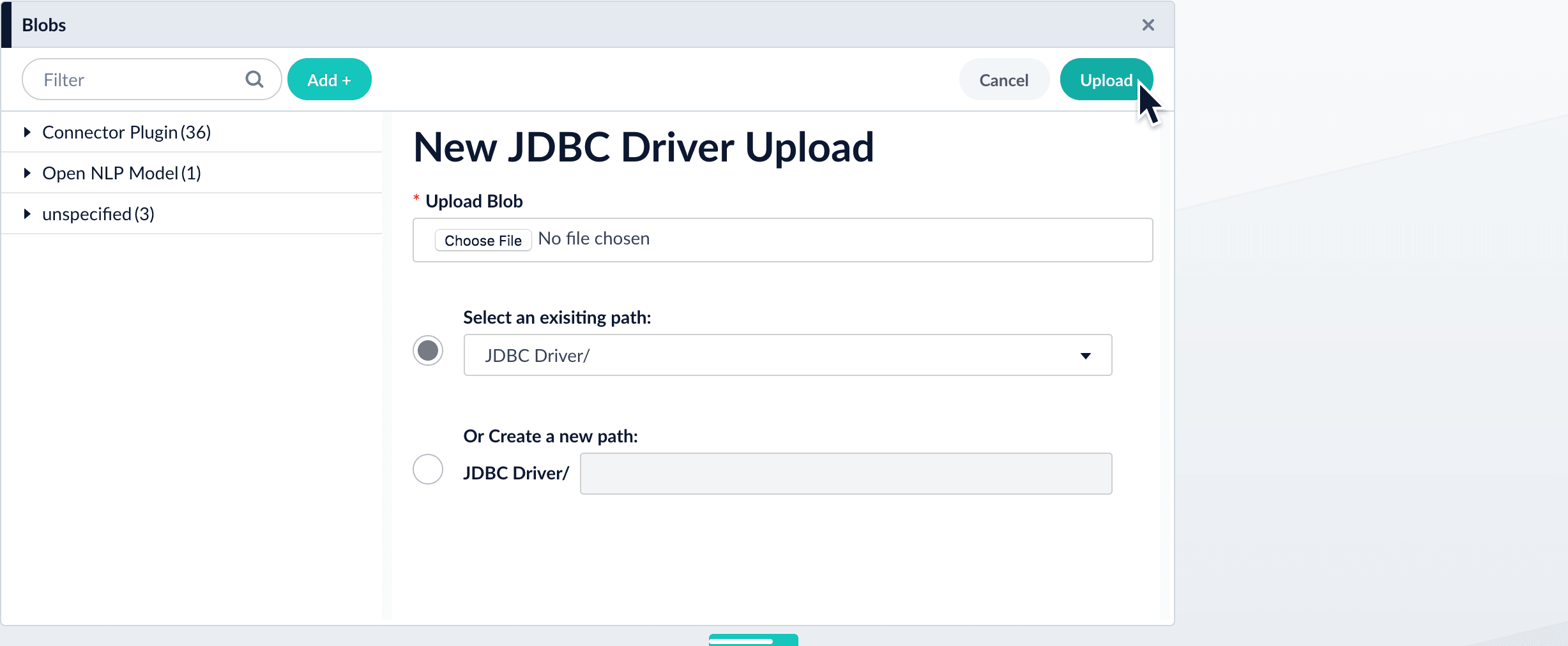
       <img src="https://mintcdn.com/lucidworks/5yWZ-KtZuBe4Y_Fg/assets/images/4.0/blobstore_add_jdbcdriver2.png?fit=max&auto=format&n=5yWZ-KtZuBe4Y_Fg&q=85&s=e722ae92551c19068ce783d6e71798b4" alt="Uploading connector" width="2455" height="1012" data-path="assets/images/4.0/blobstore_add_jdbcdriver2.png" />

  5. Click **Upload**.
     The new driver’s blob manifest appears.
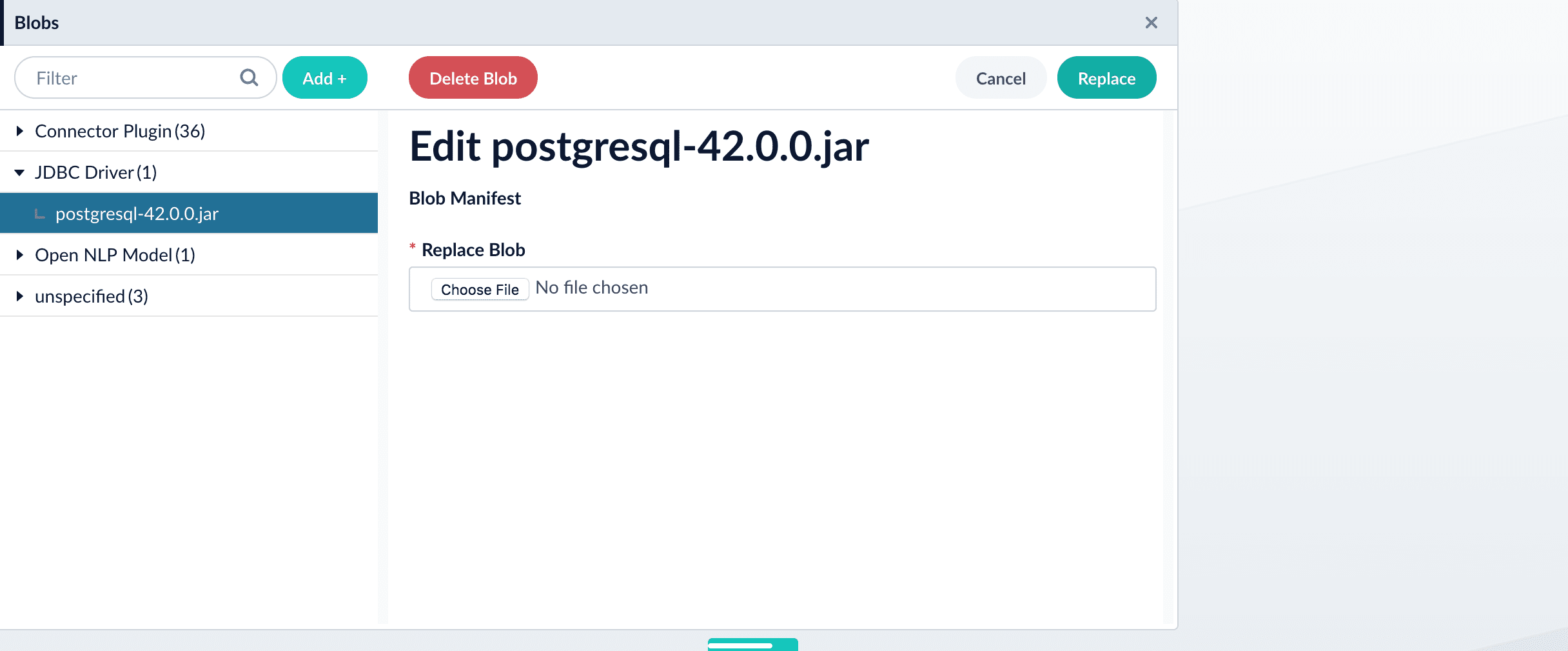
       <img src="https://mintcdn.com/lucidworks/5yWZ-KtZuBe4Y_Fg/assets/images/4.0/blobstore_add_jdbcdriver3.png?fit=max&auto=format&n=5yWZ-KtZuBe4Y_Fg&q=85&s=f3c48edcb769b7df7cd300dc449e249f" alt="Uploaded connector" width="2432" height="1009" data-path="assets/images/4.0/blobstore_add_jdbcdriver3.png" />

  From this screen you can also delete or replace the driver.

  ## How to install a JDBC driver using the API

  1. Upload the JAR file to Fusion’s blob store using the [`/blobs/{id}` endpoint](/api-reference/blobs/upload-a-blob).

     Specify an arbitrary blob ID, and a `resourceType` value of `plugin:connector`, as in this example:

     ```bash theme={"dark"}
     curl -u USERNAME:PASSWORD -H "content-type:application/java-archive" -H "content-length:707261" -X PUT --data-binary @postgresql-42.0.0.jar http://localhost:8764/api/blobs/mydriver?resourceType=driver:jdbc
     ```

     Success response:

     ```json theme={"dark"}
     {
       "name" : "mydriver",
       "contentType" : "application/java-archive",
       "size" : 707261,
       "modifiedTime" : "2017-06-09T19:00:48.919Z",
       "version" : 0,
       "md5" : "c67163ca764bfe632f28229c142131b5",
       "metadata" : {
         "subtype" : "driver:jdbc",
         "drivers" : "org.postgresql.Driver",
         "resourceType" : "driver:jdbc"
       }
     }
     ```

     Fusion automatically publishes the event to the cluster, and the listeners perform the driver installation process on each node.
     <Tip>   If the blob ID is identical to an existing one, the old driver will be uninstalled and the new driver will installed in its place. To get the list of existing blob IDs, run: `curl -u USERNAME:PASSWORD https://FUSION_HOST:FUSION_PORT/api/blobs`</Tip>
  2. To verify the uploaded driver, run:

     ```bash theme={"dark"}
     curl -u USERNAME:PASSWORD https://FUSION_HOST:FUSION_PORT/api/blobs/BLOB_ID/manifest
     ```

     Where the `BLOB_ID` is the name specified during upload, such as "mydriver" above. A success response looks like this:

     ```json theme={"dark"}
     {
       "name" : "mydriver",
       "contentType" : "application/java-archive",
       "size" : 707261,
       "modifiedTime" : "2017-06-09T19:05:17.897Z",
       "version" : 1569755095787110400,
       "md5" : "c67163ca764bfe632f28229c142131b5",
       "metadata" : {
         "subtype" : "driver:jdbc",
         "drivers" : "org.postgresql.Driver",
         "resourceType" : "driver:jdbc"
       }
     }
     ```
</Accordion>

### Supported JDBC drivers

This section contains a list of supported JDBC drivers that are compatible with any driver/database that implements a SQL standard.

<Note>
  Authentication parameters may be provided as part of the connection string. It is not necessary to include a username and password in the datasource configuration.
</Note>

#### MySQL

* [Download driver](https://dev.mysql.com/downloads/connector/j/)
* Default driver class name: `com.mysql.cj.jdbc.Driver`
* [Connection URL specification](https://dev.mysql.com/doc/connector-j/en/connector-j-reference-jdbc-url-format.html)
  * Example: `jdbc:mysql://mysql:3306/testdb`

#### Postgresql

* [Download driver](https://jdbc.postgresql.org/download/)
* Default driver class name: `org.postgresql.Driver`
* [Connection URL specification](https://jdbc.postgresql.org/documentation/use/#connecting-to-the-database)
  * Example: `jdbc:postgresql://postgres:5432/testdb`

#### Microsoft SQL Server and Azure SQL Service

* [Download driver](https://docs.microsoft.com/en-us/sql/connect/jdbc/download-microsoft-jdbc-driver-for-sql-server?view=sql-server-ver15)
* Default driver class name: `com.microsoft.sqlserver.jdbc.SQLServerDriver`
* [Connection URL specification](https://docs.microsoft.com/en-us/sql/connect/jdbc/building-the-connection-url?view=sql-server-ver15)
  * Example (SQL Server): `jdbc:sqlserver://mssql:1433`
  * Example (cloud-based Azure SQL Service): `jdbc:sqlserver://azure-test.database.windows.net:1433;database=testdbencrypt=true;trustServerCertificate=false;hostNameInCertificate=*.database.windows.net;loginTimeout=30;`

#### Oracle database

* [Download driver](https://www.oracle.com/database/technologies/appdev/jdbc-downloads.html)
* Default driver class name: `oracle.jdbc.OracleDriver`
* [Connection URL specification](https://docs.oracle.com/cd/E11882_01/appdev.112/e13995/oracle/jdbc/OracleDriver.html)
  * Example: `jdbc:oracle:thin:@oracledb:1521:orc1`

#### IBM DB2

* [Download driver](https://www.ibm.com/support/pages/db2-jdbc-driver-versions-and-downloads)
* Default driver class name: `com.ibm.db2.jcc.DB2Driver`
* [Connection URL specification](https://www.ibm.com/docs/en/db2/12.1.x?topic=cdsudidsdjs-url-format-data-server-driver-jdbc-sqlj-type-4-connectivity)
  * Example: `jdbc:db2://db2:50000/testdb`

## Authentication

Setting up the correct authentication according to your organization's data governance policies helps keep sensitive data secure while allowing authorized indexing.

If authentication is required to access your data, the JDBC V2 connector uses standard database credentials to log in.

In your datasource configuration, supply:

* `username` using the database account's username.
* `password` using the corresponding password.

## Remote connectors

V2 connectors support [running remotely](/docs/fusion-connectors/developers/remote-v2-connectors) in Fusion versions 5.7.1 and later.

<Accordion title="Configure remote V2 connectors">
  If you need to index data from behind a firewall, you can configure a V2 connector to run remotely on-premises using TLS-enabled gRPC.

  ## Prerequisites

  Before you can set up an on-prem V2 connector, you must configure the egress from your network to allow HTTP/2 communication into the Fusion cloud. You can use a [forward proxy server](#egress-and-proxy-server-configuration) to act as an intermediary between the connector and Fusion.

  The following is required to run V2 connectors remotely:

  * The [plugin zip file and the connector-plugin-standalone JAR](https://plugins.lucidworks.com/).
  * A configured connector backend gRPC endpoint.
  * Username and password of a user with a `remote-connectors` or `admin` role.
  * If the host where the remote connector is running is not configured to trust the server’s TLS certificate, you must configure the file path of the trust certificate collection.

  <Note>If your version of Fusion doesn’t have the `remote-connectors` role by default, you can create one. No API or UI permissions are required for the role.</Note>

  ## Connector compatibility

  Only V2 connectors are able to run remotely on-premises.
  You also need the remote connector client JAR file that matches your Fusion version.
  You can download the latest files at [V2 Connectors Downloads](/docs/fusion-connectors/downloads/v2-connectors-downloads).

  <Note>Whenever you upgrade Fusion, you must also update your remote connectors to match the new version of Fusion.</Note>

  The gRPC connector backend is not supported in Fusion environments deployed on AWS.

  ## System requirements

  The following is required for the on-prem host of the remote connector:

  * (Fusion 5.9.0-5.9.10) JVM version 11
  * (Fusion 5.9.11) JVM version 17
  * Minimum of 2 CPUs
  * 4GB Memory

  Note that memory requirements depend on the number and size of ingested documents.

  ## Enable backend ingress

  In your `values.yaml` file, configure this section as needed:

  ```yaml theme={"dark"}
  ingress:
    enabled: false
    pathtype: "Prefix"
    path: "/"
    #host: "ingress.example.com"
    ingressClassName: "nginx"   # Fusion 5.9.6 only
    tls:
      enabled: false
      certificateArn: ""
      # Enable the annotations field to override the default annotations
      #annotations: ""
  ```

  * Set `enabled` to `true` to enable the backend ingress.
  * Set `pathtype` to `Prefix` or `Exact`.
  * Set `path` to the path where the backend will be available.
  * Set `host` to the host where the backend will be available.
  * In Fusion 5.9.6 *only*, you can set `ingressClassName` to one of the following:
    * `nginx` for Nginx Ingress Controller
    * `alb` for AWS Application Load Balancer (ALB)
  * Configure TLS and certificates according to your CA’s procedures and policies.

    <Note>  TLS must be enabled in order to use AWS ALB for ingress.</Note>

  ## Connector configuration example

  ```yaml theme={"dark"}
  kafka-bridge:
    target: mynamespace-connectors-backend.lucidworkstest.com:443 # mandatory
    plain-text: false # optional, false by default.  
      proxy-server: # optional - needed when a forward proxy server is used to provide outbound access to the standalone connector
      host: host
      port: some-port
      user: user # optional
      password: password # optional
    trust: # optional - needed when the client's system doesn't trust the server's certificate
      cert-collection-filepath: path1

  proxy: # mandatory fusion-proxy
    user: admin
    password: password123
    url: https://fusiontest.com/ # needed only when the connector plugin requires blob store access

  plugin: # mandatory
    path: ./fs.zip
    type: #optional - the suffix is added to the connector id
      suffix: remote
  ```

  ### Minimal example

  ```yaml theme={"dark"}
  kafka-bridge:
    target: mynamespace-connectors-backend.lucidworkstest.com:443

  proxy:
    user: admin
    password: "password123"

  plugin:
    path: ./testplugin.zip
  ```

  ### Logback XML configuration file example

  ```xml theme={"dark"}
  <configuration>
      <appender name="CONSOLE" class="ch.qos.logback.core.ConsoleAppender">
          <encoder class="com.lucidworks.logging.logback.classic.LucidworksPatternLayoutEncoder">
              <pattern>%d - %-5p [%t:%C{3.}@%L] - %m{nolookups}%n</pattern>
              <charset>utf8</charset>
          </encoder>
      </appender>

      <appender name="FILE" class="ch.qos.logback.core.rolling.RollingFileAppender">
          <file>${LOGDIR:-.}/connector.log</file>
          <rollingPolicy class="ch.qos.logback.core.rolling.SizeAndTimeBasedRollingPolicy">
              <!-- rollover daily -->
              <fileNamePattern>${LOGDIR:-.}/connector-%d{yyyy-MM-dd}.%i.log.gz</fileNamePattern>
              <maxFileSize>50MB</maxFileSize>
              <totalSizeCap>10GB</totalSizeCap>
          </rollingPolicy>
          <encoder class="com.lucidworks.logging.logback.classic.LucidworksPatternLayoutEncoder">
              <pattern>%d - %-5p [%t:%C{3.}@%L] - %m{nolookups}%n</pattern>
              <charset>utf8</charset>
          </encoder>
      </appender>

      <root level="INFO">
          <appender-ref ref="CONSOLE"/>
          <appender-ref ref="FILE"/>
      </root>
  </configuration>
  ```

  ## Run the remote connector

  ```java theme={"dark"}
  java [-Dlogging.config=[LOGBACK_XML_FILE]] \
    -jar connector-plugin-client-standalone.jar [YAML_CONFIG_FILE]
  ```

  The `logging.config` property is optional. If not set, logging messages are sent to the console.

  ## Test communication

  You can run the connector in communication testing mode. This mode tests the communication with the backend without running the plugin, reports the result, and exits.

  ```java theme={"dark"}
  java -Dstandalone.connector.connectivity.test=true -jar connector-plugin-client-standalone.jar [YAML_CONFIG_FILE]
  ```

  ## Encryption

  In a deployment, communication to the connector’s backend server is encrypted using TLS. You should only run this configuration without TLS in a testing scenario. To disable TLS, set `plain-text` to `true`.

  ## Egress and proxy server configuration

  One of the methods you can use to allow outbound communication from behind a firewall is a proxy server. You can configure a proxy server to allow certain communication traffic while blocking unauthorized communication. If you use a proxy server at the site where the connector is running, you must configure the following properties:

  * **Host.** The hosts where the proxy server is running.
  * **Port.** The port the proxy server is listening to for communication requests.
  * **Credentials.** Optional proxy server user and password.

  When you configure egress, it is important to disable any connection or activity timeouts because the connector uses long running gRPC calls.

  ## Password encryption

  If you use a login name and password in your configuration, run the following utility to encrypt the password:

  1. Enter a user name and password in the [connector configuration YAML](#configuration).

  2. Run the standalone JAR with this property:

     ```java theme={"dark"}
     -Dstandalone.connector.encrypt.password=true
     ```

  3. Retrieve the encrypted passwords from the log that is created.

  4. Replace the clear password in the configuration YAML with the encrypted password.

  ## Connector restart (5.7 and earlier)

  The connector will shut down automatically whenever the connection to the server is disrupted, to prevent it from getting into a bad state. Communication disruption can happen, for example, when the server running in the `connectors-backend` pod shuts down and is replaced by a new pod. Once the connector shuts down, connector configuration and job execution are disabled. To prevent that from happening, you should restart the connector as soon as possible.

  You can use Linux scripts and utilities to restart the connector automatically, such as [Monit](https://mmonit.com/monit/).

  ## Recoverable bridge (5.8 and later)

  If communication to the remote connector is disrupted, the connector will try to recover communication and gRPC calls. By default, six attempts will be made to recover each gRPC call. The number of attempts can be configured with the `max-grpc-retries` bridge parameters.

  ## Job expiration duration (5.9.5 only)

  The timeout value for irresponsive backend jobs can be configured with the `job-expiration-duration-seconds` parameter. The default value is `120` seconds.

  ## Use the remote connector

  Once the connector is running, it is available in the Datasources dropdown. If the standalone connector terminates, it disappears from the list of available connectors. Once it is re-run, it is available again and configured connector instances will not get lost.

  ## Enable asynchronous parsing (5.9 and later)

  To separate document crawling from document parsing, enable Tika Asynchronous Parsing on remote V2 connectors.
</Accordion>

Below is an example configuration showing how to specify the file system to index under the `connector-plugins` entry in your `values.yaml` file:

```yaml wrap  theme={"dark"}
additionalVolumes:
- name: fusion-data1-pvc
    persistentVolumeClaim:
    claimName: fusion-data1-pvc
- name: fusion-data2-pvc
    persistentVolumeClaim:
    claimName: fusion-data2-pvc
additionalVolumeMounts:
- name: fusion-data1-pvc
    mountPath: "/connector/data1"
- name: fusion-data2-pvc
    mountPath: "/connector/data2"
```

You may also need to specify the user that is authorized to access the file system, as in this example:

```yaml wrap  theme={"dark"}
securityContext:
    fsGroup: 1002100000
    runAsUser: 1002100000
```

## Crawl behavior

The JDBC V2 connector retrieves data based on the user-supplied SQL query. The SQL implementation allows full use of all features, but for best results, structure the SQL query to utilize pagination.

### Pagination

#### Automatic pagination

Automatic pagination is enabled by default.
You can disable it by setting `enableAutomaticPagination` to `false`.
The `batchSize` field sets the number of documents displayed per page of query results.

When a SQL query includes pagination terms such as `OFFSET`, `LIMIT`, or `ROWS ONLY`, the SQL query terms override automatic pagination.

#### DB2 notes

When crawling an IBM DB2 database, the pagination method depends on your database version:

* IBM DB2 version \< 11.5 - Pagination is performed using subqueries.
* IBM DB2 version >= 11.5 - Pagination is performed using rows and offsets.\
  Appending `--subquery` to the SQL query statement forces the connector to paginate using subqueries regardless of the IBM DB2 database version.

#### Special variables for pagination

The connector uses placeholders for pagination that are updated based on `batchSize`:

* `${limit}`: used as the `LIMIT` parameter in native SQL
* `${offset}`: used as the `OFFSET` parameter in native SQL

Here are examples of SQL statements using these parameters:

* MySQL, postgresql, and DB2:
  ```sql theme={"dark"}
  SELECT * FROM example_table LIMIT ${limit} OFFSET ${offset}
  ```
* Microsoft, Azure, and Oracle:
  ```sql wrap theme={"dark"}
  SELECT * FROM example_table ORDER BY id OFFSET ${offset} ROWS FETCH NEXT ${limit} ROWS ONLY
  ```

### Nested queries

The connector supports nested queries. Nested queries are a set of SQL queries performed on each row returned by the main query. Because they are executed on every row returned, nested queries can significantly degrade performance.

Use the `${id}` variable to retrieve items associated with a specific primary key:

```sql wrap theme={"dark"}
SELECT * FROM example_table ORDER BY id OFFSET ${offset} ROWS FETCH NEXT ${limit} ROWS ONLY
```

### Incremental crawl

In addition to the main SQL query, users can also specify an optional delta SQL query that returns only new and modified items to increase performance during recrawls. The special `${limit}` and `${offset}` pagination variables are the same as in normal crawls.

#### Special incremental crawl variable

Use the `${last_index_time}` for an incremental crawl as a placeholder variable that contains the time the last crawl completed.
This variable is used to filter results for items added or modified since the last time the datasource job was run and is stored as a timestamp in the format of **yyyy-MM-dd HH:mm:ss.SSS**

<Note>
  The format may not be compatible with all driver date math implementations without additional conversion steps.
</Note>

Example:

```sql wrap theme={"dark"}
SELECT * FROM example_table WHERE (timestamp_column >= ${last_index_time})
```

Depending on the database used, it may be necessary to surround `${last_index_time}` in single quotes. For example, `'${last_index_time}'`.

#### Stray content deletion

Stray content deletion is a plugin feature that deletes documents from a content collection that are not rediscovered on subsequent crawls after the first crawl.
This process removes stale documents from the content collection and is enabled by default.
Stray content deletion must be configured by the user because native SQL does not provide the ability to retrieve rows that have been deleted from a table.

If you are using Fusion 5.18.0 or later, stray content deletion behavior is determined by the **Enable Stray Content Deletion** settings built into Fusion's core datasource settings, available on every V2 and Pro connector.

If system-level stray content deletion is enabled and you have a delta query configured, saving the datasource fails with a validation error. Resolve the conflict by adjusting the system setting or removing the delta query.

If you are using the JDBC V2 2.8.0 connector or later with a Fusion version earlier than 5.18.0, then the stray content deletion behavior is automatically determined by your delta query configuration.

* When no delta query is configured, stray content deletion is enabled by default.
* When a delta query is configured, stray content deletion is disabled because delta queries only track changes, not deletions.

<Warning>
  Using a delta query to perform incremental crawling only returns new and modified items. If stray content deletion is enabled when the delta query is run, unmodified items that are still valid are deleted.
</Warning>

### Binary content indexing

<Tip>
  Binary content indexing is available in versions 2.7.0 and later of the JDBC V2 connector when using MSSQL or Oracle databases.
</Tip>

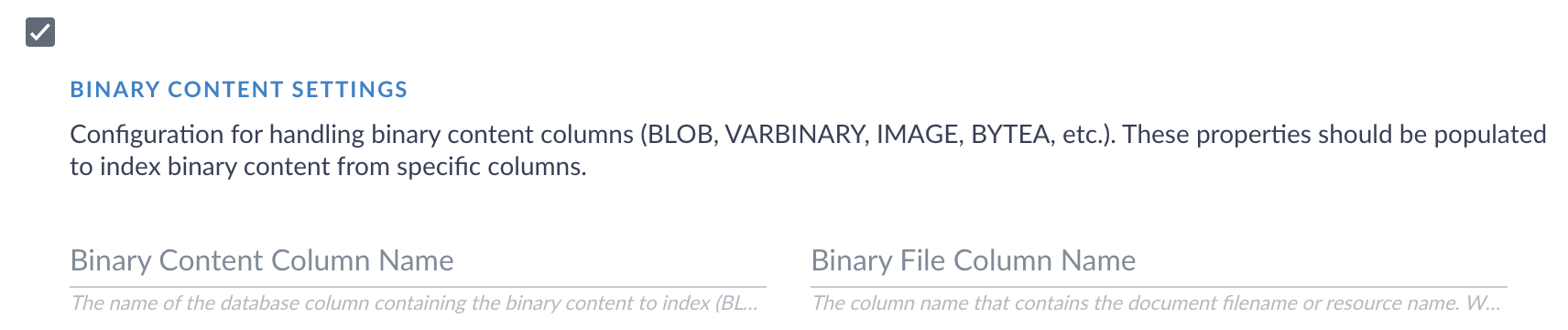
The JDBC V2 connector supports binary content indexing, which enables full-text search of documents, images, and other binary data stored in database BINARY, VARBINARY, IMAGE, or BLOB columns.

To use binary content indexing:

1. Navigate to the JDBC connector.
2. In the **Query** field, ensure that your SQL query specifies the columns explicitly with primary keys. A query such as `SELECT *` is not supported in binary content indexing. The queries are case-sensitive.
3. Select **Binary content settings**. Two more text boxes display.
   <Frame caption="Binary content indexing settings">
     <img src="https://mintcdn.com/lucidworks/Hc4XjRdgc9f-vsBD/assets/images/connectors/connector-jdbcv2-binarycontent.png?fit=max&auto=format&n=Hc4XjRdgc9f-vsBD&q=85&s=0ad30e70781eb21bf699a6ddbf583fd3" alt="Binary content settings fields for JDBC V2 connector" width="1712" height="360" data-path="assets/images/connectors/connector-jdbcv2-binarycontent.png" />
   </Frame>
4. In the **Binary content column name** field, enter the database column that contains your binary content. This field is required if you are using binary content indexing. The value is case sensitive.
5. If your database contains a separate column with file names, enter that column name in the **Binary file column name** field.
   <Tip>
     If you do not enter a column name, the JDBC connector automatically attempts to detect a column name based on common naming practices. To prevent an incorrect column name in this value, enter a value manually.
   </Tip>
6. Click **Save**.
7. Start another crawl to begin indexing the binary content.

After the crawl is completed, verify that your binary content has been indexed properly. To verify your indexing status:

1. Navigate to the Query Workbench
2. A list of documents displays. Click **Show fields** next to a document to view the indexing results.
3. The binary content is stored in a text field. The format varies depending on the type of binary content that was indexed. Verify that the contents display.

<Tip>
  The default field for binary content is `body_t`. You can edit your index pipeline if you want this data to be indexed into a different field.
</Tip>

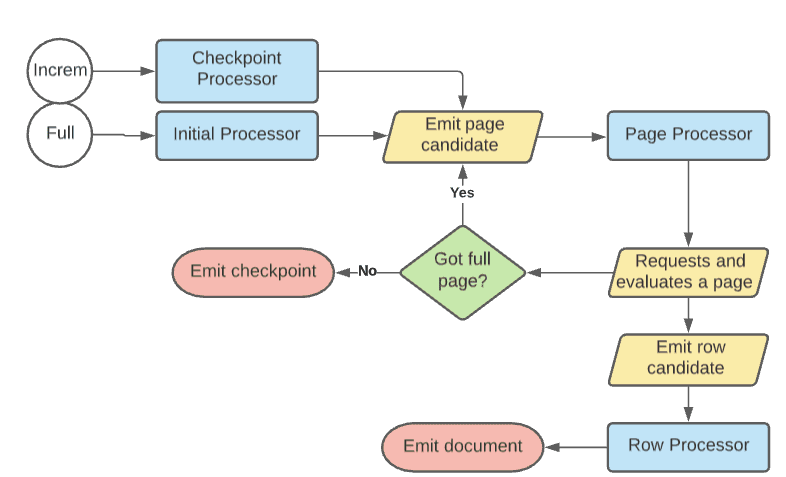
## Processor flow diagram

The following diagram represents the flow for crawls.
Incremental crawls follow the same basic flow as full crawls, except that they emit a page candidate from a delta SQL query if provided.
If no delta query is provided, then incremental crawls use the original query.

<img src="https://mintcdn.com/lucidworks/rffsSynuMpAuFk9Z/assets/images/5.3/processor-flow-diagram.png?fit=max&auto=format&n=rffsSynuMpAuFk9Z&q=85&s=104f5366bbe6ae6b35ed8353568897bc" alt="Processor flow diagram for JDBC V2 connector" width="786" height="477" data-path="assets/images/5.3/processor-flow-diagram.png" />

## Configuration

<Tip>
  When entering configuration values in the UI, use *unescaped* characters, such as `\t` for the tab character. When entering configuration values in the API, use *escaped* characters, such as `\\t` for the tab character.
</Tip>

<SchemaParamFields schema={schema} />