> ## Documentation Index
> Fetch the complete documentation index at: https://doc.lucidworks.com/llms.txt
> Use this file to discover all available pages before exploring further.

# Google Cloud Storage (GCS) V2

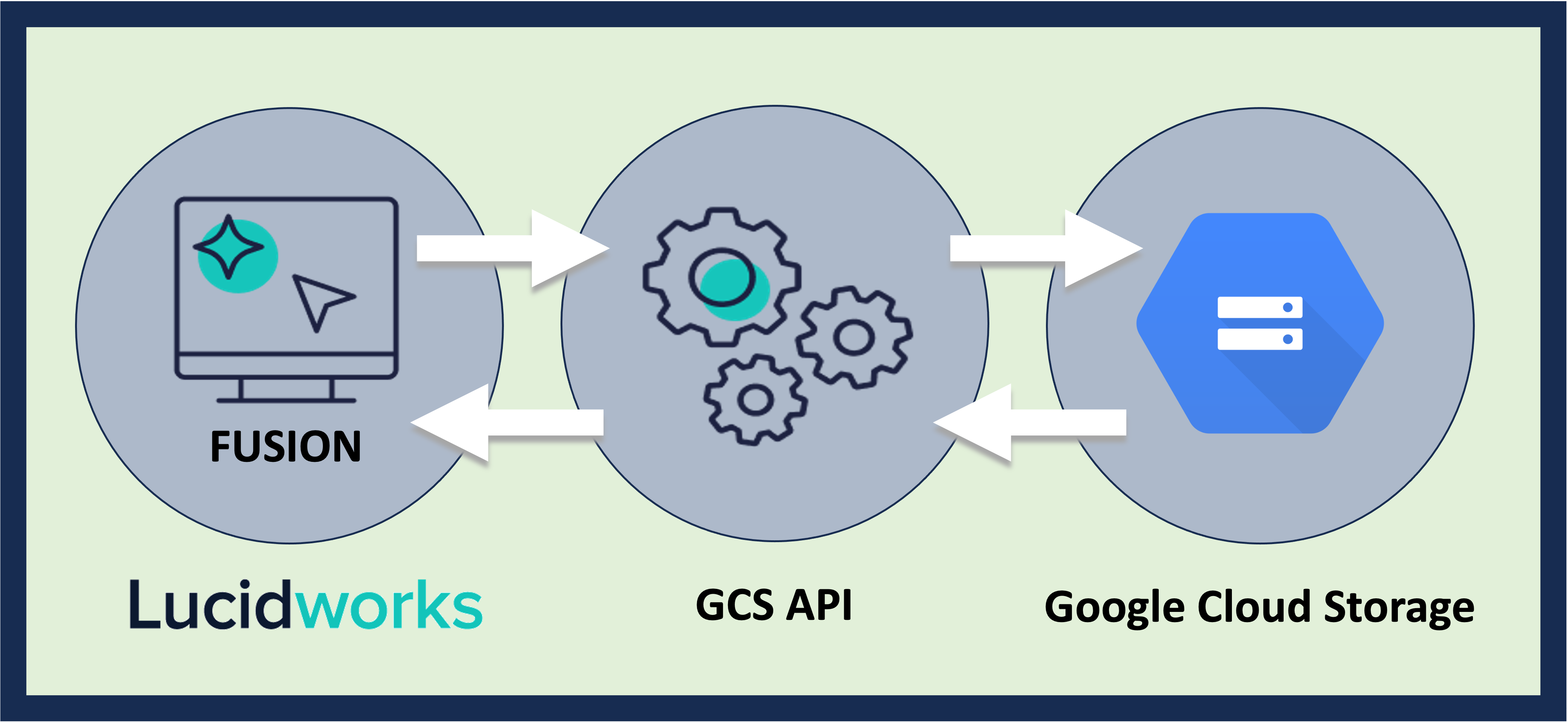
> The Fusion Google Cloud Storage (GCS) V2 connector enables indexing datasets from GCS buckets into Fusion 5. The connector leverages the Google Cloud API for authentication and fetching content and metadata.

export const schema = {
  "type": "object",
  "title": "GCS (v2)",
  "description": "Connector for Google Cloud Store",
  "required": ["parserId", "id", "properties", "pipeline"],
  "properties": {
    "parserId": {
      "type": "string",
      "title": "Parser ID",
      "description": "The Parser to use in the associated IndexPipeline."
    },
    "id": {
      "type": "string",
      "title": "Configuration ID",
      "description": "A unique identifier for this Configuration.",
      "minLength": 1,
      "pattern": "^[a-zA-Z0-9_-]+$"
    },
    "pipeline": {
      "type": "string",
      "title": "Pipeline ID",
      "description": "Name of the IndexPipeline used for processing output.",
      "minLength": 1,
      "pattern": "^[a-zA-Z0-9_-]+$"
    },
    "description": {
      "type": "string",
      "title": "Description",
      "description": "Optional description",
      "hints": ["lengthy"],
      "maxLength": 125
    },
    "modified": {
      "type": "string",
      "title": "Date Modified",
      "description": "The date at which this Configuration was last modified.",
      "hints": ["readonly", "hidden"]
    },
    "created": {
      "type": "string",
      "title": "Date Created",
      "description": "The date at which this Configuration was created.",
      "hints": ["readonly", "hidden"]
    },
    "type": {
      "type": "string",
      "title": "Type",
      "description": "A type ID for this connector.",
      "hints": ["readonly", "hidden"]
    },
    "collection": {
      "type": "string",
      "title": "Collection ID",
      "description": "The associated content Collection.",
      "hints": ["readonly", "hidden"],
      "minLength": 1,
      "pattern": "^[a-zA-Z0-9_-]+$"
    },
    "diagnosticLogging": {
      "type": "boolean",
      "title": "Diagnostic Logging",
      "description": "[Deprecated] Enables verbose diagnostic logging for troubleshooting. May increase log volume. Disabled by default.",
      "default": false
    },
    "type_description": {
      "type": "string",
      "title": "Type Description",
      "default": "Connector for Google Cloud Store",
      "hints": ["hidden", "readonly"]
    },
    "category": {
      "type": "string",
      "title": "Category",
      "default": "Connector for Google Cloud Store",
      "hints": ["hidden", "readonly"]
    },
    "connector": {
      "title": "Connector Type",
      "description": "Connector type.",
      "minLength": 1,
      "type": "string",
      "hints": ["hidden"]
    },
    "properties": {
      "type": "object",
      "title": "GCS properties",
      "description": "Plugin specific properties.",
      "required": ["authenticationProperties"],
      "properties": {
        "authenticationProperties": {
          "type": "object",
          "title": "Authentication settings",
          "description": "Connect to the bucket store using a service account. The service account requires the following permissions:\nstorage.buckets.list to crawl all the available buckets;\nstorage.objects.list and storage.objects.get to access to the objects in the buckets\n",
          "required": [],
          "properties": {
            "jsonKey": {
              "type": "string",
              "title": "Service account Json key",
              "description": "Json key contents from authorized service account",
              "hints": ["secret"]
            }
          }
        },
        "applicationProperties": {
          "type": "object",
          "title": "Limit documents",
          "description": "Bucket and Object filtering options",
          "required": [],
          "properties": {
            "buckets": {
              "type": "array",
              "title": "Bucket list",
              "description": "Add the bucket names to crawl. Leave blank to crawl all the available buckets",
              "default": [],
              "items": {
                "type": "string",
                "minLength": 1
              }
            },
            "includedFileExtensions": {
              "type": "array",
              "title": "Included file extensions",
              "description": "Set of file extensions to be fetched. If specified, all non-matching files will be skipped.",
              "default": [],
              "items": {
                "type": "string",
                "minLength": 1
              }
            },
            "excludedFileExtensions": {
              "type": "array",
              "title": "Excluded file extensions",
              "description": "A set of all file extensions to be skipped from the fetch.",
              "default": [],
              "items": {
                "type": "string",
                "minLength": 1
              }
            },
            "inclusiveRegexes": {
              "type": "array",
              "title": "Inclusive regexes",
              "description": "Regular expressions for bucket or object name patterns to include. This will limit this datasource to only items that match the regular expression.",
              "default": [],
              "items": {
                "type": "string",
                "minLength": 1
              }
            },
            "exclusiveRegexes": {
              "type": "array",
              "title": "Exclusive regexes",
              "description": "Regular expressions for bucket or object name patterns to exclude. This will limit this datasource to only items that do not match the regular expression.",
              "default": [],
              "items": {
                "type": "string",
                "minLength": 1
              }
            },
            "regexCacheSize": {
              "type": "number",
              "title": "",
              "default": 10000,
              "hints": ["hidden"],
              "maximum": 2147483647,
              "exclusiveMaximum": false,
              "minimum": -2147483648,
              "exclusiveMinimum": false,
              "multipleOf": 1
            },
            "maxSizeBytes": {
              "type": "number",
              "title": "Maximum File Size",
              "description": "Used for excluding objects when the objects size is larger than the configured value.",
              "default": -1,
              "maximum": 2147483647,
              "exclusiveMaximum": false,
              "minimum": -2147483648,
              "exclusiveMinimum": false,
              "multipleOf": 1
            },
            "minSizeBytes": {
              "type": "number",
              "title": "Minimum File Size",
              "description": "Used for excluding objects when the objects size is smaller than the configured value.",
              "default": 1,
              "maximum": 2147483647,
              "exclusiveMaximum": false,
              "minimum": -2147483648,
              "exclusiveMinimum": false,
              "multipleOf": 1
            },
            "bucketPrefix": {
              "type": "string",
              "title": "Bucket prefix",
              "description": "Filter results to buckets whose names begin with this prefix. Useful only when 'Bucket List' property is empty"
            },
            "blobsPrefix": {
              "type": "string",
              "title": "Object prefix",
              "description": "Filter results to objects whose names begin with this prefix"
            },
            "pageSize": {
              "type": "number",
              "title": "Buckets and Objects page size",
              "description": "Maximum number of buckets or objects returned per page",
              "default": 1000,
              "maximum": 1000,
              "exclusiveMaximum": false,
              "minimum": 1,
              "exclusiveMinimum": false,
              "multipleOf": 1
            }
          }
        }
      }
    },
    "coreProperties": {
      "type": "object",
      "title": "Core Properties",
      "description": "Common behavior and performance settings.",
      "required": [],
      "properties": {
        "fetchSettings": {
          "type": "object",
          "title": "Fetch Settings",
          "description": "System level settings for controlling fetch behavior and performance.",
          "required": [],
          "properties": {
            "numFetchThreads": {
              "type": "number",
              "title": "Fetch Threads",
              "description": "Maximum number of fetch threads; defaults to 5.This setting controls the number of threads that call the Connectors fetch method.Higher values can, but not always, help with overall fetch performance.",
              "default": 5,
              "maximum": 500,
              "exclusiveMaximum": false,
              "minimum": 1,
              "exclusiveMinimum": false,
              "multipleOf": 1
            },
            "indexingThreads": {
              "type": "number",
              "title": "Index Subscription Threads",
              "description": "Maximum number of indexing threads; defaults to 4.This setting controls the number of threads in the indexing service used for processing content documents emitted by this datasource.Higher values can sometimes help with overall fetch performance.",
              "default": 4,
              "maximum": 10,
              "exclusiveMaximum": false,
              "minimum": 1,
              "exclusiveMinimum": false,
              "multipleOf": 1
            },
            "pluginInstances": {
              "type": "number",
              "title": "Number of plugin instances for distributed fetching",
              "description": "Maximum number of plugin instances for distributed fetching. Only specified number of plugin instanceswill do fetching. This is useful for distributing load between different instances.",
              "default": 0,
              "maximum": 500,
              "exclusiveMaximum": false,
              "minimum": 0,
              "exclusiveMinimum": false,
              "multipleOf": 1
            },
            "fetchItemQueueSize": {
              "type": "number",
              "title": "Fetch Item Queue Size",
              "description": "Size of the fetch item queue.Larger values result in increased memory usage, but potentially higher performance.Default is 10k.",
              "default": 10000,
              "hints": ["hidden"],
              "maximum": 500000,
              "exclusiveMaximum": false,
              "minimum": 1,
              "exclusiveMinimum": false,
              "multipleOf": 1
            },
            "fetchRequestCheckInterval": {
              "type": "number",
              "title": "Fetch request check interval(ms)",
              "description": "The amount of time to wait before check if a request is done",
              "default": 15000,
              "hints": ["hidden"],
              "maximum": 500000,
              "exclusiveMaximum": false,
              "minimum": 1000,
              "exclusiveMinimum": false,
              "multipleOf": 1
            },
            "fetchResponseScheduledTimeout": {
              "type": "number",
              "title": "Fetch response scheduled timeout(ms)",
              "description": "The maximum amount of time for a response to be scheduled. The task will be canceled if this setting is exceeded.",
              "default": 300000,
              "maximum": 500000,
              "exclusiveMaximum": false,
              "minimum": 1000,
              "exclusiveMinimum": false,
              "multipleOf": 1
            },
            "fetchResponseCompletedTimeout": {
              "type": "number",
              "title": "Fetch response completion timeout(ms)",
              "description": "The maximum amount of time for a response to be completed. If exceeded, the task will be retried if the job is still running",
              "default": 300000,
              "hints": ["hidden"],
              "maximum": 600000,
              "exclusiveMaximum": false,
              "minimum": 1,
              "exclusiveMinimum": false,
              "multipleOf": 1
            },
            "indexingInactivityTimeout": {
              "type": "number",
              "title": "Indexing inactivity timeout(seconds)",
              "description": "The maximum amount of time to wait for indexing results (in seconds). If exceeded, the job will fail with an indexing inactivity timeout.",
              "default": 86400,
              "maximum": 691200,
              "exclusiveMaximum": false,
              "minimum": 60,
              "exclusiveMinimum": false,
              "multipleOf": 1
            },
            "pluginInactivityTimeout": {
              "type": "number",
              "title": "Plugin inactivity timeout(seconds)",
              "description": "The maximum amount of time to wait for plugin activity (in seconds). If exceeded, the job will fail with a plugin inactivity timeout.",
              "default": 600,
              "maximum": 691200,
              "exclusiveMaximum": false,
              "minimum": 60,
              "exclusiveMinimum": false,
              "multipleOf": 1
            },
            "indexMetadata": {
              "type": "boolean",
              "title": "Index metadata",
              "description": "When enabled the metadata of skipped items will be indexed to the content collection.",
              "default": false
            },
            "indexContentFields": {
              "type": "boolean",
              "title": "Index content fields",
              "description": "When enabled, content fields will be indexed to the crawl-db collection.",
              "default": false
            },
            "asyncParsing": {
              "type": "boolean",
              "title": "Async Parsing",
              "description": "When enabled, content will be indexed asynchronously.",
              "default": false
            }
          }
        },
        "skipConfigValidation": {
          "type": "boolean",
          "title": "Skip Validation",
          "description": "Enable to skip configuration validation when it takes too long and causes timeout issue",
          "default": false
        }
      },
      "hints": ["advanced"]
    }
  },
  "category": "Repository",
  "categoryPriority": 1
};

export const SchemaParamFields = ({schema}) => {
  const sanitize = str => {
    if (typeof str !== "string") return str;
    return str.replace(/^"(.*)"$/s, "$1").replace(/\\/g, "").replace(/"/g, "'");
  };
  const formatDescription = str => {
    const s = sanitize(str);
    return (/[.!?]\)*$/).test(s) ? s : `${s}.`;
  };
  const {description, properties = {}, required: requiredProps = []} = schema;
  const visibleProps = useMemo(() => Object.entries(properties).filter(([, prop]) => !prop.hints?.includes("hidden")), [properties]);
  return <div>
      {description && <p>{formatDescription(description)}</p>}

      {visibleProps.map(([name, prop]) => {
    const isRequired = requiredProps.includes(name);
    const hasDefault = prop.default !== undefined;
    const rawDefault = prop.default;
    const isComplexDefault = hasDefault && (typeof rawDefault === "object" || typeof rawDefault === "string" && (rawDefault.length > 20 || rawDefault.includes('"')));
    const fieldProps = {
      key: name,
      body: prop.title || name,
      type: prop.type,
      ...prop.title && ({
        post: [<><span className="text-stone-400 dark:text-stone-500">API property: </span>{name}</>]
      }),
      ...isRequired && ({
        required: true
      }),
      ...!isComplexDefault && hasDefault ? {
        default: sanitize(String(rawDefault))
      } : {}
    };
    const isObject = prop.type === "object" && prop.properties;
    const isArrayOfObjects = prop.type === "array" && prop.items?.type === "object" && prop.items.properties;
    return <ParamField {...fieldProps}>
            {prop.description && <p>{formatDescription(prop.description)}</p>}

            {isComplexDefault && <div className="flex">
                <p>
                  <strong>Default:</strong>
                </p>
                <pre className="!my-0">
                  <code>
                    {JSON.stringify(rawDefault, null, 2)}
                  </code>
                </pre>
              </div>}

            {isArrayOfObjects && <div className="flex">
              <p>
                <strong>Object attributes:</strong>
              </p>
              <pre className="!my-0">
                <code>
                  {'{\n'}
                  {Object.entries(prop.items.properties).map(([iname, iprop]) => <>
                      {`  ${iname}`}
                      {prop.items?.required?.includes(iname) && <span style={{
      color: 'red'
    }}> required</span>}
                      {`: {\n    display name: ${sanitize(iprop.title || '')}\n    type: ${iprop.type}\n  }\n`}
                    </>)}
                  {'}'}
                </code>
              </pre>
              </div>}

            {isObject && <Expandable title="properties">
                <SchemaParamFields schema={{
      properties: prop.properties,
      required: prop.required
    }} />
              </Expandable>}
          </ParamField>;
  })}
    </div>;
};

export const LwTemplate = ({title = "Key questions to get you started", icon = "sparkles", cta = "Powered by Agent Studio", linkHref = "https://lucidworks.com/demo/?utm_source=docs&utm_medium=referral&utm_campaign=docs_cta_ai"}) => {
  const [isLoaded, setIsLoaded] = useState(false);
  useEffect(() => {
    const timer = setTimeout(() => {
      setIsLoaded(true);
    }, 500);
    return () => clearTimeout(timer);
  }, []);
  return <div className="lw-template-container">
      <Card title={title} icon={icon}>
        {isLoaded && <span dangerouslySetInnerHTML={{
    __html: `<lw-template id="a029c1a9-28be-427e-b0e1-5d918920246a"></lw-template
            >`
  }} />}
        <Link href={linkHref} className="agent-studio-link text-left text-gray-600 gap-2 dark:text-gray-400 text-sm font-medium flex flex-row items-center hover:text-primary dark:hover:text-primary-light group-hover:text-primary group-hover:dark:text-primary-light">Powered by Lucidworks Agent Studio</Link>
      </Card>
    </div>;
};

[localhost link]: http://localhost:3000/docs/fusion-connectors/connectors/google-cloud-storage

[mintlify link]: https://doc.lucidworks.com/docs/fusion-connectors/connectors/google-cloud-storage

[old doc.lw link]: https://doc.lucidworks.com/fusion-connectors/3243

<Callout icon="plug" color="#A4C6F7" iconType="solid">
  * **Latest version:** v2.1.0
  * **Compatible with Fusion version:** 5.2.0 and later
</Callout>

<img src="https://mintcdn.com/lucidworks/Au994d8iJwF79HiU/assets/images/connectors/connector-api-flow-gcs.png?fit=max&auto=format&n=Au994d8iJwF79HiU&q=85&s=9c71ef36be33f9a3835aca43a3fe251a" alt="Connector flow" width="4157" height="1915" data-path="assets/images/connectors/connector-api-flow-gcs.png" />

GCS connector can index:

* CSV
* JSON
* PDF
* Word docs
* Other rich text formats

<LwTemplate />

## Features

1. Service account authentication
2. Full crawl of storage buckets and objects
3. Recrawl buckets and objects
4. Remove deleted objects
5. Update objects
6. Cascade deletion of objects in deleted buckets
7. Document parsing support
8. Bucket and object filtering

## Prerequisites

Perform these prerequisites to ensure the connector can reliably access, crawl, and index your data.
Proper setup helps avoid configuration or permission errors, so use the following guidelines to keep your content available for discovery and search in Fusion.

* Set up a Google Cloud project with access to the target GCS bucket.
  * Enable the Google Cloud Storage API.
* Create a service account with appropriate permissions:
  * The minimum permissions are `storage.objects.list` and `storage.objects.get`.
  * For bucket metadata access, also add the permission `storage.buckets.get`.
* Download a JSON key file for that service account to use in the connector authentication properties in Fusion.

Confirm network connectivity:

* Fusion must have outbound internet access to reach `https://storage.googleapis.com`.
* If you are using a proxy or VPC, make sure traffic to GCS is permitted.

Remote-connector setup if running as an on-prem process:

* A Fusion user with the `remote-connectors` or `admin` role for gRPC authentication.
* The `connector-plugin-standalone.jar` alongside the plugin ZIP on the remote host.
* A configured connector backend gRPC endpoint (`hostname:port`) in your YAML.
* If the remote host doesn't trust Fusion's TLS cert, point to a truststore file path in your config.

## Authentication

Setting up the correct authentication according to your organization's data governance policies helps keep sensitive data secure while allowing authorized indexing.

The connector uses Google Cloud service account credentials to access buckets through [JSON key authentication](https://cloud.google.com/iam/docs/creating-managing-service-account-keys).
The service account must have `storage.objects.list` and `storage.objects.get` permissions and the full JSON key content must be copied and pasted into the service account JSON key box.
You can restrict the service account from accessing content you don't want indexed using IAM roles or signed URLs.

Create a service account in Google Cloud and authenticate the GCS V2 Connector:

1. Go to the Google Cloud Console and navigate to **IAM & Admin > Service Accounts**.
2. Click **Create Service Account**.
   1. Give the service account a name such as `fusion-gcs-crawler`.
   2. Grant the service account `roles/storage.objectViewer` or use custom roles with `storage.objects.list` and `storage.objects.get`.
3. Click **Create Key** and choose **JSON**. Download the JSON key file to paste the key's value in Fusion under **Authentication Settings**.
4. Verify access and bucket permissions to ensure:
   * The service account has access to the buckets and objects you're trying to crawl.
   * The service account is authorized in the GCS project to access the buckets.

### Crawl specific buckets

If the account used has limited permissions, or to only crawl specific buckets, use the `Specify buckets to crawl` setting. Add the name of the buckets you would like to crawl to download bucket objects and metadata only for those buckets.

### Recrawl

The GCS V2 connector updates the Solr index with any content changes since the previous crawl for items added, updated, or deleted.

## Remote connectors

V2 connectors support [running remotely](/docs/fusion-connectors/developers/remote-v2-connectors) in Fusion versions 5.7.1 and later.

<Accordion title="Configure remote V2 connectors">
  If you need to index data from behind a firewall, you can configure a V2 connector to run remotely on-premises using TLS-enabled gRPC.

  ## Prerequisites

  Before you can set up an on-prem V2 connector, you must configure the egress from your network to allow HTTP/2 communication into the Fusion cloud. You can use a [forward proxy server](#egress-and-proxy-server-configuration) to act as an intermediary between the connector and Fusion.

  The following is required to run V2 connectors remotely:

  * The [plugin zip file and the connector-plugin-standalone JAR](https://plugins.lucidworks.com/).
  * A configured connector backend gRPC endpoint.
  * Username and password of a user with a `remote-connectors` or `admin` role.
  * If the host where the remote connector is running is not configured to trust the server’s TLS certificate, you must configure the file path of the trust certificate collection.

  <Note>If your version of Fusion doesn’t have the `remote-connectors` role by default, you can create one. No API or UI permissions are required for the role.</Note>

  ## Connector compatibility

  Only V2 connectors are able to run remotely on-premises.
  You also need the remote connector client JAR file that matches your Fusion version.
  You can download the latest files at [V2 Connectors Downloads](/docs/fusion-connectors/downloads/v2-connectors-downloads).

  <Note>Whenever you upgrade Fusion, you must also update your remote connectors to match the new version of Fusion.</Note>

  The gRPC connector backend is not supported in Fusion environments deployed on AWS.

  ## System requirements

  The following is required for the on-prem host of the remote connector:

  * (Fusion 5.9.0-5.9.10) JVM version 11
  * (Fusion 5.9.11) JVM version 17
  * Minimum of 2 CPUs
  * 4GB Memory

  Note that memory requirements depend on the number and size of ingested documents.

  ## Enable backend ingress

  In your `values.yaml` file, configure this section as needed:

  ```yaml theme={"dark"}
  ingress:
    enabled: false
    pathtype: "Prefix"
    path: "/"
    #host: "ingress.example.com"
    ingressClassName: "nginx"   # Fusion 5.9.6 only
    tls:
      enabled: false
      certificateArn: ""
      # Enable the annotations field to override the default annotations
      #annotations: ""
  ```

  * Set `enabled` to `true` to enable the backend ingress.
  * Set `pathtype` to `Prefix` or `Exact`.
  * Set `path` to the path where the backend will be available.
  * Set `host` to the host where the backend will be available.
  * In Fusion 5.9.6 *only*, you can set `ingressClassName` to one of the following:
    * `nginx` for Nginx Ingress Controller
    * `alb` for AWS Application Load Balancer (ALB)
  * Configure TLS and certificates according to your CA’s procedures and policies.

    <Note>  TLS must be enabled in order to use AWS ALB for ingress.</Note>

  ## Connector configuration example

  ```yaml theme={"dark"}
  kafka-bridge:
    target: mynamespace-connectors-backend.lucidworkstest.com:443 # mandatory
    plain-text: false # optional, false by default.  
      proxy-server: # optional - needed when a forward proxy server is used to provide outbound access to the standalone connector
      host: host
      port: some-port
      user: user # optional
      password: password # optional
    trust: # optional - needed when the client's system doesn't trust the server's certificate
      cert-collection-filepath: path1

  proxy: # mandatory fusion-proxy
    user: admin
    password: password123
    url: https://fusiontest.com/ # needed only when the connector plugin requires blob store access

  plugin: # mandatory
    path: ./fs.zip
    type: #optional - the suffix is added to the connector id
      suffix: remote
  ```

  ### Minimal example

  ```yaml theme={"dark"}
  kafka-bridge:
    target: mynamespace-connectors-backend.lucidworkstest.com:443

  proxy:
    user: admin
    password: "password123"

  plugin:
    path: ./testplugin.zip
  ```

  ### Logback XML configuration file example

  ```xml theme={"dark"}
  <configuration>
      <appender name="CONSOLE" class="ch.qos.logback.core.ConsoleAppender">
          <encoder class="com.lucidworks.logging.logback.classic.LucidworksPatternLayoutEncoder">
              <pattern>%d - %-5p [%t:%C{3.}@%L] - %m{nolookups}%n</pattern>
              <charset>utf8</charset>
          </encoder>
      </appender>

      <appender name="FILE" class="ch.qos.logback.core.rolling.RollingFileAppender">
          <file>${LOGDIR:-.}/connector.log</file>
          <rollingPolicy class="ch.qos.logback.core.rolling.SizeAndTimeBasedRollingPolicy">
              <!-- rollover daily -->
              <fileNamePattern>${LOGDIR:-.}/connector-%d{yyyy-MM-dd}.%i.log.gz</fileNamePattern>
              <maxFileSize>50MB</maxFileSize>
              <totalSizeCap>10GB</totalSizeCap>
          </rollingPolicy>
          <encoder class="com.lucidworks.logging.logback.classic.LucidworksPatternLayoutEncoder">
              <pattern>%d - %-5p [%t:%C{3.}@%L] - %m{nolookups}%n</pattern>
              <charset>utf8</charset>
          </encoder>
      </appender>

      <root level="INFO">
          <appender-ref ref="CONSOLE"/>
          <appender-ref ref="FILE"/>
      </root>
  </configuration>
  ```

  ## Run the remote connector

  ```java theme={"dark"}
  java [-Dlogging.config=[LOGBACK_XML_FILE]] \
    -jar connector-plugin-client-standalone.jar [YAML_CONFIG_FILE]
  ```

  The `logging.config` property is optional. If not set, logging messages are sent to the console.

  ## Test communication

  You can run the connector in communication testing mode. This mode tests the communication with the backend without running the plugin, reports the result, and exits.

  ```java theme={"dark"}
  java -Dstandalone.connector.connectivity.test=true -jar connector-plugin-client-standalone.jar [YAML_CONFIG_FILE]
  ```

  ## Encryption

  In a deployment, communication to the connector’s backend server is encrypted using TLS. You should only run this configuration without TLS in a testing scenario. To disable TLS, set `plain-text` to `true`.

  ## Egress and proxy server configuration

  One of the methods you can use to allow outbound communication from behind a firewall is a proxy server. You can configure a proxy server to allow certain communication traffic while blocking unauthorized communication. If you use a proxy server at the site where the connector is running, you must configure the following properties:

  * **Host.** The hosts where the proxy server is running.
  * **Port.** The port the proxy server is listening to for communication requests.
  * **Credentials.** Optional proxy server user and password.

  When you configure egress, it is important to disable any connection or activity timeouts because the connector uses long running gRPC calls.

  ## Password encryption

  If you use a login name and password in your configuration, run the following utility to encrypt the password:

  1. Enter a user name and password in the [connector configuration YAML](#configuration).

  2. Run the standalone JAR with this property:

     ```java theme={"dark"}
     -Dstandalone.connector.encrypt.password=true
     ```

  3. Retrieve the encrypted passwords from the log that is created.

  4. Replace the clear password in the configuration YAML with the encrypted password.

  ## Connector restart (5.7 and earlier)

  The connector will shut down automatically whenever the connection to the server is disrupted, to prevent it from getting into a bad state. Communication disruption can happen, for example, when the server running in the `connectors-backend` pod shuts down and is replaced by a new pod. Once the connector shuts down, connector configuration and job execution are disabled. To prevent that from happening, you should restart the connector as soon as possible.

  You can use Linux scripts and utilities to restart the connector automatically, such as [Monit](https://mmonit.com/monit/).

  ## Recoverable bridge (5.8 and later)

  If communication to the remote connector is disrupted, the connector will try to recover communication and gRPC calls. By default, six attempts will be made to recover each gRPC call. The number of attempts can be configured with the `max-grpc-retries` bridge parameters.

  ## Job expiration duration (5.9.5 only)

  The timeout value for irresponsive backend jobs can be configured with the `job-expiration-duration-seconds` parameter. The default value is `120` seconds.

  ## Use the remote connector

  Once the connector is running, it is available in the Datasources dropdown. If the standalone connector terminates, it disappears from the list of available connectors. Once it is re-run, it is available again and configured connector instances will not get lost.

  ## Enable asynchronous parsing (5.9 and later)

  To separate document crawling from document parsing, enable Tika Asynchronous Parsing on remote V2 connectors.
</Accordion>

Below is an example configuration showing how to specify the file system to index under the `connector-plugins` entry in your `values.yaml` file:

```yaml wrap  theme={"dark"}
additionalVolumes:
- name: fusion-data1-pvc
    persistentVolumeClaim:
    claimName: fusion-data1-pvc
- name: fusion-data2-pvc
    persistentVolumeClaim:
    claimName: fusion-data2-pvc
additionalVolumeMounts:
- name: fusion-data1-pvc
    mountPath: "/connector/data1"
- name: fusion-data2-pvc
    mountPath: "/connector/data2"
```

You may also need to specify the user that is authorized to access the file system, as in this example:

```yaml wrap  theme={"dark"}
securityContext:
    fsGroup: 1002100000
    runAsUser: 1002100000
```

## Configuration

| Name                       | Title                         | Description                                                                                                                                                                                                                                                 |
| -------------------------- | ----------------------------- | ----------------------------------------------------------------------------------------------------------------------------------------------------------------------------------------------------------------------------------------------------------- |
| `authenticationProperties` | Authentication settings       | Connect to the bucket store using a service account. The service account requires the following permissions: storage.buckets.list to crawl all the available buckets; storage.objects.list and storage.objects.get to access to the objects in the buckets. |
| `applicationProperties`    | Limit documents               | Bucket and Object filtering options.                                                                                                                                                                                                                        |
| `jsonKey`                  | Service account Json key      | Json key contents from authorized service account.                                                                                                                                                                                                          |
| `buckets`                  | Bucket list                   | Add the bucket names to crawl. Leave blank to crawl all the available buckets.                                                                                                                                                                              |
| `includedFileExtensions`   | Included file extensions      | Set of file extensions to be fetched. If specified all non-matching files will be skipped.                                                                                                                                                                  |
| `excludedFileExtensions`   | Excluded file extensions      | A set of all file extensions to be skipped from the fetch.                                                                                                                                                                                                  |
| `inclusiveRegexes`         | Inclusive regexes             | Regular expressions for bucket or object name patterns to include. This will limit this datasource to only items that match the regular expression.                                                                                                         |
| `exclusiveRegexes`         | Exclusive regexes             | Regular expressions for bucket or object name patterns to exclude. This will limit this datasource to only items that do not match the regular expression.                                                                                                  |
| `maxSizeBytes`             | Maximum File Size             | Used for excluding objects when the objects size is larger than the configured value.                                                                                                                                                                       |
| `minSizeBytes`             | Minimum File Size             | Used for excluding objects when the objects size is smaller than the configured value.                                                                                                                                                                      |
| `bucketPrefix`             | Bucket prefix                 | Filter results to buckets whose names begin with this prefix. Useful only when 'Bucket List' property is empty.                                                                                                                                             |
| `blobsPrefix`              | Object prefix                 | Filter results to objects whose names begin with this prefix.                                                                                                                                                                                               |
| `pageSize`                 | Buckets and Objects page size | Maximum number of buckets or objects returned per page.                                                                                                                                                                                                     |

<SchemaParamFields schema={schema} />