> ## Documentation Index
> Fetch the complete documentation index at: https://doc.lucidworks.com/llms.txt
> Use this file to discover all available pages before exploring further.
# Active Directory Connector for ACLs
export const LwTemplate = ({title = "Key questions to get you started", icon = "sparkles", cta = "Powered by Agent Studio", linkHref = "https://lucidworks.com/demo/?utm_source=docs&utm_medium=referral&utm_campaign=docs_cta_ai"}) => {
const [isLoaded, setIsLoaded] = useState(false);
useEffect(() => {
const timer = setTimeout(() => {
setIsLoaded(true);
}, 500);
return () => clearTimeout(timer);
}, []);
return
{isLoaded && `
}} />}
Powered by Lucidworks Agent Studio
;
};
[localhost link]: http://localhost:3000/docs/fusion-connectors/concepts/ad-acl
[mintlify link]: https://doc.lucidworks.com/docs/fusion-connectors/concepts/ad-acl
[old doc.lw link]: https://doc.lucidworks.com/fusion-connectors/11
This article describes features or functionality that are only compatible with Fusion 4.2.x through Fusion 5.5.2.
The Active Directory Connector for ACLs indexes Access Control List (ACL) information into a configured "sidecar" Solr collection, so that it can be used by other connectors.
Once the users and groups are indexed into the ACL collection, the information is used during security trimming to determine all of the groups and nested groups to which a user belongs. With this information, a connector filters documents based on their ACL metadata. This ensures search results will only contain documents that user has permission to view.
During the security trimming stage, the ACL collection is queried using a Solr graph query, which creates a graph of the results using nodes from one document to another.
The Active Directory Connector for ACLs indexes Access Control List (ACL) information into a configured "sidecar" Solr collection, so that it can be used by other connectors.
This article describes how to use an ACL collection generated by the [Active Directory Connector for ACLs](/docs/fusion-connectors/connectors/v1/ad-acl) in *V1 platform version*.
During the security trimming stage, the ACL collection is queried using a Solr graph query, which creates a graph of the results using nodes from one document to another.
To use the ACL collection, provide the inputs described below when configuring the [Active Directory Connector for ACLs](/docs/fusion-connectors/connectors/v1/ad-acl):
| Input | Description | Example |
| ----------------------------------------------------- | ------------------------------------------------------------------------------------------------------------------------------------------------------------------------------------------------- | ----------------------------------------- |
| Start Links | Each LDAP or LDAPS URL that is crawled. | `ldaps://na.lucidworks.com` |
| LDAP User Principal | The user principal account that crawls LDAP. | `firstname.lastname@na.lucidworks.com` |
| LDAP User Password | The password of the user that crawls LDAP. | `Password123` |
| LDAP Search Base | The base DN that performs the crawl. | `DC=na,DC=lucidworks,DC=com` |
| LDAP User Base (optional) | A list of users that are permitted to access a specific LDAP base. | `OU=Users,DC=na,DC=lucidworks,DC=com` |
| LDAP Group Base (optional) | A list of groups that are permitted to access a specific LDAP base. | `OU=Groups,DC=na,DC=lucidworks,DC=com` |
| LDAP User Filter (optional) | A custom attribute filter that finds user records in LDAP. | `(&(objectclass=user)(sAMAccountName=*))` |
| LDAP Group Filter (optional) | A custom attribute filter that finds group records in LDAP. | `(&(objectclass=group))` |
| SOLR ACL Collection Name | The name of the ACL collection. | `acl` |
| Index sAMAccountName Users (Active Directory only) | When active, a document is created in the ACL collection representing a user with an ID of `sAMAccountName`. This allows security trimming on the domain\username version of the username. | `true` |
| Index userPrincipalName Users (Active Directory only) | When active, a document is created in the ACL collection representing a user with an ID of `userPrincipalName`. This allows security trimming on the `username@fqdn.com` version of the username. | `false` |
This connector is used for security purposes. It does not crawl the Active Directory for data. The output of this connector is not affected by any index profile and will not be visible in queries.
## Platform versions
For Fusion 5.1 and later, the Active Directory Connector for ACLs is available in [V2 platform version](/docs/fusion-connectors/connectors/ad-acl-v2). For detailed information, see [AD Connector for ACLs V2 reference](/docs/fusion-connectors/connectors/ad-acl-v2).
For Fusion 4.2, see [AD Connector for ACLs V1 reference](/docs/fusion-connectors/connectors/v1/ad-acl).
## Graph Query
The ACL collection contains a lookup for all users and groups within your LDAP server.
This is used by the graph query to span out into all nested group relationships of a certain user. The graph query also allows your security trimming stage to input different forms of a username, including the user’s LDAP DN, domain\username, and `username@fqdn.com`, while still being able to fetch the user’s groups.
To use a graph query, it is essential to understand and adhere to graph query limitations. The `graph` parser only works in single node Solr installations, or with Solr Cloud collections that use exactly 1 shard. For more information, see the [Solr Reference Guide](/docs/5/fusion/reference/solr-reference-guide) associated with the Fusion release you are running.
### Limitations when creating the ACL collection using the graph parser
**Important**
The graph parser only works in single node Solr installations or with SolrCloud collections that use exactly one shard. This means that the ACL collection must have exactly one shard, and the ACL collection must have exactly `{num solr nodes}` replicas. Failure to adhere to these limitations will result in incomplete user ACLs, and users will not see documents they expect to see.
### Graph Query example
Let us say you want to run a security trimmed query for the user `username@lucidworks.com`. This type of username is called a "user principal name" in Active Directory. In order for the security trimming stage to run, it will need to use the following graph query:
```json wrap theme={"dark"}
{!graph from=inbound_ss to=outbound_ss}id:username@lucidworks.com
```
This query will traverse the Active Directory tree as follows:
The result will be:
```js wrap theme={"dark"}
username@lucidworks.com
CN=username,OU=users,DC=lucidworks,DC=com
CN=developers,OU=groups,DC=lucidworks,DC=com
CN=engineering,OU=groups,DC=lucidworks,DC=com
CN=employees,OU=groups,DC=lucidworks,DC=com
```
The returned IDs can now be used as a Solr filter (`fq`) to match against a document’s ACL metadata field and ensure the user only sees what they have access to.
The graph query can further traverse the Active Directory field. For example, it can map `ldapGroup-dn` to `ldapGroup-sid`, so you can match groups such as `S-1-5-21-3623811015-3361044348-30300820-1013`. This functionality is especially relevant for SharePoint and SMB2 connectors.
## Incremental Crawls
After a crawl has been finished successfully, all subsequent crawls are “incremental crawls”. Incremental crawls are only supported on Active Directory.
An incremental crawl uses the `whenChanged` attribute in order to fetch only records that have changed since the previous crawl(s). Additionally, the `CN=Deleted Objects` Active Directory location is queried to identify objects deleted since the last crawl.
Incremental crawls are typically run with a scheduled jobs in order to keep the ACL collection up-to-date. Because the crawls are incremental, these jobs should run very quickly.
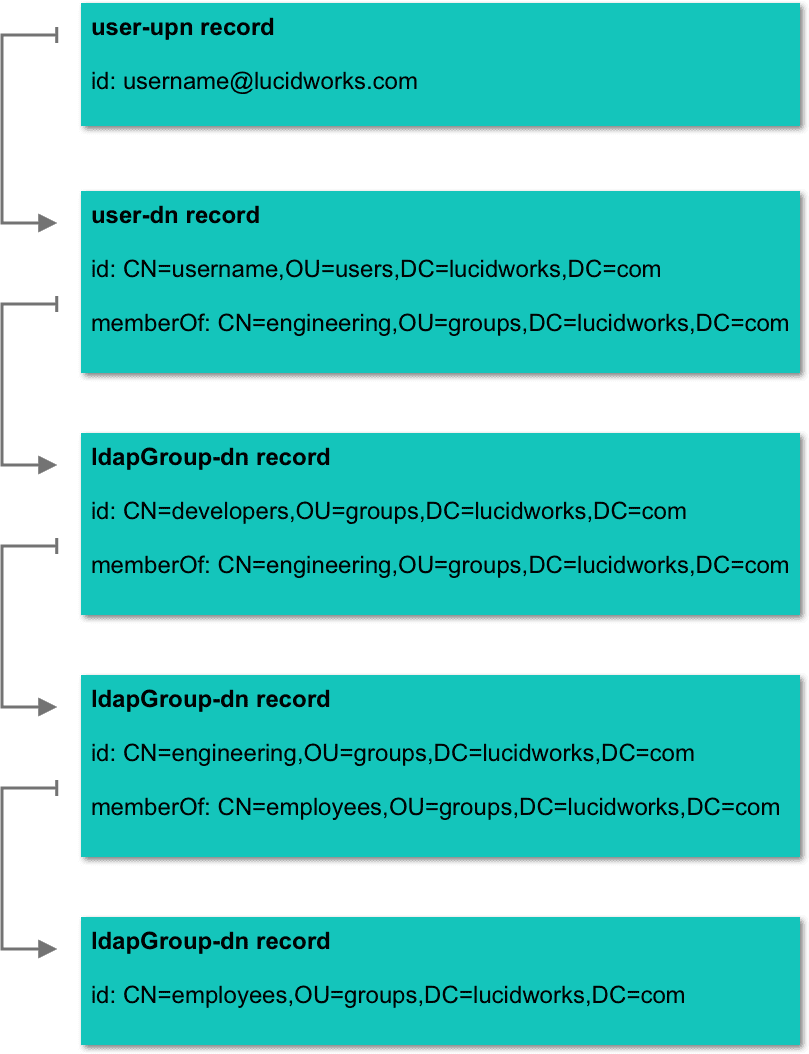 The result will be:
```js wrap theme={"dark"}
username@lucidworks.com
CN=username,OU=users,DC=lucidworks,DC=com
CN=developers,OU=groups,DC=lucidworks,DC=com
CN=engineering,OU=groups,DC=lucidworks,DC=com
CN=employees,OU=groups,DC=lucidworks,DC=com
```
The returned IDs can now be used as a Solr filter (`fq`) to match against a document’s ACL metadata field and ensure the user only sees what they have access to.
The graph query can further traverse the Active Directory field. For example, it can map `ldapGroup-dn` to `ldapGroup-sid`, so you can match groups such as `S-1-5-21-3623811015-3361044348-30300820-1013`. This functionality is especially relevant for SharePoint and SMB2 connectors.
## Incremental Crawls
After a crawl has been finished successfully, all subsequent crawls are “incremental crawls”. Incremental crawls are only supported on Active Directory.
An incremental crawl uses the `whenChanged` attribute in order to fetch only records that have changed since the previous crawl(s). Additionally, the `CN=Deleted Objects` Active Directory location is queried to identify objects deleted since the last crawl.
Incremental crawls are typically run with a scheduled jobs in order to keep the ACL collection up-to-date. Because the crawls are incremental, these jobs should run very quickly.
The result will be:
```js wrap theme={"dark"}
username@lucidworks.com
CN=username,OU=users,DC=lucidworks,DC=com
CN=developers,OU=groups,DC=lucidworks,DC=com
CN=engineering,OU=groups,DC=lucidworks,DC=com
CN=employees,OU=groups,DC=lucidworks,DC=com
```
The returned IDs can now be used as a Solr filter (`fq`) to match against a document’s ACL metadata field and ensure the user only sees what they have access to.
The graph query can further traverse the Active Directory field. For example, it can map `ldapGroup-dn` to `ldapGroup-sid`, so you can match groups such as `S-1-5-21-3623811015-3361044348-30300820-1013`. This functionality is especially relevant for SharePoint and SMB2 connectors.
## Incremental Crawls
After a crawl has been finished successfully, all subsequent crawls are “incremental crawls”. Incremental crawls are only supported on Active Directory.
An incremental crawl uses the `whenChanged` attribute in order to fetch only records that have changed since the previous crawl(s). Additionally, the `CN=Deleted Objects` Active Directory location is queried to identify objects deleted since the last crawl.
Incremental crawls are typically run with a scheduled jobs in order to keep the ACL collection up-to-date. Because the crawls are incremental, these jobs should run very quickly.