> ## Documentation Index
> Fetch the complete documentation index at: https://doc.lucidworks.com/llms.txt
> Use this file to discover all available pages before exploring further.
# Fusion 5.11.0
[localhost link]: http://localhost:3000/docs/5/fusion/release-notes/5.11.0-release-notes
[mintlify link]: https://doc.lucidworks.com/docs/5/fusion/release-notes/5.11.0-release-notes
[old doc.lw link]: https://doc.lucidworks.com/fusion/5.9/dmayvi
Released on January 3, 2024, this [rapid release](/docs/policies/lifecycle-policies/lw-version-support-lifecycle#rapid-release-support-policy) includes new features and improvements, including the App Manager API that generates information for Consumption Dashboard and updates to Solr and Kubernetes.
To learn more, skip to the [release notes](#new-features).
## Platform Support and Component Versions
### Kubernetes platform support
Lucidworks has tested and validated support for the following Kubernetes platforms and versions:
* **Google Kubernetes Engine (GKE):** 1.27
* **Microsoft Azure Kubernetes Service (AKS):** 1.27
* **Amazon Elastic Kubernetes Service (EKS):** 1.27
Support is also offered for Rancher Kubernetes Engine (RKE) and OpenShift 4 versions that are based on Kubernetes 1.27. OpenStack and customized Kubernetes installations are *not* supported.
For more information on Kubernetes version support, see the [Kubernetes support policy](/docs/policies/lifecycle-policies/lw-version-support-lifecycle#kubernetes-support).
## Component versions
The following table details the versions of key components that may be critical to deployments and upgrades.
| Component | Version |
| ----------------------- | ----------------------------------------------------------------------- |
| **Solr** | fusion-solr 5.11.0 *(based on Solr 9.4.0)* |
| **ZooKeeper** | 3.9.0 |
| **Spark** | 3.4.1 |
| **Ingress Controllers** | Nginx, Ambassador (Envoy), GKE Ingress Controller Istio not supported. |
**More information about support dates can be found at [Lucidworks Fusion Product Lifecycle](/docs/policies/lifecycle-policies/lw-version-support-lifecycle).**
**Looking to upgrade?**
See [Fusion 5 Upgrades](/docs/5/fusion/operations/fusion-5-upgrades) for detailed instructions.
## New Features
### Fusion
* The [App Manager API](/api-reference/license/get-the-fusion-license) provides programmatic access to information about your Fusion license, entitlements, and usage data. This data is also used to generate usage statistics in the [Consumption Dashboard](/docs/5/fusion/operations/monitoring-and-reporting/consumption).
For example, send a request to the `/apps-manager/entitlements/current` endpoint to retrieve general entitlements usage data:
**Input**
```bash wrap theme={"dark"}
curl -u USERNAME:PASSWORD https://FUSION_HOST:FUSION_PORT/apps-manager/entitlements/current
```
**Output**
```json theme={"dark"}
{
"contractDuration":{
"years":3,
"months":0,
"days":0
},
"info":{
"start":"2022-12-23",
"end":"2023-12-23",
"requests":10000000,
"records":5000000
},
"usage":{
"requests":2863,
"requestsPercentage":0,
"records":565672,
"recordsPercentage":11
}
}
```
## Improvements
### Fusion
* Solr has been upgraded to 9.4. For details about changes in Solr 9.4, see [Apache Solr Release Notes](https://solr.apache.org/guide/solr/latest/upgrade-notes/major-changes-in-solr-9.html#solr-9-4).
* Fusion now supports Kubernetes 1.27. This applies to GKE, AKS, and EKS. It also applies to Rancher (RKE) and OpenShift 4 versions that are compatible with Kubernetes 1.27. Refer to Kubernetes documentation at [Kubernetes v1.27](https://kubernetes.io/blog/2023/04/11/kubernetes-v1-27-release/) for more information.
* Fusion safeguards against indexing overload with an ingestion flow control system. This system prevents timeouts by:
* Logging all Kafka topics used for indexing to aid in diagnosing performance issues.
* Monitoring the rate of data production and consumption for each Kafka topic across all indexing jobs.
* Automatically throttling producers to ensure consumers can keep up.
* The [Consumption Dashboard](/docs/5/fusion/operations/monitoring-and-reporting/consumption) has been updated to restore three charts.
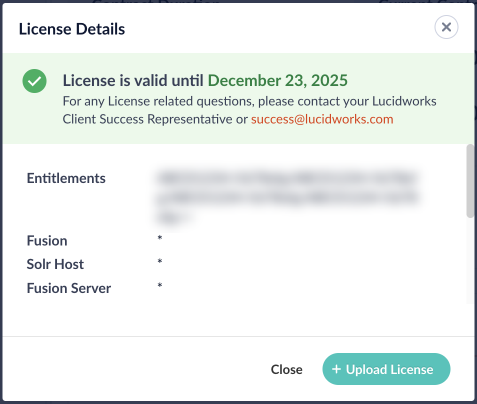
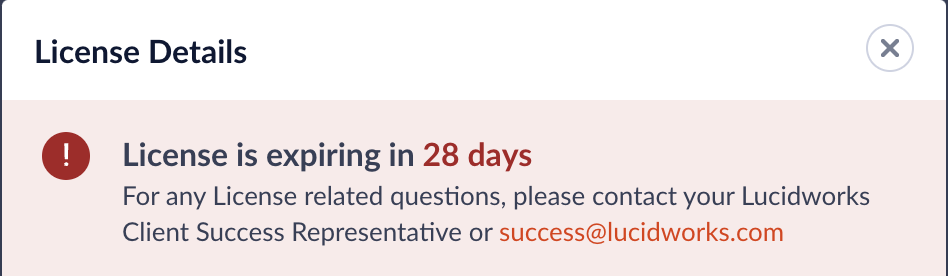
* The Fusion UI is updated with improved messaging around Fusion license renewal and expiration dates.\
License details
 License expiration notice
 * The Fusion API Gateway now includes an optional Kubernetes health check. To enable this check, edit your `values.yaml` file, and add `-Dspring.cloud.kubernetes.loadbalancer.mode=POD` to the API Gateway’s `javaToolOptions`. For example:
```yaml theme={"dark"}
fusion:
api-gateway:
javaToolOptions: "-Dspring.cloud.kubernetes.loadbalancer.mode=POD"
```
When enabled, if the health check fails during pod discovery, Kubernetes will restart the pod.
* The fusion-solr Helm chart now accepts user-defined system properties that are set in `values.yaml`. In the `values.yaml` file, populate the `solrEnvExtra` array with entries for each desired variable. Each variable requires a name and either a direct value or a value source (`valueFrom`). These variables will be included in the final configuration in the order you provide them, following any variables dynamically generated by the Helm chart templates. For more information on Kubernetes environment variables, see [Define Dependent Environment Variables](https://kubernetes.io/docs/tasks/inject-data-application/define-interdependent-environment-variables/).
* The Fusion migration script is updated to align with changes from the Solr upgrade. The migration script:
* Removes the unused configuration, ``, from `solrconfig.xml`. Solr no longer supports this configuration.
* Detects if `StatelessScriptUpdateProcessorFactory` is found in `solrconfig.xml`. The migration script will update the configuration, if possible, and provide guidance on actions you must take.
## Fusion connectors
* The default number of fetch threads for V2 connectors is now 5. Previously, the default was 20. This default setting was reduced because some Fusion environments experienced failed datasource crawls as a result of too many requests in a short period of time.
## Bug Fixes
* The [Configurations](/api-reference/configurations/get-configurations-service-status) and [ZooKeeper Import/Export](/api-reference/zookeeper/get-zookeeper-data) APIs are now accessible only to authorized users from within your Fusion cluster or through Kubernetes port forwarding.
* The Fusion API realm can now authenticate when an API key is passed via an `apiKey` query parameter. Previously, this only worked via the `x-api-key` header.
* The ZooKeeper Docker image is updated to use [Logback](https://logback.qos.ch/) for logging instead of log4j. This change fixes a bug that forced all Zookeeper log messages to use the DEBUG level.
* Fixed a bug that sometimes resulted in an HTTP 431 error when using the Fusion admin UI.
* Fixed a bug that sometimes resulted in an HTTP 414 error when using the Rules UI.
## Deprecations
For full details on deprecations, see [Deprecations and Removals](/docs/5/fusion/deprecations-and-removals).
* Fusion has deprecated the Webapps service. In previous versions of Fusion, you could use this service to deploy an App Studio WAR file into Fusion. As of Fusion 5.11.0, you should instead **Deploy App Studio Enterprise to a Fusion 5 Cluster (GKE)**.
This article explains how to deploy [App Studio Enterprise](/docs/5/fusion/dev-portal/appkit/concepts/app-studio-enterprise/overview) (ASE) to an existing Fusion 5 cluster in Google Kubernetes Engine (GKE) without using the Webapps service.
Before completing this guide, ensure that your `fusion.conf` file points to the IP or URI and port of the proxy service.
Run the App Studio Enterprise application locally and verify functioning security and search features with the cluster you are deploying to.
## Prepare the package
1. Package your app into a single JAR file:
```
./app-studio package
```
2. App Studio Enterprise includes a `dockerfile`. Create the App Studio Enterprise Docker image:
```
docker build PATH -t APP_NAME
```
Set or replace `APP_NAME` with the name of your application. Replace `PATH` with the path to build from.
3. You can test the Docker image locally with the following command:
```
docker run -it -p LOCAL_PORT:8080 APP_NAME
```
Set or replace `LOCAL_PORT` with the port on your local machine that can access the app. Replace `APP_NAME` with the ASE application name.
## Publish the image
You can publish the Docker image anywhere that supports Docker images. This section explains how to publish a Docker image to Google Kubernetes Engine.
1. Tag your container for the registry:
```
docker tag APP_NAME gcr.io/PROJECT_NAME/APP_NAME
```
2. Push your Docker image to the Google Container Registry:
```
docker push gcr.io/PROJECT_NAME/APP_NAME
```
3. Verify the image:
```
gcloud compute instances list
```
## Deploy the app to a cluster
After publishing your ASE Docker image, deploy the image to a cluster. Your existing Fusion 5 cluster is a good choice.
1. Switch the context to your Fusion 5 cluster:
```
gcloud container clusters get-credentials CLUSTER_NAME
```
Replace `CLUSTER_NAME` with your existing Fusion 5 cluster’s name.
2. Create a deployment in your cluster using the image you published:
```
kubectl create deployment APP_NAME --image=gcr.io/PROJECT_NAME/APP_NAME:latest
```
## Create an Ingress resource
After deploying the app, create an Ingress resource for your ASE instance. If you require more Ingress rules, your Ingress resource will look different. Learn more about [Ingress resources](https://kubernetes.io/docs/concepts/services-networking/ingress/).
1. Use the following command to create a minimal Ingress resource:
```
cat <
## Removals
For full details on removals, see [Deprecations and Removals](/docs/5/fusion/deprecations-and-removals).
* The previously non-functional Subscriptions UI has been removed. This is related to the removal of the [Subscriptions API](/docs/5/fusion/release-notes/more/5.6.0-release-notes) in Fusion 5.6.0.
* MLeap is removed from the ml-model service. MLeap was deprecated in Fusion 5.2.0 and was no longer used by Fusion.
## Known issues
* New Kerberos security realms cannot be configured successfully in this version of Fusion.
* The Fusion API Gateway now includes an optional Kubernetes health check. To enable this check, edit your `values.yaml` file, and add `-Dspring.cloud.kubernetes.loadbalancer.mode=POD` to the API Gateway’s `javaToolOptions`. For example:
```yaml theme={"dark"}
fusion:
api-gateway:
javaToolOptions: "-Dspring.cloud.kubernetes.loadbalancer.mode=POD"
```
When enabled, if the health check fails during pod discovery, Kubernetes will restart the pod.
* The fusion-solr Helm chart now accepts user-defined system properties that are set in `values.yaml`. In the `values.yaml` file, populate the `solrEnvExtra` array with entries for each desired variable. Each variable requires a name and either a direct value or a value source (`valueFrom`). These variables will be included in the final configuration in the order you provide them, following any variables dynamically generated by the Helm chart templates. For more information on Kubernetes environment variables, see [Define Dependent Environment Variables](https://kubernetes.io/docs/tasks/inject-data-application/define-interdependent-environment-variables/).
* The Fusion migration script is updated to align with changes from the Solr upgrade. The migration script:
* Removes the unused configuration, ``, from `solrconfig.xml`. Solr no longer supports this configuration.
* Detects if `StatelessScriptUpdateProcessorFactory` is found in `solrconfig.xml`. The migration script will update the configuration, if possible, and provide guidance on actions you must take.
## Fusion connectors
* The default number of fetch threads for V2 connectors is now 5. Previously, the default was 20. This default setting was reduced because some Fusion environments experienced failed datasource crawls as a result of too many requests in a short period of time.
## Bug Fixes
* The [Configurations](/api-reference/configurations/get-configurations-service-status) and [ZooKeeper Import/Export](/api-reference/zookeeper/get-zookeeper-data) APIs are now accessible only to authorized users from within your Fusion cluster or through Kubernetes port forwarding.
* The Fusion API realm can now authenticate when an API key is passed via an `apiKey` query parameter. Previously, this only worked via the `x-api-key` header.
* The ZooKeeper Docker image is updated to use [Logback](https://logback.qos.ch/) for logging instead of log4j. This change fixes a bug that forced all Zookeeper log messages to use the DEBUG level.
* Fixed a bug that sometimes resulted in an HTTP 431 error when using the Fusion admin UI.
* Fixed a bug that sometimes resulted in an HTTP 414 error when using the Rules UI.
## Deprecations
For full details on deprecations, see [Deprecations and Removals](/docs/5/fusion/deprecations-and-removals).
* Fusion has deprecated the Webapps service. In previous versions of Fusion, you could use this service to deploy an App Studio WAR file into Fusion. As of Fusion 5.11.0, you should instead **Deploy App Studio Enterprise to a Fusion 5 Cluster (GKE)**.
This article explains how to deploy [App Studio Enterprise](/docs/5/fusion/dev-portal/appkit/concepts/app-studio-enterprise/overview) (ASE) to an existing Fusion 5 cluster in Google Kubernetes Engine (GKE) without using the Webapps service.
Before completing this guide, ensure that your `fusion.conf` file points to the IP or URI and port of the proxy service.
Run the App Studio Enterprise application locally and verify functioning security and search features with the cluster you are deploying to.
## Prepare the package
1. Package your app into a single JAR file:
```
./app-studio package
```
2. App Studio Enterprise includes a `dockerfile`. Create the App Studio Enterprise Docker image:
```
docker build PATH -t APP_NAME
```
Set or replace `APP_NAME` with the name of your application. Replace `PATH` with the path to build from.
3. You can test the Docker image locally with the following command:
```
docker run -it -p LOCAL_PORT:8080 APP_NAME
```
Set or replace `LOCAL_PORT` with the port on your local machine that can access the app. Replace `APP_NAME` with the ASE application name.
## Publish the image
You can publish the Docker image anywhere that supports Docker images. This section explains how to publish a Docker image to Google Kubernetes Engine.
1. Tag your container for the registry:
```
docker tag APP_NAME gcr.io/PROJECT_NAME/APP_NAME
```
2. Push your Docker image to the Google Container Registry:
```
docker push gcr.io/PROJECT_NAME/APP_NAME
```
3. Verify the image:
```
gcloud compute instances list
```
## Deploy the app to a cluster
After publishing your ASE Docker image, deploy the image to a cluster. Your existing Fusion 5 cluster is a good choice.
1. Switch the context to your Fusion 5 cluster:
```
gcloud container clusters get-credentials CLUSTER_NAME
```
Replace `CLUSTER_NAME` with your existing Fusion 5 cluster’s name.
2. Create a deployment in your cluster using the image you published:
```
kubectl create deployment APP_NAME --image=gcr.io/PROJECT_NAME/APP_NAME:latest
```
## Create an Ingress resource
After deploying the app, create an Ingress resource for your ASE instance. If you require more Ingress rules, your Ingress resource will look different. Learn more about [Ingress resources](https://kubernetes.io/docs/concepts/services-networking/ingress/).
1. Use the following command to create a minimal Ingress resource:
```
cat <
## Removals
For full details on removals, see [Deprecations and Removals](/docs/5/fusion/deprecations-and-removals).
* The previously non-functional Subscriptions UI has been removed. This is related to the removal of the [Subscriptions API](/docs/5/fusion/release-notes/more/5.6.0-release-notes) in Fusion 5.6.0.
* MLeap is removed from the ml-model service. MLeap was deprecated in Fusion 5.2.0 and was no longer used by Fusion.
## Known issues
* New Kerberos security realms cannot be configured successfully in this version of Fusion.