> ## Documentation Index
> Fetch the complete documentation index at: https://doc.lucidworks.com/llms.txt
> Use this file to discover all available pages before exploring further.
# Fusion 5.9.6
[localhost link]: http://localhost:3000/docs/5/fusion/release-notes/5.9.6-release-notes
[mintlify link]: https://doc.lucidworks.com/docs/5/fusion/release-notes/5.9.6-release-notes
[old doc.lw link]: https://doc.lucidworks.com/fusion/5.9/0j9qej
Released on December 2, 2024,
this [maintenance release](/docs/policies/lifecycle-policies/lw-version-support-lifecycle#maintenance-release-support-policy) includes
the new cloud signals feature, support for Open Nashorn, plus bug fixes and other minor improvements.
To learn more, skip to the [release notes](#new-features).
**Security patch available for api-gateway: Netty request smuggling vulnerabilities**
A patch is available for the `api-gateway` service to address critical Netty request smuggling vulnerabilities (CVE-2026-42581, CVE-2026-42585, CVE-2026-42587). These vulnerabilities allow attackers to smuggle HTTP requests through the gateway, potentially bypassing security controls.
The `api-gateway` service requires the Netty security patch.
Follow these steps to apply the patched image:
1. Open your Fusion Helm values file.
2. Add or update the `api-gateway` image configuration:
```yaml theme={"dark"}
api-gateway:
image:
repository: lucidworks
name: api-gateway
tag: 5.9.9-SUST-1634-patch
imagePullPolicy: IfNotPresent
```
3. Save the values file.
4. For Fusion Cloud Native deployments, run the `upgrade_fusion.sh` script you used for your current deployment. For Helm deployments, run:
```bash theme={"dark"}
helm upgrade --namespace NAMESPACE RELEASE_NAME PATH_TO_VALUES
```
Replace `NAMESPACE` with your Kubernetes namespace, `RELEASE_NAME` with your Helm release name, and `PATH_TO_VALUES` with the path to your updated values file.
5. Wait for the `api-gateway` pods to restart and verify they are using the patched image.
**Urgent action required by November 26, 2025**
A patch is required by November 26, 2025 for all self-hosted Fusion deployments running on Amazon Elastic Kubernetes Service (EKS). Certain Java versions used by Fusion components reach end of life on this date. Failure to apply the patch will result in compatibility issues.
The following Fusion services require the `cgroupv2` patch:
| Service | Affected Fusion versions | Patch tag |
| ---------------- | ------------------------ | ---------------------------------------------- |
| `insights` | 5.9.4 to 5.9.15 | `lucidworks/insights:5.9-cgroupv2-patch` |
| `spark-solr-etl` | 5.9.4 to 5.9.11 | `lucidworks/spark-solr-etl:5.9-cgroupv2-patch` |
| `keytool-utils` | 5.9.4 to 5.9.10 | `lucidworks/keytool-utils:5.9-cgroupv2-patch` |
Follow these steps to apply the patched images:
1. Open your Fusion Helm values file. For Fusion Cloud Native deployments, use the values file for your current deployment. For Helm deployments, use the values file you used to create the deployment.
2. For each service listed in the following table that applies to your Fusion version, add or update the image configuration:
Expand the following code snippet for the complete image configuration list.
```yaml expandable theme={"dark"}
global:
keytoolUtils:
image:
repository: lucidworks
name: "keytool-utils"
tag: "5.9-cgroupv2-patch"
imagePullPolicy: "IfNotPresent"
sql-service:
keytoolUtils:
image:
repository: lucidworks
name: "keytool-utils"
tag: "5.9-cgroupv2-patch"
imagePullPolicy: "IfNotPresent"
reverse-search:
keytoolUtils:
image:
repository: lucidworks
name: "keytool-utils"
tag: "5.9-cgroupv2-patch"
imagePullPolicy: "IfNotPresent"
solr:
keytoolUtils:
image:
repository: lucidworks
name: "keytool-utils"
tag: "5.9-cgroupv2-patch"
imagePullPolicy: "IfNotPresent"
zookeeper:
keytoolUtils:
image:
repository: lucidworks
name: "keytool-utils"
tag: "5.9-cgroupv2-patch"
imagePullPolicy: "IfNotPresent"
kafka:
keytoolUtils:
image:
repository: lucidworks
name: "keytool-utils"
tag: "5.9-cgroupv2-patch"
imagePullPolicy: "IfNotPresent"
zookeeper:
keytoolUtils:
image:
repository: lucidworks
name: "keytool-utils"
tag: "5.9-cgroupv2-patch"
imagePullPolicy: "IfNotPresent"
ml-model-service:
keytoolUtils:
image:
repository: lucidworks
name: "keytool-utils"
tag: "5.9-cgroupv2-patch"
imagePullPolicy: "IfNotPresent"
fusion-admin:
keytoolUtils:
image:
repository: lucidworks
name: "keytool-utils"
tag: "5.9-cgroupv2-patch"
imagePullPolicy: "IfNotPresent"
fusion-indexing:
keytoolUtils:
image:
repository: lucidworks
name: "keytool-utils"
tag: "5.9-cgroupv2-patch"
imagePullPolicy: "IfNotPresent"
query-pipeline:
keytoolUtils:
image:
repository: lucidworks
name: "keytool-utils"
tag: "5.9-cgroupv2-patch"
imagePullPolicy: "IfNotPresent"
async-parsing:
keytoolUtils:
image:
repository: lucidworks
name: "keytool-utils"
tag: "5.9-cgroupv2-patch"
imagePullPolicy: "IfNotPresent"
admin-ui:
keytoolUtils:
image:
repository: lucidworks
name: "keytool-utils"
tag: "5.9-cgroupv2-patch"
imagePullPolicy: "IfNotPresent"
api-gateway:
keytoolUtils:
image:
repository: lucidworks
name: "keytool-utils"
tag: "5.9-cgroupv2-patch"
imagePullPolicy: "IfNotPresent"
auth-ui:
keytoolUtils:
image:
repository: lucidworks
name: "keytool-utils"
tag: "5.9-cgroupv2-patch"
imagePullPolicy: "IfNotPresent"
classic-rest-service:
keytoolUtils:
image:
repository: lucidworks
name: "keytool-utils"
tag: "5.9-cgroupv2-patch"
imagePullPolicy: "IfNotPresent"
fusion-resources:
keytoolUtils:
image:
repository: lucidworks
name: "keytool-utils"
tag: "5.9-cgroupv2-patch"
imagePullPolicy: "IfNotPresent"
job-config:
keytoolUtils:
image:
repository: lucidworks
name: "keytool-utils"
tag: "5.9-cgroupv2-patch"
imagePullPolicy: "IfNotPresent"
insights:
image:
imagePullPolicy: Always
name: insights
repository: lucidworks
tag: 5.9-cgroupv2-patch
keytoolUtils:
image:
repository: lucidworks
name: "keytool-utils"
tag: "5.9-cgroupv2-patch"
imagePullPolicy: "IfNotPresent"
job-launcher:
keytoolUtils:
image:
repository: lucidworks
name: "keytool-utils"
tag: "5.9-cgroupv2-patch"
imagePullPolicy: "IfNotPresent"
job-rest-server:
keytoolUtils:
image:
repository: lucidworks
name: "keytool-utils"
tag: "5.9-cgroupv2-patch"
imagePullPolicy: "IfNotPresent"
connectors:
keytoolUtils:
image:
repository: lucidworks
name: "keytool-utils"
tag: "5.9-cgroupv2-patch"
imagePullPolicy: "IfNotPresent"
connector-plugin:
keytoolUtils:
image:
repository: lucidworks
name: "keytool-utils"
tag: "5.9-cgroupv2-patch"
imagePullPolicy: "IfNotPresent"
connectors-backend:
keytoolUtils:
image:
repository: lucidworks
name: "keytool-utils"
tag: "5.9-cgroupv2-patch"
imagePullPolicy: "IfNotPresent"
rules-ui:
keytoolUtils:
image:
repository: lucidworks
name: "keytool-utils"
tag: "5.9-cgroupv2-patch"
imagePullPolicy: "IfNotPresent"
pm-ui:
keytoolUtils:
image:
repository: lucidworks
name: "keytool-utils"
tag: "5.9-cgroupv2-patch"
imagePullPolicy: "IfNotPresent"
lwai-gateway:
keytoolUtils:
image:
repository: lucidworks
name: "keytool-utils"
tag: "5.9-cgroupv2-patch"
imagePullPolicy: "IfNotPresent"
webapps:
keytoolUtils:
image:
repository: lucidworks
name: "keytool-utils"
tag: "5.9-cgroupv2-patch"
imagePullPolicy: "IfNotPresent"
apps-manager:
keytoolUtils:
image:
repository: lucidworks
name: "keytool-utils"
tag: "5.9-cgroupv2-patch"
imagePullPolicy: "IfNotPresent"
templating:
keytoolUtils:
image:
repository: lucidworks
name: "keytool-utils"
tag: "5.9-cgroupv2-patch"
imagePullPolicy: "IfNotPresent"
tikaserver:
keytoolUtils:
image:
repository: lucidworks
name: "keytool-utils"
tag: "5.9-cgroupv2-patch"
imagePullPolicy: "IfNotPresent"
argo:
keytoolUtils:
image:
repository: lucidworks
name: "keytool-utils"
tag: "5.9-cgroupv2-patch"
imagePullPolicy: "IfNotPresent"
seldon-core-operator:
keytoolUtils:
image:
repository: lucidworks
name: "keytool-utils"
tag: "5.9-cgroupv2-patch"
imagePullPolicy: "IfNotPresent"
argo-common-workflows:
image:
imagePullPolicy: Always
repository: lucidworks
sparkSolrEtlTag: 5.9-cgroupv2-patch
utilitiesTag: 5.9.11
```
```yaml theme={"dark"}
insights:
image:
name: insights
pullPolicy: IfNotPresent
repository: lucidworks
tag: 5.9-cgroupv2-patch
argo-common-workflows:
image:
imagePullPolicy: IfNotPresent
repository: lucidworks
sparkSolrEtlTag: 5.9-cgroupv2-patch
```
```yaml theme={"dark"}
insights:
image:
name: insights
pullPolicy: IfNotPresent
repository: lucidworks
tag: insights:5.9-cgroupv2-patch
```
3. Save the values file.
4. For Fusion Cloud Native deployments, run the `upgrade_fusion.sh` script you used for your current deployment. For Helm deployments, run the following command:
```bash theme={"dark"}
helm upgrade --namespace NAMESPACE RELEASE_NAME PATH_TO_VALUES
```
Replace `NAMESPACE` with your Kubernetes namespace. Replace `RELEASE_NAME` with your Helm release name. Replace `PATH_TO_VALUES` with the path to your updated values file.
5. Wait for the affected service pods to restart and verify they are using the patched images.
**Looking to upgrade?**
See [Fusion 5 Upgrades](/docs/5/fusion/operations/fusion-5-upgrades) for detailed instructions.
## Platform Support and Component Versions
### Kubernetes platform support
Lucidworks has tested and validated support for the following Kubernetes platforms and versions:
* **Google Kubernetes Engine (GKE):** 1.28, 1.29, 1.30
* **Microsoft Azure Kubernetes Service (AKS):** 1.28, 1.29, 1.30
* **Amazon Elastic Kubernetes Service (EKS):** 1.28, 1.29, 1.30
Support is also offered for Rancher Kubernetes Engine (RKE) and OpenShift 4 versions that are based on Kubernetes 1.28, 1.29, 1.30. OpenStack and customized Kubernetes installations are *not* supported.
For more information on Kubernetes version support, see the [Kubernetes support policy](/docs/policies/lifecycle-policies/lw-version-support-lifecycle#kubernetes-support).
### Component versions
The following table details the versions of key components that may be critical to deployments and upgrades.
| Component | Version |
| ----------------------- | ----------------------------------------------------------------------- |
| **Solr** | fusion-solr 5.9.6 *(based on Solr 9.6.1)* |
| **ZooKeeper** | 3.9.1 |
| **Spark** | 3.2.2 |
| **Ingress Controllers** | Nginx, Ambassador (Envoy), GKE Ingress Controller Istio not supported. |
More information about support dates can be found at [Lucidworks Fusion Product Lifecycle](/docs/policies/lifecycle-policies/lw-version-support-lifecycle).
## New Features
### Support for Open Nashorn
Now your pipeline definitions can include your choice of JavaScript engine, either "Nashorn" or "OpenJDK Nashorn".
You can select the JavaScript engine in the pipeline views.
Your JavaScript pipeline stages are interpreted by the selected engine.
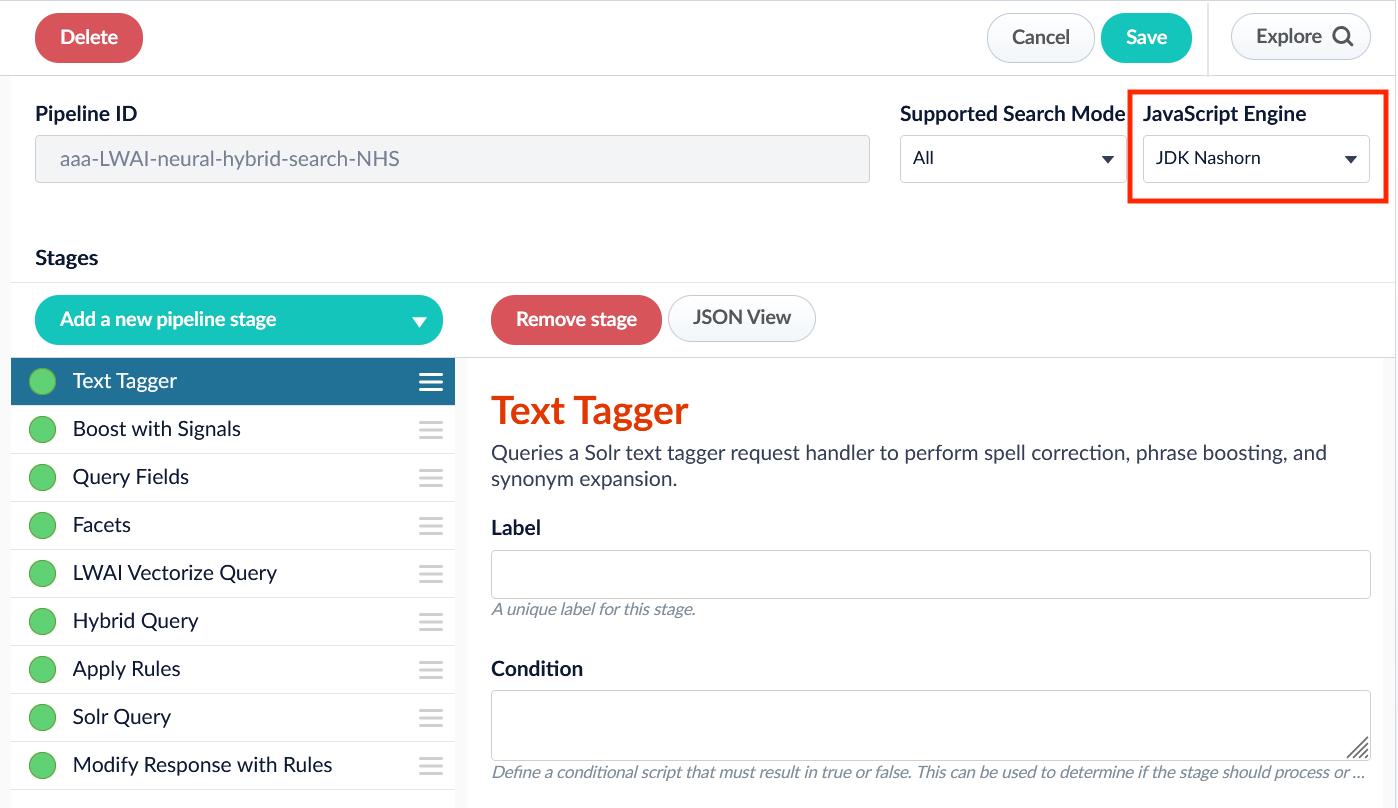 While Nashorn is the default option, it is in the process of being deprecated and will eventually be removed, so it is recommended to use OpenJDK Nashorn when possible.
## Improvements
* Fusion’s Remote V2 Connectors now support the Amazon Web Services (AWS) Application Load Balancer (ALB) for ingress.\
See **Configure Remote V2 Connectors** for configuration details.
If you need to index data from behind a firewall, you can configure a V2 connector to run remotely on-premises using TLS-enabled gRPC.
## Prerequisites
Before you can set up an on-prem V2 connector, you must configure the egress from your network to allow HTTP/2 communication into the Fusion cloud. You can use a [forward proxy server](#egress-and-proxy-server-configuration) to act as an intermediary between the connector and Fusion.
The following is required to run V2 connectors remotely:
* The [plugin zip file and the connector-plugin-standalone JAR](https://plugins.lucidworks.com/).
* A configured connector backend gRPC endpoint.
* Username and password of a user with a `remote-connectors` or `admin` role.
* If the host where the remote connector is running is not configured to trust the server’s TLS certificate, you must configure the file path of the trust certificate collection.
If your version of Fusion doesn’t have the `remote-connectors` role by default, you can create one. No API or UI permissions are required for the role.
## Connector compatibility
Only V2 connectors are able to run remotely on-premises.
You also need the remote connector client JAR file that matches your Fusion version.
You can download the latest files at [V2 Connectors Downloads](/docs/fusion-connectors/downloads/v2-connectors-downloads).
Whenever you upgrade Fusion, you must also update your remote connectors to match the new version of Fusion.
The gRPC connector backend is not supported in Fusion environments deployed on AWS.
## System requirements
The following is required for the on-prem host of the remote connector:
* (Fusion 5.9.0-5.9.10) JVM version 11
* (Fusion 5.9.11) JVM version 17
* Minimum of 2 CPUs
* 4GB Memory
Note that memory requirements depend on the number and size of ingested documents.
## Enable backend ingress
In your `values.yaml` file, configure this section as needed:
```yaml theme={"dark"}
ingress:
enabled: false
pathtype: "Prefix"
path: "/"
#host: "ingress.example.com"
ingressClassName: "nginx" # Fusion 5.9.6 only
tls:
enabled: false
certificateArn: ""
# Enable the annotations field to override the default annotations
#annotations: ""
```
* Set `enabled` to `true` to enable the backend ingress.
* Set `pathtype` to `Prefix` or `Exact`.
* Set `path` to the path where the backend will be available.
* Set `host` to the host where the backend will be available.
* In Fusion 5.9.6 *only*, you can set `ingressClassName` to one of the following:
* `nginx` for Nginx Ingress Controller
* `alb` for AWS Application Load Balancer (ALB)
* Configure TLS and certificates according to your CA’s procedures and policies.
TLS must be enabled in order to use AWS ALB for ingress.
## Connector configuration example
```yaml theme={"dark"}
kafka-bridge:
target: mynamespace-connectors-backend.lucidworkstest.com:443 # mandatory
plain-text: false # optional, false by default.
proxy-server: # optional - needed when a forward proxy server is used to provide outbound access to the standalone connector
host: host
port: some-port
user: user # optional
password: password # optional
trust: # optional - needed when the client's system doesn't trust the server's certificate
cert-collection-filepath: path1
proxy: # mandatory fusion-proxy
user: admin
password: password123
url: https://fusiontest.com/ # needed only when the connector plugin requires blob store access
plugin: # mandatory
path: ./fs.zip
type: #optional - the suffix is added to the connector id
suffix: remote
```
### Minimal example
```yaml theme={"dark"}
kafka-bridge:
target: mynamespace-connectors-backend.lucidworkstest.com:443
proxy:
user: admin
password: "password123"
plugin:
path: ./testplugin.zip
```
### Logback XML configuration file example
```xml theme={"dark"}
%d - %-5p [%t:%C{3.}@%L] - %m{nolookups}%n
utf8
${LOGDIR:-.}/connector.log
${LOGDIR:-.}/connector-%d{yyyy-MM-dd}.%i.log.gz
50MB
10GB
%d - %-5p [%t:%C{3.}@%L] - %m{nolookups}%n
utf8
```
## Run the remote connector
```java theme={"dark"}
java [-Dlogging.config=[LOGBACK_XML_FILE]] \
-jar connector-plugin-client-standalone.jar [YAML_CONFIG_FILE]
```
The `logging.config` property is optional. If not set, logging messages are sent to the console.
## Test communication
You can run the connector in communication testing mode. This mode tests the communication with the backend without running the plugin, reports the result, and exits.
```java theme={"dark"}
java -Dstandalone.connector.connectivity.test=true -jar connector-plugin-client-standalone.jar [YAML_CONFIG_FILE]
```
## Encryption
In a deployment, communication to the connector’s backend server is encrypted using TLS. You should only run this configuration without TLS in a testing scenario. To disable TLS, set `plain-text` to `true`.
## Egress and proxy server configuration
One of the methods you can use to allow outbound communication from behind a firewall is a proxy server. You can configure a proxy server to allow certain communication traffic while blocking unauthorized communication. If you use a proxy server at the site where the connector is running, you must configure the following properties:
* **Host.** The hosts where the proxy server is running.
* **Port.** The port the proxy server is listening to for communication requests.
* **Credentials.** Optional proxy server user and password.
When you configure egress, it is important to disable any connection or activity timeouts because the connector uses long running gRPC calls.
## Password encryption
If you use a login name and password in your configuration, run the following utility to encrypt the password:
1. Enter a user name and password in the connector configuration YAML.
2. Run the standalone JAR with this property:
```java theme={"dark"}
-Dstandalone.connector.encrypt.password=true
```
3. Retrieve the encrypted passwords from the log that is created.
4. Replace the clear password in the configuration YAML with the encrypted password.
## Connector restart (5.7 and earlier)
The connector will shut down automatically whenever the connection to the server is disrupted, to prevent it from getting into a bad state. Communication disruption can happen, for example, when the server running in the `connectors-backend` pod shuts down and is replaced by a new pod. Once the connector shuts down, connector configuration and job execution are disabled. To prevent that from happening, you should restart the connector as soon as possible.
You can use Linux scripts and utilities to restart the connector automatically, such as [Monit](https://mmonit.com/monit/).
## Recoverable bridge (5.8 and later)
If communication to the remote connector is disrupted, the connector will try to recover communication and gRPC calls. By default, six attempts will be made to recover each gRPC call. The number of attempts can be configured with the `max-grpc-retries` bridge parameters.
## Job expiration duration (5.9.5 only)
The timeout value for irresponsive backend jobs can be configured with the `job-expiration-duration-seconds` parameter. The default value is `120` seconds.
## Use the remote connector
Once the connector is running, it is available in the Datasources dropdown. If the standalone connector terminates, it disappears from the list of available connectors. Once it is re-run, it is available again and configured connector instances will not get lost.
## Enable asynchronous parsing (5.9 and later)
To separate document crawling from document parsing, enable Tika Asynchronous Parsing on remote V2 connectors.
## Removals
### Bitnami removal
Fusion 5.9.6 will be re-released with the same functionality but updated image references.
In the meantime, Lucidworks will self-host the required images while we work to replace Bitnami images with internally built open-source alternatives.
If you are a self-hosted Fusion customer, *you must upgrade before August 28* to ensure continued access to container images and prevent deployment issues.
You can reinstall your current version of Fusion or upgrade to Fusion 5.9.14, which includes the updated Helm chart and prepares your environment for long-term compatibility.
See [Prevent image pull failures due to Bitnami deprecation in Fusion 5.9.5 to 5.9.13](https://support.lucidworks.com/hc/en-us/articles/33966125467799-Prevent-image-pull-failures-due-to-Bitnami-deprecation-in-Fusion-5-9-5-to-5-9-13) for more information on how to prevent image pull failures.
## Bug fixes
* Fixed an issue that caused the API Gateway service to return a `401` error code for `400` errors.
* Fixed an issue that passed redacted configuration values to Fusion, resulting in invalid configurations.
* Fixed an issue that sometimes caused intermittent errors in Machine Learning stages.
* Fixed an issue where the `sourceType` query parameter was not being conveyed to Lucidworks AI.
* Fixed an issue that prevented the correct display of some UI panels for non-admin users.
* Fixed an issue where the names of some of the configuration checkboxes for the Web connector were truncated.
* Fixed an issue with the Web 1.4.0 connector that, in rare cases, prevented the client secret from being saved.
* Fixed an issue that caused a `Class cannot be created (missing no-arg constructor)` error when a response document contained an undefined value.
While Nashorn is the default option, it is in the process of being deprecated and will eventually be removed, so it is recommended to use OpenJDK Nashorn when possible.
## Improvements
* Fusion’s Remote V2 Connectors now support the Amazon Web Services (AWS) Application Load Balancer (ALB) for ingress.\
See **Configure Remote V2 Connectors** for configuration details.
If you need to index data from behind a firewall, you can configure a V2 connector to run remotely on-premises using TLS-enabled gRPC.
## Prerequisites
Before you can set up an on-prem V2 connector, you must configure the egress from your network to allow HTTP/2 communication into the Fusion cloud. You can use a [forward proxy server](#egress-and-proxy-server-configuration) to act as an intermediary between the connector and Fusion.
The following is required to run V2 connectors remotely:
* The [plugin zip file and the connector-plugin-standalone JAR](https://plugins.lucidworks.com/).
* A configured connector backend gRPC endpoint.
* Username and password of a user with a `remote-connectors` or `admin` role.
* If the host where the remote connector is running is not configured to trust the server’s TLS certificate, you must configure the file path of the trust certificate collection.
If your version of Fusion doesn’t have the `remote-connectors` role by default, you can create one. No API or UI permissions are required for the role.
## Connector compatibility
Only V2 connectors are able to run remotely on-premises.
You also need the remote connector client JAR file that matches your Fusion version.
You can download the latest files at [V2 Connectors Downloads](/docs/fusion-connectors/downloads/v2-connectors-downloads).
Whenever you upgrade Fusion, you must also update your remote connectors to match the new version of Fusion.
The gRPC connector backend is not supported in Fusion environments deployed on AWS.
## System requirements
The following is required for the on-prem host of the remote connector:
* (Fusion 5.9.0-5.9.10) JVM version 11
* (Fusion 5.9.11) JVM version 17
* Minimum of 2 CPUs
* 4GB Memory
Note that memory requirements depend on the number and size of ingested documents.
## Enable backend ingress
In your `values.yaml` file, configure this section as needed:
```yaml theme={"dark"}
ingress:
enabled: false
pathtype: "Prefix"
path: "/"
#host: "ingress.example.com"
ingressClassName: "nginx" # Fusion 5.9.6 only
tls:
enabled: false
certificateArn: ""
# Enable the annotations field to override the default annotations
#annotations: ""
```
* Set `enabled` to `true` to enable the backend ingress.
* Set `pathtype` to `Prefix` or `Exact`.
* Set `path` to the path where the backend will be available.
* Set `host` to the host where the backend will be available.
* In Fusion 5.9.6 *only*, you can set `ingressClassName` to one of the following:
* `nginx` for Nginx Ingress Controller
* `alb` for AWS Application Load Balancer (ALB)
* Configure TLS and certificates according to your CA’s procedures and policies.
TLS must be enabled in order to use AWS ALB for ingress.
## Connector configuration example
```yaml theme={"dark"}
kafka-bridge:
target: mynamespace-connectors-backend.lucidworkstest.com:443 # mandatory
plain-text: false # optional, false by default.
proxy-server: # optional - needed when a forward proxy server is used to provide outbound access to the standalone connector
host: host
port: some-port
user: user # optional
password: password # optional
trust: # optional - needed when the client's system doesn't trust the server's certificate
cert-collection-filepath: path1
proxy: # mandatory fusion-proxy
user: admin
password: password123
url: https://fusiontest.com/ # needed only when the connector plugin requires blob store access
plugin: # mandatory
path: ./fs.zip
type: #optional - the suffix is added to the connector id
suffix: remote
```
### Minimal example
```yaml theme={"dark"}
kafka-bridge:
target: mynamespace-connectors-backend.lucidworkstest.com:443
proxy:
user: admin
password: "password123"
plugin:
path: ./testplugin.zip
```
### Logback XML configuration file example
```xml theme={"dark"}
%d - %-5p [%t:%C{3.}@%L] - %m{nolookups}%n
utf8
${LOGDIR:-.}/connector.log
${LOGDIR:-.}/connector-%d{yyyy-MM-dd}.%i.log.gz
50MB
10GB
%d - %-5p [%t:%C{3.}@%L] - %m{nolookups}%n
utf8
```
## Run the remote connector
```java theme={"dark"}
java [-Dlogging.config=[LOGBACK_XML_FILE]] \
-jar connector-plugin-client-standalone.jar [YAML_CONFIG_FILE]
```
The `logging.config` property is optional. If not set, logging messages are sent to the console.
## Test communication
You can run the connector in communication testing mode. This mode tests the communication with the backend without running the plugin, reports the result, and exits.
```java theme={"dark"}
java -Dstandalone.connector.connectivity.test=true -jar connector-plugin-client-standalone.jar [YAML_CONFIG_FILE]
```
## Encryption
In a deployment, communication to the connector’s backend server is encrypted using TLS. You should only run this configuration without TLS in a testing scenario. To disable TLS, set `plain-text` to `true`.
## Egress and proxy server configuration
One of the methods you can use to allow outbound communication from behind a firewall is a proxy server. You can configure a proxy server to allow certain communication traffic while blocking unauthorized communication. If you use a proxy server at the site where the connector is running, you must configure the following properties:
* **Host.** The hosts where the proxy server is running.
* **Port.** The port the proxy server is listening to for communication requests.
* **Credentials.** Optional proxy server user and password.
When you configure egress, it is important to disable any connection or activity timeouts because the connector uses long running gRPC calls.
## Password encryption
If you use a login name and password in your configuration, run the following utility to encrypt the password:
1. Enter a user name and password in the connector configuration YAML.
2. Run the standalone JAR with this property:
```java theme={"dark"}
-Dstandalone.connector.encrypt.password=true
```
3. Retrieve the encrypted passwords from the log that is created.
4. Replace the clear password in the configuration YAML with the encrypted password.
## Connector restart (5.7 and earlier)
The connector will shut down automatically whenever the connection to the server is disrupted, to prevent it from getting into a bad state. Communication disruption can happen, for example, when the server running in the `connectors-backend` pod shuts down and is replaced by a new pod. Once the connector shuts down, connector configuration and job execution are disabled. To prevent that from happening, you should restart the connector as soon as possible.
You can use Linux scripts and utilities to restart the connector automatically, such as [Monit](https://mmonit.com/monit/).
## Recoverable bridge (5.8 and later)
If communication to the remote connector is disrupted, the connector will try to recover communication and gRPC calls. By default, six attempts will be made to recover each gRPC call. The number of attempts can be configured with the `max-grpc-retries` bridge parameters.
## Job expiration duration (5.9.5 only)
The timeout value for irresponsive backend jobs can be configured with the `job-expiration-duration-seconds` parameter. The default value is `120` seconds.
## Use the remote connector
Once the connector is running, it is available in the Datasources dropdown. If the standalone connector terminates, it disappears from the list of available connectors. Once it is re-run, it is available again and configured connector instances will not get lost.
## Enable asynchronous parsing (5.9 and later)
To separate document crawling from document parsing, enable Tika Asynchronous Parsing on remote V2 connectors.
## Removals
### Bitnami removal
Fusion 5.9.6 will be re-released with the same functionality but updated image references.
In the meantime, Lucidworks will self-host the required images while we work to replace Bitnami images with internally built open-source alternatives.
If you are a self-hosted Fusion customer, *you must upgrade before August 28* to ensure continued access to container images and prevent deployment issues.
You can reinstall your current version of Fusion or upgrade to Fusion 5.9.14, which includes the updated Helm chart and prepares your environment for long-term compatibility.
See [Prevent image pull failures due to Bitnami deprecation in Fusion 5.9.5 to 5.9.13](https://support.lucidworks.com/hc/en-us/articles/33966125467799-Prevent-image-pull-failures-due-to-Bitnami-deprecation-in-Fusion-5-9-5-to-5-9-13) for more information on how to prevent image pull failures.
## Bug fixes
* Fixed an issue that caused the API Gateway service to return a `401` error code for `400` errors.
* Fixed an issue that passed redacted configuration values to Fusion, resulting in invalid configurations.
* Fixed an issue that sometimes caused intermittent errors in Machine Learning stages.
* Fixed an issue where the `sourceType` query parameter was not being conveyed to Lucidworks AI.
* Fixed an issue that prevented the correct display of some UI panels for non-admin users.
* Fixed an issue where the names of some of the configuration checkboxes for the Web connector were truncated.
* Fixed an issue with the Web 1.4.0 connector that, in rare cases, prevented the client secret from being saved.
* Fixed an issue that caused a `Class cannot be created (missing no-arg constructor)` error when a response document contained an undefined value.