> ## Documentation Index
> Fetch the complete documentation index at: https://doc.lucidworks.com/llms.txt
> Use this file to discover all available pages before exploring further.
# Fusion 5.9.11
[localhost link]: http://localhost:3000/docs/5/fusion/release-notes/5.9.11-release-notes
[mintlify link]: https://doc.lucidworks.com/docs/5/fusion/release-notes/5.9.11-release-notes
[old doc.lw link]: https://doc.lucidworks.com/fusion/5.9/z72wlm
Released on March 20, 2025, this [maintenance release](/docs/policies/lifecycle-policies/lw-version-support-lifecycle#maintenance-release-support-policy) provides KNN-based performance enhancements for Neural Hybrid Search, Java 17 support for connectors, a new asynchronous parsing service, the Apps Manager API, and critical security updates.
Upgrading to the latest version of Fusion 5.9 offers several key benefits:
* **Access to latest features:** Stay current with the latest features and functionality to ensure compatibility and optimal performance.
* **Simplified process:** Fusion 5.9.5 and later use an in-place upgrade strategy, making upgrades easier than ever.
* **Extended support:** Upgrading keeps you up-to-date with the latest supported Kubernetes versions, as outlined in the [Lucidworks Fusion Product Lifecycle](/docs/policies/lifecycle-policies/lw-version-support-lifecycle) policy.
**Security patch available for api-gateway: Netty request smuggling vulnerabilities**
A patch is available for the `api-gateway` service to address critical Netty request smuggling vulnerabilities (CVE-2026-42581, CVE-2026-42585, CVE-2026-42587). These vulnerabilities allow attackers to smuggle HTTP requests through the gateway, potentially bypassing security controls.
The `api-gateway` service requires the Netty security patch.
Follow these steps to apply the patched image:
1. Open your Fusion Helm values file.
2. Add or update the `api-gateway` image configuration:
```yaml theme={"dark"}
api-gateway:
image:
repository: lucidworks
name: api-gateway
tag: 5.9.11-SUST-1634-patch
imagePullPolicy: IfNotPresent
```
3. Save the values file.
4. For Fusion Cloud Native deployments, run the `upgrade_fusion.sh` script you used for your current deployment. For Helm deployments, run:
```bash theme={"dark"}
helm upgrade --namespace NAMESPACE RELEASE_NAME PATH_TO_VALUES
```
Replace `NAMESPACE` with your Kubernetes namespace, `RELEASE_NAME` with your Helm release name, and `PATH_TO_VALUES` with the path to your updated values file.
5. Wait for the `api-gateway` pods to restart and verify they are using the patched image.
**Urgent action required by November 26, 2025**
A patch is required by November 26, 2025 for all self-hosted Fusion deployments running on Amazon Elastic Kubernetes Service (EKS). Certain Java versions used by Fusion components reach end of life on this date. Failure to apply the patch will result in compatibility issues.
The following Fusion services require the `cgroupv2` patch:
| Service | Affected Fusion versions | Patch tag |
| ---------------- | ------------------------ | ---------------------------------------------- |
| `insights` | 5.9.4 to 5.9.15 | `lucidworks/insights:5.9-cgroupv2-patch` |
| `spark-solr-etl` | 5.9.4 to 5.9.11 | `lucidworks/spark-solr-etl:5.9-cgroupv2-patch` |
| `keytool-utils` | 5.9.4 to 5.9.10 | `lucidworks/keytool-utils:5.9-cgroupv2-patch` |
Follow these steps to apply the patched images:
1. Open your Fusion Helm values file. For Fusion Cloud Native deployments, use the values file for your current deployment. For Helm deployments, use the values file you used to create the deployment.
2. For each service listed in the following table that applies to your Fusion version, add or update the image configuration:
Expand the following code snippet for the complete image configuration list.
```yaml expandable theme={"dark"}
global:
keytoolUtils:
image:
repository: lucidworks
name: "keytool-utils"
tag: "5.9-cgroupv2-patch"
imagePullPolicy: "IfNotPresent"
sql-service:
keytoolUtils:
image:
repository: lucidworks
name: "keytool-utils"
tag: "5.9-cgroupv2-patch"
imagePullPolicy: "IfNotPresent"
reverse-search:
keytoolUtils:
image:
repository: lucidworks
name: "keytool-utils"
tag: "5.9-cgroupv2-patch"
imagePullPolicy: "IfNotPresent"
solr:
keytoolUtils:
image:
repository: lucidworks
name: "keytool-utils"
tag: "5.9-cgroupv2-patch"
imagePullPolicy: "IfNotPresent"
zookeeper:
keytoolUtils:
image:
repository: lucidworks
name: "keytool-utils"
tag: "5.9-cgroupv2-patch"
imagePullPolicy: "IfNotPresent"
kafka:
keytoolUtils:
image:
repository: lucidworks
name: "keytool-utils"
tag: "5.9-cgroupv2-patch"
imagePullPolicy: "IfNotPresent"
zookeeper:
keytoolUtils:
image:
repository: lucidworks
name: "keytool-utils"
tag: "5.9-cgroupv2-patch"
imagePullPolicy: "IfNotPresent"
ml-model-service:
keytoolUtils:
image:
repository: lucidworks
name: "keytool-utils"
tag: "5.9-cgroupv2-patch"
imagePullPolicy: "IfNotPresent"
fusion-admin:
keytoolUtils:
image:
repository: lucidworks
name: "keytool-utils"
tag: "5.9-cgroupv2-patch"
imagePullPolicy: "IfNotPresent"
fusion-indexing:
keytoolUtils:
image:
repository: lucidworks
name: "keytool-utils"
tag: "5.9-cgroupv2-patch"
imagePullPolicy: "IfNotPresent"
query-pipeline:
keytoolUtils:
image:
repository: lucidworks
name: "keytool-utils"
tag: "5.9-cgroupv2-patch"
imagePullPolicy: "IfNotPresent"
async-parsing:
keytoolUtils:
image:
repository: lucidworks
name: "keytool-utils"
tag: "5.9-cgroupv2-patch"
imagePullPolicy: "IfNotPresent"
admin-ui:
keytoolUtils:
image:
repository: lucidworks
name: "keytool-utils"
tag: "5.9-cgroupv2-patch"
imagePullPolicy: "IfNotPresent"
api-gateway:
keytoolUtils:
image:
repository: lucidworks
name: "keytool-utils"
tag: "5.9-cgroupv2-patch"
imagePullPolicy: "IfNotPresent"
auth-ui:
keytoolUtils:
image:
repository: lucidworks
name: "keytool-utils"
tag: "5.9-cgroupv2-patch"
imagePullPolicy: "IfNotPresent"
classic-rest-service:
keytoolUtils:
image:
repository: lucidworks
name: "keytool-utils"
tag: "5.9-cgroupv2-patch"
imagePullPolicy: "IfNotPresent"
fusion-resources:
keytoolUtils:
image:
repository: lucidworks
name: "keytool-utils"
tag: "5.9-cgroupv2-patch"
imagePullPolicy: "IfNotPresent"
job-config:
keytoolUtils:
image:
repository: lucidworks
name: "keytool-utils"
tag: "5.9-cgroupv2-patch"
imagePullPolicy: "IfNotPresent"
insights:
image:
imagePullPolicy: Always
name: insights
repository: lucidworks
tag: 5.9-cgroupv2-patch
keytoolUtils:
image:
repository: lucidworks
name: "keytool-utils"
tag: "5.9-cgroupv2-patch"
imagePullPolicy: "IfNotPresent"
job-launcher:
keytoolUtils:
image:
repository: lucidworks
name: "keytool-utils"
tag: "5.9-cgroupv2-patch"
imagePullPolicy: "IfNotPresent"
job-rest-server:
keytoolUtils:
image:
repository: lucidworks
name: "keytool-utils"
tag: "5.9-cgroupv2-patch"
imagePullPolicy: "IfNotPresent"
connectors:
keytoolUtils:
image:
repository: lucidworks
name: "keytool-utils"
tag: "5.9-cgroupv2-patch"
imagePullPolicy: "IfNotPresent"
connector-plugin:
keytoolUtils:
image:
repository: lucidworks
name: "keytool-utils"
tag: "5.9-cgroupv2-patch"
imagePullPolicy: "IfNotPresent"
connectors-backend:
keytoolUtils:
image:
repository: lucidworks
name: "keytool-utils"
tag: "5.9-cgroupv2-patch"
imagePullPolicy: "IfNotPresent"
rules-ui:
keytoolUtils:
image:
repository: lucidworks
name: "keytool-utils"
tag: "5.9-cgroupv2-patch"
imagePullPolicy: "IfNotPresent"
pm-ui:
keytoolUtils:
image:
repository: lucidworks
name: "keytool-utils"
tag: "5.9-cgroupv2-patch"
imagePullPolicy: "IfNotPresent"
lwai-gateway:
keytoolUtils:
image:
repository: lucidworks
name: "keytool-utils"
tag: "5.9-cgroupv2-patch"
imagePullPolicy: "IfNotPresent"
webapps:
keytoolUtils:
image:
repository: lucidworks
name: "keytool-utils"
tag: "5.9-cgroupv2-patch"
imagePullPolicy: "IfNotPresent"
apps-manager:
keytoolUtils:
image:
repository: lucidworks
name: "keytool-utils"
tag: "5.9-cgroupv2-patch"
imagePullPolicy: "IfNotPresent"
templating:
keytoolUtils:
image:
repository: lucidworks
name: "keytool-utils"
tag: "5.9-cgroupv2-patch"
imagePullPolicy: "IfNotPresent"
tikaserver:
keytoolUtils:
image:
repository: lucidworks
name: "keytool-utils"
tag: "5.9-cgroupv2-patch"
imagePullPolicy: "IfNotPresent"
argo:
keytoolUtils:
image:
repository: lucidworks
name: "keytool-utils"
tag: "5.9-cgroupv2-patch"
imagePullPolicy: "IfNotPresent"
seldon-core-operator:
keytoolUtils:
image:
repository: lucidworks
name: "keytool-utils"
tag: "5.9-cgroupv2-patch"
imagePullPolicy: "IfNotPresent"
argo-common-workflows:
image:
imagePullPolicy: Always
repository: lucidworks
sparkSolrEtlTag: 5.9-cgroupv2-patch
utilitiesTag: 5.9.11
```
```yaml theme={"dark"}
insights:
image:
name: insights
pullPolicy: IfNotPresent
repository: lucidworks
tag: 5.9-cgroupv2-patch
argo-common-workflows:
image:
imagePullPolicy: IfNotPresent
repository: lucidworks
sparkSolrEtlTag: 5.9-cgroupv2-patch
```
```yaml theme={"dark"}
insights:
image:
name: insights
pullPolicy: IfNotPresent
repository: lucidworks
tag: insights:5.9-cgroupv2-patch
```
3. Save the values file.
4. For Fusion Cloud Native deployments, run the `upgrade_fusion.sh` script you used for your current deployment. For Helm deployments, run the following command:
```bash theme={"dark"}
helm upgrade --namespace NAMESPACE RELEASE_NAME PATH_TO_VALUES
```
Replace `NAMESPACE` with your Kubernetes namespace. Replace `RELEASE_NAME` with your Helm release name. Replace `PATH_TO_VALUES` with the path to your updated values file.
5. Wait for the affected service pods to restart and verify they are using the patched images.
**Looking to upgrade?**
See [Fusion 5 Upgrades](/docs/5/fusion/operations/fusion-5-upgrades) for detailed instructions.
For supported Kubernetes versions and key component versions, see [Platform support and component versions](#platform-support-and-component-versions).
## Key highlights
### KNN performance enhancements
The [Neural Hybrid Query stage](/docs/5/fusion/reference/config-ref/pipeline-stages/query-stages/neural-hybrid-query) now uses K-Nearest Neighbors (KNN) instead of vector similarity (vecSim).
KNN is a more efficient method for finding the most relevant results, leading to faster and more accurate searches that help users find the most relevant information faster.
New configuration options give you finer control over the speed and accuracy of neural hybrid queries:
* `vectorDepth` (Number of Vector Results) sets the number of vector results to return from the vector portion of the hybrid query.
Increasing `vectorDepth` retrieves more vector results but may increase query time.
Lowering it speeds up search but may reduce result diversity.
* `vecPreFilterBoolean` (Block pre-filtering) indicates whether to prevent pre-filtering.
Pre-filtering can improve performance, while blocking it can yield more accurate facet counts and search results.
### Java 17 for connectors
Connectors have been updated to use Java 17. If you use remote connectors, you must upgrade to JVM 17. See **Configure Remote V2 Connectors** for more information.
If you need to index data from behind a firewall, you can configure a V2 connector to run remotely on-premises using TLS-enabled gRPC.
## Prerequisites
Before you can set up an on-prem V2 connector, you must configure the egress from your network to allow HTTP/2 communication into the Fusion cloud. You can use a [forward proxy server](#egress-and-proxy-server-configuration) to act as an intermediary between the connector and Fusion.
The following is required to run V2 connectors remotely:
* The [plugin zip file and the connector-plugin-standalone JAR](https://plugins.lucidworks.com/).
* A configured connector backend gRPC endpoint.
* Username and password of a user with a `remote-connectors` or `admin` role.
* If the host where the remote connector is running is not configured to trust the server’s TLS certificate, you must configure the file path of the trust certificate collection.
If your version of Fusion doesn’t have the `remote-connectors` role by default, you can create one. No API or UI permissions are required for the role.
## Connector compatibility
Only V2 connectors are able to run remotely on-premises.
You also need the remote connector client JAR file that matches your Fusion version.
You can download the latest files at [V2 Connectors Downloads](/docs/fusion-connectors/downloads/v2-connectors-downloads).
Whenever you upgrade Fusion, you must also update your remote connectors to match the new version of Fusion.
The gRPC connector backend is not supported in Fusion environments deployed on AWS.
## System requirements
The following is required for the on-prem host of the remote connector:
* (Fusion 5.9.0-5.9.10) JVM version 11
* (Fusion 5.9.11) JVM version 17
* Minimum of 2 CPUs
* 4GB Memory
Note that memory requirements depend on the number and size of ingested documents.
## Enable backend ingress
In your `values.yaml` file, configure this section as needed:
```yaml theme={"dark"}
ingress:
enabled: false
pathtype: "Prefix"
path: "/"
#host: "ingress.example.com"
ingressClassName: "nginx" # Fusion 5.9.6 only
tls:
enabled: false
certificateArn: ""
# Enable the annotations field to override the default annotations
#annotations: ""
```
* Set `enabled` to `true` to enable the backend ingress.
* Set `pathtype` to `Prefix` or `Exact`.
* Set `path` to the path where the backend will be available.
* Set `host` to the host where the backend will be available.
* In Fusion 5.9.6 *only*, you can set `ingressClassName` to one of the following:
* `nginx` for Nginx Ingress Controller
* `alb` for AWS Application Load Balancer (ALB)
* Configure TLS and certificates according to your CA’s procedures and policies.
TLS must be enabled in order to use AWS ALB for ingress.
## Connector configuration example
```yaml theme={"dark"}
kafka-bridge:
target: mynamespace-connectors-backend.lucidworkstest.com:443 # mandatory
plain-text: false # optional, false by default.
proxy-server: # optional - needed when a forward proxy server is used to provide outbound access to the standalone connector
host: host
port: some-port
user: user # optional
password: password # optional
trust: # optional - needed when the client's system doesn't trust the server's certificate
cert-collection-filepath: path1
proxy: # mandatory fusion-proxy
user: admin
password: password123
url: https://fusiontest.com/ # needed only when the connector plugin requires blob store access
plugin: # mandatory
path: ./fs.zip
type: #optional - the suffix is added to the connector id
suffix: remote
```
### Minimal example
```yaml theme={"dark"}
kafka-bridge:
target: mynamespace-connectors-backend.lucidworkstest.com:443
proxy:
user: admin
password: "password123"
plugin:
path: ./testplugin.zip
```
### Logback XML configuration file example
```xml theme={"dark"}
%d - %-5p [%t:%C{3.}@%L] - %m{nolookups}%n
utf8
${LOGDIR:-.}/connector.log
${LOGDIR:-.}/connector-%d{yyyy-MM-dd}.%i.log.gz
50MB
10GB
%d - %-5p [%t:%C{3.}@%L] - %m{nolookups}%n
utf8
```
## Run the remote connector
```java theme={"dark"}
java [-Dlogging.config=[LOGBACK_XML_FILE]] \
-jar connector-plugin-client-standalone.jar [YAML_CONFIG_FILE]
```
The `logging.config` property is optional. If not set, logging messages are sent to the console.
## Test communication
You can run the connector in communication testing mode. This mode tests the communication with the backend without running the plugin, reports the result, and exits.
```java theme={"dark"}
java -Dstandalone.connector.connectivity.test=true -jar connector-plugin-client-standalone.jar [YAML_CONFIG_FILE]
```
## Encryption
In a deployment, communication to the connector’s backend server is encrypted using TLS. You should only run this configuration without TLS in a testing scenario. To disable TLS, set `plain-text` to `true`.
## Egress and proxy server configuration
One of the methods you can use to allow outbound communication from behind a firewall is a proxy server. You can configure a proxy server to allow certain communication traffic while blocking unauthorized communication. If you use a proxy server at the site where the connector is running, you must configure the following properties:
* **Host.** The hosts where the proxy server is running.
* **Port.** The port the proxy server is listening to for communication requests.
* **Credentials.** Optional proxy server user and password.
When you configure egress, it is important to disable any connection or activity timeouts because the connector uses long running gRPC calls.
## Password encryption
If you use a login name and password in your configuration, run the following utility to encrypt the password:
1. Enter a user name and password in the connector configuration YAML.
2. Run the standalone JAR with this property:
```java theme={"dark"}
-Dstandalone.connector.encrypt.password=true
```
3. Retrieve the encrypted passwords from the log that is created.
4. Replace the clear password in the configuration YAML with the encrypted password.
## Connector restart (5.7 and earlier)
The connector will shut down automatically whenever the connection to the server is disrupted, to prevent it from getting into a bad state. Communication disruption can happen, for example, when the server running in the `connectors-backend` pod shuts down and is replaced by a new pod. Once the connector shuts down, connector configuration and job execution are disabled. To prevent that from happening, you should restart the connector as soon as possible.
You can use Linux scripts and utilities to restart the connector automatically, such as [Monit](https://mmonit.com/monit/).
## Recoverable bridge (5.8 and later)
If communication to the remote connector is disrupted, the connector will try to recover communication and gRPC calls. By default, six attempts will be made to recover each gRPC call. The number of attempts can be configured with the `max-grpc-retries` bridge parameters.
## Job expiration duration (5.9.5 only)
The timeout value for irresponsive backend jobs can be configured with the `job-expiration-duration-seconds` parameter. The default value is `120` seconds.
## Use the remote connector
Once the connector is running, it is available in the Datasources dropdown. If the standalone connector terminates, it disappears from the list of available connectors. Once it is re-run, it is available again and configured connector instances will not get lost.
## Enable asynchronous parsing (5.9 and later)
To separate document crawling from document parsing, enable Tika Asynchronous Parsing on remote V2 connectors.
### Asynchronous parsing service
An asynchronous parsing service for connectors has been added.
While traditional synchronous parsing can create delays in indexing when handling large documents or high data volumes, asynchronous parsing processes files in the background, allowing indexing to continue without waiting for each document to be fully parsed.
This new service brings more efficient data processing, improved search freshness, scalability without added complexity, and better support for diverse data types, supporting HTML, JSON, and other formats.
A new parsing stage, [Apache Tika Container](/docs/5/fusion/reference/config-ref/parser-stages/apache-tika-container), has been added to route asynchronous parsing through the new service.
This stage is now required when using asynchronous parsing for connectors.
To use asynchronous parsing for connectors, be sure that ***Async Parsing*** is checked in the datasource and the Apache Tika Container parser stage is enabled in the index pipeline.
See **Use Tika Asynchronous Parsing** for detailed steps to set up asynchronous parsing.
This document describes how to set up your application to use Tika asynchronous parsing.
Unlike synchronous Tika parsing, which uses a parser stage, asynchronous Tika parsing is configured in the datasource and index pipeline. For more information, see [Asynchronous Tika Parsing](/docs/5/fusion/getting-data-in/indexing/asynchronous-tika-parsing).
**Field names change with asynchronous Tika parsing.**
{/* // The code sample `\_lw_*` uses a backslash to escape the underscore character to prevent italics. */}
In contrast to synchronous parsing, asynchronous Tika parsing prepends `parser_` to fields added to a document. System fields, which start with `\_lw_`, are not prepended with `parser_`. If you are migrating to asynchronous Tika parsing, and your search application configuration relies on specific field names, update your search application to use the new fields.
## Configure the connectors datasource
1. Navigate to your datasource.
2. Enable the **Advanced** view.
3. Enable the **Async Parsing** option.
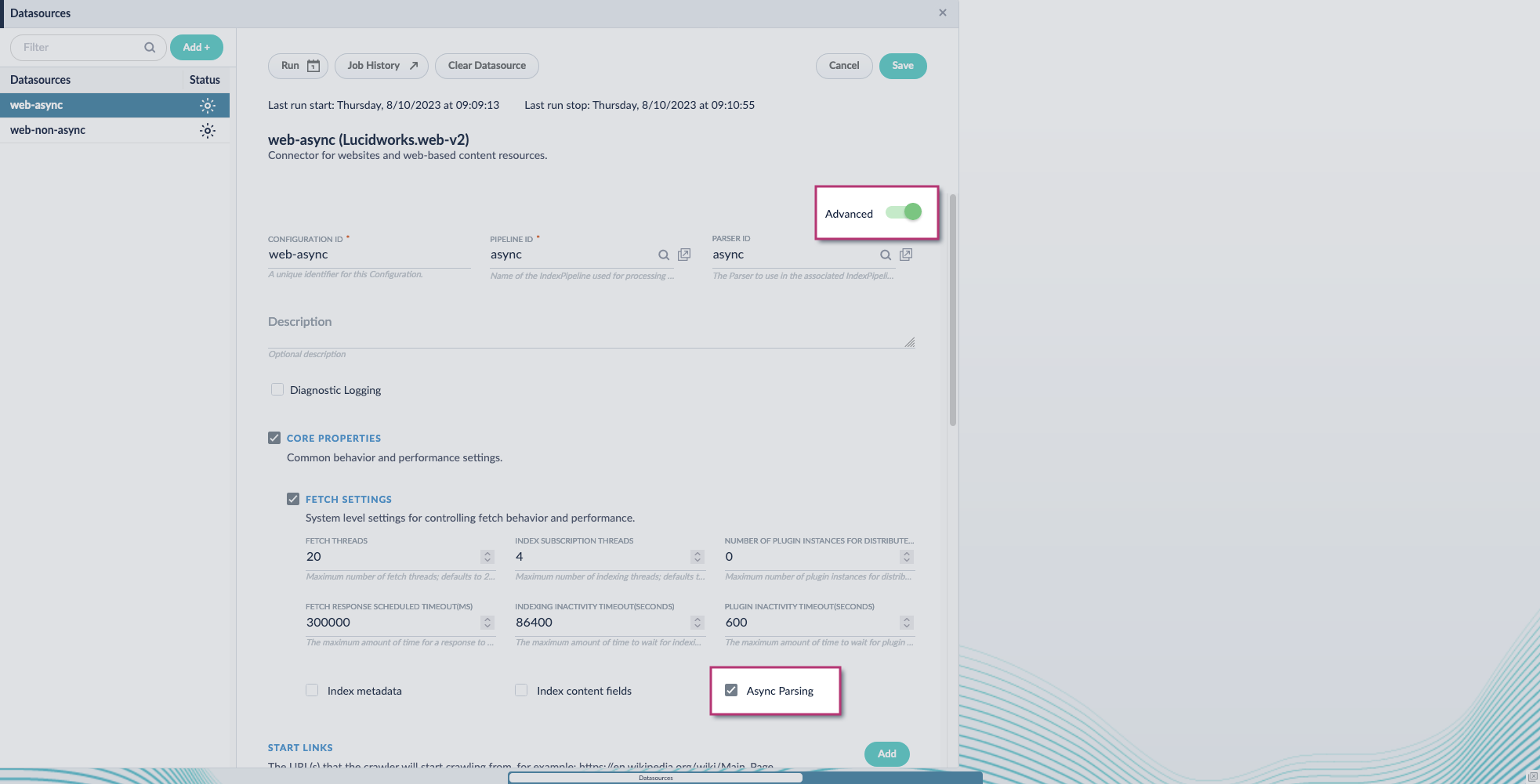 **Fusion 5.9.11 and later uses your parser configuration when using asynchronous parsing.**
The asynchronous parsing service performs Tika parsing using Apache Tika Server. In Fusion 5.8 through 5.9.10, other parsers, such as HTML and JSON, are not supported by the asynchronous parsing service. By enabling asynchronous parsing, the parser configuration linked to your datasource is ignored. In Fusion 5.9.11 and later, other parsers, such as HTML and JSON, are supported by the asynchronous parsing service. By enabling asynchronous parsing, the parser configuration linked to your datasource is used.
4. Save the datasource configuration.
## Configure the parser stage
You must do this step in Fusion 5.9.11 and later.
1. Navigate to **Parsers**.
2. Select the parser, or create a new parser.
3. From the **Add a parser stage** menu, select **Apache Tika Container Parser**.
4. (Optional) Enter a label for this stage. This label changes the names from Apache Tika Container Parser to the value you enter in this field.
5. If the Apache Tika Container Parser stage is not already the first stage, drag and drop the stage to the top of the stage list so it is the first stage that runs.
## Configure the index pipeline
1. Go to the **Index Pipeline** screen.
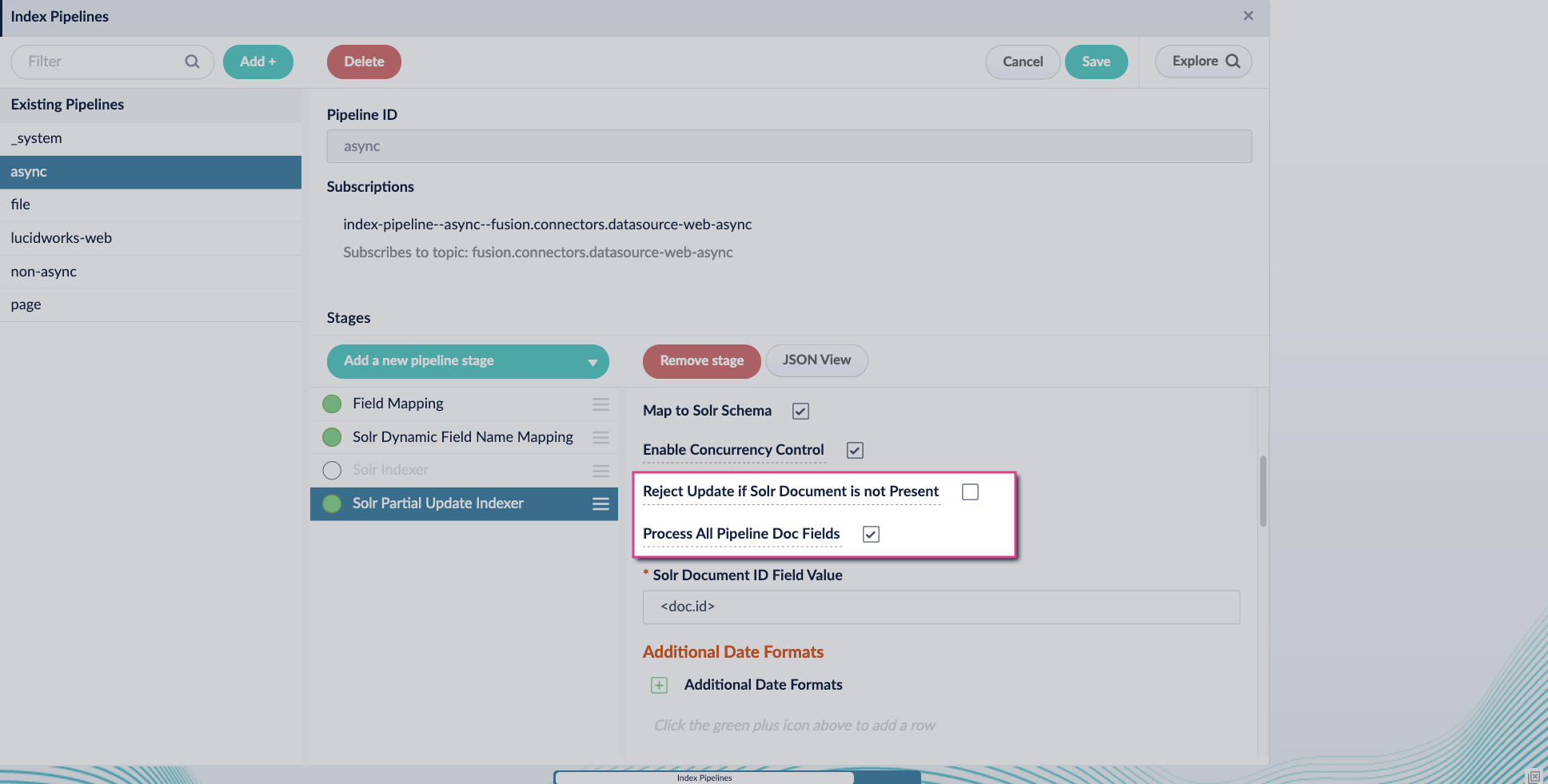
2. Add the **Solr Partial Update Indexer** stage.
3. Turn off the **Reject Update if Solr Document is not Present** option and turn on the **Process All Pipeline Doc Fields** option:
**Fusion 5.9.11 and later uses your parser configuration when using asynchronous parsing.**
The asynchronous parsing service performs Tika parsing using Apache Tika Server. In Fusion 5.8 through 5.9.10, other parsers, such as HTML and JSON, are not supported by the asynchronous parsing service. By enabling asynchronous parsing, the parser configuration linked to your datasource is ignored. In Fusion 5.9.11 and later, other parsers, such as HTML and JSON, are supported by the asynchronous parsing service. By enabling asynchronous parsing, the parser configuration linked to your datasource is used.
4. Save the datasource configuration.
## Configure the parser stage
You must do this step in Fusion 5.9.11 and later.
1. Navigate to **Parsers**.
2. Select the parser, or create a new parser.
3. From the **Add a parser stage** menu, select **Apache Tika Container Parser**.
4. (Optional) Enter a label for this stage. This label changes the names from Apache Tika Container Parser to the value you enter in this field.
5. If the Apache Tika Container Parser stage is not already the first stage, drag and drop the stage to the top of the stage list so it is the first stage that runs.
## Configure the index pipeline
1. Go to the **Index Pipeline** screen.
2. Add the **Solr Partial Update Indexer** stage.
3. Turn off the **Reject Update if Solr Document is not Present** option and turn on the **Process All Pipeline Doc Fields** option:
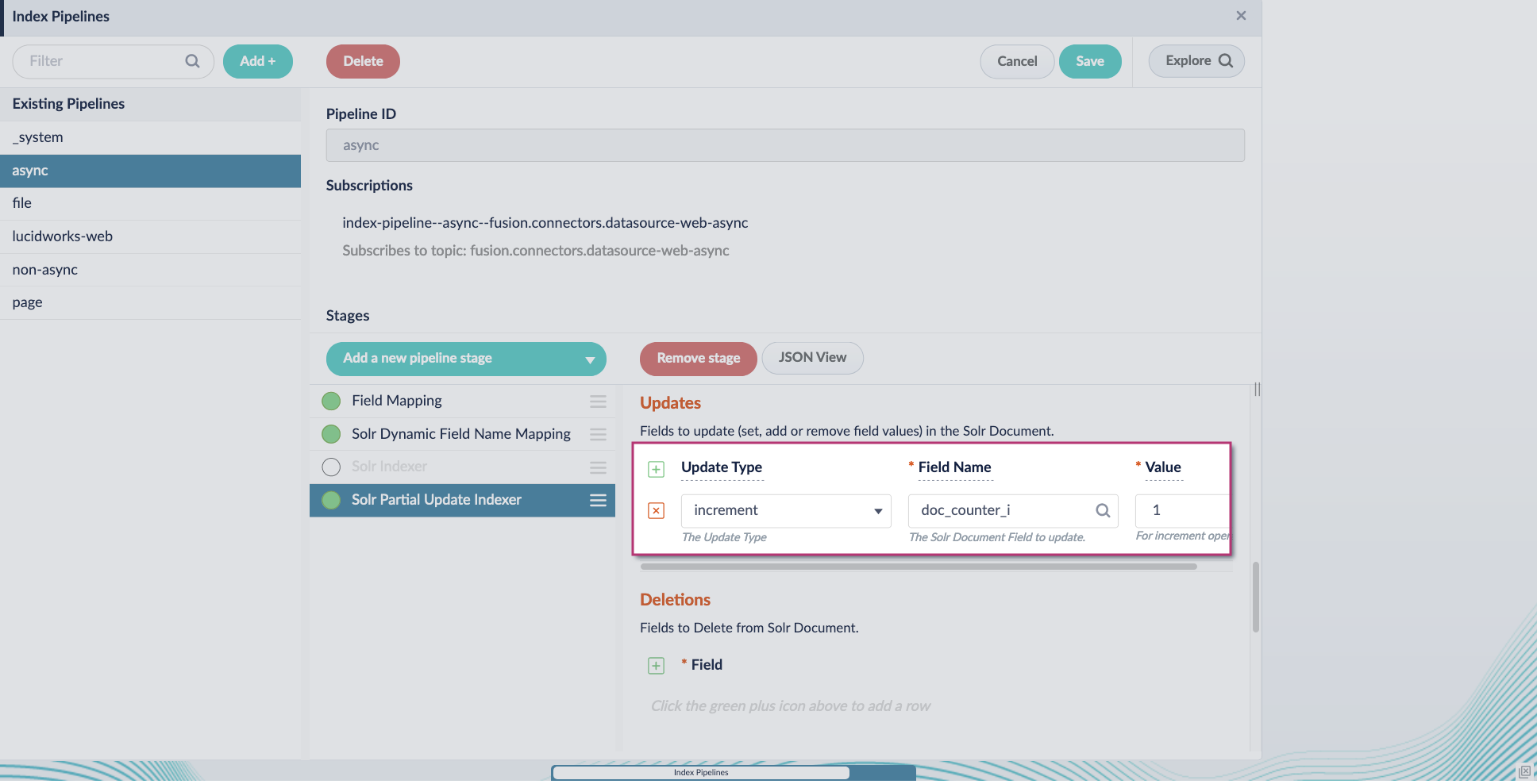
 4. Include an extra update field in the stage configuration using any update type and field name. In this example, an incremental field `docs_counter_i` with an increment value of `1` is added:
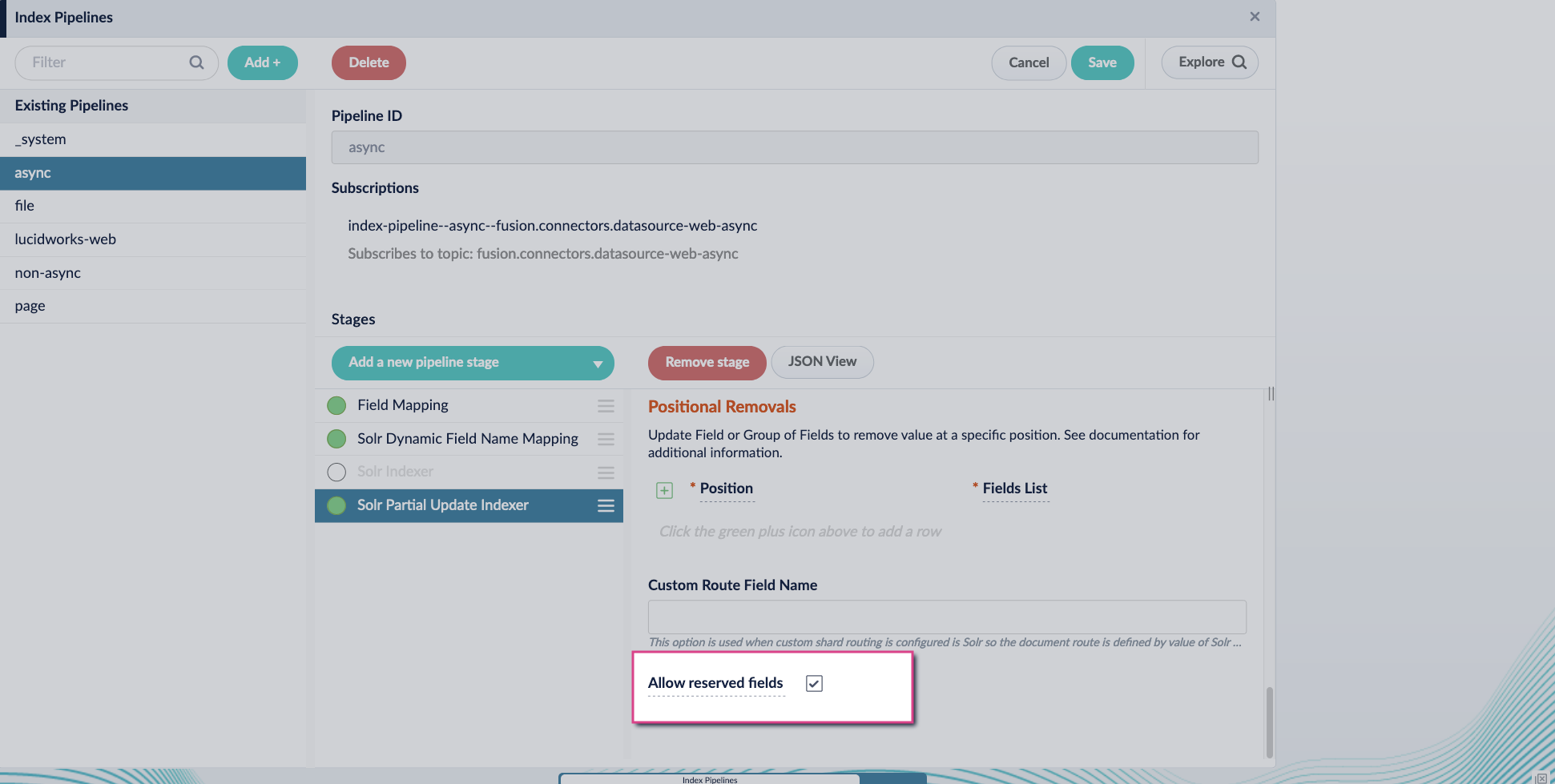
 5. Enable the **Allow reserved fields** option:
 6. Click **Save**.
7. Turn off or remove the **Solr Indexer stage**, and move the **Solr Partial Update Indexer stage** to be the last stage in the pipeline.
6. Click **Save**.
7. Turn off or remove the **Solr Indexer stage**, and move the **Solr Partial Update Indexer stage** to be the last stage in the pipeline.
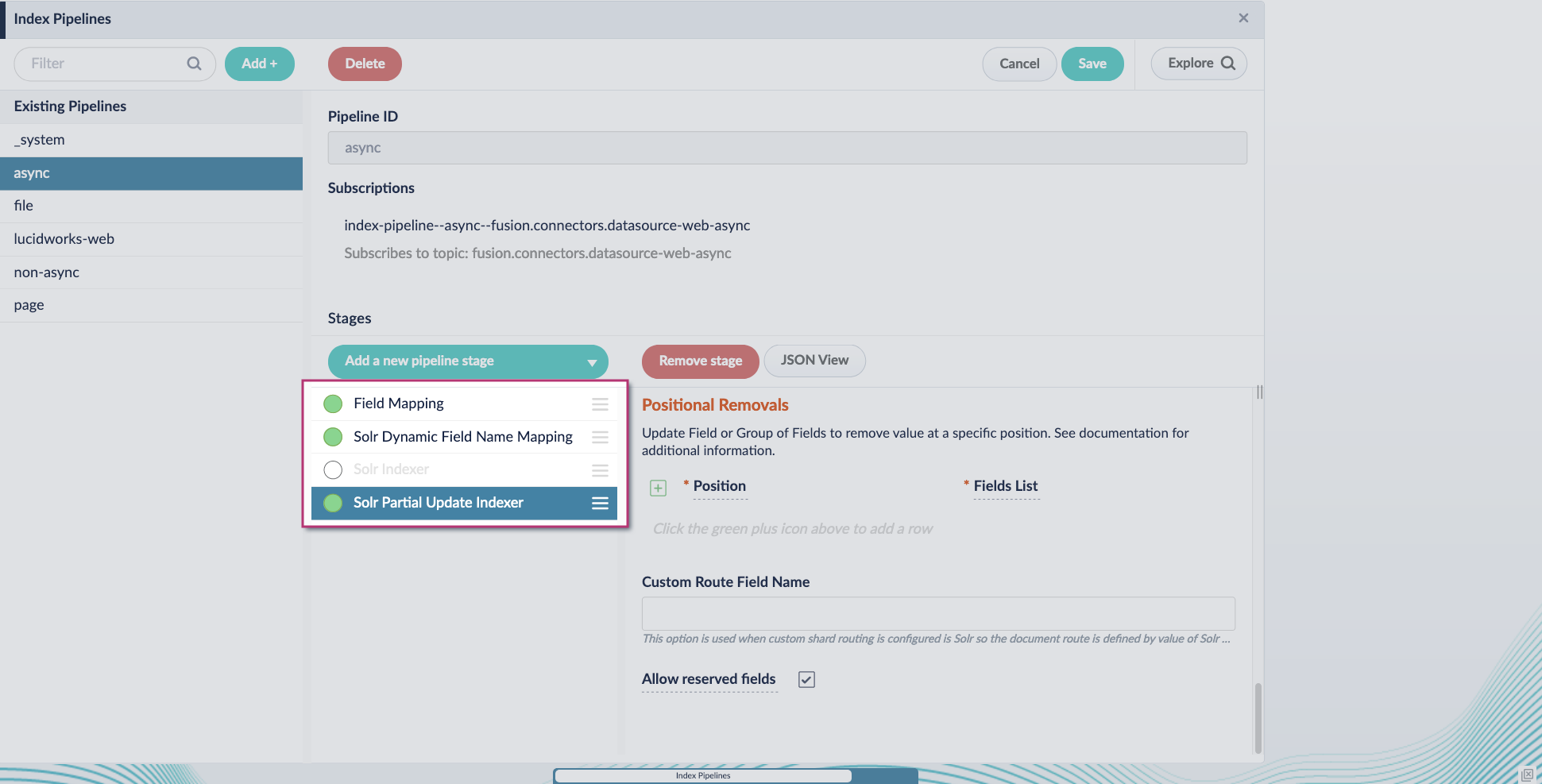 Asynchronous Tika parsing setup is now complete. Run the datasource indexing job and monitor the results.
Other parsers, such as HTML and JSON, are now supported by the asynchronous parsing service. By enabling asynchronous parsing, the parser configuration linked to your datasource is used.
To learn how to start using the new asynchronous parsing service, see the following demonstration:
This update also includes a new [Async Parsing API](/api-reference/async-parsing-api/index-a-document-using-a-profile-id).
The course for **Asynchronous Parsing Service** focuses on how to use asynchronous parsing to index your data more efficiently.
### Job Config service
The new Job Config service provides more accurate and reliable job status reporting.
This service uses asynchronous communication through Kafka for improved efficiency over the previous synchronous calls, with these benefits:
* More accurate job tracking. You get real-time, reliable job status updates, reducing uncertainty about whether a job is running, completed, or failed.
* Faster troubleshooting. With detailed job histories and improved reporting, teams can quickly diagnose issues instead of chasing down incomplete or outdated job statuses.
* Seamless transition. For most users, no action is required—API calls through `api-gateway` automatically reroute. Internal API users need only a simple update to continue tracking jobs accurately.
The following API endpoints have been migrated from the `admin` service to the new `job-config` service:
```bash theme={"dark"}
/api/tasks/{id}
/api/jobs/{resource}/schedule
/api/tasks
/api/jobs/{resource}/actions
/api/tasks/_schema
/api/jobs
/api/jobs/{resource}
/api/jobs/{resource}/history
/api/jobs/_schema
```
For API calls made to the `api-gateway` service, you do not need to make any changes; the endpoints above are automatically rerouted to the new `job-config` service.
See [Job Config API](/api-reference/manage-task-jobs/list-task-jobs) for reference information about these endpoints.
If you are making internal API calls to the `admin` service using any of the endpoints above, you must update your API calls to point to the new `job-config` service.
### Security updates
Lucidworks remains committed to providing a secure and resilient platform. Fusion 5.9.11 includes critical security updates across a number of Fusion services, including the admin, connectors, distributed compute, indexing, job configuration, and query services, ensuring continued protection and reliability for your deployments.
### API path changes
Trailing slashes are no longer supported when making API calls.
For example, this API call works:
```
http://HOSTNAME/api/apps/APP_NAME/query/QUERY_PROFILE?q=hello
```
But this API call does not work and results in an error:
```
http://HOSTNAME/api/apps/APP_NAME/query/QUERY_PROFILE/?q=hello
```
## Bug fixes
* Critical fix for Azure Kubernetes Service (AKS) and Amazon Elastic Kubernetes Service (EKS) compatibility on Kubernetes 1.30+\
By upgrading the Kubernetes Client library to version 6.2.0, this update prevents token refresh failures that previously caused service disruptions. Affected services—including connectors backend, indexing, job rest server, and job launcher services—now operate reliably in OIDC-enabled AKS and EKS environments, strengthening Fusion’s stability on modern Kubernetes deployments.
## Known issues
* Saving large query pipelines may cause OOM failures under high load.\
In Fusion 5.9.x versions through 5.9.13, saving a large query pipeline during high query volume can result in thread lock, excessive memory use, and eventual OOM errors in the Query service.\
This issue is fixed in Fusion 5.9.14.
* Scheduled jobs that perform Solr operations may fail to run or save due to permission-related issues in the `job-config` service.\
In some cases, users without full permissions can create or modify scheduled tasks that execute actions they aren’t authorized to run directly, specifically tasks that invoked Solr using `solr://` URIs.\
These jobs may fail silently or prevent schedule changes from being saved. This issue can also affect the execution of jobs after upgrade. It is fixed in Fusion 5.9.13.
* Deploying Fusion with TLS flags enabled fails in ArgoCD due to Helm chart rendering limitations.\
When using ArgoCD to deploy Fusion 5.9.10 or 5.9.11 with TLS options enabled, Helm chart rendering fails due to the use of the `lookup` function, which is unsupported by ArgoCD. This prevents ArgoCD from generating manifests, blocking deployment workflows that rely on TLS configuration.\
This issue is fixed in Fusion 5.9.12.\
As a workaround, deploy Fusion without enabling TLS in ArgoCD-managed environments, or perform the deployment using Helm directly.
* Incorrect Solr image repository in Helm charts.\
Fusion 5.9.11’s Helm chart incorrectly references an internal Lucidworks Artifactory repository for the Solr image. This can prevent successful deployment in environments without access to internal infrastructure.\
This issue is fixed in Fusion 5.9.12.\
As a workaround, override the Solr image repository in your custom `values.yaml` file.
* Jobs API returns incorrect timestamps for jobs scheduled after 12:00 UTC.\
In Fusion 5.9.11, job timestamps returned by the API may be off by 12 hours if the time is after noon UTC. This affects scheduling accuracy and may cause the UI to misinterpret whether a change has been made.\
This issue is fixed in Fusion 5.9.12.
* Cannot update existing job triggers in the Schedulers view.\
In Fusion 5.9.11, scheduled job triggers cannot be modified due to incorrect timestamp comparison logic in the Admin UI. You must delete and recreate the trigger instead.\
This issue is fixed in Fusion 5.9.12.
* Scheduler may stop working if ZooKeeper becomes briefly unavailable.\
If all `job-config` pods lose connection to ZooKeeper in Fusion 5.9.11, they may fail to re-elect a leader, halting all scheduling until one of the pods is manually restarted.\
This issue is fixed in Fusion 5.9.12.
* Datasource jobs show incorrect "started by" user.\
In Fusion 5.9.11, datasource jobs started in the UI incorrectly show `default-subject` as the initiating user in job history instead of the actual user.\
This issue is fixed in Fusion 5.9.12.
* Schema API incompatibility with nonstandard schema file names.\
In Fusion 5.9.11, new apps save Solr schemas with the name `managed-schema.xml` instead of `managed-schema`, while older apps may include only a `managed-schema` file.\
This mismatch can cause errors when editing or previewing schemas using the Schema API, particularly when the expected file extension is missing.\
For existing config sets, it’s best to copy the contents from `managed-schema` to a new `managed-schema.xml`, then delete `managed-schema`.\
Fusion 5.9.12 resolves this by supporting both file names, ensuring backward compatibility with older apps and consistent behavior for new ones.
* Job scheduling may stop working if all `job-config` pods lose connection to ZooKeeper.\
In rare cases, when a ZooKeeper connection is lost, the leader latch mechanism used by the `job-config` service might fail to recover. If no node can re-establish leadership, the job scheduler stops until at least one `job-config` pod is restarted.\
This issue is fixed in Fusion 5.9.13.
* Scheduled job triggers can’t be updated in the Schedulers view.\
While the Admin UI displays the current trigger time correctly, changes to the time are not saved.\
This is due to a mismatch in how the API formats UTC timestamps, especially for times after 12:00 UTC, which prevents the UI from detecting that a change has been made.\
To work around this, delete the existing scheduler entry and create a new one with the desired time.\
This issue is resolved in Fusion 5.9.13.
* Dependent job scheduling may fail.\
Jobs configured to run based on the success or failure of another job may not trigger as expected. This includes configurations using “on\_success\_or\_failure” and “Start + Interval” options. This issue is resolved in Fusion 5.9.13.
* Aborted jobs in Fusion are listed twice in the Job History.\
This issue is fixed in Fusion 5.9.12.
* When a new datasource is configured in **Indexing > Index Workbench**, the simulated results do not display, and the following error is generated: "Failed to simulate results from a working pipeline." As a result, the Index Workbench cannot simulate results for new datasources, preventing users from configuring the indexing process within the workbench.\
This issue is fixed in Fusion 5.9.12.\
To work around this issue, configure each part of the indexing process separately instead of using the Index Workbench:
* Configure datasources in **Indexing > Datasources**.
* Configure parsers in **Indexing > Parsers**.
* Configure index pipelines in **Indexing > Index Pipelines**.
* In Fusion 5.9.10, the Apache Spark 3.4.1 upgrade impacted jobs that use Python 3.7 behavior or compatibility, which may have automatically updated to Python 3.10.x and no longer function correctly. If you have not yet updated the code for Python 3.10.x, update your code to ensure compatibility with Python 3.10.x and then test your Spark jobs in a staging environment before deploying to production.
* An issue prevents segment-based rule filtering from working correctly in Commerce Studio. This issue is fixed in Fusion 5.9.12.
## Deprecations
For full details on deprecations, see [Deprecations and Removals](/docs/5/fusion/deprecations-and-removals).
* The [Parsers Indexing CRUD API](/api-reference/parsers-crud-api/update-a-parser), which provides CRUD operations for parsers, allowing users to create, read, update, and delete parsers, is deprecated in Fusion 5.9.11. This feature was originally deprecated in Fusion 5.12.0. It will be removed in a future release no later than September 4, 2025.
The [Async Parsing API](/api-reference/parsers-crud-api/list-all-parsers) replaces the Parsers Indexing CRUD API and is available in Fusion 5.9.11. This API provides improved functionality and aligns with Fusion’s updated architecture, ensuring consistency across versions.
* The [Word2Vec Model Training Job](/docs/5/fusion/reference/config-ref/jobs/word2vec-model-training), which trains a shallow neural model to generate vector embeddings for text data, is deprecated in Fusion 5.9.11. It will be removed in a future release no later than September 4, 2025.
Asynchronous Tika parsing setup is now complete. Run the datasource indexing job and monitor the results.
Other parsers, such as HTML and JSON, are now supported by the asynchronous parsing service. By enabling asynchronous parsing, the parser configuration linked to your datasource is used.
To learn how to start using the new asynchronous parsing service, see the following demonstration:
This update also includes a new [Async Parsing API](/api-reference/async-parsing-api/index-a-document-using-a-profile-id).
The course for **Asynchronous Parsing Service** focuses on how to use asynchronous parsing to index your data more efficiently.
### Job Config service
The new Job Config service provides more accurate and reliable job status reporting.
This service uses asynchronous communication through Kafka for improved efficiency over the previous synchronous calls, with these benefits:
* More accurate job tracking. You get real-time, reliable job status updates, reducing uncertainty about whether a job is running, completed, or failed.
* Faster troubleshooting. With detailed job histories and improved reporting, teams can quickly diagnose issues instead of chasing down incomplete or outdated job statuses.
* Seamless transition. For most users, no action is required—API calls through `api-gateway` automatically reroute. Internal API users need only a simple update to continue tracking jobs accurately.
The following API endpoints have been migrated from the `admin` service to the new `job-config` service:
```bash theme={"dark"}
/api/tasks/{id}
/api/jobs/{resource}/schedule
/api/tasks
/api/jobs/{resource}/actions
/api/tasks/_schema
/api/jobs
/api/jobs/{resource}
/api/jobs/{resource}/history
/api/jobs/_schema
```
For API calls made to the `api-gateway` service, you do not need to make any changes; the endpoints above are automatically rerouted to the new `job-config` service.
See [Job Config API](/api-reference/manage-task-jobs/list-task-jobs) for reference information about these endpoints.
If you are making internal API calls to the `admin` service using any of the endpoints above, you must update your API calls to point to the new `job-config` service.
### Security updates
Lucidworks remains committed to providing a secure and resilient platform. Fusion 5.9.11 includes critical security updates across a number of Fusion services, including the admin, connectors, distributed compute, indexing, job configuration, and query services, ensuring continued protection and reliability for your deployments.
### API path changes
Trailing slashes are no longer supported when making API calls.
For example, this API call works:
```
http://HOSTNAME/api/apps/APP_NAME/query/QUERY_PROFILE?q=hello
```
But this API call does not work and results in an error:
```
http://HOSTNAME/api/apps/APP_NAME/query/QUERY_PROFILE/?q=hello
```
## Bug fixes
* Critical fix for Azure Kubernetes Service (AKS) and Amazon Elastic Kubernetes Service (EKS) compatibility on Kubernetes 1.30+\
By upgrading the Kubernetes Client library to version 6.2.0, this update prevents token refresh failures that previously caused service disruptions. Affected services—including connectors backend, indexing, job rest server, and job launcher services—now operate reliably in OIDC-enabled AKS and EKS environments, strengthening Fusion’s stability on modern Kubernetes deployments.
## Known issues
* Saving large query pipelines may cause OOM failures under high load.\
In Fusion 5.9.x versions through 5.9.13, saving a large query pipeline during high query volume can result in thread lock, excessive memory use, and eventual OOM errors in the Query service.\
This issue is fixed in Fusion 5.9.14.
* Scheduled jobs that perform Solr operations may fail to run or save due to permission-related issues in the `job-config` service.\
In some cases, users without full permissions can create or modify scheduled tasks that execute actions they aren’t authorized to run directly, specifically tasks that invoked Solr using `solr://` URIs.\
These jobs may fail silently or prevent schedule changes from being saved. This issue can also affect the execution of jobs after upgrade. It is fixed in Fusion 5.9.13.
* Deploying Fusion with TLS flags enabled fails in ArgoCD due to Helm chart rendering limitations.\
When using ArgoCD to deploy Fusion 5.9.10 or 5.9.11 with TLS options enabled, Helm chart rendering fails due to the use of the `lookup` function, which is unsupported by ArgoCD. This prevents ArgoCD from generating manifests, blocking deployment workflows that rely on TLS configuration.\
This issue is fixed in Fusion 5.9.12.\
As a workaround, deploy Fusion without enabling TLS in ArgoCD-managed environments, or perform the deployment using Helm directly.
* Incorrect Solr image repository in Helm charts.\
Fusion 5.9.11’s Helm chart incorrectly references an internal Lucidworks Artifactory repository for the Solr image. This can prevent successful deployment in environments without access to internal infrastructure.\
This issue is fixed in Fusion 5.9.12.\
As a workaround, override the Solr image repository in your custom `values.yaml` file.
* Jobs API returns incorrect timestamps for jobs scheduled after 12:00 UTC.\
In Fusion 5.9.11, job timestamps returned by the API may be off by 12 hours if the time is after noon UTC. This affects scheduling accuracy and may cause the UI to misinterpret whether a change has been made.\
This issue is fixed in Fusion 5.9.12.
* Cannot update existing job triggers in the Schedulers view.\
In Fusion 5.9.11, scheduled job triggers cannot be modified due to incorrect timestamp comparison logic in the Admin UI. You must delete and recreate the trigger instead.\
This issue is fixed in Fusion 5.9.12.
* Scheduler may stop working if ZooKeeper becomes briefly unavailable.\
If all `job-config` pods lose connection to ZooKeeper in Fusion 5.9.11, they may fail to re-elect a leader, halting all scheduling until one of the pods is manually restarted.\
This issue is fixed in Fusion 5.9.12.
* Datasource jobs show incorrect "started by" user.\
In Fusion 5.9.11, datasource jobs started in the UI incorrectly show `default-subject` as the initiating user in job history instead of the actual user.\
This issue is fixed in Fusion 5.9.12.
* Schema API incompatibility with nonstandard schema file names.\
In Fusion 5.9.11, new apps save Solr schemas with the name `managed-schema.xml` instead of `managed-schema`, while older apps may include only a `managed-schema` file.\
This mismatch can cause errors when editing or previewing schemas using the Schema API, particularly when the expected file extension is missing.\
For existing config sets, it’s best to copy the contents from `managed-schema` to a new `managed-schema.xml`, then delete `managed-schema`.\
Fusion 5.9.12 resolves this by supporting both file names, ensuring backward compatibility with older apps and consistent behavior for new ones.
* Job scheduling may stop working if all `job-config` pods lose connection to ZooKeeper.\
In rare cases, when a ZooKeeper connection is lost, the leader latch mechanism used by the `job-config` service might fail to recover. If no node can re-establish leadership, the job scheduler stops until at least one `job-config` pod is restarted.\
This issue is fixed in Fusion 5.9.13.
* Scheduled job triggers can’t be updated in the Schedulers view.\
While the Admin UI displays the current trigger time correctly, changes to the time are not saved.\
This is due to a mismatch in how the API formats UTC timestamps, especially for times after 12:00 UTC, which prevents the UI from detecting that a change has been made.\
To work around this, delete the existing scheduler entry and create a new one with the desired time.\
This issue is resolved in Fusion 5.9.13.
* Dependent job scheduling may fail.\
Jobs configured to run based on the success or failure of another job may not trigger as expected. This includes configurations using “on\_success\_or\_failure” and “Start + Interval” options. This issue is resolved in Fusion 5.9.13.
* Aborted jobs in Fusion are listed twice in the Job History.\
This issue is fixed in Fusion 5.9.12.
* When a new datasource is configured in **Indexing > Index Workbench**, the simulated results do not display, and the following error is generated: "Failed to simulate results from a working pipeline." As a result, the Index Workbench cannot simulate results for new datasources, preventing users from configuring the indexing process within the workbench.\
This issue is fixed in Fusion 5.9.12.\
To work around this issue, configure each part of the indexing process separately instead of using the Index Workbench:
* Configure datasources in **Indexing > Datasources**.
* Configure parsers in **Indexing > Parsers**.
* Configure index pipelines in **Indexing > Index Pipelines**.
* In Fusion 5.9.10, the Apache Spark 3.4.1 upgrade impacted jobs that use Python 3.7 behavior or compatibility, which may have automatically updated to Python 3.10.x and no longer function correctly. If you have not yet updated the code for Python 3.10.x, update your code to ensure compatibility with Python 3.10.x and then test your Spark jobs in a staging environment before deploying to production.
* An issue prevents segment-based rule filtering from working correctly in Commerce Studio. This issue is fixed in Fusion 5.9.12.
## Deprecations
For full details on deprecations, see [Deprecations and Removals](/docs/5/fusion/deprecations-and-removals).
* The [Parsers Indexing CRUD API](/api-reference/parsers-crud-api/update-a-parser), which provides CRUD operations for parsers, allowing users to create, read, update, and delete parsers, is deprecated in Fusion 5.9.11. This feature was originally deprecated in Fusion 5.12.0. It will be removed in a future release no later than September 4, 2025.
The [Async Parsing API](/api-reference/parsers-crud-api/list-all-parsers) replaces the Parsers Indexing CRUD API and is available in Fusion 5.9.11. This API provides improved functionality and aligns with Fusion’s updated architecture, ensuring consistency across versions.
* The [Word2Vec Model Training Job](/docs/5/fusion/reference/config-ref/jobs/word2vec-model-training), which trains a shallow neural model to generate vector embeddings for text data, is deprecated in Fusion 5.9.11. It will be removed in a future release no later than September 4, 2025.
Lucidworks offers a wide array of AI solutions, including [Lucidworks AI](/docs/lw-platform/lw-ai/overview). Lucidworks AI provides easy-to-use, AI-powered data discovery and search capabilities including:
- Pre-trained embedding models
- Custom embedding model training
- Seamless integration with Fusion
## Removals
### Bitnami removal
Fusion 5.9.11 will be re-released with the same functionality but updated image references.
In the meantime, Lucidworks will self-host the required images while we work to replace Bitnami images with internally built open-source alternatives.
If you are a self-hosted Fusion customer, *you must upgrade before August 28* to ensure continued access to container images and prevent deployment issues.
You can reinstall your current version of Fusion or upgrade to Fusion 5.9.14, which includes the updated Helm chart and prepares your environment for long-term compatibility.
See [Prevent image pull failures due to Bitnami deprecation in Fusion 5.9.5 to 5.9.13](https://support.lucidworks.com/hc/en-us/articles/33966125467799-Prevent-image-pull-failures-due-to-Bitnami-deprecation-in-Fusion-5-9-5-to-5-9-13) for more information on how to prevent image pull failures.
## Platform support and component versions
### Kubernetes platform support
Lucidworks has tested and validated support for the following Kubernetes platforms and versions:
* **Google Kubernetes Engine (GKE):** 1.28, 1.29, 1.30, 1.31
* **Microsoft Azure Kubernetes Service (AKS):** 1.28, 1.29, 1.30, 1.31
* **Amazon Elastic Kubernetes Service (EKS):** 1.28, 1.29, 1.30, 1.31
Support is also offered for Rancher Kubernetes Engine (RKE and RKE2) and OpenShift 4 versions that are based on Kubernetes 1.28, 1.29, 1.30, 1.31; note that RKE2 may require some Helm chart modification. OpenStack and customized Kubernetes installations are *not* supported.
For more information on Kubernetes version support, see the [Kubernetes support policy](/docs/policies/lifecycle-policies/lw-version-support-lifecycle#kubernetes-support).
### Component versions
The following table details the versions of key components that may be critical to deployments and upgrades.
| Component | Version |
| ------------------- | --------------------------------------------------------------------------- |
| Solr | fusion-solr 5.9.11 *(based on Solr 9.6.1)* |
| ZooKeeper | 3.9.1 |
| Spark | 3.4.1 |
| Ingress Controllers | Nginx, Ambassador (Envoy), GKE Ingress Controller
Istio not supported. |
More information about support dates can be found at [Lucidworks Fusion Product Lifecycle](/docs/policies/lifecycle-policies/lw-version-support-lifecycle).