> ## Documentation Index
> Fetch the complete documentation index at: https://doc.lucidworks.com/llms.txt
> Use this file to discover all available pages before exploring further.
# Fusion 5.9.0
[localhost link]: http://localhost:3000/docs/5/fusion/release-notes/5.9.0-release-notes
[mintlify link]: https://doc.lucidworks.com/docs/5/fusion/release-notes/5.9.0-release-notes
[old doc.lw link]: https://doc.lucidworks.com/fusion/5.9/kpv8sh
Released on June 29, 2023, this [long-term release](/docs/policies/lifecycle-policies/lw-version-support-lifecycle#long-term-support-release-policy) includes the new Consumption Dashboard feature, adding Tika Asynchronous Parsing support for remote V2 connectors, and new version requirements for the LDAP ALCs V2 connector and the SharePoint Optimized V2 connector.
To learn more, skip to the [release notes](#new-features).
## Platform Support and Component Versions
### Kubernetes platform support
Lucidworks has tested and validated support for the following Kubernetes platforms and versions:
* **Google Kubernetes Engine (GKE):** 1.25 and 1.26
* **Microsoft Azure Kubernetes Service (AKS):** 1.25 and 1.26
* **Amazon Elastic Kubernetes Service (EKS):** 1.25 and 1.26
Support is also offered for Rancher Kubernetes Engine (RKE) and OpenShift 4 versions that are based on Kubernetes 1.25 and 1.26. OpenStack and customized Kubernetes installations are *not* supported.
For more information on Kubernetes version support, see the [Kubernetes support policy](/docs/policies/lifecycle-policies/lw-version-support-lifecycle#kubernetes-support).
### Component versions
The following table details the versions of key components that may be critical to deployments and upgrades.
| Component | Version |
| ----------------------- | ----------------------------------------------------------------------- |
| **Solr** | fusion-solr 5.9.0 *(based on Solr 9.1.1)* |
| **ZooKeeper** | 3.7.1 |
| **Spark** | 3.2.2 |
| **Ingress Controllers** | Nginx, Ambassador (Envoy), GKE Ingress Controller Istio not supported. |
**More information about support dates can be found at [Lucidworks Fusion Product Lifecycle](/docs/policies/lifecycle-policies/lw-version-support-lifecycle).**
**Looking to upgrade?**
See [Fusion 5 Upgrades](/docs/5/fusion/operations/fusion-5-upgrades) for detailed instructions.
Upgrades from Fusion 5.8.0
Fusion 5.8.1 fixed an issue with the Fusion 5.8.0 Helm chart that prevented horizontal pod autoscaling.
If you are upgrading from Fusion 5.8.0 to any later version and use horizontal pod autoscaling, you must complete the procedure detailed in the [Fusion 5.8.1 release notes](/docs/5/fusion/release-notes/more/5.8.1-release-notes).
## New Features
* The new [Consumption Dashboard](/docs/5/fusion/operations/monitoring-and-reporting/consumption) tracks your request and document usage against the allotted consumption in your Fusion license. To access the dashboard, log into Fusion and go to **Analytics > Consumption**.
The course for **The Consumption Dashboard** focuses on the purpose and function of this dashboard as well as how to navigate it using the Fusion Admin UI.
## Improvements
### Fusion
* Fusion now supports Kubernetes 1.25 and 1.26. This applies to GKE, AKS, and EKS. It also applies to Rancher (RKE) and OpenShift 4 versions that are compatible with Kubernetes 1.25 and 1.26. Refer to Kubernetes documentation for versions [1.25](https://kubernetes.io/blog/2022/08/04/upcoming-changes-in-kubernetes-1-25/) and [1.26](https://kubernetes.io/blog/2022/11/18/upcoming-changes-in-kubernetes-1-26/) to decide which version to use for your deployment.
* Added a new Admin button to the Rules Editor screen. Click on it to log out of Fusion.
* Improved Spark Solr’s performance to ingest and transport data, as well as setting the most efficient sort for data export.
### Fusion Connectors
* Remote V2 connectors now support Tika Asynchronous Parsing. You can **Use Tika Asynchronous Parsing** on [remote V2 connectors](/docs/fusion-connectors/developers/remote-v2-connectors) to separate document crawling from document parsing, which is useful for large sets of complex documents.
This document describes how to set up your application to use Tika asynchronous parsing.
Unlike synchronous Tika parsing, which uses a parser stage, asynchronous Tika parsing is configured in the datasource and index pipeline. For more information, see [Asynchronous Tika Parsing](/docs/5/fusion/getting-data-in/indexing/asynchronous-tika-parsing).
**Field names change with asynchronous Tika parsing.**
{/* // The code sample `\_lw_*` uses a backslash to escape the underscore character to prevent italics. */}
In contrast to synchronous parsing, asynchronous Tika parsing prepends `parser_` to fields added to a document. System fields, which start with `\_lw_`, are not prepended with `parser_`. If you are migrating to asynchronous Tika parsing, and your search application configuration relies on specific field names, update your search application to use the new fields.
## Configure the connectors datasource
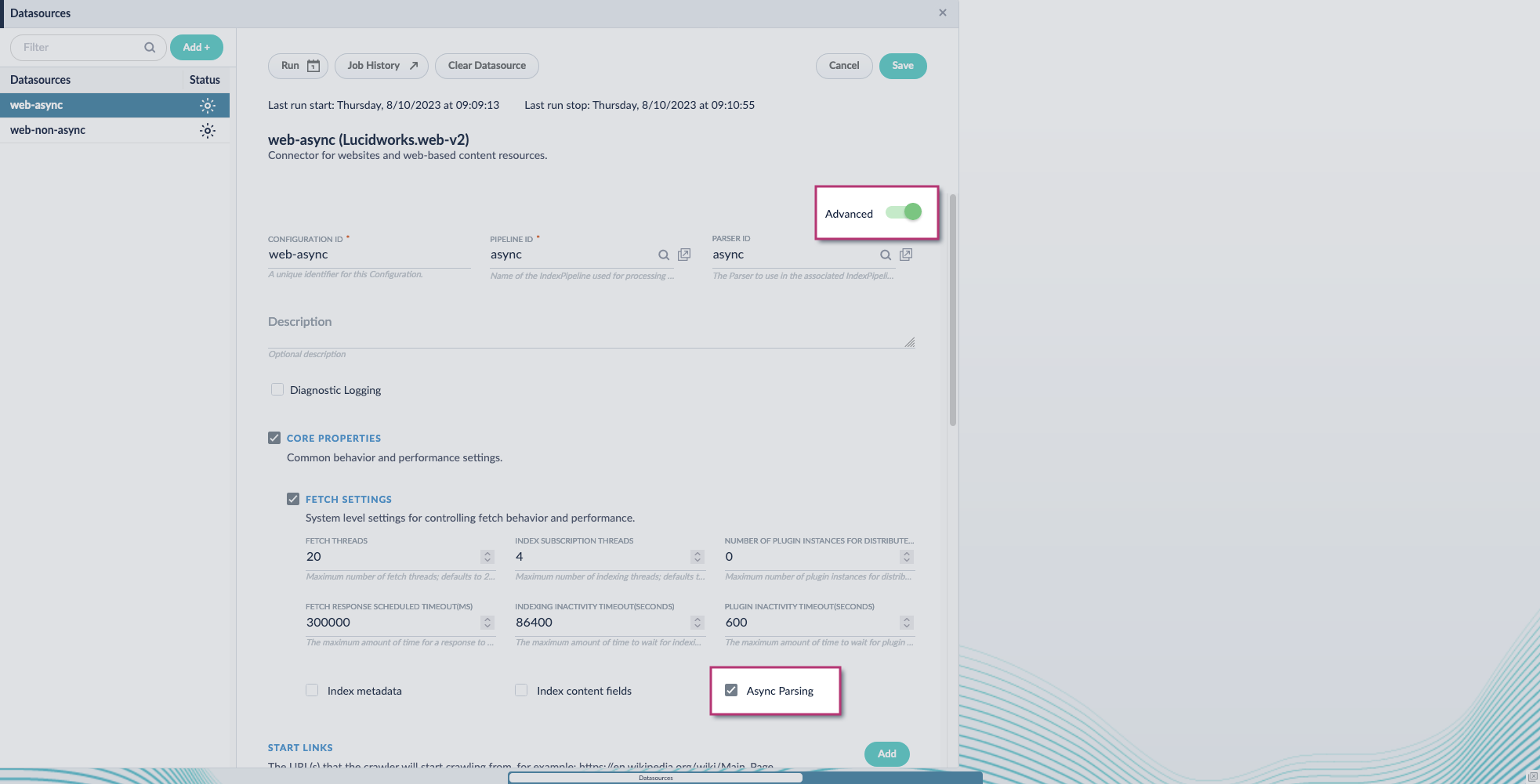
1. Navigate to your datasource.
2. Enable the **Advanced** view.
3. Enable the **Async Parsing** option.
 **Fusion 5.9.11 and later uses your parser configuration when using asynchronous parsing.**
The asynchronous parsing service performs Tika parsing using Apache Tika Server. In Fusion 5.8 through 5.9.10, other parsers, such as HTML and JSON, are not supported by the asynchronous parsing service. By enabling asynchronous parsing, the parser configuration linked to your datasource is ignored. In Fusion 5.9.11 and later, other parsers, such as HTML and JSON, are supported by the asynchronous parsing service. By enabling asynchronous parsing, the parser configuration linked to your datasource is used.
4. Save the datasource configuration.
## Configure the parser stage
You must do this step in Fusion 5.9.11 and later.
1. Navigate to **Parsers**.
2. Select the parser, or create a new parser.
3. From the **Add a parser stage** menu, select **Apache Tika Container Parser**.
4. (Optional) Enter a label for this stage. This label changes the names from Apache Tika Container Parser to the value you enter in this field.
5. If the Apache Tika Container Parser stage is not already the first stage, drag and drop the stage to the top of the stage list so it is the first stage that runs.
## Configure the index pipeline
1. Go to the **Index Pipeline** screen.
2. Add the **Solr Partial Update Indexer** stage.
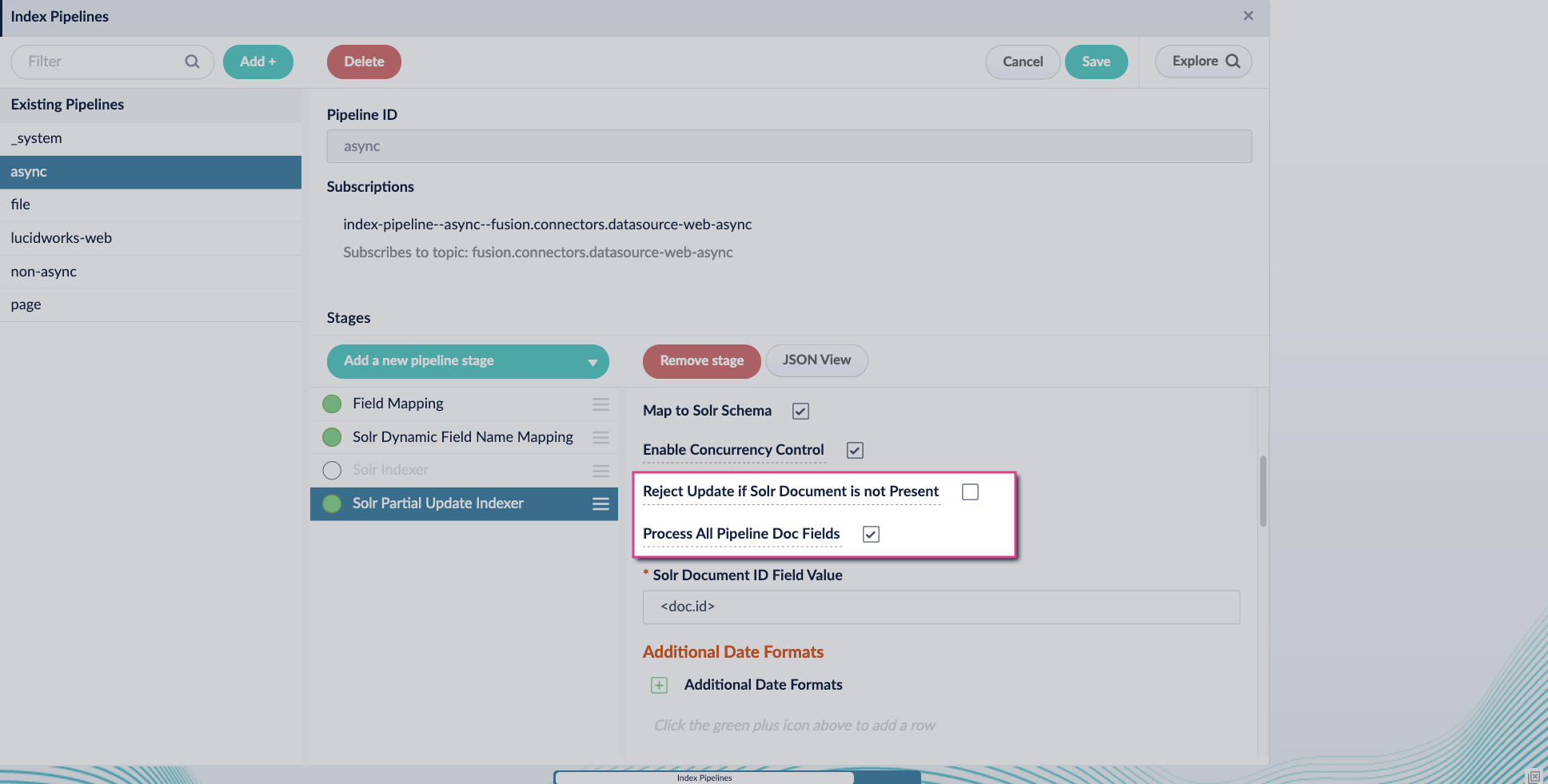
3. Turn off the **Reject Update if Solr Document is not Present** option and turn on the **Process All Pipeline Doc Fields** option:
**Fusion 5.9.11 and later uses your parser configuration when using asynchronous parsing.**
The asynchronous parsing service performs Tika parsing using Apache Tika Server. In Fusion 5.8 through 5.9.10, other parsers, such as HTML and JSON, are not supported by the asynchronous parsing service. By enabling asynchronous parsing, the parser configuration linked to your datasource is ignored. In Fusion 5.9.11 and later, other parsers, such as HTML and JSON, are supported by the asynchronous parsing service. By enabling asynchronous parsing, the parser configuration linked to your datasource is used.
4. Save the datasource configuration.
## Configure the parser stage
You must do this step in Fusion 5.9.11 and later.
1. Navigate to **Parsers**.
2. Select the parser, or create a new parser.
3. From the **Add a parser stage** menu, select **Apache Tika Container Parser**.
4. (Optional) Enter a label for this stage. This label changes the names from Apache Tika Container Parser to the value you enter in this field.
5. If the Apache Tika Container Parser stage is not already the first stage, drag and drop the stage to the top of the stage list so it is the first stage that runs.
## Configure the index pipeline
1. Go to the **Index Pipeline** screen.
2. Add the **Solr Partial Update Indexer** stage.
3. Turn off the **Reject Update if Solr Document is not Present** option and turn on the **Process All Pipeline Doc Fields** option:
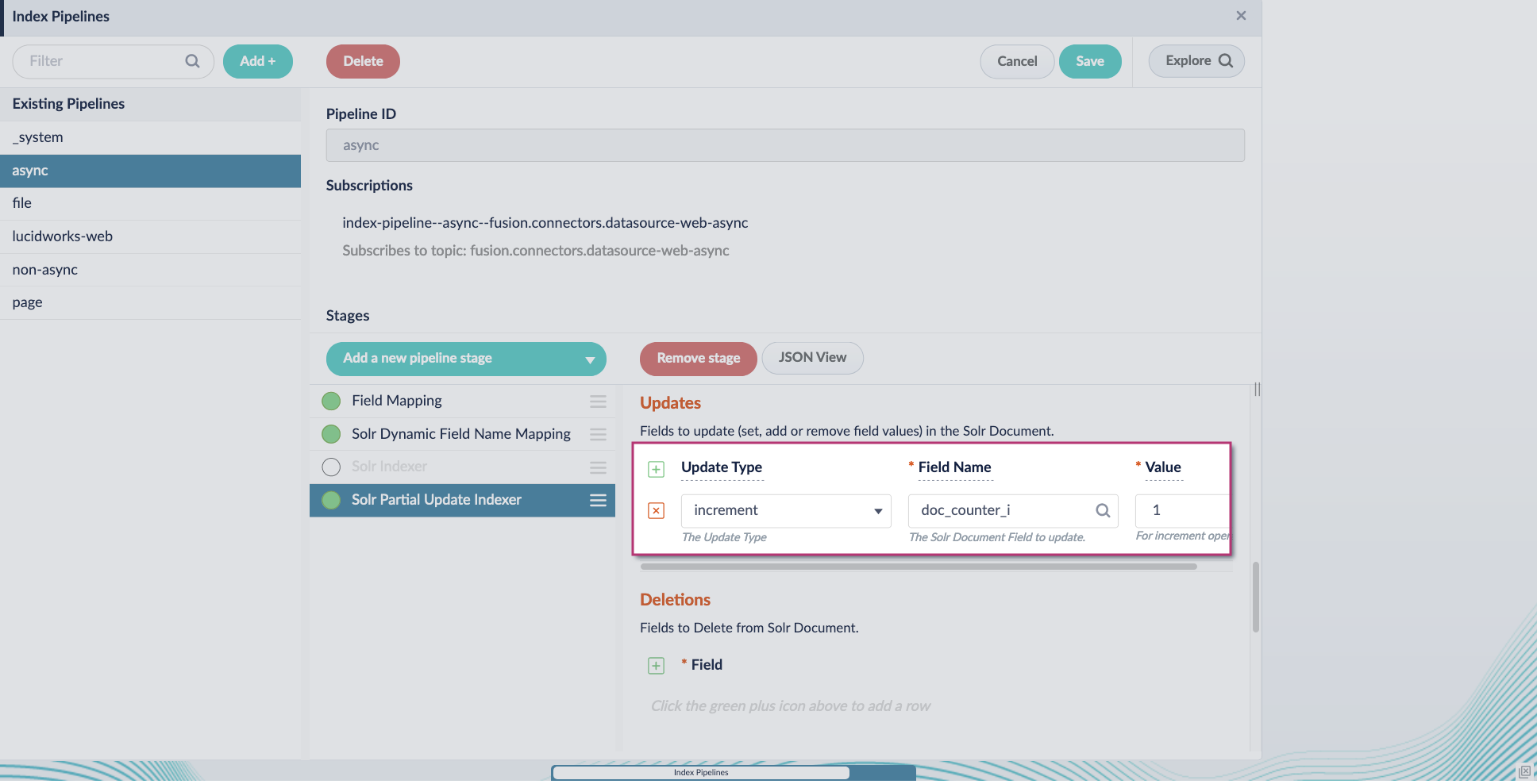
 4. Include an extra update field in the stage configuration using any update type and field name. In this example, an incremental field `docs_counter_i` with an increment value of `1` is added:
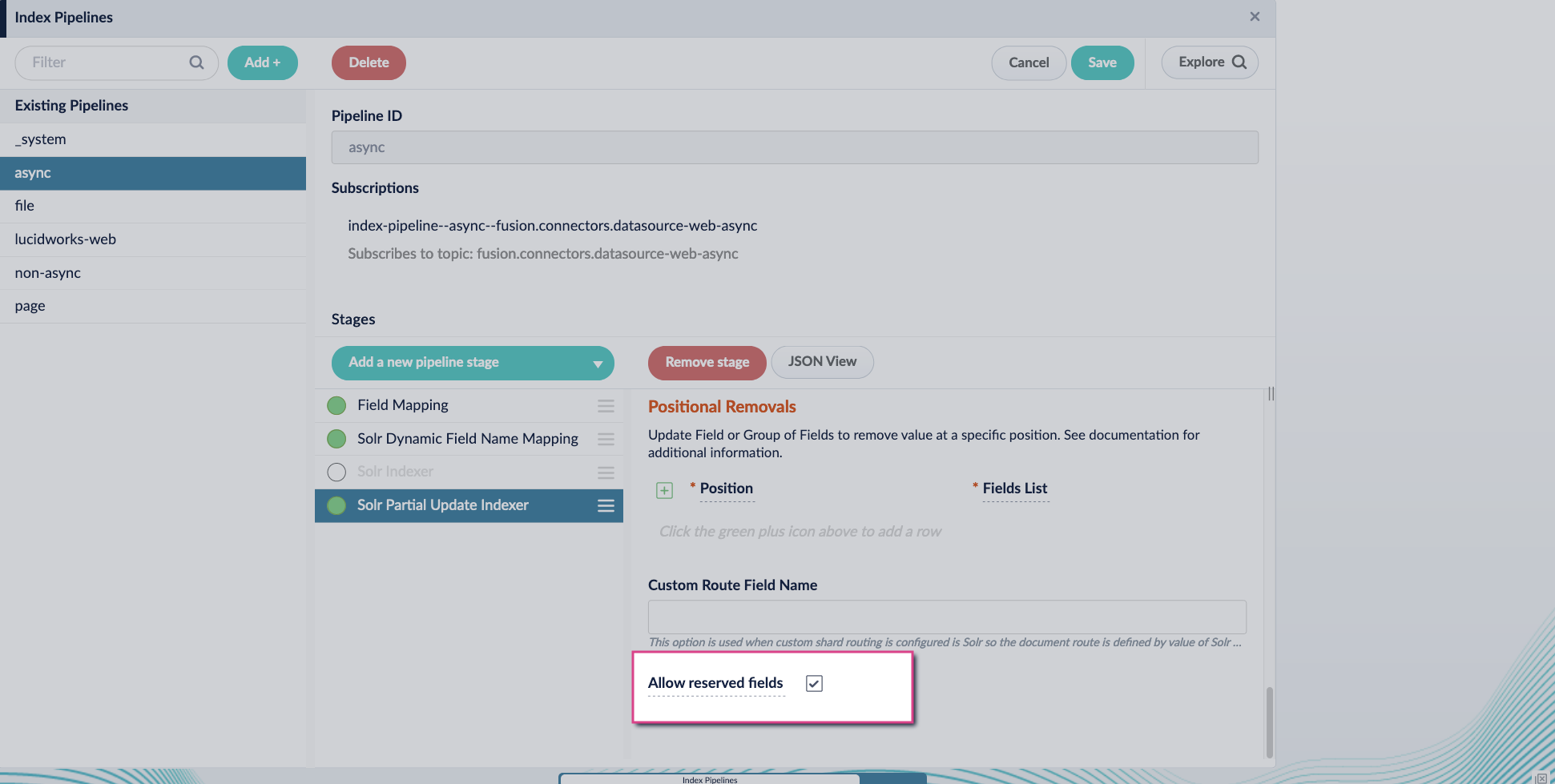
 5. Enable the **Allow reserved fields** option:
 6. Click **Save**.
7. Turn off or remove the **Solr Indexer stage**, and move the **Solr Partial Update Indexer stage** to be the last stage in the pipeline.
6. Click **Save**.
7. Turn off or remove the **Solr Indexer stage**, and move the **Solr Partial Update Indexer stage** to be the last stage in the pipeline.
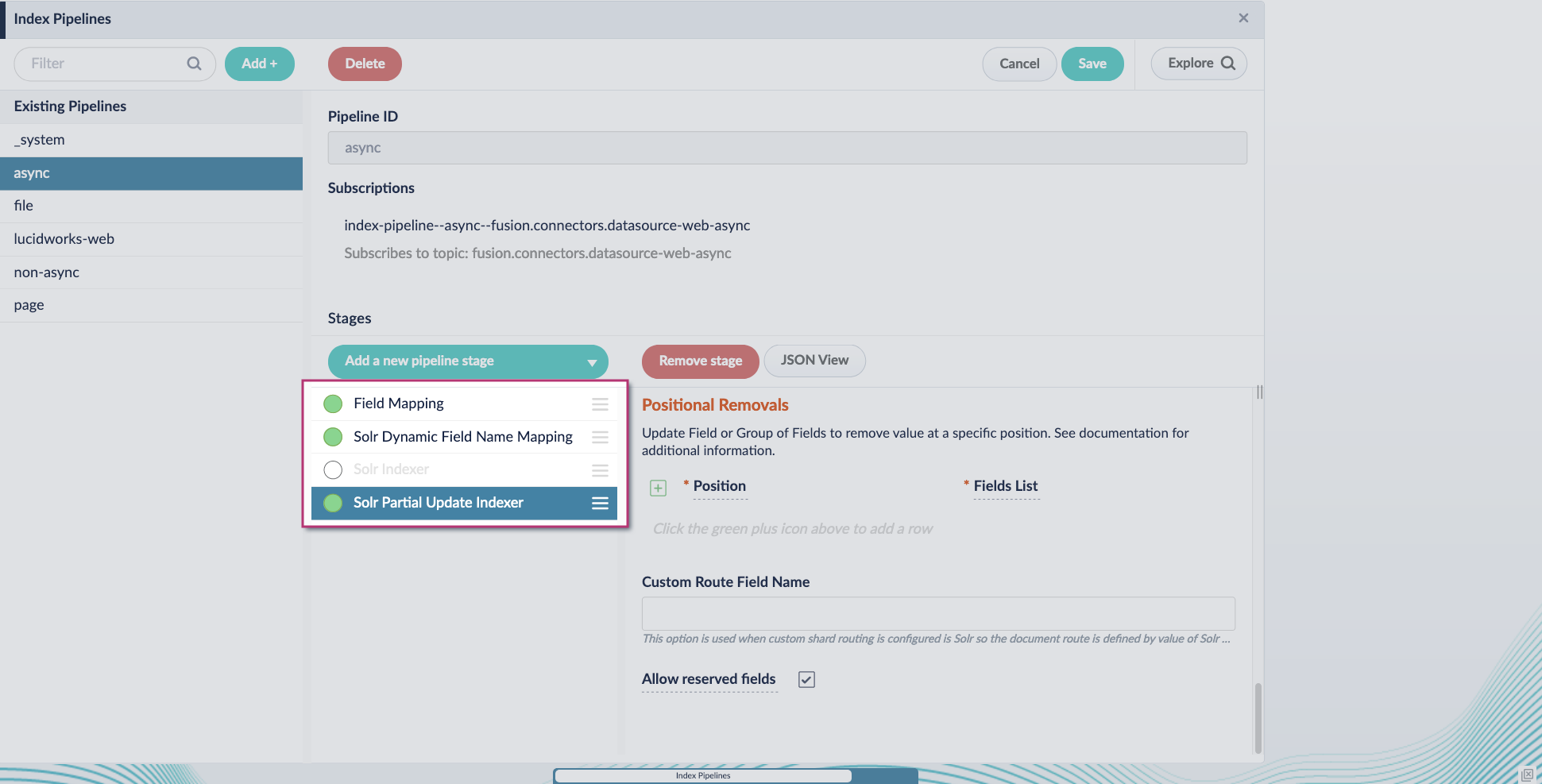 Asynchronous Tika parsing setup is now complete. Run the datasource indexing job and monitor the results.
* Updated the connectors-sdk library version to Java 11.
* Updated Fusion to prevent automatically updating V2 connector plug-ins. Intentional updates allow you to verify related functions and operations.
* Updated Fusion to specify pod resources for connector plug-in type to ensure optimal capability and performance.
## Other changes
### Babel Street (formerly Basistech) Compatibility
* Fusion 5.9.0 and later can reference a new Solr 9.0/9.1 image that comes bundled with Babel Street JAR files.
### Fusion Connectors
* Fusion 5.9.0 introduces new version requirements for the LDAP ACLs V2 and SharePoint Optimized V2 connectors. The [LDAP ACLs V2 connector](/docs/fusion-connectors/connectors/ad-acl-ldap) must use version 1.5.0 or later, and the [SharePoint Optimized V2 connector](/docs/fusion-connectors/connectors/sharepoint-v2-optimized) must use version 1.6.0 or later.
## Bug Fixes
### Fusion
* Fixed an issue where the parsing endpoint in the indexing service did not parse a DOC file or other Microsoft Word documents. The Apache POI was updated with the `log4j` API.
### Fusion Connectors
* Fixed an issue where clearing the `crawldb` for the Access Control List (ACL) datasource also deletes the ACLs.
* Fixed an issue where the Box.com V2 connector did not start successfully when a Fusion branch was deployed.
## Known issues
* New Kerberos security realms cannot be configured successfully in this version of Fusion.
Asynchronous Tika parsing setup is now complete. Run the datasource indexing job and monitor the results.
* Updated the connectors-sdk library version to Java 11.
* Updated Fusion to prevent automatically updating V2 connector plug-ins. Intentional updates allow you to verify related functions and operations.
* Updated Fusion to specify pod resources for connector plug-in type to ensure optimal capability and performance.
## Other changes
### Babel Street (formerly Basistech) Compatibility
* Fusion 5.9.0 and later can reference a new Solr 9.0/9.1 image that comes bundled with Babel Street JAR files.
### Fusion Connectors
* Fusion 5.9.0 introduces new version requirements for the LDAP ACLs V2 and SharePoint Optimized V2 connectors. The [LDAP ACLs V2 connector](/docs/fusion-connectors/connectors/ad-acl-ldap) must use version 1.5.0 or later, and the [SharePoint Optimized V2 connector](/docs/fusion-connectors/connectors/sharepoint-v2-optimized) must use version 1.6.0 or later.
## Bug Fixes
### Fusion
* Fixed an issue where the parsing endpoint in the indexing service did not parse a DOC file or other Microsoft Word documents. The Apache POI was updated with the `log4j` API.
### Fusion Connectors
* Fixed an issue where clearing the `crawldb` for the Access Control List (ACL) datasource also deletes the ACLs.
* Fixed an issue where the Box.com V2 connector did not start successfully when a Fusion branch was deployed.
## Known issues
* New Kerberos security realms cannot be configured successfully in this version of Fusion.