> ## Documentation Index
> Fetch the complete documentation index at: https://doc.lucidworks.com/llms.txt
> Use this file to discover all available pages before exploring further.
# Fusion 5.19.0
Released October 22, 2026, this is a [minor release](/docs/policies/lifecycle-policies/lw-semantic-version-support-lifecycle.md#minor-release-support-policy) that introduces a preview of the new Admin UI and automatic scaling for indexing, along with query pinning fixes and security updates.
Watch this video for a quick tour of what's new in Fusion 5.19.
Full details for every change are in these release notes and the linked documentation.
Fusion 5.19 release highlights
Upgrading to the latest version of Fusion 5 offers several key benefits:
* **Access to latest features:** Stay current with the latest features and functionality to ensure compatibility and optimal performance.
* **Simplified process:** Fusion 5.9.X and later use an in-place upgrade strategy.
* **Extended support:** Upgrading keeps you up-to-date with the latest supported Kubernetes versions, as outlined in the [Lucidworks Fusion Product Lifecycle](/docs/policies/lifecycle-policies/lw-fusion-product-lifecycle.md) policy.
> [!TIP]
>
> **Looking to upgrade?**
>
> See [Fusion 5 Upgrades](/docs/5/fusion/operations/fusion-5-upgrades.md) for detailed instructions.
For supported Kubernetes versions and key component versions, see [Platform support and component versions](#platform-support-and-component-versions).
## Key highlights
### New Admin UI (preview)
Get an early look at the redesigned Fusion Admin UI, available now as a preview alongside the one you already know. It's rebuilt on React to replace the legacy AngularJS interface, with a modern visual style, updated navigation, and improvements to several screens:
* See status and details at a glance in tables for datasources, jobs, pipelines, and more, with status labels, a details panel for the selected object, and a notifications panel.
* Get a better view in the Object Explorer, which now groups and color-codes objects by type and shows the selected object's links next to the list.
* See what each pipeline or parser stage does in Index Workbench and Query Workbench, where a diagram traces a sample input through the selected stage.
* Find the right job type in a more detailed jobs catalog, with full descriptions of each job type.
* Search and inspect your data sooner in Quickstart, which lets you query the first few documents as soon as they're indexed.
Select a screen to see it in the new Admin UI.
Where a slider appears, drag it to compare the screen with the legacy UI.
**Datasources**
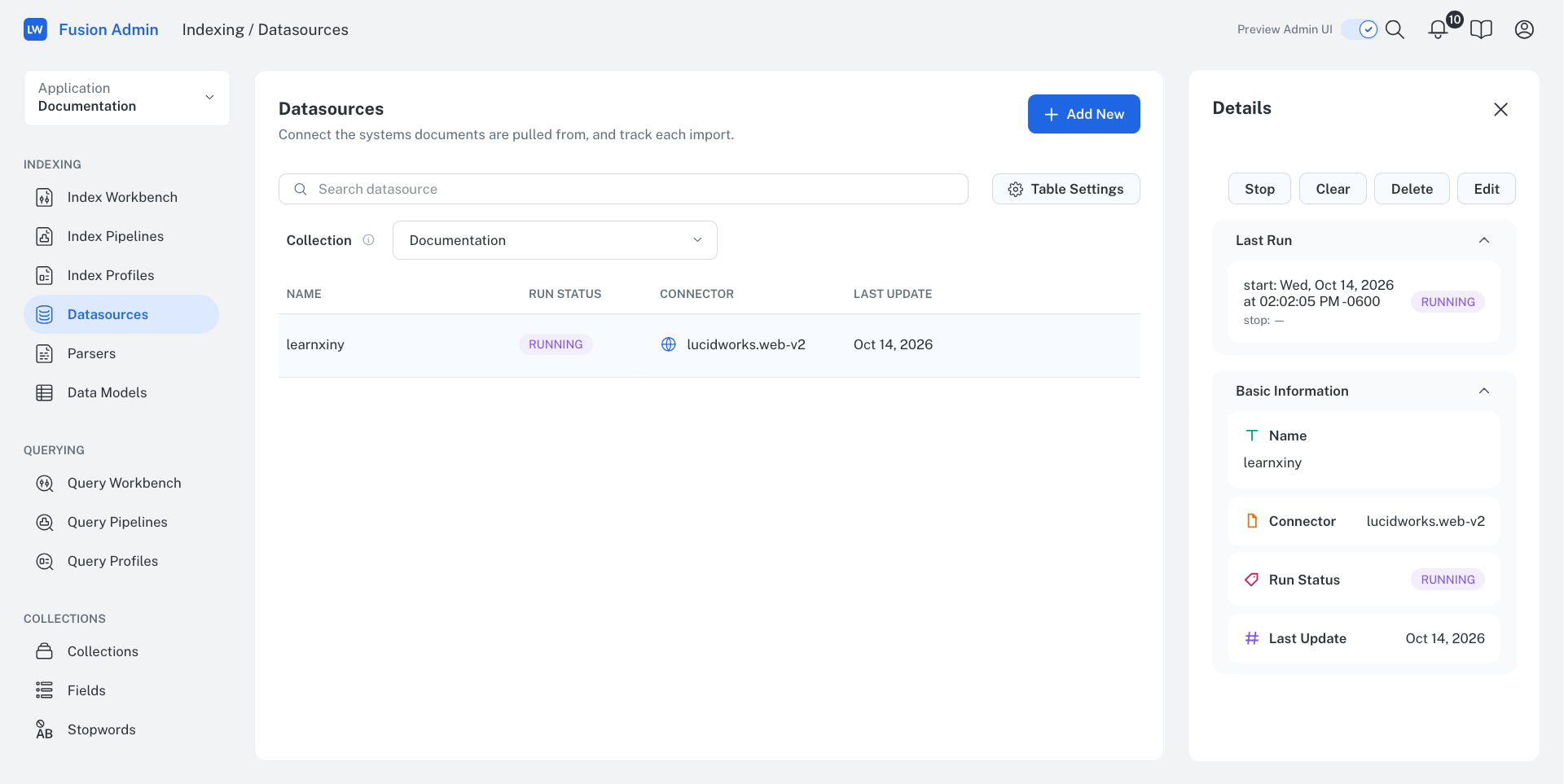
New UI
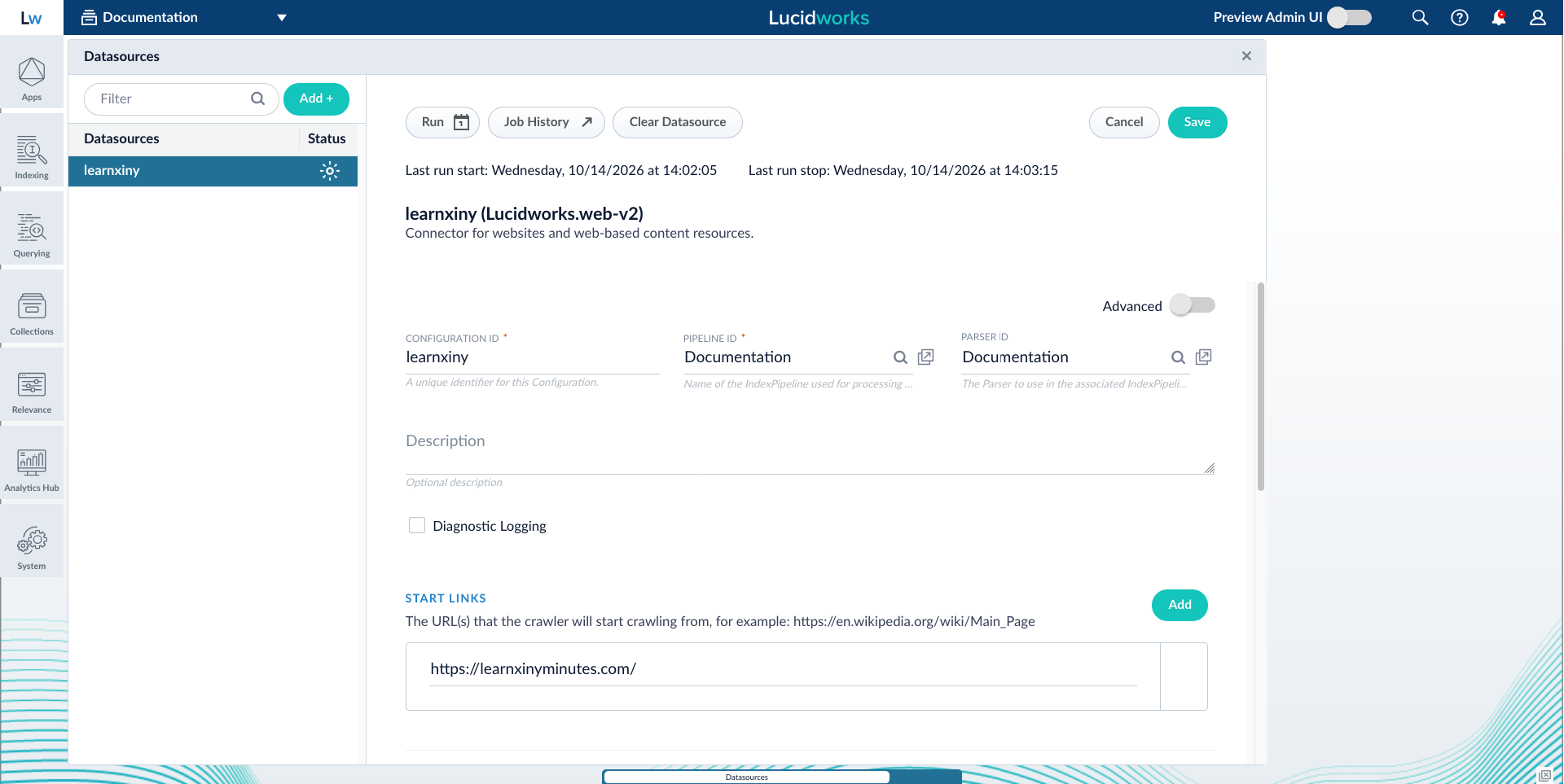
Legacy UI
**Object Explorer**
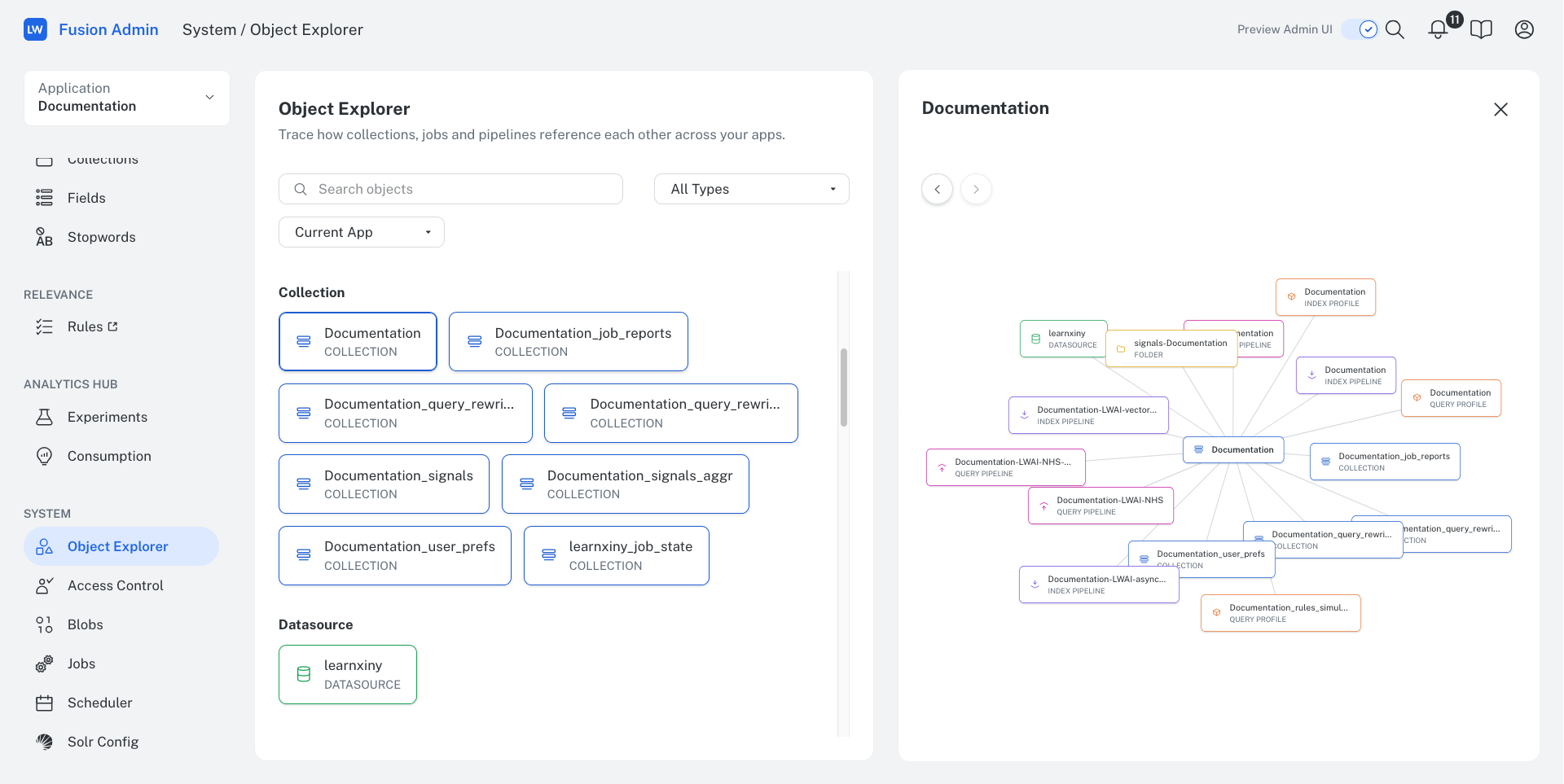
New UI
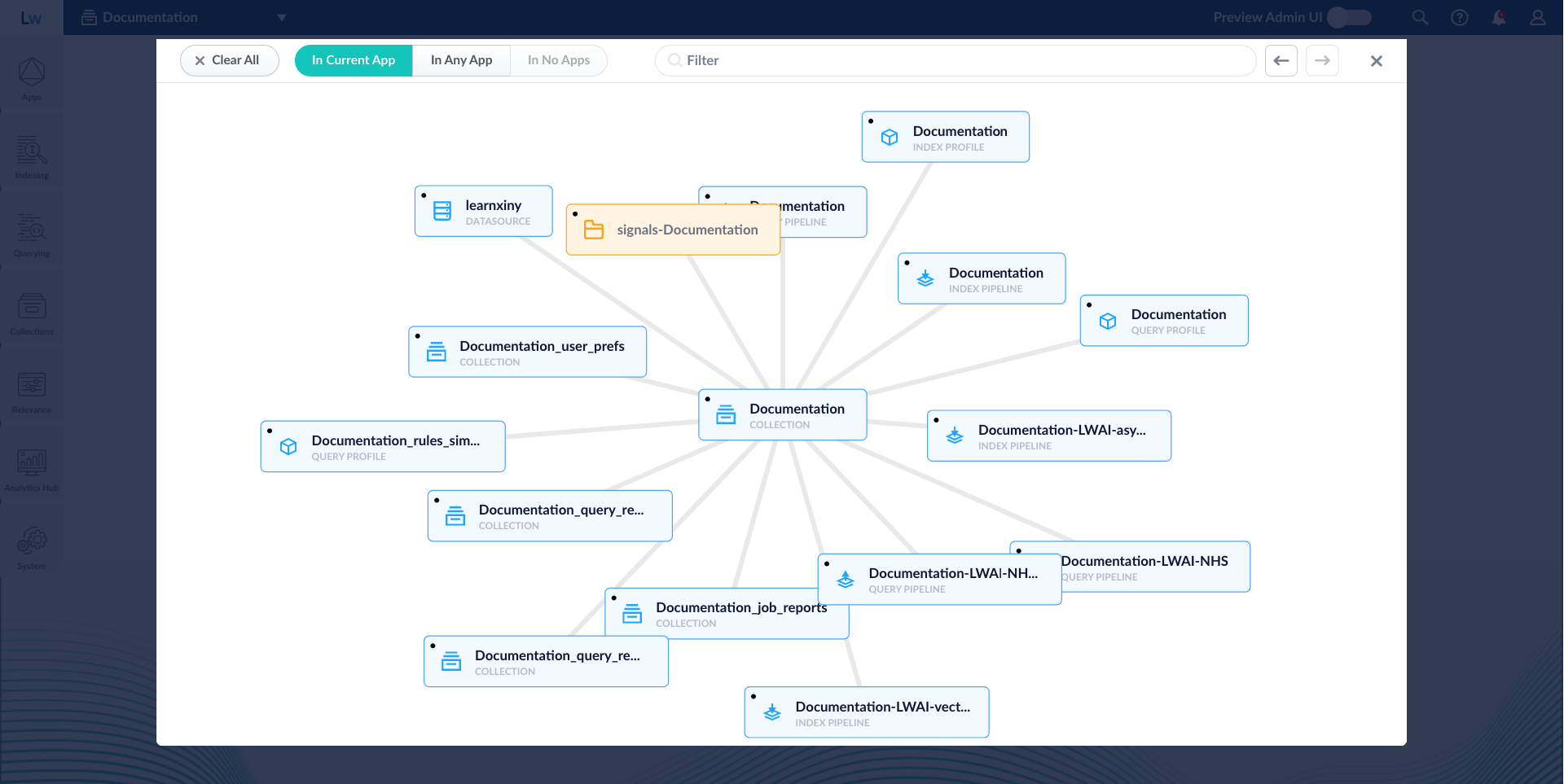
Legacy UI
**Index Workbench**
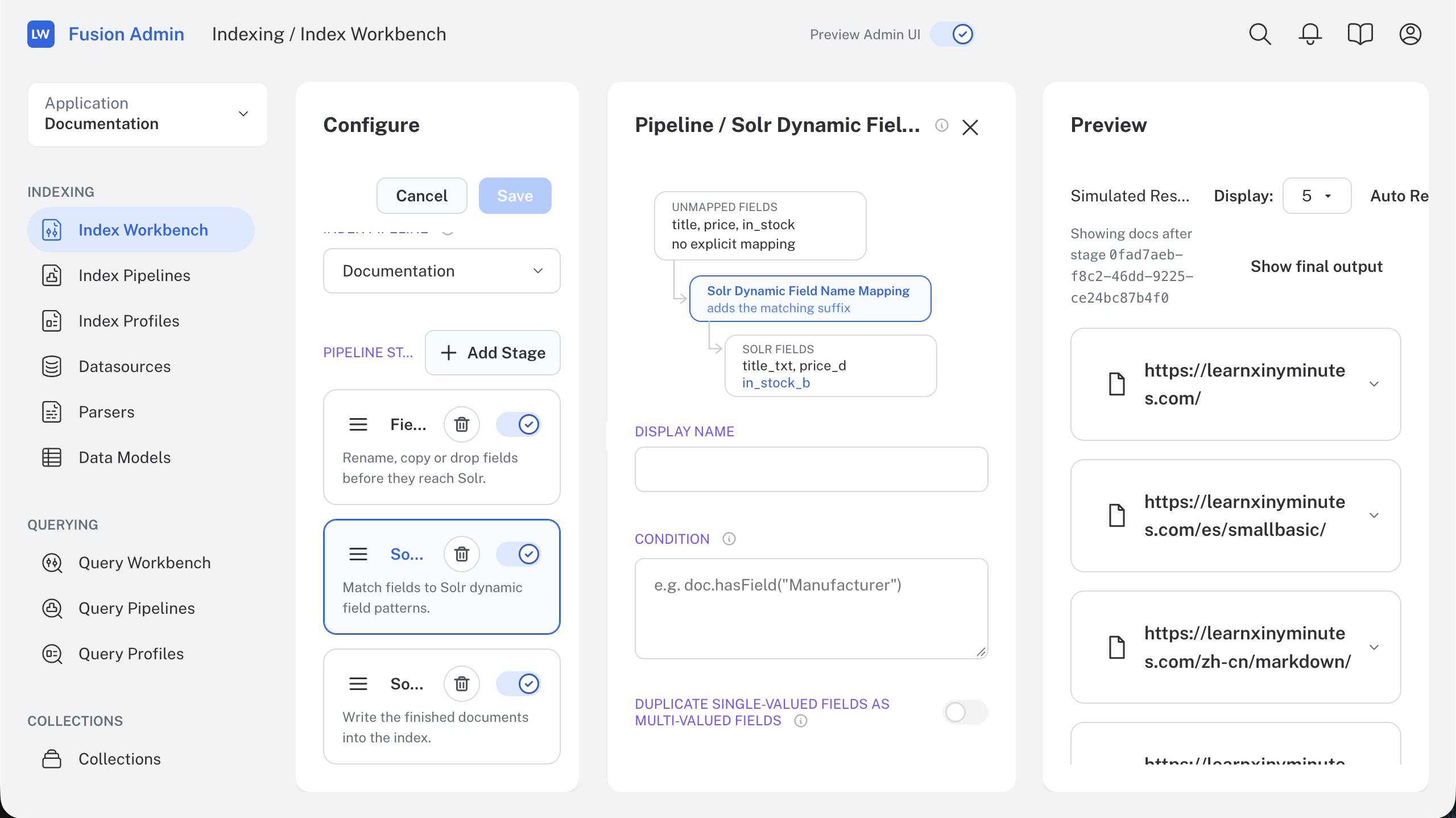
New UI
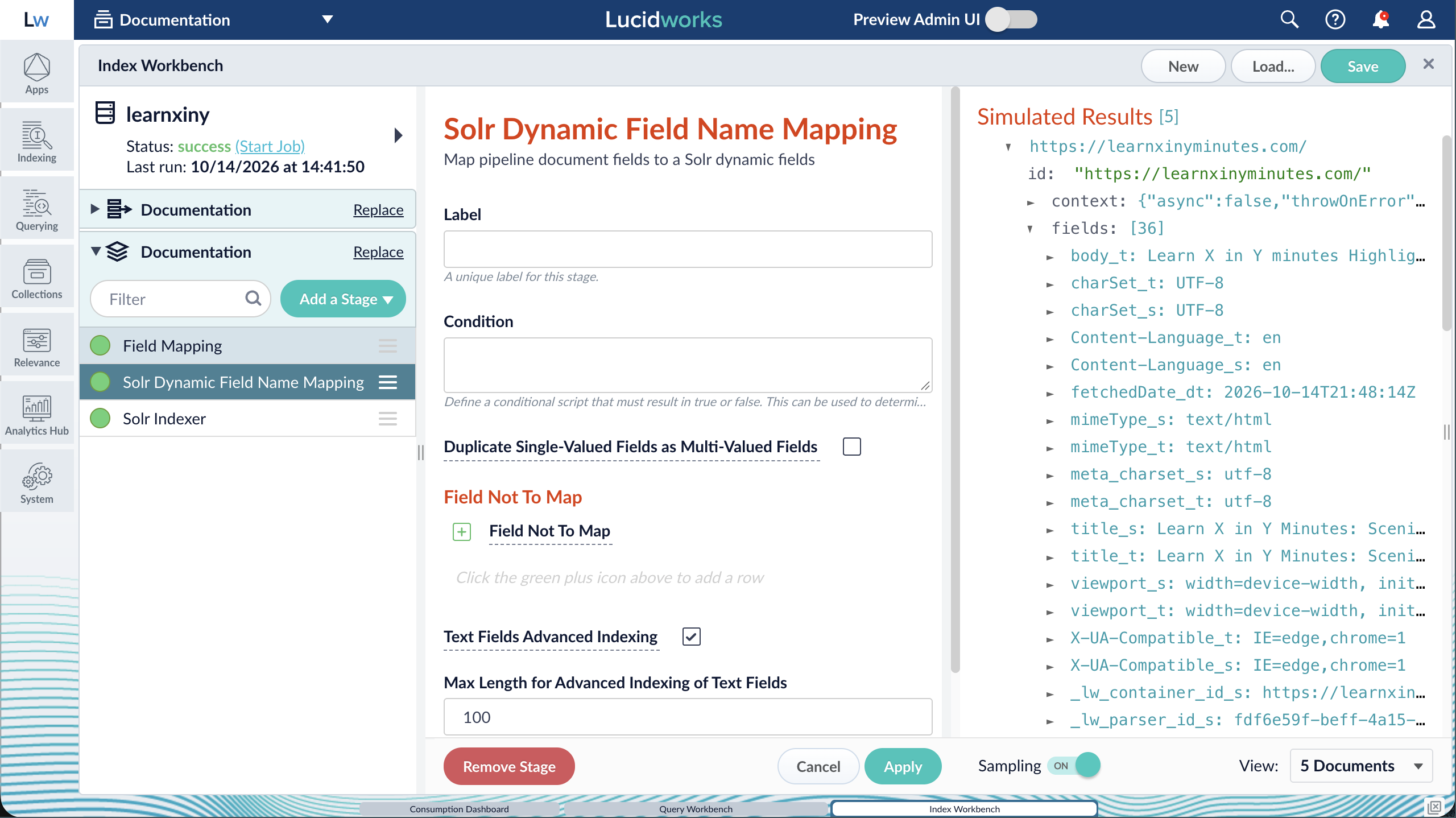
Legacy UI
**Query Workbench**
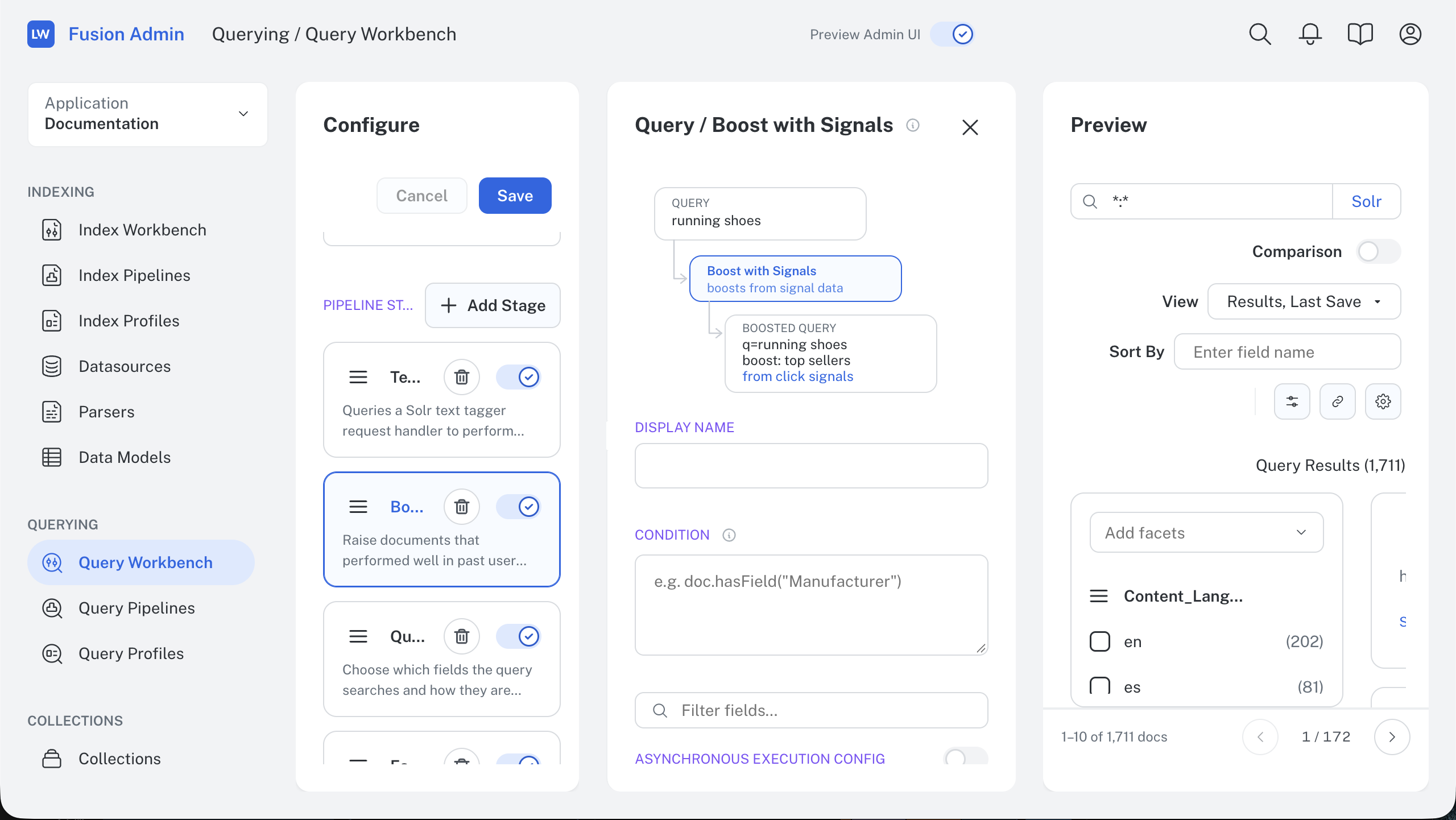
New UI
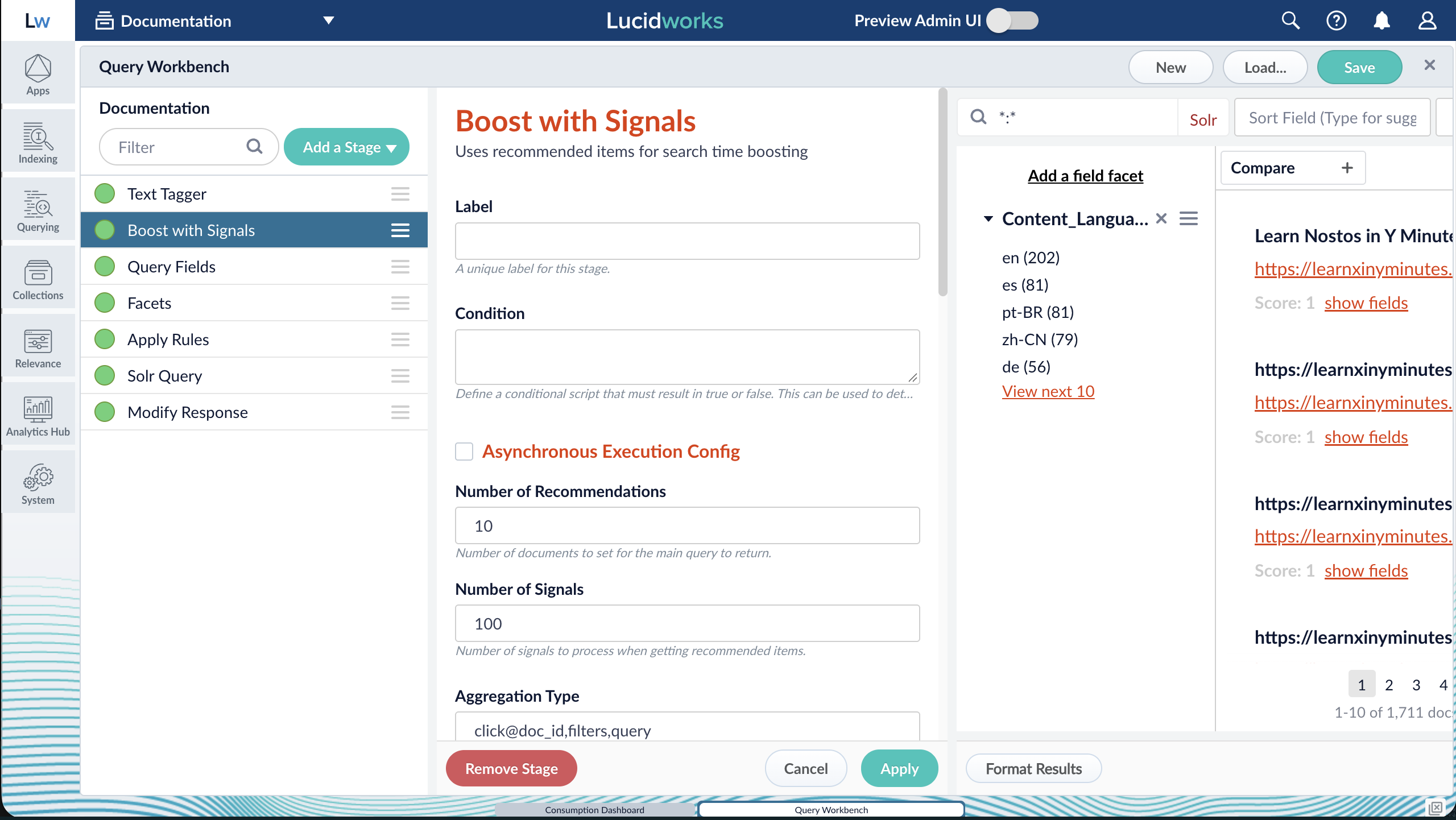
Legacy UI
**Quickstart**

To try it, use the toggle in the top bar of the Admin UI.
The toggle is in both the legacy and new Admin UI, so you can switch between them at any time, and your apps and objects are all there.
Most menu items keep their familiar names and groups, but a few have moved or aren't in the preview yet.
For example, **Jobs** is now under **System**.
Because this is a preview, capabilities and screen locations may change before general availability.
For how to switch between UIs and a full map of where menu items went, see [Try the New Admin UI](/docs/5/fusion/new-fusion-ui.md).
### Scale indexing automatically with KEDA
Fusion indexing can now scale out and back in automatically as indexing load changes, using a KEDA-based autoscaling trigger.
Delete-by-query and ACL operations now use Kafka offsets as the source of truth, so no operations are duplicated or lost when pods join or leave during a scale event.
Rebalancing uses cooperative partition assignment, so the pods that keep running continue indexing while partitions move.

You pay for extra indexing capacity only while a burst, such as a full catalog refresh, needs it.
Large updates finish sooner, so changes become searchable faster, and nobody has to scale pods by hand before a known spike.
Autoscaling is off by default.
To enable it and configure the Kafka or Prometheus trigger, see [Autoscaling with KEDA](/docs/5/fusion/operations/keda.md#triggers-for-fusion-indexing).
> **[Autoscaling Fusion with KEDA](https://academy.lucidworks.com/scorm/01a1389a-6cf8-7aca-9f95-c220db846a2b)**
>
> The course for **Autoscaling Fusion with KEDA** focuses on enabling and tuning event-driven, scheduled, and lag-based autoscaling for the `api-gateway`, `query-pipeline`, and `fusion-indexing` services, including cron, CPU, and Kafka consumer lag triggers, troubleshooting, and how Fusion keeps indexing consistent while pods scale in and out.
### Debug query rewrites faster
You can now turn off specific query rewrites for a single query, the same way you already can for rules.
This lets you find which rewrite causes an unexpected result without changing your live configuration.
To suppress rewrites, pass their IDs in `executionModifiers` on the `/preview` endpoint.
The response still shows which rewrites would have fired, but they don't affect the results.
For example, if a search for "apple charger" ranks laptop power adapters above phone cables, preview the query once with a brand rewrite suppressed and once with a synonym rewrite suppressed.
Whichever change fixes the ranking identifies the rewrite to adjust, and shoppers never see the test.

### Support for Fusion on ARM64
Fusion 5.19 adds preview support for running some services on lower-cost ARM64 nodes.
Services such as `api-gateway`, `fusion-indexing`, and the connectors services can move to ARM64 nodes, while the rest of Fusion stays on x86-64 (amd64) nodes in the same cluster.
ARM64 nodes aren't supported for production workloads in this release, but Lucidworks recommends testing them in a non-production environment now to prepare for a future release.
See [Run Fusion Services on ARM64 Nodes](/docs/5/fusion/operations/survival-guide/arm64-nodes.md) for the list of supported services and scheduling steps.
### Connectors improvements
Fusion 5.19 includes several updates that streamline the connectors platform and give administrators more control over crawl and plugin behavior.
* **Consistent security trimming across V2 connectors.**
V2 connectors now use graph-based security trimming as their single security-trimming model, so access control works the same way across connectors and the connectors SDK is simpler to build against.
To support this, Fusion removes the legacy static and dynamic security-trimming code paths from the connectors SDK and the `fusion-connectors` service.
Custom connectors built on the static or dynamic security-trimming APIs must move to graph-based security trimming.
* **More reliable Web v2 crawling.**
Fusion ships safer default Selenium Grid settings in the `connector-plugin-service` Helm chart, using modern Selenium 4 environment variable names.
This avoids hung nodes, out-of-memory failures, and silent capacity limits during Web v2 JavaScript-evaluation crawls without requiring manual chart overrides.
- **Better support for air-gapped connectors.**
Fusion adds an option to disable the connectors plugin repository's outbound Google Cloud Storage lookups, preventing repeated failed calls in air-gapped or firewalled environments without outbound internet access.
### Parsing and indexing improvements
Fusion 5.19 includes an update that prevents conflicting stage configurations in the Fusion UI.
* **Fewer conflicting pipeline configurations.**
When you configure a query pipeline stage in the Fusion UI, settings that are alternatives to each other now accept only one choice, so you can't save a stage with conflicting settings.
For example, in the Query Fields stage, **Group Leader Strategy** now lets you fill in either **By Field Value** or **By Sort**, not both.
Previously, only the field description said that these settings couldn't be combined.
### OpenShift-compliant Spark secret handling
Fusion adds an option to disable secret-to-environment-variable injection for Spark jobs, supporting compliance with Red Hat Advanced Cluster Security policies on OpenShift deployments that require the stricter setting.
### Observability improvements
Fusion 5.19 extends OpenTelemetry tracing coverage across more services and message boundaries.
* **Broader OpenTelemetry tracing coverage.**
Fusion adds OpenTelemetry tracing support to the Apps Manager and Admin services, extending the distributed tracing already available for other supported services.
* **End-to-end tracing through Kafka.**
Fusion propagates the W3C `traceparent` header through Kafka messages, creating a continuous distributed trace span from the originating message through downstream consumers instead of losing trace context at the message boundary.
## API changes
* **API for duplicating datasources.**
A new `POST /connectors/datasources/{id}/duplicate` endpoint creates a new datasource by copying the configuration of an existing V2 (SDK) datasource. You provide the ID for the new datasource and can optionally override its description, app, and collection. Classic (V1) datasources can't be duplicated.
See [Fusion APIs](/api-reference/datasource-configuration-api/duplicate-a-datasource.md) for an example.
This lays the groundwork for a future Duplicate action in the datasource UI, so datasources with mostly identical configuration no longer need to be recreated from scratch.
* **Option to create Kafka topics for subscriptions.**
The `POST /subscriptions` and `PUT /subscriptions/{id}` endpoints accept a new optional `create` query parameter. When `create` is `true`, Fusion creates the subscription's Kafka topic if it doesn't already exist, instead of rejecting the request.
See [Fusion APIs](/api-reference/subscriptions-api/create-a-subscription) for details.
* **OAuth scopes in Proxy API responses.**
The `POST /oauth2/register` response now includes a `scope` field that lists the scopes granted to the registered client. The `GET /.well-known/oauth-protected-resource` response now includes a `scopes_supported` field that lists the scopes the protected resource supports.
See [Fusion APIs](/api-reference/oauth-20/register-oauth-21-client.md) for details.
* **Admin API spec shows lowercase enum values.**
The Admin API spec now shows these enum values in lowercase, matching what the API has always sent and accepted:
* `AuthConfig.authType`: `none`, `basic`, and `kerberos`.
* `CallParams.method`: `get`, `put`, `post`, and `delete`.
* The `type` field in `AnyType` and `ObjectType`: `string`, `number`, `integer`, `boolean`, `object`, `array`, `null`, and `ref`.
Earlier versions of the spec showed these values capitalized, such as `NONE` or `String`.
The API accepts these values in any case, so requests that use uppercase values continue to work, but responses always use lowercase.
No changes to your applications are needed.
See [Fusion APIs](/api-reference/search-cluster/create-a-cluster.md) for an example of a schema that uses `AuthConfig`.
* **Parser updates create missing parsers.**
The Async Parsing `PUT /async-parsing/parsers/{id}` endpoint now creates the parser if no parser with the specified ID exists, instead of only updating an existing parser.
See [Fusion APIs](/api-reference/parsers-crud-api/update-a-parser.md) for an example.
- **Connectors SDK 4.3.0.**
Fusion 5.19 supports Connectors SDK 4.3.0, which adds graph-based security trimming with a sidecar collection.
For the SDK version that matches each Fusion release, see the [Connectors SDK support matrix](/docs/5/fusion/dev-portal/connectors-sdk/overview.md#connectors-sdk-support-matrix).
## Bug fixes
### Connectors
* **The first recrawl after upgrading to Fusion 5.18.0 reindexed all documents.**
In Fusion 5.18.0, where this issue was first found, the first recrawl after upgrading from Fusion 5.9 through 5.17 treated every document in each affected datasource as changed and sent it through indexing again, because those earlier versions don't store document signatures.
This known issue from Fusion 5.18 is fixed.
Upgrading to Fusion 5.19.0 no longer causes a full reindex on the first recrawl.
* **Some connectors re-fetched every item on every recrawl.**
In previous versions of Fusion, starting with 5.18.0, Web V2, file system, and SMB connectors didn't receive the stored state they use to skip unchanged items, such as ETag and Last-Modified values for Web V2 or modification times for files. As a result, every recrawl re-fetched every page or re-read every file instead of only changed items. This issue is fixed.
Fusion now replays stored state to connectors on recrawl, so they fetch only changed items.
> [!NOTE]
>
> To return to the Fusion 5.18.0 recrawl behavior, globally or for specific datasources, set these JVM system properties in `javaToolOptions` for the `connectors-backend` service:
>
> ```java wrap theme={"dark"}
> -Dcom.lucidworks.connectors.recrawl.mode=replay|rediscover
> -Dcom.lucidworks.connectors.recrawl.mode.rediscoverDatasourceIds=,
> -Dcom.lucidworks.connectors.recrawl.mode.replayDatasourceIds=,
> ```
>
> Set `com.lucidworks.connectors.recrawl.mode` to `rediscover` to re-fetch every item on recrawl. Leave it at the default, `replay`, to fetch only changed items. Add a datasource ID to `rediscoverDatasourceIds` or `replayDatasourceIds` to override the global value for that datasource. Restart the service to apply your changes.
* **Nested connector properties displayed out of order.**
In previous versions of Fusion, the connector configuration UI ignored the `@Property(order = N)` annotation on nested or grouped properties, so nested fields appeared in an unpredictable order.
This issue is fixed.
Fusion now applies the declared order to nested properties as well as top-level properties.
- **Connector jobs hung on unexpected crawl errors.**
In previous versions of Fusion, some unexpected crawl errors, such as a missing reactor error handler or a CrawlDB write failure, could leave connector jobs hanging indefinitely instead of failing.
This issue is fixed.
Fusion now fails these jobs with a meaningful error message.
- **Cleared datasource values appeared masked.**
In previous versions of Fusion, clearing a datasource configuration value and saving it could cause the field to show masked dots instead of appearing empty.
This issue is fixed.
Fusion now displays cleared values as empty.
- **Brief Solr outages failed connector jobs.**
In previous versions of Fusion, a transient Solr outage during a connector job's unprocessed-document count check could cause the job to fail.
This issue is fixed.
Fusion now retries this request, so brief Solr interruptions no longer fail the job.
- **Connector Helm charts exposed TLS passwords.**
In previous versions of Fusion, connector Helm charts rendered TLS keystore and truststore passwords in plaintext in Kubernetes resources, where anyone with read access to those resources could see them.
This issue is fixed.
Fusion now keeps these passwords out of rendered resources, matching the fix already applied to other Fusion services.
- **Some Microsoft Office documents failed to parse.**
In previous versions of Fusion, a parser initialization error caused some Microsoft Office documents to fail to parse, so their content wasn't indexed.
This issue is fixed.
Fusion now parses these documents correctly.
- **Connectors included a Solr remote code execution vulnerability.**
In previous versions of Fusion, `connectors-backend` bundled a version of `solr-core` affected by CVE-2025-24814, a remote code execution vulnerability.
This issue is fixed.
Fusion now removes or upgrades the vulnerable dependency in `connectors-backend`.
- **Connectors included a Netty denial-of-service vulnerability.**
In previous versions of Fusion, the gRPC library in `fusion-connectors` bundled a Netty version affected by CVE-2025-55163, an HTTP/2 vulnerability that attackers could use to cause a denial of service.
This issue is fixed.
Fusion now uses a gRPC version that bundles a patched Netty.
Connector plugin loading is unaffected.
- **Connector plugins could fill the Kafka volume.**
In previous versions of Fusion, each connector plugin published its full configuration to a Kafka topic every second, about 18 GB per day, so several plugins could fill the default 8 Gi Kafka volume and take Fusion down.
This issue is fixed.
Fusion now publishes plugin availability every 60 seconds instead of every second, compresses these messages, and limits the size and retention of the `fusion.connectors.plugin-notifications` topic.
The topic limits also apply to existing installations when the connectors RPC service starts.
### Search and query
* **Boost rules applied boosts to the wrong terms.**
In previous versions of Fusion, the `block_groups_list` feature of `BoostAttributesRule` could bind a boost factor to the wrong term and incompletely escape generated boost function queries, so results were boosted incorrectly.
This issue is fixed.
Fusion now binds boost factors to their intended terms and fully escapes generated queries.
* **Pinned documents ignored the `fl` field list.**
In previous versions of Fusion, pinned documents returned all fields instead of the fields set by `fl` in the Query Fields stage.
This issue is fixed.
Fusion now applies the same `fl` filter to pinned documents as to organic results.
* **Pinned rules stopped working after upgrading to 5.17.2.**
In previous versions of Fusion, upgrading to 5.17.2 could cause working pinned rules to stop applying, because pin rule processing changed how the boost list rule rewrote the query.
This issue is fixed.
Fusion now applies pinned rules consistently after upgrading.
* **Pinned documents appeared twice.**
In previous versions of Fusion, a document that pinning moved to a later results page could appear twice: once at its organic rank and again at its pinned position.
This issue is fixed.
Fusion now removes the duplicate entry.
* **Multi-phase pinning returned inconsistent results.**
In previous versions of Fusion, multi-phase pinning could return more documents than the requested `rows` value, and its supplemental lookup query could inherit an unintended `defType` from earlier rule processing.
This issue is fixed.
Fusion now truncates merged results to the requested page size and forces `defType=lucene` on the supplemental lookup query.
* **Multi-phase pinning dropped `fl` fields and `fq` filters.**
In previous versions of Fusion, the multi-phase pinning supplemental query kept only the first `fl` value and ignored non-collapse `fq` filters, so pinned documents could be missing fields or ignore filters.
This issue is fixed.
Fusion now preserves all requested `fl` fields and applies `fq` filters to the supplemental query.
* **Pinning many documents caused URI Too Long errors.**
In previous versions of Fusion, the multi-phase pinning supplemental query could fail with an HTTP 414 URI Too Long error when many pinned documents needed to be fetched.
This issue is fixed.
Fusion now sends this query as a POST request, which avoids URI length limits.
### Parsing and indexing improvements
* **Large bulk index requests timed out.**
In previous versions of Fusion, the Index Pipelines API could time out on bulk index requests of 400 or more documents, causing batch jobs to fail with read timeout errors.
This issue is fixed.
Fusion now handles large bulk index batches without timing out.
### Security and dependency updates
* **SnakeYAML 1.x exposed Fusion to known vulnerabilities.**
In previous versions of Fusion, services used SnakeYAML 1.x, which has known CVEs.
This issue is fixed.
Fusion now uses SnakeYAML 2.x.
- **Invalid Vault credentials weren't detected until query time.**
In previous versions of Fusion, the Active Directory Security Trimming stage and JavaScript stages (GraalVM, Nashorn, and OpenJDK Nashorn) resolved Vault-backed credentials on each request instead of at stage initialization.
Pipelines with invalid or unavailable credentials deployed successfully and failed only when the first query arrived.
This known issue from Fusion 5.18 is fixed.
Fusion now resolves and validates Vault-backed credentials during stage initialization, so configuration problems surface at deploy time.
- **Base container images included known vulnerabilities.**
In previous versions of Fusion, base container images included packages with known vulnerabilities.
This issue is fixed.
Fusion now uses updated base container images.
- **Some services used an older Netty version.**
In previous versions of Fusion, some services used an older Netty version than the rest of the platform, so they lacked the latest Netty security patches.
This issue is fixed.
Fusion now uses the same Netty version across all services.
### SDKs and services
* **The LWAI Batch Vectorize stage failed when its token expired.**
In previous versions of Fusion, the LWAI Batch Vectorize stage could keep using an expired authentication token and didn't clearly report the resulting failure.
This issue is fixed.
Fusion now refreshes the token before it expires and reports authentication failures clearly.
### Operational stability and build reliability
* **API Gateway requests were intermittently slow.**
In previous versions of Fusion, starting with 5.17.2 and 5.18.0, a small percentage of API Gateway requests took more than a second to complete, even though query pipeline and Solr execution remained fast.
This issue is fixed.
Fusion now delivers consistent API Gateway request latency under load.
* **Solr was affected by a configset remote code execution vulnerability.**
In previous versions of Fusion, the bundled Solr 9.6.1 was affected by CVE-2025-24814, a vulnerability in how Solr loads `` directives from configsets.
Fusion's default configsets don't use `` directives, but this issue is fixed.
Fusion now includes the upstream Solr fix, which ignores `` directives in `solrconfig.xml` by default.
> [!WARNING]
>
> If a custom configset uses `` directives to load JAR files, set the `SOLR_CONFIG_LIB_ENABLED` environment variable to `true` on your Solr pods before you upgrade.
> Otherwise, Solr ignores those directives and doesn't load the JAR files.
## Known issues
* **Running more than one MCP server replica breaks the `/mcp` endpoint.**
MCP sessions are stored in each pod, so requests routed to a different replica fail.
Run a single MCP server replica.
* **Collections with mixed replica types can fail to create on 3-node clusters.**
Creating a collection with NRT, TLOG, and PULL replicas can fail with a "Not enough eligible nodes" error on a 3-node high-availability cluster.
* **The Parallel Bulk Loader can duplicate documents during atomic updates.**
When `atomicUpdates` is `true` and `outputPartitions` is greater than `1`, the job adds duplicate documents instead of updating existing ones.
* **Calls between services can fail intermittently in multi-replica deployments.**
Service discovery can intermittently lose healthy services, so calls fall back to `http://:80` and fail.
This can affect deployments and API calls to services such as `fusion-admin` and `classic-rest-service`.
* **Indexing can drop documents without reporting an error.**
When Solr is temporarily unavailable, under heavy load, or returns errors, the index pipeline can discard documents after logging a warning or error.
The connector job still reports success, so the missing documents aren't indexed and no failure is surfaced.
Compare document counts in the datasource and the collection after large indexing jobs.
## Deprecations
Fusion 5.19 deprecates these features, which are expected to be removed in Fusion 6.0:
* **Legacy Admin UI.** Use the [new Admin UI](/docs/5/fusion/new-fusion-ui.md) instead.
* **Reverse Search.**
* **Seldon.** This includes the Create Seldon Core Model Deployment and Delete Seldon Core Model Deployment jobs, and Seldon models in the Ray/Seldon Vectorize Field and Ray/Seldon Vectorize Query stages.
* **Content-Based Recommender job.**
* **Smart Answers Supervised Training job.**
* **Smart Answers Evaluate Pipeline job.**
* **`fusion-classification` service.**
* **gRPC `ml-model-service` API.**
For details, see [Deprecations and Removals](/docs/5/fusion/deprecations-and-removals.md).
## Removals
Fusion 5.19 removes these connectors framework features:
* **Static and dynamic security trimming.** V2 connectors now support only graph-based security trimming.
* **Connectors `ConfigsApi` endpoints.** Use the `DataSourcesApi` endpoints instead.
For details, see [Fusion Connectors Deprecations and Removals](/docs/fusion-connectors/deprecations-and-removals.md#connectors-platform-features).
## Platform support and component versions
### Kubernetes support
Lucidworks has tested and validated Fusion 5.19 on Google Kubernetes Engine (GKE) 1.31, 1.32, 1.33, 1.34, 1.35, and 1.36.
Lucidworks also supports these platforms on versions based on Kubernetes 1.31 through 1.36:
* Microsoft Azure Kubernetes Service (AKS)
* Amazon Elastic Kubernetes Service (EKS)
* Rancher Kubernetes Engine (RKE and RKE2)
* OpenShift 4
RKE2 may require Helm chart modification.
OpenStack and customized Kubernetes installations are *not* supported.
For more information on Kubernetes version support, see the [Kubernetes support policy](/docs/policies/lifecycle-policies/lw-semantic-version-support-lifecycle.md#kubernetes-support).
### Components
The following table details the versions of key components that may be critical to deployments and upgrades.
| Component | Version |
| - | - |
| Solr | fusion-solr 5.19.0 *(based on Solr 9.6.1)* |
| ZooKeeper | 3.9.1 |
| Spark | 3.4.1 |
| Ingress Controllers | Nginx, Ambassador (Envoy), GKE Ingress Controller |
| Ray | ray\[serve] 2.56.0 |
| Helm | 4.1.1 |
See [Lucidworks Fusion Product Lifecycle](/docs/policies/lifecycle-policies/lw-fusion-product-lifecycle.md) for more information about support dates.
This documentation is built and hosted on [Mintlify](https://mintlify.com), a developer documentation platform.