> ## Documentation Index
> Fetch the complete documentation index at: https://doc.lucidworks.com/llms.txt
> Use this file to discover all available pages before exploring further.

# Local Chunker Index Stage

export const schema = {
  "type": "object",
  "title": "Local Chunker Stage",
  "description": "Pass in a json string of created vectors, and optionally text spans and chunks to create chunked documents",
  "required": ["inputContextVariable", "outputContextVariable"],
  "properties": {
    "skip": {
      "type": "boolean",
      "title": "Skip This Stage",
      "description": "Set to true to skip this stage.",
      "default": false,
      "hints": ["advanced"]
    },
    "label": {
      "type": "string",
      "title": "Label",
      "description": "A unique label for this stage.",
      "hints": ["advanced"],
      "maxLength": 255
    },
    "condition": {
      "type": "string",
      "title": "Condition",
      "description": "Define a conditional script that must result in true or false. This can be used to determine if the stage should process or not.",
      "hints": ["code", "code/javascript", "advanced"]
    },
    "inputContextVariable": {
      "type": "string",
      "title": "Input context variable",
      "description": "Name of the variable in context to be used as input. Supports template expressions."
    },
    "outputContextVariable": {
      "type": "string",
      "title": "Destination Field Name & Context Output",
      "description": "Note:  MUST contain '*_chunk_vector_*' and must be a dense vector field type.  The name here is used to populate two things with the prediction results:  1) The field name in the document that will contain the prediction, and 2) The name of the context variable that will contain the prediction."
    },
    "outputChunkSpans": {
      "type": "string",
      "title": "Destination Field Name for Chunk Spans",
      "description": "This field will contain the span information to reference individual chunks. For example, the first span may be 0-30, the second span may be 31-60, etc.  This field will be and array of strings, e.g. _ss, which look like [ \"[0,30]\", \"[31,60]\" ...] ",
      "default": "chunk_spans_ss"
    },
    "outputTextChunks": {
      "type": "string",
      "title": "Destination Field Name for Text Chunks (not the vectors)",
      "description": "For example, body_chunks_ss.  This field will contain the text chunks that are generated by the chunker."
    },
    "failOnError": {
      "type": "boolean",
      "title": "Fail on Error",
      "description": "Flag to indicate if this stage should throw an exception if an error occurs while generating a prediction for a document.",
      "default": false
    }
  },
  "category": "AI",
  "categoryPriority": 10,
  "unsafe": false
};

export const SchemaParamFields = ({schema}) => {
  const sanitize = str => {
    if (typeof str !== "string") return str;
    return str.replace(/^"(.*)"$/s, "$1").replace(/\\/g, "").replace(/"/g, "'");
  };
  const formatDescription = str => {
    const s = sanitize(str);
    return (/[.!?]\)*$/).test(s) ? s : `${s}.`;
  };
  const {description, properties = {}, required: requiredProps = []} = schema;
  const visibleProps = useMemo(() => Object.entries(properties).filter(([, prop]) => !prop.hints?.includes("hidden")), [properties]);
  return <div>
      {description && <p>{formatDescription(description)}</p>}

      {visibleProps.map(([name, prop]) => {
    const isRequired = requiredProps.includes(name);
    const hasDefault = prop.default !== undefined;
    const rawDefault = prop.default;
    const isComplexDefault = hasDefault && (typeof rawDefault === "object" || typeof rawDefault === "string" && (rawDefault.length > 20 || rawDefault.includes('"')));
    const fieldProps = {
      key: name,
      body: prop.title || name,
      type: prop.type,
      ...prop.title && ({
        post: [<><span className="text-stone-400 dark:text-stone-500">API property: </span>{name}</>]
      }),
      ...isRequired && ({
        required: true
      }),
      ...!isComplexDefault && hasDefault ? {
        default: sanitize(String(rawDefault))
      } : {}
    };
    const isObject = prop.type === "object" && prop.properties;
    const isArrayOfObjects = prop.type === "array" && prop.items?.type === "object" && prop.items.properties;
    return <ParamField {...fieldProps}>
            {prop.description && <p>{formatDescription(prop.description)}</p>}

            {isComplexDefault && <div className="flex">
                <p>
                  <strong>Default:</strong>
                </p>
                <pre className="!my-0">
                  <code>
                    {JSON.stringify(rawDefault, null, 2)}
                  </code>
                </pre>
              </div>}

            {isArrayOfObjects && <div className="flex">
              <p>
                <strong>Object attributes:</strong>
              </p>
              <pre className="!my-0">
                <code>
                  {'{\n'}
                  {Object.entries(prop.items.properties).map(([iname, iprop]) => <>
                      {`  ${iname}`}
                      {prop.items?.required?.includes(iname) && <span style={{
      color: 'red'
    }}> required</span>}
                      {`: {\n    display name: ${sanitize(iprop.title || '')}\n    type: ${iprop.type}\n  }\n`}
                    </>)}
                  {'}'}
                </code>
              </pre>
              </div>}

            {isObject && <Expandable title="properties">
                <SchemaParamFields schema={{
      properties: prop.properties,
      required: prop.required
    }} />
              </Expandable>}
          </ParamField>;
  })}
    </div>;
};

export const LwTemplate = ({title = "Key questions to get you started", icon = "sparkles", cta = "Powered by Agent Studio", linkHref = "https://lucidworks.com/demo/?utm_source=docs&utm_medium=referral&utm_campaign=docs_cta_ai"}) => {
  const [isLoaded, setIsLoaded] = useState(false);
  useEffect(() => {
    const timer = setTimeout(() => {
      setIsLoaded(true);
    }, 500);
    return () => clearTimeout(timer);
  }, []);
  return <div className="lw-template-container">
      <Card title={title} icon={icon}>
        {isLoaded && <span dangerouslySetInnerHTML={{
    __html: `<lw-template id="a029c1a9-28be-427e-b0e1-5d918920246a"></lw-template
            >`
  }} />}
        <Link href={linkHref} className="agent-studio-link text-left text-gray-600 gap-2 dark:text-gray-400 text-sm font-medium flex flex-row items-center hover:text-primary dark:hover:text-primary-light group-hover:text-primary group-hover:dark:text-primary-light">Powered by Lucidworks Agent Studio</Link>
      </Card>
    </div>;
};

<Note>This feature is only available in Fusion 5.9.x for versions 5.9.14 and later.</Note>

The Local Chunker indexing stage uses your local Ray deployment or your API to break down large text documents into smaller, semantically meaningful chunks, vectorizes those chunks for Neural Hybrid Search, and stores those vectors in Solr.

Use this index stage if:

* You want to use chunking in your Fusion search strategy with an external chunking solution.
* You are comfortable setting up your own Ray Serve environment or using Fusion's Ray image.
* You cannot use the LWAI Chunker Index Stage, which uses Lucidworks AI to break down large text documents.

See the [ML Models API](/api-reference/model-service-api/list-all-models) for additional details about configuration.

You must set up the Local Chunker stage with Fusion's Ray image, your own Ray Serve environment, or an API. See "Develop and deploy a chunking machine learning model with Ray" below for a tutorial for your own Ray Serve environment. If you are using an API instead of a Ray model deployment to do chunking, the minimum requirement is that the response matches what the Local Chunker Stage input requires.

<Accordion title="Develop and deploy a chunking machine learning model with Ray">
  <Note>This feature is only available in Fusion 5.9.x for versions 5.9.14 and later.</Note>

  This tutorial walks you through deploying your own chunking model to Fusion with Ray.

  <LwTemplate />

  ## Prerequisites

  * A Fusion instance with an app and data to index

  * An understanding of Python and the ability to write Python code

  * [Docker](https://docs.docker.com/get-docker/) installed locally, plus a private or public Docker repository

  * Ray installed locally: `pip install ray[serve]` using the version of ray\[serve] found in the release notes for your version of Fusion.

  * Code editor; you can use any editor, but Visual Studio Code is used in this example

  * Model: [Snowflake/snowflake-arctic-embed-xs](https://huggingface.co/Snowflake/snowflake-arctic-embed-xs)

  * Docker image for chunking on indexing: [ray-chunking-snowflake-arctic-embed-xs](https://hub.docker.com/r/jstrmec/ray-chunking-snowflake-arctic-embed-xs/)

  * Docker image for chunking on querying: [ray-snowflake-arctic-embed-xs](https://hub.docker.com/r/jstrmec/ray-snowflake-arctic-embed-xs)

  * The chunking query parsers are added to your `solrconfig.xml` file, if not present:

    ```xml wrap theme={"dark"}
    <!-- FUSION NOTES: These query parsers are used with Solr-based vector search -->
    <queryParser name="xvecSim" class="org.apache.solr.lwbackported.XVecSimQParserPlugin"/>
    <queryParser name="_lw_chunk_wrap" class="org.apache.solr.lw.ParentAndAllKidsWrapperQParserPlugin"/>
    <queryParser name="neuralHybrid" class="org.apache.solr.lw.NeuralHybridQParserPlugin"/>
    ```

  * The vector definitions are added to your `managed-schema.xml` file. See [Vector definitions](/docs/5/fusion/reference/config-ref/pipeline-stages/index-stages/local-chunker-index-stage#vector-definitions) for the full definitions.

  * The collection must have a processor component added to the Solr schema: `<processor class="solr.lw.MultiVectorsToChildDocsProcessorFactory" />`. Here is an example of a default in the `solrconfig.xml`. After you add this, you must clear the collection and re-index.

    ```xml wrap theme={"dark"}
    <!-- FUSION NOTES: Fusion's default is not to use Solr's schemaless mode.
      Fusion uses the Solr Dynamic Field Name Mapping index pipeline stage to automatically convert all incoming fields to dynamic fields. Fusion's default schema supports this with multiple dynamic field rules.
      If Solr's schemaless mode is preferred, it must be configured in a new updateRequestProcessorChain and the "default" param below changed to false. -->
    <updateRequestProcessorChain default="true">
        <processor class="solr.IgnoreCommitOptimizeUpdateProcessorFactory">
          <str name="responseMessage">Optimize requests are not allowed in this Solr instance.</str>
          <int name="statusCode">400</int>
          <bool name="ignoreOptimizeOnly">true</bool>
        </processor>
        <processor class="solr.UUIDUpdateProcessorFactory" />
        <processor class="solr.lw.MultiVectorsToChildDocsProcessorFactory" />
        <processor class="solr.LogUpdateProcessorFactory"/>
        <processor class="solr.DistributedUpdateProcessorFactory"/>
        <processor class="solr.RunUpdateProcessorFactory"/>
    </updateRequestProcessorChain>
    ```

  ## Tips

  * Always test your Python code locally before uploading to Docker and then Fusion.
    This simplifies troubleshooting significantly.

  * Once you've created your Docker you can also test locally by doing `docker run` with a specified port, like 8000, which you can then `curl` to confirm functionality in Fusion.
    See the testing example below.

  * If you run into an issue with the model not deploying and you're using the 'real' example, there is a very good chance you haven't allocated enough memory or CPU in your job spec or in the Ray-Argo config.
    You can increase the resources. To edit the ConfigMap, run `kubectl edit configmap argo-deploy-ray-model-workflow -n <namespace>` and then find the `ray-head` container in the artisanal escaped YAML and change the memory limit.
    Exercise caution when editing because it can break the YAML.
    Just delete and replace a single character at a time without changing any formatting.
    For additional guidance, see the [testing locally snowflake-arctic-embed-xs\_chunking-ray example](https://colab.research.google.com/drive/117er9qe_wx0pJRf9o9x8M6VfPDBm-uIJ?usp=sharing).

  <Card title="Intro to Machine Learning in Fusion" class="note-image" href="https://academy.lucidworks.com/intro-to-machine-learning-in-fusion" cta="Take this course on the LucidAcademy." icon="graduation-cap" iconType="duotone">
    The course for **Intro to Machine Learning in Fusion** focuses using machine learning to infer the goals of customers and users in order to deliver a more sophisticated search experience.
  </Card>

  ## Local testing example

  1. Docker command:
     ```bash theme={"dark"}
     docker run -p 127.0.0.1:8000:8000 DOCKER_IMAGE
     ```

  2. Curl to hit Docker:

     ```bash wrap theme={"dark"}
     curl -i -X POST http://127.0.0.1:8000 -H 'Content-Type: application/json' -d '{"text": "I love Fusion", "quantize":True, "include_text_chunks":True}'
     ```

  3. Curl model in Fusion:

  ```bash wrap theme={"dark"}
  curl -u $FUSION_USER:$FUSION_PASSWORD  -X POST -H 'Content-Type: application/json' -d '{"text": "I love Fusion", "quantize":True, "include_text_chunks":False}' https://FUSION_HOST:6764/api/ai/ml-models/MODEL_NAME/prediction
  ```

  1. See all your deployed models:

     ```bash wrap theme={"dark"}
     curl -u USERNAME:PASSWORD http://FUSION_HOST:FUSION_PORT/api/ai/ml-models
     ```

  2. Check the Ray UI to see Replica State, Resources, and Logs.\
     If you are getting an internal model error, the best way to see what is going on is to query via port-forwarding the model.
     The `MODEL_DEPLOYMENT` in the command below can be found with `kubectl get svc -n NAMESPACE`. It will have the same name as set in the model name in the *Create Ray Model Deployment* job.

     ```bash wrap theme={"dark"}
     kubectl -n NAMESPACE port-forward svc/MODEL_DEPLOYMENT-head-svc 8000:8265
     ```

  ## Download the model and choose a chunking strategy

  This tutorial uses the [Snowflake/snowflake-arctic-embed-xs](https://huggingface.co/Snowflake/snowflake-arctic-embed-xs) model from Hugging Face, but any pre-trained model from [huggingface.co](https://huggingface.co) works with this tutorial.

  For the chunking strategy you can start with [LangChain](https://python.langchain.com/docs/concepts/text_splitters/) or [LlamaIndex](https://docs.llamaindex.ai/en/stable/module_guides/loading/node_parsers/).

  If you want to use your own model instead, you can do so, but your model must have been trained and then saved though a function similar to the PyTorch's `torch.save(model, PATH)` function.
  See [Saving and Loading Models](https://pytorch.org/tutorials/beginner/saving_loading_models.html) in the PyTorch documentation.

  ## Create the index model

  The next step is to format a Python class which will be invoked by Fusion to get the results from your index model.
  The skeleton below represents the format that you should follow. This is distinct from the standard example without chunking because the format to output is more complex.

  The model's return value must be a dictionary with a key named `response`. The value associated with this key must be a JSON string. When parsed, this JSON string is a dictionary that contains two primary keys:

  * `spans`: A list of lists, where each inner list represents `[start_index, end_index]` pairs for each text chunk
  * `vectors`: A list of dictionaries. Each dictionary in this list must have a key named `vector`, and the value is a list of numbers representing an embedding vector with the shape of (1, DIM), where DIM (vector dimension) is a consistent integer. This format is required for the [Local Chunker Index Stage](/docs/5/fusion/reference/config-ref/pipeline-stages/index-stages/local-chunker-index-stage) to handle the vector encoding.

  Optionally you can pass the actual chunks in a list of strings. However, this is not recommended due to the Solr storage impact of saving a very large document twice.
  See also [Getting Started](https://docs.ray.io/en/latest/serve/getting_started.html) in the Ray Serve documentation.

  ```python expandable wrap theme={"dark"}
  import json
  from typing import Any, Dict, List
  from ray import serve
  from starlette.requests import Request
  from torch import Tensor


  # These defaults are for the ray serve deployment
  # when running simply from docker. The 'Create Ray Model Deployment'
  # job can override these replicas and resources if needed.
  @serve.deployment(num_replicas=1, ray_actor_options={"num_cpus": 1})
  class Deployment(object):
      def __init__(self):
          """
          Add any initialization parameters. Generally this is where you would load
          your model. This method will be called once when the deployment is created.
          """
          print("Initializing")
          self.model = load_model()  # faux code

      # This can be named as any method which takes a dictionary as input and returns a dictionary
      # as output. In this example, we are using the encode method to encode the
      # input text into a vector.
      def main(self, input_dict: Dict[str, Any]) -> Dict[str, Any]:
          """
          This method will be called when the deployment is queried. It will receive
          the input data and should return the output data.
          """
          text = input_dict["text"]
          chunks = self.chunk_text(text)  # faux code
          spans = self.get_spans(text)  # faux code
          embeddings = self.model.encode(chunks)  # faux code
          output = self.create_output_dict(spans=spans, vectors=embeddings, chunks=chunks)
          return output

      # This shows the required structure of the output dictionary.
      # The 'spans' and 'vectors' keys are required for the `Local Chunker` stage.
      def create_output_dict(
          self,
          spans: List[List[int]],
          vectors: Tensor,
          chunks: List[str],
      ) -> Dict[str, Any]:
          vectors = self.format_vectors(vectors=vectors, chunks_len=len(chunks))
          output_dict = {
              "spans": spans,  # required
              "vectors": vectors,  # required
              "chunks": chunks,  # optional
          }

          return {
              "response": json.dumps(output_dict), # This is required because the Fusion logic doesn't handle nested structures
          }

      # This converts the vectors to the required format
      # for the Local Chunking stage. The structure
      # is a list of dictionaries,each containing a
      # 'vector' key.
      # [{"vector": [0.1, 0.2, ...]}, {"vector": [0.3, 0.4, ...]}, ...]
      @staticmethod
      def format_vectors(
          vectors: Tensor,
          chunks_len: int,
      ) -> List[Dict[str, Any]]:
          vectors = (
              vectors.squeeze().tolist()
              if chunks_len > 1
              else [vectors.squeeze().tolist()]
          )
          # Convert the tensor to a list of dictionaries
          formatted_vectors = []
          for vector in vectors:
              formatted_vectors.append({"vector": vector})
          return formatted_vectors

      async def __call__(self, http_request: Request) -> Dict[str, Any]:
          input_dict: Dict[str, Any] = await http_request.json()
          return self.main(
              input_dict=input_dict
          )  # This will be the function you defined above, in this case main


  app = Deployment.bind()
  ```

  A real instance of this class with the `snowflake-arctic-embed-xs` model is as follows:

  NOTE: This code pulls from Hugging Face. To have the model load in the image without pulling from Hugging Face or other external sources, download the model weights into a folder name and change the model name to the folder name preceded by `./`.

  ```python expandable wrap theme={"dark"}
  """
  Example is based on:
      - https://huggingface.co/Snowflake/snowflake-arctic-embed-xs
      - https://docs.ray.io/en/latest/serve/getting_started.html
  """

  import json
  import sys
  from time import time
  from typing import Any, Dict, List, Optional

  import torch
  import torch.nn.functional as F
  from langchain_text_splitters import CharacterTextSplitter
  from ray import serve
  from starlette.requests import Request
  from starlette.responses import JSONResponse
  from torch import Tensor
  from transformers import AutoModel, AutoTokenizer

  HUB_MODEL_NAME = "Snowflake/snowflake-arctic-embed-xs"
  # Truncate to 150k characters to avoid timeout errors from model
  # and 10 Chunk limit to protect Fusion document count
  CHAR_TRUNCATION = 150_000
  MAX_CHUNKS = 10


  @serve.deployment(num_replicas=1, ray_actor_options={"num_cpus": 1})
  class Deployment(object):
      def __init__(self):
          from loguru import logger

          # Initializing logger
          self.logger = logger
          self.logger.remove()
          self.logger.add(sys.stdout, level="INFO", serialize=False, colorize=True)

          # Initializing model
          self.logger.info("Loading model...")
          self.tokenizer = AutoTokenizer.from_pretrained(HUB_MODEL_NAME)
          self.model = AutoModel.from_pretrained(HUB_MODEL_NAME)
          self.model.eval()
          self.vector_size = 384
          self.logger.info("Model initialization finished!")
          # snowflake-arctic-embed-xs specific prefix (NOT for other models)
          self.query_prefix = "Represent this sentence for searching relevant passages:"
          self.passage_prefix = ""

      def main(self, input_dict: Dict[str, Any]) -> Dict[str, Any]:
          try:
              timings_dict = {}
              _start_time = time()

              # Extracting text from input
              text = input_dict.get("text", None)
              include_text_chunks = self.obj_to_bool(
                  input_dict.get("include_text_chunks", False)
              )

              if text is None:  # Check if text is None and return
                  self.logger.error("No text provided in the input dictionary.")
                  return JSONResponse(
                      {"error": "No `text`input key provided"}, status_code=400
                  )
              elif (
                  text.isspace() or len(text) == 0
              ):  # Check if the text is empty and return
                  self.logger.warning("Empty text provided. Returning empty output.")
                  return self.create_output_dict(
                      spans=[],
                      vectors=[],
                      chunks=[],
                      include_text_chunks=include_text_chunks,
                  )
              elif len(text) > CHAR_TRUNCATION:  # Check if the text is too long
                  text = text[:CHAR_TRUNCATION]
                  self.logger.warning(
                      f"Input text truncated to {CHAR_TRUNCATION} characters"
                      f" to avoid Fusion stage timeout errors."
                  )
              # Log the length of the text
              self.logger.debug(f"Text len: {len(text)}")

              # Check DataType
              dataType = input_dict.get("dataType", "passage")

              # Check if quantization is set
              quantize_bool = self.obj_to_bool(input_dict.get("quantize", False))
              # Check if chunks should be included

              # chunking the text
              chunks = self.chunk_text(text)
              initial_chunk_count = len(chunks)
              # Limit the number of chunks to Expolding Fusion Document Count
              if initial_chunk_count > MAX_CHUNKS:
                  chunks = chunks[:MAX_CHUNKS]
                  self.logger.warning(
                      f"Input text chunked into {initial_chunk_count} chunks. "
                      f"Only the first {MAX_CHUNKS} chunks will be processed."
                  )
              timings_dict["chunking_time"] = time()
              spans = self.get_chunk_spans(text=text, chunks=chunks)
              timings_dict["span_extraction_time"] = time()

              # encoding the chunks
              vectors = self.encode_chunks(chunks, dataType=dataType)
              timings_dict["encoding_time"] = time()
              # Check if quantization is set
              if quantize_bool:
                  vectors = self.quantize_vectors(embeddings=vectors)
                  timings_dict["quantization_time"] = time()

              # Create output dictionary
              output_dict = self.create_output_dict(
                  spans=spans,
                  vectors=vectors,
                  chunks=chunks,
                  include_text_chunks=include_text_chunks,
              )
              self.log_response_timings(
                  action_name="chunk_via_ray",
                  start_time=_start_time,
                  timings_dict=timings_dict,
              )
              return output_dict
          except Exception as e:
              self.logger.error(f"An error occurred: {e}")
              return JSONResponse({"error": str(e)}, status_code=500)

      def encode_chunks(self, chunks: List[str], dataType: str) -> Tensor:
          # Add prefix to the chunks based on the dataType
          if dataType == "passage":
              chunks = [f"{self.passage_prefix} {text}".strip() for text in chunks]
          elif dataType == "query":
              chunks = [f"{self.query_prefix} {text}".strip() for text in chunks]

          # Tokenization
          tokenized_texts = self.tokenizer(
              chunks,
              max_length=512,
              padding=True,
              truncation=True,
              return_tensors="pt",
          )

          # Encoding (Model Specific Please check the model documentation)
          with torch.inference_mode():
              # Vectorization
              model_output = self.model(**tokenized_texts)
              embeddings = self.cls_pooling(model_output.last_hidden_state)
              embeddings = F.normalize(embeddings, p=2, dim=1)
          return embeddings

      def create_output_dict(
          self,
          spans: List[List[int]],
          vectors: Tensor,
          chunks: Optional[List[str]],
          include_text_chunks: bool = False,
      ) -> Dict[str, Any]:
          vectors = self.format_vectors(vectors=vectors, chunks_len=len(chunks))
          output_dict = {
              "spans": spans,
              "vectors": vectors,
          }
          if include_text_chunks:
              output_dict["chunks"] = chunks
          return {
              "response": json.dumps(output_dict),
          }

      @staticmethod
      def format_vectors(vectors: Tensor, chunks_len: int) -> List[Dict[str, Any]]:
          vectors = vectors if chunks_len > 1 else [vectors]
          # Convert the tensor to a list of dictionaries
          formatted_vectors = []
          for vector in vectors:
              formatted_vectors.append({"vector": vector.squeeze().tolist()})
          return formatted_vectors

      @staticmethod
      def cls_pooling(encoded: torch.Tensor) -> torch.Tensor:
          return encoded[:, 0, :]

      @staticmethod
      def chunk_text(text: str) -> List[str]:
          separator = "\n\n" if text.count("\n\n") > 0 else "\n"
          # Initialize the text splitter
          text_splitter = CharacterTextSplitter(
              separator=separator,
              chunk_size=512,
              chunk_overlap=0,
              length_function=len,
          )
          # Split the text into chunks
          chunks = text_splitter.split_text(text)
          return chunks

      @staticmethod
      def get_chunk_spans(text: str, chunks: List[str]) -> List[List[int]]:
          # Initialize spans list
          spans = []
          for chunk in chunks:
              start = text.find(chunk)
              end = start + len(chunk)
              spans.append([start, end])
          return spans

      @staticmethod
      def quantize_vectors(embeddings: Tensor) -> Tensor:
          min_val = torch.min(embeddings, dim=1, keepdim=True).values
          max_val = torch.max(embeddings, dim=1, keepdim=True).values
          scale = (max_val - min_val).clamp(min=1e-8)
          normalized = (embeddings - min_val) / scale
          # Makes signed byte compatible
          quantized = normalized * 255 - 128
          quantized = torch.round(quantized).clamp(-128, 127).to(torch.int8)
          return quantized


      @staticmethod
      def obj_to_bool(s: Any) -> bool:
          if isinstance(s, bool):
              return s
          elif isinstance(s, int):
              return s != 0
          elif isinstance(s, str):
              return str(s).strip().lower() == "true"
          else:
              return False

      def log_response_timings(
          self,
          action_name: str,
          start_time: float,
          timings_dict: Optional[Dict[str, float]] = None,
      ) -> None:
          timings_str = (
              f"Time taken to {action_name} input: {(time() - start_time) * 1000:.1f}ms"
          )
          if timings_dict is not None:
              timings_dict_str = {}
              previous_time = start_time
              for k, v in timings_dict.items():
                  timings_dict_str[k] = f"{(v - previous_time) * 1000:.1f}ms"
                  previous_time = v
              timings_str += f" {timings_dict_str}"
          self.logger.info(timings_str)

      async def __call__(self, http_request: Request) -> Dict[str, Any]:
          try:
              input_dict: Dict[str, Any] = await http_request.json()
          except UnicodeDecodeError:
              body_bytes = await http_request.body()
              try:
                  decoded = body_bytes.decode("utf-8", errors="replace")
                  input_dict = json.loads(decoded)
              except json.JSONDecodeError:
                  return JSONResponse({"error": "Invalid JSON"}, status_code=400)
          return self.main(input_dict=input_dict)


  app = Deployment.bind()
  ```

  In the preceding code, logging has been added for debugging purposes.

  The preceding code example contains the following functions:

  * `__call__`

    This function is non-negotiable.

  * `__init__`

    The `__init__` function is where models, tokenizers, vectorizers, and the like should be set to self for invoking.
    It is recommended that you include your model's trained parameters directly into the Docker container rather than reaching out to external storage inside `__init__`.

  * `main`

    The `main` function is where the field or query that is passed from Fusion to the model is processed. Alternatively, you can process this in the `call` function but it is cleaner not to. The `main` function can handle any text processing needed for the model to accept input invoked in its `model.predict()` or equivalent function which gets the expected model result.

  The model's return value must be a dictionary with a key named `response`. The value associated with this key must be a JSON string. When parsed, this JSON string is a dictionary that contains two primary keys:

  * `spans`: A list of lists, where each inner list represents `[start_index, end_index]` pairs for each text chunk
  * `vectors`: A list of dictionaries. Each dictionary in this list must have a key named `vector`, and the value is a list of numbers representing an embedding vector with the shape of (1, DIM), where DIM (vector dimension) is a consistent integer. This format is required for the [Local Chunker Index Stage](/docs/5/fusion/reference/config-ref/pipeline-stages/index-stages/local-chunker-index-stage) to handle the vector encoding.

  If the output needs additional manipulation, that should be done before the result is returned.

  <Note>
    Use the *exact* name of the class when naming this file.
    In the preceding example, the Python file is named `deployment.py` and the class name is `Deployment()`.
  </Note>

  ## Create a Dockerfile

  The next step is to create a Dockerfile. The Dockerfile should follow this general outline; read the comments for additional details:

  ```dockerfile expandable theme={"dark"}
  #It is important that python version is 3.x-slim
  FROM python:3.10-slim

  # Install dependencies
  RUN apt-get update && apt-get install -y wget

  # Create working app directory
  RUN mkdir -p /app
  WORKDIR /app

  # Copy the requirements file and install the dependencies
  COPY requirements.txt /app
  RUN pip install -r requirements.txt --no-cache-dir

  # Copy source code
  COPY deployment.py /app

  # Expose serving port for HTTP communication with Fusion
  EXPOSE 8000

  # The end of the command follows module:application and the below value should be set in the RAY DEPLOYMENT IMPORT PATH field in 'Create Ray Model Deployment' job
  CMD exec serve run deployment:app
  ```

  ## Create a requirements file

  The `requirements.txt` file is a list of installs for the Dockerfile to run to ensure the Docker container has the right resources to run the model. For the `snowflake-arctic-embed-xs` model, the requirements are as follows:

  ```properties theme={"dark"}
  torch==2.6.0 -f https://download.pytorch.org/whl/torch_stable.html
  transformers==4.51.3
  ray[serve]==2.46.0
  loguru=0.7.2
  ```

  Any recent ray\[serve] version should work, but the tested value and known supported version for Fusion 5.9.14 is 2.46.0. In general, if an item was used in an `import` statement in your Python file, it should be included in the requirements file. Check your Fusion version's release notes for the tested and verified version of ray\[serve].

  To populate the requirements, use the following command in the terminal, inside the directory that contains your code:

  ```bash theme={"dark"}
  pip freeze > requirements.txt
  ```

  ## Build and push the Docker image

  After creating the `deployment.py`, Dockerfile, and `requirements.txt` files, you need to run a few Docker commands. Run the following commands in order:

  ```bash wrap theme={"dark"}
  DOCKER_DEFAULT_PLATFORM=linux/amd64 docker build . -t [DOCKERHUB-USERNAME]/[REPOSITORY]:[VERSION-TAG]
  ```

  ```bash wrap theme={"dark"}
  docker push [DOCKERHUB USERNAME]/[REPOSITORY]:[VERSION-TAG]
  ```

  Using the example model, the terminal commands would be as follows:

  ```bash wrap theme={"dark"}
  DOCKER_BUILDKIT=1 docker build . -t jstrmec/ray-chunking-snowflake-arctic-embed-xs:0.1
  ```

  ```bash wrap theme={"dark"}
  docker push jstrmec/ray-chunking-snowflake-arctic-embed-xs:0.1
  ```

  This repository is public and you can visit it here: [ray-chunking-snowflake-arctic-embed-xs](https://hub.docker.com/r/jstrmec/ray-chunking-snowflake-arctic-embed-xs)

  ## Create the query model

  The chunking is complex and does a lot of particular things. To stabilize your Fusion environment and to simplify indexing and querying, this tutorial creates a separate model for querying. The query model code goes into less detail.

  A real instance of this class with the `snowflake-arctic-embed-xs` model is as follows:

  ```python wrap expandable theme={"dark"}
  """
  Example is based on:
      - https://huggingface.co/Snowflake/snowflake-arctic-embed-xs
      - https://docs.ray.io/en/latest/serve/getting_started.html
  """

  import json
  import sys
  from time import time
  from typing import Any, Dict, Optional

  import torch
  import torch.nn.functional as F
  from ray import serve
  from starlette.requests import Request
  from starlette.responses import JSONResponse
  from torch import Tensor
  from transformers import AutoModel, AutoTokenizer

  HUB_MODEL_NAME = "Snowflake/snowflake-arctic-embed-xs"
  # Truncate to 150k characters to avoid timeout errors from model
  CHAR_TRUNCATION = 150_000

  @serve.deployment(num_replicas=1, ray_actor_options={"num_cpus": 1})
  class Deployment():
      def __init__(self):
          from loguru import logger

          # Initializing logger
          self.logger = logger
          self.logger.remove()
          self.logger.add(sys.stdout, level="INFO", serialize=False, colorize=True)

          # Initializing model
          self.logger.info("Loading model...")
          self.tokenizer = AutoTokenizer.from_pretrained(HUB_MODEL_NAME)
          self.model = AutoModel.from_pretrained(HUB_MODEL_NAME)
          self.model.eval()
          self.logger.info("Model initialization finished!")
          # snowflake-arctic-embed-xs specific prefix (NOT for other models)
          self.query_prefix = "Represent this sentence for searching relevant passages:"
          self.passage_prefix = ""

      @staticmethod
      def quantize_vectors(embeddings: Tensor) -> Tensor:
          min_val = torch.min(embeddings, dim=1, keepdim=True).values
          max_val = torch.max(embeddings, dim=1, keepdim=True).values
          scale = (max_val - min_val).clamp(min=1e-8)
          normalized = (embeddings - min_val) / scale
          # Makes signed byte compatible
          quantized = normalized * 255 - 128
          quantized = torch.round(quantized).clamp(-128, 127).to(torch.int8)
          return quantized

      def encode(self, input_dict: Dict[str, Any]) -> Dict[str, Any]:
          try:
              timings_dict = {}
              _start_time = time()

              # Extracting text from input
              text = input_dict.get("text", None)
              validated_text = self.validate_and_truncate_text(text)
              if isinstance(validated_text, JSONResponse):
                  return validated_text
              text = validated_text

              # Check DataType if it is passage or query
              # and add prefix accordingly
              dataType = input_dict.get("dataType", None)
              if dataType == "passage":
                  text = f"{self.passage_prefix} {text}".strip()
              elif dataType == "query":
                  text = f"{self.query_prefix} {text}".strip()
              # Check if quantization is set
              quantize_bool = self.obj_to_bool(input_dict.get("quantize", False))

              # Tokenization
              tokenized_texts = self.tokenizer(
                  text,
                  max_length=512,
                  padding=True,
                  truncation=True,
                  return_tensors="pt",
              )
              timings_dict["tokenizing_time"] = time()

              # Encoding
              with torch.inference_mode():
                  # Forward pass of the model
                  model_output = self.model(**tokenized_texts)
                  embeddings = self.cls_pooling(model_output.last_hidden_state)
                  timings_dict["encoding_time"] = time()

                  # Normalizing embeddings
                  embeddings = F.normalize(embeddings, p=2, dim=1)
                  timings_dict["normalizing_time"] = time()

                  # Check if quantization is set
                  if quantize_bool:
                      # Quantize the embeddings
                      embeddings = self.quantize_vectors(embeddings)
                      timings_dict["quantizing_time"] = time()

                  # Converting into output format
                  output_dict = {"vector": embeddings.squeeze().tolist()}

                  self.log_response_timings(
                      action_name="encode_via_ray",
                      start_time=_start_time,
                      timings_dict=timings_dict,
                  )
                  return output_dict
          except Exception as e:
              self.logger.error(f"An error occurred: {e}")
              return JSONResponse({"error": str(e)}, status_code=500)

      def validate_and_truncate_text(self, text: Optional[str]) -> str | JSONResponse:
          if text is None:
              self.logger.error("No text provided in the input dictionary.")
              return JSONResponse(
                  {"error": "No `text` input key provided"}, status_code=400
              )
          elif text.isspace() or len(text) == 0:
              self.logger.warning("Empty text provided. Returning empty output.")
              return JSONResponse({"error": "No text provided"}, status_code=400)
          elif len(text) > CHAR_TRUNCATION:
              self.logger.warning(
                  f"Input text truncated to {CHAR_TRUNCATION} characters "
                  f"to avoid Fusion stage timeout errors."
              )
              return text[:CHAR_TRUNCATION]
          return text

      @staticmethod
      def cls_pooling(encoded: torch.Tensor) -> torch.Tensor:
          return encoded[:, 0, :]

      @staticmethod
      def obj_to_bool(s: Any) -> bool:
          if isinstance(s, bool):
              return s
          elif isinstance(s, int):
              return s != 0
          elif isinstance(s, str):
              return str(s).strip().lower() == "true"
          else:
              return False

      def log_response_timings(
          self,
          action_name: str,
          start_time: float,
          timings_dict: Optional[Dict[str, float]] = None,
      ) -> None:
          timings_str = (
              f"Time taken to {action_name} input: {(time() - start_time) * 1000:.1f}ms"
          )
          if timings_dict is not None:
              timings_dict_str = {}
              previous_time = start_time
              for k, v in timings_dict.items():
                  timings_dict_str[k] = f"{(v - previous_time) * 1000:.1f}ms"
                  previous_time = v
              timings_str += f" {timings_dict_str}"
          self.logger.info(timings_str)

      async def __call__(self, http_request: Request) -> Dict[str, Any]:
          try:
              input_dict: Dict[str, Any] = await http_request.json()
          except UnicodeDecodeError:
              body_bytes = await http_request.body()
              try:
                  decoded = body_bytes.decode("utf-8", errors="replace")
                  input_dict = json.loads(decoded)
              except json.JSONDecodeError:
                  return JSONResponse({"error": "Invalid JSON"}, status_code=400)
          return self.encode(input_dict=input_dict)

  app = Deployment.bind()
  ```

  <Note>This code pulls from Hugging Face. To have the model load in the image without pulling from Hugging Face or other external sources, download the model weights into a folder name and change the model name to the folder name preceded by `./`.</Note>

  This repository is public and you can visit it here: [ray-snowflake-arctic-embed-xs](https://hub.docker.com/r/jstrmec/ray-snowflake-arctic-embed-xs)

  ## Deploy the models in Fusion

  Now you can go to Fusion to deploy your model. You must deploy the indexing model and the querying model.

  1. In Fusion, navigate to **Collections** > **Jobs**.

  2. Add a job by clicking the **Add+** Button and selecting **Create Ray Model Deployment**.

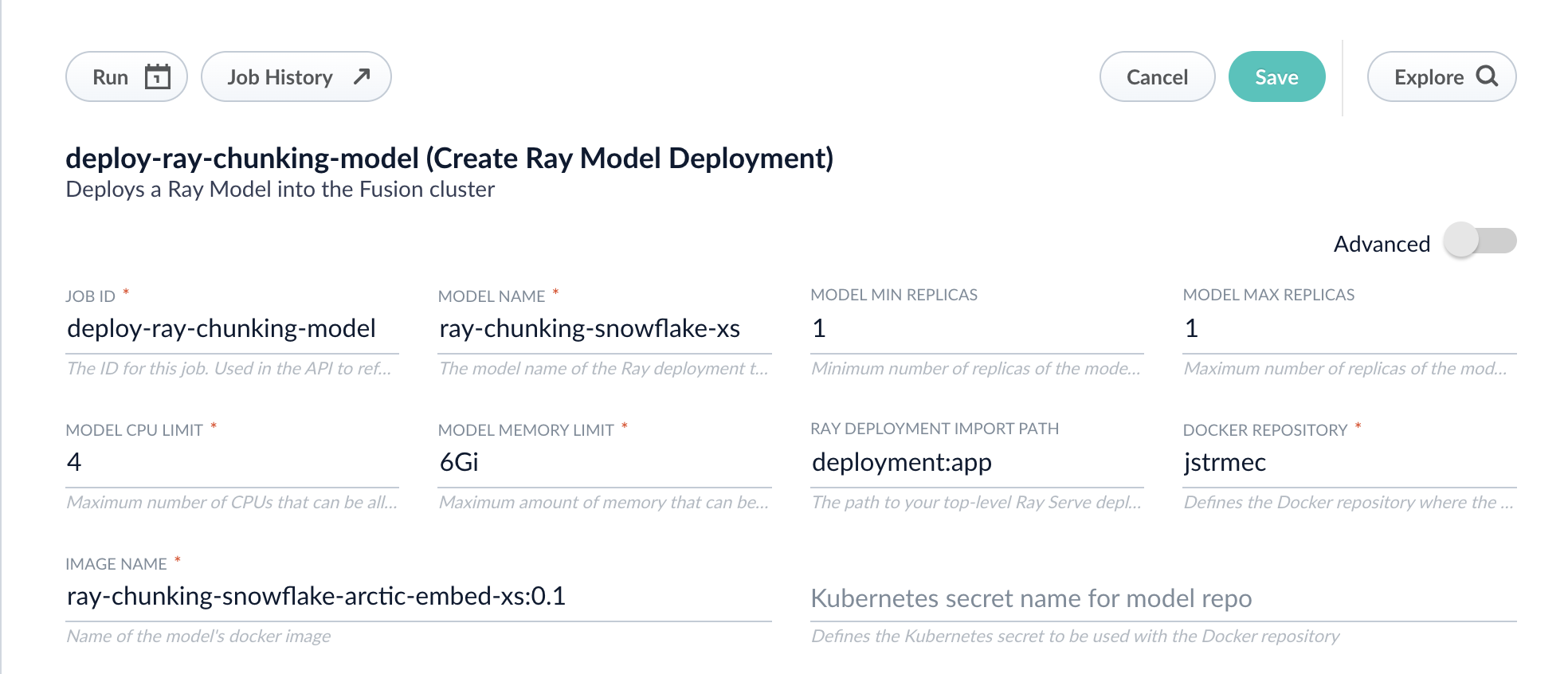
  3. Fill in each of the text fields. Chunking will need a higher memory and CPU limit requirement than the default:

       <img src="https://mintcdn.com/lucidworks/sBy1WWIeb2aVbL1d/assets/images/5.9/5.9.14/deploy-ray-chunking-model-fusion.png?fit=max&auto=format&n=sBy1WWIeb2aVbL1d&q=85&s=9d8c177467663113be0e97d3d3adfd58" alt="Deploy Ray chunking model in Fusion" width="1968" height="846" data-path="assets/images/5.9/5.9.14/deploy-ray-chunking-model-fusion.png" />

     | Parameter                      | Description                                                                                                                                                                             |
     | ------------------------------ | --------------------------------------------------------------------------------------------------------------------------------------------------------------------------------------- |
     | **Job ID**                     | A string used by the Fusion API to reference the job after its creation.                                                                                                                |
     | **Model name**                 | A name for the deployed model. This is used to generate the deployment name in Ray. It is also the name that you reference as a `model-id` when making predictions with the ML Service. |
     | **Model min replicas**         | The minimum number of load-balanced replicas of the model to deploy.                                                                                                                    |
     | **Model max replicas**         | The maximum number of load-balanced replicas of the model to deploy. Specify multiple replicas for a higher-volume intake.                                                              |
     | **Model CPU limit**            | The number of CPUs to allocate to a single model replica.                                                                                                                               |
     | **Model memory limit**         | The maximum amount of memory to allocate to a single model replica.                                                                                                                     |
     | **Ray Deployment Import Path** | The path to your top-level Ray Serve deployment (or the same path passed to `serve run`). For example, `deployment:app`.                                                                |
     | **Docker Repository**          | The public or private repository where the Docker image is located. If you're using Docker Hub, fill in the Docker Hub username here.                                                   |
     | **Image name**                 | The name of the image. For example, `ray-chunking-snowflake-arctic-embed-xs:0.1`.                                                                                                       |
     | **Kubernetes secret**          | If you're using a private repository, supply the name of the Kubernetes secret used for access.                                                                                         |

  4. Click **Advanced** to view and configure advanced details:

     | Parameter                 | Description                                                                                                                                                                                                                                                                     |
     | ------------------------- | ------------------------------------------------------------------------------------------------------------------------------------------------------------------------------------------------------------------------------------------------------------------------------- |
     | **Additional parameters** | This section lets you enter parameter `name:parameter` value options to be injected into the training JSON map at runtime. The values are inserted as they are entered, so you must surround string values with `"`. This is the `sparkConfig` field in the configuration file. |
     | **Write Options**         | This section lets you enter parameter `name:parameter` value options to use when writing output to Solr or other sources. This is the `writeOptions` field in the configuration file.                                                                                           |
     | **Read Options**          | This section lets you enter parameter `name:parameter` value options to use when reading input from Solr or other sources. This is the `readOptions` field in the configuration file.                                                                                           |

  5. Click **Save**, then **Run** and **Start**.

  6. Repeat these steps for the querying model.

  When the job finishes successfully, you can proceed to the next section.

  Now that the models are in Fusion, you can use them in the Machine Learning or Ray / Seldon Vectorize index and query stages.

  ## Configure the Fusion pipelines

  Your real-world pipeline configuration depends on your use case and model, but for our example we will configure the index pipeline and then the query pipeline.

  ### Configure the index pipeline

  The index pipeline requires at least two additional stages: the Machine Learning stage and the Local Chunker stage.

  Create the Machine Learning stage first. To create the Machine Learning stage:

  1. Create a new index pipeline or load an existing one for editing.

  2. Click **Add a Stage** and then **Machine Learning**.

  3. In the new Machine Learning stage, fill in these fields:

     * The model ID

     * The model input

       ```java theme={"dark"}
       var modelInput = new java.util.HashMap()
       var text = doc.getFirstFieldValue("embedding_t");
       modelInput.put("text", text)
       modelInput.put("dataType","passage")
       modelInput.put("quantize", "false") // if this is true it must be true on query-side too
       modelInput.put("include_text_chunks", "true")
       modelInput
       ```

     * The model output

       ```java theme={"dark"}
       context.put("chunkedData",  modelOutput.get("response"));
       ```

  4. Save the stage.

  To create the Local Chunker stage:

  1. In the same existing index pipeline, click **Add a Stage** and then **Local Chunker**.
  2. In the new stage, fill in these fields:
     \*\* The **Input Context Variable** is `<ctx.chunkedData>`
     \*\* The **Destination Field Name and Context Output** is `ray_chunk_vector_384v`

  ### Configure the query pipeline

  The query pipeline requires at least two additional stages: the Chunking Neural Hybrid Query stage and either the Machine Learning stage with a context key vector or the Ray/Seldon Vectorize Query stage. If you followed the full tutorial, use the Machine Learning stage.

  To set up the Machine Learning query stage:

  1. Create a new query pipeline or load an existing one for editing.
  2. Click **Add a Stage** and then **Machine Learning**.
  3. In the new stage, fill in these fields:
     * The model ID

     * The model input as shown below:

       ```java theme={"dark"}
       var modelInput = new java.util.HashMap()
       var text = request.getFirstParam("q")
       modelInput.put("text", text)
       modelInput.put("dataType", "query")
       modelInput.put("quantize", "false")  // should only be true if done on index-side too
       modelInput
       ```

     * The model output as shown below:

       ```java theme={"dark"}
       context.put("vector", modelOutput.get("vector").toString());
       ```

  To set up the Chunking Neural Hybrid Query stage:

  1. In the same existing query pipeline, click **Add a Stage** and then **Chunking Neural Hybrid Query**.
  2. In the new stage, fill in the required fields.

  You have now successfully uploaded indexing and querying Ray models to Fusion and deployed it, and you are now ready to query. If you are getting the same results every time you query, double check that your vectors are correct and check that the chunking query parsers are defined in your `solrconfig.xml` file as described in the prerequisites of this tutorial.
</Accordion>

## Accepted format

The Local Chunker stage accepts data formatted in a specific format:

```json theme={"dark"}
{
    "chunkedData": "{\"spans\": [[0, 13]], \"vectors\": [{\"vector\": [171, 167, 127, 148, 141...]}], \"chunks\": [\"I love Fusion\"]}"
}
```

You can obtain this format by converting a response such as the following to a single JSON string and use that converted response as the value to `chunkedData`'s key:

```json theme={"dark"}
{
"spans": [
        [ 0,13]
    ],
"vectors": [
        {"vector": [171, 167, 127, 148, 141...]}
    ],
"chunks": [
  "I love Fusion"
  ]
}
```

To use the local chunker stage, add the following to your `solrConfig.xml` file:

```xml theme={"dark"}
<!-- FUSION NOTES: These query parsers are used with Solr-based vector search -->
<queryParser name="xvecSim" class="org.apache.solr.lwbackported.XVecSimQParserPlugin"/>
<queryParser name="_lw_chunk_wrap" class="org.apache.solr.lw.ParentAndAllKidsWrapperQParserPlugin"/>
<queryParser name="neuralHybrid" class="org.apache.solr.lw.NeuralHybridQParserPlugin"/>
```

## Vector definitions

Add the following vector definitions to your `managed-schema.xml` file:

```xml wrap expandable theme={"dark"}
<!-- Vector search fields -->
<dynamicField docValues="false" indexed="true" multiValued="false" name="*_64v" stored="true" type="knn_64_vector"/>
<dynamicField docValues="false" indexed="true" multiValued="false" name="*_128v" stored="true" type="knn_128_vector"/>
<dynamicField docValues="false" indexed="true" multiValued="false" name="*_256v" stored="true" type="knn_256_vector"/>
<dynamicField docValues="false" indexed="true" multiValued="false" name="*_384v" stored="true" type="knn_384_vector"/>
<dynamicField docValues="false" indexed="true" multiValued="false" name="*_512v" stored="true" type="knn_512_vector"/>
<dynamicField docValues="false" indexed="true" multiValued="false" name="*_768v" stored="true" type="knn_768_vector"/>
<dynamicField docValues="false" indexed="true" multiValued="false" name="*_1024v" stored="true" type="knn_1024_vector"/>

<!-- Field Types to support vector search -->
<fieldType class="solr.DenseVectorField" hnswBeamWidth="200" hnswMaxConnections="45" knnAlgorithm="hnsw" name="knn_64_vector" similarityFunction="cosine" vectorDimension="64"/>
<fieldType class="solr.DenseVectorField" hnswBeamWidth="200" hnswMaxConnections="45" knnAlgorithm="hnsw" name="knn_128_vector" similarityFunction="cosine" vectorDimension="128"/>
<fieldType class="solr.DenseVectorField" hnswBeamWidth="200" hnswMaxConnections="45" knnAlgorithm="hnsw" name="knn_256_vector" similarityFunction="cosine" vectorDimension="256"/>
<fieldType class="solr.DenseVectorField" hnswBeamWidth="200" hnswMaxConnections="45" knnAlgorithm="hnsw" name="knn_384_vector" similarityFunction="cosine" vectorDimension="384"/>
<fieldType class="solr.DenseVectorField" hnswBeamWidth="200" hnswMaxConnections="45" knnAlgorithm="hnsw" name="knn_512_vector" similarityFunction="cosine" vectorDimension="512"/>
<fieldType class="solr.DenseVectorField" hnswBeamWidth="200" hnswMaxConnections="45" knnAlgorithm="hnsw" name="knn_768_vector" similarityFunction="cosine" vectorDimension="768"/>
<fieldType class="solr.DenseVectorField" hnswBeamWidth="200" hnswMaxConnections="45" knnAlgorithm="hnsw" name="knn_1024_vector" similarityFunction="cosine" vectorDimension="1024"/>

<!-- INCOMPATIBLE with versions before 5.9.13 -->
<!-- BYTE Vector search fields -->
<dynamicField name="*_64bv" type="knn_64_byte_vector" indexed="true" stored="true" docValues="false" multiValued="false"/>
<dynamicField name="*_128bv" type="knn_128_byte_vector" indexed="true" stored="true" docValues="false" multiValued="false"/>
<dynamicField name="*_256bv" type="knn_256_byte_vector" indexed="true" stored="true" docValues="false" multiValued="false"/>
<dynamicField name="*_384bv" type="knn_384_byte_vector" indexed="true" stored="true" docValues="false" multiValued="false"/>
<dynamicField name="*_512bv" type="knn_512_byte_vector" indexed="true" stored="true" docValues="false" multiValued="false"/>
<dynamicField name="*_768bv" type="knn_768_byte_vector" indexed="true" stored="true" docValues="false" multiValued="false"/>
<dynamicField name="*_1024bv" type="knn_1024_byte_vector" indexed="true" stored="true" docValues="false" multiValued="false"/>
<!-- BYTE Field Types to support vector search -->
<fieldType name="knn_64_byte_vector" class="solr.DenseVectorField" vectorDimension="64" similarityFunction="cosine" vectorEncoding="BYTE" knnAlgorithm="hnsw" hnswMaxConnections="45" hnswBeamWidth="200"/>
<fieldType name="knn_128_byte_vector" class="solr.DenseVectorField" vectorDimension="128" similarityFunction="cosine" vectorEncoding="BYTE" knnAlgorithm="hnsw" hnswMaxConnections="45" hnswBeamWidth="200"/>
<fieldType name="knn_256_byte_vector" class="solr.DenseVectorField" vectorDimension="256" similarityFunction="cosine" vectorEncoding="BYTE" knnAlgorithm="hnsw" hnswMaxConnections="45" hnswBeamWidth="200"/>
<fieldType name="knn_384_byte_vector" class="solr.DenseVectorField" vectorDimension="384" similarityFunction="cosine" vectorEncoding="BYTE" knnAlgorithm="hnsw" hnswMaxConnections="45" hnswBeamWidth="200"/>
<fieldType name="knn_512_byte_vector" class="solr.DenseVectorField" vectorDimension="512" similarityFunction="cosine" vectorEncoding="BYTE" knnAlgorithm="hnsw" hnswMaxConnections="45" hnswBeamWidth="200"/>
<fieldType name="knn_768_byte_vector" class="solr.DenseVectorField" vectorDimension="768" similarityFunction="cosine" vectorEncoding="BYTE" knnAlgorithm="hnsw" hnswMaxConnections="45" hnswBeamWidth="200"/>
<fieldType name="knn_1024_byte_vector" class="solr.DenseVectorField" vectorDimension="1024" similarityFunction="cosine" vectorEncoding="BYTE" knnAlgorithm="hnsw" hnswMaxConnections="45" hnswBeamWidth="200"/>
```

## JavaScript to transform JSON to a string

If you are returning JSON from the API, use the following code sample to pass the JSON response to the Local Chunker stage.

```js theme={"dark"}
var api_json_response = ctx.get("api_response")["response"]
var stringified_api_response = JSON.stringify(api_json_response)
ctx.put(“chunkedData”, stringified_api_response)
```

## Configuration

<Tip>When entering configuration values in the UI, use *unescaped* characters, such as `\t` for the tab character. When entering configuration values in the API, use *escaped* characters, such as `\t` for the tab character.</Tip>

<SchemaParamFields schema={schema} />
