> ## Documentation Index
> Fetch the complete documentation index at: https://doc.lucidworks.com/llms.txt
> Use this file to discover all available pages before exploring further.

# Upload Model Parameters to Cloud Job

export const schema = {
  "type": "object",
  "title": "Upload Model Parameters To Cloud",
  "description": "Upload a trained model's parameters to cloud storage",
  "required": ["id", "modelName", "type"],
  "properties": {
    "id": {
      "type": "string",
      "title": "Job ID",
      "description": "The ID for this job. Used in the API to reference this job. Allowed characters: a-z, A-Z, dash (-) and underscore (_)",
      "maxLength": 63,
      "pattern": "[a-zA-Z][_\\-a-zA-Z0-9]*[a-zA-Z0-9]?"
    },
    "sparkConfig": {
      "type": "array",
      "title": "Additional parameters",
      "description": "Provide additional key/value pairs to be injected into the training JSON map at runtime. Values will be inserted as-is, so use \" to surround string values",
      "hints": ["advanced"],
      "items": {
        "type": "object",
        "required": ["key"],
        "properties": {
          "key": {
            "type": "string",
            "title": "Parameter Name"
          },
          "value": {
            "type": "string",
            "title": "Parameter Value"
          }
        }
      }
    },
    "writeOptions": {
      "type": "array",
      "title": "Write Options",
      "description": "Options used when writing output to Solr or other sources",
      "hints": ["advanced"],
      "items": {
        "type": "object",
        "required": ["key"],
        "properties": {
          "key": {
            "type": "string",
            "title": "Parameter Name"
          },
          "value": {
            "type": "string",
            "title": "Parameter Value"
          }
        }
      }
    },
    "readOptions": {
      "type": "array",
      "title": "Read Options",
      "description": "Options used when reading input from Solr or other sources.",
      "hints": ["advanced"],
      "items": {
        "type": "object",
        "required": ["key"],
        "properties": {
          "key": {
            "type": "string",
            "title": "Parameter Name"
          },
          "value": {
            "type": "string",
            "title": "Parameter Value"
          }
        }
      }
    },
    "modelName": {
      "type": "string",
      "title": "Model name",
      "description": "The model name of the Seldon Core deployment to upload (must be a valid lowercased DNS subdomain with no underscores).",
      "maxLength": 30,
      "pattern": "^[a-z0-9]([-a-z0-9]*[a-z0-9])?(\\.[a-z0-9]([-a-z0-9]*[a-z0-9])?)*$"
    },
    "cloudPath": {
      "type": "string",
      "title": "Cloud Path",
      "description": "Path to cloud storage location that will contain the saved parameters for this model - the model version will be appended to the filename at the end of the path string. Supports S3, GCS, or Azure Blob Storage URIs"
    },
    "cloudSecret": {
      "type": "string",
      "title": "Kubernetes secret name for cloud storage access",
      "description": "Defines the Kubernetes secret that will be used to access cloud storage"
    },
    "type": {
      "type": "string",
      "title": "Spark Job Type",
      "enum": ["argo-upload-model"],
      "default": "argo-upload-model",
      "hints": ["readonly"]
    }
  },
  "additionalProperties": true,
  "category": "Other",
  "categoryPriority": 1
};

export const SchemaParamFields = ({schema}) => {
  const sanitize = str => {
    if (typeof str !== "string") return str;
    return str.replace(/^"(.*)"$/s, "$1").replace(/\\/g, "").replace(/"/g, "'");
  };
  const formatDescription = str => {
    const s = sanitize(str);
    return (/[.!?]\)*$/).test(s) ? s : `${s}.`;
  };
  const {description, properties = {}, required: requiredProps = []} = schema;
  const visibleProps = useMemo(() => Object.entries(properties).filter(([, prop]) => !prop.hints?.includes("hidden")), [properties]);
  return <div>
      {description && <p>{formatDescription(description)}</p>}

      {visibleProps.map(([name, prop]) => {
    const isRequired = requiredProps.includes(name);
    const hasDefault = prop.default !== undefined;
    const rawDefault = prop.default;
    const isComplexDefault = hasDefault && (typeof rawDefault === "object" || typeof rawDefault === "string" && (rawDefault.length > 20 || rawDefault.includes('"')));
    const fieldProps = {
      key: name,
      body: prop.title || name,
      type: prop.type,
      ...prop.title && ({
        post: [<><span className="text-stone-400 dark:text-stone-500">API property: </span>{name}</>]
      }),
      ...isRequired && ({
        required: true
      }),
      ...!isComplexDefault && hasDefault ? {
        default: sanitize(String(rawDefault))
      } : {}
    };
    const isObject = prop.type === "object" && prop.properties;
    const isArrayOfObjects = prop.type === "array" && prop.items?.type === "object" && prop.items.properties;
    return <ParamField {...fieldProps}>
            {prop.description && <p>{formatDescription(prop.description)}</p>}

            {isComplexDefault && <div className="flex">
                <p>
                  <strong>Default:</strong>
                </p>
                <pre className="!my-0">
                  <code>
                    {JSON.stringify(rawDefault, null, 2)}
                  </code>
                </pre>
              </div>}

            {isArrayOfObjects && <div className="flex">
              <p>
                <strong>Object attributes:</strong>
              </p>
              <pre className="!my-0">
                <code>
                  {'{\n'}
                  {Object.entries(prop.items.properties).map(([iname, iprop]) => <>
                      {`  ${iname}`}
                      {prop.items?.required?.includes(iname) && <span style={{
      color: 'red'
    }}> required</span>}
                      {`: {\n    display name: ${sanitize(iprop.title || '')}\n    type: ${iprop.type}\n  }\n`}
                    </>)}
                  {'}'}
                </code>
              </pre>
              </div>}

            {isObject && <Expandable title="properties">
                <SchemaParamFields schema={{
      properties: prop.properties,
      required: prop.required
    }} />
              </Expandable>}
          </ParamField>;
  })}
    </div>;
};

export const LwTemplate = ({title = "Key questions to get you started", icon = "sparkles", cta = "Powered by Agent Studio", linkHref = "https://lucidworks.com/demo/?utm_source=docs&utm_medium=referral&utm_campaign=docs_cta_ai"}) => {
  const [isLoaded, setIsLoaded] = useState(false);
  useEffect(() => {
    const timer = setTimeout(() => {
      setIsLoaded(true);
    }, 500);
    return () => clearTimeout(timer);
  }, []);
  return <div className="lw-template-container">
      <Card title={title} icon={icon}>
        {isLoaded && <span dangerouslySetInnerHTML={{
    __html: `<lw-template id="a029c1a9-28be-427e-b0e1-5d918920246a"></lw-template
            >`
  }} />}
        <Link href={linkHref} className="agent-studio-link text-left text-gray-600 gap-2 dark:text-gray-400 text-sm font-medium flex flex-row items-center hover:text-primary dark:hover:text-primary-light group-hover:text-primary group-hover:dark:text-primary-light">Powered by Lucidworks Agent Studio</Link>
      </Card>
    </div>;
};

[localhost link]: http://localhost:3000/docs/5/fusion/reference/config-ref/jobs/upload-model-parameters

[mintlify link]: https://doc.lucidworks.com/docs/5/fusion/reference/config-ref/jobs/upload-model-parameters

[old doc.lw link]: https://doc.lucidworks.com/fusion/5.9/3xcen9

The Upload Model Parameters to Cloud job allows you to take a trained model and store its training to a blob in cloud storage, such as Google Cloud Storage (GCS), Amazon S3 (S3), or Azure Blob Storage.

See **Creating the Upload Model Parameters to Cloud Job** for more information on creating the job and deploying a model with it.

<Accordion title="Creating the Upload Model Parameters to Cloud Job">
  {/* // tag::intro[] */}

  The Upload Model Parameters to Cloud job lets you store a trained model’s training to a blob in cloud storage.

  This document describes the steps to create the Upload Model Parameters to Cloud job and deploy a model with it.

  {/* // end::intro[] */}

  See [Upload Model Parameters to Cloud](/docs/5/fusion/reference/config-ref/jobs/upload-model-parameters) to learn more about the Upload Model Parameters to Cloud job.

  <LwTemplate />

  ## Deploy a model​

  First, deploy a **Smart Answers Supervised Model**.

  ## Create the job

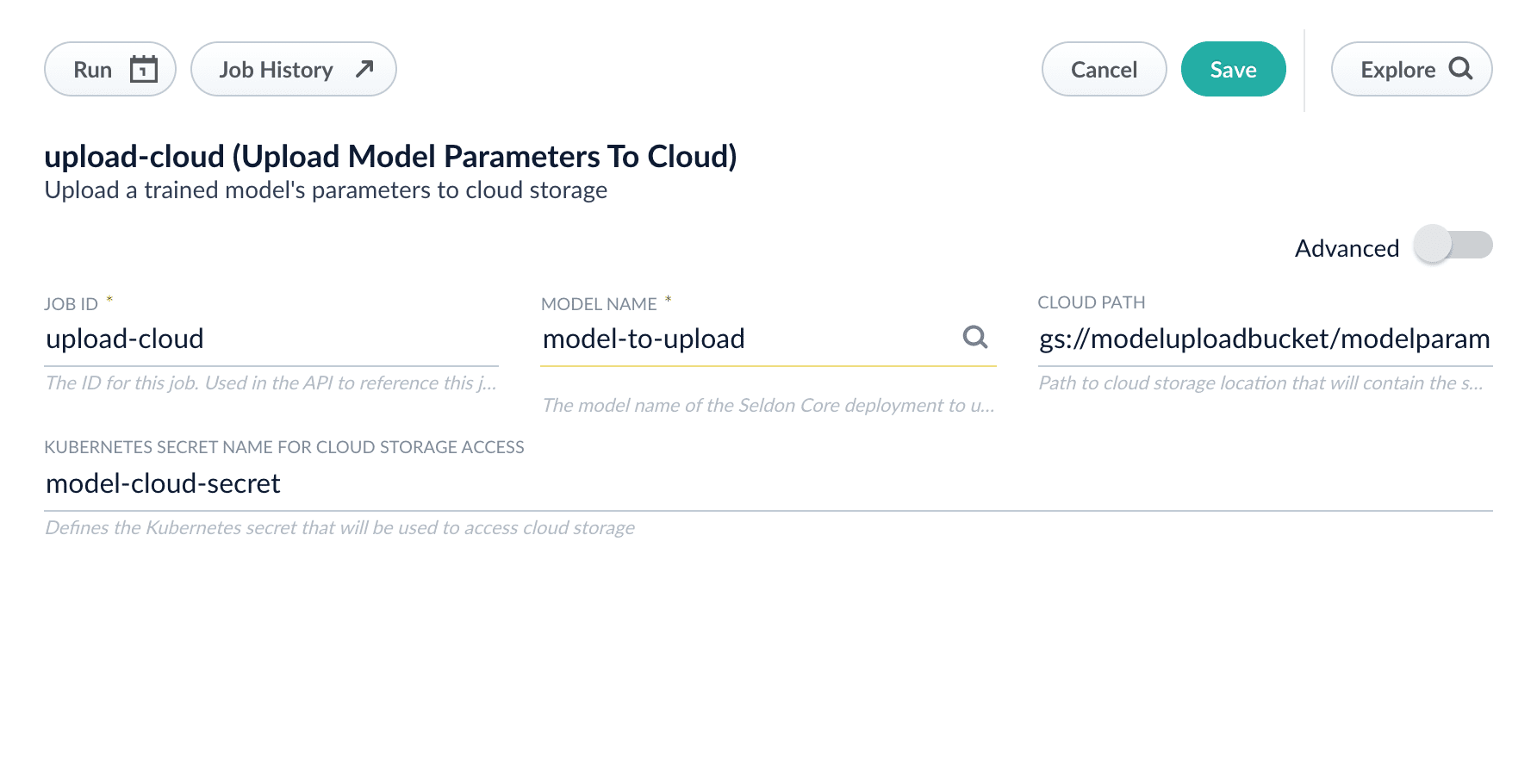
  1. In the **Collections > Jobs** menu, click **Add +** and select **Upload Model Parameters to Cloud** to create a new instance of that job.
  2. Set the job ID to `upload-cloud`(or something appropriate for your model) and find the name of the deployed model in the **Model Name** text box.
  3. Enter the **Cloud Path** to direct to the location you would like to store the parameters blob in.

     You will also need to provide the Kubernetes secret that provides the access details for the cloud storage path.
     ​
  4. Run the job, then check the cloud storage location to verify that the parameter file has been saved.

     The exported file will also have the version number (based on epoch time) of the model appended to it.

  <Warning>Take note of the full cloud path; you will need it to deploy the job later.</Warning>

  <img src="https://mintcdn.com/lucidworks/L5PMnIeZ03zhv8Ti/assets/images/5.4/upload-model-parameters-create-job.png?fit=max&auto=format&n=L5PMnIeZ03zhv8Ti&q=85&s=d9d0fa4836cd23ba0a103d053683fe3e" alt="Creating the Job" width="1784" height="910" data-path="assets/images/5.4/upload-model-parameters-create-job.png" />

  ### GCS

  1. Obtain the Google Cloud Storage credentials JSON file for accessing the storage bucket you intend to use for transferring models.
  2. Add the credentials JSON file as a secret with the following command:
     ​

  ```
  kubectl create secret generic model-cloud-secret --from-file=credentials.json -n [NAMESPACE]
  ```

  ### S3

  1. Create a JSON file with the following keys:
  <Note>`”region”` is optional and will be set to `us-east-1` if a value is not entered</Note>
  ​

  ```
  {
     "key": [KEY],
     "secret": [SECRET],
     "region": [REGION]
  }
  ```

  2. Upload the JSON file as a secret in the cluster:
     ​

  ```
  kubectl create secret generic model-cloud-secret --from-file=model.json -n [NAMESPACE]
  ```

  The secret can now be referenced as `model-cloud-secret` in the job configuration.

  ### Azure Blob Storage

  1. Create a JSON file with the layout below:
     ​

  ```
  {
     "key": [KEY],
     "secret": [SECRET]
  }
  ```

  2. Create the `model-cloud-secret` secret in the Kubernetes cluster:

  ```
  kubectl create secret generic model-cloud-secret --from-file=model.json -n [NAMESPACE]
  ```

  ## Deploy a new model with the Upload Model Parameters job

  The new model can run in either the same Fusion cluster or a different cluster.

  If you are planning on transferring a model to a different cluster, note that you will need to set up the Kubernetes secrets in that cluster as well, though the access for deploying can be limited to read-only.

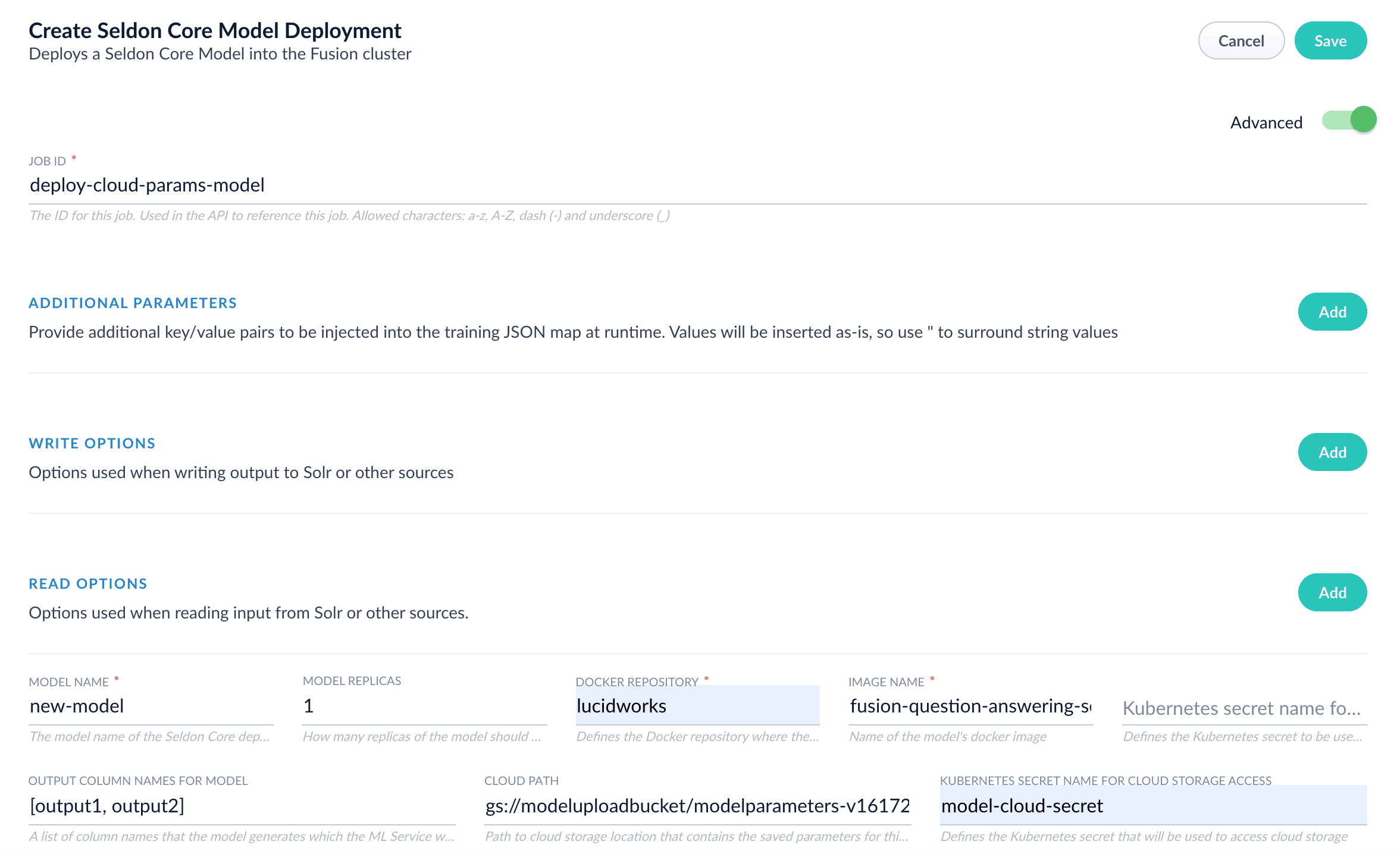
  1. Create a new **Create Seldon Core Model Deployment** job and toggle **Advanced**.
  2. Enter the full cloud path, including the version number, in the *Cloud Path* box.
  3. Enter the Kubernetes secret that will be used to access the path in the *Kubernetes Secret Name for Cloud Storage Access* box.
     ​
  4. For this example, you will be using the job to deploy a trained Smart Answers model, so use the `fusion-question-answering-seldon:5.4.0` model image from the `lucidworks` repository in the *Image Name* box.

  <img src="https://mintcdn.com/lucidworks/L5PMnIeZ03zhv8Ti/assets/images/5.4/upload-model-parameters-deploy-model.png?fit=max&auto=format&n=L5PMnIeZ03zhv8Ti&q=85&s=ef89362c40bc20e99b1473fb122d2993" alt="Deploying the model" width="2353" height="1436" data-path="assets/images/5.4/upload-model-parameters-deploy-model.png" />

  5. Run the job. Confirm that the model deploys into the cluster and is running.
</Accordion>

<Tip>
  With the release of Fusion 5.4, the [**Create Seldon Core Model Deployment**](/docs/5/fusion/reference/config-ref/jobs/create-seldon-core-model-deployment) job has been updated in conjunction so that it can pull down the saved model blobs and use them in deploying a new instance of the model, allowing for easier transference and versioning of trained models for rollback and testing.
</Tip>

<SchemaParamFields schema={schema} />