> ## Documentation Index
> Fetch the complete documentation index at: https://doc.lucidworks.com/llms.txt
> Use this file to discover all available pages before exploring further.

# Configure Fusion for JWT

export const LwTemplate = ({title = "Key questions to get you started", icon = "sparkles", cta = "Powered by Agent Studio", linkHref = "https://lucidworks.com/demo/?utm_source=docs&utm_medium=referral&utm_campaign=docs_cta_ai"}) => {
  const [isLoaded, setIsLoaded] = useState(false);
  useEffect(() => {
    const timer = setTimeout(() => {
      setIsLoaded(true);
    }, 500);
    return () => clearTimeout(timer);
  }, []);
  return <div className="lw-template-container">
      <Card title={title} icon={icon}>
        {isLoaded && <span dangerouslySetInnerHTML={{
    __html: `<lw-template id="a029c1a9-28be-427e-b0e1-5d918920246a"></lw-template
            >`
  }} />}
        <Link href={linkHref} className="agent-studio-link text-left text-gray-600 gap-2 dark:text-gray-400 text-sm font-medium flex flex-row items-center hover:text-primary dark:hover:text-primary-light group-hover:text-primary group-hover:dark:text-primary-light">Powered by Lucidworks Agent Studio</Link>
      </Card>
    </div>;
};

[localhost link]: http://localhost:3000/docs/5/fusion/reference/config-ref/configure-fusion-for-jwt-5x

[mintlify link]: https://doc.lucidworks.com/docs/5/fusion/reference/config-ref/configure-fusion-for-jwt-5x

[old doc.lw link]: https://doc.lucidworks.com/fusion/5.9/cvrcam

Fusion uses a shared secret key between the issuer and Fusion to encrypt the JWT payload.

<LwTemplate />

## How the JWT realm works

A JWT is comprised of three distinct parts: the header, payload, and signing key. Each of these parts are separately encoded using Base64url encoding.

* The **header** identifies the algorithm used to generate the token.

  <Note>
    Fusion uses both the HS256 and RS256 signature algorithms.
  </Note>

* The **payload** consists of data that will be passed with the token.

* The **signing key** validates the integrity of the token by using a "secret" to ensure the header and payload being submitted in the token match the header and payload stored in the signing key.

Within Fusion, the JWT realm uses an *authorization header* in the request to authenticate the user and the data inside the JWT token for the authorization. This authorization header uses the following format:

```bash theme={"dark"}
Bearer <jwt-token>
```

Upon receiving the authorization header, Fusion authenticates the token and emits a response accordingly.

## Configure JWT for Fusion

### Create a JWT token

Using the tool you use to validate users, create a JWT token. The token requires the following properties:

* `iss`: Issuer value. If the issuer value does not match the value configured in Fusion, the user will be denied access.
* `iat`: A JSON numeric date value. This value is calculated by counting the number of seconds between 1970-01-01T00:00:00Z UTC and the specified UTC date/time, ignoring leap seconds.
* `sub`: Subject. The name/id of the user. The user is logged in by this name.
* `groups`: The groups from the group-role mappings that this user belongs to. The groups key should match the one you specify while creating the JWT realm.

Example data inside token:

```json wrap  theme={"dark"}
{
   "iss":"fusion-enterprise-app",
   "iat":"1562633069",
   "sub":"username",
   "groups": ["group-1", "group-2"]
}
```

### Create the Fusion JWT realm

To create a Fusion realm, in the Fusion UI:

1. Click **System > Access Control**.
2. Click the **Security Realms** tab, then **Add Security Realm**.
3. Enter a realm name. Under **type**, select **jwt**.
4. Create the security realm with the following values:

   | Value             | Description                                                                                                                                                                                                                                                                                                                                                                                                                                                                                                                                                                                                                                                                                                                                                                                                                                                                                                                                                                                                                                                                                                                                                                                                                                                                                                                                                                                                                                                                                                                                                                                                                                                                                                                                                                                                                                                                                |
   | ----------------- | ------------------------------------------------------------------------------------------------------------------------------------------------------------------------------------------------------------------------------------------------------------------------------------------------------------------------------------------------------------------------------------------------------------------------------------------------------------------------------------------------------------------------------------------------------------------------------------------------------------------------------------------------------------------------------------------------------------------------------------------------------------------------------------------------------------------------------------------------------------------------------------------------------------------------------------------------------------------------------------------------------------------------------------------------------------------------------------------------------------------------------------------------------------------------------------------------------------------------------------------------------------------------------------------------------------------------------------------------------------------------------------------------------------------------------------------------------------------------------------------------------------------------------------------------------------------------------------------------------------------------------------------------------------------------------------------------------------------------------------------------------------------------------------------------------------------------------------------------------------------------------------------ |
   | Realm type        | jwt                                                                                                                                                                                                                                                                                                                                                                                                                                                                                                                                                                                                                                                                                                                                                                                                                                                                                                                                                                                                                                                                                                                                                                                                                                                                                                                                                                                                                                                                                                                                                                                                                                                                                                                                                                                                                                                                                        |
   | Roles             | Check the roles that this realm provides after successfully authenticating a user by default.                                                                                                                                                                                                                                                                                                                                                                                                                                                                                                                                                                                                                                                                                                                                                                                                                                                                                                                                                                                                                                                                                                                                                                                                                                                                                                                                                                                                                                                                                                                                                                                                                                                                                                                                                                                              |
   | JWT Issuer        | A unique value that is used in the JWT authorization header. This value should match the value of the `iss` in the token, for example `fusion-enterprise-app`.                                                                                                                                                                                                                                                                                                                                                                                                                                                                                                                                                                                                                                                                                                                                                                                                                                                                                                                                                                                                                                                                                                                                                                                                                                                                                                                                                                                                                                                                                                                                                                                                                                                                                                                             |
   | JWT Set URL       | The URL that the Signing Key can be downloaded from. Either this field or `Signing Key` must be filled.                                                                                                                                                                                                                                                                                                                                                                                                                                                                                                                                                                                                                                                                                                                                                                                                                                                                                                                                                                                                                                                                                                                                                                                                                                                                                                                                                                                                                                                                                                                                                                                                                                                                                                                                                                                    |
   | JWK Set Timeout   | The time in milliseconds to continue the request. The default is 500 ms. Set this higher if the request is slow to respond, for example, 2000.                                                                                                                                                                                                                                                                                                                                                                                                                                                                                                                                                                                                                                                                                                                                                                                                                                                                                                                                                                                                                                                                                                                                                                                                                                                                                                                                                                                                                                                                                                                                                                                                                                                                                                                                             |
   | Signing Key       | A string of secret characters that will be used to encrypt the JWT token. The key must be a shared public key. Either this field or `JWT Set URI` must be filled.                                                                                                                                                                                                                                                                                                                                                                                                                                                                                                                                                                                                                                                                                                                                                                                                                                                                                                                                                                                                                                                                                                                                                                                                                                                                                                                                                                                                                                                                                                                                                                                                                                                                                                                          |
   | Groups Key        | <br />*Optional*. The JWT token value that contains the list of groups the user is in.                                                                                                                                                                                                                                                                                                                                                                                                                                                                                                                                                                                                                                                                                                                                                                                                                                                                                                                                                                                                                                                                                                                                                                                                                                                                                                                                                                                                                                                                                                                                                                                                                                                                                                                                                                                                     |
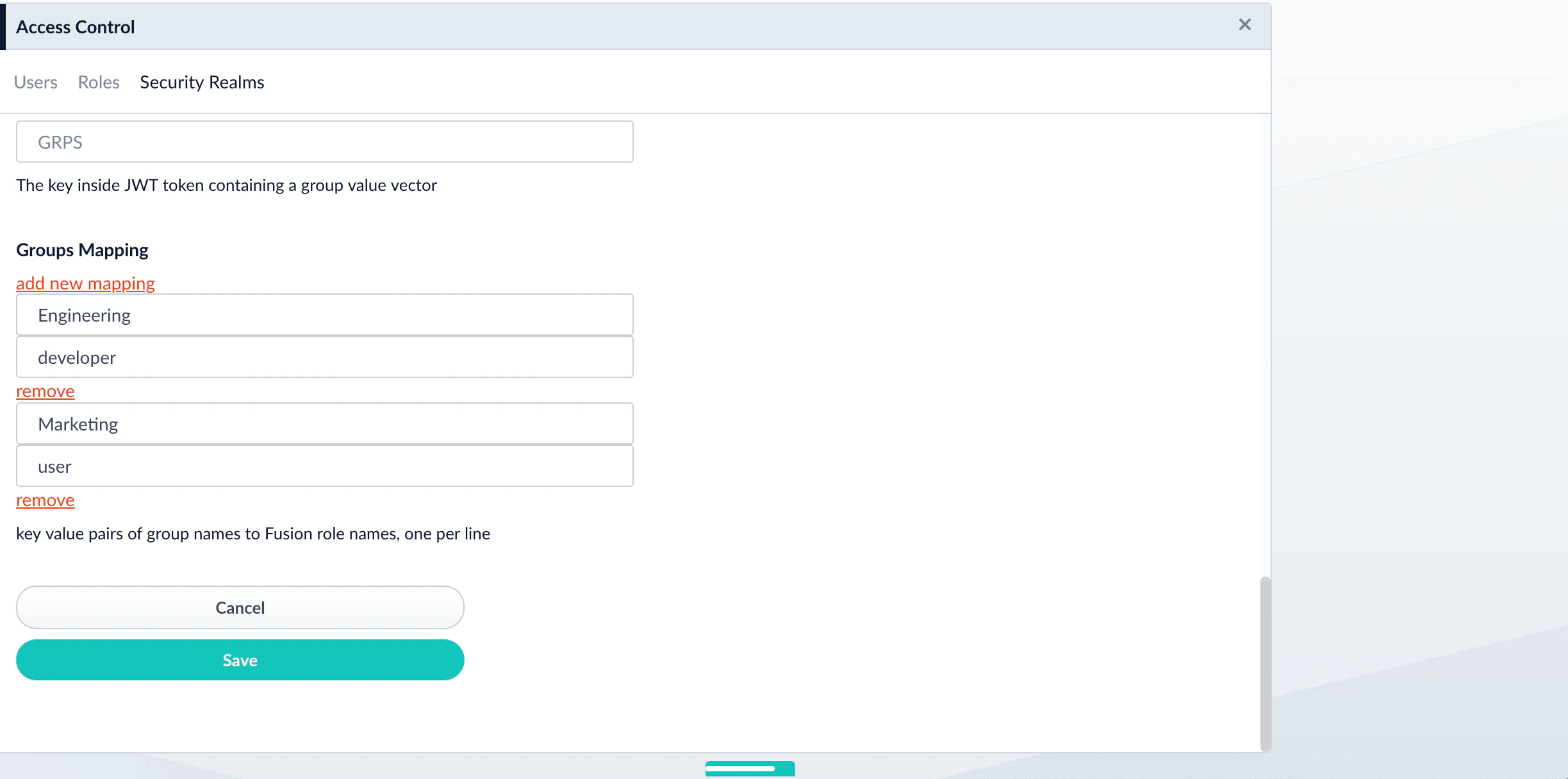
   | Groups Mapping    | A list of pairs which associate groups to roles. For example: `{<name of group>, <role assigned to group>}`.<br /><br />1. Click **Add new mapping**. Two rows appear.<br />2. In the first row, add a group. The JWT token contains the groups for a particular user.<br />3. In the second row, add the role or roles (separated by spaces) for that group.<br /><Frame><img src="https://mintcdn.com/lucidworks/L5PMnIeZ03zhv8Ti/assets/images/5.6/jwt-group-mapping-56.png?fit=max&auto=format&n=L5PMnIeZ03zhv8Ti&q=85&s=2b6982db35123401663f9195252bef94" width="2447" height="1216" data-path="assets/images/5.6/jwt-group-mapping-56.png" /></Frame> |
   | User ID Attribute | The field in JWT from which Fusion takes the name of the user.                                                                                                                                                                                                                                                                                                                                                                                                                                                                                                                                                                                                                                                                                                                                                                                                                                                                                                                                                                                                                                                                                                                                                                                                                                                                                                                                                                                                                                                                                                                                                                                                                                                                                                                                                                                                                             |
5. Click **Save**.

### Validate the new realm

When you send a request to Fusion, you should receive a response. The request to Fusion looks like this:

```bash wrap  theme={"dark"}
curl http://127.0.0.1:8764/api/users -H 'authorization: Bearer <token-header>.<token-payload>.<token-signing-key>'
```

<Note>
  `Bearer` is case sensitive.
</Note>

If no signing key is used, truncate the JWT to read `…​ Bearer <token-header>.<token-payload>.`.

## Resources

[JWT.io](https://jwt.io) is an excellent resource for learning about JWT, creating tokens, debugging tokens, and more.

## Example of generating a JWT using PyJWT

Typically, you will generate your JWT token from the application you are integrating with Fusion APIs.

This example, however, uses Python to create a JWT token with the PyJWT Python egg.

1. Install the PyJWT egg:

   ```sh theme={"dark"}
   pip install pyjwt
   ```

2. Inside a Python console, run the following command using your realm configurations:

   ```py theme={"dark"}
   import jwt
   from datetime import datetime, timedelta

   key = '<signing key>'
   jwt_issuer = '<jwt issuer>'
   username = '<username>'
   groups = ['<groups assigned to user>']
   iat = datetime.utcnow()
   exp = iat + timedelta(minutes=5)
   payload = {'iss': jwt_issuer, 'iat': iat, 'exp': exp,'sub': username, 'groups': groups}

   print (jwt.encode(payload, key, algorithm='HS256'))
   ```

A Bearer token will be printed for use in API requests:

```
eyJhbGciOiJIUzI1NiIsInR5cCI6IkpXVCJ9.eyJpc3MiOiJmdXNpb24tYXBwIiwiaWF0IjoxNTYyNjMzMDY5LCJzdWIiOiJhZG1pbiIsImdyb3VwcyI6WyJncm91cDEiXX0.HYyv_XlijDeO1zdZ1Cd_gifgcIAFiZ1ldkbgk0hnWro
```

3. You can now use this as a bearer token in an authorization header to authenticate to Fusion.\
   Test your Fusion API web service call with cURL. For example, if your role is an administrator, call:

   ```bash wrap theme={"dark"}
   curl -H "Authorization: Bearer eyJhbGciOiJIUzI1NiJ9.eyJpc3MiOiJmdXNpb24iLCJpYXQiOjE1MzY3ODI1MTc4NjQsInN1YiI6InRlc3QtZnVzaW9uIiwiZ3JvdXBzIjpbImdyb3VwLW9uZSIsImdyb3VwLXR3byJdfQ._ACGk4q3Y5g8QgvLFUUQIcMN2ynACypcpei2JmYFlzc" http://localhost:8764/api/roles
   ```