> ## Documentation Index
> Fetch the complete documentation index at: https://doc.lucidworks.com/llms.txt
> Use this file to discover all available pages before exploring further.
# Workload Isolation with Multiple Node Pools
export const LwTemplate = ({title = "Key questions to get you started", icon = "sparkles", cta = "Powered by Agent Studio", linkHref = "https://lucidworks.com/demo/?utm_source=docs&utm_medium=referral&utm_campaign=docs_cta_ai"}) => {
const [isLoaded, setIsLoaded] = useState(false);
useEffect(() => {
const timer = setTimeout(() => {
setIsLoaded(true);
}, 500);
return () => clearTimeout(timer);
}, []);
return
{isLoaded && `
}} />}
Powered by Lucidworks Agent Studio
;
};
[localhost link]: http://localhost:3000/docs/5/fusion/operations/survival-guide/workload-isolation
[mintlify link]: https://doc.lucidworks.com/docs/5/fusion/operations/survival-guide/workload-isolation
[old doc.lw link]: https://doc.lucidworks.com/fusion/5.9/147
You can run all Fusion services on a single [Node Pool](https://cloud.google.com/kubernetes-engine/docs/concepts/node-pools). Kubernetes does its best to balance resource use across the nodes. However, Lucidworks recommends defining multiple node pools to separate services into "workload partitions" based on the type of traffic a service receives.
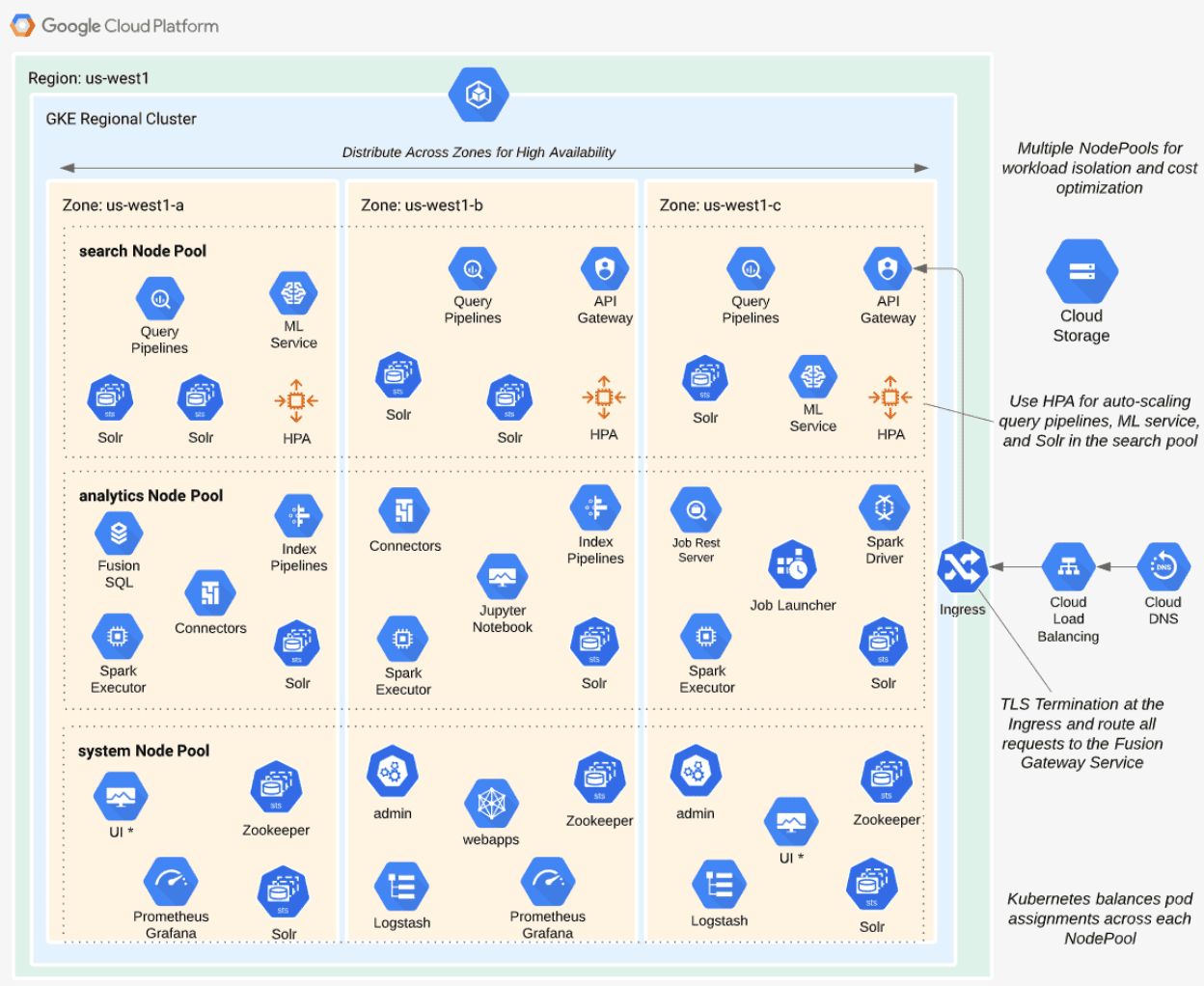
The Fusion Helm chart supports three optional partitions: [**search**](#search), [**analytics**](#analytics), and [**system**](#system). Workload isolation with node pools allows you to optimize resource use across the cluster to achieve better scalability, balance, and minimize infrastructure costs. It also helps with monitoring, as you have better control over the traffic handled by each node in the cluster. To use this feature, define separate node pools in your Kubernetes cluster.
The **analytics**, **search**, and **system** partitions are recommended starting points. You can extend upon this model to refine your pod allocation by adding more node pools. For example, running Spark jobs on a dedicated pool of preemptible nodes is a successful pattern in Kubernetes clusters at Lucidworks.
## search
The following diagram depicts how the **search** partition hosts the API gateway (proxy), query pipelines, and machine learning (ML) model service. It also hosts a Solr StatefulSet that hosts collections to support high volume, low-latency reads. This includes your primary search collection and the *signals\_aggr* collection, which serves signal boosting lookups during query execution.
When using multiple node pools to isolate or partition workloads, the Fusion Helm chart defines multiple StatefulSets for Solr. Each Solr StatefulSet uses the same ZooKeeper connect string, so they are considered to be in the same Solr cluster. A Solr autoscaling policy partitions the collections based on workload and zone. The autoscaling policy also ensures even distribution of replicas between multiple availability zones (typically three for HA). This ensures your Fusion cluster can withstand the loss of one availability zone and remain operational.
## analytics
The **analytics** partition hosts the Spark driver and executor pods, Spark job management services (`job-rest-service` and `job-launcher`), and index pipelines. It also hosts a Solr StatefulSet for hosting analytics-oriented collections, such as the signals collection. The signals collection typically experiences high write volume and batch-oriented read requests from Spark jobs that do large table scans on the collection throughout the day. In addition, the analytics Solr pods may have different resource requirements than the search Solr pods. You don’t need as much memory for analytics pods, as they’re not serving facet queries and other memory intensive workloads.
When running in GKE, separating the Spark driver and executor pods into a dedicated node pool backed by preemptible nodes is a common pattern for reducing costs while increasing the compute capacity for running Spark jobs. You can also do this on EKS with spot instances. See [Spark Administration in Kubernetes](/docs/5/fusion/operations/survival-guide/spark-kubernetes-overview) for more details.
## system
The **system** partition hosts all other Fusion services, including the stateless UI services (`rules-ui`), Prometheus, and Grafana. It also hosts Solr pods that host system collections like `system_blobs`. Lucidworks recommends running your ZooKeeper ensemble in the system partition.
 ## analytics
The **analytics** partition hosts the Spark driver and executor pods, Spark job management services (`job-rest-service` and `job-launcher`), and index pipelines. It also hosts a Solr StatefulSet for hosting analytics-oriented collections, such as the signals collection. The signals collection typically experiences high write volume and batch-oriented read requests from Spark jobs that do large table scans on the collection throughout the day. In addition, the analytics Solr pods may have different resource requirements than the search Solr pods. You don’t need as much memory for analytics pods, as they’re not serving facet queries and other memory intensive workloads.
## analytics
The **analytics** partition hosts the Spark driver and executor pods, Spark job management services (`job-rest-service` and `job-launcher`), and index pipelines. It also hosts a Solr StatefulSet for hosting analytics-oriented collections, such as the signals collection. The signals collection typically experiences high write volume and batch-oriented read requests from Spark jobs that do large table scans on the collection throughout the day. In addition, the analytics Solr pods may have different resource requirements than the search Solr pods. You don’t need as much memory for analytics pods, as they’re not serving facet queries and other memory intensive workloads.