> ## Documentation Index
> Fetch the complete documentation index at: https://doc.lucidworks.com/llms.txt
> Use this file to discover all available pages before exploring further.
# Commit management
export const LwTemplate = ({title = "Key questions to get you started", icon = "sparkles", cta = "Powered by Agent Studio", linkHref = "https://lucidworks.com/demo/?utm_source=docs&utm_medium=referral&utm_campaign=docs_cta_ai"}) => {
const [isLoaded, setIsLoaded] = useState(false);
useEffect(() => {
const timer = setTimeout(() => {
setIsLoaded(true);
}, 500);
return () => clearTimeout(timer);
}, []);
return
{isLoaded && `
}} />}
Powered by Lucidworks Agent Studio
;
};
[old doc.lw link]: https//doc.lucidworks.com/fusion/5.9/ozi0ub
[localhost link]: http://localhost:3000/docs/5/fusion/operations/config-sync/commits-management
[mintlify link]: https://doc.lucidworks.com/docs/5/fusion/operations/config-sync/commits-management
ConfigSync uses a GitHub repository to store the configuration files.
It pulls the latest changes from the repository every 30 seconds by default, and applies them to the Fusion cluster.
You can configure the polling interval; see the [ConfigSync configuration reference](/docs/5/fusion/operations/config-sync/settings).
At the same time, it listens to the changes in the Fusion cluster and pushes them to the GitHub repository.
Fusion cluster changes have a higher priority than GitHub repository changes in case of conflicts.
## Latest synced commit
The latest synced commit is the commit that was last applied by ConfigSync.
ConfigSync tracks it as `latest-synced-commit` whose value is the Git commit hash.
It uses this value to determine which commits to apply.
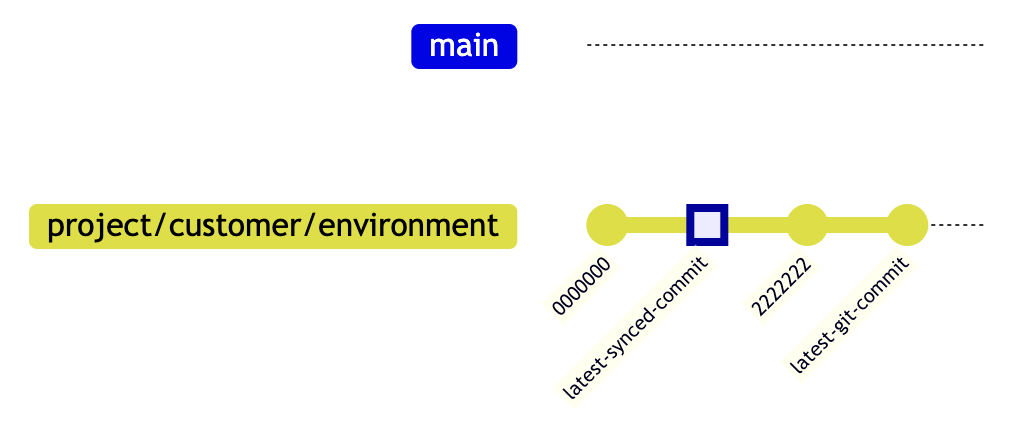
ConfigSync applies all commits that are newer than `latest-synced-commit` and sets `latest-synced-commit` to the latest commit.
For example, imagine the following Git commit history:
When ConfigSync performs a `git pull` and finds a new commit, it applies it and sets `latest-synced-commit` to the latest commit.
ConfigSync calculates the difference between `latest-synced-commit` and `latest-git-commit` and applies all commits within that range.
Then it sets `latest-synced-commit` to `latest-git-commit`.
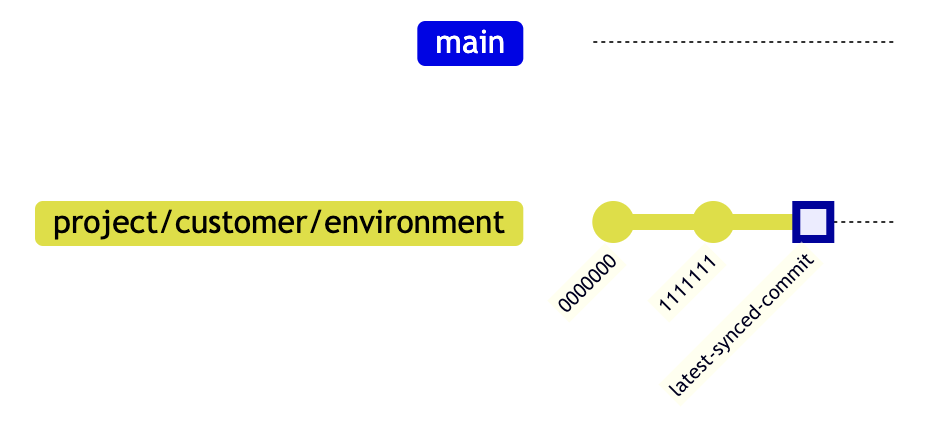
If needed, you can set `latest-synced-commit` manually:
```bash theme={"dark"}
PUT /api/properties/latest-synced-commit
Content-Type: text/plain
1111111
```
This sets `latest-synced-commit` pointer to `1111111`.
After that, ConfigSync reapplies all commits that are newer than `latest-synced-commit` and set `latest-synced-commit` to the latest commit.
## Locked commit
ConfigSync can lock the configuration to a specific commit.
This means that ConfigSync :
* Does not apply any commits that are newer than the locked commit
* Does not update changes from the Fusion cluster to the GitHub repository
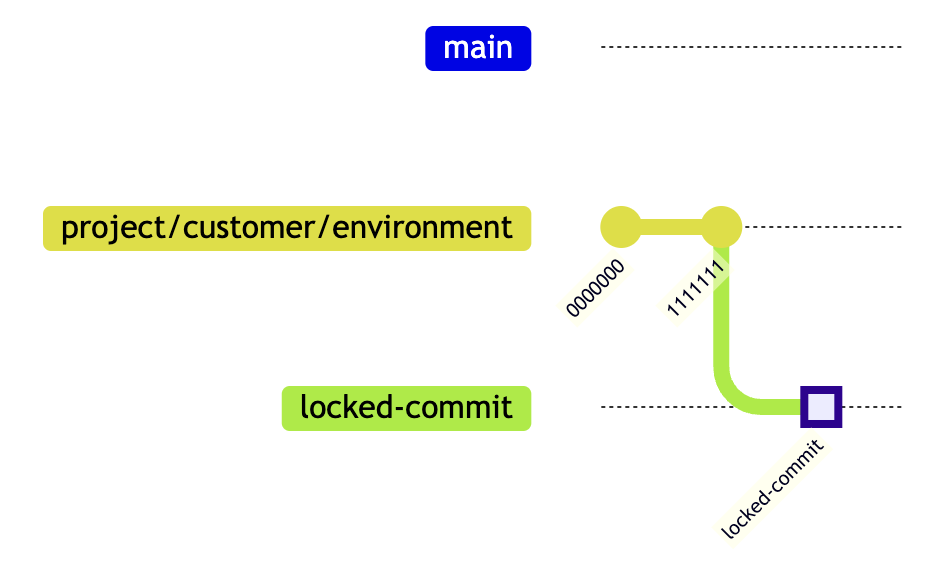
You can set `locked-commit` using the API:
```bash theme={"dark"}
PUT /api/properties/locked-commit
Content-Type: text/plain
2222222
```
If `locked-commit` precedes `latest-synced-commit`, ConfigSync reverts all changes to the `locked-commit` and sets `latest-synced-commit` to `locked-commit`.
All commits that are newer than `locked-commit` are ignored, as well as changes from the Fusion cluster.
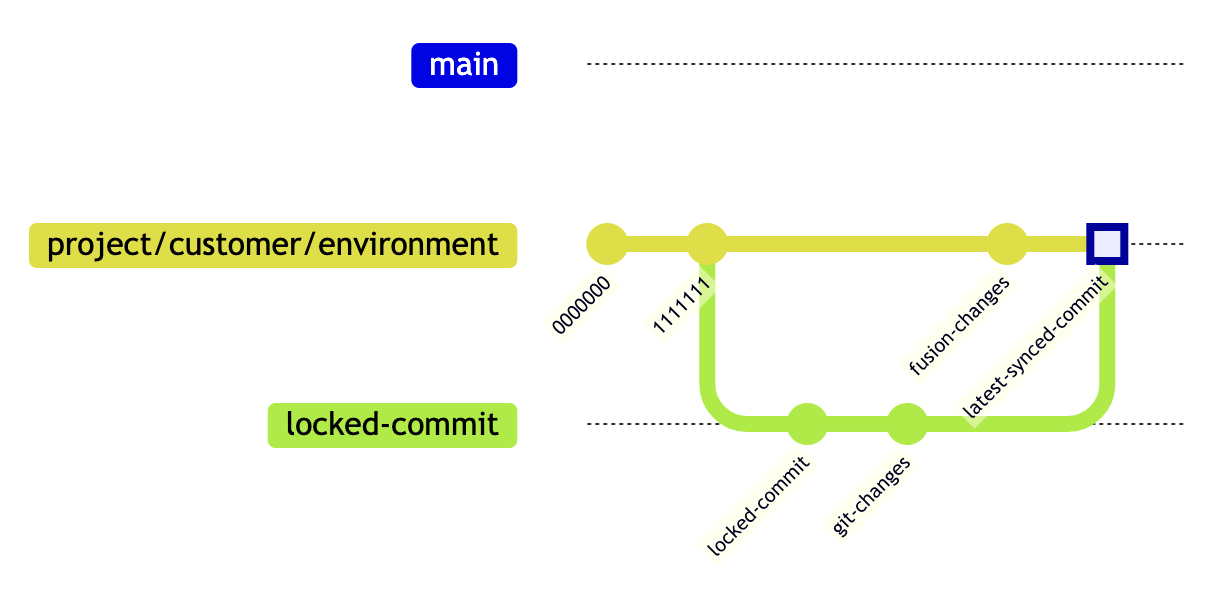
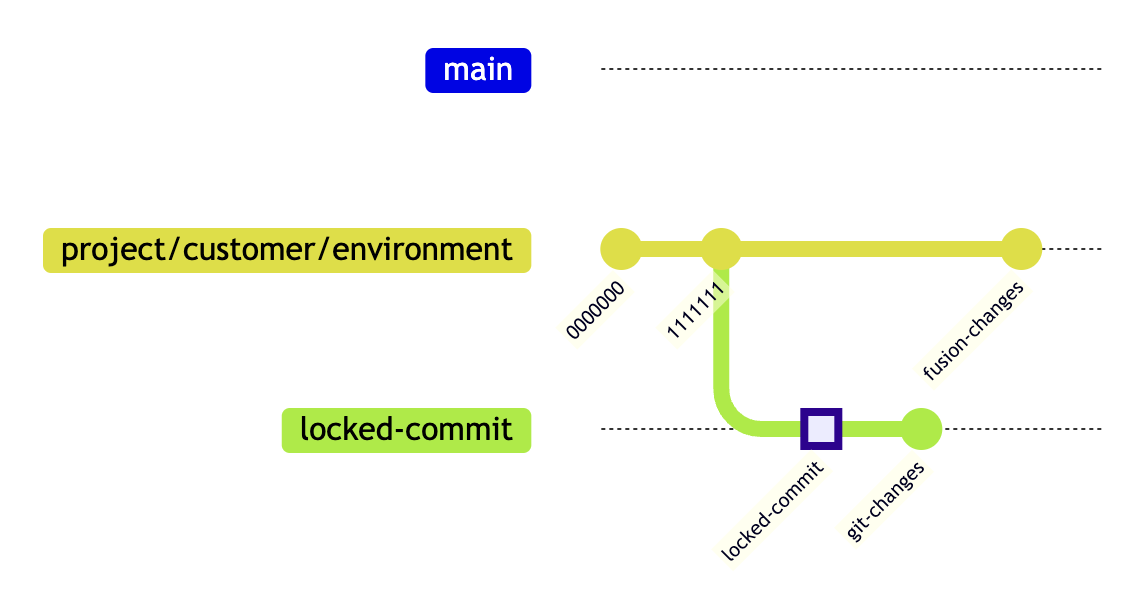
After we remove the `locked-commit`, ConfigSync commits all Fusion cluster changes and pulls the latest changes from the GitHub repository:
```bash theme={"dark"}
DELETE /api/properties/locked-commit
```
That triggers a merge between `git-changes` and `fusion-changes` where `fusion-changes` has a higher priority in case of conflicts.
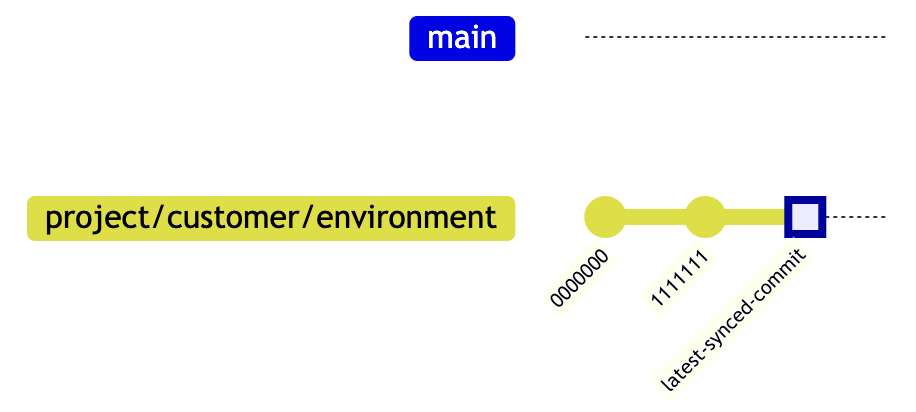 When ConfigSync performs a `git pull` and finds a new commit, it applies it and sets `latest-synced-commit` to the latest commit.
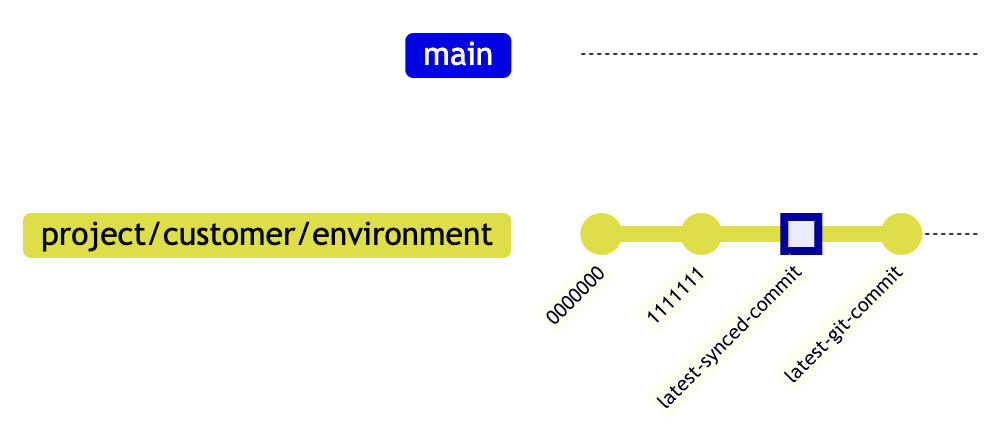 ConfigSync calculates the difference between `latest-synced-commit` and `latest-git-commit` and applies all commits within that range.
Then it sets `latest-synced-commit` to `latest-git-commit`.
ConfigSync calculates the difference between `latest-synced-commit` and `latest-git-commit` and applies all commits within that range.
Then it sets `latest-synced-commit` to `latest-git-commit`.
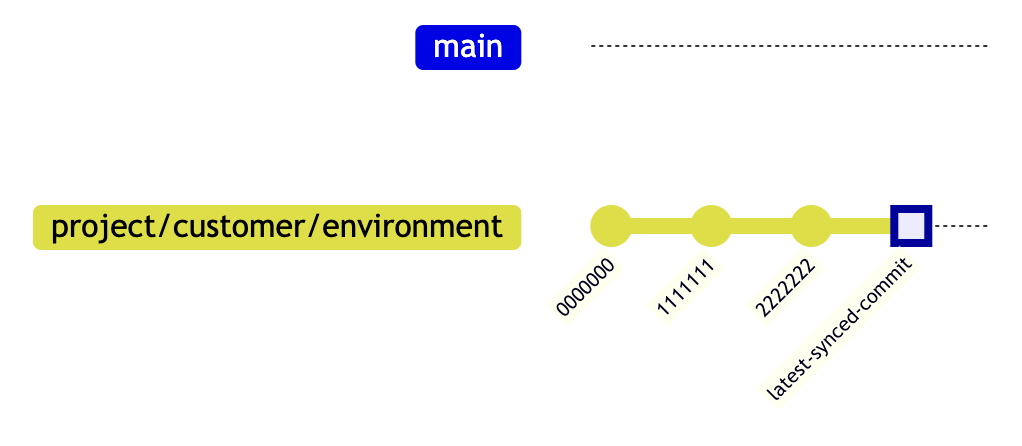 If needed, you can set `latest-synced-commit` manually:
```bash theme={"dark"}
PUT /api/properties/latest-synced-commit
Content-Type: text/plain
1111111
```
This sets `latest-synced-commit` pointer to `1111111`.
If needed, you can set `latest-synced-commit` manually:
```bash theme={"dark"}
PUT /api/properties/latest-synced-commit
Content-Type: text/plain
1111111
```
This sets `latest-synced-commit` pointer to `1111111`.
 After that, ConfigSync reapplies all commits that are newer than `latest-synced-commit` and set `latest-synced-commit` to the latest commit.
## Locked commit
ConfigSync can lock the configuration to a specific commit.
This means that ConfigSync :
* Does not apply any commits that are newer than the locked commit
* Does not update changes from the Fusion cluster to the GitHub repository
After that, ConfigSync reapplies all commits that are newer than `latest-synced-commit` and set `latest-synced-commit` to the latest commit.
## Locked commit
ConfigSync can lock the configuration to a specific commit.
This means that ConfigSync :
* Does not apply any commits that are newer than the locked commit
* Does not update changes from the Fusion cluster to the GitHub repository
 You can set `locked-commit` using the API:
```bash theme={"dark"}
PUT /api/properties/locked-commit
Content-Type: text/plain
2222222
```
You can set `locked-commit` using the API:
```bash theme={"dark"}
PUT /api/properties/locked-commit
Content-Type: text/plain
2222222
```
 All commits that are newer than `locked-commit` are ignored, as well as changes from the Fusion cluster.
 After we remove the `locked-commit`, ConfigSync commits all Fusion cluster changes and pulls the latest changes from the GitHub repository:
```bash theme={"dark"}
DELETE /api/properties/locked-commit
```
That triggers a merge between `git-changes` and `fusion-changes` where `fusion-changes` has a higher priority in case of conflicts.
After we remove the `locked-commit`, ConfigSync commits all Fusion cluster changes and pulls the latest changes from the GitHub repository:
```bash theme={"dark"}
DELETE /api/properties/locked-commit
```
That triggers a merge between `git-changes` and `fusion-changes` where `fusion-changes` has a higher priority in case of conflicts.