> ## Documentation Index
> Fetch the complete documentation index at: https://doc.lucidworks.com/llms.txt
> Use this file to discover all available pages before exploring further.
# Part number detection in Neural Hybrid Search
export const LwTemplate = ({title = "Key questions to get you started", icon = "sparkles", cta = "Powered by Agent Studio", linkHref = "https://lucidworks.com/demo/?utm_source=docs&utm_medium=referral&utm_campaign=docs_cta_ai"}) => {
const [isLoaded, setIsLoaded] = useState(false);
useEffect(() => {
const timer = setTimeout(() => {
setIsLoaded(true);
}, 500);
return () => clearTimeout(timer);
}, []);
return
{isLoaded && `
}} />}
Powered by Lucidworks Agent Studio
;
};
Part number detection and search within Neural Hybrid Search (NHS) is a specialized query processing feature that automatically detects part number patterns in search queries, and then optimizes search behavior to balance lexical precision with semantic understanding.
In part number searches, lexical matching is the more dominant function and highly accurate, lexically-focused results are returned. Semantic matching is minimized for part number searches, but is not impacted for general queries.
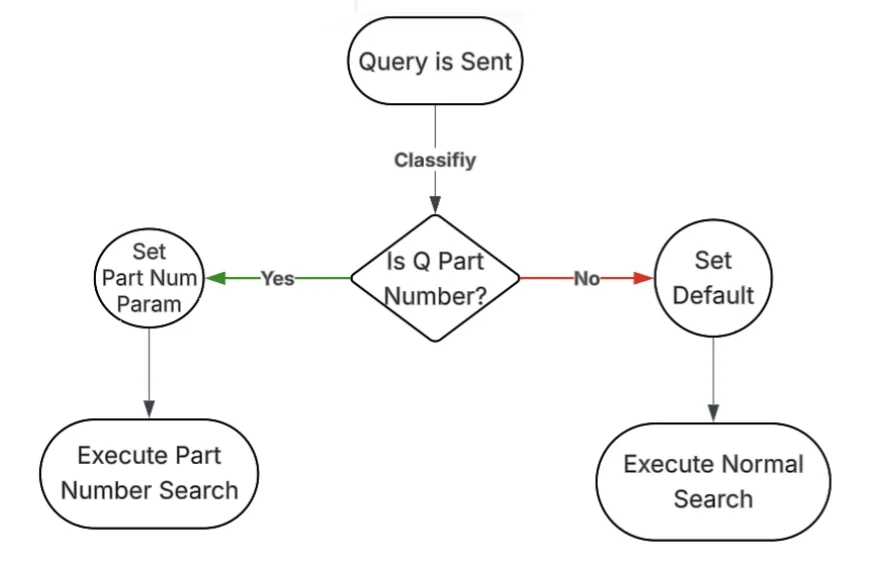
Part number detection in Fusion is most useful in the case of query routing between part number and non-part number queries. This is especially useful in Neural Hybrid configurations where the part numbers search benefit from different weights such as a higher lexical contribution.
This feature uses a LWAI Prediction stage with the `part-number-detection` use case and then selecting the trained custom model. In addition, the `ctx` variable is set to contain the output. Conditions can be added to the stages that dictate which should, or should not, trigger the stage based on whether or not a part number is detected.
Click your use case below to see examples of how part number detection can enhance the search experience:
Some B2C organizations offer products that are identified with model or part numbers. For example, an ecommerce organization may sell electronics such as televisions or computers. Or a home improvement company may sell supplies such as tool models, paint codes, or home appliance replacement parts. Accurate part number results help the customer select the correct item, which increases customer satisfaction and reduces product returns.
Many B2B organizations heavily rely on part numbers, SKUs, or product codes to identify the products they distribute. For example, customers of an automotive parts distributor search on specific SKUs or part numbers to stock their auto parts stores. The correct selection of products is essential, and enables targeted purchases, encourages repeat orders, and builds the long-term customer relationships that help B2B organizations thrive.
The part number search can be used to return results from your company's knowledge bases, technical documents, inventory catalogs, and other documents. For example, your employees may need information about regulatory compliance documentation, installation instructions for a specific part, or inventory counts for a specific SKU. Easy and fast access to this information increases productivity and access to accurate, up-to-date information.
## Part number detection process
For every query, the system first determines if the search terms include a complete or partial SKU or part number while allowing for misspellings, missing characters, or mistyped characters such as a capital O instead of the number zero. However, sometimes queries may contain so few characters that would indicate a part number (less than 4), that they are considered stray characters or misspellings and cannot be interpreted as partial part numbers.
If it detects part numbers, lexical matching is prioritized. If there is no part number in the query, semantic searches that interpret the context and meaning are prioritized.
## Prerequisites
Part number detection is included in the NHS functionality, and is not a separate offering. The platform requirements for part number detection include the following items:
* Fusion release 5.9.10 or later using the existing NHS infrastructure, which seamlessly integrates with existing pipelines.
* Lucidworks Platform custom-trained model and predictions for the part number catalog. The bulk of the cost of the large language models (LLMs) is incurred, if necessary, at the time the custom model is trained. No expensive LLM calls occur at query time.
* Permission to access and configure the appropriate pipelines. These permissions are included if your organization has enabled NHS.
The data requirements for part number detection include the following items:
* Product catalog with part number fields that is indexed and up-to-date.
* Optional historical query signals for supervised training can be used in the search functionality. While the use of signals is optimal, the model must be trained to learn part number patterns without signals.
* Optional click and conversion data to validate relevance can be used in the search functionality. While the use of signals is optimal, the model must be trained to learn part number patterns without signals.
IMPORTANT: The query data used is from signals and the part numbers associated with those queries, even if it wasn't a part number type of query.
## Implement part number detection
Complete the following configuration to implement part number detection functionality:
To create the custom Part Number Detection use case model by selecting the Part Number Classification data schema on the Use Case screen, complete the following procedure:
1. In Lucidworks Platform, click the megamenu > **Models > Custom Models > Create New Model**.
2. Enter a unique name, select the region where the model will be trained, and click **Continue**.
3. Select the **Part Number Classification** data schema option on the Use Case screen.
4. Enter the GCS paths in the **Query Training Data** and **Index Training Data** fields.
5. Upload the **Service Account Key** and click **Continue**.
6. Select an RNN model type. If nothing is selected, the default is `General`.
7. In the **Text Processor Config** field, select **word\_en**.
8. In Layer 1 the RNN Layer section, enter **gru** with **128**. Other layers are optional.
* Use `"trainer_config": "mlp_ecommerce_rnn"` for ecommerce use cases
* Validation is automatically sampled (10% of unique queries, min 50, max 5000)
* For custom column names, adjust `dataset_config.query_col_name` to match your Parquet file
7. Click **Save & Run**.
For more information, see [Create and deploy custom models](/docs/lw-platform/lw-ai/lw-ai-custom-embedding-model-training/create-and-deploy-custom-models), [Custom embedding model use case training data](/docs/lw-platform/lw-ai/lw-ai-custom-embedding-model-training/custom-embedding-model-training-data), and [Custom configuration](/docs/lw-platform/lw-ai/lw-ai-custom-embedding-model-training/custom-embedding-model-configuration).
8. Monitor the training progress. Once complete, the model is automatically deployed using Seldon within the Kubernetes cluster and becomes available for predictions.
Complete the configuration for each stage to configure the Fusion stages for the part number detection feature:
#### LWAI Prediction query stage
Create a Fusion LWAI Prediction query stage with the following information in the specified fields:
1. **Label**: **Part number classification LWAI Prediction query**.
2. **Condition**: One conditional statement could be `params.q != null && params.q.length() > 3`, which ensures the stage only runs if there are at least four characters in the input text of the query.
3. **Account Name**: `YOUR_LWAI_ACCOUNT` as defined in the Lucidworks AI Gateway Service.
4. **Use Case**: The name of the use case created. Select **part-number-detection**.
5. **Model**: The name of the Part Number Classification model. For example, `part-number-detection-model`.
6. **Input context variable**: The name of the variable in context to be used as input. Supports template expressions. For example, `request.params.q` where `q` is the input query text that is sent to the part number classification model and reviewed to determine if it is a part number or general query.
7. **Destination Variable Name & Context Output**: Enter the field name of both the query response and the context variable where the prediction results are populated. For example, `is_part_number_b`.
8. **API Key**: The unique API key associated with the model.
9. Save your changes.
#### Neural Hybrid query stage
Create a Fusion Neural Hybrid query stage with the following information in the specified fields:
1. **Label**: **Part Number Neural Hybrid query**.
2. **Condition**: `ctx.get('is_part_number_b').contains("true")` that triggers the stage if the context variable set in the JavaScript query stage is `true`.
If the Neural Hybrid query stage is not detecting part numbers, enter `ctx.get('is_part_number_b').contains("false")` in the **Condition** field. In cases where you want a default behavior if a prediction fails or doesn’t occur, you can add `!ctx.containsKey('is_part_number_b')` and use the javascript with `||` to combine with the true or false case.
3. Save your changes.
#### Optional additional Solr query stage
Create an optional, additional Solr query stage as a lexical-only fallback.
For maximum precision, you can add a separate, additional Solr query stage that bypasses NHS entirely for high-confidence part number queries.
Create a Solr query stage with the following information in the specified fields:
1. **Label**: **Part number lexical-only fallback Solr query**.
2. **Condition**: `params.use_lexical_pipeline == true && params.part_number_prediction.confidence > 0.95` that triggers the stage based on the settings in the JavaScript query stage.
### Examples
When the stages are configured, the part number detection feature can be used in Fusion, Lucidworks Search, or Lucidworks AI.
The following example reflects when a part number is detected (`true`):
The following example reflects when a part number is not detected (`false`):
 The following example reflects when a part number is not detected (`false`):

 ## Prerequisites
Part number detection is included in the NHS functionality, and is not a separate offering. The platform requirements for part number detection include the following items:
* Fusion release 5.9.10 or later using the existing NHS infrastructure, which seamlessly integrates with existing pipelines.
* Lucidworks Platform custom-trained model and predictions for the part number catalog. The bulk of the cost of the large language models (LLMs) is incurred, if necessary, at the time the custom model is trained. No expensive LLM calls occur at query time.
* Permission to access and configure the appropriate pipelines. These permissions are included if your organization has enabled NHS.
The data requirements for part number detection include the following items:
* Product catalog with part number fields that is indexed and up-to-date.
* Optional historical query signals for supervised training can be used in the search functionality. While the use of signals is optimal, the model must be trained to learn part number patterns without signals.
* Optional click and conversion data to validate relevance can be used in the search functionality. While the use of signals is optimal, the model must be trained to learn part number patterns without signals.
## Prerequisites
Part number detection is included in the NHS functionality, and is not a separate offering. The platform requirements for part number detection include the following items:
* Fusion release 5.9.10 or later using the existing NHS infrastructure, which seamlessly integrates with existing pipelines.
* Lucidworks Platform custom-trained model and predictions for the part number catalog. The bulk of the cost of the large language models (LLMs) is incurred, if necessary, at the time the custom model is trained. No expensive LLM calls occur at query time.
* Permission to access and configure the appropriate pipelines. These permissions are included if your organization has enabled NHS.
The data requirements for part number detection include the following items:
* Product catalog with part number fields that is indexed and up-to-date.
* Optional historical query signals for supervised training can be used in the search functionality. While the use of signals is optimal, the model must be trained to learn part number patterns without signals.
* Optional click and conversion data to validate relevance can be used in the search functionality. While the use of signals is optimal, the model must be trained to learn part number patterns without signals.