> ## Documentation Index
> Fetch the complete documentation index at: https://doc.lucidworks.com/llms.txt
> Use this file to discover all available pages before exploring further.
# Getting Started with Recommendations and Boosting
export const LwTemplate = ({title = "Key questions to get you started", icon = "sparkles", cta = "Powered by Agent Studio", linkHref = "https://lucidworks.com/demo/?utm_source=docs&utm_medium=referral&utm_campaign=docs_cta_ai"}) => {
const [isLoaded, setIsLoaded] = useState(false);
useEffect(() => {
const timer = setTimeout(() => {
setIsLoaded(true);
}, 500);
return () => clearTimeout(timer);
}, []);
return
{isLoaded && `
}} />}
Powered by Lucidworks Agent Studio
;
};
[localhost link]: http://localhost:3000/docs/5/fusion/getting-data-out/query-enhancement/recommendations/getting-started
[mintlify link]: https://doc.lucidworks.com/docs/5/fusion/getting-data-out/query-enhancement/recommendations/getting-started
[old doc.lw link]: https://doc.lucidworks.com/fusion/5.9/480
[Signals](/docs/5/fusion/getting-data-out/query-enhancement/signals/overview) provide the data that Fusion uses to generate [collaborative recommendations](/docs/5/fusion/getting-data-out/query-enhancement/recommendations/recommendation-methods). The simplest way to get started is to enable signals and recommendations in one of your primary collections.
Once you do this, Fusion automatically creates a set of [default objects](#default-objects-for-recommendations) and begins creating and updating collections of recommendations on a regular schedule.
[Content-based recommendations](/docs/5/fusion/getting-data-out/query-enhancement/recommendations/recommendation-methods) can be used without enabling signals or recommendations, but they require manual configuration.
The course for **Recommendations** focuses on how Fusion uses signals to automatically produce custom recommendations to offer users the items most relevant to their experience.
## Enable signals
Signals are enabled by default for new collections when you have a Fusion license installed. You can enable or disable signals for any collection at **Collections** > **Collections Manager**.
Enabling signals automatically creates a set of [aggregation jobs](/docs/5/fusion/reference/config-ref/jobs/aggregations/sql-aggregation) which create the input data for recommendations. See [Signals and Aggregations](/docs/5/fusion/getting-data-out/query-enhancement/signals/overview) for complete details.
## Enable recommendations
Recommendations are not enabled by default. You can enable recommendations using one of the following methods:
* **Collections Manager.** Sign in to Fusion and select your application. Then click **Collections** > **Collections Manager**. Click the gear icon of your collection and select **Enable Recommendations**.
The system displays the Enable Recommendations dialog box. Click **Enable Recommendations** to automatically enable the [items-for-user](/docs/5/fusion/getting-data-out/query-enhancement/recommendations/recommendation-methods) and [items-for-item](/docs/5/fusion/getting-data-out/query-enhancement/recommendations/recommendation-methods) recommendation methods. To use additional [recommendation methods](/docs/5/fusion/getting-data-out/query-enhancement/recommendations/recommendation-methods), you must configure them separately.
* **Relevance.** Sign in to Fusion and select your application. Then click **Relevance > Recommendations**. The system displays the Enable Recommendations dialog box. Click **Enable Recommendations** to automatically enable the [items-for-user](/docs/5/fusion/getting-data-out/query-enhancement/recommendations/recommendation-methods) and [items-for-item](/docs/5/fusion/getting-data-out/query-enhancement/recommendations/recommendation-methods) recommendation methods. To use additional [recommendation methods](/docs/5/fusion/getting-data-out/query-enhancement/recommendations/recommendation-methods), you must configure them separately.
* **REST API.** Use this command to enable recommendations:
```bash wrap theme={"dark"}
curl -u USERNAME:PASSWORD -X PUT http://FUSION_HOST:FUSION_PORT/api/collections/COLLECTION_NAME/features/recommendations -H 'content-type: application/json' -d '{"enabled":true}'
```
## Default objects for recommendations
When recommendations are enabled, Fusion automatically creates a default set of collections, jobs, schedules, and query pipelines that provide basic functionality for recommendations.
You can tune the default jobs and pipelines as needed to refine the results, or create new ones, then configure your search application to request recommendations from the query pipelines.
**See also the default objects created when you [enable signals](/docs/5/fusion/getting-data-out/query-enhancement/signals/overview). These must already exist when you enable recommendations.**
### Collections
* `COLLECTION_NAME_items_for_item_recommendations`
Collection to hold generated item-item similarities (by default 10 per item). No `user_id_s` data is present. A Recommend Items for Item query pipeline stage can use the similarities to return item recommendations. For example, a query in which `doc_id_s = docA` would return an ordered list of other `doc_id_s` values for documents that are similar to document `docA`, along with the similarities. For example: `[("docB", 0.83), ("docC", 0.55), ("docD", 0.43), …, ("docK", 0.22)]`.
* `COLLECTION_NAME_items_for_user_recommendations`
Collection to hold recommended items for a user. By default the job creates 10 recommendations per user.
* `COLLECTION_NAME_recs_aggr`
Collection to hold the output of recommender aggregation jobs.
* `COLLECTION_NAME_bpr_user_recs` and `COLLECTION_NAME_bpr_item_recs`
Collections for Bayesian Personalized Ranking (BPR) recs, user-item, and item-item (respectively).
* `COLLECTION_NAME_content_recs`
Collection for content-based recommender recs.
* `COLLECTION_NAME_recommender_models`
Collection that stores ALS models.
* `COLLECTION_NAME_queries_query_recs`
Collection for output of the Query-Query Similarity Job.
### Jobs and schedules
Enabling recommendations creates the new jobs below, each using a different method to produce items-for-item and items-for-user recommendations. These jobs consume the output of the [signals aggregation jobs](/docs/5/fusion/reference/config-ref/jobs/aggregations/sql-aggregation).
| | [BPR Recommender](/docs/5/fusion/reference/config-ref/jobs/bpr-recommender) | [Content-Based Recommender](/docs/5/fusion/reference/config-ref/jobs/content-based-recommender) | [Query-to-Query Session-Based Similarity](/docs/5/fusion/reference/config-ref/jobs/query-to-query-session-based-similarity) | Default job name |
| ------------------------------------------------------------------------------------------------- | --------------------------------------------------------------------------- | ----------------------------------------------------------------------------------------------- | --------------------------------------------------------------------------------------------------------------------------- | -------------------------- |
| `COLLECTION_NAME_item_recommendations` | `COLLECTION_NAME_bpr_item_recs` | `COLLECTION_NAME_content_recs` | `COLLECTION_NAME_query_recs` | Default input collection |
| `COLLECTION_NAME_signals_aggr` | `COLLECTION_NAME_signals_aggr` | `COLLECTION_NAME` | `COLLECTION_NAME_signals` | Default output collections |
| `COLLECTION_NAME_items_for_user_recommendations` `COLLECTION_NAME_items_for_item_recommendations` | `COLLECTION_NAME_bpr_user_recs` `COLLECTION_NAME_bpr_item_recs` | `COLLECTION_NAME_content_recs` | `COLLECTION_NAME_queries_query_recs` | Recommendation type |
None of the jobs are scheduled by default; you must manually run or schedule them.
NOTE:
* The `COLLECTION_NAME_user_item_prefs_agg` job provides input data for the ALS and BPR jobs and must run before them. See [SQL Aggregations](/docs/5/fusion/reference/config-ref/jobs/aggregations/built-in-sql-aggregation-jobs#collection-name-user-item-preferences-aggregation) for details.
* The `COLLECTION_NAME_user_query_history_agg` job generates aggregations for user-item preferences from signal information.
Fusion does *not* automatically create a [Query-to-Query Session-Based Similarity job](/docs/5/fusion/reference/config-ref/jobs/query-to-query-session-based-similarity), which is needed for certain [recommender types](/docs/5/fusion/getting-data-out/query-enhancement/recommendations/recommendation-methods#content-based-vs-collaborative-recommendations).
### Query pipelines
* `COLLECTION_NAME_items_for_user_recommendations`
Query pipeline to generate recommendations of items for a user.
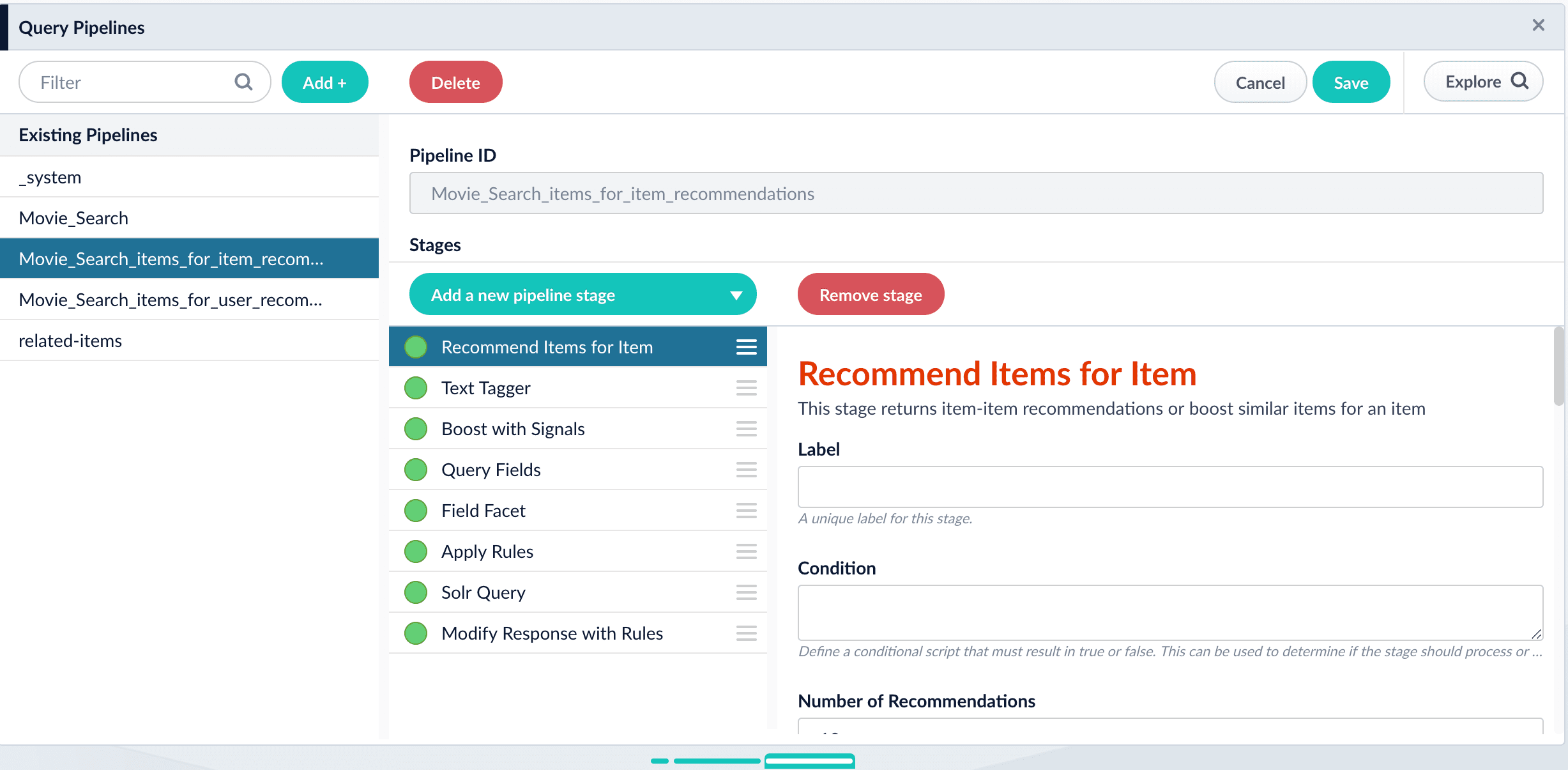
* `COLLECTION_NAME_items_for_item_recommendations`
Query pipeline to generate recommendations of items similar to an item.
* `COLLECTION_NAME_queries_query_recs`
Query pipeline to generate [queries-for-query recommendations](/docs/5/fusion/getting-data-out/query-enhancement/recommendations/queries-for-query) using a model created by the [Query-to-Query Session-Based Similarity](/docs/5/fusion/reference/config-ref/jobs/query-to-query-session-based-similarity) job.
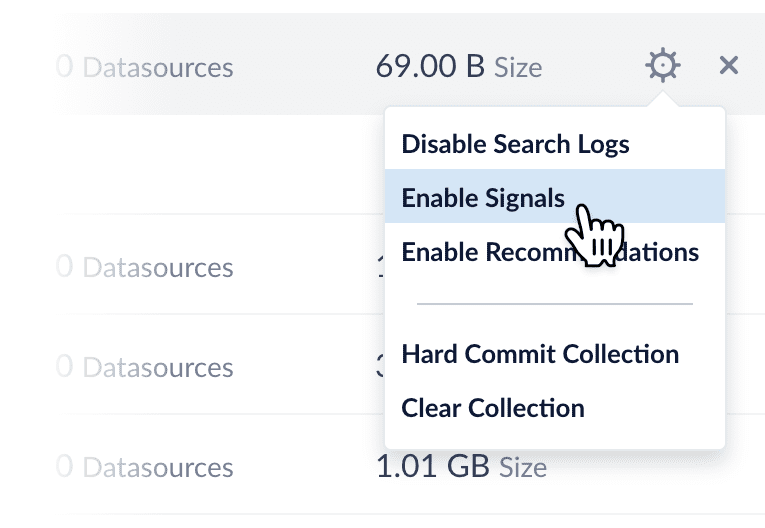 Enabling signals automatically creates a set of [aggregation jobs](/docs/5/fusion/reference/config-ref/jobs/aggregations/sql-aggregation) which create the input data for recommendations. See [Signals and Aggregations](/docs/5/fusion/getting-data-out/query-enhancement/signals/overview) for complete details.
## Enable recommendations
Recommendations are not enabled by default. You can enable recommendations using one of the following methods:
* **Collections Manager.** Sign in to Fusion and select your application. Then click **Collections** > **Collections Manager**. Click the gear icon of your collection and select **Enable Recommendations**.
Enabling signals automatically creates a set of [aggregation jobs](/docs/5/fusion/reference/config-ref/jobs/aggregations/sql-aggregation) which create the input data for recommendations. See [Signals and Aggregations](/docs/5/fusion/getting-data-out/query-enhancement/signals/overview) for complete details.
## Enable recommendations
Recommendations are not enabled by default. You can enable recommendations using one of the following methods:
* **Collections Manager.** Sign in to Fusion and select your application. Then click **Collections** > **Collections Manager**. Click the gear icon of your collection and select **Enable Recommendations**.
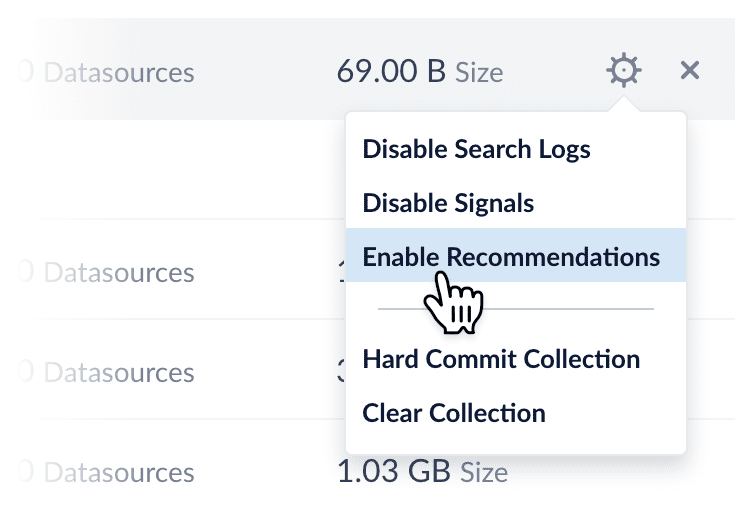 The system displays the Enable Recommendations dialog box. Click **Enable Recommendations** to automatically enable the [items-for-user](/docs/5/fusion/getting-data-out/query-enhancement/recommendations/recommendation-methods) and [items-for-item](/docs/5/fusion/getting-data-out/query-enhancement/recommendations/recommendation-methods) recommendation methods. To use additional [recommendation methods](/docs/5/fusion/getting-data-out/query-enhancement/recommendations/recommendation-methods), you must configure them separately.
* **Relevance.** Sign in to Fusion and select your application. Then click **Relevance > Recommendations**. The system displays the Enable Recommendations dialog box. Click **Enable Recommendations** to automatically enable the [items-for-user](/docs/5/fusion/getting-data-out/query-enhancement/recommendations/recommendation-methods) and [items-for-item](/docs/5/fusion/getting-data-out/query-enhancement/recommendations/recommendation-methods) recommendation methods. To use additional [recommendation methods](/docs/5/fusion/getting-data-out/query-enhancement/recommendations/recommendation-methods), you must configure them separately.
* **REST API.** Use this command to enable recommendations:
```bash wrap theme={"dark"}
curl -u USERNAME:PASSWORD -X PUT http://FUSION_HOST:FUSION_PORT/api/collections/COLLECTION_NAME/features/recommendations -H 'content-type: application/json' -d '{"enabled":true}'
```
## Default objects for recommendations
When recommendations are enabled, Fusion automatically creates a default set of collections, jobs, schedules, and query pipelines that provide basic functionality for recommendations.
You can tune the default jobs and pipelines as needed to refine the results, or create new ones, then configure your search application to request recommendations from the query pipelines.
**See also the default objects created when you [enable signals](/docs/5/fusion/getting-data-out/query-enhancement/signals/overview). These must already exist when you enable recommendations.**
### Collections
* `COLLECTION_NAME_items_for_item_recommendations`
Collection to hold generated item-item similarities (by default 10 per item). No `user_id_s` data is present. A Recommend Items for Item query pipeline stage can use the similarities to return item recommendations. For example, a query in which `doc_id_s = docA` would return an ordered list of other `doc_id_s` values for documents that are similar to document `docA`, along with the similarities. For example: `[("docB", 0.83), ("docC", 0.55), ("docD", 0.43), …, ("docK", 0.22)]`.
* `COLLECTION_NAME_items_for_user_recommendations`
Collection to hold recommended items for a user. By default the job creates 10 recommendations per user.
* `COLLECTION_NAME_recs_aggr`
Collection to hold the output of recommender aggregation jobs.
* `COLLECTION_NAME_bpr_user_recs` and `COLLECTION_NAME_bpr_item_recs`
Collections for Bayesian Personalized Ranking (BPR) recs, user-item, and item-item (respectively).
* `COLLECTION_NAME_content_recs`
Collection for content-based recommender recs.
* `COLLECTION_NAME_recommender_models`
Collection that stores ALS models.
* `COLLECTION_NAME_queries_query_recs`
Collection for output of the Query-Query Similarity Job.
### Jobs and schedules
Enabling recommendations creates the new jobs below, each using a different method to produce items-for-item and items-for-user recommendations. These jobs consume the output of the [signals aggregation jobs](/docs/5/fusion/reference/config-ref/jobs/aggregations/sql-aggregation).
| | [BPR Recommender](/docs/5/fusion/reference/config-ref/jobs/bpr-recommender) | [Content-Based Recommender](/docs/5/fusion/reference/config-ref/jobs/content-based-recommender) | [Query-to-Query Session-Based Similarity](/docs/5/fusion/reference/config-ref/jobs/query-to-query-session-based-similarity) | Default job name |
| ------------------------------------------------------------------------------------------------- | --------------------------------------------------------------------------- | ----------------------------------------------------------------------------------------------- | --------------------------------------------------------------------------------------------------------------------------- | -------------------------- |
| `COLLECTION_NAME_item_recommendations` | `COLLECTION_NAME_bpr_item_recs` | `COLLECTION_NAME_content_recs` | `COLLECTION_NAME_query_recs` | Default input collection |
| `COLLECTION_NAME_signals_aggr` | `COLLECTION_NAME_signals_aggr` | `COLLECTION_NAME` | `COLLECTION_NAME_signals` | Default output collections |
| `COLLECTION_NAME_items_for_user_recommendations` `COLLECTION_NAME_items_for_item_recommendations` | `COLLECTION_NAME_bpr_user_recs` `COLLECTION_NAME_bpr_item_recs` | `COLLECTION_NAME_content_recs` | `COLLECTION_NAME_queries_query_recs` | Recommendation type |
None of the jobs are scheduled by default; you must manually run or schedule them.
NOTE:
* The `COLLECTION_NAME_user_item_prefs_agg` job provides input data for the ALS and BPR jobs and must run before them. See [SQL Aggregations](/docs/5/fusion/reference/config-ref/jobs/aggregations/built-in-sql-aggregation-jobs#collection-name-user-item-preferences-aggregation) for details.
* The `COLLECTION_NAME_user_query_history_agg` job generates aggregations for user-item preferences from signal information.
Fusion does *not* automatically create a [Query-to-Query Session-Based Similarity job](/docs/5/fusion/reference/config-ref/jobs/query-to-query-session-based-similarity), which is needed for certain [recommender types](/docs/5/fusion/getting-data-out/query-enhancement/recommendations/recommendation-methods#content-based-vs-collaborative-recommendations).
### Query pipelines
* `COLLECTION_NAME_items_for_user_recommendations`
Query pipeline to generate recommendations of items for a user.
* `COLLECTION_NAME_items_for_item_recommendations`
Query pipeline to generate recommendations of items similar to an item.
The system displays the Enable Recommendations dialog box. Click **Enable Recommendations** to automatically enable the [items-for-user](/docs/5/fusion/getting-data-out/query-enhancement/recommendations/recommendation-methods) and [items-for-item](/docs/5/fusion/getting-data-out/query-enhancement/recommendations/recommendation-methods) recommendation methods. To use additional [recommendation methods](/docs/5/fusion/getting-data-out/query-enhancement/recommendations/recommendation-methods), you must configure them separately.
* **Relevance.** Sign in to Fusion and select your application. Then click **Relevance > Recommendations**. The system displays the Enable Recommendations dialog box. Click **Enable Recommendations** to automatically enable the [items-for-user](/docs/5/fusion/getting-data-out/query-enhancement/recommendations/recommendation-methods) and [items-for-item](/docs/5/fusion/getting-data-out/query-enhancement/recommendations/recommendation-methods) recommendation methods. To use additional [recommendation methods](/docs/5/fusion/getting-data-out/query-enhancement/recommendations/recommendation-methods), you must configure them separately.
* **REST API.** Use this command to enable recommendations:
```bash wrap theme={"dark"}
curl -u USERNAME:PASSWORD -X PUT http://FUSION_HOST:FUSION_PORT/api/collections/COLLECTION_NAME/features/recommendations -H 'content-type: application/json' -d '{"enabled":true}'
```
## Default objects for recommendations
When recommendations are enabled, Fusion automatically creates a default set of collections, jobs, schedules, and query pipelines that provide basic functionality for recommendations.
You can tune the default jobs and pipelines as needed to refine the results, or create new ones, then configure your search application to request recommendations from the query pipelines.
**See also the default objects created when you [enable signals](/docs/5/fusion/getting-data-out/query-enhancement/signals/overview). These must already exist when you enable recommendations.**
### Collections
* `COLLECTION_NAME_items_for_item_recommendations`
Collection to hold generated item-item similarities (by default 10 per item). No `user_id_s` data is present. A Recommend Items for Item query pipeline stage can use the similarities to return item recommendations. For example, a query in which `doc_id_s = docA` would return an ordered list of other `doc_id_s` values for documents that are similar to document `docA`, along with the similarities. For example: `[("docB", 0.83), ("docC", 0.55), ("docD", 0.43), …, ("docK", 0.22)]`.
* `COLLECTION_NAME_items_for_user_recommendations`
Collection to hold recommended items for a user. By default the job creates 10 recommendations per user.
* `COLLECTION_NAME_recs_aggr`
Collection to hold the output of recommender aggregation jobs.
* `COLLECTION_NAME_bpr_user_recs` and `COLLECTION_NAME_bpr_item_recs`
Collections for Bayesian Personalized Ranking (BPR) recs, user-item, and item-item (respectively).
* `COLLECTION_NAME_content_recs`
Collection for content-based recommender recs.
* `COLLECTION_NAME_recommender_models`
Collection that stores ALS models.
* `COLLECTION_NAME_queries_query_recs`
Collection for output of the Query-Query Similarity Job.
### Jobs and schedules
Enabling recommendations creates the new jobs below, each using a different method to produce items-for-item and items-for-user recommendations. These jobs consume the output of the [signals aggregation jobs](/docs/5/fusion/reference/config-ref/jobs/aggregations/sql-aggregation).
| | [BPR Recommender](/docs/5/fusion/reference/config-ref/jobs/bpr-recommender) | [Content-Based Recommender](/docs/5/fusion/reference/config-ref/jobs/content-based-recommender) | [Query-to-Query Session-Based Similarity](/docs/5/fusion/reference/config-ref/jobs/query-to-query-session-based-similarity) | Default job name |
| ------------------------------------------------------------------------------------------------- | --------------------------------------------------------------------------- | ----------------------------------------------------------------------------------------------- | --------------------------------------------------------------------------------------------------------------------------- | -------------------------- |
| `COLLECTION_NAME_item_recommendations` | `COLLECTION_NAME_bpr_item_recs` | `COLLECTION_NAME_content_recs` | `COLLECTION_NAME_query_recs` | Default input collection |
| `COLLECTION_NAME_signals_aggr` | `COLLECTION_NAME_signals_aggr` | `COLLECTION_NAME` | `COLLECTION_NAME_signals` | Default output collections |
| `COLLECTION_NAME_items_for_user_recommendations` `COLLECTION_NAME_items_for_item_recommendations` | `COLLECTION_NAME_bpr_user_recs` `COLLECTION_NAME_bpr_item_recs` | `COLLECTION_NAME_content_recs` | `COLLECTION_NAME_queries_query_recs` | Recommendation type |
None of the jobs are scheduled by default; you must manually run or schedule them.
NOTE:
* The `COLLECTION_NAME_user_item_prefs_agg` job provides input data for the ALS and BPR jobs and must run before them. See [SQL Aggregations](/docs/5/fusion/reference/config-ref/jobs/aggregations/built-in-sql-aggregation-jobs#collection-name-user-item-preferences-aggregation) for details.
* The `COLLECTION_NAME_user_query_history_agg` job generates aggregations for user-item preferences from signal information.
Fusion does *not* automatically create a [Query-to-Query Session-Based Similarity job](/docs/5/fusion/reference/config-ref/jobs/query-to-query-session-based-similarity), which is needed for certain [recommender types](/docs/5/fusion/getting-data-out/query-enhancement/recommendations/recommendation-methods#content-based-vs-collaborative-recommendations).
### Query pipelines
* `COLLECTION_NAME_items_for_user_recommendations`
Query pipeline to generate recommendations of items for a user.
* `COLLECTION_NAME_items_for_item_recommendations`
Query pipeline to generate recommendations of items similar to an item.
 * `COLLECTION_NAME_queries_query_recs`
Query pipeline to generate [queries-for-query recommendations](/docs/5/fusion/getting-data-out/query-enhancement/recommendations/queries-for-query) using a model created by the [Query-to-Query Session-Based Similarity](/docs/5/fusion/reference/config-ref/jobs/query-to-query-session-based-similarity) job.
* `COLLECTION_NAME_queries_query_recs`
Query pipeline to generate [queries-for-query recommendations](/docs/5/fusion/getting-data-out/query-enhancement/recommendations/queries-for-query) using a model created by the [Query-to-Query Session-Based Similarity](/docs/5/fusion/reference/config-ref/jobs/query-to-query-session-based-similarity) job.