> ## Documentation Index
> Fetch the complete documentation index at: https://doc.lucidworks.com/llms.txt
> Use this file to discover all available pages before exploring further.
# Boost With Signals
export const LwTemplate = ({title = "Key questions to get you started", icon = "sparkles", cta = "Powered by Agent Studio", linkHref = "https://lucidworks.com/demo/?utm_source=docs&utm_medium=referral&utm_campaign=docs_cta_ai"}) => {
const [isLoaded, setIsLoaded] = useState(false);
useEffect(() => {
const timer = setTimeout(() => {
setIsLoaded(true);
}, 500);
return () => clearTimeout(timer);
}, []);
return
{isLoaded && `
}} />}
Powered by Lucidworks Agent Studio
;
};
[localhost link]: http://localhost:3000/docs/5/fusion/getting-data-out/query-enhancement/boosting/boost-with-signals
[mintlify link]: https://doc.lucidworks.com/docs/5/fusion/getting-data-out/query-enhancement/boosting/boost-with-signals
[old doc.lw link]: https://doc.lucidworks.com/fusion/5.9/483
The Boost With Signals query pipeline stage performs automatic boosts based on the contents of the aggregated signals collection. For this type of boosting, signals must be enabled but recommendations need not be.
Using the main query and the stage configuration parameters, this stage performs a secondary query to the `COLLECTION_NAME_signals_aggr` collection and returns updated boost weights for the items in the main query’s search results. Items that have received more user interaction also receive higher boost weights.
Some of the important configuration parameters are discussed below. For complete details about all configuration parameters for this stage, see [Boost with Signals](/docs/5/fusion/reference/config-ref/pipeline-stages/query-stages/recommendation-boosting-query-stage).
## Configuration overview
The fields below are especially useful to understand when configuring this stage.
Sets the `rows` query param in the main query as the maximum number of query results which will be boosted by this pipeline stage.
Sets the `rows` query param in the query that searches the `COLLECTION_NAME_signals_aggr` collection, so only the specified number of aggregated signals are retrieved and used for boosting. When signals boosting is applied to a query, aggregated signals records are queried from the appropriate `_signals_aggr` collection to find out the popularity or boost weight for documents which have signals. `numSignals` limits the number of records to be queried from a `COLLECTION_NAME_signals_aggr` collection and used to calculate this boost.
A filter to retrieve aggregated signals in the `COLLECTION_NAME_signals_aggr` collection per each aggregated signal’s `aggr_type_s` field value.
The document field in the main collection on which to perform boosting. Typically it should use the default field, which is `id`.
This field corresponds to the **Rollup Field**/`rollupField` field. Together, these two fields act like a `FIELD:VALUE` pair in the query modification for boosting.
This adds a query parameter to the original query, either “query-param” or “query-parser”. The result is `(“query-param” or “query-parser”) + Boost Param (“boost” or “bq”)`, as in the examples below:
* “query-param” + "boost", result boost query param
```js theme={"dark"}
boost="map(query({!field f='id' v=‘6239046,13026192}), 0, 0, 1, 27.1705)"
```
* “query-parser” + "boost", result boost query param
```js theme={"dark"}
bp_xxx_bbqx="map(query({!field f='id' v=‘6239046,13026192}), 0, 0, 1, 27.1705)"
```
When `Boost Param` uses `bq`, similar logic applies. When Boost Param/`boostingParam` uses “boost”, it works with both “query-param” and “query-parser”.
Indicates which aggregated signal document field the boost parameter will use for the final boosting. It works in combination with the **Solr Field to Boost On**/`boostId` field.
This should be set to the field in the aggregated signal collection that stores the doc list that is aggregated as one record. By default it’s set to `doc_id_s`.
Indicates the final boost weight used to calculate the new score for docs retrieved by the main query.
Similar to **Rollup Field**/`rollupField` above, this should be set to the field in the aggregated signal collection that stores the final weight that was calculated. By default it’s `weight_d`.
Calculates the final weight using the weight and score retrieved from the `COLLECTION_NAME_signals_aggr` collection.
The default value is:
```text theme={"dark"}
math:log(weight_d + 1) + 10 * math:log(score+1)
```
## Solr query parameters
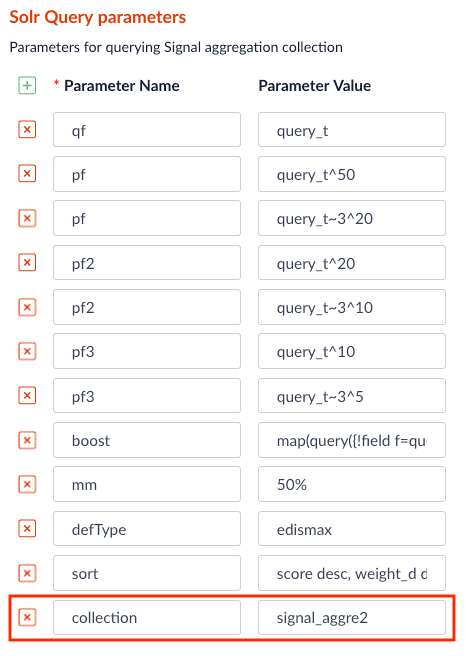
These parameters are used in the **Solr Query parameters**/`queryParams` field for retrieving signal aggregation docs from the `COLLECTION_NAME_signals_aggr` collection. These Solr query params will affect which aggregated signals are used for producing the boosting parameter on the main query.
| | |
| ---------------- | ----------------------------------------------------------------------------------------------------------------------- |
| `qf=query_t` | Defines which field to query. In the default case, the query searches on the `query_t` field of aggregated signal docs. |
| `pf=query_t^50` | Boosts docs within the set of retrieved docs using phrase matching. |
| `pf2=query_t^20` | `pf2` is similar to `pf`; the difference is that `pf2` works on bigram phrases. |
| `pf3=query_t^10` | `pf3` is similar to `pf`; the difference is that `pf3` works on trigram phrases. |
## FAQs
**If there is `fq` in the main query, how is it matched with the correct aggregated signal?**
In this case, you need to use the `lw.rec.fq` query parameter in the main query. `lw.rec.fq` can be parsed by the Boost with Signals stage, and therefore the filters specified in it can be added to the Solr query that is retrieving the aggregated signals.
For example, if we have filter query param `fq=format:CD&fq=name:Latin`, this needs to be translated into `lw.rec.fq=filters_s:"format:cd $ name:latin"`. Values must be lowercase. The final main query should be:
```sh wrap theme={"dark"}
http://FUSION_HOST:FUSION_PORT/api/apps/demo_app/query-pipelines/demo_app/collections/demo_app/select?echoParams=all&wt=json&json.nl=arrarr&sort&start=0&q=apple&debug=true&rows=10&lw.rec.fq=filters_s:"format:cd $ name:latin"
```
Now the Boost with Signals stage will only retrieve aggregated signals that have the same filter query.
If there are multiple `fq` values (for example, `format:cd` and `name:latin`), they are ordered alphabetically as strings and joined with " $" (a$ with a space on each side). In the example, `"format:cd $ name:latin"`.
**What if my aggregated signals are in a different collection?**
You can point the Boost with Signals stage to a different signal collection by adding a `collection` parameter in the `Solr Query Parameters` section.